
PROJECT SEMINAR ON SOFTWARE INVENTORY MANAGEMENT SUBMITTED BY :- JYOTI JAIN & YOGITA SAHU FINAL YEAR CSE
INTRODUCTION A typical Software Inventory Management can have a number of Software stocks of different types.  Each and every Software product can be from a different manufacturer (for e.g. Microsoft and Sun). Maintaining such a heterogeneous inventory can get out of hand if it isn't tracked properly. Service Desk Plus allows you maintain a clean and neat catalog of your varied inventory. The software Inventory Management has been planned to work as a stand alone software working on a stand alone computer The software will be flexible enough to be extended to be operated in a sophisticated distributed environment .
HARDWARE SPECIFICATION 16 MB RAM memory minimum, 32 MB RAM memory recommended IBM compatible PC with AMD/Intel Pentium P200 MHz processor or above. Approx. 50 MB hard disk space required SVGA Display running at 1024 x 768 resolution Mouse CD-ROM drive for software installation
SOFTWARE SPECIFICATION Technology Used :- Visual Studio.NET  Language Used :-Visual Basic .NET  Database :- MS-Access  Reporting Tool :- Crystal Report Operating System :- Windows XP
VISUAL STUDIO.NET   Microsoft Visual Studio  is the main Integrated Development Environment (IDE) from Microsoft. It can be used to develop console and GUI applications along with Windows Forms applications, web sites, web applications, and web services . Visual Studio supports languages by means of language services, which allow any programming language to be supported (to varying degrees) by the code editor and debugger, provided a language-specific service has been authored. Built-in languages include C/C++ (via Visual C++), VB.NET (via Visual Basic .NET), and C# (via Visual C#).
Visual Basic .NET (VB.NET) is an object-oriented computer language that can be viewed as an evolution of Microsoft's Visual Basic (VB) implemented on the Microsoft .NET framework. Visual Basic. NET is the most recent generation of Visual Basic. Developers will be pleased to note that its new features include inheritance, method overloading, structured exception handling, and more. These capabilities make it easier than ever to create .NET applications, including Windows applications, web services, and web applications.  VISUAL BASIC.NET
ADO.NET ADO.NET  is a set of computer software components that can be used by programmers to access data and data services. It is a part of the base class library that is included with the Microsoft .NET Framework. It is commonly used by programmers to access and modify data stored in relational database systems, though it can also be used to access data in non-relational sources. ADO.NET is sometimes considered an evolution of ActiveX Data Objects (ADO) technology, but was changed so extensively that it can be conceived of as an entirely new product. ADO.NET consists of two primary parts: Data provider Data set
Data provider These classes provide access to a data source, such as a Microsoft SQL Server or Oracle database and OLEDB data provider. Each data source has its own set of provider objects, but they each have a common set of utility classes: Connection: Provides a connection used to communicate with the data source. Also acts as an abstract factory for command objects.  Command: Used to perform some action on the data source, such as reading, updating, or deleting relational data.  Parameter: Describes a single parameter to a command. A common example is a parameter to a stored procedure.  Data Adapter: A bridge used to transfer data between a data source and a DataSet object . Data Reader: Used to efficiently process a large list of results one record at a time. It allows records to be accessed in a read-only, forward-only mode, i.e., records have to be accessed in sequential   order; they can neither be randomly accessed nor can a record which has been processed previously be accessed again.
Data Set Dataset objects, a group of classes describing a simple in-memory relational database, were the star of the show in the initial release (1.0) of the Microsoft .NET Framework. The classes form a containment hierarchy: A  DataSet  object represents a schema (either an entire database or a subset of one). It can contain tables and relationships between those tables.  A  Data Table  object represents a single table in the database. It has a name, rows, and columns.  A  Data Relation  is a relationship between tables, such as a primary-key foreign-key relationship. This is useful for enabling Data Row's functionality of retrieving related rows.  A  Constraint  describes an enforced property of the database, such as the uniqueness of the values in a primary key column. As data is modified any violations that arise will cause exceptions.
MS-ACCESS Microsoft Access is Relational Database Management Inc. It comes as a part of Microsoft Office’s package. It makes the task of creation and maintaining the database much easier. Maintaining a database involves performing of various data manipulation operations on the tables of the database. These operations are: Adding records Querying Modifying records Creating records These operations enable that user to store, retrieve and update data in the database. Also it facilitates to create relationship between the various tables. All these features make access a Relational Database Management System (RDBMS).
CRYSTAL REPORT Crystal Reports  is a business intelligence application used to design and generate reports from a wide range of data sources. Several other applications, such as Microsoft Visual Studio, bundle an OEM version of  Crystal Reports  as a general purpose reporting tool. Crystal Reports became the defector report writer when Microsoft released it with Visual Basic. Creating reports-: Users install  Crystal Reports  on a computer and use it to select specific rows and columns from a table of compatible data . Users can then arrange the data on the report in the format needed. Once the report layout is complete it is saved as a file with the extension RPT
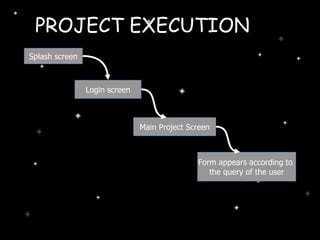
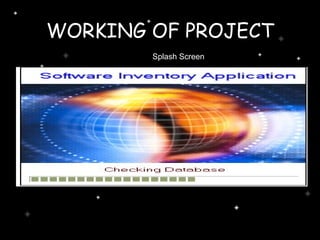
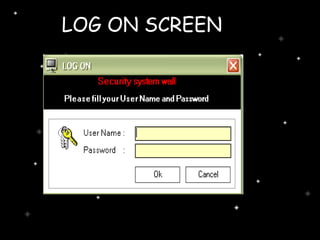
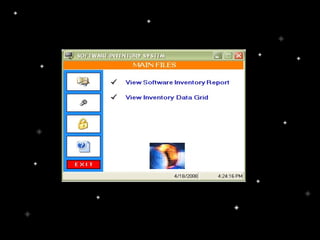
Splash screen Login screen Main Project Screen Form appears according to  the query of the   user PROJECT EXECUTION
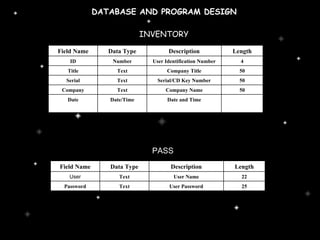
DATABASE AND PROGRAM DESIGN INVENTORY   PASS   Field Name Data Type Description Length ID Number User Identification Number 4 Title Text Company Title 50 Serial Text Serial/CD Key Number 50 Company Text Company Name 50 Date Date/Time Date and Time Field Name Data Type Description Length User Text User Name 22 Password Text User Password 25
WORKING OF PROJECT Splash Screen
LOG ON SCREEN
 
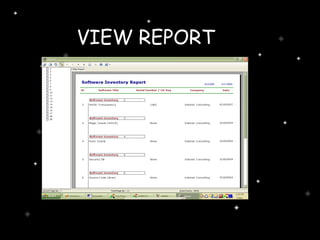
VIEW REPORT
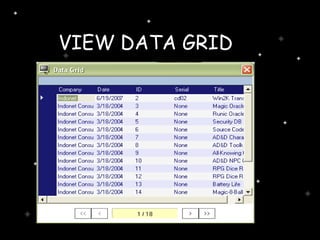
VIEW DATA GRID
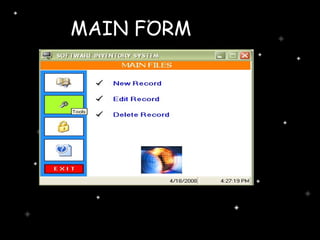
MAIN FORM
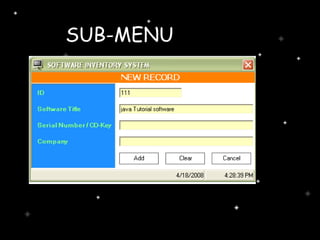
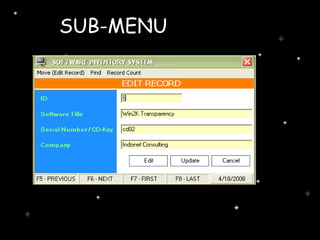
SUB-MENU
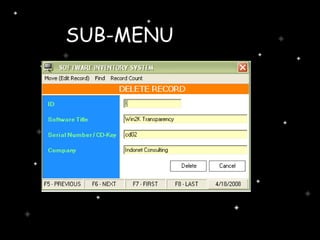
SUB-MENU
SUB-MENU
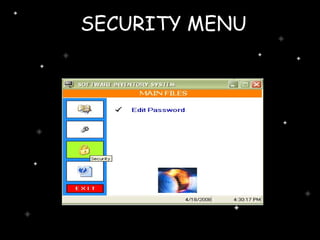
SECURITY MENU
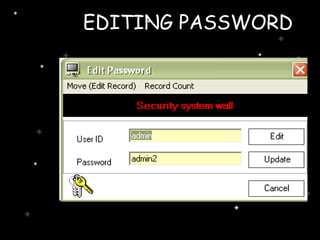
EDITING PASSWORD
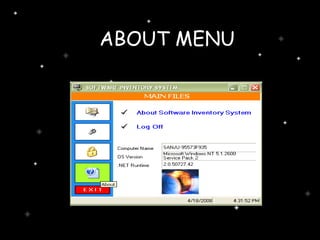
ABOUT MENU
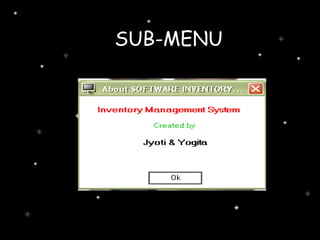
SUB-MENU
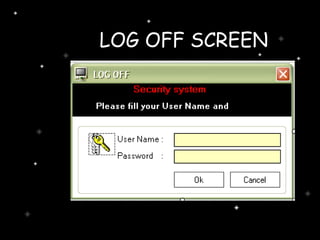
LOG OFF SCREEN
FUTURE SCOPE & MODIFICATIONS We can provide more Robust security features. We can provide recovery of the failure of Database. Provision of feedback system can also be included. We can also make it centralized
Thank You

Project seminar

  • 1.
    PROJECT SEMINAR ONSOFTWARE INVENTORY MANAGEMENT SUBMITTED BY :- JYOTI JAIN & YOGITA SAHU FINAL YEAR CSE
  • 2.
    INTRODUCTION A typicalSoftware Inventory Management can have a number of Software stocks of different types. Each and every Software product can be from a different manufacturer (for e.g. Microsoft and Sun). Maintaining such a heterogeneous inventory can get out of hand if it isn't tracked properly. Service Desk Plus allows you maintain a clean and neat catalog of your varied inventory. The software Inventory Management has been planned to work as a stand alone software working on a stand alone computer The software will be flexible enough to be extended to be operated in a sophisticated distributed environment .
  • 3.
    HARDWARE SPECIFICATION 16MB RAM memory minimum, 32 MB RAM memory recommended IBM compatible PC with AMD/Intel Pentium P200 MHz processor or above. Approx. 50 MB hard disk space required SVGA Display running at 1024 x 768 resolution Mouse CD-ROM drive for software installation
  • 4.
    SOFTWARE SPECIFICATION TechnologyUsed :- Visual Studio.NET Language Used :-Visual Basic .NET Database :- MS-Access Reporting Tool :- Crystal Report Operating System :- Windows XP
  • 5.
    VISUAL STUDIO.NET Microsoft Visual Studio is the main Integrated Development Environment (IDE) from Microsoft. It can be used to develop console and GUI applications along with Windows Forms applications, web sites, web applications, and web services . Visual Studio supports languages by means of language services, which allow any programming language to be supported (to varying degrees) by the code editor and debugger, provided a language-specific service has been authored. Built-in languages include C/C++ (via Visual C++), VB.NET (via Visual Basic .NET), and C# (via Visual C#).
  • 6.
    Visual Basic .NET(VB.NET) is an object-oriented computer language that can be viewed as an evolution of Microsoft's Visual Basic (VB) implemented on the Microsoft .NET framework. Visual Basic. NET is the most recent generation of Visual Basic. Developers will be pleased to note that its new features include inheritance, method overloading, structured exception handling, and more. These capabilities make it easier than ever to create .NET applications, including Windows applications, web services, and web applications. VISUAL BASIC.NET
  • 7.
    ADO.NET ADO.NET is a set of computer software components that can be used by programmers to access data and data services. It is a part of the base class library that is included with the Microsoft .NET Framework. It is commonly used by programmers to access and modify data stored in relational database systems, though it can also be used to access data in non-relational sources. ADO.NET is sometimes considered an evolution of ActiveX Data Objects (ADO) technology, but was changed so extensively that it can be conceived of as an entirely new product. ADO.NET consists of two primary parts: Data provider Data set
  • 8.
    Data provider Theseclasses provide access to a data source, such as a Microsoft SQL Server or Oracle database and OLEDB data provider. Each data source has its own set of provider objects, but they each have a common set of utility classes: Connection: Provides a connection used to communicate with the data source. Also acts as an abstract factory for command objects. Command: Used to perform some action on the data source, such as reading, updating, or deleting relational data. Parameter: Describes a single parameter to a command. A common example is a parameter to a stored procedure. Data Adapter: A bridge used to transfer data between a data source and a DataSet object . Data Reader: Used to efficiently process a large list of results one record at a time. It allows records to be accessed in a read-only, forward-only mode, i.e., records have to be accessed in sequential order; they can neither be randomly accessed nor can a record which has been processed previously be accessed again.
  • 9.
    Data Set Datasetobjects, a group of classes describing a simple in-memory relational database, were the star of the show in the initial release (1.0) of the Microsoft .NET Framework. The classes form a containment hierarchy: A DataSet object represents a schema (either an entire database or a subset of one). It can contain tables and relationships between those tables. A Data Table object represents a single table in the database. It has a name, rows, and columns. A Data Relation is a relationship between tables, such as a primary-key foreign-key relationship. This is useful for enabling Data Row's functionality of retrieving related rows. A Constraint describes an enforced property of the database, such as the uniqueness of the values in a primary key column. As data is modified any violations that arise will cause exceptions.
  • 10.
    MS-ACCESS Microsoft Accessis Relational Database Management Inc. It comes as a part of Microsoft Office’s package. It makes the task of creation and maintaining the database much easier. Maintaining a database involves performing of various data manipulation operations on the tables of the database. These operations are: Adding records Querying Modifying records Creating records These operations enable that user to store, retrieve and update data in the database. Also it facilitates to create relationship between the various tables. All these features make access a Relational Database Management System (RDBMS).
  • 11.
    CRYSTAL REPORT CrystalReports is a business intelligence application used to design and generate reports from a wide range of data sources. Several other applications, such as Microsoft Visual Studio, bundle an OEM version of Crystal Reports as a general purpose reporting tool. Crystal Reports became the defector report writer when Microsoft released it with Visual Basic. Creating reports-: Users install Crystal Reports on a computer and use it to select specific rows and columns from a table of compatible data . Users can then arrange the data on the report in the format needed. Once the report layout is complete it is saved as a file with the extension RPT
  • 12.
    Splash screen Loginscreen Main Project Screen Form appears according to the query of the user PROJECT EXECUTION
  • 13.
    DATABASE AND PROGRAMDESIGN INVENTORY PASS Field Name Data Type Description Length ID Number User Identification Number 4 Title Text Company Title 50 Serial Text Serial/CD Key Number 50 Company Text Company Name 50 Date Date/Time Date and Time Field Name Data Type Description Length User Text User Name 22 Password Text User Password 25
  • 14.
    WORKING OF PROJECTSplash Screen
  • 15.
  • 16.
  • 17.
  • 18.
  • 19.
  • 20.
  • 21.
  • 22.
  • 23.
  • 24.
  • 25.
  • 26.
  • 27.
  • 28.
    FUTURE SCOPE &MODIFICATIONS We can provide more Robust security features. We can provide recovery of the failure of Database. Provision of feedback system can also be included. We can also make it centralized
  • 29.