Debugging Live Apps in k8s
Faheem Memon
Current Troubleshooting Options
● Application logs
● Application metrics
● Pod description and status
● Pod events
● Pod shell aka exec
○ Requires debug tooling to be available in the containers
○ Sometimes requires higher tooling
○ Harder to control through governance
Ephemeral Containers
● Motivation
○ Minimal images lower operational burden and reduce
attack vectors.
○ Immutable images improve correctness and reliability.
○ Smaller image size reduces resource usage and speeds
deployments.
● Graduated to beta with v1.23
○ alpha since v1.16)
● Adds new containers to running pods
● Follow ContainerSpec
○ Ephemeral containers may not have ports
○ Lack guarantees for resources or execution
○ Never restarted
Ephemeral Containers Play Nice
● Allow access to namespaces and the file systems
of individual containers
● Fetch container images at run time rather than at
the time of pod or image creation
● Respect admission controllers and audit logging
● Be discoverable via the API
● Support arbitrary runtimes via the CRI (possibly
with reduced feature set)
● Require no administrative access to the node
● Have no inherent side effects to the running
container image
● Define a v1.Container available for inspection by
admission controllers
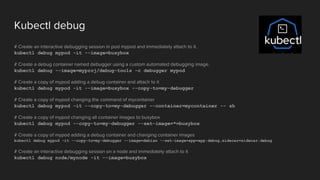
Kubectl debug
# Create an interactive debugging session in pod mypod and immediately attach to it.
kubectl debug mypod -it --image=busybox
# Create a debug container named debugger using a custom automated debugging image.
kubectl debug --image=myproj/debug-tools -c debugger mypod
# Create a copy of mypod adding a debug container and attach to it
kubectl debug mypod -it --image=busybox --copy-to=my-debugger
# Create a copy of mypod changing the command of mycontainer
kubectl debug mypod -it --copy-to=my-debugger --container=mycontainer -- sh
# Create a copy of mypod changing all container images to busybox
kubectl debug mypod --copy-to=my-debugger --set-image=*=busybox
# Create a copy of mypod adding a debug container and changing container images
kubectl debug mypod -it --copy-to=my-debugger --image=debian --set-image=app=app:debug,sidecar=sidecar:debug
# Create an interactive debugging session on a node and immediately attach to it
kubectl debug node/mynode -it --image=busybox
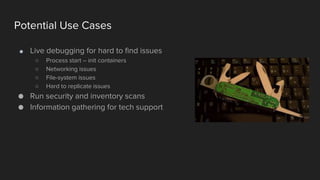
Potential Use Cases
● Live debugging for hard to find issues
○ Process start – init containers
○ Networking issues
○ File-system issues
○ Hard to replicate issues
● Run security and inventory scans
● Information gathering for tech support
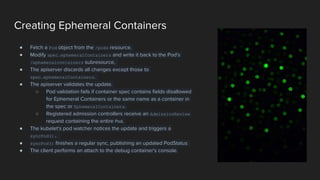
Creating Ephemeral Containers
● Fetch a Pod object from the /pods resource.
● Modify spec.ephemeralContainers and write it back to the Pod's
/ephemeralcontainers subresource,
● The apiserver discards all changes except those to
spec.ephemeralContainers.
● The apiserver validates the update.
○ Pod validation fails if container spec contains fields disallowed
for Ephemeral Containers or the same name as a container in
the spec or EphemeralContainers.
○ Registered admission controllers receive an AdmissionReview
request containing the entire Pod.
● The kubelet's pod watcher notices the update and triggers a
syncPod().
● syncPod() finishes a regular sync, publishing an updated PodStatus
● The client performs an attach to the debug container's console.
Live Demo
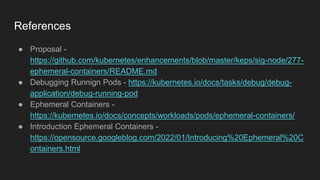
References
● Proposal -
https://github.com/kubernetes/enhancements/blob/master/keps/sig-node/277-
ephemeral-containers/README.md
● Debugging Runnign Pods - https://kubernetes.io/docs/tasks/debug/debug-
application/debug-running-pod
● Ephemeral Containers -
https://kubernetes.io/docs/concepts/workloads/pods/ephemeral-containers/
● Introduction Ephemeral Containers -
https://opensource.googleblog.com/2022/01/Introducing%20Ephemeral%20C
ontainers.html

Debugging Live Apps in k8s

  • 1.
    Debugging Live Appsin k8s Faheem Memon
  • 2.
    Current Troubleshooting Options ●Application logs ● Application metrics ● Pod description and status ● Pod events ● Pod shell aka exec ○ Requires debug tooling to be available in the containers ○ Sometimes requires higher tooling ○ Harder to control through governance
  • 3.
    Ephemeral Containers ● Motivation ○Minimal images lower operational burden and reduce attack vectors. ○ Immutable images improve correctness and reliability. ○ Smaller image size reduces resource usage and speeds deployments. ● Graduated to beta with v1.23 ○ alpha since v1.16) ● Adds new containers to running pods ● Follow ContainerSpec ○ Ephemeral containers may not have ports ○ Lack guarantees for resources or execution ○ Never restarted
  • 4.
    Ephemeral Containers PlayNice ● Allow access to namespaces and the file systems of individual containers ● Fetch container images at run time rather than at the time of pod or image creation ● Respect admission controllers and audit logging ● Be discoverable via the API ● Support arbitrary runtimes via the CRI (possibly with reduced feature set) ● Require no administrative access to the node ● Have no inherent side effects to the running container image ● Define a v1.Container available for inspection by admission controllers
  • 5.
    Kubectl debug # Createan interactive debugging session in pod mypod and immediately attach to it. kubectl debug mypod -it --image=busybox # Create a debug container named debugger using a custom automated debugging image. kubectl debug --image=myproj/debug-tools -c debugger mypod # Create a copy of mypod adding a debug container and attach to it kubectl debug mypod -it --image=busybox --copy-to=my-debugger # Create a copy of mypod changing the command of mycontainer kubectl debug mypod -it --copy-to=my-debugger --container=mycontainer -- sh # Create a copy of mypod changing all container images to busybox kubectl debug mypod --copy-to=my-debugger --set-image=*=busybox # Create a copy of mypod adding a debug container and changing container images kubectl debug mypod -it --copy-to=my-debugger --image=debian --set-image=app=app:debug,sidecar=sidecar:debug # Create an interactive debugging session on a node and immediately attach to it kubectl debug node/mynode -it --image=busybox
  • 6.
    Potential Use Cases ●Live debugging for hard to find issues ○ Process start – init containers ○ Networking issues ○ File-system issues ○ Hard to replicate issues ● Run security and inventory scans ● Information gathering for tech support
  • 7.
    Creating Ephemeral Containers ●Fetch a Pod object from the /pods resource. ● Modify spec.ephemeralContainers and write it back to the Pod's /ephemeralcontainers subresource, ● The apiserver discards all changes except those to spec.ephemeralContainers. ● The apiserver validates the update. ○ Pod validation fails if container spec contains fields disallowed for Ephemeral Containers or the same name as a container in the spec or EphemeralContainers. ○ Registered admission controllers receive an AdmissionReview request containing the entire Pod. ● The kubelet's pod watcher notices the update and triggers a syncPod(). ● syncPod() finishes a regular sync, publishing an updated PodStatus ● The client performs an attach to the debug container's console.
  • 8.
  • 9.
    References ● Proposal - https://github.com/kubernetes/enhancements/blob/master/keps/sig-node/277- ephemeral-containers/README.md ●Debugging Runnign Pods - https://kubernetes.io/docs/tasks/debug/debug- application/debug-running-pod ● Ephemeral Containers - https://kubernetes.io/docs/concepts/workloads/pods/ephemeral-containers/ ● Introduction Ephemeral Containers - https://opensource.googleblog.com/2022/01/Introducing%20Ephemeral%20C ontainers.html