Basics of Database Management
System
System
(CS-335)
(CS-335)
Dr. Halima Sadia
Dr. Halima Sadia
Associate Professor
Associate Professor
Department of CSE
Department of CSE
Integral University
Integral University
Lucknow
Lucknow
Unit-1
Unit-1
•An overview of database management system.
•Database Vs. file system.
•Database system concepts and architecture.
•Data Independence
•Schema and instances
•Data Models
•Data base language and interfaces.
•Overall database Structure.
What is “Data”?
What is “Data”?
ANSI definition of data:
 A representation of facts, concepts, or
instructions in a formalized manner suitable
for communication, interpretation, or
processing by humans or by automatic
means.
 Any representation such as characters or
analog quantities to which meaning is or
might be assigned. Generally, we perform
operations on data or data items to supply
some information about an entity.
What is a Database ?
 A database is an organized collection of structured
information, or data, typically stored electronically in
a computer system. A database is usually controlled
by a database management system (DBMS).
 A database is a data structure that stores organized
information. Most databases contain multiple tables,
which may each include several different fields.
For example, a company database may include tables
for products, employees, and financial records.
 A database is a collection of information that is
organized so that it can be easily accessed, managed
and updated.
Databases in our daily Life
 In purely conceptual terms, humans use databases to store
information that they think they will need at a later time.
Examples include
 A shopping list
 A cook book
 A class register
 Microsoft excel spreadsheets
 Amazon uses multiple databases to manage products
 Facebook , WhatsApp is a database of messages.
 Healthcare information
 Local library has a database of books
 Employee database
 Student Database
Popular Databases
Popular Databases
•A Database is a repository(Infrastructure related software) which serves
the purpose of storing data and retrieving the stored data by using some
specific.
•Databases are essentially software applications. A database management
system (DBMS) is the name of the software that provides data to other
applications
Databases for Health and Medicine
 Medline
 Biomedical and Life Science Lectures
 Nutrition and Life Science Database
Nutrition and Life Science Database
 AMED (Allied and Complementary
AMED (Allied and Complementary
Medicine Database)
Medicine Database)
 Science Direct Freedom Collection
Science Direct Freedom Collection
 Web of Science
Web of Science
 Springer Connect
History of Databases
 Before databases existed, everything had to be recorded on
paper. Data was organized as lists, journals, ledgers and endless
archives containing hundreds of thousands or even millions of
records contained in filing cabinets.
 There were also security problems because physical access was
often easy to gain.
 The database was created to try and solve these limitations of
traditional paper-based information storage.
 In databases, the files are called records and the individual data
elements in a record (for example, name, phone number, date of
birth) are called fields.
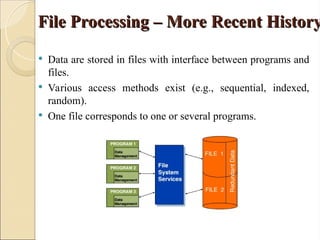
File Processing – More Recent History
 Data are stored in files with interface between programs and
files.
 Various access methods exist (e.g., sequential, indexed,
random).
 One file corresponds to one or several programs.
Database Management System
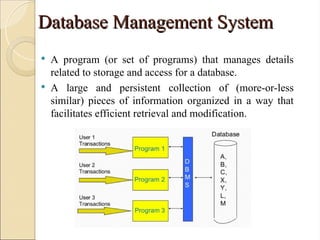
 A program (or set of programs) that manages details
related to storage and access for a database.
 A large and persistent collection of (more-or-less
similar) pieces of information organized in a way that
facilitates efficient retrieval and modification.
Drawbacks of using file system
 Data redundancy and inconsistency – Multiple file
formats, duplication of information in different files
 Atomicity Either All or None – Failures may leave
database in an inconsistent state with partial updates
carried out – Example: Transfer of funds from one
account to another should either complete or not
happen at all
 Difficulty in accessing data – Need to write a new
program to carry out each new task
 Data isolation – Multiple files and formats
Drawbacks of using file system
 Integrity problems – Integrity constraints (e.g.,
account balance > 0)– Hard to add new
constraints or change existing ones
 Concurrent access anomalies – Concurrent
access needed for performance – Uncontrolled
concurrent accesses can lead to inconsistencies
 Security – Hard to provide user access to
some, but not all, data
Advantages of DBMS
Advantages of DBMS
 Data Independence: Abstract view of data – Details of data
representation and storage are not exposed to application
programs
 Efficient Data Access: a variety of sophisticated techniques to
store and retrieve data efficiently
 Data Integrity and Security: DBMS can enforce integrity
constraints – It provides security at various levels of users
 Data Administration: centralizing the administration of data can
minimize redundancy and for fine-tuning the storage of the data
to make retrieval efficient
Advantages of DBMS
Advantages of DBMS
 Concurrent Access and Crash Recovery: schedules concurrent
accesses to the data in such a manner that for the users it is
equivalent to data accessed by one user at a time – Also, protects
users from the effects of system failures. It provides proper
backup and recovery mechanisms, rollbacks.
 Reduced Application Development Time:
◦ Supports important functions that are common to many
applications accessing data in the DBMS
◦ High-level interface to the data, facilitates quick application
development
◦ DBMS applications are also likely to be more robust than
similar stand-alone applications because many important tasks
are handled by the DBMS, do not have to be debugged and
tested in the application
Database system concepts and
Architecture
Architecture
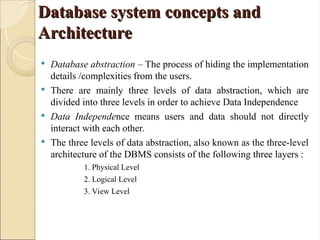
 Database abstraction – The process of hiding the implementation
details /complexities from the users.
 There are mainly three levels of data abstraction, which are
divided into three levels in order to achieve Data Independence
 Data Independence means users and data should not directly
interact with each other.
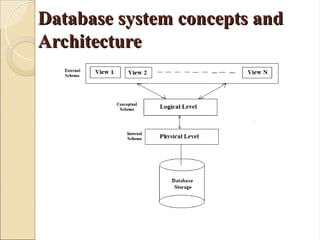
 The three levels of data abstraction, also known as the three-level
architecture of the DBMS consists of the following three layers :
1. Physical Level
2. Logical Level
3. View Level
Database system concepts and
Architecture
Architecture
Database system concepts and
Architecture
Architecture
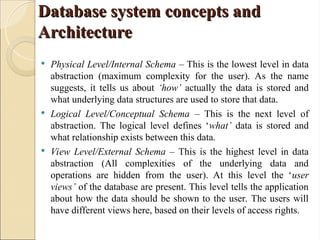
 Physical Level/Internal Schema – This is the lowest level in data
abstraction (maximum complexity for the user). As the name
suggests, it tells us about ‘how’ actually the data is stored and
what underlying data structures are used to store that data.
 Logical Level/Conceptual Schema – This is the next level of
abstraction. The logical level defines ‘what’ data is stored and
what relationship exists between this data.
 View Level/External Schema – This is the highest level in data
abstraction (All complexities of the underlying data and
operations are hidden from the user). At this level the ‘user
views’ of the database are present. This level tells the application
about how the data should be shown to the user. The users will
have different views here, based on their levels of access rights.
Data Independence
Data Independence
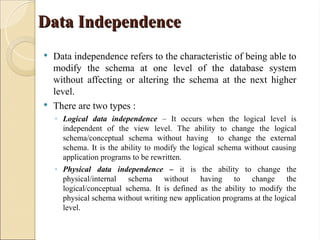
 Data independence refers to the characteristic of being able to
modify the schema at one level of the database system
without affecting or altering the schema at the next higher
level.
 There are two types :
◦ Logical data independence – It occurs when the logical level is
independent of the view level. The ability to change the logical
schema/conceptual schema without having to change the external
schema. It is the ability to modify the logical schema without causing
application programs to be rewritten.
◦ Physical data independence – it is the ability to change the
physical/internal schema without having to change the
logical/conceptual schema. It is defined as the ability to modify the
physical schema without writing new application programs at the logical
level.
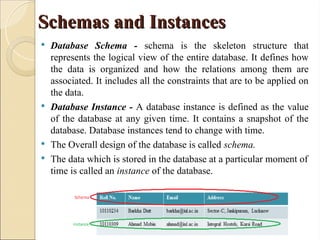
Schemas and Instances
 Database Schema - schema is the skeleton structure that
represents the logical view of the entire database. It defines how
the data is organized and how the relations among them are
associated. It includes all the constraints that are to be applied on
the data.
 Database Instance - A database instance is defined as the value
of the database at any given time. It contains a snapshot of the
database. Database instances tend to change with time.
 The Overall design of the database is called schema.
 The data which is stored in the database at a particular moment of
time is called an instance of the database.
Data Models
Data Models
 A Database model defines the logical design and structure of a
database and defines how data will be stored, accessed and
updated in a database management system.
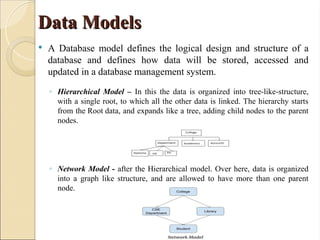
◦ Hierarchical Model – In this the data is organized into tree-like-structure,
with a single root, to which all the other data is linked. The hierarchy starts
from the Root data, and expands like a tree, adding child nodes to the parent
nodes.
◦ Network Model - after the Hierarchical model. Over here, data is organized
into a graph like structure, and are allowed to have more than one parent
node.
Data Models
Data Models
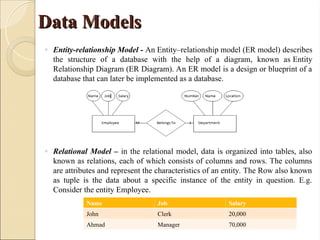
◦ Entity-relationship Model - An Entity–relationship model (ER model) describes
the structure of a database with the help of a diagram, known as Entity
Relationship Diagram (ER Diagram). An ER model is a design or blueprint of a
database that can later be implemented as a database.
◦ Relational Model – in the relational model, data is organized into tables, also
known as relations, each of which consists of columns and rows. The columns
are attributes and represent the characteristics of an entity. The Row also known
as tuple is the data about a specific instance of the entity in question. E.g.
Consider the entity Employee.
Name Job Salary
John Clerk 20,000
Ahmad Manager 70,000
Database Language and Interfaces
 Database Languages are the set of statements, that are used to define and
manipulate the database. The following are the types of the database languages
used :
 Data Definition Language
◦ DDL stands for Data Definition Language.
◦ It is used to define the schema/structure of the database.
◦ It is used to create schema, tables, indexes, constraints, etc. in the database.
◦ It is also used to store metadata like the number of tables and schemas, their names, indexes,
columns in each table, constraints, etc.
◦ E.g. CREATE, ALTER, DROP, RENAME, TRUNCATE etc.
 Data Manipulation Language
◦ DML stands for Data Manipulation Language.
◦ It is used for manipulating the data in a database.
◦ Manipulation means the user can insert, delete, update and modify the data stored in the database.
◦ E.g. SELECT, INSERT, DELETE, UPDATE etc.
 Data Control Language
◦ DCL stands for Data Control Language.
◦ It is used to retrieve the stored or saved data.
◦ It is used to provide control on the database.
◦ The DCL execution is transactional.
◦ E.g. GRANT, REVOKE
 Transaction Control Language
◦ TCL is used to run the changes made by the DML statement.
◦ TCL can be grouped into a logical transaction.
◦ E.g. COMMIT, ROLLBACK
Database Language and Interfaces
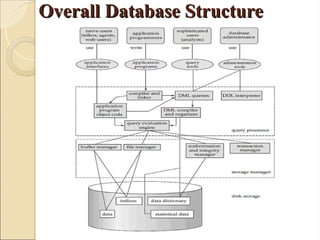
Overall Database Structure
Database End Users
Database End Users
 Naive Users : are layman users that use the database application through an
easy to use form interface. The user is presented a GUI view of the
database and no complexities are involved in using the functionality of the
Database System.
 Application Programmers : write application programs to achieve the
functionality of the Database application. They are responsible in
developing the DBMS. They require computer proficiency to code and
develop applications related to a DBMS.
 Sophisticated Users : they write queries using different query tools to run
the database application. These users write DDL, DML, DCL statements to
access the database.
 Specialized Users : advance category of sophisticated users. Some database
applications require specialized databases and the users that access and
interpret these types of applications are specialized users. E.g. databases
captured by satellite imaging systems, weather forecast systems,
geographical databases etc.
Database End Users
Database End Users
 Database Administrator (DBA) : A DBA is a person or a group of persons that have the
central authority over the database management system. It has the overall control over the
whole database. The functions of a DBA are :
◦ Schema definition : The DBA creates the original database schema by executing a set of
data definition statements in the DDL.
◦ Storage structure and access-method definition.
◦ Schema and physical-organization modification : The DBA carries out changes to the
schema and physical organization to reflect the changing needs of the organization, or
to alter the physical organization to improve performance.
◦ Granting of authorization for data access : By granting different types of authorization,
the database administrator can regulate which parts of the database various users can
access. The authorization information is kept in a special system structure that the
database system consults when ever someone attempts to access the data in the system.
◦ Routine maintenance :
 Periodically backing up the database, either onto tapes or onto remote servers, to
prevent loss of data in case of disasters such as flooding.
 Ensuring that enough free disk space is available for normal operations, and
upgrading disk space as required.
 Monitoring jobs running on the database and ensuring that performance is not
degraded by very expensive tasks submitted by some users.
Query Processor
Query Processor
 The Query Processor translates statements written in query language into
low-level instructions that are understandable by the database manager.
 The Query processor components include :
 DDL Interpreter : The DDL queries are interpreted by the DDL
Interpreter. It records the definition in the data dictionary.
 DML Compiler : When the user writes DML queries to insert, delete,
update or retrieve the record from the database, they need to be converted
in object code. This is done by DML Compiler.
 Query Evaluation Engine : It executes low level instructions from the
DML Compiler. The query optimizer decides the best way to execute the
user request which is received from the DML compiler. It selects an
optimized plan.
Storage Manager
Storage Manager
 Storage manager is a program module that provides the interface between the low-
level data stored in the database and the application programs and queries submitted
to the system.
 It converts the requests received from query optimizer to machine-understandable
form.
 The Storage Manager has four components :
 Buffer Manager : A Buffer is a temporary storage area that is used to hold the
intermediate/temporary data.
 File Manager : It manages allocation of disk space and data structures used to
represent information on the disk. A File manager is used to manage the records of
the database that are stored in a file.
 Authorization and Integrity Manager : This checks for the authorization level of the
user and then gives access to the underlying data stored. It also runs the Integrity
constraints that are applied on the database at the time of creation.
 Transaction Manager : A transaction manager ensures ACID properties of
transaction. A transaction should hold Atomicity, Consistency, Isolation and
Durability.
Disk Storage
Disk Storage
 Data Files : They store the database itself.
 Data Dictionary : It stores metadata “Data-about-Data”. It stores
information about the structure of the database.
 Indices : They provide fast access to the database.
References
References
Books
1. Date C J, “An Introduction to Database System”, Addision Wesley
2. Korth, Silbertz, Sudarshan, “Database Concepts”, McGraw Hill
3. Elmasri, Navathe, “Fundamentals of Database System”, Addision Wesley
4. Leon & Leon, “Database Management Systems”, Vikas Publishing House.
5. Bipin C. Desai, “An Introduction to Database System”, TMH
6. Ramakrishnan Gehrke, “Database management System”, McGraw Hill
8. Maheshwari Jain, “DBMS: Complete Practical Approach” Firewall Media, New Delhi
Thank You
Thank You

Basics of Database Management System: Key Components

  • 1.
    Basics of DatabaseManagement Basics of Database Management System System (CS-335) (CS-335) Dr. Halima Sadia Dr. Halima Sadia Associate Professor Associate Professor Department of CSE Department of CSE Integral University Integral University Lucknow Lucknow
  • 2.
    Unit-1 Unit-1 •An overview ofdatabase management system. •Database Vs. file system. •Database system concepts and architecture. •Data Independence •Schema and instances •Data Models •Data base language and interfaces. •Overall database Structure.
  • 3.
    What is “Data”? Whatis “Data”? ANSI definition of data:  A representation of facts, concepts, or instructions in a formalized manner suitable for communication, interpretation, or processing by humans or by automatic means.  Any representation such as characters or analog quantities to which meaning is or might be assigned. Generally, we perform operations on data or data items to supply some information about an entity.
  • 4.
    What is aDatabase ? What is a Database ?  A database is an organized collection of structured information, or data, typically stored electronically in a computer system. A database is usually controlled by a database management system (DBMS).  A database is a data structure that stores organized information. Most databases contain multiple tables, which may each include several different fields. For example, a company database may include tables for products, employees, and financial records.  A database is a collection of information that is organized so that it can be easily accessed, managed and updated.
  • 5.
    Databases in ourdaily Life Databases in our daily Life  In purely conceptual terms, humans use databases to store information that they think they will need at a later time. Examples include  A shopping list  A cook book  A class register  Microsoft excel spreadsheets  Amazon uses multiple databases to manage products  Facebook , WhatsApp is a database of messages.  Healthcare information  Local library has a database of books  Employee database  Student Database
  • 6.
    Popular Databases Popular Databases •ADatabase is a repository(Infrastructure related software) which serves the purpose of storing data and retrieving the stored data by using some specific. •Databases are essentially software applications. A database management system (DBMS) is the name of the software that provides data to other applications
  • 7.
    Databases for Healthand Medicine Databases for Health and Medicine  Medline  Biomedical and Life Science Lectures  Nutrition and Life Science Database Nutrition and Life Science Database  AMED (Allied and Complementary AMED (Allied and Complementary Medicine Database) Medicine Database)  Science Direct Freedom Collection Science Direct Freedom Collection  Web of Science Web of Science  Springer Connect
  • 8.
    History of Databases Historyof Databases  Before databases existed, everything had to be recorded on paper. Data was organized as lists, journals, ledgers and endless archives containing hundreds of thousands or even millions of records contained in filing cabinets.  There were also security problems because physical access was often easy to gain.  The database was created to try and solve these limitations of traditional paper-based information storage.  In databases, the files are called records and the individual data elements in a record (for example, name, phone number, date of birth) are called fields.
  • 9.
    File Processing –More Recent History File Processing – More Recent History  Data are stored in files with interface between programs and files.  Various access methods exist (e.g., sequential, indexed, random).  One file corresponds to one or several programs.
  • 10.
    Database Management System DatabaseManagement System  A program (or set of programs) that manages details related to storage and access for a database.  A large and persistent collection of (more-or-less similar) pieces of information organized in a way that facilitates efficient retrieval and modification.
  • 11.
    Drawbacks of usingfile system Drawbacks of using file system  Data redundancy and inconsistency – Multiple file formats, duplication of information in different files  Atomicity Either All or None – Failures may leave database in an inconsistent state with partial updates carried out – Example: Transfer of funds from one account to another should either complete or not happen at all  Difficulty in accessing data – Need to write a new program to carry out each new task  Data isolation – Multiple files and formats
  • 12.
    Drawbacks of usingfile system Drawbacks of using file system  Integrity problems – Integrity constraints (e.g., account balance > 0)– Hard to add new constraints or change existing ones  Concurrent access anomalies – Concurrent access needed for performance – Uncontrolled concurrent accesses can lead to inconsistencies  Security – Hard to provide user access to some, but not all, data
  • 13.
    Advantages of DBMS Advantagesof DBMS  Data Independence: Abstract view of data – Details of data representation and storage are not exposed to application programs  Efficient Data Access: a variety of sophisticated techniques to store and retrieve data efficiently  Data Integrity and Security: DBMS can enforce integrity constraints – It provides security at various levels of users  Data Administration: centralizing the administration of data can minimize redundancy and for fine-tuning the storage of the data to make retrieval efficient
  • 14.
    Advantages of DBMS Advantagesof DBMS  Concurrent Access and Crash Recovery: schedules concurrent accesses to the data in such a manner that for the users it is equivalent to data accessed by one user at a time – Also, protects users from the effects of system failures. It provides proper backup and recovery mechanisms, rollbacks.  Reduced Application Development Time: ◦ Supports important functions that are common to many applications accessing data in the DBMS ◦ High-level interface to the data, facilitates quick application development ◦ DBMS applications are also likely to be more robust than similar stand-alone applications because many important tasks are handled by the DBMS, do not have to be debugged and tested in the application
  • 15.
    Database system conceptsand Database system concepts and Architecture Architecture  Database abstraction – The process of hiding the implementation details /complexities from the users.  There are mainly three levels of data abstraction, which are divided into three levels in order to achieve Data Independence  Data Independence means users and data should not directly interact with each other.  The three levels of data abstraction, also known as the three-level architecture of the DBMS consists of the following three layers : 1. Physical Level 2. Logical Level 3. View Level
  • 16.
    Database system conceptsand Database system concepts and Architecture Architecture
  • 17.
    Database system conceptsand Database system concepts and Architecture Architecture  Physical Level/Internal Schema – This is the lowest level in data abstraction (maximum complexity for the user). As the name suggests, it tells us about ‘how’ actually the data is stored and what underlying data structures are used to store that data.  Logical Level/Conceptual Schema – This is the next level of abstraction. The logical level defines ‘what’ data is stored and what relationship exists between this data.  View Level/External Schema – This is the highest level in data abstraction (All complexities of the underlying data and operations are hidden from the user). At this level the ‘user views’ of the database are present. This level tells the application about how the data should be shown to the user. The users will have different views here, based on their levels of access rights.
  • 18.
    Data Independence Data Independence Data independence refers to the characteristic of being able to modify the schema at one level of the database system without affecting or altering the schema at the next higher level.  There are two types : ◦ Logical data independence – It occurs when the logical level is independent of the view level. The ability to change the logical schema/conceptual schema without having to change the external schema. It is the ability to modify the logical schema without causing application programs to be rewritten. ◦ Physical data independence – it is the ability to change the physical/internal schema without having to change the logical/conceptual schema. It is defined as the ability to modify the physical schema without writing new application programs at the logical level.
  • 19.
    Schemas and Instances Schemasand Instances  Database Schema - schema is the skeleton structure that represents the logical view of the entire database. It defines how the data is organized and how the relations among them are associated. It includes all the constraints that are to be applied on the data.  Database Instance - A database instance is defined as the value of the database at any given time. It contains a snapshot of the database. Database instances tend to change with time.  The Overall design of the database is called schema.  The data which is stored in the database at a particular moment of time is called an instance of the database.
  • 20.
    Data Models Data Models A Database model defines the logical design and structure of a database and defines how data will be stored, accessed and updated in a database management system. ◦ Hierarchical Model – In this the data is organized into tree-like-structure, with a single root, to which all the other data is linked. The hierarchy starts from the Root data, and expands like a tree, adding child nodes to the parent nodes. ◦ Network Model - after the Hierarchical model. Over here, data is organized into a graph like structure, and are allowed to have more than one parent node.
  • 21.
    Data Models Data Models ◦Entity-relationship Model - An Entity–relationship model (ER model) describes the structure of a database with the help of a diagram, known as Entity Relationship Diagram (ER Diagram). An ER model is a design or blueprint of a database that can later be implemented as a database. ◦ Relational Model – in the relational model, data is organized into tables, also known as relations, each of which consists of columns and rows. The columns are attributes and represent the characteristics of an entity. The Row also known as tuple is the data about a specific instance of the entity in question. E.g. Consider the entity Employee. Name Job Salary John Clerk 20,000 Ahmad Manager 70,000
  • 22.
    Database Language andInterfaces Database Language and Interfaces  Database Languages are the set of statements, that are used to define and manipulate the database. The following are the types of the database languages used :  Data Definition Language ◦ DDL stands for Data Definition Language. ◦ It is used to define the schema/structure of the database. ◦ It is used to create schema, tables, indexes, constraints, etc. in the database. ◦ It is also used to store metadata like the number of tables and schemas, their names, indexes, columns in each table, constraints, etc. ◦ E.g. CREATE, ALTER, DROP, RENAME, TRUNCATE etc.  Data Manipulation Language ◦ DML stands for Data Manipulation Language. ◦ It is used for manipulating the data in a database. ◦ Manipulation means the user can insert, delete, update and modify the data stored in the database. ◦ E.g. SELECT, INSERT, DELETE, UPDATE etc.
  • 23.
     Data ControlLanguage ◦ DCL stands for Data Control Language. ◦ It is used to retrieve the stored or saved data. ◦ It is used to provide control on the database. ◦ The DCL execution is transactional. ◦ E.g. GRANT, REVOKE  Transaction Control Language ◦ TCL is used to run the changes made by the DML statement. ◦ TCL can be grouped into a logical transaction. ◦ E.g. COMMIT, ROLLBACK Database Language and Interfaces Database Language and Interfaces
  • 24.
  • 25.
    Database End Users DatabaseEnd Users  Naive Users : are layman users that use the database application through an easy to use form interface. The user is presented a GUI view of the database and no complexities are involved in using the functionality of the Database System.  Application Programmers : write application programs to achieve the functionality of the Database application. They are responsible in developing the DBMS. They require computer proficiency to code and develop applications related to a DBMS.  Sophisticated Users : they write queries using different query tools to run the database application. These users write DDL, DML, DCL statements to access the database.  Specialized Users : advance category of sophisticated users. Some database applications require specialized databases and the users that access and interpret these types of applications are specialized users. E.g. databases captured by satellite imaging systems, weather forecast systems, geographical databases etc.
  • 26.
    Database End Users DatabaseEnd Users  Database Administrator (DBA) : A DBA is a person or a group of persons that have the central authority over the database management system. It has the overall control over the whole database. The functions of a DBA are : ◦ Schema definition : The DBA creates the original database schema by executing a set of data definition statements in the DDL. ◦ Storage structure and access-method definition. ◦ Schema and physical-organization modification : The DBA carries out changes to the schema and physical organization to reflect the changing needs of the organization, or to alter the physical organization to improve performance. ◦ Granting of authorization for data access : By granting different types of authorization, the database administrator can regulate which parts of the database various users can access. The authorization information is kept in a special system structure that the database system consults when ever someone attempts to access the data in the system. ◦ Routine maintenance :  Periodically backing up the database, either onto tapes or onto remote servers, to prevent loss of data in case of disasters such as flooding.  Ensuring that enough free disk space is available for normal operations, and upgrading disk space as required.  Monitoring jobs running on the database and ensuring that performance is not degraded by very expensive tasks submitted by some users.
  • 27.
    Query Processor Query Processor The Query Processor translates statements written in query language into low-level instructions that are understandable by the database manager.  The Query processor components include :  DDL Interpreter : The DDL queries are interpreted by the DDL Interpreter. It records the definition in the data dictionary.  DML Compiler : When the user writes DML queries to insert, delete, update or retrieve the record from the database, they need to be converted in object code. This is done by DML Compiler.  Query Evaluation Engine : It executes low level instructions from the DML Compiler. The query optimizer decides the best way to execute the user request which is received from the DML compiler. It selects an optimized plan.
  • 28.
    Storage Manager Storage Manager Storage manager is a program module that provides the interface between the low- level data stored in the database and the application programs and queries submitted to the system.  It converts the requests received from query optimizer to machine-understandable form.  The Storage Manager has four components :  Buffer Manager : A Buffer is a temporary storage area that is used to hold the intermediate/temporary data.  File Manager : It manages allocation of disk space and data structures used to represent information on the disk. A File manager is used to manage the records of the database that are stored in a file.  Authorization and Integrity Manager : This checks for the authorization level of the user and then gives access to the underlying data stored. It also runs the Integrity constraints that are applied on the database at the time of creation.  Transaction Manager : A transaction manager ensures ACID properties of transaction. A transaction should hold Atomicity, Consistency, Isolation and Durability.
  • 29.
    Disk Storage Disk Storage Data Files : They store the database itself.  Data Dictionary : It stores metadata “Data-about-Data”. It stores information about the structure of the database.  Indices : They provide fast access to the database.
  • 30.
    References References Books 1. Date CJ, “An Introduction to Database System”, Addision Wesley 2. Korth, Silbertz, Sudarshan, “Database Concepts”, McGraw Hill 3. Elmasri, Navathe, “Fundamentals of Database System”, Addision Wesley 4. Leon & Leon, “Database Management Systems”, Vikas Publishing House. 5. Bipin C. Desai, “An Introduction to Database System”, TMH 6. Ramakrishnan Gehrke, “Database management System”, McGraw Hill 8. Maheshwari Jain, “DBMS: Complete Practical Approach” Firewall Media, New Delhi
  • 31.