Dates and Times in Java
Tecniche di Programmazione – A.A. 2014/2015
Summary
A.A. 2014/2015Tecniche di programmazione2
 Libraries and History
 The “old” Date/Calendar classes
 The new (≥Java8) java.time package
 Basic concepts
 Main classes
 Date operations
 Dealing with SQL dates
Libraries and History
Dates and Times in Java
A common problem
A.A. 2014/2015Tecniche di programmazione4
 Most software programs need to deal with dates and/or
times
 The human calendar system is extremely complex
 Uneven months, Leap years, Leap seconds
 Time zones, Daylight savings time
 Localized representations
 Time instants vs. time intervals vs. recurring instants
 Different calendar systems
 Available libraries, in all languages, are often over-
simplified or over-engineered
Two ways at representing time
A.A. 2014/2015Tecniche di programmazione5
 Machine time
 A given number of seconds (ms, ns) measured starting from a
known reference point
 Fixed reference (Epoch): absolute time
 Variable reference: time intervals
 Human time
 The passing of time, as we humans measure it
 Dates: day, month, year, week, weekday, century, …
 Times: hours, minutes, seconds, ms, …
 Takes into account local culture
 Gregorian Calendar, localization, time zones, DST
What we want to represent
A.A. 2014/2015Tecniche di programmazione6
 Exact time instants: Now.The moment of moon landing.
 Days (without times):The date I was born.The discovery
of Americas.
 Times (without dates): Office hours are 9-17.
 Recurring dates:Wedding anniversary. Christmas day.
(date without year)
 Date intervals: One week. Seven Days. 30 working days.
 Relative dates: nextThursday. By the end of next month.
 …
Basic operations
A.A. 2014/2015Tecniche di programmazione7
 Parsing: convert a string into a date/time object
 Formatting: covert a date/time object into a string
 Building: create a date/time object starting from its
components
 Analyzing: extracting date/time components from an
object
 Arithmetic: sum or subtract a quantity from a date/time;
compute the difference between two dates/times; equality
or majority comparing
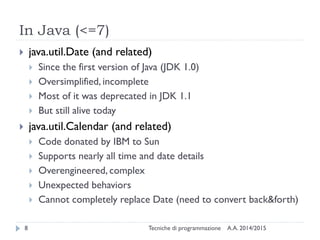
In Java (<=7)
A.A. 2014/2015Tecniche di programmazione8
 java.util.Date (and related)
 Since the first version of Java (JDK 1.0)
 Oversimplified, incomplete
 Most of it was deprecated in JDK 1.1
 But still alive today
 java.util.Calendar (and related)
 Code donated by IBM to Sun
 Supports nearly all time and date details
 Overengineered, complex
 Unexpected behaviors
 Cannot completely replace Date (need to convert back&forth)
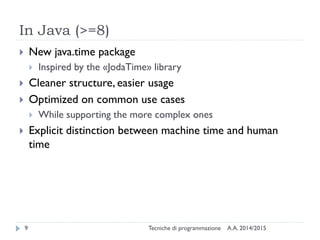
In Java (>=8)
A.A. 2014/2015Tecniche di programmazione9
 New java.time package
 Inspired by the «JodaTime» library
 Cleaner structure, easier usage
 Optimized on common use cases
 While supporting the more complex ones
 Explicit distinction between machine time and human
time
The “old” Date/Calendar classes
Dates and Times in Java
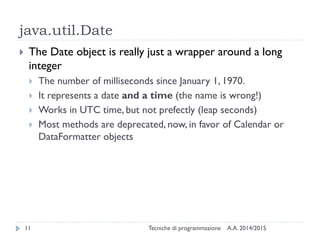
java.util.Date
A.A. 2014/2015Tecniche di programmazione11
 The Date object is really just a wrapper around a long
integer
 The number of milliseconds since January 1, 1970.
 It represents a date and a time (the name is wrong!)
 Works in UTC time, but not prefectly (leap seconds)
 Most methods are deprecated, now, in favor of Calendar or
DataFormatter objects
Date constructors
A.A. 2014/2015Tecniche di programmazione12
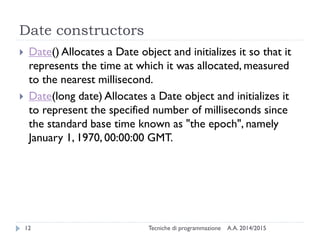
 Date() Allocates a Date object and initializes it so that it
represents the time at which it was allocated, measured
to the nearest millisecond.
 Date(long date) Allocates a Date object and initializes it
to represent the specified number of milliseconds since
the standard base time known as "the epoch", namely
January 1, 1970, 00:00:00 GMT.
Date methods (non-Deprecated)
A.A. 2014/2015Tecniche di programmazione13
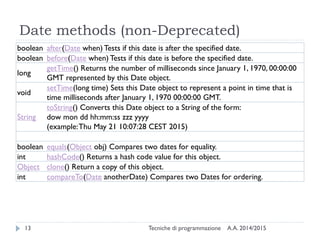
boolean after(Date when) Tests if this date is after the specified date.
boolean before(Date when) Tests if this date is before the specified date.
long
getTime() Returns the number of milliseconds since January 1, 1970, 00:00:00
GMT represented by this Date object.
void
setTime(long time) Sets this Date object to represent a point in time that is
time milliseconds after January 1, 1970 00:00:00 GMT.
String
toString() Converts this Date object to a String of the form:
dow mon dd hh:mm:ss zzz yyyy
(example:Thu May 21 10:07:28 CEST 2015)
boolean equals(Object obj) Compares two dates for equality.
int hashCode() Returns a hash code value for this object.
Object clone() Return a copy of this object.
int compareTo(Date anotherDate) Compares two Dates for ordering.
java.text.DateFormat
A.A. 2014/2015Tecniche di programmazione14
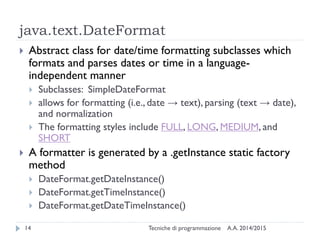
 Abstract class for date/time formatting subclasses which
formats and parses dates or time in a language-
independent manner
 Subclasses: SimpleDateFormat
 allows for formatting (i.e., date → text), parsing (text → date),
and normalization
 The formatting styles include FULL, LONG, MEDIUM, and
SHORT
 A formatter is generated by a .getInstance static factory
method
 DateFormat.getDateInstance()
 DateFormat.getTimeInstance()
 DateFormat.getDateTimeInstance()
Examples
A.A. 2014/2015Tecniche di programmazione15
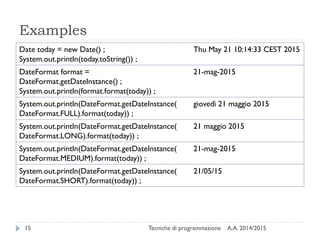
Date today = new Date() ;
System.out.println(today.toString()) ;
Thu May 21 10:14:33 CEST 2015
DateFormat format =
DateFormat.getDateInstance() ;
System.out.println(format.format(today)) ;
21-mag-2015
System.out.println(DateFormat.getDateInstance(
DateFormat.FULL).format(today)) ;
giovedì 21 maggio 2015
System.out.println(DateFormat.getDateInstance(
DateFormat.LONG).format(today)) ;
21 maggio 2015
System.out.println(DateFormat.getDateInstance(
DateFormat.MEDIUM).format(today)) ;
21-mag-2015
System.out.println(DateFormat.getDateInstance(
DateFormat.SHORT).format(today)) ;
21/05/15
Format localization
A.A. 2014/2015Tecniche di programmazione16
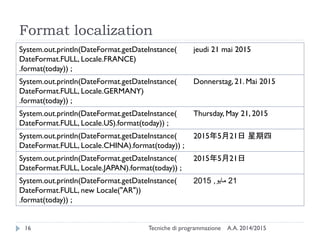
System.out.println(DateFormat.getDateInstance(
DateFormat.FULL, Locale.FRANCE)
.format(today)) ;
jeudi 21 mai 2015
System.out.println(DateFormat.getDateInstance(
DateFormat.FULL, Locale.GERMANY)
.format(today)) ;
Donnerstag, 21. Mai 2015
System.out.println(DateFormat.getDateInstance(
DateFormat.FULL, Locale.US).format(today)) ;
Thursday, May 21, 2015
System.out.println(DateFormat.getDateInstance(
DateFormat.FULL, Locale.CHINA).format(today)) ;
2015年5月21日 星期四
System.out.println(DateFormat.getDateInstance(
DateFormat.FULL, Locale.JAPAN).format(today)) ;
2015年5月21日
System.out.println(DateFormat.getDateInstance(
DateFormat.FULL, new Locale("AR"))
.format(today)) ;
21‫مايو‬,2015
Custom formats
A.A. 2014/2015Tecniche di programmazione17
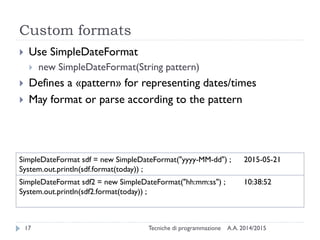
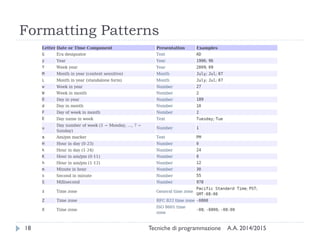
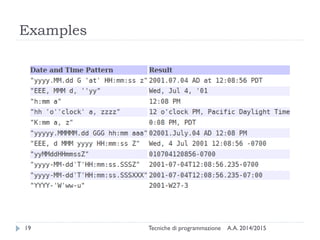
 Use SimpleDateFormat
 new SimpleDateFormat(String pattern)
 Defines a «pattern» for representing dates/times
 May format or parse according to the pattern
SimpleDateFormat sdf = new SimpleDateFormat("yyyy-MM-dd") ;
System.out.println(sdf.format(today)) ;
2015-05-21
SimpleDateFormat sdf2 = new SimpleDateFormat("hh:mm:ss") ;
System.out.println(sdf2.format(today)) ;
10:38:52
Formatting Patterns
A.A. 2014/2015Tecniche di programmazione18
Examples
A.A. 2014/2015Tecniche di programmazione19
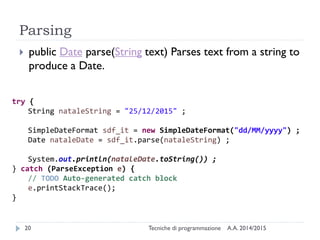
Parsing
A.A. 2014/2015Tecniche di programmazione20
 public Date parse(String text) Parses text from a string to
produce a Date.
try {
String nataleString = "25/12/2015" ;
SimpleDateFormat sdf_it = new SimpleDateFormat("dd/MM/yyyy") ;
Date nataleDate = sdf_it.parse(nataleString) ;
System.out.println(nataleDate.toString()) ;
} catch (ParseException e) {
// TODO Auto-generated catch block
e.printStackTrace();
}
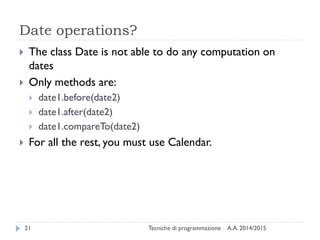
Date operations?
A.A. 2014/2015Tecniche di programmazione21
 The class Date is not able to do any computation on
dates
 Only methods are:
 date1.before(date2)
 date1.after(date2)
 date1.compareTo(date2)
 For all the rest, you must use Calendar.
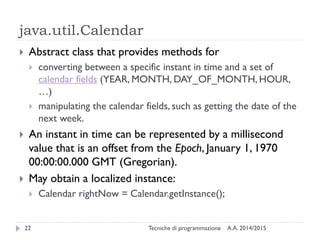
java.util.Calendar
A.A. 2014/2015Tecniche di programmazione22
 Abstract class that provides methods for
 converting between a specific instant in time and a set of
calendar fields (YEAR, MONTH, DAY_OF_MONTH, HOUR,
…)
 manipulating the calendar fields, such as getting the date of the
next week.
 An instant in time can be represented by a millisecond
value that is an offset from the Epoch, January 1, 1970
00:00:00.000 GMT (Gregorian).
 May obtain a localized instance:
 Calendar rightNow = Calendar.getInstance();
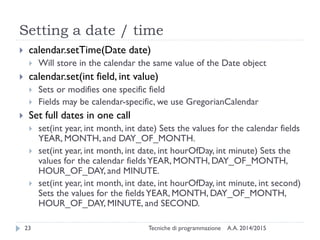
Setting a date / time
A.A. 2014/2015Tecniche di programmazione23
 calendar.setTime(Date date)
 Will store in the calendar the same value of the Date object
 calendar.set(int field, int value)
 Sets or modifies one specific field
 Fields may be calendar-specific, we use GregorianCalendar
 Set full dates in one call
 set(int year, int month, int date) Sets the values for the calendar fields
YEAR, MONTH, and DAY_OF_MONTH.
 set(int year, int month, int date, int hourOfDay, int minute) Sets the
values for the calendar fieldsYEAR, MONTH, DAY_OF_MONTH,
HOUR_OF_DAY, and MINUTE.
 set(int year, int month, int date, int hourOfDay, int minute, int second)
Sets the values for the fieldsYEAR, MONTH, DAY_OF_MONTH,
HOUR_OF_DAY, MINUTE, and SECOND.
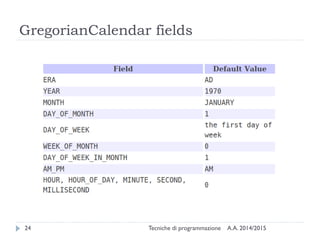
GregorianCalendar fields
A.A. 2014/2015Tecniche di programmazione24
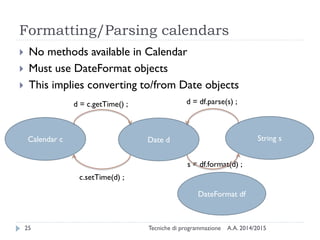
Formatting/Parsing calendars
A.A. 2014/2015Tecniche di programmazione25
 No methods available in Calendar
 Must use DateFormat objects
 This implies converting to/from Date objects
Calendar c Date d
DateFormat df
c.setTime(d) ;
d = c.getTime() ;
s = df.format(d) ;
String s
d = df.parse(s) ;
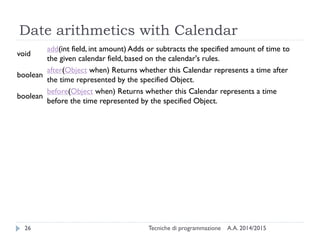
Date arithmetics with Calendar
A.A. 2014/2015Tecniche di programmazione26
void
add(int field, int amount) Adds or subtracts the specified amount of time to
the given calendar field, based on the calendar's rules.
boolean
after(Object when) Returns whether this Calendar represents a time after
the time represented by the specified Object.
boolean
before(Object when) Returns whether this Calendar represents a time
before the time represented by the specified Object.
The new java.time package
Dates and Times in Java
Good introductions
A.A. 2014/2015Tecniche di programmazione28
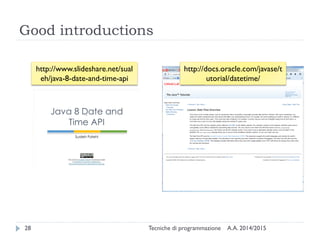
http://www.slideshare.net/sual
eh/java-8-date-and-time-api
http://docs.oracle.com/javase/t
utorial/datetime/
Main principles
A.A. 2014/2015Tecniche di programmazione29
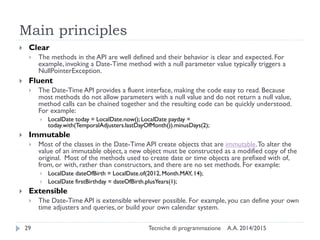
 Clear
 The methods in the API are well defined and their behavior is clear and expected. For
example, invoking a Date-Time method with a null parameter value typically triggers a
NullPointerException.
 Fluent
 The Date-Time API provides a fluent interface, making the code easy to read. Because
most methods do not allow parameters with a null value and do not return a null value,
method calls can be chained together and the resulting code can be quickly understood.
For example:
 LocalDate today = LocalDate.now(); LocalDate payday =
today.with(TemporalAdjusters.lastDayOfMonth()).minusDays(2);
 Immutable
 Most of the classes in the Date-Time API create objects that are immutable.To alter the
value of an immutable object, a new object must be constructed as a modified copy of the
original. Most of the methods used to create date or time objects are prefixed with of,
from, or with, rather than constructors, and there are no set methods. For example:
 LocalDate dateOfBirth = LocalDate.of(2012, Month.MAY,14);
 LocalDate firstBirthday = dateOfBirth.plusYears(1);
 Extensible
 The Date-Time API is extensible wherever possible. For example, you can define your own
time adjusters and queries, or build your own calendar system.
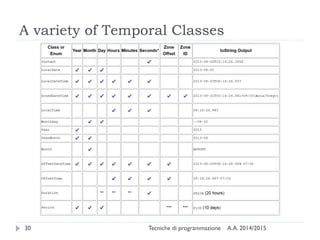
A variety of Temporal Classes
A.A. 2014/2015Tecniche di programmazione30
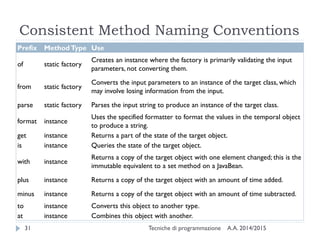
Consistent Method Naming Conventions
A.A. 2014/2015Tecniche di programmazione31
Prefix MethodType Use
of static factory
Creates an instance where the factory is primarily validating the input
parameters, not converting them.
from static factory
Converts the input parameters to an instance of the target class, which
may involve losing information from the input.
parse static factory Parses the input string to produce an instance of the target class.
format instance
Uses the specified formatter to format the values in the temporal object
to produce a string.
get instance Returns a part of the state of the target object.
is instance Queries the state of the target object.
with instance
Returns a copy of the target object with one element changed; this is the
immutable equivalent to a set method on a JavaBean.
plus instance Returns a copy of the target object with an amount of time added.
minus instance Returns a copy of the target object with an amount of time subtracted.
to instance Converts this object to another type.
at instance Combines this object with another.
Examples
A.A. 2014/2015Tecniche di programmazione32
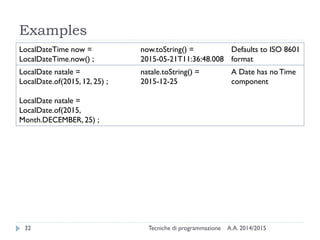
LocalDateTime now =
LocalDateTime.now() ;
now.toString() =
2015-05-21T11:36:48.008
Defaults to ISO 8601
format
LocalDate natale =
LocalDate.of(2015, 12, 25) ;
LocalDate natale =
LocalDate.of(2015,
Month.DECEMBER, 25) ;
natale.toString() =
2015-12-25
A Date has noTime
component
Accessing fields
A.A. 2014/2015Tecniche di programmazione33
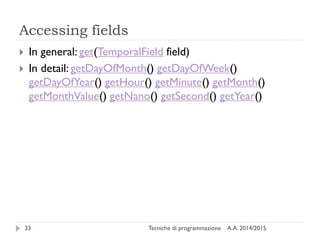
 In general: get(TemporalField field)
 In detail:
 getDayOfMonth()
 getDayOfWeek()
 getDayOfYear()
 getHour()
 getMinute()
 getMonth()
 getMonthValue()
 getNano()
 getSecond()
 getYear()
Machine time
A.A. 2014/2015Tecniche di programmazione34
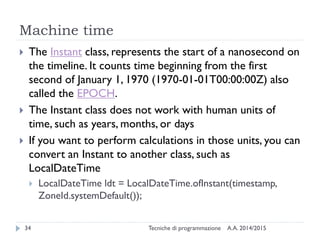
 The Instant class, represents the start of a nanosecond
on the timeline. It counts time beginning from the first
second of January 1, 1970 (1970-01-01T00:00:00Z) - the
Epoch.
 The Instant class does not work with human units of
time, such as years, months, or days
 If you want to perform calculations in those units, you can
convert an Instant to another class, such as
LocalDateTime
 LocalDateTime ldt =
LocalDateTime.ofInstant(timestamp,
ZoneId.systemDefault());
Parsing and Formatting
A.A. 2014/2015Tecniche di programmazione35
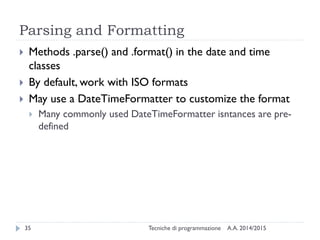
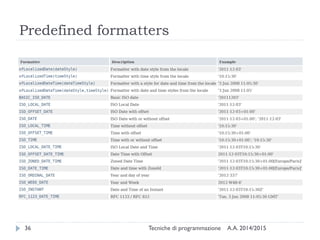
 Methods .parse() and .format() in all date and time
classes
 By default, work with ISO formats
 May use a DateTimeFormatter to customize the
format
 Many commonly used DateTimeFormatter isntances are
pre-defined
Predefined formatters
A.A. 2014/2015Tecniche di programmazione36
Predefined formatters
A.A. 2014/2015Tecniche di programmazione37
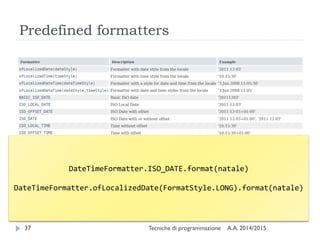
DateTimeFormatter.ISO_DATE.format(natale)
DateTimeFormatter.ofLocalizedDate(FormatStyle.LONG).format(natale)
Custom formatters
A.A. 2014/2015Tecniche di programmazione38
Custom formatters
A.A. 2014/2015Tecniche di programmazione39
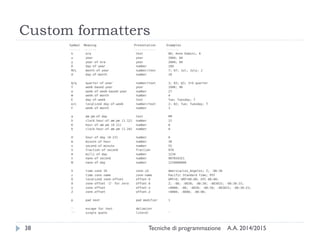
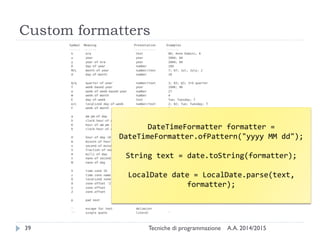
DateTimeFormatter formatter =
DateTimeFormatter.ofPattern("yyyy MM dd");
String text = date.toString(formatter);
LocalDate date = LocalDate.parse(text,
formatter);
Date/Time arithmetics
A.A. 2014/2015Tecniche di programmazione40
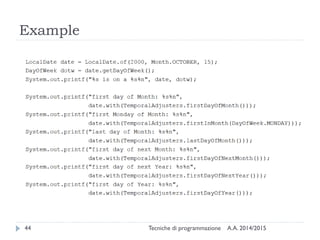
 The date and time classes already contain basic
operations for adding/subtracting/comparing
 For more complex operations, you may use the
TemporalAdjuster classes, as a parameter of the
.with() method of date/time classes
 Many predefinted TemporalAdjuster classes already defined
as static instances of TemporalAdjusters
Arithmetic in LocalDateTime
A.A. 2014/2015Tecniche di programmazione41
 isAfter(other) isBefore(other)
isEqual(other)
 minus(long amountToSubtract, TemporalUnit
unit) minus(TemporalAmount
amountToSubtract)
 minusDays(long days) minusHours(long
hours) minusMinutes(long minutes)
minusMonths(long months) minusNanos(long
nanos) minusSeconds(long seconds)
minusWeeks(long weeks) minusYears(long
years)
 Same with plusXXX()
Computing differences
A.A. 2014/2015Tecniche di programmazione42
 With LocalDate objects
 until(Temporal endExclusive, TemporalUnit
unit)
 Calculates the amount of time until another date-time in terms
of the specified unit.
 With Instants and Duration.beteween
 Instant t1, t2;
 long ns = Duration.between(t1, t2).toNanos();
 With Dates and Period.between
 LocalDate today = LocalDate.now();
 LocalDate birthday = LocalDate.of(1960,
Month.JANUARY, 1);
 Period p = Period.between(birthday, today);
Temporal Adjusters
A.A. 2014/2015Tecniche di programmazione43
 dayOfWeekInMonth(int ordinal, DayOfWeek dayOfWeek) a new date in the same month with the ordinal
day-of-week
 firstDayOfMonth() a new date set to the first day of the current month
 firstDayOfNextMonth() a new date set to the first day of the next month
 firstDayOfNextYear() a new date set to the first day of the next year.
 firstDayOfYear() a new date set to the first day of the current year.
 firstInMonth(DayOfWeek dayOfWeek) a new date in the same month with the first matching day-of-week
 lastDayOfMonth() a new date set to the last day of the current month
 lastDayOfYear() a new date set to the last day of the current year
 lastInMonth(DayOfWeek dayOfWeek) a new date in the same month with the last matching day-of-week.
 next(DayOfWeek dayOfWeek) adjusts the date to the first occurrence of the specified day-of-week after
the date being adjusted
 nextOrSame(DayOfWeek dayOfWeek) adjusts the date to the first occurrence of the specified day-of-week
after the date being adjusted unless it is already on that day in which case the same object is returned.
 previous(DayOfWeek dayOfWeek) adjusts the date to the first occurrence of the specified day-of-week
before the date being adjusted
 previousOrSame(DayOfWeek dayOfWeek) adjusts the date to the first occurrence of the specified day-of-
week before the date being adjusted unless it is already on that day in which case the same object is
returned
Example
A.A. 2014/2015Tecniche di programmazione44
Compatibility JDK7-JDK8
A.A. 2014/2015Tecniche di programmazione45
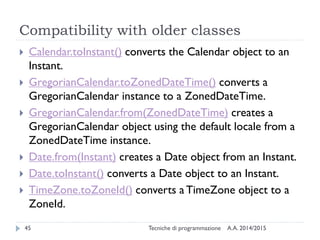
 Calendar.toInstant() converts the Calendar object to an
Instant.
 GregorianCalendar.toZonedDateTime() converts a
GregorianCalendar instance to a ZonedDateTime.
 GregorianCalendar.from(ZonedDateTime) creates a
GregorianCalendar object using the default locale from a
ZonedDateTime instance.
 Date.from(Instant) creates a Date object from an Instant.
 Date.toInstant() converts a Date object to an Instant.
 TimeZone.toZoneId() converts a TimeZone object to a
ZoneId.
Summary
A.A. 2014/2015Tecniche di programmazione46
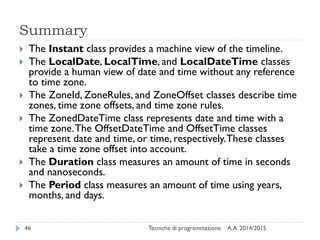
 The Instant class provides a machine view of the timeline.
 The LocalDate, LocalTime, and LocalDateTime classes
provide a human view of date and time without any reference
to time zone.
 The ZoneId, ZoneRules, and ZoneOffset classes describe time
zones, time zone offsets, and time zone rules.
 The ZonedDateTime class represents date and time with a
time zone.The OffsetDateTime and OffsetTime classes
represent date and time, or time, respectively.These classes
take a time zone offset into account.
 The Duration class measures an amount of time in seconds
and nanoseconds.
 The Period class measures an amount of time using years,
months, and days.
Dealing with SQL dates
Dates and Times in Java
Adding SQL into the picture
A.A. 2014/2015Tecniche di programmazione48
 How are dates and times represented in standard SQL?
 How are dates and times implemented in MySQL?
 Differences, incompatibilities
 How are dates and times transferred over JDBC?
“Standard” SQL
A.A. 2014/2015Tecniche di programmazione49
 DATE: for date values (e.g. 2011-05-03)
 TIME: for time values (e.g. 15:51:36).The granularity of
the time value is usually a tick (100 nanoseconds).
 TIMESTAMP:This is a DATE and a TIME put together in
one variable (e.g. 2011-05-03 15:51:36).
 TIME WITH TIME ZONE or TIMETZ: the same as TIME,
but including details about the time zone in question.
 TIMESTAMP WITH TIME ZONE or TIMESTAMPTZ: the
same as TIMESTAMP, but including details about the time
zone in question.
http://en.wikipedia.org/wiki/SQL#Date_and_time
MySQL
A.A. 2014/2015Tecniche di programmazione50
 DATE: values with a date part but no time part, in 'YYYY-MM-
DD' format. Supported range '1000-01-01' to '9999-12-31'.
 DATETIME: values that contain both date and time parts, in
'YYYY-MM-DD HH:MM:SS' format. Supported range is '1000-
01-01 00:00:00' to '9999-12-31 23:59:59'.
 TIMESTAMP: values that contain both date and time parts.
Range of '1970-01-01 00:00:01' UTC to '2038-01-19
03:14:07' UTC. Internally represented as Unix milliseconds
 TIMESTAMP and DATETIME offer automatic initialization and
updating to the current date and time:
 Non-standard DEFAULT CURRENT_TIMESTAMP column attribute
MySQL
A.A. 2014/2015Tecniche di programmazione51
 TIME: values in 'HH:MM:SS' format (or 'HHH:MM:SS').
Values may range from '-838:59:59' to '838:59:59'.
May represent the hour or the day, or an elapsed time
interval (even >24hr)
 YEAR: a 1-byte type used to represent year values. It can
be declared as YEAR or YEAR(4) and has a display width
of four characters.
 Year values in the range 00-69 are converted to 2000-2069.
 Year values in the range 70-99 are converted to 1970-1999.
JDBC (MySQL Connector/J)
A.A. 2014/2015Tecniche di programmazione52
 Supported SQL types are enumerated in java.sql.Types
 http://docs.oracle.com/javase/8/docs/api/java/sql/Types.html
 Represented in java as classes in java.sql
 java.sql.Date (subclass of java.util.Date)
 the millisecond values wrapped by a java.sql.Date instance must
be 'normalized' by setting the hours, minutes, seconds, and
milliseconds to zero
 java.sql.Time (subclass of java.util.Date)
 The date components should be set to the "zero epoch" value of
January 1, 1970 and should not be accessed.
 java.sql.Timestamp (subclass of java.util.Date)
 Supports factional seconds.A composite of a java.util.Date and a
separate nanoseconds value.
MySQL to Java mappings
A.A. 2014/2015Tecniche di programmazione53
MySQLType
Name
Return
value of
GetColumn
ClassName
Returned as Java Class
DATE DATE java.sql.Date
DATETIME DATETIME java.sql.Timestamp
TIMESTAMP[(M)] TIMESTAMP java.sql.Timestamp
TIME TIME java.sql.Time
YEAR[(2|4)] YEAR
If yearIsDateType configuration property is
set to false, then the returned object type is
java.sql.Short.
If set to true (the default), then the returned
object is of type java.sql.Date with the date
set to January 1st, at midnight.
http://dev.mysql.com/doc/connector-j/en/connector-j-reference-type-conversions.html
From SQL to Java 8
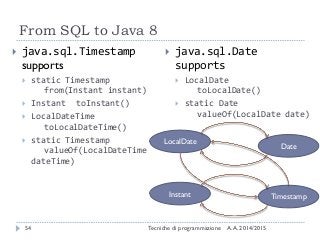
A.A. 2014/2015Tecniche di programmazione54
 java.sql.Timestamp
supports
 static Timestamp
from(Instant instant)
 Instant toInstant()
 LocalDateTime
toLocalDateTime()
 static Timestamp
valueOf(LocalDateTime
dateTime)
 java.sql.Date
supports
 LocalDate
toLocalDate()
 static Date
valueOf(LocalDate date)
LocalDate
Instant
Date
Timestamp
Resources
A.A. 2014/2015Tecniche di programmazione55
 JDK8 java.time
 Official tutorial
http://docs.oracle.com/javase/tutorial/datetime/TOC.html
 JavaDoc
https://docs.oracle.com/javase/8/docs/api/java/time/package-
summary.html
 MySql Date and times
 http://dev.mysql.com/doc/refman/5.7/en/date-and-time-
types.html
 MySQL Connector/J
 http://dev.mysql.com/doc/connector-j/en/index.html
 Comparison of different SQL implementations
 http://troels.arvin.dk/db/rdbms/
Licenza d’uso
A.A. 2014/2015Tecniche di programmazione56
 Queste diapositive sono distribuite con licenza Creative Commons
“Attribuzione - Non commerciale - Condividi allo stesso modo (CC
BY-NC-SA)”
 Sei libero:
 di riprodurre, distribuire, comunicare al pubblico, esporre in pubblico,
rappresentare, eseguire e recitare quest'opera
 di modificare quest'opera
 Alle seguenti condizioni:
 Attribuzione — Devi attribuire la paternità dell'opera agli autori
originali e in modo tale da non suggerire che essi avallino te o il modo in
cui tu usi l'opera.
 Non commerciale — Non puoi usare quest'opera per fini
commerciali.
 Condividi allo stesso modo — Se alteri o trasformi quest'opera, o se
la usi per crearne un'altra, puoi distribuire l'opera risultante solo con una
licenza identica o equivalente a questa.
 http://creativecommons.org/licenses/by-nc-sa/3.0/

Dates and Times in Java 7 and Java 8

  • 1.
    Dates and Timesin Java Tecniche di Programmazione – A.A. 2014/2015
  • 2.
    Summary A.A. 2014/2015Tecniche diprogrammazione2  Libraries and History  The “old” Date/Calendar classes  The new (≥Java8) java.time package  Basic concepts  Main classes  Date operations  Dealing with SQL dates
  • 3.
    Libraries and History Datesand Times in Java
  • 4.
    A common problem A.A.2014/2015Tecniche di programmazione4  Most software programs need to deal with dates and/or times  The human calendar system is extremely complex  Uneven months, Leap years, Leap seconds  Time zones, Daylight savings time  Localized representations  Time instants vs. time intervals vs. recurring instants  Different calendar systems  Available libraries, in all languages, are often over- simplified or over-engineered
  • 5.
    Two ways atrepresenting time A.A. 2014/2015Tecniche di programmazione5  Machine time  A given number of seconds (ms, ns) measured starting from a known reference point  Fixed reference (Epoch): absolute time  Variable reference: time intervals  Human time  The passing of time, as we humans measure it  Dates: day, month, year, week, weekday, century, …  Times: hours, minutes, seconds, ms, …  Takes into account local culture  Gregorian Calendar, localization, time zones, DST
  • 6.
    What we wantto represent A.A. 2014/2015Tecniche di programmazione6  Exact time instants: Now.The moment of moon landing.  Days (without times):The date I was born.The discovery of Americas.  Times (without dates): Office hours are 9-17.  Recurring dates:Wedding anniversary. Christmas day. (date without year)  Date intervals: One week. Seven Days. 30 working days.  Relative dates: nextThursday. By the end of next month.  …
  • 7.
    Basic operations A.A. 2014/2015Tecnichedi programmazione7  Parsing: convert a string into a date/time object  Formatting: covert a date/time object into a string  Building: create a date/time object starting from its components  Analyzing: extracting date/time components from an object  Arithmetic: sum or subtract a quantity from a date/time; compute the difference between two dates/times; equality or majority comparing
  • 8.
    In Java (<=7) A.A.2014/2015Tecniche di programmazione8  java.util.Date (and related)  Since the first version of Java (JDK 1.0)  Oversimplified, incomplete  Most of it was deprecated in JDK 1.1  But still alive today  java.util.Calendar (and related)  Code donated by IBM to Sun  Supports nearly all time and date details  Overengineered, complex  Unexpected behaviors  Cannot completely replace Date (need to convert back&forth)
  • 9.
    In Java (>=8) A.A.2014/2015Tecniche di programmazione9  New java.time package  Inspired by the «JodaTime» library  Cleaner structure, easier usage  Optimized on common use cases  While supporting the more complex ones  Explicit distinction between machine time and human time
  • 10.
    The “old” Date/Calendarclasses Dates and Times in Java
  • 11.
    java.util.Date A.A. 2014/2015Tecniche diprogrammazione11  The Date object is really just a wrapper around a long integer  The number of milliseconds since January 1, 1970.  It represents a date and a time (the name is wrong!)  Works in UTC time, but not prefectly (leap seconds)  Most methods are deprecated, now, in favor of Calendar or DataFormatter objects
  • 12.
    Date constructors A.A. 2014/2015Tecnichedi programmazione12  Date() Allocates a Date object and initializes it so that it represents the time at which it was allocated, measured to the nearest millisecond.  Date(long date) Allocates a Date object and initializes it to represent the specified number of milliseconds since the standard base time known as "the epoch", namely January 1, 1970, 00:00:00 GMT.
  • 13.
    Date methods (non-Deprecated) A.A.2014/2015Tecniche di programmazione13 boolean after(Date when) Tests if this date is after the specified date. boolean before(Date when) Tests if this date is before the specified date. long getTime() Returns the number of milliseconds since January 1, 1970, 00:00:00 GMT represented by this Date object. void setTime(long time) Sets this Date object to represent a point in time that is time milliseconds after January 1, 1970 00:00:00 GMT. String toString() Converts this Date object to a String of the form: dow mon dd hh:mm:ss zzz yyyy (example:Thu May 21 10:07:28 CEST 2015) boolean equals(Object obj) Compares two dates for equality. int hashCode() Returns a hash code value for this object. Object clone() Return a copy of this object. int compareTo(Date anotherDate) Compares two Dates for ordering.
  • 14.
    java.text.DateFormat A.A. 2014/2015Tecniche diprogrammazione14  Abstract class for date/time formatting subclasses which formats and parses dates or time in a language- independent manner  Subclasses: SimpleDateFormat  allows for formatting (i.e., date → text), parsing (text → date), and normalization  The formatting styles include FULL, LONG, MEDIUM, and SHORT  A formatter is generated by a .getInstance static factory method  DateFormat.getDateInstance()  DateFormat.getTimeInstance()  DateFormat.getDateTimeInstance()
  • 15.
    Examples A.A. 2014/2015Tecniche diprogrammazione15 Date today = new Date() ; System.out.println(today.toString()) ; Thu May 21 10:14:33 CEST 2015 DateFormat format = DateFormat.getDateInstance() ; System.out.println(format.format(today)) ; 21-mag-2015 System.out.println(DateFormat.getDateInstance( DateFormat.FULL).format(today)) ; giovedì 21 maggio 2015 System.out.println(DateFormat.getDateInstance( DateFormat.LONG).format(today)) ; 21 maggio 2015 System.out.println(DateFormat.getDateInstance( DateFormat.MEDIUM).format(today)) ; 21-mag-2015 System.out.println(DateFormat.getDateInstance( DateFormat.SHORT).format(today)) ; 21/05/15
  • 16.
    Format localization A.A. 2014/2015Tecnichedi programmazione16 System.out.println(DateFormat.getDateInstance( DateFormat.FULL, Locale.FRANCE) .format(today)) ; jeudi 21 mai 2015 System.out.println(DateFormat.getDateInstance( DateFormat.FULL, Locale.GERMANY) .format(today)) ; Donnerstag, 21. Mai 2015 System.out.println(DateFormat.getDateInstance( DateFormat.FULL, Locale.US).format(today)) ; Thursday, May 21, 2015 System.out.println(DateFormat.getDateInstance( DateFormat.FULL, Locale.CHINA).format(today)) ; 2015年5月21日 星期四 System.out.println(DateFormat.getDateInstance( DateFormat.FULL, Locale.JAPAN).format(today)) ; 2015年5月21日 System.out.println(DateFormat.getDateInstance( DateFormat.FULL, new Locale("AR")) .format(today)) ; 21‫مايو‬,2015
  • 17.
    Custom formats A.A. 2014/2015Tecnichedi programmazione17  Use SimpleDateFormat  new SimpleDateFormat(String pattern)  Defines a «pattern» for representing dates/times  May format or parse according to the pattern SimpleDateFormat sdf = new SimpleDateFormat("yyyy-MM-dd") ; System.out.println(sdf.format(today)) ; 2015-05-21 SimpleDateFormat sdf2 = new SimpleDateFormat("hh:mm:ss") ; System.out.println(sdf2.format(today)) ; 10:38:52
  • 18.
  • 19.
  • 20.
    Parsing A.A. 2014/2015Tecniche diprogrammazione20  public Date parse(String text) Parses text from a string to produce a Date. try { String nataleString = "25/12/2015" ; SimpleDateFormat sdf_it = new SimpleDateFormat("dd/MM/yyyy") ; Date nataleDate = sdf_it.parse(nataleString) ; System.out.println(nataleDate.toString()) ; } catch (ParseException e) { // TODO Auto-generated catch block e.printStackTrace(); }
  • 21.
    Date operations? A.A. 2014/2015Tecnichedi programmazione21  The class Date is not able to do any computation on dates  Only methods are:  date1.before(date2)  date1.after(date2)  date1.compareTo(date2)  For all the rest, you must use Calendar.
  • 22.
    java.util.Calendar A.A. 2014/2015Tecniche diprogrammazione22  Abstract class that provides methods for  converting between a specific instant in time and a set of calendar fields (YEAR, MONTH, DAY_OF_MONTH, HOUR, …)  manipulating the calendar fields, such as getting the date of the next week.  An instant in time can be represented by a millisecond value that is an offset from the Epoch, January 1, 1970 00:00:00.000 GMT (Gregorian).  May obtain a localized instance:  Calendar rightNow = Calendar.getInstance();
  • 23.
    Setting a date/ time A.A. 2014/2015Tecniche di programmazione23  calendar.setTime(Date date)  Will store in the calendar the same value of the Date object  calendar.set(int field, int value)  Sets or modifies one specific field  Fields may be calendar-specific, we use GregorianCalendar  Set full dates in one call  set(int year, int month, int date) Sets the values for the calendar fields YEAR, MONTH, and DAY_OF_MONTH.  set(int year, int month, int date, int hourOfDay, int minute) Sets the values for the calendar fieldsYEAR, MONTH, DAY_OF_MONTH, HOUR_OF_DAY, and MINUTE.  set(int year, int month, int date, int hourOfDay, int minute, int second) Sets the values for the fieldsYEAR, MONTH, DAY_OF_MONTH, HOUR_OF_DAY, MINUTE, and SECOND.
  • 24.
  • 25.
    Formatting/Parsing calendars A.A. 2014/2015Tecnichedi programmazione25  No methods available in Calendar  Must use DateFormat objects  This implies converting to/from Date objects Calendar c Date d DateFormat df c.setTime(d) ; d = c.getTime() ; s = df.format(d) ; String s d = df.parse(s) ;
  • 26.
    Date arithmetics withCalendar A.A. 2014/2015Tecniche di programmazione26 void add(int field, int amount) Adds or subtracts the specified amount of time to the given calendar field, based on the calendar's rules. boolean after(Object when) Returns whether this Calendar represents a time after the time represented by the specified Object. boolean before(Object when) Returns whether this Calendar represents a time before the time represented by the specified Object.
  • 27.
    The new java.timepackage Dates and Times in Java
  • 28.
    Good introductions A.A. 2014/2015Tecnichedi programmazione28 http://www.slideshare.net/sual eh/java-8-date-and-time-api http://docs.oracle.com/javase/t utorial/datetime/
  • 29.
    Main principles A.A. 2014/2015Tecnichedi programmazione29  Clear  The methods in the API are well defined and their behavior is clear and expected. For example, invoking a Date-Time method with a null parameter value typically triggers a NullPointerException.  Fluent  The Date-Time API provides a fluent interface, making the code easy to read. Because most methods do not allow parameters with a null value and do not return a null value, method calls can be chained together and the resulting code can be quickly understood. For example:  LocalDate today = LocalDate.now(); LocalDate payday = today.with(TemporalAdjusters.lastDayOfMonth()).minusDays(2);  Immutable  Most of the classes in the Date-Time API create objects that are immutable.To alter the value of an immutable object, a new object must be constructed as a modified copy of the original. Most of the methods used to create date or time objects are prefixed with of, from, or with, rather than constructors, and there are no set methods. For example:  LocalDate dateOfBirth = LocalDate.of(2012, Month.MAY,14);  LocalDate firstBirthday = dateOfBirth.plusYears(1);  Extensible  The Date-Time API is extensible wherever possible. For example, you can define your own time adjusters and queries, or build your own calendar system.
  • 30.
    A variety ofTemporal Classes A.A. 2014/2015Tecniche di programmazione30
  • 31.
    Consistent Method NamingConventions A.A. 2014/2015Tecniche di programmazione31 Prefix MethodType Use of static factory Creates an instance where the factory is primarily validating the input parameters, not converting them. from static factory Converts the input parameters to an instance of the target class, which may involve losing information from the input. parse static factory Parses the input string to produce an instance of the target class. format instance Uses the specified formatter to format the values in the temporal object to produce a string. get instance Returns a part of the state of the target object. is instance Queries the state of the target object. with instance Returns a copy of the target object with one element changed; this is the immutable equivalent to a set method on a JavaBean. plus instance Returns a copy of the target object with an amount of time added. minus instance Returns a copy of the target object with an amount of time subtracted. to instance Converts this object to another type. at instance Combines this object with another.
  • 32.
    Examples A.A. 2014/2015Tecniche diprogrammazione32 LocalDateTime now = LocalDateTime.now() ; now.toString() = 2015-05-21T11:36:48.008 Defaults to ISO 8601 format LocalDate natale = LocalDate.of(2015, 12, 25) ; LocalDate natale = LocalDate.of(2015, Month.DECEMBER, 25) ; natale.toString() = 2015-12-25 A Date has noTime component
  • 33.
    Accessing fields A.A. 2014/2015Tecnichedi programmazione33  In general: get(TemporalField field)  In detail:  getDayOfMonth()  getDayOfWeek()  getDayOfYear()  getHour()  getMinute()  getMonth()  getMonthValue()  getNano()  getSecond()  getYear()
  • 34.
    Machine time A.A. 2014/2015Tecnichedi programmazione34  The Instant class, represents the start of a nanosecond on the timeline. It counts time beginning from the first second of January 1, 1970 (1970-01-01T00:00:00Z) - the Epoch.  The Instant class does not work with human units of time, such as years, months, or days  If you want to perform calculations in those units, you can convert an Instant to another class, such as LocalDateTime  LocalDateTime ldt = LocalDateTime.ofInstant(timestamp, ZoneId.systemDefault());
  • 35.
    Parsing and Formatting A.A.2014/2015Tecniche di programmazione35  Methods .parse() and .format() in all date and time classes  By default, work with ISO formats  May use a DateTimeFormatter to customize the format  Many commonly used DateTimeFormatter isntances are pre-defined
  • 36.
  • 37.
    Predefined formatters A.A. 2014/2015Tecnichedi programmazione37 DateTimeFormatter.ISO_DATE.format(natale) DateTimeFormatter.ofLocalizedDate(FormatStyle.LONG).format(natale)
  • 38.
  • 39.
    Custom formatters A.A. 2014/2015Tecnichedi programmazione39 DateTimeFormatter formatter = DateTimeFormatter.ofPattern("yyyy MM dd"); String text = date.toString(formatter); LocalDate date = LocalDate.parse(text, formatter);
  • 40.
    Date/Time arithmetics A.A. 2014/2015Tecnichedi programmazione40  The date and time classes already contain basic operations for adding/subtracting/comparing  For more complex operations, you may use the TemporalAdjuster classes, as a parameter of the .with() method of date/time classes  Many predefinted TemporalAdjuster classes already defined as static instances of TemporalAdjusters
  • 41.
    Arithmetic in LocalDateTime A.A.2014/2015Tecniche di programmazione41  isAfter(other) isBefore(other) isEqual(other)  minus(long amountToSubtract, TemporalUnit unit) minus(TemporalAmount amountToSubtract)  minusDays(long days) minusHours(long hours) minusMinutes(long minutes) minusMonths(long months) minusNanos(long nanos) minusSeconds(long seconds) minusWeeks(long weeks) minusYears(long years)  Same with plusXXX()
  • 42.
    Computing differences A.A. 2014/2015Tecnichedi programmazione42  With LocalDate objects  until(Temporal endExclusive, TemporalUnit unit)  Calculates the amount of time until another date-time in terms of the specified unit.  With Instants and Duration.beteween  Instant t1, t2;  long ns = Duration.between(t1, t2).toNanos();  With Dates and Period.between  LocalDate today = LocalDate.now();  LocalDate birthday = LocalDate.of(1960, Month.JANUARY, 1);  Period p = Period.between(birthday, today);
  • 43.
    Temporal Adjusters A.A. 2014/2015Tecnichedi programmazione43  dayOfWeekInMonth(int ordinal, DayOfWeek dayOfWeek) a new date in the same month with the ordinal day-of-week  firstDayOfMonth() a new date set to the first day of the current month  firstDayOfNextMonth() a new date set to the first day of the next month  firstDayOfNextYear() a new date set to the first day of the next year.  firstDayOfYear() a new date set to the first day of the current year.  firstInMonth(DayOfWeek dayOfWeek) a new date in the same month with the first matching day-of-week  lastDayOfMonth() a new date set to the last day of the current month  lastDayOfYear() a new date set to the last day of the current year  lastInMonth(DayOfWeek dayOfWeek) a new date in the same month with the last matching day-of-week.  next(DayOfWeek dayOfWeek) adjusts the date to the first occurrence of the specified day-of-week after the date being adjusted  nextOrSame(DayOfWeek dayOfWeek) adjusts the date to the first occurrence of the specified day-of-week after the date being adjusted unless it is already on that day in which case the same object is returned.  previous(DayOfWeek dayOfWeek) adjusts the date to the first occurrence of the specified day-of-week before the date being adjusted  previousOrSame(DayOfWeek dayOfWeek) adjusts the date to the first occurrence of the specified day-of- week before the date being adjusted unless it is already on that day in which case the same object is returned
  • 44.
  • 45.
    Compatibility JDK7-JDK8 A.A. 2014/2015Tecnichedi programmazione45  Calendar.toInstant() converts the Calendar object to an Instant.  GregorianCalendar.toZonedDateTime() converts a GregorianCalendar instance to a ZonedDateTime.  GregorianCalendar.from(ZonedDateTime) creates a GregorianCalendar object using the default locale from a ZonedDateTime instance.  Date.from(Instant) creates a Date object from an Instant.  Date.toInstant() converts a Date object to an Instant.  TimeZone.toZoneId() converts a TimeZone object to a ZoneId.
  • 46.
    Summary A.A. 2014/2015Tecniche diprogrammazione46  The Instant class provides a machine view of the timeline.  The LocalDate, LocalTime, and LocalDateTime classes provide a human view of date and time without any reference to time zone.  The ZoneId, ZoneRules, and ZoneOffset classes describe time zones, time zone offsets, and time zone rules.  The ZonedDateTime class represents date and time with a time zone.The OffsetDateTime and OffsetTime classes represent date and time, or time, respectively.These classes take a time zone offset into account.  The Duration class measures an amount of time in seconds and nanoseconds.  The Period class measures an amount of time using years, months, and days.
  • 47.
    Dealing with SQLdates Dates and Times in Java
  • 48.
    Adding SQL intothe picture A.A. 2014/2015Tecniche di programmazione48  How are dates and times represented in standard SQL?  How are dates and times implemented in MySQL?  Differences, incompatibilities  How are dates and times transferred over JDBC?
  • 49.
    “Standard” SQL A.A. 2014/2015Tecnichedi programmazione49  DATE: for date values (e.g. 2011-05-03)  TIME: for time values (e.g. 15:51:36).The granularity of the time value is usually a tick (100 nanoseconds).  TIMESTAMP:This is a DATE and a TIME put together in one variable (e.g. 2011-05-03 15:51:36).  TIME WITH TIME ZONE or TIMETZ: the same as TIME, but including details about the time zone in question.  TIMESTAMP WITH TIME ZONE or TIMESTAMPTZ: the same as TIMESTAMP, but including details about the time zone in question. http://en.wikipedia.org/wiki/SQL#Date_and_time
  • 50.
    MySQL A.A. 2014/2015Tecniche diprogrammazione50  DATE: values with a date part but no time part, in 'YYYY-MM- DD' format. Supported range '1000-01-01' to '9999-12-31'.  DATETIME: values that contain both date and time parts, in 'YYYY-MM-DD HH:MM:SS' format. Supported range is '1000- 01-01 00:00:00' to '9999-12-31 23:59:59'.  TIMESTAMP: values that contain both date and time parts. Range of '1970-01-01 00:00:01' UTC to '2038-01-19 03:14:07' UTC. Internally represented as Unix milliseconds  TIMESTAMP and DATETIME offer automatic initialization and updating to the current date and time:  Non-standard DEFAULT CURRENT_TIMESTAMP column attribute
  • 51.
    MySQL A.A. 2014/2015Tecniche diprogrammazione51  TIME: values in 'HH:MM:SS' format (or 'HHH:MM:SS'). Values may range from '-838:59:59' to '838:59:59'. May represent the hour or the day, or an elapsed time interval (even >24hr)  YEAR: a 1-byte type used to represent year values. It can be declared as YEAR or YEAR(4) and has a display width of four characters.  Year values in the range 00-69 are converted to 2000-2069.  Year values in the range 70-99 are converted to 1970-1999.
  • 52.
    JDBC (MySQL Connector/J) A.A.2014/2015Tecniche di programmazione52  Supported SQL types are enumerated in java.sql.Types  http://docs.oracle.com/javase/8/docs/api/java/sql/Types.html  Represented in java as classes in java.sql  java.sql.Date (subclass of java.util.Date)  the millisecond values wrapped by a java.sql.Date instance must be 'normalized' by setting the hours, minutes, seconds, and milliseconds to zero  java.sql.Time (subclass of java.util.Date)  The date components should be set to the "zero epoch" value of January 1, 1970 and should not be accessed.  java.sql.Timestamp (subclass of java.util.Date)  Supports factional seconds.A composite of a java.util.Date and a separate nanoseconds value.
  • 53.
    MySQL to Javamappings A.A. 2014/2015Tecniche di programmazione53 MySQLType Name Return value of GetColumn ClassName Returned as Java Class DATE DATE java.sql.Date DATETIME DATETIME java.sql.Timestamp TIMESTAMP[(M)] TIMESTAMP java.sql.Timestamp TIME TIME java.sql.Time YEAR[(2|4)] YEAR If yearIsDateType configuration property is set to false, then the returned object type is java.sql.Short. If set to true (the default), then the returned object is of type java.sql.Date with the date set to January 1st, at midnight. http://dev.mysql.com/doc/connector-j/en/connector-j-reference-type-conversions.html
  • 54.
    From SQL toJava 8 A.A. 2014/2015Tecniche di programmazione54  java.sql.Timestamp supports  static Timestamp from(Instant instant)  Instant toInstant()  LocalDateTime toLocalDateTime()  static Timestamp valueOf(LocalDateTime dateTime)  java.sql.Date supports  LocalDate toLocalDate()  static Date valueOf(LocalDate date) LocalDate Instant Date Timestamp
  • 55.
    Resources A.A. 2014/2015Tecniche diprogrammazione55  JDK8 java.time  Official tutorial http://docs.oracle.com/javase/tutorial/datetime/TOC.html  JavaDoc https://docs.oracle.com/javase/8/docs/api/java/time/package- summary.html  MySql Date and times  http://dev.mysql.com/doc/refman/5.7/en/date-and-time- types.html  MySQL Connector/J  http://dev.mysql.com/doc/connector-j/en/index.html  Comparison of different SQL implementations  http://troels.arvin.dk/db/rdbms/
  • 56.
    Licenza d’uso A.A. 2014/2015Tecnichedi programmazione56  Queste diapositive sono distribuite con licenza Creative Commons “Attribuzione - Non commerciale - Condividi allo stesso modo (CC BY-NC-SA)”  Sei libero:  di riprodurre, distribuire, comunicare al pubblico, esporre in pubblico, rappresentare, eseguire e recitare quest'opera  di modificare quest'opera  Alle seguenti condizioni:  Attribuzione — Devi attribuire la paternità dell'opera agli autori originali e in modo tale da non suggerire che essi avallino te o il modo in cui tu usi l'opera.  Non commerciale — Non puoi usare quest'opera per fini commerciali.  Condividi allo stesso modo — Se alteri o trasformi quest'opera, o se la usi per crearne un'altra, puoi distribuire l'opera risultante solo con una licenza identica o equivalente a questa.  http://creativecommons.org/licenses/by-nc-sa/3.0/