Autonomous Database
Level 100
Sanjay Narvekar
Oracle Cloud Infrastructure
October 2019
© 2019 Oracle
Safe harbor statement
The following is intended to outline our general product direction. It is intended for information
purposes only, and may not be incorporated into any contract. It is not a commitment to deliver
any material, code, or functionality, and should not be relied upon in making purchasing
decisions.
The development, release, timing, and pricing of any features or functionality described for
Oracle’s products may change and remains at the sole discretion of Oracle Corporation.
© 2019 Oracle
Objectives
After completing this lesson, you should be able to:
• Compare Autonomous Database (ADB) with DB System Cloud offerings
in OCI
• Describe the features of Autonomous Data Warehouse Cloud -
Serverless and Autonomous Data Warehouse Cloud - Dedicated,
Autonomous Transaction Processing - Serverless and Autonomous
Transaction Processing – Dedicated
• Describe how to deploy, use and manage ADB
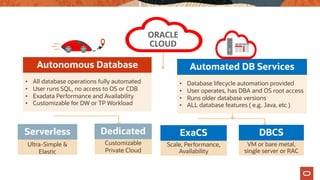
ORACLE
CLOUD
Automated DB Services
Autonomous Database
• All database operations fully automated
• User runs SQL, no access to OS or CDB
• Exadata Performance and Availability
• Customizable for DW or TP Workload
Serverless Dedicated
Ultra-Simple & Customizable
Private Cloud
Elastic
• Database lifecycle automation provided
• User operates, has DBA and OS root access
• Runs older database versions
• ALL database features ( e.g. Java, etc )
ExaCS DBCS
Scale, Performance, VM or bare metal,
Availability single server or RAC
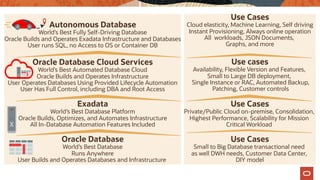
Autonomous Database
World’s Best Fully Self-Driving Database
Oracle Builds and Operates Exadata Infrastructure and Databases
User runs SQL, no Access to OS or Container DB
Oracle Database Cloud Services
World’s Best Automated Database Cloud
Oracle Builds and Operates Infrastructure
User Operates Databases Using Provided Lifecycle Automation
User Has Full Control, including DBA and Root Access
Exadata
World’s Best Database Platform
Oracle Builds, Optimizes, and Automates Infrastructure
All In-Database Automation Features Included
Oracle Database
World’s Best Database
Runs Anywhere
User Builds and Operates Databases and Infrastructure
Use Cases
Cloud elasticity, Machine Learning, Self driving
Instant Provisioning, Always online operation
All workloads, JSON Documents,
Graphs, and more
Use cases
Availability, Flexible Version and Features,
Small to Large DB deployment,
Single Instance or RAC, Automated Backup,
Patching, Customer controls
Use Cases
Private/Public Cloud on-premise, Consolidation,
Highest Performance, Scalability for Mission
Critical Workload
Use Cases
Small to Big Database transactional need
as well DWH needs, Customer Data Center,
DIY model
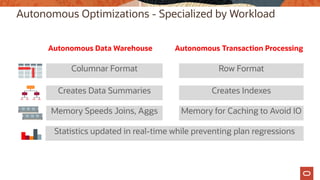
Autonomous Optimizations - Specialized by Workload
Autonomous Data Warehouse Autonomous Transaction Processing
Columnar Format Row Format
Creates Data Summaries Creates Indexes
Memory Speeds Joins, Aggs Memory for Caching to Avoid IO
Statistics updated in real-time while preventing plan regressions
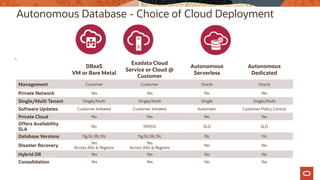
Autonomous Database - Choice of Cloud Deployment
DBaaS Autonomous Autonomous
VM or Bare Metal Serverless Dedicated
Exadata Cloud
Service or Cloud @
Customer
Management Customer Customer Oracle Oracle
Private Network Yes Yes No Yes
Single/Multi Tenant Single/Multi Single/Multi Single Single/Multi
Software Updates Customer Initiated Customer Initiated Automatic Customer Policy Control
Private Cloud No Yes No Yes
Offers Availability
No 99.95% SLO SLO
SLA
Database Versions 11g,12c,18c,19c 11g,12c,18c,19c 18c 19c
Yes Yes
Disaster Recovery No No
Across ADs & Regions Across ADs & Regions
Hybrid DR Yes Yes No No
Consolidation Yes Yes No Yes
Autonomous Database Cloud Service – Deployment Options
Oracle Autonomous Database can be deployed in 2 ways – dedicated and serverless.
Dedicated deployment is a deployment choice that enables you to provision autonomous
databases into their own dedicated Exadata cloud infrastructure, instead of a shared
infrastructure with other tenants.
With serverless deployment, the simplest configuration, you share the resources of an Exadata
cloud infrastructure. You can quickly get started with no minimum commitment, enjoying quick
database provisioning and independent scalability of compute and storage.
Both deployment options are available for Autonomous Transaction Processing and
Autonomous Data Warehouse.
Autonomous Database - Serverless
Autonomous Data Warehouse & Autonomous Transaction Processing
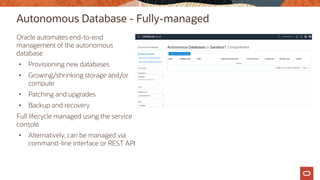
Autonomous Database - Fully-managed
Oracle automates end-to-end
management of the autonomous
database
• Provisioning new databases
• Growing/shrinking storage and/or
compute
• Patching and upgrades
• Backup and recovery
Full lifecycle managed using the service
console
• Alternatively, can be managed via
command-line interface or REST API
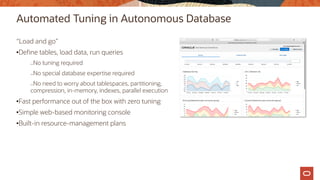
Automated Tuning in Autonomous Database
“Load and go”
•Define tables, load data, run queries
—No tuning required
—No special database expertise required
—No need to worry about tablespaces, partitioning,
compression, in-memory, indexes, parallel execution
•Fast performance out of the box with zero tuning
•Simple web-based monitoring console
•Built-in resource-management plans
Autonomous Database – Fully-elastic
Size the database to the exact compute and storage required
• Not constrained by fixed building blocks, no predefined shapes
Scale the database on demand
• Independently scale compute or storage
• Resizing occurs instantly, fully online
Shut off idle compute to save money
• Restart instantly
Auto scaling:
• Enable auto scaling to allow Autonomous Database to use more CPU and IO resources
automatically when the workload requires it.
Full Support of Database Ecosystem
Autonomous Database service supports :
• Existing tools, running on-premises or in the cloud
– Third-party BI tools
– Third-party data-integration tools
– Oracle BI and data-integration tools: BIEE, ODI, etc.
• Oracle cloud services: Analytics Cloud Service, GoldenGate Cloud Service, Integration Cloud
Service, and others
• Connectivity via SQL*Net, JDBC, ODBC
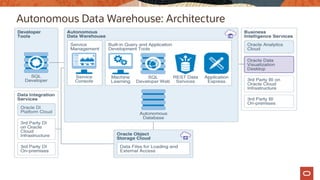
Autonomous Data Warehouse: Architecture
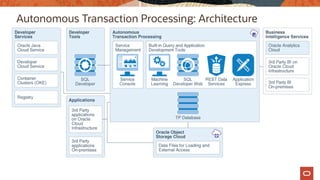
Autonomous Transaction Processing: Architecture
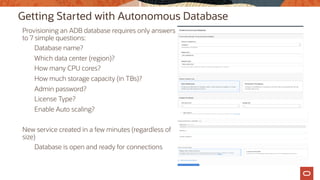
Getting Started with Autonomous Database
Provisioning an ADB database requires only answers
to 7 simple questions:
Database name?
Which data center (region)?
How many CPU cores?
How much storage capacity (in TBs)?
Admin password?
License Type?
Enable Auto scaling?
New service created in a few minutes (regardless of
size)
Database is open and ready for connections
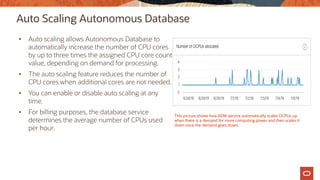
Auto Scaling Autonomous Database
• Auto scaling allows Autonomous Database to
automatically increase the number of CPU cores
by up to three times the assigned CPU core count
value, depending on demand for processing.
• The auto scaling feature reduces the number of
CPU cores when additional cores are not needed.
• You can enable or disable auto scaling at any
time.
• For billing purposes, the database service
determines the average number of CPUs used
per hour.
This picture shows how ADW service automatically scales OCPUs up
when there is a demand for more computing power and then scales it
down once the demand goes down.
Securing Autonomous Database (ADB)
• Stores all data in encrypted format in the Oracle Database. Only authenticated users and
applications can access the data when they connect to the database.
• Database clients use SSL/TLS 1.2 encrypted and mutually authenticated connections. This
ensures that there is no unauthorized access to the ADB Cloud and that communications
between the client and server are fully encrypted and cannot be intercepted or altered.
• Certificate based authentication uses an encrypted key stored in a wallet on both the client
(where the application is running) and the server (where your database service on the ADB
Cloud is running). The key on the client must match the key on the server to make a
connection. A wallet contains a collection of files, including the key and other information
needed to connect to your database service in the ADB Cloud.
• You can specify IP addresses (or CIDR block) allowed to access the ADB using the access
control list. This access control list will block all IP addresses that are not in the list from
accessing the database.
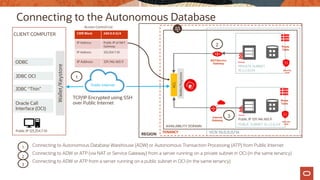
Connecting to the Autonomous Database
Connecting to Autonomous Database Warehouse (ADW) or Autonomous Transaction Processing (ATP) from Public Internet
Connecting to ADW or ATP (via NAT or Service Gateway) from a server running on a private subnet in OCI (in the same tenancy)
Connecting to ADW or ATP from a server running on a public subnet in OCI (in the same tenancy)
AVAILABILITY DOMAIN
VCN 10.0.0.0/16
PUBLIC SUBNET 10.1.3.0/24
PRIVATE SUBNET
10.2.2.0/24
Public	Internet
ACL
Wallet/Keystore
Wallet/Keystore
CLIENT COMPUTER
ODBC
JDBC OCI
JDBC “Thin”
Oracle Call
Interface (OCI)
Internet
Gateway
Route
Table
Route
Table
TCP/IP Encrypted using SSH
over Public Internet
REGION
NAT/Service
Gateway
TENANCY
1
2
3
1
2
3
CIDR Block 240.0.0.0/4
IP Address Public IP of NAT
Gateway
IP Address 123.254.7.10
IP Address 129.146.160.9
Security
Lists
Security
Lists
Public IP 123.254.7.10
Public IP 129.146.160.9
Access Control List
Troubleshooting connectivity issues
• Ensure that the Access Control List for the Autonomous Database (ADB) has the necessary
entries for CIDR Block ranges and IP addresses, as your use case dictates.
• When connecting to ADB from a client computer behind a firewall, the firewall must permit
the use of the port specified in the database connection when connecting to the servers in the
connection. The default port number for Autonomous Data Warehouse is 1522 (find the port
number in the connection string from the tnsnames.ora file in your credentials ZIP file). Your
firewall must allow access to servers within the .oraclecloud.com domain using (TCP) port
1522.
• When connecting to ADB from a server running on a private subnet (on the same OCI tenancy
as the ADB), ensure that you have a service gateway or NAT gateway attached to the VCN.
The route table for the subnet needs to have the appropriate routing rules for the service
gateway or NAT gateway. The security lists for the subnet will need to have the right egress
rules.
• For connections originating from a server running on a public subnet (on the same OCI
tenancy as the ADB), ensure that route table and security lists are appropriately configured.
Scaling Your Database
Scale your database on demand without tedious manual steps
• Independently scale compute or storage
• Resizing occurs instantly, fully online
• Memory, IO bandwidth, concurrency scales linearly with CPU
• Close your database to save money when not used
• Restart instantly
Monitoring
• Service Console based monitoring
§ Simplified monitoring using the web-based service console.
§ Historical and real-time database and CPU utilization monitoring.
§ Real Time SQL Monitoring to monitor running and past SQL statements.
§ CPU allocation chart to view number of CPUs utilized by the service.
• Performance Hub based monitoring
§ Natively integrated in the OCI console and available via a single click from the ADB detail
page
§ Active Session History (ASH) analytics
§ Real Time SQL monitoring
Autonomous Database (ADB) Cloud – Backup and recovery
• Autonomous Database Cloud automatically backs up your database for you. The
retention period for backups is 60 days. You can restore and recover your database to any
point-in-time in this retention period.
• Autonomous Database Cloud automatic backups provide weekly full backups and daily
incremental backups.
• Manual backups for your ADB database is not needed.
• But, you can do manual backups using the cloud console if you want to take backups
before any major changes, for example before ETL processing, to make restore and
recovery faster. The manual backups are put in your Cloud Object Storage bucket. When
you initiate a point-in-time recovery Autonomous Database Cloud decides which backup
to use for faster recovery.
• You can initiate recovery for your Autonomous Database using the cloud console.
Autonomous Database Cloud automatically restores and recovers your database to the
point-in-time you specify.
• Network Access Control Lists (ACL)s are stored in the database with other database
metadata. If the database is restored to a point in time the network ACLs are reverted back
to the list as of that point in time.
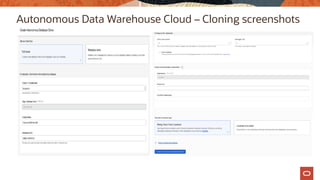
Autonomous Database Cloud – Cloning
• Autonomous Database provides cloning where you can choose to clone either the full
database or only the database metadata.
• Full Clone: creates a new database with the source database’s data and metadata.
• Metadata Clone: creates a new database with the source database’s metadata without the
data.
• When creating a Full Clone database, the minimum storage that you can specify is the
source database’s actual used space rounded to the next TB.
• You can only clone an Autonomous Database instance to the same tenancy and the same
region as the source database.
• During the provisioning for either a Full Clone or a Metadata Clone, the optimizer statistics
are copied from the source database to the cloned database.
• The following applies for optimizer statistics for tables in a cloned database:
§ Full Clone: loads into tables behave the same as loading into a table with statistics
already in place.
§ Metadata Clone: the first load into a table after the clone clears the statistics for that
table and updates the statistics with the new load.
Autonomous Data Warehouse Cloud – Cloning screenshots
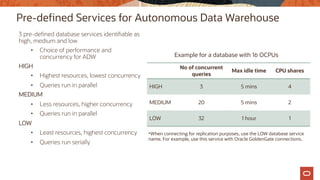
Pre-defined Services for Autonomous Data Warehouse
3 pre-defined database services identifiable as
high, medium and low
• Choice of performance and
concurrency for ADW
HIGH
• Highest resources, lowest concurrency
• Queries run in parallel
MEDIUM
• Less resources, higher concurrency
• Queries run in parallel
LOW
• Least resources, highest concurrency
• Queries run serially
No of concurrent
queries
Max idle time CPU shares
HIGH 3 5 mins 4
MEDIUM 20 5 mins 2
LOW 32 1 hour 1
Example for a database with 16 OCPUs
*When connecting for replication purposes, use the LOW database service
name. For example, use this service with Oracle GoldenGate connections.
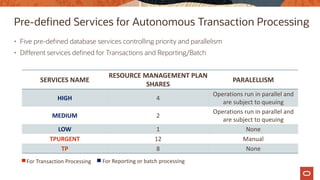
SERVICES	NAME
RESOURCE	MANAGEMENT	PLAN	
SHARES
PARALELLISM
HIGH 4
Operations	run	in	parallel	and	
are	subject	to	queuing
MEDIUM 2
Operations	run	in	parallel	and	
are	subject	to	queuing
LOW 1 None
TPURGENT 12 Manual
TP 8 None
Pre-defined Services for Autonomous Transaction Processing
• Five pre-defined database services controlling priority and parallelism
• Different services defined for Transactions and Reporting/Batch
For	Transaction	Processing For	Reporting	or	batch	processing
Autonomous Database
Demo
Autonomous Database - Dedicated
Autonomous Data Warehouse & Autonomous Transaction Processing
Autonomous Database - Dedicated
• The Autonomous Dedicated database service provides a private database
cloud running on dedicated Exadata Infrastructure in the Public Cloud.
• It has multiple levels of isolation protects you from noisy or hostile
neighbors.
• Customizable operational policies give you control of provisioning, software
updates, availability and density.
Autonomous Database- Dedicated
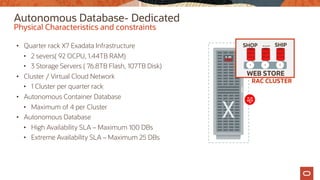
• Quarter rack X7 Exadata Infrastructure
• 2 severs( 92 OCPU, 1.44TB RAM)
• 3 Storage Servers ( 76.8TB Flash, 107TB Disk)
• Cluster / Virtual Cloud Network
• 1 Cluster per quarter rack
• Autonomous Container Database
• Maximum of 4 per Cluster
• Autonomous Database
• High Availability SLA – Maximum 100 DBs
• Extreme Availability SLA – Maximum 25 DBs
Physical Characteristics and constraints
RAC CLUSTER
WEB STORE
SHOP SHIP
….
Autonomous Database- Dedicated
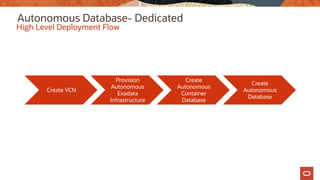
High Level Deployment Flow
Create VCN
Provision
Autonomous
Exadata
Infrastructure
Create
Autonomous
Container
Database
Create
Autonomous
Database
Autonomous Database - Dedicated
• Databases always encrypted
• Reduced attack surface
• Automatic protection of customer data from Oracle operations staff
• Database Vault’s new Operations Control feature
• Oracle automatically applies security updates for the entire stack
• Quarterly, or off-cycle for high-impact security vulnerability
• Customer can separately use Database Vault for their own user data isolation
Security
Summary
You should now be able to
• Compare Autonomous Database (ADB) with DB System Cloud offerings in OCI
• Describe the features of Autonomous Data Warehouse Cloud - Serverless and Autonomous
Data Warehouse Cloud - Dedicated, Autonomous Transaction Processing - Serverless and
Autonomous Transaction Processing – Dedicated
• Describe how to deploy, use and manage ADB
Additional resources
• Autonomous Data Warehouse Service Documentation
https://docs.oracle.com/en/cloud/paas/autonomous-data-warehouse-cloud/
• Autonomous Transaction Processing Documentation
https://docs.oracle.com/en/cloud/paas/atp-cloud/index.html
• Autonomous Data Warehouse Cloud for Experienced Oracle Database Users
https://docs.oracle.com/en/cloud/paas/autonomous-data-warehouse-
cloud/user/experienced-database-users.html - GUID-58EE6599-6DB4-4F8E-816D-
0422377857E5
• Migrating Amazon Redshift to Autonomous Data Warehouse Cloud
https://docs.oracle.com/en/cloud/paas/autonomous-data-warehouse-
cloud/user/migrating.html - GUID-A00E1C78-BCB1-46E9-97FA-DD1B377DF1F2
36 © 2019 Oracle
Oracle Cloud always free tier:
oracle.com/cloud/free/
OCI training and certification:
https://www.oracle.com/cloud/iaas/training/
https://www.oracle.com/cloud/iaas/training/certification.html
OCI hands-on labs:
ocitraining.qloudable.com/provider/oracle
Oracle learning library videos on YouTube:
youtube.com/user/OracleLearning

autonomous-database-100.pdf

  • 1.
    Autonomous Database Level 100 SanjayNarvekar Oracle Cloud Infrastructure October 2019 © 2019 Oracle
  • 2.
    Safe harbor statement Thefollowing is intended to outline our general product direction. It is intended for information purposes only, and may not be incorporated into any contract. It is not a commitment to deliver any material, code, or functionality, and should not be relied upon in making purchasing decisions. The development, release, timing, and pricing of any features or functionality described for Oracle’s products may change and remains at the sole discretion of Oracle Corporation. © 2019 Oracle
  • 3.
    Objectives After completing thislesson, you should be able to: • Compare Autonomous Database (ADB) with DB System Cloud offerings in OCI • Describe the features of Autonomous Data Warehouse Cloud - Serverless and Autonomous Data Warehouse Cloud - Dedicated, Autonomous Transaction Processing - Serverless and Autonomous Transaction Processing – Dedicated • Describe how to deploy, use and manage ADB
  • 4.
    ORACLE CLOUD Automated DB Services AutonomousDatabase • All database operations fully automated • User runs SQL, no access to OS or CDB • Exadata Performance and Availability • Customizable for DW or TP Workload Serverless Dedicated Ultra-Simple & Customizable Private Cloud Elastic • Database lifecycle automation provided • User operates, has DBA and OS root access • Runs older database versions • ALL database features ( e.g. Java, etc ) ExaCS DBCS Scale, Performance, VM or bare metal, Availability single server or RAC
  • 5.
    Autonomous Database World’s BestFully Self-Driving Database Oracle Builds and Operates Exadata Infrastructure and Databases User runs SQL, no Access to OS or Container DB Oracle Database Cloud Services World’s Best Automated Database Cloud Oracle Builds and Operates Infrastructure User Operates Databases Using Provided Lifecycle Automation User Has Full Control, including DBA and Root Access Exadata World’s Best Database Platform Oracle Builds, Optimizes, and Automates Infrastructure All In-Database Automation Features Included Oracle Database World’s Best Database Runs Anywhere User Builds and Operates Databases and Infrastructure Use Cases Cloud elasticity, Machine Learning, Self driving Instant Provisioning, Always online operation All workloads, JSON Documents, Graphs, and more Use cases Availability, Flexible Version and Features, Small to Large DB deployment, Single Instance or RAC, Automated Backup, Patching, Customer controls Use Cases Private/Public Cloud on-premise, Consolidation, Highest Performance, Scalability for Mission Critical Workload Use Cases Small to Big Database transactional need as well DWH needs, Customer Data Center, DIY model
  • 6.
    Autonomous Optimizations -Specialized by Workload Autonomous Data Warehouse Autonomous Transaction Processing Columnar Format Row Format Creates Data Summaries Creates Indexes Memory Speeds Joins, Aggs Memory for Caching to Avoid IO Statistics updated in real-time while preventing plan regressions
  • 7.
    Autonomous Database -Choice of Cloud Deployment DBaaS Autonomous Autonomous VM or Bare Metal Serverless Dedicated Exadata Cloud Service or Cloud @ Customer Management Customer Customer Oracle Oracle Private Network Yes Yes No Yes Single/Multi Tenant Single/Multi Single/Multi Single Single/Multi Software Updates Customer Initiated Customer Initiated Automatic Customer Policy Control Private Cloud No Yes No Yes Offers Availability No 99.95% SLO SLO SLA Database Versions 11g,12c,18c,19c 11g,12c,18c,19c 18c 19c Yes Yes Disaster Recovery No No Across ADs & Regions Across ADs & Regions Hybrid DR Yes Yes No No Consolidation Yes Yes No Yes
  • 8.
    Autonomous Database CloudService – Deployment Options Oracle Autonomous Database can be deployed in 2 ways – dedicated and serverless. Dedicated deployment is a deployment choice that enables you to provision autonomous databases into their own dedicated Exadata cloud infrastructure, instead of a shared infrastructure with other tenants. With serverless deployment, the simplest configuration, you share the resources of an Exadata cloud infrastructure. You can quickly get started with no minimum commitment, enjoying quick database provisioning and independent scalability of compute and storage. Both deployment options are available for Autonomous Transaction Processing and Autonomous Data Warehouse.
  • 9.
    Autonomous Database -Serverless Autonomous Data Warehouse & Autonomous Transaction Processing
  • 10.
    Autonomous Database -Fully-managed Oracle automates end-to-end management of the autonomous database • Provisioning new databases • Growing/shrinking storage and/or compute • Patching and upgrades • Backup and recovery Full lifecycle managed using the service console • Alternatively, can be managed via command-line interface or REST API
  • 11.
    Automated Tuning inAutonomous Database “Load and go” •Define tables, load data, run queries —No tuning required —No special database expertise required —No need to worry about tablespaces, partitioning, compression, in-memory, indexes, parallel execution •Fast performance out of the box with zero tuning •Simple web-based monitoring console •Built-in resource-management plans
  • 12.
    Autonomous Database –Fully-elastic Size the database to the exact compute and storage required • Not constrained by fixed building blocks, no predefined shapes Scale the database on demand • Independently scale compute or storage • Resizing occurs instantly, fully online Shut off idle compute to save money • Restart instantly Auto scaling: • Enable auto scaling to allow Autonomous Database to use more CPU and IO resources automatically when the workload requires it.
  • 13.
    Full Support ofDatabase Ecosystem Autonomous Database service supports : • Existing tools, running on-premises or in the cloud – Third-party BI tools – Third-party data-integration tools – Oracle BI and data-integration tools: BIEE, ODI, etc. • Oracle cloud services: Analytics Cloud Service, GoldenGate Cloud Service, Integration Cloud Service, and others • Connectivity via SQL*Net, JDBC, ODBC
  • 14.
  • 15.
  • 16.
    Getting Started withAutonomous Database Provisioning an ADB database requires only answers to 7 simple questions: Database name? Which data center (region)? How many CPU cores? How much storage capacity (in TBs)? Admin password? License Type? Enable Auto scaling? New service created in a few minutes (regardless of size) Database is open and ready for connections
  • 17.
    Auto Scaling AutonomousDatabase • Auto scaling allows Autonomous Database to automatically increase the number of CPU cores by up to three times the assigned CPU core count value, depending on demand for processing. • The auto scaling feature reduces the number of CPU cores when additional cores are not needed. • You can enable or disable auto scaling at any time. • For billing purposes, the database service determines the average number of CPUs used per hour. This picture shows how ADW service automatically scales OCPUs up when there is a demand for more computing power and then scales it down once the demand goes down.
  • 18.
    Securing Autonomous Database(ADB) • Stores all data in encrypted format in the Oracle Database. Only authenticated users and applications can access the data when they connect to the database. • Database clients use SSL/TLS 1.2 encrypted and mutually authenticated connections. This ensures that there is no unauthorized access to the ADB Cloud and that communications between the client and server are fully encrypted and cannot be intercepted or altered. • Certificate based authentication uses an encrypted key stored in a wallet on both the client (where the application is running) and the server (where your database service on the ADB Cloud is running). The key on the client must match the key on the server to make a connection. A wallet contains a collection of files, including the key and other information needed to connect to your database service in the ADB Cloud. • You can specify IP addresses (or CIDR block) allowed to access the ADB using the access control list. This access control list will block all IP addresses that are not in the list from accessing the database.
  • 19.
    Connecting to theAutonomous Database Connecting to Autonomous Database Warehouse (ADW) or Autonomous Transaction Processing (ATP) from Public Internet Connecting to ADW or ATP (via NAT or Service Gateway) from a server running on a private subnet in OCI (in the same tenancy) Connecting to ADW or ATP from a server running on a public subnet in OCI (in the same tenancy) AVAILABILITY DOMAIN VCN 10.0.0.0/16 PUBLIC SUBNET 10.1.3.0/24 PRIVATE SUBNET 10.2.2.0/24 Public Internet ACL Wallet/Keystore Wallet/Keystore CLIENT COMPUTER ODBC JDBC OCI JDBC “Thin” Oracle Call Interface (OCI) Internet Gateway Route Table Route Table TCP/IP Encrypted using SSH over Public Internet REGION NAT/Service Gateway TENANCY 1 2 3 1 2 3 CIDR Block 240.0.0.0/4 IP Address Public IP of NAT Gateway IP Address 123.254.7.10 IP Address 129.146.160.9 Security Lists Security Lists Public IP 123.254.7.10 Public IP 129.146.160.9 Access Control List
  • 20.
    Troubleshooting connectivity issues •Ensure that the Access Control List for the Autonomous Database (ADB) has the necessary entries for CIDR Block ranges and IP addresses, as your use case dictates. • When connecting to ADB from a client computer behind a firewall, the firewall must permit the use of the port specified in the database connection when connecting to the servers in the connection. The default port number for Autonomous Data Warehouse is 1522 (find the port number in the connection string from the tnsnames.ora file in your credentials ZIP file). Your firewall must allow access to servers within the .oraclecloud.com domain using (TCP) port 1522. • When connecting to ADB from a server running on a private subnet (on the same OCI tenancy as the ADB), ensure that you have a service gateway or NAT gateway attached to the VCN. The route table for the subnet needs to have the appropriate routing rules for the service gateway or NAT gateway. The security lists for the subnet will need to have the right egress rules. • For connections originating from a server running on a public subnet (on the same OCI tenancy as the ADB), ensure that route table and security lists are appropriately configured.
  • 21.
    Scaling Your Database Scaleyour database on demand without tedious manual steps • Independently scale compute or storage • Resizing occurs instantly, fully online • Memory, IO bandwidth, concurrency scales linearly with CPU • Close your database to save money when not used • Restart instantly
  • 22.
    Monitoring • Service Consolebased monitoring § Simplified monitoring using the web-based service console. § Historical and real-time database and CPU utilization monitoring. § Real Time SQL Monitoring to monitor running and past SQL statements. § CPU allocation chart to view number of CPUs utilized by the service. • Performance Hub based monitoring § Natively integrated in the OCI console and available via a single click from the ADB detail page § Active Session History (ASH) analytics § Real Time SQL monitoring
  • 23.
    Autonomous Database (ADB)Cloud – Backup and recovery • Autonomous Database Cloud automatically backs up your database for you. The retention period for backups is 60 days. You can restore and recover your database to any point-in-time in this retention period. • Autonomous Database Cloud automatic backups provide weekly full backups and daily incremental backups. • Manual backups for your ADB database is not needed. • But, you can do manual backups using the cloud console if you want to take backups before any major changes, for example before ETL processing, to make restore and recovery faster. The manual backups are put in your Cloud Object Storage bucket. When you initiate a point-in-time recovery Autonomous Database Cloud decides which backup to use for faster recovery. • You can initiate recovery for your Autonomous Database using the cloud console. Autonomous Database Cloud automatically restores and recovers your database to the point-in-time you specify. • Network Access Control Lists (ACL)s are stored in the database with other database metadata. If the database is restored to a point in time the network ACLs are reverted back to the list as of that point in time.
  • 24.
    Autonomous Database Cloud– Cloning • Autonomous Database provides cloning where you can choose to clone either the full database or only the database metadata. • Full Clone: creates a new database with the source database’s data and metadata. • Metadata Clone: creates a new database with the source database’s metadata without the data. • When creating a Full Clone database, the minimum storage that you can specify is the source database’s actual used space rounded to the next TB. • You can only clone an Autonomous Database instance to the same tenancy and the same region as the source database. • During the provisioning for either a Full Clone or a Metadata Clone, the optimizer statistics are copied from the source database to the cloned database. • The following applies for optimizer statistics for tables in a cloned database: § Full Clone: loads into tables behave the same as loading into a table with statistics already in place. § Metadata Clone: the first load into a table after the clone clears the statistics for that table and updates the statistics with the new load.
  • 25.
    Autonomous Data WarehouseCloud – Cloning screenshots
  • 26.
    Pre-defined Services forAutonomous Data Warehouse 3 pre-defined database services identifiable as high, medium and low • Choice of performance and concurrency for ADW HIGH • Highest resources, lowest concurrency • Queries run in parallel MEDIUM • Less resources, higher concurrency • Queries run in parallel LOW • Least resources, highest concurrency • Queries run serially No of concurrent queries Max idle time CPU shares HIGH 3 5 mins 4 MEDIUM 20 5 mins 2 LOW 32 1 hour 1 Example for a database with 16 OCPUs *When connecting for replication purposes, use the LOW database service name. For example, use this service with Oracle GoldenGate connections.
  • 27.
    SERVICES NAME RESOURCE MANAGEMENT PLAN SHARES PARALELLISM HIGH 4 Operations run in parallel and are subject to queuing MEDIUM 2 Operations run in parallel and are subject to queuing LOW1 None TPURGENT 12 Manual TP 8 None Pre-defined Services for Autonomous Transaction Processing • Five pre-defined database services controlling priority and parallelism • Different services defined for Transactions and Reporting/Batch For Transaction Processing For Reporting or batch processing
  • 28.
  • 29.
    Autonomous Database -Dedicated Autonomous Data Warehouse & Autonomous Transaction Processing
  • 30.
    Autonomous Database -Dedicated • The Autonomous Dedicated database service provides a private database cloud running on dedicated Exadata Infrastructure in the Public Cloud. • It has multiple levels of isolation protects you from noisy or hostile neighbors. • Customizable operational policies give you control of provisioning, software updates, availability and density.
  • 31.
    Autonomous Database- Dedicated •Quarter rack X7 Exadata Infrastructure • 2 severs( 92 OCPU, 1.44TB RAM) • 3 Storage Servers ( 76.8TB Flash, 107TB Disk) • Cluster / Virtual Cloud Network • 1 Cluster per quarter rack • Autonomous Container Database • Maximum of 4 per Cluster • Autonomous Database • High Availability SLA – Maximum 100 DBs • Extreme Availability SLA – Maximum 25 DBs Physical Characteristics and constraints RAC CLUSTER WEB STORE SHOP SHIP ….
  • 32.
    Autonomous Database- Dedicated HighLevel Deployment Flow Create VCN Provision Autonomous Exadata Infrastructure Create Autonomous Container Database Create Autonomous Database
  • 33.
    Autonomous Database -Dedicated • Databases always encrypted • Reduced attack surface • Automatic protection of customer data from Oracle operations staff • Database Vault’s new Operations Control feature • Oracle automatically applies security updates for the entire stack • Quarterly, or off-cycle for high-impact security vulnerability • Customer can separately use Database Vault for their own user data isolation Security
  • 34.
    Summary You should nowbe able to • Compare Autonomous Database (ADB) with DB System Cloud offerings in OCI • Describe the features of Autonomous Data Warehouse Cloud - Serverless and Autonomous Data Warehouse Cloud - Dedicated, Autonomous Transaction Processing - Serverless and Autonomous Transaction Processing – Dedicated • Describe how to deploy, use and manage ADB
  • 35.
    Additional resources • AutonomousData Warehouse Service Documentation https://docs.oracle.com/en/cloud/paas/autonomous-data-warehouse-cloud/ • Autonomous Transaction Processing Documentation https://docs.oracle.com/en/cloud/paas/atp-cloud/index.html • Autonomous Data Warehouse Cloud for Experienced Oracle Database Users https://docs.oracle.com/en/cloud/paas/autonomous-data-warehouse- cloud/user/experienced-database-users.html - GUID-58EE6599-6DB4-4F8E-816D- 0422377857E5 • Migrating Amazon Redshift to Autonomous Data Warehouse Cloud https://docs.oracle.com/en/cloud/paas/autonomous-data-warehouse- cloud/user/migrating.html - GUID-A00E1C78-BCB1-46E9-97FA-DD1B377DF1F2
  • 36.
    36 © 2019Oracle Oracle Cloud always free tier: oracle.com/cloud/free/ OCI training and certification: https://www.oracle.com/cloud/iaas/training/ https://www.oracle.com/cloud/iaas/training/certification.html OCI hands-on labs: ocitraining.qloudable.com/provider/oracle Oracle learning library videos on YouTube: youtube.com/user/OracleLearning