5. DDL Statements of SQL
 Create & Drop View Statements
 Create & Drop Table Statements
 Create & Drop View Statements
 Create & Drop Index Statement
 Alter Table Statement
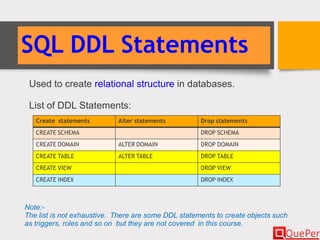
SQL DDL Statements
Used to create relational structure in databases.
List of DDL Statements:
Create statements Alter statements Drop statements
CREATE SCHEMA DROP SCHEMA
CREATE DOMAIN ALTER DOMAIN DROP DOMAIN
CREATE TABLE ALTER TABLE DROP TABLE
CREATE VIEW DROP VIEW
CREATE INDEX DROP INDEX
Note:-
The list is not exhaustive. There are some DDL statements to create objects such
as triggers, roles and so on but they are not covered in this course.
CREATE SCHEMA Statement
CREATE SCHEMA statement creates a schema with the given
name in the current database.
Syntax: CREATE SCHEMA name [ AUTHORIZATION
user-id ]
name: Name of the schema.
user-id: User identifier used to login into the database.
Examples:
CREATE SCHEMA courses;
CREATE SCHEMA payroll AUTHORIZATION jimson;
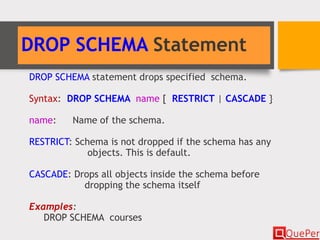
DROP SCHEMA Statement
DROP SCHEMA statement drops specified schema.
Syntax: DROP SCHEMA name [ RESTRICT | CASCADE }
name: Name of the schema.
RESTRICT: Schema is not dropped if the schema has any
objects. This is default.
CASCADE: Drops all objects inside the schema before
dropping the schema itself
Examples:
DROP SCHEMA courses
CREATE TABLE Statement
CREATE TABLE statement creates a relation.
Syntax: CREATE TABLE table-name (
{ column-name data-type [ NOT NULL ] [ UNIQUE ]
[ PRIMARY KEY ] [ DEFAULT default-value ]
[ CHECK (search-condition) ]
} [ , … ]
[ , [ CONSTRAINT pk-cn ] PRIMARY KEY ( pk-column-list ) ]
[ , [ CONSTRAINT uq-cn ] UNIQUE ( uq-columns-list ) ] [ …
]
[ , [ CONSTRAINT fk-cn ] FOREIGN KEY ( rfg-column-list )
REFERENCES rfd-table-name [ ( rfd-column-list ) ]
[ … ]
[ , [ CONSTRAINT ck-cn ] CHECK ( search-condition ) ]
[ … ] )
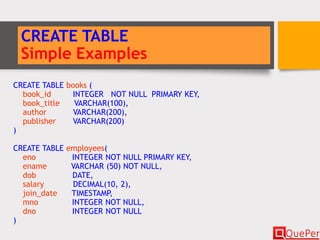
CREATE TABLE
Simple Examples
CREATE TABLE books (
book_id INTEGER NOT NULL PRIMARY KEY,
book_title VARCHAR(100),
author VARCHAR(200),
publisher VARCHAR(200)
)
CREATE TABLE employees(
eno INTEGER NOT NULL PRIMARY KEY,
ename VARCHAR (50) NOT NULL,
dob DATE,
salary DECIMAL(10, 2),
join_date TIMESTAMP,
mno INTEGER NOT NULL,
dno INTEGER NOT NULL
)
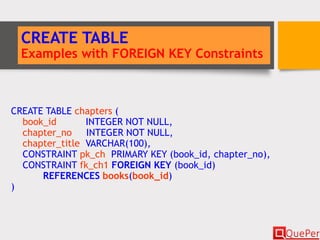
CREATE TABLE
Examples with FOREIGN KEY Constraints
CREATE TABLE chapters (
book_id INTEGER NOT NULL,
chapter_no INTEGER NOT NULL,
chapter_title VARCHAR(100),
CONSTRAINT pk_ch PRIMARY KEY (book_id, chapter_no),
CONSTRAINT fk_ch1 FOREIGN KEY (book_id)
REFERENCES books(book_id)
)
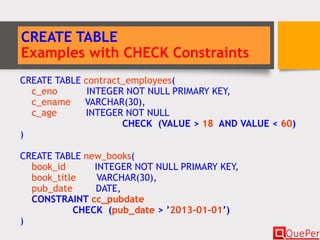
CREATE TABLE
Examples with CHECK Constraints
CREATE TABLE contract_employees(
c_eno INTEGER NOT NULL PRIMARY KEY,
c_ename VARCHAR(30),
c_age INTEGER NOT NULL
CHECK (VALUE > 18 AND VALUE < 60)
)
CREATE TABLE new_books(
book_id INTEGER NOT NULL PRIMARY KEY,
book_title VARCHAR(30),
pub_date DATE,
CONSTRAINT cc_pubdate
CHECK (pub_date > ’2013-01-01’)
)
DROP TABLE Statement
DROP TABLE statement removes the specified table from the
database.
Syntax: DROP TABLE table-name [ RESTRICT | CASCADE ]
Default option is RESTRICT.
Example:
DROP TABLE contract_employees;
CREATE VIEW Statement
CREATE VIEW statement creates a view from one or more
tables..
Syntax: CREATE VIEW view-name [ ( column-list ) ]
AS subselect [ WITH CHECK OPTION ]
subselect: A SELECT statement that provides data for the view.
Example:
CREATE VIEW old_employees (old_eno, old_ename)
AS SELECT eno, ename FROM employees
WHERE join_date < ’2013-01-01’;
DROP VIEW Statement
DROP VIEW statement removes the specified view from the
database.
Syntax: DROP VIEW view-name [ RESTRICT | CASCADE ]
Default option is RESTRICT.
Example:
DROP VIEW old_employees;
CREATE INDEX Statement
CREATE INDEX statement creates an index on the specified
columns of a table.
Syntax: CREATE [ UNIQUE ] INDEX index-name ON
table-name ( {column_name [ ASC | DESC ] }
[, {column_name [ ASC | DESC ] } ] …)
Example:
CREATE INDEX emp_dno_idx ON employees (dno);
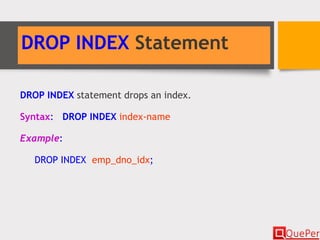
DROP INDEX Statement
DROP INDEX statement drops an index.
Syntax: DROP INDEX index-name
Example:
DROP INDEX emp_dno_idx;
ALTER TABLE Statement
ALTER TABLE statement alters or modifies existing table.
Syntax: ALTER TABLE table-name {
{ ADD [ COLUMN ] column-defiition } |
{ DROP [ COLUMN ] column-name
[ RESTRICT | CASCADE ] } |
{ ALTER [ COLUMN ] column-name
{ SET DEFAULT default-value |
DROP DEFAULT } } |
{ ADD table-constraint-definition } |
{ DROP CONSTRAINT constraint-name
[ RESTRICT | CASCADE }
}
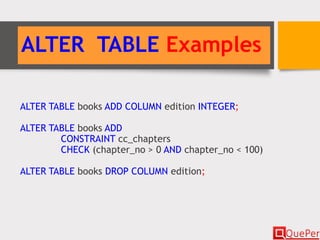
ALTER TABLE Examples
ALTER TABLE books ADD COLUMN edition INTEGER;
ALTER TABLE books ADD
CONSTRAINT cc_chapters
CHECK (chapter_no > 0 AND chapter_no < 100)
ALTER TABLE books DROP COLUMN edition;
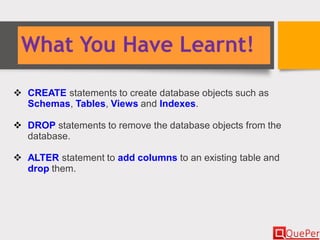
What You Have Learnt!
 CREATE statements to create database objects such as
Schemas, Tables, Views and Indexes.
 DROP statements to remove the database objects from the
database.
 ALTER statement to add columns to an existing table and
drop them.

Database Systems - SQL - DDL Statements (Chapter 3/2)

  • 1.
    5. DDL Statementsof SQL  Create & Drop View Statements  Create & Drop Table Statements  Create & Drop View Statements  Create & Drop Index Statement  Alter Table Statement
  • 2.
    SQL DDL Statements Usedto create relational structure in databases. List of DDL Statements: Create statements Alter statements Drop statements CREATE SCHEMA DROP SCHEMA CREATE DOMAIN ALTER DOMAIN DROP DOMAIN CREATE TABLE ALTER TABLE DROP TABLE CREATE VIEW DROP VIEW CREATE INDEX DROP INDEX Note:- The list is not exhaustive. There are some DDL statements to create objects such as triggers, roles and so on but they are not covered in this course.
  • 3.
    CREATE SCHEMA Statement CREATESCHEMA statement creates a schema with the given name in the current database. Syntax: CREATE SCHEMA name [ AUTHORIZATION user-id ] name: Name of the schema. user-id: User identifier used to login into the database. Examples: CREATE SCHEMA courses; CREATE SCHEMA payroll AUTHORIZATION jimson;
  • 4.
    DROP SCHEMA Statement DROPSCHEMA statement drops specified schema. Syntax: DROP SCHEMA name [ RESTRICT | CASCADE } name: Name of the schema. RESTRICT: Schema is not dropped if the schema has any objects. This is default. CASCADE: Drops all objects inside the schema before dropping the schema itself Examples: DROP SCHEMA courses
  • 5.
    CREATE TABLE Statement CREATETABLE statement creates a relation. Syntax: CREATE TABLE table-name ( { column-name data-type [ NOT NULL ] [ UNIQUE ] [ PRIMARY KEY ] [ DEFAULT default-value ] [ CHECK (search-condition) ] } [ , … ] [ , [ CONSTRAINT pk-cn ] PRIMARY KEY ( pk-column-list ) ] [ , [ CONSTRAINT uq-cn ] UNIQUE ( uq-columns-list ) ] [ … ] [ , [ CONSTRAINT fk-cn ] FOREIGN KEY ( rfg-column-list ) REFERENCES rfd-table-name [ ( rfd-column-list ) ] [ … ] [ , [ CONSTRAINT ck-cn ] CHECK ( search-condition ) ] [ … ] )
  • 6.
    CREATE TABLE Simple Examples CREATETABLE books ( book_id INTEGER NOT NULL PRIMARY KEY, book_title VARCHAR(100), author VARCHAR(200), publisher VARCHAR(200) ) CREATE TABLE employees( eno INTEGER NOT NULL PRIMARY KEY, ename VARCHAR (50) NOT NULL, dob DATE, salary DECIMAL(10, 2), join_date TIMESTAMP, mno INTEGER NOT NULL, dno INTEGER NOT NULL )
  • 7.
    CREATE TABLE Examples withFOREIGN KEY Constraints CREATE TABLE chapters ( book_id INTEGER NOT NULL, chapter_no INTEGER NOT NULL, chapter_title VARCHAR(100), CONSTRAINT pk_ch PRIMARY KEY (book_id, chapter_no), CONSTRAINT fk_ch1 FOREIGN KEY (book_id) REFERENCES books(book_id) )
  • 8.
    CREATE TABLE Examples withCHECK Constraints CREATE TABLE contract_employees( c_eno INTEGER NOT NULL PRIMARY KEY, c_ename VARCHAR(30), c_age INTEGER NOT NULL CHECK (VALUE > 18 AND VALUE < 60) ) CREATE TABLE new_books( book_id INTEGER NOT NULL PRIMARY KEY, book_title VARCHAR(30), pub_date DATE, CONSTRAINT cc_pubdate CHECK (pub_date > ’2013-01-01’) )
  • 9.
    DROP TABLE Statement DROPTABLE statement removes the specified table from the database. Syntax: DROP TABLE table-name [ RESTRICT | CASCADE ] Default option is RESTRICT. Example: DROP TABLE contract_employees;
  • 10.
    CREATE VIEW Statement CREATEVIEW statement creates a view from one or more tables.. Syntax: CREATE VIEW view-name [ ( column-list ) ] AS subselect [ WITH CHECK OPTION ] subselect: A SELECT statement that provides data for the view. Example: CREATE VIEW old_employees (old_eno, old_ename) AS SELECT eno, ename FROM employees WHERE join_date < ’2013-01-01’;
  • 11.
    DROP VIEW Statement DROPVIEW statement removes the specified view from the database. Syntax: DROP VIEW view-name [ RESTRICT | CASCADE ] Default option is RESTRICT. Example: DROP VIEW old_employees;
  • 12.
    CREATE INDEX Statement CREATEINDEX statement creates an index on the specified columns of a table. Syntax: CREATE [ UNIQUE ] INDEX index-name ON table-name ( {column_name [ ASC | DESC ] } [, {column_name [ ASC | DESC ] } ] …) Example: CREATE INDEX emp_dno_idx ON employees (dno);
  • 13.
    DROP INDEX Statement DROPINDEX statement drops an index. Syntax: DROP INDEX index-name Example: DROP INDEX emp_dno_idx;
  • 14.
    ALTER TABLE Statement ALTERTABLE statement alters or modifies existing table. Syntax: ALTER TABLE table-name { { ADD [ COLUMN ] column-defiition } | { DROP [ COLUMN ] column-name [ RESTRICT | CASCADE ] } | { ALTER [ COLUMN ] column-name { SET DEFAULT default-value | DROP DEFAULT } } | { ADD table-constraint-definition } | { DROP CONSTRAINT constraint-name [ RESTRICT | CASCADE } }
  • 15.
    ALTER TABLE Examples ALTERTABLE books ADD COLUMN edition INTEGER; ALTER TABLE books ADD CONSTRAINT cc_chapters CHECK (chapter_no > 0 AND chapter_no < 100) ALTER TABLE books DROP COLUMN edition;
  • 16.
    What You HaveLearnt!  CREATE statements to create database objects such as Schemas, Tables, Views and Indexes.  DROP statements to remove the database objects from the database.  ALTER statement to add columns to an existing table and drop them.