Oracle DML Statements
DML: Data Manipulation Language
Used to add, change or delete data
INSERT– add rows to a table
UPDATE – update existing rows in a table.
MERGE – update if rows exist, insert if they don’t
DELETE – delete rows from a table
http://adata.guru
Transactions
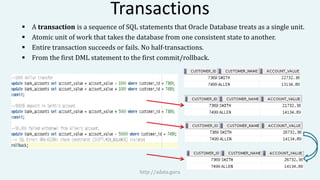
 A transaction is a sequence of SQL statements that Oracle Database treats as a single unit.
 Atomic unit of work that takes the database from one consistent state to another.
 Entire transaction succeeds or fails. No half-transactions.
 From the first DML statement to the first commit/rollback.
http://adata.guru
Transaction Control Statements
Commit
Ends your current transaction and make permanent all changes performed in the
transaction. Oracle Database issues an implicit COMMIT before and after any data
definition language (DDL) statement.
Rollback:
Undo work done in the current transaction. If you do not explicitly commit the
transaction and the program terminates abnormally, then Oracle Database rolls back
the last uncommitted transaction.
http://adata.guru
DML Statements – INSERT
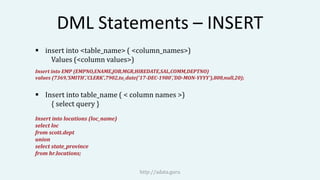
 insert into <table_name> ( <column_names>)
Values (<column values>)
Insert into EMP (EMPNO,ENAME,JOB,MGR,HIREDATE,SAL,COMM,DEPTNO)
values (7369,'SMITH','CLERK',7902,to_date('17-DEC-1980','DD-MON-YYYY'),800,null,20);
 Insert into table_name ( < column names >)
{ select query }
Insert into locations (loc_name)
select loc
from scott.dept
union
select state_province
from hr.locations;
http://adata.guru
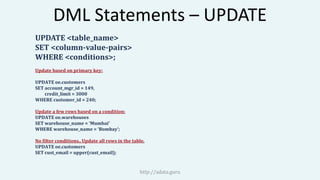
DML Statements – UPDATE
UPDATE <table_name>
SET <column-value-pairs>
WHERE <conditions>;
Update based on primary key:
UPDATE oe.customers
SET account_mgr_id = 149,
credit_limit = 3000
WHERE customer_id = 240;
Update a few rows based on a condition:
UPDATE oe.warehouses
SET warehouse_name = ‘Mumbai’
WHERE warehouse_name = ‘Bombay’;
No filter conditions.. Update all rows in the table.
UPDATE oe.customers
SET cust_email = upper(cust_email);
http://adata.guru
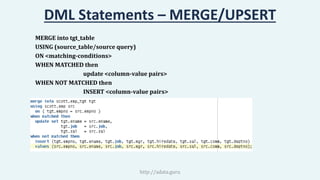
DML Statements – MERGE/UPSERT
MERGE into tgt_table
USING (source_table/source query)
ON <matching-conditions>
WHEN MATCHED then
update <column-value pairs>
WHEN NOT MATCHED then
INSERT <column-value pairs>
http://adata.guru
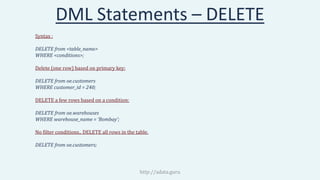
DML Statements – DELETE
Syntax :
DELETE from <table_name>
WHERE <conditions>;
Delete (one row) based on primary key:
DELETE from oe.customers
WHERE customer_id = 240;
DELETE a few rows based on a condition:
DELETE from oe.warehouses
WHERE warehouse_name = ‘Bombay’;
No filter conditions.. DELETE all rows in the table.
DELETE from oe.customers;
http://adata.guru
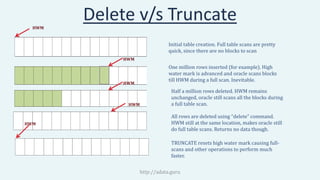
Delete v/s Truncate
http://adata.guru
HWM
HWM
HWM
HWM
HWM
Initial table creation. Full table scans are pretty
quick, since there are no blocks to scan
One million rows inserted (for example). High
water mark is advanced and oracle scans blocks
till HWM during a full scan. Inevitable.
Half a million rows deleted. HWM remains
unchanged, oracle still scans all the blocks during
a full table scan.
All rows are deleted using “delete” command.
HWM still at the same location, makes oracle still
do full table scans. Returns no data though.
TRUNCATE resets high water mark causing full-
scans and other operations to perform much
faster.

Oracle SQL DML Statements

  • 1.
    Oracle DML Statements DML:Data Manipulation Language Used to add, change or delete data INSERT– add rows to a table UPDATE – update existing rows in a table. MERGE – update if rows exist, insert if they don’t DELETE – delete rows from a table http://adata.guru
  • 2.
    Transactions  A transactionis a sequence of SQL statements that Oracle Database treats as a single unit.  Atomic unit of work that takes the database from one consistent state to another.  Entire transaction succeeds or fails. No half-transactions.  From the first DML statement to the first commit/rollback. http://adata.guru
  • 3.
    Transaction Control Statements Commit Endsyour current transaction and make permanent all changes performed in the transaction. Oracle Database issues an implicit COMMIT before and after any data definition language (DDL) statement. Rollback: Undo work done in the current transaction. If you do not explicitly commit the transaction and the program terminates abnormally, then Oracle Database rolls back the last uncommitted transaction. http://adata.guru
  • 4.
    DML Statements –INSERT  insert into <table_name> ( <column_names>) Values (<column values>) Insert into EMP (EMPNO,ENAME,JOB,MGR,HIREDATE,SAL,COMM,DEPTNO) values (7369,'SMITH','CLERK',7902,to_date('17-DEC-1980','DD-MON-YYYY'),800,null,20);  Insert into table_name ( < column names >) { select query } Insert into locations (loc_name) select loc from scott.dept union select state_province from hr.locations; http://adata.guru
  • 5.
    DML Statements –UPDATE UPDATE <table_name> SET <column-value-pairs> WHERE <conditions>; Update based on primary key: UPDATE oe.customers SET account_mgr_id = 149, credit_limit = 3000 WHERE customer_id = 240; Update a few rows based on a condition: UPDATE oe.warehouses SET warehouse_name = ‘Mumbai’ WHERE warehouse_name = ‘Bombay’; No filter conditions.. Update all rows in the table. UPDATE oe.customers SET cust_email = upper(cust_email); http://adata.guru
  • 6.
    DML Statements –MERGE/UPSERT MERGE into tgt_table USING (source_table/source query) ON <matching-conditions> WHEN MATCHED then update <column-value pairs> WHEN NOT MATCHED then INSERT <column-value pairs> http://adata.guru
  • 7.
    DML Statements –DELETE Syntax : DELETE from <table_name> WHERE <conditions>; Delete (one row) based on primary key: DELETE from oe.customers WHERE customer_id = 240; DELETE a few rows based on a condition: DELETE from oe.warehouses WHERE warehouse_name = ‘Bombay’; No filter conditions.. DELETE all rows in the table. DELETE from oe.customers; http://adata.guru
  • 8.
    Delete v/s Truncate http://adata.guru HWM HWM HWM HWM HWM Initialtable creation. Full table scans are pretty quick, since there are no blocks to scan One million rows inserted (for example). High water mark is advanced and oracle scans blocks till HWM during a full scan. Inevitable. Half a million rows deleted. HWM remains unchanged, oracle still scans all the blocks during a full table scan. All rows are deleted using “delete” command. HWM still at the same location, makes oracle still do full table scans. Returns no data though. TRUNCATE resets high water mark causing full- scans and other operations to perform much faster.