1
Unit – 1
Introduction
Ayesha Asmat
Database Systems
2
Data
• Data refers to the raw facts & figures concerning:
✓ PEOPLE
✓ EVENT
✓ ORGANISATION
✓ OBJECT
• The amount of available data in the modern computer world is
literally exploding.
3
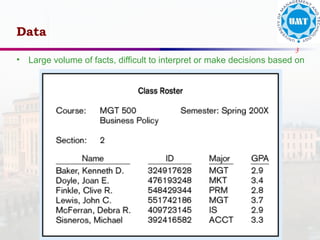
• Large volume of facts, difficult to interpret or make decisions based on
Data
4
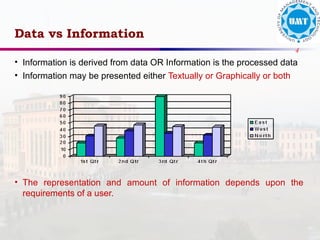
• Information is derived from data OR Information is the processed data
• Information may be presented either Textually or Graphically or both
• The representation and amount of information depends upon the
requirements of a user.
Data vs Information
5
Record Keeping Techniques
1. Manual Record Keeping.
2. Computerized Record Keeping
a) File Processing System.
b) Database System (The paradigm shift)
6
Manual System - Drawbacks
• High data volume
• Not reliable
• Inefficient
• Duplication of data
• Inconsistency
• The System can’t answer complex queries
involving multiple departments.
7
• Consider a College System consisting of the
following offices:
– Admission Office
– Academics Office
– Exam Office
• Each Office is maintaining its own set of files for
its day to day operations.
• Some of the files used in the system are Student’s
File, Faculty File, Course File, Correspondence
File etc.
Case Study
8
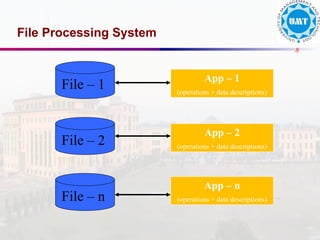
File Processing System
File – 1
App – 1
(operations + data descriptions)
File – 2
File – n
App – 2
(operations + data descriptions)
App – n
(operations + data descriptions)
9
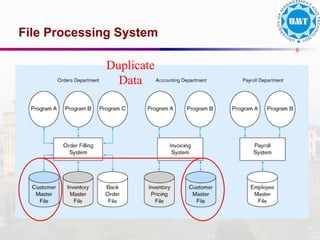
File Processing System
Duplicate
Data
10
File Processing System
• File-based systems were an early attempt to computerize
the manual filing system.
• The manual files were replaced by computer files.
• A person responsible for developing and managing
computerized file processing system was called Data
Processing (DP) specialist.
• In the traditional file processing system, the existing
manual system is automated by focusing on the data
processing needs of the individual departments instead of
treating the organization as whole.
• Each application will have its own set of Private Files
designed to meet the needs of a particular department.
11
Drawbacks of File System
1. Redundancy of Data
2. Inconsistent Data
3. Limited Data Sharing
4. Lack of provision for security
5. Limited recovery from failure
12
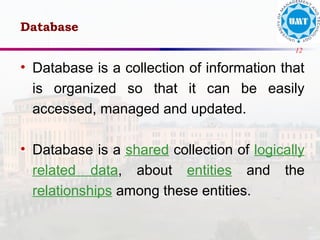
• Database is a collection of information that
is organized so that it can be easily
accessed, managed and updated.
• Database is a shared collection of logically
related data, about entities and the
relationships among these entities.
Database
13
Entities
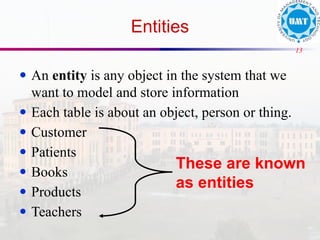
● An entity is any object in the system that we
want to model and store information
● Each table is about an object, person or thing.
● Customer
● Patients
● Books
● Products
● Teachers
These are known
as entities
14
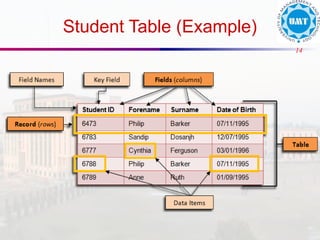
Student Table (Example)
15
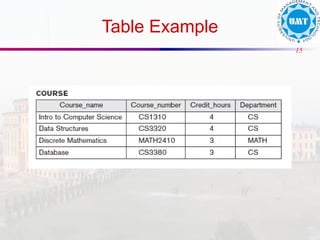
Table Example
16
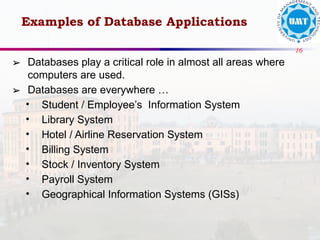
➢ Databases play a critical role in almost all areas where
computers are used.
➢ Databases are everywhere …
• Student / Employee’s Information System
• Library System
• Hotel / Airline Reservation System
• Billing System
• Stock / Inventory System
• Payroll System
• Geographical Information Systems (GISs)
Examples of Database Applications
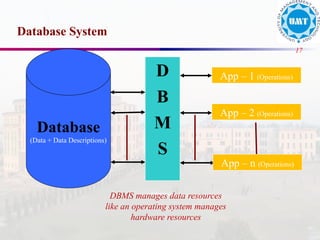
17
Database System
Database
(Data + Data Descriptions)
App – 1 (Operations)
D
B
M
S
App – 2 (Operations)
App – n (Operations)
DBMS manages data resources
like an operating system manages
hardware resources
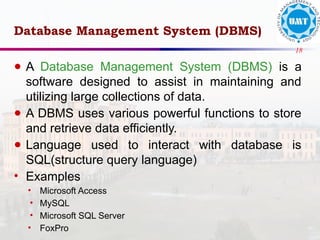
18
Database Management System (DBMS)
● A Database Management System (DBMS) is a
software designed to assist in maintaining and
utilizing large collections of data.
● A DBMS uses various powerful functions to store
and retrieve data efficiently.
● Language used to interact with database is
SQL(structure query language)
• Examples
• Microsoft Access
• MySQL
• Microsoft SQL Server
• FoxPro
19
20
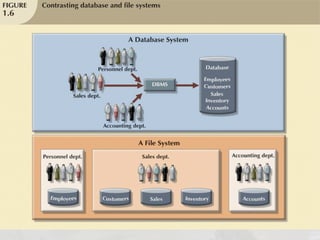
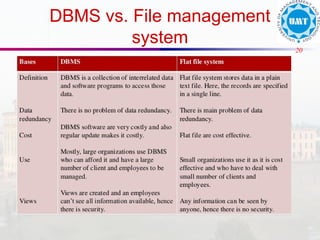
DBMS vs. File management
system
21
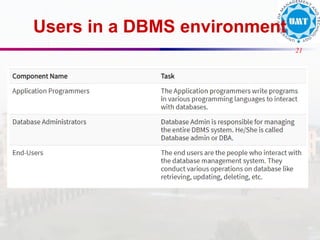
Users in a DBMS environment
22
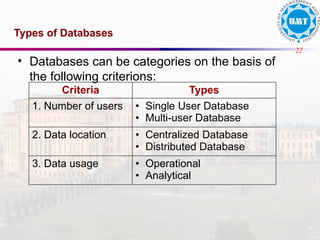
Types of Databases
• Databases can be categories on the basis of
the following criterions:
Criteria Types
1. Number of users • Single User Database
• Multi-user Database
2. Data location • Centralized Database
• Distributed Database
3. Data usage • Operational
• Analytical
23
Types of Databases
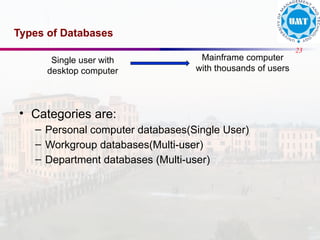
• Categories are:
– Personal computer databases(Single User)
– Workgroup databases(Multi-user)
– Department databases (Multi-user)
Single user with
desktop computer
Mainframe computer
with thousands of users
24
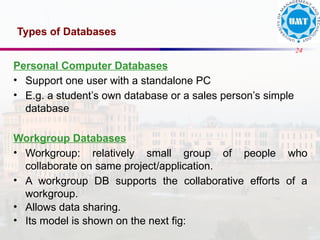
Types of Databases
Personal Computer Databases
• Support one user with a standalone PC
• E.g. a student’s own database or a sales person’s simple
database
Workgroup Databases
• Workgroup: relatively small group of people who
collaborate on same project/application.
• A workgroup DB supports the collaborative efforts of a
workgroup.
• Allows data sharing.
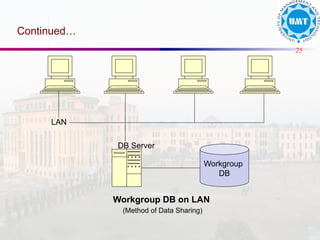
• Its model is shown on the next fig:
25
Continued…
Workgroup DB on LAN
(Method of Data Sharing)
DB Server
Workgroup
DB
LAN
26
Types of Databases
Department Databases
• Department: Functional unit within an organization
• Department DBs support function & activities of a
department.
• E.g. personnel DB to track employees, jobs, skills etc.
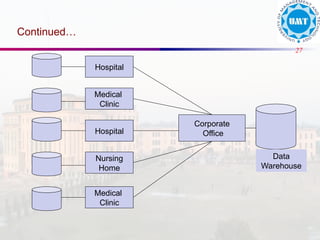
Enterprise Databases
• DB scope is the entire organization
• To support organization-wide operations & decision
making.
27
Continued…
Corporate
Office
Hospital
Medical
Clinic
Hospital
Nursing
Home
Medical
Clinic
Data
Warehouse
28
Types of Databases
Centralized & Distributed Databases
• Centralized database system – supports a database located at a
single site
• Distributed database system – supports a database distributed
across several different sites

Introduction to Database - Chapter 1.pptx

  • 1.
    1 Unit – 1 Introduction AyeshaAsmat Database Systems
  • 2.
    2 Data • Data refersto the raw facts & figures concerning: ✓ PEOPLE ✓ EVENT ✓ ORGANISATION ✓ OBJECT • The amount of available data in the modern computer world is literally exploding.
  • 3.
    3 • Large volumeof facts, difficult to interpret or make decisions based on Data
  • 4.
    4 • Information isderived from data OR Information is the processed data • Information may be presented either Textually or Graphically or both • The representation and amount of information depends upon the requirements of a user. Data vs Information
  • 5.
    5 Record Keeping Techniques 1.Manual Record Keeping. 2. Computerized Record Keeping a) File Processing System. b) Database System (The paradigm shift)
  • 6.
    6 Manual System -Drawbacks • High data volume • Not reliable • Inefficient • Duplication of data • Inconsistency • The System can’t answer complex queries involving multiple departments.
  • 7.
    7 • Consider aCollege System consisting of the following offices: – Admission Office – Academics Office – Exam Office • Each Office is maintaining its own set of files for its day to day operations. • Some of the files used in the system are Student’s File, Faculty File, Course File, Correspondence File etc. Case Study
  • 8.
    8 File Processing System File– 1 App – 1 (operations + data descriptions) File – 2 File – n App – 2 (operations + data descriptions) App – n (operations + data descriptions)
  • 9.
  • 10.
    10 File Processing System •File-based systems were an early attempt to computerize the manual filing system. • The manual files were replaced by computer files. • A person responsible for developing and managing computerized file processing system was called Data Processing (DP) specialist. • In the traditional file processing system, the existing manual system is automated by focusing on the data processing needs of the individual departments instead of treating the organization as whole. • Each application will have its own set of Private Files designed to meet the needs of a particular department.
  • 11.
    11 Drawbacks of FileSystem 1. Redundancy of Data 2. Inconsistent Data 3. Limited Data Sharing 4. Lack of provision for security 5. Limited recovery from failure
  • 12.
    12 • Database isa collection of information that is organized so that it can be easily accessed, managed and updated. • Database is a shared collection of logically related data, about entities and the relationships among these entities. Database
  • 13.
    13 Entities ● An entityis any object in the system that we want to model and store information ● Each table is about an object, person or thing. ● Customer ● Patients ● Books ● Products ● Teachers These are known as entities
  • 14.
  • 15.
  • 16.
    16 ➢ Databases playa critical role in almost all areas where computers are used. ➢ Databases are everywhere … • Student / Employee’s Information System • Library System • Hotel / Airline Reservation System • Billing System • Stock / Inventory System • Payroll System • Geographical Information Systems (GISs) Examples of Database Applications
  • 17.
    17 Database System Database (Data +Data Descriptions) App – 1 (Operations) D B M S App – 2 (Operations) App – n (Operations) DBMS manages data resources like an operating system manages hardware resources
  • 18.
    18 Database Management System(DBMS) ● A Database Management System (DBMS) is a software designed to assist in maintaining and utilizing large collections of data. ● A DBMS uses various powerful functions to store and retrieve data efficiently. ● Language used to interact with database is SQL(structure query language) • Examples • Microsoft Access • MySQL • Microsoft SQL Server • FoxPro
  • 19.
  • 20.
    20 DBMS vs. Filemanagement system
  • 21.
    21 Users in aDBMS environment
  • 22.
    22 Types of Databases •Databases can be categories on the basis of the following criterions: Criteria Types 1. Number of users • Single User Database • Multi-user Database 2. Data location • Centralized Database • Distributed Database 3. Data usage • Operational • Analytical
  • 23.
    23 Types of Databases •Categories are: – Personal computer databases(Single User) – Workgroup databases(Multi-user) – Department databases (Multi-user) Single user with desktop computer Mainframe computer with thousands of users
  • 24.
    24 Types of Databases PersonalComputer Databases • Support one user with a standalone PC • E.g. a student’s own database or a sales person’s simple database Workgroup Databases • Workgroup: relatively small group of people who collaborate on same project/application. • A workgroup DB supports the collaborative efforts of a workgroup. • Allows data sharing. • Its model is shown on the next fig:
  • 25.
    25 Continued… Workgroup DB onLAN (Method of Data Sharing) DB Server Workgroup DB LAN
  • 26.
    26 Types of Databases DepartmentDatabases • Department: Functional unit within an organization • Department DBs support function & activities of a department. • E.g. personnel DB to track employees, jobs, skills etc. Enterprise Databases • DB scope is the entire organization • To support organization-wide operations & decision making.
  • 27.
  • 28.
    28 Types of Databases Centralized& Distributed Databases • Centralized database system – supports a database located at a single site • Distributed database system – supports a database distributed across several different sites