DATABASE SYSTEMS
M AHMAD ABBAS
Dept. of Computer SciencE
INTRO LACTURE
INTRODUCTION
 Good decisions require good information derived
from raw facts
 Data is managed most efficiently when stored in a
database
 Databases evolved from computer file systems
 Understanding file system characteristics is
important
BASICS
 First we will talk about basic,
 Data
 Information
 Database
 DBMS etc…
DATA V INFORMATION
Data
 Data is the raw material that is to be processed for
information
 Data is useless unless it is processed or has been
made into something meaningful
 Data has no meaning when it has not been
interpreted
For Example:
 During census, data of all citizens is collected
 Companies collect data by survey to know the opinion of
people about their product
DATA V INFORMATION CONTINUED..
Information
 Information is processed data
 The data that can be made useful is known as
information
 Information is the meaning that has been formed
with the help of data
For example:
 Census data is used to get information about total population
of a country
 Survey data is summarized into information to present to
management of the company
DATABASE
 A database is a gathering of data, stored on a
server
 The data is organized in a way it can easily be
retrieved, managed and edited in significant ways
by the end-user
 Mostly used Database model is Relational
database model
 Stored Data in the form of rows and columns
WHY DATABASES?
 Databases solve many of the problems
encountered in data management
 Used in almost all modern settings involving data
management:
 Business
 Research
 Administration
 Important to understand how databases work and
interact with other applications
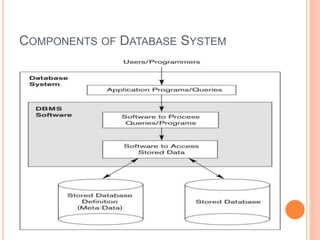
COMPONENTS OF DATABASE SYSTEM
OBJECTIVES OF TODAY’S LECTURE
 Know common database terminology
 Understand requirements and uses of data
 Realize the importance and need for databases
in problem-solving
 Understand the different types of databases and
their differences
DBMS
 Database management system (DBMS) helps you
to create and manage database,
 DBMS is a computer software providing the
interface between users and database.
For example,
 SQL server (Microsoft), Oracle (ORACLE), DB2 (IBM) etc..
DBMS CONT’D
 Software system that is designed to allow users to
create , design and manipulate databases.
 Mostly commonly used commands to create,
retrieve and manipulate databases
 DML(Data Manipulation Language ) Commands
 DDL(Data Definition Language) Commands
 DCL (Data Control Language) Commands
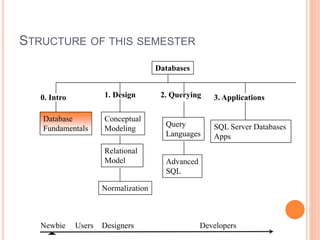
STRUCTURE OF THIS SEMESTER
Database
Fundamentals
Relational
Model
Normalization
Conceptual
Modeling
Query
Languages
Advanced
SQL
SQL Server Databases
Apps
0. Intro 1. Design 3. Applications
Newbie Users Designers
Databases
2. Querying
Developers
ROLE AND ADVANTAGES OF THE DBMS
 DBMS is the intermediary between the user and the
database
 Database structure stored as file collection
 Can only access files through the DBMS
 DBMS enables data to be shared
 DBMS integrates many users’ views of the data
ROLE AND ADVANTAGES OF THE DBMS
(CONT’D.)
 Advantages of a DBMS:
 Improved data sharing
 Improved data security
 Minimized data inconsistency
 Improved data access
 Improved decision making
 Increased end-user productivity
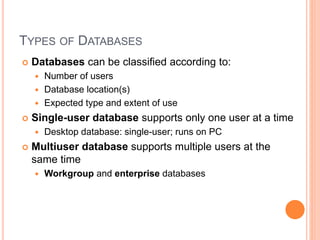
TYPES OF DATABASES
 Databases can be classified according to:
 Number of users
 Database location(s)
 Expected type and extent of use
 Single-user database supports only one user at a time
 Desktop database: single-user; runs on PC
 Multiuser database supports multiple users at the
same time
 Workgroup and enterprise databases
EVOLUTION OF FILE SYSTEM DATA
PROCESSING
 Reasons for studying file systems:
 Complexity of database design is easier to understand
 Understanding file system problems helps to avoid
problems with DBMS systems
 Knowledge of file system is useful for converting file
system to database system
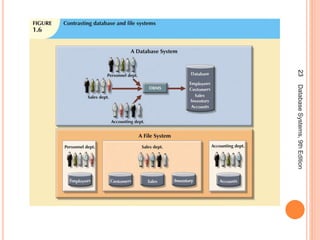
 File systems typically composed of collection of file
folders, each tagged and kept in cabinet
 Organized by expected use
18DatabaseSystems,9thEdition
PROBLEMS WITH FILE SYSTEM DATA
PROCESSING
 File systems were an improvement over manual
system
 File systems used for more than two decades
 Understanding the shortcomings of file systems aids in
development of modern databases
 Even simple file system retrieval task required
extensive programming
 Ad hoc queries impossible
 Changing existing structure difficult
DATA REDUNDANCY
 File system structure makes it difficult to combine data
from multiple sources
 Vulnerable to security breaches
 Organizational structure promotes storage of same data
in different locations
 Islands of information
 Data stored in different locations is unlikely to be
updated consistently
 Data redundancy: same data stored unnecessarily in
different places
DATA REDUNDANCY (CONT'D.)
 Data inconsistency: different and conflicting
versions of same data occur at different places
 Data anomalies: abnormalities when all changes in
redundant data are not made correctly
 Update anomalies
 Insertion anomalies
 Deletion anomalies
DATABASE SYSTEMS
 Database system consists of logically related data
stored in a single logical data repository
 May be physically distributed among multiple storage
facilities
 DBMS eliminates most of file system’s problems
23DatabaseSystems,9thEdition
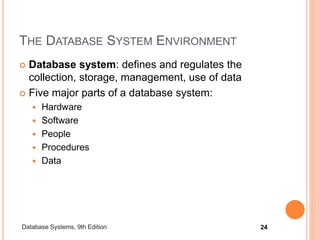
THE DATABASE SYSTEM ENVIRONMENT
 Database system: defines and regulates the
collection, storage, management, use of data
 Five major parts of a database system:
 Hardware
 Software
 People
 Procedures
 Data
24Database Systems, 9th Edition
THE DATABASE SYSTEM ENVIRONMENT
(CONT'D.)
 Hardware: all the system’s physical devices
 Software: three types of software required:
 Operating system software
 DBMS software
 Application programs and utility software
THE DATABASE SYSTEM ENVIRONMENT
(CONT'D.)
 People: all users of the database system
 System and database administrators
 Database designers
 Systems analysts and programmers
 End users
 Procedures: instructions and rules that govern the
design and use of the database system
 Data: the collection of facts stored in the database
THE DATABASE SYSTEM ENVIRONMENT
(CONT'D.)
 Database systems are created and managed at
different levels of complexity
 Database solutions must be cost-effective as well
as tactically and strategically effective
 Database technology already in use affects
selection of a database system
And
 Be Confident and Be determine to achieve
something ahead in life!!

DATABASE INTRODUCTION

  • 1.
    DATABASE SYSTEMS M AHMADABBAS Dept. of Computer SciencE INTRO LACTURE
  • 2.
    INTRODUCTION  Good decisionsrequire good information derived from raw facts  Data is managed most efficiently when stored in a database  Databases evolved from computer file systems  Understanding file system characteristics is important
  • 3.
    BASICS  First wewill talk about basic,  Data  Information  Database  DBMS etc…
  • 4.
    DATA V INFORMATION Data Data is the raw material that is to be processed for information  Data is useless unless it is processed or has been made into something meaningful  Data has no meaning when it has not been interpreted For Example:  During census, data of all citizens is collected  Companies collect data by survey to know the opinion of people about their product
  • 5.
    DATA V INFORMATIONCONTINUED.. Information  Information is processed data  The data that can be made useful is known as information  Information is the meaning that has been formed with the help of data For example:  Census data is used to get information about total population of a country  Survey data is summarized into information to present to management of the company
  • 6.
    DATABASE  A databaseis a gathering of data, stored on a server  The data is organized in a way it can easily be retrieved, managed and edited in significant ways by the end-user  Mostly used Database model is Relational database model  Stored Data in the form of rows and columns
  • 7.
    WHY DATABASES?  Databasessolve many of the problems encountered in data management  Used in almost all modern settings involving data management:  Business  Research  Administration  Important to understand how databases work and interact with other applications
  • 8.
  • 9.
    OBJECTIVES OF TODAY’SLECTURE  Know common database terminology  Understand requirements and uses of data  Realize the importance and need for databases in problem-solving  Understand the different types of databases and their differences
  • 10.
    DBMS  Database managementsystem (DBMS) helps you to create and manage database,  DBMS is a computer software providing the interface between users and database. For example,  SQL server (Microsoft), Oracle (ORACLE), DB2 (IBM) etc..
  • 11.
    DBMS CONT’D  Softwaresystem that is designed to allow users to create , design and manipulate databases.  Mostly commonly used commands to create, retrieve and manipulate databases  DML(Data Manipulation Language ) Commands  DDL(Data Definition Language) Commands  DCL (Data Control Language) Commands
  • 12.
    STRUCTURE OF THISSEMESTER Database Fundamentals Relational Model Normalization Conceptual Modeling Query Languages Advanced SQL SQL Server Databases Apps 0. Intro 1. Design 3. Applications Newbie Users Designers Databases 2. Querying Developers
  • 13.
    ROLE AND ADVANTAGESOF THE DBMS  DBMS is the intermediary between the user and the database  Database structure stored as file collection  Can only access files through the DBMS  DBMS enables data to be shared  DBMS integrates many users’ views of the data
  • 15.
    ROLE AND ADVANTAGESOF THE DBMS (CONT’D.)  Advantages of a DBMS:  Improved data sharing  Improved data security  Minimized data inconsistency  Improved data access  Improved decision making  Increased end-user productivity
  • 16.
    TYPES OF DATABASES Databases can be classified according to:  Number of users  Database location(s)  Expected type and extent of use  Single-user database supports only one user at a time  Desktop database: single-user; runs on PC  Multiuser database supports multiple users at the same time  Workgroup and enterprise databases
  • 17.
    EVOLUTION OF FILESYSTEM DATA PROCESSING  Reasons for studying file systems:  Complexity of database design is easier to understand  Understanding file system problems helps to avoid problems with DBMS systems  Knowledge of file system is useful for converting file system to database system  File systems typically composed of collection of file folders, each tagged and kept in cabinet  Organized by expected use
  • 18.
  • 19.
    PROBLEMS WITH FILESYSTEM DATA PROCESSING  File systems were an improvement over manual system  File systems used for more than two decades  Understanding the shortcomings of file systems aids in development of modern databases  Even simple file system retrieval task required extensive programming  Ad hoc queries impossible  Changing existing structure difficult
  • 20.
    DATA REDUNDANCY  Filesystem structure makes it difficult to combine data from multiple sources  Vulnerable to security breaches  Organizational structure promotes storage of same data in different locations  Islands of information  Data stored in different locations is unlikely to be updated consistently  Data redundancy: same data stored unnecessarily in different places
  • 21.
    DATA REDUNDANCY (CONT'D.) Data inconsistency: different and conflicting versions of same data occur at different places  Data anomalies: abnormalities when all changes in redundant data are not made correctly  Update anomalies  Insertion anomalies  Deletion anomalies
  • 22.
    DATABASE SYSTEMS  Databasesystem consists of logically related data stored in a single logical data repository  May be physically distributed among multiple storage facilities  DBMS eliminates most of file system’s problems
  • 23.
  • 24.
    THE DATABASE SYSTEMENVIRONMENT  Database system: defines and regulates the collection, storage, management, use of data  Five major parts of a database system:  Hardware  Software  People  Procedures  Data 24Database Systems, 9th Edition
  • 25.
    THE DATABASE SYSTEMENVIRONMENT (CONT'D.)  Hardware: all the system’s physical devices  Software: three types of software required:  Operating system software  DBMS software  Application programs and utility software
  • 26.
    THE DATABASE SYSTEMENVIRONMENT (CONT'D.)  People: all users of the database system  System and database administrators  Database designers  Systems analysts and programmers  End users  Procedures: instructions and rules that govern the design and use of the database system  Data: the collection of facts stored in the database
  • 27.
    THE DATABASE SYSTEMENVIRONMENT (CONT'D.)  Database systems are created and managed at different levels of complexity  Database solutions must be cost-effective as well as tactically and strategically effective  Database technology already in use affects selection of a database system
  • 28.
    And  Be Confidentand Be determine to achieve something ahead in life!!