Developing a Database for Netflix
Database and SQL
Hannah Parker, Sean Scott, Anqi Wang, Dongqi Wang
17 February 2016
Professor Nejad
I. Introduction
Netflix provides streaming movies and TV shows to over 75 million subscribers across
the globe. Customers can watch as many shows/ movies as they want as long as they are
connected to the internet for a monthly subscription fee of about ten dollars. Netflix produces
original content and also pays for the rights to stream feature films and shows.
In order to understand customer behavior, Netflix needs to track its customers, its content,
and the content that specific customers watch. Understanding which users watch which shows
and movies will allow the firm to recommend similar content that the user will also likely enjoy.
This type of data collection and analysis in order to provide recommendations offers customers
an enjoyable, convenient streaming experience. Moreover, the database will track important
metrics such as customer churn and poor performing content (content that receives poor ratings
and content that is rarely streamed).
II. Database Design
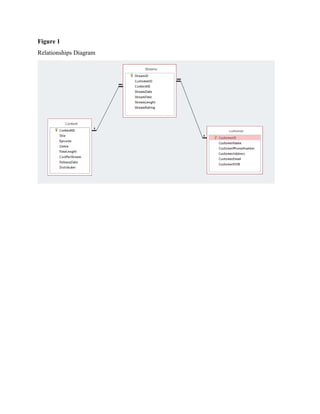
In order for Netflix to collect the information it needs, three tables need to be established.
Netflix first needs to compile a table listing all of its content (movies, tv shows, etc). Content
will be uniquely identified by its ‘Content ID’. For TV shows, each episode will have a unique
Content ID. Netflix also needs to gather information on its customers. The customer table will
collect data including individual customer names, phone numbers, addresses, emails, and dates
of birth. Customers are uniquely identified by their ‘CustomerID’. Once Netflix is properly
recording all content and customers, it also needs a table for streams. A stream is defined as an
instance when a unique customer watches a unique piece of content. Streams are uniquely
identified by a ‘StreamID’ and also characterized by the Customer’s ID, the Content’s ID, the
date of the stream, the time of the stream, the length or duration of the stream (i.e., did the
customer watch the entire show or movie?) and finally the rating that the customer gives the
content.
Figure 1
Relationships Diagram
III. Table Schemas
Table 1
Customer Table
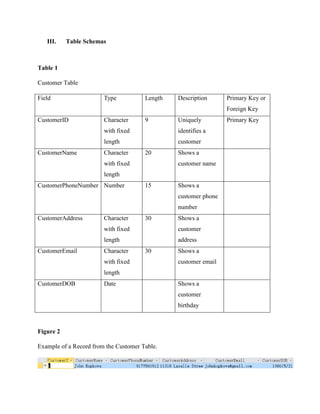
Field Type Length Description Primary Key or
Foreign Key
CustomerID Character
with fixed
length
9 Uniquely
identifies a
customer
Primary Key
CustomerName Character
with fixed
length
20 Shows a
customer name
CustomerPhoneNumber Number 15 Shows a
customer phone
number
CustomerAddress Character
with fixed
length
30 Shows a
customer
address
CustomerEmail Character
with fixed
length
30 Shows a
customer email
CustomerDOB Date Shows a
customer
birthday
Figure 2
Example of a Record from the Customer Table.
Table 2
Content Table
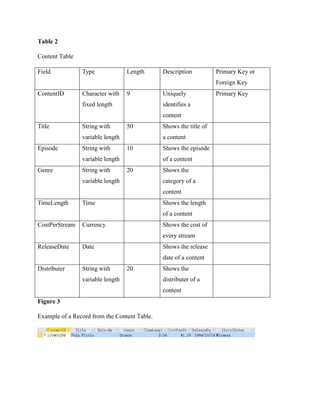
Field Type Length Description Primary Key or
Foreign Key
ContentID Character with
fixed length
9 Uniquely
identifies a
content
Primary Key
Title String with
variable length
50 Shows the title of
a content
Episode String with
variable length
10 Shows the episode
of a content
Genre String with
variable length
20 Shows the
category of a
content
TimeLength Time Shows the length
of a content
CostPerStream Currency Shows the cost of
every stream
ReleaseDate Date Shows the release
date of a content
Distributer String with
variable length
20 Shows the
distributer of a
content
Figure 3
Example of a Record from the Content Table.
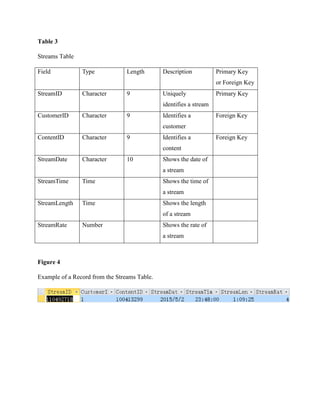
Table 3
Streams Table
Field Type Length Description Primary Key
or Foreign Key
StreamID Character 9 Uniquely
identifies a stream
Primary Key
CustomerID Character 9 Identifies a
customer
Foreign Key
ContentID Character 9 Identifies a
content
Foreign Key
StreamDate Character 10 Shows the date of
a stream
StreamTime Time Shows the time of
a stream
StreamLength Time Shows the length
of a stream
StreamRate Number Shows the rate of
a stream
Figure 4
Example of a Record from the Streams Table.
IV. Queries
SELECT *
FROM Content
This query returns all columns and all rows of the Content table in the database. This query is
useful when one needs to visualize all potentially useful information in the Content Table.
SELECT CustomerName, CustomerPhoneNumber, CustomerEmail
FROM Customer
This query returns the name, phone number, and email for each customer in the database. The
purpose of this query is to return customer contact information. If Netflix was running a new
promotional campaign and needed to get in touch with all their customers by phone and/or email,
this query would provide the information they need.
SELECT Customer.CustomerID, Customer.CustomerName,
Customer.CustomerEmail .Streams.StreamDate, Streams.StreamRating
FROM Customer, Streams
WHERE Customer.CustomerID = Streams.CustomerID;
This query uses an inner join to match a customer’s name and email with the date of each of their
streams and the rating they gave the stream. The information provided with this query paints a
picture of how ratings have changed over time for each customer. If a customer’s ratings are
getting lower, this query also gives an email, so Netflix can get in touch with them and
recommend some new content.
SELECT Content.ContentID, Content.Title, Streams.StreamDate, Streams.StreamTime
FROM Content LEFT JOIN Streams
ON Content.ContentID = Streams.ContentID;
This query uses an outer join to show the Title of each stream, along with the content’s ID, and
the date and time of the stream. This query shows trends in stream time. This query (because it
is an outer join) also notifies Netflix what content has yet to be streamed. This is important
because Netflix does not want to pay for content that no one is watching.
SELECT C.CustomerName, Sum(Co.CostPerStream) AS TotalCost
FROM Customer C, Content Co, Streams S
WHERE C.CustomerID = S.CustomerID
AND S.ContentID = Co.ContentID
Group By C.CustomerName
HAVING Sum(Co.CostPerStream) > 1.00;
By taking information from the customer and content tables, this query shows managers which
customers are the most costly based on number of streams. Once the database is bigger, Netflix
will be able to identify its most costly customers (on a large scale) and decide what to do with
those customers. If a customer is costing Netflix more than he or she is worth, it may not be
practical to keep that customer.
SELECT Co.Title, Co.Episode, AVG(S.StreamRating) AS AverageRating, Count(S.StreamID)
AS TotalStreams
FROM Content Co, Streams S
WHERE Co.ContentID = S.ContentID
Group By Co.Episode, Co.Title;
This query contains a calculation that identifies the average rating given to any particular content.
It will show Netflix managers the performance of each piece of content in the company’s
database. Therefore, if one show or movie has an extremely low rating, the company may want
to consider discontinuing that streaming option.
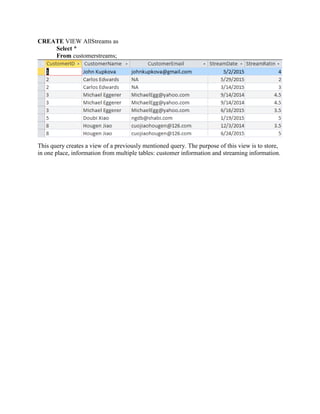
CREATE VIEW AllStreams as
Select *
From customerstreams;
This query creates a view of a previously mentioned query. The purpose of this view is to store,
in one place, information from multiple tables: customer information and streaming information.

Database Project for Netflix (SQL Project)

  • 1.
    Developing a Databasefor Netflix Database and SQL Hannah Parker, Sean Scott, Anqi Wang, Dongqi Wang 17 February 2016 Professor Nejad
  • 2.
    I. Introduction Netflix providesstreaming movies and TV shows to over 75 million subscribers across the globe. Customers can watch as many shows/ movies as they want as long as they are connected to the internet for a monthly subscription fee of about ten dollars. Netflix produces original content and also pays for the rights to stream feature films and shows. In order to understand customer behavior, Netflix needs to track its customers, its content, and the content that specific customers watch. Understanding which users watch which shows and movies will allow the firm to recommend similar content that the user will also likely enjoy. This type of data collection and analysis in order to provide recommendations offers customers an enjoyable, convenient streaming experience. Moreover, the database will track important metrics such as customer churn and poor performing content (content that receives poor ratings and content that is rarely streamed). II. Database Design In order for Netflix to collect the information it needs, three tables need to be established. Netflix first needs to compile a table listing all of its content (movies, tv shows, etc). Content will be uniquely identified by its ‘Content ID’. For TV shows, each episode will have a unique Content ID. Netflix also needs to gather information on its customers. The customer table will collect data including individual customer names, phone numbers, addresses, emails, and dates of birth. Customers are uniquely identified by their ‘CustomerID’. Once Netflix is properly recording all content and customers, it also needs a table for streams. A stream is defined as an instance when a unique customer watches a unique piece of content. Streams are uniquely identified by a ‘StreamID’ and also characterized by the Customer’s ID, the Content’s ID, the date of the stream, the time of the stream, the length or duration of the stream (i.e., did the customer watch the entire show or movie?) and finally the rating that the customer gives the content.
  • 3.
  • 4.
    III. Table Schemas Table1 Customer Table Field Type Length Description Primary Key or Foreign Key CustomerID Character with fixed length 9 Uniquely identifies a customer Primary Key CustomerName Character with fixed length 20 Shows a customer name CustomerPhoneNumber Number 15 Shows a customer phone number CustomerAddress Character with fixed length 30 Shows a customer address CustomerEmail Character with fixed length 30 Shows a customer email CustomerDOB Date Shows a customer birthday Figure 2 Example of a Record from the Customer Table.
  • 5.
    Table 2 Content Table FieldType Length Description Primary Key or Foreign Key ContentID Character with fixed length 9 Uniquely identifies a content Primary Key Title String with variable length 50 Shows the title of a content Episode String with variable length 10 Shows the episode of a content Genre String with variable length 20 Shows the category of a content TimeLength Time Shows the length of a content CostPerStream Currency Shows the cost of every stream ReleaseDate Date Shows the release date of a content Distributer String with variable length 20 Shows the distributer of a content Figure 3 Example of a Record from the Content Table.
  • 6.
    Table 3 Streams Table FieldType Length Description Primary Key or Foreign Key StreamID Character 9 Uniquely identifies a stream Primary Key CustomerID Character 9 Identifies a customer Foreign Key ContentID Character 9 Identifies a content Foreign Key StreamDate Character 10 Shows the date of a stream StreamTime Time Shows the time of a stream StreamLength Time Shows the length of a stream StreamRate Number Shows the rate of a stream Figure 4 Example of a Record from the Streams Table.
  • 7.
    IV. Queries SELECT * FROMContent This query returns all columns and all rows of the Content table in the database. This query is useful when one needs to visualize all potentially useful information in the Content Table. SELECT CustomerName, CustomerPhoneNumber, CustomerEmail FROM Customer This query returns the name, phone number, and email for each customer in the database. The purpose of this query is to return customer contact information. If Netflix was running a new promotional campaign and needed to get in touch with all their customers by phone and/or email, this query would provide the information they need.
  • 8.
    SELECT Customer.CustomerID, Customer.CustomerName, Customer.CustomerEmail.Streams.StreamDate, Streams.StreamRating FROM Customer, Streams WHERE Customer.CustomerID = Streams.CustomerID; This query uses an inner join to match a customer’s name and email with the date of each of their streams and the rating they gave the stream. The information provided with this query paints a picture of how ratings have changed over time for each customer. If a customer’s ratings are getting lower, this query also gives an email, so Netflix can get in touch with them and recommend some new content. SELECT Content.ContentID, Content.Title, Streams.StreamDate, Streams.StreamTime FROM Content LEFT JOIN Streams ON Content.ContentID = Streams.ContentID; This query uses an outer join to show the Title of each stream, along with the content’s ID, and the date and time of the stream. This query shows trends in stream time. This query (because it is an outer join) also notifies Netflix what content has yet to be streamed. This is important because Netflix does not want to pay for content that no one is watching.
  • 9.
    SELECT C.CustomerName, Sum(Co.CostPerStream)AS TotalCost FROM Customer C, Content Co, Streams S WHERE C.CustomerID = S.CustomerID AND S.ContentID = Co.ContentID Group By C.CustomerName HAVING Sum(Co.CostPerStream) > 1.00; By taking information from the customer and content tables, this query shows managers which customers are the most costly based on number of streams. Once the database is bigger, Netflix will be able to identify its most costly customers (on a large scale) and decide what to do with those customers. If a customer is costing Netflix more than he or she is worth, it may not be practical to keep that customer. SELECT Co.Title, Co.Episode, AVG(S.StreamRating) AS AverageRating, Count(S.StreamID) AS TotalStreams FROM Content Co, Streams S WHERE Co.ContentID = S.ContentID Group By Co.Episode, Co.Title; This query contains a calculation that identifies the average rating given to any particular content. It will show Netflix managers the performance of each piece of content in the company’s database. Therefore, if one show or movie has an extremely low rating, the company may want to consider discontinuing that streaming option.
  • 10.
    CREATE VIEW AllStreamsas Select * From customerstreams; This query creates a view of a previously mentioned query. The purpose of this view is to store, in one place, information from multiple tables: customer information and streaming information.