
Crash Recovery
Prof. Nilesh Magar, Dr. Vishwanath Karad, MITWPU
• The entire DBMS is a very complex structure with multiple transactions being
performed and carried out in every second
• The toughness and strength of a system depend not only to the complex and
secured architecture of a system but also in the way how data are managed and
maintained in the worst cases.
• If the underlying architecture fails or crashes, then there must be some
techniques and procedures by which the lost data during a transaction gets
recovered
Prof. Nilesh Magar, Dr. Vishwanath Karad, MITWPU
What is Crash Recovery?
• It is the method of restoring the database to its correct state in the event of a
failure
• Recovery is a service which should be provided by all the DBMS for ensuring that
the database is dependable and remains in a consistent state in the presence of
failures time of the transaction or after the end of a process
• In this context, dependability refers to both the flexibility of the DBMS to various
kinds of failure and its ability to recover from those failures
Prof. Nilesh Magar, Dr. Vishwanath Karad, MITWPU
What is the need of recovery of database?
• The storage of data usually includes four types of media with an increasing
amount of reliability: the main memory, the magnetic disk, the magnetic tape,
and the optical disk
• There are many different forms of failure that can have an effect on database
• Some data failures can affect main memory only, while others involve non-
volatile or secondary storage also
Prof. Nilesh Magar, Dr. Vishwanath Karad, MITWPU
The sources of failure:
• Due to hardware or software errors, the system crashes which ultimately resulting in loss of main
memory
• Failures of media, such as head crashes or unreadable media that results in the loss of portions of
secondary storage
• There can be application software errors, such as logical errors which are accessing the database that
can cause one or more transactions to abort or fail
• Natural physical disasters can also occur such as fires, floods, earthquakes, or power failures
• Carelessness or unintentional destruction of data or directories by operators or users
• Damage or intentional corruption or hampering of data (using malicious software or files) hardware or
software facilities
Prof. Nilesh Magar, Dr. Vishwanath Karad, MITWPU
Crash Recovery
Whatever the grounds of the failure are, there are two principal things that you
have to consider:
• Failure of main memory including that database buffers
• Failure of the disk copy of that database
Prof. Nilesh Magar, Dr. Vishwanath Karad, MITWPU
Recovery facility
• Every DBMS should offer the following facilities to help out with the recovery
mechanism:
• Backup mechanism makes backup copies at a specific interval for the database
• Logging facilities keep tracing the current state of transactions and any changes made to
the database
• Checkpoint facility allows updates to the database for getting the latest patches to be made
permanent and keep secure from vulnerability
• Recovery manager allows the database system for restoring the database to a reliable and
steady state after any failure occurs
Prof. Nilesh Magar, Dr. Vishwanath Karad, MITWPU
Log based Recovery in DBMS
• Atomicity property of DBMS states that either all the operations of transactions
must be performed or none
• The modifications done by an aborted transaction should not be visible to
database and the modifications done by committed transaction should be visible
• To achieve our goal of atomicity, user must first output to stable storage
information describing the modifications, without modifying the database itself
• This information can help us ensure that all modifications performed by
committed transactions are reflected in the database
• This information can also help us ensure that no modifications made by an
aborted transaction persist in the database
Prof. Nilesh Magar, Dr. Vishwanath Karad, MITWPU
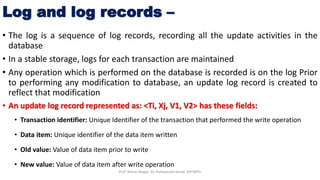
Log and log records –
• The log is a sequence of log records, recording all the update activities in the
database
• In a stable storage, logs for each transaction are maintained
• Any operation which is performed on the database is recorded is on the log Prior
to performing any modification to database, an update log record is created to
reflect that modification
• An update log record represented as: <Ti, Xj, V1, V2> has these fields:
• Transaction identifier: Unique Identifier of the transaction that performed the write operation
• Data item: Unique identifier of the data item written
• Old value: Value of data item prior to write
• New value: Value of data item after write operation
Prof. Nilesh Magar, Dr. Vishwanath Karad, MITWPU
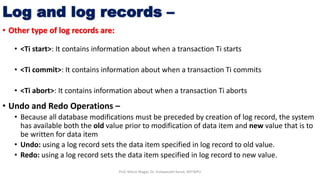
• Other type of log records are:
• <Ti start>: It contains information about when a transaction Ti starts
• <Ti commit>: It contains information about when a transaction Ti commits
• <Ti abort>: It contains information about when a transaction Ti aborts
• Undo and Redo Operations –
• Because all database modifications must be preceded by creation of log record, the system
has available both the old value prior to modification of data item and new value that is to
be written for data item
• Undo: using a log record sets the data item specified in log record to old value.
• Redo: using a log record sets the data item specified in log record to new value.
Log and log records –
Prof. Nilesh Magar, Dr. Vishwanath Karad, MITWPU
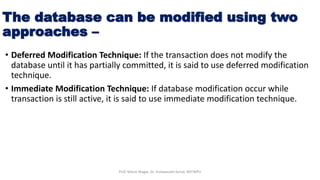
The database can be modified using two
approaches –
• Deferred Modification Technique: If the transaction does not modify the
database until it has partially committed, it is said to use deferred modification
technique.
• Immediate Modification Technique: If database modification occur while
transaction is still active, it is said to use immediate modification technique.
Prof. Nilesh Magar, Dr. Vishwanath Karad, MITWPU
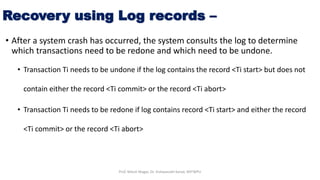
Recovery using Log records –
• After a system crash has occurred, the system consults the log to determine
which transactions need to be redone and which need to be undone.
• Transaction Ti needs to be undone if the log contains the record <Ti start> but does not
contain either the record <Ti commit> or the record <Ti abort>
• Transaction Ti needs to be redone if log contains record <Ti start> and either the record
<Ti commit> or the record <Ti abort>
Prof. Nilesh Magar, Dr. Vishwanath Karad, MITWPU
Use of Checkpoints cntd…
• When a system crash occurs, user must consult the log.
• In principle, that need to search the entire log to determine this information.
• There are two major difficulties with log based approach:
• The search process is time-consuming
• Most of the transactions that, according to our algorithm, need to be redone have already written
their updates into the database. Although redoing them will cause no harm, it will cause recovery
to take longer.
• To reduce these types of overhead, user introduce checkpoints
• A log record of the form <checkpoint L> is used to represent a checkpoint in log where
L is a list of transactions active at the time of the checkpoint
• When a checkpoint log record is added to log all the transactions that have committed
before this checkpoint have <Ti commit> log record before the checkpoint record
• Any database modifications made by Ti is written to the database either prior to the
checkpoint or as part of the checkpoint itself
• Thus, at recovery time, there is no need to perform a redo operation on TiProf. Nilesh Magar, Dr. Vishwanath Karad, MITWPU
• After a system crash has occurred, the system examines the log to find the last
<checkpoint L> record
• The redo or undo operations need to be applied only to transactions in L, and to
all transactions that started execution after the record was written to the log
• Let us denote this set of transactions as T
• Same rules of undo and redo are applicable on T as mentioned in Recovery using
Log records part
Use of Checkpoints cntd…
Prof. Nilesh Magar, Dr. Vishwanath Karad, MITWPU
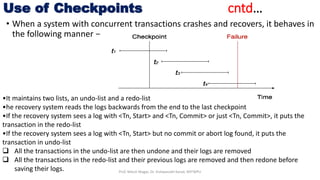
• When a system with concurrent transactions crashes and recovers, it behaves in
the following manner −
Use of Checkpoints cntd…
•It maintains two lists, an undo-list and a redo-list
•he recovery system reads the logs backwards from the end to the last checkpoint
•If the recovery system sees a log with <Tn, Start> and <Tn, Commit> or just <Tn, Commit>, it puts the
transaction in the redo-list
•If the recovery system sees a log with <Tn, Start> but no commit or abort log found, it puts the
transaction in undo-list
 All the transactions in the undo-list are then undone and their logs are removed
 All the transactions in the redo-list and their previous logs are removed and then redone before
saving their logs. Prof. Nilesh Magar, Dr. Vishwanath Karad, MITWPU
Database Backup & Recovery from Catastrophic
Failure
• A catastrophic failure is one where a stable, secondary storage device gets
corrupt
• With the storage device, all the valuable data that is stored inside is lost
• We have two different strategies to recover data from such a catastrophic
failure −
• Remote backup : Here a backup copy of the database is stored at a remote location from
where it can be restored in case of a catastrophe.
• Alternatively, database backups can be taken on magnetic tapes and stored at a safer
place. This backup can later be transferred onto a freshly installed database to bring it to
the point of backup.
Prof. Nilesh Magar, Dr. Vishwanath Karad, MITWPU
Remote Backup
• Remote backup provides a sense of security in case the primary location where the
database is located gets destroyed
• Remote backup can be offline or real-time or online
• In case it is offline, it is maintained manually
• Online backup systems are more real-time and lifesavers for database administrators
and investors
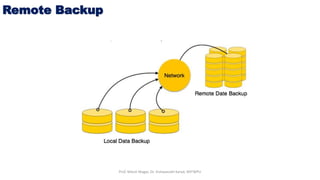
• An online backup system is a mechanism where every bit of the real-time data is backed
up simultaneously at two distant places, one of them is directly connected to the
system and the other one is kept at a remote place as backup
Prof. Nilesh Magar, Dr. Vishwanath Karad, MITWPU
Remote Backup
Prof. Nilesh Magar, Dr. Vishwanath Karad, MITWPU
• As soon as the primary database storage fails, the backup system senses the
failure and switches the user system to the remote storage
• Sometimes this is so instant that the users can’t even realize a failure
Remote Backup
Prof. Nilesh Magar, Dr. Vishwanath Karad, MITWPU
Thank you
and
all the best
Prof. Nilesh Magar, Dr. Vishwanath Karad, MITWPU

Crash recovery in database

  • 1.
    Crash Recovery Prof. NileshMagar, Dr. Vishwanath Karad, MITWPU
  • 2.
    • The entireDBMS is a very complex structure with multiple transactions being performed and carried out in every second • The toughness and strength of a system depend not only to the complex and secured architecture of a system but also in the way how data are managed and maintained in the worst cases. • If the underlying architecture fails or crashes, then there must be some techniques and procedures by which the lost data during a transaction gets recovered Prof. Nilesh Magar, Dr. Vishwanath Karad, MITWPU
  • 3.
    What is CrashRecovery? • It is the method of restoring the database to its correct state in the event of a failure • Recovery is a service which should be provided by all the DBMS for ensuring that the database is dependable and remains in a consistent state in the presence of failures time of the transaction or after the end of a process • In this context, dependability refers to both the flexibility of the DBMS to various kinds of failure and its ability to recover from those failures Prof. Nilesh Magar, Dr. Vishwanath Karad, MITWPU
  • 4.
    What is theneed of recovery of database? • The storage of data usually includes four types of media with an increasing amount of reliability: the main memory, the magnetic disk, the magnetic tape, and the optical disk • There are many different forms of failure that can have an effect on database • Some data failures can affect main memory only, while others involve non- volatile or secondary storage also Prof. Nilesh Magar, Dr. Vishwanath Karad, MITWPU
  • 5.
    The sources offailure: • Due to hardware or software errors, the system crashes which ultimately resulting in loss of main memory • Failures of media, such as head crashes or unreadable media that results in the loss of portions of secondary storage • There can be application software errors, such as logical errors which are accessing the database that can cause one or more transactions to abort or fail • Natural physical disasters can also occur such as fires, floods, earthquakes, or power failures • Carelessness or unintentional destruction of data or directories by operators or users • Damage or intentional corruption or hampering of data (using malicious software or files) hardware or software facilities Prof. Nilesh Magar, Dr. Vishwanath Karad, MITWPU
  • 6.
    Crash Recovery Whatever thegrounds of the failure are, there are two principal things that you have to consider: • Failure of main memory including that database buffers • Failure of the disk copy of that database Prof. Nilesh Magar, Dr. Vishwanath Karad, MITWPU
  • 7.
    Recovery facility • EveryDBMS should offer the following facilities to help out with the recovery mechanism: • Backup mechanism makes backup copies at a specific interval for the database • Logging facilities keep tracing the current state of transactions and any changes made to the database • Checkpoint facility allows updates to the database for getting the latest patches to be made permanent and keep secure from vulnerability • Recovery manager allows the database system for restoring the database to a reliable and steady state after any failure occurs Prof. Nilesh Magar, Dr. Vishwanath Karad, MITWPU
  • 8.
    Log based Recoveryin DBMS • Atomicity property of DBMS states that either all the operations of transactions must be performed or none • The modifications done by an aborted transaction should not be visible to database and the modifications done by committed transaction should be visible • To achieve our goal of atomicity, user must first output to stable storage information describing the modifications, without modifying the database itself • This information can help us ensure that all modifications performed by committed transactions are reflected in the database • This information can also help us ensure that no modifications made by an aborted transaction persist in the database Prof. Nilesh Magar, Dr. Vishwanath Karad, MITWPU
  • 9.
    Log and logrecords – • The log is a sequence of log records, recording all the update activities in the database • In a stable storage, logs for each transaction are maintained • Any operation which is performed on the database is recorded is on the log Prior to performing any modification to database, an update log record is created to reflect that modification • An update log record represented as: <Ti, Xj, V1, V2> has these fields: • Transaction identifier: Unique Identifier of the transaction that performed the write operation • Data item: Unique identifier of the data item written • Old value: Value of data item prior to write • New value: Value of data item after write operation Prof. Nilesh Magar, Dr. Vishwanath Karad, MITWPU
  • 10.
    • Other typeof log records are: • <Ti start>: It contains information about when a transaction Ti starts • <Ti commit>: It contains information about when a transaction Ti commits • <Ti abort>: It contains information about when a transaction Ti aborts • Undo and Redo Operations – • Because all database modifications must be preceded by creation of log record, the system has available both the old value prior to modification of data item and new value that is to be written for data item • Undo: using a log record sets the data item specified in log record to old value. • Redo: using a log record sets the data item specified in log record to new value. Log and log records – Prof. Nilesh Magar, Dr. Vishwanath Karad, MITWPU
  • 11.
    The database canbe modified using two approaches – • Deferred Modification Technique: If the transaction does not modify the database until it has partially committed, it is said to use deferred modification technique. • Immediate Modification Technique: If database modification occur while transaction is still active, it is said to use immediate modification technique. Prof. Nilesh Magar, Dr. Vishwanath Karad, MITWPU
  • 12.
    Recovery using Logrecords – • After a system crash has occurred, the system consults the log to determine which transactions need to be redone and which need to be undone. • Transaction Ti needs to be undone if the log contains the record <Ti start> but does not contain either the record <Ti commit> or the record <Ti abort> • Transaction Ti needs to be redone if log contains record <Ti start> and either the record <Ti commit> or the record <Ti abort> Prof. Nilesh Magar, Dr. Vishwanath Karad, MITWPU
  • 13.
    Use of Checkpointscntd… • When a system crash occurs, user must consult the log. • In principle, that need to search the entire log to determine this information. • There are two major difficulties with log based approach: • The search process is time-consuming • Most of the transactions that, according to our algorithm, need to be redone have already written their updates into the database. Although redoing them will cause no harm, it will cause recovery to take longer. • To reduce these types of overhead, user introduce checkpoints • A log record of the form <checkpoint L> is used to represent a checkpoint in log where L is a list of transactions active at the time of the checkpoint • When a checkpoint log record is added to log all the transactions that have committed before this checkpoint have <Ti commit> log record before the checkpoint record • Any database modifications made by Ti is written to the database either prior to the checkpoint or as part of the checkpoint itself • Thus, at recovery time, there is no need to perform a redo operation on TiProf. Nilesh Magar, Dr. Vishwanath Karad, MITWPU
  • 14.
    • After asystem crash has occurred, the system examines the log to find the last <checkpoint L> record • The redo or undo operations need to be applied only to transactions in L, and to all transactions that started execution after the record was written to the log • Let us denote this set of transactions as T • Same rules of undo and redo are applicable on T as mentioned in Recovery using Log records part Use of Checkpoints cntd… Prof. Nilesh Magar, Dr. Vishwanath Karad, MITWPU
  • 15.
    • When asystem with concurrent transactions crashes and recovers, it behaves in the following manner − Use of Checkpoints cntd… •It maintains two lists, an undo-list and a redo-list •he recovery system reads the logs backwards from the end to the last checkpoint •If the recovery system sees a log with <Tn, Start> and <Tn, Commit> or just <Tn, Commit>, it puts the transaction in the redo-list •If the recovery system sees a log with <Tn, Start> but no commit or abort log found, it puts the transaction in undo-list  All the transactions in the undo-list are then undone and their logs are removed  All the transactions in the redo-list and their previous logs are removed and then redone before saving their logs. Prof. Nilesh Magar, Dr. Vishwanath Karad, MITWPU
  • 16.
    Database Backup &Recovery from Catastrophic Failure • A catastrophic failure is one where a stable, secondary storage device gets corrupt • With the storage device, all the valuable data that is stored inside is lost • We have two different strategies to recover data from such a catastrophic failure − • Remote backup : Here a backup copy of the database is stored at a remote location from where it can be restored in case of a catastrophe. • Alternatively, database backups can be taken on magnetic tapes and stored at a safer place. This backup can later be transferred onto a freshly installed database to bring it to the point of backup. Prof. Nilesh Magar, Dr. Vishwanath Karad, MITWPU
  • 17.
    Remote Backup • Remotebackup provides a sense of security in case the primary location where the database is located gets destroyed • Remote backup can be offline or real-time or online • In case it is offline, it is maintained manually • Online backup systems are more real-time and lifesavers for database administrators and investors • An online backup system is a mechanism where every bit of the real-time data is backed up simultaneously at two distant places, one of them is directly connected to the system and the other one is kept at a remote place as backup Prof. Nilesh Magar, Dr. Vishwanath Karad, MITWPU
  • 18.
    Remote Backup Prof. NileshMagar, Dr. Vishwanath Karad, MITWPU
  • 19.
    • As soonas the primary database storage fails, the backup system senses the failure and switches the user system to the remote storage • Sometimes this is so instant that the users can’t even realize a failure Remote Backup Prof. Nilesh Magar, Dr. Vishwanath Karad, MITWPU
  • 20.
    Thank you and all thebest Prof. Nilesh Magar, Dr. Vishwanath Karad, MITWPU