 Introduction
 Digital Number system
 Number Conversions
 Binary Representation of integers
 Binary Representation of Real Number
 Representing Characters in Memory
 ISCII
 Unicode
Introduction:---
 Digital techniques have found their way to innumerable area of
technology, but the area of automatic digital computers is by far the
most notable and extensive.
 As you known, a computer is a system of a hardware that performs
arithmetic operations, manipulates data, and makes decisions.
 In science, technology, business, and in fact , most other fields of
endeavor , we are constantly dealing with quantities ; so are
computers. Quantities are measured, ,monitoring, recorded ,
manipulated arithmetically, observed, or in some other way utilized in
most physical systems. In digital systems like computer, the quantities
are represented by symbols called digits.
 Many numbers systems are used in digital technology that represents
the digits in various forms.
 The most common are the decimal, binary, octal, and hexadecimal
systems.
 This presentation discusses these number systems and he physical
representation of digits in computers.
Digital Number System:---
 In digital representation, various number systems are
used. The most common number systems are used. The
most common number systems used in:---
 Decimal Number Systems.
 Binary Number Systems.
 Octal Number Systems.
 Hexadecimal Number Systems.
 Let us discuss these number systems briefly.
(1.)Decimal Number Systems
 The decimal number system is composed of 10 numerals or symbols.
 These numbers are : 0,1,2,3,4,5,6,7,8,9,; using these symbols as digits
of a number, we can express any quantity.
 The decimal system, also called the base -10 system because it has
evolved naturally as a result of the fact that man has 10 fingers.
 The decimal system is a positional- value system in which the value of
a digit depends on its position.
 For e.g., consider the decimal number 729. we know that the digit 7
actually represents 7 hundred, the 2 represents 2 tens, and the 9
represents 9 units. In essence, the 7 carries the most weight of three
digits; it is referred to as most significant digit (MSD). The 9 carries
the least weight and s called the least significant digit (LSD).
(1.)Decimal Number Systems
 More rigorously, the various positions relative to the decimal
point carry weights that can be expressed as powers of 10.
for example : 2745.214 is thus equal to
 In general any number is simply the sum of the products of
each digit value and its positional value. The sequence of the
decimal numbers goes as 0,1,2,3,4,5,6,7,8,9,10,
11,12,13,…… see after 9 each successive number is a
combination of two symbols of this system.
(2.)Binary Number Systems
 Unfortunately, the decimal number system does not lend
itself to convenient implementation in digital systems.
 For e.g., it is very difficult to design electronic equipment
so it can work with 10 different voltages levels. On the
other hand it is very easy to design simple, accurate
electronic circuits that operate only two voltages levels.
 For this reason, almost every digital system uses the
binary number system as the basis number system of its
operation, although other systems are often used in
conjunction with binary.
(2.)Binary Number Systems
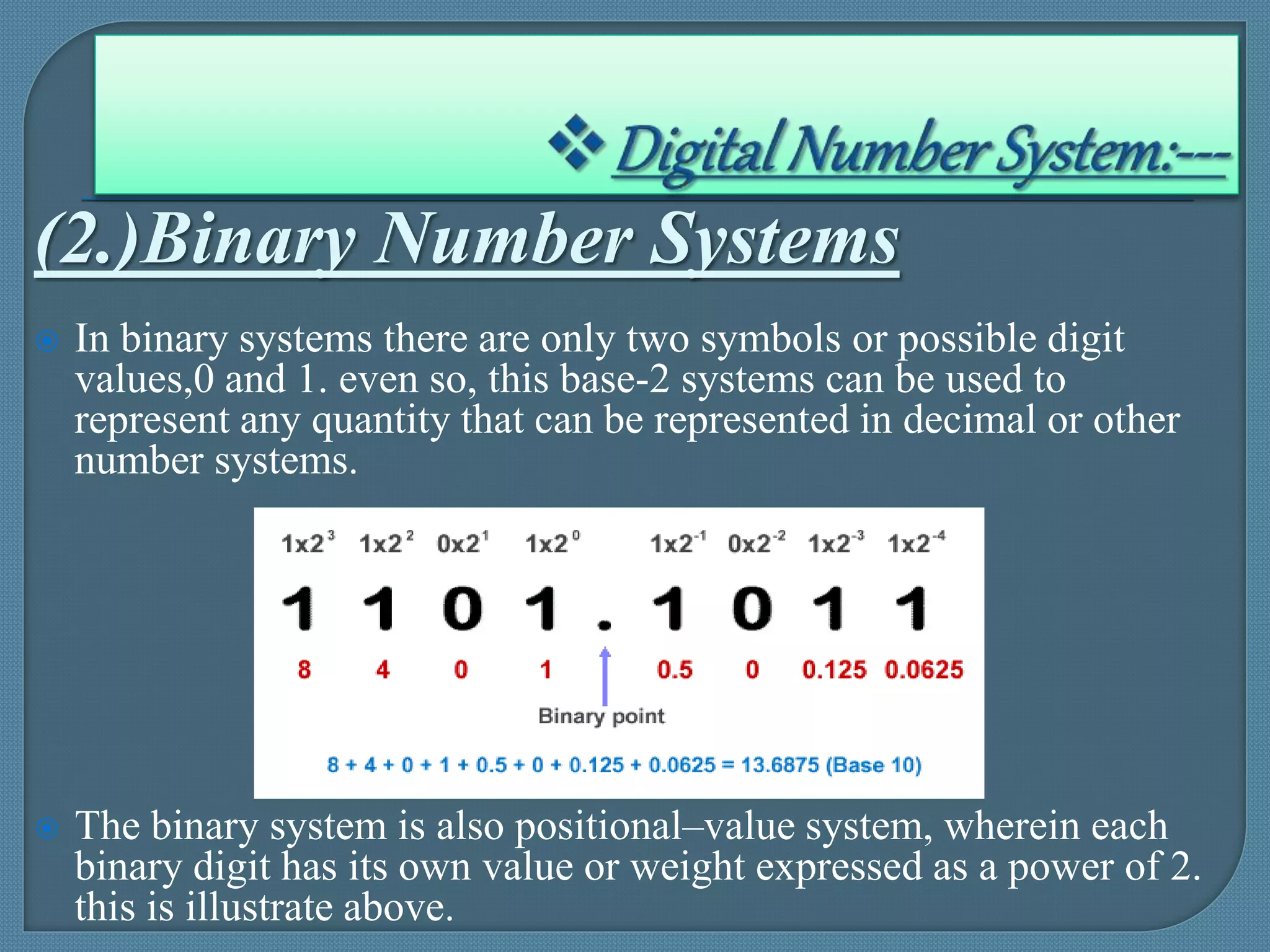
 In binary systems there are only two symbols or possible digit
values,0 and 1. even so, this base-2 systems can be used to
represent any quantity that can be represented in decimal or other
number systems.
 The binary system is also positional–value system, wherein each
binary digit has its own value or weight expressed as a power of 2.
this is illustrate above.
(3.) Octal Number Systems
 The octal number system is very important in digital number
system is very important in digital computer work. The octal
number system has a base of eight, meaning that it has eight
unique symbols : 0,1,2,3,4,5,6and 7. thus each digit of an
octal number can have any value from 0 to 7.
 The octal system is also a positional value system, wherein
each octal digit ha sits own value or weight expressed as a
power of 8.
 The places to the left of the octal point (counter part of
decimal point and binary point) are positive powers of 8 and
places to the right are negative powers of 8.
 (3.) Octal Number Systems
 The number 257.43is shown below.
 To find the decimal equivalent of above shown octal
number, simply take the sum of product of each digit value
and its position value.
 The sequence of octal number goes as 0,1,2,3,4,5,6,
7,8,9,10,11,12,13,…,…,….,see each successive number
after 7 is a combination of 2 or more unique symbol of octal
system.
(3.) Hexadecimal Number Systems
 The hexadecimal system uses base 16. thus it has 16 possible
digit symbols. It uses the digits 0 through 9 plus the alphabet
letter A,B,C,D,E and F as the 16 digit symbols.
Weights
Hexadecimal Point
 Hexadecimal system is also a positional value systems, wherein
each hexadecimal digit has its own value or weight expressed as
power of 16. As shown above.
(3.) Hexadecimal Number Systems
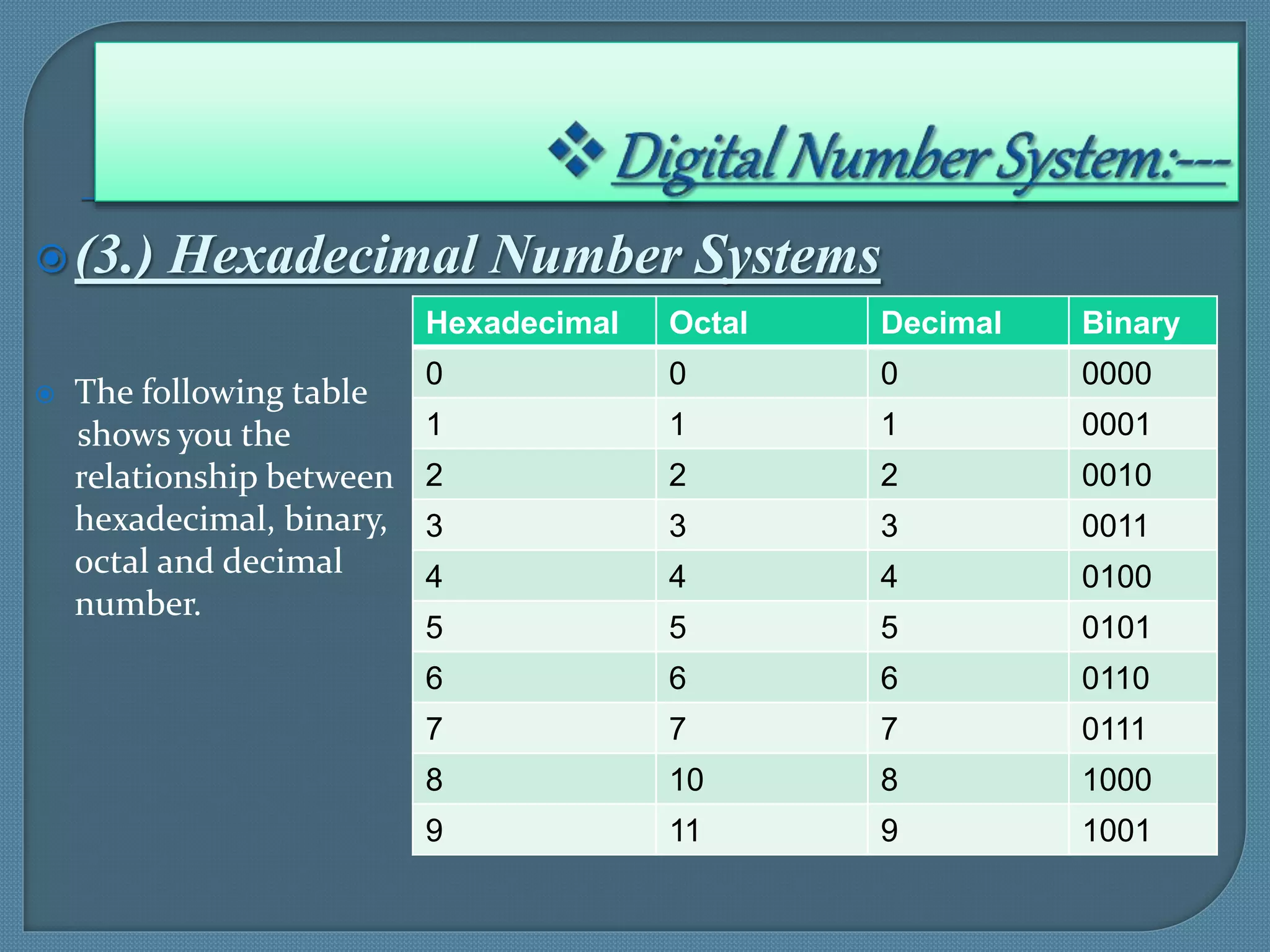
 The following table
shows you the
relationship between
hexadecimal, binary,
octal and decimal
number.
Hexadecimal Octal Decimal Binary
0 0 0 0000
1 1 1 0001
2 2 2 0010
3 3 3 0011
4 4 4 0100
5 5 5 0101
6 6 6 0110
7 7 7 0111
8 10 8 1000
9 11 9 1001
(3.) Hexadecimal Number Systems
 Note that each hexadecimal digit represents a group of 4 binary
digits. It is important to remember that hex digit A to F are
equivalent to the decimal values 10 through
Hexadecimal Octal Decimal Binary
A 12 10 1010
B 13 11 1011
C 14 12 1100
D 15 13 1101
E 16 14 1110
F 17 15 1111
Numberconversion:---
 The binary number system is the most important one in digital systems as it is
very easy to implement in circuitry.
 The decimal system is important because it is universally used to represent
quantities outside a digital system.
 In in addition to binary and decimal, octal and hexadecimal number system
find widespread application in digital systems.
 These number systems provide an efficient means for representing large
binary number, as we shall see, both these number system may be in use at the
same time, so that an understanding of the system operation requires the
ability to convert from one number system to another.
 This section discusses how to perform these conversion.
(1.)Decimal-To-Binary Conversion.
 There are two procedure of converting integers from decimal to binary
conversion
 The first method requires a table of power of 2. because of this
restriction, it is more useful for small numbers where these power have
been memorized.
 Starting with the decimal number to be evaluated, obtain the largest power
of 2 from the table without exceeding the original number. Record this.
Then subtract the table obtained number from the original number.
 Repeat the process for remainder, and continue until the remainder is zero.
Finally, add the binary numbers obtained from the table. The result is
answer.
(1.)Decimal-To-Binary Conversion.
1st Method Referring to Table of Power.
 From table of 2, 32 is the largest number without exceeding43.
32=100000
 Now, put 1 at 6th position(5+1) and 0s at all position
43-32=11
 From table, 8 is the largest number with exceeding 11.
8=1000
 Now , 11-8=3
 From the table , 2 is the largest number without exceeding 3
2=10
 1 is the largest without exceeding 1
1=1
(1.)Decimal-To-Binary Conversion.
1st Method Referring to Table of Power.
 Add all the binary number obtained i.e.,
100000
1000
10
1
101011
Thus
4310=1010112
(1.)Decimal-To-Binary Conversion.
2nd Method Repeated Division Method.
 The second method of converting decimal to binary is repeated
division method, the number is successively divided by 2 and its
remainder recorded.
 Finally binary result is obtained by assembling the remainders, with
the last remainder being the most significant bit (MSB).
(1.)Decimal-To-Binary Conversion.
2nd Method Repeated Division Method.
1.A Converting Decimal Fraction To Binary
 To convert decimal fraction into binary, the procedure is to
successively multiply the decimal fraction by the radix i.e., base and
collect all numbers to the left of the decimal point.
(2.) Binary-To-Decimal Conversion.
 The binary number system is a positional system where each binary
digit carries a certain weight based on its position relative the LSB.
 Any binary number can be converted to its decimal equivalent simply
by summing together the weights of the various positions in the
binary number which contain a 1.
(2.) Binary-To-Decimal Conversion.
 Note that the procedure is to find the weight fro each
bit position that contains a 1, and then to add them up.
(2.) Binary-To-Decimal Conversion.
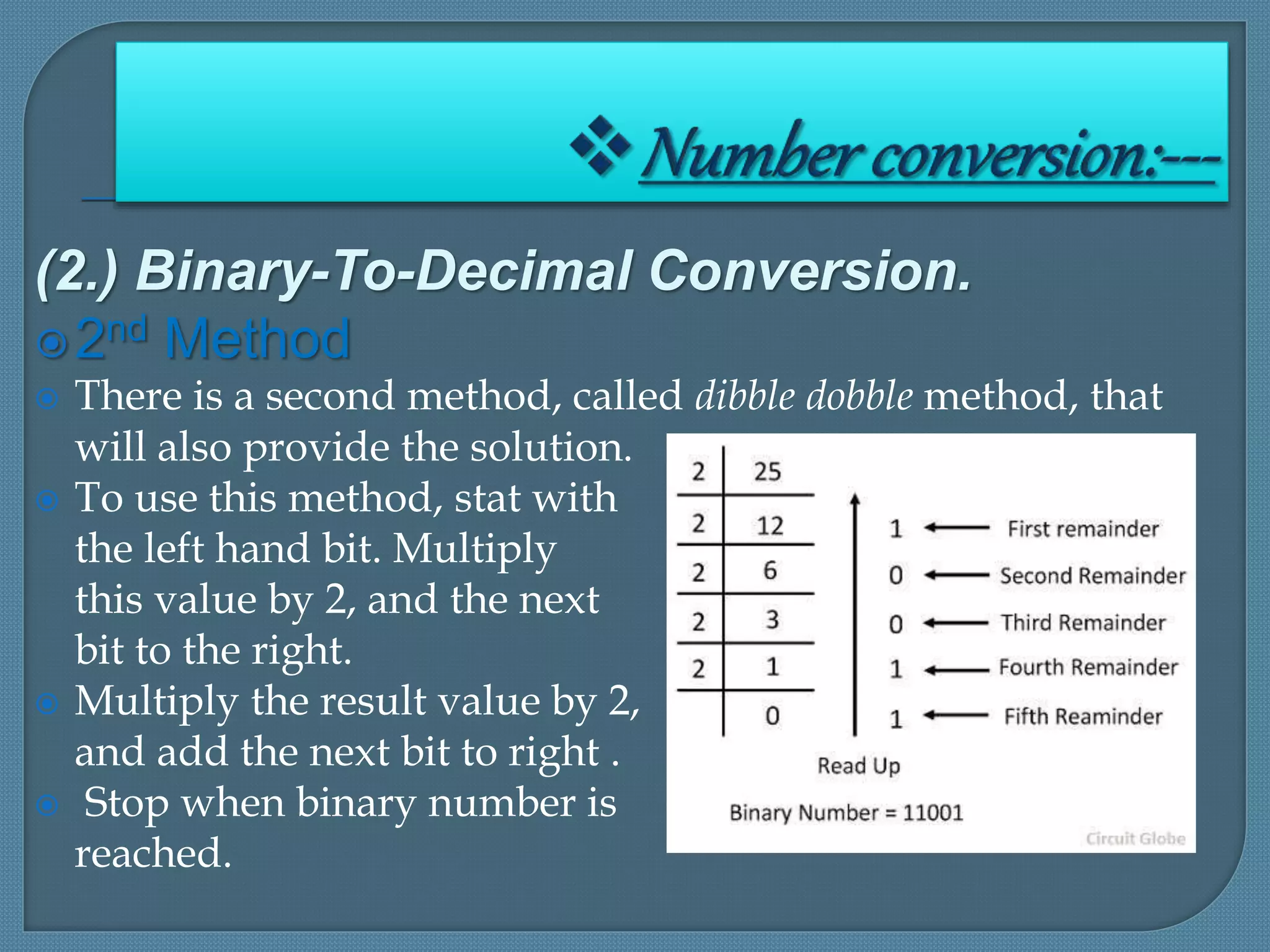
2nd Method
 There is a second method, called dibble dobble method, that
will also provide the solution.
 To use this method, stat with
the left hand bit. Multiply
this value by 2, and the next
bit to the right.
 Multiply the result value by 2,
and add the next bit to right .
 Stop when binary number is
reached.
(A.) Converting Binary Fraction
 To find decimal equivalent of binary fraction, take the
sum of the products of each digit value and its
positional value .
(2.) Decimal-To-Octal Conversion.
 Converting Binary Fraction To Decimal
 A decimal integer can be converted to octal by using the
same repeated division method.
 Note that the first remainder becomes the least significant
digit of the octal number and the last remainder becomes the
most significant digit.
(3.) Decimal-To-Octal Conversion.
 Converting Binary Fraction To Decimal
 To convert decimal fraction into octal, the procedure is
successively multiply the decimal fraction by the radix
i.e., base(8 is in this case) and collect all the number
to the left of the decimal point.
 Convert (0.513)10 in
octal.
 And answer is
(0.4.651...)8
(4.) Octal-To-Decimal Conversion.
 An octal number, then, can be easily converted to its
decimal equivalent by multiplying each octal digit by
its positional weight.
 Convert 372468 to decimal.
The Answer =
1603810
(5.) Octal-To-Decimal Conversion.
 The primary advantage of the octal number system is
the ease with which conversion can be made between
binary is performed by converting each octal digit to
its 3-bit binary equivalent.
 The eight possible digits are converted as indicated :--
Binary equivalent of octal digits
,
(5.) Octal-To-Binary Conversion.
 Using these conversions, any octal number is
converted to binary by individually converting each
digit.
 Convert the
257.43 to Binary.
Answer is 010100111.1000112
(6.) Binary-To-Octal Conversion.
 Converting from binary integers to octal integers is
simply the reverse of the foregoing process. The bits of
the binary integer are grouped into groups of three bits
starting at the LSB. Then each group is converted to its
octal equivalent
 Convert 1001110102
to octal
Answer=257.43
(6.) Binary-To-Octal Conversion.
 Sometimes the binary number will not have even
group of three bits.
 For those cases, we can add one or two 0s to the left
of the MSB of the binary to fill out the last group.
 Note that, after the binary point, the groups of 3 bits
are made starting from left to right.
 That is why, we added two zeroes to make a group
of three bits as the last group had only 1.
(7.)Decimal-To-Hex Conversion.
 Decimal to hex conversion can be done using
repeated division by 16.
 Note that any remainder
that are greater than 9 are
represented by letter
A through F.
(8.)Hex-To-Decimal Conversion.
 A hex number can be converted to its decimal
equivalent by using the fact that each hex digit
position has a weight that is power of 16.
 Note that in the
second example the
value 10 was
substituted for A and
the value 16 for F in
the conversion to
decimal.
(9.) Binary-To-Hex Conversion.
 Binary numbers can be easily converted to hexadecimal
by grouping in groups of four starting at the binary
point.
(10.)Hex-To-Binary Conversion.
 The hexadecimal number system is used primarily as
a shorthand method for representing binary numbers.
It is a relative simple matter to convert a hex number
to binary. Each hex digit is converted to its 4 bit
binary equivalent.
Binaryrepresentationof integers:---
 Integers may be represented in various ways in
computers. These are
 Sign and Magnitude representation.
 One’s complement, and
 Two’s complement representations.
 Let us discuss these representation in briefly.
Binaryrepresentationofintegers:---
Sign and Magnitude Representation.
 This is conventional form for number representation. Integers are identified
buy their signs and a string of digits which represents the magnitude .
 For example :
 +17 or 23 are positive integers
 -14 or -15 are negative integers
 To represents sign of a number , utmost bit is used. If it holds value 0, the
sign is -,
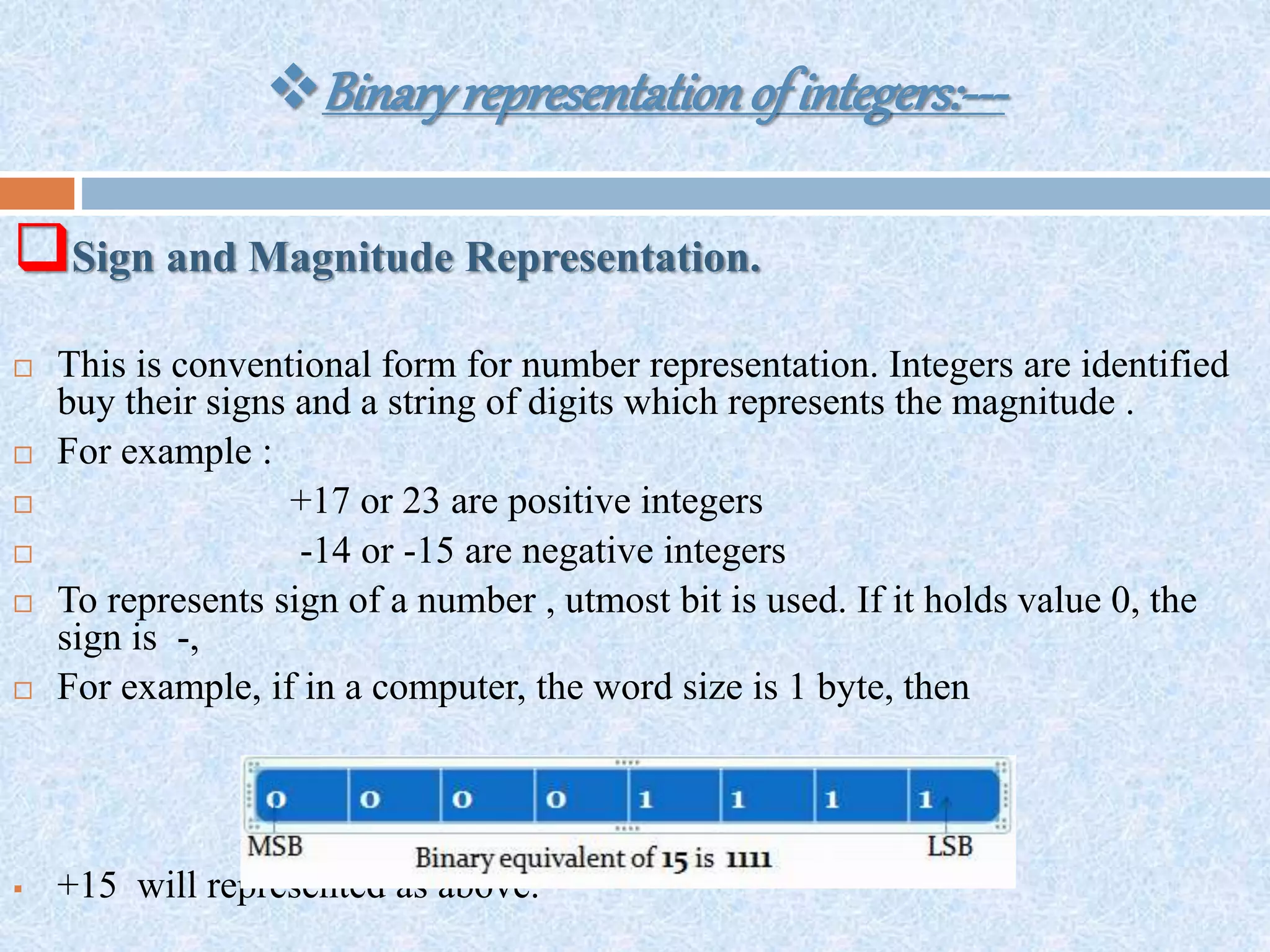
 For example, if in a computer, the word size is 1 byte, then
 +15 will represented as above.
Binaryrepresentationofintegers:---
Sign and Magnitude Representation.
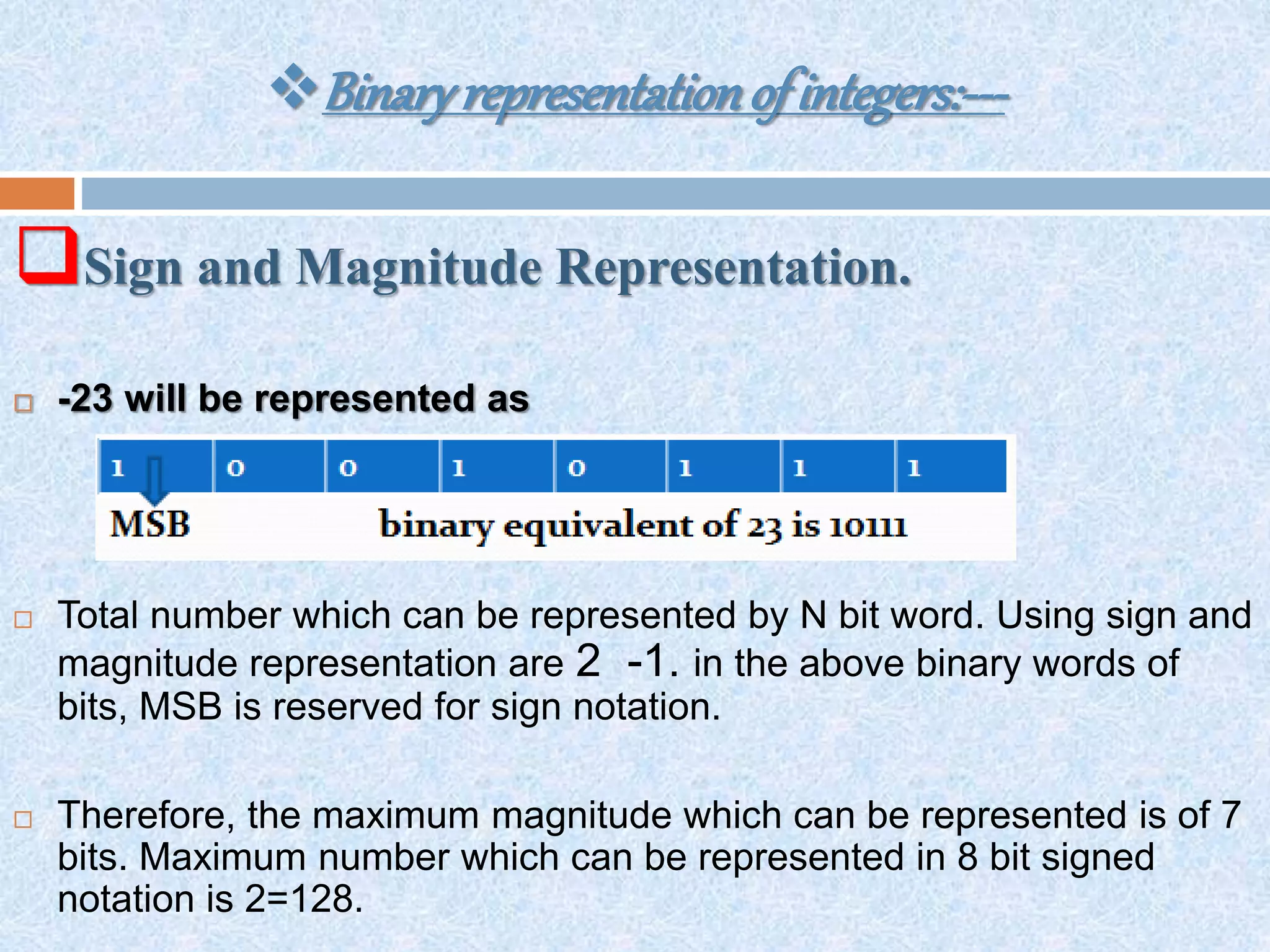
 -23 will be represented as
 Total number which can be represented by N bit word. Using sign and
magnitude representation are 2 -1. in the above binary words of
bits, MSB is reserved for sign notation.
 Therefore, the maximum magnitude which can be represented is of 7
bits. Maximum number which can be represented in 8 bit signed
notation is 2=128.
Binaryrepresentationofintegers:---
One’s Complement Representation.
 One’s complement represents positive number by their binary
equivalent and negative numbers by their 1’s complement .
 For example :--
Binaryrepresentationofintegers:---
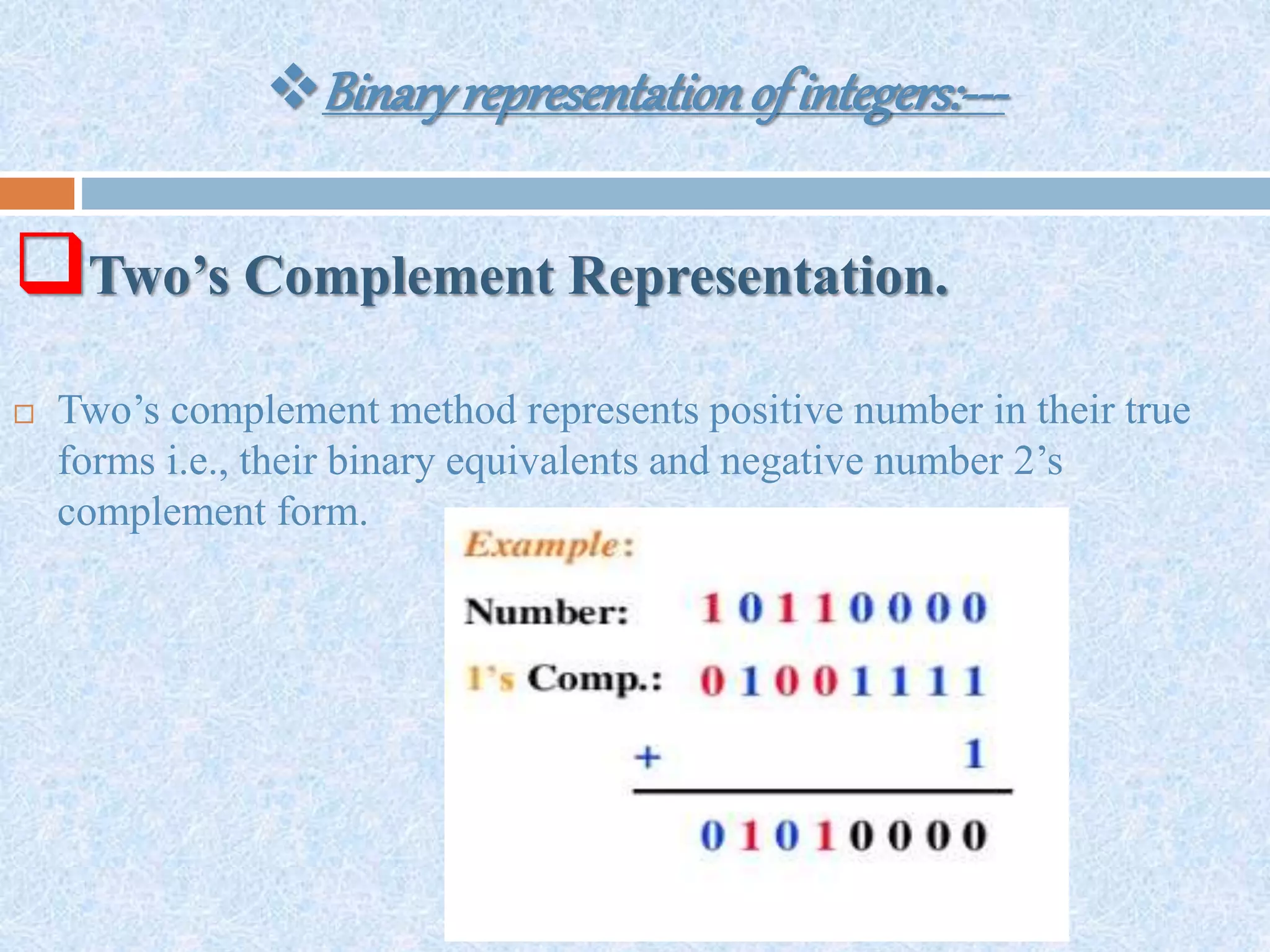
Two’s Complement Representation.
 Two’s complement method represents positive number in their true
forms i.e., their binary equivalents and negative number 2’s
complement form.
Binaryrepresentationofintegers:---
Two’s Complement Representation.
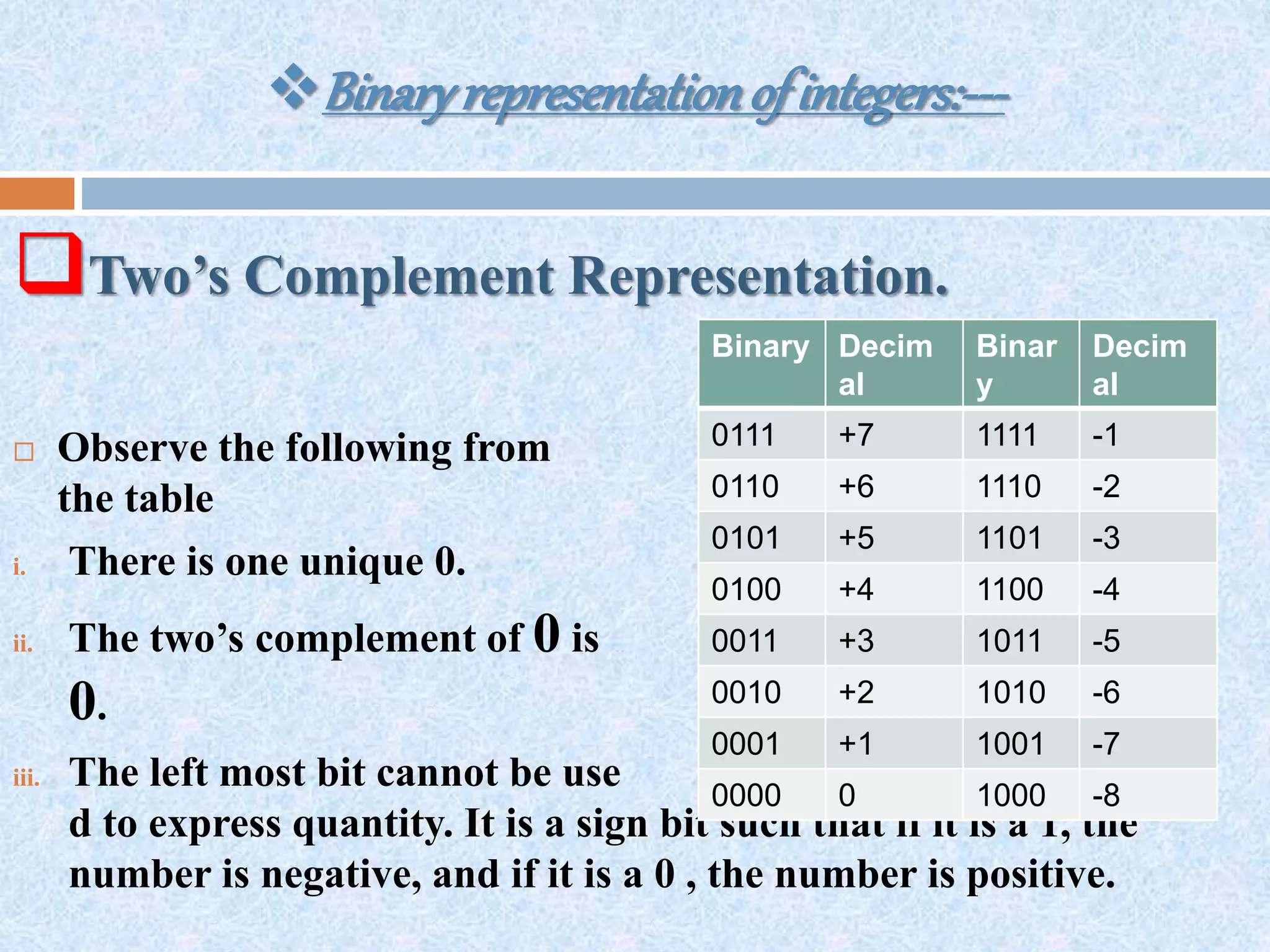
 Observe the following from
the table
i. There is one unique 0.
ii. The two’s complement of 0 is
0.
iii. The left most bit cannot be use
d to express quantity. It is a sign bit such that if it is a 1, the
number is negative, and if it is a 0 , the number is positive.
Binary Decim
al
Binar
y
Decim
al
0111 +7 1111 -1
0110 +6 1110 -2
0101 +5 1101 -3
0100 +4 1100 -4
0011 +3 1011 -5
0010 +2 1010 -6
0001 +1 1001 -7
0000 0 1000 -8
Binaryrepresentationofintegers:---
Two’s Complement Representation.
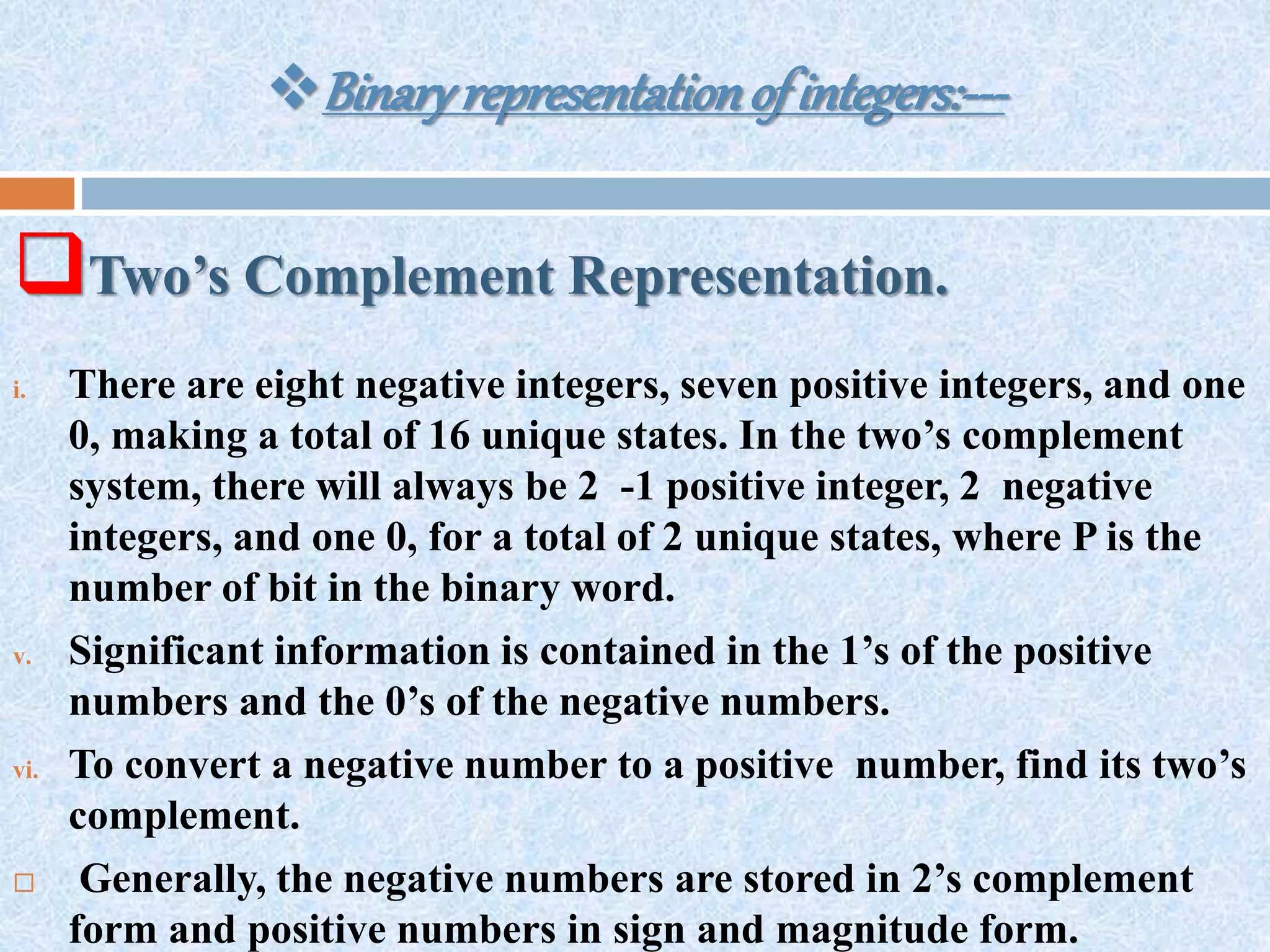
i. There are eight negative integers, seven positive integers, and one
0, making a total of 16 unique states. In the two’s complement
system, there will always be 2 -1 positive integer, 2 negative
integers, and one 0, for a total of 2 unique states, where P is the
number of bit in the binary word.
v. Significant information is contained in the 1’s of the positive
numbers and the 0’s of the negative numbers.
vi. To convert a negative number to a positive number, find its two’s
complement.
 Generally, the negative numbers are stored in 2’s complement
form and positive numbers in sign and magnitude form.
Binaryrepresentationof realnumber
 Real numbers are represented in storage medium by
their exponents and mantissa.
 For example, number 32.17 can be written as
0.3217*10,0.3217 is its mantissa and 2 is its exponent.
 Binary numbers can also be expressed in this same
notation by stating a number and an exponent of 2. the
format for one computer is as shown above.
Mantissa Exponent
0100100000 100011
 There are many formats of floating-point numbers, each computer
having its own. Some use two words for mantissa and one for
exponent; other use one and one-half words for mantissa and one
for the exponent.
 On some machines, the programmer can select from several
formats, depending on the machines, the programmer can select
from several formats, depending on the accuracy desired. Some
use excess-n notation for the exponent; some use two’s
complement. Some even use signed magnitude for both mantissa
and the exponent.
Desired Exponent Binary Representation
-32 000000
-1 011111
0 100000
+6 100110
+31 111111
2
 Floating point numbers have the advantage of
expressing very large and very small numbers.
 In the above described machine, the mantissa is
10 bits long and the exponent 6 bits. The system
is, therefore capable of 9 bit accuracy .
 The exponent bit add nothing to accuracy to 15
bits. Thus, although floating point numbers can be
much larger or smaller than an equivalent length
fixed point number, they are less accurate.
Represent tingcharactersinmemory:-
 In addition to numerical data, a computer must be able to handle numerical
information.
 In other words, a computer should recognize codes that represent letters of
the alphabet, punctuation marks, and other special characters as well as
number.
 These codes are called alphanumeric codes.
 A complete alphanumeric code would include the 26 lowercase letter, 25
uppercase letters,10 numeric digits 7 punctuation marks, and anywhere from
20 to 40 other characters, such as +,/,#,%,*, and so on.
 We can say that an alphanumeric code represent all of the various characters
and function that are found on a standard typewriter (or computer keyboard).
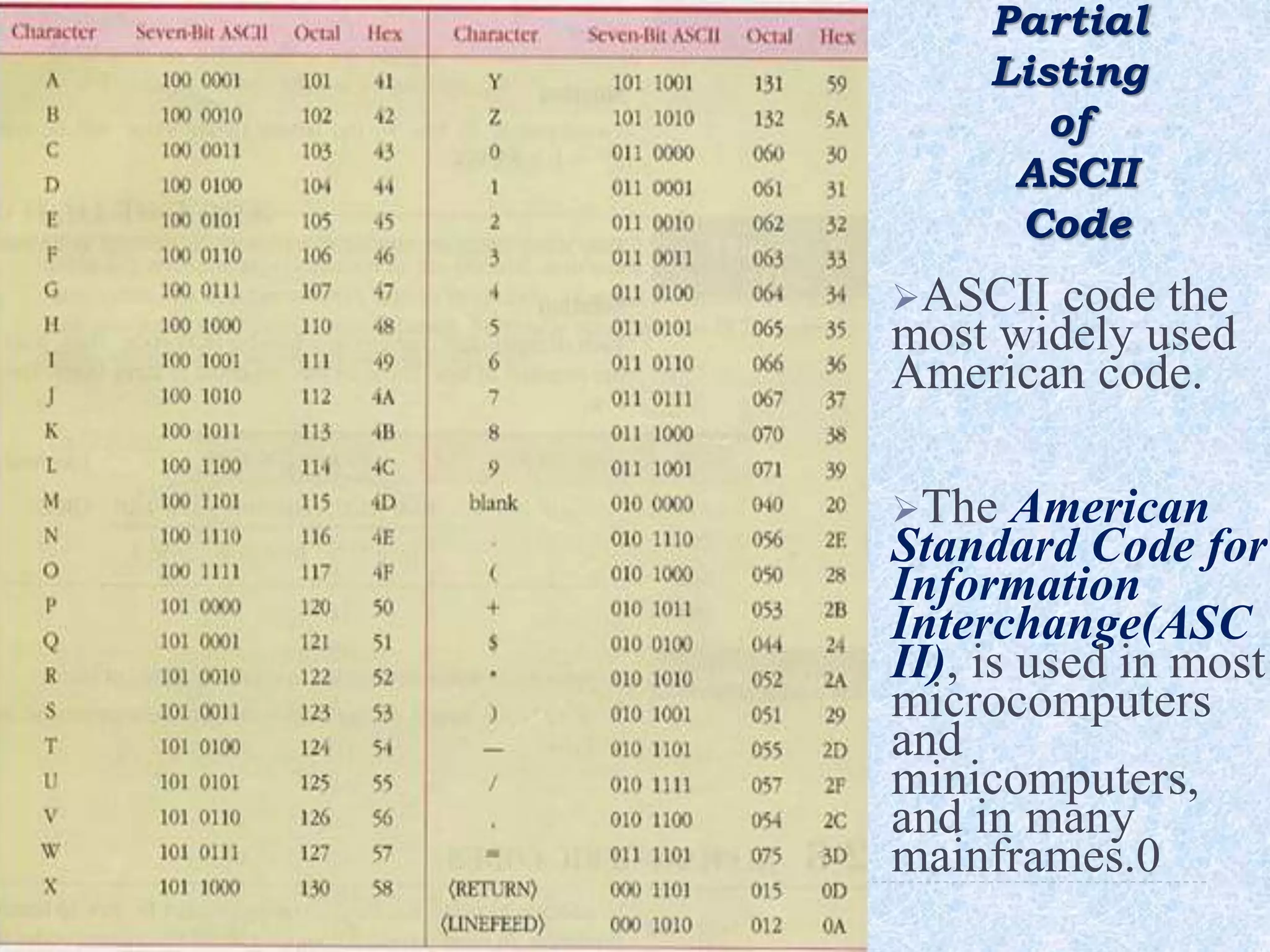
Partial
Listing
of
ASCII
Code
ASCII code the
most widely used
American code.
The American
Standard Code for
Information
Interchange(ASC
II), is used in most
microcomputers
and
minicomputers,
and in many
mainframes.0
ISCII:-
 With the advent of computerization considerable work has been
undertaken to facilitate the use of Indian languages on computers.
 These activities were generally limited to specific languages and
were independent exercises of various organizations, thus, making
data-interchange impossible.
 In such a scenario, it is important to have a common standard for
coding scripts. In 1991, the Bureau of Indian Standard adopted the
Indian Standard Code for Information Interchange (ISCII), the
ISCII standard that was evolved by a standardization committee .
 This is an eight bit code capable of coding 256 characters. ISCII
code retains all ASCII characters and offers coding for Indian
scripts also. Thus, it is also called Indian Script Code for
Information.
ISCII:-
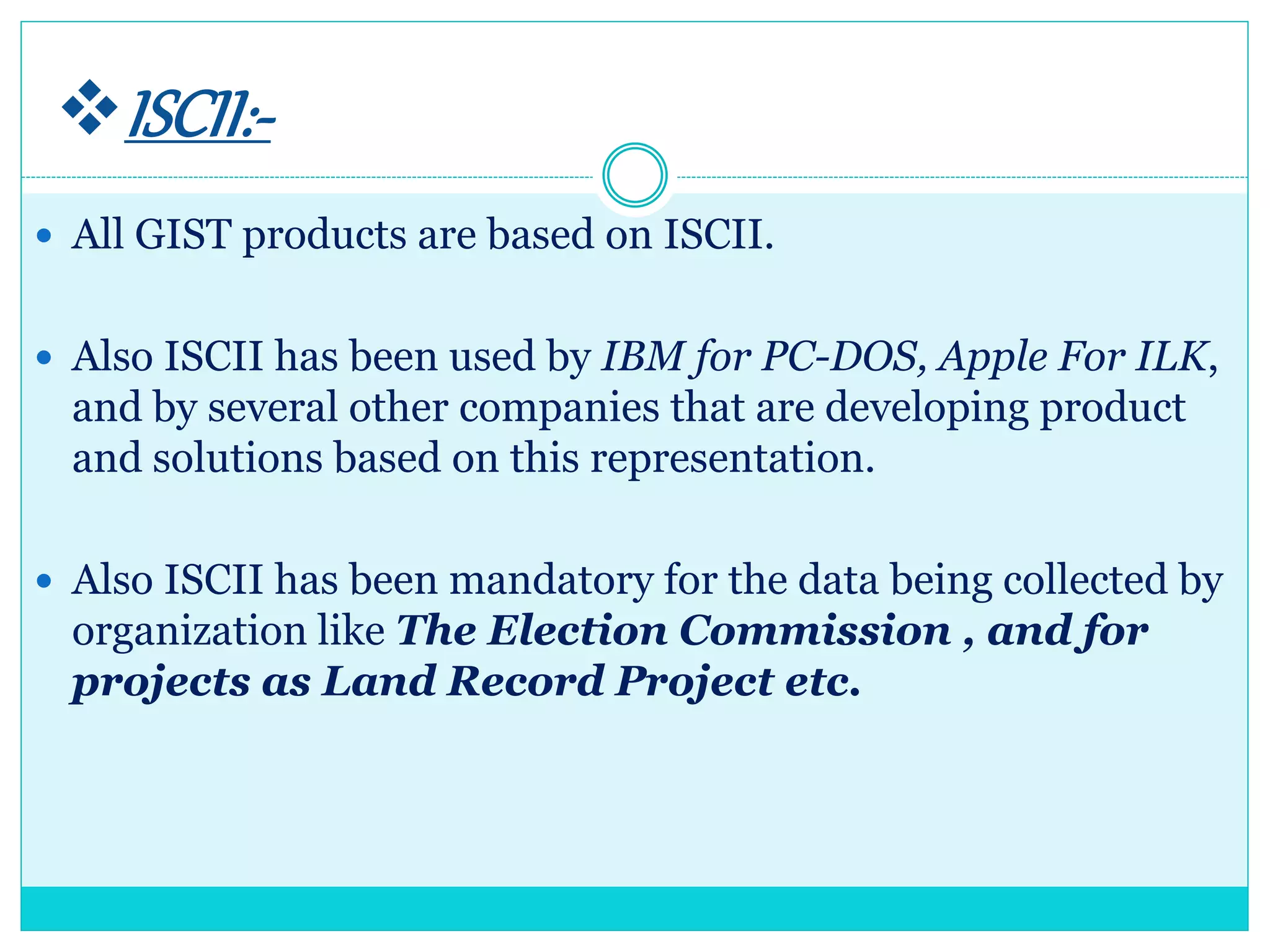
 All GIST products are based on ISCII.
 Also ISCII has been used by IBM for PC-DOS, Apple For ILK,
and by several other companies that are developing product
and solutions based on this representation.
 Also ISCII has been mandatory for the data being collected by
organization like The Election Commission , and for
projects as Land Record Project etc.
 This standard does not apply to Devanagari Script,
but also to the Gurmukhi, Gujarati, Oriya, Bengali,
Assamese, Telugu, Kannada, Malayalam and Tamil
Script.
 Because the structure of these scripts is so similar
that a single coding can be applied to all of them,
immedately providing tranliteration between the
scripts.
 Some of the ISCII version for different script are
being given in previous slides.
Unicode:----
 Unicode, the new universal coding standard being adopted all newer
platforms.
 It has been developed by Unicode Consortium that was formed in
1991.
 As officially stated,
Unicode provides a unique number fro every character,
no matter what the platform,
no matter what the program,
no matter what the language.
Unicode:----
 Fundamentally, computers just deal with numbers.
 They store letters and other characters by assigning a number for
each one.
 Before Unicode was invented, there was hundreds of different
encoding systems for assigning these numbers.
 No single encoding contain enough character : for example, the
European Union alone requires several different encodings to
cover all its languages.
 Even for a single punctuation, and technical symbols in common
use .
Unicode:----
 These encoding system also conflict with one another.
 That is, two encodings can use the same number for two different
characters, or use different numbers for the same character.
 Any given computer (especially servers) needs to support many
different encodings; yet whenever data is passed between different
encoding or platforms, that data always runs the risk of corruption.
Significance.
 Unicode provides a unique number for every character, no matter
what the platform, no matter what the program, no matter what the
language.
 The Unicode standard has been adopted by such industry leaders as
apple, HP, IBM, just System, Microsoft, Oracle, SAP, Sun, Sybase,
Unisys and many others.
 Unicode is required by modern standard such as XML, Java, ECMA
script, WML etc. and is the official way to implement ISO/IEC
10646.
 Unicode is becoming very popular and is supported in many
operating systems, all modern browser, and many others products.
 Significance.
 The emergence of the Unicode standard and the
availability of tool supporting it, are among the most
significant recent global software technology trends.
 Incorporating Unicode into client – server or multi-tiered
applications and websites offers significant cost saving over the uses
of legacy character sets.
 Unicode enables a single software product or a single website to be
targeted across multiple platform, language and countries without
re-engineering.
 Unicode allows data to be transported through many different
systems without corruption.
Characters Represented.
 Unicode version 3.0 represented 49,194 characters.
 Whereas Unicode version 3.1 has added many more
characters, making the character count to 94,140.
Indian Languages on Unicode.
 The Unicode standard has incorporated Indian scripts under the
group named Asian script.
 The Indian scripts included are Devnagari, Bengali, Gurumukhi,
Guajarati, Oriya, Tamil, Telugu, Kannada, and Malayalam.
 The Indian language block of Unicode Standard is based on ISCII-
1988.
 We are discussing Devanagari and Bengali Scripts in next Slide.
Devanagri
Script
Bengali
Script
To Take
Knowledge

Data repersentation.

  • 2.
     Introduction  DigitalNumber system  Number Conversions  Binary Representation of integers  Binary Representation of Real Number  Representing Characters in Memory  ISCII  Unicode
  • 3.
    Introduction:---  Digital techniqueshave found their way to innumerable area of technology, but the area of automatic digital computers is by far the most notable and extensive.  As you known, a computer is a system of a hardware that performs arithmetic operations, manipulates data, and makes decisions.  In science, technology, business, and in fact , most other fields of endeavor , we are constantly dealing with quantities ; so are computers. Quantities are measured, ,monitoring, recorded , manipulated arithmetically, observed, or in some other way utilized in most physical systems. In digital systems like computer, the quantities are represented by symbols called digits.  Many numbers systems are used in digital technology that represents the digits in various forms.  The most common are the decimal, binary, octal, and hexadecimal systems.  This presentation discusses these number systems and he physical representation of digits in computers.
  • 4.
    Digital Number System:--- In digital representation, various number systems are used. The most common number systems are used. The most common number systems used in:---  Decimal Number Systems.  Binary Number Systems.  Octal Number Systems.  Hexadecimal Number Systems.  Let us discuss these number systems briefly.
  • 5.
    (1.)Decimal Number Systems The decimal number system is composed of 10 numerals or symbols.  These numbers are : 0,1,2,3,4,5,6,7,8,9,; using these symbols as digits of a number, we can express any quantity.  The decimal system, also called the base -10 system because it has evolved naturally as a result of the fact that man has 10 fingers.  The decimal system is a positional- value system in which the value of a digit depends on its position.  For e.g., consider the decimal number 729. we know that the digit 7 actually represents 7 hundred, the 2 represents 2 tens, and the 9 represents 9 units. In essence, the 7 carries the most weight of three digits; it is referred to as most significant digit (MSD). The 9 carries the least weight and s called the least significant digit (LSD).
  • 6.
    (1.)Decimal Number Systems More rigorously, the various positions relative to the decimal point carry weights that can be expressed as powers of 10. for example : 2745.214 is thus equal to  In general any number is simply the sum of the products of each digit value and its positional value. The sequence of the decimal numbers goes as 0,1,2,3,4,5,6,7,8,9,10, 11,12,13,…… see after 9 each successive number is a combination of two symbols of this system.
  • 7.
    (2.)Binary Number Systems Unfortunately, the decimal number system does not lend itself to convenient implementation in digital systems.  For e.g., it is very difficult to design electronic equipment so it can work with 10 different voltages levels. On the other hand it is very easy to design simple, accurate electronic circuits that operate only two voltages levels.  For this reason, almost every digital system uses the binary number system as the basis number system of its operation, although other systems are often used in conjunction with binary.
  • 8.
    (2.)Binary Number Systems In binary systems there are only two symbols or possible digit values,0 and 1. even so, this base-2 systems can be used to represent any quantity that can be represented in decimal or other number systems.  The binary system is also positional–value system, wherein each binary digit has its own value or weight expressed as a power of 2. this is illustrate above.
  • 9.
    (3.) Octal NumberSystems  The octal number system is very important in digital number system is very important in digital computer work. The octal number system has a base of eight, meaning that it has eight unique symbols : 0,1,2,3,4,5,6and 7. thus each digit of an octal number can have any value from 0 to 7.  The octal system is also a positional value system, wherein each octal digit ha sits own value or weight expressed as a power of 8.  The places to the left of the octal point (counter part of decimal point and binary point) are positive powers of 8 and places to the right are negative powers of 8.
  • 10.
     (3.) OctalNumber Systems  The number 257.43is shown below.  To find the decimal equivalent of above shown octal number, simply take the sum of product of each digit value and its position value.  The sequence of octal number goes as 0,1,2,3,4,5,6, 7,8,9,10,11,12,13,…,…,….,see each successive number after 7 is a combination of 2 or more unique symbol of octal system.
  • 11.
    (3.) Hexadecimal NumberSystems  The hexadecimal system uses base 16. thus it has 16 possible digit symbols. It uses the digits 0 through 9 plus the alphabet letter A,B,C,D,E and F as the 16 digit symbols. Weights Hexadecimal Point  Hexadecimal system is also a positional value systems, wherein each hexadecimal digit has its own value or weight expressed as power of 16. As shown above.
  • 12.
    (3.) Hexadecimal NumberSystems  The following table shows you the relationship between hexadecimal, binary, octal and decimal number. Hexadecimal Octal Decimal Binary 0 0 0 0000 1 1 1 0001 2 2 2 0010 3 3 3 0011 4 4 4 0100 5 5 5 0101 6 6 6 0110 7 7 7 0111 8 10 8 1000 9 11 9 1001
  • 13.
    (3.) Hexadecimal NumberSystems  Note that each hexadecimal digit represents a group of 4 binary digits. It is important to remember that hex digit A to F are equivalent to the decimal values 10 through Hexadecimal Octal Decimal Binary A 12 10 1010 B 13 11 1011 C 14 12 1100 D 15 13 1101 E 16 14 1110 F 17 15 1111
  • 14.
    Numberconversion:---  The binarynumber system is the most important one in digital systems as it is very easy to implement in circuitry.  The decimal system is important because it is universally used to represent quantities outside a digital system.  In in addition to binary and decimal, octal and hexadecimal number system find widespread application in digital systems.  These number systems provide an efficient means for representing large binary number, as we shall see, both these number system may be in use at the same time, so that an understanding of the system operation requires the ability to convert from one number system to another.  This section discusses how to perform these conversion.
  • 16.
    (1.)Decimal-To-Binary Conversion.  Thereare two procedure of converting integers from decimal to binary conversion  The first method requires a table of power of 2. because of this restriction, it is more useful for small numbers where these power have been memorized.  Starting with the decimal number to be evaluated, obtain the largest power of 2 from the table without exceeding the original number. Record this. Then subtract the table obtained number from the original number.  Repeat the process for remainder, and continue until the remainder is zero. Finally, add the binary numbers obtained from the table. The result is answer.
  • 17.
    (1.)Decimal-To-Binary Conversion. 1st MethodReferring to Table of Power.  From table of 2, 32 is the largest number without exceeding43. 32=100000  Now, put 1 at 6th position(5+1) and 0s at all position 43-32=11  From table, 8 is the largest number with exceeding 11. 8=1000  Now , 11-8=3  From the table , 2 is the largest number without exceeding 3 2=10  1 is the largest without exceeding 1 1=1
  • 18.
    (1.)Decimal-To-Binary Conversion. 1st MethodReferring to Table of Power.  Add all the binary number obtained i.e., 100000 1000 10 1 101011 Thus 4310=1010112
  • 19.
    (1.)Decimal-To-Binary Conversion. 2nd MethodRepeated Division Method.  The second method of converting decimal to binary is repeated division method, the number is successively divided by 2 and its remainder recorded.  Finally binary result is obtained by assembling the remainders, with the last remainder being the most significant bit (MSB).
  • 20.
  • 21.
    1.A Converting DecimalFraction To Binary  To convert decimal fraction into binary, the procedure is to successively multiply the decimal fraction by the radix i.e., base and collect all numbers to the left of the decimal point.
  • 22.
    (2.) Binary-To-Decimal Conversion. The binary number system is a positional system where each binary digit carries a certain weight based on its position relative the LSB.  Any binary number can be converted to its decimal equivalent simply by summing together the weights of the various positions in the binary number which contain a 1.
  • 23.
    (2.) Binary-To-Decimal Conversion. Note that the procedure is to find the weight fro each bit position that contains a 1, and then to add them up.
  • 24.
    (2.) Binary-To-Decimal Conversion. 2ndMethod  There is a second method, called dibble dobble method, that will also provide the solution.  To use this method, stat with the left hand bit. Multiply this value by 2, and the next bit to the right.  Multiply the result value by 2, and add the next bit to right .  Stop when binary number is reached.
  • 25.
    (A.) Converting BinaryFraction  To find decimal equivalent of binary fraction, take the sum of the products of each digit value and its positional value .
  • 26.
    (2.) Decimal-To-Octal Conversion. Converting Binary Fraction To Decimal  A decimal integer can be converted to octal by using the same repeated division method.  Note that the first remainder becomes the least significant digit of the octal number and the last remainder becomes the most significant digit.
  • 27.
    (3.) Decimal-To-Octal Conversion. Converting Binary Fraction To Decimal  To convert decimal fraction into octal, the procedure is successively multiply the decimal fraction by the radix i.e., base(8 is in this case) and collect all the number to the left of the decimal point.  Convert (0.513)10 in octal.  And answer is (0.4.651...)8
  • 28.
    (4.) Octal-To-Decimal Conversion. An octal number, then, can be easily converted to its decimal equivalent by multiplying each octal digit by its positional weight.  Convert 372468 to decimal. The Answer = 1603810
  • 29.
    (5.) Octal-To-Decimal Conversion. The primary advantage of the octal number system is the ease with which conversion can be made between binary is performed by converting each octal digit to its 3-bit binary equivalent.  The eight possible digits are converted as indicated :-- Binary equivalent of octal digits ,
  • 30.
    (5.) Octal-To-Binary Conversion. Using these conversions, any octal number is converted to binary by individually converting each digit.  Convert the 257.43 to Binary. Answer is 010100111.1000112
  • 31.
    (6.) Binary-To-Octal Conversion. Converting from binary integers to octal integers is simply the reverse of the foregoing process. The bits of the binary integer are grouped into groups of three bits starting at the LSB. Then each group is converted to its octal equivalent  Convert 1001110102 to octal Answer=257.43
  • 32.
    (6.) Binary-To-Octal Conversion. Sometimes the binary number will not have even group of three bits.  For those cases, we can add one or two 0s to the left of the MSB of the binary to fill out the last group.  Note that, after the binary point, the groups of 3 bits are made starting from left to right.  That is why, we added two zeroes to make a group of three bits as the last group had only 1.
  • 33.
    (7.)Decimal-To-Hex Conversion.  Decimalto hex conversion can be done using repeated division by 16.  Note that any remainder that are greater than 9 are represented by letter A through F.
  • 34.
    (8.)Hex-To-Decimal Conversion.  Ahex number can be converted to its decimal equivalent by using the fact that each hex digit position has a weight that is power of 16.  Note that in the second example the value 10 was substituted for A and the value 16 for F in the conversion to decimal.
  • 35.
    (9.) Binary-To-Hex Conversion. Binary numbers can be easily converted to hexadecimal by grouping in groups of four starting at the binary point.
  • 36.
    (10.)Hex-To-Binary Conversion.  Thehexadecimal number system is used primarily as a shorthand method for representing binary numbers. It is a relative simple matter to convert a hex number to binary. Each hex digit is converted to its 4 bit binary equivalent.
  • 37.
    Binaryrepresentationof integers:---  Integersmay be represented in various ways in computers. These are  Sign and Magnitude representation.  One’s complement, and  Two’s complement representations.  Let us discuss these representation in briefly.
  • 38.
    Binaryrepresentationofintegers:--- Sign and MagnitudeRepresentation.  This is conventional form for number representation. Integers are identified buy their signs and a string of digits which represents the magnitude .  For example :  +17 or 23 are positive integers  -14 or -15 are negative integers  To represents sign of a number , utmost bit is used. If it holds value 0, the sign is -,  For example, if in a computer, the word size is 1 byte, then  +15 will represented as above.
  • 39.
    Binaryrepresentationofintegers:--- Sign and MagnitudeRepresentation.  -23 will be represented as  Total number which can be represented by N bit word. Using sign and magnitude representation are 2 -1. in the above binary words of bits, MSB is reserved for sign notation.  Therefore, the maximum magnitude which can be represented is of 7 bits. Maximum number which can be represented in 8 bit signed notation is 2=128.
  • 40.
    Binaryrepresentationofintegers:--- One’s Complement Representation. One’s complement represents positive number by their binary equivalent and negative numbers by their 1’s complement .  For example :--
  • 41.
    Binaryrepresentationofintegers:--- Two’s Complement Representation. Two’s complement method represents positive number in their true forms i.e., their binary equivalents and negative number 2’s complement form.
  • 42.
    Binaryrepresentationofintegers:--- Two’s Complement Representation. Observe the following from the table i. There is one unique 0. ii. The two’s complement of 0 is 0. iii. The left most bit cannot be use d to express quantity. It is a sign bit such that if it is a 1, the number is negative, and if it is a 0 , the number is positive. Binary Decim al Binar y Decim al 0111 +7 1111 -1 0110 +6 1110 -2 0101 +5 1101 -3 0100 +4 1100 -4 0011 +3 1011 -5 0010 +2 1010 -6 0001 +1 1001 -7 0000 0 1000 -8
  • 43.
    Binaryrepresentationofintegers:--- Two’s Complement Representation. i.There are eight negative integers, seven positive integers, and one 0, making a total of 16 unique states. In the two’s complement system, there will always be 2 -1 positive integer, 2 negative integers, and one 0, for a total of 2 unique states, where P is the number of bit in the binary word. v. Significant information is contained in the 1’s of the positive numbers and the 0’s of the negative numbers. vi. To convert a negative number to a positive number, find its two’s complement.  Generally, the negative numbers are stored in 2’s complement form and positive numbers in sign and magnitude form.
  • 44.
    Binaryrepresentationof realnumber  Realnumbers are represented in storage medium by their exponents and mantissa.  For example, number 32.17 can be written as 0.3217*10,0.3217 is its mantissa and 2 is its exponent.  Binary numbers can also be expressed in this same notation by stating a number and an exponent of 2. the format for one computer is as shown above. Mantissa Exponent 0100100000 100011
  • 45.
     There aremany formats of floating-point numbers, each computer having its own. Some use two words for mantissa and one for exponent; other use one and one-half words for mantissa and one for the exponent.  On some machines, the programmer can select from several formats, depending on the machines, the programmer can select from several formats, depending on the accuracy desired. Some use excess-n notation for the exponent; some use two’s complement. Some even use signed magnitude for both mantissa and the exponent. Desired Exponent Binary Representation -32 000000 -1 011111 0 100000 +6 100110 +31 111111
  • 46.
    2  Floating pointnumbers have the advantage of expressing very large and very small numbers.  In the above described machine, the mantissa is 10 bits long and the exponent 6 bits. The system is, therefore capable of 9 bit accuracy .  The exponent bit add nothing to accuracy to 15 bits. Thus, although floating point numbers can be much larger or smaller than an equivalent length fixed point number, they are less accurate.
  • 47.
    Represent tingcharactersinmemory:-  Inaddition to numerical data, a computer must be able to handle numerical information.  In other words, a computer should recognize codes that represent letters of the alphabet, punctuation marks, and other special characters as well as number.  These codes are called alphanumeric codes.  A complete alphanumeric code would include the 26 lowercase letter, 25 uppercase letters,10 numeric digits 7 punctuation marks, and anywhere from 20 to 40 other characters, such as +,/,#,%,*, and so on.  We can say that an alphanumeric code represent all of the various characters and function that are found on a standard typewriter (or computer keyboard).
  • 48.
    Partial Listing of ASCII Code ASCII code the mostwidely used American code. The American Standard Code for Information Interchange(ASC II), is used in most microcomputers and minicomputers, and in many mainframes.0
  • 49.
    ISCII:-  With theadvent of computerization considerable work has been undertaken to facilitate the use of Indian languages on computers.  These activities were generally limited to specific languages and were independent exercises of various organizations, thus, making data-interchange impossible.  In such a scenario, it is important to have a common standard for coding scripts. In 1991, the Bureau of Indian Standard adopted the Indian Standard Code for Information Interchange (ISCII), the ISCII standard that was evolved by a standardization committee .  This is an eight bit code capable of coding 256 characters. ISCII code retains all ASCII characters and offers coding for Indian scripts also. Thus, it is also called Indian Script Code for Information.
  • 50.
    ISCII:-  All GISTproducts are based on ISCII.  Also ISCII has been used by IBM for PC-DOS, Apple For ILK, and by several other companies that are developing product and solutions based on this representation.  Also ISCII has been mandatory for the data being collected by organization like The Election Commission , and for projects as Land Record Project etc.
  • 54.
     This standarddoes not apply to Devanagari Script, but also to the Gurmukhi, Gujarati, Oriya, Bengali, Assamese, Telugu, Kannada, Malayalam and Tamil Script.  Because the structure of these scripts is so similar that a single coding can be applied to all of them, immedately providing tranliteration between the scripts.  Some of the ISCII version for different script are being given in previous slides.
  • 55.
    Unicode:----  Unicode, thenew universal coding standard being adopted all newer platforms.  It has been developed by Unicode Consortium that was formed in 1991.  As officially stated, Unicode provides a unique number fro every character, no matter what the platform, no matter what the program, no matter what the language.
  • 56.
    Unicode:----  Fundamentally, computersjust deal with numbers.  They store letters and other characters by assigning a number for each one.  Before Unicode was invented, there was hundreds of different encoding systems for assigning these numbers.  No single encoding contain enough character : for example, the European Union alone requires several different encodings to cover all its languages.  Even for a single punctuation, and technical symbols in common use .
  • 57.
    Unicode:----  These encodingsystem also conflict with one another.  That is, two encodings can use the same number for two different characters, or use different numbers for the same character.  Any given computer (especially servers) needs to support many different encodings; yet whenever data is passed between different encoding or platforms, that data always runs the risk of corruption.
  • 58.
    Significance.  Unicode providesa unique number for every character, no matter what the platform, no matter what the program, no matter what the language.  The Unicode standard has been adopted by such industry leaders as apple, HP, IBM, just System, Microsoft, Oracle, SAP, Sun, Sybase, Unisys and many others.  Unicode is required by modern standard such as XML, Java, ECMA script, WML etc. and is the official way to implement ISO/IEC 10646.  Unicode is becoming very popular and is supported in many operating systems, all modern browser, and many others products.
  • 59.
     Significance.  Theemergence of the Unicode standard and the availability of tool supporting it, are among the most significant recent global software technology trends.  Incorporating Unicode into client – server or multi-tiered applications and websites offers significant cost saving over the uses of legacy character sets.  Unicode enables a single software product or a single website to be targeted across multiple platform, language and countries without re-engineering.  Unicode allows data to be transported through many different systems without corruption.
  • 60.
    Characters Represented.  Unicodeversion 3.0 represented 49,194 characters.  Whereas Unicode version 3.1 has added many more characters, making the character count to 94,140.
  • 61.
    Indian Languages onUnicode.  The Unicode standard has incorporated Indian scripts under the group named Asian script.  The Indian scripts included are Devnagari, Bengali, Gurumukhi, Guajarati, Oriya, Tamil, Telugu, Kannada, and Malayalam.  The Indian language block of Unicode Standard is based on ISCII- 1988.  We are discussing Devanagari and Bengali Scripts in next Slide.
  • 62.
  • 63.

Editor's Notes

  • #47 SANDEEP KUMAR IS VERY GOOD BOY