Kensu | Confidential | All rights reserved | Copyright, 2022
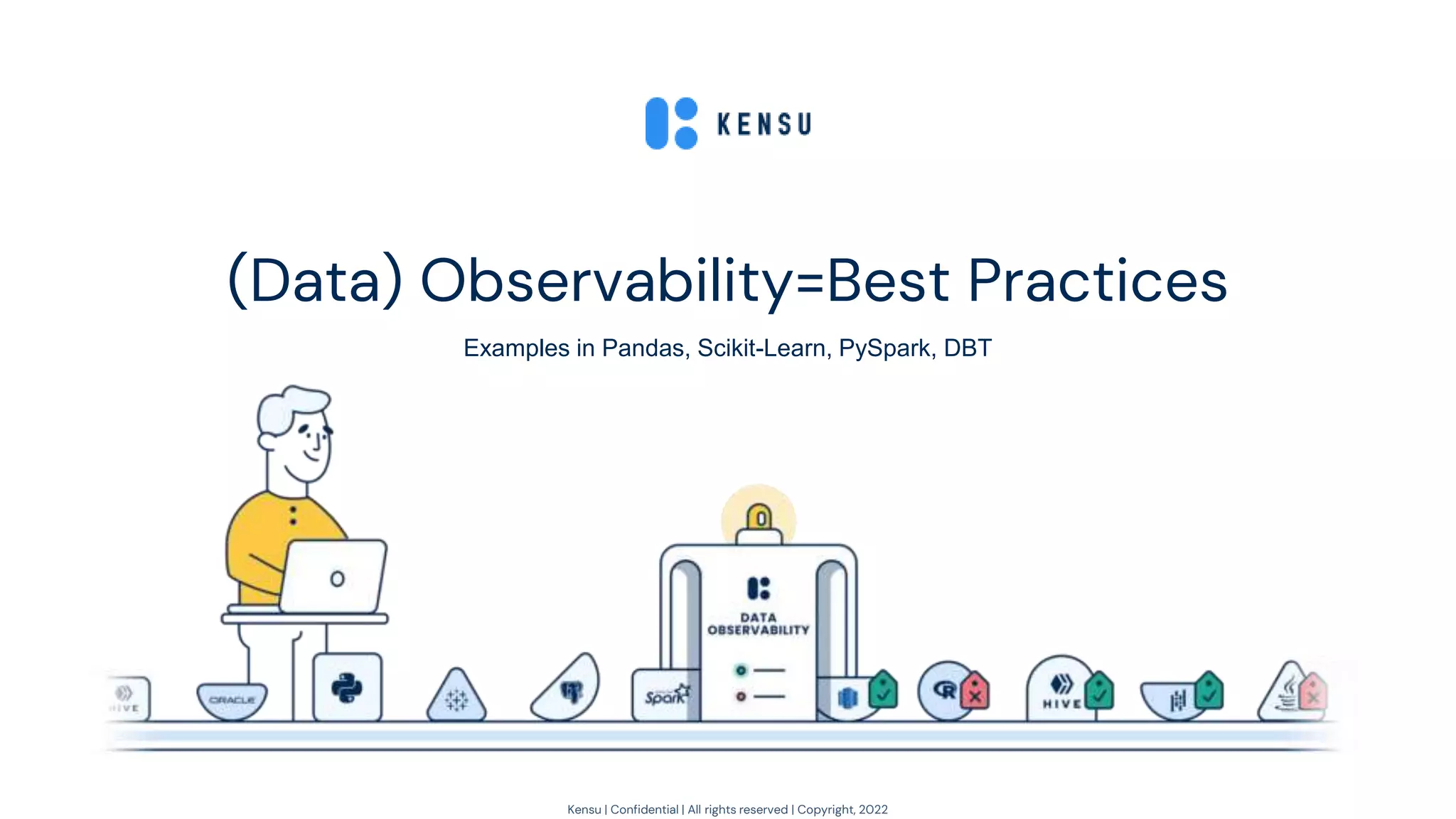
(Data) Observability=Best Practices
Examples in Pandas, Scikit-Learn, PySpark, DBT
Kensu | Confidential | All rights reserved | Copyright, 2022
My 20 years of scars with data 🩹
2
First 10 years
- Software Engineer in Geospatial - Map/Coverage/Catalog (Java, C++, YUI 🩹)
- (Satellite) Images and Vector Data Miner
(Java/Python/R/Fortran/Scala)
Next 5 years
- Spark evangelist, teaching, and consulting in Big Data/AI in the Silicon Valley
- Creator of Spark-Notebook (pre-jupyter): open-source (3100+ ✪) and community-drive (20K+)
Last 5 years
- Brainstorming on how to bring quality and monitoring DevOps best practices to data (aka DODD)
- Founded Kensu: easing data teams to embrace best practices and create trust in deliveries
Meanwhile, “serial author”
- “What is Data Governance”, O’Reilly, 2020
- “What is Data Observability”, O’Reilly, 2021
- “Fundamentals of Data Observability”, O’Reilly, 2023
Kensu | Confidential | All rights reserved | Copyright, 2022
Agenda
3
1. Observability & Data
2. DO @ The Source - Pandas, PySpark, Scikit-Learn
3. Showcase
Kensu | Confidential | All rights reserved | Copyright, 2022
Observability & Data
1
4
Kensu | Confidential | All rights reserved | Copyright, 2022
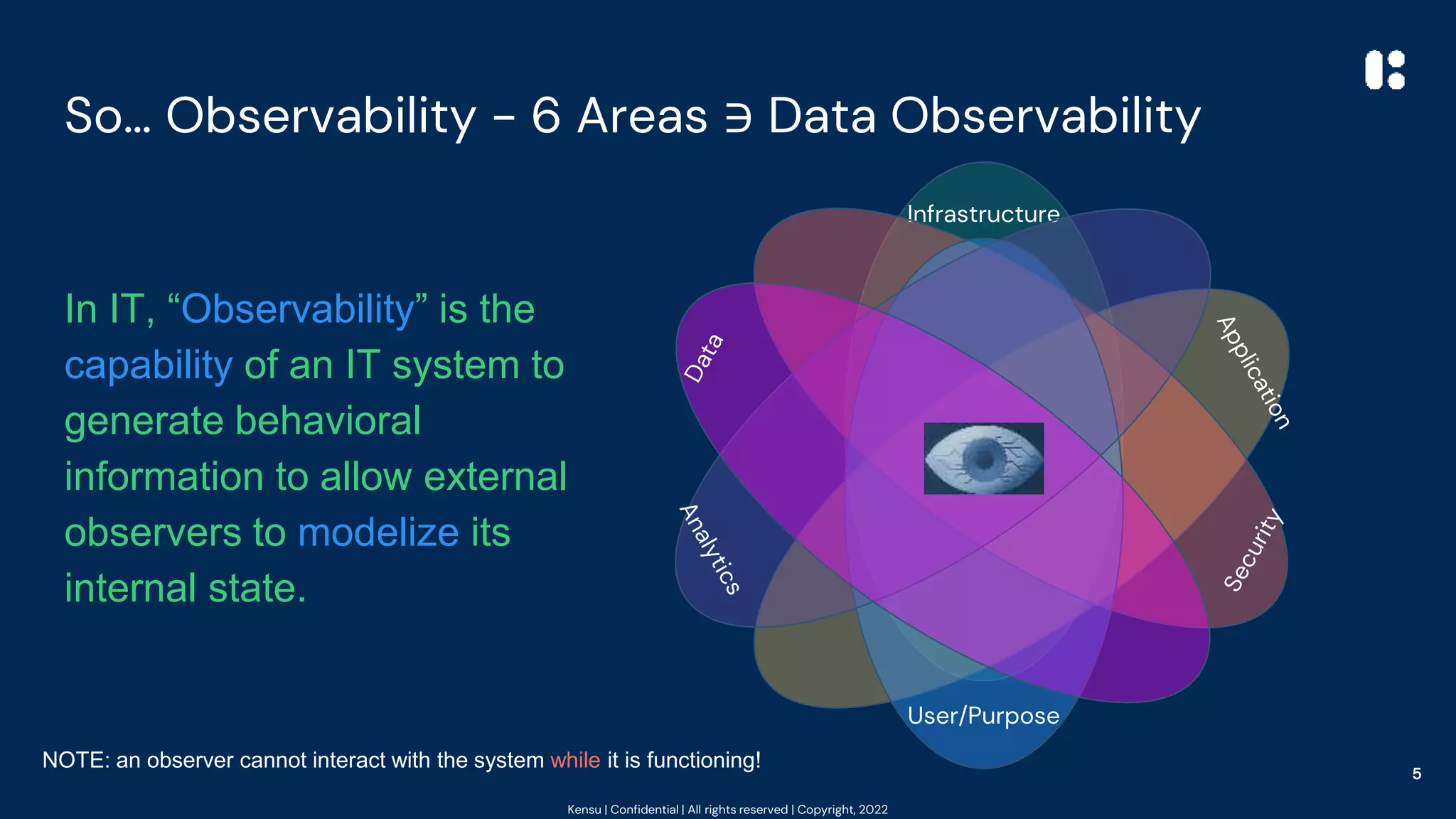
So… Observability - 6 Areas ∋ Data Observability
In IT, “Observability” is the
capability of an IT system to
generate behavioral
information to allow external
observers to modelize its
internal state.
NOTE: an observer cannot interact with the system while it is functioning!
Infrastructure
5
Kensu | Confidential | All rights reserved | Copyright, 2022
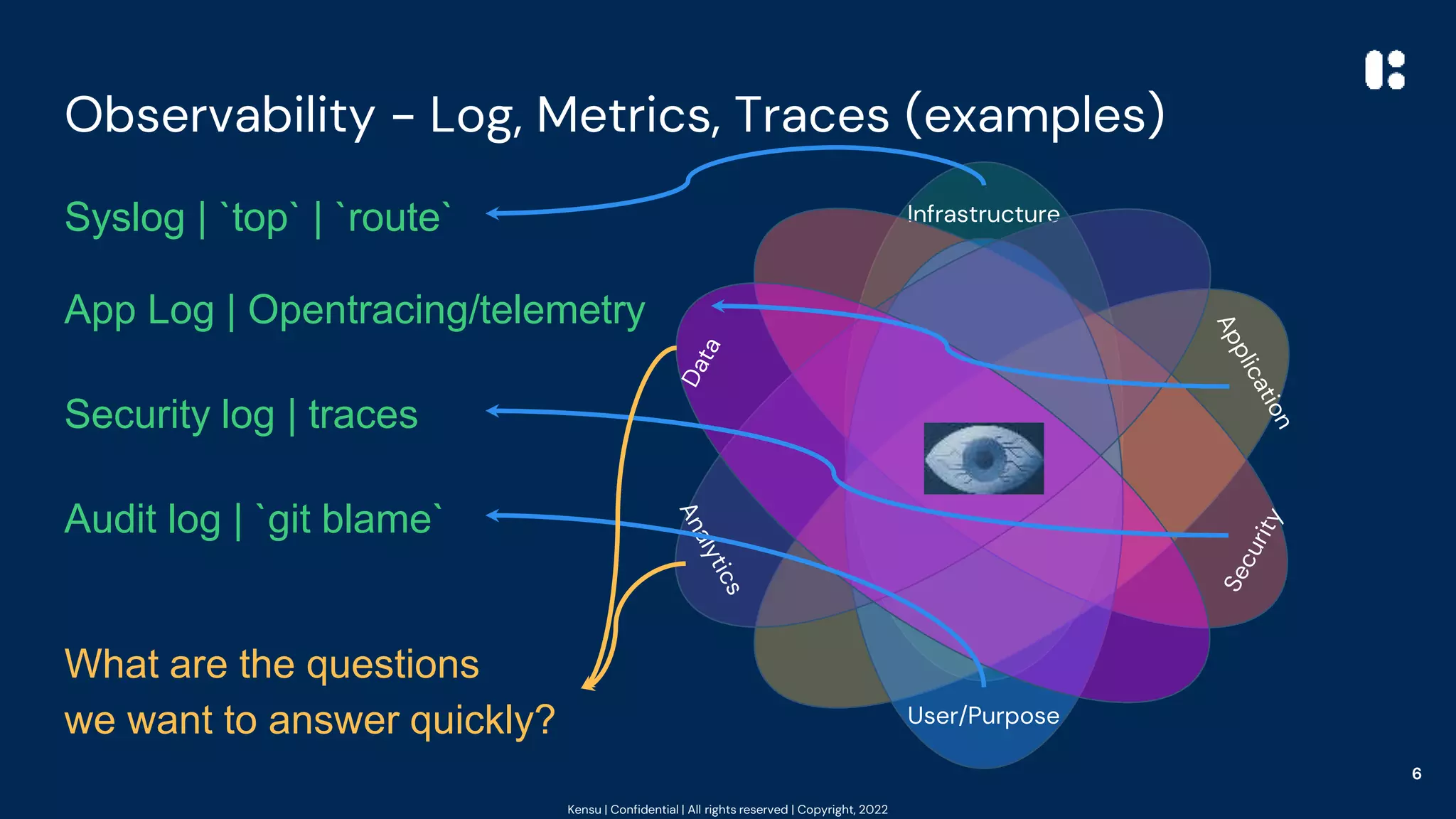
Observability - Log, Metrics, Traces (examples)
Infrastructure
Syslog | `top` | `route`
App Log | Opentracing/telemetry
Security log | traces
Audit log | `git blame`
What are the questions
we want to answer quickly?
6
Kensu | Confidential | All rights reserved | Copyright, 2022
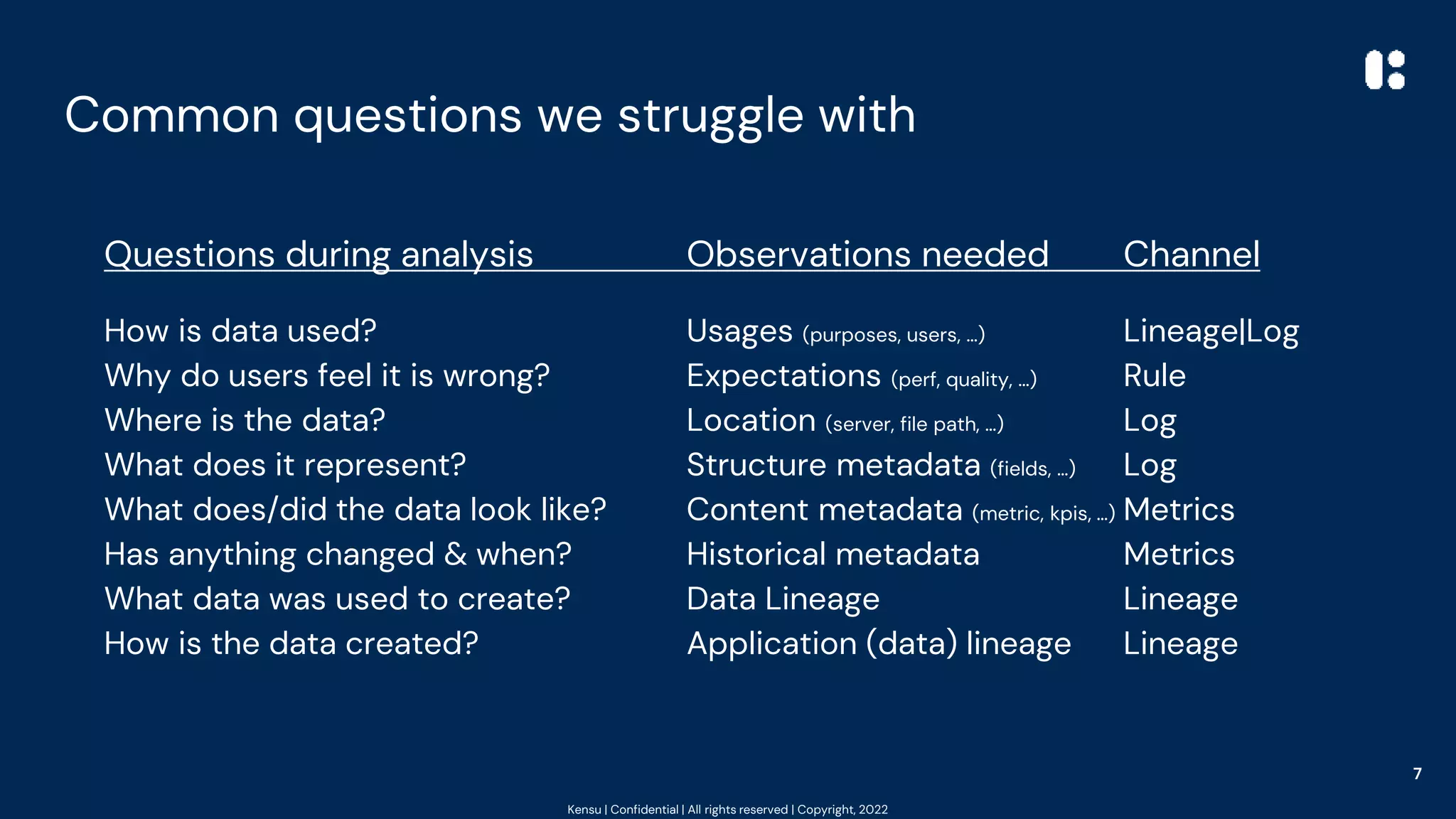
Common questions we struggle with
7
Questions during analysis Observations needed Channel
How is data used? Usages (purposes, users, …) Lineage|Log
Why do users feel it is wrong? Expectations (perf, quality, …) Rule
Where is the data? Location (server, file path, …) Log
What does it represent? Structure metadata (fields, …) Log
What does/did the data look like? Content metadata (metric, kpis, …) Metrics
Has anything changed & when? Historical metadata Metrics
What data was used to create? Data Lineage Lineage
How is the data created? Application (data) lineage Lineage
Kensu | Confidential | All rights reserved | Copyright, 2022
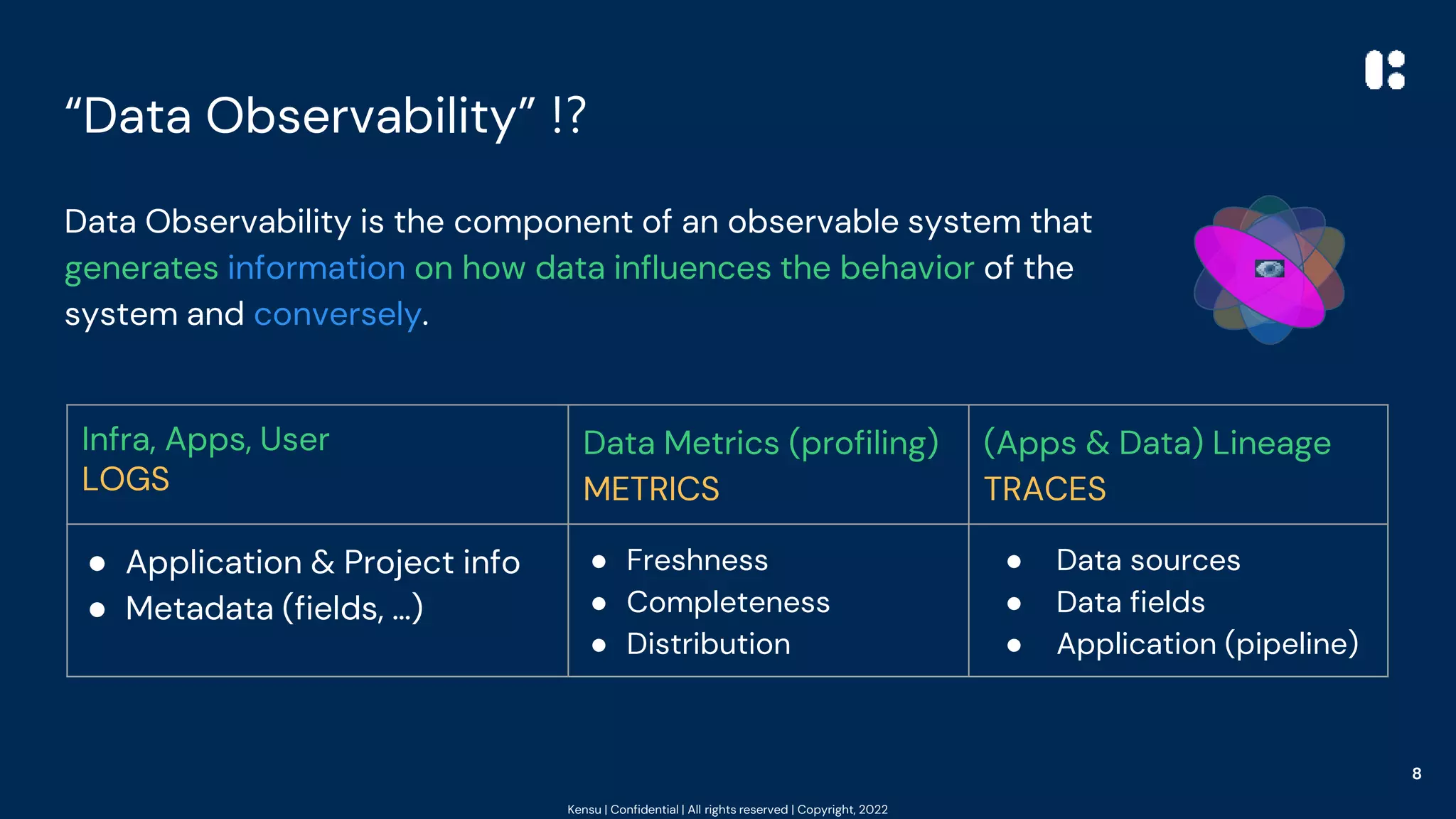
“Data Observability” ⁉️
Data Observability is the component of an observable system that
generates information on how data influences the behavior of the
system and conversely.
8
Infra, Apps, User
LOGS
Data Metrics (profiling)
METRICS
(Apps & Data) Lineage
TRACES
● Application & Project info
● Metadata (fields, …)
● Freshness
● Completeness
● Distribution
● Data sources
● Data fields
● Application (pipeline)
Kensu | Confidential | All rights reserved | Copyright, 2022
Introducing DO @ the Source
Examples
2
9
Kensu | Confidential | All rights reserved | Copyright, 2022
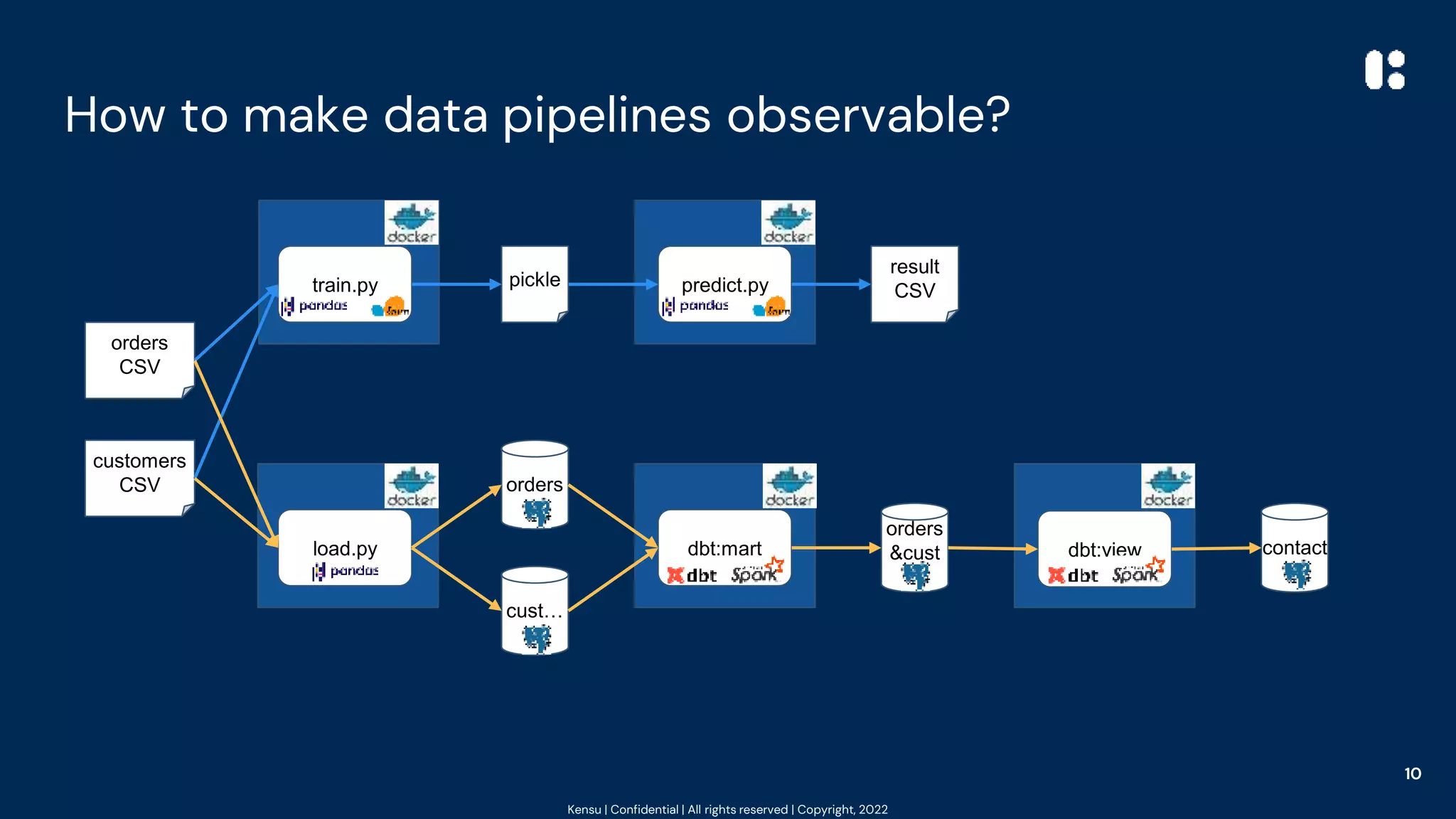
How to make data pipelines observable?
10
orders
CSV
customers
CSV
train.py
load.py
orders
&cust
…
predict.py
pickle
result
CSV
orders
cust…
contact
dbt:mart dbt:view
Kensu | Confidential | All rights reserved | Copyright, 2022
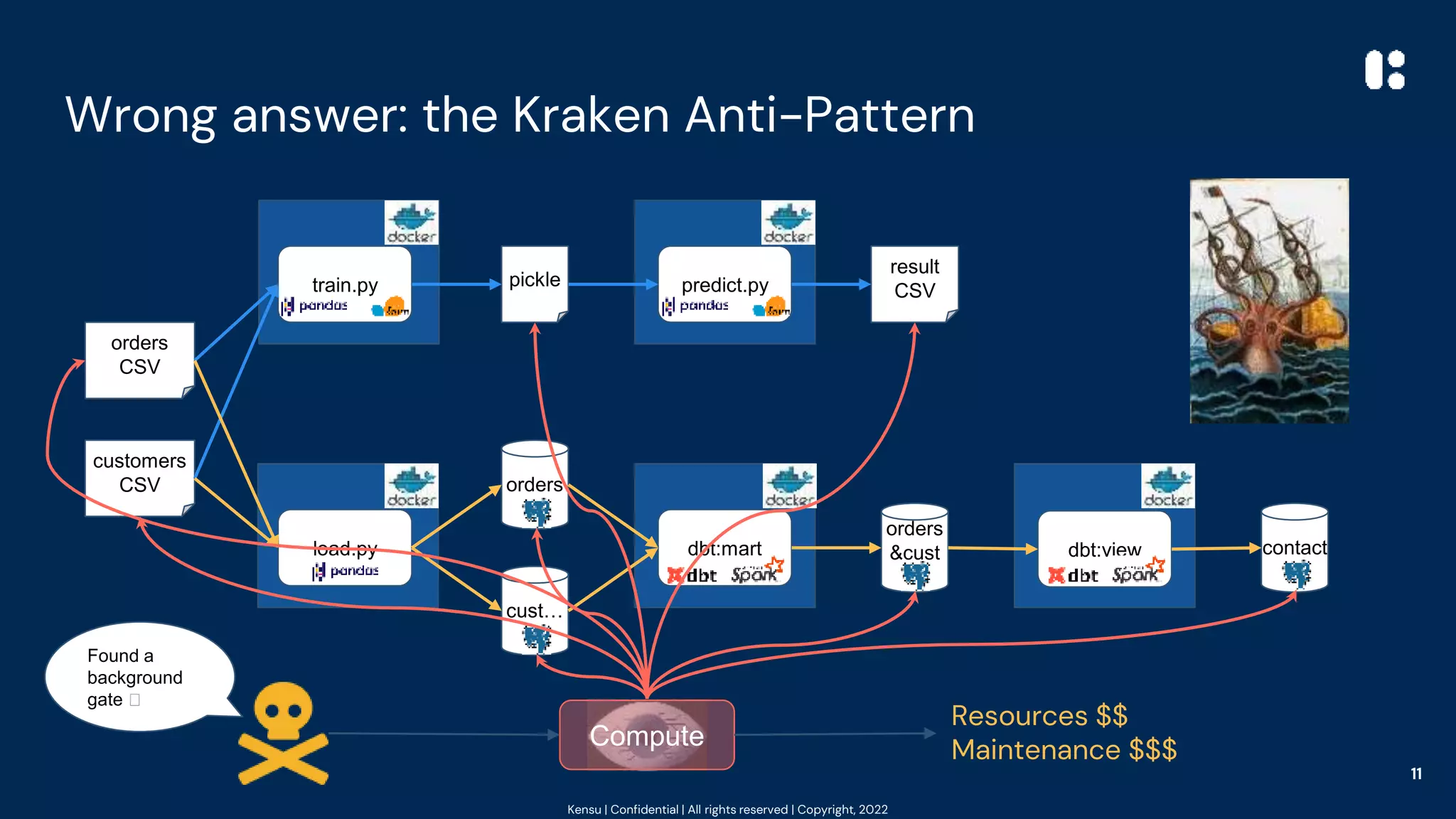
Wrong answer: the Kraken Anti-Pattern
11
orders
CSV
customers
CSV
train.py
load.py
orders
&cust
…
predict.py
pickle
result
CSV
orders
cust…
contact
dbt:mart dbt:view
Compute
Resources $$
Maintenance $$$
Found a
background
gate 🥳
Kensu | Confidential | All rights reserved | Copyright, 2022
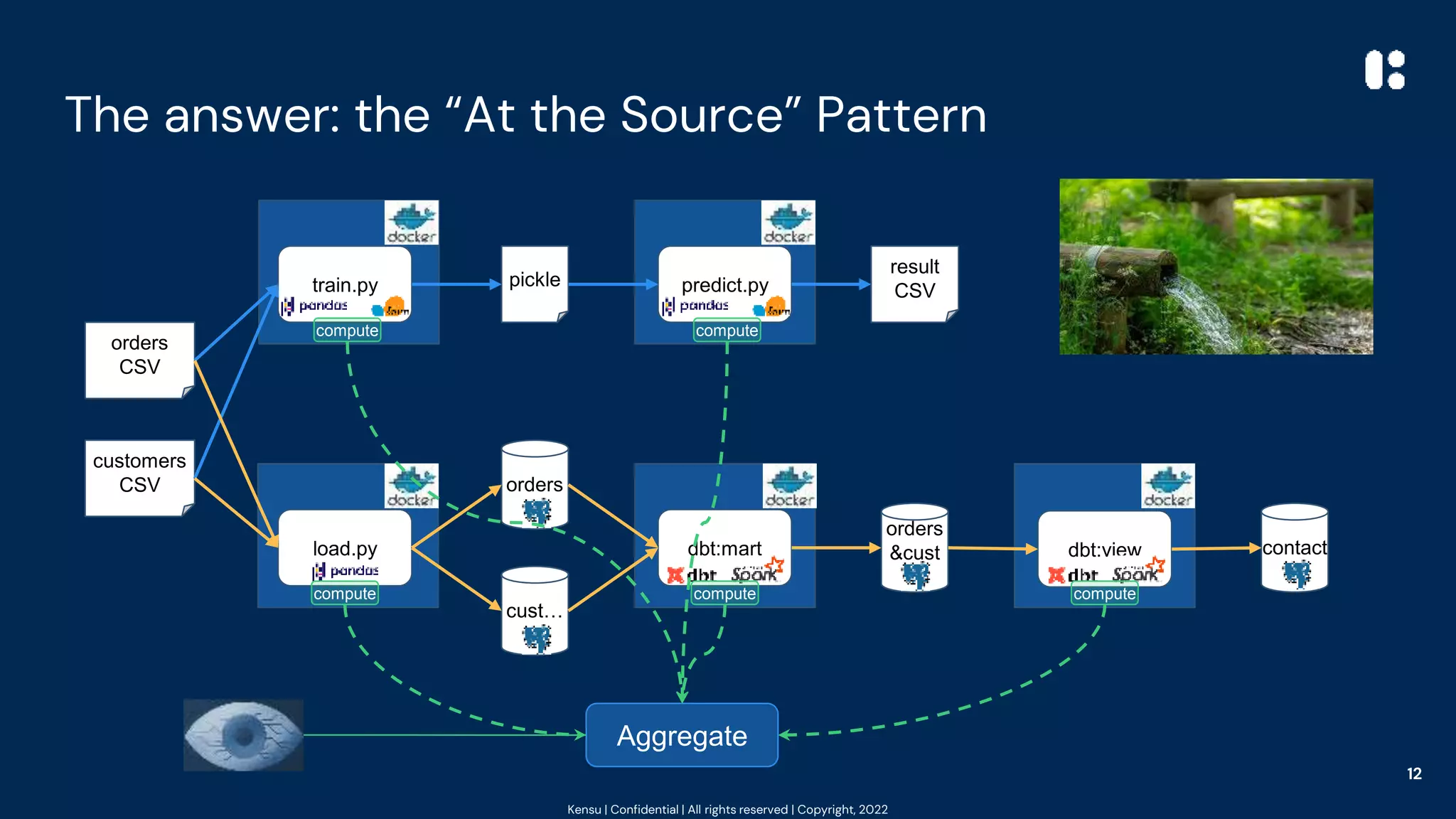
The answer: the “At the Source” Pattern
12
orders
CSV
customers
CSV
train.py
load.py
orders
&cust
…
predict.py
pickle
result
CSV
orders
cust…
contact
dbt:mart dbt:view
Aggregate
compute compute
compute compute compute
Kensu | Confidential | All rights reserved | Copyright, 2022
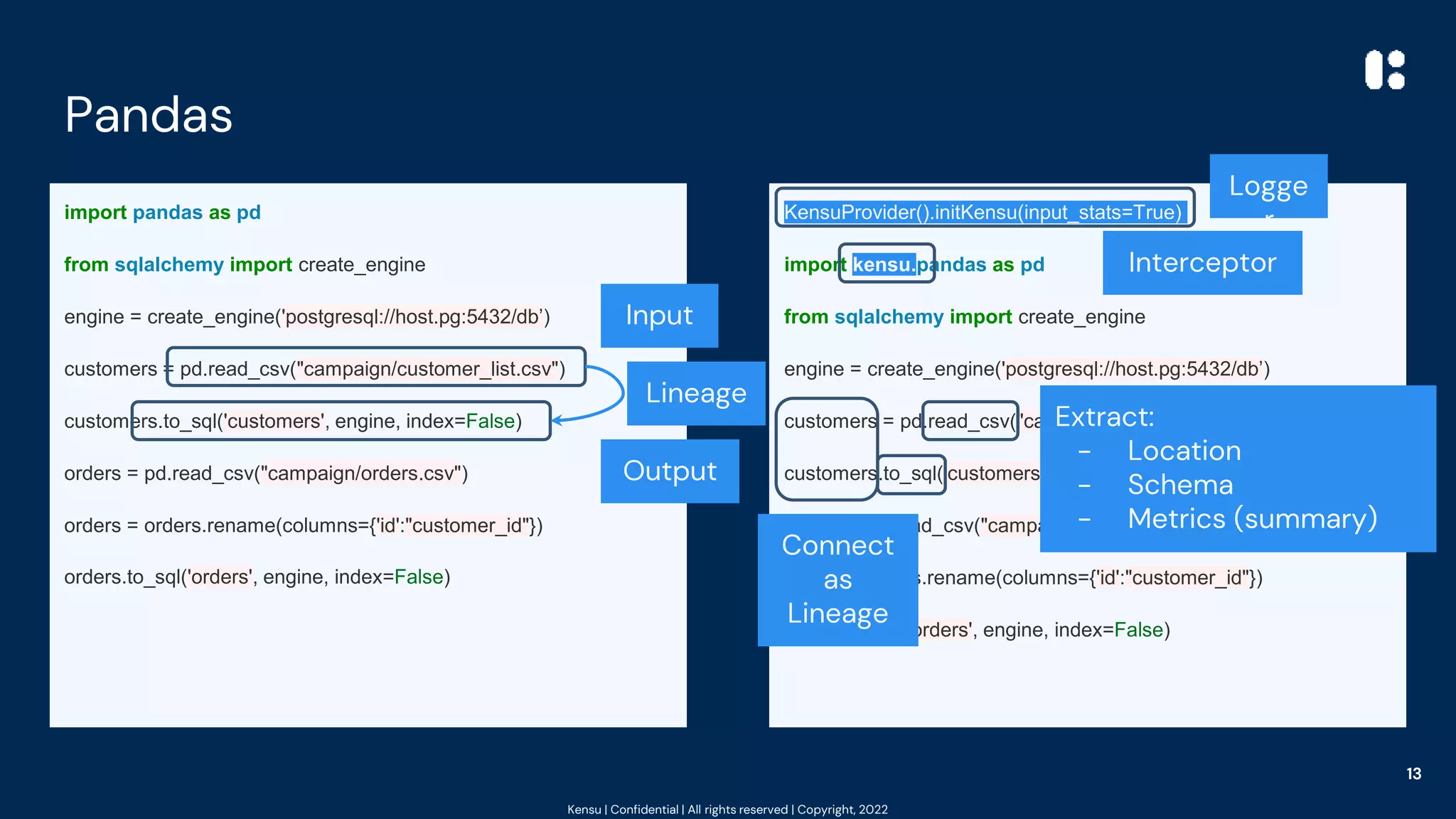
Pandas
import pandas as pd
from sqlalchemy import create_engine
engine = create_engine('postgresql://host.pg:5432/db’)
customers = pd.read_csv("campaign/customer_list.csv")
customers.to_sql('customers', engine, index=False)
orders = pd.read_csv("campaign/orders.csv")
orders = orders.rename(columns={'id':"customer_id"})
orders.to_sql('orders', engine, index=False)
KensuProvider().initKensu(input_stats=True)
import kensu.pandas as pd
from sqlalchemy import create_engine
engine = create_engine('postgresql://host.pg:5432/db’)
customers = pd.read_csv("campaign/customer_list.csv")
customers.to_sql('customers', engine, index=False)
orders = pd.read_csv("campaign/orders.csv")
orders = orders.rename(columns={'id':"customer_id"})
orders.to_sql('orders', engine, index=False)
13
Input
Output
Lineage
Logge
r
Interceptor
Extract:
- Location
- Schema
- Metrics (summary)
Connect
as
Lineage
Kensu | Confidential | All rights reserved | Copyright, 2022
PySpark (& dbt)
spark = SparkSession.builder.appName("MyApp").getOrCreate()
all_assets = spark.read.option("inferSchema","true")
.option("header","true")
.csv("monthly_assets.csv")
apptech = all_assets[all_assets['Symbol'] == 'APCX']
Buzzfeed = all_assets[all_assets['Symbol'] == 'ENFA']
buzz_report = Buzzfeed.withColumn('Intraday_Delta',
Buzzfeed['Adj Close'] - Buzzfeed['Open'])
apptech_report = apptech.withColumn('Intraday_Delta',
apptech['Adj Close'] - apptech['Open'])
kept_values = ['Open','Adj Close','Intraday_Delta']
final_report_buzzfeed = buzz_report[kept_values]
final_report_apptech = apptech_report[kept_values]
final_report_buzzfeed.write.mode('overwrite').csv("report_bf.csv")
final_report_apptech.write.mode('overwrite').csv("report_afcsv")
spark = SparkSession.builder.appName("MyApp")
.config("spark.driver.extraClassPath",
"kensu-spark-
agent.jar").getOrCreate()
init_kensu_spark(spark, input_stats=True)
all_assets = spark.read.option("inferSchema","true")
.option("header","true")
.csv("monthly_assets.csv")
apptech = all_assets[all_assets['Symbol'] == 'APCX']
Buzzfeed = all_assets[all_assets['Symbol'] == 'ENFA']
buzz_report = Buzzfeed.withColumn('Intraday_Delta',
Buzzfeed['Adj Close'] - Buzzfeed['Open'])
apptech_report = apptech.withColumn('Intraday_Delta',
apptech['Adj Close'] - apptech['Open'])
kept_values = ['Open','Adj Close','Intraday_Delta']
final_report_buzzfeed = buzz_report[kept_values]
final_report_apptech = apptech_report[kept_values]
final_report_buzzfeed.write.mode('overwrite').csv("report_bf.csv")
final_report_apptech.write.mode('overwrite').csv("report_afcsv")
14
Input
Filters
Computations
Select
2 Outputs
Interceptor
Logger
Extract from DAG:
- DataFrames
(I/O)
- Location
- Schema
- Metrics
- Lineage
Kensu | Confidential | All rights reserved | Copyright, 2022
k = KensuProvider().initKensu(input_stats=True)
Import kensu.pickle as pickle
from kensu.sklearn.model_selection import train_test_split
import kensu.pandas as pd
data = pd.read_csv("orders.csv")
df=data[['total_qty', 'total_basket']]
X = df.drop('total_basket',axis=1)
y = df['total_basket']
X_train, X_test, y_train, y_test = train_test_split(X, y)
from kensu.sklearn.linear_model import LinearRegression
model=LinearRegression().fit(X_train,y_train)
with open('model.pickle', 'wb') as f:
pickle.dump(model,f)
Scikit-Learn: 🚂
import pickle as pickle
from sklearn.model_selection import train_test_split
import pandas as pd
data = pd.read_csv("orders.csv")
df=data[['total_qty', 'total_basket']]
X = df.drop('total_basket',axis=1)
y = df['total_basket']
X_train, X_test, y_train, y_test = train_test_split(X, y)
from sklearn.linear_model import LinearRegression
model=LinearRegression().fit(X_train,y_train)
with open('model.pickle', 'wb') as f:
pickle.dump(model,f)
15
Filter
Transformation
Output
Input
Select
Logge
r
Interceptors
Extract:
- Location
- Schema
- Data Metrics
- Model Metrics
Accumulate
connections as
Lineage
Kensu | Confidential | All rights reserved | Copyright, 2022
k = KensuProvider().initKensu(input_stats=True)
import kensu.pandas as pd
import kensu.pickle as pickle
data = pd.read_csv("second_campaign/orders.csv")
with open('model.pickle', 'rb') as f:
model=pickle.load(f)
df=data[['total_qty']]
pred = model.predict(df)
df = data.copy()
df['model_pred']=pred
df.to_csv('model_results.csv', index=False)
Scikit-Learn: 🔮
import pandas as pd
import pickle as pickle
data = pd.read_csv("second_campaign/orders.csv")
with open('model.pickle', 'rb') as f:
model=pickle.load(f)
df=data[['total_qty']]
pred = model.predict(df)
df = data.copy()
df['model_pred']=pred
df.to_csv('model_results.csv', index=False)
2 Inputs
Output
Transformation
Select
Computation
Logge
r
Interceptors
Accumulate
connections as
Lineage
Extract:
- Location
- Schema
- Data Metrics
- Model Metrics?
Kensu | Confidential | All rights reserved | Copyright, 2022
Showcase
4
17
Hey! Where is 3?
Kensu | Confidential | All rights reserved | Copyright, 2022
Let it run ➡ let it rain
Example code:
https://github.com/kensuio-oss/kensu-public-examples
All you need is Docker Compose
Example using a Free Platform for the Data Community:
https://sandbox.kensuapp.com/
All you need is a Google Account/Mail
18
Kensu | Confidential | All rights reserved | Copyright, 2022
Thank YOU!
Try it by yourself: https://sandbox.kensuapp.com
Powered by
- Connect with Google in 10 seconds 😊.
- 🆓 of use.
- 🚀 Get started with examples in
Python, Spark, DBT, SQL, …
Ping me: @noootsab - LinkedIn - andy.petrella@kensu.io
19
Chapters 1&2 ☑️
Chapter 3 👷
♂️
https://kensu.io

Data Observability Best Pracices

  • 1.
    Kensu | Confidential| All rights reserved | Copyright, 2022 (Data) Observability=Best Practices Examples in Pandas, Scikit-Learn, PySpark, DBT
  • 2.
    Kensu | Confidential| All rights reserved | Copyright, 2022 My 20 years of scars with data 🩹 2 First 10 years - Software Engineer in Geospatial - Map/Coverage/Catalog (Java, C++, YUI 🩹) - (Satellite) Images and Vector Data Miner (Java/Python/R/Fortran/Scala) Next 5 years - Spark evangelist, teaching, and consulting in Big Data/AI in the Silicon Valley - Creator of Spark-Notebook (pre-jupyter): open-source (3100+ ✪) and community-drive (20K+) Last 5 years - Brainstorming on how to bring quality and monitoring DevOps best practices to data (aka DODD) - Founded Kensu: easing data teams to embrace best practices and create trust in deliveries Meanwhile, “serial author” - “What is Data Governance”, O’Reilly, 2020 - “What is Data Observability”, O’Reilly, 2021 - “Fundamentals of Data Observability”, O’Reilly, 2023
  • 3.
    Kensu | Confidential| All rights reserved | Copyright, 2022 Agenda 3 1. Observability & Data 2. DO @ The Source - Pandas, PySpark, Scikit-Learn 3. Showcase
  • 4.
    Kensu | Confidential| All rights reserved | Copyright, 2022 Observability & Data 1 4
  • 5.
    Kensu | Confidential| All rights reserved | Copyright, 2022 So… Observability - 6 Areas ∋ Data Observability In IT, “Observability” is the capability of an IT system to generate behavioral information to allow external observers to modelize its internal state. NOTE: an observer cannot interact with the system while it is functioning! Infrastructure 5
  • 6.
    Kensu | Confidential| All rights reserved | Copyright, 2022 Observability - Log, Metrics, Traces (examples) Infrastructure Syslog | `top` | `route` App Log | Opentracing/telemetry Security log | traces Audit log | `git blame` What are the questions we want to answer quickly? 6
  • 7.
    Kensu | Confidential| All rights reserved | Copyright, 2022 Common questions we struggle with 7 Questions during analysis Observations needed Channel How is data used? Usages (purposes, users, …) Lineage|Log Why do users feel it is wrong? Expectations (perf, quality, …) Rule Where is the data? Location (server, file path, …) Log What does it represent? Structure metadata (fields, …) Log What does/did the data look like? Content metadata (metric, kpis, …) Metrics Has anything changed & when? Historical metadata Metrics What data was used to create? Data Lineage Lineage How is the data created? Application (data) lineage Lineage
  • 8.
    Kensu | Confidential| All rights reserved | Copyright, 2022 “Data Observability” ⁉️ Data Observability is the component of an observable system that generates information on how data influences the behavior of the system and conversely. 8 Infra, Apps, User LOGS Data Metrics (profiling) METRICS (Apps & Data) Lineage TRACES ● Application & Project info ● Metadata (fields, …) ● Freshness ● Completeness ● Distribution ● Data sources ● Data fields ● Application (pipeline)
  • 9.
    Kensu | Confidential| All rights reserved | Copyright, 2022 Introducing DO @ the Source Examples 2 9
  • 10.
    Kensu | Confidential| All rights reserved | Copyright, 2022 How to make data pipelines observable? 10 orders CSV customers CSV train.py load.py orders &cust … predict.py pickle result CSV orders cust… contact dbt:mart dbt:view
  • 11.
    Kensu | Confidential| All rights reserved | Copyright, 2022 Wrong answer: the Kraken Anti-Pattern 11 orders CSV customers CSV train.py load.py orders &cust … predict.py pickle result CSV orders cust… contact dbt:mart dbt:view Compute Resources $$ Maintenance $$$ Found a background gate 🥳
  • 12.
    Kensu | Confidential| All rights reserved | Copyright, 2022 The answer: the “At the Source” Pattern 12 orders CSV customers CSV train.py load.py orders &cust … predict.py pickle result CSV orders cust… contact dbt:mart dbt:view Aggregate compute compute compute compute compute
  • 13.
    Kensu | Confidential| All rights reserved | Copyright, 2022 Pandas import pandas as pd from sqlalchemy import create_engine engine = create_engine('postgresql://host.pg:5432/db’) customers = pd.read_csv("campaign/customer_list.csv") customers.to_sql('customers', engine, index=False) orders = pd.read_csv("campaign/orders.csv") orders = orders.rename(columns={'id':"customer_id"}) orders.to_sql('orders', engine, index=False) KensuProvider().initKensu(input_stats=True) import kensu.pandas as pd from sqlalchemy import create_engine engine = create_engine('postgresql://host.pg:5432/db’) customers = pd.read_csv("campaign/customer_list.csv") customers.to_sql('customers', engine, index=False) orders = pd.read_csv("campaign/orders.csv") orders = orders.rename(columns={'id':"customer_id"}) orders.to_sql('orders', engine, index=False) 13 Input Output Lineage Logge r Interceptor Extract: - Location - Schema - Metrics (summary) Connect as Lineage
  • 14.
    Kensu | Confidential| All rights reserved | Copyright, 2022 PySpark (& dbt) spark = SparkSession.builder.appName("MyApp").getOrCreate() all_assets = spark.read.option("inferSchema","true") .option("header","true") .csv("monthly_assets.csv") apptech = all_assets[all_assets['Symbol'] == 'APCX'] Buzzfeed = all_assets[all_assets['Symbol'] == 'ENFA'] buzz_report = Buzzfeed.withColumn('Intraday_Delta', Buzzfeed['Adj Close'] - Buzzfeed['Open']) apptech_report = apptech.withColumn('Intraday_Delta', apptech['Adj Close'] - apptech['Open']) kept_values = ['Open','Adj Close','Intraday_Delta'] final_report_buzzfeed = buzz_report[kept_values] final_report_apptech = apptech_report[kept_values] final_report_buzzfeed.write.mode('overwrite').csv("report_bf.csv") final_report_apptech.write.mode('overwrite').csv("report_afcsv") spark = SparkSession.builder.appName("MyApp") .config("spark.driver.extraClassPath", "kensu-spark- agent.jar").getOrCreate() init_kensu_spark(spark, input_stats=True) all_assets = spark.read.option("inferSchema","true") .option("header","true") .csv("monthly_assets.csv") apptech = all_assets[all_assets['Symbol'] == 'APCX'] Buzzfeed = all_assets[all_assets['Symbol'] == 'ENFA'] buzz_report = Buzzfeed.withColumn('Intraday_Delta', Buzzfeed['Adj Close'] - Buzzfeed['Open']) apptech_report = apptech.withColumn('Intraday_Delta', apptech['Adj Close'] - apptech['Open']) kept_values = ['Open','Adj Close','Intraday_Delta'] final_report_buzzfeed = buzz_report[kept_values] final_report_apptech = apptech_report[kept_values] final_report_buzzfeed.write.mode('overwrite').csv("report_bf.csv") final_report_apptech.write.mode('overwrite').csv("report_afcsv") 14 Input Filters Computations Select 2 Outputs Interceptor Logger Extract from DAG: - DataFrames (I/O) - Location - Schema - Metrics - Lineage
  • 15.
    Kensu | Confidential| All rights reserved | Copyright, 2022 k = KensuProvider().initKensu(input_stats=True) Import kensu.pickle as pickle from kensu.sklearn.model_selection import train_test_split import kensu.pandas as pd data = pd.read_csv("orders.csv") df=data[['total_qty', 'total_basket']] X = df.drop('total_basket',axis=1) y = df['total_basket'] X_train, X_test, y_train, y_test = train_test_split(X, y) from kensu.sklearn.linear_model import LinearRegression model=LinearRegression().fit(X_train,y_train) with open('model.pickle', 'wb') as f: pickle.dump(model,f) Scikit-Learn: 🚂 import pickle as pickle from sklearn.model_selection import train_test_split import pandas as pd data = pd.read_csv("orders.csv") df=data[['total_qty', 'total_basket']] X = df.drop('total_basket',axis=1) y = df['total_basket'] X_train, X_test, y_train, y_test = train_test_split(X, y) from sklearn.linear_model import LinearRegression model=LinearRegression().fit(X_train,y_train) with open('model.pickle', 'wb') as f: pickle.dump(model,f) 15 Filter Transformation Output Input Select Logge r Interceptors Extract: - Location - Schema - Data Metrics - Model Metrics Accumulate connections as Lineage
  • 16.
    Kensu | Confidential| All rights reserved | Copyright, 2022 k = KensuProvider().initKensu(input_stats=True) import kensu.pandas as pd import kensu.pickle as pickle data = pd.read_csv("second_campaign/orders.csv") with open('model.pickle', 'rb') as f: model=pickle.load(f) df=data[['total_qty']] pred = model.predict(df) df = data.copy() df['model_pred']=pred df.to_csv('model_results.csv', index=False) Scikit-Learn: 🔮 import pandas as pd import pickle as pickle data = pd.read_csv("second_campaign/orders.csv") with open('model.pickle', 'rb') as f: model=pickle.load(f) df=data[['total_qty']] pred = model.predict(df) df = data.copy() df['model_pred']=pred df.to_csv('model_results.csv', index=False) 2 Inputs Output Transformation Select Computation Logge r Interceptors Accumulate connections as Lineage Extract: - Location - Schema - Data Metrics - Model Metrics?
  • 17.
    Kensu | Confidential| All rights reserved | Copyright, 2022 Showcase 4 17 Hey! Where is 3?
  • 18.
    Kensu | Confidential| All rights reserved | Copyright, 2022 Let it run ➡ let it rain Example code: https://github.com/kensuio-oss/kensu-public-examples All you need is Docker Compose Example using a Free Platform for the Data Community: https://sandbox.kensuapp.com/ All you need is a Google Account/Mail 18
  • 19.
    Kensu | Confidential| All rights reserved | Copyright, 2022 Thank YOU! Try it by yourself: https://sandbox.kensuapp.com Powered by - Connect with Google in 10 seconds 😊. - 🆓 of use. - 🚀 Get started with examples in Python, Spark, DBT, SQL, … Ping me: @noootsab - LinkedIn - andy.petrella@kensu.io 19 Chapters 1&2 ☑️ Chapter 3 👷 ♂️ https://kensu.io