Implementing a data-driven
security model in SSAS
© Pariveda Solutions. Confidential & Proprietary.1
Contents
 Overview of SSAS Security
 The Use Case
 The Problem
 The Solution
 Conclusion
© Pariveda Solutions. Confidential & Proprietary.2
SSAS Security
Overview
Overview of SSAS Security
The Use Case
The Problem
The Solution
Conclusion
© Pariveda Solutions. Confidential & Proprietary.3
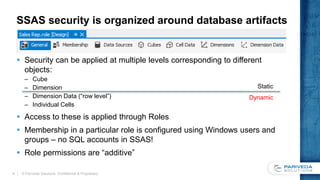
SSAS security is organized around database artifacts
 Security can be applied at multiple levels corresponding to different
objects:
– Cube
– Dimension
– Dimension Data (“row level”)
– Individual Cells
 Access to these is applied through Roles
 Membership in a particular role is configured using Windows users and
groups – no SQL accounts in SSAS!
 Role permissions are “additive”
© Pariveda Solutions. Confidential & Proprietary.4
Static
Dynamic
The Use Case
© Pariveda Solutions. Confidential & Proprietary.5
Overview of SSAS Security
The Use Case
The Problem
The Solution
Conclusion
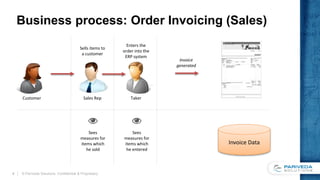
Business process: Order Invoicing (Sales)
© Pariveda Solutions. Confidential & Proprietary.6
Sales RepCustomer Taker
Enters the
order into the
ERP system
Sells items to
a customer
Invoice
generated
Invoice Data
Sees
measures for
items which
he sold
Sees
measures for
items which
he entered
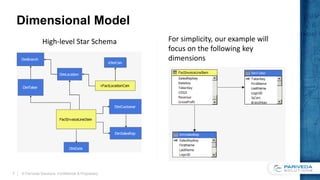
Dimensional Model
© Pariveda Solutions. Confidential & Proprietary.7
Invoice Line Item
InvoiceLineItemKey
SalesRepKey
TakerKey
….
Revenue
COGS
Gross Profit
Sales Rep
SalesRepKey
LoginID
FullName
Region
Taker
TakerKey
LoginID
FullName
Branch
High-level Star Schema For simplicity, our example will
focus on the following key
dimensions
Security Use Case 1: User has single role secured
by single dimension
Example 1: Sales Rep
– Has access to all transactions which he/she sold
– InvoiceLineItem => SalesRep.LoginID = Current User
Example 2: Taker
– Has access to all transaction which he/she entered
– InvoiceLineItem => Taker.LoginID = Current User
© Pariveda Solutions. Confidential & Proprietary.8
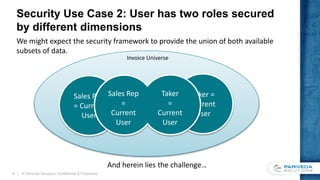
Security Use Case 2: User has two roles secured
by different dimensions
© Pariveda Solutions. Confidential & Proprietary.9
Invoice Universe
Sales Rep
= Current
User
Taker =
Current
User
Taker
=
Current
User
Sales Rep
=
Current
User
And herein lies the challenge…
We might expect the security framework to provide the union of both available
subsets of data.
The Problem
© Pariveda Solutions. Confidential & Proprietary.10
Overview of SSAS Security
The Use Case
The Problem
The Solution
Conclusion
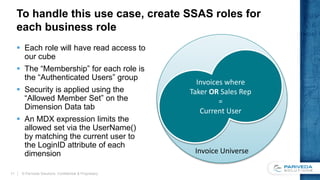
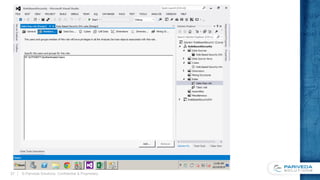
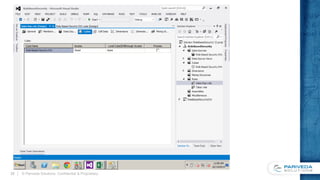
To handle this use case, create SSAS roles for
each business role
 Each role will have read access to
our cube
 The “Membership” for each role is
the “Authenticated Users” group
 Security is applied using the
“Allowed Member Set” on the
Dimension Data tab
 An MDX expression limits the
allowed set via the UserName()
by matching the current user to
the LoginID attribute of each
dimension
© Pariveda Solutions. Confidential & Proprietary.11
Invoice Universe
Invoices where
Taker OR Sales Rep
=
Current User
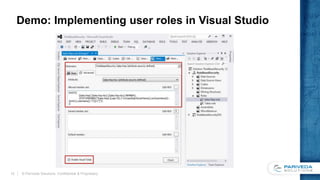
Demo: Implementing user roles in Visual Studio
© Pariveda Solutions. Confidential & Proprietary.12
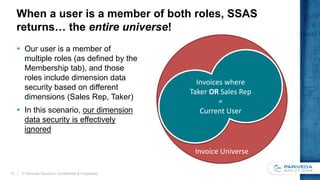
When a user is a member of both roles, SSAS
returns… the entire universe!
 Our user is a member of
multiple roles (as defined by the
Membership tab), and those
roles include dimension data
security based on different
dimensions (Sales Rep, Taker)
 In this scenario, our dimension
data security is effectively
ignored
© Pariveda Solutions. Confidential & Proprietary.13
Invoice Universe
Invoices where
Taker OR Sales Rep
=
Current User
Invoice Universe
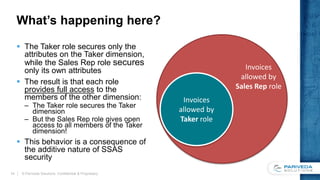
What’s happening here?
 The Taker role secures only the
attributes on the Taker dimension,
while the Sales Rep role secures
only its own attributes
 The result is that each role
provides full access to the
members of the other dimension:
– The Taker role secures the Taker
dimension
– But the Sales Rep role gives open
access to all members of the Taker
dimension!
 This behavior is a consequence of
the additive nature of SSAS
security
© Pariveda Solutions. Confidential & Proprietary.14
Invoices
allowed by
Taker role
Invoices
allowed by
Sales Rep role
Out of the box, a solely data-driven approach
based on multiple roles is impossible
 It is possible to implement with Active Directory groups, but
this isn’t ideal
– These groups must be maintained in the separate system; the
business processes no longer drives security
– Any users with overlapping membership will still encounter the issue
– You will probably not find out about this error unless someone tells
you!
 Let’s explore some other options…
© Pariveda Solutions. Confidential & Proprietary.15
The Solution
© Pariveda Solutions. Confidential & Proprietary.16
Overview of SSAS Security
The Use Case
The Problem
The Solution
Conclusion
There are two primary workarounds to address
this behavior
 Monolithic Security Dimension
 Custom Role Assembly
© Pariveda Solutions. Confidential & Proprietary.17
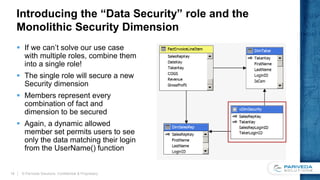
Introducing the “Data Security” role and the
Monolithic Security Dimension
 If we can’t solve our use case
with multiple roles, combine them
into a single role!
 The single role will secure a new
Security dimension
 Members represent every
combination of fact and
dimension to be secured
 Again, a dynamic allowed
member set permits users to see
only the data matching their login
from the UserName() function
© Pariveda Solutions. Confidential & Proprietary.18
Implementing the Security dimension in the data
warehouse or data source view
 Implemented as a view or a
named query against the fact
and dimension tables
 Selects all distinct combinations
of keys for the dimensions to be
secured
© Pariveda Solutions. Confidential & Proprietary.19
CREATE VIEW [dbo].[vDimSecurity]
WITH SCHEMABINDING
AS
SELECT DISTINCT
SalesRepKey = Rep.SalesRepKey,
SalesRepLoginID = UPPER(RTRIM(LTRIM(Rep.LoginID))),
TakerKey = Taker.TakerKey,
TakerLoginID = UPPER(RTRIM(LTRIM(Taker.LoginID))),
FROM
dbo.FactInvoiceLineItem InvLn
INNER JOIN
dbo.DimSalesRep Rep
ON InvLn.SalesRepKey = Rep.SalesRepKey
INNER JOIN
dbo.DimTaker Taker
ON InvLn.TakerKey = Taker.TakerKey
GO
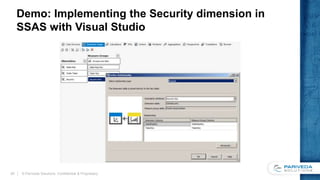
Demo: Implementing the Security dimension in
SSAS with Visual Studio
© Pariveda Solutions. Confidential & Proprietary.20
A custom assembly can also be used to short-
circuit “additive” security
 Earlier we discussed the unexpected behavior of the
multiple roles approach:
– Sales Rep provides open access to the members of the Taker
dimension
– Taker provides open access to the members of the Sales Rep
dimension
 We can prevent this by using custom code to build the
allowed members for the opposite dimensions in each role
based on user membership
© Pariveda Solutions. Confidential & Proprietary.21
Implementing the custom assembly
 The assembly exposes a static
method, IsUserInRole
– Queries the roles of the current user
– Returns true when the specified role is
in the list
 Used in the allowed member set
of the other dimensions for each
role
– For Sales Rep, we add attribute
security for the Taker role
– Uses IIF to return the empty set if the
user is in the Taker role
– If not, returns all members of the Taker
dimension
 Becomes more complex as
roles are added to the cube
public static bool IsUserInRole(string roleName)
{
AdomdCommand cmd = new AdomdCommand(
@"SELECT ROLES FROM SYSTEMRESTRICTSCHEMA
($System.dbschema_catalogs, [CATALOG_NAME]
= '"
+ Context.CurrentDatabaseName
+ "')");
if (
(cmd.ExecuteScalar() as string)
.ToLower().Contains(roleName.ToLower())
)
return true;
else
return false;
}
© Pariveda Solutions. Confidential & Proprietary.22
Conclusion
© Pariveda Solutions. Confidential & Proprietary.23
Overview of SSAS Security
The Use Case
The Problem
The Solution
Conclusion
Conclusion
 SSAS provides a useful model for securing data within a cube based on dynamic
business rules defined within the cube itself
 This model employs a so called “additive” approach when combining multiple
security roles for a single user
 However, there may be some surprising (and undesirable) consequences when a
user has multiple roles based on different dimensions
 There are 2 primary solutions to achieve this use case:
– Monolithic Security Dimension
– Custom Role Assembly
 We have found the Monolithic Security Dimension to be a relatively clean and
effective approach, which fulfills the business requirements and leverages out-of-
the-box SSAS functionality rather than requiring a custom assembly
© Pariveda Solutions. Confidential & Proprietary.24
© Pariveda Solutions. Confidential & Proprietary.25
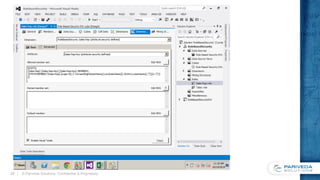
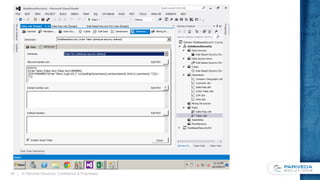
Appendix A: Implementing Individual Roles
© Pariveda Solutions. Confidential & Proprietary.26
© Pariveda Solutions. Confidential & Proprietary.27
© Pariveda Solutions. Confidential & Proprietary.28
© Pariveda Solutions. Confidential & Proprietary.29
© Pariveda Solutions. Confidential & Proprietary.30
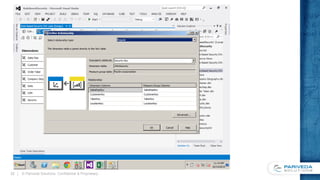
Appendix B: Implementing Monolithic Security
© Pariveda Solutions. Confidential & Proprietary.31
© Pariveda Solutions. Confidential & Proprietary.32
© Pariveda Solutions. Confidential & Proprietary.33

Data Driven Security in SSAS

  • 1.
    Implementing a data-driven securitymodel in SSAS © Pariveda Solutions. Confidential & Proprietary.1
  • 2.
    Contents  Overview ofSSAS Security  The Use Case  The Problem  The Solution  Conclusion © Pariveda Solutions. Confidential & Proprietary.2
  • 3.
    SSAS Security Overview Overview ofSSAS Security The Use Case The Problem The Solution Conclusion © Pariveda Solutions. Confidential & Proprietary.3
  • 4.
    SSAS security isorganized around database artifacts  Security can be applied at multiple levels corresponding to different objects: – Cube – Dimension – Dimension Data (“row level”) – Individual Cells  Access to these is applied through Roles  Membership in a particular role is configured using Windows users and groups – no SQL accounts in SSAS!  Role permissions are “additive” © Pariveda Solutions. Confidential & Proprietary.4 Static Dynamic
  • 5.
    The Use Case ©Pariveda Solutions. Confidential & Proprietary.5 Overview of SSAS Security The Use Case The Problem The Solution Conclusion
  • 6.
    Business process: OrderInvoicing (Sales) © Pariveda Solutions. Confidential & Proprietary.6 Sales RepCustomer Taker Enters the order into the ERP system Sells items to a customer Invoice generated Invoice Data Sees measures for items which he sold Sees measures for items which he entered
  • 7.
    Dimensional Model © ParivedaSolutions. Confidential & Proprietary.7 Invoice Line Item InvoiceLineItemKey SalesRepKey TakerKey …. Revenue COGS Gross Profit Sales Rep SalesRepKey LoginID FullName Region Taker TakerKey LoginID FullName Branch High-level Star Schema For simplicity, our example will focus on the following key dimensions
  • 8.
    Security Use Case1: User has single role secured by single dimension Example 1: Sales Rep – Has access to all transactions which he/she sold – InvoiceLineItem => SalesRep.LoginID = Current User Example 2: Taker – Has access to all transaction which he/she entered – InvoiceLineItem => Taker.LoginID = Current User © Pariveda Solutions. Confidential & Proprietary.8
  • 9.
    Security Use Case2: User has two roles secured by different dimensions © Pariveda Solutions. Confidential & Proprietary.9 Invoice Universe Sales Rep = Current User Taker = Current User Taker = Current User Sales Rep = Current User And herein lies the challenge… We might expect the security framework to provide the union of both available subsets of data.
  • 10.
    The Problem © ParivedaSolutions. Confidential & Proprietary.10 Overview of SSAS Security The Use Case The Problem The Solution Conclusion
  • 11.
    To handle thisuse case, create SSAS roles for each business role  Each role will have read access to our cube  The “Membership” for each role is the “Authenticated Users” group  Security is applied using the “Allowed Member Set” on the Dimension Data tab  An MDX expression limits the allowed set via the UserName() by matching the current user to the LoginID attribute of each dimension © Pariveda Solutions. Confidential & Proprietary.11 Invoice Universe Invoices where Taker OR Sales Rep = Current User
  • 12.
    Demo: Implementing userroles in Visual Studio © Pariveda Solutions. Confidential & Proprietary.12
  • 13.
    When a useris a member of both roles, SSAS returns… the entire universe!  Our user is a member of multiple roles (as defined by the Membership tab), and those roles include dimension data security based on different dimensions (Sales Rep, Taker)  In this scenario, our dimension data security is effectively ignored © Pariveda Solutions. Confidential & Proprietary.13 Invoice Universe Invoices where Taker OR Sales Rep = Current User
  • 14.
    Invoice Universe What’s happeninghere?  The Taker role secures only the attributes on the Taker dimension, while the Sales Rep role secures only its own attributes  The result is that each role provides full access to the members of the other dimension: – The Taker role secures the Taker dimension – But the Sales Rep role gives open access to all members of the Taker dimension!  This behavior is a consequence of the additive nature of SSAS security © Pariveda Solutions. Confidential & Proprietary.14 Invoices allowed by Taker role Invoices allowed by Sales Rep role
  • 15.
    Out of thebox, a solely data-driven approach based on multiple roles is impossible  It is possible to implement with Active Directory groups, but this isn’t ideal – These groups must be maintained in the separate system; the business processes no longer drives security – Any users with overlapping membership will still encounter the issue – You will probably not find out about this error unless someone tells you!  Let’s explore some other options… © Pariveda Solutions. Confidential & Proprietary.15
  • 16.
    The Solution © ParivedaSolutions. Confidential & Proprietary.16 Overview of SSAS Security The Use Case The Problem The Solution Conclusion
  • 17.
    There are twoprimary workarounds to address this behavior  Monolithic Security Dimension  Custom Role Assembly © Pariveda Solutions. Confidential & Proprietary.17
  • 18.
    Introducing the “DataSecurity” role and the Monolithic Security Dimension  If we can’t solve our use case with multiple roles, combine them into a single role!  The single role will secure a new Security dimension  Members represent every combination of fact and dimension to be secured  Again, a dynamic allowed member set permits users to see only the data matching their login from the UserName() function © Pariveda Solutions. Confidential & Proprietary.18
  • 19.
    Implementing the Securitydimension in the data warehouse or data source view  Implemented as a view or a named query against the fact and dimension tables  Selects all distinct combinations of keys for the dimensions to be secured © Pariveda Solutions. Confidential & Proprietary.19 CREATE VIEW [dbo].[vDimSecurity] WITH SCHEMABINDING AS SELECT DISTINCT SalesRepKey = Rep.SalesRepKey, SalesRepLoginID = UPPER(RTRIM(LTRIM(Rep.LoginID))), TakerKey = Taker.TakerKey, TakerLoginID = UPPER(RTRIM(LTRIM(Taker.LoginID))), FROM dbo.FactInvoiceLineItem InvLn INNER JOIN dbo.DimSalesRep Rep ON InvLn.SalesRepKey = Rep.SalesRepKey INNER JOIN dbo.DimTaker Taker ON InvLn.TakerKey = Taker.TakerKey GO
  • 20.
    Demo: Implementing theSecurity dimension in SSAS with Visual Studio © Pariveda Solutions. Confidential & Proprietary.20
  • 21.
    A custom assemblycan also be used to short- circuit “additive” security  Earlier we discussed the unexpected behavior of the multiple roles approach: – Sales Rep provides open access to the members of the Taker dimension – Taker provides open access to the members of the Sales Rep dimension  We can prevent this by using custom code to build the allowed members for the opposite dimensions in each role based on user membership © Pariveda Solutions. Confidential & Proprietary.21
  • 22.
    Implementing the customassembly  The assembly exposes a static method, IsUserInRole – Queries the roles of the current user – Returns true when the specified role is in the list  Used in the allowed member set of the other dimensions for each role – For Sales Rep, we add attribute security for the Taker role – Uses IIF to return the empty set if the user is in the Taker role – If not, returns all members of the Taker dimension  Becomes more complex as roles are added to the cube public static bool IsUserInRole(string roleName) { AdomdCommand cmd = new AdomdCommand( @"SELECT ROLES FROM SYSTEMRESTRICTSCHEMA ($System.dbschema_catalogs, [CATALOG_NAME] = '" + Context.CurrentDatabaseName + "')"); if ( (cmd.ExecuteScalar() as string) .ToLower().Contains(roleName.ToLower()) ) return true; else return false; } © Pariveda Solutions. Confidential & Proprietary.22
  • 23.
    Conclusion © Pariveda Solutions.Confidential & Proprietary.23 Overview of SSAS Security The Use Case The Problem The Solution Conclusion
  • 24.
    Conclusion  SSAS providesa useful model for securing data within a cube based on dynamic business rules defined within the cube itself  This model employs a so called “additive” approach when combining multiple security roles for a single user  However, there may be some surprising (and undesirable) consequences when a user has multiple roles based on different dimensions  There are 2 primary solutions to achieve this use case: – Monolithic Security Dimension – Custom Role Assembly  We have found the Monolithic Security Dimension to be a relatively clean and effective approach, which fulfills the business requirements and leverages out-of- the-box SSAS functionality rather than requiring a custom assembly © Pariveda Solutions. Confidential & Proprietary.24
  • 25.
    © Pariveda Solutions.Confidential & Proprietary.25
  • 26.
    Appendix A: ImplementingIndividual Roles © Pariveda Solutions. Confidential & Proprietary.26
  • 27.
    © Pariveda Solutions.Confidential & Proprietary.27
  • 28.
    © Pariveda Solutions.Confidential & Proprietary.28
  • 29.
    © Pariveda Solutions.Confidential & Proprietary.29
  • 30.
    © Pariveda Solutions.Confidential & Proprietary.30
  • 31.
    Appendix B: ImplementingMonolithic Security © Pariveda Solutions. Confidential & Proprietary.31
  • 32.
    © Pariveda Solutions.Confidential & Proprietary.32
  • 33.
    © Pariveda Solutions.Confidential & Proprietary.33

Editor's Notes

  • #10 We might expect the security framework to provide the union of both available subsets of data. And herein lies the challenge…