Data Compression
What is Data Compression?
Definition
Reducing the amount of data required to represent a source of information, while preserving the
original content as much as possible.
Objectives
1. Reduce the amount of data storage space required.
2. Reduce data transmission time over the network.
Why Data Compression?
Make optimal use of limited storage space
Save time and help to optimize resources
 If compression and decompression are done in I/O processor, less time is required to move data to or from
storage subsystem, freeing I/O bus for other work
 In sending data over communication line: less time to transmit and less storage to host
Allow real time transfer at a given data rate
Why does file size matter?
 Consider you are taking photos from your 16 Megapixel camera. What will be the size of each uncompressed
image?
Each megapixel need 24 bits (i.e. 8 bits – Red, 8 bits – Green, 8 bits - Blue). 24 bits is equal to 3
bytes. Therefore, the file size will be (16megapixel) * (3bytes) = 48000000 bytes. (i.e. 48 MB)
Data Compression Methods
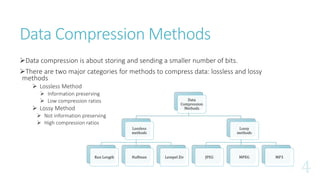
Data compression is about storing and sending a smaller number of bits.
There are two major categories for methods to compress data: lossless and lossy
methods
 Lossless Method
 Information preserving
 Low compression ratios
 Lossy Method
 Not information preserving
 High compression ratios
Data
Compression
Methods
Lossless
methods
Run Length Huffman Lempel Ziv
Lossy
methods
JPEG MPEG MP3
Data and Information
Data and information are not synonymous terms
Data is the means by which information is conveyed.
Data compression aims to reduce the amount of data while preserving as much information as possible.
The same information can be represented by different amount of data.
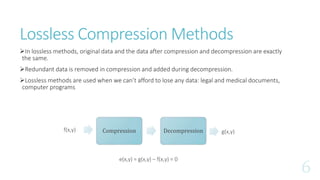
Lossless Compression Methods
In lossless methods, original data and the data after compression and decompression are exactly
the same.
Redundant data is removed in compression and added during decompression.
Lossless methods are used when we can’t afford to lose any data: legal and medical documents,
computer programs
Compression Decompressionf(x,y) g(x,y)
e(x,y) = g(x,y) – f(x,y) = 0
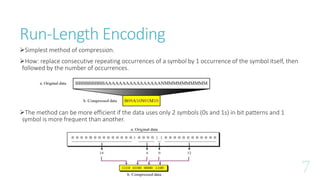
Run-Length Encoding
Simplest method of compression.
How: replace consecutive repeating occurrences of a symbol by 1 occurrence of the symbol itself, then
followed by the number of occurrences.
The method can be more efficient if the data uses only 2 symbols (0s and 1s) in bit patterns and 1
symbol is more frequent than another.
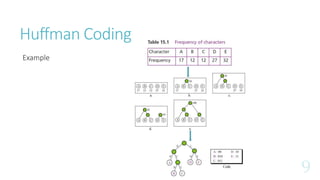
Huffman Coding
 Assign fewer bits to symbols that occur more frequently and more bits to symbols appear less
often.
 There’s no unique Huffman code and every Huffman code has the same average code length.
 Algorithm:
1. Make a leaf node for each code symbol
Add the generation probability of each symbol to the leaf node
2. Take the two leaf nodes with the smallest probability and connect them into a new node
Add 1 or 0 to each of the two branches
The probability of the new node is the sum of the probabilities of the two connecting nodes
3. If there is only one node left, the code construction is completed. If not, go back to (2)
Huffman Coding
Example
Lempel Ziv Encoding
It is dictionary-based encoding
Basic idea:
 Create a dictionary(a table) of strings used during communication.
 If both sender and receiver have a copy of the dictionary, then previously-encountered strings can be
substituted by their index in the dictionary.
Have 2 phases:
 Building an indexed dictionary
 Compressing a string of symbols
Algorithm:
 Extract the smallest substring that cannot be found in the remaining uncompressed string.
 Store that substring in the dictionary as a new entry and assign it an index value
 Substring is replaced with the index found in the dictionary
 Insert the index and the last character of the substring into the compressed string
Used in GIF, TIFF and PDF file formats
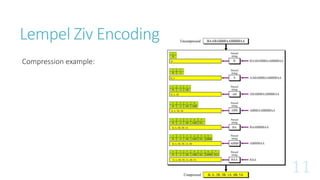
Lempel Ziv Encoding
Compression example:
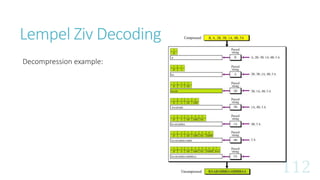
Lempel Ziv Decoding
Decompression example:
Lossy Compression Methods
Loss of information is acceptable in a picture of video.
The reason is that our eyes and ears cannot distinguish subtle changes.
Loss of information is not acceptable in a text file or a program file.
These methods are cheaper, less time and space.
Several methods:
 JPEG: compress pictures and graphics
 MPEG: compress video
 MP3: compress audio
JPEG Encoding
JPEG stands for Joint Photographic Experts Group.
Used to compress pictures and graphics.
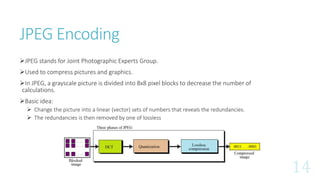
In JPEG, a grayscale picture is divided into 8x8 pixel blocks to decrease the number of
calculations.
Basic idea:
 Change the picture into a linear (vector) sets of numbers that reveals the redundancies.
 The redundancies is then removed by one of lossless
JPEG Encoding - DCT
The DCT transformation matrix, with one DC coefficient [G(0,0)]
and 63 AC coefficient
The 8×8 sub-image matrix
The two dimensional DCT
The 8×8 sub-image shown in
8-bit grayscale
The quantized sub-image matrix after quantization.
Quantization & Compression
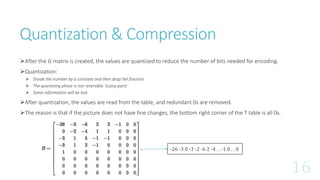
After the G matrix is created, the values are quantized to reduce the number of bits needed for encoding.
Quantization:
 Divide the number by a constant and then drop the fraction.
 The quantizing phase is not reversible. (Lossy part)
 Some information will be lost.
After quantization, the values are read from the table, and redundant 0s are removed.
The reason is that if the picture does not have fine changes, the bottom right corner of the T table is all 0s.
-26 -3 0 -3 -2 -6 2 -4 . . -1 0 . . 0
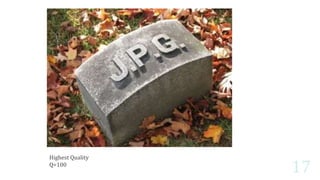
Highest Quality
Q=100
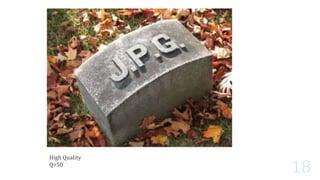
High Quality
Q=50
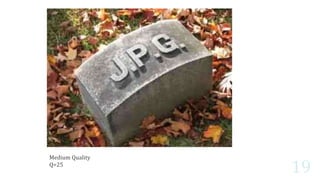
Medium Quality
Q=25
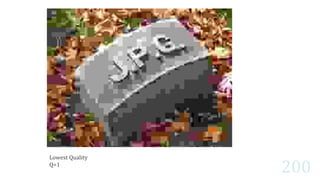
Lowest Quality
Q=1
Thank You.
1. http://web.engr.oregonstate.edu/~thinhq/teaching/ece499/spring06/compression_overview.pdf
2. http://rahilshaikh.weebly.com/uploads/1/1/6/3/11635894/data_compression.pdf
3. http://www.geeksforgeeks.org/huffman-decoding/
4. https://en.wikipedia.org/wiki/JPEG
5. https://www.scantips.com/basics09.html
6. https://blog.photoshelter.com/2008/06/uncompressed-image-file-size/
References

Data compression

  • 1.
  • 2.
    What is DataCompression? Definition Reducing the amount of data required to represent a source of information, while preserving the original content as much as possible. Objectives 1. Reduce the amount of data storage space required. 2. Reduce data transmission time over the network.
  • 3.
    Why Data Compression? Makeoptimal use of limited storage space Save time and help to optimize resources  If compression and decompression are done in I/O processor, less time is required to move data to or from storage subsystem, freeing I/O bus for other work  In sending data over communication line: less time to transmit and less storage to host Allow real time transfer at a given data rate Why does file size matter?  Consider you are taking photos from your 16 Megapixel camera. What will be the size of each uncompressed image? Each megapixel need 24 bits (i.e. 8 bits – Red, 8 bits – Green, 8 bits - Blue). 24 bits is equal to 3 bytes. Therefore, the file size will be (16megapixel) * (3bytes) = 48000000 bytes. (i.e. 48 MB)
  • 4.
    Data Compression Methods Datacompression is about storing and sending a smaller number of bits. There are two major categories for methods to compress data: lossless and lossy methods  Lossless Method  Information preserving  Low compression ratios  Lossy Method  Not information preserving  High compression ratios Data Compression Methods Lossless methods Run Length Huffman Lempel Ziv Lossy methods JPEG MPEG MP3
  • 5.
    Data and Information Dataand information are not synonymous terms Data is the means by which information is conveyed. Data compression aims to reduce the amount of data while preserving as much information as possible. The same information can be represented by different amount of data.
  • 6.
    Lossless Compression Methods Inlossless methods, original data and the data after compression and decompression are exactly the same. Redundant data is removed in compression and added during decompression. Lossless methods are used when we can’t afford to lose any data: legal and medical documents, computer programs Compression Decompressionf(x,y) g(x,y) e(x,y) = g(x,y) – f(x,y) = 0
  • 7.
    Run-Length Encoding Simplest methodof compression. How: replace consecutive repeating occurrences of a symbol by 1 occurrence of the symbol itself, then followed by the number of occurrences. The method can be more efficient if the data uses only 2 symbols (0s and 1s) in bit patterns and 1 symbol is more frequent than another.
  • 8.
    Huffman Coding  Assignfewer bits to symbols that occur more frequently and more bits to symbols appear less often.  There’s no unique Huffman code and every Huffman code has the same average code length.  Algorithm: 1. Make a leaf node for each code symbol Add the generation probability of each symbol to the leaf node 2. Take the two leaf nodes with the smallest probability and connect them into a new node Add 1 or 0 to each of the two branches The probability of the new node is the sum of the probabilities of the two connecting nodes 3. If there is only one node left, the code construction is completed. If not, go back to (2)
  • 9.
  • 10.
    Lempel Ziv Encoding Itis dictionary-based encoding Basic idea:  Create a dictionary(a table) of strings used during communication.  If both sender and receiver have a copy of the dictionary, then previously-encountered strings can be substituted by their index in the dictionary. Have 2 phases:  Building an indexed dictionary  Compressing a string of symbols Algorithm:  Extract the smallest substring that cannot be found in the remaining uncompressed string.  Store that substring in the dictionary as a new entry and assign it an index value  Substring is replaced with the index found in the dictionary  Insert the index and the last character of the substring into the compressed string Used in GIF, TIFF and PDF file formats
  • 11.
  • 12.
  • 13.
    Lossy Compression Methods Lossof information is acceptable in a picture of video. The reason is that our eyes and ears cannot distinguish subtle changes. Loss of information is not acceptable in a text file or a program file. These methods are cheaper, less time and space. Several methods:  JPEG: compress pictures and graphics  MPEG: compress video  MP3: compress audio
  • 14.
    JPEG Encoding JPEG standsfor Joint Photographic Experts Group. Used to compress pictures and graphics. In JPEG, a grayscale picture is divided into 8x8 pixel blocks to decrease the number of calculations. Basic idea:  Change the picture into a linear (vector) sets of numbers that reveals the redundancies.  The redundancies is then removed by one of lossless
  • 15.
    JPEG Encoding -DCT The DCT transformation matrix, with one DC coefficient [G(0,0)] and 63 AC coefficient The 8×8 sub-image matrix The two dimensional DCT The 8×8 sub-image shown in 8-bit grayscale The quantized sub-image matrix after quantization.
  • 16.
    Quantization & Compression Afterthe G matrix is created, the values are quantized to reduce the number of bits needed for encoding. Quantization:  Divide the number by a constant and then drop the fraction.  The quantizing phase is not reversible. (Lossy part)  Some information will be lost. After quantization, the values are read from the table, and redundant 0s are removed. The reason is that if the picture does not have fine changes, the bottom right corner of the T table is all 0s. -26 -3 0 -3 -2 -6 2 -4 . . -1 0 . . 0
  • 17.
  • 18.
  • 19.
  • 20.
  • 21.
  • 22.
    1. http://web.engr.oregonstate.edu/~thinhq/teaching/ece499/spring06/compression_overview.pdf 2. http://rahilshaikh.weebly.com/uploads/1/1/6/3/11635894/data_compression.pdf 3.http://www.geeksforgeeks.org/huffman-decoding/ 4. https://en.wikipedia.org/wiki/JPEG 5. https://www.scantips.com/basics09.html 6. https://blog.photoshelter.com/2008/06/uncompressed-image-file-size/ References