What the hell is Simics? September 21, 2007 (Part of the slides are from CSE 532 Tutorial) NOTE: Some of the contents here are outdated.  Esp. Simics 2.0 is no longer supported by VirtuTech.  You have to install and use Simics 3.0.
Overview of Simics Virtutech Simics 3.0.x or 2.2.x  Academic licenses available in department Get your own free for one year, renewable http://www.virtutech.com Full system simulator Operating System Libraries, Applications
Some keywords Host Machine Where you run the simulation Windows, Linux,  Solaris  host machines Target Machine What you want to simulate Module Configuration Script
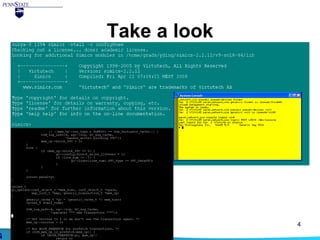
Take a look
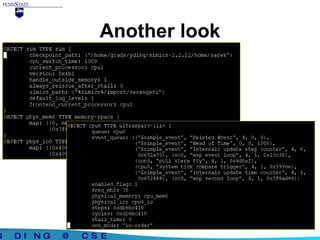
Another look
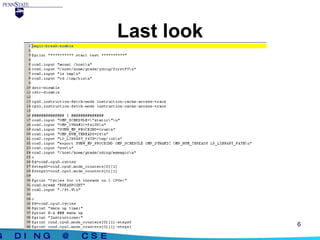
Last look
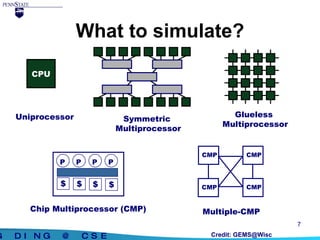
What to simulate? CPU Uniprocessor Credit: GEMS@Wisc Symmetric  Multiprocessor Glueless  Multiprocessor Multiple-CMP CMP CMP CMP CMP P Chip Multiprocessor (CMP) P P P $ $ $ $
System level simulator “ Virtutech Simics is a  full system  simulation platform that provides a controlled, deterministic, and fully virtualized environment.” Models the entire machine that OS sees it can run anything target system can Vital for tracing OS-intensive workload Simics is a  hardware simulator
Full System Simulation Microprocessor design Memory studies Device development Operating system emulation OS development Debugging High-availability testing Please see the  “ Simics:A Full System Simulation Platform”   paper for the details.
Simics helps a lot Used in various research areas Access to shared-memory system / message-passing system Run real parallel programs. Inspect what happens in the system. (e.g. examine cache coherent traffic.) Study the system parameter’s impact to the performance. Test out new synchronization atoms/coherent protocol.
Fast or slow simulator? Simulate instruction by instruction Fast enough to run real applications 100x slowdown with statistics ~5-10MIPS. Faster than sim-fast, a simulator in the simplescalar suite However, the truth is that simulation is always slow
Flexibility with modules User pluggable modules enable detailed simulation of required hardware components Caches, out-of-order Microarchitecture,… A variety of statistics available to use Simics API has more than 200 exported functions, several data types, and more than 50 predefined interfaces. The API is written in C.
Simulator Translation Cache STC enables statistical-accuracy as well as efficiency. a mechanism in the simulator to improve simulator performance. Among other things, it filters uninteresting memory accesses from the memory hierarchy. istc-disable dstc-disable
How to simulate multiprocessors? Simulate on each processor for certain number of cycles cpu-switch-time default: 1000 cycles Cycles Number of cycles Steps Number of instructions (os and application)
Start Simics cd  $SIMICS_HOME ./simics ./simics -x firststeps.simics ./simics -c configuration -stall -no-win -help
Pause/Stop the simulation ctrl + c Temporal breakpoint cc N (cycles) c N (steps) Memory/Register/IO breakpoint Graphics breakpoint Text output breakpoint magic breakpoint magic instruction
Checkpoints Save the states: simics> write-configuration blabla simics> exit Resume ./simics -c blabla simics> read-configuration blabla
Access Host Files You can access the host file system by mounting it to the simulated machine. The /host file system is mounted as read-only Do not execute files on host system directly, instead, copy it to simulated machine and run
Execution Model In-Order execution: An instruction can not be issued unless the previous instruction completes, no matter how many simulated cycle it takes. Out-of-Order execution (only available for sparc targets). Instruction stalls only if the instruction’s true dependencies are not completed.
Default Timing Model Default  timing model In-Order execution: An instruction use exact one clock cycle. Out-of-Order execution: Control or data dependency will cost one clock cycle.
User Defined Timing Model Memory Hierarchy Interface Instruction fetch visibility cpu0.instruction-fetch-mode instruction-cache-access-trace Timing model User define a timing model function which will be called when memory request occurs. The function should return the number of cycles to stall the instruction. If return nonzero, Simics will stall that number of cycles
Setup your own Simics Simics 2.2.12 Build on what Chun LIU left years ago Simics 3.0.11 Build on the department installation Simics 3.0.29 Download it yourself Windows on x86 Linux on x86 Solaris on SPARC Linux on AMD64 Note: As Simics is evolving quite rapidly and many bugs are fixed in later versions, users are generally recommend to upgrade. Possible compatibility issues are read in the RELEASENOTES.
Setup Simics 2.2.12 1. go to any directory you want to install simics-2.2.12 2. run  /home/csl/chliu/simics-2.2.12/scripts/user-install.sh  /home/scalp/chliu/simics-2.2.12/ 3. run  /home/mdl/yding/image/chliu.sh  instead of  /home/csl/chliu/simics-2.0/simics_install  4. go to simics-2.2.12/v9-sol8-64/lib 5. make v9  6. go to simics-2.2.12/home/sarek Successfully tested on eru as of 09/21/2007
Setup Simics 2.2.12 (cont’d) You have a version to run! ./simics -c s1p s2p, s4p, s8p as well in the directory Configurations from 2 to 24 processors available in /home/mdl/yding/image/ You may not be able to access, though Most research work has results up tp 16 processors
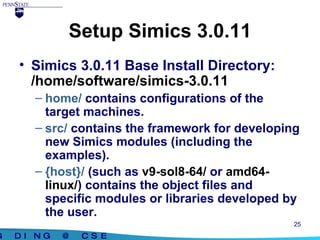
Setup Simics 3.0.11 Simics 3.0.11 Base Install Directory:  /home/software/simics-3.0.11 home/  contains configurations of the target machines. src/  contains the framework for developing new Simics modules (including the examples). {host}/  (such as  v9-sol8-64/  or  amd64-linux/ ) contains the object files and specific modules or libraries developed by the user.
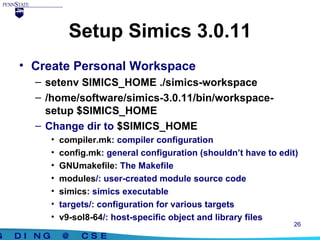
Setup Simics 3.0.11 Create Personal Workspace setenv SIMICS_HOME ./simics-workspace /home/software/simics-3.0.11/bin/workspace-setup $SIMICS_HOME Change dir to  $SIMICS_HOME compiler.mk : compiler configuration config.mk : general configuration (shouldn’t have to edit) GNUmakefile : The Makefile modules /: user-created module source code simics : simics executable targets/: configuration for various targets v9-sol8-64 /: host-specific object and library files
Recompiling Simics (with user modules) Change dir to  $SIMICS_HOME Edit  compiler.mk Change the CC variable in v9-sol8-64 and add a CXX variable: CC=cc –Kpic CXX=cc Type  gmake You should have an executable called  simics  
Variations GEMS Wisconsin http://www.cs.wisc.edu/gems/ Version 1.3 Flexus CMU http://www.ece.cmu.edu/~simflex/flexus.html Version 2.1.1
Resources Some intruduction papers online, such as  Simics: A Full System Simulation Platform, IEEE Computer, 2002 Simics User Guide Much thinner than you think Read it first Simics Forum http://www.simics.net Quite a few people in CSE department
 

Damn Simics

  • 1.
    What the hellis Simics? September 21, 2007 (Part of the slides are from CSE 532 Tutorial) NOTE: Some of the contents here are outdated. Esp. Simics 2.0 is no longer supported by VirtuTech. You have to install and use Simics 3.0.
  • 2.
    Overview of SimicsVirtutech Simics 3.0.x or 2.2.x Academic licenses available in department Get your own free for one year, renewable http://www.virtutech.com Full system simulator Operating System Libraries, Applications
  • 3.
    Some keywords HostMachine Where you run the simulation Windows, Linux, Solaris host machines Target Machine What you want to simulate Module Configuration Script
  • 4.
  • 5.
  • 6.
  • 7.
    What to simulate?CPU Uniprocessor Credit: GEMS@Wisc Symmetric Multiprocessor Glueless Multiprocessor Multiple-CMP CMP CMP CMP CMP P Chip Multiprocessor (CMP) P P P $ $ $ $
  • 8.
    System level simulator“ Virtutech Simics is a full system simulation platform that provides a controlled, deterministic, and fully virtualized environment.” Models the entire machine that OS sees it can run anything target system can Vital for tracing OS-intensive workload Simics is a hardware simulator
  • 9.
    Full System SimulationMicroprocessor design Memory studies Device development Operating system emulation OS development Debugging High-availability testing Please see the “ Simics:A Full System Simulation Platform” paper for the details.
  • 10.
    Simics helps alot Used in various research areas Access to shared-memory system / message-passing system Run real parallel programs. Inspect what happens in the system. (e.g. examine cache coherent traffic.) Study the system parameter’s impact to the performance. Test out new synchronization atoms/coherent protocol.
  • 11.
    Fast or slowsimulator? Simulate instruction by instruction Fast enough to run real applications 100x slowdown with statistics ~5-10MIPS. Faster than sim-fast, a simulator in the simplescalar suite However, the truth is that simulation is always slow
  • 12.
    Flexibility with modulesUser pluggable modules enable detailed simulation of required hardware components Caches, out-of-order Microarchitecture,… A variety of statistics available to use Simics API has more than 200 exported functions, several data types, and more than 50 predefined interfaces. The API is written in C.
  • 13.
    Simulator Translation CacheSTC enables statistical-accuracy as well as efficiency. a mechanism in the simulator to improve simulator performance. Among other things, it filters uninteresting memory accesses from the memory hierarchy. istc-disable dstc-disable
  • 14.
    How to simulatemultiprocessors? Simulate on each processor for certain number of cycles cpu-switch-time default: 1000 cycles Cycles Number of cycles Steps Number of instructions (os and application)
  • 15.
    Start Simics cd $SIMICS_HOME ./simics ./simics -x firststeps.simics ./simics -c configuration -stall -no-win -help
  • 16.
    Pause/Stop the simulationctrl + c Temporal breakpoint cc N (cycles) c N (steps) Memory/Register/IO breakpoint Graphics breakpoint Text output breakpoint magic breakpoint magic instruction
  • 17.
    Checkpoints Save thestates: simics> write-configuration blabla simics> exit Resume ./simics -c blabla simics> read-configuration blabla
  • 18.
    Access Host FilesYou can access the host file system by mounting it to the simulated machine. The /host file system is mounted as read-only Do not execute files on host system directly, instead, copy it to simulated machine and run
  • 19.
    Execution Model In-Orderexecution: An instruction can not be issued unless the previous instruction completes, no matter how many simulated cycle it takes. Out-of-Order execution (only available for sparc targets). Instruction stalls only if the instruction’s true dependencies are not completed.
  • 20.
    Default Timing ModelDefault timing model In-Order execution: An instruction use exact one clock cycle. Out-of-Order execution: Control or data dependency will cost one clock cycle.
  • 21.
    User Defined TimingModel Memory Hierarchy Interface Instruction fetch visibility cpu0.instruction-fetch-mode instruction-cache-access-trace Timing model User define a timing model function which will be called when memory request occurs. The function should return the number of cycles to stall the instruction. If return nonzero, Simics will stall that number of cycles
  • 22.
    Setup your ownSimics Simics 2.2.12 Build on what Chun LIU left years ago Simics 3.0.11 Build on the department installation Simics 3.0.29 Download it yourself Windows on x86 Linux on x86 Solaris on SPARC Linux on AMD64 Note: As Simics is evolving quite rapidly and many bugs are fixed in later versions, users are generally recommend to upgrade. Possible compatibility issues are read in the RELEASENOTES.
  • 23.
    Setup Simics 2.2.121. go to any directory you want to install simics-2.2.12 2. run /home/csl/chliu/simics-2.2.12/scripts/user-install.sh /home/scalp/chliu/simics-2.2.12/ 3. run /home/mdl/yding/image/chliu.sh instead of /home/csl/chliu/simics-2.0/simics_install 4. go to simics-2.2.12/v9-sol8-64/lib 5. make v9 6. go to simics-2.2.12/home/sarek Successfully tested on eru as of 09/21/2007
  • 24.
    Setup Simics 2.2.12(cont’d) You have a version to run! ./simics -c s1p s2p, s4p, s8p as well in the directory Configurations from 2 to 24 processors available in /home/mdl/yding/image/ You may not be able to access, though Most research work has results up tp 16 processors
  • 25.
    Setup Simics 3.0.11Simics 3.0.11 Base Install Directory: /home/software/simics-3.0.11 home/ contains configurations of the target machines. src/ contains the framework for developing new Simics modules (including the examples). {host}/ (such as v9-sol8-64/ or amd64-linux/ ) contains the object files and specific modules or libraries developed by the user.
  • 26.
    Setup Simics 3.0.11Create Personal Workspace setenv SIMICS_HOME ./simics-workspace /home/software/simics-3.0.11/bin/workspace-setup $SIMICS_HOME Change dir to $SIMICS_HOME compiler.mk : compiler configuration config.mk : general configuration (shouldn’t have to edit) GNUmakefile : The Makefile modules /: user-created module source code simics : simics executable targets/: configuration for various targets v9-sol8-64 /: host-specific object and library files
  • 27.
    Recompiling Simics (withuser modules) Change dir to $SIMICS_HOME Edit compiler.mk Change the CC variable in v9-sol8-64 and add a CXX variable: CC=cc –Kpic CXX=cc Type gmake You should have an executable called simics 
  • 28.
    Variations GEMS Wisconsinhttp://www.cs.wisc.edu/gems/ Version 1.3 Flexus CMU http://www.ece.cmu.edu/~simflex/flexus.html Version 2.1.1
  • 29.
    Resources Some intruductionpapers online, such as Simics: A Full System Simulation Platform, IEEE Computer, 2002 Simics User Guide Much thinner than you think Read it first Simics Forum http://www.simics.net Quite a few people in CSE department
  • 30.

Editor's Notes

  • #27 You may need to type: export VTECH_LICENCE=/home/software/simics-2.0.26/licenses After this, a file with name .flexlmrc should be created in your home directory