What is Parallel Computing
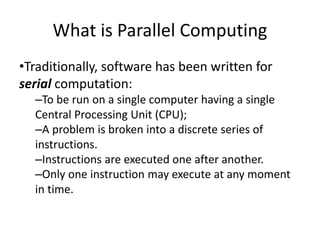
•Traditionally, software has been written for
serial computation:
–To be run on a single computer having a single
Central Processing Unit (CPU);
–A problem is broken into a discrete series of
instructions.
–Instructions are executed one after another.
–Only one instruction may execute at any moment
in time.
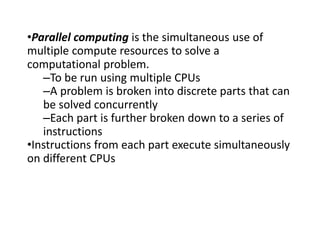
•Parallel computing is the simultaneous use of
multiple compute resources to solve a
computational problem.
–To be run using multiple CPUs
–A problem is broken into discrete parts that can
be solved concurrently
–Each part is further broken down to a series of
instructions
•Instructions from each part execute simultaneously
on different CPUs
Why Parallel Computing?
•The primary reasons for using parallel
computing:
–Save time
–Solve large problems
–Provide concurrency (do multiple things at the
same time)
–Taking advantage of non-local resources
–Overcoming memory constraints
–Cost savings
Basic Design
•Basic design
–Memory is used to store both program and data
instructions
–Program instructions are coded data which tell
the computer to do something
–Data is simply information to be used by the
program
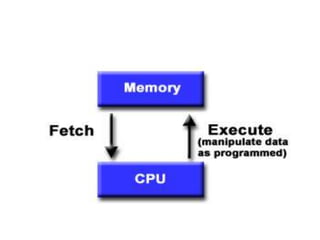
•A central processing unit (CPU) gets
instructions and/or data from memory,
decodes the instructions and then
sequentially performs them.
9
Parallel Computer Models
10
Classification of parallel architectures
•Flynn’s taxonomy
•Classification based on the memory
arrangement
•Classification based on type of interconnection
11
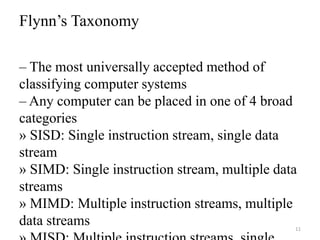
Flynn’s Taxonomy
– The most universally accepted method of
classifying computer systems
– Any computer can be placed in one of 4 broad
categories
» SISD: Single instruction stream, single data
stream
» SIMD: Single instruction stream, multiple data
streams
» MIMD: Multiple instruction streams, multiple
data streams
12
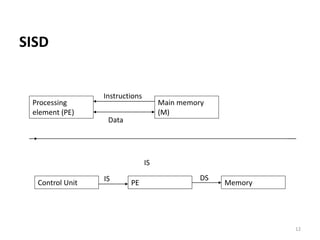
SISD
Processing
element (PE)
Main memory
(M)
Instructions
Data
Control Unit PE Memory
PE
IS
IS DS
Single Instruction, Single Data
(SISD)
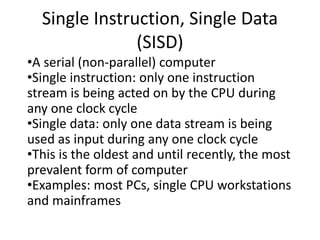
•A serial (non-parallel) computer
•Single instruction: only one instruction
stream is being acted on by the CPU during
any one clock cycle
•Single data: only one data stream is being
used as input during any one clock cycle
•This is the oldest and until recently, the most
prevalent form of computer
•Examples: most PCs, single CPU workstations
and mainframes
14
SIMD
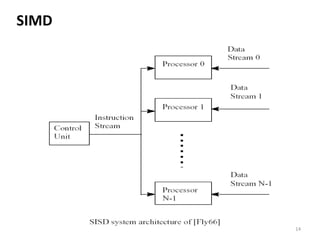
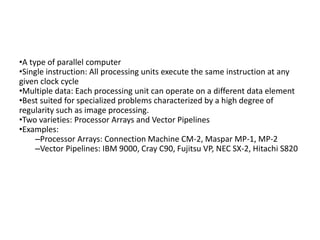
•A type of parallel computer
•Single instruction: All processing units execute the same instruction at any
given clock cycle
•Multiple data: Each processing unit can operate on a different data element
•Best suited for specialized problems characterized by a high degree of
regularity such as image processing.
•Two varieties: Processor Arrays and Vector Pipelines
•Examples:
–Processor Arrays: Connection Machine CM-2, Maspar MP-1, MP-2
–Vector Pipelines: IBM 9000, Cray C90, Fujitsu VP, NEC SX-2, Hitachi S820
Applications
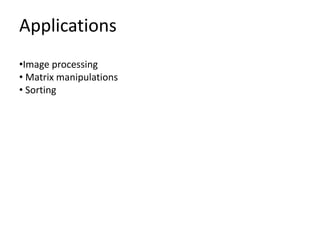
•Image processing
• Matrix manipulations
• Sorting
17
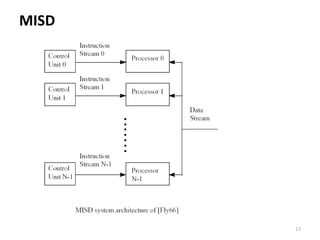
MISD
• A single data stream is fed into multiple processing
units.
• Each processing unit operates on the data
independently via independent instruction streams.
• Many functional units perform different operations
on the same data.
Applications
•Classification
• Robot vision
20
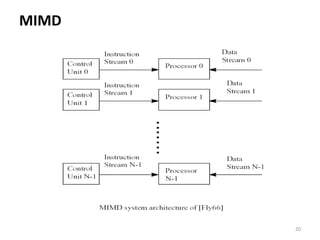
MIMD
•Currently, the most common type of parallel
computer. Most modern computers fall into this
category.
•Multiple Instruction: every processor may be
executing a different instruction stream
•Multiple Data: every processor may be working
with a different data stream
•Execution can be synchronous or asynchronous,
deterministic or non-deterministic
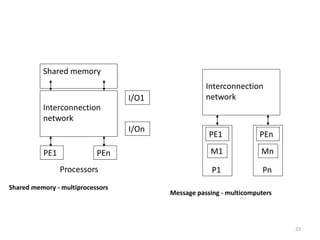
Classification based on memory
arrangement
23
PE1 PEn
Processors
Interconnection
network
Shared memory
Shared memory - multiprocessors
I/O1
I/On
PE1
Interconnection
network
M1
P1
PEn
Mn
Pn
Message passing - multicomputers
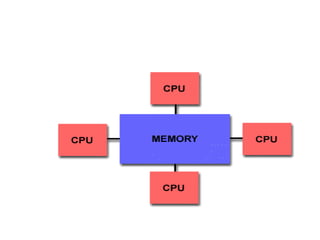
•Multiple processors can operate independently but share
the same memory resources.
•Changes in a memory location effected by one processor
are visible to all other processors.
•Processors easily communicate by means of shared
variables
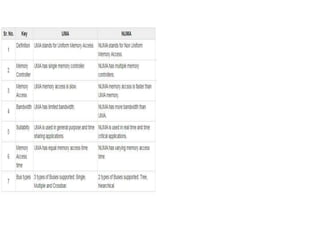
•Shared memory machines can be divided into two main
classes based upon memory access times: UMA and NUMA
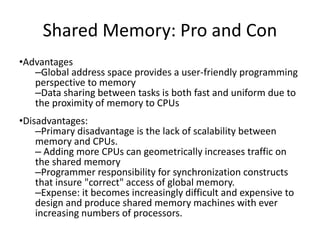
Shared Memory: Pro and Con
•Advantages
–Global address space provides a user-friendly programming
perspective to memory
–Data sharing between tasks is both fast and uniform due to
the proximity of memory to CPUs
•Disadvantages:
–Primary disadvantage is the lack of scalability between
memory and CPUs.
– Adding more CPUs can geometrically increases traffic on
the shared memory
–Programmer responsibility for synchronization constructs
that insure "correct" access of global memory.
–Expense: it becomes increasingly difficult and expensive to
design and produce shared memory machines with ever
increasing numbers of processors.
28
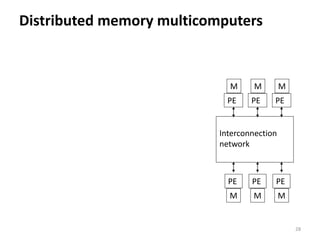
Distributed memory multicomputers
PE
Interconnection
network
M
PE
M
PE
M
PE
M
PE
M
PE
M
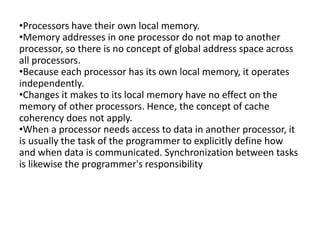
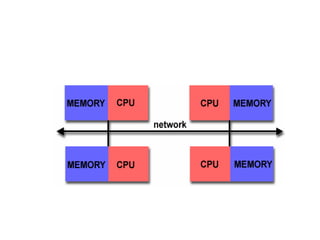
•Processors have their own local memory.
•Memory addresses in one processor do not map to another
processor, so there is no concept of global address space across
all processors.
•Because each processor has its own local memory, it operates
independently.
•Changes it makes to its local memory have no effect on the
memory of other processors. Hence, the concept of cache
coherency does not apply.
•When a processor needs access to data in another processor, it
is usually the task of the programmer to explicitly define how
and when data is communicated. Synchronization between tasks
is likewise the programmer's responsibility
Distributed Memory: Pro and Con
•Advantages
–Memory is scalable with number of processors. Increase the number of
processors and the size of memory increases proportionately.
–Each processor can rapidly access its own memory without interference
and without the overhead incurred with trying to maintain cache
coherency.
–Cost effectiveness: can use commodity, off-the-shelf processors and
networking.
•Disadvantages
–The programmer is responsible for many of the details associated with
data communication between processors.
–It may be difficult to map existing data structures, based on global
memory, to this memory organization.
–Non-uniform memory access (NUMA) times
Classification based on type of
interconnections
33
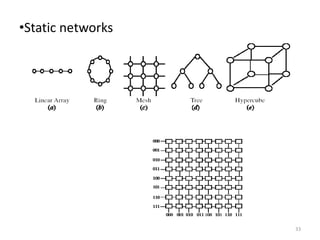
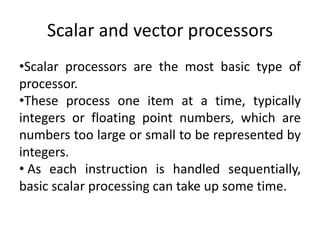
•Static networks
•Dynamic networks
Scalar and vector processors
•Scalar processors are the most basic type of
processor.
•These process one item at a time, typically
integers or floating point numbers, which are
numbers too large or small to be represented by
integers.
• As each instruction is handled sequentially,
basic scalar processing can take up some time.
• vector processors operate on an array of data points.
• Rather than handling each item individually, multiple
items that all have the same instruction can be handled at
once.
•This can save time over scalar processing, but also adds
complexity to a system, which can slow other functions.
•Vector processing works best when there is a large amount
of data to be processed, groups of which can be handled by
one instruction
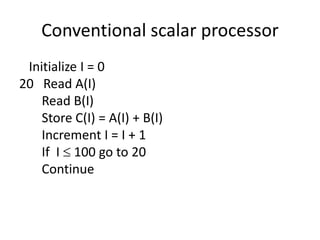
Conventional scalar processor
Initialize I = 0
20 Read A(I)
Read B(I)
Store C(I) = A(I) + B(I)
Increment I = I + 1
If I  100 go to 20
Continue
Vector processor
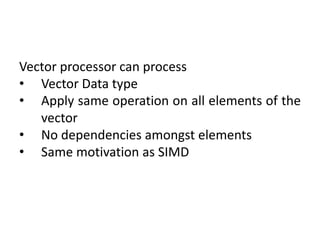
Single vector instruction
C(1:100) = A(1:100) + B(1:100)
Vector processor can process
• Vector Data type
• Apply same operation on all elements of the
vector
• No dependencies amongst elements
• Same motivation as SIMD
What is vector processing?
•A vector processor is one that can compute operations on entire
vectors with one simple instruction.
•A vector compiler will attempt to translate loops into single
vector instructions.
•Example - Suppose we have the following for loop:
for i = 1, n
X(i) = Y(i) + Z(i)
continue
•This will be translated into one long vector of length n and a
vector add instruction will be executed.
Why is this more efficient?
#1: Because there is only a need for one instruction, the vector
processor will not have to fetch and decode as many
instructions; Thus, memory bandwidth and the control unit
overhead are reduced considerably.
#2: The Vector Processor, after receiving the instruction, will be
told that it must fetch x amount of pairs of operands. When
received, they will be passed on directly to a pipelined data unit
to process them.
There are 2 specific kinds of machines
#1: Memory to memory: operands are fetched from
memory and passed on directly to the functional unit.
The results are then written back out to memory to
complete the process.
#2: Register to register: operands are loaded into a set
of vector registers, the operands are fetched from the
vector registers and the results are returned to a vector
register.
Vector Instruction Set Advantages
•Compact
–one short instruction encodes N operations
•Expressive, tells hardware that these N
operations:
–are independent
–use the same functional unit
–access disjoint registers
–access registers in the same pattern as previous instructions
–access a contiguous block of memory (unit-stride load/store)
–access memory in a known pattern (strided load/store)
•Scalable
–can run same object code on more parallel pipelines or lanes
Disadvantages
•Not as fast with scalar instructions
•Complexity
•Difficulties in implementing
•High price of on-chip vector memory systems
•Increased code complexity
Applications
•Servers
•Home Cinema
•Super Computing
•Cluster Computing
•Mainframes
Fall 2008 Introduction to Parallel Processing 45
Array Computers
•An array processor is a synchronous parallel
computer with multiple arithmetic logic units, called
processing elements (PE), that can operate in
parallel.
•The PEs are synchronized to perform the same
function at the same time.
•Only a few array computers are designed primarily
for numerical computation, while the others are for
research purposes.
Fall 2008 Introduction to Parallel Processing 46
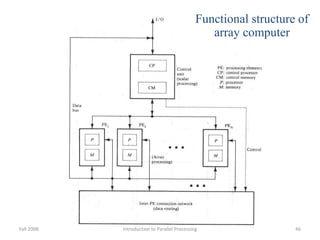
Functional structure of
array computer
• Array processors are also known as multiprocessors or vector processors.
They perform computations on large arrays of data. Thus, they are used to
improve the performance of the computer.
• Two types of Array Processor:
 Attached Array Processors
 SIMD Array Processors
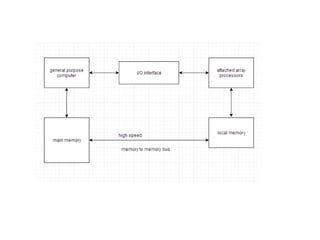
Attached Array Processors:
• An attached array processor is a processor which is attached to a general
purpose computer and its purpose is to enhance and improve the performance
of that computer in numerical computational tasks.
• It achieves high performance by means of parallel processing with multiple
functional units.
SIMD Array Processors
• SIMD is the organization of a single computer containing multiple processors
operating in parallel.
• The processing units are made to operate under the control of a common
control unit, thus providing a single instruction stream and multiple data
streams.
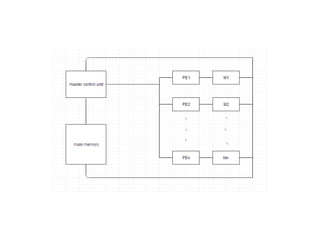
• A general block diagram of an array processor is next slide.
• It contains a set of identical processing elements (PE's), each of which is
having a local memory M.
• Each processor element includes an ALU and registers.
• The master control unit controls all the operations of the processor elements.
It also decodes the instructions and determines how the instruction is to be
executed.
• The main memory is used for storing the program.
• The control unit is responsible for fetching the instructions.
• Vector instructions are send to all PE's simultaneously and results are
returned to the memory.
• The best known SIMD array processor is the ILLIAC IV computer
developed by the Burroughs corps. SIMD processors are highly specialized
computers.
• They are only suitable for numerical problems that can be expressed in vector
or matrix form and they are not suitable for other types of computations.
Why use the Array Processor
•Array processors increases the overall instruction processing speed.
•As most of the Array processors operates asynchronously from the host CPU, hence
it improves the overall capacity of the system.
•Array Processors has its own local memory, hence providing extra memory for
systems with low memory.

CSA unit5.pptx

  • 1.
    What is ParallelComputing •Traditionally, software has been written for serial computation: –To be run on a single computer having a single Central Processing Unit (CPU); –A problem is broken into a discrete series of instructions. –Instructions are executed one after another. –Only one instruction may execute at any moment in time.
  • 3.
    •Parallel computing isthe simultaneous use of multiple compute resources to solve a computational problem. –To be run using multiple CPUs –A problem is broken into discrete parts that can be solved concurrently –Each part is further broken down to a series of instructions •Instructions from each part execute simultaneously on different CPUs
  • 5.
  • 6.
    •The primary reasonsfor using parallel computing: –Save time –Solve large problems –Provide concurrency (do multiple things at the same time) –Taking advantage of non-local resources –Overcoming memory constraints –Cost savings
  • 8.
    Basic Design •Basic design –Memoryis used to store both program and data instructions –Program instructions are coded data which tell the computer to do something –Data is simply information to be used by the program •A central processing unit (CPU) gets instructions and/or data from memory, decodes the instructions and then sequentially performs them.
  • 9.
  • 10.
    10 Classification of parallelarchitectures •Flynn’s taxonomy •Classification based on the memory arrangement •Classification based on type of interconnection
  • 11.
    11 Flynn’s Taxonomy – Themost universally accepted method of classifying computer systems – Any computer can be placed in one of 4 broad categories » SISD: Single instruction stream, single data stream » SIMD: Single instruction stream, multiple data streams » MIMD: Multiple instruction streams, multiple data streams
  • 12.
  • 13.
    Single Instruction, SingleData (SISD) •A serial (non-parallel) computer •Single instruction: only one instruction stream is being acted on by the CPU during any one clock cycle •Single data: only one data stream is being used as input during any one clock cycle •This is the oldest and until recently, the most prevalent form of computer •Examples: most PCs, single CPU workstations and mainframes
  • 14.
  • 15.
    •A type ofparallel computer •Single instruction: All processing units execute the same instruction at any given clock cycle •Multiple data: Each processing unit can operate on a different data element •Best suited for specialized problems characterized by a high degree of regularity such as image processing. •Two varieties: Processor Arrays and Vector Pipelines •Examples: –Processor Arrays: Connection Machine CM-2, Maspar MP-1, MP-2 –Vector Pipelines: IBM 9000, Cray C90, Fujitsu VP, NEC SX-2, Hitachi S820
  • 16.
  • 17.
  • 18.
    • A singledata stream is fed into multiple processing units. • Each processing unit operates on the data independently via independent instruction streams. • Many functional units perform different operations on the same data.
  • 19.
  • 20.
  • 21.
    •Currently, the mostcommon type of parallel computer. Most modern computers fall into this category. •Multiple Instruction: every processor may be executing a different instruction stream •Multiple Data: every processor may be working with a different data stream •Execution can be synchronous or asynchronous, deterministic or non-deterministic
  • 22.
    Classification based onmemory arrangement
  • 23.
    23 PE1 PEn Processors Interconnection network Shared memory Sharedmemory - multiprocessors I/O1 I/On PE1 Interconnection network M1 P1 PEn Mn Pn Message passing - multicomputers
  • 24.
    •Multiple processors canoperate independently but share the same memory resources. •Changes in a memory location effected by one processor are visible to all other processors. •Processors easily communicate by means of shared variables •Shared memory machines can be divided into two main classes based upon memory access times: UMA and NUMA
  • 27.
    Shared Memory: Proand Con •Advantages –Global address space provides a user-friendly programming perspective to memory –Data sharing between tasks is both fast and uniform due to the proximity of memory to CPUs •Disadvantages: –Primary disadvantage is the lack of scalability between memory and CPUs. – Adding more CPUs can geometrically increases traffic on the shared memory –Programmer responsibility for synchronization constructs that insure "correct" access of global memory. –Expense: it becomes increasingly difficult and expensive to design and produce shared memory machines with ever increasing numbers of processors.
  • 28.
  • 29.
    •Processors have theirown local memory. •Memory addresses in one processor do not map to another processor, so there is no concept of global address space across all processors. •Because each processor has its own local memory, it operates independently. •Changes it makes to its local memory have no effect on the memory of other processors. Hence, the concept of cache coherency does not apply. •When a processor needs access to data in another processor, it is usually the task of the programmer to explicitly define how and when data is communicated. Synchronization between tasks is likewise the programmer's responsibility
  • 31.
    Distributed Memory: Proand Con •Advantages –Memory is scalable with number of processors. Increase the number of processors and the size of memory increases proportionately. –Each processor can rapidly access its own memory without interference and without the overhead incurred with trying to maintain cache coherency. –Cost effectiveness: can use commodity, off-the-shelf processors and networking. •Disadvantages –The programmer is responsible for many of the details associated with data communication between processors. –It may be difficult to map existing data structures, based on global memory, to this memory organization. –Non-uniform memory access (NUMA) times
  • 32.
    Classification based ontype of interconnections
  • 33.
  • 34.
    Scalar and vectorprocessors •Scalar processors are the most basic type of processor. •These process one item at a time, typically integers or floating point numbers, which are numbers too large or small to be represented by integers. • As each instruction is handled sequentially, basic scalar processing can take up some time.
  • 35.
    • vector processorsoperate on an array of data points. • Rather than handling each item individually, multiple items that all have the same instruction can be handled at once. •This can save time over scalar processing, but also adds complexity to a system, which can slow other functions. •Vector processing works best when there is a large amount of data to be processed, groups of which can be handled by one instruction
  • 36.
    Conventional scalar processor InitializeI = 0 20 Read A(I) Read B(I) Store C(I) = A(I) + B(I) Increment I = I + 1 If I  100 go to 20 Continue
  • 37.
    Vector processor Single vectorinstruction C(1:100) = A(1:100) + B(1:100)
  • 38.
    Vector processor canprocess • Vector Data type • Apply same operation on all elements of the vector • No dependencies amongst elements • Same motivation as SIMD
  • 39.
    What is vectorprocessing? •A vector processor is one that can compute operations on entire vectors with one simple instruction. •A vector compiler will attempt to translate loops into single vector instructions. •Example - Suppose we have the following for loop: for i = 1, n X(i) = Y(i) + Z(i) continue •This will be translated into one long vector of length n and a vector add instruction will be executed.
  • 40.
    Why is thismore efficient? #1: Because there is only a need for one instruction, the vector processor will not have to fetch and decode as many instructions; Thus, memory bandwidth and the control unit overhead are reduced considerably. #2: The Vector Processor, after receiving the instruction, will be told that it must fetch x amount of pairs of operands. When received, they will be passed on directly to a pipelined data unit to process them.
  • 41.
    There are 2specific kinds of machines #1: Memory to memory: operands are fetched from memory and passed on directly to the functional unit. The results are then written back out to memory to complete the process. #2: Register to register: operands are loaded into a set of vector registers, the operands are fetched from the vector registers and the results are returned to a vector register.
  • 42.
    Vector Instruction SetAdvantages •Compact –one short instruction encodes N operations •Expressive, tells hardware that these N operations: –are independent –use the same functional unit –access disjoint registers –access registers in the same pattern as previous instructions –access a contiguous block of memory (unit-stride load/store) –access memory in a known pattern (strided load/store) •Scalable –can run same object code on more parallel pipelines or lanes
  • 43.
    Disadvantages •Not as fastwith scalar instructions •Complexity •Difficulties in implementing •High price of on-chip vector memory systems •Increased code complexity
  • 44.
  • 45.
    Fall 2008 Introductionto Parallel Processing 45 Array Computers •An array processor is a synchronous parallel computer with multiple arithmetic logic units, called processing elements (PE), that can operate in parallel. •The PEs are synchronized to perform the same function at the same time. •Only a few array computers are designed primarily for numerical computation, while the others are for research purposes.
  • 46.
    Fall 2008 Introductionto Parallel Processing 46 Functional structure of array computer
  • 47.
    • Array processorsare also known as multiprocessors or vector processors. They perform computations on large arrays of data. Thus, they are used to improve the performance of the computer. • Two types of Array Processor:  Attached Array Processors  SIMD Array Processors Attached Array Processors: • An attached array processor is a processor which is attached to a general purpose computer and its purpose is to enhance and improve the performance of that computer in numerical computational tasks. • It achieves high performance by means of parallel processing with multiple functional units.
  • 49.
    SIMD Array Processors •SIMD is the organization of a single computer containing multiple processors operating in parallel. • The processing units are made to operate under the control of a common control unit, thus providing a single instruction stream and multiple data streams. • A general block diagram of an array processor is next slide. • It contains a set of identical processing elements (PE's), each of which is having a local memory M. • Each processor element includes an ALU and registers. • The master control unit controls all the operations of the processor elements. It also decodes the instructions and determines how the instruction is to be executed.
  • 51.
    • The mainmemory is used for storing the program. • The control unit is responsible for fetching the instructions. • Vector instructions are send to all PE's simultaneously and results are returned to the memory. • The best known SIMD array processor is the ILLIAC IV computer developed by the Burroughs corps. SIMD processors are highly specialized computers. • They are only suitable for numerical problems that can be expressed in vector or matrix form and they are not suitable for other types of computations.
  • 52.
    Why use theArray Processor •Array processors increases the overall instruction processing speed. •As most of the Array processors operates asynchronously from the host CPU, hence it improves the overall capacity of the system. •Array Processors has its own local memory, hence providing extra memory for systems with low memory.