1
MATATAG K TO 10 CURRICULUM
MATATAG
K to 10 Curriculum
Weekly Lesson Log
School: SAN ISIDRO NATIONAL HIGH SCHOOL Grade Level: VIII
Name of Teacher LOIDA L. ALMAZAN Learning Area: TLE
Teaching Dates and Time: JUNE 16 – 27, 2025 (WEEK 1-2) Quarter: First
I. CURRICULUM CONTENT, STANDARDS, AND LESSON COMPETENCIES
A. Content Standards The learners demonstrate an understanding of the tools and equipment in ICT.
B. Performance Standards The learners create videos with graphics design in a safe and responsible manner
C. Learning Competencies
and Objectives
Learning Competency:
The learners will
 Familiarize themselves with the tools and equipment in ICT.
Learning Objectives:
At the end of the lesson, learners are expected to:
1. Develop the ability to identify various ICT tools and equipment, understand their purposes, and learn the basic
functions of each.
2. Gain hands-on experience with ICT equipment, focusing on safe handling and operation according to best practices and
manufacturer guidelines.
3. Foster an appreciation for the role of ICT in enhancing work efficiency and problem-solving, leading to a value-driven
approach to technology adoption.
D. Content Tools and equipment in ICT
🔾 computer programming
🔾 visual arts
🔾 computer system servicing
🔾 telecommunication
Appropriate software applications for specific tasks
🔾 application software
🔾 system software
E. Integration SGD 4: Quality Education
II. LEARNING RESOURCES
Braden, A. (2020, December 4). Software Definition & Meaning | What is Software? Webopedia. https://www.webopedia.com/definitions/software/ Computer
Hope. (2019). What is a Computer? Computerhope.com. https://www.computerhope.com/jargon/c/computer.htm
2
MATATAG K TO 10 CURRICULUM
Different ICT Tools – Communication technologies for extension education. (n.d.). Ebooks.inflibnet.ac.in.
https://ebooks.inflibnet.ac.in/hsp13/chapter/different-ict-tools/
Different Types of Software with Examples. (n.d.). Squareboat. https://www.squareboat.com/blog/different-types-of-software-with-examples Moes, T.
(2023, June). What is Software? Everything You Need to Know. Softwarelab.org. https://softwarelab.org/blog/what-is-software/ Rosencrance, L. (2021,
March). What is Software? Definition, Types and Examples. TechTarget.
https://www.techtarget.com/searchapparchitecture/definition/software
TechTerms. (2019). Hardware Definition. Techterms.com. https://techterms.com/definition/hardware
III. TEACHING AND LEARNING PROCEDURE NOTES TO TEACHERS
A. Activating
Prior
Knowledge
DAY 1
1. Short Review
Brainstorming session on the importance of tools and equipment in different fields.
https://encrypted- https://b2binformation.blogspot.com/2012/10/agricultural-tools-have-become-common.html
tbn0.gstatic.com/images?q=tbn:ANd9GcRlEmrgBHySeuIPqcfCzr8_l5T_Ghv9A41U7A&s
https://www.google.com/url?sa=i&url=https%3A%2F%2Fwww.civilengineeringweb.com%2F2022%2F03%2Ftypes-plumbing-tools-
uses.html&psig=AOvVaw2oI_kcwdLVTjtCljGPCe8a&ust=1718623002930000&source=images&cd=vfe&opi=89978449&ved=0CBQQjRxqFwo
TCJjN7dv_34YDFQAAAAAdAAAAABAP https://azglobalsupplier.com/it-equipment/
2. Feedback (Optional)
Instructional Materials:
Pictures of various tools
and equipment, the teacher
may also use realia, if
available.
Show the images but not
limited to the following to
the class, and ask the
importance of these tools
and equipment in what
field of specialization(s).
B. Establishing
Lesson Purpose
1. Lesson Purpose
1. Develop the ability to identify various ICT tools and equipment, understand their purposes, and
learn the basic functions of each.
At the beginning of the
lesson, take a moment to
clearly articulate the
objectives to the students.
3
MATATAG K TO 10 CURRICULUM
2. Gain hands-on experience with ICT equipment, focusing on safe handling and operation according to
best practices and manufacturer guidelines.
3. Foster an appreciation for the role of ICT in enhancing work efficiency and problem-solving, leading to a
value-driven approach to technology adoption.
2. Unlocking Content Vocabulary
Solicit Ideas from the learners as the wheel spins, from the selected word.
 Computer - is a programmable device that stores, retrieves, and processes data.
 ICT - information and communications technology is the infrastructure and components that
enable modern computing.
 Application - In computing, an application, or app for short, is a software program designed to
help a computer user accomplish a task.
 Hardware - consists of the physical parts of a computer system
 Software - is a collection of instructions, data, or computer programs used to operate computers and
execute specific tasks
This involves explaining
what they are expected to
learn and achieve by the
end of the session
https://wordwall.net/reso
urce/72086373
use this link to do the
interactive activity. SPIN IT.
C. Developing and
Deepening
Understanding
SUB-TOPIC 1: EXPLORING TOOLS AND EQUIPMENT IN ICT
1. Explicitation
1. Begin with a brief overview of the importance of ICT in today's world.
2. Ask the students how the various ICT fields use TOOLS and EQUIPMENT.
3. Define and categorize what various tools and equipment mean in the field of ICT.
4. Explain how each of these fields relies on specific tools and equipment.
Common Tools and Equipment used in Computer Programming
1. Hardware
 Computer: The primary device used for writing code, running programs, and testing software.
 Desktop or Laptop: Depending on preference and requirements.
2. Software
 Integrated Development Environments (IDEs): Comprehensive tools that provide editing,
debugging, and compilation in one place.
Examples: Visual Studio Code, IntelliJ IDEA, PyCharm, Eclipse, Xcode.
 Code Editors: Lightweight alternatives to IDEs for quick coding and scripting.
Examples: Sublime Text, Atom, Notepad++.
 Version Control Systems (VCS): Tools to manage changes to source code over time.
Examples: Git, Subversion (SVN), Mercurial.
The teacher may include
images or photos relating to
the type of ICT equipment
and tools in various fields.
The teacher may play this
video on YouTube to
enhance the
understanding of learners
about programming,
Video Link:
https://www.youtube.co
m/watch?v=_j4Lj-BT00g
4
MATATAG K TO 10 CURRICULUM
 Repositories and Collaboration Platforms:
Examples: GitHub, GitLab, Bitbucket.
 Compilers and Interpreters: Tools that translate code into executable programs.
Examples: GCC (GNU Compiler Collection), Clang, Python Interpreter, Node.js.
 Debuggers: Tools to test and debug code.
Examples: GDB (GNU Debugger), LLDB, built-in debuggers in IDEs.
 Package Managers: Tools to manage software libraries and dependencies.
Examples: npm (Node Package Manager), pip (Python Package Installer), Maven, Gradle, NuGet.
 Build Automation Tools: Tools to automate the process of compiling code, running tests, and
deploying applications.
Examples: Jenkins, Travis CI, CircleCI, Make, Ant.
Common tools and equipment in Computer Systems Servicing:
 Hand Tools: When servicing computers, students need tools like screwdrivers, pliers, and anti-
static wristbands. These tools help with hardware installation, repair, and maintenance.
 Diagnostic Software: Students can use software tools to diagnose hardware issues, check system
performance, and troubleshoot problems.
 Cable Testers and Multimeters: These tools help verify cable connections and measure electrical
parameters.
 Cleaning Kits: Keeping computers dust-free is essential for optimal performance.
Common tools and equipment Visual Arts:
 Digital Cameras and Scanners: Students can capture images of their artwork or scan traditional
artwork to create digital versions.
 Graphic Design Software (e.g., Adobe Photoshop, Illustrator): These tools allow students to
manipulate images, create digital art, and design graphics.
 Tablets and Drawing Pads: Artists can use these devices to create digital illustrations and
paintings.
 3D Modeling Software (e.g., Blender, Autodesk Maya): For students interested in 3D art and
animation.
Telecommunication:
1. Hardware
 Modems and Routers: Devices that modulate and demodulate signals for transmission over
telephone lines or cable systems and route data between devices on a network.
Examples: DSL modems, cable modems, wireless routers.
Demonstrate the use of one
tool in a practical scenario.
Start by discussing the
importance of safety when
handling ICT equipment.
5
MATATAG K TO 10 CURRICULUM
 Switches and Hubs: Networking devices that connect multiple devices within a network,
facilitating communication between them.
Examples: Ethernet switches, network hubs.
 Repeaters and Extenders: Devices that amplify or regenerate signals to extend the range of a
network.
Examples: Signal boosters, Wi-Fi extenders.
 Antennas: Devices that transmit and receive radio waves for wireless communication.
Examples: Yagi antennas, parabolic antennas, dipole antennas.
 Base Stations: Equipment that connects mobile devices to a network in cellular and radio
communication.
Examples: Cell towers, microcells, femtocells.
2. Software
 Network Management Software: Tools for monitoring, managing, and troubleshooting network
performance and connectivity.
Examples: SolarWinds Network Performance Monitor, PRTG Network Monitor, Nagios.
 Communication Protocols: Software protocols that define rules for data exchange over a network.
Examples: TCP/IP (Transmission Control Protocol/Internet Protocol), VoIP (Voice over Internet Protocol), SIP (Session
Initiation Protocol).
 Telephony Software: Applications for managing voice communication over networks.
Examples: Asterisk, FreeSWITCH, Skype for Business.
DAY 2
2. Worked Example
Group the learners by 6, let them pick an item below, and answer the selected question by reciting in front to
use only 6 words or how many are they in the group.
1. What are the essential tools in ICT?
2. How can ICT tools improve efficiency in tasks?
3. Explain the importance of selecting the right tool for a specific task.
3. Lesson Activity: (Refer to worksheet activity no. 1)
Materials Needed:
● Various ICT equipment (e.g., desktop computers, laptops, keyboards, mice, cables, routers)
● Anti-static wrist straps
● Screwdrivers and other basic tools for computer servicing
● Manufacturer manuals or online resources for reference
● Safety posters or handouts outlining best practices
● Whiteboard or flipchart for group discussion
Explain the risks associated
with static electricity,
incorrect handling, and
improper use of tools.
6
MATATAG K TO 10 CURRICULUM
Procedure:
1. Demonstrate how to safely handle and operate other ICT equipment
2. Discuss how to properly pack and store ICT equipment to prevent damage during transport or
storage
3. Distribute safety handouts or provide a brief summary of key best practices for ICT safety.
4. Emphasize the importance of following manufacturer guidelines when handling ICT equipment
5. Divide the learners into groups and let them select an available tool, equipment or materials
relating to ICT.
6. Let them talk with one another and create a poster highlighting the importance of safety and
proper handling of ICT equipment.
7. Present in class
Rubrics for grading:
Criteria Excellent (4) Good (3) Satisfactory (2) Needs Improvement
(1)
Safety Practices Consistently applies Applies safety Applies safety Rarely applies safety
safety practices, practices most of the practices but has practices or has
including using anti- time, with only minor a few noticeable significant safety
static wrist straps, oversights. lapses in safety lapses that could lead
proper tool use, and procedures. to damage or injury.
careful handling of
components.
Following Follows instructions Generally, follows Follows Struggles to follow
Instructions precisely, instructions but instructions with instructions,
demonstrating a clear requires occasional some difficulty, requiring significant
understanding of the clarification or needing frequent assistance or
task and required correction. guidance or supervision.
steps. correction.
Teamwork and Actively participates Works well in a group, Works in a group Struggles to work in a
Collaboration in group work, communicates, and but has some group, contributing
communicates collaborates with challenges with minimally or causing
effectively, and peers, with minor communication or disruptions.
contributes to team issues. collaboration.
success.
Task Completion Completes the Completes the task Completes the Does not complete the
assigned task with minor errors or task with task or makes critical
accurately and within delays but corrects significant errors errors that prevent
the allotted time. them independently. or delays, task completion.
requiring assistance.
Instructions for Using
the Rubric:
Assess Each Student:
Evaluate each student
based on the criteria above
during the hands- on
activity. Assign a score
from 1 (Needs
Improvement) to 4
(Excellent) for each
criterion.
Calculate the Total Score:
Add the scores for each
criterion to get a total score
for the student.
Provide Feedback: Offer
constructive feedback
based on the rubric scores,
highlighting strengths and
areas for improvement.
Encourage Improvement:
Use the rubric to guide
7
MATATAG K TO 10 CURRICULUM
Problem-Solving Demonstrates strong Solves problems Needs assistance Fails to adapt to
and Adaptability problem-solving effectively, adapting to with problem- challenges or is
skills, adapting to most challenges with solving or unable to solve
unexpected minimal guidance. struggles to adapt problems without
challenges and to changes. significant guidance.
finding solutions.
further learning and
improvement in safety
practices, teamwork, and
task completion.
Quality of Work Produces high- Produces good-quality Produces Produces work with
quality work, with work, with some satisfactory work, significant quality
careful attention to minor issues in detail but with issues, lacking
detail and neatness. or neatness. noticeable issues attention to detail or
in quality or neatness.
neatness.
DAY 3
SUB-TOPIC 2: TYPES OF SOFTWARE
1. Explicitation
Definition of Software
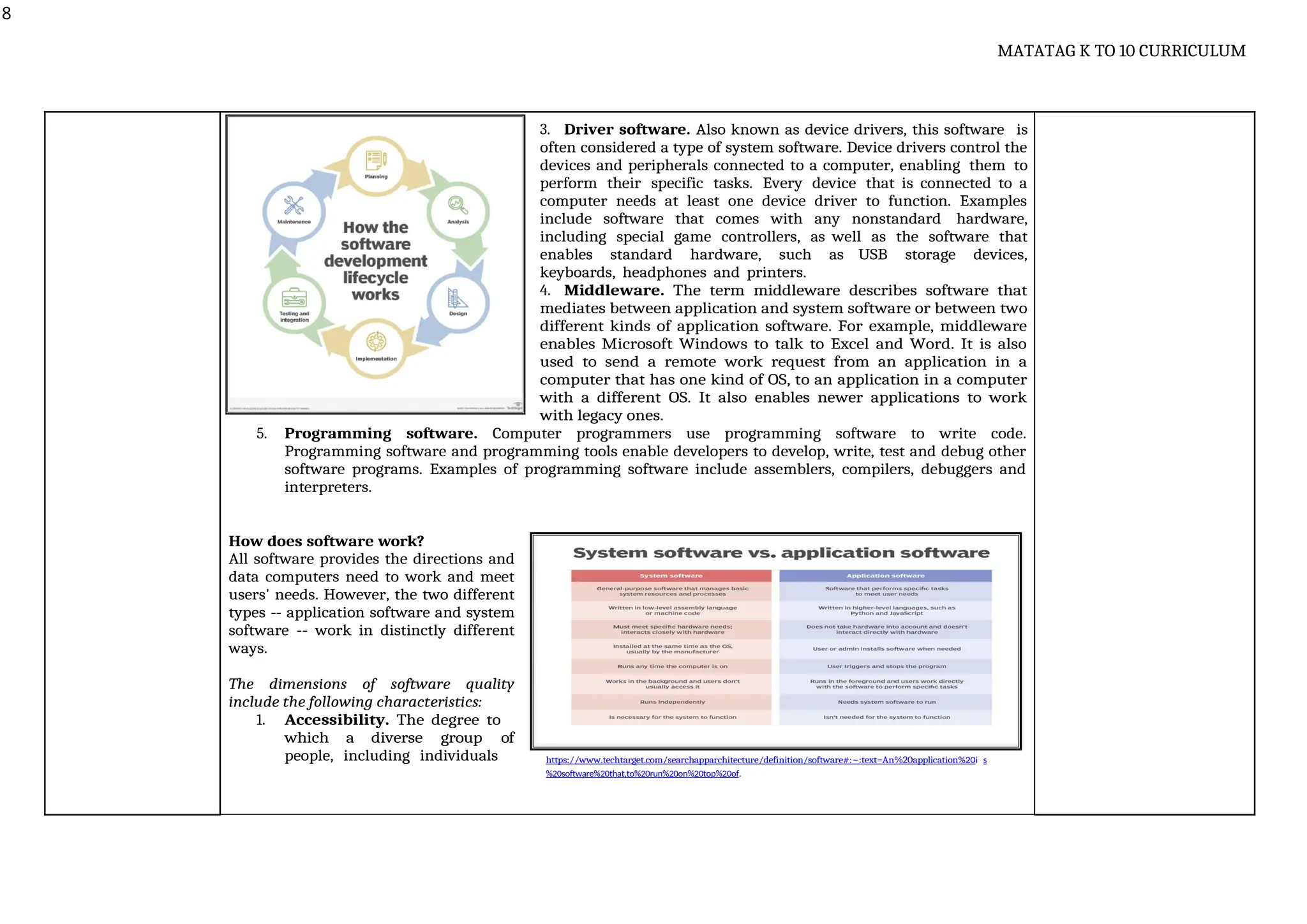
Software is a set of instructions, data or programs used to operate computers and execute specific
tasks. It is the opposite of hardware, which describes the physical aspects of a computer. Software is a generic
term used to refer to applications, scripts and programs that run on a device. It can be thought of as the
variable part of a computer, while hardware is the invariable part.
Use slide decks to present
explicitation
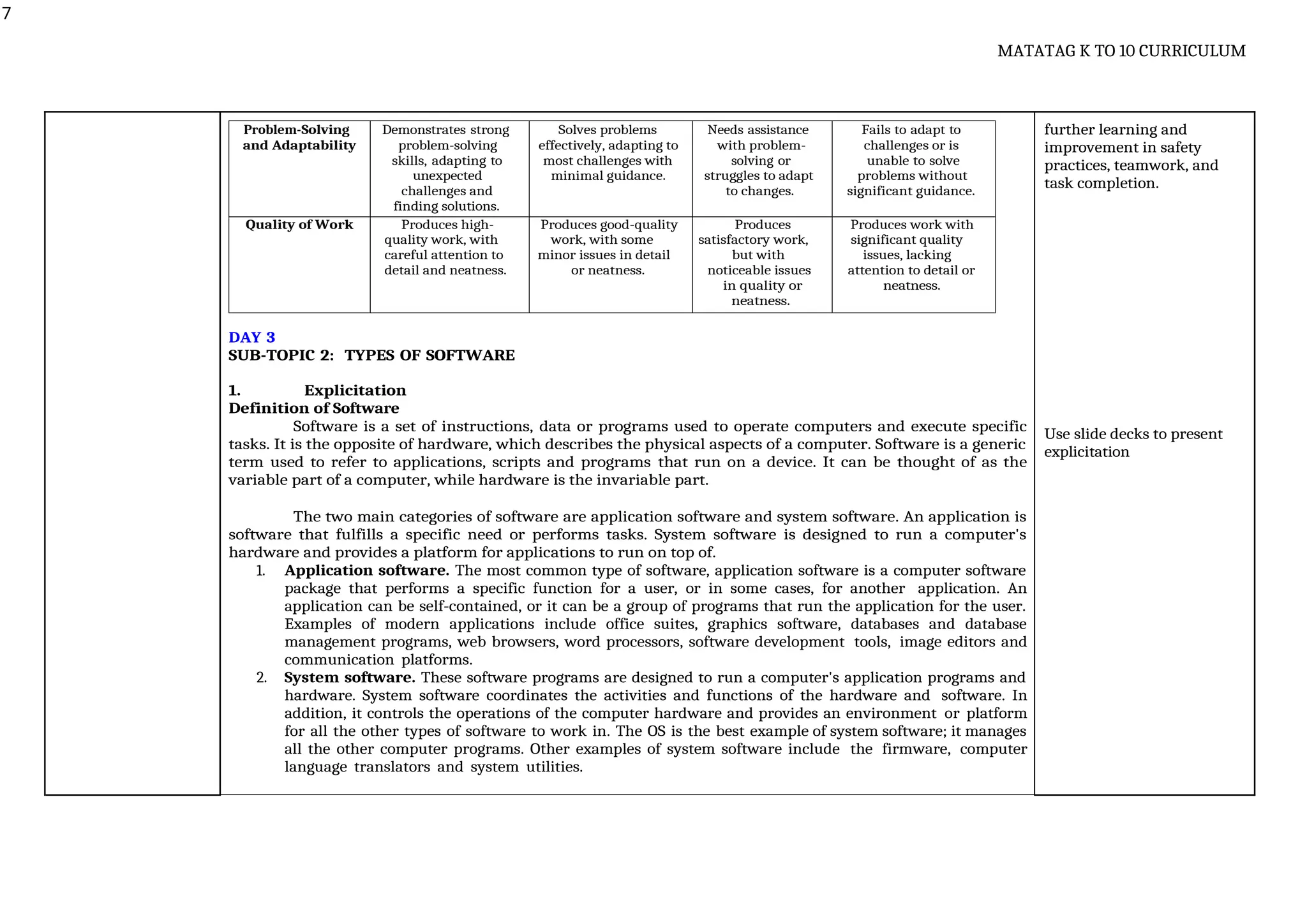
The two main categories of software are application software and system software. An application is
software that fulfills a specific need or performs tasks. System software is designed to run a computer's
hardware and provides a platform for applications to run on top of.
1. Application software. The most common type of software, application software is a computer software
package that performs a specific function for a user, or in some cases, for another application. An
application can be self-contained, or it can be a group of programs that run the application for the user.
Examples of modern applications include office suites, graphics software, databases and database
management programs, web browsers, word processors, software development tools, image editors and
communication platforms.
2. System software. These software programs are designed to run a computer's application programs and
hardware. System software coordinates the activities and functions of the hardware and software. In
addition, it controls the operations of the computer hardware and provides an environment or platform
for all the other types of software to work in. The OS is the best example of system software; it manages
all the other computer programs. Other examples of system software include the firmware, computer
language translators and system utilities.
8
MATATAG K TO 10 CURRICULUM
3. Driver software. Also known as device drivers, this software is
often considered a type of system software. Device drivers control the
devices and peripherals connected to a computer, enabling them to
perform their specific tasks. Every device that is connected to a
computer needs at least one device driver to function. Examples
include software that comes with any nonstandard hardware,
including special game controllers, as well as the software that
enables standard hardware, such as USB storage devices,
keyboards, headphones and printers.
4. Middleware. The term middleware describes software that
mediates between application and system software or between two
different kinds of application software. For example, middleware
enables Microsoft Windows to talk to Excel and Word. It is also
used to send a remote work request from an application in a
computer that has one kind of OS, to an application in a computer
with a different OS. It also enables newer applications to work
with legacy ones.
5. Programming software. Computer programmers use programming software to write code.
Programming software and programming tools enable developers to develop, write, test and debug other
software programs. Examples of programming software include assemblers, compilers, debuggers and
interpreters.
How does software work?
All software provides the directions and
data computers need to work and meet
users' needs. However, the two different
types -- application software and system
software -- work in distinctly different
ways.
The dimensions of software quality
include the following characteristics:
1. Accessibility. The degree to
which a diverse group of
people, including individuals https://www.techtarget.com/searchapparchitecture/definition/software#:~:text=An%20application%20i s
%20software%20that,to%20run%20on%20top%20of.
9
MATATAG K TO 10 CURRICULUM
who require adaptive technologies such as voice recognition and screen magnifiers, can
comfortably use the software.
2. Compatibility. The suitability of the software for use in a variety of environments, such as with
different OSes, devices and browsers.
3. Efficiency. The ability of the software to perform well without wasting energy, resources, effort,
time or money.
4. Functionality. Software's ability to carry out its specified functions.
5. Installability. The ability of the software to be installed in a specified environment.
6. Localization. The various languages, time zones and other such features a software can function in.
7. Maintainability. How easily the software can be modified to add and improve features, fix bugs, etc.
8. Performance. How fast the software performs under a specific load.
9. Portability. The ability of the software to be easily transferred from one location to another.
10. Reliability. The software's ability to perform a required function under specific conditions for a
defined period of time without any errors.
11. Scalability. The measure of the software's ability to increase or decrease performance in response to
changes in its processing demands.
12. Security. The software's ability to protect against unauthorized access, invasion of privacy, theft,
data loss, malicious software, etc.
13. Testability. How easy it is to test the software.
14. Usability. How easy it is to use the software.
2. Worked Example
1. Operating System (OS)
Example: Installing a new application on Windows 10.
Step 1: Download the installation file for the application.
Step 2: Double-click the downloaded file to begin the installation process.
Step 3: Follow the on-screen instructions to complete the installation.
Step 4: Once installed, you can find the application in the Start Menu and run it.
2. Application Software
Example: Creating a presentation in Microsoft PowerPoint.
Step 1: Open PowerPoint and select a template or create a new blank presentation.
Step 2: Add new slides and input content such as text, images, and videos.
Step 3: Apply transitions and animations to enhance the presentation.
Step 4: Save the presentation and practice your slideshow.
https://www.techtarget.c
om/searchapparchitectur
e/definition/software#:~:t
ext=An%20application%20i s
%20software%20that,to%20ru
n%20on%20top%20of
Show video on how to
install windows 10, if
there is no resource
available or use virtual
box instead.
https://www.youtube.co
m/watch?v=nbGkPYtXtm
A&t=60s
10
MATATAG K TO 10 CURRICULUM
3. Utility Software
Example: Running a disk cleanup on a computer.
Step 1: Open the Disk Cleanup utility from the Start Menu.
Step 2: Select the drive you want to clean up and click “OK”.
Step 3: Check the boxes for the types of files you want to delete and click “OK”.
Step 4: Confirm the action and wait for the cleanup to finish.
DAY 4
3. Lesson Activity: Software Exploration Quest
(Refer to worksheet activity no. 2)
 4-5 members per group.
Materials Needed:
● Computers with internet access.
● Presentation software (e.g., Microsoft PowerPoint, Google Slides).
● Access to a printer (optional)
Instructions:
1. Divide and Conquer:
● Assign each group one type of software: Operating System, Device Driver, Firmware, Application
Software, Utility Software.
● Each group will research their assigned software type and prepare a short presentation.
2. Research Phase (30 minutes):
● Groups will use the internet to research their assigned software type.
● They should find out the definition, purpose, examples, and any interesting facts.
3. Preparation Phase (45 minutes):
● Using the presentation software, groups will create a slideshow that includes their findings.
● Encourage creativity: include images, diagrams, or even short videos.
4. Presentation Phase (15 minutes per group):
 Each group will present their findings to the class.
 Encourage questions and discussions after each presentation.
5. Practical Application (30 minutes):
● Groups will demonstrate a practical example of using their software type.
● For example, the group assigned to Application Software might demonstrate how to create a chart in
Excel.
6. Reflection and Discussion (15 minutes):
● After all presentations, discuss as a class the importance of each software type.
11
MATATAG K TO 10 CURRICULUM
● Reflect on how different software types interact with each other.
Generalization:
Let the learners fill out the CLOZE test below to generalize the topic for the day.
Software is an essential component of modern computing systems, providing the instructions and data that
computers need to perform tasks. There are several types of software, each serving a different purpose:
1. software is the type that controls the computer hardware and provides basic functionalities to
other types of software. It includes the operating system, which is the main program that
manages all the resources such as memory, CPU, and external devices.
2. software refers to programs designed to perform specific tasks for users. Examples include
word processors, spreadsheets, and media players.
3. software includes utilities that support the computer infrastructure by performing maintenance
tasks, such as virus scanning or disk defragmentation.
4. software is created to meet the specific needs of an organization or user, often tailored to handle
particular tasks.
5. software helps in the translation of programming languages, making it possible for high- level
language programs to be understood by the computer.
6. software is designed for general use by a variety of users and can include everything from
database programs to web browsers.
7. software operates directly on the hardware to perform tasks and is often embedded within the
hardware itself.
8. drivers are specialized software that allow the operating system to communicate with hardware
devices like printers and graphics cards.
Answer key:
1. System
2. Application
3. Utility
4. Custom
5. Language
Processor
6. General Purpose
7. Firmware
8. Device Driver
D. Making
Generalizations
1. Learners’ Takeaways
1. An example of a portable computing device often used for presentations and note-taking is a
2. A is a device used to display visual information from a computer.
3. An example of a piece of hardware that connects to a computer for inputting data is a .
4. A commonly used source control tool for managing code repositories is .
5. A popular software used for digital illustration and painting is .
2. Reflection on Learning
 Ask the learners about their understanding of the topic(s) presented by making a KWL chart. Supply
the blank sheet for each learner and let them write and put emojis on what they feel after the lesson.
12
MATATAG K TO 10 CURRICULUM
IV. EVALUATING LEARNING: FORMATIVE ASSESSMENT AND TEACHER’S REFLECTION NOTES TO TEACHERS
A. Evaluating 1. Formative Assessment: Multiple choice Quiz Answer Key:
1. A
2. A
3. A
4. A
5. B
6. C
7. C
8. A
9. B
10. B
Learning 1. Which of the following is an example of an Integrated Development Environment (IDE)?
A) Visual Studio Code
B) GitHub
C) Windows File Explorer
D) Google Chrome
2. Which of these tools is used for version control in programming projects?
A) Git
B) Python
C) PyCharm
D) MySQL
3. What is the main purpose of a virtual machine in software development?
A) To create isolated environments for testing and deploying software
B) To compile code into machine language
C) To share code repositories online
D) To design 3D models
4. In computer systems servicing, which of the following tools is used to diagnose hardware
issues?
A) Diagnostic software
B) Anti-static wristbands
C) Cleaning kits
D) Cable testers
5. Which tool would you use to measure electrical parameters like voltage or resistance?
A) Pliers
B) Multimeter
C) Cleaning kit
D) Screwdriver
6. What is the primary purpose of graphic design software like Adobe Photoshop?
A) To test and debug software code
B) To compile code into machine-readable format
C) To manipulate images and create digital art
D) To diagnose computer hardware issues
13
MATATAG K TO 10 CURRICULUM
7. Which of these tools is typically used in visual arts for creating digital illustrations and
paintings?
A) Routers and switches
B) Email and instant messaging
C) Tablets and drawing pads
D) Screwdrivers and pliers
8. What is the main function of networking equipment like routers and switches?
A) To manage data traffic over networks
B) To clean and maintain computer systems
C) To create virtual machines for software testing
D) To provide an integrated environment for programming
9. Which of the following is a common video conferencing tool used for virtual meetings?
A) Microsoft Word
B) Zoom
C) Adobe Photoshop
D) PyCharm
10. Which of the following describes the use of online code repositories like GitHub and
GitLab?
A) To compile and debug code
B) To share code and collaborate with other developers
C) To design and create 3D models
D) To measure electrical parameters
2. Homework
 Research: Begin by researching different types of software. Use reliable sources such as
academic journals, textbooks, and educational websites.
 Analysis: Analyze the functions and applications of each software type.
 Reflection: Reflect on how each type of software impacts your daily computer use.
 Tasks:
1. Write a brief description of each type of software listed below.
2. Provide real-world examples of each software type.
3. Discuss how each software type has evolved over time and its future prospects.
 Types of Software:
14
MATATAG K TO 10 CURRICULUM
1. System Software
2. Application Software
3. Utility Software
4. Custom Software
5. Language Processor Software
6. General Purpose Software
7. Firmware
8. Device Driver Software
B. Teacher’s
Remarks
Note observations on any
of the following areas:
Effective Practices Problems Encountered The teacher may take note of some
observations related to the effective
practices and problems encountered
after utilizing the different strategies,
materials used, learner engagement
and other related stuff.
Teachers may also suggest ways to
improve the different activities
explored/ lesson exemplar.
strategies explored
materials used
learner engagement/
interaction
others
C. Teacher’s
Reflection
Reflection guide or prompt can be on:
▪ principles behind the teaching
What principles and beliefs informed my lesson? Why did I teach the
lesson the way I did?
students
What roles did my students play in my lesson? What did my students learn?
How did they learn?
ways forward
What could I have done differently? What can I explore in the
next lesson?
Teacher’s reflection in every lesson conducted/
facilitated is essential and necessary to improve
practice. You may also consider this as an input for
the LAC/Collab sessions.
Prepared by:
LOIDA L. ALMAZAN Checked by:
Subject Teacher LADY DIANA C. DE OCAMPO
Principal I
Daily Lesson Log MATATAG ICT TEchnology 8

  • 1.
    1 MATATAG K TO10 CURRICULUM MATATAG K to 10 Curriculum Weekly Lesson Log School: SAN ISIDRO NATIONAL HIGH SCHOOL Grade Level: VIII Name of Teacher LOIDA L. ALMAZAN Learning Area: TLE Teaching Dates and Time: JUNE 16 – 27, 2025 (WEEK 1-2) Quarter: First I. CURRICULUM CONTENT, STANDARDS, AND LESSON COMPETENCIES A. Content Standards The learners demonstrate an understanding of the tools and equipment in ICT. B. Performance Standards The learners create videos with graphics design in a safe and responsible manner C. Learning Competencies and Objectives Learning Competency: The learners will  Familiarize themselves with the tools and equipment in ICT. Learning Objectives: At the end of the lesson, learners are expected to: 1. Develop the ability to identify various ICT tools and equipment, understand their purposes, and learn the basic functions of each. 2. Gain hands-on experience with ICT equipment, focusing on safe handling and operation according to best practices and manufacturer guidelines. 3. Foster an appreciation for the role of ICT in enhancing work efficiency and problem-solving, leading to a value-driven approach to technology adoption. D. Content Tools and equipment in ICT 🔾 computer programming 🔾 visual arts 🔾 computer system servicing 🔾 telecommunication Appropriate software applications for specific tasks 🔾 application software 🔾 system software E. Integration SGD 4: Quality Education II. LEARNING RESOURCES Braden, A. (2020, December 4). Software Definition & Meaning | What is Software? Webopedia. https://www.webopedia.com/definitions/software/ Computer Hope. (2019). What is a Computer? Computerhope.com. https://www.computerhope.com/jargon/c/computer.htm
  • 2.
    2 MATATAG K TO10 CURRICULUM Different ICT Tools – Communication technologies for extension education. (n.d.). Ebooks.inflibnet.ac.in. https://ebooks.inflibnet.ac.in/hsp13/chapter/different-ict-tools/ Different Types of Software with Examples. (n.d.). Squareboat. https://www.squareboat.com/blog/different-types-of-software-with-examples Moes, T. (2023, June). What is Software? Everything You Need to Know. Softwarelab.org. https://softwarelab.org/blog/what-is-software/ Rosencrance, L. (2021, March). What is Software? Definition, Types and Examples. TechTarget. https://www.techtarget.com/searchapparchitecture/definition/software TechTerms. (2019). Hardware Definition. Techterms.com. https://techterms.com/definition/hardware III. TEACHING AND LEARNING PROCEDURE NOTES TO TEACHERS A. Activating Prior Knowledge DAY 1 1. Short Review Brainstorming session on the importance of tools and equipment in different fields. https://encrypted- https://b2binformation.blogspot.com/2012/10/agricultural-tools-have-become-common.html tbn0.gstatic.com/images?q=tbn:ANd9GcRlEmrgBHySeuIPqcfCzr8_l5T_Ghv9A41U7A&s https://www.google.com/url?sa=i&url=https%3A%2F%2Fwww.civilengineeringweb.com%2F2022%2F03%2Ftypes-plumbing-tools- uses.html&psig=AOvVaw2oI_kcwdLVTjtCljGPCe8a&ust=1718623002930000&source=images&cd=vfe&opi=89978449&ved=0CBQQjRxqFwo TCJjN7dv_34YDFQAAAAAdAAAAABAP https://azglobalsupplier.com/it-equipment/ 2. Feedback (Optional) Instructional Materials: Pictures of various tools and equipment, the teacher may also use realia, if available. Show the images but not limited to the following to the class, and ask the importance of these tools and equipment in what field of specialization(s). B. Establishing Lesson Purpose 1. Lesson Purpose 1. Develop the ability to identify various ICT tools and equipment, understand their purposes, and learn the basic functions of each. At the beginning of the lesson, take a moment to clearly articulate the objectives to the students.
  • 3.
    3 MATATAG K TO10 CURRICULUM 2. Gain hands-on experience with ICT equipment, focusing on safe handling and operation according to best practices and manufacturer guidelines. 3. Foster an appreciation for the role of ICT in enhancing work efficiency and problem-solving, leading to a value-driven approach to technology adoption. 2. Unlocking Content Vocabulary Solicit Ideas from the learners as the wheel spins, from the selected word.  Computer - is a programmable device that stores, retrieves, and processes data.  ICT - information and communications technology is the infrastructure and components that enable modern computing.  Application - In computing, an application, or app for short, is a software program designed to help a computer user accomplish a task.  Hardware - consists of the physical parts of a computer system  Software - is a collection of instructions, data, or computer programs used to operate computers and execute specific tasks This involves explaining what they are expected to learn and achieve by the end of the session https://wordwall.net/reso urce/72086373 use this link to do the interactive activity. SPIN IT. C. Developing and Deepening Understanding SUB-TOPIC 1: EXPLORING TOOLS AND EQUIPMENT IN ICT 1. Explicitation 1. Begin with a brief overview of the importance of ICT in today's world. 2. Ask the students how the various ICT fields use TOOLS and EQUIPMENT. 3. Define and categorize what various tools and equipment mean in the field of ICT. 4. Explain how each of these fields relies on specific tools and equipment. Common Tools and Equipment used in Computer Programming 1. Hardware  Computer: The primary device used for writing code, running programs, and testing software.  Desktop or Laptop: Depending on preference and requirements. 2. Software  Integrated Development Environments (IDEs): Comprehensive tools that provide editing, debugging, and compilation in one place. Examples: Visual Studio Code, IntelliJ IDEA, PyCharm, Eclipse, Xcode.  Code Editors: Lightweight alternatives to IDEs for quick coding and scripting. Examples: Sublime Text, Atom, Notepad++.  Version Control Systems (VCS): Tools to manage changes to source code over time. Examples: Git, Subversion (SVN), Mercurial. The teacher may include images or photos relating to the type of ICT equipment and tools in various fields. The teacher may play this video on YouTube to enhance the understanding of learners about programming, Video Link: https://www.youtube.co m/watch?v=_j4Lj-BT00g
  • 4.
    4 MATATAG K TO10 CURRICULUM  Repositories and Collaboration Platforms: Examples: GitHub, GitLab, Bitbucket.  Compilers and Interpreters: Tools that translate code into executable programs. Examples: GCC (GNU Compiler Collection), Clang, Python Interpreter, Node.js.  Debuggers: Tools to test and debug code. Examples: GDB (GNU Debugger), LLDB, built-in debuggers in IDEs.  Package Managers: Tools to manage software libraries and dependencies. Examples: npm (Node Package Manager), pip (Python Package Installer), Maven, Gradle, NuGet.  Build Automation Tools: Tools to automate the process of compiling code, running tests, and deploying applications. Examples: Jenkins, Travis CI, CircleCI, Make, Ant. Common tools and equipment in Computer Systems Servicing:  Hand Tools: When servicing computers, students need tools like screwdrivers, pliers, and anti- static wristbands. These tools help with hardware installation, repair, and maintenance.  Diagnostic Software: Students can use software tools to diagnose hardware issues, check system performance, and troubleshoot problems.  Cable Testers and Multimeters: These tools help verify cable connections and measure electrical parameters.  Cleaning Kits: Keeping computers dust-free is essential for optimal performance. Common tools and equipment Visual Arts:  Digital Cameras and Scanners: Students can capture images of their artwork or scan traditional artwork to create digital versions.  Graphic Design Software (e.g., Adobe Photoshop, Illustrator): These tools allow students to manipulate images, create digital art, and design graphics.  Tablets and Drawing Pads: Artists can use these devices to create digital illustrations and paintings.  3D Modeling Software (e.g., Blender, Autodesk Maya): For students interested in 3D art and animation. Telecommunication: 1. Hardware  Modems and Routers: Devices that modulate and demodulate signals for transmission over telephone lines or cable systems and route data between devices on a network. Examples: DSL modems, cable modems, wireless routers. Demonstrate the use of one tool in a practical scenario. Start by discussing the importance of safety when handling ICT equipment.
  • 5.
    5 MATATAG K TO10 CURRICULUM  Switches and Hubs: Networking devices that connect multiple devices within a network, facilitating communication between them. Examples: Ethernet switches, network hubs.  Repeaters and Extenders: Devices that amplify or regenerate signals to extend the range of a network. Examples: Signal boosters, Wi-Fi extenders.  Antennas: Devices that transmit and receive radio waves for wireless communication. Examples: Yagi antennas, parabolic antennas, dipole antennas.  Base Stations: Equipment that connects mobile devices to a network in cellular and radio communication. Examples: Cell towers, microcells, femtocells. 2. Software  Network Management Software: Tools for monitoring, managing, and troubleshooting network performance and connectivity. Examples: SolarWinds Network Performance Monitor, PRTG Network Monitor, Nagios.  Communication Protocols: Software protocols that define rules for data exchange over a network. Examples: TCP/IP (Transmission Control Protocol/Internet Protocol), VoIP (Voice over Internet Protocol), SIP (Session Initiation Protocol).  Telephony Software: Applications for managing voice communication over networks. Examples: Asterisk, FreeSWITCH, Skype for Business. DAY 2 2. Worked Example Group the learners by 6, let them pick an item below, and answer the selected question by reciting in front to use only 6 words or how many are they in the group. 1. What are the essential tools in ICT? 2. How can ICT tools improve efficiency in tasks? 3. Explain the importance of selecting the right tool for a specific task. 3. Lesson Activity: (Refer to worksheet activity no. 1) Materials Needed: ● Various ICT equipment (e.g., desktop computers, laptops, keyboards, mice, cables, routers) ● Anti-static wrist straps ● Screwdrivers and other basic tools for computer servicing ● Manufacturer manuals or online resources for reference ● Safety posters or handouts outlining best practices ● Whiteboard or flipchart for group discussion Explain the risks associated with static electricity, incorrect handling, and improper use of tools.
  • 6.
    6 MATATAG K TO10 CURRICULUM Procedure: 1. Demonstrate how to safely handle and operate other ICT equipment 2. Discuss how to properly pack and store ICT equipment to prevent damage during transport or storage 3. Distribute safety handouts or provide a brief summary of key best practices for ICT safety. 4. Emphasize the importance of following manufacturer guidelines when handling ICT equipment 5. Divide the learners into groups and let them select an available tool, equipment or materials relating to ICT. 6. Let them talk with one another and create a poster highlighting the importance of safety and proper handling of ICT equipment. 7. Present in class Rubrics for grading: Criteria Excellent (4) Good (3) Satisfactory (2) Needs Improvement (1) Safety Practices Consistently applies Applies safety Applies safety Rarely applies safety safety practices, practices most of the practices but has practices or has including using anti- time, with only minor a few noticeable significant safety static wrist straps, oversights. lapses in safety lapses that could lead proper tool use, and procedures. to damage or injury. careful handling of components. Following Follows instructions Generally, follows Follows Struggles to follow Instructions precisely, instructions but instructions with instructions, demonstrating a clear requires occasional some difficulty, requiring significant understanding of the clarification or needing frequent assistance or task and required correction. guidance or supervision. steps. correction. Teamwork and Actively participates Works well in a group, Works in a group Struggles to work in a Collaboration in group work, communicates, and but has some group, contributing communicates collaborates with challenges with minimally or causing effectively, and peers, with minor communication or disruptions. contributes to team issues. collaboration. success. Task Completion Completes the Completes the task Completes the Does not complete the assigned task with minor errors or task with task or makes critical accurately and within delays but corrects significant errors errors that prevent the allotted time. them independently. or delays, task completion. requiring assistance. Instructions for Using the Rubric: Assess Each Student: Evaluate each student based on the criteria above during the hands- on activity. Assign a score from 1 (Needs Improvement) to 4 (Excellent) for each criterion. Calculate the Total Score: Add the scores for each criterion to get a total score for the student. Provide Feedback: Offer constructive feedback based on the rubric scores, highlighting strengths and areas for improvement. Encourage Improvement: Use the rubric to guide
  • 7.
    7 MATATAG K TO10 CURRICULUM Problem-Solving Demonstrates strong Solves problems Needs assistance Fails to adapt to and Adaptability problem-solving effectively, adapting to with problem- challenges or is skills, adapting to most challenges with solving or unable to solve unexpected minimal guidance. struggles to adapt problems without challenges and to changes. significant guidance. finding solutions. further learning and improvement in safety practices, teamwork, and task completion. Quality of Work Produces high- Produces good-quality Produces Produces work with quality work, with work, with some satisfactory work, significant quality careful attention to minor issues in detail but with issues, lacking detail and neatness. or neatness. noticeable issues attention to detail or in quality or neatness. neatness. DAY 3 SUB-TOPIC 2: TYPES OF SOFTWARE 1. Explicitation Definition of Software Software is a set of instructions, data or programs used to operate computers and execute specific tasks. It is the opposite of hardware, which describes the physical aspects of a computer. Software is a generic term used to refer to applications, scripts and programs that run on a device. It can be thought of as the variable part of a computer, while hardware is the invariable part. Use slide decks to present explicitation The two main categories of software are application software and system software. An application is software that fulfills a specific need or performs tasks. System software is designed to run a computer's hardware and provides a platform for applications to run on top of. 1. Application software. The most common type of software, application software is a computer software package that performs a specific function for a user, or in some cases, for another application. An application can be self-contained, or it can be a group of programs that run the application for the user. Examples of modern applications include office suites, graphics software, databases and database management programs, web browsers, word processors, software development tools, image editors and communication platforms. 2. System software. These software programs are designed to run a computer's application programs and hardware. System software coordinates the activities and functions of the hardware and software. In addition, it controls the operations of the computer hardware and provides an environment or platform for all the other types of software to work in. The OS is the best example of system software; it manages all the other computer programs. Other examples of system software include the firmware, computer language translators and system utilities.
  • 8.
    8 MATATAG K TO10 CURRICULUM 3. Driver software. Also known as device drivers, this software is often considered a type of system software. Device drivers control the devices and peripherals connected to a computer, enabling them to perform their specific tasks. Every device that is connected to a computer needs at least one device driver to function. Examples include software that comes with any nonstandard hardware, including special game controllers, as well as the software that enables standard hardware, such as USB storage devices, keyboards, headphones and printers. 4. Middleware. The term middleware describes software that mediates between application and system software or between two different kinds of application software. For example, middleware enables Microsoft Windows to talk to Excel and Word. It is also used to send a remote work request from an application in a computer that has one kind of OS, to an application in a computer with a different OS. It also enables newer applications to work with legacy ones. 5. Programming software. Computer programmers use programming software to write code. Programming software and programming tools enable developers to develop, write, test and debug other software programs. Examples of programming software include assemblers, compilers, debuggers and interpreters. How does software work? All software provides the directions and data computers need to work and meet users' needs. However, the two different types -- application software and system software -- work in distinctly different ways. The dimensions of software quality include the following characteristics: 1. Accessibility. The degree to which a diverse group of people, including individuals https://www.techtarget.com/searchapparchitecture/definition/software#:~:text=An%20application%20i s %20software%20that,to%20run%20on%20top%20of.
  • 9.
    9 MATATAG K TO10 CURRICULUM who require adaptive technologies such as voice recognition and screen magnifiers, can comfortably use the software. 2. Compatibility. The suitability of the software for use in a variety of environments, such as with different OSes, devices and browsers. 3. Efficiency. The ability of the software to perform well without wasting energy, resources, effort, time or money. 4. Functionality. Software's ability to carry out its specified functions. 5. Installability. The ability of the software to be installed in a specified environment. 6. Localization. The various languages, time zones and other such features a software can function in. 7. Maintainability. How easily the software can be modified to add and improve features, fix bugs, etc. 8. Performance. How fast the software performs under a specific load. 9. Portability. The ability of the software to be easily transferred from one location to another. 10. Reliability. The software's ability to perform a required function under specific conditions for a defined period of time without any errors. 11. Scalability. The measure of the software's ability to increase or decrease performance in response to changes in its processing demands. 12. Security. The software's ability to protect against unauthorized access, invasion of privacy, theft, data loss, malicious software, etc. 13. Testability. How easy it is to test the software. 14. Usability. How easy it is to use the software. 2. Worked Example 1. Operating System (OS) Example: Installing a new application on Windows 10. Step 1: Download the installation file for the application. Step 2: Double-click the downloaded file to begin the installation process. Step 3: Follow the on-screen instructions to complete the installation. Step 4: Once installed, you can find the application in the Start Menu and run it. 2. Application Software Example: Creating a presentation in Microsoft PowerPoint. Step 1: Open PowerPoint and select a template or create a new blank presentation. Step 2: Add new slides and input content such as text, images, and videos. Step 3: Apply transitions and animations to enhance the presentation. Step 4: Save the presentation and practice your slideshow. https://www.techtarget.c om/searchapparchitectur e/definition/software#:~:t ext=An%20application%20i s %20software%20that,to%20ru n%20on%20top%20of Show video on how to install windows 10, if there is no resource available or use virtual box instead. https://www.youtube.co m/watch?v=nbGkPYtXtm A&t=60s
  • 10.
    10 MATATAG K TO10 CURRICULUM 3. Utility Software Example: Running a disk cleanup on a computer. Step 1: Open the Disk Cleanup utility from the Start Menu. Step 2: Select the drive you want to clean up and click “OK”. Step 3: Check the boxes for the types of files you want to delete and click “OK”. Step 4: Confirm the action and wait for the cleanup to finish. DAY 4 3. Lesson Activity: Software Exploration Quest (Refer to worksheet activity no. 2)  4-5 members per group. Materials Needed: ● Computers with internet access. ● Presentation software (e.g., Microsoft PowerPoint, Google Slides). ● Access to a printer (optional) Instructions: 1. Divide and Conquer: ● Assign each group one type of software: Operating System, Device Driver, Firmware, Application Software, Utility Software. ● Each group will research their assigned software type and prepare a short presentation. 2. Research Phase (30 minutes): ● Groups will use the internet to research their assigned software type. ● They should find out the definition, purpose, examples, and any interesting facts. 3. Preparation Phase (45 minutes): ● Using the presentation software, groups will create a slideshow that includes their findings. ● Encourage creativity: include images, diagrams, or even short videos. 4. Presentation Phase (15 minutes per group):  Each group will present their findings to the class.  Encourage questions and discussions after each presentation. 5. Practical Application (30 minutes): ● Groups will demonstrate a practical example of using their software type. ● For example, the group assigned to Application Software might demonstrate how to create a chart in Excel. 6. Reflection and Discussion (15 minutes): ● After all presentations, discuss as a class the importance of each software type.
  • 11.
    11 MATATAG K TO10 CURRICULUM ● Reflect on how different software types interact with each other. Generalization: Let the learners fill out the CLOZE test below to generalize the topic for the day. Software is an essential component of modern computing systems, providing the instructions and data that computers need to perform tasks. There are several types of software, each serving a different purpose: 1. software is the type that controls the computer hardware and provides basic functionalities to other types of software. It includes the operating system, which is the main program that manages all the resources such as memory, CPU, and external devices. 2. software refers to programs designed to perform specific tasks for users. Examples include word processors, spreadsheets, and media players. 3. software includes utilities that support the computer infrastructure by performing maintenance tasks, such as virus scanning or disk defragmentation. 4. software is created to meet the specific needs of an organization or user, often tailored to handle particular tasks. 5. software helps in the translation of programming languages, making it possible for high- level language programs to be understood by the computer. 6. software is designed for general use by a variety of users and can include everything from database programs to web browsers. 7. software operates directly on the hardware to perform tasks and is often embedded within the hardware itself. 8. drivers are specialized software that allow the operating system to communicate with hardware devices like printers and graphics cards. Answer key: 1. System 2. Application 3. Utility 4. Custom 5. Language Processor 6. General Purpose 7. Firmware 8. Device Driver D. Making Generalizations 1. Learners’ Takeaways 1. An example of a portable computing device often used for presentations and note-taking is a 2. A is a device used to display visual information from a computer. 3. An example of a piece of hardware that connects to a computer for inputting data is a . 4. A commonly used source control tool for managing code repositories is . 5. A popular software used for digital illustration and painting is . 2. Reflection on Learning  Ask the learners about their understanding of the topic(s) presented by making a KWL chart. Supply the blank sheet for each learner and let them write and put emojis on what they feel after the lesson.
  • 12.
    12 MATATAG K TO10 CURRICULUM IV. EVALUATING LEARNING: FORMATIVE ASSESSMENT AND TEACHER’S REFLECTION NOTES TO TEACHERS A. Evaluating 1. Formative Assessment: Multiple choice Quiz Answer Key: 1. A 2. A 3. A 4. A 5. B 6. C 7. C 8. A 9. B 10. B Learning 1. Which of the following is an example of an Integrated Development Environment (IDE)? A) Visual Studio Code B) GitHub C) Windows File Explorer D) Google Chrome 2. Which of these tools is used for version control in programming projects? A) Git B) Python C) PyCharm D) MySQL 3. What is the main purpose of a virtual machine in software development? A) To create isolated environments for testing and deploying software B) To compile code into machine language C) To share code repositories online D) To design 3D models 4. In computer systems servicing, which of the following tools is used to diagnose hardware issues? A) Diagnostic software B) Anti-static wristbands C) Cleaning kits D) Cable testers 5. Which tool would you use to measure electrical parameters like voltage or resistance? A) Pliers B) Multimeter C) Cleaning kit D) Screwdriver 6. What is the primary purpose of graphic design software like Adobe Photoshop? A) To test and debug software code B) To compile code into machine-readable format C) To manipulate images and create digital art D) To diagnose computer hardware issues
  • 13.
    13 MATATAG K TO10 CURRICULUM 7. Which of these tools is typically used in visual arts for creating digital illustrations and paintings? A) Routers and switches B) Email and instant messaging C) Tablets and drawing pads D) Screwdrivers and pliers 8. What is the main function of networking equipment like routers and switches? A) To manage data traffic over networks B) To clean and maintain computer systems C) To create virtual machines for software testing D) To provide an integrated environment for programming 9. Which of the following is a common video conferencing tool used for virtual meetings? A) Microsoft Word B) Zoom C) Adobe Photoshop D) PyCharm 10. Which of the following describes the use of online code repositories like GitHub and GitLab? A) To compile and debug code B) To share code and collaborate with other developers C) To design and create 3D models D) To measure electrical parameters 2. Homework  Research: Begin by researching different types of software. Use reliable sources such as academic journals, textbooks, and educational websites.  Analysis: Analyze the functions and applications of each software type.  Reflection: Reflect on how each type of software impacts your daily computer use.  Tasks: 1. Write a brief description of each type of software listed below. 2. Provide real-world examples of each software type. 3. Discuss how each software type has evolved over time and its future prospects.  Types of Software:
  • 14.
    14 MATATAG K TO10 CURRICULUM 1. System Software 2. Application Software 3. Utility Software 4. Custom Software 5. Language Processor Software 6. General Purpose Software 7. Firmware 8. Device Driver Software B. Teacher’s Remarks Note observations on any of the following areas: Effective Practices Problems Encountered The teacher may take note of some observations related to the effective practices and problems encountered after utilizing the different strategies, materials used, learner engagement and other related stuff. Teachers may also suggest ways to improve the different activities explored/ lesson exemplar. strategies explored materials used learner engagement/ interaction others C. Teacher’s Reflection Reflection guide or prompt can be on: ▪ principles behind the teaching What principles and beliefs informed my lesson? Why did I teach the lesson the way I did? students What roles did my students play in my lesson? What did my students learn? How did they learn? ways forward What could I have done differently? What can I explore in the next lesson? Teacher’s reflection in every lesson conducted/ facilitated is essential and necessary to improve practice. You may also consider this as an input for the LAC/Collab sessions. Prepared by: LOIDA L. ALMAZAN Checked by: Subject Teacher LADY DIANA C. DE OCAMPO Principal I