
DSpace – Open Source RepositoryDSpace – Open Source Repository
FAHEEM AKBAR
CMS EXPERT
Virtual Web Solutions
onlinevws@gmail.com
www.vwsonline.org
Virtual Web Solutions Virtually any
thing is possible: www.vwsonline.org
 “DSpace captures your data in any format in
text, video, audio, and data. It distributes it over
the web. It indexes your work, so users can
search and retrieve your items. It preserves your
digital work over the long term. DSpace provides
a way to manage your research materials and
publications in a professionally maintained
repository to give them greater visibility and
accessibility over time.” www.dspace.org
Virtual Web Solutions Virtually any
thing is possible: www.vwsonline.org
Following are the Pre-Requisite software so fist install all these
software's.
 Java SDK
 Apache Maven
 Apache Ant
 Apache Tomcat
 PostgreSQL
 Dspace
Virtual Web Solutions Virtually any
thing is possible: www.vwsonline.org
 Check your computer that either it is running on 32 or 64 bit
windows
 Do the following:
For Windows vista or windows 7
 Start button  clicking Control Panel  clicking System
and Maintenance  click on System.
 2. Here can view the system type.
Virtual Web Solutions Virtually any
thing is possible: www.vwsonline.org
Right Click on My computer
Now Click on Properties
Here you can see the it is 32bit or 64 bit system
Virtual Web Solutions Virtually any
thing is possible: www.vwsonline.org
 To install Dspace first download the following software.
All of them are free software and can be download from
www.vwsonline.org.
 Java SDK (32 or 64bit )
 Apache ant (latest version)
 Apache Maven
 PostgreSQL (32 or 64 bit)
 Apache Tomcat (32 or 64bit)
 DSpace (the version you want to install
latest is 5.1)
Virtual Web Solutions Virtually any
thing is possible: www.vwsonline.org
JAVA SDK (jdk-6u38-windows-i586)
Direct link
http://www.oracle.com/technetwork/java/javase/downloads
/jdk6u38-downloads-1877406.html
Or
http:// www.vwsonline.org
 Installing Java, to do this , double click on the file ‘jdk-
6u38-windows-i586’ and follow the on screen
instructions and accept the license agreement.
Virtual Web Solutions Virtually any
thing is possible: www.vwsonline.org
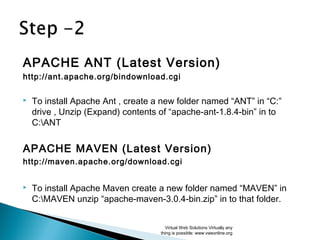
APACHE ANT (Latest Version)
http://ant.apache.org/bindownload.cgi
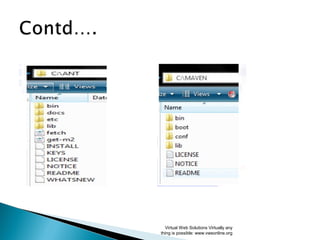
 To install Apache Ant , create a new folder named “ANT” in “C:”
drive , Unzip (Expand) contents of “apache-ant-1.8.4-bin” in to
C:ANT
APACHE MAVEN (Latest Version)
http://maven.apache.org/download.cgi
 To install Apache Maven create a new folder named “MAVEN” in
C:MAVEN unzip “apache-maven-3.0.4-bin.zip” in to that folder.
Virtual Web Solutions Virtually any
thing is possible: www.vwsonline.org
Virtual Web Solutions Virtually any
thing is possible: www.vwsonline.org
For Windows Vista or Windows 7
 Right click “My Computer” Click “Properties” Click on
“Advanced System Settings” from “Tasks” Choose “Advance”
tab Click on “Environment Variable” Button
For Windows XP
 Right click “My Computer” Click Properties  “Advance” tab 
Click on “Environment Variable” Button
 Now click on “PATH” variable under ‘System Variables’ and click
on “Edit”.Button
Virtual Web Solutions Virtually any
thing is possible: www.vwsonline.org
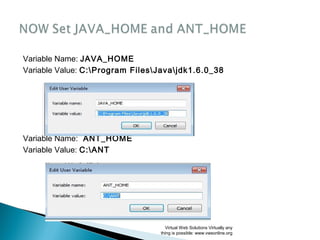
Variable Name: JAVA_HOME
Variable Value: C:Program FilesJavajdk1.6.0_38
Variable Name: ANT_HOME
Variable Value: C:ANT
Virtual Web Solutions Virtually any
thing is possible: www.vwsonline.org
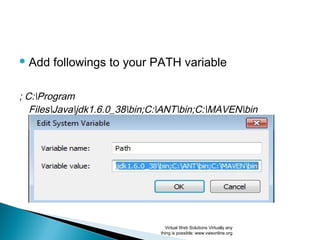
 Add followings to your PATH variable
; C:Program
FilesJavajdk1.6.0_38bin;C:ANTbin;C:MAVENbin
Virtual Web Solutions Virtually any
thing is possible: www.vwsonline.org
Now verify the platform, to do so run the following
commands in to the command prompt.
> java –version
> ant –version
>mvn – version
 As show on next slide.
Virtual Web Solutions Virtually any
thing is possible: www.vwsonline.org
Virtual Web Solutions Virtually any
thing is possible: www.vwsonline.org
 how to install of PostgreSQL with database
creation, to install PostgreSQL
 double click on “postgresql”. Follow the
instructions.
Virtual Web Solutions Virtually any
thing is possible: www.vwsonline.org
Virtual Web Solutions Virtually any
thing is possible: www.vwsonline.org
 Remember that in the last step/screen don’t check
the update check box. Otherwise the Postgre SQL
will not work.
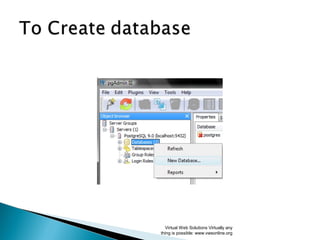
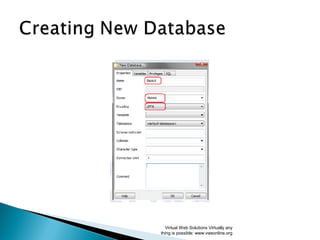
 Next step is creation of empty database with the
name “dsapce” to store dspace data.
Virtual Web Solutions Virtually any
thing is possible: www.vwsonline.org
Virtual Web Solutions Virtually any
thing is possible: www.vwsonline.org

Virtual Web Solutions Virtually any
thing is possible: www.vwsonline.org
Virtual Web Solutions Virtually any
thing is possible: www.vwsonline.org
Virtual Web Solutions Virtually any
thing is possible: www.vwsonline.org
Virtual Web Solutions Virtually any
thing is possible: www.vwsonline.org
Download Apache Tomcat form vwsonline or
the following link:
http://tomcat.apache.org
 This step installation of Apache Tomcat will be
attempted, to do this, double click on “apache-
tomcate”
Virtual Web Solutions Virtually any
thing is possible: www.vwsonline.org
Virtual Web Solutions Virtually any
thing is possible: www.vwsonline.org
Virtual Web Solutions Virtually any
thing is possible: www.vwsonline.org
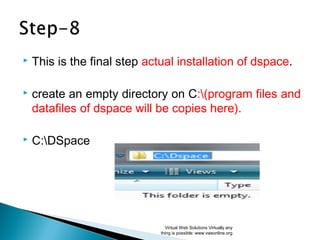
 This is the final step actual installation of dspace.
 create an empty directory on C:(program files and
datafiles of dspace will be copies here).
 C:DSpace
Virtual Web Solutions Virtually any
thing is possible: www.vwsonline.org
 Extract all the contents of ‘dspace-5.1-src-release.zip’ to one folder
(i.e DSpace) and copy entire folder to your C: drive as C: dspace-
5.1-src-release.zip
 Once the files are unzipped, go to
“C:Dspacedspace-5.1-src-eleasedspaceconfig”,
 Find out “dspace.cfg” and open in notepad or any other editor and
atleast change the following parameters. Use forward slashes `/` for
path separators
Virtual Web Solutions Virtually any
thing is possible: www.vwsonline.org
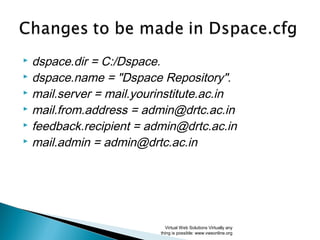
 dspace.dir = C:/Dspace.
 dspace.name = "Dspace Repository".
 mail.server = mail.yourinstitute.ac.in
 mail.from.address = admin@drtc.ac.in
 feedback.recipient = admin@drtc.ac.in
 mail.admin = admin@drtc.ac.in
Virtual Web Solutions Virtually any
thing is possible: www.vwsonline.org
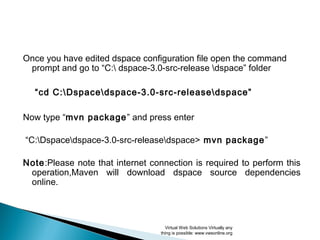
Once you have edited dspace configuration file open the command
prompt and go to “C: dspace-5.1-src-release dspace” folder
“cd C:Dspacedspace-5.1-src-releasedspace”
Now type “mvn package” and press enter
“C:Dspacedspace-5.1-src-releasedspace> mvn package”
Note: Please note that internet connection is required to perform this
operation, Maven will download dspace source dependencies
online.
Virtual Web Solutions Virtually any
thing is possible: www.vwsonline.org
Now go to “C: dspace-5.1-src-releasedspacetargetdspace-build.dir”
on command prompt
“cd C: dspace-5.1-src-releasedspacetargetdspace-
build.dir”
Now type “ant fresh_install” and press enter
C: dspace-virsion-src-releasedspacetargetdspace-5.1-build.dir>ant
fresh_install
Virtual Web Solutions Virtually any
thing is possible: www.vwsonline.org
 Now it is time to create default system administrator. To
create administrator execute following command
“C:dspacebindspace create-
administrator”
Virtual Web Solutions Virtually any
thing is possible: www.vwsonline.org
 Using your explorer browse through your
C:dspacewebapps folder
Virtual Web Solutions Virtually any
thing is possible: www.vwsonline.org
 Copy “jspui” and “xmlui” folder to your tomcat
installation’s webapps folder
Virtual Web Solutions Virtually any
thing is possible: www.vwsonline.org
 Start tomcat service if it is already not running by going in
to :
Control Panel  Administrative Tools  Services
Apache Tomcat 7 and clicking on “Start”
 Point your browser to
http://localhost:8080/jspui
or http://localhost:8080/xmlui
Virtual Web Solutions Virtually any
thing is possible: www.vwsonline.org
Dspace Installation is Completed
If case of queries regarding installation
please post it on vwonline forum
For advance learning please register
premium course on Dspace on
www.vwsonline.org
Virtual Web Solutions:
www.vwsonline.org
Thanks
Virtual Web Solutions Virtually any
thing is possible: www.vwsonline.org

D installation manual

  • 1.
    DSpace – OpenSource RepositoryDSpace – Open Source Repository FAHEEM AKBAR CMS EXPERT Virtual Web Solutions onlinevws@gmail.com www.vwsonline.org Virtual Web Solutions Virtually any thing is possible: www.vwsonline.org
  • 2.
     “DSpace capturesyour data in any format in text, video, audio, and data. It distributes it over the web. It indexes your work, so users can search and retrieve your items. It preserves your digital work over the long term. DSpace provides a way to manage your research materials and publications in a professionally maintained repository to give them greater visibility and accessibility over time.” www.dspace.org Virtual Web Solutions Virtually any thing is possible: www.vwsonline.org
  • 3.
    Following are thePre-Requisite software so fist install all these software's.  Java SDK  Apache Maven  Apache Ant  Apache Tomcat  PostgreSQL  Dspace Virtual Web Solutions Virtually any thing is possible: www.vwsonline.org
  • 4.
     Check yourcomputer that either it is running on 32 or 64 bit windows  Do the following: For Windows vista or windows 7  Start button  clicking Control Panel  clicking System and Maintenance  click on System.  2. Here can view the system type. Virtual Web Solutions Virtually any thing is possible: www.vwsonline.org
  • 5.
    Right Click onMy computer Now Click on Properties Here you can see the it is 32bit or 64 bit system Virtual Web Solutions Virtually any thing is possible: www.vwsonline.org
  • 6.
     To installDspace first download the following software. All of them are free software and can be download from www.vwsonline.org.  Java SDK (32 or 64bit )  Apache ant (latest version)  Apache Maven  PostgreSQL (32 or 64 bit)  Apache Tomcat (32 or 64bit)  DSpace (the version you want to install latest is 5.1) Virtual Web Solutions Virtually any thing is possible: www.vwsonline.org
  • 7.
    JAVA SDK (jdk-6u38-windows-i586) Directlink http://www.oracle.com/technetwork/java/javase/downloads /jdk6u38-downloads-1877406.html Or http:// www.vwsonline.org  Installing Java, to do this , double click on the file ‘jdk- 6u38-windows-i586’ and follow the on screen instructions and accept the license agreement. Virtual Web Solutions Virtually any thing is possible: www.vwsonline.org
  • 8.
    APACHE ANT (LatestVersion) http://ant.apache.org/bindownload.cgi  To install Apache Ant , create a new folder named “ANT” in “C:” drive , Unzip (Expand) contents of “apache-ant-1.8.4-bin” in to C:ANT APACHE MAVEN (Latest Version) http://maven.apache.org/download.cgi  To install Apache Maven create a new folder named “MAVEN” in C:MAVEN unzip “apache-maven-3.0.4-bin.zip” in to that folder. Virtual Web Solutions Virtually any thing is possible: www.vwsonline.org
  • 9.
    Virtual Web SolutionsVirtually any thing is possible: www.vwsonline.org
  • 10.
    For Windows Vistaor Windows 7  Right click “My Computer” Click “Properties” Click on “Advanced System Settings” from “Tasks” Choose “Advance” tab Click on “Environment Variable” Button For Windows XP  Right click “My Computer” Click Properties  “Advance” tab  Click on “Environment Variable” Button  Now click on “PATH” variable under ‘System Variables’ and click on “Edit”.Button Virtual Web Solutions Virtually any thing is possible: www.vwsonline.org
  • 11.
    Variable Name: JAVA_HOME VariableValue: C:Program FilesJavajdk1.6.0_38 Variable Name: ANT_HOME Variable Value: C:ANT Virtual Web Solutions Virtually any thing is possible: www.vwsonline.org
  • 12.
     Add followingsto your PATH variable ; C:Program FilesJavajdk1.6.0_38bin;C:ANTbin;C:MAVENbin Virtual Web Solutions Virtually any thing is possible: www.vwsonline.org
  • 13.
    Now verify theplatform, to do so run the following commands in to the command prompt. > java –version > ant –version >mvn – version  As show on next slide. Virtual Web Solutions Virtually any thing is possible: www.vwsonline.org
  • 14.
    Virtual Web SolutionsVirtually any thing is possible: www.vwsonline.org
  • 15.
     how toinstall of PostgreSQL with database creation, to install PostgreSQL  double click on “postgresql”. Follow the instructions. Virtual Web Solutions Virtually any thing is possible: www.vwsonline.org
  • 16.
    Virtual Web SolutionsVirtually any thing is possible: www.vwsonline.org
  • 17.
     Remember thatin the last step/screen don’t check the update check box. Otherwise the Postgre SQL will not work.  Next step is creation of empty database with the name “dsapce” to store dspace data. Virtual Web Solutions Virtually any thing is possible: www.vwsonline.org
  • 18.
    Virtual Web SolutionsVirtually any thing is possible: www.vwsonline.org
  • 19.
     Virtual Web SolutionsVirtually any thing is possible: www.vwsonline.org
  • 20.
    Virtual Web SolutionsVirtually any thing is possible: www.vwsonline.org
  • 21.
    Virtual Web SolutionsVirtually any thing is possible: www.vwsonline.org
  • 22.
    Virtual Web SolutionsVirtually any thing is possible: www.vwsonline.org
  • 23.
    Download Apache Tomcatform vwsonline or the following link: http://tomcat.apache.org  This step installation of Apache Tomcat will be attempted, to do this, double click on “apache- tomcate” Virtual Web Solutions Virtually any thing is possible: www.vwsonline.org
  • 24.
    Virtual Web SolutionsVirtually any thing is possible: www.vwsonline.org
  • 25.
    Virtual Web SolutionsVirtually any thing is possible: www.vwsonline.org
  • 26.
     This isthe final step actual installation of dspace.  create an empty directory on C:(program files and datafiles of dspace will be copies here).  C:DSpace Virtual Web Solutions Virtually any thing is possible: www.vwsonline.org
  • 27.
     Extract allthe contents of ‘dspace-5.1-src-release.zip’ to one folder (i.e DSpace) and copy entire folder to your C: drive as C: dspace- 5.1-src-release.zip  Once the files are unzipped, go to “C:Dspacedspace-5.1-src-eleasedspaceconfig”,  Find out “dspace.cfg” and open in notepad or any other editor and atleast change the following parameters. Use forward slashes `/` for path separators Virtual Web Solutions Virtually any thing is possible: www.vwsonline.org
  • 28.
     dspace.dir =C:/Dspace.  dspace.name = "Dspace Repository".  mail.server = mail.yourinstitute.ac.in  mail.from.address = admin@drtc.ac.in  feedback.recipient = admin@drtc.ac.in  mail.admin = admin@drtc.ac.in Virtual Web Solutions Virtually any thing is possible: www.vwsonline.org
  • 29.
    Once you haveedited dspace configuration file open the command prompt and go to “C: dspace-5.1-src-release dspace” folder “cd C:Dspacedspace-5.1-src-releasedspace” Now type “mvn package” and press enter “C:Dspacedspace-5.1-src-releasedspace> mvn package” Note: Please note that internet connection is required to perform this operation, Maven will download dspace source dependencies online. Virtual Web Solutions Virtually any thing is possible: www.vwsonline.org
  • 30.
    Now go to“C: dspace-5.1-src-releasedspacetargetdspace-build.dir” on command prompt “cd C: dspace-5.1-src-releasedspacetargetdspace- build.dir” Now type “ant fresh_install” and press enter C: dspace-virsion-src-releasedspacetargetdspace-5.1-build.dir>ant fresh_install Virtual Web Solutions Virtually any thing is possible: www.vwsonline.org
  • 31.
     Now itis time to create default system administrator. To create administrator execute following command “C:dspacebindspace create- administrator” Virtual Web Solutions Virtually any thing is possible: www.vwsonline.org
  • 32.
     Using yourexplorer browse through your C:dspacewebapps folder Virtual Web Solutions Virtually any thing is possible: www.vwsonline.org
  • 33.
     Copy “jspui”and “xmlui” folder to your tomcat installation’s webapps folder Virtual Web Solutions Virtually any thing is possible: www.vwsonline.org
  • 34.
     Start tomcatservice if it is already not running by going in to : Control Panel  Administrative Tools  Services Apache Tomcat 7 and clicking on “Start”  Point your browser to http://localhost:8080/jspui or http://localhost:8080/xmlui Virtual Web Solutions Virtually any thing is possible: www.vwsonline.org
  • 35.
    Dspace Installation isCompleted If case of queries regarding installation please post it on vwonline forum For advance learning please register premium course on Dspace on www.vwsonline.org Virtual Web Solutions: www.vwsonline.org
  • 36.
    Thanks Virtual Web SolutionsVirtually any thing is possible: www.vwsonline.org

Editor's Notes