CUCUMBER
Yıldız MEHTAP
CUCUMBER
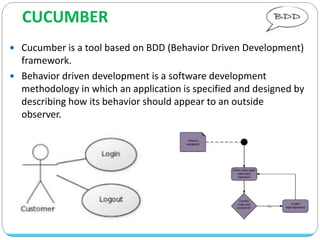
 Cucumber is a tool based on BDD (Behavior Driven Development)
framework.
 Behavior driven development is a software development
methodology in which an application is specified and designed by
describing how its behavior should appear to an outside
observer.
 It allows the developer to develop the test cases in a very easy
way, that everyone can understand.
 Cucumber was implemented in Ruby and later extended to Java.
 Cucumber can be used along with Selenium.
 Cucumber Supports many other languages like Perl, PHP, Python,
.Net etc.
 Cucumber is the most well known BDD framework.
Gherkin
 Cucumber executes your .feature files, and those files contain
executable specifications written in a language called Gherkin.
 Gherkin is designed to be easy to learn by non-programmers.
 The main keywords are:
o Feature,Scenario,Steps
(Given, When, Then, And, But),Background
o There are a few extra keywords as well: | (Data Tables),
@ (Tags), # (Comments)
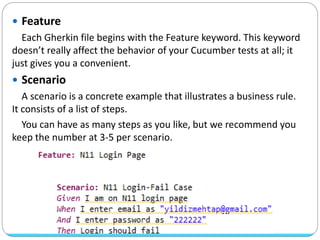
 Feature
Each Gherkin file begins with the Feature keyword. This keyword
doesn’t really affect the behavior of your Cucumber tests at all; it
just gives you a convenient.
 Scenario
A scenario is a concrete example that illustrates a business rule.
It consists of a list of steps.
You can have as many steps as you like, but we recommend you
keep the number at 3-5 per scenario.
 Steps (Given, When, Then, And, But)
A step typically starts with Given, When or Then. If there are multiple
Given or When steps underneath each other, you can use And or But.
Cucumber does not differentiate between the keywords, but choosing
the right one is important for the readability of the scenario as a whole.
 Given : Diyelim ki (Login sayfasındayım.)
It describes the pre-requisite for the test to be executed.
 When : Eğer ki (Kullanıcı adı ve şifremi boş geçersem.)
It defines the trigger point for any test scenario execution.
 Then : O zaman (Hata almalıyım.)
Then holds the expected result for the test to be executed.
(verify/assert)
Use Given to put the system in a known state.
Use When to perform the user actions.
Use Then to verify the outcome.
 And
It provides the logical AND condition between any two
statements. AND can be used in conjunction with GIVEN, WHEN
and THEN statement.
 But
It signifies logical OR condition between any two statements. OR
can be used in conjunction with GIVEN, WHEN and THEN
statement.
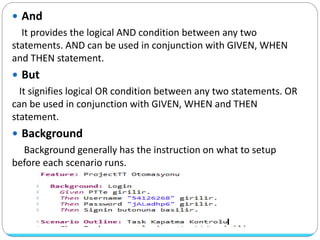
 Background
Background generally has the instruction on what to setup
before each scenario runs.
 Big data
When writing Feature files, Doc Strings should be within
three adjacent quotes """ at the beginning and three at
the end.
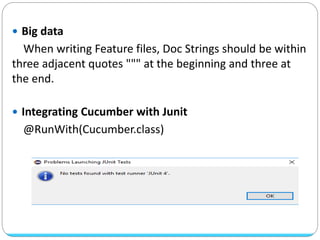
 Integrating Cucumber with Junit
@RunWith(Cucumber.class)
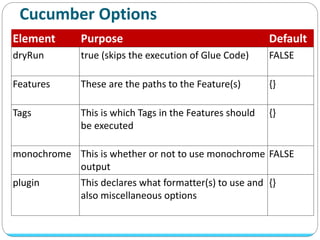
Cucumber Options
Element Purpose Default
dryRun true (skips the execution of Glue Code) FALSE
Features These are the paths to the Feature(s) {}
Tags This is which Tags in the Features should
be executed
{}
monochrome This is whether or not to use monochrome
output
FALSE
plugin This declares what formatter(s) to use and
also miscellaneous options
{}
 Features
This option is used to specify the path to the Feature files.
When Cucumber starts execution, it looks for
the .Feature files at the path/folder mentioned in
the FEATURE option. Whichever files are with
the .Feature extension at the path mentioned in
the FEATURE option, are executed..
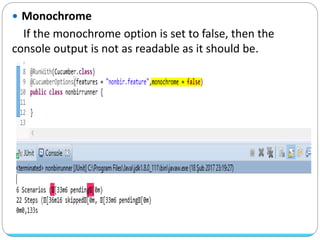
 Monochrome
If the monochrome option is set to false, then the
console output is not as readable as it should be.
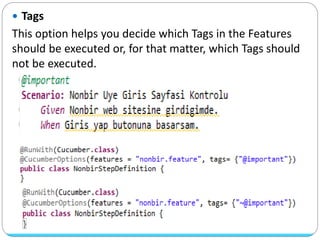
 Tags
This option helps you decide which Tags in the Features
should be executed or, for that matter, which Tags should
not be executed.
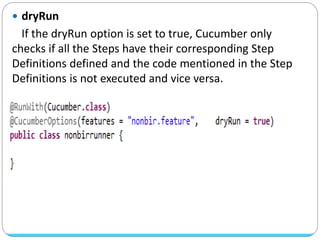
 dryRun
If the dryRun option is set to true, Cucumber only
checks if all the Steps have their corresponding Step
Definitions defined and the code mentioned in the Step
Definitions is not executed and vice versa.
 Plugin
If you are expecting some Scenarios to fail, and want to
re-run the failed Scenarios, only then use the Rerunplugin.
This is what the code for @CucumberOptions looks like:
 Configuring the naming conventions
Cucumber lets the team choose the naming convention.
Depending on the naming convention, Cucumber
generates the method names for Step Definitions.
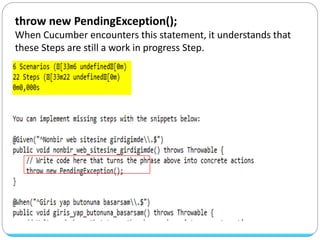
throw new PendingException();
When Cucumber encounters this statement, it understands that
these Steps are still a work in progress Step.
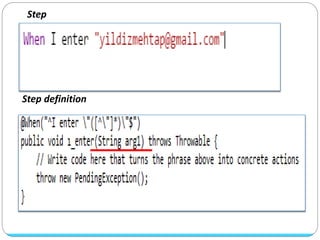
Step
Step definition
Regex
Expression Meaning
(.*) Match any string
(d+) Match any number
^ Any beginning of a string
$ Any end of a string
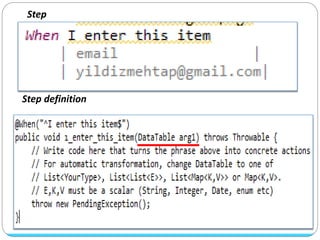
Step
Step definition
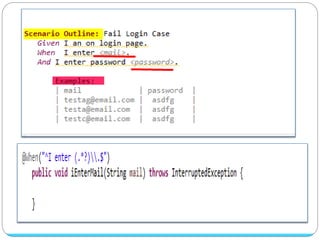
Step
Step definition
Thank you...
yildizmehtap91@gmail.com

Cucumber

  • 1.
  • 2.
    CUCUMBER  Cucumber isa tool based on BDD (Behavior Driven Development) framework.  Behavior driven development is a software development methodology in which an application is specified and designed by describing how its behavior should appear to an outside observer.
  • 3.
     It allowsthe developer to develop the test cases in a very easy way, that everyone can understand.  Cucumber was implemented in Ruby and later extended to Java.  Cucumber can be used along with Selenium.  Cucumber Supports many other languages like Perl, PHP, Python, .Net etc.  Cucumber is the most well known BDD framework.
  • 4.
    Gherkin  Cucumber executesyour .feature files, and those files contain executable specifications written in a language called Gherkin.  Gherkin is designed to be easy to learn by non-programmers.  The main keywords are: o Feature,Scenario,Steps (Given, When, Then, And, But),Background o There are a few extra keywords as well: | (Data Tables), @ (Tags), # (Comments)
  • 5.
     Feature Each Gherkinfile begins with the Feature keyword. This keyword doesn’t really affect the behavior of your Cucumber tests at all; it just gives you a convenient.  Scenario A scenario is a concrete example that illustrates a business rule. It consists of a list of steps. You can have as many steps as you like, but we recommend you keep the number at 3-5 per scenario.
  • 6.
     Steps (Given,When, Then, And, But) A step typically starts with Given, When or Then. If there are multiple Given or When steps underneath each other, you can use And or But. Cucumber does not differentiate between the keywords, but choosing the right one is important for the readability of the scenario as a whole.  Given : Diyelim ki (Login sayfasındayım.) It describes the pre-requisite for the test to be executed.  When : Eğer ki (Kullanıcı adı ve şifremi boş geçersem.) It defines the trigger point for any test scenario execution.  Then : O zaman (Hata almalıyım.) Then holds the expected result for the test to be executed. (verify/assert) Use Given to put the system in a known state. Use When to perform the user actions. Use Then to verify the outcome.
  • 7.
     And It providesthe logical AND condition between any two statements. AND can be used in conjunction with GIVEN, WHEN and THEN statement.  But It signifies logical OR condition between any two statements. OR can be used in conjunction with GIVEN, WHEN and THEN statement.  Background Background generally has the instruction on what to setup before each scenario runs.
  • 8.
     Big data Whenwriting Feature files, Doc Strings should be within three adjacent quotes """ at the beginning and three at the end.  Integrating Cucumber with Junit @RunWith(Cucumber.class)
  • 9.
    Cucumber Options Element PurposeDefault dryRun true (skips the execution of Glue Code) FALSE Features These are the paths to the Feature(s) {} Tags This is which Tags in the Features should be executed {} monochrome This is whether or not to use monochrome output FALSE plugin This declares what formatter(s) to use and also miscellaneous options {}
  • 10.
     Features This optionis used to specify the path to the Feature files. When Cucumber starts execution, it looks for the .Feature files at the path/folder mentioned in the FEATURE option. Whichever files are with the .Feature extension at the path mentioned in the FEATURE option, are executed..
  • 11.
     Monochrome If themonochrome option is set to false, then the console output is not as readable as it should be.
  • 12.
     Tags This optionhelps you decide which Tags in the Features should be executed or, for that matter, which Tags should not be executed.
  • 13.
     dryRun If thedryRun option is set to true, Cucumber only checks if all the Steps have their corresponding Step Definitions defined and the code mentioned in the Step Definitions is not executed and vice versa.
  • 14.
     Plugin If youare expecting some Scenarios to fail, and want to re-run the failed Scenarios, only then use the Rerunplugin. This is what the code for @CucumberOptions looks like:
  • 15.
     Configuring thenaming conventions Cucumber lets the team choose the naming convention. Depending on the naming convention, Cucumber generates the method names for Step Definitions.
  • 16.
    throw new PendingException(); WhenCucumber encounters this statement, it understands that these Steps are still a work in progress Step.
  • 17.
    Step Step definition Regex Expression Meaning (.*)Match any string (d+) Match any number ^ Any beginning of a string $ Any end of a string
  • 18.
  • 19.
  • 21.