Your Topic www.company.com
Sexy Using Cucumber - BDD in your
project
Mr. Vu Nguyen
Senior Automation Engineer
Presented by :
Your Topic www.company.com
- Working as an QAAutomation
- Over 8 years experience in software engineering experience
- Skype ID: vunguyen2588
- Email: hoaivunguyenpham@gmail.com
Your Topic www.company.com
Agenda
 Runner Class
 Features
 Steps Definitions
 Cucumber Data
 Cucumber Report
 Creating project cucumber with maven
 Behavior Driven Development
 Cucumber
 Advantages of Cucumber
 Environment Setup
 Gherkins Language
 Cucumber Execution Flow
Your Topic www.company.com
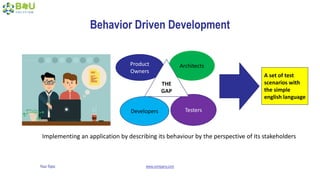
Behavior Driven Development
Product
Owners
Architects
Developers Testers
A set of test
scenarios with
the simple
english language
THE
GAP
Implementing an application by describing its behaviour by the perspective of its stakeholders
Your Topic www.company.com
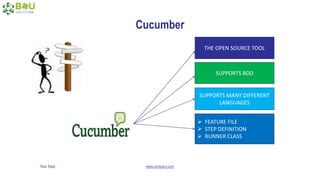
Cucumber
THE OPEN SOURCE TOOL
SUPPORTS BDD
SUPPORTS MANY DIFFERENT
LANGUAGES
 FEATURE FILE
 STEP DEFINITION
 RUNNER CLASS
Your Topic www.company.com
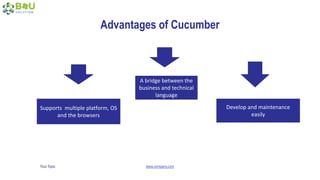
Advantages of Cucumber
Supports multiple platform, OS
and the browsers
A bridge between the
business and technical
language
Develop and maintenance
easily
Your Topic www.company.com
Environment Setup
Your Topic www.company.com
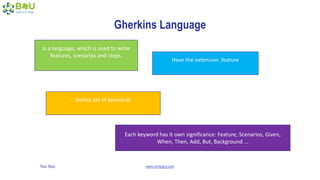
Gherkins Language
Is a language, which is used to write
features, scenarios and steps.
Have the extension .feature
Define set of keywords
Each keyword has it own significance: Feature, Scenarios, Given,
When, Then, Add, But, Background ...
Your Topic www.company.com
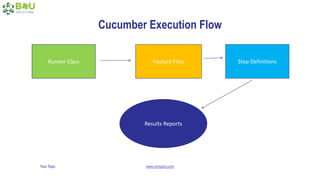
Cucumber Execution Flow
Runner Class Feature Files Step Definitions
Results Reports
Your Topic www.company.com
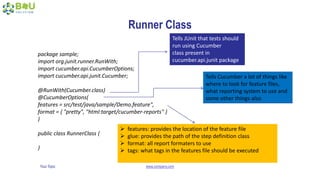
Runner Class
package sample;
import org.junit.runner.RunWith;
import cucumber.api.CucumberOptions;
import cucumber.api.junit.Cucumber;
@RunWith(Cucumber.class)
@CucumberOptions(
features = src/test/java/sample/Demo.feature",
format = { "pretty", "html:target/cucumber-reports" }
)
public class RunnerClass {
}
Tells JUnit that tests should
run using Cucumber
class present in
cucumber.api.junit package
Tells Cucumber a lot of things like
where to look for feature files,
what reporting system to use and
some other things also
 features: provides the location of the feature file
 glue: provides the path of the step definition class
 format: all report formaters to use
 tags: what tags in the features file should be executed
Your Topic www.company.com
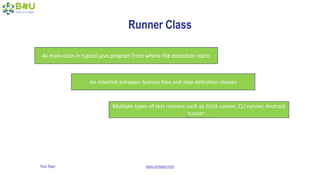
Runner Class
An interlink between feature files and step definition classes
Multiple types of test runners such as JUnit runner, CLI runner, Android
runner ...
As main class in typical java program from where the execution starts
Your Topic www.company.com
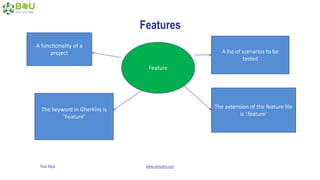
Features
Feature
A functionality of a
project A list of scenarios to be
tested
The keyword in Gherkins is
‘Feature’
The extension of the feature file
is ‘.feature’
Your Topic www.company.com
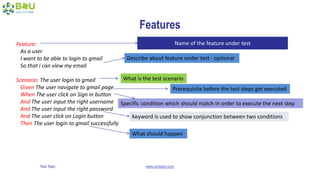
Features
Feature:
As a user
I want to be able to login to gmail
So that i can view my email
Scenario: The user login to gmail
Given The user navigate to gmail page
When The user click on Sign in button
And The user input the right username
And The user input the right password
And The user click on Login button
Then The user login to gmail successfully
Name of the feature under test
Describe about feature under test - optional
What is the test scenario
Prerequisite before the test steps get executed
Specific condition which should match in order to execute the next step
Keyword is used to show conjunction between two conditions
What should happen
Your Topic www.company.com
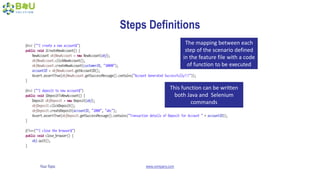
Steps Definitions
The mapping between each
step of the scenario defined
in the feature file with a code
of function to be executed
This function can be written
both Java and Selenium
commands
Your Topic www.company.com
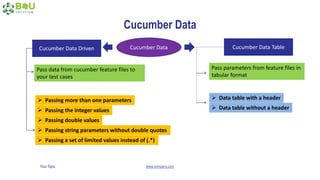
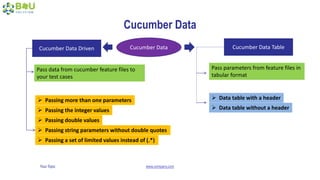
Cucumber Data
Cucumber DataCucumber Data Driven Cucumber Data Table
Pass data from cucumber feature files to
your test cases
Pass parameters from feature files in
tabular format
 Passing more than one parameters
 Passing the integer values
 Passing double values
 Passing string parameters without double quotes
 Passing a set of limited values instead of (.*)
 Data table with a header
 Data table without a header
Your Topic www.company.com
Passing more than one parameters
On feature file, we use
“(string)”
On step definition file, we use
”([^”]*)”
Your Topic www.company.com
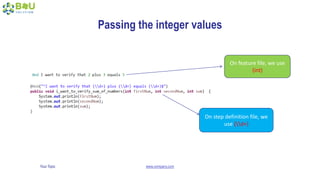
Passing the integer values
On feature file, we use
(int)
On step definition file, we
use (d+)
Your Topic www.company.com
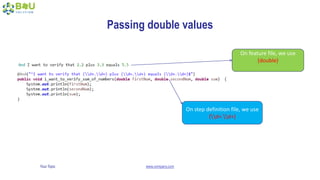
Passing double values
On feature file, we use
(double)
On step definition file, we use
(d+.d+)
Your Topic www.company.com
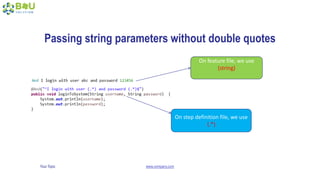
Passing string parameters without double quotes
On feature file, we use
(string)
On step definition file, we use
(.*)
Your Topic www.company.com
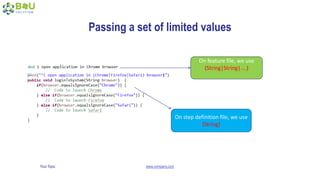
Passing a set of limited values
On feature file, we use
(String|String|....)
On step definition file, we use
(String)
Your Topic www.company.com
Cucumber Data
Cucumber DataCucumber Data Driven Cucumber Data Table
Pass data from cucumber feature files to
your test cases
Pass parameters from feature files in
tabular format
 Passing more than one parameters
 Passing the integer values
 Passing double values
 Passing string parameters without double quotes
 Passing a set of limited values instead of (.*)
 Data table with a header
 Data table without a header
Your Topic www.company.com
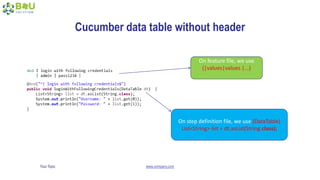
Cucumber data table without header
On feature file, we use
(|values|values |...)
On step definition file, we use (DataTable)
List<String> list = dt.asList(String.class);
Your Topic www.company.com
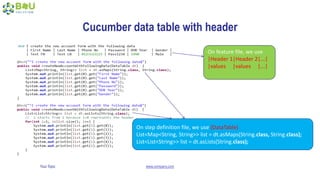
Cucumber data table with header
On feature file, we use
|Header 1|Header 2|...|
|values |values |...|
On step definition file, we use (DataTable)
List<Map<String, String>> list = dt.asMaps(String.class, String.class);
List<List<String>> list = dt.asLists(String.class);
Your Topic www.company.com
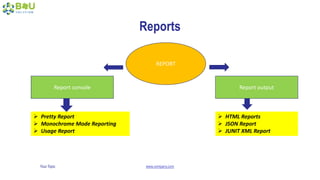
Reports
REPORT
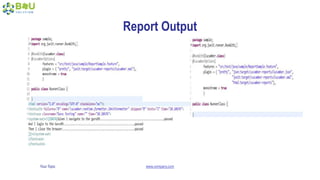
Report console Report output
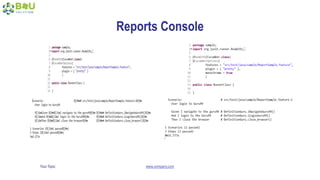
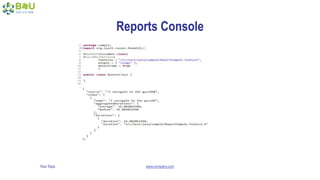
 Pretty Report
 Monochrome Mode Reporting
 Usage Report
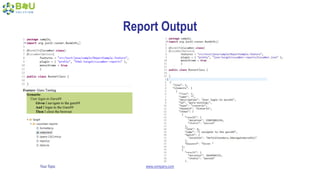
 HTML Reports
 JSON Report
 JUNIT XML Report
Your Topic www.company.com
Reports Console
Your Topic www.company.com
Reports Console
Your Topic www.company.com
Report Output
Your Topic www.company.com
Report Output
Your Topic www.company.com
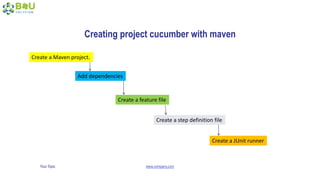
Create a Maven project.
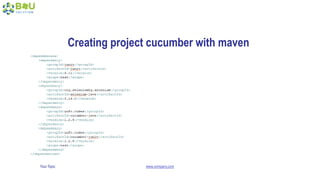
Add dependencies
Create a feature file
Create a step definition file
Create a JUnit runner
Creating project cucumber with maven
Your Topic www.company.com
Creating project cucumber with maven
Your Topic www.company.com
Q&A
Your Topic www.company.com
Reference
• http://toolsqa.com
• http://b4usolution.com/tutorial/
• http://www.automationtestinghub.com
• https://stackoverflow.com
• https://www.tutorialspoint.com
• https://www.slideshare.net/

Sexy Using Cucumber - BDD in your project

  • 1.
    Your Topic www.company.com SexyUsing Cucumber - BDD in your project Mr. Vu Nguyen Senior Automation Engineer Presented by :
  • 2.
    Your Topic www.company.com -Working as an QAAutomation - Over 8 years experience in software engineering experience - Skype ID: vunguyen2588 - Email: hoaivunguyenpham@gmail.com
  • 3.
    Your Topic www.company.com Agenda Runner Class  Features  Steps Definitions  Cucumber Data  Cucumber Report  Creating project cucumber with maven  Behavior Driven Development  Cucumber  Advantages of Cucumber  Environment Setup  Gherkins Language  Cucumber Execution Flow
  • 4.
    Your Topic www.company.com BehaviorDriven Development Product Owners Architects Developers Testers A set of test scenarios with the simple english language THE GAP Implementing an application by describing its behaviour by the perspective of its stakeholders
  • 5.
    Your Topic www.company.com Cucumber THEOPEN SOURCE TOOL SUPPORTS BDD SUPPORTS MANY DIFFERENT LANGUAGES  FEATURE FILE  STEP DEFINITION  RUNNER CLASS
  • 6.
    Your Topic www.company.com Advantagesof Cucumber Supports multiple platform, OS and the browsers A bridge between the business and technical language Develop and maintenance easily
  • 7.
  • 8.
    Your Topic www.company.com GherkinsLanguage Is a language, which is used to write features, scenarios and steps. Have the extension .feature Define set of keywords Each keyword has it own significance: Feature, Scenarios, Given, When, Then, Add, But, Background ...
  • 9.
    Your Topic www.company.com CucumberExecution Flow Runner Class Feature Files Step Definitions Results Reports
  • 10.
    Your Topic www.company.com RunnerClass package sample; import org.junit.runner.RunWith; import cucumber.api.CucumberOptions; import cucumber.api.junit.Cucumber; @RunWith(Cucumber.class) @CucumberOptions( features = src/test/java/sample/Demo.feature", format = { "pretty", "html:target/cucumber-reports" } ) public class RunnerClass { } Tells JUnit that tests should run using Cucumber class present in cucumber.api.junit package Tells Cucumber a lot of things like where to look for feature files, what reporting system to use and some other things also  features: provides the location of the feature file  glue: provides the path of the step definition class  format: all report formaters to use  tags: what tags in the features file should be executed
  • 11.
    Your Topic www.company.com RunnerClass An interlink between feature files and step definition classes Multiple types of test runners such as JUnit runner, CLI runner, Android runner ... As main class in typical java program from where the execution starts
  • 12.
    Your Topic www.company.com Features Feature Afunctionality of a project A list of scenarios to be tested The keyword in Gherkins is ‘Feature’ The extension of the feature file is ‘.feature’
  • 13.
    Your Topic www.company.com Features Feature: Asa user I want to be able to login to gmail So that i can view my email Scenario: The user login to gmail Given The user navigate to gmail page When The user click on Sign in button And The user input the right username And The user input the right password And The user click on Login button Then The user login to gmail successfully Name of the feature under test Describe about feature under test - optional What is the test scenario Prerequisite before the test steps get executed Specific condition which should match in order to execute the next step Keyword is used to show conjunction between two conditions What should happen
  • 14.
    Your Topic www.company.com StepsDefinitions The mapping between each step of the scenario defined in the feature file with a code of function to be executed This function can be written both Java and Selenium commands
  • 15.
    Your Topic www.company.com CucumberData Cucumber DataCucumber Data Driven Cucumber Data Table Pass data from cucumber feature files to your test cases Pass parameters from feature files in tabular format  Passing more than one parameters  Passing the integer values  Passing double values  Passing string parameters without double quotes  Passing a set of limited values instead of (.*)  Data table with a header  Data table without a header
  • 16.
    Your Topic www.company.com Passingmore than one parameters On feature file, we use “(string)” On step definition file, we use ”([^”]*)”
  • 17.
    Your Topic www.company.com Passingthe integer values On feature file, we use (int) On step definition file, we use (d+)
  • 18.
    Your Topic www.company.com Passingdouble values On feature file, we use (double) On step definition file, we use (d+.d+)
  • 19.
    Your Topic www.company.com Passingstring parameters without double quotes On feature file, we use (string) On step definition file, we use (.*)
  • 20.
    Your Topic www.company.com Passinga set of limited values On feature file, we use (String|String|....) On step definition file, we use (String)
  • 21.
    Your Topic www.company.com CucumberData Cucumber DataCucumber Data Driven Cucumber Data Table Pass data from cucumber feature files to your test cases Pass parameters from feature files in tabular format  Passing more than one parameters  Passing the integer values  Passing double values  Passing string parameters without double quotes  Passing a set of limited values instead of (.*)  Data table with a header  Data table without a header
  • 22.
    Your Topic www.company.com Cucumberdata table without header On feature file, we use (|values|values |...) On step definition file, we use (DataTable) List<String> list = dt.asList(String.class);
  • 23.
    Your Topic www.company.com Cucumberdata table with header On feature file, we use |Header 1|Header 2|...| |values |values |...| On step definition file, we use (DataTable) List<Map<String, String>> list = dt.asMaps(String.class, String.class); List<List<String>> list = dt.asLists(String.class);
  • 24.
    Your Topic www.company.com Reports REPORT Reportconsole Report output  Pretty Report  Monochrome Mode Reporting  Usage Report  HTML Reports  JSON Report  JUNIT XML Report
  • 25.
  • 26.
  • 27.
  • 28.
  • 29.
    Your Topic www.company.com Createa Maven project. Add dependencies Create a feature file Create a step definition file Create a JUnit runner Creating project cucumber with maven
  • 30.
    Your Topic www.company.com Creatingproject cucumber with maven
  • 31.
  • 32.
    Your Topic www.company.com Reference •http://toolsqa.com • http://b4usolution.com/tutorial/ • http://www.automationtestinghub.com • https://stackoverflow.com • https://www.tutorialspoint.com • https://www.slideshare.net/