Cucumber Tool Overview
2
PRESENTED BY:
Meenakshi Singhal
(Senior Associate QA L1)
3
AGENDA
1. Introduction to BDD
2. Introduction to Cucumber
3. Usage of Cucumber with
Selenium
4. Gherkin Language, Feature
Files, Step Definitions & Tags
5. Cucumber Reports
6. Demo Project
Introduction to BDD
5
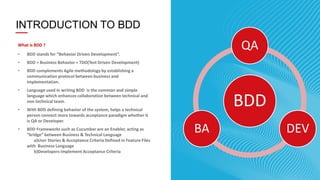
INTRODUCTION TO BDD
What is BDD ?
• BDD stands for “Behavior Driven Development”.
• BDD = Business Behavior + TDD(Test Driven Development)
• BDD complements Agile methodology by establishing a
communication protocol between business and
implementation.
• Language used in writing BDD is the common and simple
language which enhances collaboration between technical and
non technical team.
• With BDD defining behavior of the system, helps a technical
person connect more towards acceptance paradigm whether it
is QA or Developer.
• BDD Frameworks such as Cucumber are an Enabler, acting as
“bridge” between Business & Technical Language
a)User Stories & Acceptance Criteria Defined in Feature Files
with Business Language
b)Developers Implement Acceptance Criteria
BDD
QA
DEVBA
6
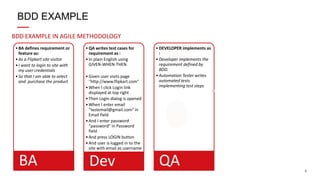
BDD EXAMPLE IN AGILE METHODOLOGY
BDD EXAMPLE
•BA defines requirement or
feature as:
•As a Flipkart site visitor
•I want to login to site with
my user credentials
•So that I am able to select
and purchase the product
BA
•QA writes test cases for
requirement as :
•In plain English using
GIVEN-WHEN-THEN
•Given user visits page
"http://www.flipkart.com"
•When I click Login link
displayed at top right
•Then Login dialog is opened
•When I enter email
“testemail@gmail.com" in
Email field
•And I enter password
“password" in Password
field
•And press LOGIN button
•And user is logged in to the
site with email as username
Dev
•DEVELOPER implements as
:
•Developer implements the
requirement defined by
BDD.
•Automation Tester writes
automated tests
implementing test steps
QA
7
BEHAVIOR
Feature: <short description>
<story>
<scenario 1>
<scenario n>
WHO? As a <role>
WHAT? I want <feature>
WHY? so that <business
value>
Scenario: <description>
Given <preconditions, context>
[And] <additional preconditions>
When <action, behaviour>
Then <postconditions>
[And] <additional postconditions>
8
BDD EXAMPLE IN AGILE METHODOLOGY
BA defines requirement or feature as:
As a Flipkart site visitor
I want to login to site with my user credentials
So that I am able to select and purchase the product
BDD EXAMPLE
9
BDD Frameworks
Basic .feature (User Story)
Structure:
Feature: [Title]
As a [Role]
I want [Some Action]
So that [Business Value]
Scenario: Title
Given [Context]
And [More Context]
When (I do) [Action]
And [Other Action]
Then (I should see) [Outcome]
And [More Outcomes]
- Description of Feature
- Stakeholder and/or User role
- Action to be taken by user.
- Business Value Provided
- Description of Scenario
- Preconditions of Scenario
- Actions taken in Scenario
- Outcome Expected
One or more Scenarios defined
10© COPYRIGHT 2014 SAPIENTNITRO | QA SCG | CONFIDENTIAL
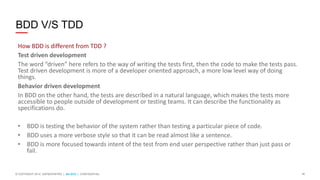
BDD V/S TDD
How BDD is different from TDD ?
Test driven development
The word “driven” here refers to the way of writing the tests first, then the code to make the tests pass.
Test driven development is more of a developer oriented approach, a more low level way of doing
things.
Behavior driven development
In BDD on the other hand, the tests are described in a natural language, which makes the tests more
accessible to people outside of development or testing teams. It can describe the functionality as
specifications do.
• BDD is testing the behavior of the system rather than testing a particular piece of code.
• BDD uses a more verbose style so that it can be read almost like a sentence.
• BDD is more focused towards intent of the test from end user perspective rather than just pass or
fail.
11
Tools to Practice BDD
• Cucumber (Java & Ruby)
• Jbehave(Java)
• Concordion(Java)
• Specflow(C#)
• EasyB(Java)
• Specflow(Ruby)
Tools to practice BDD
Introduction to Cucumber
13
What is Cucumber ?
• Cucumber is a open source Tool/Framework/Environment to practice Behavior Driven Development in
Agile projects.
• Cucumber is also used for automation of integration tests and automation of regression tests.
• Cucumber API is written in Ruby, Java, C#, Python.
• Cucumber uses Gherkin syntax to implement BDD.
• Cucumber plugins are available for Eclipse and IntelliJ IDEs.
• Cucumber can be integrated with web application automation tools like Selenium Webdriver , Watir.
• Provides integration with Maven and CI environments like Jenkins, TeamCity.
• Provides inbuilt test reporting in html and junit formats.
What is Cucumber
14
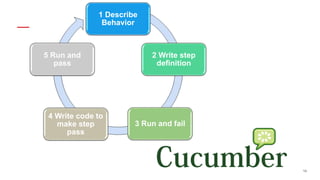
1 Describe
Behavior
2 Write step
definition
3 Run and fail
4 Write code to
make step
pass
5 Run and
pass
15
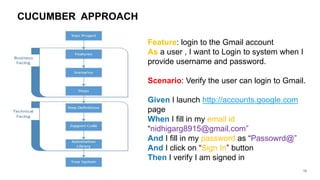
CUCUMBER APPROACH
Feature: login to the Gmail account
As a user , I want to Login to system when I
provide username and password.
Scenario: Verify the user can login to Gmail.
Given I launch http://accounts.google.com
page
When I fill in my email id
“nidhigarg8915@gmail.com”
And I fill in my password as “Passowrd@”
And I click on “Sign In” button
Then I verify I am signed in
3. Usage of Cucumber with Selenium
17
• Cucumber can be very efficiently used with Selenium Webdriver as a Test Framework for Functional,
Regression and Cross-Browser testing.
• It’s is FRIENDLY and UNDERSTANDABLE by non-technical User
• Automation framework based BDD Cucumber is NOT REALLY HARD to develop and maintenance
• Support on MULTIPLE PLATFORM,OS and different browsers
• Cucumber serves the purpose of maintaining test scripts and test data as parameters in .feature files
along with running test suites and test reporting while Selenium interacts with browser.
• Cucumber interprets the tests into the specified programming language and uses Selenium to drive
the test cases in a browser
Usage & Pros of Cucumber with Selenium
18
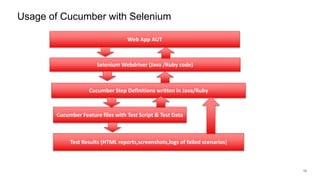
Usage of Cucumber with Selenium
Web App AUT
Selenium Webdriver (Java /Ruby code)
Cucumber Step Definitions written in Java/Ruby
Cucumber Feature files with Test Script & Test Data
Test Results (HTML reports,screenshots,logs of failed scenarios)
4. Gherkin Language, Feature Files, Step
Definitions & Tags
20
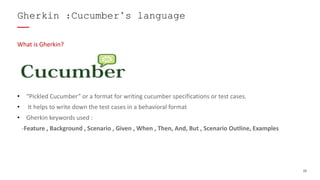
What is Gherkin?
• “Pickled Cucumber” or a format for writing cucumber specifications or test cases.
• It helps to write down the test cases in a behavioral format
• Gherkin keywords used :
-Feature , Background , Scenario , Given , When , Then, And, But , Scenario Outline, Examples
Gherkin :Cucumber’s language
21
• Feature
–Gives a summary documentation about the group of tests that follow
e.g. Login into Flipkart Website
-Not Mandatory
- We use the below syntax :
In order to <meet some goal>
As a <type of stakeholder>
I want <a feature>
Gherkin :Cucumber’s language
22
Scenario -Example of how a system should behave in a particular situation. If you add together
the behavior defined by all of the scenarios, that’s the expected behavior of the feature itself.
Scenario Outline: Same scenario can be executed for multiple sets of data using scenario outline.
The data is provided by a tabular structure separated by (I I).
Given, When, Then
In Gherkin, we use the keywords Given, When, and Then to identify those three different parts of
the scenario:
• Given: It specifies the context of the text to be executed. By using datatables "Given", step can
also be parameterized.
• When: "When" specifies the test action that has to performed
• Then: The expected outcome of the test can be represented by "Then"
Gherkin :Cucumber’s language
23
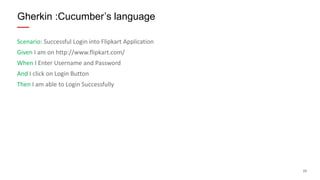
Scenario: Successful Login into Flipkart Application
Given I am on http://www.flipkart.com/
When I Enter Username and Password
And I click on Login Button
Then I am able to Login Successfully
Gherkin :Cucumber’s language
24
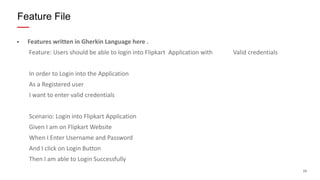
• Features written in Gherkin Language here .
Feature: Users should be able to login into Flipkart Application with Valid credentials
In order to Login into the Application
As a Registered user
I want to enter valid credentials
Scenario: Login into Flipkart Application
Given I am on Flipkart Website
When I Enter Username and Password
And I click on Login Button
Then I am able to Login Successfully
Feature File
25
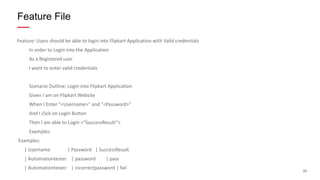
Feature: Users should be able to login into Flipkart Application with Valid credentials
In order to Login into the Application
As a Registered user
I want to enter valid credentials
Scenario Outline: Login into Flipkart Application
Given I am on Flipkart Website
When I Enter "<Username>" and "<Password>"
And I click on Login Button
Then I am able to Login <“SuccessResult”>
Examples:
Examples:
| Username | Password | SuccessResult
| Automationtester | password | pass
| Automationtester | incorrectpassword | fail
Feature File
26
• Step definition maps the test case steps in the feature files
• It must match the given component in a feature
• Java implementation
• Regex Expressions used for data parameters
@Given("^I am on Flipkart Website$")
public void I_am_on_Flipkart_Website() throws Throwable {
// Express the Regexp above with the code you wish you had
throw new PendingException();
}
@When("^When I Enter "([^"]*)" and "([^"]*)"")
public void When_I_Enter_Username_and_Password(String arg1,String arg2) throws Throwable {
// Express the Regexp above with the code you wish you had
throw new PendingException();
}
Step Definitions
27
@And("^And I click on Login Button$")
public void An_ I_click_on_Sign_in_Button() throws Throwable {
// Express the Regexp above with the code you wish you had
throw new PendingException();
}
@Then("^Then I am able to Login "([^"]*)"$")
public void Then_I_am_able_to_Login_Successfully(String arg) throws Throwable {
// Express the Regexp above with the code you wish you had
throw new PendingException();
}
Step Definitions
28
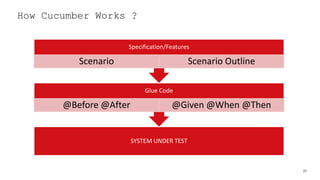
How Cucumber Works ?
SYSTEM UNDER TEST
Glue Code
@Before @After @Given @When @Then
Specification/Features
Scenario Scenario Outline
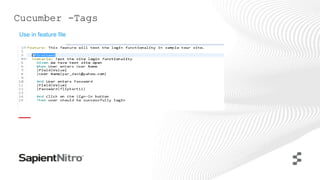
Cucumber -Tags
Use in feature file
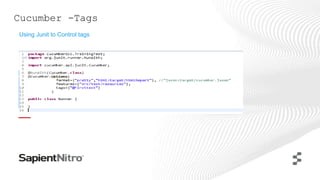
Cucumber -Tags
Using Junit to Control tags
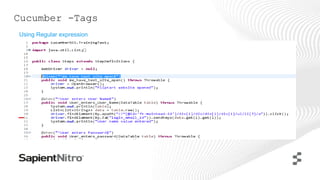
Cucumber -Tags
Using Regular expression
5. Cucumber Reports
33
• What Reporting is?
• What reporting formats are available to us?
• How to generate Report using cucumber framework?
Cucumber Report & Formatter
34
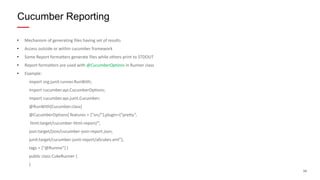
• Mechanism of generating files having set of results
• Access outside or within cucumber framework
• Some Report formatters generate files while others print to STDOUT
• Report formatters are used with @CucumberOptions in Runner class
• Example:
import org.junit.runner.RunWith;
import cucumber.api.CucumberOptions;
import cucumber.api.junit.Cucumber;
@RunWith(Cucumber.class)
@CucumberOptions( features = {"src/"},plugin={“pretty”,
html:target/cucumber-html-report/“,
json:target/json/cucumber-json-report.json,
junit:target/cucumber-junit-report/allcukes.xml"},
tags = {"@Runme"} )
public class CukeRunner {
}
Cucumber Reporting
35
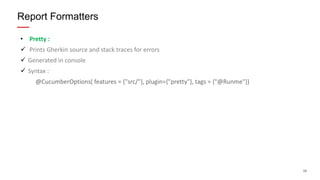
• Pretty :
 Prints Gherkin source and stack traces for errors
 Generated in console
 Syntax :
@CucumberOptions( features = {"src/"}, plugin={"pretty"}, tags = {"@Runme"})
Report Formatters
36
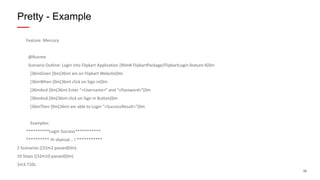
Feature: Mercury
@Runme
Scenario Outline: Login into Flipkart Application [90m# FlipkartPackage/FlipkartLogin.feature:4[0m
[36mGiven [0m[36mI am on Flipkart Website[0m
[36mWhen [0m[36mI click on Sign in[0m
[36mAnd [0m[36mI Enter "<Username>" and "<Password>"[0m
[36mAnd [0m[36mI click on Sign in Button[0m
[36mThen [0m[36mI am able to Login "<SuccessResult>"[0m
Examples:
**********Login Success***********
********** Hi sbansal... ! ***********
2 Scenarios ([32m2 passed[0m)
10 Steps ([32m10 passed[0m)
1m3.710s
Pretty - Example
37
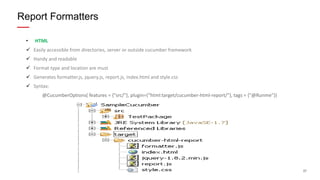
• HTML
 Easily accessible from directories, server or outside cucumber framework
 Handy and readable
 Format type and location are must
 Generates formatter.js, jquery.js, report.js, index.html and style.css
 Syntax:
@CucumberOptions( features = {"src/"}, plugin={“html:target/cucumber-html-report/"}, tags = {"@Runme"})
Report Formatters
38
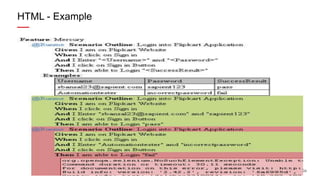
HTML - Example
39
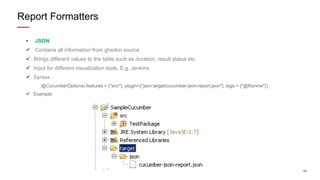
• JSON
 Contains all information from gherkin source
 Brings different values to the table such as duration, result status etc.
 Input for different visualization tools, E.g. Jenkins
 Syntax :
@CucumberOptions( features = {"src/"}, plugin={“json:target/cucumber-json-report.json"}, tags = {"@Runme"})
 Example:
Report Formatters
40
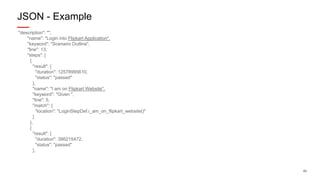
"description": "",
"name": "Login into Flipkart Application",
"keyword": "Scenario Outline",
"line": 13,
"steps": [
{
"result": {
"duration": 12578995610,
"status": "passed"
},
"name": "I am on Flipkart Website",
"keyword": "Given ",
"line": 5,
"match": {
"location": "LoginStepDef.i_am_on_flipkart_website()"
}
},
{
"result": {
"duration": 386215472,
"status": "passed"
},
JSON - Example
41
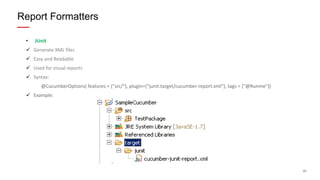
• JUnit
 Generate XML files
 Easy and Readable
 Used for visual reports
 Syntax:
@CucumberOptions( features = {"src/"}, plugin={“junit:target/cucumber-report.xml"}, tags = {"@Runme"})
 Example:
Report Formatters
42
"<?xml version="1.0" encoding="UTF-8"?><testsuite failures="1" name="cucumber.runtime.formatter.JUnitFormatter" skipped="0" tests="2"
time="62.17886">
<testcase classname="Mercury" name="Login into Flipkart Application" time="19.504004">
<system-out><![CDATA[Given I am on Flipkart Website..............................................passed
When I click on Sign in.....................................................passed
And I Enter "sbansal23@sapient.com" and "sapient123"........................passed
And I click on Sign in Button...............................................passed
Then I am able to Login "pass"..............................................passed
]]></system-out>
</testcase>
<testcase classname="Mercury" name="Login into Flipkart Application 2" time="42.674856">
[CDATA[Given I am on Flipkart Website..............................................passed
When I click on Sign in.....................................................passed
And I Enter "Automationtester" and "incorrectpassword"......................passed
And I click on Sign in Button...............................................passed
Then I am able to Login "fail"..............................................failed
Junit - Example
THANK YOU!

Cucumber_Training_ForQA

  • 1.
  • 2.
  • 3.
    3 AGENDA 1. Introduction toBDD 2. Introduction to Cucumber 3. Usage of Cucumber with Selenium 4. Gherkin Language, Feature Files, Step Definitions & Tags 5. Cucumber Reports 6. Demo Project
  • 4.
  • 5.
    5 INTRODUCTION TO BDD Whatis BDD ? • BDD stands for “Behavior Driven Development”. • BDD = Business Behavior + TDD(Test Driven Development) • BDD complements Agile methodology by establishing a communication protocol between business and implementation. • Language used in writing BDD is the common and simple language which enhances collaboration between technical and non technical team. • With BDD defining behavior of the system, helps a technical person connect more towards acceptance paradigm whether it is QA or Developer. • BDD Frameworks such as Cucumber are an Enabler, acting as “bridge” between Business & Technical Language a)User Stories & Acceptance Criteria Defined in Feature Files with Business Language b)Developers Implement Acceptance Criteria BDD QA DEVBA
  • 6.
    6 BDD EXAMPLE INAGILE METHODOLOGY BDD EXAMPLE •BA defines requirement or feature as: •As a Flipkart site visitor •I want to login to site with my user credentials •So that I am able to select and purchase the product BA •QA writes test cases for requirement as : •In plain English using GIVEN-WHEN-THEN •Given user visits page "http://www.flipkart.com" •When I click Login link displayed at top right •Then Login dialog is opened •When I enter email “testemail@gmail.com" in Email field •And I enter password “password" in Password field •And press LOGIN button •And user is logged in to the site with email as username Dev •DEVELOPER implements as : •Developer implements the requirement defined by BDD. •Automation Tester writes automated tests implementing test steps QA
  • 7.
    7 BEHAVIOR Feature: <short description> <story> <scenario1> <scenario n> WHO? As a <role> WHAT? I want <feature> WHY? so that <business value> Scenario: <description> Given <preconditions, context> [And] <additional preconditions> When <action, behaviour> Then <postconditions> [And] <additional postconditions>
  • 8.
    8 BDD EXAMPLE INAGILE METHODOLOGY BA defines requirement or feature as: As a Flipkart site visitor I want to login to site with my user credentials So that I am able to select and purchase the product BDD EXAMPLE
  • 9.
    9 BDD Frameworks Basic .feature(User Story) Structure: Feature: [Title] As a [Role] I want [Some Action] So that [Business Value] Scenario: Title Given [Context] And [More Context] When (I do) [Action] And [Other Action] Then (I should see) [Outcome] And [More Outcomes] - Description of Feature - Stakeholder and/or User role - Action to be taken by user. - Business Value Provided - Description of Scenario - Preconditions of Scenario - Actions taken in Scenario - Outcome Expected One or more Scenarios defined
  • 10.
    10© COPYRIGHT 2014SAPIENTNITRO | QA SCG | CONFIDENTIAL BDD V/S TDD How BDD is different from TDD ? Test driven development The word “driven” here refers to the way of writing the tests first, then the code to make the tests pass. Test driven development is more of a developer oriented approach, a more low level way of doing things. Behavior driven development In BDD on the other hand, the tests are described in a natural language, which makes the tests more accessible to people outside of development or testing teams. It can describe the functionality as specifications do. • BDD is testing the behavior of the system rather than testing a particular piece of code. • BDD uses a more verbose style so that it can be read almost like a sentence. • BDD is more focused towards intent of the test from end user perspective rather than just pass or fail.
  • 11.
    11 Tools to PracticeBDD • Cucumber (Java & Ruby) • Jbehave(Java) • Concordion(Java) • Specflow(C#) • EasyB(Java) • Specflow(Ruby) Tools to practice BDD
  • 12.
  • 13.
    13 What is Cucumber? • Cucumber is a open source Tool/Framework/Environment to practice Behavior Driven Development in Agile projects. • Cucumber is also used for automation of integration tests and automation of regression tests. • Cucumber API is written in Ruby, Java, C#, Python. • Cucumber uses Gherkin syntax to implement BDD. • Cucumber plugins are available for Eclipse and IntelliJ IDEs. • Cucumber can be integrated with web application automation tools like Selenium Webdriver , Watir. • Provides integration with Maven and CI environments like Jenkins, TeamCity. • Provides inbuilt test reporting in html and junit formats. What is Cucumber
  • 14.
    14 1 Describe Behavior 2 Writestep definition 3 Run and fail 4 Write code to make step pass 5 Run and pass
  • 15.
    15 CUCUMBER APPROACH Feature: loginto the Gmail account As a user , I want to Login to system when I provide username and password. Scenario: Verify the user can login to Gmail. Given I launch http://accounts.google.com page When I fill in my email id “nidhigarg8915@gmail.com” And I fill in my password as “Passowrd@” And I click on “Sign In” button Then I verify I am signed in
  • 16.
    3. Usage ofCucumber with Selenium
  • 17.
    17 • Cucumber canbe very efficiently used with Selenium Webdriver as a Test Framework for Functional, Regression and Cross-Browser testing. • It’s is FRIENDLY and UNDERSTANDABLE by non-technical User • Automation framework based BDD Cucumber is NOT REALLY HARD to develop and maintenance • Support on MULTIPLE PLATFORM,OS and different browsers • Cucumber serves the purpose of maintaining test scripts and test data as parameters in .feature files along with running test suites and test reporting while Selenium interacts with browser. • Cucumber interprets the tests into the specified programming language and uses Selenium to drive the test cases in a browser Usage & Pros of Cucumber with Selenium
  • 18.
    18 Usage of Cucumberwith Selenium Web App AUT Selenium Webdriver (Java /Ruby code) Cucumber Step Definitions written in Java/Ruby Cucumber Feature files with Test Script & Test Data Test Results (HTML reports,screenshots,logs of failed scenarios)
  • 19.
    4. Gherkin Language,Feature Files, Step Definitions & Tags
  • 20.
    20 What is Gherkin? •“Pickled Cucumber” or a format for writing cucumber specifications or test cases. • It helps to write down the test cases in a behavioral format • Gherkin keywords used : -Feature , Background , Scenario , Given , When , Then, And, But , Scenario Outline, Examples Gherkin :Cucumber’s language
  • 21.
    21 • Feature –Gives asummary documentation about the group of tests that follow e.g. Login into Flipkart Website -Not Mandatory - We use the below syntax : In order to <meet some goal> As a <type of stakeholder> I want <a feature> Gherkin :Cucumber’s language
  • 22.
    22 Scenario -Example ofhow a system should behave in a particular situation. If you add together the behavior defined by all of the scenarios, that’s the expected behavior of the feature itself. Scenario Outline: Same scenario can be executed for multiple sets of data using scenario outline. The data is provided by a tabular structure separated by (I I). Given, When, Then In Gherkin, we use the keywords Given, When, and Then to identify those three different parts of the scenario: • Given: It specifies the context of the text to be executed. By using datatables "Given", step can also be parameterized. • When: "When" specifies the test action that has to performed • Then: The expected outcome of the test can be represented by "Then" Gherkin :Cucumber’s language
  • 23.
    23 Scenario: Successful Logininto Flipkart Application Given I am on http://www.flipkart.com/ When I Enter Username and Password And I click on Login Button Then I am able to Login Successfully Gherkin :Cucumber’s language
  • 24.
    24 • Features writtenin Gherkin Language here . Feature: Users should be able to login into Flipkart Application with Valid credentials In order to Login into the Application As a Registered user I want to enter valid credentials Scenario: Login into Flipkart Application Given I am on Flipkart Website When I Enter Username and Password And I click on Login Button Then I am able to Login Successfully Feature File
  • 25.
    25 Feature: Users shouldbe able to login into Flipkart Application with Valid credentials In order to Login into the Application As a Registered user I want to enter valid credentials Scenario Outline: Login into Flipkart Application Given I am on Flipkart Website When I Enter "<Username>" and "<Password>" And I click on Login Button Then I am able to Login <“SuccessResult”> Examples: Examples: | Username | Password | SuccessResult | Automationtester | password | pass | Automationtester | incorrectpassword | fail Feature File
  • 26.
    26 • Step definitionmaps the test case steps in the feature files • It must match the given component in a feature • Java implementation • Regex Expressions used for data parameters @Given("^I am on Flipkart Website$") public void I_am_on_Flipkart_Website() throws Throwable { // Express the Regexp above with the code you wish you had throw new PendingException(); } @When("^When I Enter "([^"]*)" and "([^"]*)"") public void When_I_Enter_Username_and_Password(String arg1,String arg2) throws Throwable { // Express the Regexp above with the code you wish you had throw new PendingException(); } Step Definitions
  • 27.
    27 @And("^And I clickon Login Button$") public void An_ I_click_on_Sign_in_Button() throws Throwable { // Express the Regexp above with the code you wish you had throw new PendingException(); } @Then("^Then I am able to Login "([^"]*)"$") public void Then_I_am_able_to_Login_Successfully(String arg) throws Throwable { // Express the Regexp above with the code you wish you had throw new PendingException(); } Step Definitions
  • 28.
    28 How Cucumber Works? SYSTEM UNDER TEST Glue Code @Before @After @Given @When @Then Specification/Features Scenario Scenario Outline
  • 29.
  • 30.
  • 31.
  • 32.
  • 33.
    33 • What Reportingis? • What reporting formats are available to us? • How to generate Report using cucumber framework? Cucumber Report & Formatter
  • 34.
    34 • Mechanism ofgenerating files having set of results • Access outside or within cucumber framework • Some Report formatters generate files while others print to STDOUT • Report formatters are used with @CucumberOptions in Runner class • Example: import org.junit.runner.RunWith; import cucumber.api.CucumberOptions; import cucumber.api.junit.Cucumber; @RunWith(Cucumber.class) @CucumberOptions( features = {"src/"},plugin={“pretty”, html:target/cucumber-html-report/“, json:target/json/cucumber-json-report.json, junit:target/cucumber-junit-report/allcukes.xml"}, tags = {"@Runme"} ) public class CukeRunner { } Cucumber Reporting
  • 35.
    35 • Pretty : Prints Gherkin source and stack traces for errors  Generated in console  Syntax : @CucumberOptions( features = {"src/"}, plugin={"pretty"}, tags = {"@Runme"}) Report Formatters
  • 36.
    36 Feature: Mercury @Runme Scenario Outline:Login into Flipkart Application [90m# FlipkartPackage/FlipkartLogin.feature:4[0m [36mGiven [0m[36mI am on Flipkart Website[0m [36mWhen [0m[36mI click on Sign in[0m [36mAnd [0m[36mI Enter "<Username>" and "<Password>"[0m [36mAnd [0m[36mI click on Sign in Button[0m [36mThen [0m[36mI am able to Login "<SuccessResult>"[0m Examples: **********Login Success*********** ********** Hi sbansal... ! *********** 2 Scenarios ([32m2 passed[0m) 10 Steps ([32m10 passed[0m) 1m3.710s Pretty - Example
  • 37.
    37 • HTML  Easilyaccessible from directories, server or outside cucumber framework  Handy and readable  Format type and location are must  Generates formatter.js, jquery.js, report.js, index.html and style.css  Syntax: @CucumberOptions( features = {"src/"}, plugin={“html:target/cucumber-html-report/"}, tags = {"@Runme"}) Report Formatters
  • 38.
  • 39.
    39 • JSON  Containsall information from gherkin source  Brings different values to the table such as duration, result status etc.  Input for different visualization tools, E.g. Jenkins  Syntax : @CucumberOptions( features = {"src/"}, plugin={“json:target/cucumber-json-report.json"}, tags = {"@Runme"})  Example: Report Formatters
  • 40.
    40 "description": "", "name": "Logininto Flipkart Application", "keyword": "Scenario Outline", "line": 13, "steps": [ { "result": { "duration": 12578995610, "status": "passed" }, "name": "I am on Flipkart Website", "keyword": "Given ", "line": 5, "match": { "location": "LoginStepDef.i_am_on_flipkart_website()" } }, { "result": { "duration": 386215472, "status": "passed" }, JSON - Example
  • 41.
    41 • JUnit  GenerateXML files  Easy and Readable  Used for visual reports  Syntax: @CucumberOptions( features = {"src/"}, plugin={“junit:target/cucumber-report.xml"}, tags = {"@Runme"})  Example: Report Formatters
  • 42.
    42 "<?xml version="1.0" encoding="UTF-8"?><testsuitefailures="1" name="cucumber.runtime.formatter.JUnitFormatter" skipped="0" tests="2" time="62.17886"> <testcase classname="Mercury" name="Login into Flipkart Application" time="19.504004"> <system-out><![CDATA[Given I am on Flipkart Website..............................................passed When I click on Sign in.....................................................passed And I Enter "sbansal23@sapient.com" and "sapient123"........................passed And I click on Sign in Button...............................................passed Then I am able to Login "pass"..............................................passed ]]></system-out> </testcase> <testcase classname="Mercury" name="Login into Flipkart Application 2" time="42.674856"> [CDATA[Given I am on Flipkart Website..............................................passed When I click on Sign in.....................................................passed And I Enter "Automationtester" and "incorrectpassword"......................passed And I click on Sign in Button...............................................passed Then I am able to Login "fail"..............................................failed Junit - Example
  • 43.