Puneet SHARMA
 Introduction – What & Why
 Installing and Executing ANT
 ANT Terminologies and Concepts
 Core ANT tasks
 Creating a build file
 Execute an executable
 Executing SQL queries
 DEMO
 Queries
 Apache Ant (Ant) is a general purpose build tool. Ant
is an abbreviation for Another Neat Tool.
 Ant is primarily used for building and deploying Java
projects but can be used for every possible repetitive
tasks.
 ANT is Operating System and Language Neutral.
 ANT is implemented in Java.
 Ant can get source code from version control
 CVS, Subversion, Synergy, Perforce, ClearCase and many
more
 Ant can compile source code
 Ant can run unit tests
 JUnit3, JUnit4, TestNG, or any arbitrary test application
 Ant can package compiled code and resources
 jars, wars, ears, tars, zips, whatever
 Download latest stable zip file
from http://ant.apache.org/bindownload.cgi
 Unzip downloaded file into a directory
 Setup Environment Variables
 Define ANT_HOME to be the location where Ant was
unzipped
 Define JAVA_HOME to be the location where the JDK is
installed
 Add %ANT_HOME%bin to the PATH
 Check your installation by opening a command line
and typing ant -version into the commend line.
 Ant Project – a collection of named targets that can
run in any order. Each build file contains one project.
 Ant Target – a fixed series of ant tasks in a specified
order that can depend on other named targets. Targets
can depend only on other targets, not on projects or
tasks. A target represents a particular item to be
created, it can be a single item like a jar, or a group of
items, like classes.
 Ant Task – something that ant can execute such as a
compile, copy or replace. Most tasks have very
convenient default values.
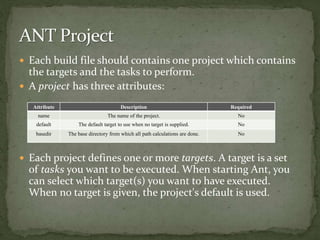
 Each build file should contains one project which contains
the targets and the tasks to perform.
 A project has three attributes:
 Each project defines one or more targets. A target is a set
of tasks you want to be executed. When starting Ant, you
can select which target(s) you want to have executed.
When no target is given, the project's default is used.
Attribute Description Required
name The name of the project. No
default The default target to use when no target is supplied. No
basedir The base directory from which all path calculations are done. No
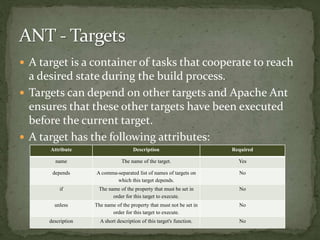
 A target is a container of tasks that cooperate to reach
a desired state during the build process.
 Targets can depend on other targets and Apache Ant
ensures that these other targets have been executed
before the current target.
 A target has the following attributes:
Attribute Description Required
name The name of the target. Yes
depends A comma-separated list of names of targets on
which this target depends.
No
if The name of the property that must be set in
order for this target to execute.
No
unless The name of the property that must not be set in
order for this target to execute.
No
description A short description of this target's function. No
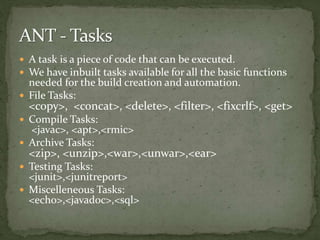
 A task is a piece of code that can be executed.
 We have inbuilt tasks available for all the basic functions
needed for the build creation and automation.
 File Tasks:
<copy>, <concat>, <delete>, <filter>, <fixcrlf>, <get>
 Compile Tasks:
<javac>, <apt>,<rmic>
 Archive Tasks:
<zip>, <unzip>,<war>,<unwar>,<ear>
 Testing Tasks:
<junit>,<junitreport>
 Miscelleneous Tasks:
<echo>,<javadoc>,<sql>
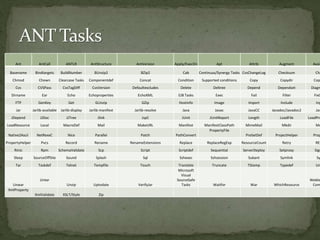
Ant AntCall ANTLR AntStructure AntVersion Apply/ExecOn Apt Attrib Augment Avail
Basename Bindtargets BuildNumber BUnzip2 BZip2 Cab Continuus/Synergy Tasks CvsChangeLog Checksum Chg
Chmod Chown Clearcase Tasks Componentdef Concat Condition Supported conditions Copy Copydir Cop
Cvs CVSPass CvsTagDiff CvsVersion Defaultexcludes Delete Deltree Depend Dependset Diagn
Dirname Ear Echo Echoproperties EchoXML EJB Tasks Exec Fail Filter FixC
FTP GenKey Get GUnzip GZip Hostinfo Image Import Include Inp
Jar Jarlib-available Jarlib-display Jarlib-manifest Jarlib-resolve Java Javac JavaCC Javadoc/Javadoc2 Jav
JDepend JJDoc JJTree Jlink JspC JUnit JUnitReport Length LoadFile LoadPro
LoadResource Local MacroDef Mail MakeURL Manifest ManifestClassPath MimeMail Mkdir Mo
Native2Ascii NetRexxC Nice Parallel Patch PathConvert
PropertyFile
PreSetDef ProjectHelper Prop
PropertyHelper Pvcs Record Rename RenameExtensions Replace ReplaceRegExp ResourceCount Retry REx
Rmic Rpm SchemaValidate Scp Script Scriptdef Sequential ServerDeploy Setproxy Sign
Sleep SourceOffSite Sound Splash Sql Sshexec Sshsession Subant Symlink Sy
Tar Taskdef Telnet Tempfile Touch Translate Truncate TStamp Typedef Un
Unwar
Untar
Unzip Uptodate VerifyJar
Microsoft
Visual
SourceSafe
Tasks Waitfor War WhichResource
Weblo
Com
XmlProperty
XmlValidate XSLT/Style Zip
 Build File is an XML file which contains all the
configuration which is executed by ANT to create
build and performing other Tasks.
 The Sample Build file to create a build is attached
below:
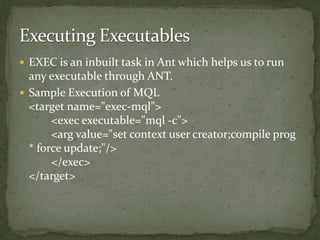
 EXEC is an inbuilt task in Ant which helps us to run
any executable through ANT.
 Sample Execution of MQL
<target name="exec-mql">
<exec executable="mql -c">
<arg value="set context user creator;compile prog
* force update;"/>
</exec>
</target>
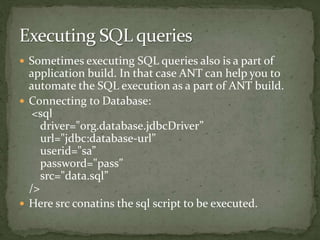
 Sometimes executing SQL queries also is a part of
application build. In that case ANT can help you to
automate the SQL execution as a part of ANT build.
 Connecting to Database:
<sql
driver="org.database.jdbcDriver”
url="jdbc:database-url”
userid="sa”
password="pass”
src="data.sql”
/>
 Here src conatins the sql script to be executed.
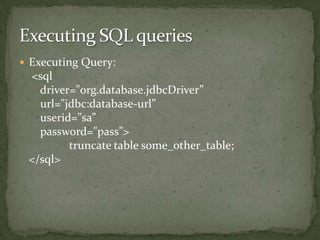
 Executing Query:
<sql
driver="org.database.jdbcDriver”
url="jdbc:database-url”
userid="sa”
password="pass”>
truncate table some_other_table;
</sql>
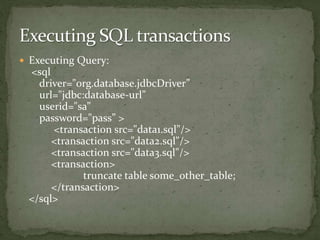
 Executing Query:
<sql
driver="org.database.jdbcDriver”
url="jdbc:database-url”
userid="sa”
password="pass” >
<transaction src="data1.sql"/>
<transaction src="data2.sql"/>
<transaction src="data3.sql"/>
<transaction>
truncate table some_other_table;
</transaction>
</sql>
ANT
Puneet Sharma.

Basics of ANT

  • 1.
  • 2.
     Introduction –What & Why  Installing and Executing ANT  ANT Terminologies and Concepts  Core ANT tasks  Creating a build file  Execute an executable  Executing SQL queries  DEMO  Queries
  • 3.
     Apache Ant(Ant) is a general purpose build tool. Ant is an abbreviation for Another Neat Tool.  Ant is primarily used for building and deploying Java projects but can be used for every possible repetitive tasks.  ANT is Operating System and Language Neutral.  ANT is implemented in Java.
  • 4.
     Ant canget source code from version control  CVS, Subversion, Synergy, Perforce, ClearCase and many more  Ant can compile source code  Ant can run unit tests  JUnit3, JUnit4, TestNG, or any arbitrary test application  Ant can package compiled code and resources  jars, wars, ears, tars, zips, whatever
  • 5.
     Download lateststable zip file from http://ant.apache.org/bindownload.cgi  Unzip downloaded file into a directory  Setup Environment Variables  Define ANT_HOME to be the location where Ant was unzipped  Define JAVA_HOME to be the location where the JDK is installed  Add %ANT_HOME%bin to the PATH  Check your installation by opening a command line and typing ant -version into the commend line.
  • 6.
     Ant Project– a collection of named targets that can run in any order. Each build file contains one project.  Ant Target – a fixed series of ant tasks in a specified order that can depend on other named targets. Targets can depend only on other targets, not on projects or tasks. A target represents a particular item to be created, it can be a single item like a jar, or a group of items, like classes.  Ant Task – something that ant can execute such as a compile, copy or replace. Most tasks have very convenient default values.
  • 7.
     Each buildfile should contains one project which contains the targets and the tasks to perform.  A project has three attributes:  Each project defines one or more targets. A target is a set of tasks you want to be executed. When starting Ant, you can select which target(s) you want to have executed. When no target is given, the project's default is used. Attribute Description Required name The name of the project. No default The default target to use when no target is supplied. No basedir The base directory from which all path calculations are done. No
  • 8.
     A targetis a container of tasks that cooperate to reach a desired state during the build process.  Targets can depend on other targets and Apache Ant ensures that these other targets have been executed before the current target.  A target has the following attributes: Attribute Description Required name The name of the target. Yes depends A comma-separated list of names of targets on which this target depends. No if The name of the property that must be set in order for this target to execute. No unless The name of the property that must not be set in order for this target to execute. No description A short description of this target's function. No
  • 9.
     A taskis a piece of code that can be executed.  We have inbuilt tasks available for all the basic functions needed for the build creation and automation.  File Tasks: <copy>, <concat>, <delete>, <filter>, <fixcrlf>, <get>  Compile Tasks: <javac>, <apt>,<rmic>  Archive Tasks: <zip>, <unzip>,<war>,<unwar>,<ear>  Testing Tasks: <junit>,<junitreport>  Miscelleneous Tasks: <echo>,<javadoc>,<sql>
  • 10.
    Ant AntCall ANTLRAntStructure AntVersion Apply/ExecOn Apt Attrib Augment Avail Basename Bindtargets BuildNumber BUnzip2 BZip2 Cab Continuus/Synergy Tasks CvsChangeLog Checksum Chg Chmod Chown Clearcase Tasks Componentdef Concat Condition Supported conditions Copy Copydir Cop Cvs CVSPass CvsTagDiff CvsVersion Defaultexcludes Delete Deltree Depend Dependset Diagn Dirname Ear Echo Echoproperties EchoXML EJB Tasks Exec Fail Filter FixC FTP GenKey Get GUnzip GZip Hostinfo Image Import Include Inp Jar Jarlib-available Jarlib-display Jarlib-manifest Jarlib-resolve Java Javac JavaCC Javadoc/Javadoc2 Jav JDepend JJDoc JJTree Jlink JspC JUnit JUnitReport Length LoadFile LoadPro LoadResource Local MacroDef Mail MakeURL Manifest ManifestClassPath MimeMail Mkdir Mo Native2Ascii NetRexxC Nice Parallel Patch PathConvert PropertyFile PreSetDef ProjectHelper Prop PropertyHelper Pvcs Record Rename RenameExtensions Replace ReplaceRegExp ResourceCount Retry REx Rmic Rpm SchemaValidate Scp Script Scriptdef Sequential ServerDeploy Setproxy Sign Sleep SourceOffSite Sound Splash Sql Sshexec Sshsession Subant Symlink Sy Tar Taskdef Telnet Tempfile Touch Translate Truncate TStamp Typedef Un Unwar Untar Unzip Uptodate VerifyJar Microsoft Visual SourceSafe Tasks Waitfor War WhichResource Weblo Com XmlProperty XmlValidate XSLT/Style Zip
  • 11.
     Build Fileis an XML file which contains all the configuration which is executed by ANT to create build and performing other Tasks.  The Sample Build file to create a build is attached below:
  • 12.
     EXEC isan inbuilt task in Ant which helps us to run any executable through ANT.  Sample Execution of MQL <target name="exec-mql"> <exec executable="mql -c"> <arg value="set context user creator;compile prog * force update;"/> </exec> </target>
  • 13.
     Sometimes executingSQL queries also is a part of application build. In that case ANT can help you to automate the SQL execution as a part of ANT build.  Connecting to Database: <sql driver="org.database.jdbcDriver” url="jdbc:database-url” userid="sa” password="pass” src="data.sql” />  Here src conatins the sql script to be executed.
  • 14.
  • 15.
     Executing Query: <sql driver="org.database.jdbcDriver” url="jdbc:database-url” userid="sa” password="pass”> <transaction src="data1.sql"/> <transaction src="data2.sql"/> <transaction src="data3.sql"/> <transaction> truncate table some_other_table; </transaction> </sql>
  • 18.