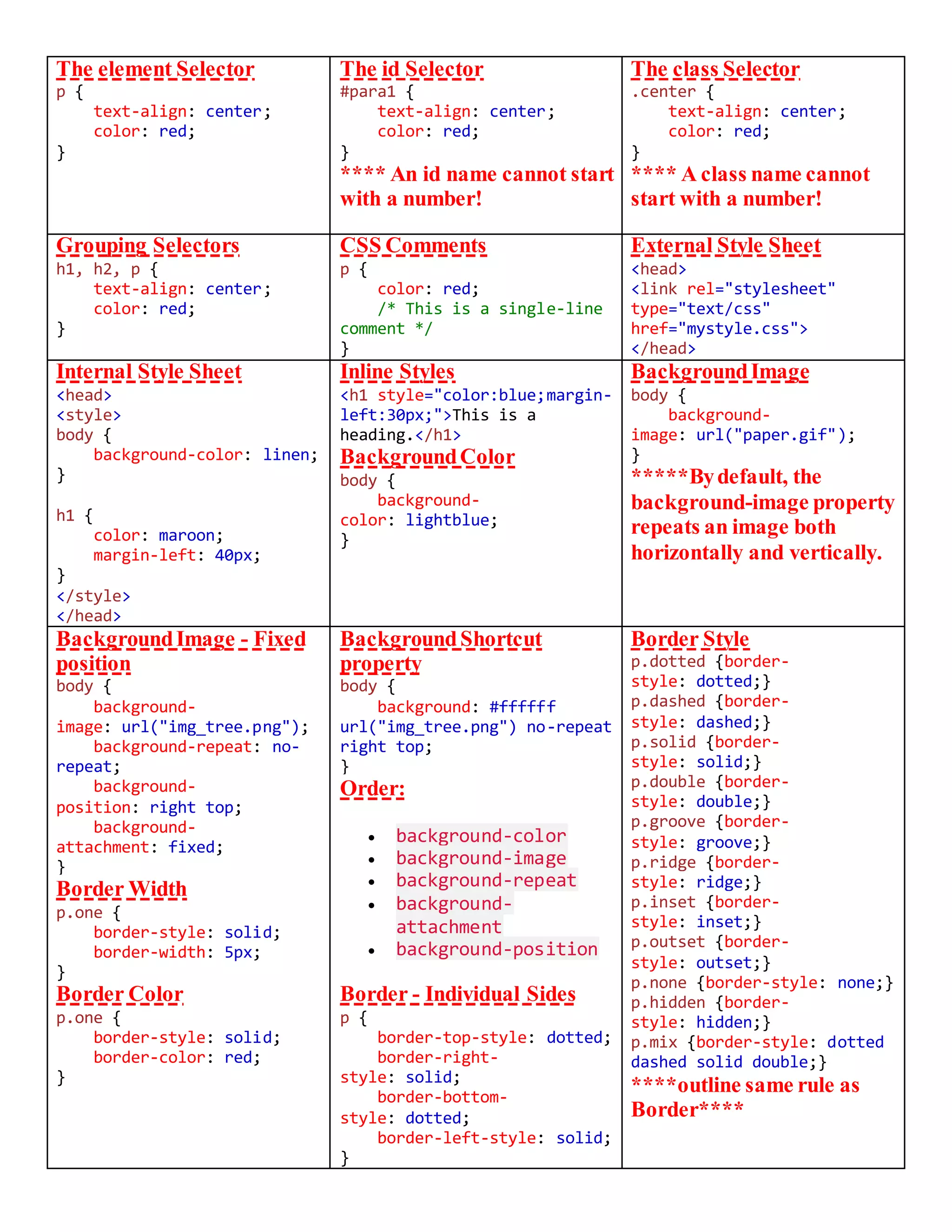
The element Selector
p {
text-align: center;
color: red;
}
The id Selector
#para1 {
text-align: center;
color: red;
}
**** An id name cannot start
with a number!
The class Selector
.center {
text-align: center;
color: red;
}
**** A class name cannot
start with a number!
Grouping Selectors
h1, h2, p {
text-align: center;
color: red;
}
CSS Comments
p {
color: red;
/* This is a single-line
comment */
}
External Style Sheet
<head>
<link rel="stylesheet"
type="text/css"
href="mystyle.css">
</head>
Internal Style Sheet
<head>
<style>
body {
background-color: linen;
}
h1 {
color: maroon;
margin-left: 40px;
}
</style>
</head>
Inline Styles
<h1 style="color:blue;margin-
left:30px;">This is a
heading.</h1>
BackgroundColor
body {
background-
color: lightblue;
}
BackgroundImage
body {
background-
image: url("paper.gif");
}
*****Bydefault, the
background-image property
repeats an image both
horizontally and vertically.
BackgroundImage - Fixed
position
body {
background-
image: url("img_tree.png");
background-repeat: no-
repeat;
background-
position: right top;
background-
attachment: fixed;
}
Border Width
p.one {
border-style: solid;
border-width: 5px;
}
Border Color
p.one {
border-style: solid;
border-color: red;
}
BackgroundShortcut
property
body {
background: #ffffff
url("img_tree.png") no-repeat
right top;
}
Order:
 background-color
 background-image
 background-repeat
 background-
attachment
 background-position
Border - Individual Sides
p {
border-top-style: dotted;
border-right-
style: solid;
border-bottom-
style: dotted;
border-left-style: solid;
}
Border Style
p.dotted {border-
style: dotted;}
p.dashed {border-
style: dashed;}
p.solid {border-
style: solid;}
p.double {border-
style: double;}
p.groove {border-
style: groove;}
p.ridge {border-
style: ridge;}
p.inset {border-
style: inset;}
p.outset {border-
style: outset;}
p.none {border-style: none;}
p.hidden {border-
style: hidden;}
p.mix {border-style: dotted
dashed solid double;}
****outline same rule as
Border****
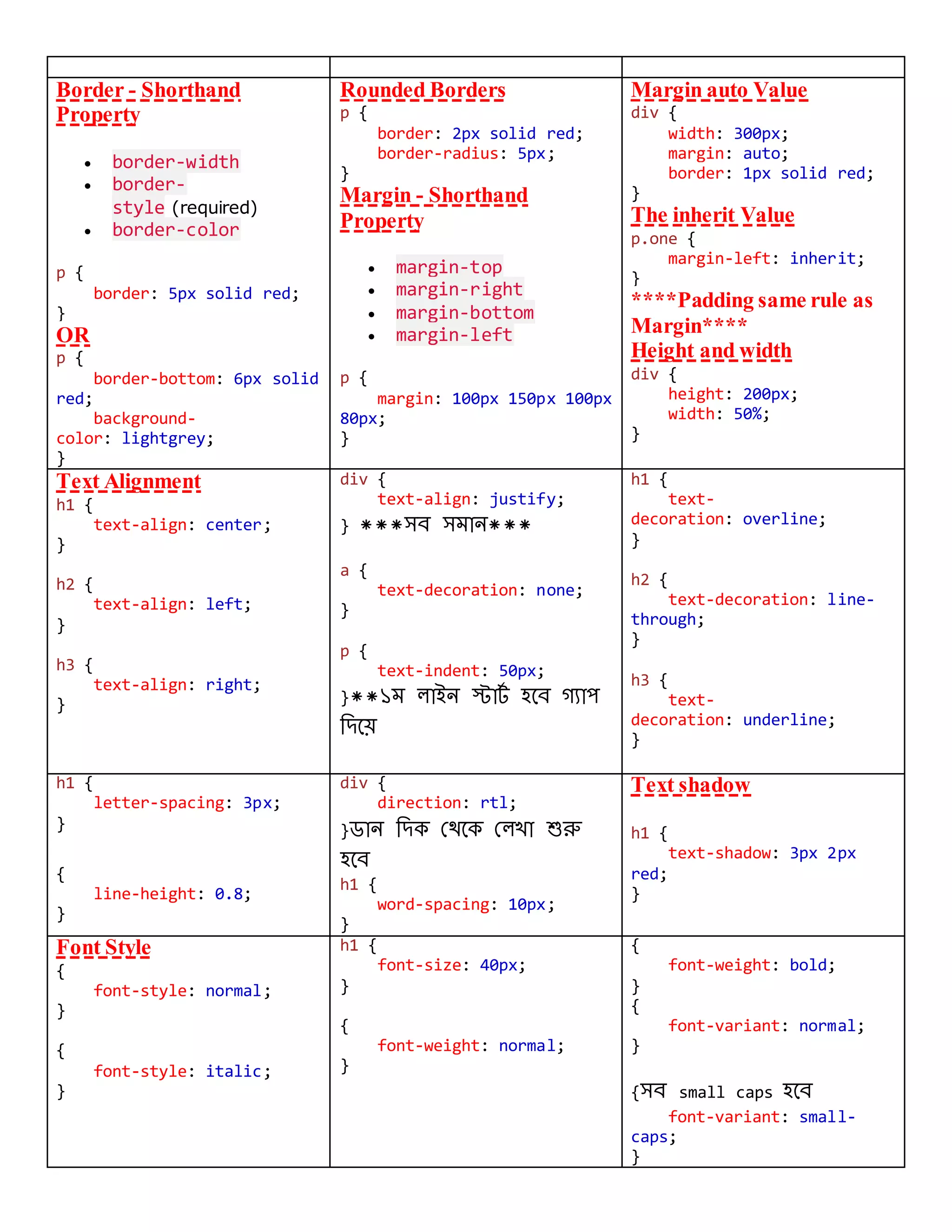
Border - Shorthand
Property
 border-width
 border-
style (required)
 border-color
p {
border: 5px solid red;
}
OR
p {
border-bottom: 6px solid
red;
background-
color: lightgrey;
}
Rounded Borders
p {
border: 2px solid red;
border-radius: 5px;
}
Margin - Shorthand
Property
 margin-top
 margin-right
 margin-bottom
 margin-left
p {
margin: 100px 150px 100px
80px;
}
Margin auto Value
div {
width: 300px;
margin: auto;
border: 1px solid red;
}
The inherit Value
p.one {
margin-left: inherit;
}
****Padding same rule as
Margin****
Height and width
div {
height: 200px;
width: 50%;
}
Text Alignment
h1 {
text-align: center;
}
h2 {
text-align: left;
}
h3 {
text-align: right;
}
div {
text-align: justify;
} ***সব সমান***
a {
text-decoration: none;
}
p {
text-indent: 50px;
}**১ম লাইন স্টার্ট হবব গ্যাপ
দিবে
h1 {
text-
decoration: overline;
}
h2 {
text-decoration: line-
through;
}
h3 {
text-
decoration: underline;
}
h1 {
letter-spacing: 3px;
}
{
line-height: 0.8;
}
div {
direction: rtl;
}ডান দিক থেবক থলখা শুরু
হবব
h1 {
word-spacing: 10px;
}
Text shadow
h1 {
text-shadow: 3px 2px
red;
}
Font Style
{
font-style: normal;
}
{
font-style: italic;
}
h1 {
font-size: 40px;
}
{
font-weight: normal;
}
{
font-weight: bold;
}
{
font-variant: normal;
}
{সব small caps হবব
font-variant: small-
caps;
}
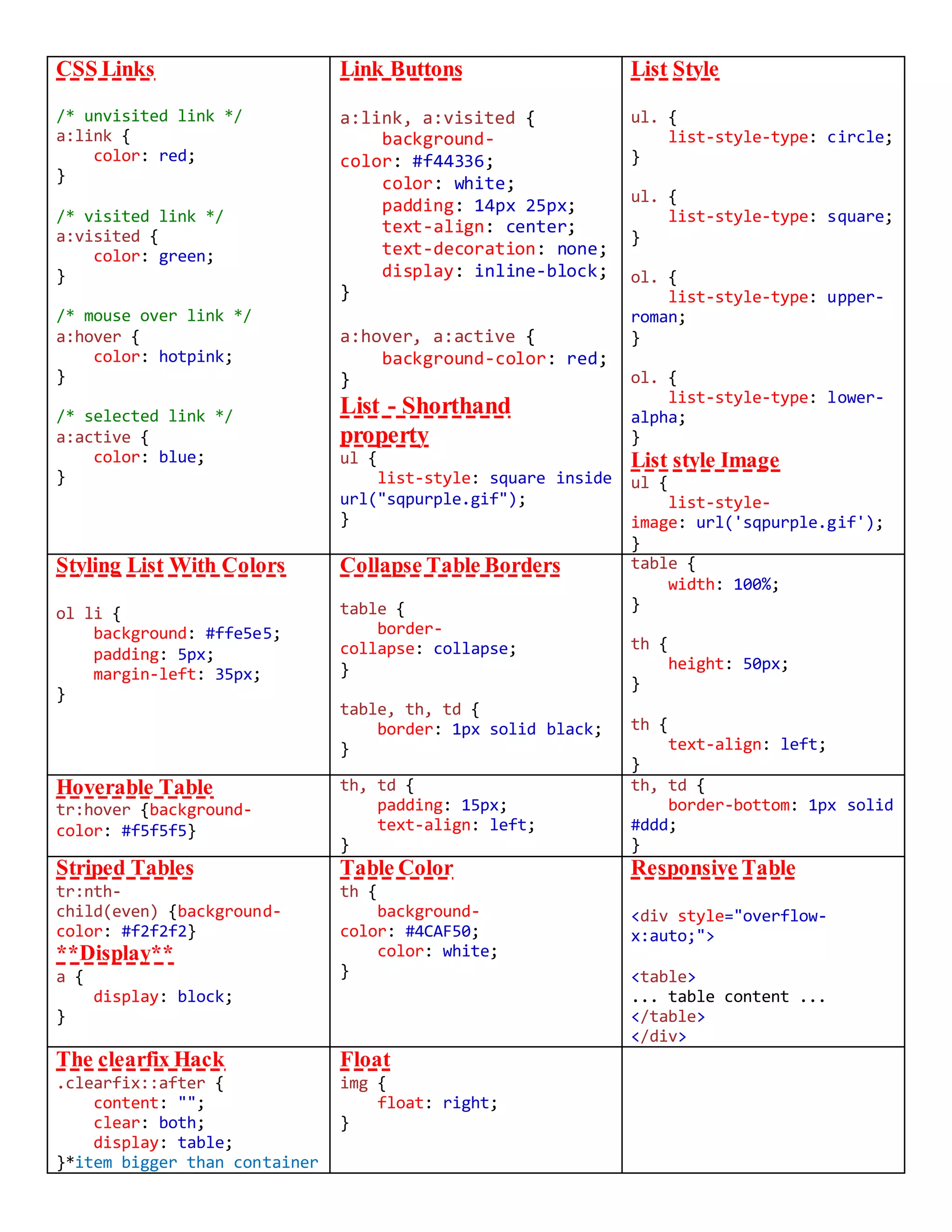
CSS Links
/* unvisited link */
a:link {
color: red;
}
/* visited link */
a:visited {
color: green;
}
/* mouse over link */
a:hover {
color: hotpink;
}
/* selected link */
a:active {
color: blue;
}
Link Buttons
a:link, a:visited {
background-
color: #f44336;
color: white;
padding: 14px 25px;
text-align: center;
text-decoration: none;
display: inline-block;
}
a:hover, a:active {
background-color: red;
}
List - Shorthand
property
ul {
list-style: square inside
url("sqpurple.gif");
}
List Style
ul. {
list-style-type: circle;
}
ul. {
list-style-type: square;
}
ol. {
list-style-type: upper-
roman;
}
ol. {
list-style-type: lower-
alpha;
}
List style Image
ul {
list-style-
image: url('sqpurple.gif');
}
Styling List With Colors
ol li {
background: #ffe5e5;
padding: 5px;
margin-left: 35px;
}
Collapse Table Borders
table {
border-
collapse: collapse;
}
table, th, td {
border: 1px solid black;
}
table {
width: 100%;
}
th {
height: 50px;
}
th {
text-align: left;
}
Hoverable Table
tr:hover {background-
color: #f5f5f5}
th, td {
padding: 15px;
text-align: left;
}
th, td {
border-bottom: 1px solid
#ddd;
}
Striped Tables
tr:nth-
child(even) {background-
color: #f2f2f2}
**Display**
a {
display: block;
}
Table Color
th {
background-
color: #4CAF50;
color: white;
}
Responsive Table
<div style="overflow-
x:auto;">
<table>
... table content ...
</table>
</div>
The clearfix Hack
.clearfix::after {
content: "";
clear: both;
display: table;
}*item bigger than container
Float
img {
float: right;
}
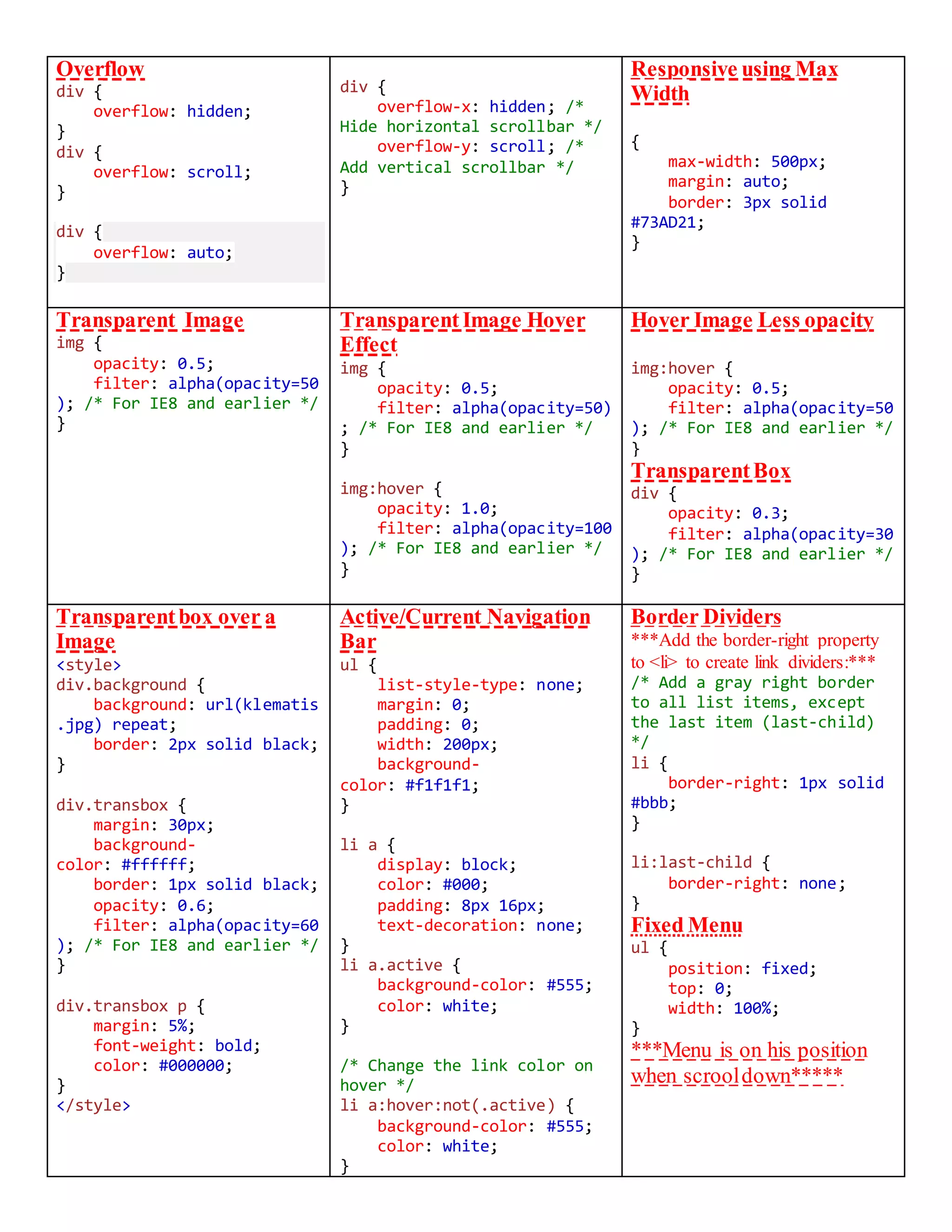
Overflow
div {
overflow: hidden;
}
div {
overflow: scroll;
}
div {
overflow: auto;
}
div {
overflow-x: hidden; /*
Hide horizontal scrollbar */
overflow-y: scroll; /*
Add vertical scrollbar */
}
Responsive using Max
Width
{
max-width: 500px;
margin: auto;
border: 3px solid
#73AD21;
}
Transparent Image
img {
opacity: 0.5;
filter: alpha(opacity=50
); /* For IE8 and earlier */
}
Transparent Image Hover
Effect
img {
opacity: 0.5;
filter: alpha(opacity=50)
; /* For IE8 and earlier */
}
img:hover {
opacity: 1.0;
filter: alpha(opacity=100
); /* For IE8 and earlier */
}
Hover Image Less opacity
img:hover {
opacity: 0.5;
filter: alpha(opacity=50
); /* For IE8 and earlier */
}
TransparentBox
div {
opacity: 0.3;
filter: alpha(opacity=30
); /* For IE8 and earlier */
}
Transparentbox over a
Image
<style>
div.background {
background: url(klematis
.jpg) repeat;
border: 2px solid black;
}
div.transbox {
margin: 30px;
background-
color: #ffffff;
border: 1px solid black;
opacity: 0.6;
filter: alpha(opacity=60
); /* For IE8 and earlier */
}
div.transbox p {
margin: 5%;
font-weight: bold;
color: #000000;
}
</style>
Active/Current Navigation
Bar
ul {
list-style-type: none;
margin: 0;
padding: 0;
width: 200px;
background-
color: #f1f1f1;
}
li a {
display: block;
color: #000;
padding: 8px 16px;
text-decoration: none;
}
li a.active {
background-color: #555;
color: white;
}
/* Change the link color on
hover */
li a:hover:not(.active) {
background-color: #555;
color: white;
}
Border Dividers
***Add the border-right property
to <li> to create link dividers:***
/* Add a gray right border
to all list items, except
the last item (last-child)
*/
li {
border-right: 1px solid
#bbb;
}
li:last-child {
border-right: none;
}
Fixed Menu
ul {
position: fixed;
top: 0;
width: 100%;
}
***Menu is on his position
when scrooldown*****
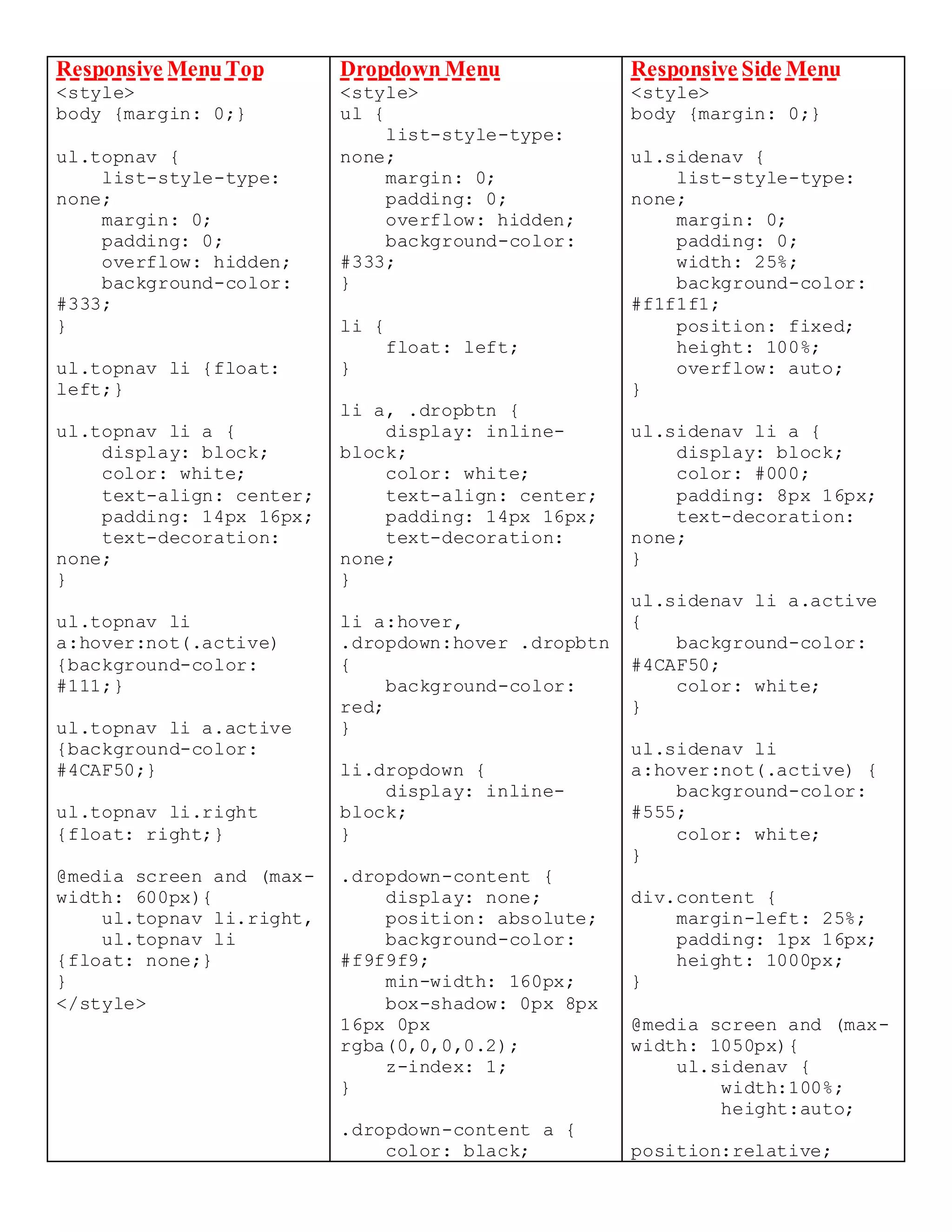
Responsive MenuTop
<style>
body {margin: 0;}
ul.topnav {
list-style-type:
none;
margin: 0;
padding: 0;
overflow: hidden;
background-color:
#333;
}
ul.topnav li {float:
left;}
ul.topnav li a {
display: block;
color: white;
text-align: center;
padding: 14px 16px;
text-decoration:
none;
}
ul.topnav li
a:hover:not(.active)
{background-color:
#111;}
ul.topnav li a.active
{background-color:
#4CAF50;}
ul.topnav li.right
{float: right;}
@media screen and (max-
width: 600px){
ul.topnav li.right,
ul.topnav li
{float: none;}
}
</style>
Dropdown Menu
<style>
ul {
list-style-type:
none;
margin: 0;
padding: 0;
overflow: hidden;
background-color:
#333;
}
li {
float: left;
}
li a, .dropbtn {
display: inline-
block;
color: white;
text-align: center;
padding: 14px 16px;
text-decoration:
none;
}
li a:hover,
.dropdown:hover .dropbtn
{
background-color:
red;
}
li.dropdown {
display: inline-
block;
}
.dropdown-content {
display: none;
position: absolute;
background-color:
#f9f9f9;
min-width: 160px;
box-shadow: 0px 8px
16px 0px
rgba(0,0,0,0.2);
z-index: 1;
}
.dropdown-content a {
color: black;
Responsive Side Menu
<style>
body {margin: 0;}
ul.sidenav {
list-style-type:
none;
margin: 0;
padding: 0;
width: 25%;
background-color:
#f1f1f1;
position: fixed;
height: 100%;
overflow: auto;
}
ul.sidenav li a {
display: block;
color: #000;
padding: 8px 16px;
text-decoration:
none;
}
ul.sidenav li a.active
{
background-color:
#4CAF50;
color: white;
}
ul.sidenav li
a:hover:not(.active) {
background-color:
#555;
color: white;
}
div.content {
margin-left: 25%;
padding: 1px 16px;
height: 1000px;
}
@media screen and (max-
width: 1050px){
ul.sidenav {
width:100%;
height:auto;
position:relative;
padding: 12px 16px;
text-decoration:
none;
display: block;
text-align: left;
}
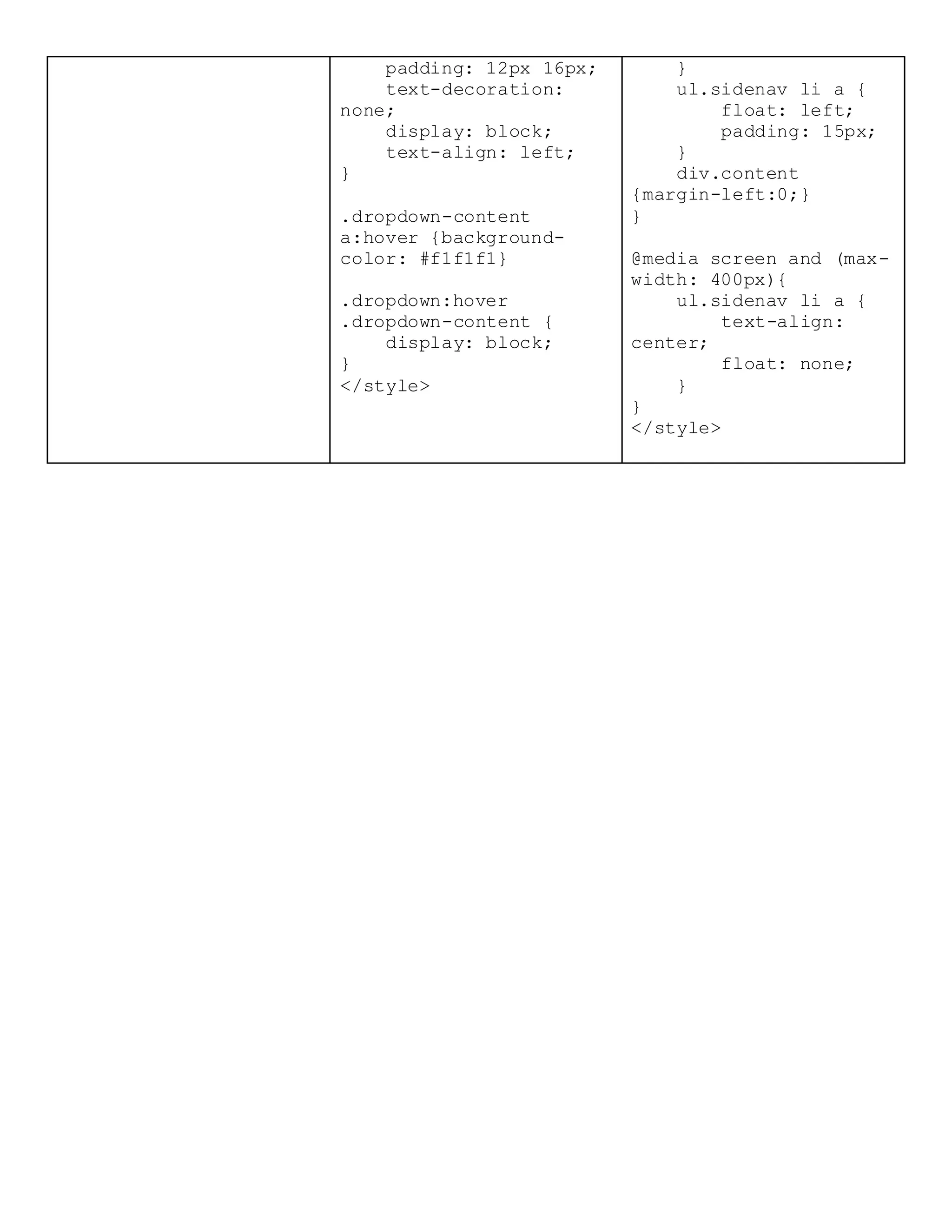
.dropdown-content
a:hover {background-
color: #f1f1f1}
.dropdown:hover
.dropdown-content {
display: block;
}
</style>
}
ul.sidenav li a {
float: left;
padding: 15px;
}
div.content
{margin-left:0;}
}
@media screen and (max-
width: 400px){
ul.sidenav li a {
text-align:
center;
float: none;
}
}
</style>

Css(handbook)

  • 1.
    The element Selector p{ text-align: center; color: red; } The id Selector #para1 { text-align: center; color: red; } **** An id name cannot start with a number! The class Selector .center { text-align: center; color: red; } **** A class name cannot start with a number! Grouping Selectors h1, h2, p { text-align: center; color: red; } CSS Comments p { color: red; /* This is a single-line comment */ } External Style Sheet <head> <link rel="stylesheet" type="text/css" href="mystyle.css"> </head> Internal Style Sheet <head> <style> body { background-color: linen; } h1 { color: maroon; margin-left: 40px; } </style> </head> Inline Styles <h1 style="color:blue;margin- left:30px;">This is a heading.</h1> BackgroundColor body { background- color: lightblue; } BackgroundImage body { background- image: url("paper.gif"); } *****Bydefault, the background-image property repeats an image both horizontally and vertically. BackgroundImage - Fixed position body { background- image: url("img_tree.png"); background-repeat: no- repeat; background- position: right top; background- attachment: fixed; } Border Width p.one { border-style: solid; border-width: 5px; } Border Color p.one { border-style: solid; border-color: red; } BackgroundShortcut property body { background: #ffffff url("img_tree.png") no-repeat right top; } Order:  background-color  background-image  background-repeat  background- attachment  background-position Border - Individual Sides p { border-top-style: dotted; border-right- style: solid; border-bottom- style: dotted; border-left-style: solid; } Border Style p.dotted {border- style: dotted;} p.dashed {border- style: dashed;} p.solid {border- style: solid;} p.double {border- style: double;} p.groove {border- style: groove;} p.ridge {border- style: ridge;} p.inset {border- style: inset;} p.outset {border- style: outset;} p.none {border-style: none;} p.hidden {border- style: hidden;} p.mix {border-style: dotted dashed solid double;} ****outline same rule as Border****
  • 2.
    Border - Shorthand Property border-width  border- style (required)  border-color p { border: 5px solid red; } OR p { border-bottom: 6px solid red; background- color: lightgrey; } Rounded Borders p { border: 2px solid red; border-radius: 5px; } Margin - Shorthand Property  margin-top  margin-right  margin-bottom  margin-left p { margin: 100px 150px 100px 80px; } Margin auto Value div { width: 300px; margin: auto; border: 1px solid red; } The inherit Value p.one { margin-left: inherit; } ****Padding same rule as Margin**** Height and width div { height: 200px; width: 50%; } Text Alignment h1 { text-align: center; } h2 { text-align: left; } h3 { text-align: right; } div { text-align: justify; } ***সব সমান*** a { text-decoration: none; } p { text-indent: 50px; }**১ম লাইন স্টার্ট হবব গ্যাপ দিবে h1 { text- decoration: overline; } h2 { text-decoration: line- through; } h3 { text- decoration: underline; } h1 { letter-spacing: 3px; } { line-height: 0.8; } div { direction: rtl; }ডান দিক থেবক থলখা শুরু হবব h1 { word-spacing: 10px; } Text shadow h1 { text-shadow: 3px 2px red; } Font Style { font-style: normal; } { font-style: italic; } h1 { font-size: 40px; } { font-weight: normal; } { font-weight: bold; } { font-variant: normal; } {সব small caps হবব font-variant: small- caps; }
  • 3.
    CSS Links /* unvisitedlink */ a:link { color: red; } /* visited link */ a:visited { color: green; } /* mouse over link */ a:hover { color: hotpink; } /* selected link */ a:active { color: blue; } Link Buttons a:link, a:visited { background- color: #f44336; color: white; padding: 14px 25px; text-align: center; text-decoration: none; display: inline-block; } a:hover, a:active { background-color: red; } List - Shorthand property ul { list-style: square inside url("sqpurple.gif"); } List Style ul. { list-style-type: circle; } ul. { list-style-type: square; } ol. { list-style-type: upper- roman; } ol. { list-style-type: lower- alpha; } List style Image ul { list-style- image: url('sqpurple.gif'); } Styling List With Colors ol li { background: #ffe5e5; padding: 5px; margin-left: 35px; } Collapse Table Borders table { border- collapse: collapse; } table, th, td { border: 1px solid black; } table { width: 100%; } th { height: 50px; } th { text-align: left; } Hoverable Table tr:hover {background- color: #f5f5f5} th, td { padding: 15px; text-align: left; } th, td { border-bottom: 1px solid #ddd; } Striped Tables tr:nth- child(even) {background- color: #f2f2f2} **Display** a { display: block; } Table Color th { background- color: #4CAF50; color: white; } Responsive Table <div style="overflow- x:auto;"> <table> ... table content ... </table> </div> The clearfix Hack .clearfix::after { content: ""; clear: both; display: table; }*item bigger than container Float img { float: right; }
  • 4.
    Overflow div { overflow: hidden; } div{ overflow: scroll; } div { overflow: auto; } div { overflow-x: hidden; /* Hide horizontal scrollbar */ overflow-y: scroll; /* Add vertical scrollbar */ } Responsive using Max Width { max-width: 500px; margin: auto; border: 3px solid #73AD21; } Transparent Image img { opacity: 0.5; filter: alpha(opacity=50 ); /* For IE8 and earlier */ } Transparent Image Hover Effect img { opacity: 0.5; filter: alpha(opacity=50) ; /* For IE8 and earlier */ } img:hover { opacity: 1.0; filter: alpha(opacity=100 ); /* For IE8 and earlier */ } Hover Image Less opacity img:hover { opacity: 0.5; filter: alpha(opacity=50 ); /* For IE8 and earlier */ } TransparentBox div { opacity: 0.3; filter: alpha(opacity=30 ); /* For IE8 and earlier */ } Transparentbox over a Image <style> div.background { background: url(klematis .jpg) repeat; border: 2px solid black; } div.transbox { margin: 30px; background- color: #ffffff; border: 1px solid black; opacity: 0.6; filter: alpha(opacity=60 ); /* For IE8 and earlier */ } div.transbox p { margin: 5%; font-weight: bold; color: #000000; } </style> Active/Current Navigation Bar ul { list-style-type: none; margin: 0; padding: 0; width: 200px; background- color: #f1f1f1; } li a { display: block; color: #000; padding: 8px 16px; text-decoration: none; } li a.active { background-color: #555; color: white; } /* Change the link color on hover */ li a:hover:not(.active) { background-color: #555; color: white; } Border Dividers ***Add the border-right property to <li> to create link dividers:*** /* Add a gray right border to all list items, except the last item (last-child) */ li { border-right: 1px solid #bbb; } li:last-child { border-right: none; } Fixed Menu ul { position: fixed; top: 0; width: 100%; } ***Menu is on his position when scrooldown*****
  • 5.
    Responsive MenuTop <style> body {margin:0;} ul.topnav { list-style-type: none; margin: 0; padding: 0; overflow: hidden; background-color: #333; } ul.topnav li {float: left;} ul.topnav li a { display: block; color: white; text-align: center; padding: 14px 16px; text-decoration: none; } ul.topnav li a:hover:not(.active) {background-color: #111;} ul.topnav li a.active {background-color: #4CAF50;} ul.topnav li.right {float: right;} @media screen and (max- width: 600px){ ul.topnav li.right, ul.topnav li {float: none;} } </style> Dropdown Menu <style> ul { list-style-type: none; margin: 0; padding: 0; overflow: hidden; background-color: #333; } li { float: left; } li a, .dropbtn { display: inline- block; color: white; text-align: center; padding: 14px 16px; text-decoration: none; } li a:hover, .dropdown:hover .dropbtn { background-color: red; } li.dropdown { display: inline- block; } .dropdown-content { display: none; position: absolute; background-color: #f9f9f9; min-width: 160px; box-shadow: 0px 8px 16px 0px rgba(0,0,0,0.2); z-index: 1; } .dropdown-content a { color: black; Responsive Side Menu <style> body {margin: 0;} ul.sidenav { list-style-type: none; margin: 0; padding: 0; width: 25%; background-color: #f1f1f1; position: fixed; height: 100%; overflow: auto; } ul.sidenav li a { display: block; color: #000; padding: 8px 16px; text-decoration: none; } ul.sidenav li a.active { background-color: #4CAF50; color: white; } ul.sidenav li a:hover:not(.active) { background-color: #555; color: white; } div.content { margin-left: 25%; padding: 1px 16px; height: 1000px; } @media screen and (max- width: 1050px){ ul.sidenav { width:100%; height:auto; position:relative;
  • 6.
    padding: 12px 16px; text-decoration: none; display:block; text-align: left; } .dropdown-content a:hover {background- color: #f1f1f1} .dropdown:hover .dropdown-content { display: block; } </style> } ul.sidenav li a { float: left; padding: 15px; } div.content {margin-left:0;} } @media screen and (max- width: 400px){ ul.sidenav li a { text-align: center; float: none; } } </style>