Articles from Jinal Desai .NET
Exam 70-480 CSS3
2013-01-19 14:01:28 Jinal Desai

The article is targeted for Microsoft Certification exam 70-480, the CSS3 described
in the article is limited to the exam point of view only.

Selectors
Element Selector: li { color: red; }
Class Selector: .fancyClass { color: red; }
Universal Selector: *.fancyClass { color: red; }
Combination of element selector and class selector to limit the scope: div
.fancyClass { color:red; }
Identifier Selector: #contactForm { color:blude; }
Attribute Selector []:
 *[data-author] { color:red; }    <div data-author></div>
*[data-author=”Dan Brown”]{ } <div data-author="Dan Brown"></div>
*[data-author*=Brown]{ }
                                   <div data-author="Dan Brown"></div>
//*=contains
*[data-author^=Dan]{ }
                                   <div data-author="Dan Brown"></div>
//^=starts with
*[data-author$=Brown]{ }
                                   <div data-author="Dan Brown"></div>
//$=ends with

Selector Chaining
table, ul { color:red; } //all tabl and ul elements
div table, div ul { color:red; } //all table and ul elements which are inside div

Pseudo Element Selectors
p::first-letter { color:red; } //Apply style to first character of every paragraph
p::first-line { color:red; } //Apply style to first line of every paragraph
p:hover { color:red; } //Apply style when hover on every paragraph

Combinators
Combinators are simple selectors in your css, which when combined it targets to
group or individual elements.
#Div1 div { } //All the divs inside div with id Div1
#Div1 p { } //All the paragraphs inside div with id Div1
#Div1 > p { } //All the immediate paragraphs inside the div with id Div1
#Div1 ~ p { } //All the sibling paragraphs to the div with id Div1
ul + div { } //Immediate succeeding div siblings of all ul

Pseudo Classes
li:first-child { color:red; }
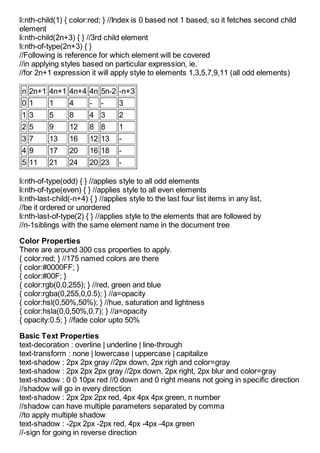
li:nth-child(1) { color:red; } //Index is 0 based not 1 based, so it fetches second child
element
li:nth-child(2n+3) { } //3rd child element
li:nth-of-type(2n+3) { }
//Following is reference for which element will be covered
//in applying styles based on particular expression, ie.
//for 2n+1 expression it will apply style to elements 1,3,5,7,9,11 (all odd elements)

n 2n+1 4n+1 4n+4 4n 5n-2 -n+3
01        1      4      -   -     3
13        5      8      4 3       2
25        9      12     8 8       1
37        13     16     12 13     -
49        17     20     16 18     -
5 11      21     24     20 23     -

li:nth-of-type(odd) { } //applies style to all odd elements
li:nth-of-type(even) { } //applies style to all even elements
li:nth-last-child(-n+4) { } //applies style to the last four list items in any list,
//be it ordered or unordered
li:nth-last-of-type(2) { } //applies style to the elements that are followed by
//n-1siblings with the same element name in the document tree

Color Properties
There are around 300 css properties to apply.
{ color:red; } //175 named colors are there
{ color:#0000FF; }
{ color:#00F; }
{ color:rgb(0,0,255); } //red, green and blue
{ color:rgba(0,255,0,0.5); } //a=opacity
{ color:hsl(0,50%,50%); } //hue, saturation and lightness
{ color:hsla(0,0,50%,0.7); } //a=opacity
{ opacity:0.5; } //fade color upto 50%

Basic Text Properties
text-decoration : overline | underline | line-through
text-transform : none | lowercase | uppercase | capitalize
text-shadow : 2px 2px gray //2px down, 2px righ and color=gray
text-shadow : 2px 2px 2px gray //2px down, 2px right, 2px blur and color=gray
text-shadow : 0 0 10px red //0 down and 0 right means not going in specific direction
//shadow will go in every direction
text-shadow : 2px 2px 2px red, 4px 4px 4px green, n number
//shadow can have multiple parameters separated by comma
//to apply multiple shadow
text-shadow : -2px 2px -2px red, 4px -4px -4px green
//-sign for going in reverse direction
Font Properties
font-style : normal | italique | oblique
font-variant : normal | small-caps
font-weight : normal | bold | bolder | light | lighter | #
//# can be any number between 100-900 where 100 is lighter and 900 bolder
font-size : {length} //1px, 1pt, 1cm, 0.5in
line-height : {length} //for making space between the lines
font-family : {fontname}

New way of defining font faces
@font-face {
font-family : “Arial123”;
src : url(“/fonts/Arial.woff”) format(woff);
}
//to use it
.arialFont {
font-family : Arial123;
}

How to define Columns?
{ columns : 8; }
{ columns : 100px 200px 100px 200px; }

Box Properties
{ margin : 10px; } //margin 10px in all directions
{ margin-left : 10px; }
{ margin-right : 10px; }
{ margin-top : 10px; }
{ margin-bottom : 10px; }

{ padding : 20px; } //padding 20px in all directions
{ padding-left : 20px; }
{ padding-right : 20px; }
{ padding-top : 20px; }
{ padding-bottom : 20px; }

{ border : 2px solid; }
{ border : 5px dotted red; }
{ border-left : 1px solid green; }

{ box-sizing : border-box; } //Includes border in total width defined for the content
{ -moz-box-sizing : border-box; } //For firefox
{ -webkit-box-sizing : border-box; } //For safari
{ box-sizing : content-box; } //Default behavior of width and height
{ box-sizing : inherit; }

Visibility
{ display : inline | block | inline-block | table | none }
{ visibility : visible | hidden }
{ white-space : normal | pre | nowrap | pre-wrap | pre-line | inherit }
{ overflow : visible | hidden | scroll | auto }
{ overflow-x : visible; }
{ overflow-y : hidden; }
{ box-shadow : 10px 10px 5px #888888; }
{ border-radius : 5px; } //for rounded border

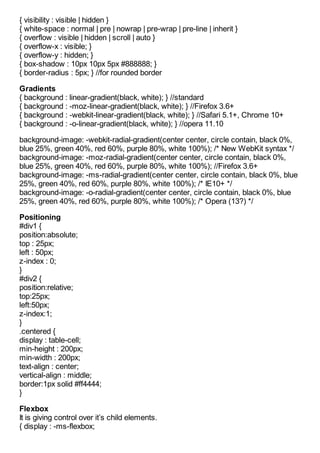
Gradients
{ background : linear-gradient(black, white); } //standard
{ background : -moz-linear-gradient(black, white); } //Firefox 3.6+
{ background : -webkit-linear-gradient(black, white); } //Safari 5.1+, Chrome 10+
{ background : -o-linear-gradient(black, white); } //opera 11.10

background-image: -webkit-radial-gradient(center center, circle contain, black 0%,
blue 25%, green 40%, red 60%, purple 80%, white 100%); /* New WebKit syntax */
background-image: -moz-radial-gradient(center center, circle contain, black 0%,
blue 25%, green 40%, red 60%, purple 80%, white 100%); //Firefox 3.6+
background-image: -ms-radial-gradient(center center, circle contain, black 0%, blue
25%, green 40%, red 60%, purple 80%, white 100%); /* IE10+ */
background-image: -o-radial-gradient(center center, circle contain, black 0%, blue
25%, green 40%, red 60%, purple 80%, white 100%); /* Opera (13?) */

Positioning
#div1 {
position:absolute;
top : 25px;
left : 50px;
z-index : 0;
}
#div2 {
position:relative;
top:25px;
left:50px;
z-index:1;
}
.centered {
display : table-cell;
min-height : 200px;
min-width : 200px;
text-align : center;
vertical-align : middle;
border:1px solid #ff4444;
}

Flexbox
It is giving control over it’s child elements.
{ display : -ms-flexbox;
-ms-flex-pack : distribute; //manage space between child flex elements
}
{ display : -ms-flexbox;
-ms-flex: 1 0 auto; //1=relative amount of flex, 0=size
-ms-flex: 2 0 auto; //2=double the size than previous one
}
{ display : -ms-flexbox;
-ms-flex-wrap : wrap;
}
#flexbox > div {
background-color : gray; }
#flexbox > div : nth-child(7) {
background-color : red; }

Grid
Grid Features
-Power of tables but implemented in CSS
-absolute rows and columns
-functional rows and columns
-spanning
-alignment
{ display: -ms-grid;
-ms-grid-columns:250px 250px;
-ms-grid-rows:250px 250px;
}
.grid > div > div : nth-child(2) {
-ms-grid-columns:2;
-ms-grid-rows:1;
}
.grid > div > div:nth-child(2) {
-ms-grid-row-span:2;
-ms-grid-column-span:3;
}
{ height:600px;
-ms-grid-rows:100px 1fr 2fr 100px;
width:400px;
-ms-grid-columns:100px 1fr 2fr;
}
We can also cascade flexbox inside flexbox or grid inside grid.

Transform, Transition and Animation
.grid div h2 {
-ms-grid-column-align: center;
-ms-grid-row-align: center;
}
.grid div:nth-of-type(2) h2 {
transform: scale(0.5);
}
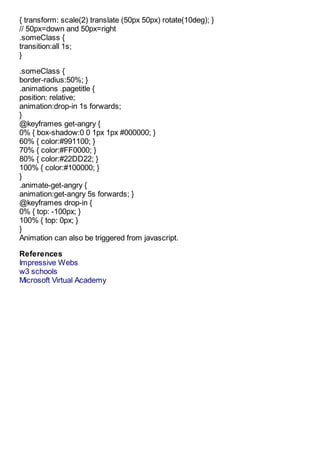
{ transform: scale(2) translate (50px 50px) rotate(10deg); }
// 50px=down and 50px=right
.someClass {
transition:all 1s;
}

.someClass {
border-radius:50%; }
.animations .pagetitle {
position: relative;
animation:drop-in 1s forwards;
}
@keyframes get-angry {
0% { box-shadow:0 0 1px 1px #000000; }
60% { color:#991100; }
70% { color:#FF0000; }
80% { color:#22DD22; }
100% { color:#100000; }
}
.animate-get-angry {
animation:get-angry 5s forwards; }
@keyframes drop-in {
0% { top: -100px; }
100% { top: 0px; }
}
Animation can also be triggered from javascript.

References
Impressive Webs
w3 schools
Microsoft Virtual Academy

Exam 70 480 CSS3 at Jinal Desai .NET

  • 1.
    Articles from JinalDesai .NET Exam 70-480 CSS3 2013-01-19 14:01:28 Jinal Desai The article is targeted for Microsoft Certification exam 70-480, the CSS3 described in the article is limited to the exam point of view only. Selectors Element Selector: li { color: red; } Class Selector: .fancyClass { color: red; } Universal Selector: *.fancyClass { color: red; } Combination of element selector and class selector to limit the scope: div .fancyClass { color:red; } Identifier Selector: #contactForm { color:blude; } Attribute Selector []: *[data-author] { color:red; } <div data-author></div> *[data-author=”Dan Brown”]{ } <div data-author="Dan Brown"></div> *[data-author*=Brown]{ } <div data-author="Dan Brown"></div> //*=contains *[data-author^=Dan]{ } <div data-author="Dan Brown"></div> //^=starts with *[data-author$=Brown]{ } <div data-author="Dan Brown"></div> //$=ends with Selector Chaining table, ul { color:red; } //all tabl and ul elements div table, div ul { color:red; } //all table and ul elements which are inside div Pseudo Element Selectors p::first-letter { color:red; } //Apply style to first character of every paragraph p::first-line { color:red; } //Apply style to first line of every paragraph p:hover { color:red; } //Apply style when hover on every paragraph Combinators Combinators are simple selectors in your css, which when combined it targets to group or individual elements. #Div1 div { } //All the divs inside div with id Div1 #Div1 p { } //All the paragraphs inside div with id Div1 #Div1 > p { } //All the immediate paragraphs inside the div with id Div1 #Div1 ~ p { } //All the sibling paragraphs to the div with id Div1 ul + div { } //Immediate succeeding div siblings of all ul Pseudo Classes li:first-child { color:red; }
  • 2.
    li:nth-child(1) { color:red;} //Index is 0 based not 1 based, so it fetches second child element li:nth-child(2n+3) { } //3rd child element li:nth-of-type(2n+3) { } //Following is reference for which element will be covered //in applying styles based on particular expression, ie. //for 2n+1 expression it will apply style to elements 1,3,5,7,9,11 (all odd elements) n 2n+1 4n+1 4n+4 4n 5n-2 -n+3 01 1 4 - - 3 13 5 8 4 3 2 25 9 12 8 8 1 37 13 16 12 13 - 49 17 20 16 18 - 5 11 21 24 20 23 - li:nth-of-type(odd) { } //applies style to all odd elements li:nth-of-type(even) { } //applies style to all even elements li:nth-last-child(-n+4) { } //applies style to the last four list items in any list, //be it ordered or unordered li:nth-last-of-type(2) { } //applies style to the elements that are followed by //n-1siblings with the same element name in the document tree Color Properties There are around 300 css properties to apply. { color:red; } //175 named colors are there { color:#0000FF; } { color:#00F; } { color:rgb(0,0,255); } //red, green and blue { color:rgba(0,255,0,0.5); } //a=opacity { color:hsl(0,50%,50%); } //hue, saturation and lightness { color:hsla(0,0,50%,0.7); } //a=opacity { opacity:0.5; } //fade color upto 50% Basic Text Properties text-decoration : overline | underline | line-through text-transform : none | lowercase | uppercase | capitalize text-shadow : 2px 2px gray //2px down, 2px righ and color=gray text-shadow : 2px 2px 2px gray //2px down, 2px right, 2px blur and color=gray text-shadow : 0 0 10px red //0 down and 0 right means not going in specific direction //shadow will go in every direction text-shadow : 2px 2px 2px red, 4px 4px 4px green, n number //shadow can have multiple parameters separated by comma //to apply multiple shadow text-shadow : -2px 2px -2px red, 4px -4px -4px green //-sign for going in reverse direction
  • 3.
    Font Properties font-style :normal | italique | oblique font-variant : normal | small-caps font-weight : normal | bold | bolder | light | lighter | # //# can be any number between 100-900 where 100 is lighter and 900 bolder font-size : {length} //1px, 1pt, 1cm, 0.5in line-height : {length} //for making space between the lines font-family : {fontname} New way of defining font faces @font-face { font-family : “Arial123”; src : url(“/fonts/Arial.woff”) format(woff); } //to use it .arialFont { font-family : Arial123; } How to define Columns? { columns : 8; } { columns : 100px 200px 100px 200px; } Box Properties { margin : 10px; } //margin 10px in all directions { margin-left : 10px; } { margin-right : 10px; } { margin-top : 10px; } { margin-bottom : 10px; } { padding : 20px; } //padding 20px in all directions { padding-left : 20px; } { padding-right : 20px; } { padding-top : 20px; } { padding-bottom : 20px; } { border : 2px solid; } { border : 5px dotted red; } { border-left : 1px solid green; } { box-sizing : border-box; } //Includes border in total width defined for the content { -moz-box-sizing : border-box; } //For firefox { -webkit-box-sizing : border-box; } //For safari { box-sizing : content-box; } //Default behavior of width and height { box-sizing : inherit; } Visibility { display : inline | block | inline-block | table | none }
  • 4.
    { visibility :visible | hidden } { white-space : normal | pre | nowrap | pre-wrap | pre-line | inherit } { overflow : visible | hidden | scroll | auto } { overflow-x : visible; } { overflow-y : hidden; } { box-shadow : 10px 10px 5px #888888; } { border-radius : 5px; } //for rounded border Gradients { background : linear-gradient(black, white); } //standard { background : -moz-linear-gradient(black, white); } //Firefox 3.6+ { background : -webkit-linear-gradient(black, white); } //Safari 5.1+, Chrome 10+ { background : -o-linear-gradient(black, white); } //opera 11.10 background-image: -webkit-radial-gradient(center center, circle contain, black 0%, blue 25%, green 40%, red 60%, purple 80%, white 100%); /* New WebKit syntax */ background-image: -moz-radial-gradient(center center, circle contain, black 0%, blue 25%, green 40%, red 60%, purple 80%, white 100%); //Firefox 3.6+ background-image: -ms-radial-gradient(center center, circle contain, black 0%, blue 25%, green 40%, red 60%, purple 80%, white 100%); /* IE10+ */ background-image: -o-radial-gradient(center center, circle contain, black 0%, blue 25%, green 40%, red 60%, purple 80%, white 100%); /* Opera (13?) */ Positioning #div1 { position:absolute; top : 25px; left : 50px; z-index : 0; } #div2 { position:relative; top:25px; left:50px; z-index:1; } .centered { display : table-cell; min-height : 200px; min-width : 200px; text-align : center; vertical-align : middle; border:1px solid #ff4444; } Flexbox It is giving control over it’s child elements. { display : -ms-flexbox;
  • 5.
    -ms-flex-pack : distribute;//manage space between child flex elements } { display : -ms-flexbox; -ms-flex: 1 0 auto; //1=relative amount of flex, 0=size -ms-flex: 2 0 auto; //2=double the size than previous one } { display : -ms-flexbox; -ms-flex-wrap : wrap; } #flexbox > div { background-color : gray; } #flexbox > div : nth-child(7) { background-color : red; } Grid Grid Features -Power of tables but implemented in CSS -absolute rows and columns -functional rows and columns -spanning -alignment { display: -ms-grid; -ms-grid-columns:250px 250px; -ms-grid-rows:250px 250px; } .grid > div > div : nth-child(2) { -ms-grid-columns:2; -ms-grid-rows:1; } .grid > div > div:nth-child(2) { -ms-grid-row-span:2; -ms-grid-column-span:3; } { height:600px; -ms-grid-rows:100px 1fr 2fr 100px; width:400px; -ms-grid-columns:100px 1fr 2fr; } We can also cascade flexbox inside flexbox or grid inside grid. Transform, Transition and Animation .grid div h2 { -ms-grid-column-align: center; -ms-grid-row-align: center; } .grid div:nth-of-type(2) h2 { transform: scale(0.5); }
  • 6.
    { transform: scale(2)translate (50px 50px) rotate(10deg); } // 50px=down and 50px=right .someClass { transition:all 1s; } .someClass { border-radius:50%; } .animations .pagetitle { position: relative; animation:drop-in 1s forwards; } @keyframes get-angry { 0% { box-shadow:0 0 1px 1px #000000; } 60% { color:#991100; } 70% { color:#FF0000; } 80% { color:#22DD22; } 100% { color:#100000; } } .animate-get-angry { animation:get-angry 5s forwards; } @keyframes drop-in { 0% { top: -100px; } 100% { top: 0px; } } Animation can also be triggered from javascript. References Impressive Webs w3 schools Microsoft Virtual Academy