CSS:
A Slippery Slope to the Backend
Hi, I’m Kacey Coughlin
Web Developer, LinkedIn
@kaceykaso
Menu:
1.Why is CSS !important?
2.What do preprocessors do?
3.How do preprocessors make your life easier?
4.Basic Sass mixins
5.How CSS is becoming more like JS
6.Where you can learn more…
Poll: I prefer to write…
1.) HTML/CSS
2.) Javascript
3.) Neither, backend
forever!
When you think of CSS….
“Stylesheet architecture”
“Painting with all the colors of the wind onto jagged mountains in
order to make them look like a bob Ross piece of art”
“Good CSS gives the web a better feel… bad CSS makes me /headde
sk”
“A thing that formats web pages that I totally don't understand”
“Curling into a ball and crying myself to sleep”
CSS (Cascading Style Sheet):
A language that describes how to presentation of a
document written in a markup language.
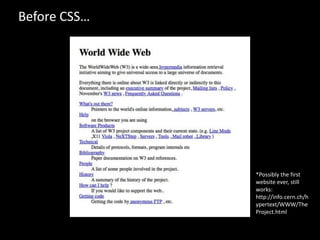
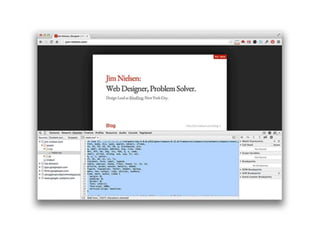
Before CSS…
*Possibly the first
website ever, still
works:
http://info.cern.ch/h
ypertext/WWW/The
Project.html
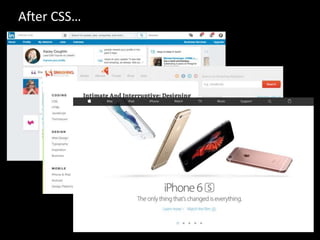
After CSS…
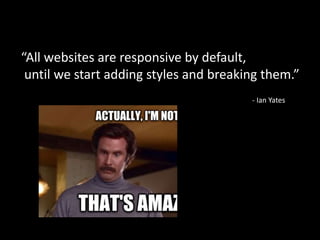
“All websites are responsive by default,
until we start adding styles and breaking them.”
- Ian Yates
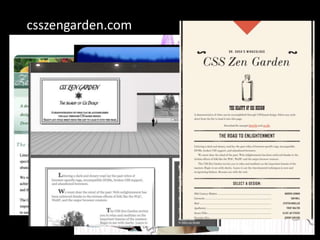
csszengarden.com
csszengarden.com
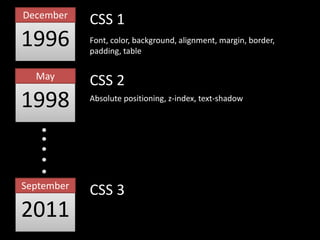
CSS 1
1996
December
1998
May
2011
September
CSS 2
CSS 3
Font, color, background, alignment, margin, border,
padding, table
Absolute positioning, z-index, text-shadow
CSS3 === Christmas!
Element:not(thing) /* targets elements w/o thing */
Element:first-of-type /* targets the first of this type */
Element:nth-child(n) /* targets every nth child */
Element:nth-of-type(n) /* targets every nth type */
Element[foo*=“bar”] /* targets attr containing “bar” */
Element ~ Element-sibling /* targets any general sibling */
Parallax
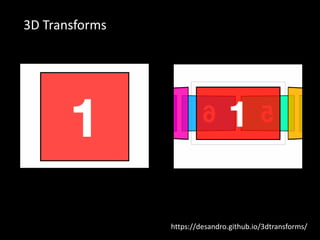
3D Transforms
https://desandro.github.io/3dtransforms/
CSS Preprocessors
Extends CSS to use variables, operators, functions, and inheritance.
Minifies and concatenates all files into one plain CSS file.
sass-lang.com lesscss.org learnboost.github.io/stylus
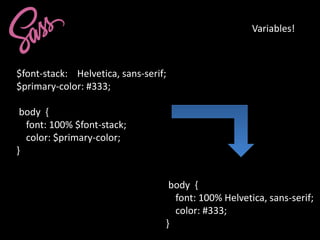
$font-stack: Helvetica, sans-serif;
$primary-color: #333;
body {
font: 100% $font-stack;
color: $primary-color;
}
body {
font: 100% Helvetica, sans-serif;
color: #333;
}
Variables!
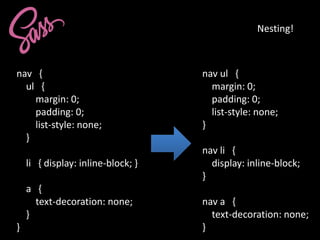
nav {
ul {
margin: 0;
padding: 0;
list-style: none;
}
li { display: inline-block; }
a {
text-decoration: none;
}
}
nav ul {
margin: 0;
padding: 0;
list-style: none;
}
nav li {
display: inline-block;
}
nav a {
text-decoration: none;
}
Nesting!
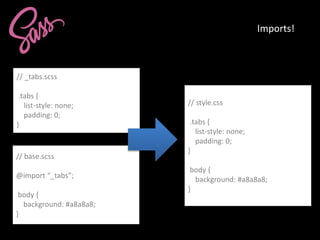
Imports!
// _tabs.scss
.tabs {
list-style: none;
padding: 0;
}
// base.scss
@import “_tabs”;
body {
background: #a8a8a8;
}
// style.css
.tabs {
list-style: none;
padding: 0;
}
body {
background: #a8a8a8;
}
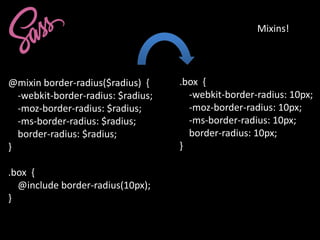
Mixins!
@mixin border-radius($radius) {
-webkit-border-radius: $radius;
-moz-border-radius: $radius;
-ms-border-radius: $radius;
border-radius: $radius;
}
.box {
@include border-radius(10px);
}
.box {
-webkit-border-radius: 10px;
-moz-border-radius: 10px;
-ms-border-radius: 10px;
border-radius: 10px;
}
Operators!
article[role="main"] {
float: left;
width: 600px / 960px * 100%;
}
article[role="main"] {
float: left;
width: 62.5%;
}
*Calc can do this, kinda :P
article[role=“main”] {
float: left;
width: calc(600px / 960px);
}
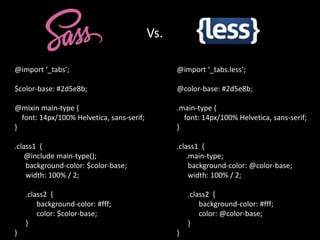
Vs.
@import ‘_tabs.less’;
@color-base: #2d5e8b;
.main-type {
font: 14px/100% Helvetica, sans-serif;
}
.class1 {
.main-type;
background-color: @color-base;
width: 100% / 2;
.class2 {
background-color: #fff;
color: @color-base;
}
}
@import ‘_tabs’;
$color-base: #2d5e8b;
@mixin main-type {
font: 14px/100% Helvetica, sans-serif;
}
.class1 {
@include main-type();
background-color: $color-base;
width: 100% / 2;
.class2 {
background-color: #fff;
color: $color-base;
}
}
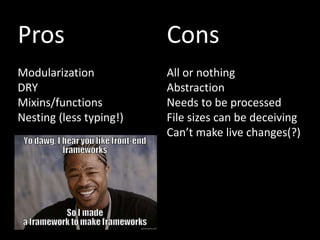
Pros
Modularization
DRY
Mixins/functions
Nesting (less typing!)
Cons
All or nothing
Abstraction
Needs to be processed
File sizes can be deceiving
Can’t make live changes(?)
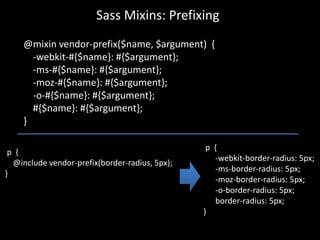
Sass Mixins: Prefixing
@mixin vendor-prefix($name, $argument) {
-webkit-#{$name}: #{$argument};
-ms-#{$name}: #{$argument};
-moz-#{$name}: #{$argument};
-o-#{$name}: #{$argument};
#{$name}: #{$argument};
}
p {
@include vendor-prefix(border-radius, 5px);
}
p {
-webkit-border-radius: 5px;
-ms-border-radius: 5px;
-moz-border-radius: 5px;
-o-border-radius: 5px;
border-radius: 5px;
}
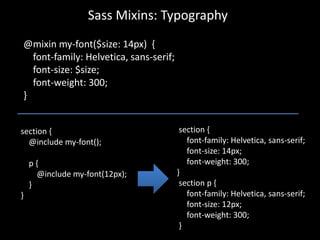
Sass Mixins: Typography
@mixin my-font($size: 14px) {
font-family: Helvetica, sans-serif;
font-size: $size;
font-weight: 300;
}
section {
@include my-font();
p {
@include my-font(12px);
}
}
section {
font-family: Helvetica, sans-serif;
font-size: 14px;
font-weight: 300;
}
section p {
font-family: Helvetica, sans-serif;
font-size: 12px;
font-weight: 300;
}
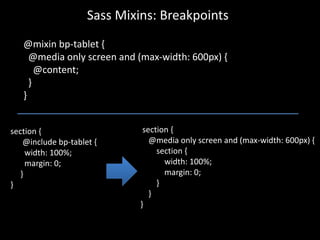
Sass Mixins: Breakpoints
@mixin bp-tablet {
@media only screen and (max-width: 600px) {
@content;
}
}
section {
@include bp-tablet {
width: 100%;
margin: 0;
}
}
section {
@media only screen and (max-width: 600px) {
section {
width: 100%;
margin: 0;
}
}
}
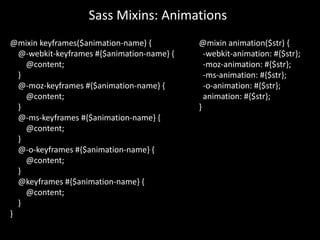
Sass Mixins: Animations
@mixin keyframes($animation-name) {
@-webkit-keyframes #{$animation-name} {
@content;
}
@-moz-keyframes #{$animation-name} {
@content;
}
@-ms-keyframes #{$animation-name} {
@content;
}
@-o-keyframes #{$animation-name} {
@content;
}
@keyframes #{$animation-name} {
@content;
}
}
@mixin animation($str) {
-webkit-animation: #{$str};
-moz-animation: #{$str};
-ms-animation: #{$str};
-o-animation: #{$str};
animation: #{$str};
}
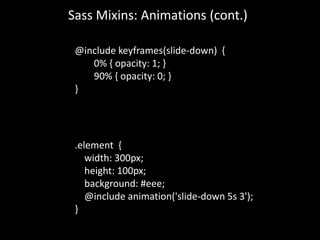
Sass Mixins: Animations (cont.)
@include keyframes(slide-down) {
0% { opacity: 1; }
90% { opacity: 0; }
}
.element {
width: 300px;
height: 100px;
background: #eee;
@include animation('slide-down 5s 3');
}
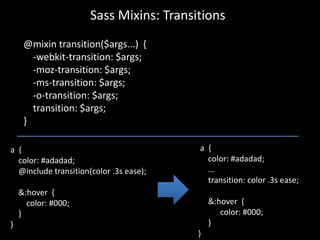
Sass Mixins: Transitions
@mixin transition($args...) {
-webkit-transition: $args;
-moz-transition: $args;
-ms-transition: $args;
-o-transition: $args;
transition: $args;
}
a {
color: #adadad;
@include transition(color .3s ease);
&:hover {
color: #000;
}
}
a {
color: #adadad;
…
transition: color .3s ease;
&:hover {
color: #000;
}
}
Sass Mixins: Visually Hide
@mixin hide-element() {
margin: -1px;
padding: 0;
width: 1px;
height: 1px;
overflow: hidden;
clip: rect(0 0 0 0);
position: absolute;
}
.hidden-element {
@include hide-element();
}
<button class="mobile-navigation-trigger">
<span class=”hide-element">
Open the navigation
</span>
<img src="img/mobile-navigation-icon.svg">
</button>
Preprocessors:
Making your life easier since 2006!
1. Less typing
2. Saves dev time
3. See 1 and 2
CSS is becoming more like Javascript…
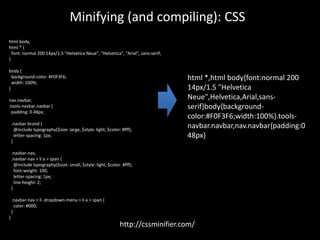
Minifying (and compiling): CSS
html body,
html * {
font: normal 200 14px/1.5 "Helvetica Neue", "Helvetica", "Arial", sans-serif;
}
body {
background-color: #F0F3F6;
width: 100%;
}
nav.navbar,
.tools-navbar.navbar {
padding: 0 48px;
.navbar-brand {
@include typography($size: large, $style: light, $color: #fff);
letter-spacing: 1px;
}
.navbar-nav,
.navbar-nav > li a > span {
@include typography($size: small, $style: light, $color: #fff);
font-weight: 100;
letter-spacing: 1px;
line-height: 2;
}
.navbar-nav > li .dropdown-menu > li a > span {
color: #000;
}
}
html *,html body{font:normal 200
14px/1.5 "Helvetica
Neue",Helvetica,Arial,sans-
serif}body{background-
color:#F0F3F6;width:100%}.tools-
navbar.navbar,nav.navbar{padding:0
48px}
http://cssminifier.com/
Minifying (and compiling): JS
(function ($) {
/**
* @function
* @property {object} jQuery plugin which runs handler function once specified
* element is inserted into the DOM
* @param {function} handler A function to execute at the time when the
* element is inserted
* @param {bool} shouldRunHandlerOnce Optional: if true, handler is unbound
* after its first invocation
* @example $(selector).waitUntilExists(function);
*/
$.fn.waitUntilExists = function (handler, shouldRunHandlerOnce, isChild) {
var found = 'found';
var $this = $(this.selector);
var $elements = $this.not(function () {
return $(this).data(found);
}).each(handler).data(found, true);
if (!isChild) {
(window.waitUntilExists_Intervals = window.waitUntilExists_Intervals ||
{})[this.selector] =
window.setInterval(function () {
$this.waitUntilExists(handler, shouldRunHandlerOnce, true);
}, 500)
;
} else if (shouldRunHandlerOnce && $elements.length) {
window.clearInterval(window.waitUntilExists_Intervals[this.selector]);
}
return $this;
}
}(jQuery));
!function(t){t.fn.waitUntilExists=function(n,i,s){var
e="found",a=t(this.selector),l=a.not(function(){return
t(this).data(e)}).each(n).data(e,!0);return
s?i&&l.length&&window.clearInterval(window.waitUntilE
xists_Intervals[this.selector]):(window.waitUntilExists_Int
ervals=window.waitUntilExists_Intervals||{})[this.selecto
r]=window.setInterval(function(){a.waitUntilExists(n,i,!0)}
,500),a}}(jQuery);
http://jscompress.com/
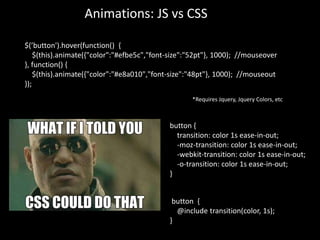
Animations: JS vs CSS
$(’button').hover(function() {
$(this).animate({"color":"#efbe5c","font-size":"52pt"}, 1000); //mouseover
}, function() {
$(this).animate({"color":"#e8a010","font-size":"48pt"}, 1000); //mouseout
});
*Requires Jquery, Jquery Colors, etc
button {
transition: color 1s ease-in-out;
-moz-transition: color 1s ease-in-out;
-webkit-transition: color 1s ease-in-out;
-o-transition: color 1s ease-in-out;
}
button {
@include transition(color, 1s);
}
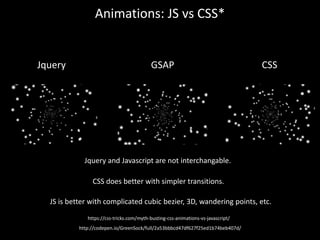
Animations: JS vs CSS*
Jquery and Javascript are not interchangable.
Jquery GSAP CSS
CSS does better with simpler transitions.
JS is better with complicated cubic bezier, 3D, wandering points, etc.
https://css-tricks.com/myth-busting-css-animations-vs-javascript/
http://codepen.io/GreenSock/full/2a53bbbcd47df627f25ed1b74beb407d/
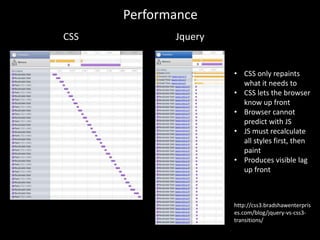
Performance
CSS Jquery
• CSS only repaints
what it needs to
• CSS lets the browser
know up front
• Browser cannot
predict with JS
• JS must recalculate
all styles first, then
paint
• Produces visible lag
up front
http://css3.bradshawenterpris
es.com/blog/jquery-vs-css3-
transitions/
Functions
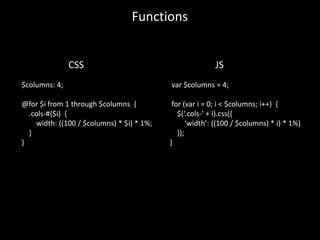
$columns: 4;
@for $i from 1 through $columns {
.cols-#{$i} {
width: ((100 / $columns) * $i) * 1%;
}
}
var $columns = 4;
for (var i = 0; i < $columns; i++) {
$(‘.cols-’ + i).css({
‘width’: ((100 / $columns) * i) * 1%)
});
}
CSS JS
Functions
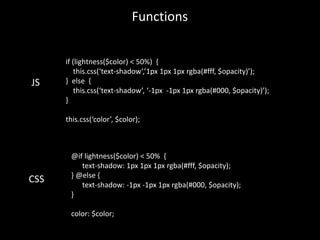
@if lightness($color) < 50% {
text-shadow: 1px 1px 1px rgba(#fff, $opacity);
} @else {
text-shadow: -1px -1px 1px rgba(#000, $opacity);
}
color: $color;
JS
CSS
if (lightness($color) < 50%) {
this.css(‘text-shadow’,’1px 1px 1px rgba(#fff, $opacity)’);
} else {
this.css(‘text-shadow’, ‘-1px -1px 1px rgba(#000, $opacity)’);
}
this.css(‘color’, $color);
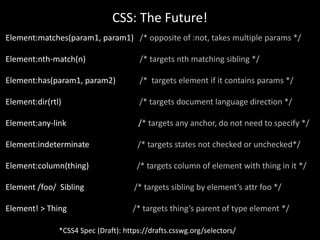
CSS: The Future!
*CSS4 Spec (Draft): https://drafts.csswg.org/selectors/
Element:matches(param1, param1) /* opposite of :not, takes multiple params */
Element:nth-match(n) /* targets nth matching sibling */
Element:has(param1, param2) /* targets element if it contains params */
Element:dir(rtl) /* targets document language direction */
Element:any-link /* targets any anchor, do not need to specify */
Element:indeterminate /* targets states not checked or unchecked*/
Element:column(thing) /* targets column of element with thing in it */
Element /foo/ Sibling /* targets sibling by element’s attr foo */
Element! > Thing /* targets thing’s parent of type element */
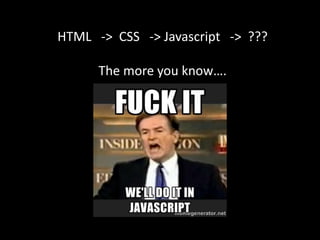
HTML -> CSS -> Javascript -> ???
The more you know….
Learn MOAR!
https://css-tricks.com/
http://codepen.io/
http://www.smashingmagazine.
com/
Shop Talk
http://shoptalkshow.com/
Boagworld
https://boagworld.com/show/
The Big Web Show
http://www.zeldman.com/
Category/the-big-web-show/
http://stackoverflow.com/
https://www.quora.com/
http://caniuse.com/
Thanks!!
@kaceykaso @linkedin

CSS: A Slippery Slope to the Backend

  • 1.
    CSS: A Slippery Slopeto the Backend
  • 2.
    Hi, I’m KaceyCoughlin Web Developer, LinkedIn @kaceykaso
  • 3.
    Menu: 1.Why is CSS!important? 2.What do preprocessors do? 3.How do preprocessors make your life easier? 4.Basic Sass mixins 5.How CSS is becoming more like JS 6.Where you can learn more…
  • 4.
    Poll: I preferto write… 1.) HTML/CSS 2.) Javascript 3.) Neither, backend forever!
  • 5.
    When you thinkof CSS….
  • 6.
    When you thinkof CSS…. “Stylesheet architecture” “Painting with all the colors of the wind onto jagged mountains in order to make them look like a bob Ross piece of art” “Good CSS gives the web a better feel… bad CSS makes me /headde sk” “A thing that formats web pages that I totally don't understand” “Curling into a ball and crying myself to sleep”
  • 7.
    CSS (Cascading StyleSheet): A language that describes how to presentation of a document written in a markup language.
  • 8.
    Before CSS… *Possibly thefirst website ever, still works: http://info.cern.ch/h ypertext/WWW/The Project.html
  • 9.
  • 11.
    “All websites areresponsive by default, until we start adding styles and breaking them.” - Ian Yates
  • 12.
  • 13.
  • 14.
    CSS 1 1996 December 1998 May 2011 September CSS 2 CSS3 Font, color, background, alignment, margin, border, padding, table Absolute positioning, z-index, text-shadow
  • 15.
    CSS3 === Christmas! Element:not(thing)/* targets elements w/o thing */ Element:first-of-type /* targets the first of this type */ Element:nth-child(n) /* targets every nth child */ Element:nth-of-type(n) /* targets every nth type */ Element[foo*=“bar”] /* targets attr containing “bar” */ Element ~ Element-sibling /* targets any general sibling */
  • 16.
  • 17.
  • 18.
    CSS Preprocessors Extends CSSto use variables, operators, functions, and inheritance. Minifies and concatenates all files into one plain CSS file. sass-lang.com lesscss.org learnboost.github.io/stylus
  • 19.
    $font-stack: Helvetica, sans-serif; $primary-color:#333; body { font: 100% $font-stack; color: $primary-color; } body { font: 100% Helvetica, sans-serif; color: #333; } Variables!
  • 20.
    nav { ul { margin:0; padding: 0; list-style: none; } li { display: inline-block; } a { text-decoration: none; } } nav ul { margin: 0; padding: 0; list-style: none; } nav li { display: inline-block; } nav a { text-decoration: none; } Nesting!
  • 21.
    Imports! // _tabs.scss .tabs { list-style:none; padding: 0; } // base.scss @import “_tabs”; body { background: #a8a8a8; } // style.css .tabs { list-style: none; padding: 0; } body { background: #a8a8a8; }
  • 22.
    Mixins! @mixin border-radius($radius) { -webkit-border-radius:$radius; -moz-border-radius: $radius; -ms-border-radius: $radius; border-radius: $radius; } .box { @include border-radius(10px); } .box { -webkit-border-radius: 10px; -moz-border-radius: 10px; -ms-border-radius: 10px; border-radius: 10px; }
  • 23.
    Operators! article[role="main"] { float: left; width:600px / 960px * 100%; } article[role="main"] { float: left; width: 62.5%; } *Calc can do this, kinda :P article[role=“main”] { float: left; width: calc(600px / 960px); }
  • 24.
    Vs. @import ‘_tabs.less’; @color-base: #2d5e8b; .main-type{ font: 14px/100% Helvetica, sans-serif; } .class1 { .main-type; background-color: @color-base; width: 100% / 2; .class2 { background-color: #fff; color: @color-base; } } @import ‘_tabs’; $color-base: #2d5e8b; @mixin main-type { font: 14px/100% Helvetica, sans-serif; } .class1 { @include main-type(); background-color: $color-base; width: 100% / 2; .class2 { background-color: #fff; color: $color-base; } }
  • 25.
    Pros Modularization DRY Mixins/functions Nesting (less typing!) Cons Allor nothing Abstraction Needs to be processed File sizes can be deceiving Can’t make live changes(?)
  • 26.
    Sass Mixins: Prefixing @mixinvendor-prefix($name, $argument) { -webkit-#{$name}: #{$argument}; -ms-#{$name}: #{$argument}; -moz-#{$name}: #{$argument}; -o-#{$name}: #{$argument}; #{$name}: #{$argument}; } p { @include vendor-prefix(border-radius, 5px); } p { -webkit-border-radius: 5px; -ms-border-radius: 5px; -moz-border-radius: 5px; -o-border-radius: 5px; border-radius: 5px; }
  • 27.
    Sass Mixins: Typography @mixinmy-font($size: 14px) { font-family: Helvetica, sans-serif; font-size: $size; font-weight: 300; } section { @include my-font(); p { @include my-font(12px); } } section { font-family: Helvetica, sans-serif; font-size: 14px; font-weight: 300; } section p { font-family: Helvetica, sans-serif; font-size: 12px; font-weight: 300; }
  • 28.
    Sass Mixins: Breakpoints @mixinbp-tablet { @media only screen and (max-width: 600px) { @content; } } section { @include bp-tablet { width: 100%; margin: 0; } } section { @media only screen and (max-width: 600px) { section { width: 100%; margin: 0; } } }
  • 29.
    Sass Mixins: Animations @mixinkeyframes($animation-name) { @-webkit-keyframes #{$animation-name} { @content; } @-moz-keyframes #{$animation-name} { @content; } @-ms-keyframes #{$animation-name} { @content; } @-o-keyframes #{$animation-name} { @content; } @keyframes #{$animation-name} { @content; } } @mixin animation($str) { -webkit-animation: #{$str}; -moz-animation: #{$str}; -ms-animation: #{$str}; -o-animation: #{$str}; animation: #{$str}; }
  • 30.
    Sass Mixins: Animations(cont.) @include keyframes(slide-down) { 0% { opacity: 1; } 90% { opacity: 0; } } .element { width: 300px; height: 100px; background: #eee; @include animation('slide-down 5s 3'); }
  • 31.
    Sass Mixins: Transitions @mixintransition($args...) { -webkit-transition: $args; -moz-transition: $args; -ms-transition: $args; -o-transition: $args; transition: $args; } a { color: #adadad; @include transition(color .3s ease); &:hover { color: #000; } } a { color: #adadad; … transition: color .3s ease; &:hover { color: #000; } }
  • 32.
    Sass Mixins: VisuallyHide @mixin hide-element() { margin: -1px; padding: 0; width: 1px; height: 1px; overflow: hidden; clip: rect(0 0 0 0); position: absolute; } .hidden-element { @include hide-element(); } <button class="mobile-navigation-trigger"> <span class=”hide-element"> Open the navigation </span> <img src="img/mobile-navigation-icon.svg"> </button>
  • 33.
    Preprocessors: Making your lifeeasier since 2006! 1. Less typing 2. Saves dev time 3. See 1 and 2
  • 34.
    CSS is becomingmore like Javascript…
  • 35.
    Minifying (and compiling):CSS html body, html * { font: normal 200 14px/1.5 "Helvetica Neue", "Helvetica", "Arial", sans-serif; } body { background-color: #F0F3F6; width: 100%; } nav.navbar, .tools-navbar.navbar { padding: 0 48px; .navbar-brand { @include typography($size: large, $style: light, $color: #fff); letter-spacing: 1px; } .navbar-nav, .navbar-nav > li a > span { @include typography($size: small, $style: light, $color: #fff); font-weight: 100; letter-spacing: 1px; line-height: 2; } .navbar-nav > li .dropdown-menu > li a > span { color: #000; } } html *,html body{font:normal 200 14px/1.5 "Helvetica Neue",Helvetica,Arial,sans- serif}body{background- color:#F0F3F6;width:100%}.tools- navbar.navbar,nav.navbar{padding:0 48px} http://cssminifier.com/
  • 36.
    Minifying (and compiling):JS (function ($) { /** * @function * @property {object} jQuery plugin which runs handler function once specified * element is inserted into the DOM * @param {function} handler A function to execute at the time when the * element is inserted * @param {bool} shouldRunHandlerOnce Optional: if true, handler is unbound * after its first invocation * @example $(selector).waitUntilExists(function); */ $.fn.waitUntilExists = function (handler, shouldRunHandlerOnce, isChild) { var found = 'found'; var $this = $(this.selector); var $elements = $this.not(function () { return $(this).data(found); }).each(handler).data(found, true); if (!isChild) { (window.waitUntilExists_Intervals = window.waitUntilExists_Intervals || {})[this.selector] = window.setInterval(function () { $this.waitUntilExists(handler, shouldRunHandlerOnce, true); }, 500) ; } else if (shouldRunHandlerOnce && $elements.length) { window.clearInterval(window.waitUntilExists_Intervals[this.selector]); } return $this; } }(jQuery)); !function(t){t.fn.waitUntilExists=function(n,i,s){var e="found",a=t(this.selector),l=a.not(function(){return t(this).data(e)}).each(n).data(e,!0);return s?i&&l.length&&window.clearInterval(window.waitUntilE xists_Intervals[this.selector]):(window.waitUntilExists_Int ervals=window.waitUntilExists_Intervals||{})[this.selecto r]=window.setInterval(function(){a.waitUntilExists(n,i,!0)} ,500),a}}(jQuery); http://jscompress.com/
  • 37.
    Animations: JS vsCSS $(’button').hover(function() { $(this).animate({"color":"#efbe5c","font-size":"52pt"}, 1000); //mouseover }, function() { $(this).animate({"color":"#e8a010","font-size":"48pt"}, 1000); //mouseout }); *Requires Jquery, Jquery Colors, etc button { transition: color 1s ease-in-out; -moz-transition: color 1s ease-in-out; -webkit-transition: color 1s ease-in-out; -o-transition: color 1s ease-in-out; } button { @include transition(color, 1s); }
  • 38.
    Animations: JS vsCSS* Jquery and Javascript are not interchangable. Jquery GSAP CSS CSS does better with simpler transitions. JS is better with complicated cubic bezier, 3D, wandering points, etc. https://css-tricks.com/myth-busting-css-animations-vs-javascript/ http://codepen.io/GreenSock/full/2a53bbbcd47df627f25ed1b74beb407d/
  • 39.
    Performance CSS Jquery • CSSonly repaints what it needs to • CSS lets the browser know up front • Browser cannot predict with JS • JS must recalculate all styles first, then paint • Produces visible lag up front http://css3.bradshawenterpris es.com/blog/jquery-vs-css3- transitions/
  • 40.
    Functions $columns: 4; @for $ifrom 1 through $columns { .cols-#{$i} { width: ((100 / $columns) * $i) * 1%; } } var $columns = 4; for (var i = 0; i < $columns; i++) { $(‘.cols-’ + i).css({ ‘width’: ((100 / $columns) * i) * 1%) }); } CSS JS
  • 41.
    Functions @if lightness($color) <50% { text-shadow: 1px 1px 1px rgba(#fff, $opacity); } @else { text-shadow: -1px -1px 1px rgba(#000, $opacity); } color: $color; JS CSS if (lightness($color) < 50%) { this.css(‘text-shadow’,’1px 1px 1px rgba(#fff, $opacity)’); } else { this.css(‘text-shadow’, ‘-1px -1px 1px rgba(#000, $opacity)’); } this.css(‘color’, $color);
  • 42.
    CSS: The Future! *CSS4Spec (Draft): https://drafts.csswg.org/selectors/ Element:matches(param1, param1) /* opposite of :not, takes multiple params */ Element:nth-match(n) /* targets nth matching sibling */ Element:has(param1, param2) /* targets element if it contains params */ Element:dir(rtl) /* targets document language direction */ Element:any-link /* targets any anchor, do not need to specify */ Element:indeterminate /* targets states not checked or unchecked*/ Element:column(thing) /* targets column of element with thing in it */ Element /foo/ Sibling /* targets sibling by element’s attr foo */ Element! > Thing /* targets thing’s parent of type element */
  • 43.
    HTML -> CSS-> Javascript -> ??? The more you know….
  • 44.
    Learn MOAR! https://css-tricks.com/ http://codepen.io/ http://www.smashingmagazine. com/ Shop Talk http://shoptalkshow.com/ Boagworld https://boagworld.com/show/ TheBig Web Show http://www.zeldman.com/ Category/the-big-web-show/ http://stackoverflow.com/ https://www.quora.com/ http://caniuse.com/
  • 45.

Editor's Notes

  • #38 Before CSS3, js was only way to animate (lets ignore Flash). If you didn’t know JS, you were shit out of luck! But now, we can animate with CSS, and what usually tends to be the case now, better understand and slip into JS.
  • #39 Yes, Javascript (pure) is still king in terms of performance, but that comes with some caviats.