Juicer
一个 Javascript 模板引擎の实现与优化


            流火 @ TaobaoUED
            Blog: http://benben.cc
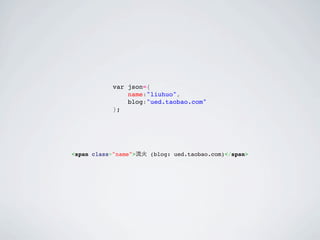
var json={
    name:"liuhuo",
    blog:"ued.taobao.com"
};
var json={
               name:"liuhuo",
               blog:"ued.taobao.com"
           };


<span class="name">流火 (blog: ued.taobao.com)</span>
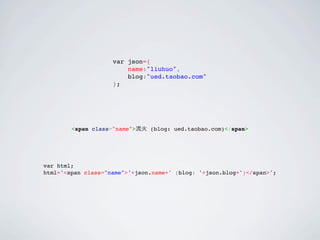
var json={
                        name:"liuhuo",
                        blog:"ued.taobao.com"
                    };


        <span class="name">流火 (blog: ued.taobao.com)</span>


var html;
html='<span class="name">'+json.name+' (blog: '+json.blog+')</span>';
function sub(str,data) {
    return str
        .replace(/{(.*?)}/igm,function($,$1) {
            return data[$1]?data[$1]:$;
        });
}
var tpl='<span class="name">{name} (blog: {blog})</span>';

var html=sub(tpl,json);
YUI.Lang.sub
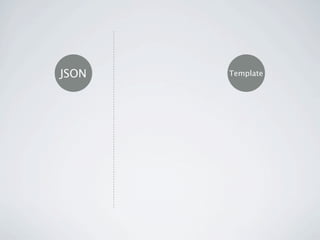
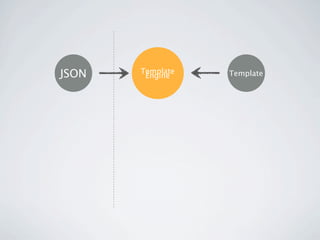
JSON   Template
JSON   Template
JSON   Template
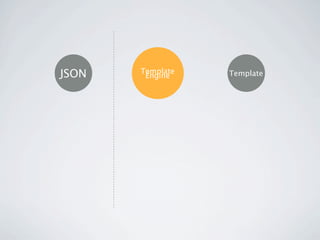
        Engine    Template
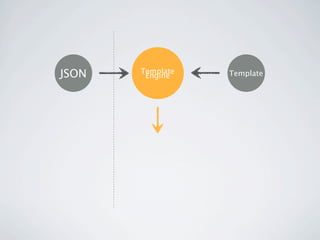
JSON   Template
        Engine    Template
JSON   Template
        Engine    Template
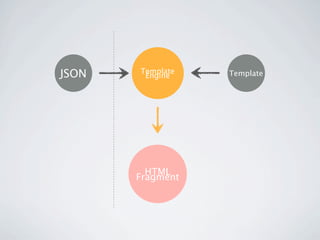
JSON   Template
        Engine    Template


         HTML
       Fragment
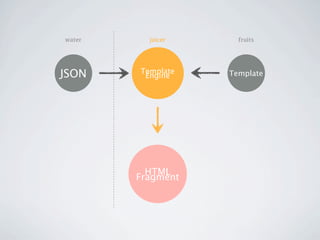
water     juicer     fruits


JSON    Template
         Engine    Template


          HTML
        Fragment
doT      yayaTemplate
    ejs
             Mustache
                             artTemplate
nTenjin
                    Kissy template
   micro template

   ...
               jQuery tmpl
“如无必要,勿增实体”
Entia non sunt multiplicanda praeter
necessitatem.
Security
Security
 XSS escape
Security
          XSS escape


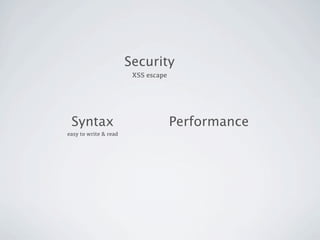
Syntax
Security
                        XSS escape


 Syntax
easy to write & read
Security
                        XSS escape


 Syntax                              Performance
easy to write & read
Security
                        XSS escape


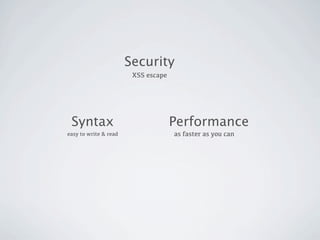
 Syntax                              Performance
easy to write & read                 as faster as you can
Security
                        XSS escape


 Syntax                              Performance
easy to write & read                 as faster as you can


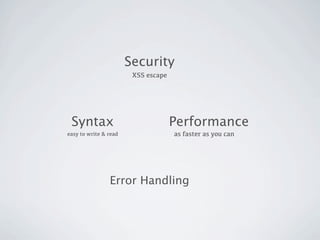
                Error Handling
Security
                        XSS escape


 Syntax                              Performance
easy to write & read                 as faster as you can


                Error Handling
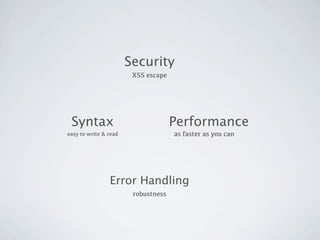
                        robustness
Security
                        XSS escape


 Syntax                              Performance
easy to write & read                 as faster as you can


                Error Handling
                        robustness
Syntax
<ul>                                               <ul>                                            <ul>
    {{#list}}                                          {@each data.list as it,k}                       {{#each list as it,k}}
        {{#show}}                                          {@if it.show}                                   {{#if it.show}}
            <li>{{name}} (index: {{index}})</li>               <li>${it.name} (index: ${k})</li>               <li>{{it.name}} (index: {{k}})</li>
        {{/show}}                                          {@/if}                                          {{/if}}
    {{/list}}                                          {@/each}                                        {{/each}}
    {{#blah}}                                          {@each data.blah as it}                         {{#each blah as it}}
        <li>                                               <li>                                            <li>
            num: {{num}}                                       num: ${it.num}                                  num: {{it.num}}
            ...                                                {@if it.num==3}                                 {{#if it.num==3}}
            {{#inner}}                                             {@each it.inner as it2}                         {{#each it.inner as it2}}
                <li>{{time}}</li>                                      <li>${it2.time}</li>                            <li>{{it2.time}}</li>
            {{/inner}}                                             {@/each}                                        {{/each}}
            ...                                                {@/if}                                          {{/if}}
        </li>                                              </li>                                           </li>
    {{/blah}}                                          {@/each}                                        {{/each}}
</ul>                                              </ul>                                           </ul>

<ul>                                                                      <ul>
    <% for(var i=0;i<list.length;i++) { %>                                    <?js for(var i=0;i<it.list.length;i++) { ?>
        <% if(list[i].show) { %>                                                  <?js if(it.list[i].show) { ?>
            <li><%= list[i].name %> (index: <%= i %>)</li>                            <li>${it.list[i].name} (index: ${i})</li>
        <% } %>                                                                   <?js } ?>
    <% } %>                                                                   <?js } ?>
    <% for(var i=0;i<blah.length;i++) { %>                                    <?js for(var i=0;i<it.blah.length;i++) { ?>
        <li>                                                                      <li>
            num: <%= blah[i].num %>                                                   num: ${it.blah[i].num}
            <% if(blah[i].num==3) { %>                                                <?js if(it.blah[i].num==3) { ?>           
                <% for(var j=0;j<blah[i].inner.length;j++) { %>                           <?js for(var j=0;j<it.blah[i].inner.length;j++) { ?>
                    <li><%= blah[i].inner[j].time %></li>                                     <li>${it.blah[i].inner[j].time}</li>
                <% } %>                                                                   <?js } ?>
            <% } %>                                                                   <?js } ?>
        </li>                                                                     </li>
    <% } %>                                                                   <?js } ?>
</ul>                                                                     </ul>
JSON
var data={
    list:[
        {name:'liuhuo',show:true},
        {name:'benben',show:false},
        {name:'taobao',show:true}
    ],
    blah:[
        {num:1},
        {num:2},
        {num:3,inner:[
            {'time':'15:00'},
            {'time':'16:00'},
            {'time':'17:00'},
            {'time':'18:00'}
        ]},
        {num:4}
    ]
};
JSON                                  EXPECTED RESULT
var data={                            <ul>
    list:[                                <li>liuhuo (index: 0)</li>
        {name:'liuhuo',show:true},        <li>benben (index: 1)</li>
        {name:'benben',show:false},       <li>taobao (index: 2)</li>
        {name:'taobao',show:true}         <li>num: 1</li>
    ],                                    <li>num: 2</li>
    blah:[                                <li>num: 3</li>
        {num:1},                          <li>15:00</li>
        {num:2},                          <li>16:00</li>
        {num:3,inner:[                    <li>17:00</li>
            {'time':'15:00'},             <li>18:00</li>
            {'time':'16:00'},             <li>num: 4</li>
            {'time':'17:00'},         </ul>
            {'time':'18:00'}
        ]},
        {num:4}
    ]
};
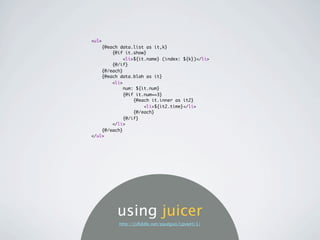
<ul>
    {@each data.list as it,k}
        {@if it.show}
            <li>${it.name} (index: ${k})</li>
        {@/if}
    {@/each}
    {@each data.blah as it}
        <li>
            num: ${it.num}
            {@if it.num==3}
                {@each it.inner as it2}
                    <li>${it2.time}</li>
                {@/each}
            {@/if}
        </li>
    {@/each}
</ul>


         using juicer
          http://jsfiddle.net/paulguo/LpvwH/1/
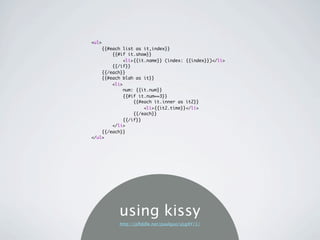
<ul>
    {{#each list as it,index}}
        {{#if it.show}}
            <li>{{it.name}} (index: {{index}})</li>
        {{/if}}
    {{/each}}
    {{#each blah as it}}
        <li>
            num: {{it.num}}
            {{#if it.num==3}}
                {{#each it.inner as it2}}
                    <li>{{it2.time}}</li>
                {{/each}}
            {{/if}}
        </li>
    {{/each}}
</ul>


          using kissy
          http://jsfiddle.net/paulguo/yLg4Y/1/
<ul>
    {{#list}}
        {{#show}}
            <li>{{name}} (index: {{index}})</li>
        {{/show}}
    {{/list}}
    {{#blah}}
        <li>
            num: {{num}}
            {{#inner}}
                <li>{{time}}</li>
            {{/inner}}
        </li>
    {{/blah}}
</ul>


    using mustache
          http://jsfiddle.net/paulguo/VCH9k/1/
<ul>
    <% for(var i=0;i<list.length;i++) { %>
        <% if(list[i].show) { %>
            <li><%= list[i].name %> (index: <%= i %>)</li>
        <% } %>
    <% } %>
    <% for(var i=0;i<blah.length;i++) { %>
        <li>
            num: <%= blah[i].num %>
            <% if(blah[i].num==3) { %>           
                <% for(var j=0;j<blah[i].inner.length;j++) { %>
                    <li><%= blah[i].inner[j].time %></li>
                <% } %>
            <% } %>
        </li>
    <% } %>
</ul>


               using micro
                http://jsfiddle.net/paulguo/KsDhC/1/
<ul>
    <?js for(var i=0;i<it.list.length;i++) { ?>
        <?js if(it.list[i].show) { ?>
            <li>${it.list[i].name} (index: ${i})</li>
        <?js } ?>
    <?js } ?>
    <?js for(var i=0;i<it.blah.length;i++) { ?>
        <li>
            num: ${it.blah[i].num}
            <?js if(it.blah[i].num==3) { ?>           
                <?js for(var j=0;j<it.blah[i].inner.length;j++) { ?>
                    <li>${it.blah[i].inner[j].time}</li>
                <?js } ?>
            <?js } ?>
        </li>
    <?js } ?>
</ul>


               using nTenjin
                  http://jsfiddle.net/paulguo/W7eVV/1/
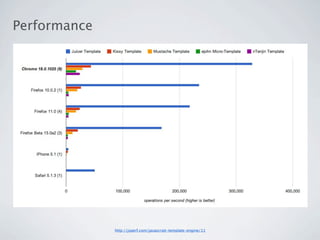
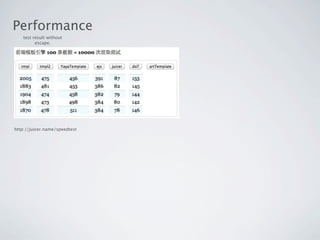
Performance
Performance


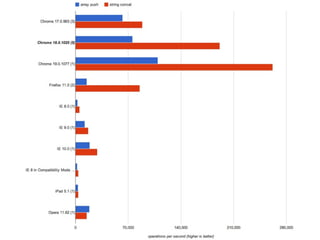
              http://jsperf.com/javascript-template-engine/11
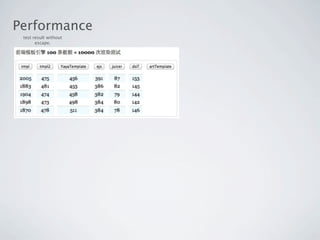
Performance
 test result without
       escape.
Performance
 test result without
       escape.
Performance
    test result without
          escape.


http://juicer.name/speedtest
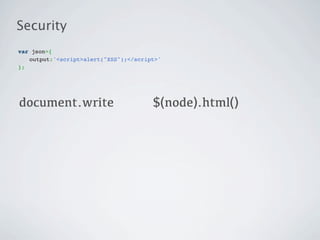
Security
var json={
" output:'<script>alert("XSS");</script>'
};
Security
var json={
" output:'<script>alert("XSS");</script>'
};


document.write
Security
var json={
" output:'<script>alert("XSS");</script>'
};


document.write                        $(node).html()
Security
var json={
" output:'<script>alert("XSS");</script>'
};


document.write                        $(node).html()

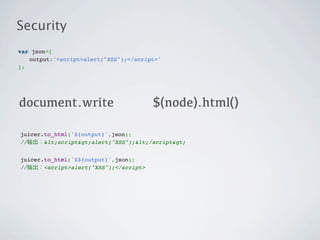
juicer.to_html('${output}',json);
//输出:&lt;script&gt;alert("XSS");&lt;/script&gt;


juicer.to_html('$${output}',json);
//输出:<script>alert("XSS");</script>
template
compile
template             reusable function
compile
template             reusable function
                           compiled template
compile                             render
template             reusable function                  html code
                           compiled template
var json={
    list:[
        {name:"benben"},
        {name:"liuhuo"}
    ]
};

var tpl='{@each data.list as value,key}$${value.name}{@/each}';
var compiled_tpl=juicer.compile(tpl,{errorhandling:false});
function anonymous(data) {
    var data = data || {};
    var out = '';
    out += '';
    for (var i0 = 0, l = data.list.length; i0 < l; i0++) {
        var value = data.list[i0];
        var key = i0;
        out += '';
        out += ((value.name));
        out += '';
    }
    out += '';
    return out;
}
Several Optimization Point


                using += instead of array.push
Browser string optimizations have changed the string
concatenation picture.
Firefox was the first browser to optimize string concatenation. Beginning with
version 1.0, the array technique is actually slower than using the plus operator
in all cases. Other browsers have also optimized string concatenation, so
Safari, Opera, Chrome, and Internet Explorer 8 also show better performance
using the plus operator. Internet Explorer prior to version 8 didn’t have such an
optimization, and so the array technique is always faster than the plus operator.


— Writing Efficient JavaScript: Chapter 7 – Even Faster Websites
The V8 javascript engine (used in Google Chrome) uses this code
to do string concatenation:


// ECMA-262, section 15.5.4.6
function StringConcat() {
  if (IS_NULL_OR_UNDEFINED(this) && !IS_UNDETECTABLE(this)) {
    throw MakeTypeError("called_on_null_or_undefined", ["String.prototype.concat"]);
  }
  var len = %_ArgumentsLength();
  var this_as_string = TO_STRING_INLINE(this);
  if (len === 1) {
    return this_as_string + %_Arguments(0);
  }
  var parts = new InternalArray(len + 1);
  parts[0] = this_as_string;
  for (var i = 0; i < len; i++) {
    var part = %_Arguments(i);
    parts[i + 1] = TO_STRING_INLINE(part);
  }
  return %StringBuilderConcat(parts, len + 1, "");
}
Several Optimization Point


                             avoid using with {}
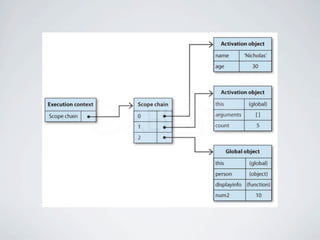
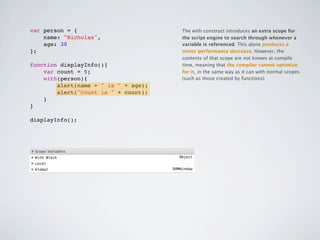
var person = {                        The with construct introduces an extra scope for
    name: "Nicholas",                 the script engine to search through whenever a
    age: 30                           variable is referenced. This alone produces a
};                                    minor performance decrease. However, the
                                      contents of that scope are not known at compile
function displayInfo(){               time, meaning that the compiler cannot optimize
    var count = 5;                    for it, in the same way as it can with normal scopes
    with(person){                     (such as those created by functions).
        alert(name + " is " + age);
        alert("Count is " + count);
    }
}

displayInfo();
Several Optimization Point


                  cache the compiled template.
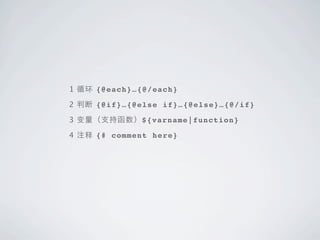
1 循环 {@each}…{@/each}

2 判断 {@if}…{@else if}…{@else}…{@/if}

3 变量(支持函数)${varname|function}

4 注释 {# comment here}
a demo, then docs.
          http://juicer.name
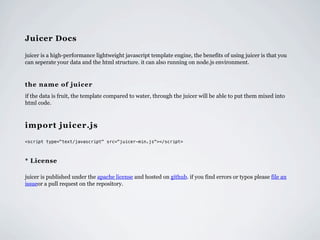
Juicer Docs

juicer is a high-performance lightweight javascript template engine, the benefits of using juicer is that you
can seperate your data and the html structure. it can also running on node.js environment.


the name of juicer
if the data is fruit, the template compared to water, through the juicer will be able to put them mixed into
html code.


import juicer.js
<script type="text/javascript" src="juicer-min.js"></script>


* License

juicer is published under the apache license and hosted on github. if you find errors or typos please file an
issueor a pull request on the repository.
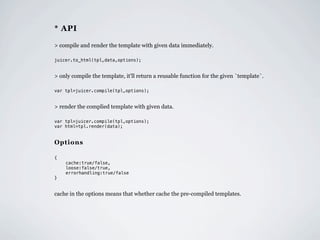
* API

> compile and render the template with given data immediately.

juicer.to_html(tpl,data,options);


> only compile the template, it'll return a reusable function for the given `template`.

var tpl=juicer.compile(tpl,options);


> render the complied template with given data.

var tpl=juicer.compile(tpl,options);
var html=tpl.render(data);


Options

{
"   cache:true/false,
"   loose:false/true,
    errorhandling:true/false
}


cache in the options means that whether cache the pre-compiled templates.
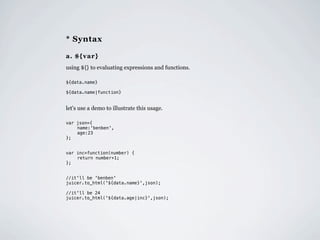
* Syntax

a. ${var}
using ${} to evaluating expressions and functions.

${data.name}

${data.name|function}


let's use a demo to illustrate this usage.

var json={
"   name:'benben',
"   age:23
};


var inc=function(number) {
"   return number+1;
};


//it'll be 'benben'
juicer.to_html('${data.name}',json);

//it'll be 24
juicer.to_html('${data.age|inc}',json);
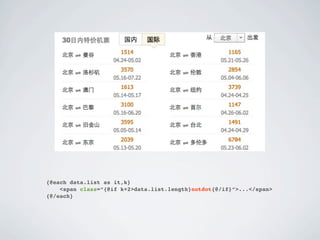
{@each data.list as it,k}
    <span class=”{@if k+2>data.list.length}notdot{@/if}”>...</span>
{@/each}
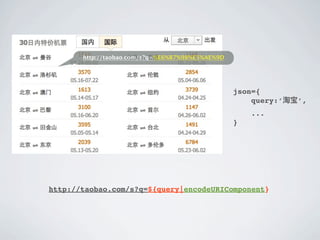
http://taobao.com/s?q=%E6%B7%98%E5%AE%9D


                                                  json={
                                                      query:’淘宝’,
                                                      ...
                                                  }


http://taobao.com/s?q=${query|encodeURIComponent}
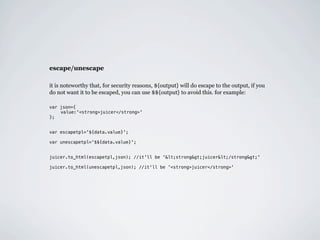
escape/unescape

it is noteworthy that, for security reasons, ${output} will do escape to the output, if you
do not want it to be escaped, you can use $${output} to avoid this. for example:

var json={
"   value:'<strong>juicer</strong>'
};


var escapetpl='${data.value}';

var unescapetpl='$${data.value}';


juicer.to_html(escapetpl,json); //it'll be '&lt;strong&gt;juicer&lt;/strong&gt;'

juicer.to_html(unescapetpl,json); //it'll be '<strong>juicer</strong>'
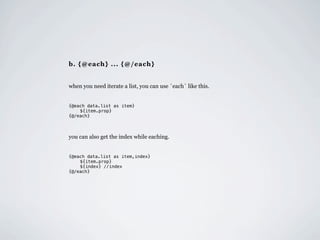
b. {@each} ... {@/each}


when you need iterate a list, you can use `each` like this.


{@each data.list as item}
"   ${item.prop}
{@/each}


you can also get the index while eaching.


{@each data.list as item,index}
"   ${item.prop}
"   ${index} //index
{@/each}
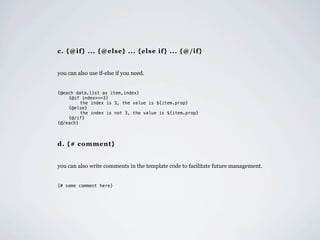
c. {@if} ... {@else} ... {else if} ... {@/if}


you can also use if-else if you need.


{@each data.list as item,index}
"   {@if index===3}
"   "    the index is 3, the value is ${item.prop}
"   {@else}
"   "    the index is not 3, the value is ${item.prop}
"   {@/if}
{@/each}


d. {# comment}


you can also write comments in the template code to facilitate future management.


{# some comment here}
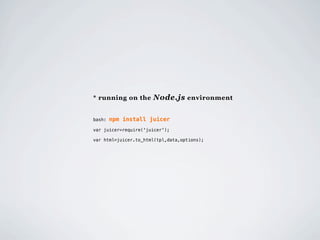
* running on the Node.js environment


bash:   npm install juicer
var juicer=require('juicer');

var html=juicer.to_html(tpl,data,options);
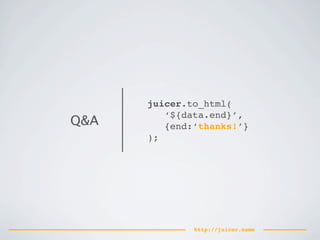
juicer.to_html(
         ‘${data.end}’,
Q&A      {end:‘thanks!’}
      );


              http://juicer.name

Juicer javascript template engine

  • 2.
    Juicer 一个 Javascript 模板引擎の实现与优化 流火 @ TaobaoUED Blog: http://benben.cc
  • 3.
  • 4.
    var json={     name:"liuhuo",     blog:"ued.taobao.com" }; <span class="name">流火 (blog: ued.taobao.com)</span>
  • 5.
    var json={     name:"liuhuo",     blog:"ued.taobao.com" }; <span class="name">流火 (blog: ued.taobao.com)</span> var html; html='<span class="name">'+json.name+' (blog: '+json.blog+')</span>';
  • 7.
    function sub(str,data) { return str .replace(/{(.*?)}/igm,function($,$1) { return data[$1]?data[$1]:$; }); }
  • 8.
    var tpl='<span class="name">{name}(blog: {blog})</span>'; var html=sub(tpl,json);
  • 9.
  • 10.
    JSON Template
  • 11.
    JSON Template
  • 12.
    JSON Template Engine Template
  • 13.
    JSON Template Engine Template
  • 14.
    JSON Template Engine Template
  • 15.
    JSON Template Engine Template HTML Fragment
  • 16.
    water juicer fruits JSON Template Engine Template HTML Fragment
  • 18.
    doT yayaTemplate ejs Mustache artTemplate nTenjin Kissy template micro template ... jQuery tmpl
  • 20.
    “如无必要,勿增实体” Entia non suntmultiplicanda praeter necessitatem.
  • 22.
  • 23.
  • 24.
    Security XSS escape Syntax
  • 25.
    Security XSS escape Syntax easy to write & read
  • 26.
    Security XSS escape Syntax Performance easy to write & read
  • 27.
    Security XSS escape Syntax Performance easy to write & read as faster as you can
  • 28.
    Security XSS escape Syntax Performance easy to write & read as faster as you can Error Handling
  • 29.
    Security XSS escape Syntax Performance easy to write & read as faster as you can Error Handling robustness
  • 30.
    Security XSS escape Syntax Performance easy to write & read as faster as you can Error Handling robustness
  • 31.
    Syntax <ul> <ul> <ul>     {{#list}}     {@each data.list as it,k}     {{#each list as it,k}}         {{#show}}         {@if it.show}         {{#if it.show}}             <li>{{name}} (index: {{index}})</li>             <li>${it.name} (index: ${k})</li>             <li>{{it.name}} (index: {{k}})</li>         {{/show}}         {@/if}         {{/if}}     {{/list}}     {@/each}     {{/each}}     {{#blah}}     {@each data.blah as it}     {{#each blah as it}}         <li>         <li>         <li>             num: {{num}}             num: ${it.num}             num: {{it.num}}             ...             {@if it.num==3}             {{#if it.num==3}}             {{#inner}}                 {@each it.inner as it2}                 {{#each it.inner as it2}}                 <li>{{time}}</li>                     <li>${it2.time}</li>                     <li>{{it2.time}}</li>             {{/inner}}                 {@/each}                 {{/each}}             ...             {@/if}             {{/if}}         </li>         </li>         </li>     {{/blah}}     {@/each}     {{/each}} </ul> </ul> </ul> <ul> <ul>     <% for(var i=0;i<list.length;i++) { %>     <?js for(var i=0;i<it.list.length;i++) { ?>         <% if(list[i].show) { %>         <?js if(it.list[i].show) { ?>             <li><%= list[i].name %> (index: <%= i %>)</li>             <li>${it.list[i].name} (index: ${i})</li>         <% } %>         <?js } ?>     <% } %>     <?js } ?>     <% for(var i=0;i<blah.length;i++) { %>     <?js for(var i=0;i<it.blah.length;i++) { ?>         <li>         <li>             num: <%= blah[i].num %>             num: ${it.blah[i].num}             <% if(blah[i].num==3) { %>                        <?js if(it.blah[i].num==3) { ?>                            <% for(var j=0;j<blah[i].inner.length;j++) { %>                 <?js for(var j=0;j<it.blah[i].inner.length;j++) { ?>                     <li><%= blah[i].inner[j].time %></li>                     <li>${it.blah[i].inner[j].time}</li>                 <% } %>                 <?js } ?>             <% } %>             <?js } ?>         </li>         </li>     <% } %>     <?js } ?> </ul> </ul>
  • 32.
  • 33.
    JSON EXPECTED RESULT var data={ <ul>     list:[     <li>liuhuo (index: 0)</li>         {name:'liuhuo',show:true},     <li>benben (index: 1)</li>         {name:'benben',show:false},     <li>taobao (index: 2)</li>         {name:'taobao',show:true}     <li>num: 1</li>     ],     <li>num: 2</li>     blah:[     <li>num: 3</li>         {num:1},     <li>15:00</li>         {num:2},     <li>16:00</li>         {num:3,inner:[     <li>17:00</li>             {'time':'15:00'},     <li>18:00</li>             {'time':'16:00'},     <li>num: 4</li>             {'time':'17:00'}, </ul>             {'time':'18:00'}         ]},         {num:4}     ] };
  • 35.
    <ul>     {@each data.listas it,k}         {@if it.show}             <li>${it.name} (index: ${k})</li>         {@/if}     {@/each}     {@each data.blah as it}         <li>             num: ${it.num}             {@if it.num==3}                 {@each it.inner as it2}                     <li>${it2.time}</li>                 {@/each}             {@/if}         </li>     {@/each} </ul> using juicer http://jsfiddle.net/paulguo/LpvwH/1/
  • 36.
    <ul>     {{#each listas it,index}}         {{#if it.show}}             <li>{{it.name}} (index: {{index}})</li>         {{/if}}     {{/each}}     {{#each blah as it}}         <li>             num: {{it.num}}             {{#if it.num==3}}                 {{#each it.inner as it2}}                     <li>{{it2.time}}</li>                 {{/each}}             {{/if}}         </li>     {{/each}} </ul> using kissy http://jsfiddle.net/paulguo/yLg4Y/1/
  • 37.
    <ul>     {{#list}}        {{#show}}             <li>{{name}} (index: {{index}})</li>         {{/show}}     {{/list}}     {{#blah}}         <li>             num: {{num}}             {{#inner}}                 <li>{{time}}</li>             {{/inner}}         </li>     {{/blah}} </ul> using mustache http://jsfiddle.net/paulguo/VCH9k/1/
  • 38.
    <ul>     <% for(vari=0;i<list.length;i++) { %>         <% if(list[i].show) { %>             <li><%= list[i].name %> (index: <%= i %>)</li>         <% } %>     <% } %>     <% for(var i=0;i<blah.length;i++) { %>         <li>             num: <%= blah[i].num %>             <% if(blah[i].num==3) { %>                            <% for(var j=0;j<blah[i].inner.length;j++) { %>                     <li><%= blah[i].inner[j].time %></li>                 <% } %>             <% } %>         </li>     <% } %> </ul> using micro http://jsfiddle.net/paulguo/KsDhC/1/
  • 39.
    <ul>     <?js for(vari=0;i<it.list.length;i++) { ?>         <?js if(it.list[i].show) { ?>             <li>${it.list[i].name} (index: ${i})</li>         <?js } ?>     <?js } ?>     <?js for(var i=0;i<it.blah.length;i++) { ?>         <li>             num: ${it.blah[i].num}             <?js if(it.blah[i].num==3) { ?>                            <?js for(var j=0;j<it.blah[i].inner.length;j++) { ?>                     <li>${it.blah[i].inner[j].time}</li>                 <?js } ?>             <?js } ?>         </li>     <?js } ?> </ul> using nTenjin http://jsfiddle.net/paulguo/W7eVV/1/
  • 40.
  • 41.
    Performance http://jsperf.com/javascript-template-engine/11
  • 42.
    Performance test resultwithout escape.
  • 43.
    Performance test resultwithout escape.
  • 44.
    Performance test result without escape. http://juicer.name/speedtest
  • 45.
  • 46.
  • 47.
  • 48.
    Security var json={ " output:'<script>alert("XSS");</script>' }; document.write $(node).html() juicer.to_html('${output}',json); //输出:&lt;script&gt;alert("XSS");&lt;/script&gt; juicer.to_html('$${output}',json); //输出:<script>alert("XSS");</script>
  • 49.
  • 50.
    compile template reusable function
  • 51.
    compile template reusable function compiled template
  • 52.
    compile render template reusable function html code compiled template
  • 53.
    var json={     list:[         {name:"benben"},         {name:"liuhuo"}     ] }; var tpl='{@eachdata.list as value,key}$${value.name}{@/each}'; var compiled_tpl=juicer.compile(tpl,{errorhandling:false});
  • 54.
    function anonymous(data) {     vardata = data || {};     var out = '';     out += '';     for (var i0 = 0, l = data.list.length; i0 < l; i0++) {         var value = data.list[i0];         var key = i0;         out += '';         out += ((value.name));         out += '';     }     out += '';     return out; }
  • 55.
  • 56.
    Several Optimization Point using += instead of array.push
  • 58.
    Browser string optimizationshave changed the string concatenation picture. Firefox was the first browser to optimize string concatenation. Beginning with version 1.0, the array technique is actually slower than using the plus operator in all cases. Other browsers have also optimized string concatenation, so Safari, Opera, Chrome, and Internet Explorer 8 also show better performance using the plus operator. Internet Explorer prior to version 8 didn’t have such an optimization, and so the array technique is always faster than the plus operator. — Writing Efficient JavaScript: Chapter 7 – Even Faster Websites
  • 59.
    The V8 javascriptengine (used in Google Chrome) uses this code to do string concatenation: // ECMA-262, section 15.5.4.6 function StringConcat() {   if (IS_NULL_OR_UNDEFINED(this) && !IS_UNDETECTABLE(this)) {     throw MakeTypeError("called_on_null_or_undefined", ["String.prototype.concat"]);   }   var len = %_ArgumentsLength();   var this_as_string = TO_STRING_INLINE(this);   if (len === 1) {     return this_as_string + %_Arguments(0);   }   var parts = new InternalArray(len + 1);   parts[0] = this_as_string;   for (var i = 0; i < len; i++) {     var part = %_Arguments(i);     parts[i + 1] = TO_STRING_INLINE(part);   }   return %StringBuilderConcat(parts, len + 1, ""); }
  • 60.
    Several Optimization Point avoid using with {}
  • 62.
    var person ={ The with construct introduces an extra scope for name: "Nicholas", the script engine to search through whenever a age: 30 variable is referenced. This alone produces a }; minor performance decrease. However, the contents of that scope are not known at compile function displayInfo(){ time, meaning that the compiler cannot optimize var count = 5; for it, in the same way as it can with normal scopes with(person){ (such as those created by functions). alert(name + " is " + age); alert("Count is " + count); } } displayInfo();
  • 63.
    Several Optimization Point cache the compiled template.
  • 64.
    1 循环 {@each}…{@/each} 2判断 {@if}…{@else if}…{@else}…{@/if} 3 变量(支持函数)${varname|function} 4 注释 {# comment here}
  • 65.
    a demo, thendocs. http://juicer.name
  • 66.
    Juicer Docs juicer isa high-performance lightweight javascript template engine, the benefits of using juicer is that you can seperate your data and the html structure. it can also running on node.js environment. the name of juicer if the data is fruit, the template compared to water, through the juicer will be able to put them mixed into html code. import juicer.js <script type="text/javascript" src="juicer-min.js"></script> * License juicer is published under the apache license and hosted on github. if you find errors or typos please file an issueor a pull request on the repository.
  • 67.
    * API > compileand render the template with given data immediately. juicer.to_html(tpl,data,options); > only compile the template, it'll return a reusable function for the given `template`. var tpl=juicer.compile(tpl,options); > render the complied template with given data. var tpl=juicer.compile(tpl,options); var html=tpl.render(data); Options { " cache:true/false, " loose:false/true, errorhandling:true/false } cache in the options means that whether cache the pre-compiled templates.
  • 68.
    * Syntax a. ${var} using${} to evaluating expressions and functions. ${data.name} ${data.name|function} let's use a demo to illustrate this usage. var json={ " name:'benben', " age:23 }; var inc=function(number) { " return number+1; }; //it'll be 'benben' juicer.to_html('${data.name}',json); //it'll be 24 juicer.to_html('${data.age|inc}',json);
  • 69.
    {@each data.list asit,k} <span class=”{@if k+2>data.list.length}notdot{@/if}”>...</span> {@/each}
  • 70.
    http://taobao.com/s?q=%E6%B7%98%E5%AE%9D json={ query:’淘宝’, ... } http://taobao.com/s?q=${query|encodeURIComponent}
  • 71.
    escape/unescape it is noteworthythat, for security reasons, ${output} will do escape to the output, if you do not want it to be escaped, you can use $${output} to avoid this. for example: var json={ " value:'<strong>juicer</strong>' }; var escapetpl='${data.value}'; var unescapetpl='$${data.value}'; juicer.to_html(escapetpl,json); //it'll be '&lt;strong&gt;juicer&lt;/strong&gt;' juicer.to_html(unescapetpl,json); //it'll be '<strong>juicer</strong>'
  • 72.
    b. {@each} ...{@/each} when you need iterate a list, you can use `each` like this. {@each data.list as item} " ${item.prop} {@/each} you can also get the index while eaching. {@each data.list as item,index} " ${item.prop} " ${index} //index {@/each}
  • 73.
    c. {@if} ...{@else} ... {else if} ... {@/if} you can also use if-else if you need. {@each data.list as item,index} " {@if index===3} " " the index is 3, the value is ${item.prop} " {@else} " " the index is not 3, the value is ${item.prop} " {@/if} {@/each} d. {# comment} you can also write comments in the template code to facilitate future management. {# some comment here}
  • 74.
    * running onthe Node.js environment bash: npm install juicer var juicer=require('juicer'); var html=juicer.to_html(tpl,data,options);
  • 75.
    juicer.to_html( ‘${data.end}’, Q&A {end:‘thanks!’} ); http://juicer.name