CS6601 DISTRIBUTED SYSTEMS
UNIT – I
Dr.A.Kathirvel, Professor, Computer Science and Engg.
M N M Jain Engineering College, Chennai
Unit - I
INTRODUCTION
Examples of Distributed Systems–Trends
in Distributed Systems – Focus on
resource sharing – Challenges. Case
study: World Wide Web.
Coulouris, Dollimore, Kindberg and Blair
Distributed Systems:Concepts and Design Edition 5, Addison-Wesley 2012
Applications
Most people know about the Internet (a computer
network) through applications
World Wide Web
Email
Online Social Network
Streaming Audio Video
File Sharing
Instant Messaging
…
3
4
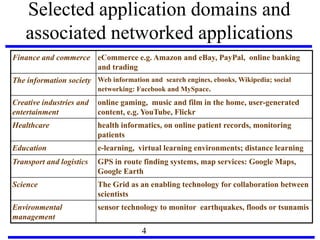
Selected application domains and
associated networked applications
Finance and commerce eCommerce e.g. Amazon and eBay, PayPal, online banking
and trading
The information society Web information and search engines, ebooks, Wikipedia; social
networking: Facebook and MySpace.
Creative industries and
entertainment
online gaming, music and film in the home, user-generated
content, e.g. YouTube, Flickr
Healthcare health informatics, on online patient records, monitoring
patients
Education e-learning, virtual learning environments; distance learning
Transport and logistics GPS in route finding systems, map services: Google Maps,
Google Earth
Science The Grid as an enabling technology for collaboration between
scientists
Environmental
management
sensor technology to monitor earthquakes, floods or tsunamis
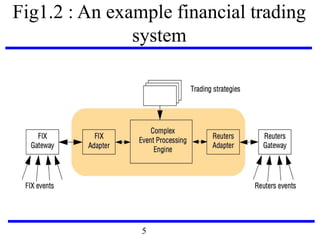
Fig1.2 : An example financial trading
system
5
intranet
ISP
desktop computer:
backbone
satellite link
server:
☎
network link:
☎
☎
☎
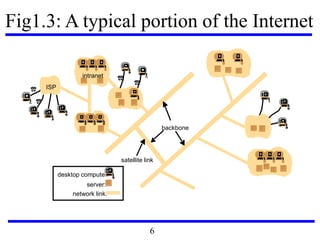
Fig1.3: A typical portion of the Internet
6
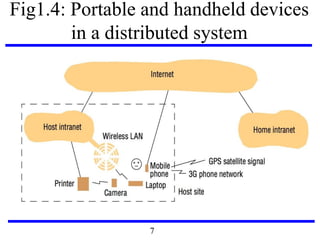
Fig1.4: Portable and handheld devices
in a distributed system
7
8
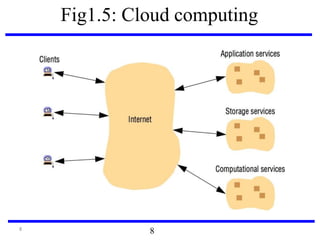
Fig1.5: Cloud computing
8
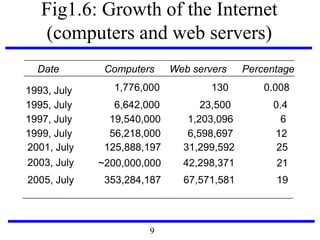
Fig1.6: Growth of the Internet
(computers and web servers)
Date Computers Web servers Percentage
1993, July 1,776,000 130 0.008
1995, July 6,642,000 23,500 0.4
1997, July 19,540,000 1,203,096 6
1999, July 56,218,000 6,598,697 12
2001, July 125,888,197 31,299,592 25
42,298,3712003, July
2005, July
~200,000,000
353,284,187 67,571,581
21
19
9
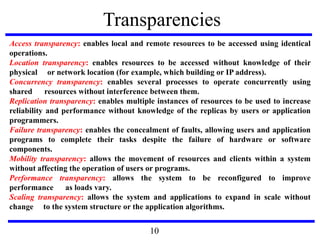
Transparencies
Access transparency: enables local and remote resources to be accessed using identical
operations.
Location transparency: enables resources to be accessed without knowledge of their
physical or network location (for example, which building or IP address).
Concurrency transparency: enables several processes to operate concurrently using
shared resources without interference between them.
Replication transparency: enables multiple instances of resources to be used to increase
reliability and performance without knowledge of the replicas by users or application
programmers.
Failure transparency: enables the concealment of faults, allowing users and application
programs to complete their tasks despite the failure of hardware or software
components.
Mobility transparency: allows the movement of resources and clients within a system
without affecting the operation of users or programs.
Performance transparency: allows the system to be reconfigured to improve
performance as loads vary.
Scaling transparency: allows the system and applications to expand in scale without
change to the system structure or the application algorithms.
10
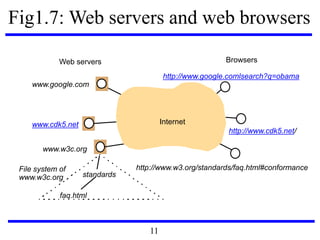
Fig1.7: Web servers and web browsers
Internet
BrowsersWeb servers
www.google.com
www.cdk5.net
www.w3c.org
standards
faq.html
http://www.w3.org/standards/faq.html#conformance
http://www.google.comlsearch?q=obama
http://www.cdk5.net/
File system of
www.w3c.org
11
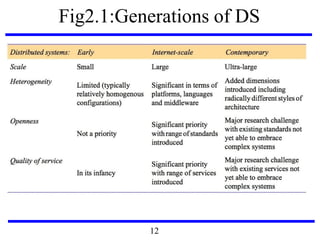
Fig2.1:Generations of DS
12
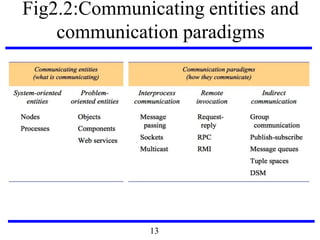
Fig2.2:Communicating entities and
communication paradigms
13
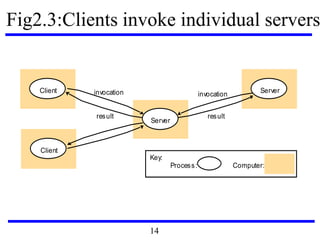
Fig2.3:Clients invoke individual servers
Server
Client
Client
invocation
result
Serverinvocation
result
Process:
Key:
Computer:
14
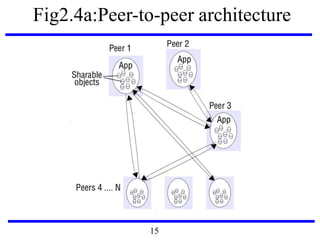
Fig2.4a:Peer-to-peer architecture
15
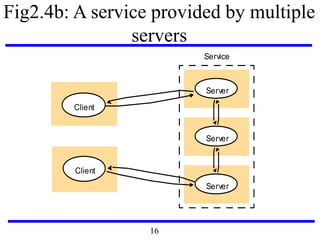
Fig2.4b: A service provided by multiple
servers
Server
Server
Server
Service
Client
Client
16
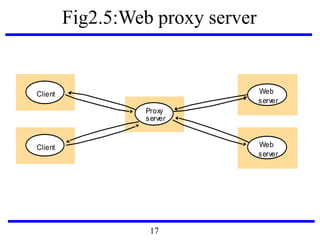
Fig2.5:Web proxy server
Client
Proxy
Web
server
Web
server
server
Client
17
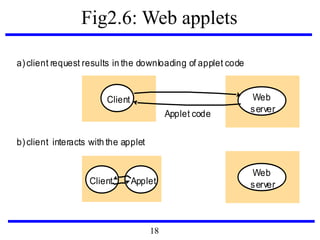
Fig2.6: Web applets
a)client request results in the downloading of applet code
Web
server
Client
Web
serverApplet
Applet code
Client
b)client interacts with the applet
18
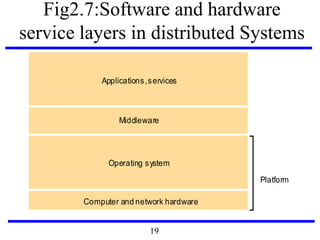
Fig2.7:Software and hardware
service layers in distributed Systems
Applications,services
Computer and network hardware
Platform
Operating system
Middleware
19
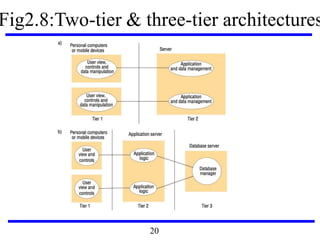
Fig2.8:Two-tier & three-tier architectures
20
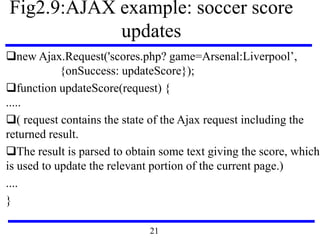
Fig2.9:AJAX example: soccer score
updates
new Ajax.Request('scores.php? game=Arsenal:Liverpool’,
{onSuccess: updateScore});
function updateScore(request) {
.....
( request contains the state of the Ajax request including the
returned result.
The result is parsed to obtain some text giving the score, which
is used to update the relevant portion of the current page.)
....
}
21
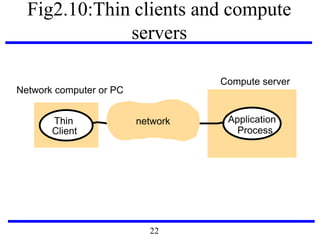
Fig2.10:Thin clients and compute
servers
Thin
Client
Application
Process
Network computer or PC
Compute server
network
22
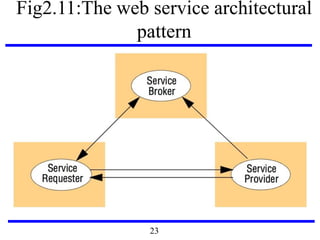
Fig2.11:The web service architectural
pattern
23
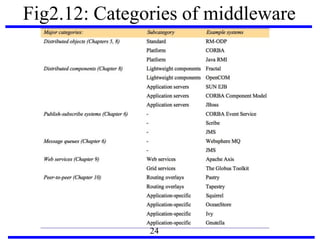
Fig2.12: Categories of middleware
24
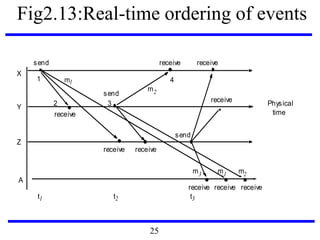
Fig2.13:Real-time ordering of events
send
receive
send
receive
m1 m2
2
1
3
4
X
Y
Z
Physical
time
A
m3
receive receive
send
receive receive receive
t1 t2 t3
receive
receive
m2
m1
25
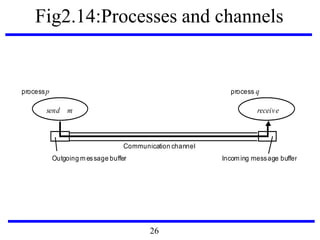
Fig2.14:Processes and channels
processp process q
Communication channel
send
Outgoing message buffer Incoming message buffer
receivem
26
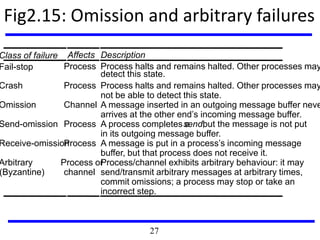
Fig2.15: Omission and arbitrary failures
Class of failure Affects Description
Fail-stop Process Process halts and remains halted. Other processes may
detect this state.
Crash Process Process halts and remains halted. Other processes may
not be able to detect this state.
Omission Channel A message inserted in an outgoing message buffer neve
arrives at the other end’s incoming message buffer.
Send-omission Process A process completes asend,but the message is not put
in its outgoing message buffer.
Receive-omissionProcess A message is put in a process’s incoming message
buffer, but that process does not receive it.
Arbitrary
(Byzantine)
Process or
channel
Process/channel exhibits arbitrary behaviour: it may
send/transmit arbitrary messages at arbitrary times,
commit omissions; a process may stop or take an
incorrect step.
27
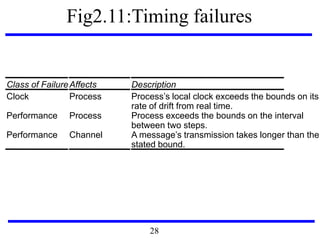
Fig2.11:Timing failures
Class of FailureAffects Description
Clock Process Process’s local clock exceeds the bounds on its
rate of drift from real time.
Performance Process Process exceeds the bounds on the interval
between two steps.
Performance Channel A message’s transmission takes longer than the
stated bound.
28
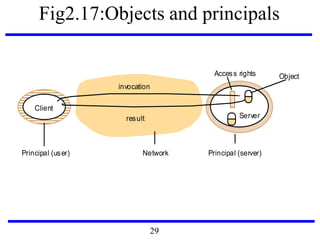
Fig2.17:Objects and principals
Network
invocation
result
Client
Server
Principal (user) Principal (server)
ObjectAccess rights
29
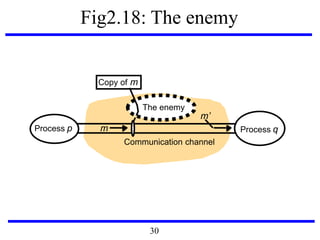
Fig2.18: The enemy
Communication channel
Copy of m
Process p Process qm
The enemy
m’
30
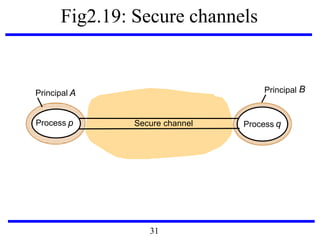
Fig2.19: Secure channels
Principal A
Secure channelProcess p Process q
Principal B
31
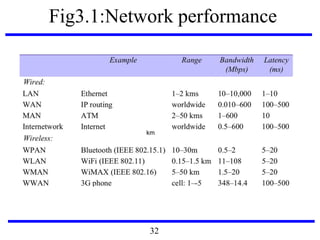
Fig3.1:Network performance
km
32
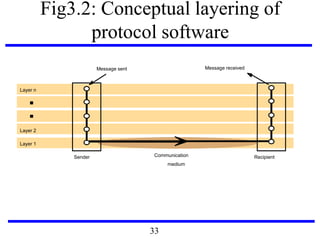
Fig3.2: Conceptual layering of
protocol software
Layer n
Layer 2
Layer 1
Message sent Message received
Communication
medium
Sender Recipient
33
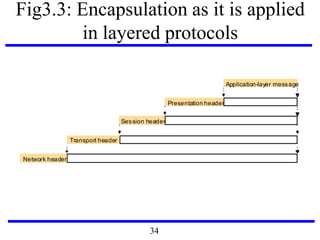
Fig3.3: Encapsulation as it is applied
in layered protocols
Presentation header
Application-layer message
Session header
Transport header
Network header
34
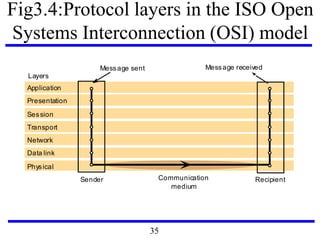
Fig3.4:Protocol layers in the ISO Open
Systems Interconnection (OSI) model
Application
Presentation
Session
Transport
Network
Data link
Physical
Message sent Message received
Sender Recipient
Layers
Communication
medium
35
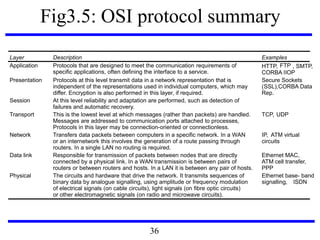
Fig3.5: OSI protocol summary
Layer Description Examples
Application Protocols that are designed to meet the communication requirements of
specific applications, often defining the interface to a service.
HTTP, FTP , SMTP,
CORBA IIOP
Presentation Protocols at this level transmit data in a network representation that is
independent of the representations used in individual computers, which may
differ. Encryption is also performed in this layer, if required.
Secure Sockets
(SSL),CORBA Data
Rep.
Session At this level reliability and adaptation are performed, such as detection of
failures and automatic recovery.
Transport This is the lowest level at which messages (rather than packets) are handled.
Messages are addressed to communication ports attached to processes,
Protocols in this layer may be connection-oriented or connectionless.
TCP, UDP
Network Transfers data packets between computers in a specific network. In a WAN
or an internetwork this involves the generation of a route passing through
routers. In a single LAN no routing is required.
IP, ATM virtual
circuits
Data link Responsible for transmission of packets between nodes that are directly
connected by a physical link. In a WAN transmission is between pairs of
routers or between routers and hosts. In a LAN it is between any pair of hosts.
Ethernet MAC,
ATM cell transfer,
PPP
Physical The circuits and hardware that drive the network. It transmits sequences of
binary data by analogue signalling, using amplitude or frequency modulation
of electrical signals (on cable circuits), light signals (on fibre optic circuits)
or other electromagnetic signals (on radio and microwave circuits).
Ethernet base- band
signalling, ISDN
36
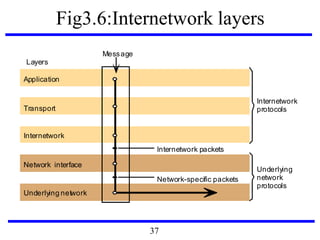
Fig3.6:Internetwork layers
Underlying network
Application
Network interface
Transport
Internetwork
Internetwork packets
Network-specific packets
Message
Layers
Internetwork
protocols
Underlying
network
protocols
37
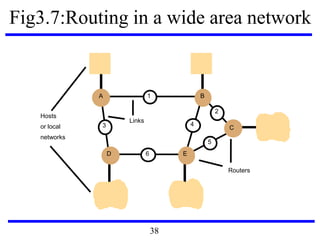
Fig3.7:Routing in a wide area network
Hosts
Links
or local
networks
A
D E
B
C
1
2
5
43
6
Routers
38
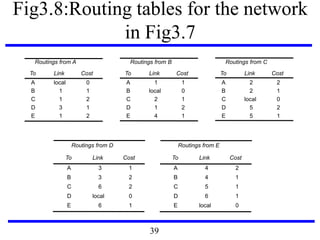
Fig3.8:Routing tables for the network
in Fig3.7
Routings from D Routings from E
To Link Cost To Link Cost
A
B
C
D
E
3
3
6
local
6
1
2
2
0
1
A
B
C
D
E
4
4
5
6
local
2
1
1
1
0
Routings from A Routings from B Routings from C
To Link Cost To Link Cost To Link Cost
A
B
C
D
E
local
1
1
3
1
0
1
2
1
2
A
B
C
D
E
1
local
2
1
4
1
0
1
2
1
A
B
C
D
E
2
2
local
5
5
2
1
0
2
1
39
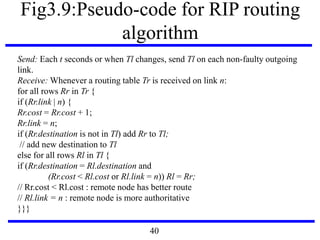
Fig3.9:Pseudo-code for RIP routing
algorithm
Send: Each t seconds or when Tl changes, send Tl on each non-faulty outgoing
link.
Receive: Whenever a routing table Tr is received on link n:
for all rows Rr in Tr {
if (Rr.link | n) {
Rr.cost = Rr.cost + 1;
Rr.link = n;
if (Rr.destination is not in Tl) add Rr to Tl;
// add new destination to Tl
else for all rows Rl in Tl {
if (Rr.destination = Rl.destination and
(Rr.cost < Rl.cost or Rl.link = n)) Rl = Rr;
// Rr.cost < Rl.cost : remote node has better route
// Rl.link = n : remote node is more authoritative
}}}
40
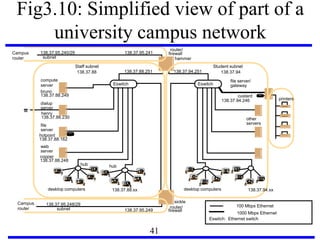
Fig3.10: Simplified view of part of a
university campus network
file
compute
dialup
hammer
henry
hotpoint
138.37.88.230
138.37.88.162
bruno
138.37.88.249
router/
sickle
138.37.95.241138.37.95.240/29
138.37.95.249
copper
138.37.88.248
firewall
web
138.37.95.248/29
server
desktop computers 138.37.88.xx
subnet
subnet
Eswitch
138.37.88
server
server
server
138.37.88.251
custard
138.37.94.246
desktop computers
Eswitch
138.37.94
hubhub
Student subnetStaff subnet
other
servers
router/
firewall
138.37.94.251
☎
1000 Mbps Ethernet
Eswitch: Ethernet switch
100 Mbps Ethernet
file server/
gateway
printers
Campus
router
Campus
router
138.37.94.xx
41
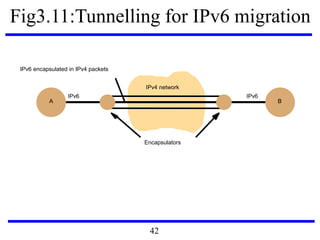
Fig3.11:Tunnelling for IPv6 migration
A B
IPv6 IPv6
IPv6 encapsulated in IPv4 packets
Encapsulators
IPv4 network
42
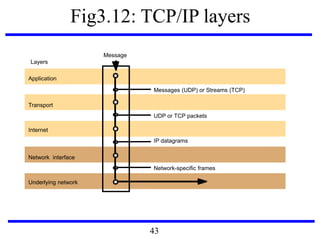
Fig3.12: TCP/IP layers
Messages (UDP) or Streams (TCP)
Application
Transport
Internet
UDP or TCP packets
IP datagrams
Network-specific frames
Message
Layers
Underlying network
Network interface
43
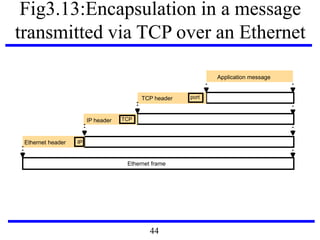
Fig3.13:Encapsulation in a message
transmitted via TCP over an Ethernet
Application message
TCP header
IP header
Ethernet header
Ethernet frame
port
TCP
IP
44
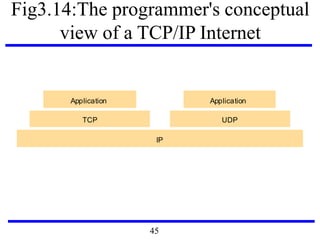
Fig3.14:The programmer's conceptual
view of a TCP/IP Internet
IP
Application Application
TCP UDP
45
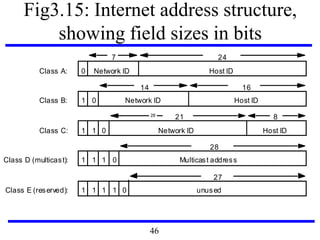
Fig3.15: Internet address structure,
showing field sizes in bits
7 24
Class A: 0 Network ID Host ID
14 16
Class B: 1 0 Network ID Host ID
21 8
Class C: 1 1 0 Network ID Host ID
28
Class D (multicast): 1 1 1 0 Multicast address
27
Class E (reserved): 1 1 1 1 unused0
28
46
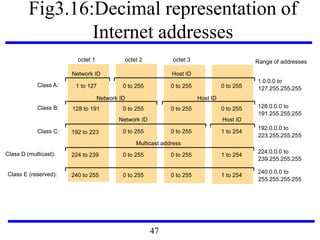
Fig3.16:Decimal representation of
Internet addresses
octet 1 octet 2 octet 3
Class A: 1 to 127
0 to 255 0 to 255 1 to 254
Class B: 128 to 191
Class C: 192 to 223
224 to 239Class D (multicast):
Network ID
Network ID
Network ID
Host ID
Host ID
Host ID
Multicast address
0 to 255 0 to 255 1 to 254
0 to 255 0 to 255 0 to 255
0 to 255 0 to 255 1 to 254240 to 255Class E (reserved):
1.0.0.0 to
127.255.255.255
128.0.0.0 to
191.255.255.255
192.0.0.0 to
223.255.255.255
224.0.0.0 to
239.255.255.255
240.0.0.0 to
255.255.255.255
Range of addresses
47
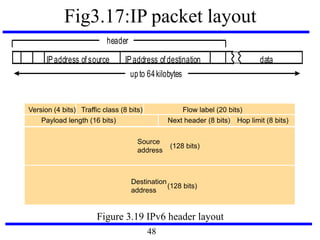
Fig3.17:IP packet layout
dataIPaddress of destinationIPaddress of source
header
upto 64kilobytes
Figure 3.19 IPv6 header layout
Source
address
(128 bits)
Destination
address
(128 bits)
Version (4 bits) Traffic class (8 bits) Flow label (20 bits)
Payload length (16 bits) Hop limit (8 bits)Next header (8 bits)
48
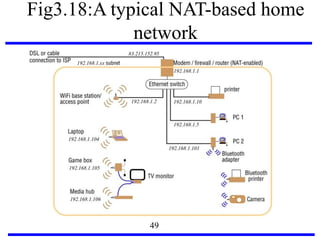
Fig3.18:A typical NAT-based home
network
49
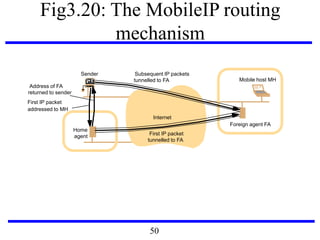
Fig3.20: The MobileIP routing
mechanism
Sender
Home
Mobile host MH
Foreign agent FA
Internet
agent
First IP packet
addressed to MH
Address of FA
returned to sender
First IP packet
tunnelled to FA
Subsequent IP packets
tunnelled to FA
50
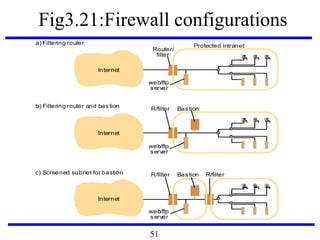
Fig3.21:Firewall configurations
Internet
Router/
Protected intraneta) Filtering router
Internet
b) Filtering router and bastion
filter
Internet
R/filterc) Screened subnet for bastion R/filter Bastion
R/filter Bastion
web/ftp
server
web/ftp
server
web/ftp
server
51
Fig3.22: IEEE 802 network standards
IEEE No. Name Title Reference
802.3 Ethernet CSMA/CD Networks (Ethernet) [IEEE 1985a]
802.4 Token Bus Networks [IEEE 1985b]
802.5 Token Ring Networks [IEEE 1985c]
802.6 Metropolitan Area Networks [IEEE 1994]
802.11 WiFi Wireless Local Area Networks [IEEE 1999]
802.15.1 Bluetooth Wireless Personal Area Networks [IEEE 2002]
802.15.4 ZigBee Wireless Sensor Networks [IEEE 2003]
802.16 WiMAX Wireless Metropolitan Area Networks [IEEE 2004a]
52
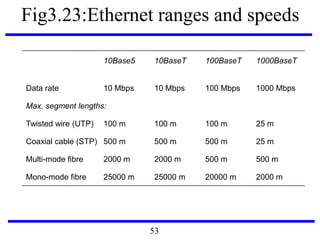
Fig3.23:Ethernet ranges and speeds
10Base5 10BaseT 100BaseT 1000BaseT
Data rate 10 Mbps 10 Mbps 100 Mbps 1000 Mbps
Max. segment lengths:
Twisted wire (UTP) 100 m 100 m 100 m 25 m
Coaxial cable (STP) 500 m 500 m 500 m 25 m
Multi-mode fibre 2000 m 2000 m 500 m 500 m
Mono-mode fibre 25000 m 25000 m 20000 m 2000 m
53
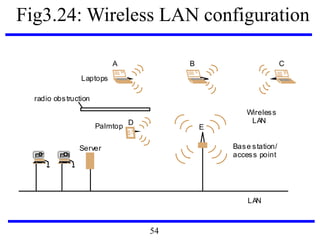
Fig3.24: Wireless LAN configuration
LAN
Server
Wireless
LAN
Laptops
Base station/
access point
Palmtop
radio obstruction
A B C
D
E
54
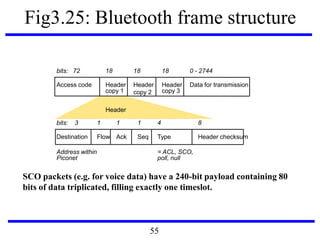
Fig3.25: Bluetooth frame structure
SCO packets (e.g. for voice data) have a 240-bit payload containing 80
bits of data triplicated, filling exactly one timeslot.
bits: 72 18 18 18 0 - 2744
Access code Header
copy 1
Header
copy 2
Header
copy 3
Data for transmission
bits: 3 1 1 1 4 8
Destination Flow Ack Seq Type Header checksum
Address within
Piconet
= ACL, SCO,
poll, null
Header
55
Designing Distributed Systems
Google Case Study
56
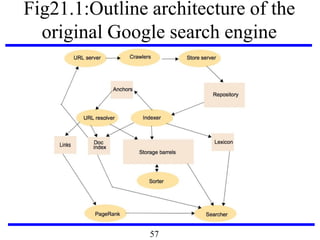
Fig21.1:Outline architecture of the
original Google search engine
57
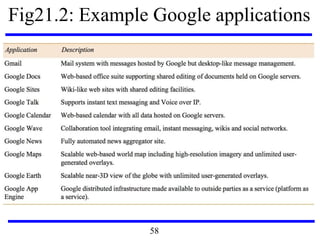
Fig21.2: Example Google applications
58
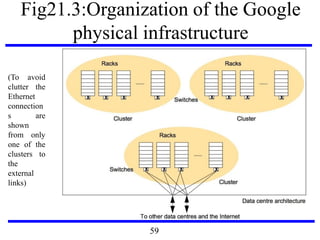
Fig21.3:Organization of the Google
physical infrastructure
(To avoid
clutter the
Ethernet
connection
s are
shown
from only
one of the
clusters to
the
external
links)
59
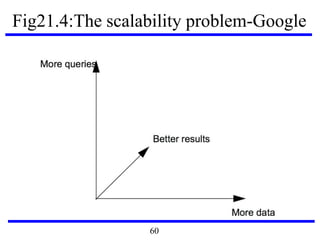
Fig21.4:The scalability problem-Google
60
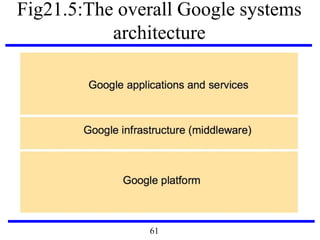
Fig21.5:The overall Google systems
architecture
61
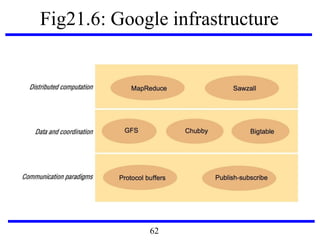
Fig21.6: Google infrastructure
62
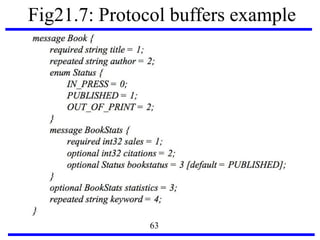
Fig21.7: Protocol buffers example
63
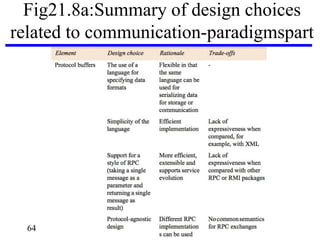
Fig21.8a:Summary of design choices
related to communication-paradigmspart
64
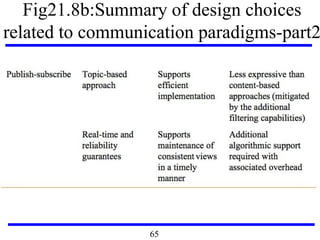
Fig21.8b:Summary of design choices
related to communication paradigms-part2
65
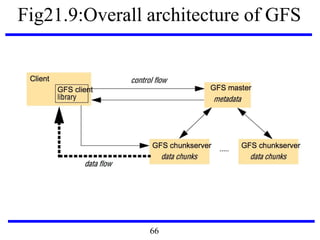
Fig21.9:Overall architecture of GFS
66
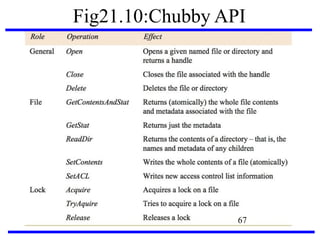
Fig21.10:Chubby API
67
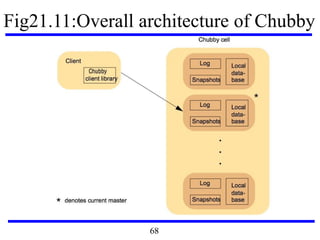
Fig21.11:Overall architecture of Chubby
68
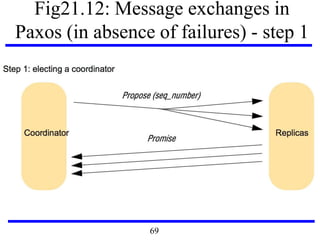
Fig21.12: Message exchanges in
Paxos (in absence of failures) - step 1
69
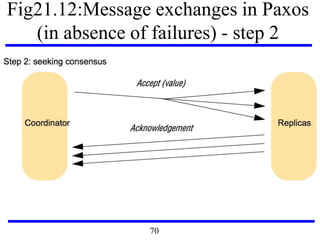
Fig21.12:Message exchanges in Paxos
(in absence of failures) - step 2
70
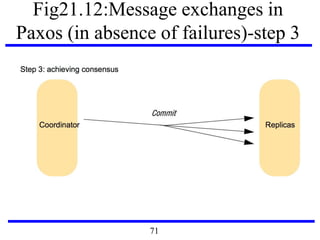
Fig21.12:Message exchanges in
Paxos (in absence of failures)-step 3
71
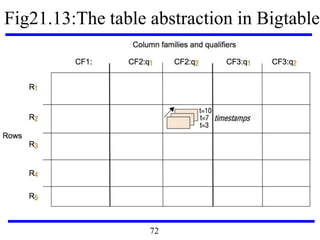
Fig21.13:The table abstraction in Bigtable
72
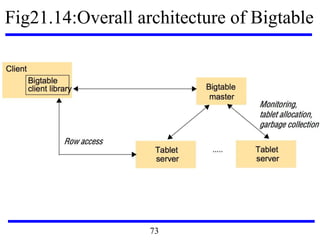
Fig21.14:Overall architecture of Bigtable
73
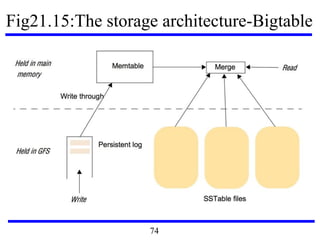
Fig21.15:The storage architecture-Bigtable
74
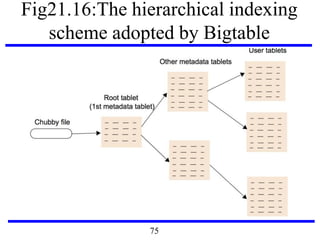
Fig21.16:The hierarchical indexing
scheme adopted by Bigtable
75
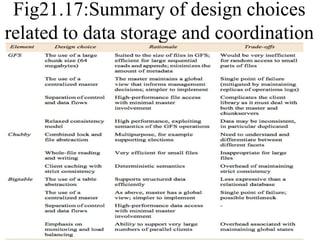
Fig21.17:Summary of design choices
related to data storage and coordination
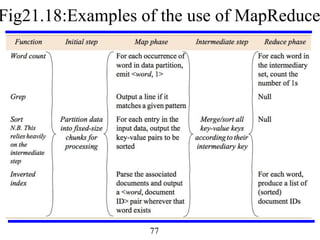
Fig21.18:Examples of the use of MapReduce
77
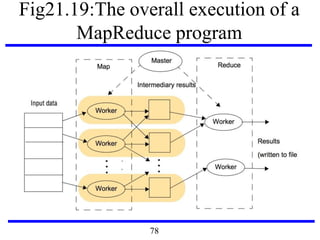
Fig21.19:The overall execution of a
MapReduce program
78
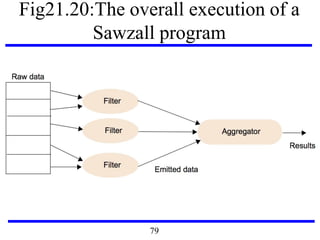
Fig21.20:The overall execution of a
Sawzall program
79
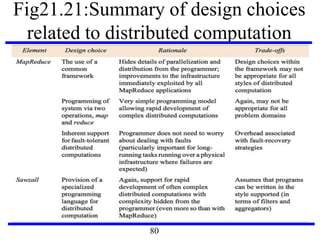
Fig21.21:Summary of design choices
related to distributed computation
80
Questions?

CS6601 DISTRIBUTED SYSTEMS

  • 1.
    CS6601 DISTRIBUTED SYSTEMS UNIT– I Dr.A.Kathirvel, Professor, Computer Science and Engg. M N M Jain Engineering College, Chennai
  • 2.
    Unit - I INTRODUCTION Examplesof Distributed Systems–Trends in Distributed Systems – Focus on resource sharing – Challenges. Case study: World Wide Web. Coulouris, Dollimore, Kindberg and Blair Distributed Systems:Concepts and Design Edition 5, Addison-Wesley 2012
  • 3.
    Applications Most people knowabout the Internet (a computer network) through applications World Wide Web Email Online Social Network Streaming Audio Video File Sharing Instant Messaging … 3
  • 4.
    4 Selected application domainsand associated networked applications Finance and commerce eCommerce e.g. Amazon and eBay, PayPal, online banking and trading The information society Web information and search engines, ebooks, Wikipedia; social networking: Facebook and MySpace. Creative industries and entertainment online gaming, music and film in the home, user-generated content, e.g. YouTube, Flickr Healthcare health informatics, on online patient records, monitoring patients Education e-learning, virtual learning environments; distance learning Transport and logistics GPS in route finding systems, map services: Google Maps, Google Earth Science The Grid as an enabling technology for collaboration between scientists Environmental management sensor technology to monitor earthquakes, floods or tsunamis
  • 5.
    Fig1.2 : Anexample financial trading system 5
  • 6.
    intranet ISP desktop computer: backbone satellite link server: ☎ networklink: ☎ ☎ ☎ Fig1.3: A typical portion of the Internet 6
  • 7.
    Fig1.4: Portable andhandheld devices in a distributed system 7
  • 8.
  • 9.
    Fig1.6: Growth ofthe Internet (computers and web servers) Date Computers Web servers Percentage 1993, July 1,776,000 130 0.008 1995, July 6,642,000 23,500 0.4 1997, July 19,540,000 1,203,096 6 1999, July 56,218,000 6,598,697 12 2001, July 125,888,197 31,299,592 25 42,298,3712003, July 2005, July ~200,000,000 353,284,187 67,571,581 21 19 9
  • 10.
    Transparencies Access transparency: enableslocal and remote resources to be accessed using identical operations. Location transparency: enables resources to be accessed without knowledge of their physical or network location (for example, which building or IP address). Concurrency transparency: enables several processes to operate concurrently using shared resources without interference between them. Replication transparency: enables multiple instances of resources to be used to increase reliability and performance without knowledge of the replicas by users or application programmers. Failure transparency: enables the concealment of faults, allowing users and application programs to complete their tasks despite the failure of hardware or software components. Mobility transparency: allows the movement of resources and clients within a system without affecting the operation of users or programs. Performance transparency: allows the system to be reconfigured to improve performance as loads vary. Scaling transparency: allows the system and applications to expand in scale without change to the system structure or the application algorithms. 10
  • 11.
    Fig1.7: Web serversand web browsers Internet BrowsersWeb servers www.google.com www.cdk5.net www.w3c.org standards faq.html http://www.w3.org/standards/faq.html#conformance http://www.google.comlsearch?q=obama http://www.cdk5.net/ File system of www.w3c.org 11
  • 12.
  • 13.
  • 14.
    Fig2.3:Clients invoke individualservers Server Client Client invocation result Serverinvocation result Process: Key: Computer: 14
  • 15.
  • 16.
    Fig2.4b: A serviceprovided by multiple servers Server Server Server Service Client Client 16
  • 17.
  • 18.
    Fig2.6: Web applets a)clientrequest results in the downloading of applet code Web server Client Web serverApplet Applet code Client b)client interacts with the applet 18
  • 19.
    Fig2.7:Software and hardware servicelayers in distributed Systems Applications,services Computer and network hardware Platform Operating system Middleware 19
  • 20.
  • 21.
    Fig2.9:AJAX example: soccerscore updates new Ajax.Request('scores.php? game=Arsenal:Liverpool’, {onSuccess: updateScore}); function updateScore(request) { ..... ( request contains the state of the Ajax request including the returned result. The result is parsed to obtain some text giving the score, which is used to update the relevant portion of the current page.) .... } 21
  • 22.
    Fig2.10:Thin clients andcompute servers Thin Client Application Process Network computer or PC Compute server network 22
  • 23.
    Fig2.11:The web servicearchitectural pattern 23
  • 24.
  • 25.
    Fig2.13:Real-time ordering ofevents send receive send receive m1 m2 2 1 3 4 X Y Z Physical time A m3 receive receive send receive receive receive t1 t2 t3 receive receive m2 m1 25
  • 26.
    Fig2.14:Processes and channels processpprocess q Communication channel send Outgoing message buffer Incoming message buffer receivem 26
  • 27.
    Fig2.15: Omission andarbitrary failures Class of failure Affects Description Fail-stop Process Process halts and remains halted. Other processes may detect this state. Crash Process Process halts and remains halted. Other processes may not be able to detect this state. Omission Channel A message inserted in an outgoing message buffer neve arrives at the other end’s incoming message buffer. Send-omission Process A process completes asend,but the message is not put in its outgoing message buffer. Receive-omissionProcess A message is put in a process’s incoming message buffer, but that process does not receive it. Arbitrary (Byzantine) Process or channel Process/channel exhibits arbitrary behaviour: it may send/transmit arbitrary messages at arbitrary times, commit omissions; a process may stop or take an incorrect step. 27
  • 28.
    Fig2.11:Timing failures Class ofFailureAffects Description Clock Process Process’s local clock exceeds the bounds on its rate of drift from real time. Performance Process Process exceeds the bounds on the interval between two steps. Performance Channel A message’s transmission takes longer than the stated bound. 28
  • 29.
  • 30.
    Fig2.18: The enemy Communicationchannel Copy of m Process p Process qm The enemy m’ 30
  • 31.
    Fig2.19: Secure channels PrincipalA Secure channelProcess p Process q Principal B 31
  • 32.
  • 33.
    Fig3.2: Conceptual layeringof protocol software Layer n Layer 2 Layer 1 Message sent Message received Communication medium Sender Recipient 33
  • 34.
    Fig3.3: Encapsulation asit is applied in layered protocols Presentation header Application-layer message Session header Transport header Network header 34
  • 35.
    Fig3.4:Protocol layers inthe ISO Open Systems Interconnection (OSI) model Application Presentation Session Transport Network Data link Physical Message sent Message received Sender Recipient Layers Communication medium 35
  • 36.
    Fig3.5: OSI protocolsummary Layer Description Examples Application Protocols that are designed to meet the communication requirements of specific applications, often defining the interface to a service. HTTP, FTP , SMTP, CORBA IIOP Presentation Protocols at this level transmit data in a network representation that is independent of the representations used in individual computers, which may differ. Encryption is also performed in this layer, if required. Secure Sockets (SSL),CORBA Data Rep. Session At this level reliability and adaptation are performed, such as detection of failures and automatic recovery. Transport This is the lowest level at which messages (rather than packets) are handled. Messages are addressed to communication ports attached to processes, Protocols in this layer may be connection-oriented or connectionless. TCP, UDP Network Transfers data packets between computers in a specific network. In a WAN or an internetwork this involves the generation of a route passing through routers. In a single LAN no routing is required. IP, ATM virtual circuits Data link Responsible for transmission of packets between nodes that are directly connected by a physical link. In a WAN transmission is between pairs of routers or between routers and hosts. In a LAN it is between any pair of hosts. Ethernet MAC, ATM cell transfer, PPP Physical The circuits and hardware that drive the network. It transmits sequences of binary data by analogue signalling, using amplitude or frequency modulation of electrical signals (on cable circuits), light signals (on fibre optic circuits) or other electromagnetic signals (on radio and microwave circuits). Ethernet base- band signalling, ISDN 36
  • 37.
    Fig3.6:Internetwork layers Underlying network Application Networkinterface Transport Internetwork Internetwork packets Network-specific packets Message Layers Internetwork protocols Underlying network protocols 37
  • 38.
    Fig3.7:Routing in awide area network Hosts Links or local networks A D E B C 1 2 5 43 6 Routers 38
  • 39.
    Fig3.8:Routing tables forthe network in Fig3.7 Routings from D Routings from E To Link Cost To Link Cost A B C D E 3 3 6 local 6 1 2 2 0 1 A B C D E 4 4 5 6 local 2 1 1 1 0 Routings from A Routings from B Routings from C To Link Cost To Link Cost To Link Cost A B C D E local 1 1 3 1 0 1 2 1 2 A B C D E 1 local 2 1 4 1 0 1 2 1 A B C D E 2 2 local 5 5 2 1 0 2 1 39
  • 40.
    Fig3.9:Pseudo-code for RIProuting algorithm Send: Each t seconds or when Tl changes, send Tl on each non-faulty outgoing link. Receive: Whenever a routing table Tr is received on link n: for all rows Rr in Tr { if (Rr.link | n) { Rr.cost = Rr.cost + 1; Rr.link = n; if (Rr.destination is not in Tl) add Rr to Tl; // add new destination to Tl else for all rows Rl in Tl { if (Rr.destination = Rl.destination and (Rr.cost < Rl.cost or Rl.link = n)) Rl = Rr; // Rr.cost < Rl.cost : remote node has better route // Rl.link = n : remote node is more authoritative }}} 40
  • 41.
    Fig3.10: Simplified viewof part of a university campus network file compute dialup hammer henry hotpoint 138.37.88.230 138.37.88.162 bruno 138.37.88.249 router/ sickle 138.37.95.241138.37.95.240/29 138.37.95.249 copper 138.37.88.248 firewall web 138.37.95.248/29 server desktop computers 138.37.88.xx subnet subnet Eswitch 138.37.88 server server server 138.37.88.251 custard 138.37.94.246 desktop computers Eswitch 138.37.94 hubhub Student subnetStaff subnet other servers router/ firewall 138.37.94.251 ☎ 1000 Mbps Ethernet Eswitch: Ethernet switch 100 Mbps Ethernet file server/ gateway printers Campus router Campus router 138.37.94.xx 41
  • 42.
    Fig3.11:Tunnelling for IPv6migration A B IPv6 IPv6 IPv6 encapsulated in IPv4 packets Encapsulators IPv4 network 42
  • 43.
    Fig3.12: TCP/IP layers Messages(UDP) or Streams (TCP) Application Transport Internet UDP or TCP packets IP datagrams Network-specific frames Message Layers Underlying network Network interface 43
  • 44.
    Fig3.13:Encapsulation in amessage transmitted via TCP over an Ethernet Application message TCP header IP header Ethernet header Ethernet frame port TCP IP 44
  • 45.
    Fig3.14:The programmer's conceptual viewof a TCP/IP Internet IP Application Application TCP UDP 45
  • 46.
    Fig3.15: Internet addressstructure, showing field sizes in bits 7 24 Class A: 0 Network ID Host ID 14 16 Class B: 1 0 Network ID Host ID 21 8 Class C: 1 1 0 Network ID Host ID 28 Class D (multicast): 1 1 1 0 Multicast address 27 Class E (reserved): 1 1 1 1 unused0 28 46
  • 47.
    Fig3.16:Decimal representation of Internetaddresses octet 1 octet 2 octet 3 Class A: 1 to 127 0 to 255 0 to 255 1 to 254 Class B: 128 to 191 Class C: 192 to 223 224 to 239Class D (multicast): Network ID Network ID Network ID Host ID Host ID Host ID Multicast address 0 to 255 0 to 255 1 to 254 0 to 255 0 to 255 0 to 255 0 to 255 0 to 255 0 to 255 0 to 255 0 to 255 1 to 254240 to 255Class E (reserved): 1.0.0.0 to 127.255.255.255 128.0.0.0 to 191.255.255.255 192.0.0.0 to 223.255.255.255 224.0.0.0 to 239.255.255.255 240.0.0.0 to 255.255.255.255 Range of addresses 47
  • 48.
    Fig3.17:IP packet layout dataIPaddressof destinationIPaddress of source header upto 64kilobytes Figure 3.19 IPv6 header layout Source address (128 bits) Destination address (128 bits) Version (4 bits) Traffic class (8 bits) Flow label (20 bits) Payload length (16 bits) Hop limit (8 bits)Next header (8 bits) 48
  • 49.
  • 50.
    Fig3.20: The MobileIProuting mechanism Sender Home Mobile host MH Foreign agent FA Internet agent First IP packet addressed to MH Address of FA returned to sender First IP packet tunnelled to FA Subsequent IP packets tunnelled to FA 50
  • 51.
    Fig3.21:Firewall configurations Internet Router/ Protected intraneta)Filtering router Internet b) Filtering router and bastion filter Internet R/filterc) Screened subnet for bastion R/filter Bastion R/filter Bastion web/ftp server web/ftp server web/ftp server 51
  • 52.
    Fig3.22: IEEE 802network standards IEEE No. Name Title Reference 802.3 Ethernet CSMA/CD Networks (Ethernet) [IEEE 1985a] 802.4 Token Bus Networks [IEEE 1985b] 802.5 Token Ring Networks [IEEE 1985c] 802.6 Metropolitan Area Networks [IEEE 1994] 802.11 WiFi Wireless Local Area Networks [IEEE 1999] 802.15.1 Bluetooth Wireless Personal Area Networks [IEEE 2002] 802.15.4 ZigBee Wireless Sensor Networks [IEEE 2003] 802.16 WiMAX Wireless Metropolitan Area Networks [IEEE 2004a] 52
  • 53.
    Fig3.23:Ethernet ranges andspeeds 10Base5 10BaseT 100BaseT 1000BaseT Data rate 10 Mbps 10 Mbps 100 Mbps 1000 Mbps Max. segment lengths: Twisted wire (UTP) 100 m 100 m 100 m 25 m Coaxial cable (STP) 500 m 500 m 500 m 25 m Multi-mode fibre 2000 m 2000 m 500 m 500 m Mono-mode fibre 25000 m 25000 m 20000 m 2000 m 53
  • 54.
    Fig3.24: Wireless LANconfiguration LAN Server Wireless LAN Laptops Base station/ access point Palmtop radio obstruction A B C D E 54
  • 55.
    Fig3.25: Bluetooth framestructure SCO packets (e.g. for voice data) have a 240-bit payload containing 80 bits of data triplicated, filling exactly one timeslot. bits: 72 18 18 18 0 - 2744 Access code Header copy 1 Header copy 2 Header copy 3 Data for transmission bits: 3 1 1 1 4 8 Destination Flow Ack Seq Type Header checksum Address within Piconet = ACL, SCO, poll, null Header 55
  • 56.
  • 57.
    Fig21.1:Outline architecture ofthe original Google search engine 57
  • 58.
    Fig21.2: Example Googleapplications 58
  • 59.
    Fig21.3:Organization of theGoogle physical infrastructure (To avoid clutter the Ethernet connection s are shown from only one of the clusters to the external links) 59
  • 60.
  • 61.
    Fig21.5:The overall Googlesystems architecture 61
  • 62.
  • 63.
  • 64.
    Fig21.8a:Summary of designchoices related to communication-paradigmspart 64
  • 65.
    Fig21.8b:Summary of designchoices related to communication paradigms-part2 65
  • 66.
  • 67.
  • 68.
  • 69.
    Fig21.12: Message exchangesin Paxos (in absence of failures) - step 1 69
  • 70.
    Fig21.12:Message exchanges inPaxos (in absence of failures) - step 2 70
  • 71.
    Fig21.12:Message exchanges in Paxos(in absence of failures)-step 3 71
  • 72.
  • 73.
  • 74.
  • 75.
  • 76.
    Fig21.17:Summary of designchoices related to data storage and coordination
  • 77.
    Fig21.18:Examples of theuse of MapReduce 77
  • 78.
    Fig21.19:The overall executionof a MapReduce program 78
  • 79.
    Fig21.20:The overall executionof a Sawzall program 79
  • 80.
    Fig21.21:Summary of designchoices related to distributed computation 80
  • 81.