CROSS SITE Scripting

                                HOW VULNERABLE IS MY WEB APPLICATION
                                          FROM A DEVELOPER’S ANGLE…


Dilan Warnakulasooriya                    Asanka Fernandopulle

Information Security Engineer             Senior Software Engineer
99X Technology                            99X Technology
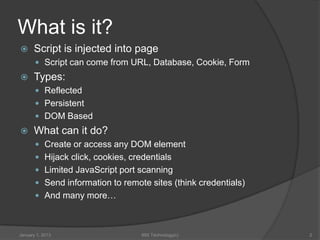
What is it?
     Script is injected into page
        Script can come from URL, Database, Cookie, Form
     Types:
        Reflected
        Persistent
        DOM Based
     What can it do?
        Create or access any DOM element
        Hijack click, cookies, credentials
        Limited JavaScript port scanning
        Send information to remote sites (think credentials)
        And many more…


January 1, 2013                    99X Technology(c)            2
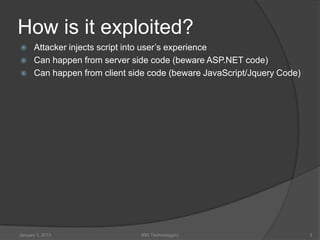
How is it exploited?
     Attacker injects script into user’s experience
     Can happen from server side code (beware ASP.NET code)
     Can happen from client side code (beware JavaScript/Jquery Code)


January 1, 2013                99X Technology(c)                         3
Exploiting Demos


Reflected


January 1, 2013   99X Technology(c)   4
Exploiting Demos


Persistent


January 1, 2013   99X Technology(c)   5
Exploiting Demos


Older style IE6 Content type
Sniffing


January 1, 2013   99X Technology(c)   6
Exploiting Demos


DOM based + JSON +
JQUERY


January 1, 2013   99X Technology(c)   7
Exploiting Demos


DATA URI – Link Hijack


January 1, 2013   99X Technology(c)   8
Exploiting Demos


Dangling markup


January 1, 2013   99X Technology(c)   9
How do you prevent it?
     Relected/Persisted not used _anywhere_ in JavaScript is the
      easiest way to prevent
        Html Encode – specify encoder for AntiXss
        Avoid user inputs in any attribute or regex to a-z only
        Consider stripping out anything not a-z,0-9
     Json.Encode() or Encoder.JavascriptEncode() all data supplied to
      JavaScript
        Still vulnerable if this text is read from an element and used incorrectly
     More complex scenarios require serious investigation into code
      sections
        Audit anywhere DOM elements are created/altered for user supplied inputs
     Some past vulnerabilities were hard to control (flash, pdf, etc)


January 1, 2013                           99X Technology(c)                           10
How do you prevent it?(cont’d)
     Do not store data encoded, but sanitized
     Encoding & Storing can lead to double encoding:
       <         &lt      &amp;lt;        &amp;amp;lt
     AntiXss Sanitizer’s GetSafeHtml()/ GetSafeHtmlFragment()
     Specify Page Encoding in the web.config
     Content Security Policies
        Firefox OK
        Chrome/Safari(WebKit) OK
        IE 10 – Partially implemented – As expected
     Don’t expect blacklists to work (ie searching for <script>)
        Have been bypassed in many ways
        Replacing “script” with “” can end up making <script>!
     Consider removing all data: from all stored URI’s to exclude data
     Only allow local URL redirects that start with “/uri”


January 1, 2013                         99X Technology(c)                 11
How do you prevent it?(Last but not
least)
     Audit every location data is assigned, output, and used since lots of
      data can be affected by user
        Ensure its not used in JavaScript, or Highly sanitized
        ASP.NET Textbox HtmlEncodes(), Label does not
         ○ KNOW YOUR CONTROL’s BEHAVIOUR!!! EVERY ONE!
        Test by injecting script, special characters (ex <) into app – use Fiddler if you
            must, to change incoming data
     Be Concerned with any place that DOM elements are
      created/modified
        Use functions such as setAttribute and var y = document.createElement(“div”);
            rather than document.writeln, $(x).html(), element.innerHTML, eval
     Deprecate IE6 (and all older browsers)
        Use Request.Browser, ie6update.com, etc…
     Don’t turn off EnableRequestValidation or ValidateRequest!
        MVC apps use [AllowHtml], Web forms more difficult (Until 4.5!!)


January 1, 2013                             99X Technology(c)                                12
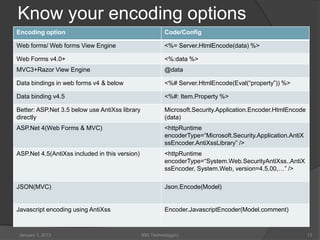
Know your encoding options
Encoding option                                           Code/Config

Web forms/ Web forms View Engine                          <%= Server.HtmlEncode(data) %>

Web Forms v4.0+                                           <%:data %>
MVC3+Razor View Engine                                    @data

Data bindings in web forms v4 & below                     <%# Server.HtmlEncode(Eval(“property”)) %>

Data binding v4.5                                         <%#: Item.Property %>

Better: ASP.Net 3.5 below use AntiXss library             Microsoft.Security.Application.Encoder.HtmlEncode
directly                                                  (data)
ASP.Net 4(Web Forms & MVC)                                <httpRuntime
                                                          encoderType=“Microsoft.Security.Application.AntiX
                                                          ssEncoder.AntiXssLibrary” />
ASP.Net 4.5(AntiXss included in this version)             <httpRuntime
                                                          encoderType=“System.Web.SecurityAntiXss..AntiX
                                                          ssEncoder, System.Web, version=4.5.00,…” />

JSON(MVC)                                                 Json.Encode(Model)


Javascript encoding using AntiXss                         Encoder.JavascriptEncoder(Model.comment)


January 1, 2013                                 99X Technology(c)                                             13
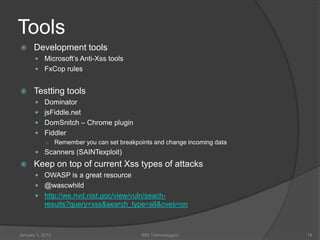
Tools
     Development tools
        Microsoft’s Anti-Xss tools
        FxCop rules


     Testting tools
        Dominator
        jsFiddle.net
        DomSnitch – Chrome plugin
        Fiddler
         ○ Remember you can set breakpoints and change incoming data
        Scanners (SAINTexploit)
     Keep on top of current Xss types of attacks
        OWASP is a great resource
        @wascwhild
        http://we.nvd.nist.goc/view/vuln/seach-
            results?query=xss&search_type=all&cves=on


January 1, 2013                         99X Technology(c)              14

Cross site scripting

  • 1.
    CROSS SITE Scripting HOW VULNERABLE IS MY WEB APPLICATION FROM A DEVELOPER’S ANGLE… Dilan Warnakulasooriya Asanka Fernandopulle Information Security Engineer Senior Software Engineer 99X Technology 99X Technology
  • 2.
    What is it?  Script is injected into page  Script can come from URL, Database, Cookie, Form  Types:  Reflected  Persistent  DOM Based  What can it do?  Create or access any DOM element  Hijack click, cookies, credentials  Limited JavaScript port scanning  Send information to remote sites (think credentials)  And many more… January 1, 2013 99X Technology(c) 2
  • 3.
    How is itexploited?  Attacker injects script into user’s experience  Can happen from server side code (beware ASP.NET code)  Can happen from client side code (beware JavaScript/Jquery Code) January 1, 2013 99X Technology(c) 3
  • 4.
    Exploiting Demos Reflected January 1,2013 99X Technology(c) 4
  • 5.
  • 6.
    Exploiting Demos Older styleIE6 Content type Sniffing January 1, 2013 99X Technology(c) 6
  • 7.
    Exploiting Demos DOM based+ JSON + JQUERY January 1, 2013 99X Technology(c) 7
  • 8.
    Exploiting Demos DATA URI– Link Hijack January 1, 2013 99X Technology(c) 8
  • 9.
    Exploiting Demos Dangling markup January1, 2013 99X Technology(c) 9
  • 10.
    How do youprevent it?  Relected/Persisted not used _anywhere_ in JavaScript is the easiest way to prevent  Html Encode – specify encoder for AntiXss  Avoid user inputs in any attribute or regex to a-z only  Consider stripping out anything not a-z,0-9  Json.Encode() or Encoder.JavascriptEncode() all data supplied to JavaScript  Still vulnerable if this text is read from an element and used incorrectly  More complex scenarios require serious investigation into code sections  Audit anywhere DOM elements are created/altered for user supplied inputs  Some past vulnerabilities were hard to control (flash, pdf, etc) January 1, 2013 99X Technology(c) 10
  • 11.
    How do youprevent it?(cont’d)  Do not store data encoded, but sanitized  Encoding & Storing can lead to double encoding:  < &lt &amp;lt; &amp;amp;lt  AntiXss Sanitizer’s GetSafeHtml()/ GetSafeHtmlFragment()  Specify Page Encoding in the web.config  Content Security Policies  Firefox OK  Chrome/Safari(WebKit) OK  IE 10 – Partially implemented – As expected  Don’t expect blacklists to work (ie searching for <script>)  Have been bypassed in many ways  Replacing “script” with “” can end up making <script>!  Consider removing all data: from all stored URI’s to exclude data  Only allow local URL redirects that start with “/uri” January 1, 2013 99X Technology(c) 11
  • 12.
    How do youprevent it?(Last but not least)  Audit every location data is assigned, output, and used since lots of data can be affected by user  Ensure its not used in JavaScript, or Highly sanitized  ASP.NET Textbox HtmlEncodes(), Label does not ○ KNOW YOUR CONTROL’s BEHAVIOUR!!! EVERY ONE!  Test by injecting script, special characters (ex <) into app – use Fiddler if you must, to change incoming data  Be Concerned with any place that DOM elements are created/modified  Use functions such as setAttribute and var y = document.createElement(“div”); rather than document.writeln, $(x).html(), element.innerHTML, eval  Deprecate IE6 (and all older browsers)  Use Request.Browser, ie6update.com, etc…  Don’t turn off EnableRequestValidation or ValidateRequest!  MVC apps use [AllowHtml], Web forms more difficult (Until 4.5!!) January 1, 2013 99X Technology(c) 12
  • 13.
    Know your encodingoptions Encoding option Code/Config Web forms/ Web forms View Engine <%= Server.HtmlEncode(data) %> Web Forms v4.0+ <%:data %> MVC3+Razor View Engine @data Data bindings in web forms v4 & below <%# Server.HtmlEncode(Eval(“property”)) %> Data binding v4.5 <%#: Item.Property %> Better: ASP.Net 3.5 below use AntiXss library Microsoft.Security.Application.Encoder.HtmlEncode directly (data) ASP.Net 4(Web Forms & MVC) <httpRuntime encoderType=“Microsoft.Security.Application.AntiX ssEncoder.AntiXssLibrary” /> ASP.Net 4.5(AntiXss included in this version) <httpRuntime encoderType=“System.Web.SecurityAntiXss..AntiX ssEncoder, System.Web, version=4.5.00,…” /> JSON(MVC) Json.Encode(Model) Javascript encoding using AntiXss Encoder.JavascriptEncoder(Model.comment) January 1, 2013 99X Technology(c) 13
  • 14.
    Tools  Development tools  Microsoft’s Anti-Xss tools  FxCop rules  Testting tools  Dominator  jsFiddle.net  DomSnitch – Chrome plugin  Fiddler ○ Remember you can set breakpoints and change incoming data  Scanners (SAINTexploit)  Keep on top of current Xss types of attacks  OWASP is a great resource  @wascwhild  http://we.nvd.nist.goc/view/vuln/seach- results?query=xss&search_type=all&cves=on January 1, 2013 99X Technology(c) 14