By: M. Swain
Client-side
 refers to operations that are performed by the client in
a client–server environment
 Typically, web browser, that runs on a user's local
computer
 The user has complete control over the client
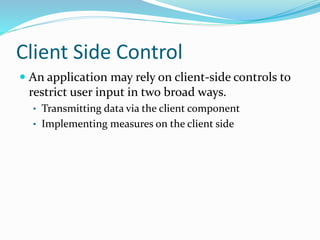
Client Side Control
 An application may rely on client-side controls to
restrict user input in two broad ways.
• Transmitting data via the client component
• Implementing measures on the client side
Capturing User Data: HTML Forms
 Simplest and most common mechanism for capturing
input from the user and submitting it to the server
 Example: Consider this HTML form
<form action=”order.asp” method=”post”>
<p>Product: Sony VAIO A217S</p>
<p>Quantity: <input size=”2” maxlength=”3”
name=”quantity”>
Hack Steps for Length Limit
 Look for form elements containing a max-length
attribute.
 Submit data that is longer than this length
 If the application accepts the overlong data, you may
infer that the client-side validation is not replicated on
the server.
 The above security flaws if exists, can lead to
possibilities of other vulnerabilities such as SQL
injection, cross-site scripting, or buffer overflows.
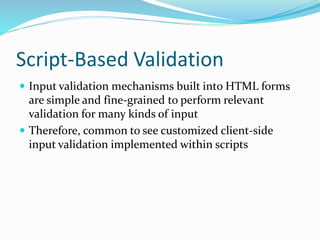
Script-Based Validation
 Input validation mechanisms built into HTML forms
are simple and fine-grained to perform relevant
validation for many kinds of input
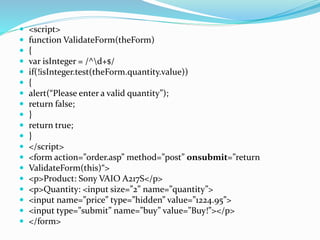
 Therefore, common to see customized client-side
input validation implemented within scripts
 <script>
 function ValidateForm(theForm)
 {
 var isInteger = /^d+$/
 if(!isInteger.test(theForm.quantity.value))
 {
 alert(“Please enter a valid quantity”);
 return false;
 }
 return true;
 }
 </script>
 <form action=”order.asp” method=”post” onsubmit=”return
 ValidateForm(this)“>
 <p>Product: Sony VAIO A217S</p>
 <p>Quantity: <input size=”2” name=”quantity”>
 <input name=”price” type=”hidden” value=”1224.95”>
 <input type=”submit” name=”buy” value=”Buy!”></p>
 </form>
Hack Steps
 Identify any cases where client-side JavaScript is used
 Submit data to the server by blocking the validation
steps
 Determine whether the client-side controls are
replicated on the server
 And if not, whether this can be exploited for any
malicious purpose.
Disabled Elements
 Element on an HTML form is flagged as disabled, it
appears on-screen but is grayed out and is not editable
or usable
 Consider the following form:
Disabled Elements
<form action=”order.asp” method=”post”>
<p>Product: <input disabled=”true” name=”product” value=”Sony
VAIO
A217S”></p>
<p>Quantity: <input size=”2” name=”quantity”>
<input name=”price” type=”hidden” value=”1224.95”>
<input type=”submit” value=”Buy!”></p>
</form>
Capturing User Data: Thick-Client
Components
 Besides HTML forms, the other main method for
capturing, validating, and submitting user data
 Technology: Java Applet, ActiveX Control, Shock Wave
Flash Objects
 Internal workings are less transparently visible than
HTML forms and JavaScript
Java Applets
 Popular for implementing thick-client components
 cross-platform and run in a sandboxed environment
 Main use: to capture user input or other in-browser
information
Java game example
 <script>
 function play()
 {
 alert(“you scored “ + TheApplet.getScore());
 document.location = “submitScore.jsp?score=” +
 TheApplet.getObsScore() + “&name=” +
 document.playForm.yourName.value;
 }
 </script>
 <form name=playForm>
 <p>Enter name: <input type=”text” name=”yourName” value=”“></p>
 <input type=”button” value=”Play” onclick=JavaScript:play()>
 </form>
 <applet code=”https://wahh-game.com/JavaGame.class”
 id=”TheApplet”></applet>
Java example
 URL entry that is returned after playing game:
https://wahh-game.com/submitScore.jsp?score=
c1cc3139323c3e4544464d51515352585a61606a6b&name=daf
 Want to cheat the game, one way is to harvest a large
number of scores and attempt to reverse engineer the
algorithm
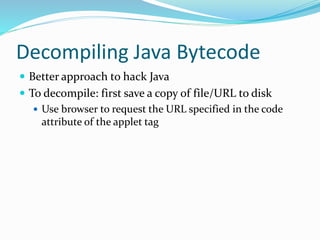
Decompiling Java Bytecode
 Better approach to hack Java
 To decompile: first save a copy of file/URL to disk
 Use browser to request the URL specified in the code
attribute of the applet tag
Jad
 Tool for decompiling Java bytecode
 Once Jad has decompiled the applet back to its source
code, you can start to bypass the client-side controls
 For example, you could change the getObsScore
method to:
return obfuscate(“99999|0.123456789”);
Coping with Bytecode Obfuscation
 Various techniques have been developed to obfuscate
bytecode because of the ease Java can decompile it
 These techniques result in bytecode that is harder to
decompile or that leads to misleading or invalid source
code
Obfuscation techniques
 Meaningful class, method, and member variable names are
replaced with meaningless expressions like a, b, c.
 Redundant code may be added for Obscurity
ActiveX Controls
 Heavyweight technology compared to Java
 ActiveX controls are written in C and C++
 Can’t be decompiled back to source code easily
 It’s possible for a user to hack ActiveX, but too
complicated
Fixing Inputs Processed by Controls
 ActiveX controls are sometimes put as a client-side
control to verify that the client computer compiles
with specific security standards before access is
granted to certain server-side functionality
 Filemon and Regmon (now Process Monitor)
 Enable you to monitor all of a process’s interaction with
the computer’s file system and registry
Decompiling Managed Code
 .NET Reflector by Lutz Roeder
 Useful tool for decompiling a thick-client component
written in C# & Visual Basic
Shockwave Flash Objects
 Most common use of Flash is for an application
context for online games
 Flash objects are contained within a compiled file that
the browser downloads from the server and executes in
a virtual machine (Flash player)
 SWF file contains bytecode that can be decompiled to
recover the original source
Flasm
 Dissembler and assembler for SWF bytecode and can
be used to extract human-readable representation of
the bytecode from an SWF file then reassemble
modified bytecode into a new SWF file
Handling Client-Side Data Securely
 Security problems with web applications arise because
client-side components and user input are outside of
the server’s direct control
Transmitting Data via the Client
 Encryption techniques can be used to prevent
tampering by the user
 If the above is used, then there are two important
pitfalls to avoid:
 Replay Attack
 Cryptographic Attack
Validating Client-Generated Data
 Data generated on the client and transmitted to the
server cannot be validated securely on the client:
 Lightweight client-side controls like HTML form fields
and JavaScript provide zero assurance about the input
received by the server
 Use of thick-client components are sometimes more
difficult to circumvent, but this may merely slow down
an attacker for a short period.
Logging and Alerting
 Integration of server-side intrusion detection defenses
 Anomalies should be logged and administrators
should be alerted in real time to take action
Summary
 Almost all client-server applications must accept the
fact that the client component, and all processing that
occurs on it, cannot be trusted to behave as expected
 Questions?

Chapter5-Bypass-ClientSide-Control-Presentation.pptx

  • 1.
  • 2.
    Client-side  refers tooperations that are performed by the client in a client–server environment  Typically, web browser, that runs on a user's local computer  The user has complete control over the client
  • 3.
    Client Side Control An application may rely on client-side controls to restrict user input in two broad ways. • Transmitting data via the client component • Implementing measures on the client side
  • 4.
    Capturing User Data:HTML Forms  Simplest and most common mechanism for capturing input from the user and submitting it to the server  Example: Consider this HTML form <form action=”order.asp” method=”post”> <p>Product: Sony VAIO A217S</p> <p>Quantity: <input size=”2” maxlength=”3” name=”quantity”>
  • 5.
    Hack Steps forLength Limit  Look for form elements containing a max-length attribute.  Submit data that is longer than this length  If the application accepts the overlong data, you may infer that the client-side validation is not replicated on the server.  The above security flaws if exists, can lead to possibilities of other vulnerabilities such as SQL injection, cross-site scripting, or buffer overflows.
  • 6.
    Script-Based Validation  Inputvalidation mechanisms built into HTML forms are simple and fine-grained to perform relevant validation for many kinds of input  Therefore, common to see customized client-side input validation implemented within scripts
  • 7.
     <script>  functionValidateForm(theForm)  {  var isInteger = /^d+$/  if(!isInteger.test(theForm.quantity.value))  {  alert(“Please enter a valid quantity”);  return false;  }  return true;  }  </script>  <form action=”order.asp” method=”post” onsubmit=”return  ValidateForm(this)“>  <p>Product: Sony VAIO A217S</p>  <p>Quantity: <input size=”2” name=”quantity”>  <input name=”price” type=”hidden” value=”1224.95”>  <input type=”submit” name=”buy” value=”Buy!”></p>  </form>
  • 8.
    Hack Steps  Identifyany cases where client-side JavaScript is used  Submit data to the server by blocking the validation steps  Determine whether the client-side controls are replicated on the server  And if not, whether this can be exploited for any malicious purpose.
  • 9.
    Disabled Elements  Elementon an HTML form is flagged as disabled, it appears on-screen but is grayed out and is not editable or usable  Consider the following form:
  • 10.
    Disabled Elements <form action=”order.asp”method=”post”> <p>Product: <input disabled=”true” name=”product” value=”Sony VAIO A217S”></p> <p>Quantity: <input size=”2” name=”quantity”> <input name=”price” type=”hidden” value=”1224.95”> <input type=”submit” value=”Buy!”></p> </form>
  • 11.
    Capturing User Data:Thick-Client Components  Besides HTML forms, the other main method for capturing, validating, and submitting user data  Technology: Java Applet, ActiveX Control, Shock Wave Flash Objects  Internal workings are less transparently visible than HTML forms and JavaScript
  • 12.
    Java Applets  Popularfor implementing thick-client components  cross-platform and run in a sandboxed environment  Main use: to capture user input or other in-browser information
  • 13.
    Java game example <script>  function play()  {  alert(“you scored “ + TheApplet.getScore());  document.location = “submitScore.jsp?score=” +  TheApplet.getObsScore() + “&name=” +  document.playForm.yourName.value;  }  </script>  <form name=playForm>  <p>Enter name: <input type=”text” name=”yourName” value=”“></p>  <input type=”button” value=”Play” onclick=JavaScript:play()>  </form>  <applet code=”https://wahh-game.com/JavaGame.class”  id=”TheApplet”></applet>
  • 14.
    Java example  URLentry that is returned after playing game: https://wahh-game.com/submitScore.jsp?score= c1cc3139323c3e4544464d51515352585a61606a6b&name=daf  Want to cheat the game, one way is to harvest a large number of scores and attempt to reverse engineer the algorithm
  • 15.
    Decompiling Java Bytecode Better approach to hack Java  To decompile: first save a copy of file/URL to disk  Use browser to request the URL specified in the code attribute of the applet tag
  • 16.
    Jad  Tool fordecompiling Java bytecode  Once Jad has decompiled the applet back to its source code, you can start to bypass the client-side controls  For example, you could change the getObsScore method to: return obfuscate(“99999|0.123456789”);
  • 17.
    Coping with BytecodeObfuscation  Various techniques have been developed to obfuscate bytecode because of the ease Java can decompile it  These techniques result in bytecode that is harder to decompile or that leads to misleading or invalid source code
  • 18.
    Obfuscation techniques  Meaningfulclass, method, and member variable names are replaced with meaningless expressions like a, b, c.  Redundant code may be added for Obscurity
  • 19.
    ActiveX Controls  Heavyweighttechnology compared to Java  ActiveX controls are written in C and C++  Can’t be decompiled back to source code easily  It’s possible for a user to hack ActiveX, but too complicated
  • 20.
    Fixing Inputs Processedby Controls  ActiveX controls are sometimes put as a client-side control to verify that the client computer compiles with specific security standards before access is granted to certain server-side functionality  Filemon and Regmon (now Process Monitor)  Enable you to monitor all of a process’s interaction with the computer’s file system and registry
  • 21.
    Decompiling Managed Code .NET Reflector by Lutz Roeder  Useful tool for decompiling a thick-client component written in C# & Visual Basic
  • 22.
    Shockwave Flash Objects Most common use of Flash is for an application context for online games  Flash objects are contained within a compiled file that the browser downloads from the server and executes in a virtual machine (Flash player)  SWF file contains bytecode that can be decompiled to recover the original source
  • 23.
    Flasm  Dissembler andassembler for SWF bytecode and can be used to extract human-readable representation of the bytecode from an SWF file then reassemble modified bytecode into a new SWF file
  • 24.
    Handling Client-Side DataSecurely  Security problems with web applications arise because client-side components and user input are outside of the server’s direct control
  • 25.
    Transmitting Data viathe Client  Encryption techniques can be used to prevent tampering by the user  If the above is used, then there are two important pitfalls to avoid:  Replay Attack  Cryptographic Attack
  • 26.
    Validating Client-Generated Data Data generated on the client and transmitted to the server cannot be validated securely on the client:  Lightweight client-side controls like HTML form fields and JavaScript provide zero assurance about the input received by the server  Use of thick-client components are sometimes more difficult to circumvent, but this may merely slow down an attacker for a short period.
  • 27.
    Logging and Alerting Integration of server-side intrusion detection defenses  Anomalies should be logged and administrators should be alerted in real time to take action
  • 28.
    Summary  Almost allclient-server applications must accept the fact that the client component, and all processing that occurs on it, cannot be trusted to behave as expected  Questions?