Creative iMedia
R082 CREATING DIGITAL GRAPHICS
Task brief
A local magazine is to include a feature on digital cameras and how they can be used in the
local area. The intention of the advertisement is to encourage readers to photograph their
local area and submit their images to the magazine, either by email, website upload or social
media. You have been asked to create an advertisement for the A5 magazine that will be a full
page. The specifications of the advertisement to fit within the page are as follows:
• Width: 135 mm (5.3 inches)
• Height: 190 mm (7.5 inches)
The advert should have a title of “Photography around [your local area name]”. The content of
the advertisement could include a digital camera and photographs of your local area but
alternative ideas may also be accepted with a suitable justification. The target audience for
the advertisement will be quite broad but you can select a more specific audience group in
your planning and explain why the content will appeal to them.A single piece of digital graphic
artwork should be produced for the advertisement, which will need to be print quality. A
second version of the advertisement will be needed for the website, which should be resized to
300 pixels in height and saved as a separate file.
Learning Outcome (LO) 1 is assessed in this task.
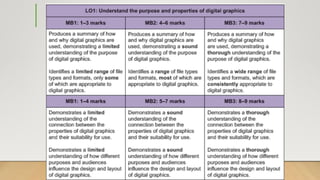
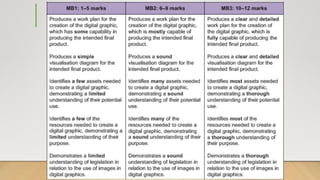
Before creating your digital graphic, you need to investigate the purpose and properties of digital graphics.
The purpose of digital graphics
You need to:
• Investigate how and why digital graphics are used in a range of sectors
• Identify the purpose of digital graphics.
Identifying the properties of digital graphics
You need to consider:
• The properties of digital graphics which affect their suitability and compatibility with the intended purpose
• File formats for different types and uses of digital graphics.
Investigate the design and layout of digital graphics
You need to:
• Investigate how different purposes and audiences would influence the design and layout of digital graphics.
Make sure you summarise any investigation and research in your own words. Present your evidence in an appropriate way.
Task 1: Investigating Digital Graphics
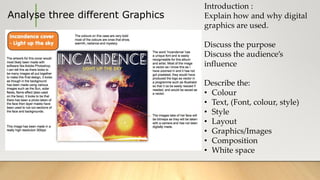
Analyse three different Graphics
Introduction :
Explain how and why digital
graphics are used.
Discuss the purpose
Discuss the audience’s
influence
Describe the:
• Colour
• Text, (Font, colour, style)
• Style
• Layout
• Graphics/Images
• Composition
• White space
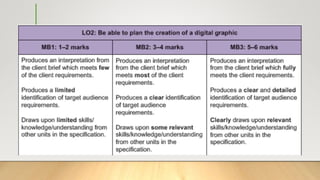
Task 2 – Planning your digital graphic
You need to organise your time and resources so that you can plan
the creation of your digital graphic.
You will need to generate the ideas for the digital graphic, taking into
consideration any external restrictions on what you can use or
produce.
Your client and the target audience
You need to:
• Consider the client’s requirements and how these are specified
• Consider the target audience for the digital graphic
• Decide on a visual style and composition of the digital graphic.
Target
Audience
Categories:
Gender -
Ethnicity -
Interests -
Income -
Health -
Task 2 – Planning your digital graphic
Creating a work plan for the project
You need to:
• Identify what activities must be completed to create the digital graphic
• Estimate how long each activity will take
• Identify the workflow sequence needed to create the digital graphic
• Describe the assets and resources you will need to create the digital graphic.
Producing ideas
You need to:
• Produce a visualisation diagram of the digital graphic.
Legal restrictions
The digital graphic will be used in a commercial context.
You need to:
• Explain any legal issues and restrictions that need to be considered when creating the digital graphic.
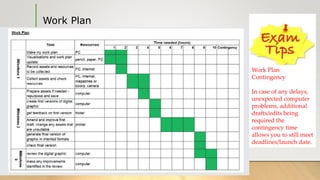
Work Plan
Work Plan
Contingency
In case of any delays,
unexpected computer
problems, additional
drafts/edits being
required the
contingency time
allows you to still meet
deadlines/launch date.
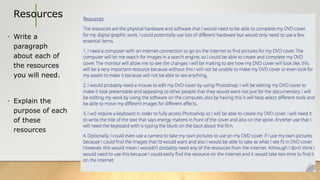
Resources
• Write a
paragraph
about each of
the resources
you will need.
• Explain the
purpose of each
of these
resources
Pre Production:
Visualisation Diagram
The purpose of a
Visulisation Diagram.
• Static Image to show
how product will
look
• To plan out your
design
• To Plan out your
layout
You should include:
Font, Colour, Texture,
Graphics, Content,
Logo, Text,
Annotations
Add detail about each assets
(individual part) of your on
you visualization diagram.
Explain the potential use of
each of these assets.
• Visulisation diagram allows
the design to be seen before
it’s made
• Provides quick check of
ideas so changes can be
made
• Allows a draft to be checked
with your client
• You can create different
versions and choose the best
Explain overall visual
style and composition
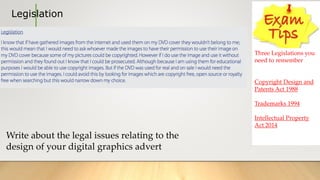
Legislation
Three Legislations you
need to remember
Copyright Design and
Patents Act 1988
Trademarks 1994
Intellectual Property
Act 2014
Write about the legal issues relating to the
design of your digital graphics advert
Task 3 – Creating your digital graphic
Learning Outcome (LO) 3 is assessed in this task.
You will need to produce the digital graphic using a range of tools, techniques and assets to ensure it is suitable for
its intended uses.
Obtaining assets for use in the graphic
You need to:
• Obtain the assets required for the digital graphic
• Re-purpose and store the assets to ensure their technical compatibility with the intended digital graphic.
Create the graphic
You need to:
• Use a range of tools and techniques from the image editing software to combine the assets into the final graphic
• Save both versions of the digital graphic in suitable formats as specified in the brief
• Submit both digital graphic versions in an electronic format.
The final graphics in their intended digital format must be supplied with the portfolio of evidence.
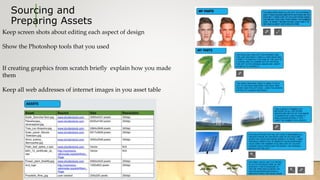
Sourcing and
Preparing Assets
Keep screen shots about editing each aspect of design
Show the Photoshop tools that you used
If creating graphics from scratch briefly explain how you made
them
Keep all web addresses of internet images in you asset table
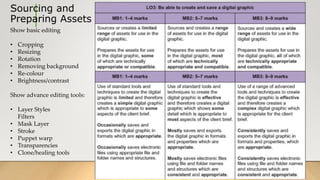
Sourcing and
Preparing Assets
Show basic editing
• Cropping
• Resizing
• Rotation
• Removing background
• Re-colour
• Brightness/contrast
Show advance editing tools:
• Layer Styles
Filters
• Mask Layer
• Stroke
• Puppet warp
• Transparencies
• Clone/healing tools
Task 4 – Checking and reviewing the digital graphic
Learning Outcome (LO) 4 is assessed in this task.
Now the digital graphic has been produced, you need to consider whether you have met
all the requirements of the initial brief. You will also need to review the overall quality of
the digital graphic and identify any improvements that could be made.
Reviewing the digital graphic
You need to:
• Review how well the digital graphic meets the client’s requirements
• Identify how the digital graphic could be improved
• Describe areas for further development, giving reasons for your choices.
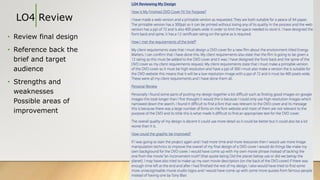
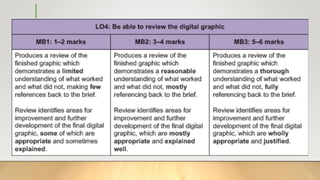
LO4 Review
• Review final design
• Reference back the
brief and target
audience
• Strengths and
weaknesses
Possible areas of
improvement
Creative i media r082   new brief

Creative i media r082 new brief

  • 1.
  • 2.
    Task brief A localmagazine is to include a feature on digital cameras and how they can be used in the local area. The intention of the advertisement is to encourage readers to photograph their local area and submit their images to the magazine, either by email, website upload or social media. You have been asked to create an advertisement for the A5 magazine that will be a full page. The specifications of the advertisement to fit within the page are as follows: • Width: 135 mm (5.3 inches) • Height: 190 mm (7.5 inches) The advert should have a title of “Photography around [your local area name]”. The content of the advertisement could include a digital camera and photographs of your local area but alternative ideas may also be accepted with a suitable justification. The target audience for the advertisement will be quite broad but you can select a more specific audience group in your planning and explain why the content will appeal to them.A single piece of digital graphic artwork should be produced for the advertisement, which will need to be print quality. A second version of the advertisement will be needed for the website, which should be resized to 300 pixels in height and saved as a separate file.
  • 3.
    Learning Outcome (LO)1 is assessed in this task. Before creating your digital graphic, you need to investigate the purpose and properties of digital graphics. The purpose of digital graphics You need to: • Investigate how and why digital graphics are used in a range of sectors • Identify the purpose of digital graphics. Identifying the properties of digital graphics You need to consider: • The properties of digital graphics which affect their suitability and compatibility with the intended purpose • File formats for different types and uses of digital graphics. Investigate the design and layout of digital graphics You need to: • Investigate how different purposes and audiences would influence the design and layout of digital graphics. Make sure you summarise any investigation and research in your own words. Present your evidence in an appropriate way. Task 1: Investigating Digital Graphics
  • 4.
    Analyse three differentGraphics Introduction : Explain how and why digital graphics are used. Discuss the purpose Discuss the audience’s influence Describe the: • Colour • Text, (Font, colour, style) • Style • Layout • Graphics/Images • Composition • White space
  • 6.
    Task 2 –Planning your digital graphic You need to organise your time and resources so that you can plan the creation of your digital graphic. You will need to generate the ideas for the digital graphic, taking into consideration any external restrictions on what you can use or produce. Your client and the target audience You need to: • Consider the client’s requirements and how these are specified • Consider the target audience for the digital graphic • Decide on a visual style and composition of the digital graphic. Target Audience Categories: Gender - Ethnicity - Interests - Income - Health -
  • 8.
    Task 2 –Planning your digital graphic Creating a work plan for the project You need to: • Identify what activities must be completed to create the digital graphic • Estimate how long each activity will take • Identify the workflow sequence needed to create the digital graphic • Describe the assets and resources you will need to create the digital graphic. Producing ideas You need to: • Produce a visualisation diagram of the digital graphic. Legal restrictions The digital graphic will be used in a commercial context. You need to: • Explain any legal issues and restrictions that need to be considered when creating the digital graphic.
  • 9.
    Work Plan Work Plan Contingency Incase of any delays, unexpected computer problems, additional drafts/edits being required the contingency time allows you to still meet deadlines/launch date.
  • 10.
    Resources • Write a paragraph abouteach of the resources you will need. • Explain the purpose of each of these resources
  • 11.
    Pre Production: Visualisation Diagram Thepurpose of a Visulisation Diagram. • Static Image to show how product will look • To plan out your design • To Plan out your layout You should include: Font, Colour, Texture, Graphics, Content, Logo, Text, Annotations Add detail about each assets (individual part) of your on you visualization diagram. Explain the potential use of each of these assets. • Visulisation diagram allows the design to be seen before it’s made • Provides quick check of ideas so changes can be made • Allows a draft to be checked with your client • You can create different versions and choose the best Explain overall visual style and composition
  • 12.
    Legislation Three Legislations you needto remember Copyright Design and Patents Act 1988 Trademarks 1994 Intellectual Property Act 2014 Write about the legal issues relating to the design of your digital graphics advert
  • 14.
    Task 3 –Creating your digital graphic Learning Outcome (LO) 3 is assessed in this task. You will need to produce the digital graphic using a range of tools, techniques and assets to ensure it is suitable for its intended uses. Obtaining assets for use in the graphic You need to: • Obtain the assets required for the digital graphic • Re-purpose and store the assets to ensure their technical compatibility with the intended digital graphic. Create the graphic You need to: • Use a range of tools and techniques from the image editing software to combine the assets into the final graphic • Save both versions of the digital graphic in suitable formats as specified in the brief • Submit both digital graphic versions in an electronic format. The final graphics in their intended digital format must be supplied with the portfolio of evidence.
  • 15.
    Sourcing and Preparing Assets Keepscreen shots about editing each aspect of design Show the Photoshop tools that you used If creating graphics from scratch briefly explain how you made them Keep all web addresses of internet images in you asset table
  • 16.
    Sourcing and Preparing Assets Showbasic editing • Cropping • Resizing • Rotation • Removing background • Re-colour • Brightness/contrast Show advance editing tools: • Layer Styles Filters • Mask Layer • Stroke • Puppet warp • Transparencies • Clone/healing tools
  • 17.
    Task 4 –Checking and reviewing the digital graphic Learning Outcome (LO) 4 is assessed in this task. Now the digital graphic has been produced, you need to consider whether you have met all the requirements of the initial brief. You will also need to review the overall quality of the digital graphic and identify any improvements that could be made. Reviewing the digital graphic You need to: • Review how well the digital graphic meets the client’s requirements • Identify how the digital graphic could be improved • Describe areas for further development, giving reasons for your choices.
  • 18.
    LO4 Review • Reviewfinal design • Reference back the brief and target audience • Strengths and weaknesses Possible areas of improvement