Crea%ve	
  Coding	
  
Interac%on	
  Design	
  Lab	
  1,	
  IUAV,	
  WS	
  10/11	


                                               Till	
  Nagel,	
  FH	
  Potsdam,	
  10/2010	
  
“	
  
   A	
  man	
  paints	
  with	
  his	
  brain,	
  
   not	
  with	
  his	
  hands.	
  
                             Michelangelo	
  
Processing	
  Basics	
  
Processing	
  Basics	


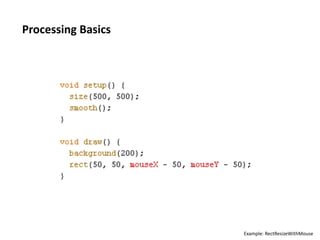
                           Example:	
  RectResizeWithMouse	
  
Processing	
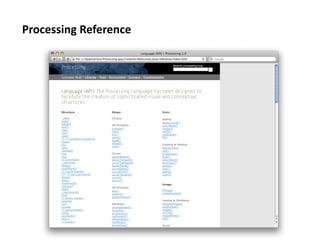
  Reference	
  
A	
  more	
  in-­‐depth	
  look	
  …	
  
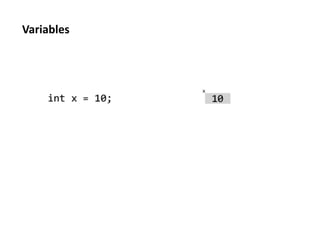
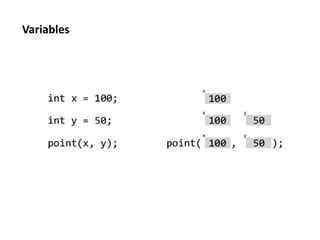
Variables	
  
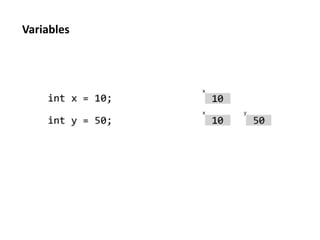
Variables	
  
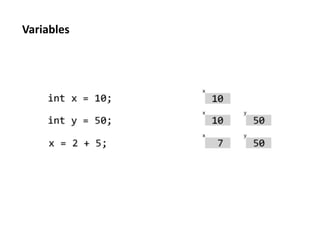
Variables	
  
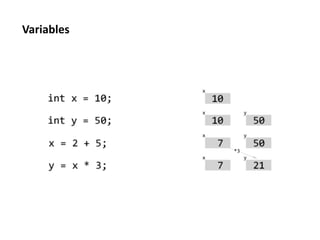
Variables	
  
Variables	
  
Variables	
  
Variables	
  
Variables	
  

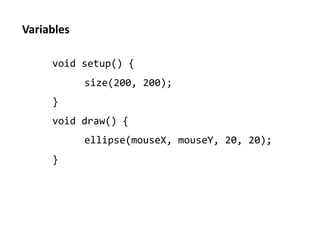
       void	
  setup()	
  {	
  
                	
  size(200,	
  200);	
  
       }	
  
       void	
  draw()	
  {	
  
                	
  ellipse(mouseX,	
  mouseY,	
  20,	
  20);	
  
       }	
  
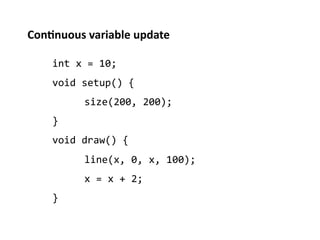
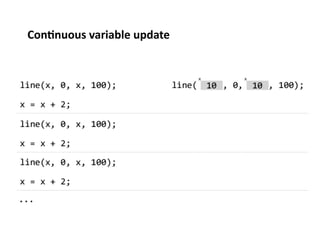
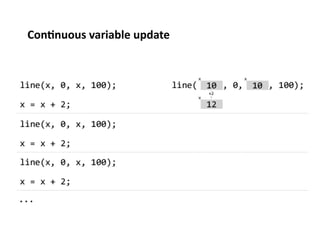
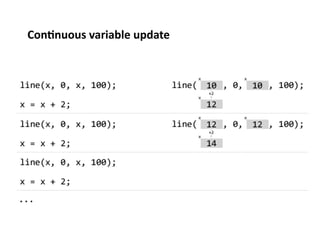
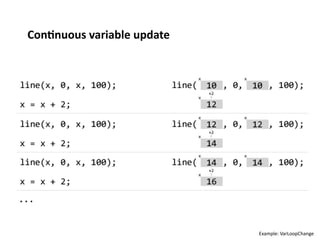
Con%nuous	
  variable	
  update	
  

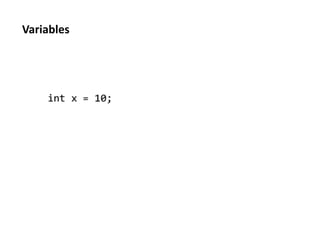
      int	
  x	
  =	
  10;	
  
      void	
  setup()	
  {	
  
              	
  size(200,	
  200);	
  
      }	
  
      void	
  draw()	
  {	
  
              	
  line(x,	
  0,	
  x,	
  100);	
  
              	
  x	
  =	
  x	
  +	
  2;	
  
      }	
  
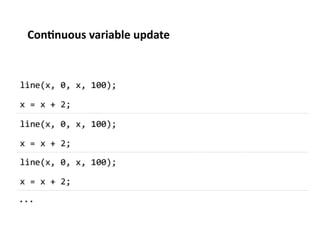
Con%nuous	
  variable	
  update	
  
Con%nuous	
  variable	
  update	
  
Con%nuous	
  variable	
  update	
  
Con%nuous	
  variable	
  update	
  
Con%nuous	
  variable	
  update	


                                      Example:	
  VarLoopChange	
  
Mul%ple	
  usage	
  of	
  variables	
  

      void	
  setup()	
  {	
  
              	
  size(200,	
  200);	
  
      }	
  
      void	
  draw()	
  {	
  
              	
  fill(mouseX,	
  mouseY,	
  0);	
  
              	
  ellipse(mouseX,	
  mouseY,	
  20,	
  20);	
  
      }	


                                                              Example:	
  Mul;Use	
  
Reading	
  discussion	
  
Condi%onals	
  
Condi%onals	
  

  if	
  (test)	
  {	
  
          	
  statements	
  
  }	


                               Images	
  from:	
  Casey	
  Reas,	
  Ben	
  Fry,	
  Processing,	
  MIT	
  Press,	
  2007	
  
Condi%onals	
  

  if	
  (x	
  <	
  150)	
  {	
  
          	
  line(20,	
  20,	
  180,	
  180);	
  
  }	
  
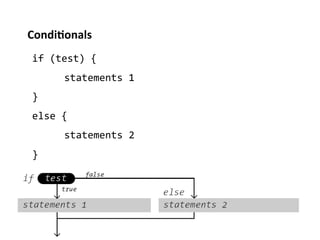
Condi%onals	
  
 if	
  (test)	
  {	
  
         	
  statements	
  1	
  
 }	
  
 else	
  {	
  
         	
  statements	
  2	
  
 }	
  
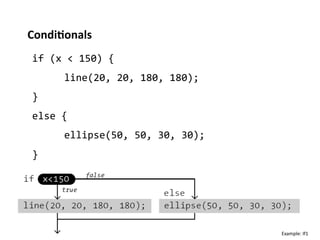
Condi%onals	
  
 if	
  (x	
  <	
  150)	
  {	
  
         	
  line(20,	
  20,	
  180,	
  180);	
  
 }	
  
 else	
  {	
  
         	
  ellipse(50,	
  50,	
  30,	
  30);	
  
 }	


                                                     Example:	
  If1	
  
Condi%onals	
  

 Condi;onals	
  control	
  the	
  program	
  flow.	
  

 Each	
  condi;on	
  can	
  be	
  either	
  true	
  or	
  false.	
  

 It	
  checks	
  if	
  a	
  condi;on	
  is	
  true.	
  

 If	
  condi;on	
  is	
  true,	
  the	
  inner	
  statements	
  are	
  executed.	
  
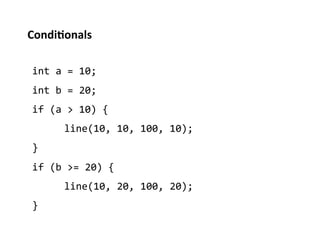
Condi%onals	
  

 int	
  a	
  =	
  10;	
  
 int	
  b	
  =	
  20;	
  
 if	
  (a	
  >	
  10)	
  {	
  
          	
  line(10,	
  10,	
  100,	
  10);	
  
 }	
  
 if	
  (b	
  >=	
  20)	
  {	
  
          	
  line(10,	
  20,	
  100,	
  20);	
  
 }	
  
Condi%onals	
  

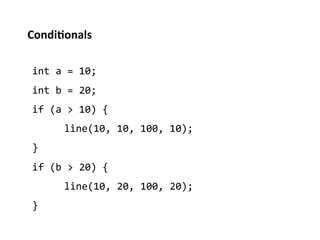
 int	
  a	
  =	
  10;	
  
 int	
  b	
  =	
  20;	
  
 if	
  (a	
  >	
  10)	
  {	
  
          	
  line(10,	
  10,	
  100,	
  10);	
  
 }	
  
 if	
  (b	
  >	
  20)	
  {	
  
          	
  line(10,	
  20,	
  100,	
  20);	
  
 }	
  
Condi%onals	
  

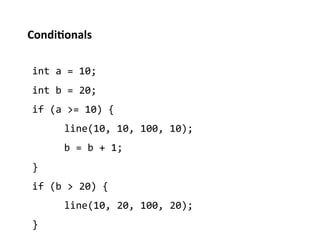
 int	
  a	
  =	
  10;	
  
 int	
  b	
  =	
  20;	
  
 if	
  (a	
  >=	
  10)	
  {	
  
          	
  line(10,	
  10,	
  100,	
  10);	
  
          	
  b	
  =	
  b	
  +	
  1;	
  
 }	
  
 if	
  (b	
  >	
  20)	
  {	
  
          	
  line(10,	
  20,	
  100,	
  20);	
  
 }	
  
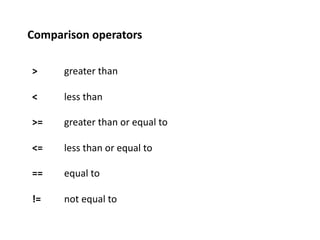
Comparison	
  operators	
  

 >        	
  greater	
  than	
  

 <        	
  less	
  than	
  

 >=       	
  greater	
  than	
  or	
  equal	
  to	
  

 <=       	
  less	
  than	
  or	
  equal	
  to	
  

 ==	
     	
  equal	
  to	
  

 !=       	
  not	
  equal	
  to	
  
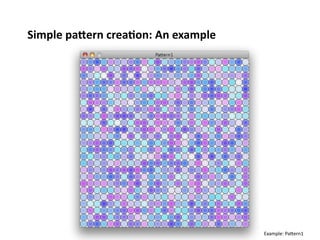
Simple	
  paTern	
  crea%on:	
  An	
  example	


                                                    Example:	
  PaPern1	
  
Exercises	
  

E6:	
  Download	
  and	
  modify	
  sketch	
  to	
  create	
  different	
  paPerns.	


  hTp://%llnagel.com/iuav/PaTernTemplate.zip	
  
Varia%on:	
  Make	
  it	
  interac;ve	
  so	
  that	
  the	
  results	
  depends	
  on	
  
mouse	
  movements.	
  
Varia%on:	
  Use	
  random()	
  to	
  randomize	
  the	
  graphic.	
  
Condi%onals	
  &	
  Interac%on	


 if	
  (mousePressed)	
  {	
  
         	
  point(100,	
  200);	
  
 }	
  
Condi%onals	
  &	
  Interac%on	


 if	
  (mousePressed)	
  {	
  
         	
  x	
  =	
  x	
  +	
  1;	
  
 }	
  
 ellipse(x,	
  y,	
  10,	
  10);	
  
Boolean	
  variables	
  

 boolean	
  upper	
  =	
  mouseY	
  <	
  height/2;	
  
 if	
  (upper)	
  {	
  
         	
  fill(255,	
  0,	
  0);	
  
 }	
  
 else	
  {	
  
         	
  fill(0,	
  255,	
  0);	
  
 }	
  
 ellipse(mouseX,	
  mouseY,	
  10,	
  10);	
  

                                                         Example:	
  IfElseShowcase	
  
Combined	
  condi%ons	


 if	
  (mouseX	
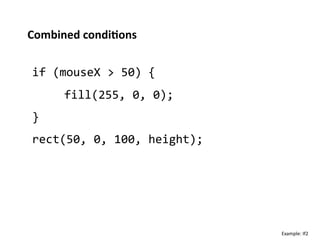
  >	
  50)	
  {	
  
         	
  fill(255,	
  0,	
  0);	
  
 }	
  
 rect(50,	
  0,	
  100,	
  height);	


                                          Example:	
  If2	
  
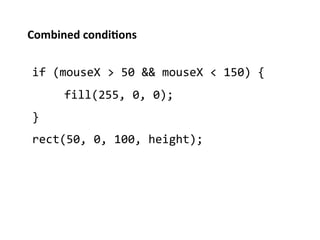
Combined	
  condi%ons	


 if	
  (mouseX	
  >	
  50	
  &&	
  mouseX	
  <	
  150)	
  {	
  
         	
  fill(255,	
  0,	
  0);	
  
 }	
  
 rect(50,	
  0,	
  100,	
  height);	
  
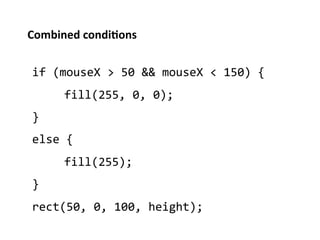
Combined	
  condi%ons	


 if	
  (mouseX	
  >	
  50	
  &&	
  mouseX	
  <	
  150)	
  {	
  
         	
  fill(255,	
  0,	
  0);	
  
 }	
  
 else	
  {	
  
         	
  fill(255);	
  
 }	
  
 rect(50,	
  0,	
  100,	
  height);	
  
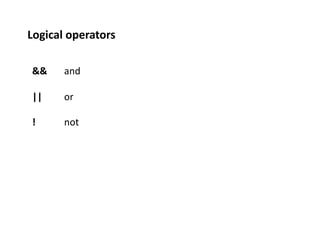
Logical	
  operators	
  

 &&      	
  and	
  

 ||      	
  or	
  

 !       	
  not	
  
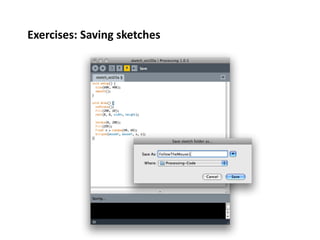
Exercises:	
  Saving	
  sketches	
  
Exercises	
  

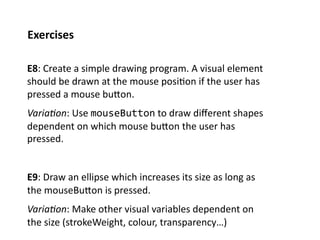
E8:	
  Create	
  a	
  simple	
  drawing	
  program.	
  A	
  visual	
  element	
  
should	
  be	
  drawn	
  at	
  the	
  mouse	
  posi;on	
  if	
  the	
  user	
  has	
  
pressed	
  a	
  mouse	
  buPon.	
  
Varia%on:	
  Use	
  mouseButton	
  to	
  draw	
  different	
  shapes	
  
dependent	
  on	
  which	
  mouse	
  buPon	
  the	
  user	
  has	
  
pressed.	


E9:	
  Draw	
  an	
  ellipse	
  which	
  increases	
  its	
  size	
  as	
  long	
  as	
  
the	
  mouseBuPon	
  is	
  pressed.	
  
Varia%on:	
  Make	
  other	
  visual	
  variables	
  dependent	
  on	
  
the	
  size	
  (strokeWeight,	
  colour,	
  transparency…)	
  
Exercises	
  

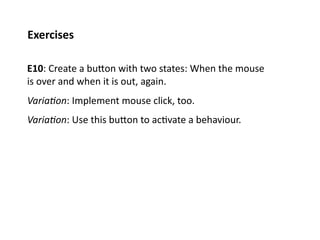
E10:	
  Create	
  a	
  buPon	
  with	
  two	
  states:	
  When	
  the	
  mouse	
  
is	
  over	
  and	
  when	
  it	
  is	
  out,	
  again.	
  
Varia%on:	
  Implement	
  mouse	
  click,	
  too.	
  
Varia%on:	
  Use	
  this	
  buPon	
  to	
  ac;vate	
  a	
  behaviour.	
  
Assignment	
  

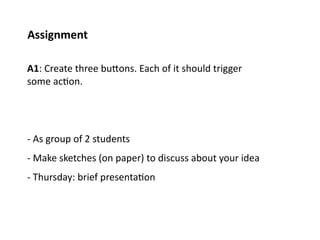
A1:	
  Create	
  three	
  buPons.	
  Each	
  of	
  it	
  should	
  trigger	
  
some	
  ac;on.	


-­‐	
  As	
  group	
  of	
  2	
  students	
  
-­‐	
  Make	
  sketches	
  (on	
  paper)	
  to	
  discuss	
  about	
  your	
  idea	
  
-­‐	
  Thursday:	
  brief	
  presenta;on	
  
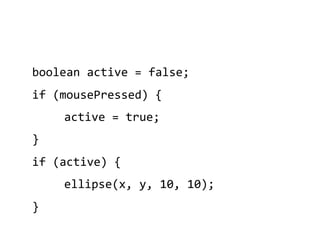
boolean	
  active	
  =	
  false;	
  
if	
  (mousePressed)	
  {	
  
        	
  active	
  =	
  true;	
  
}	
  
if	
  (active)	
  {	
  
        	
  ellipse(x,	
  y,	
  10,	
  10);	
  
}	
  
Thank	
  you.	


                Copyright	
  Till	
  Nagel,	
  FH	
  Potsdam,	
  10/2010	
  

Creative Coding 1 - 3 Conditions

  • 1.
    Crea%ve  Coding   Interac%on  Design  Lab  1,  IUAV,  WS  10/11   Till  Nagel,  FH  Potsdam,  10/2010  
  • 2.
    “   A  man  paints  with  his  brain,   not  with  his  hands.   Michelangelo  
  • 3.
  • 4.
    Processing  Basics   Example:  RectResizeWithMouse  
  • 5.
  • 6.
  • 7.
  • 8.
  • 9.
  • 10.
  • 11.
  • 12.
  • 13.
  • 14.
    Variables   void  setup()  {    size(200,  200);   }   void  draw()  {    ellipse(mouseX,  mouseY,  20,  20);   }  
  • 15.
    Con%nuous  variable  update   int  x  =  10;   void  setup()  {    size(200,  200);   }   void  draw()  {    line(x,  0,  x,  100);    x  =  x  +  2;   }  
  • 16.
  • 17.
  • 18.
  • 19.
  • 20.
    Con%nuous  variable  update   Example:  VarLoopChange  
  • 21.
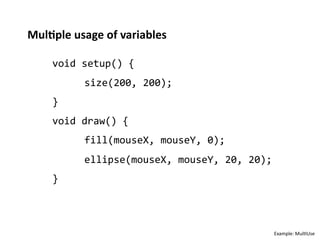
    Mul%ple  usage  of  variables   void  setup()  {    size(200,  200);   }   void  draw()  {    fill(mouseX,  mouseY,  0);    ellipse(mouseX,  mouseY,  20,  20);   }   Example:  Mul;Use  
  • 22.
  • 23.
  • 24.
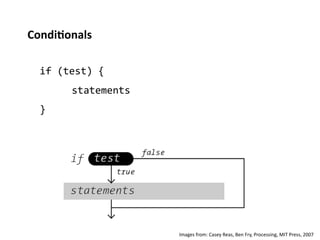
    Condi%onals   if  (test)  {    statements   }   Images  from:  Casey  Reas,  Ben  Fry,  Processing,  MIT  Press,  2007  
  • 25.
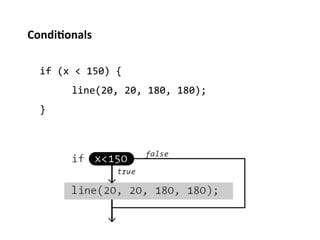
    Condi%onals   if  (x  <  150)  {    line(20,  20,  180,  180);   }  
  • 26.
    Condi%onals   if  (test)  {    statements  1   }   else  {    statements  2   }  
  • 27.
    Condi%onals   if  (x  <  150)  {    line(20,  20,  180,  180);   }   else  {    ellipse(50,  50,  30,  30);   }   Example:  If1  
  • 28.
    Condi%onals   Condi;onals  control  the  program  flow.   Each  condi;on  can  be  either  true  or  false.   It  checks  if  a  condi;on  is  true.   If  condi;on  is  true,  the  inner  statements  are  executed.  
  • 29.
    Condi%onals   int  a  =  10;   int  b  =  20;   if  (a  >  10)  {    line(10,  10,  100,  10);   }   if  (b  >=  20)  {    line(10,  20,  100,  20);   }  
  • 30.
    Condi%onals   int  a  =  10;   int  b  =  20;   if  (a  >  10)  {    line(10,  10,  100,  10);   }   if  (b  >  20)  {    line(10,  20,  100,  20);   }  
  • 31.
    Condi%onals   int  a  =  10;   int  b  =  20;   if  (a  >=  10)  {    line(10,  10,  100,  10);    b  =  b  +  1;   }   if  (b  >  20)  {    line(10,  20,  100,  20);   }  
  • 32.
    Comparison  operators   >  greater  than   <  less  than   >=  greater  than  or  equal  to   <=  less  than  or  equal  to   ==    equal  to   !=  not  equal  to  
  • 33.
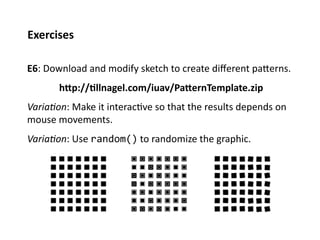
    Simple  paTern  crea%on:  An  example   Example:  PaPern1  
  • 34.
    Exercises   E6:  Download  and  modify  sketch  to  create  different  paPerns.      hTp://%llnagel.com/iuav/PaTernTemplate.zip   Varia%on:  Make  it  interac;ve  so  that  the  results  depends  on   mouse  movements.   Varia%on:  Use  random()  to  randomize  the  graphic.  
  • 35.
    Condi%onals  &  Interac%on   if  (mousePressed)  {    point(100,  200);   }  
  • 36.
    Condi%onals  &  Interac%on   if  (mousePressed)  {    x  =  x  +  1;   }   ellipse(x,  y,  10,  10);  
  • 37.
    Boolean  variables   boolean  upper  =  mouseY  <  height/2;   if  (upper)  {    fill(255,  0,  0);   }   else  {    fill(0,  255,  0);   }   ellipse(mouseX,  mouseY,  10,  10);   Example:  IfElseShowcase  
  • 38.
    Combined  condi%ons   if  (mouseX  >  50)  {    fill(255,  0,  0);   }   rect(50,  0,  100,  height);   Example:  If2  
  • 39.
    Combined  condi%ons   if  (mouseX  >  50  &&  mouseX  <  150)  {    fill(255,  0,  0);   }   rect(50,  0,  100,  height);  
  • 40.
    Combined  condi%ons   if  (mouseX  >  50  &&  mouseX  <  150)  {    fill(255,  0,  0);   }   else  {    fill(255);   }   rect(50,  0,  100,  height);  
  • 41.
    Logical  operators   &&  and   ||  or   !  not  
  • 42.
  • 43.
    Exercises   E8:  Create  a  simple  drawing  program.  A  visual  element   should  be  drawn  at  the  mouse  posi;on  if  the  user  has   pressed  a  mouse  buPon.   Varia%on:  Use  mouseButton  to  draw  different  shapes   dependent  on  which  mouse  buPon  the  user  has   pressed.   E9:  Draw  an  ellipse  which  increases  its  size  as  long  as   the  mouseBuPon  is  pressed.   Varia%on:  Make  other  visual  variables  dependent  on   the  size  (strokeWeight,  colour,  transparency…)  
  • 44.
    Exercises   E10:  Create  a  buPon  with  two  states:  When  the  mouse   is  over  and  when  it  is  out,  again.   Varia%on:  Implement  mouse  click,  too.   Varia%on:  Use  this  buPon  to  ac;vate  a  behaviour.  
  • 45.
    Assignment   A1:  Create  three  buPons.  Each  of  it  should  trigger   some  ac;on.     -­‐  As  group  of  2  students   -­‐  Make  sketches  (on  paper)  to  discuss  about  your  idea   -­‐  Thursday:  brief  presenta;on  
  • 46.
    boolean  active  =  false;   if  (mousePressed)  {    active  =  true;   }   if  (active)  {    ellipse(x,  y,  10,  10);   }  
  • 47.
    Thank  you.   Copyright  Till  Nagel,  FH  Potsdam,  10/2010