BY
Lucy Morrissey
First Draft
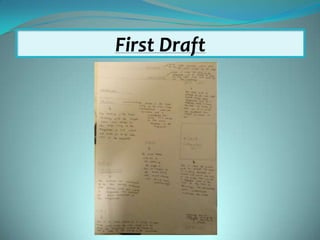
Before I started to use Photoshop to create the front cover of my magazine, I had to create a first draft of
my magazine cover. This draft shows where I am going to place everything on my magazine. Before I
started my draft, I had to research different front covers of magazines, this gave me an idea of how a
magazine cover should be presented. Once I had researched and I had an idea of how my magazine cover
should be set out, I could start creating a draft. This research helped me to decide where I am going to
position each different magazine convention on the magazine cover. When designing this draft, I had to
think about the different conventions of a magazine cover. I first started with the banner, as this is
allocated at the top of the magazine cover. Underneath the banner I placed the masthead of the magazine.
This shows the titles of the magazine and has to stand out to catch the readers eye. In the centre of the
page, I placed the main image, this image has to relate to the main story and must stand out from
everything else on the page, it had to be bold and interesting. Now I had positioned the main compositions
of the magazine cover on the page, I could work around these and place my lure, barcode, kicker, cover
lines and date line.
I used this first draft to help me create my final draft because I knew where everything had to be placed.
First Draft
Taking Photos to use on the cover
Before creating my front cover, using
Photoshop, I had to take photos for my main
cover. The photos I took had to be related to
the main cover headline, which was sacred
heart new sixth form.
When taking my images, I had to take into
consideration, the different camera angles,
this was to ensure that my images were to
the best quality possible.
I took lots of different images, so that I had
enough images but not too many. The main
image was the most important image as it
will be placed in the centre of my page, so I
had to ensure that this image was taken
properly.
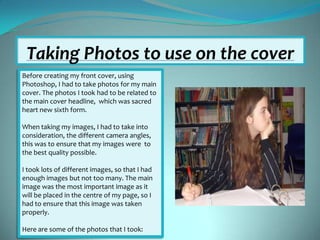
Here are some of the photos that I took:
Changes
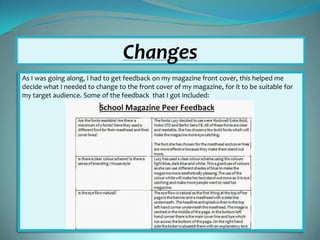
As I was going along, I had to get feedback on my magazine front cover, this helped me
decide what I needed to change to the front cover of my magazine, for it to be suitable for
my target audience. Some of the feedback that I got included:
Using Photoshop
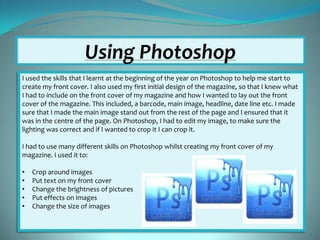
I used the skills that I learnt at the beginning of the year on Photoshop to help me start to
create my front cover. I also used my first initial design of the magazine, so that I knew what
I had to include on the front cover of my magazine and how I wanted to lay out the front
cover of the magazine. This included, a barcode, main image, headline, date line etc. I made
sure that I made the main image stand out from the rest of the page and I ensured that it
was in the centre of the page. On Photoshop, I had to edit my image, to make sure the
lighting was correct and if I wanted to crop it I can crop it.
I had to use many different skills on Photoshop whilst creating my front cover of my
magazine. I used it to:

•
•
•
•
•

Crop around images
Put text on my front cover
Change the brightness of pictures
Put effects on images
Change the size of images
Final Design of my front cover
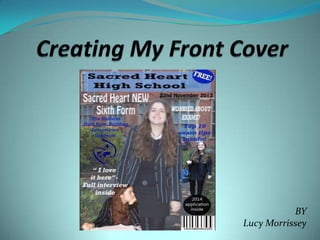
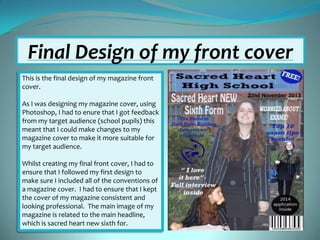
This is the final design of my magazine front
cover.
As I was designing my magazine cover, using
Photoshop, I had to enure that I got feedback
from my target audience (school pupils) this
meant that I could make changes to my
magazine cover to make it more suitable for
my target audience.
Whilst creating my final front cover, I had to
ensure that I followed my first design to
make sure I included all of the conventions of
a magazine cover. I had to ensure that I kept
the cover of my magazine consistent and
looking professional. The main image of my
magazine is related to the main headline,
which is sacred heart new sixth for.

Creating my front cover

  • 1.
  • 2.
    First Draft Before Istarted to use Photoshop to create the front cover of my magazine, I had to create a first draft of my magazine cover. This draft shows where I am going to place everything on my magazine. Before I started my draft, I had to research different front covers of magazines, this gave me an idea of how a magazine cover should be presented. Once I had researched and I had an idea of how my magazine cover should be set out, I could start creating a draft. This research helped me to decide where I am going to position each different magazine convention on the magazine cover. When designing this draft, I had to think about the different conventions of a magazine cover. I first started with the banner, as this is allocated at the top of the magazine cover. Underneath the banner I placed the masthead of the magazine. This shows the titles of the magazine and has to stand out to catch the readers eye. In the centre of the page, I placed the main image, this image has to relate to the main story and must stand out from everything else on the page, it had to be bold and interesting. Now I had positioned the main compositions of the magazine cover on the page, I could work around these and place my lure, barcode, kicker, cover lines and date line. I used this first draft to help me create my final draft because I knew where everything had to be placed.
  • 3.
  • 4.
    Taking Photos touse on the cover Before creating my front cover, using Photoshop, I had to take photos for my main cover. The photos I took had to be related to the main cover headline, which was sacred heart new sixth form. When taking my images, I had to take into consideration, the different camera angles, this was to ensure that my images were to the best quality possible. I took lots of different images, so that I had enough images but not too many. The main image was the most important image as it will be placed in the centre of my page, so I had to ensure that this image was taken properly. Here are some of the photos that I took:
  • 5.
    Changes As I wasgoing along, I had to get feedback on my magazine front cover, this helped me decide what I needed to change to the front cover of my magazine, for it to be suitable for my target audience. Some of the feedback that I got included:
  • 6.
    Using Photoshop I usedthe skills that I learnt at the beginning of the year on Photoshop to help me start to create my front cover. I also used my first initial design of the magazine, so that I knew what I had to include on the front cover of my magazine and how I wanted to lay out the front cover of the magazine. This included, a barcode, main image, headline, date line etc. I made sure that I made the main image stand out from the rest of the page and I ensured that it was in the centre of the page. On Photoshop, I had to edit my image, to make sure the lighting was correct and if I wanted to crop it I can crop it. I had to use many different skills on Photoshop whilst creating my front cover of my magazine. I used it to: • • • • • Crop around images Put text on my front cover Change the brightness of pictures Put effects on images Change the size of images
  • 7.
    Final Design ofmy front cover This is the final design of my magazine front cover. As I was designing my magazine cover, using Photoshop, I had to enure that I got feedback from my target audience (school pupils) this meant that I could make changes to my magazine cover to make it more suitable for my target audience. Whilst creating my final front cover, I had to ensure that I followed my first design to make sure I included all of the conventions of a magazine cover. I had to ensure that I kept the cover of my magazine consistent and looking professional. The main image of my magazine is related to the main headline, which is sacred heart new sixth for.