Month day, year

Bayar F. AbdulaJabbar
4th CS-UoD

Virtual Private Networks
(VPN)
By using the SecurityKISS VPN service
Benefits of a VPN
Cost Savings with
a VPN

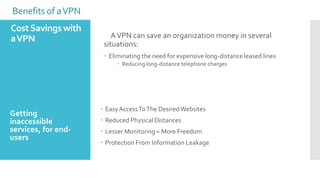
A VPN can save an organization money in several
situations:
 Eliminating the need for expensive long-distance leased lines
 Reducing long-distance telephone charges

Getting
inaccessible
services, for endusers

 Easy Access To The Desired Websites
 Reduced Physical Distances
 Lesser Monitoring = More Freedom
 Protection From Information Leakage
Benefits of a VPN
Network Scalability
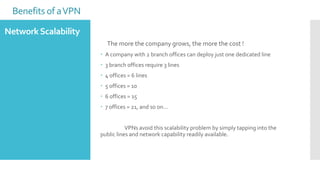
The more the company grows, the more the cost !
 A company with 2 branch offices can deploy just one dedicated line

 3 branch offices require 3 lines
 4 offices = 6 lines
 5 offices = 10
 6 offices = 15

 7 offices = 21, and so on…
VPNs avoid this scalability problem by simply tapping into the
public lines and network capability readily available.
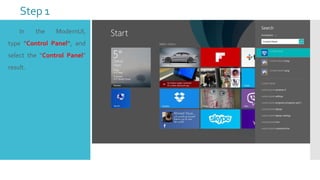
Step 1


In

the

ModernUI,

type "Control Panel“, and
select the “Control Panel”
result.
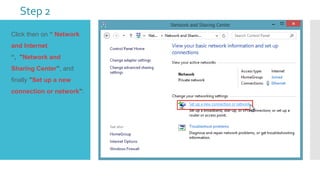
Step 2
 Click then on “ Network
and Internet
“, "Network and
Sharing Center", and
finally "Set up a new
connection or network":
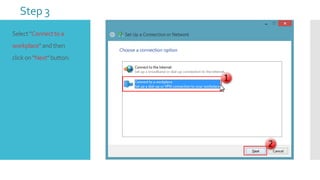
Step 3
Select "Connect to a
workplace" and then
click on "Next" button:
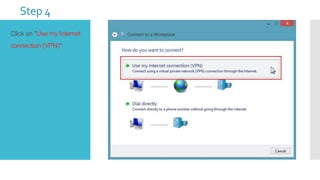
Step 4
Click on "Use my Internet
connection (VPN)":
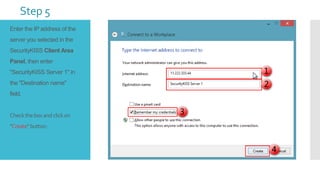
Step 5
Enter the IP address of the
server you selected in the
SecurityKISS Client Area
Panel, then enter
"SecurityKISS Server 1" in

the "Destination name"
field.

Check the box and click on

"Create" button:
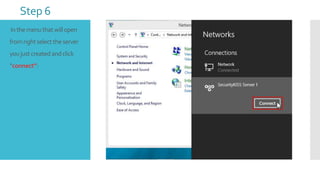
Step 6
In the menu that will open
from right select the server
you just created and click

“connect”:
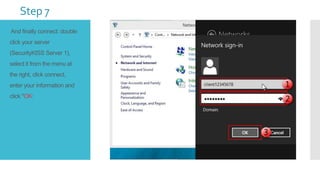
Step 7
And finally connect: double
click your server
(SecurityKISS Server 1),

select it from the menu at
the right, click connect,
enter your information and
click "OK:

Creating a vpn

  • 1.
    Month day, year BayarF. AbdulaJabbar 4th CS-UoD Virtual Private Networks (VPN) By using the SecurityKISS VPN service
  • 2.
    Benefits of aVPN Cost Savings with a VPN A VPN can save an organization money in several situations:  Eliminating the need for expensive long-distance leased lines  Reducing long-distance telephone charges Getting inaccessible services, for endusers  Easy Access To The Desired Websites  Reduced Physical Distances  Lesser Monitoring = More Freedom  Protection From Information Leakage
  • 3.
    Benefits of aVPN Network Scalability The more the company grows, the more the cost !  A company with 2 branch offices can deploy just one dedicated line  3 branch offices require 3 lines  4 offices = 6 lines  5 offices = 10  6 offices = 15  7 offices = 21, and so on… VPNs avoid this scalability problem by simply tapping into the public lines and network capability readily available.
  • 5.
    Step 1  In the ModernUI, type "ControlPanel“, and select the “Control Panel” result.
  • 6.
    Step 2  Clickthen on “ Network and Internet “, "Network and Sharing Center", and finally "Set up a new connection or network":
  • 7.
    Step 3 Select "Connectto a workplace" and then click on "Next" button:
  • 8.
    Step 4 Click on"Use my Internet connection (VPN)":
  • 9.
    Step 5 Enter theIP address of the server you selected in the SecurityKISS Client Area Panel, then enter "SecurityKISS Server 1" in the "Destination name" field. Check the box and click on "Create" button:
  • 10.
    Step 6 In themenu that will open from right select the server you just created and click “connect”:
  • 11.
    Step 7 And finallyconnect: double click your server (SecurityKISS Server 1), select it from the menu at the right, click connect, enter your information and click "OK: