CREATING A CHATBOT
CHETAN KUMAR VERMA - 2101331520048
KRISHNA SHUKLA – 2101331520077
ASTITVA SINGH - 2101331520036
WHAT IS A CHATBOT
A chatbot is a computer program
that simulates and processes human
conversation (either written or
spoken), allowing humans to
interact with digital devices as if
they were communicating with a real
person.
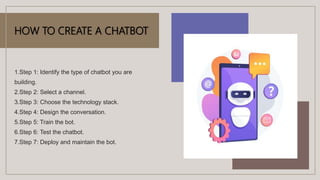
HOW TO CREATE A CHATBOT
1.Step 1: Identify the type of chatbot you are
building.
2.Step 2: Select a channel.
3.Step 3: Choose the technology stack.
4.Step 4: Design the conversation.
5.Step 5: Train the bot.
6.Step 6: Test the chatbot.
7.Step 7: Deploy and maintain the bot.
BENEFITS OF
CHATBOT
1.INCREASE CUSTOMER
ENGAGEMENT
2.IMPROVE LEAD GENERATION
3.REDUCE CUSTOMER SERVICE
COSTS
4.MONITOR CONSUMER DATA
TO GAIN INSIGHTS
5.DEVISE A CONVERSATIONAL
MARKETING STRATEGY
WHY WE CHOOSE
THIS PROJECT ?
Now, many brands across
industries rely on AI chatbots to
provide customer support 24/7,
to send updates, recommend
products, increase sales, and
more. Conversational
commerce will only keep
growing and evolving from
here
TYPES OF CHATBOTS
-VOICE BOTS
-HYBRID BOTS
-SOCIAL MESSAGING BOTS
-MENU BASED BOTS
-SKILLS BOTS
-KEYWORD BASED BOTS
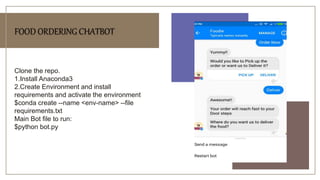
FOOD ORDERING CHATBOT
Clone the repo.
1.Install Anaconda3
2.Create Environment and install
requirements and activate the environment
$conda create --name <env-name> --file
requirements.txt
Main Bot file to run:
$python bot.py
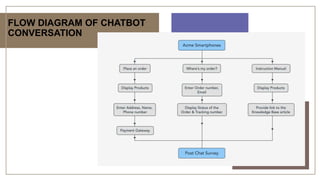
FLOW DIAGRAM OF CHATBOT
CONVERSATION
PREPARING AND TRAINING THE CHATBOT
 CHATBOT CODE LINK
 BOT
 CHATBOT OUTPUT LINK
 NOOB
OUTPUT
FEATURES OF CHATBOT
• Register Screen.
• Sign-in Screen.
• Generates database for user login system.
• Offers you a GUI Based Chatbot for patients
for diagnosing. [A pragmatic Approach for
Diagnosis]
• Reccomends an appropriate doctor to you for
the following symptom.
MODULES USED
 OUR PROGRAM USES A NUMBER OF
PYTHON MODULES TO WORK PROPERLY:
• Tkinter
• Os
• Web browser
• Numpy matplotlib
• pandas
Chatbots can automate tasks
performed frequently and at
specific times. This gives
employees time to focus on
more important tasks and
prevents customers from
waiting to receive responses.
Proactive customer interaction.
WHY SHOULD WE
USE A CHATBOT ?
EMULATING LAB COORDINATOR CHATBOT
Link For Code : -
 Code 2
Link For Output 2 : -
 Lab Coordinator
CERTIFICATE OF COMPLETION
CrEATING A CHATBOT 3(2).pptx

CrEATING A CHATBOT 3(2).pptx

  • 1.
    CREATING A CHATBOT CHETANKUMAR VERMA - 2101331520048 KRISHNA SHUKLA – 2101331520077 ASTITVA SINGH - 2101331520036
  • 2.
    WHAT IS ACHATBOT A chatbot is a computer program that simulates and processes human conversation (either written or spoken), allowing humans to interact with digital devices as if they were communicating with a real person.
  • 3.
    HOW TO CREATEA CHATBOT 1.Step 1: Identify the type of chatbot you are building. 2.Step 2: Select a channel. 3.Step 3: Choose the technology stack. 4.Step 4: Design the conversation. 5.Step 5: Train the bot. 6.Step 6: Test the chatbot. 7.Step 7: Deploy and maintain the bot.
  • 4.
    BENEFITS OF CHATBOT 1.INCREASE CUSTOMER ENGAGEMENT 2.IMPROVELEAD GENERATION 3.REDUCE CUSTOMER SERVICE COSTS 4.MONITOR CONSUMER DATA TO GAIN INSIGHTS 5.DEVISE A CONVERSATIONAL MARKETING STRATEGY
  • 5.
    WHY WE CHOOSE THISPROJECT ? Now, many brands across industries rely on AI chatbots to provide customer support 24/7, to send updates, recommend products, increase sales, and more. Conversational commerce will only keep growing and evolving from here
  • 6.
    TYPES OF CHATBOTS -VOICEBOTS -HYBRID BOTS -SOCIAL MESSAGING BOTS -MENU BASED BOTS -SKILLS BOTS -KEYWORD BASED BOTS
  • 7.
    FOOD ORDERING CHATBOT Clonethe repo. 1.Install Anaconda3 2.Create Environment and install requirements and activate the environment $conda create --name <env-name> --file requirements.txt Main Bot file to run: $python bot.py
  • 8.
    FLOW DIAGRAM OFCHATBOT CONVERSATION
  • 9.
    PREPARING AND TRAININGTHE CHATBOT  CHATBOT CODE LINK  BOT  CHATBOT OUTPUT LINK  NOOB
  • 10.
  • 11.
    FEATURES OF CHATBOT •Register Screen. • Sign-in Screen. • Generates database for user login system. • Offers you a GUI Based Chatbot for patients for diagnosing. [A pragmatic Approach for Diagnosis] • Reccomends an appropriate doctor to you for the following symptom.
  • 12.
    MODULES USED  OURPROGRAM USES A NUMBER OF PYTHON MODULES TO WORK PROPERLY: • Tkinter • Os • Web browser • Numpy matplotlib • pandas
  • 13.
    Chatbots can automatetasks performed frequently and at specific times. This gives employees time to focus on more important tasks and prevents customers from waiting to receive responses. Proactive customer interaction. WHY SHOULD WE USE A CHATBOT ?
  • 14.
    EMULATING LAB COORDINATORCHATBOT Link For Code : -  Code 2 Link For Output 2 : -  Lab Coordinator
  • 15.