PRESENTED BY
Ms. V.VENNILA., MCA.,M.Phil.,
Asst.Prof of Information Technology,
Bon Secours College for Women,
Thanjavur
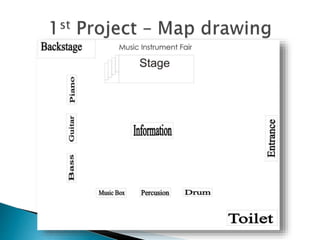
 In this Map Drawing, I drew a picture that
shows about the map of a Music Instrument
Fair.
 I made this map with simple tools like
Rectangle Tool and Text Tool. I also use the
Weld to combine some rectangles to make
the stairs.
 In this Rough Drawing, I made that picture
from what I have just learnt that time. Mr.
Abe told me to make things like that.
 Generally, I used Polygon Tool and Complex
Star Tool. In the Complex Star Tool Output, I
added the amount of angles that it has. I also
used Rectangle Tool to give it a border and
then I used Interactive Transparency Tool to
give a transparency effect.
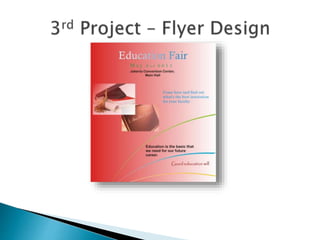
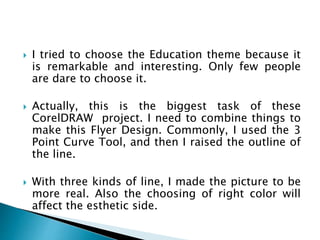
 I tried to choose the Education theme because it
is remarkable and interesting. Only few people
are dare to choose it.
 Actually, this is the biggest task of these
CorelDRAW project. I need to combine things to
make this Flyer Design. Commonly, I used the 3
Point Curve Tool, and then I raised the outline of
the line.
 With three kinds of line, I made the picture to be
more real. Also the choosing of right color will
affect the esthetic side.
 This is the project that I like most. These idea
will be put into a Logo related to the recent
Flyer Design project.
 I like to make it simple, but interesting. How
could I make those two human-like
animation? I used the Ellipse Tool to make
some circles and then I combine it with Weld.
Thank You All

CORELDRAW EXAMPLES

  • 1.
    PRESENTED BY Ms. V.VENNILA.,MCA.,M.Phil., Asst.Prof of Information Technology, Bon Secours College for Women, Thanjavur
  • 3.
     In thisMap Drawing, I drew a picture that shows about the map of a Music Instrument Fair.  I made this map with simple tools like Rectangle Tool and Text Tool. I also use the Weld to combine some rectangles to make the stairs.
  • 5.
     In thisRough Drawing, I made that picture from what I have just learnt that time. Mr. Abe told me to make things like that.  Generally, I used Polygon Tool and Complex Star Tool. In the Complex Star Tool Output, I added the amount of angles that it has. I also used Rectangle Tool to give it a border and then I used Interactive Transparency Tool to give a transparency effect.
  • 7.
     I triedto choose the Education theme because it is remarkable and interesting. Only few people are dare to choose it.  Actually, this is the biggest task of these CorelDRAW project. I need to combine things to make this Flyer Design. Commonly, I used the 3 Point Curve Tool, and then I raised the outline of the line.  With three kinds of line, I made the picture to be more real. Also the choosing of right color will affect the esthetic side.
  • 9.
     This isthe project that I like most. These idea will be put into a Logo related to the recent Flyer Design project.  I like to make it simple, but interesting. How could I make those two human-like animation? I used the Ellipse Tool to make some circles and then I combine it with Weld.
  • 10.