Adobe PhoneGap
&
Apache Cordova
MASAHIRO TANAKA
FOUNDER & CEO, MONACA
Tales Of JavaScript Meetup, July 1 2014
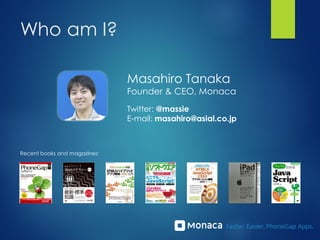
Who am I?
Masahiro Tanaka
Founder & CEO, Monaca
Twitter: @massie
E-mail: masahiro@asial.co.jp
Recent books and magazines:
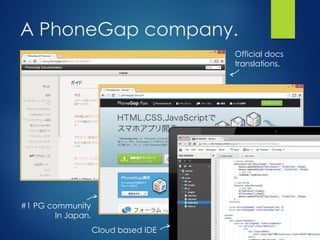
A PhoneGap company.
Official docs
translations.
#1 PG community
In Japan.
Cloud based IDE
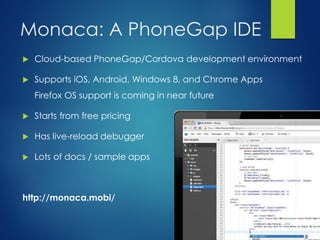
Monaca: A PhoneGap IDE
 Cloud-based PhoneGap/Cordova development environment
 Supports iOS, Android, Windows 8, and Chrome Apps
Firefox OS support is coming in near future
 Starts from free pricing
 Has live-reload debugger
 Lots of docs / sample apps
http://monaca.mobi/
Android Native Layer
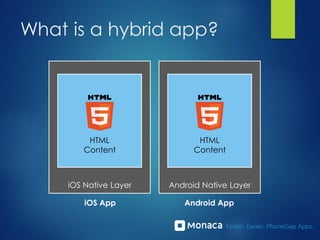
What is a hybrid app?
HTML
Content
iOS Native Layer
HTML
Content
iOS App Android App
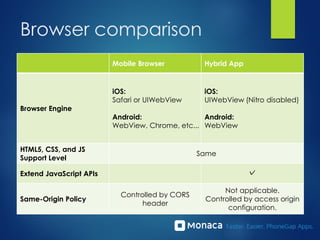
Browser comparison
Mobile Browser Hybrid App
Browser Engine
iOS:
Safari or UIWebView
Android:
WebView, Chrome, etc...
iOS:
UIWebView (Nitro disabled)
Android:
WebView
HTML5, CSS, and JS
Support Level
Same
Extend JavaScript APIs ✓
Same-Origin Policy
Controlled by CORS
header
Not applicable.
Controlled by access origin
configuration.
Hybrid apps are...
Mostly the same
as the mobile Web apps.
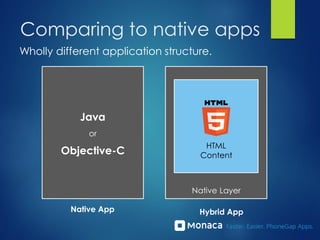
Comparing to native apps
Wholly different application structure.
Native Layer
HTML
Content
Hybrid App
Java
or
Objective-C
Native App
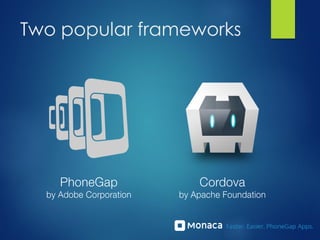
Two popular frameworks
What is Cordova?
?
A street.
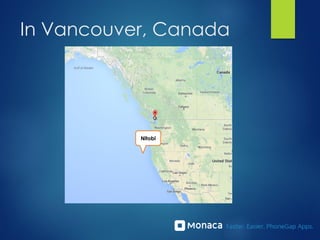
In Vancouver, Canada
Nitobi
History of PhoneGap / Cordova
 Nitobi folks developed PhoneGap.
 Adobe acquired Nitobi.
 PhoneGap became a product of Adobe.
 And PhoneGap source code transferred to Apache
Foundation.
 Nitobi team wanted a name that had a meaning to them.
 So they re-named it "Cordova"
Difference between
PhoneGap and Cordova?
Conclusion
SAME
(if we talk about the API sets)
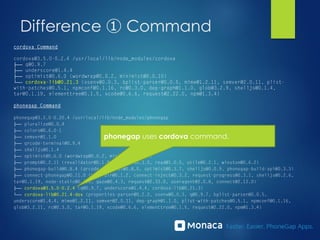
Difference ① Command
phonegap uses cordova command.
Difference ① Command
Action Option cordova phonegap Description
create ✓ ✓ Create a new project
serve ✓ ✓ Run on local Web server (Used by Developer App
etc.)
build ✓ ✓ Build
install ✓ Install on connected device
run ✓ ✓ Run on connected device
plugin ✓ ✓ Add / remove / search Cordova plugin
prepare ✓ Generate a build image
compile ✓ Do compile from prepared build image
emulate ✓ Run in emulator (same as run --emulator)
remote
login/logout/build/install/
run
✓ Commands for PhoneGap Build integration
local build/install/run/plugin ✓ Commands for local development
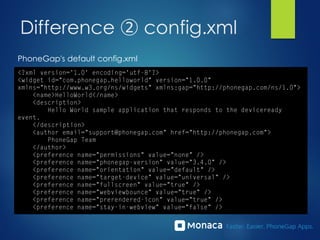
Difference ② config.xml
Cordova's default config.xml
Difference ② config.xml
PhoneGap's default config.xml
Other differences
 Available Version
 Cordova: 3.5
 PhoneGap Build: 3.4
 Native-code customizability
 Cordova: You can customize code in any where
 PhoneGap Build: Only Cordova plugins are supported
 PhoneGap has more features
 PhoneGap Enterprise
 PhoneGap Developer App
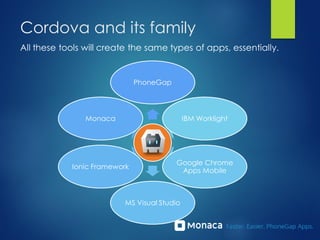
Cordova and its family
PhoneGap
Monaca
Ionic Framework
MS Visual Studio
Google Chrome
Apps Mobile
IBM Worklight
All these tools will create the same types of apps, essentially.
Common problems
 User interface
 Delivering smooth native-like widgets and transition
 Overall performance
 More faster JavaScript
 More faster rendering
 Security
 Encryption of the source code (HTML and JS)
 Device API / native functions
 You need to wrap every Android or iOS native API calls
Recent trends
 New enhanced browser engines
 Cordova-compatible Blink-based WebView
 WKWebView coming in iOS 8. See my article here.
 Modern HTML5 based UI frameworks
 Based in AngularJS: Ionic Framework, Onsen UI
 Optimized to CSS3 rendering: famo.us
 Cordova Plugin Registry
New Android WebViews
 Intel Crosswalk Project
 Based on Chrominium.
 Supports Tizen and Android.
 Ludei WebView+ (Cocoon JS)
 Browser engine with WebGL enabled.
 Great for 3D games.
 Amazon Silk
 Browser engine for Kindle Fire.
 Only available through Amazon HTML5/Web Apps Store.
New WebView benefits
 No fragmentation in Android version anymore
 Same HTML5/CSS3/JS for all Android 4 devices
 Ease of debugging
 Supports USB debugging via Chrome Dev Tools
 JavaScript breakpoints, profile, network...
 Less device testing
 Increased performance
 Can use the latest Blink engine
 Tradeoffs:
 File size getting big (8MB~15MB)
 Slow startup
iOS 8 WKWebView
iOS 8
WKWebView
iOS 8
UIWebView
iOS 7
UIWebView
WebGL 3D Graphics ✓ ✓
IndexedDB ✓
HTML5 Coverage
Score
440/555 427/555 410/555
SunSpider
Benchmark
949.8ms 4249.6ms 3659.5ms
CSS Shapes ✓ ✓
4x
Faster!
Modern JS UI Framework
 Ionic Framework (http://ionicframework.com)
 UI framework based on AngularJS.
 Onsen UI (http://onsenui.io)
 AngularJS + Topcoat. Supports tablet and Android 2.3.
 Famo.us (http://famo.us)
 Super-quick rendering using CSS3 tricks.
Cordova Plugin Registry
http://plugins.cordova.io/
 Cordova core and plugin are separated as
of Cordova 3.4.
 APIs are now implemented sa plugins.
 Plugin registry like npm
 Install with command
 User can submit their own plugins.
Monaca demo
if time allows.
http://monaca.mobi/
Thank You!
P.S. AND PLEASE CONSIDER USING MONACA.
Presented by:
Masahiro Tanaka
@massie
masahiro@asial.co.jp

Cordova and PhoneGap Insights

  • 1.
    Adobe PhoneGap & Apache Cordova MASAHIROTANAKA FOUNDER & CEO, MONACA Tales Of JavaScript Meetup, July 1 2014
  • 2.
    Who am I? MasahiroTanaka Founder & CEO, Monaca Twitter: @massie E-mail: masahiro@asial.co.jp Recent books and magazines:
  • 3.
    A PhoneGap company. Officialdocs translations. #1 PG community In Japan. Cloud based IDE
  • 4.
    Monaca: A PhoneGapIDE  Cloud-based PhoneGap/Cordova development environment  Supports iOS, Android, Windows 8, and Chrome Apps Firefox OS support is coming in near future  Starts from free pricing  Has live-reload debugger  Lots of docs / sample apps http://monaca.mobi/
  • 5.
    Android Native Layer Whatis a hybrid app? HTML Content iOS Native Layer HTML Content iOS App Android App
  • 6.
    Browser comparison Mobile BrowserHybrid App Browser Engine iOS: Safari or UIWebView Android: WebView, Chrome, etc... iOS: UIWebView (Nitro disabled) Android: WebView HTML5, CSS, and JS Support Level Same Extend JavaScript APIs ✓ Same-Origin Policy Controlled by CORS header Not applicable. Controlled by access origin configuration.
  • 7.
    Hybrid apps are... Mostlythe same as the mobile Web apps.
  • 8.
    Comparing to nativeapps Wholly different application structure. Native Layer HTML Content Hybrid App Java or Objective-C Native App
  • 9.
  • 10.
  • 11.
  • 12.
  • 13.
    History of PhoneGap/ Cordova  Nitobi folks developed PhoneGap.  Adobe acquired Nitobi.  PhoneGap became a product of Adobe.  And PhoneGap source code transferred to Apache Foundation.  Nitobi team wanted a name that had a meaning to them.  So they re-named it "Cordova"
  • 14.
    Difference between PhoneGap andCordova? Conclusion SAME (if we talk about the API sets)
  • 15.
    Difference ① Command phonegapuses cordova command.
  • 16.
    Difference ① Command ActionOption cordova phonegap Description create ✓ ✓ Create a new project serve ✓ ✓ Run on local Web server (Used by Developer App etc.) build ✓ ✓ Build install ✓ Install on connected device run ✓ ✓ Run on connected device plugin ✓ ✓ Add / remove / search Cordova plugin prepare ✓ Generate a build image compile ✓ Do compile from prepared build image emulate ✓ Run in emulator (same as run --emulator) remote login/logout/build/install/ run ✓ Commands for PhoneGap Build integration local build/install/run/plugin ✓ Commands for local development
  • 17.
  • 18.
  • 19.
    Other differences  AvailableVersion  Cordova: 3.5  PhoneGap Build: 3.4  Native-code customizability  Cordova: You can customize code in any where  PhoneGap Build: Only Cordova plugins are supported  PhoneGap has more features  PhoneGap Enterprise  PhoneGap Developer App
  • 20.
    Cordova and itsfamily PhoneGap Monaca Ionic Framework MS Visual Studio Google Chrome Apps Mobile IBM Worklight All these tools will create the same types of apps, essentially.
  • 21.
    Common problems  Userinterface  Delivering smooth native-like widgets and transition  Overall performance  More faster JavaScript  More faster rendering  Security  Encryption of the source code (HTML and JS)  Device API / native functions  You need to wrap every Android or iOS native API calls
  • 22.
    Recent trends  Newenhanced browser engines  Cordova-compatible Blink-based WebView  WKWebView coming in iOS 8. See my article here.  Modern HTML5 based UI frameworks  Based in AngularJS: Ionic Framework, Onsen UI  Optimized to CSS3 rendering: famo.us  Cordova Plugin Registry
  • 23.
    New Android WebViews Intel Crosswalk Project  Based on Chrominium.  Supports Tizen and Android.  Ludei WebView+ (Cocoon JS)  Browser engine with WebGL enabled.  Great for 3D games.  Amazon Silk  Browser engine for Kindle Fire.  Only available through Amazon HTML5/Web Apps Store.
  • 24.
    New WebView benefits No fragmentation in Android version anymore  Same HTML5/CSS3/JS for all Android 4 devices  Ease of debugging  Supports USB debugging via Chrome Dev Tools  JavaScript breakpoints, profile, network...  Less device testing  Increased performance  Can use the latest Blink engine  Tradeoffs:  File size getting big (8MB~15MB)  Slow startup
  • 25.
    iOS 8 WKWebView iOS8 WKWebView iOS 8 UIWebView iOS 7 UIWebView WebGL 3D Graphics ✓ ✓ IndexedDB ✓ HTML5 Coverage Score 440/555 427/555 410/555 SunSpider Benchmark 949.8ms 4249.6ms 3659.5ms CSS Shapes ✓ ✓ 4x Faster!
  • 26.
    Modern JS UIFramework  Ionic Framework (http://ionicframework.com)  UI framework based on AngularJS.  Onsen UI (http://onsenui.io)  AngularJS + Topcoat. Supports tablet and Android 2.3.  Famo.us (http://famo.us)  Super-quick rendering using CSS3 tricks.
  • 27.
    Cordova Plugin Registry http://plugins.cordova.io/ Cordova core and plugin are separated as of Cordova 3.4.  APIs are now implemented sa plugins.  Plugin registry like npm  Install with command  User can submit their own plugins.
  • 28.
    Monaca demo if timeallows. http://monaca.mobi/
  • 29.
    Thank You! P.S. ANDPLEASE CONSIDER USING MONACA. Presented by: Masahiro Tanaka @massie masahiro@asial.co.jp