Cross-Platform Development
using HTML, CSS & JS
JavaScript Engine
• What are they?
• Is a program or library which executes JavaScript code
• JavaScript interpreter or JavaScript implementation
• Major Implementation
• SpiderMonkey (Netscape)
• Rhino
• V8 (Chrome)
• V8 developed by Lars Bak
• Compiles JavaScript to native machine code
• Better performance for game on browser
2
JavaScript vs NodeJS
• JavaScript is a language
• Asynchronous
• NodeJS is dialect of JavaScript
• JavaScript in Browser
• Client-side
• DOM, AJAX, Local Storage, Cookie
• JavaScript on Machine
• Process JavaScript independent of browser
• eg. NodeJS, MarkLogic
• Server, DOM, File system…
3
Software/App Development
• Electron by Github
• Cross platform desktop app
• JS (Code) + HTML (GUI) = exe
• eg. Atom and Visual Code source code editor
• Phonegap by Nitobi (Adobe)
• Cross platform mobile app
• Target 13 different platforms
• Android, WP, Ubuntu Mobile, Firefox OS, BADA, Blackberry…
• PhoneGap open-source version
• Cordova
4
Who uses Cordova!
• Wikipedia
• Facebook
• Salesforce (CRM)
• Intel
• Microsoft
• Adobe
• Zynga – Mafia Wars
• Vodafone McLaren F1 – 1 million download
5
How does it work?
• Utilizes web view of every platform
• Cordova API link for device functionality
• Example phone functionality through cordova.js
• Media
• File
• Contact
• Connection
• More…
• Third Party Plugins
• Barcode, Admob, SQLite
6
Apache Cordova - Default Plugins
• Battery
• Camera
• Console
• Contacts
• Device
• Device Motion
• Orientation
• Dialogs
• Geo location
• In App Browser
• Media
• Media Capture
• Network Information
• Splash Screen
• Vibration
• File Transfer
• File
7
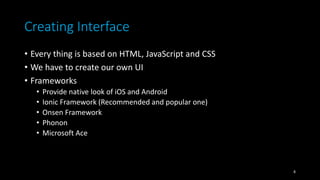
Creating Interface
• Every thing is based on HTML, JavaScript and CSS
• We have to create our own UI
• Frameworks
• Provide native look of iOS and Android
• Ionic Framework (Recommended and popular one)
• Onsen Framework
• Phonon
• Microsoft Ace
8
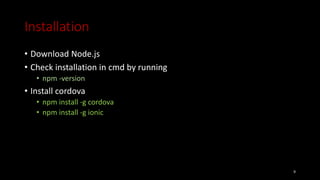
Installation
• Download Node.js
• Check installation in cmd by running
• npm -version
• Install cordova
• npm install -g cordova
• npm install -g ionic
9
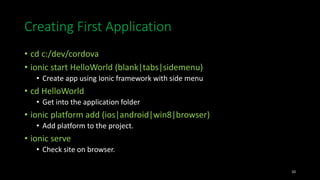
Creating First Application
• cd c:/dev/cordova
• ionic start HelloWorld (blank|tabs|sidemenu)
• Create app using Ionic framework with side menu
• cd HelloWorld
• Get into the application folder
• ionic platform add (ios|android|win8|browser)
• Add platform to the project.
• ionic serve
• Check site on browser.
10
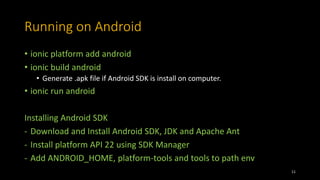
Running on Android
• ionic platform add android
• ionic build android
• Generate .apk file if Android SDK is install on computer.
• ionic run android
Installing Android SDK
- Download and Install Android SDK, JDK and Apache Ant
- Install platform API 22 using SDK Manager
- Add ANDROID_HOME, platform-tools and tools to path env
11
Other solution for building
• build.phonegap.com (only build in cloud)
• monaca.io (build with online IDE)
• appery.io (not free)
• Intel XDK
• Visual Studio 2015
12
13
Cordova vs Native Development
• Least expensive to develop
• Biggest target market
• Low Barrier to Entry
• Creates an App that you can
publish in the App Stores
• Easier to maintain
• Prototype very quickly
• Utilize all of the many JavaScript
libraries already available
• Best end user experience
• Highest ceiling for performance
• Directly access device features
and services via API
• Easily provide appropriate
interfaces depending on device
• Utilize Native IDE,
Documentation and
Development tools
14
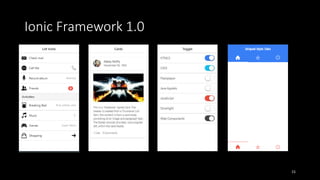
Ionic Framework 1.0
15
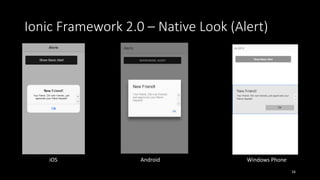
Ionic Framework 2.0 – Native Look (Alert)
16
iOS Android Windows Phone
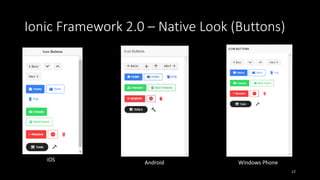
Ionic Framework 2.0 – Native Look (Buttons)
17
iOS Android Windows Phone
Ionic 1.0 vs Ionic 2.0
• 1.0
• iOS design
• Angular JS
• http://ionicframework.com/docs/components/
• 2.0
• Native look for iOS, Android and WP
• Angular2 (Re-written Angular JS)
• Dart or Typescript
• http://ionicframework.com/docs/v2/components/#icon-buttons
18
Electron App
• Install NodeJS and Git
• Clone the Quick Start repository
• git clone https://github.com/electron/electron-quick-start
• Go into the repository
• cd electron-quick-start
• Install the dependencies and run
• npm install && npm start
• Building for Windows
• http://electron.atom.io/docs/development/build-instructions-windows/
19
My Applications
• NeON Student for Mobile
• http://bit.ly/NeONAndroid
• http://bit.ly/NeONWP8
• Asma ul Husna
• Image Analyzer
20
Thank you!
Reference
• https://www.quora.com/What-are-some-of-the-best-apps-developed-
using-PhoneGap
• https://build.phonegap.com/plugins
• http://www.tricedesigns.com/2012/03/27/who-uses-phonegapapache-
cordova/
• http://www.slideshare.net/mikejf12/an-introduction-to-apache-cordova
• https://en.wikipedia.org/wiki/Node.js
• https://en.wikipedia.org/wiki/MarkLogic
• https://en.wikipedia.org/wiki/JavaScript
• http://wijmo.com/blog/mobile-app-development-how-to-decide-on-
hybrid-vs-native/

Cross-Platform Development

  • 1.
  • 2.
    JavaScript Engine • Whatare they? • Is a program or library which executes JavaScript code • JavaScript interpreter or JavaScript implementation • Major Implementation • SpiderMonkey (Netscape) • Rhino • V8 (Chrome) • V8 developed by Lars Bak • Compiles JavaScript to native machine code • Better performance for game on browser 2
  • 3.
    JavaScript vs NodeJS •JavaScript is a language • Asynchronous • NodeJS is dialect of JavaScript • JavaScript in Browser • Client-side • DOM, AJAX, Local Storage, Cookie • JavaScript on Machine • Process JavaScript independent of browser • eg. NodeJS, MarkLogic • Server, DOM, File system… 3
  • 4.
    Software/App Development • Electronby Github • Cross platform desktop app • JS (Code) + HTML (GUI) = exe • eg. Atom and Visual Code source code editor • Phonegap by Nitobi (Adobe) • Cross platform mobile app • Target 13 different platforms • Android, WP, Ubuntu Mobile, Firefox OS, BADA, Blackberry… • PhoneGap open-source version • Cordova 4
  • 5.
    Who uses Cordova! •Wikipedia • Facebook • Salesforce (CRM) • Intel • Microsoft • Adobe • Zynga – Mafia Wars • Vodafone McLaren F1 – 1 million download 5
  • 6.
    How does itwork? • Utilizes web view of every platform • Cordova API link for device functionality • Example phone functionality through cordova.js • Media • File • Contact • Connection • More… • Third Party Plugins • Barcode, Admob, SQLite 6
  • 7.
    Apache Cordova -Default Plugins • Battery • Camera • Console • Contacts • Device • Device Motion • Orientation • Dialogs • Geo location • In App Browser • Media • Media Capture • Network Information • Splash Screen • Vibration • File Transfer • File 7
  • 8.
    Creating Interface • Everything is based on HTML, JavaScript and CSS • We have to create our own UI • Frameworks • Provide native look of iOS and Android • Ionic Framework (Recommended and popular one) • Onsen Framework • Phonon • Microsoft Ace 8
  • 9.
    Installation • Download Node.js •Check installation in cmd by running • npm -version • Install cordova • npm install -g cordova • npm install -g ionic 9
  • 10.
    Creating First Application •cd c:/dev/cordova • ionic start HelloWorld (blank|tabs|sidemenu) • Create app using Ionic framework with side menu • cd HelloWorld • Get into the application folder • ionic platform add (ios|android|win8|browser) • Add platform to the project. • ionic serve • Check site on browser. 10
  • 11.
    Running on Android •ionic platform add android • ionic build android • Generate .apk file if Android SDK is install on computer. • ionic run android Installing Android SDK - Download and Install Android SDK, JDK and Apache Ant - Install platform API 22 using SDK Manager - Add ANDROID_HOME, platform-tools and tools to path env 11
  • 12.
    Other solution forbuilding • build.phonegap.com (only build in cloud) • monaca.io (build with online IDE) • appery.io (not free) • Intel XDK • Visual Studio 2015 12
  • 13.
  • 14.
    Cordova vs NativeDevelopment • Least expensive to develop • Biggest target market • Low Barrier to Entry • Creates an App that you can publish in the App Stores • Easier to maintain • Prototype very quickly • Utilize all of the many JavaScript libraries already available • Best end user experience • Highest ceiling for performance • Directly access device features and services via API • Easily provide appropriate interfaces depending on device • Utilize Native IDE, Documentation and Development tools 14
  • 15.
  • 16.
    Ionic Framework 2.0– Native Look (Alert) 16 iOS Android Windows Phone
  • 17.
    Ionic Framework 2.0– Native Look (Buttons) 17 iOS Android Windows Phone
  • 18.
    Ionic 1.0 vsIonic 2.0 • 1.0 • iOS design • Angular JS • http://ionicframework.com/docs/components/ • 2.0 • Native look for iOS, Android and WP • Angular2 (Re-written Angular JS) • Dart or Typescript • http://ionicframework.com/docs/v2/components/#icon-buttons 18
  • 19.
    Electron App • InstallNodeJS and Git • Clone the Quick Start repository • git clone https://github.com/electron/electron-quick-start • Go into the repository • cd electron-quick-start • Install the dependencies and run • npm install && npm start • Building for Windows • http://electron.atom.io/docs/development/build-instructions-windows/ 19
  • 20.
    My Applications • NeONStudent for Mobile • http://bit.ly/NeONAndroid • http://bit.ly/NeONWP8 • Asma ul Husna • Image Analyzer 20
  • 21.
  • 22.
    Reference • https://www.quora.com/What-are-some-of-the-best-apps-developed- using-PhoneGap • https://build.phonegap.com/plugins •http://www.tricedesigns.com/2012/03/27/who-uses-phonegapapache- cordova/ • http://www.slideshare.net/mikejf12/an-introduction-to-apache-cordova • https://en.wikipedia.org/wiki/Node.js • https://en.wikipedia.org/wiki/MarkLogic • https://en.wikipedia.org/wiki/JavaScript • http://wijmo.com/blog/mobile-app-development-how-to-decide-on- hybrid-vs-native/