





Hybrid Apps with
Ionic Framework
AAYUSH SHRESTHA
AAYUSHONWEB@GMAIL.COM
CURRENTLY
◦ Head of UI/UX Architecture and Design at Viveka Health
◦ Co Founder of Lishn.com
PREVIOUSLY
◦ Chief of Design at nLocate
Find Me At:
aayushonweb@gmail.com
fb.me/ShresthaAayush
@AayushShrestha
AAYUSH
SHRESTHA
We all want to be
mobile app
developers.
.. and with the web technologies that
you are already familiar with.
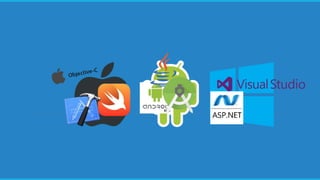
Native Apps
Platform specific
Respective development tools
Time consuming to develop
Development is expensive
Performance is best
Platform Independent
HTML5, CSS3, JavaScript
Quick Development
Direct access to native APIs
Limited Performance
Hybrid Apps
Apache Cordova is a platform to build
mobile applications using HTML5, CSS
and JavaScript.
Cordova is an application
container
◦ You develop a web app.
◦ Cordova will take that web app and bundle it in a native
app.
◦ A Cordova app opens a webview (an instance of a web
browser) where the web app will operate
Cordova is an application
container
Supports most mobile platforms
◦ Android
◦ iOS
◦ Windows
◦ Blackberry OS
◦ Ubuntu OS
◦ Firefox OS
◦ LG Web OS
◦ FireOS
BUILD ONCE.
RUN AT ALL
PLATFORMS.
Cordova gives access to Native
APIs
◦ Battery Status
◦ Camera
◦ Contacts
◦ Device
◦ Device Orientation
◦ Dialogs
◦ File System
◦ Geolocation
◦ Media Capture
◦ Network Information
◦ Splashscreen
◦ Statusbar
◦ Vibration
Cordova is Free, Open Source and
Extensible
◦ Free and Open Source
◦ Cordova provides ways to develop your own plugins
that can interact with the device and/or the platform’s
SDK so you can build more advanced native features
What is PhoneGap?
◦ Cordova was initially called PhoneGap when it was
developed at Nitobi Labs
◦ Adobe bought PhoneGap.
◦ Then Adobe donated the project to Apache Software
Foundation and it was renamed to Cordova
◦ Now, PhoneGap is a distribution of Cordova that is
managed by Adobe.
◦ Phonegap is also free and open source
◦ Analogous to Chromium engine and Google Chrome
Ionic Framework is a front-end
framework built on top of Cordova with
Angular JS.
Ionic Framework
◦ Front end framework for hybrid mobile apps
◦ Angular JS to build mobile web application
◦ Cordova to create, build, run and deploy native apps
◦ UI components that will make your apps look more like
native apps
◦ Ionic-CLI that makes building, running, testing and
deploying apps easier
Lets Get Started!
$ npm install –g cordova
$ npm install –g ionic@1.3
INSTALL CORDOVA AND IONIC FRAMEWORK
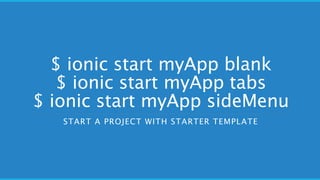
$ ionic start myApp blank
$ ionic start myApp tabs
$ ionic start myApp sideMenu
START A PROJECT WITH STARTER TEMPLATE
$ ionic serve
$ ionic serve --lab
BROWSER TESTING
$ ionic build android
$ ionic emulate android
$ionic run android
BUILD THE APP AND TEST IN SIMULATOR.
REPLACE ANDROID WITH IOS TO BUILD AND TEST IN IOS.
* ANDROID SIMULATOR MUST BE INSTALLED
CSS UI Components
IONICONS
Platform Specific
Customization
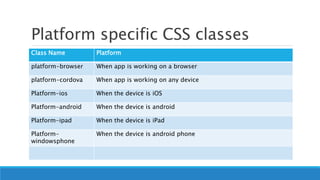
Platform specific CSS classes
Class Name Platform
platform-browser When app is working on a browser
platform-cordova When app is working on any device
Platform-ios When the device is iOS
Platform-android When the device is android
Platform-ipad When the device is iPad
Platform-
windowsphone
When the device is android phone
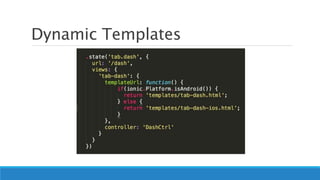
Dynamic Templates
Dynamic Templates : Merges
Folder
You can have a special folder named merges in the same level where www folder
resides
Merges folder can have directories for android and ios that can override www
folder
Native Features : Camera
$ cordova plugin add
cordova-plugin-camera
ADD CAMERA PLUGIN FOR CORDOVA
HTTPS://CORDOVA.APACHE.ORG/DOCS/EN/LATEST/REFERENC
E/CORDOVA-PLUGIN-CAMERA/
$ bower install ngCordova
INSTALL NGCORDOVA LIBRARY. NGCORDVA IS AN ANGULAR
LIBRARY THAT HELPS YOU PROPERLY USE CORDOVA PLUGINS
IN ANGULAR.
HTTP://NGCORDOVA.COM/
Add a new tab in tabs.html
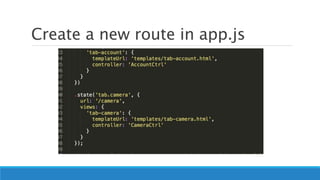
Create a new route in app.js
Create a CameraCtrl in
controllers.js
Notice: There is another parameter $cordovaCamera in the controller function.
$cordovaCamera is a service provided by ngCordova that helps you access the device
camera
Create a new template tab-
camera.html
The template has two buttons. One for taking phot. Another for Choosing Photo from
Gallery.
The <img> element shows the image selected or clicked.
In CameraCtrl.js, write takePhoto
function
Options object defines various options to start the camera, like the width and height of image,
source type (here Camera)
$cordovaCamera.getPicture() function starts the camera.
From the imageData received from camera, we create an imageURI which is used in template to view
the image.
In CameraCtrl.js, write
choosePhoto function
Similar to takePhoto function
But in options object, for sourceType, we use Camera.PictureSourceType.PHOTOLIBRARY
Icons and Splashscreens
Download and edit Icons and
Splashscreen PSDs
EDIT WITH YOUR LOGO AND PUT THEM IN RESOURCES
FOLDER
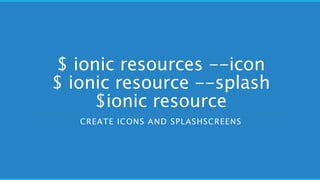
$ ionic resources --icon
$ ionic resource --splash
$ionic resource
CREATE ICONS AND SPLASHSCREENS

Workshop on Hybrid App Development with Ionic Framework

  • 1.
    Hybrid Apps with IonicFramework AAYUSH SHRESTHA AAYUSHONWEB@GMAIL.COM
  • 2.
    CURRENTLY ◦ Head ofUI/UX Architecture and Design at Viveka Health ◦ Co Founder of Lishn.com PREVIOUSLY ◦ Chief of Design at nLocate Find Me At: aayushonweb@gmail.com fb.me/ShresthaAayush @AayushShrestha AAYUSH SHRESTHA
  • 3.
    We all wantto be mobile app developers.
  • 6.
    .. and withthe web technologies that you are already familiar with.
  • 7.
    Native Apps Platform specific Respectivedevelopment tools Time consuming to develop Development is expensive Performance is best Platform Independent HTML5, CSS3, JavaScript Quick Development Direct access to native APIs Limited Performance Hybrid Apps
  • 8.
    Apache Cordova isa platform to build mobile applications using HTML5, CSS and JavaScript.
  • 9.
    Cordova is anapplication container ◦ You develop a web app. ◦ Cordova will take that web app and bundle it in a native app. ◦ A Cordova app opens a webview (an instance of a web browser) where the web app will operate
  • 10.
    Cordova is anapplication container
  • 11.
    Supports most mobileplatforms ◦ Android ◦ iOS ◦ Windows ◦ Blackberry OS ◦ Ubuntu OS ◦ Firefox OS ◦ LG Web OS ◦ FireOS BUILD ONCE. RUN AT ALL PLATFORMS.
  • 12.
    Cordova gives accessto Native APIs ◦ Battery Status ◦ Camera ◦ Contacts ◦ Device ◦ Device Orientation ◦ Dialogs ◦ File System ◦ Geolocation ◦ Media Capture ◦ Network Information ◦ Splashscreen ◦ Statusbar ◦ Vibration
  • 13.
    Cordova is Free,Open Source and Extensible ◦ Free and Open Source ◦ Cordova provides ways to develop your own plugins that can interact with the device and/or the platform’s SDK so you can build more advanced native features
  • 14.
    What is PhoneGap? ◦Cordova was initially called PhoneGap when it was developed at Nitobi Labs ◦ Adobe bought PhoneGap. ◦ Then Adobe donated the project to Apache Software Foundation and it was renamed to Cordova ◦ Now, PhoneGap is a distribution of Cordova that is managed by Adobe. ◦ Phonegap is also free and open source ◦ Analogous to Chromium engine and Google Chrome
  • 15.
    Ionic Framework isa front-end framework built on top of Cordova with Angular JS.
  • 16.
    Ionic Framework ◦ Frontend framework for hybrid mobile apps ◦ Angular JS to build mobile web application ◦ Cordova to create, build, run and deploy native apps ◦ UI components that will make your apps look more like native apps ◦ Ionic-CLI that makes building, running, testing and deploying apps easier
  • 17.
  • 18.
    $ npm install–g cordova $ npm install –g ionic@1.3 INSTALL CORDOVA AND IONIC FRAMEWORK
  • 19.
    $ ionic startmyApp blank $ ionic start myApp tabs $ ionic start myApp sideMenu START A PROJECT WITH STARTER TEMPLATE
  • 20.
    $ ionic serve $ionic serve --lab BROWSER TESTING
  • 21.
    $ ionic buildandroid $ ionic emulate android $ionic run android BUILD THE APP AND TEST IN SIMULATOR. REPLACE ANDROID WITH IOS TO BUILD AND TEST IN IOS. * ANDROID SIMULATOR MUST BE INSTALLED
  • 22.
  • 23.
  • 24.
  • 25.
    Platform specific CSSclasses Class Name Platform platform-browser When app is working on a browser platform-cordova When app is working on any device Platform-ios When the device is iOS Platform-android When the device is android Platform-ipad When the device is iPad Platform- windowsphone When the device is android phone
  • 26.
  • 27.
    Dynamic Templates :Merges Folder You can have a special folder named merges in the same level where www folder resides Merges folder can have directories for android and ios that can override www folder
  • 28.
  • 29.
    $ cordova pluginadd cordova-plugin-camera ADD CAMERA PLUGIN FOR CORDOVA HTTPS://CORDOVA.APACHE.ORG/DOCS/EN/LATEST/REFERENC E/CORDOVA-PLUGIN-CAMERA/
  • 30.
    $ bower installngCordova INSTALL NGCORDOVA LIBRARY. NGCORDVA IS AN ANGULAR LIBRARY THAT HELPS YOU PROPERLY USE CORDOVA PLUGINS IN ANGULAR. HTTP://NGCORDOVA.COM/
  • 31.
    Add a newtab in tabs.html
  • 32.
    Create a newroute in app.js
  • 33.
    Create a CameraCtrlin controllers.js Notice: There is another parameter $cordovaCamera in the controller function. $cordovaCamera is a service provided by ngCordova that helps you access the device camera
  • 34.
    Create a newtemplate tab- camera.html The template has two buttons. One for taking phot. Another for Choosing Photo from Gallery. The <img> element shows the image selected or clicked.
  • 35.
    In CameraCtrl.js, writetakePhoto function Options object defines various options to start the camera, like the width and height of image, source type (here Camera) $cordovaCamera.getPicture() function starts the camera. From the imageData received from camera, we create an imageURI which is used in template to view the image.
  • 36.
    In CameraCtrl.js, write choosePhotofunction Similar to takePhoto function But in options object, for sourceType, we use Camera.PictureSourceType.PHOTOLIBRARY
  • 37.
  • 38.
    Download and editIcons and Splashscreen PSDs EDIT WITH YOUR LOGO AND PUT THEM IN RESOURCES FOLDER
  • 39.
    $ ionic resources--icon $ ionic resource --splash $ionic resource CREATE ICONS AND SPLASHSCREENS