Design Documentation


 Software Development


                        1
Software Development Lifecycle
This is used by software designers - the whole
design process can be thought of as a cycle
The stages are:
   Identify - Define requirements and specification
   Design - Plan the solution to the problem
   Develop - Produce the program code
   Test     - Locate and remove any errors
   Evaluate - Review against program requirements


                                                      2
Identify the Scope
The first stage of the design process is based upon
analysing the user’s requirements to determine
what is achievable with the resources available.
Resource limitations (called constraints) usually
involve time and money.
Prioritise the most important features and decide
what will be included in the first version of the
software and what can be left out and put on the
‘wish list’ for future versions.
You then need to produce a formal written
requirements specification for the program
                                                      3
Design Documentation
Requirement Specification:
  Inputs are required from the user
  Outputs expected by the user
  Processing needed to provide functionality
  Constraints e.g. time, funds, specialist skills
Screen Designs
Program Design: Modules and Algorithms:
  Structure Diagram / Flowcharts / Pseudocode
Data Dictionary
Test Plan
                                                    4
Requirements Specification
Inputs: List of all the data that is input by the user
   Give specific details of the actual data, e.g. first name
   and last name of user
   Identify valid and invalid values for text and acceptable
   ranges for numeric data
Outputs: List of all output expected by the user
   Give specific details of the actual data and format, e.g.
   Monthly sales report which will be displayed in a bar
   chart, showing total sales for each product
   Include any help information e.g. Instructions, error
   messages or visual feedback

                                                               5
Requirements Specification
Processing: Give details of all the functions the
program will need to have.
  You should break this down into each processing task
  e.g. validation, calculations, formatting etc.
  Explain what each function should do (not how – yet!)
  There could be many of these in your proposed system
Constraints: Identify any resource limitations
  It could include budget, development
  timescales, hardware available, training
  requirements, special needs of users etc.
  Give specific details of each, e.g. The total budget
  available is £50,000
                                                          6
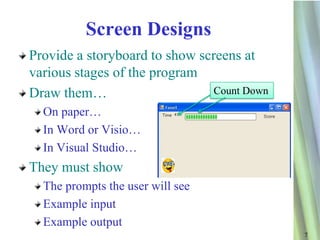
Screen Designs
Provide a storyboard to show screens at
various stages of the program
Draw them…                      Count Down

  On paper…
  In Word or Visio…
  In Visual Studio…
They must show
  The prompts the user will see
  Example input
  Example output
                                             7
Process Specification

Requirements Specification - describes WHAT the
system must be able to do.
Process Specification - provides details of HOW the
required functionality is achieved.
Various techniques used to clarify procedures
  Flow Charts
  Structure Diagram
  Pseudocode / Structured English
Provides the logical design for a computer algorithm
Not language specific
                                                       8
Data Dictionary

This is used to document the variables and data
types used in your program
Show the variable names, datatypes and a
description of what data the variable is going to
store
Identify location e.g. Local or Global
  Remember local is better


                                             9
                                                    9
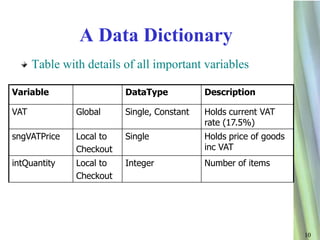
A Data Dictionary
      Table with details of all important variables

Variable                  DataType           Description

VAT            Global     Single, Constant   Holds current VAT
                                             rate (17.5%)
sngVATPrice    Local to   Single             Holds price of goods
               Checkout                      inc VAT
intQuantity    Local to   Integer            Number of items
               Checkout


                                                                    10

Design documentation

  • 1.
  • 2.
    Software Development Lifecycle Thisis used by software designers - the whole design process can be thought of as a cycle The stages are: Identify - Define requirements and specification Design - Plan the solution to the problem Develop - Produce the program code Test - Locate and remove any errors Evaluate - Review against program requirements 2
  • 3.
    Identify the Scope Thefirst stage of the design process is based upon analysing the user’s requirements to determine what is achievable with the resources available. Resource limitations (called constraints) usually involve time and money. Prioritise the most important features and decide what will be included in the first version of the software and what can be left out and put on the ‘wish list’ for future versions. You then need to produce a formal written requirements specification for the program 3
  • 4.
    Design Documentation Requirement Specification: Inputs are required from the user Outputs expected by the user Processing needed to provide functionality Constraints e.g. time, funds, specialist skills Screen Designs Program Design: Modules and Algorithms: Structure Diagram / Flowcharts / Pseudocode Data Dictionary Test Plan 4
  • 5.
    Requirements Specification Inputs: Listof all the data that is input by the user Give specific details of the actual data, e.g. first name and last name of user Identify valid and invalid values for text and acceptable ranges for numeric data Outputs: List of all output expected by the user Give specific details of the actual data and format, e.g. Monthly sales report which will be displayed in a bar chart, showing total sales for each product Include any help information e.g. Instructions, error messages or visual feedback 5
  • 6.
    Requirements Specification Processing: Givedetails of all the functions the program will need to have. You should break this down into each processing task e.g. validation, calculations, formatting etc. Explain what each function should do (not how – yet!) There could be many of these in your proposed system Constraints: Identify any resource limitations It could include budget, development timescales, hardware available, training requirements, special needs of users etc. Give specific details of each, e.g. The total budget available is £50,000 6
  • 7.
    Screen Designs Provide astoryboard to show screens at various stages of the program Draw them… Count Down On paper… In Word or Visio… In Visual Studio… They must show The prompts the user will see Example input Example output 7
  • 8.
    Process Specification Requirements Specification- describes WHAT the system must be able to do. Process Specification - provides details of HOW the required functionality is achieved. Various techniques used to clarify procedures Flow Charts Structure Diagram Pseudocode / Structured English Provides the logical design for a computer algorithm Not language specific 8
  • 9.
    Data Dictionary This isused to document the variables and data types used in your program Show the variable names, datatypes and a description of what data the variable is going to store Identify location e.g. Local or Global Remember local is better 9 9
  • 10.
    A Data Dictionary Table with details of all important variables Variable DataType Description VAT Global Single, Constant Holds current VAT rate (17.5%) sngVATPrice Local to Single Holds price of goods Checkout inc VAT intQuantity Local to Integer Number of items Checkout 10