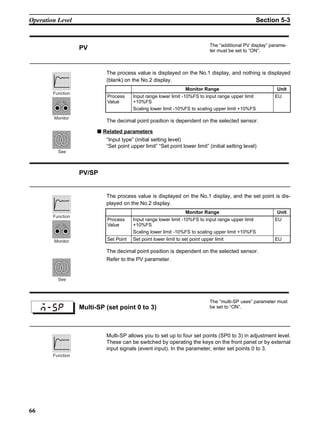
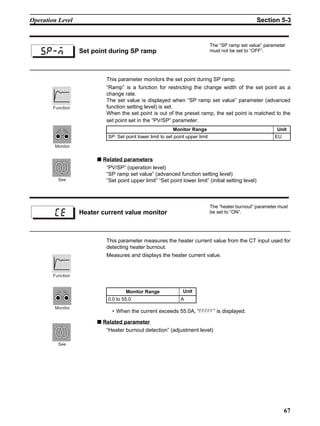
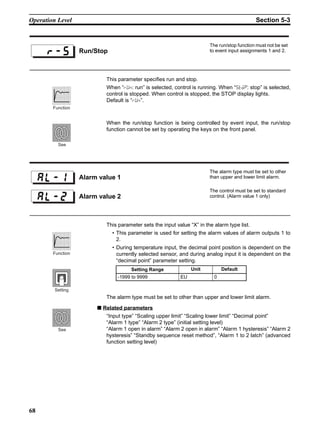
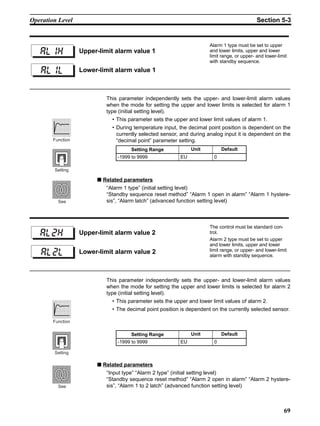
USER’S MANUAL
Cat. No. H100-E1-04A
E5CN
Temperature Controller
E5CN Temperature Controller
User’s Manual
Revised July 2003
iv
v
Notice:
OMRON products are manufactured for use according to proper procedures by a qualified operator
and only for the purposes described in this manual.
The following conventions are used to indicate and classify precautions in this manual. Always heed
the information provided with them. Failure to heed precautions can result in injury to people or dam-
age to property.
!DANGER Indicates an imminently hazardous situation which, if not avoided, will result in death or
serious injury.
!WARNING Indicates a potentially hazardous situation which, if not avoided, could result in death or
serious injury.
!Caution Indicates a potentially hazardous situation which, if not avoided, may result in minor or
moderate injury, or property damage.
Visual Aids
The following headings appear in the left column of the manual to help you locate different types of
information.
Note Indicates information of particular interest for efficient and convenient opera-
tion of the product.
1,2,3... 1. Indicates lists of one sort or another, such as procedures, checklists, etc.
vi
Conventions Used in This Manual
Meanings of Abbreviations
The following abbreviations are used in parameter names, figures and in text explanations. These
abbreviations mean the following:
Note “EU” stands for Engineering Unit. EU is used as the minimum unit for engi-
neering units such as °C, m, and g.
The size of EU varies according to the input type. For example, when the input
temperature setting range is –200 to +1300°C, 1 EU is 1°C, and when the
input temperature setting range is –20.0 to +500.0°C, 1 EU is 0.1°C.
In the case of analog input, the size of EU varies according to the decimal
point position of the scaling setting, and 1 EU becomes the minimum scaling
unit.
How to Read Display Symbols
The following tables show the correspondence between the symbols displayed on the displays and
alphabet characters.
Symbol Term
PV Process value
SP Set point
AT Auto-tuning
ST Self-tuning
EU Engineering unit (See note.)
A B C D E F G H I J K L M
N O P Q R S T U V W X Y Z
 OMRON, 1998
All rights reserved. No part of this publication may be reproduced, stored in a retrieval system, or transmitted, in any form, or
by any means, mechanical, electronic, photocopying, recording, or otherwise, without the prior written permission of
OMRON.
No patent liability is assumed with respect to the use of the information contained herein. Moreover, because OMRON is con-
stantly striving to improve its high-quality products, the information contained in this manual is subject to change without
notice. Every precaution has been taken in the preparation of this manual. Nevertheless, OMRON assumes no responsibility
for errors or omissions. Neither is any liability assumed for damages resulting from the use of the information contained in
this publication.
vii
TABLE OF CONTENTS
PRECAUTIONS . . . . . . . . . . . . . . . . . . . . . . . . . . . . . . . . . . . xi
1 Preface . . . . . . . . . . . . . . . . . . . . . . . . . . . . . . . . . . . . . . . . . . . . . . . . . . . . . . . . . . . . . . . . . . xii
2 Precautions. . . . . . . . . . . . . . . . . . . . . . . . . . . . . . . . . . . . . . . . . . . . . . . . . . . . . . . . . . . . . . . xii
3 Safety Precautions . . . . . . . . . . . . . . . . . . . . . . . . . . . . . . . . . . . . . . . . . . . . . . . . . . . . . . . . . xii
SECTION 1
INTRODUCTION . . . . . . . . . . . . . . . . . . . . . . . . . . . . . . . . . 1
1-1 Names of Parts. . . . . . . . . . . . . . . . . . . . . . . . . . . . . . . . . . . . . . . . . . . . . . . . . . . . . . . . . . . . 2
1-2 I/O Configuration and Main Functions . . . . . . . . . . . . . . . . . . . . . . . . . . . . . . . . . . . . . . . . . 3
1-3 How Setup Levels Are Configured and Operating the Keys on the Front Panel. . . . . . . . . . 5
1-4 Communications Function. . . . . . . . . . . . . . . . . . . . . . . . . . . . . . . . . . . . . . . . . . . . . . . . . . . 7
SECTION 2
PREPARATIONS. . . . . . . . . . . . . . . . . . . . . . . . . . . . . . . . . . 9
2-1 Installation . . . . . . . . . . . . . . . . . . . . . . . . . . . . . . . . . . . . . . . . . . . . . . . . . . . . . . . . . . . . . . . 10
2-2 Wiring Terminals . . . . . . . . . . . . . . . . . . . . . . . . . . . . . . . . . . . . . . . . . . . . . . . . . . . . . . . . . . 12
2-3 Requests at Installation . . . . . . . . . . . . . . . . . . . . . . . . . . . . . . . . . . . . . . . . . . . . . . . . . . . . . 16
SECTION 3
BASIC OPERATION. . . . . . . . . . . . . . . . . . . . . . . . . . . . . . . 17
3-1 Initial Setup Examples. . . . . . . . . . . . . . . . . . . . . . . . . . . . . . . . . . . . . . . . . . . . . . . . . . . . . . 18
3-2 Setting the Input Type . . . . . . . . . . . . . . . . . . . . . . . . . . . . . . . . . . . . . . . . . . . . . . . . . . . . . . 20
3-3 Selecting ×C/×F. . . . . . . . . . . . . . . . . . . . . . . . . . . . . . . . . . . . . . . . . . . . . . . . . . . . . . . . . . . 21
3-4 Selecting PID Control or ON/OFF Control. . . . . . . . . . . . . . . . . . . . . . . . . . . . . . . . . . . . . . 22
3-5 Setting Output Specifications . . . . . . . . . . . . . . . . . . . . . . . . . . . . . . . . . . . . . . . . . . . . . . . . 23
3-6 Setting the SP. . . . . . . . . . . . . . . . . . . . . . . . . . . . . . . . . . . . . . . . . . . . . . . . . . . . . . . . . . . . . 25
3-7 Executing ON/OFF Control. . . . . . . . . . . . . . . . . . . . . . . . . . . . . . . . . . . . . . . . . . . . . . . . . . 26
3-8 Determining PID Constants (AT, ST, manual setup). . . . . . . . . . . . . . . . . . . . . . . . . . . . . . . 28
3-9 Alarm Outputs . . . . . . . . . . . . . . . . . . . . . . . . . . . . . . . . . . . . . . . . . . . . . . . . . . . . . . . . . . . . 32
3-10 Heater Burnout Alarm (HBA) . . . . . . . . . . . . . . . . . . . . . . . . . . . . . . . . . . . . . . . . . . . . . . . . 35
3-11 Requests during Operation . . . . . . . . . . . . . . . . . . . . . . . . . . . . . . . . . . . . . . . . . . . . . . . . . . 38
SECTION 4
Applied Operation . . . . . . . . . . . . . . . . . . . . . . . . . . . . . . . . . 39
4-1 Shifting Input Values . . . . . . . . . . . . . . . . . . . . . . . . . . . . . . . . . . . . . . . . . . . . . . . . . . . . . . . 40
4-2 Alarm Hysteresis . . . . . . . . . . . . . . . . . . . . . . . . . . . . . . . . . . . . . . . . . . . . . . . . . . . . . . . . . . 44
4-3 Setting Scaling Upper and Lower Limits (analog input). . . . . . . . . . . . . . . . . . . . . . . . . . . . 46
4-4 Executing Heating and Cooling Control . . . . . . . . . . . . . . . . . . . . . . . . . . . . . . . . . . . . . . . . 47
4-5 To Use Event Input . . . . . . . . . . . . . . . . . . . . . . . . . . . . . . . . . . . . . . . . . . . . . . . . . . . . . . . . 49
4-6 Setting the SP Upper and Lower Limit Values . . . . . . . . . . . . . . . . . . . . . . . . . . . . . . . . . . . 53
4-7 Executing the SP Ramp Function (limiting the SP change rate). . . . . . . . . . . . . . . . . . . . . . 55
viii
TABLE OF CONTENTS
4-8 To Move to the Advanced Function Setting Level . . . . . . . . . . . . . . . . . . . . . . . . . . . . . . . . 57
4-9 Using the Key Protect Level . . . . . . . . . . . . . . . . . . . . . . . . . . . . . . . . . . . . . . . . . . . . . . . . . 58
4-10 To Use PV Color Change Function . . . . . . . . . . . . . . . . . . . . . . . . . . . . . . . . . . . . . . . . . . . . 59
SECTION 5
Parameters. . . . . . . . . . . . . . . . . . . . . . . . . . . . . . . . . . . . . . . . 61
5-1 Conventions Used in this Section . . . . . . . . . . . . . . . . . . . . . . . . . . . . . . . . . . . . . . . . . . . . . 62
5-2 Protect Level . . . . . . . . . . . . . . . . . . . . . . . . . . . . . . . . . . . . . . . . . . . . . . . . . . . . . . . . . . . . . 63
5-3 Operation Level . . . . . . . . . . . . . . . . . . . . . . . . . . . . . . . . . . . . . . . . . . . . . . . . . . . . . . . . . . . 65
5-4 Adjustment Level. . . . . . . . . . . . . . . . . . . . . . . . . . . . . . . . . . . . . . . . . . . . . . . . . . . . . . . . . . 71
5-5 Initial Setting Level . . . . . . . . . . . . . . . . . . . . . . . . . . . . . . . . . . . . . . . . . . . . . . . . . . . . . . . . 79
5-6 Advanced Function Setting Level . . . . . . . . . . . . . . . . . . . . . . . . . . . . . . . . . . . . . . . . . . . . . 88
5-7 Communication Setting Level . . . . . . . . . . . . . . . . . . . . . . . . . . . . . . . . . . . . . . . . . . . . . . . . 105
SECTION 6
Calibration. . . . . . . . . . . . . . . . . . . . . . . . . . . . . . . . . . . . . . . . 107
6-1 Parameter Structure . . . . . . . . . . . . . . . . . . . . . . . . . . . . . . . . . . . . . . . . . . . . . . . . . . . . . . . . 108
6-2 User Calibration. . . . . . . . . . . . . . . . . . . . . . . . . . . . . . . . . . . . . . . . . . . . . . . . . . . . . . . . . . . 109
6-3 Calibrating Thermocouples . . . . . . . . . . . . . . . . . . . . . . . . . . . . . . . . . . . . . . . . . . . . . . . . . . 110
6-4 Calibrating Analog Input. . . . . . . . . . . . . . . . . . . . . . . . . . . . . . . . . . . . . . . . . . . . . . . . . . . . 113
6-5 Calibrating Platinum Resistance Thermometers . . . . . . . . . . . . . . . . . . . . . . . . . . . . . . . . . . 114
6-6 Checking Indication Accuracy . . . . . . . . . . . . . . . . . . . . . . . . . . . . . . . . . . . . . . . . . . . . . . . 115
Appendices . . . . . . . . . . . . . . . . . . . . . . . . . . . . . . . . . . . . . . . 117
Index. . . . . . . . . . . . . . . . . . . . . . . . . . . . . . . . . . . . . . . . . . . . . 133
Revision History . . . . . . . . . . . . . . . . . . . . . . . . . . . . . . . . . . . 135
ix
About this Manual:
Please read this manual carefully and be sure you understand the information provided before
attempting to install or operate the E5CN Temperature Controller. Be sure to read the precautions pro-
vided in the following section.
Precautions provides general precautions for using the E5CN Temperature Controller.
Section 1 describes the features, names of parts and typical functions.
Section 2 describes installation and wiring.
Section 3 describes basic control examples.
Section 4 describes advanced functions to fully use E5CN.
Section 5 describes advanced functions to fully use E5CN.
Section 6 describes calibration method.
!WARNING Failure to read and understand the information provided in this manual may result in per-
sonal injury or death, damage to the product, or product failure. Please read each section
in its entirety and be sure you understand the information provided in the section and
related sections before attempting any of the procedures or operations given.
x
xi
PRECAUTIONS
This section provides general precautions for using the E5CN Temperature Controller.
The information contained in this section is important for the safe and reliable application of the E5CN
Temperature Controller. You must read this section and understand the information contained before attempting
to set up or operate a Temperature Controller.
1 Preface. . . . . . . . . . . . . . . . . . . . . . . . . . . . . . . . . . . . . . . . . . . . . . . . . . . . . . . xii
2 Precautions . . . . . . . . . . . . . . . . . . . . . . . . . . . . . . . . . . . . . . . . . . . . . . . . . . . xii
3 Safety Precautions. . . . . . . . . . . . . . . . . . . . . . . . . . . . . . . . . . . . . . . . . . . . . . xii
3-1 Safety Signal Words . . . . . . . . . . . . . . . . . . . . . . . . . . . . . . . . . . . . . xii
3-2 Safety Precautions . . . . . . . . . . . . . . . . . . . . . . . . . . . . . . . . . . . . . . xiii
3-3 Notice . . . . . . . . . . . . . . . . . . . . . . . . . . . . . . . . . . . . . . . . . . . . . . . . xiii
xii
Preface 1
1 Preface
The compact temperature controller E5CN allows the user to carry out the fol-
lowing:
• Select from many types of temperature, infrared temperature sensor and
analog input
• Select heating and cooling control in addition to standard control
• Select AT (auto-tuning) and ST (self-tuning) as tuning functions
• Use multi-SP and the run/stop function according to event input
• Use the HBA (heater burnout alarm) function (when option board E53-
CNHB or E53-CNH03 is fitted)
• Use the communications function (when option communications unit E53-
CNH03 is fitted)
• Calibrate sensor input
• The E5CN features a watertight construction (NEMA4X : equivalent to
IP66).
• The E5CN conforms to UL/CSA/ICE safety standards and EMC stan-
dards.
• Control process condition can be checked visually by PV color change
function.
This User’s Manual describes how to use the E5CN.
Before using your E5CN, thoroughly read and understand this manual in order
to ensure correct use.
Also, store this manual in a safe place so that it can be retrieved whenever
necessary.
Note For an additional description of the communications function, also refer to the
E5AN/EN/CN/GN Temperature Controller, Communications Function User’s
Manuals (Cat. No. H102)
2 Precautions
When the product is used under the circumstances or environment described
in this manual, always adhere to the limitations of the rating and functions.
Also, for safety, take countermeasures such as fitting fail safe installations.
DO NOT USE :
• In circumstances or environments that have not been described below in
this manual.
• For control in nuclear power, railway, aircraft, vehicle, incinerator, medical,
entertainment, or safety applications.
• Where death or serious property damage may occur, or where extensive
safety precautions are required.
3 Safety Precautions
3-1 Safety Signal Words
This manual uses the following signal words to mark safety precautions for the
E5CN.
These precautions provide important information for the safe application of
the product. You must be sure to follow the instructions provided in all safety
precautions.
xiii
Safety Precautions 3
!WARNING Indicates information that, if not heeded, could possibly result in loss of life or
serious injury.
!Caution Indicates information that, if not heeded, could result in relatively serious or
minor injury, damage to the product, or faulty operation.
3-2 Safety Precautions
!Caution Electric Shock Warning
Do not touch the terminals while the power is ON.
Doing so may cause an electric shock.
!Caution Do not allow metal fragments or lead wire scraps to fall inside this product.
These may cause electric shock, fire or malfunction.
!Caution Never disassemble, repair or modify the product.
Doing so may cause electric shock, fire or malfunction.
!Caution Do not use the product in flammable and explosive gas atmospheres.
!Caution The life expectancy of the output relays varies greatly with the switching
capacity and other switching conditions. Always use the output relays within
their rated load and electrical life expectancy. If an output relay is used beyond
its life expectancy, its contacts may become fused or burned.
!Caution Use the product within the rated load.
Not doing so may cause damage or fire.
!Caution Use this product within the rated supply voltage.
Not doing so may cause damage or fire.
!Caution Tighten the terminal screws properly. Tighten them to a torque of 0.74 N⋅m
(7.5kgf⋅cm)(max.)
Loose screws may cause malfunction.
!Caution Set all settings according to the control target of the product.
If the settings are not appropriate for the control target, the product may oper-
ate in an unexpected manner, resulting in damage to the product or resulting
in accidents.
!Caution To maintain safety in the event of a product malfunction, always take appropri-
ate safety measures, such as installing an alarm on a separate line to prevent
excessive temperature rise.
If a malfunction prevents proper control, a major accident may result.
3-3 Notice
Be sure to observe these precautions to ensure safe use.
1. Do not wire unused terminals.
2. Be sure to wire properly with correct polarity of terminals.
xiv
Safety Precautions 3
3. To reduce induction noise, separate the high-voltage or large-current pow-
er lines from other lines, and avoid parallel or common wiring with the pow-
er lines when you are wiring to the terminals. We recommend using
separating pipes, ducts, or shielded lines.
4. Do not use this product in the following places:
• Places subject to dust or corrosive gases (in particular, sulfide gas and
ammonia gas)
• Places subject to high humidity, condensation or freezing
• Places subject to direct sunlight
• Places subject to vibration and large shocks
• Places subject to splashing liquid or oily atmosphere
• Places directly subject to heat radiated from heating equipment
• Places subject to intense temperature changes
5. To allow heat to escape, do not block the area around the product. (Ensure
that enough space is left for the heat to escape.)
• Do not block the ventilation holes on the casing.
6. When you draw out the internal mechanism from the housing, never touch
electric components inside or subject the internal mechanism to shock.
7. Cleaning: Do not use paint thinner or the equivalent. Use standard grade
alcohol to clean the product.
8. Use specified size (M3.5, width 7.2 mm or less) crimped terminals for wir-
ing.
9. Allow as much space as possible between the E5CN and devices that gen-
erate powerful high-frequency noise (e.g. high-frequency welders, high-
frequency sewing machines) or surges.
10. When executing self-tuning, turn the load (e.g. heater) ON simultaneously
or before you turn the E5CN ON. If you turn the E5CN ON before turning
the load ON, correct self-tuning results and optimum control may no longer
be obtained.
11. Use a 100 to 240 VAC (50/60 Hz), 24 VAC (50/60 Hz) or 24 VDC power
supply matched to the power specifications of the E5CN. Also, make sure
that rated voltage is attained within two seconds of turning the power ON.
12. Attach a surge suppresser or noise filter to peripheral devices that gener-
ate noise (in particular, motors, transformers, solenoids, magnetic coils or
other equipment that have an inductance component).
13. When mounting a noise filter on the power supply, be sure to first check the
filter’s voltage and current capacity, and then mount the filter as close as
possible to the E5CN.
14. Use within the following temperature and humidity ranges:
• Temperature: -10 to 55°C, Humidity: 25 to 85% (with no icing or conden-
sation)
If the E5CN is installed inside a control board, the ambient temperature
must be kept to under 55°C, including the temperature around the E5CN.
If the E5CN is subjected to heat radiation, use a fan to cool the surface of
the E5CN to under 55°C.
15. Store within the following temperature and humidity ranges:
• Temperature: -25 to 65°C, Humidity: 25 to 85% (with no icing or conden-
sation)
16. Never place heavy objects on, or apply pressure to the E5CN as it may
cause it to deform and deteriorate during use or storage.
17. Avoid using the E5CN in places near a radio, television set, or wireless in-
stallation. These devices can cause radio disturbances which adversely af-
fect the performance of the E5CN.
1
SECTION 1
INTRODUCTION
1-1 Names of Parts . . . . . . . . . . . . . . . . . . . . . . . . . . . . . . . . . . . . . . . . . . . . . . . . 2
1-1-1 Front panel . . . . . . . . . . . . . . . . . . . . . . . . . . . . . . . . . . . . . . . . . . . . 2
1-1-2 Display . . . . . . . . . . . . . . . . . . . . . . . . . . . . . . . . . . . . . . . . . . . . . . . 2
1-1-3 How to use keys . . . . . . . . . . . . . . . . . . . . . . . . . . . . . . . . . . . . . . . . 3
1-2 I/O Configuration and Main Functions. . . . . . . . . . . . . . . . . . . . . . . . . . . . . . 3
1-2-1 I/O configuration . . . . . . . . . . . . . . . . . . . . . . . . . . . . . . . . . . . . . . . 3
1-2-2 Main functions . . . . . . . . . . . . . . . . . . . . . . . . . . . . . . . . . . . . . . . . . 4
1-3 How Setup Levels Are Configured and Operating the Keys on the Front Panel 5
1-3-1 Selecting parameters. . . . . . . . . . . . . . . . . . . . . . . . . . . . . . . . . . . . . 7
1-3-2 Fixing settings. . . . . . . . . . . . . . . . . . . . . . . . . . . . . . . . . . . . . . . . . . 7
1-4 Communications Function . . . . . . . . . . . . . . . . . . . . . . . . . . . . . . . . . . . . . . . 7
2
Names of Parts Section 1-1
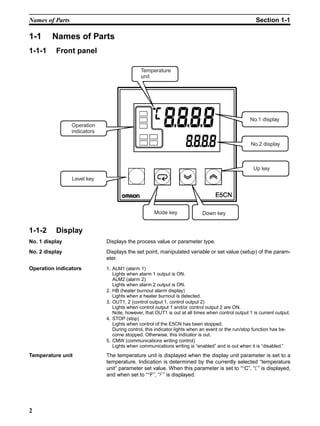
1-1 Names of Parts
1-1-1 Front panel
1-1-2 Display
No. 1 display Displays the process value or parameter type.
No. 2 display Displays the set point, manipulated variable or set value (setup) of the param-
eter.
Operation indicators 1. ALM1 (alarm 1)
Lights when alarm 1 output is ON.
ALM2 (alarm 2)
Lights when alarm 2 output is ON.
2. HB (heater burnout alarm display)
Lights when a heater burnout is detected.
3. OUT1, 2 (control output 1, control output 2)
Lights when control output 1 and/or control output 2 are ON.
Note, however, that OUT1 is out at all times when control output 1 is current output.
4. STOP (stop)
Lights when control of the E5CN has been stopped.
During control, this indicator lights when an event or the run/stop function has be-
come stopped. Otherwise, this indicator is out.
5. CMW (communications writing control)
Lights when communications writing is “enabled” and is out when it is “disabled.”
Temperature unit The temperature unit is displayed when the display unit parameter is set to a
temperature. Indication is determined by the currently selected “temperature
unit” parameter set value. When this parameter is set to “°C”, “c” is displayed,
and when set to “°F”, “f” is displayed.
No.1 display
No.2 display
Up key
Down keyMode key
Level key
Temperature
unit
Operation
indicators
3
I/O Configuration and Main Functions Section 1-2
1-1-3 How to use keys
The following describes the basic functions of the front panel keys.
(level) key Press this key to select the setting levels. The setting level is selected in order
“operation level” ←→ “adjustment level”, “initial setting level” ←→ “communi-
cations setting level”.
(mode) key Press this key to select parameters within each level.
(up) key Each press of this key increments values displayed on the No.2 display. Hold-
ing down this key continuously increments values.
(down) key Each press of this key decrements values displayed on the No.2 display. Hold-
ing down this key continuously decrements values.
+ key
combination
This key combination sets the E5CN to the “protect level.” For details on the
protect level, see Section 5 Parameters.
1-2 I/O Configuration and Main Functions
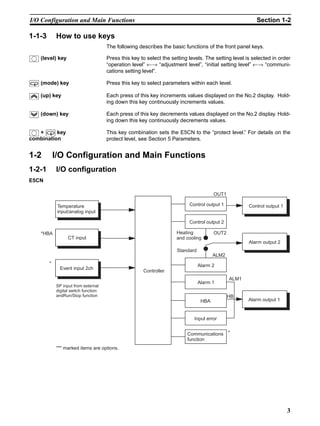
1-2-1 I/O configuration
E5CN
*HBA
CT input
Controller
Control output 1
Control output 2
Standard
Alarm 2
Alarm 1
HBA
Input error
Alarm output 2
Alarm output 1
OUT1
OUT2
ALM2
ALM1
HB
Event input 2ch
Control output 1
*
*
"*" marked items are options.
Temperature
input/analog input
SP input from external
digital switch function
andRun/Stop function
Heating
and cooling
Communications
function
4
I/O Configuration and Main Functions Section 1-2
1-2-2 Main functions
The following introduces the main functions of the E5CN. For details on each
function and how to use the functions, see Section 3 onwards.
Input sensor types • The following input sensors can be connected for temperature input:
Thermocouple : K, J, T, E, L, U, N, R, S, B
Infrared temperature sensor type : ES1A
: K(10 to 70°C), K(60 to 120°C),
K(115 to 165°C), K (160 to 260°C)
Platinum resistance thermometer
: Pt100, JPt100
Analog input : 0 to 50 mV
Control output • Control output is either relay, voltage output or current output depending
on the model of E5CN.
• If you select heating and cooling control on the E5CN-@2@@, alarm 2
output is used as cooling side output. So, use alarm 1 if an alarm is
needed in heating and cooling control.
Alarms • Alarms are supported on the E5CN-@2@@. Set the alarm type and alarm
value, or upper- and lower-limit alarms.
• If necessary, a more comprehensive alarm function can be achieved by
setting the “standby sequence”, “alarm hysteresis”, “close in alarm/open
in alarm” and Alarm latch ON/OFF parameters.
• When the input error output is set to “ON”, alarm output 1 turns ON when
an input error occurs.
Control adjustment • Optimum PID constants can be set easily by AT (auto-tuning) and ST
(self-tuning).
Event input • When the option event input unit E53-CNHB is mounted in the E5CN, the
following functions can be achieved by event input:
Set point selection (multi-SP max. 4 points) and run/stop
HBA • The heater burnout alarm (HBA) function is supported when the option
unit (E53-CNHB or E53-CNH03) is mounted in the E5CN.
Communications function • Communications according to CompoWay/F* and Sysway are supported
when the option communications unit E53-CNH03 is mounted in the
E5CN.
Communications are carried out over the RS-485 interface.
Note CompoWay/F is a general-purpose serial communications-based unified com-
munications procedure developed by OMRON. CompoWay/F uses com-
mands compliant with the well-established FINS, together with a unified frame
format on OMRON programmable controllers to facilitate communications
between personal computers and components.
5
How Setup Levels Are Configured and Operating the Keys on the Front Panel Section 1-3
1-3 How Setup Levels Are Configured and Operating the Keys
on the Front Panel
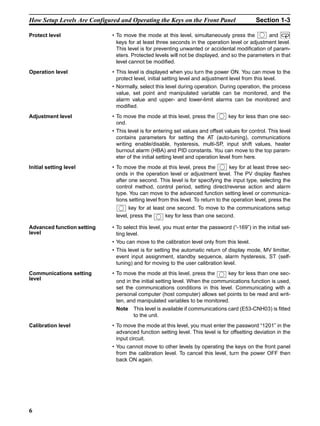
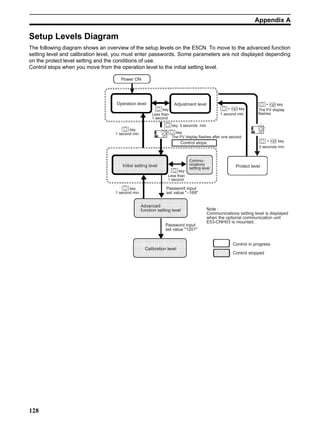
Parameters are divided into groups, each called a “level”. Each of the set val-
ues (setup items) in these levels are called a “parameter.” The parameters on
the E5CN are divided into the following seven levels:
: Indicates items that can be set.
Of these levels, the initial setting level, communications setting level,
advanced function setting level and calibration level can be used only when
control has stopped. Note that controller outputs are stopped when any of
these four levels are selected.
Control in
Progress
Control Stopped
Protect level -
Operation level -
Adjustment level -
Initial setting level -
Advanced function setting level -
Calibration level -
Communications setting level -
Password input
set value "1201"
Advanced
function setting level
Calibration level
Password input
set value "-169"
Control stops.
Initial setting level
Less than
1 second
key
key
Commu-
nications
setting level
The PV display flashes after one second.
Power ON
Operation level
1 second min.
Protect level
Control in progress
Control stopped
Adjustment level
Less than
1 second
key
1 second min.
key
1 second min.
key
3 seconds min.key
Note :
Communications setting level is displayed
when the optional communication unit
E53-CNH03 is mounted.
3 seconds min.
+ key
The PV display
flashes
25
10025
100
+ key
+ key
6
How Setup Levels Are Configured and Operating the Keys on the Front Panel Section 1-3
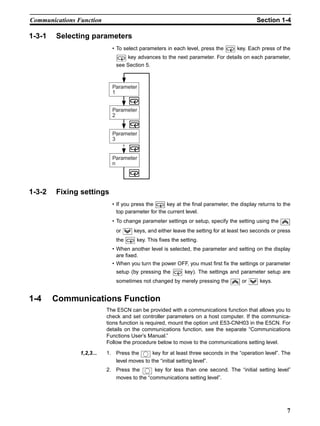
Protect level • To move the mode at this level, simultaneously press the and
keys for at least three seconds in the operation level or adjustment level.
This level is for preventing unwanted or accidental modification of param-
eters. Protected levels will not be displayed, and so the parameters in that
level cannot be modified.
Operation level • This level is displayed when you turn the power ON. You can move to the
protect level, initial setting level and adjustment level from this level.
• Normally, select this level during operation. During operation, the process
value, set point and manipulated variable can be monitored, and the
alarm value and upper- and lower-limit alarms can be monitored and
modified.
Adjustment level • To move the mode at this level, press the key for less than one sec-
ond.
• This level is for entering set values and offset values for control. This level
contains parameters for setting the AT (auto-tuning), communications
writing enable/disable, hysteresis, multi-SP, input shift values, heater
burnout alarm (HBA) and PID constants. You can move to the top param-
eter of the initial setting level and operation level from here.
Initial setting level • To move the mode at this level, press the key for at least three sec-
onds in the operation level or adjustment level. The PV display flashes
after one second. This level is for specifying the input type, selecting the
control method, control period, setting direct/reverse action and alarm
type. You can move to the advanced function setting level or communica-
tions setting level from this level. To return to the operation level, press the
key for at least one second. To move to the communications setup
level, press the key for less than one second.
Advanced function setting
level
• To select this level, you must enter the password (“-169”) in the initial set-
ting level.
• You can move to the calibration level only from this level.
• This level is for setting the automatic return of display mode, MV limitter,
event input assignment, standby sequence, alarm hysteresis, ST (self-
tuning) and for moving to the user calibration level.
Communications setting
level
• To move the mode at this level, press the key for less than one sec-
ond in the initial setting level. When the communications function is used,
set the communications conditions in this level. Communicating with a
personal computer (host computer) allows set points to be read and writ-
ten, and manipulated variables to be monitored.
Note This level is available if communications card (E53-CNH03) is fitted
to the unit.
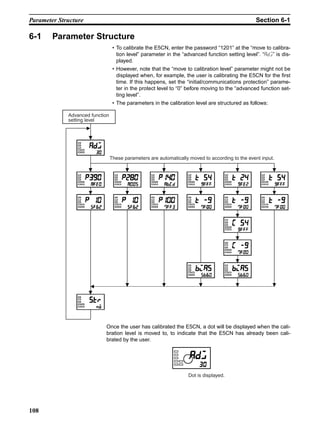
Calibration level • To move the mode at this level, you must enter the password “1201” in the
advanced function setting level. This level is for offsetting deviation in the
input circuit.
• You cannot move to other levels by operating the keys on the front panel
from the calibration level. To cancel this level, turn the power OFF then
back ON again.
7
Communications Function Section 1-4
1-3-1 Selecting parameters
• To select parameters in each level, press the key. Each press of the
key advances to the next parameter. For details on each parameter,
see Section 5.
1-3-2 Fixing settings
• If you press the key at the final parameter, the display returns to the
top parameter for the current level.
• To change parameter settings or setup, specify the setting using the
or keys, and either leave the setting for at least two seconds or press
the key. This fixes the setting.
• When another level is selected, the parameter and setting on the display
are fixed.
• When you turn the power OFF, you must first fix the settings or parameter
setup (by pressing the key). The settings and parameter setup are
sometimes not changed by merely pressing the or keys.
1-4 Communications Function
The E5CN can be provided with a communications function that allows you to
check and set controller parameters on a host computer. If the communica-
tions function is required, mount the option unit E53-CNH03 in the E5CN. For
details on the communications function, see the separate “Communications
Functions User’s Manual.”
Follow the procedure below to move to the communications setting level.
1,2,3... 1. Press the key for at least three seconds in the “operation level”. The
level moves to the “initial setting level”.
2. Press the key for less than one second. The “initial setting level”
moves to the “communications setting level”.
Parameter
1
Parameter
2
Parameter
3
Parameter
n
8
Communications Function Section 1-4
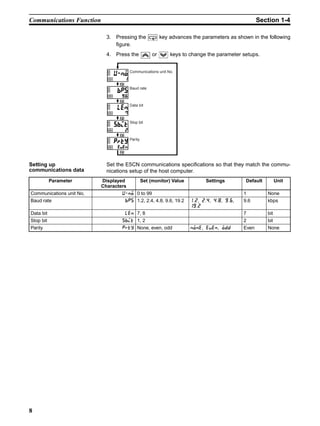
3. Pressing the key advances the parameters as shown in the following
figure.
4. Press the or keys to change the parameter setups.
Setting up
communications data
Set the E5CN communications specifications so that they match the commu-
nications setup of the host computer.
Communications unit No.
Baud rate
Data bit
Stop bit
Parity
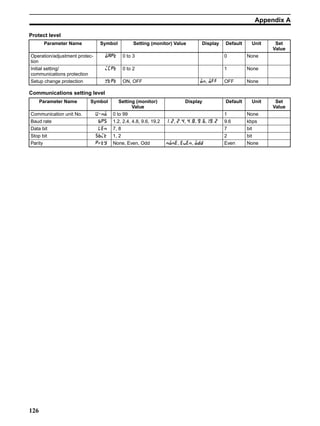
Parameter Displayed
Characters
Set (monitor) Value Settings Default Unit
Communications unit No. A:; 0 to 99 1 None
Baud rate .? 1.2, 2.4, 4.8, 9.6, 19.2 , , , ,

9.6 kbps
Data bit 81: 7, 8 7 bit
Stop bit ?.5@ 1, 2 2 bit
Parity @E None, even, odd :;:1, 1B1:, ;00 Even None
9
SECTION 2
PREPARATIONS
2-1 Installation. . . . . . . . . . . . . . . . . . . . . . . . . . . . . . . . . . . . . . . . . . . . . . . . . . . . 10
2-1-1 Dimensions . . . . . . . . . . . . . . . . . . . . . . . . . . . . . . . . . . . . . . . . . . . . 10
2-1-2 Panel cutout . . . . . . . . . . . . . . . . . . . . . . . . . . . . . . . . . . . . . . . . . . . 10
2-1-3 Setting up the option units . . . . . . . . . . . . . . . . . . . . . . . . . . . . . . . . 11
2-1-4 Mounting. . . . . . . . . . . . . . . . . . . . . . . . . . . . . . . . . . . . . . . . . . . . . . 12
2-2 Wiring Terminals. . . . . . . . . . . . . . . . . . . . . . . . . . . . . . . . . . . . . . . . . . . . . . . 12
2-2-1 Terminal arrangement. . . . . . . . . . . . . . . . . . . . . . . . . . . . . . . . . . . . 12
2-2-2 Precautions when wiring. . . . . . . . . . . . . . . . . . . . . . . . . . . . . . . . . . 13
2-2-3 Wiring . . . . . . . . . . . . . . . . . . . . . . . . . . . . . . . . . . . . . . . . . . . . . . . . 13
2-3 Requests at Installation . . . . . . . . . . . . . . . . . . . . . . . . . . . . . . . . . . . . . . . . . . 16
2-3-1 To ensure prolonged use . . . . . . . . . . . . . . . . . . . . . . . . . . . . . . . . . . 16
2-3-2 To reduce the influence of noise. . . . . . . . . . . . . . . . . . . . . . . . . . . . 16
2-3-3 To ensure high-precision measurement . . . . . . . . . . . . . . . . . . . . . . 16
10
Installation Section 2-1
2-1 Installation
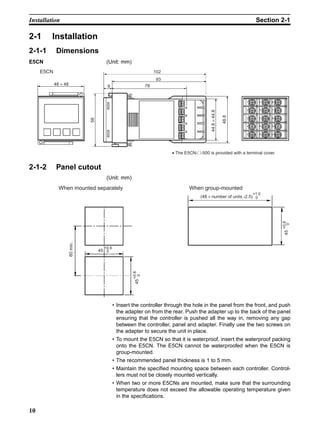
2-1-1 Dimensions
E5CN (Unit: mm)
2-1-2 Panel cutout
(Unit: mm)
• Insert the controller through the hole in the panel from the front, and push
the adapter on from the rear. Push the adapter up to the back of the panel
ensuring that the controller is pushed all the way in, removing any gap
between the controller, panel and adapter. Finally use the two screws on
the adapter to secure the unit in place.
• To mount the E5CN so that it is waterproof, insert the waterproof packing
onto the E5CN. The E5CN cannot be waterproofed when the E5CN is
group-mounted.
• The recommended panel thickness is 1 to 5 mm.
• Maintain the specified mounting space between each controller. Control-
lers must not be closely mounted vertically.
• When two or more E5CNs are mounted, make sure that the surrounding
temperature does not exceed the allowable operating temperature given
in the specifications.
• The E5CN-@-500 is provided with a terminal cover.
48 × 48
E5CN
9 78
93
102
58
48.8
1
2
3
4
5
11
12
13
14
15
6
7
8
9
10
44.8×44.8
(48 × number of units -2.5)
When mounted separately When group-mounted
+1.0
0
45
+0.6
0
60min.
45
+0.6
0
45+0.6
0
11
Installation Section 2-1
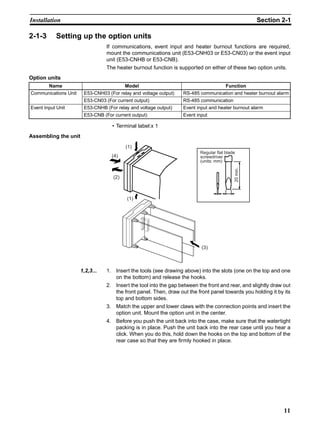
2-1-3 Setting up the option units
If communications, event input and heater burnout functions are required,
mount the communications unit (E53-CNH03 or E53-CN03) or the event input
unit (E53-CNHB or E53-CNB).
The heater burnout function is supported on either of these two option units.
Option units
• Terminal label:x 1
Assembling the unit
1,2,3... 1. Insert the tools (see drawing above) into the slots (one on the top and one
on the bottom) and release the hooks.
2. Insert the tool into the gap between the front and rear, and slightly draw out
the front panel. Then, draw out the front panel towards you holding it by its
top and bottom sides.
3. Match the upper and lower claws with the connection points and insert the
option unit. Mount the option unit in the center.
4. Before you push the unit back into the case, make sure that the watertight
packing is in place. Push the unit back into the rear case until you hear a
click. When you do this, hold down the hooks on the top and bottom of the
rear case so that they are firmly hooked in place.
Name Model Function
Communications Unit E53-CNH03 (For relay and voltage output) RS-485 communication and heater burnout alarm
E53-CN03 (For current output) RS-485 communication
Event Input Unit E53-CNHB (For relay and voltage output) Event input and heater burnout alarm
E53-CNB (For current output) Event input
Regular flat blade
screwdriver
(units: mm)
20min.
(1)
(1)
(2)
(4)
(3)
12
Wiring Terminals Section 2-2
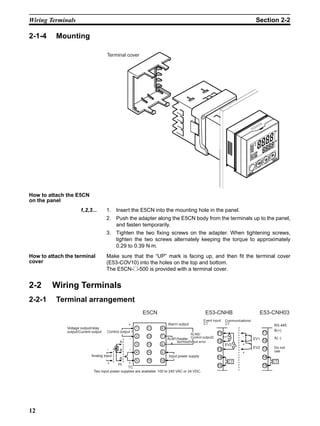
2-1-4 Mounting
How to attach the E5CN
on the panel
1,2,3... 1. Insert the E5CN into the mounting hole in the panel.
2. Push the adapter along the E5CN body from the terminals up to the panel,
and fasten temporarily.
3. Tighten the two fixing screws on the adapter. When tightening screws,
tighten the two screws alternately keeping the torque to approximately
0.29 to 0.39 N⋅m.
How to attach the terminal
cover
Make sure that the “UP” mark is facing up, and then fit the terminal cover
(E53-COV10) into the holes on the top and bottom.
The E5CN-@-500 is provided with a terminal cover.
2-2 Wiring Terminals
2-2-1 Terminal arrangement
Terminal cover
Communications/
CT
Voltage output/relay
output/Current output Control output 1
Analog input
Two input power supplies are available: 100 to 240 VAC or 24 VDC.
Alarm output
ALM1/heater
burnout/Input error
Input power supply
Event input/
CT
ALM2/
Control output2
1
2
3
4
5
11
12
13
14
15
6
7
8
9
10
11
12
13
14
15
11
12
13
14
15
EV1
EV2
CT CT
RS-485
B(+)
A(−)
Do not
use
E5CN
−
+
−
+
−
+
A
B
B
Pt
TC
E53-CNHB E53-CNH03
EV2
EV1
−
+
+
13
Wiring Terminals Section 2-2
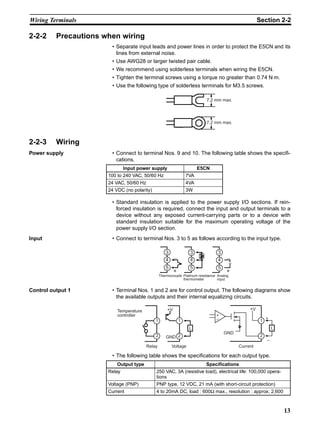
2-2-2 Precautions when wiring
• Separate input leads and power lines in order to protect the E5CN and its
lines from external noise.
• Use AWG28 or larger twisted pair cable.
• We recommend using solderless terminals when wiring the E5CN.
• Tighten the terminal screws using a torque no greater than 0.74 N⋅m.
• Use the following type of solderless terminals for M3.5 screws.
2-2-3 Wiring
Power supply • Connect to terminal Nos. 9 and 10. The following table shows the specifi-
cations.
• Standard insulation is applied to the power supply I/O sections. If rein-
forced insulation is required, connect the input and output terminals to a
device without any exposed current-carrying parts or to a device with
standard insulation suitable for the maximum operating voltage of the
power supply I/O section.
Input • Connect to terminal Nos. 3 to 5 as follows according to the input type.
Control output 1 • Terminal Nos. 1 and 2 are for control output. The following diagrams show
the available outputs and their internal equalizing circuits.
• The following table shows the specifications for each output type.
7.2 mm max.
7.2 mm max.
Input power supply E5CN
100 to 240 VAC, 50/60 Hz 7VA
24 VAC, 50/60 Hz 4VA
24 VDC (no polarity) 3W
Analog
input
Thermocouple Platinum resistance
thermometer
3
4
5
3
4
5
3
4
5
−
+
−
+
v
Output type Specifications
Relay 250 VAC, 3A (resistive load), electrical life: 100,000 opera-
tions
Voltage (PNP) PNP type, 12 VDC, 21 mA (with short-circuit protection)
Current 4 to 20mA DC, load : 600Ω max., resolution : approx. 2,600
Voltage
Temperature
controller
Relay
1
2
1
2
L
+V
GND
+V
GND
+
−
L
Current
1
2
+
−
14
Wiring Terminals Section 2-2
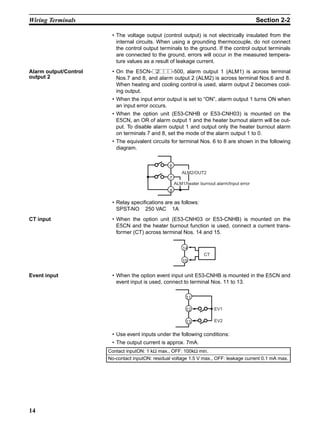
• The voltage output (control output) is not electrically insulated from the
internal circuits. When using a grounding thermocouple, do not connect
the control output terminals to the ground. If the control output terminals
are connected to the ground, errors will occur in the measured tempera-
ture values as a result of leakage current.
Alarm output/Control
output 2
• On the E5CN-@2@@@-500, alarm output 1 (ALM1) is across terminal
Nos.7 and 8, and alarm output 2 (ALM2) is across terminal Nos.6 and 8.
When heating and cooling control is used, alarm output 2 becomes cool-
ing output.
• When the input error output is set to “ON”, alarm output 1 turns ON when
an input error occurs.
• When the option unit (E53-CNHB or E53-CNH03) is mounted on the
E5CN, an OR of alarm output 1 and the heater burnout alarm will be out-
put. To disable alarm output 1 and output only the heater burnout alarm
on terminals 7 and 8, set the mode of the alarm output 1 to 0.
• The equivalent circuits for terminal Nos. 6 to 8 are shown in the following
diagram.
• Relay specifications are as follows:
SPST-NO 250 VAC 1A
CT input • When the option unit (E53-CNH03 or E53-CNHB) is mounted on the
E5CN and the heater burnout function is used, connect a current trans-
former (CT) across terminal Nos. 14 and 15.
Event input • When the option event input unit E53-CNHB is mounted in the E5CN and
event input is used, connect to terminal Nos. 11 to 13.
• Use event inputs under the following conditions:
• The output current is approx. 7mA.
6
7
8
ALM2/OUT2
ALM1/heater burnout alarm/Input error
14
15
CT
Contact inputON: 1 kΩ max., OFF: 100kΩ min.
No-contact inputON: residual voltage 1.5 V max., OFF: leakage current 0.1 mA max.
11
12
13
EV1
EV2
15
Wiring Terminals Section 2-2
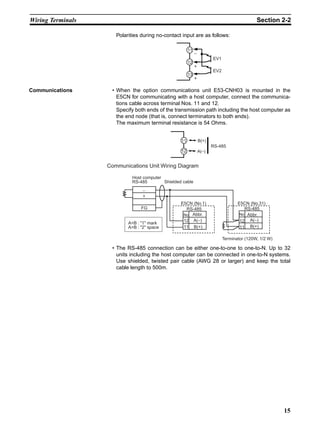
Polarities during no-contact input are as follows:
Communications • When the option communications unit E53-CNH03 is mounted in the
E5CN for communicating with a host computer, connect the communica-
tions cable across terminal Nos. 11 and 12.
Specify both ends of the transmission path including the host computer as
the end node (that is, connect terminators to both ends).
The maximum terminal resistance is 54 Ohms.
• The RS-485 connection can be either one-to-one to one-to-N. Up to 32
units including the host computer can be connected in one-to-N systems.
Use shielded, twisted pair cable (AWG 28 or larger) and keep the total
cable length to 500m.
11
12
13
EV1
EV2
−
+
+
11
12
B(+)
A(−)
RS-485
Terminator (120W, 1/2 W)
Communications Unit Wiring Diagram
Host computer
RS-485 Shielded cable
E5CN (No.1)
Abbr.
AB : 1 mark
AB : 2 space
E5CN (No.31)
No
A(−)12
B(+)11
Abbr.No
A(−)12
B(+)11
−
+
FG RS-485 RS-485
16
Requests at Installation Section 2-3
2-3 Requests at Installation
2-3-1 To ensure prolonged use
Use the temperature in the following operating environment:
Temperature : –10 to +55°C (icing and condensation not allowed)
Humidity : 25 to 85%
When the temperature controller is incorporated in a control panel, make sure
that the controller’s ambient temperature and not the panel’s ambient temper-
ature does not exceed 55°C.
The life of electronic equipment such as temperature controllers is influenced
not only by the life determined by the relay switching count but also by the life
of the electronic components used internally. The service life of components
is dependent on the ambient temperature: the higher the ambient temperature
becomes, the shorter the service life becomes, and vice versa. For this rea-
son, the service life of the temperature controller can be extended by lowering
its internal temperature.
Gang-mounting two or more temperature controllers, or mounting tempera-
ture controllers above each other may cause heat to build up inside the tem-
perature controllers, which will shorten their service life. When mounting
temperature controllers like this, forced cooling measures such as a cooling
fan for cooling the temperature controllers must be taken into consideration.
Prevent only the terminal block from being cooled. Otherwise, this may result
in a measurement error.
2-3-2 To reduce the influence of noise
To reduce induction noise, the leads on the temperature controller’s terminal
block must be wired separately from large-voltage/large-current power leads.
Also, avoid wiring leads in parallel with power leads or in the same wiring
path. Other methods such as separating conduits and wiring ducts, or using
shield wire are also effective.
Attach a surge absorber or noise filter to peripheral equipment that generates
noise (in particular, motors, transformers, solenoids, or other equipment that
has a magnetic coil or other inductance component).
When a noise filter is used at the power supply, first check the voltage or cur-
rent, and attach the noise filter as close as possible to the temperature con-
troller.
Also, install the temperature controller as far away as possible from equip-
ment that generates strong, high frequency (e.g. high-frequency welders,
high-frequency sewing machines) or surges.
2-3-3 To ensure high-precision measurement
When the thermocouple leads are extended, be sure to use a compensating
lead wire matched to the type of thermocouple.
When the platinum resistance detector leads are extended, use the lead hav-
ing the smallest resistance to equalize the resistance of the three leads.
Install the temperature controller so that it is horizontal.
If there is a large error in the measurement values, make sure that input com-
pensation has been set correctly.
17
SECTION 3
BASIC OPERATION
3-1 Initial Setup Examples . . . . . . . . . . . . . . . . . . . . . . . . . . . . . . . . . . . . . . . . . . 18
3-2 Setting the Input Type . . . . . . . . . . . . . . . . . . . . . . . . . . . . . . . . . . . . . . . . . . . 20
3-2-1 Input type . . . . . . . . . . . . . . . . . . . . . . . . . . . . . . . . . . . . . . . . . . . . . 20
3-3 Selecting °C/°F . . . . . . . . . . . . . . . . . . . . . . . . . . . . . . . . . . . . . . . . . . . . . . . . 21
3-3-1 Temperature unit. . . . . . . . . . . . . . . . . . . . . . . . . . . . . . . . . . . . . . . . 21
3-4 Selecting PID Control or ON/OFF Control . . . . . . . . . . . . . . . . . . . . . . . . . . 22
3-5 Setting Output Specifications . . . . . . . . . . . . . . . . . . . . . . . . . . . . . . . . . . . . . 23
3-5-1 Control period. . . . . . . . . . . . . . . . . . . . . . . . . . . . . . . . . . . . . . . . . . 23
3-5-2 Direct/reverse operation . . . . . . . . . . . . . . . . . . . . . . . . . . . . . . . . . . 23
3-6 Setting the SP . . . . . . . . . . . . . . . . . . . . . . . . . . . . . . . . . . . . . . . . . . . . . . . . . 25
3-6-1 Changing the SP . . . . . . . . . . . . . . . . . . . . . . . . . . . . . . . . . . . . . . . . 25
3-7 Executing ON/OFF Control . . . . . . . . . . . . . . . . . . . . . . . . . . . . . . . . . . . . . . 26
3-7-1 ON/OFF Control. . . . . . . . . . . . . . . . . . . . . . . . . . . . . . . . . . . . . . . . 26
3-7-2 Setup . . . . . . . . . . . . . . . . . . . . . . . . . . . . . . . . . . . . . . . . . . . . . . . . . 27
3-8 Determining PID Constants (AT, ST, manual setup) . . . . . . . . . . . . . . . . . . . 28
3-8-1 AT (auto-tuning) . . . . . . . . . . . . . . . . . . . . . . . . . . . . . . . . . . . . . . . . 28
3-8-2 ST (self-tuning). . . . . . . . . . . . . . . . . . . . . . . . . . . . . . . . . . . . . . . . . 30
3-8-3 ST start conditions . . . . . . . . . . . . . . . . . . . . . . . . . . . . . . . . . . . . . . 30
3-8-4 ST stable range . . . . . . . . . . . . . . . . . . . . . . . . . . . . . . . . . . . . . . . . . 31
3-8-5 Manual setup. . . . . . . . . . . . . . . . . . . . . . . . . . . . . . . . . . . . . . . . . . . 31
3-9 Alarm Outputs. . . . . . . . . . . . . . . . . . . . . . . . . . . . . . . . . . . . . . . . . . . . . . . . . 32
3-9-1 Alarm type . . . . . . . . . . . . . . . . . . . . . . . . . . . . . . . . . . . . . . . . . . . . 33
3-9-2 Alarm value. . . . . . . . . . . . . . . . . . . . . . . . . . . . . . . . . . . . . . . . . . . . 34
3-10 Heater Burnout Alarm (HBA). . . . . . . . . . . . . . . . . . . . . . . . . . . . . . . . . . . . . 35
3-10-1 HBA detection . . . . . . . . . . . . . . . . . . . . . . . . . . . . . . . . . . . . . . . . . 35
3-10-2 Operating conditions. . . . . . . . . . . . . . . . . . . . . . . . . . . . . . . . . . . . . 35
3-10-3 Setup . . . . . . . . . . . . . . . . . . . . . . . . . . . . . . . . . . . . . . . . . . . . . . . . . 36
3-10-4 How to calculate detection current values . . . . . . . . . . . . . . . . . . . . 37
3-10-5 Example . . . . . . . . . . . . . . . . . . . . . . . . . . . . . . . . . . . . . . . . . . . . . . 37
3-11 Requests during Operation . . . . . . . . . . . . . . . . . . . . . . . . . . . . . . . . . . . . . . . 38
18
Initial Setup Examples Section 3-1
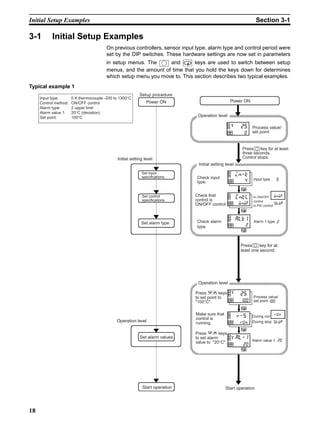
3-1 Initial Setup Examples
On previous controllers, sensor input type, alarm type and control period were
set by the DIP switches. These hardware settings are now set in parameters
in setup menus. The and keys are used to switch between setup
menus, and the amount of time that you hold the keys down for determines
which setup menu you move to. This section describes two typical examples.
Typical example 1
Setup procedure
Power ON
Initial setting level
Set input
specifications
Set control
specifications
Set alarm type
Set alarm values
Operation level
Start operation
Power ON
Operation level
Initial setting level
Operation level
Process value/
set point
In ON/OFF
control
In PID control
Check input
type.
Check alarm
type.
Press key for at least
three seconds.
Control stops.
Press key for at
least one second.
Start operation
Input type: 0 K thermocouple -200 to 1300°C
Control method: ON/OFF control
Alarm type: 2 upper limit
Alarm value 1: 20°C (deviation)
Set point: 100°C
20
al-1
Press keys
to set alarm
value to 20°C.
Make sure that
control is
running.
Alarm value 1 20
During run
During stop
run
stoprun
r-5
Process value/
set point 100100
25
Alarm 1 type 2
2
alt1
0
25
Input type 04
in-t
Press keys
to set point to
100°C.
Check that
control is
ON/OFF control.
onof
stoponof
cntl
19
Initial Setup Examples Section 3-1
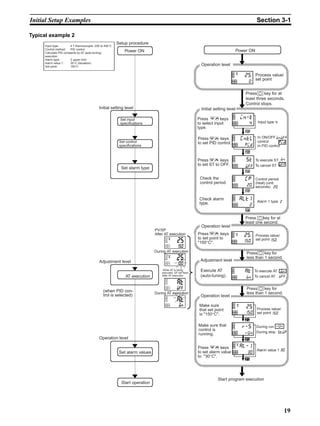
Typical example 2
Setup procedure
Power ON
Initial setting level
Set alarm type
AT execution
Set alarm values
Adjustment level
Operation level
(when PID con-
trol is selected)
Start operation
Power ON
Initial setting level
Operation level
Process value/
set point
Check alarm
type.
During AT execution
Adjustment level
Operation level
Start program execution
Operation level
During AT execution
After AT execution
PV/SP
Input type: 4 T thermocouple -200 to 400°C
Control method: PID control
Calculate PID constants by AT (auto-tuning)
execution.
Alarm type: 2 upper limit
Alarm value 1: 30°C (deviation)
Set point: 150°C
Set input
specifications
Set control
specifications
While AT is being
executed, SP will flash
After AT execution
Press keys
to set alarm value
to 30°C.
Make sure that
control is
running.
Alarm value 1 30
30
al-1
During run
During stop
run
stoprun
r-5
Process value/
set point 150150
25Make sure
that set point
is 150°C.
Press key for
less than 1 second.
Execute AT
(auto-tuning).
Press key for
less than 1 second.
To execute AT
To cancel AT
on
offon
at
150
25Press keys
to set point to
150°C.
Process value/
set point 150
Press key for at
least one second.
Alarm 1 type 2
2
alt1
Check the
control period.
Press keys
to set ST to OFF.
Control period
(heat) (unit:
seconds) 2020
cp
To execute ST
To cancel ST
on
off
off
st
Press keys
to set PID control.
In ON/OFF
control
In PID control
onoff
pid
pid
cntl
Press keys
to select input
type.
Input type 4
Press key for at
least three seconds.
Control stops.
4
in-t
0
25
20
Setting the Input Type Section 3-2
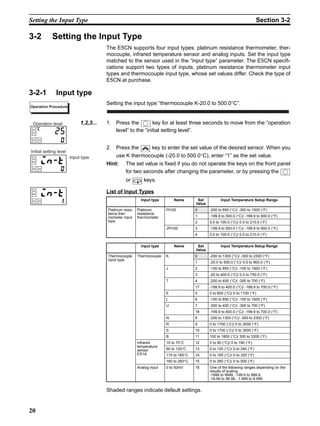
3-2 Setting the Input Type
The E5CN supports four input types: platinum resistance thermometer, ther-
mocouple, infrared temperature sensor and analog inputs. Set the input type
matched to the sensor used in the “input type” parameter. The E5CN specifi-
cations support two types of inputs, platinum resistance thermometer input
types and thermocouple input type, whose set values differ. Check the type of
E5CN at purchase.
3-2-1 Input type
Setting the input type “thermocouple K-20.0 to 500.0°C”.
1,2,3... 1. Press the key for at least three seconds to move from the “operation
level” to the “initial setting level”.
2. Press the key to enter the set value of the desired sensor. When you
use K thermocouple (-20.0 to 500.0°C), enter “1” as the set value.
Hint: The set value is fixed if you do not operate the keys on the front panel
for two seconds after changing the parameter, or by pressing the
or keys.
List of Input Types
Shaded ranges indicate default settings.
Operation Procedure
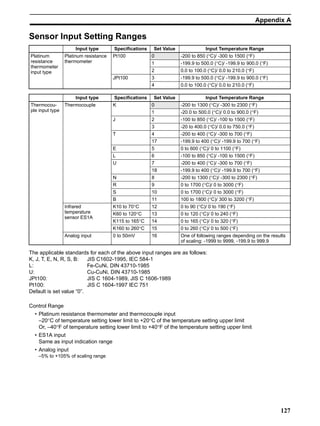
Input type Name Set
Value
Input Temperature Setup Range
Platinum resis-
tance ther-
mometer input
type
Platinum
resistance
thermometer
Pt100 0 -200 to 850 (°C)/ -300 to 1500 (°F)
1 -199.9 to 500.0 (°C)/ -199.9 to 900.0 (°F)
2 0.0 to 100.0 (°C)/ 0.0 to 210.0 (°F)
JPt100 3 -199.9 to 500.0 (°C)/ -199.9 to 900.0 (°F)
4 0.0 to 100.0 (°C)/ 0.0 to 210.0 (°F)
Input type Name Set
Value
Input Temperature Setup Range
Thermocouple
input type
Thermocouple K 0 -200 to 1300 (°C)/ -300 to 2300 (°F)
1 -20.0 to 500.0 (°C)/ 0.0 to 900.0 (°F)
J 2 -100 to 850 (°C)/ -100 to 1500 (°F)
3 -20 to 400.0 (°C)/ 0.0 to 750.0 (°F)
T 4 -200 to 400 (°C)/ -300 to 700 (°F)
17 -199.9 to 400.0 (°C)/ -199.9 to 700.0 (°F)
E 5 0 to 600 (°C)/ 0 to 1100 (°F)
L 6 -100 to 850 (°C)/ -100 to 1500 (°F)
U 7 -200 to 400 (°C)/ -300 to 700 (°F)
18 -199.9 to 400.0 (°C)/ -199.9 to 700.0 (°F)
N 8 -200 to 1300 (°C)/ -300 to 2300 (°F)
R 9 0 to 1700 (°C)/ 0 to 3000 (°F)
S 10 0 to 1700 (°C)/ 0 to 3000 (°F)
B 11 100 to 1800 (°C)/ 300 to 3200 (°F)
Infrared
temperature
sensor
ES1A
10 to 70°C 12 0 to 90 (°C)/ 0 to 190 (°F)
60 to 120°C 13 0 to 120 (°C)/ 0 to 240 (°F)
115 to 165°C 14 0 to 165 (°C)/ 0 to 320 (°F)
160 to 260°C 15 0 to 260 (°C)/ 0 to 500 (°F)
Analog input 0 to 50mV 16 One of the following ranges depending on the
results of scaling:
-1999 to 9999, -199.9 to 999.9,
-19.99 to 99.99, -1.999 to 9.999
Operation level
25
Input type
Initial setting level
21
Selecting °C/°F Section 3-3
3-3 Selecting °C/°F
3-3-1 Temperature unit
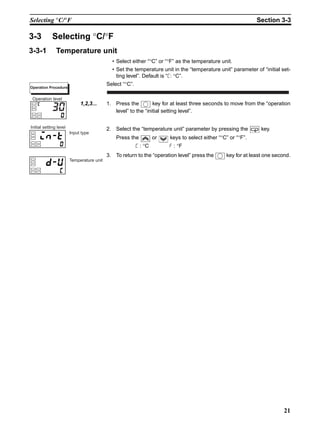
• Select either “°C” or “°F” as the temperature unit.
• Set the temperature unit in the “temperature unit” parameter of “initial set-
ting level”. Default is “c: °C”.
Select “°C”.
1,2,3... 1. Press the key for at least three seconds to move from the “operation
level” to the “initial setting level”.
2. Select the “temperature unit” parameter by pressing the key.
Press the or keys to select either “°C” or “°F”.
c : °C f : °F
3. To return to the “operation level” press the key for at least one second.
Operation Procedure
30
Operation level
Input type
Initial setting level
Temperature unit
22
Selecting PID Control or ON/OFF Control Section 3-4
3-4 Selecting PID Control or ON/OFF Control
The E5CN supports two control methods, 2-PID control and ON/OFF control.
The control method is selected by the “PID / ON/OFF” parameter in the “initial
setting level”. When this parameter is set to “pid”, 2-PID control is set, and
when set to “onof”, ON/OFF control is set (default).
2-PID control
PID control is set by AT (auto-tuning), ST (self-tuning) or manual setup.
For PID control, set the PID constants in the “proportional band (P)”, “integral
time (I)” and “derivative time (D)” parameters.
ON/OFF control
In “ON/OFF” control, the control output is turned ON when the process value
is lower than the current set point, and the control output is turned OFF when
the process value is higher than the current set point (reverse operation).
23
Setting Output Specifications Section 3-5
3-5 Setting Output Specifications
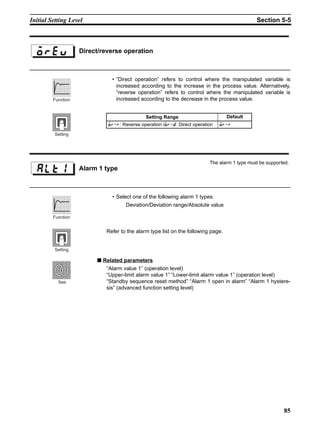
3-5-1 Control period
• Set the output period (control period). Though a shorter period provides
better control performance, we recommend setting the control period to
20 seconds or more taking the life expectancy in the case of relay output
into consideration. If necessary, readjust the control period by trial opera-
tion, for example, when the control period parameters are set to their
defaults.
• Set the control period in the “control period (OUT1)” and “control period
(OUT2)” parameters (initial setting level). Default is “20 seconds”.
• The “control period (OUT2)” parameter can be used only in heating and
cooling control.
• Whenever control output 1 is the current output, “control period (OUT1)”
cannot be used.
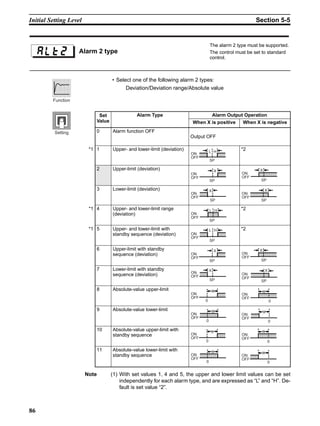
3-5-2 Direct/reverse operation
• “Direct operation” refers to control where the manipulated variable is
increased according to the increase in the process value. Alternatively,
“Reverse operation” refers to control where the manipulated variable is
decreased according to the increase in the process value.
For example, when the process value (PV) (temperature) is lower than the set
point (SP) (temperature) in a heating control system, the manipulated variable
increases by the difference between the PV and SP values.
Accordingly, this becomes “reverse operation” in a heating control system, or
alternatively, “direct operation” in a cooling control system.
• Direct/reverse operation is set in the “direct/reverse operation” parameter
(initial setting level). The “direct/reverse operation” parameter default is
“reverse operation”.
Control
period
(OUT1)
Control
period
(OUT2)
High temperature
Manipulated variable
Direct operation
Low temperature Set value
High temperature
Manipulated variable
Reverse operation
Low temperature Set value
100%
0%
100%
0%
24
Setting Output Specifications Section 3-5
In this example, let’s monitor the “input type”, “temperature unit”, “direct/
reverse operation” and “control period (OUT1)” parameters.
“input type” = “0”: K thermocouple
“temperature unit” = “c”: °C
“direct/reverse operation” = “or-r”: reverse operation
“control period (OUT1)” = “20 (secs)”
1,2,3... 1. Press the key for at least three seconds to move from the “operation
level” to the “initial setting level”.
2. The input type is displayed. When you are setting the input type for the first
time, “0”: K thermocouple is set. (“0” is set in the case of a platinum resis-
tance thermometer.) To select a different sensor, press the or
keys.
3. Select the “temperature unit” parameter by pressing the key. Default
is “c”: °C. To select “f”: °F, press either of the or keys.
4. Select the “control period (OUT1) parameter by pressing the key.
Default is “20”.
5. Select the “direct/reverse operation” parameter by pressing the key.
Default is “or-r”: reverse operation. To select “or-d”: direct operation,
press either or keys.
6. To return to the “operation level” press the key for at least one second.
Operation Procedure
Operation level
Input type
Initial setting level
Temperature unit
Direct/reverse
operation
PV/SP
Operation level
Control period
(OUT1)
20
cp
25
Setting the SP Section 3-6
3-6 Setting the SP
The “operation level” is displayed when the E5CN is turned ON. The upper
display (No.1 display) displays the process value, and the lower display (No.2
display) displays the set point.
3-6-1 Changing the SP
• The set point cannot be changed when the “operation/adjustment protec-
tion” parameter is set to “3”. For details, see “4.9 Using the Key Protect
Levels.”
• To change the set point, press the or keys in the “PV/SP”
parameter (operation level), and set the desired set value. The new set
point is selected two seconds after you have specified the new value.
• Multi-SP is used to switch between two or four set points.
See “4.5 To Use Event Input” for details.
In this example, let’s change the set point from “0°C” to “200°C”.
1,2,3... 1. Normally, the “PV/SP” parameter is displayed. The set point is “0°C”.
2. Press the or keys until the set point changes to “200°C”.
Operation level
Operation Procedure
Operation level
26
Executing ON/OFF Control Section 3-7
3-7 Executing ON/OFF Control
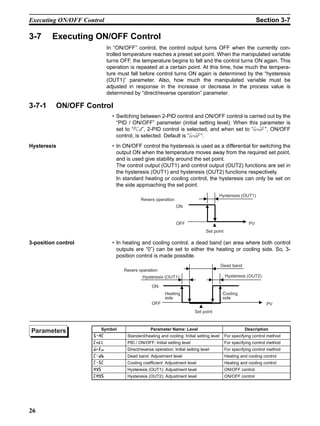
In “ON/OFF” control, the control output turns OFF when the currently con-
trolled temperature reaches a preset set point. When the manipulated variable
turns OFF, the temperature begins to fall and the control turns ON again. This
operation is repeated at a certain point. At this time, how much the tempera-
ture must fall before control turns ON again is determined by the “hysteresis
(OUT1)” parameter. Also, how much the manipulated variable must be
adjusted in response in the increase or decrease in the process value is
determined by “direct/reverse operation” parameter.
3-7-1 ON/OFF Control
• Switching between 2-PID control and ON/OFF control is carried out by the
“PID / ON/OFF” parameter (initial setting level). When this parameter is
set to “pid”, 2-PID control is selected, and when set to “onof”, ON/OFF
control, is selected. Default is “onof”.
Hysteresis • In ON/OFF control the hysteresis is used as a differential for switching the
output ON when the temperature moves away from the required set point,
and is used give stability around the set point.
The control output (OUT1) and control output (OUT2) functions are set in
the hysteresis (OUT1) and hysteresis (OUT2) functions respectively.
In standard heating or cooling control, the hysteresis can only be set on
the side approaching the set point.
3-position control • In heating and cooling control, a dead band (an area where both control
outputs are “0”) can be set to either the heating or cooling side. So, 3-
position control is made possible.
Set point
Hysteresis (OUT1)
ON
OFF PV
Revers operation
Set point
Hysteresis (OUT1)
Heating
side
Dead band
Hysteresis (OUT2)
Cooling
side
ON
OFF PV
Revers operation
Symbol Parameter Name: Level Description
?4/ Standard/heating and cooling: Initial setting level For specifying control method
/:@8 PID / ON/OFF: Initial setting level For specifying control method
;1B Direct/reverse operation: Initial setting level For specifying control method
/0. Dead band: Adjustment level Heating and cooling control
/?/ Cooling coefficient: Adjustment level Heating and cooling control
4E? Hysteresis (OUT1): Adjustment level ON/OFF control
/4E? Hysteresis (OUT2): Adjustment level ON/OFF control
Parameters
27
Executing ON/OFF Control Section 3-7
3-7-2 Setup
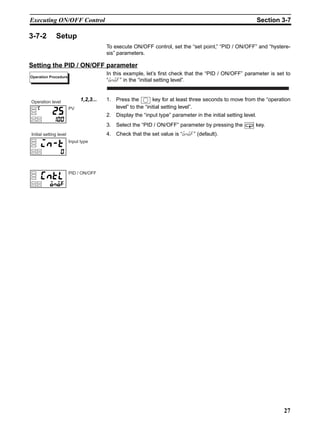
To execute ON/OFF control, set the “set point,” “PID / ON/OFF” and “hystere-
sis” parameters.
Setting the PID / ON/OFF parameter
In this example, let’s first check that the “PID / ON/OFF” parameter is set to
“onof” in the “initial setting level”.
1,2,3... 1. Press the key for at least three seconds to move from the “operation
level” to the “initial setting level”.
2. Display the “input type” parameter in the initial setting level.
3. Select the “PID / ON/OFF” parameter by pressing the key.
4. Check that the set value is “onof” (default).
Operation Procedure
PV
Operation level
Input type
Initial setting level
PID / ON/OFF
28
Determining PID Constants (AT, ST, manual setup) Section 3-8
3-8 Determining PID Constants (AT, ST, manual setup)
3-8-1 AT (auto-tuning)
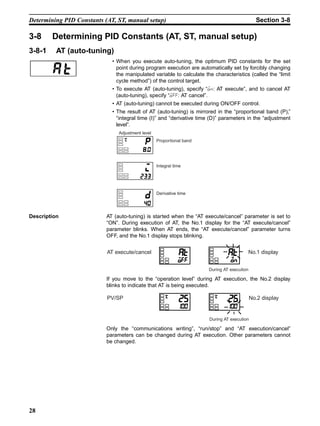
• When you execute auto-tuning, the optimum PID constants for the set
point during program execution are automatically set by forcibly changing
the manipulated variable to calculate the characteristics (called the “limit
cycle method”) of the control target.
• To execute AT (auto-tuning), specify “on: AT execute”, and to cancel AT
(auto-tuning), specify “off: AT cancel”.
• AT (auto-tuning) cannot be executed during ON/OFF control.
• The result of AT (auto-tuning) is mirrored in the “proportional band (P),”
“integral time (I)” and “derivative time (D)” parameters in the “adjustment
level”.
Description AT (auto-tuning) is started when the “AT execute/cancel” parameter is set to
“ON”. During execution of AT, the No.1 display for the “AT execute/cancel”
parameter blinks. When AT ends, the “AT execute/cancel” parameter turns
OFF, and the No.1 display stops blinking.
If you move to the “operation level” during AT execution, the No.2 display
blinks to indicate that AT is being executed.
Only the “communications writing”, “run/stop” and “AT execution/cancel”
parameters can be changed during AT execution. Other parameters cannot
be changed.
Adjustment level
Proportional band
Integral time
Derivative time
AT execute/cancel No.1 display
During AT execution
PV/SP No.2 display
During AT execution
29
Determining PID Constants (AT, ST, manual setup) Section 3-8
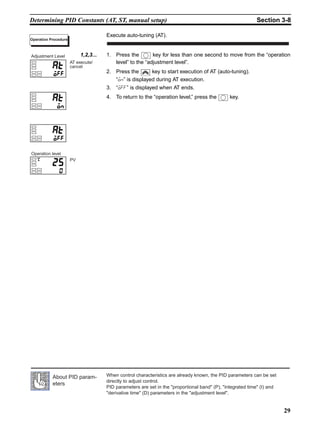
Execute auto-tuning (AT).
1,2,3... 1. Press the key for less than one second to move from the “operation
level” to the “adjustment level”.
2. Press the key to start execution of AT (auto-tuning).
“on” is displayed during AT execution.
3. “off” is displayed when AT ends.
4. To return to the “operation level,” press the key.
Operation Procedure
AT execute/
cancel
Adjustment Level
PV
Operation level
When control characteristics are already known, the PID parameters can be set
directly to adjust control.
PID parameters are set in the proportional band (P), integrated time (I) and
derivative time (D) parameters in the adjustment level.
About PID param-
eters
30
Determining PID Constants (AT, ST, manual setup) Section 3-8
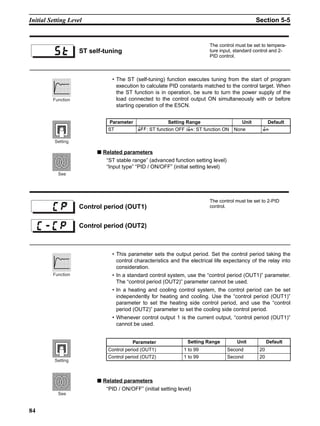
3-8-2 ST (self-tuning)
The ST (self-tuning) function executes tuning from the start of program execu-
tion to calculate PID constants matched to the control target.
Once the PID constants have been calculated, ST is not executed when the
next control operation is started as long as the set point remains unchanged.
ST (self-tuning) is executed when the “ST” parameter is set to “ON” in the “ini-
tial setting level”.
When the ST function is in operation, be sure to turn the power supply of the
load connected to the control output ON simultaneously with or before starting
operation of the E5CN.
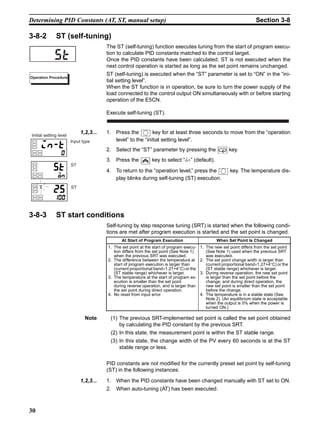
Execute self-tuning (ST).
1,2,3... 1. Press the key for at least three seconds to move from the “operation
level” to the “initial setting level”.
2. Select the “ST” parameter by pressing the key.
3. Press the key to select “on” (default).
4. To return to the “operation level,” press the key. The temperature dis-
play blinks during self-tuning (ST) execution.
3-8-3 ST start conditions
Self-tuning by step response tuning (SRT) is started when the following condi-
tions are met after program execution is started and the set point is changed.
Note (1) The previous SRT-implemented set point is called the set point obtained
by calculating the PID constant by the previous SRT.
(2) In this state, the measurement point is within the ST stable range.
(3) In this state, the change width of the PV every 60 seconds is at the ST
stable range or less.
PID constants are not modified for the currently preset set point by self-tuning
(ST) in the following instances:
1,2,3... 1. When the PID constants have been changed manually with ST set to ON.
2. When auto-tuning (AT) has been executed.
st
Operation Procedure
Input type
Initial setting level
ST
ST
At Start of Program Execution When Set Point Is Changed
1. The set point at the start of program execu-
tion differs from the set point (See Note 1)
when the previous SRT was executed.
2. The difference between the temperature at
start of program execution is larger than
(current proportional band×1.27+4°C) or the
(ST stable range) whichever is larger.
3. The temperature at the start of program ex-
ecution is smaller than the set point
during reverse operation, and is larger than
the set point during direct operation.
4. No reset from input error
1. The new set point differs from the set point
(See Note 1) used when the previous SRT
was executed.
2. The set point change width is larger than
(current proportional band×1.27+4°C) or the
(ST stable range) whichever is larger.
3. During reverse operation, the new set point
is larger than the set point before the
change; and during direct operation, the
new set point is smaller than the set point
before the change.
4. The temperature is in a stable state (See
Note 2). (An equilibrium state is acceptable
when the output is 0% when the power is
turned ON.)
31
Determining PID Constants (AT, ST, manual setup) Section 3-8
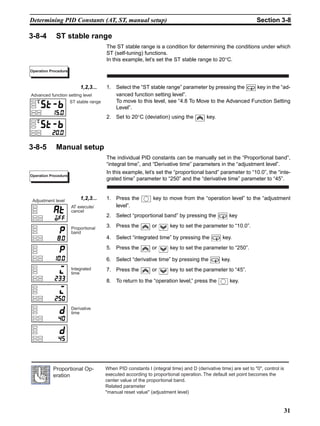
3-8-4 ST stable range
The ST stable range is a condition for determining the conditions under which
ST (self-tuning) functions.
In this example, let’s set the ST stable range to 20°C.
1,2,3... 1. Select the “ST stable range” parameter by pressing the key in the “ad-
vanced function setting level”.
To move to this level, see “4.8 To Move to the Advanced Function Setting
Level”.
2. Set to 20°C (deviation) using the key.
3-8-5 Manual setup
The individual PID constants can be manually set in the “Proportional band”,
“integral time”, and “Derivative time” parameters in the “adjustment level”.
In this example, let’s set the “proportional band” parameter to “10.0”, the “inte-
grated time” parameter to “250” and the “derivative time” parameter to “45”.
1,2,3... 1. Press the key to move from the “operation level” to the “adjustment
level”.
2. Select “proportional band” by pressing the key
3. Press the or key to set the parameter to “10.0”.
4. Select “integrated time” by pressing the key.
5. Press the or key to set the parameter to “250”.
6. Select “derivative time” by pressing the key.
7. Press the or key to set the parameter to “45”.
8. To return to the “operation level,” press the key.
Operation Procedure
ST stable range
Advanced function setting level
Operation Procedure
AT execute/
cancel
Adjustment level
Proportional
band
Integrated
time
Derivative
time
When PID constants I (integral time) and D (derivative time) are set to 0, control is
executed according to proportional operation. The default set point becomes the
center value of the proportional band.
Related parameter
manual reset value (adjustment level)
Proportional Op-
eration
32
Alarm Outputs Section 3-9
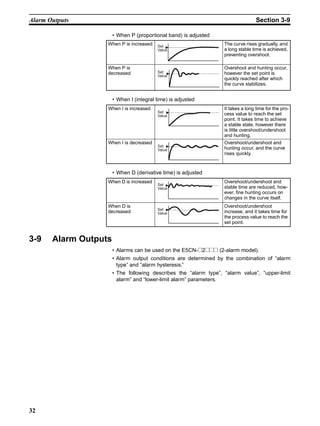
• When P (proportional band) is adjusted
• When I (integral time) is adjusted
• When D (derivative time) is adjusted
3-9 Alarm Outputs
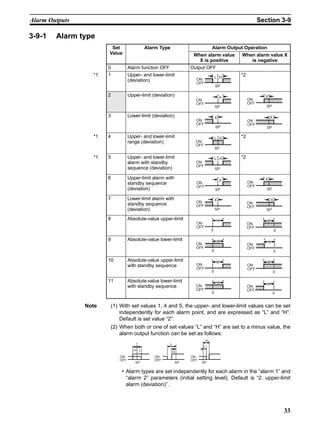
• Alarms can be used on the E5CN-@2@@@ (2-alarm model).
• Alarm output conditions are determined by the combination of “alarm
type” and “alarm hysteresis.”
• The following describes the “alarm type”, “alarm value”, “upper-limit
alarm” and “lower-limit alarm” parameters.
When P is increased The curve rises gradually, and
a long stable time is achieved,
preventing overshoot.
When P is
decreased
Overshoot and hunting occur,
however the set point is
quickly reached after which
the curve stabilizes.
When I is increased It takes a long time for the pro-
cess value to reach the set
point. It takes time to achieve
a stable state, however there
is little overshoot/undershoot
and hunting.
When I is decreased Overshoot/undershoot and
hunting occur, and the curve
rises quickly.
When D is increased Overshoot/undershoot and
stable time are reduced, how-
ever, fine hunting occurs on
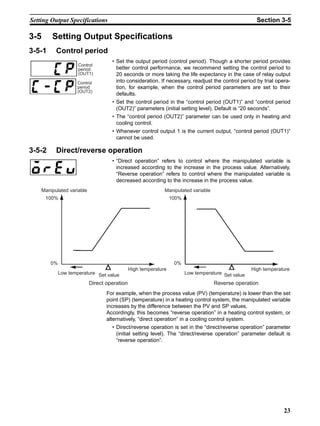
changes in the curve itself.
When D is
decreased
Overshoot/undershoot
increase, and it takes time for
the process value to reach the
set point.
Set
Value
Set
Value
Set
Value
Set
Value
Set
Value
Set
Value
33
Alarm Outputs Section 3-9
3-9-1 Alarm type
Note (1) With set values 1, 4 and 5, the upper- and lower-limit values can be set
independently for each alarm point, and are expressed as “L” and “H”.
Default is set value “2”.
(2) When both or one of set values “L” and “H” are set to a minus value, the
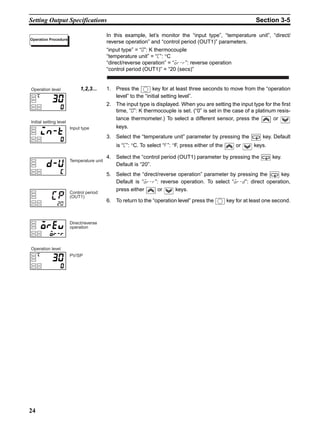
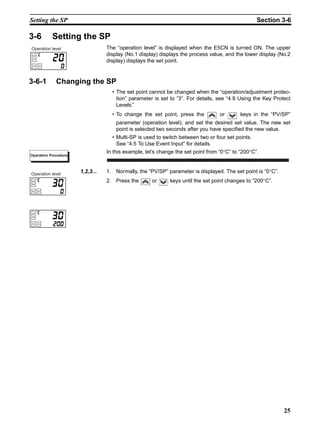
alarm output function can be set as follows:
• Alarm types are set independently for each alarm in the “alarm 1” and
“alarm 2” parameters (initial setting level). Default is “2: upper-limit
alarm (deviation)”.
Set
Value
Alarm Type Alarm Output Operation
When alarm value
X is positive
When alarm value X
is negative
0 Alarm function OFF Output OFF
*1 1 Upper- and lower-limit
(deviation)
*2
2 Upper-limit (deviation)
3 Lower-limit (deviation)
*1 4 Upper- and lower-limit
range (deviation)
*2
*1 5 Upper- and lower-limit
alarm with standby
sequence (deviation)
*2
6 Upper-limit alarm with
standby sequence
(deviation)
7 Lower-limit alarm with
standby sequence
(deviation)
8 Absolute-value upper-limit
9 Absolute-value lower-limit
10 Absolute-value upper-limit
with standby sequence
11 Absolute-value lower-limit
with standby sequence
ON
OFF
L H
SP
X
ON
OFF
SP
ON
OFF
SP
X
X
ON
OFF
SP
ON
OFF
SP
X
ON
OFF
SP
L H
ON
OFF
SP
L H
ON
OFF
SP
X
ON
OFF
SP
X
ON
OFF
SP
X
ON
OFF
SP
X
ON
OFF
0
X
ON
OFF
0
X
ON
OFF
0
X
ON
OFF
0
X
ON
OFF
0
X
ON
OFF
0
X
ON
OFF
0
X
ON
OFF
0
X
ON
OFF
ON
OFF
ON
OFF
SP SP SP
H
L
L
H
H
L
34
Alarm Outputs Section 3-9
3-9-2 Alarm value
• Alarm values are indicated by “X” in the table on the previous page. When
the upper and lower limits are set independently, “H” is displayed for
upper limit values, and “L” is displayed for lower limit values.
• To set the upper- and lower-limit alarm values for deviation, set the upper
and lower limits in each of the “alarm 1 upper limit”, “alarm 2 upper limit”,
“alarm 1 lower limit” and “alarm 2 lower limit” parameters (operation level).
Set “alarm 1” to the upper-limit alarm. The following shows related parameters
and setups. In this example, the alarm output is active when the set point is
exceeded by “10°C”. (The temperature unit in this example is “°C”.)
“alarm 1 type” = “2: upper-limit alarm (deviation)”
“alarm value 1” = “10”
1,2,3... 1. Press the key for at least three seconds to move from the “operation
level” to the “initial setting level”.
2. Select the “alarm 1 type” parameter by pressing the key. Check that
the “alarm type” parameter is set to “2” (default, upper-limit alarm).
3. To return to the “operation level” press the key for at least one second.
4. Select “alarm value 1” by pressing .
5. Press the key to set the parameter to “10”.
Lower-limit
alarm value
al 1l
al 2l
al 1h
al 2h
Upper-limit
alarm value
al -1
al -2
Alarm value
Operation Procedure
Input type
Alarm 1 type
PV/SP
Alarm value 1
Initial setting level
Operation level
35
Heater Burnout Alarm (HBA) Section 3-10
3-10 Heater Burnout Alarm (HBA)
3-10-1 HBA detection
• Heater burnout detection works as follows.
1,2,3... 1. Connect the current transformer (CT) to terminal Nos. 14 and 15, and in-
sert the heater lead through the CT hole. For specifications, models and
external dimensions of current transformers that can be used on this con-
troller, see “Appendix, About Current Transformer (CT).”
2. When current flows through this lead, the current transformer generates
AC current proportional to the current value. The E5CN measures this AC
current to calculate the current flowing to the heater.
3. If the heater is burned out, the current measured at the current transformer
decreases. This value is compared with the value set as the “heater burn-
out set value”, and the output becomes active as the heater burnout alarm.
• Set the heater burnout set value in the “heater burnout detection” param-
eter (adjustment level). To monitor the current value of the current trans-
former, use the “heater current monitor” parameter.
• When you are not using the HBA function, set the “heater burnout”
parameter (advanced function setting level) to “OFF”.
3-10-2 Operating conditions
• The HBA function can be used when the option unit (E53-CNH03 or E53-
CNHB) is mounted on the E5CN. Be sure to connect the CT to the E5CN,
and pass the heater lead through the CT hole.
• Turn the heater ON at the same time as or before turning the E5CN ON. If
the heater is turned ON after turning the E5CN ON, the heater burnout
alarm will activate.
• Control is continued even if the heater burnout alarm is active. (That is,
the E5CN attempts to control the heater on which the heater burnout
alarm has not occurred.)
• The heater burnout alarm is detected when the control output is continu-
ously ON for 190 ms or more.
• The rated current value may sometimes differ slightly from the actual cur-
rent flowing to the heater. Check the current value in an actual operating
state in the “heater current monitor” parameter.
• If there is little difference between the current in a normal state and the
current in the burnout state, detection may become unstable. On a heater
of current 10.0 A or less, maintain a difference of 1.0 A or more. On a
heater of current 10.0 A or more, maintain a difference of 2.5 A or more.
• The HBA function cannot be used when the heater is controlled by a
phase control system or cycle control system. Also, 3-phase heaters can-
not be used.
Heater lead
To CT terminal
When heater burnout is detected on a 3-phase heater, use the K2CU-F@@A-@GS
(with gate input terminal). For details, see the respective data sheet.)
36
Heater Burnout Alarm (HBA) Section 3-10
3-10-3 Setup
To activate the heater burnout alarm, set the “HBA used” parameter
(advanced function setting level) to “ON” and the heater burnout set value in
the “heater burnout detection” parameter (adjustment level).
In this example, let’s set the “heater burnout detection” parameter to “2.5”.
Moving to the advanced function setting level
The default of the “heater burnout” parameter is already “ON”, so set the
“heater burnout detection” parameter.
1,2,3... 1. Move to the advanced function setting level.
Press the key for at least three seconds to move from the “operation
level” to the “initial setting level”.
2. Then move to “advanced function setting level” by pressing the key.
3. Press the key to enter the password (“-169”), and move from the “ini-
tial setting level” to the “advanced function setting level”.
The top parameter in the “advanced function setting level” is displayed.
4. Select the “HBA used” parameter by pressing the keyy.
Make sure that this parameter is set to “ON” (default).
Next, let’s set the “heater current value monitor” parameter.
Setting heater burnout detection
5. Press the key for at least one second to move from the “advanced
function setting level” to the “initial setting level” and then to the “operation
level”.
6. Press the key for less than one second to move from the “operation
level” to the “adjustment level”.
7. Select the “heater current value monitor” parameter by pressing the
key. Check the current value. Next, set the “heater burnout detection” pa-
rameter.
8. Select the “heater burnout detection” parameter by pressing the key.
Set the current value as a reference value. Set this set value so that there
is a large difference between the current flowing to the heater lead when
heater operation is normal and the current flowing when a heater burnout
occurs.
9. For example, set “2.5”. To return to the “operation level”, press the key
for less than one second.
Operation Procedure
PV/SP
Operation level
HBA used
Initial setting level
Input type
Advanced function setting level
Move to advanced
function setting level
PV/SP
Operation level
Heater burnout
detection
Adjustment level
AT execute/
cancel
Heater current
value monitor
37
Heater Burnout Alarm (HBA) Section 3-10
3-10-4 How to calculate detection current values
• Calculate the set value by the following equation:
• To set the value of the heater burnout when two or more heaters are con-
nected through the CT, use the curent value of the smallest heater con-
nected. OR the current value when one of the heaters burns out if all the
heaters have the same current value.
• Make sure that the following conditions are satisfied:
Heater of current 10.0 A or less:
Current value at normal operation -
current value at heater burnout ≥ 1 A
(When the resultant current is less than 1 A, detection is unstable.)
Heater of current 10.0 A or more:
Current value at normal operation -
current value at heater burnout ≥ 2.5 A
(When the resultant current is less than 2.5 A, detection is unstable.)
• The setting range is 0.1 to 49.9 A. Heater burnout is not detected when
the set value is “0.0” or “50.0”. When the set value is “0.0”, the heater
burnout alarm is set to “OFF”, and if the set value is “50.0”, the heater
burnout alarm is set to “ON”.
• Set the total current value at normal heater operation to 50 A or less.
When set to “55.0 A”, “ffff” is displayed in the “heater current monitor”
parameter.
3-10-5 Example
Example 1 When using a 200 VAC, 1 kW heater
Example 2 When using three 200 VAC, 1 kW heaters
Set value =
(current value at normal operation + current value at heater burnout)
2
Current during normal operation =
Current at heater burnout = 0A
Set value =
(current at normal operation - current at heater
burnout ) = 5−0 = 5A (≥ 1A))
Heater
Control output
1KW
CT
AC200V
E5CN 14 15
200
1000
= 5A ( 10A)
200
5 + 0
= 2.5A
Current at normal operation =
Current at burnout of one heater =
Set value =
(current at normal operation - current at heater
Heater
Control output
1KWx3
CT
AC200V
E5CN 14 15
burnout ) = 15−10 = 5A (≥ 2.5A))
200
1000
× 3 = 15A (≥ 10A)
2
5 + 10
= 12.5A
200
1000
× 2 = 10A
Symbol Parameter : Level Description
/@ Heater current value monitor: Adjustment level For heater current value monitor
4. Heater burnout detection: Adjustment level For HBA detection
4.4 Heater burnout hysteresis: Advanced function setting level For HBA detection
4.8 Heater burnout latch: Advanced function setting level For HBA detection
Parameters
38
Requests during Operation Section 3-11
3-11 Requests during Operation
1,2,3... 1. About four seconds is required for outputs to turn ON when the power is
turned ON. Take this into consideration when the temperature controller is
incorporated into a sequence circuit.
2. Allow at least 30 minutes for warming up.
3. When self-tuning is used, turn the temperature controller and load (e.g.
heater) ON simultaneously or turn the load ON before the temperature
controller. If the load is turned ON before the temperature controller, cor-
rect self-tuning and optimum control are no longer possible.
When operation is started after warm-up, turn the power OFF once after
warm-up is completed, and then turn the temperature controller and load
ON simultaneously. (Instead of turning the temperature controller power
ON again, moving from the STOP to the RUN mode also is possible.)
4. The temperature controller may be subject to the influence of radio inter-
ference if used near a radio, TV or wireless equipment.
39
SECTION 4
Applied Operation
4-1 Shifting Input Values. . . . . . . . . . . . . . . . . . . . . . . . . . . . . . . . . . . . . . . . . . . . 40
4-1-1 Shifting input . . . . . . . . . . . . . . . . . . . . . . . . . . . . . . . . . . . . . . . . . . 40
4-1-2 How to calculate input shift values (2-point shift) . . . . . . . . . . . . . . 41
4-1-3 1-point shift method . . . . . . . . . . . . . . . . . . . . . . . . . . . . . . . . . . . . . 42
4-1-4 2-point shift method . . . . . . . . . . . . . . . . . . . . . . . . . . . . . . . . . . . . . 42
4-1-5 Example of 2-point temperature input shift . . . . . . . . . . . . . . . . . . . 43
4-2 Alarm Hysteresis. . . . . . . . . . . . . . . . . . . . . . . . . . . . . . . . . . . . . . . . . . . . . . . 44
4-2-1 Standby sequence . . . . . . . . . . . . . . . . . . . . . . . . . . . . . . . . . . . . . . . 44
4-2-2 Alarm latch . . . . . . . . . . . . . . . . . . . . . . . . . . . . . . . . . . . . . . . . . . . . 44
4-2-3 Close in alarm/open in alarm . . . . . . . . . . . . . . . . . . . . . . . . . . . . . . 45
4-3 Setting Scaling Upper and Lower Limits (analog input) . . . . . . . . . . . . . . . . 46
4-3-1 Analog input . . . . . . . . . . . . . . . . . . . . . . . . . . . . . . . . . . . . . . . . . . . 46
4-4 Executing Heating and Cooling Control. . . . . . . . . . . . . . . . . . . . . . . . . . . . . 47
4-4-1 Heating and cooling control . . . . . . . . . . . . . . . . . . . . . . . . . . . . . . . 47
4-4-2 Setup . . . . . . . . . . . . . . . . . . . . . . . . . . . . . . . . . . . . . . . . . . . . . . . . . 48
4-5 To Use Event Input . . . . . . . . . . . . . . . . . . . . . . . . . . . . . . . . . . . . . . . . . . . . . 49
4-5-1 Setting event input . . . . . . . . . . . . . . . . . . . . . . . . . . . . . . . . . . . . . . 49
4-5-2 How to use multi-SP. . . . . . . . . . . . . . . . . . . . . . . . . . . . . . . . . . . . . 49
4-5-3 Setting by key operation . . . . . . . . . . . . . . . . . . . . . . . . . . . . . . . . . . 50
4-5-4 Setup . . . . . . . . . . . . . . . . . . . . . . . . . . . . . . . . . . . . . . . . . . . . . . . . . 50
4-5-5 Executing run/stop control . . . . . . . . . . . . . . . . . . . . . . . . . . . . . . . . 52
4-6 Setting the SP Upper and Lower Limit Values . . . . . . . . . . . . . . . . . . . . . . . . 53
4-6-1 Set point limitter . . . . . . . . . . . . . . . . . . . . . . . . . . . . . . . . . . . . . . . . 53
4-6-2 Setup . . . . . . . . . . . . . . . . . . . . . . . . . . . . . . . . . . . . . . . . . . . . . . . . . 54
4-7 Executing the SP Ramp Function (limiting the SP change rate) . . . . . . . . . . 55
4-7-1 SP ramp. . . . . . . . . . . . . . . . . . . . . . . . . . . . . . . . . . . . . . . . . . . . . . . 55
4-8 To Move to the Advanced Function Setting Level . . . . . . . . . . . . . . . . . . . . . 57
4-9 Using the Key Protect Level . . . . . . . . . . . . . . . . . . . . . . . . . . . . . . . . . . . . . . 58
4-9-1 Key protect . . . . . . . . . . . . . . . . . . . . . . . . . . . . . . . . . . . . . . . . . . . . 58
4-10 To Use PV Color Change Function. . . . . . . . . . . . . . . . . . . . . . . . . . . . . . . . . 59
4-10-1 PV color change . . . . . . . . . . . . . . . . . . . . . . . . . . . . . . . . . . . . . . . . 59
4-10-2 Setup . . . . . . . . . . . . . . . . . . . . . . . . . . . . . . . . . . . . . . . . . . . . . . . . . 60
40
Shifting Input Values Section 4-1
4-1 Shifting Input Values
4-1-1 Shifting input
• The input shift type matched to the sensor currently selected in the “input
type” parameter is displayed.
1-point shift • 2-point shift is applied only for infrared temperature sensors.
• With 1-point shift, only the value set to the “Temperature input shift”
parameter (adjustment level) is applied to the entire temperature input
range. For example, if the input shift value is set to “1.2°C”, the process
value is treated as “201.2°C” after input shift is applied when the process
value is 200°C.
In this example, let’s shift the input of the K sensor by “1°C” by 1-point input
shift.
Operation level
1,2,3... 1. Press the key to move from the “operation level” to the “adjustment
level”.
2. Select the “temperature input shift” parameter by pressing the key.
3. Press the or keys to set “1”.
4. To return to the “operation level,” press the key. The process value is
1°C larger than before shift is applied.
Input
Temperature
Upper-limit
value
After shift
Input shift value
Before
shift
0
100
Lower-limit
value
Operation Procedure
Operation level
Operation level
Adjustment level
Temperature
input shift
41
Shifting Input Values Section 4-1
2-point shift • The input temperature range of infrared temperature sensors can be
shifted by setting an individual value for the upper and lower points of the
sensor range. This means that the shift can be applied equally across the
range with separate values for each end of the range. For example, if the
upper-limit value is set to “2°C” and the lower-limit value is set to “1°C”,
the sensor range is shifted by an average of 1.5°C at 50% input.
• Set the upper-limit value in the “upper-limit temperature input shift value”
parameter and the lower-limit value in the “lower-limit temperature input
shift value” parameter.
4-1-2 How to calculate input shift values (2-point shift)
When the infrared temperature sensor model ES1A is connected to the
E5CN, an offset of several to several tens of a degree can occur.
For this reason, offset the readout value by 1-point or 2-point shift as
described in this item. This offset occurs as a bias current for detecting con-
troller sensor error flows to the output impedance of the infrared temperature
sensor. 2-point shift can be carried out only on infrared temperature sensors,
and cannot be set for other input types.
[Preparations]
1,2,3... 1. Set to the temperature range matching the input specifications of the infra-
red temperature sensor. (ES1A is supported only in thermocouple input
types on the E5CN.)
2. Prepare a thermometer capable of measuring the temperature of the con-
trol target as shown in Figure 1 so that 1-point shift or 2-point shift can be
carried out.
Upper-limit
temperature
input shift
value
Lower-limit
temperature
input shift
value
Input
Temperature
Upper-limit
value
Lower-limit value
Upper-limit temperature input shift value
After shift
Before shift
Lower-limit temperature
input shift value 100
0
Figure 1 Configuration When Compensating an Infrared Temperature Sensor
Infrared
temperature
sensor
(A) E5CN
(B) Thermometer
(C) Control target
42
Shifting Input Values Section 4-1
4-1-3 1-point shift method
1,2,3... 1. In the configuration shown in Figure 1, bring the set point to near the value
at which the temperature of the control target is to be controlled. Let’s as-
sume that the control target temperature (C) and the control target temper-
ature (B) are matching.
2. Check the control target temperature (B) and the controller readout (A).
Take the following value as the input shift value, and set the same numer-
ical values to “insl” and “insh”.
Figure 2 shows the effect of 1-point temperature input shift.
3. After you have set the input shift values, check controller readout (A) and
control target temperature (B). If they are almost the same, this completes
temperature input shift.
4-1-4 2-point shift method
Use 2-point input shift if you want to increase the accuracy of the readout val-
ues across the range of the sensor.
1,2,3... 1. Shift the controller readout by two points, near room temperature and near
the value at which the temperature of the control target is to be controlled.
For this reason, bring the control target temperature to near room temper-
ature and to near the set point, and check control target temperature (B)
and controller readout (A).
2. Using equations (1) and (2) calculate the upper- and lower-limit tempera-
ture input shift values from the readout and temperature to be shifted that
you obtained in step 1.
Figure 3 shows the effect of shift by 2-point temperature input shift.
Upper-limit
temperature
input shift value
Lower-limit
temperature
input shift value
Adjustment level
insh
10
10
insl
control target temperature (B) - controller readout (A)
Controller readout (A)
Temperature readout
after shift (e.g. 120°C)
Temperature readout
before shift (e.g. 110°C)
After shift
Input shift value (e.g. 10°C)
Before shift
Near set point
(e.g. 120°C)
Temperature readout of
control target (B)
Figure 2 1-point Temperature Input Shift
0
Figure 3 2-point Temperature Input Shift
Controller readout (A)
Set temperature
upper limit YH
(e.g. 260°C)
Temperature readout
after input shift X2 (e.g. 110°C)
Temperature readout
before input shift Y2 (e.g. 105°C)
Temperature readout
before input shift Y1 (e.g. 40°C)
Temperature readout
after input shift X1 (e.g. 25°C)
Lower-limit temperature
input shift value
X1 room temperature
(e.g. 25°C)
Set temperature
lower limit YL (e.g. 0°C)
Near X2 set point (e.g. 110°C)
Temperature readout of
control target (B)
Before shift
Upper-limit temperature
input shift value
After shift
0
43
Shifting Input Values Section 4-1
• Use the following equation to calculate the lower-limit temperature input
shift value.
• Use the following equation to calculate the upper-limit temperature input
shift value.
3. After you have set the calculated values to “insl” and “insh”, check con-
troller readout (A) and control target temperature (B).
4. Although the input shift was carried out at two points, close to room tem-
perature (ambient temperature), and near to the set point, select points
close to each end of the sensor range to improve accuracy across the full
range of the sensor measurement range.
Note Before selecting these values, check that they will not damage the
controller if applied.
4-1-5 Example of 2-point temperature input shift
In this example, we use the ES1A K 0 to 260°C specification.
YL an YH in equations 1 and 2 are set temperature lower limit YL is 0°C and
set temperature upper limit YH is 260°C. Check the temperature of the control
target.
When the room temperature X1 is 25°C, the readout on the controller Y1 is
40°C, and when the temperature near the set point X2 is 110°C, the readout
on the controller Y2 becomes105°C.
Lower-limit temperature input shift value
Upper-limit temperature input shift value
insl= × {(X2 - Y2) - (X1 - Y1)} + (X1 - Y1)...equation 1
YL - Y1
Y2 - Y1
insh = × {(X2 - Y2) - (X1 - Y1)} + (X1 - Y1)...equation 2
YH - Y1
Y2 - Y1
Lower-limit tem
perature input
shift value
Adjustment level
insl
27
Upper-limit tem
perature input
shift value
insh
53
insl= × {(110 - 105) - (25 - 40)} + (25 - 40) = -27.3 (°C)
0 - 40
105 - 40
insh = × {(110 - 105) - (25 - 40)} + (25 - 40) = 52.7 (°C)
260 - 40
105 - 40
44
Alarm Hysteresis Section 4-2
4-2 Alarm Hysteresis
• The hysteresis of alarm outputs when alarms are switched ON/OFF can
be set as follows:
• Alarm hysteresis is set independently for each alarm in the “alarm hyster-
esis 1” and “alarm hysteresis 2” parameters (advanced function setting
level). Default is “0.2”.
4-2-1 Standby sequence
• “Standby sequence” is a function which allows the alarm outputs to be
temporarily disabled while the first alarm condition occurs. From here on,
the alarm output is active for future alarm conditions.
• For example, in a standard heating application, if you used the standard
“low alarm”, the alarm would be active from switching the controller ON.
However, with “Standby Sequence”, the alarm output is disabled during
the first warmup, and the temperature has to rise above the alarm set
point before the alarm can become active. Then, if the temperature falls
below the alarm set point, the output is active.
Restart • The standby sequence is canceled when an alarm is output. It is, how-
ever, restarted later by the “standby sequence” parameter (advanced
function setting level).
For details, see the “standby sequence” parameter in “Section 5, Parame-
ters.”
4-2-2 Alarm latch
• “Alarm latch” is a function where alarm output once turned ON stays ON
regardless of the temperature.
• The alarm latch can be canceled by turning the power OFF. (Note, how-
ever, that it can also be canceled by switching to the initial setting level,
communications setting level, advanced function setting level or calibra-
tion level.
Alarm value
Upper-limit
alarm
Alarm hysteresis
Alarm value
Lower-limit
alarm
Alarm hysteresis
ON
OFF
ON
OFF
45
Alarm Hysteresis Section 4-2
4-2-3 Close in alarm/open in alarm
• When the E5CN is set to “close in alarm,” the status of the alarm output is
normally open. When set to “open in alarm,” the status of the alarm output
is output inverted or nomally closed.
• Alarm type and close in alarm (normally open)/open in alarm (normally
closed) can be set independently for each alarm.
• Close in alarm/open in alarm is set in the “alarm 1 to 2 open in alarm”
parameters (advanced function setting level). Default is “n-o: close in
alarm”.
• Alarm output turns OFF (relay contact open) at a power interruption and
for about two seconds after the power is turned ON regardless of the
close in alarm/open in alarm setting
Summary of alarm
operations
The figure below visually summarizes the above description of alarm opera-
tions (when alarm type is set to “lower-limit alarm with standby sequence” and
E5CN is set to “close in alarm”).
When “alarm 1 open in alarm” (advanced function setting level) is set to “open
in alarm”, the heater burnout alarm and input error output also become “open
in alarm.”
@:1 or 2
Alarm Output Function Output Alarm LCD
Close in
alarm
ON ON Lit
OFF OFF Out
Open in
alarm
ON OFF Lit
OFF ON Out
Alarm type: lower-limit alarm with
standby sequence
Alarm value
Alarm
Output
Standby sequence
canceled
Alarm hysteresis
Time
ON (closed)
OFF (open)
ON
OFF
PV
Symbol Parameter : Level Description
-84@ Alarm 1 to 2 hysteresis:
Advanced function setting level
Alarm
?1@ Standby sequence reset method:
Advanced function setting level
Alarm
-8@: Alarm 1 to 2 open in alarm:
Advanced function setting level
Alarm
Parameters
46
Setting Scaling Upper and Lower Limits (analog input) Section 4-3
4-3 Setting Scaling Upper and Lower Limits (analog input)
4-3-1 Analog input
• When an analog input (voltage input) is selected, scaling matched to the
control is possible.
• Scaling is set in the “scaling upper limit”, “scaling lower limit” and “decimal
point” parameters (initial setting level). These parameters cannot be used
when temperature input type is selected.
• The “scaling upper limit” parameter sets the physical quantity to be
expressed by the upper limit value of input, and the “scaling lower limit”
parameter sets the physical quantity to be expressed by the lower-limit
value of input. The “decimal point” parameter specifies the number of dig-
its past the decimal point.
• The following figure shows a scaling example of 0 to 5 mV input. After
scaling, the humidity can be directly read.
In this example, let’s set the scaling upper- and lower-limits so that inputs 0 to
50 mV become 10.0% to 95.0%.
1,2,3... 1. Press the key for at least three seconds to move from the “operation
level” to the “initial setting level”.
2. Select “scaling upper limit” by pressing .
3. Press the or key to set the parameter to “950”.
4. Select “scaling lower limit” by pressing .
5. Press the or key to set the parameter to “100”.
6. Select the decimal point position by pressing .
7. Press the or key to set the parameter to “1”.
8. To return to the “operation level” press the key for at least one second.
Scaling
upper
limit
Scaling
lower limit
Decimal
point
Input
(0 to 50 mV)
Readout
(humidity)
Upper-limit value (95.0%)
Lower-limit value (10.0%)
0
100%FS
50mV
0mV
Operation Procedure
Input type
Initial setting level
Scaling upper
limit
Scaling lower
limit
Decimal point
47
Executing Heating and Cooling Control Section 4-4
4-4 Executing Heating and Cooling Control
4-4-1 Heating and cooling control
Heating and cooling control can be used on E5CN-@2@@ controllers. Heating
and cooling control operates when “h-c: heating and cooling” is selected in
the “standard/heating and cooling” parameter (initial setting level). Select the
standard heating control or cooling control according to the following table:
(Parameter default is heating control (standard).)
• When heating and cooling control is selected, the “dead band” and “cool-
ing coefficient” parameters can be used.
Dead band The dead band is set with the set point as its center on the E5CN-@2@@. The
dead band width is the set value of the “dead band” parameter (adjustment
level). Setting a negative value produces an overlap band.
Default is “0.0EU.”
Cooling coefficient If the heating and cooling characteristics of the control target greatly differ,
preventing satisfactory control characteristics from being obtained by the
same PID constants, adjust the proportional band (P) at the cooling side using
the cooling coefficient to balance control between the heating and cooling
sides. In heating and cooling control, P at the heating or cooling side is calcu-
lated by the following formula:
Control output 1 P = P
Control output 2 side P = P × cooling coefficient
The cooling coefficient is applied to control output 1 side P to obtain control
whose characteristics (control output 2 side P) differ from those on the control
output 1 side.
Setting Output
Control Method Direct/reverse
operation
Control output 1 Control output 2
Standard control Reverse operation Control output
(heat)
-
Standard control Direct operation Control output
(cool)
-
Heating and cool-
ing control
Reverse operation Control output
(heat)
Control output
(cool)
Heating and cool-
ing control
Direct operation Control output
(cool)
Control output
(heat)
Output
Heating side
Dead band:
dead band width = positive
Cooling side
Set point
Output
Heating side Cooling side
Overlap band:
dead band width = negative
Set point
PV PV
0 0
48
Executing Heating and Cooling Control Section 4-4
4-4-2 Setup
To set heating and cooling control, set the “standard/heating and cooling”,
“dead band” and “cooling coefficient” parameters.
Setting heating and cooling control
In this example, let’s set the scaling upper- and lower-limits so that inputs 0 to
50 mV become 10.0% to 95.0%.
1,2,3... 1. Press the key for at least three seconds to move from the “operation
level” to the “initial setting level”.
2. Select “heating and cooling control” in the “initial setting level”.
send: Standard control
h-g: Heating and cooling control
Setting dead band
“dead band” = “5”
1,2,3... 1. Select “dead band” in the “adjustment level”.
2. Press the key to set the parameter to “5.0”.
The setting range is -199.9 to 999.9.
Setting cooling coefficient
Cooling coefficient = 10
1,2,3... 1. Select “cooling coefficient” in the “adjustment level”.
In this example, set the parameter to “10”.
2. Press the key to set the parameter to “10.00”.
The setting range is 0.01 to 99.99.
Output
Control output
1 side P
Set point
Control output 1 side P × 0.8
Control output 1 side
P × 1.0
Control output 2 side P
Output
Control output 1 side
P × 1.0
Set point
Control output 1 side P × 1.5
0 0
PV PV
Control output
1 side P Control output 2 side P
Operation Procedure
Standard/heating
and cooling
Initial setting level
Operation Procedure
Dead band
Adjustment level
Operation Procedure
Cooling
coefficient
Adjustment level
49
To Use Event Input Section 4-5
4-5 To Use Event Input
4-5-1 Setting event input
• By event input, either of multi-SP or RUN/STOP can be selected for use.
• Of these, the multi-SP function event input is used only for the number (0
to 2) set in number of multi-SP uses” (advanced function level).
• RUN/STOP is assigned to inputs unused for multi-SP of events inputs 1
and 2 by “event input assignments 1 and 2” (advanced function level).
Note “STOP (RUN/STOP) switching” can be set only on one of event in-
put assignments 1 or 2. The event input on the side that is set can
be used. The setting on the other side becomes “NONE”.
When you are setting two external input set points, set in the “number of multi-
SP uses” parameter.
• To select set points (0/1)
Two set points can be selected when the “number of multi-SP uses” is set
to “1” (default). This setting need not be changed. Set point 0 or 1 is spec-
ified by the ON/OFF state of event input 1.
4-5-2 How to use multi-SP
With multi-SP, preset four set points (SP0 to 3) in the adjustment level, a
switch the set point either by operating the keys or by external input signals
(event input).
When multi-SP is used by
event input
Multi-SP can be used when the option event input unit E53-CNHB is mounted
on the E5CN and “number of multi-SP uses” is set to “1” or “2”.
• When “number of multi-SP uses” is set to “1”
• When “number of multi-SP uses” is set to “2”
Number
of
Multi-SP
Uses
Setting Event Input Function
Event input
assignment 1
Event input
assignment 2
Event input 1
function
Event input 2
function
0 NONE or STOP 1” NONE or RUN/STOP switching 1”
1 – (not dis-
played)
NONE or
STOP
Multi–SP 2 set
points (set point 0/1
switching)
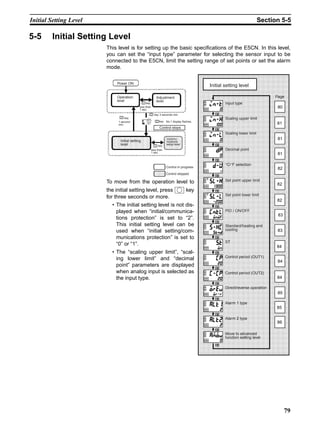
NONE or
RUN/STOP switch-
ing
2 – (not displayed) Multi–SP 4 set points
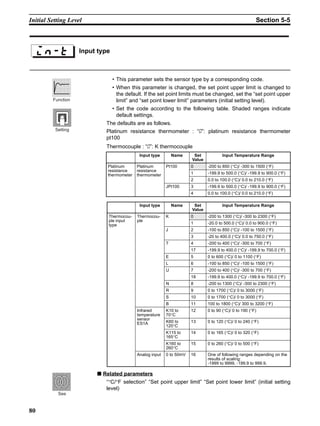
(set point 0/1/2/3 switching)
E5CN
11
12
13
EV1 EV2
Event input 1 Selected Set Point
OFF Set point 0
ON Set point 1
Event input 1 Event input 2 Selected Set Point
OFF OFF Set point 0
ON OFF Set point 1
OFF ON Set point 2
ON ON Set point 3
50
To Use Event Input Section 4-5
Note Event input can be used when the option event input unit E53-
CNHB is mounted in the E5CN. Select event input ON/OFF while
the E5CN is turned ON. Judgment of event input ON/OFF is carried
out on event inputs of 50 ms or more.
4-5-3 Setting by key operation
You can select set points 0 to 3 by changing the set value of the “multi-SP”
parameter. The “multi-SP” display conditions are as follows:
• When the option event input unit E53-CNHB is not mounted in the E5CN,
and “multi-SP” is set to “ON”
• When the option event input unit E53-CNHB is mounted in the E5CN, the
“number of multi-SP uses” is set to “0” and “multi-SP” is set to “ON”
The following table shows the relationship between the “multi SP” parameter
set value and the selected set point.
4-5-4 Setup
To select set points (0/1/2/3)
Before you set the “number of multi SP uses,” cancel protection and move to
the “advanced function setting level”. For details on how to cancel protection,
see “4.9 Using the Key Protect Level”.
Multi-SP Selected Set Point
0 Set point 0
1 Set point 1
2 Set point 2
3 Set point 3
Operation Procedure
51
To Use Event Input Section 4-5
1,2,3... 1. Press the key for at least three seconds to move from the “operation
level” to the “initial setting level”.
2. Select “Move to advanced function setting level” by pressing the key.
3. Press the key to enter “-169” (password).
You can move to the “advanced function setting level” by pressing the
key or leaving the setting for at least two seconds.
4. Select “Number of multi-SP uses” by pressing the key.
5. Press the key to set the parameter to “2”.
6. To return to the “initial setting level” press the key for at least one sec-
ond.
7. To return to the “operation level” press the key for at least one second.
Set points 0, 1, 2 and 3 are set according to the ON/OFF states of event
inputs 1 and 2.
PV/SP
Operation level
Input type
Initial setting level
Move to advanced
function setting
level
Parameter
initialize
Advanced function setting level
Number of
multi-SP uses
Number of multi-SP uses setting
E5CN
11
12
13
EV1 EV2
52
To Use Event Input Section 4-5
4-5-5 Executing run/stop control
When “event input assignment 1” or “event input assignment 2” is set to “run/
stop”, control started when event input 1 or 2 becomes “OFF”. Control is
stopped when event input 1 or 2 becomes “ON”. However, alarm output will
be ON according to alarm setting.
While control is stopped, STP (stop) lights.
Note When “number of multi-SP uses” is set to “0” or “1” that is not the
set point setting, run/stop control is possible according to event in-
puts.
Event input assignments 1 and 2 are as follows according to the “number of
multi-SP uses” setting.
• When the number of multi-SP uses is set to either 1 or 2, and event input
assignment 1 or 2 is set to “not displayed,” the setting automatically
becomes “none.”
• When the “number of multi-SP uses” is set to “0”, and both input assign-
ments 1 and 2 can be set, RUN/STOP is assigned to only one event
assignment. The other event assignment is automatically set to OFF.
• When the RUN/STOP function is used for event inputs, RUN/STOP at the
run level is not displayed.
Setting Input Contact State
Event input 1 or 2 ON STOP
Event input 1 or 2 OFF RUN
Number
of
Multi-SP
Uses
Setting Event Input Function
Event input
assignment 1
Event input
assignment 2
Event input 1
function
Event input 2
function
0 NONE STOP NONE RUN/STOP
switching
STOP NONE RUN/STOP
switching
NONE
NONE NONE NONE NONE
1 – (setting data
not displayed)
STOP Multi–SP 2 set
points (set point 0/1
switching)
RUN/STOP
switching
– (setting data
not displayed)
NONE Multi–SP 2 set
points (set point 0/1
switching)
NONE or
RUN/STOP switch-
ing
2 – (setting data
not displayed)
– (setting data
not displayed)
Multi–SP 4 set points
(set point 0/1/2/3 switching)
Symbol Parameters : Level Description
1B Event input 1 assignment:
Advanced function setting level
For event input function
1B Event input 2 assignment:
Advanced function setting level
1B: Number of multi-SP uses:
Advanced function setting level
Parameters
53
Setting the SP Upper and Lower Limit Values Section 4-6
4-6 Setting the SP Upper and Lower Limit Values
4-6-1 Set point limitter
The setting range of the set point is limited by the set point limitter. The set
point limitter is used to prevent the control target from reaching abnormal tem-
peratures. The upper- and lower-limit values of this set point limitter are set by
the “set point upper limit” and “set point lower limit” parameters in the “initial
setting level”, respectively. However, note that when the set point limitter is
reset, the set point is forcibly changed to the upper- or lower-limit value of the
set point limitter if the set point is out of the limitter range. Also, when the input
type and temperature unit are changed, the set point limitter is forcibly reset to
the sensor setting range.
B
(setting possible)
Setting range
Changed to upper
limit value
Input type changed
Sensor range
Set point limitter
Changed to the
new upper limit
value
Set point
BA
C
Set point
Set point
Sensor upper- and lower-limit values
Set point Upper- and lower-limit values of the limitter
(setting impossible)
×
×
Symbol Parameters : Level Description
?84 Set point upper limit: Initial setting level For limiting SP setting
?88 Set point lower limit: Initial setting level For limiting SP setting
Parameters
54
Setting the SP Upper and Lower Limit Values Section 4-6
4-6-2 Setup
To set the set point upper and lower limits, set in the “set point upper limit” and
“set point lower limit” parameters in the “initial setting level”. This example
describes how to set the set point limitter “-200 to 1300°C” to input type K
thermocouple.
Setting the set point upper limit
Set the “set point upper limit” parameter to “1000”.
1,2,3... 1. Press the key for at least three seconds to move from the “operation
level” to the “initial setting level”.
2. Select “set point upper limit”.
3. Press the or key to set the parameter to “1000”.
Setting the set point lower limit
Set the “set point lower limit” parameter to “-100”.
1,2,3... 1. Select “set point lower limit” in the “initial setting level”.
2. Press the or key to set the parameter to “-100”.
Set point limitter
Sensor range
-200 1300
1000-100
Operation Procedure
Input type
Set point
upper limit
Initial setting level
Operation Procedure
Set point lower
limit
55
Executing the SP Ramp Function (limiting the SP change rate) Section 4-7
4-7 Executing the SP Ramp Function (limiting the SP change
rate)
4-7-1 SP ramp
With the SP ramp function, the controller operates according to the value (set
point during SP ramp) limited by a change rate. The interval in which the set
point during SP ramp is limited is referred to as the “SP ramp”.
The change rate during SP ramp is specified by the “SP ramp set value”
parameter. The “SP ramp set value” default is “OFF”, and the SP ramp func-
tion is disabled.
Changing of the ramp set point can be monitored in the “set point during SP
ramp” parameter (operation level). Use this parameter during monitoring of
the SP ramp.
Operation is the same also during switching of the set points by multi-SP.
Change point
SP after change
SP before change
SP ramp
SP ramp set value
Time unit of ramp rate (min.)
Time
SP
Symbol Parameters : Level Description
;84 MV upper limit :
Advanced function setting level
For limiting manipulated variable
;88 MV lower limit :
Advanced function setting level
For limiting manipulated variable
?84 Set point upper limit:
Initial setting level
For limiting SP setting
?88 Set point lower limit:
Initial setting level
For limiting SP setting
?@ SP ramp set value:
Advanced function setting level
For limiting SP change rate
Parameters
56
Executing the SP Ramp Function (limiting the SP change rate) Section 4-7
Operation at start If the SP ramp function is enabled when the E5CN is turned ON, and when
“run” is switched to from “stop,” the process value may reach the set point
after SP ramp in the same way as when the set point is changed. In this case,
operation is carried out with the process value regarded as the set point
before the change was made.
The direction of the SP ramp changes according to the relationship between
the process value and the set point.
Restrictions during SP
ramp operation
• Execution of auto-tuning starts after the end of SP ramp.
• When control is stopped or an error occurs, the SP ramp function is dis-
abled.
Time
PV  SP
Set point
SP ramp
Power ON
Time
PV  SP
SP ramp
Set point
Power ON
Same
change rate
SP SP
PV
PV
57
To Move to the Advanced Function Setting Level Section 4-8
4-8 To Move to the Advanced Function Setting Level
In the default setting, the advanced function setting level is protected and you
cannot move to this setting level. To move to this setting level, you must first
cancel the protection applied by the “protect level.” See “4.9 Using the Key
Protect Level”.
1,2,3... 1. Press the and keys simultaneously for at least three seconds in
the “operation level.”
Note The key pressing time can be changed in ”protect level move time”
(advanced function level).
2. The controller moves to the protect level, and “operation/adjustment pro-
tection” is displayed.
3. Press the key once to move to “initial setting/communications protec-
tion.”
4. Set the set value to “0”
5. Press the and keys simultaneously to return to the “operation lev-
el.”
6. Press the key for at least three seconds to move to the “initial setting
level” from the “operation level.”
7. Select the “Move to advanced function setting level” parameter by pressing
the key.
8. Press the key to enter the password (“-169”), and either press the
key or leave the setting for at least two seconds to move to the “advanced
function setting level” from the “initial setting level.”
operation/adjust
ment protection
Protect level
oapt
0
initial setting/
communications
protection
icpt
1
icpt
0
PV/SP
Operation level
25
100
Input type
Initial setting level
in-t
0
Move to advanced
function setting
level
amoV
-169
Advanced function
setting level
init
off
58
Using the Key Protect Level Section 4-9
4-9 Using the Key Protect Level
4-9-1 Key protect
• To move to the protect level, press the and keys simultaneously
for at least three seconds.
• The protect level protects parameters that are not changed during control-
ler operation until operation is started to prevent them from being modified
unintentionally.
• The protect level setting restricts the range of parameters that can be
used.
Operation/adjustment
protection
The following table shows the relationship between set values and the range
of protection.
• When this parameter is set to “0”, parameters are not protected.
• Default is “0”.
Initial setting/
communications
protection
This protect level restricts movement to the initial setting level, communica-
tions setting level and advanced function setting level.
• Default is “1”.
Setting change protection This protect level protects setup from being changed by operating the keys on
the front panel.
• Default is “OFF”.
Level Set value
0 1 2 3
Operation
level
PV
PV/SP
Other × ×
Adjustment level × × ×
: Can be displayed and
changed
: Can be displayed
× : Cannot be displayed
and move to other levels
not possible
Set
value
Initial
setting
level
Communica-
tions setting
level
Advanced func-
tion setting level
0
1 ×
2 × × ×
: Move to other
levels possible
× : Move to other
levels not possible
Set
value
Description
OFF Setup can be changed by key operation.
ON Setup cannot be changed by key operation. (The protect level can be
changed.)
59
To Use PV Color Change Function Section 4-10
4-10 To Use PV Color Change Function
4-10-1 PV color change
The PV color change function is used to change the PV (1st display) color.
There are two colors “red” and “green”, and can be selected from the following
three modes and five functions.
• Mode which displays “red” and “green” all the time when matching the dis-
play color with other controller models.
• Mode which switches the PV display color to “red→green (when alarm 1
occurs)” and “green→red (when alarm 1 occurs)” according to alarm 1
which is used for abnormal signal/temperature reach signal.
• Mode which switches the PV display color to “red→green (within PV sta-
ble band→red)” according to PV stable band as the stable display or devi-
ation display. Set the PV stable band at “PV stable band” in “Advanced
function setting level”.
• The default is “red : Red”.
The following shows the display functions set by the “PV color change func-
tion”.
PV stable band When the mode linking to PV stable band is selected, the PV display color will
change according to whether the present value (PV) is lower/within/higher
than the PV stable band shown in the following figure. The PV stable band is
set as shown with the SP as the center. The default is 5.0 (EU).
colr PV color
change
Mode Setting Function PV Display Color Application Example
Constant 10 Red Always Red For matching the display color
with other controller models
3: Green Always Green For matching the display color
with other controller models
Linked to
alarm 1
ALM1 off ALM1 lit Application Example
3 Red→Green Red Green For displaying PV reach signal
3 Green→Red Green Red For displaying abnormal signal
Linked to
PV stable
band
Low Within PV stable band High Application Example
3 Red→Green→Red Red Green Red For displaying whether the tem-
perature is within the stable band
or not.
ALM1 lit
Alarm
value
SP
OFF
ON
PV
SP
PV
Within range
PV stable
band
PV stable
band
Low High
PV stable
band
SP
PV
Within range
PV stable
band
PV stable
band
Low High
60
To Use PV Color Change Function Section 4-10
4-10-2 Setup
• To set PV color change to stable display
To display PV color in the green stable display when the PV is within SP ±
15.0×C to enable to check the control process at a glance, set “PV color
change” and “PV stable band”.
Release the protect before
setting PV color change -
PV stable range to prepare
to move to advanced function
setting level. (See steps 1 to
6 of page 57.)
“PV color change” = “r-g.r : Red→Green→Red
“PV stable band” = “15.0°C”
1,2,3... 1. Press the key for more than 3 seconds to move from the “operation
level” to the “initial setting level”.
2. Select “Move to advanced function setting level” by pressing the key.
3. Press the key to enter “–169” (password).
You can move to the “advanced function setting level” by pressing the
key or leaving the setting for at least two seconds.
4. Select “PV color change” by pressing the key.
5. Press the key to set the parameter to “r-g.r”.
6. Select “PV stable band” by pressing the key.
7. Press the key to set the parameter to “15.0”.
8. To return to the “initial setting level”, press the key for at least one sec-
ond.
9. To return to the “operation setting level”, press the key for at least one
second.
Operation Procedure
PV/SP
Operation level
25
100
Input type
Initial setting level
in-t
0
Move to advanced
function setting
level
Initial setting level
amoV
169
Advanced function
setting level
Parameter
initializeinit
off
Advanced function
setting level
PV color change
colr
red
colr
r-g.r
Advanced function
setting level
PV stable band
pV-b
5..0
pV-b
15..0
PV/SP
Operation level
25
100
61
SECTION 5
Parameters
5-1 Conventions Used in this Section . . . . . . . . . . . . . . . . . . . . . . . . . . . . . . . . . . 62
5-1-1 Meanings of icons used in this Section. . . . . . . . . . . . . . . . . . . . . . . 62
5-1-2 About parameter display. . . . . . . . . . . . . . . . . . . . . . . . . . . . . . . . . . 62
5-1-3 About the Order in Which Parameters Are Described in This Section 62
5-2 Protect Level . . . . . . . . . . . . . . . . . . . . . . . . . . . . . . . . . . . . . . . . . . . . . . . . . . 63
5-3 Operation Level. . . . . . . . . . . . . . . . . . . . . . . . . . . . . . . . . . . . . . . . . . . . . . . . 65
5-4 Adjustment Level . . . . . . . . . . . . . . . . . . . . . . . . . . . . . . . . . . . . . . . . . . . . . . 71
5-5 Initial Setting Level. . . . . . . . . . . . . . . . . . . . . . . . . . . . . . . . . . . . . . . . . . . . . 79
5-6 Advanced Function Setting Level . . . . . . . . . . . . . . . . . . . . . . . . . . . . . . . . . . 88
5-7 Communication Setting Level. . . . . . . . . . . . . . . . . . . . . . . . . . . . . . . . . . . . . 105
62
Conventions Used in this Section Section 5-1
5-1 Conventions Used in this Section
5-1-1 Meanings of icons used in this Section
Describes the functions of the parameter.
Describes the setting range and defaults of the parameter.
Describes the monitor range.
Describes the parameter operations.
Describes related parameters and items.
5-1-2 About parameter display
Parameters are displayed only when the “Conditions of Use” on the right of
the parameter heading are satisfied. However, note that the settings of pro-
tected parameters are still valid, and are not displayed regardless of the con-
ditions of use.
5-1-3 About the Order in Which Parameters Are Described in This
Section
Parameters are described level by level.
The first page of each level lists the parameters available in that level. The
parameter names in this list are listed in the order that they are displayed on
the E5CN.
Function
Setting
Monitor
Example
of use
See
The control must be
2-PID control.
AT Execute/cancel
Displayed symbol Parameter name Conditions of use
63
Protect Level Section 5-2
5-2 Protect Level
Three levels of protection are provided on the E5CN, “operation/adjustment
protection”, “initial setting/communications protection” and “setting change
protection.” These protect levels prevent unwanted operation of the keys on
the front panel in varying degrees.
This parameter specifies the range of parameters to be protected. indi-
cates the default.
■ Operation/adjustment protection
The following table shows the relationship between set values and the range
of protection.
• Parameter items are not protected when the set value is set to “0”.
Operation/adjustment protection
Initial setting/communications protection
Setting change protection
The settings of protected parameters are not displayed
and so cannot be modified.
Protect level
Operation/adjustment
protection
Initial setting/commu
nications protection
Setting change
protection
Page
Power ON
1 second
min.
Operation
level
Adjustment
levelkey
Control in progress
Protect
level
To move from the operation Level to the protect level, press
the and keys for at least three seconds.
+ key
3 seconds
min.
+ key
1 second
min.
63
63
63
oapt
icpt
wtpt
Function
Setting
Level Set value
0 1 2 3
Operation
level
PV
PV/SP
Other × ×
Adjustment level × × ×
: Can be displayed and
changed
: Can be displayed
× : Cannot be displayed and
move to other levels not
possible
64
Protect Level Section 5-2
■ Initial setting/communications protection
Move to the “initial setting level,” “communications setting level” and
“advanced function setting level” is restricted.
■ Setting change protection
Changes to setups by key operation are restricted.
Set
value
Initial
setting
level
Communica-
tions setting
level
Advanced func-
tion setting level
0
1 ×
2 × × ×
: Move to other levels
possible
× : Move to other levels
not possible
Set value Description
OFF Setup can be changed by key operation.
ON Setup cannot be changed by key operation. (The protect level can be
changed.)
65
Operation Level Section 5-3
5-3 Operation Level
Display this level when you are to
carry out control operations on the
E5CN. You can set alarm values or
monitor the manipulated variable in
this level.
This level is automatically displayed
immediately after the E5CN is turned
ON. To move to other levels, press
the key or the and
keys.
Page
Operation level
PV
PV/SP
Multi-SP
Set point during SP
ramp
Heater current value
monitor
Run/stop
Alarm value 1
Upper-limit alarm
value 1
Lower-limit alarm
value 1
Alarm value 2
Upper-limit alarm
value 2
Lower-limit alarm
value 2
MV monitor (OUT1)
MV monitor (OUT2)
5-5
0.0
0.0
66
66
66
67
67
68
68
69
69
68
69
69
70
70
Control in progress
Control stopped
Power ON
Initial setting
level
Commu-
nications
setup level
Operation
level
Adjustment
level
1 second
min.
key
less than
1 sec.
key
less than
1 sec.
key
Control stops
3 seconds min.key
No.1 display flashes.key25
100
66
Operation Level Section 5-3
The process value is displayed on the No.1 display, and nothing is displayed
(blank) on the No.2 display.
The decimal point position is dependent on the selected sensor.
■ Related parameters
“Input type” (initial setting level)
“Set point upper limit” “Set point lower limit” (initial setting level)
The process value is displayed on the No.1 display, and the set point is dis-
played on the No.2 display.
The decimal point position is dependent on the selected sensor.
Refer to the PV parameter.
Multi-SP allows you to set up to four set points (SP0 to 3) in adjustment level.
These can be switched by operating the keys on the front panel or by external
input signals (event input). In the parameter, enter set points 0 to 3.
PV The “additional PV display” parame-
ter must be set to “ON”.
Monitor Range Unit
Process
Value
Input range lower limit -10%FS to input range upper limit
+10%FS
Scaling lower limit -10%FS to scaling upper limit +10%FS
EU
Function
Monitor
See
PV/SP
Monitor Range Unit
Process
Value
Input range lower limit -10%FS to input range upper limit
+10%FS
Scaling lower limit -10%FS to scaling upper limit +10%FS
EU
Set Point Set point lower limit to set point upper limit EU
Function
Monitor
See
Multi-SP (set point 0 to 3)
The “multi-SP uses” parameter must
be set to “ON”.
m-sp
Function
67
Operation Level Section 5-3
This parameter monitors the set point during SP ramp.
“Ramp” is a function for restricting the change width of the set point as a
change rate.
The set value is displayed when “SP ramp set value” parameter (advanced
function setting level) is set.
When the set point is out of the preset ramp, the set point is matched to the
set point set in the “PV/SP” parameter.
■ Related parameters
“PV/SP” (operation level)
“SP ramp set value” (advanced function setting level)
“Set point upper limit” “Set point lower limit” (initial setting level)
This parameter measures the heater current value from the CT input used for
detecting heater burnout.
Measures and displays the heater current value.
• When the current exceeds 55.0A, “fffff” is displayed.
■ Related parameter
“Heater burnout detection” (adjustment level)
Set point during SP ramp
The “SP ramp set value” parameter
must not be set to “OFF”.
sp-m
Monitor Range Unit
SP: Set point lower limit to set point upper limit EU
Monitor
Function
See
Heater current value monitor
The “heater burnout” parameter must
be set to “ON”.
ce
Monitor Range Unit
0.0 to 55.0 A
Function
Monitor
See
68
Operation Level Section 5-3
This parameter specifies run and stop.
When “run: run” is selected, control is running. When “stop: stop” is selected,
control is stopped. When control is stopped, the STOP display lights.
Default is “run”.
When the run/stop function is being controlled by event input, the run/stop
function cannot be set by operating the keys on the front panel.
This parameter sets the input value “X” in the alarm type list.
• This parameter is used for setting the alarm values of alarm outputs 1 to
2.
• During temperature input, the decimal point position is dependent on the
currently selected sensor, and during analog input it is dependent on the
“decimal point” parameter setting.
The alarm type must be set to other than upper and lower limit alarm.
■ Related parameters
“Input type” “Scaling upper limit” “Scaling lower limit” “Decimal point”
“Alarm 1 type” “Alarm 2 type” (initial setting level)
“Alarm 1 open in alarm” “Alarm 2 open in alarm” “Alarm 1 hysteresis” “Alarm 2
hysteresis” “Standby sequence reset method”, “Alarm 1 to 2 latch” (advanced
function setting level)
Run/Stop
The run/stop function must not be set
to event input assignments 1 and 2.
Function
See
Alarm value 1
The alarm type must be set to other
than upper and lower limit alarm.
Alarm value 2
The control must be set to standard
control. (Alarm value 1 only)
Setting Range Unit Default
-1999 to 9999 EU 0
Function
Setting
See
69
Operation Level Section 5-3
This parameter independently sets the upper- and lower-limit alarm values
when the mode for setting the upper and lower limits is selected for alarm 1
type (initial setting level).
• This parameter sets the upper and lower limit values of alarm 1.
• During temperature input, the decimal point position is dependent on the
currently selected sensor, and during analog input it is dependent on the
“decimal point” parameter setting.
■ Related parameters
“Alarm 1 type” (initial setting level)
“Standby sequence reset method” “Alarm 1 open in alarm” “Alarm 1 hystere-
sis”, “Alarm latch” (advanced function setting level)
This parameter independently sets the upper- and lower-limit alarm values
when the mode for setting the upper and lower limits is selected for alarm 2
type (initial setting level).
• This parameter sets the upper and lower limit values of alarm 2.
• The decimal point position is dependent on the currently selected sensor.
■ Related parameters
“Input type” “Alarm 2 type” (initial setting level)
“Standby sequence reset method” “Alarm 2 open in alarm” “Alarm 2 hystere-
sis”, “Alarm 1 to 2 latch” (advanced function setting level)
Upper-limit alarm value 1
Alarm 1 type must be set to upper
and lower limits, upper and lower
limit range, or upper- and lower-limit
with standby sequence.
Lower-limit alarm value 1
al1h
al1l
Setting Range Unit Default
-1999 to 9999 EU 0
Function
Setting
See
Upper-limit alarm value 2
The control must be standard con-
trol.
Alarm 2 type must be set to upper
and lower limits, upper and lower
limit range, or upper- and lower-limit
alarm with standby sequence.
Lower-limit alarm value 2
al2h
al2l
Setting Range Unit Default
-1999 to 9999 EU 0
Function
Setting
See
70
Operation Level Section 5-3
This parameter is for monitoring the manipulated variable on the control out-
put 1 side during operation.
• This parameter cannot be set.
• During standard control, the manipulated variable is monitored, and dur-
ing control output 1 and cooling control, the manipulated variable on the
heating side is monitored.
• Default is “OFF” and the manipulated variable is not displayed.
■ Related parameters
“Manipulated variable display” (advanced function setting level)
This parameter is for monitoring the manipulated variable on the control out-
put 2 side during operation.
• This parameter cannot be set.
• During heating and cooling control, the manipulated variable on the con-
trol output 2 side (“ALM 2” terminal output) is monitored.
■ Related parameters
“Standard/heating and cooling” (initial setting level)
“Manipulated variable display” (advanced function setting level)
MV monitor (OUT1)
Manipulated variable display must be
set to “ON”.
Setting Range Unit Default
Standard 0.0 to 100.0 %
Heating and cooling 0.0 to 100.0 %
Function
Monitor
See
MV monitor (OUT2)
The control must be heating and
cooling control.
Manipulated variable display must be
set to “ON”.
c-o
Setting Range Unit Default
Heating and cooling 0.0 to 100.0 %
Function
Monitor
See
71
Adjustment Level Section 5-4
5-4 Adjustment Level
This level is for executing AT (auto-tuning) or setting up the control.
This level provides you with basic
controller setup parameters for PID
(proportional band, integral time,
derivative time) and heating and
cooling control.
To move to the adjustment level from
the operation level, press the
key for less than one second.
• The set points 0 to 3 in the
adjustment level are set values
for switching the set point during
multi-SP input.
• Heater current value monitor
and HBA detection are displayed
when option unit (E53-CNHB or
E53-CNH03) is mounted on the
E5CN.
• You can change adjustment
level parameters by setting
Operation/adjustment protec-
tion to “0”. If the protect level is
set to “1” to “3”, adjustment level
parameters cannot be displayed.
Page
Adjustment level
AT execute/cancel
Communications writing
Heater current value
monitor
Heater burnout detection
Set point 0
Set point 1
Set point 2
Set point 3
Temperature input
shift value
Upper-limit tempera
ture input shift value
Lower-limit temperature
input shift value
Proportional band
Integral time
Derivative time
Cooling coefficient
Dead band
Manual reset value
Hysteresis (OUT1)
Hysteresis (OUT2)
0.0
0.0
0.0
0.0
0.0
8.0
1.00
50.0
1.0
1.0
72
72
73
73
74
74
74
74
75
75
75
76
76
76
77
77
78
78
78
Control in progress
Control stopped
Power ON
Operation
level
key
Protect
level
+
Adjustment
level
Initial setting
level
Commu-
nications
setup level
1 second
min.
key
less than
1 sec.
key
less than
1 sec.
key
Control stop
3 seconds min.key
No.1 display flashes.key25
100
72
Adjustment Level Section 5-4
This parameter executes AT (auto-tuning).
• When you execute auto-tuning, the optimum PID parameters “propor-
tional band,” “integral time” and “derivative time” for the set point during
program execution are automatically set by forcibly changing the manipu-
lated variable to calculate the characteristics of the control target.
• Normally, this parameter is set to “off”. If you press the or keys,
the parameter is turned ON and AT is executed.
AT cannot be executed when control has stopped or during ON/OFF con-
trol.
• When AT execution ends, the parameter setting automatically returns to
“off”.
■ Related parameters
“Proportional band” “Integral time” “Derivative time” (adjustment level)
“PID / ON/OFF” (initial setting level)
This parameter enables/disables writing of parameters to the E5CN from the
host (personal computer) by communications.
ON: Writing enabled
OFF: Writing disabled
Default: OFF
■ Related parameter
“MB command logic switching” (advanced function level) (page 102)
“Communication unit No.” “Baud rate” “Data bit” “Parity” “Stop bit” (communi-
cations setting level)
AT execute/cancel
The E5CN must be in operation, and
control must be 2-PID control.
Function
Example
of use
See
Communications writing
The communication unit (E53-
CNH03) must be mounted on the
E5CN.
cmwt
Function
Setting
See
73
Adjustment Level Section 5-4
This parameter measures the current value of the heater from current trans-
former (CT) input to detect heater burnout.
This parameter measures and displays the current value of the heater.
• ”ffff” is displayed when 55.0A is exceeded.
■ Related parameters
“Heater burnout detection” (adjustment level)
“HBA used” (advanced function setting level)
This parameter sets the current value for the heater burnout alarm output to
become active.
• This parameter outputs the heater burnout alarm when the heater current
value falls below this parameter setting.
• When the set value is “0.0”, the heater burnout alarm is “OFF”. When the
set value is “50.0”, the heater burnout alarm is “ON”.
■ Related parameters
“HBA used” (advanced function setting level)
“Heater current value monitor” (adjustment level)
“Heater burnout latch” (advanced function setting level)
“Heater burnout hysteresis” (advanced function setting level)
Heater current value monitor
The “HBA used” parameter must be
set to “ON”.ct
Setting Range Unit
0.0 to 55.0 A
Function
Monitor
See
Heater burnout detection
The “HBA used” parameter must be
set to “ON”.
hb
Setting Range Unit Default
0.0 to 50.0 A 0.0
Function
Setting
See
74
Adjustment Level Section 5-4
These parameters set the set points when the multi-SP function is used.
The values set in these parameters can be selected by operating the keys on
the front panel or by event input.
• When the set point has been changed, the set value of these parameters
currently set by multi-SP is linked and changed.
• During temperature input, the decimal point position is dependent on the
selected sensor.
During analog input, the decimal point position is dependent on the setting of
the “decimal point position” parameter.
■ Related parameters
“Number of multi-SP uses” (advanced function setting level)
“PV/SP” (operation level) “Input type” (initial setting level)
“Input type” (initial setting level)
“Event input assignment 1” (advanced function setting level)
“Event input assignment 2” (advanced function setting level)
“Multi-SP uses” (advanced function setting level)
Set point 0
The “number of multi-SP uses”
parameter must be set to either “1” or
“2”, and the “multi-SP uses” parame-
ter must be set to “ON”.
Set point 1
Set point 2
Set point 3
sp-0
sp-1
sp-2
sp-3
Setting Range Unit Default
Set point lower limit to set point upper limit EU 0
Function
Setting
See
75
Adjustment Level Section 5-4
Sometimes an error between the set point and the actual temperature occurs.
To offset this, a value obtained by adding an input shift value to the input is
displayed as the measurement value and used for control.
The entire input range is shifted by a fixed rate (1-point shift). If the input shift
value is set to “-1°C”, the set point is controlled to a value obtained by sub-
tracting 1°C from the actual temperature.
■ Related parameters
“Input type” (initial setting level)
Whereas the entire input range is shifted by a fixed rate (1-point shift) in the
“temperature input shift” parameter, the input range is shifted by two points (2-
point shift) at the upper and lower limits. 2-point shift enables more accurate
offset of the input range compared with 1-point shift, if the input shift values at
the upper and lower limits differ.
This parameter sets input shift values for each of the upper and lower limits
(2-point shift) of the input range.
■ Related parameters
“Input type” (initial setting level)
Temperature input shift
The “input type” parameter must be
set to temperature input excluding an
infrared temperature sensor.
Setting Range Unit Default
-199.9 to 999.9 EU 0.0
Function
Setting
See
Upper-limit temperature input shift value
The “input type” parameter must be
set to only the infrared temperature
sensor.
Lower-limit temperature input shift value
Setting Range Unit Default
-199.9 to 999.9 EU 0.0
Function
Setting
See
76
Adjustment Level Section 5-4
This parameter sets the PID parameters. Note that PID is automatically set
when AT and ST are executed.
Proportional action :P refers to control in which the MV is proportional to the
deviation (control error).
Integral action : I gives a control action that is proportional to the time
integral of the control error. With proportional control,
there is normally an offset (control error). So, proportional
action is used in combination with integral action. As time
passes, this control error disappears, and the set point
comes to agree with the control temperature (process
value).
Derivative action : D gives a control action that is proportional to the time
derivative of the control error. As proportional control and
integral control correct for errors in the control result, the
control system will be late in responding to sudden
changes in temperature. Derivative action enables con-
trol that is proportional to a predicted process output to
correct for future error
■ Related parameters
“AT execute/cancel” (adjustment level)
Proportional band
The control must be 2-PID control.
Integral time
Derivative time
Parameter Setting Range Unit Default
Proportional band 0.1 to 999.9 EU 8.0
Integral time 0 to 3999 Second 233
Derivative time 0 to 3999 Second 40
Function
Setting
See
77
Adjustment Level Section 5-4
If the heating and cooling characteristics of the control target greatly differ,
preventing satisfactory control characteristics from being obtained by the
same PID parameters, adjust the proportional band (P) at the control output 2
side by adding the cooling coefficient to balance control between the control
output 1 and control output 2 sides.
In heating and cooling control, control output 2 side P is calculated by the fol-
lowing formula to set the cooling coefficient:
Control output 2 side P = Cooling coefficient × P (proportional band)
■ Related parameters
“Proportional band” (adjustment level)
This parameter sets the output dead band width in a heating and cooling con-
trol system. A negative setting sets an overlap band.
This parameter sets an area in which the control output is “0” centering
around the set point in a heating and cooling control system.
• The decimal point setting follows the currently set sensor. During analog
input, the decimal point setting follows the “decimal point position” setting.
Cooling coefficient
The control must be either heating
and cooling control and 2-PID con-
trol.
Setting Range Unit Default
0.01 to 99.99 None 1.00
Function
Setting
See
Dead band
The control system must be heating
and cooling control.
Setting Range Unit Default
-199.9 to 999.9 EU 0.0
Function
Setting
78
Adjustment Level Section 5-4
• This parameter sets the required manipulated variable to remove offset
during stabilization of P or PD control.
■ Related parameters
“PID / ON/OFF” (initial setting level)
“Integral time” (adjustment level)
This parameter sets the hysteresis for ensuring stable operation at ON/OFF
switching.
• In a standard control, use the “hysteresis (OUT1)” parameter. The “hys-
teresis (OUT2)” parameter cannot be used.
• In a heating and cooling control, the hysteresis can be set independently
for heating and cooling. Use the “hysteresis (OUT1)” parameter to set the
control output 1 side hysteresis, and use the “hysteresis (OUT2)” parame-
ter to set the control output 2 side hysteresis.
• The decimal point setting follows the currently set sensor. During analog
input, the decimal point setting follows the “decimal point position” setting.
■ Related parameters
“PID / ON/OFF” (initial setting level)
Manual reset value
The control must be standard control
and 2-PID control. The “integral time”
parameter must be set to “0”.
Setting Range Unit Default
0.0 to 100.0 % 50.0
Function
Setting
See
Hysteresis (OUT1)
The control must be ON/OFF control.
Hysteresis (OUT2)
Setting Range Unit Default
0.1 to 999.9 EU 1.0
Function
Setting
See
79
Initial Setting Level Section 5-5
5-5 Initial Setting Level
This level is for setting up the basic specifications of the E5CN. In this level,
you can set the “input type” parameter for selecting the sensor input to be
connected to the E5CN, limit the setting range of set points or set the alarm
mode.
To move from the operation level to
the initial setting level, press key
for three seconds or more.
• The initial setting level is not dis-
played when “initial/communica-
tions protection” is set to “2”.
This initial setting level can be
used when “initial setting/com-
munications protection” is set to
“0” or “1”.
• The “scaling upper limit”, “scal-
ing lower limit” and “decimal
point” parameters are displayed
when analog input is selected as
the input type.
Page
Initial setting level
Input type
Scaling upper limit
Scaling lower limit
Decimal point
°C/°F selection
Set point upper limit
Set point lower limit
PID / ON/OFF
Standard/heating and
cooling
ST
Control period (OUT1)
Control period (OUT2)
Direct/reverse operation
Alarm 1 type
Alarm 2 type
Move to advanced
function setting level
80
81
81
81
82
82
82
83
83
84
84
84
85
85
86
Control in progress
Control stopped
Power ON
Initial setting
level
Commu-
nications
setup level
Operation
level
Adjustment
level
1 second
min.
key
less than
1 sec.
key
less than
1 sec.
key
Control stops
3 seconds min.key
No.1 display flashes.key25
100
80
Initial Setting Level Section 5-5
• This parameter sets the sensor type by a corresponding code.
• When this parameter is changed, the set point upper limit is changed to
the default. If the set point limits must be changed, set the “set point upper
limit” and “set point lower limit” parameters (initial setting level).
• Set the code according to the following table. Shaded ranges indicate
default settings.
The defaults are as follows.
Platinum resistance thermometer : “0”: platinum resistance thermometer
pt100
Thermocouple : “0”: K thermocouple
■ Related parameters
“°C/°F selection” “Set point upper limit” “Set point lower limit” (initial setting
level)
Input type
Input type Name Set
Value
Input Temperature Range
Platinum
resistance
thermometer
Platinum
resistance
thermometer
Pt100 0 -200 to 850 (°C)/ -300 to 1500 (°F)
1 -199.9 to 500.0 (°C)/ -199.9 to 900.0 (°F)
2 0.0 to 100.0 (°C)/ 0.0 to 210.0 (°F)
JPt100 3 -199.9 to 500.0 (°C)/ -199.9 to 900.0 (°F)
4 0.0 to 100.0 (°C)/ 0.0 to 210.0 (°F)
Input type Name Set
Value
Input Temperature Range
Thermocou-
ple input
type
Thermocou-
ple
K 0 -200 to 1300 (°C)/ -300 to 2300 (°F)
1 -20.0 to 500.0 (°C)/ 0.0 to 900.0 (°F)
J 2 -100 to 850 (°C)/ -100 to 1500 (°F)
3 -20 to 400.0 (°C)/ 0.0 to 750.0 (°F)
T 4 -200 to 400 (°C)/ -300 to 700 (°F)
17 -199.9 to 400.0 (°C)/ -199.9 to 700.0 (°F)
E 5 0 to 600 (°C)/ 0 to 1100 (°F)
L 6 -100 to 850 (°C)/ -100 to 1500 (°F)
U 7 -200 to 400 (°C)/ -300 to 700 (°F)
18 -199.9 to 400.0 (°C)/ -199.9 to 700.0 (°F)
N 8 -200 to 1300 (°C)/ -300 to 2300 (°F)
R 9 0 to 1700 (°C)/ 0 to 3000 (°F)
S 10 0 to 1700 (°C)/ 0 to 3000 (°F)
B 11 100 to 1800 (°C)/ 300 to 3200 (°F)
Infrared
temperature
sensor
ES1A
K10 to
70°C
12 0 to 90 (°C)/ 0 to 190 (°F)
K60 to
120°C
13 0 to 120 (°C)/ 0 to 240 (°F)
K115 to
165°C
14 0 to 165 (°C)/ 0 to 320 (°F)
K160 to
260°C
15 0 to 260 (°C)/ 0 to 500 (°F)
Analog input 0 to 50mV 16 One of following ranges depending on the
results of scaling:
-1999 to 9999, -199.9 to 999.9,
Function
Setting
See
81
Initial Setting Level Section 5-5
• These parameters can be used when voltage input is selected as the
input type.
• When voltage input is selected as the input type, scaling is carried out.
Set the upper limit in the “scaling upper limit” parameter and the lower
limit in the “scaling lower limit” parameter.
• The “decimal point” parameter specifies the decimal point position of
parameters (set point, etc.) whose unit is set to EU.
• Scaling upper limit, Scaling lower limit
• Decimal point: Default is “0: 0 digits past decimal point”
■ Related parameters
“Input type” (initial setting level)
Scaling upper limit
The input type must be set to analog
input.
Scaling lower limit
Decimal point
Parameter Setting Range Unit Default
Scaling upper limit Scaling lower limit +1 to 9999 None 100
Scaling lower limit -1999 to scaling upper limit -1 None 0
Set value Setting Example
0 0 digits past decimal point 1234
1 1 digit past decimal point 123.4
Function
Setting
See
82
Initial Setting Level Section 5-5
• Set the temperature input unit to either of “°C” or “°F”.
■ Related parameters
“Input type” (initial setting level)
• This parameter limits the upper and lower limits when the SP is set. The
SP can be set within the range defined by the upper and lower limit set
values in the “set point upper limit” and “set point lower limit” parameters.
The existing SP settings that are out of the range are forcibly changed to
one of the upper or lower limit values (which-ever is closest).
• When the temperature input type and temperature unit have been
changed, the set point upper limit and set point lower limit are forcibly
changed to the upper and lower limits of the sensor.
• During temperature input, the decimal point position is dependent on the
currently selected sensor. During analog input, it is dependent on the
“decimal point” parameter setting.
■ Related parameters
“Input type” “°C/°F selection” (initial setting level)
°C/°F selection
The input type must be set to tem-
perature input.
Setting Range Default
/: °C/2: °F /
Function
Setting
See
Set point upper limit
Set point lower limit
Parameter Setting Range Unit Default
Set point upper
limit
Set point lower limit +1 to sensor range upper
limit
EU 1300
Platinum resistance thermometer EU 850
Set point lower
limit
Sensor range lower limit to set point upper limit
-1
EU -200
Function
Setting
See
83
Initial Setting Level Section 5-5
• This parameter selects 2-PID control or ON/OFF control.
• The AT and ST tuning functions can be used in 2-PID control.
■ Related parameters
“AT execute/cancel” “Manual reset” “Hysteresis (OUT1)” “Hysteresis (OUT2)”
(adjustment level)
“ST stable range” (advanced function setting level)
• This parameter selects standard control or heating and cooling control.
• When heating and cooling control is selected, the alarm 2 output terminal
“ALM2” is used for control output 2 side output. So, alarm 2 cannot be
used.
■ Related parameters
“MV monitor (OUT1)” “MV monitor (OUT2)” (operation level)
“Alarm value 1” “Upper-limit alarm value 1” “Lower-limit alarm value 1” (opera-
tion level)
“Hysteresis (OUT2)” “Cooling coefficient” “Dead band” (adjustment level)
“Control period (OUT2)” (initial setting level)
“Alarm 1 type” (initial setting level)
“Alarm 1 hysteresis” “Alarm 1 open in alarm” (advanced function setting level)
PID / ON/OFF
Setting Range Default
50: 2-PID /;:;2: ON/OFF ;:;2
Function
Setting
See
Standard/heating and
cooling
The E5CN must support alarm 2 out-
put.s-hc
Setting Range Default
?@:0: Standard /4/: Heating and cooling ?@:0
Function
Setting
See
84
Initial Setting Level Section 5-5
• The ST (self-tuning) function executes tuning from the start of program
execution to calculate PID constants matched to the control target. When
the ST function is in operation, be sure to turn the power supply of the
load connected to the control output ON simultaneously with or before
starting operation of the E5CN.
■ Related parameters
“ST stable range” (advanced function setting level)
“Input type” “PID / ON/OFF” (initial setting level)
• This parameter sets the output period. Set the control period taking the
control characteristics and the electrical life expectancy of the relay into
consideration.
• In a standard control system, use the “control period (OUT1)” parameter.
The “control period (OUT2)” parameter cannot be used.
• In a heating and cooling control system, the control period can be set
independently for heating and cooling. Use the “control period (OUT1)”
parameter to set the heating side control period, and use the “control
period (OUT2)” parameter to set the cooling side control period.
• Whenever control output 1 is the current output, “control period (OUT1)”
cannot be used.
■ Related parameters
“PID / ON/OFF” (initial setting level)
ST self-tuning
The control must be set to tempera-
ture input, standard control and 2-
PID control.
Parameter Setting Range Unit Default
ST ;22: ST function OFF /;:: ST function ON None ;:
Function
Setting
See
Control period (OUT1)
The control must be set to 2-PID
control.
Control period (OUT2)
Parameter Setting Range Unit Default
Control period (OUT1) 1 to 99 Second 20
Control period (OUT2) 1 to 99 Second 20
Function
Setting
See
85
Initial Setting Level Section 5-5
• “Direct operation” refers to control where the manipulated variable is
increased according to the increase in the process value. Alternatively,
“reverse operation” refers to control where the manipulated variable is
increased according to the decrease in the process value.
• Select one of the following alarm 1 types:
Deviation/Deviation range/Absolute value
Refer to the alarm type list on the following page.
■ Related parameters
“Alarm value 1” (operation level)
“Upper-limit alarm value 1” “Lower-limit alarm value 1” (operation level)
“Standby sequence reset method” “Alarm 1 open in alarm” “Alarm 1 hystere-
sis” (advanced function setting level)
Direct/reverse operation
Setting Range Default
;: Reverse operation /;0: Direct operation ;
Function
Setting
Alarm 1 type
The alarm 1 type must be supported.
Function
Setting
See
86
Initial Setting Level Section 5-5
• Select one of the following alarm 2 types:
Deviation/Deviation range/Absolute value
Note (1) With set values 1, 4 and 5, the upper and lower limit values can be set
independently for each alarm type, and are expressed as “L” and “H”. De-
fault is set value “2”.
Alarm 2 type
The alarm 2 type must be supported.
The control must be set to standard
control.
Function
Set
Value
Alarm Type Alarm Output Operation
When X is positive When X is negative
0 Alarm function OFF
Output OFF
*1 1 Upper- and lower-limit (deviation) *2
2 Upper-limit (deviation)
3 Lower-limit (deviation)
*1 4 Upper- and lower-limit range
(deviation)
*2
*1 5 Upper- and lower-limit with
standby sequence (deviation)
*2
6 Upper-limit with standby
sequence (deviation)
7 Lower-limit with standby
sequence (deviation)
8 Absolute-value upper-limit
9 Absolute-value lower-limit
10 Absolute-value upper-limit with
standby sequence
11 Absolute-value lower-limit with
standby sequence
Setting
ON
OFF
L H
SP
X
ON
OFF
SP
ON
OFF
SP
X
X
ON
OFF
SP
ON
OFF
SP
X
ON
OFF
SP
L H
ON
OFF
SP
L H
ON
OFF
SP
X
ON
OFF
SP
X
ON
OFF
SP
X
ON
OFF
SP
X
ON
OFF
0
X
ON
OFF
0
X
ON
OFF
0
X
ON
OFF
0
X
ON
OFF
0
X
ON
OFF
0
X
ON
OFF
0
X
ON
OFF
0
X
87
Initial Setting Level Section 5-5
(2) When both or one of set values ”L” and ”H” are set to a minus value, the
alarm output function can be set as follows:
• Alarm types are set independently for each alarm in the “alarm 1 type”
and “alarm 2 type” parameters (initial setting level). Default is “2: Upper-
limit alarm”.
■ Related parameters
“Alarm value 2” (operation level)
“Upper-limit alarm value 2” “Lower-limit alarm value 2” (operation level)
“Standby sequence reset method” “Alarm 2 open in alarm” “Alarm 2 hystere-
sis” (advanced function setting level)
ON
OFF
ON
OFF
ON
OFF
SP SP SP
H
L
L
H
H
L
See
88
Advanced Function Setting Level Section 5-6
5-6 Advanced Function Setting Level
This level is for using the E5CN to its maximum. To move to this level, enter
the password (“-169”) in the “initial setting level”.
• The parameters in this level can be used when “initial setting/communica-
tions protection” is set to “0”.
• To move to calibration level, enter the password (“1201”).
Password input
set value 1201
Advanced
function setting
level
Calibration level
Password input
set value -169
Control stops.
Initial setting level
less than
1 second
key
key
Commu-
nications
setting
level
No.1 display flashes.
Power ON
Operation
level
1 second
min.
+ key
Protect level
Control in progress
Control stopped
Adjustment
level
less than
1 second
key
1 second
min.
key
1 second min.
key
3 seconds min.key
25
100
Page
Page
Parameter initialize
Number of multi-SP uses
Event input assignment 1
Event input assignment 2
Multi-SP uses
SP ramp set value
Standby sequence
reset method
Alarm 1 open in alarm
Alarm 1 hysteresis
Alarm 2 open in alarm
Alarm 2 hysteresis
HBA used
Heater burnout latch
Heater burnout hysteresis
ST stable range
α
MV upper limit
MV lower limit
Input digital filter
Additional PV display
MV display
Automatic return of
display mode
Move to calibration level
Alarm 1 latch
Alarm 2 latch
Protect level move time
Input error output
Cold junction
compensation method
MB command logic switching
Advanced function setting level
PV color change
PV stable band
89
89
90
90
91
91
92
93
94
93
94
95
95
95
96
96
97
97
98
98
99
99
100
100
100
101
101
102
103
103
89
Advanced Function Setting Level Section 5-6
This parameter returns parameter settings to their defaults.
ON: Initializes all parameters.
OFF: Turns the E5CN OFF after returning parameter settings to their defaults.
“Multi-SP” is a function for setting set points 0 to 3 in advance, and selecting
these set points by a combination of event inputs 1 and 2.
The “number of multi-SP uses” parameter is used when the number of preset
set points is 2 or 4. This parameter determines display or non-display of the
“event input assignment 1” and “event input assignment 2” parameters.
The “number of multi-SP uses” displays which functions are assigned to event
inputs 1 and 2.
Note “STOP (RUN/STOP) switching” can be set only on one of event in-
put assignments 1 or 2. The event input on the side that is set can
be used. The setting on the other side becomes “NONE”.
Multi-SP can be used when the option event input unit E53-CNHB is mounted
on the E5CN, and the “number of multi-SP uses” is set to “1” or “2”.
• When the number of multi-SP uses is set to “1”
Parameter initialize
Function
Setting
Number of Multi-SP
Uses
The option event input unit E53-
CNHB must be mounted in the
E5CN.
Number
of
Multi-SP
Uses
Setting Event Input Function
Event input
assignment 1
Event input
assignment 2
Event input 1
function
Event input 2
function
0 NONE or STOP 1” NONE or RUN/STOP switching 1”
1 – (not displayed) NONE or STOP Multi–SP 2 set
points (set point 0/1
switching)
NONE or
RUN/STOP switch-
ing
2 – (not displayed) Multi–SP 4 set points
(set point 0/1/2/3 switching)
Event input 1 Selected Set Point
OFF Set point 0
ON Set point 1
Function
Setting
90
Advanced Function Setting Level Section 5-6
• When the number of multi-SP uses is set to “2”
Note Event input can be used when the option event input unit E53-
CNHB is mounted in the E5CN. Select event input ON/OFF while
the E5CN is turned ON. Judgment of event input ON/OFF is carried
out on event inputs of 50 ms or more.
■ Related parameters
“Event input assignment 1” (advanced function setting level)
“Event input assignment 2” (advanced function setting level)
“Multi-SP uses” (advanced function setting level)
“Set point 0” “Set point 1” “Set point 2” “Set point 3” (adjustment level)
• The following functions are assigned as event input 1 or event input 2:
“Run/stop”
• Default is “none” for event input assignment 1 and “stop” for event input
assignment 2.
■ Related parameters
“Set point 0” “Set point 1” “Set point 2” “Set point 3” (adjustment level)
“Number of multi-SP uses” (advanced function setting level)
Event input 1 Event input 2 Selected Set Point
OFF OFF Set point 0
ON OFF Set point 1
OFF ON Set point 2
ON ON Set point 3
See
Event input assignment 1
The number of multi-SP uses must
be set to “0” or “1”.
Event input assignment 2
eV-1
eV-2
Settings Function
:;:1 None
?@; RUN/STOP
Function
Setting
See
91
Advanced Function Setting Level Section 5-6
When the “multi-SP uses” parameter is set to “ON”, you can select set points
0 to 3 by operating the keys on the front panel of the controller.
When the option event input unit E53-CNHB is mounted on the E5GN, this
parameter can be used when the “number of multi-SP uses” parameter is set
to “0” and “multi-SP uses” is set to ON.
;:: You can select set points 0 to 3.
;22: You cannot select set points 0 to 3.
■ Related parameters
“Multi-SP” (operation level)
“Number of Multi-SP uses” (advanced function setting level)
• This parameter specifies the change rate during SP ramp operation. Set
the maximum permissible change width per unit of time (minute) as the
“SP ramp set value”. However, note, that when the “SP ramp set value” is
set to “OFF”, the SP ramp function is disabled.
• When setting “30 per minute” as the “SP ramp set value,” set the “SP
ramp set value” parameter to “30”.
• During temperature input, the decimal point position of the SP ramp set
value is dependent on the currently selected sensor, and during analog
input it is dependent on scaling.
■ Related parameters
“Input type” “Scaling upper limit” “Scaling lower limit” “Decimal point” “ST” (ini-
tial setting level)
Multi-SP uses
The “number of multi-SP uses”
parameter must be set to “0” on mod-
els on which the option event input
unit E53-CNHB is not mounted.
mspu
Function
Setting
See
SP ramp set value
ST (self-tuning) must be set to
“OFF”.
Parameter Setting Range Unit Default
SP ramp set value OFF, 1 to 9999 EU OFF
Function
Setting
See
92
Advanced Function Setting Level Section 5-6
• This parameter selects the conditions for enabling reset after the standby
sequence of the alarm has been canceled.
• Output is turned OFF when the initial setting level, communications set-
ting level, advanced function setting level or calibration level is switched
to.
• Condition A:
Control started (including power ON), and set point, alarm value (upper/
lower-limit alarm value) or input shift value (upper/lower-limit temperature
input shift value) changed
• Condition B:
Power ON
• The following example shows the reset action when the alarm type is
lower-limit alarm with standby sequence.
■ Related parameters
“Alarm 1 type” “Alarm 2 type” (initial setting level)
“Alarm 1 to 2 latch” (advanced function setting level)
Standby sequence reset method
The alarm 1/2 type must be set to
“with standby sequence.”
Function
: Standby sequence canceled point
: Standby sequence reset point
Alarm output: Condition A
Alarm output: Condition B
Alarm point
(after change)
Alarm point
SP change
Condition A only
Alarm hysteresis
Condition A only
Setting Range Default
-: Condition A / .: Condition B -
Setting
See
93
Advanced Function Setting Level Section 5-6
• This parameter sets the output states of alarm 1.
• When the E5CN is set to “close in alarm,” the status of the alarm output
function is normally open. When set to “open in alarm,” the status of the
alarm output is output inverted normally, or closed. The following table
shows the relationship between alarm output functions, alarm output and
output LCDs.
• When “alarm 1 open in alarm” is set to “open in alarm”, the heater burnout
alarm and input error output also become “open in alarm.”
■ Related parameters
“Alarm value 1” “Upper-limit alarm value 1” “Lower-limit alarm value 1” (opera-
tion level)
“Alarm 1 type” “Standard/heating and cooling” (initial setting level)
“Alarm 1 hysteresis” “Standby sequence reset method”, “Alarm latch”
(advanced function setting level)
• This parameter sets the output states of alarm 2.
• When the E5CN is set to “close in alarm,” the status of the alarm output
function is normally open. When set to “open in alarm,” the status of the
alarm output function is output inverted normally closed. The following
table shows the relationship between alarm output functions, alarm output
and output LCDs.
Alarm 1 open in alarm
Alarm 1 function must be supported.
Alarm Output Function Alarm Output Output LCDs
Close in alarm ON ON Lit
OFF OFF Out
Open in alarm ON OFF Lit
OFF ON Out
Setting Range Default
:;: Close in alarm / :/: Open in alarm :;
Function
Setting
See
Alarm 2 open in alarm
Alarm 2 function must be supported.
Control must be set to standard con-
trol.
Alarm Output Function Alarm Output Output LCDs
Close in alarm ON ON Lit
OFF OFF Out
Open in alarm ON OFF Lit
OFF ON Out
Setting Range Default
:;: Displayed/ :/: Not displayed :;
Function
Setting
94
Advanced Function Setting Level Section 5-6
■ Related parameters
“Alarm value 2” “Upper-limit alarm value 2” “Lower-limit alarm value 2” (opera-
tion level)
“Alarm 2 type” (initial setting level)
“Alarm 2 hysteresis” “Standby sequence reset method”, “Alarm 2 latch”
(advanced function setting level)
• This parameter sets the hysteresis of alarm output 1.
• During analog input, the decimal point setting follows the “decimal point
position” setting.
■ Related parameters
“Alarm value 1” “Upper-limit alarm value 1” “Lower-limit alarm value 1” (opera-
tion level)
“Alarm 1 type” “Standard/heating and cooling” (initial setting level)
“Alarm 1 open in alarm” “Standby sequence reset method”, “Alarm 1 latch”
(advanced function setting level)
• This parameter sets the hysteresis of alarm output 2.
• During analog input, the decimal point setting follows the “decimal point
position” setting.
■ Related parameters
“Alarm value 2” (operation level)
“Upper-limit alarm value 2” “Lower-limit alarm value 2” (operation level)
“Alarm 2 type” (initial setting level)
“Alarm 2 open in alarm” “Standby sequence reset method”, “Alarm 2 latch”
(advanced function setting level)
See
Alarm 1 hysteresis
Alarm 1 function must be supported.
Setting Range Unit Default
0.1 to 999.9 EU 0.2
Function
Setting
See
Alarm 2 hysteresis
Alarm 2 function must be supported.
Control must be set to standard con-
trol.
Setting Range Unit Default
0.1 to 999.9 EU 0.2
Function
Setting
See
95
Advanced Function Setting Level Section 5-6
• This parameter sets use of the heater burnout alarm.
• When this parameter is set to ON, the heater burnout alarm is held until
either of the following conditions is satisfied: Output is turned OFF when
the initial setting level, communications setting level, advanced function
setting level or calibration level is switched to.
a Heater burnout detection is set to “0.0A”.
b The power is turned OFF then back ON again (power is reset).
■ Related parameters
“HBA used” (advanced function setting level)
• This parameter sets the hysteresis when HBA is detected.
■ Related parameters
“HBA used” (advanced function setting level)
HBA used
The option event input unit E53-
CNHB or the communication unit
E53-CNH03 must be mounted in the
E5CN.
hbu
Setting Range Default
;:: Enabled / ;22: Disabled ;:
Function
Setting
Heater burnout latch
The “HBA used” parameter must be
set to “ON”.hbl
Setting Range Default
;:: Enabled / ;22: Disabled ;22
Function
Setting
See
Heater burnout hysteresis
The “heater burnout latch” parameter
must be set to OFF.hbh
Setting Range Unit Default
0.1 to 50.0 A 0.1
Function
Setting
See
96
Advanced Function Setting Level Section 5-6
• This parameter sets the set value for determining the conditions under
which ST (self-tuning) occurs. This parameter cannot be used when the
“ST” parameter is set to “OFF”.
■ Related parameters
“PID / ON/OFF” (initial setting level)
“Input type” (initial setting level)
“ST” (initial setting level)
• Normally, use this parameter at its default.
• This parameter sets 2-PID-constant α.
■ Related parameters
“PID / ON/OFF” (initial setting level)
“ST” (initial setting level)
ST stable range
The control must be set to tempera-
ture input, standard control, PID con-
trol, and ST set to “ON”.
Setting Range Unit Default
0.1 to 999.9 EU 15.0
Function
Setting
See
α
The control must be 2-PID control,
and the “ST” parameter must be set
to “OFF”.
Setting Range Unit Default
0.00 to 1.00 None 0.65
Function
Setting
See
97
Advanced Function Setting Level Section 5-6
• The “MV upper limit” and “MV lower limit” parameters set the upper and
lower limits of the manipulated variable. When the manipulated variable
calculated by the E5CN exceeds the upper or lower limit value, the upper
or lower limit set becomes the output level.
• MV upper limit
The setting ranges during standard control and heating and control output
2 control are different.
The manipulated variable at the cooling side during heating and cooling
control is expressed as a negative value.
• MV lower limit
The setting ranges during standard control and heating and cooling con-
trol are different.
The manipulated variable at the control output 2 side during heating and
cooling control is expressed as a negative value.
■ Related parameters
“PID / ON/OFF” (initial setting level)
“ST” (initial setting level)
MV upper limit
The control must be 2-PID control,
and the “ST” parameter must be set
to “OFF”.
MV lower limit
Control Method Setting Range Unit Default
Standard MV lower limit +0.1 to 105.0 % 105.0
Heating and cooling 0.0 to 105.0 % 105.0
Control Method Setting Range Unit Default
Standard -5.0 to MV upper limit -0.1 % -5.0
Heating and cooling -105.0 to 0.0 % -105.0
Function
Setting
See
98
Advanced Function Setting Level Section 5-6
• Sets the time constant of the input digital filter. The following figure shows
the effect on data after passing through the digital filter:
• This parameter adds the facility of displaying only the PV. It is added to
the top of the operation level. It is used to give the option of displaying the
PV and SP or just the PV only.
Input digital filter
Setting Range Unit Default
0.0 to 999.9 Second 0.0
Function
Time
PV before passing through filter
PV after passing through filter
Time
constant
Input digital filter
A
0.63A
Setting
Additional PV displaypuad
Setting Range Default
;:: Displayed / ;22: Not displayed OFF
Function
Setting
99
Advanced Function Setting Level Section 5-6
This parameter displays the manipulated variable.
The manipulated variable is displayed when the “manipulated variable monitor
(OUT1) and (OUT2)” parameters are set to “ON”, and not displayed when
these parameters are set to “OFF”.
• If you do not operate any of the keys on the front panel for the time set by
this parameter in the “operation level” and “adjustment level”, the display
automatically returns to the PV/SP display.
• This function is disabled (display does not change automatically) when
this parameter is set to “OFF”.
Manipulated variable displayo-dp
Setting Range Default
;:: Displayed / ;22: Not displayed OFF
Function
Setting
Automatic return of display mode
Setting Range Unit Default
OFF, 1 to 99 Second OFF
Function
Setting
100
Advanced Function Setting Level Section 5-6
• When this setting is set to “ON”, the alarm function is held until the power
is turned OFF once the alarm function has turned ON. Note, however, that
the latch is canceled when the initial setting level, advanced function set-
ting level or calibration level is switched to.
• When alarm output function is set to open in alarm, closed output is held,
and set to closed in alarm, open output is held.
■ Related parameters
“Alarm value 1 to 2” (operation level) (page 68)
“Upper-limit alarm value 1 to 2” “Lower-limit alarm value 1 to 2” (operation
level) (page 69)
“Alarm 1 to 2 type” (initial setting level) (page 85 and page 86)
“Standby sequence reset method” (advanced function setting level) (page 92)
“Alarm 1 to 2 open in alarm” “Alarm 1 to 2 hysteresis” (advanced function set-
ting level” (page 93 to page 93)
• Sets the key pressing time required for moving to the protect level from
the operation level or the adjustment level.
■ Related parameters
“Operation/adjustment protection” “Initial setting/communications protection”
“Setting change protection” (protect level) (page 63)
Alarm 1 latch
The alarm 1 function must be ON.
Alarm 2 latch
The alarm 2 function must be ON.
a1lt
a2lt
Setting Range Default
;:: ON / ;22: OFF ;22
Function
Setting
See
Protect level move timeprlt
Setting Range Unit Default
1 to 30 Second 3
Function
Setting
See
101
Advanced Function Setting Level Section 5-6
• When this setting is set to “ON”, alarm 1 output becomes ON at an input
error. Note, however, that the alarm 1 operation display does not light.
• The alarm 1 output is the OR output of alarm 1, HBA used and input error.
• Output is turned OFF by moving to the initial setting level, communica-
tions setting level, advanced function setting level or calibration level.
■ Related parameters
“Input error” (error display) (page 120)
• Specifies whether cold junction compensation is to be performed inter-
nally by the controller or to be performed externally when the input type
setting value is No.0 to 15, 17 or 18.
• The cold junction compensation external setting is valid when the temper-
ature difference is measured using two thermocouples or two ES1As.
■ Related parameters
“Input type” (initial setting level) (page 80)
Input error output
The alarm 1 type must be supported.
sero
Setting Range Default
;:: ON / ;22: OFF ;22
Function
Setting
See
Cold junction
compensation method
Input type must be thermocouple or
infrared temperature sensor
cjc
Setting Range Default
;:: internally / ;22: externally ;:
Function
Setting
See
102
Advanced Function Setting Level Section 5-6
• Switches the logic of MB command (communications writing switching) in
the Sysway communications procedures.
• The MB command (communications writing switching) is equivalent to the
MB command (remote/local switching) on the E5@J.
• The hatched setting is the default (same logic as E5@J).
■ Related parameters
“Communications writing” (adjustment level) (page 72)
MB command logic
switching
Communications function must be
supported.rlrV
Setting Value Text Data of MB Command
0000 0001
OFF Communications writing
enabled (remote mode selec-
tion)
Communications writing dis-
abled (local mode selection)
ON Communications writing dis-
abled (local mode selection)
Communications writing
enabled (remote mode selec-
tion)
Function
Setting
See
103
Advanced Function Setting Level Section 5-6
Use the PV color change function to change the PV (1st display) color. There
are “red color” and “green color”, and can be selected from the following three
modes and five functions.
• Mode which displays “red” or “green” all the time.
• Mode which switches the PV display color to “red→green (when alarm 1
is ON)” and ” green→red (when alarm 1 is ON)” according to alarm 1.
• Mode which switches the PV display color to “red→green (within PV sta-
ble band→red)” according to PV stable band. Set the PV stable band to
“PV stable band” in “Advanced function setting level”.
• The default is “red : Red”.
The following shows the display functions set by the “PV color change func-
tion”.
■ Related parameters
“PV stable band” (advanced function setting level) (page 104)
PV color change
functioncolr
Function
Setting
Mode Setting Function PV Display Color Application Example
Constant 10 Red Always Red For matching the display
color with other controller
models
3: Green Always Green For matching the display
color with other controller
models
Linked to
alarm 1
ALM1 off ALM1 lit Application Example
3 Red→Green Red Green For displaying
PV reach signal
3 Green→Red Green Red For displaying
abnormal signal
Linked to
PV stable
band
Low Within PV
stable band
High Application Example
3 Red→Green
→Red
Red Green Red For displaying whether the
temperature is within the sta-
ble band or not.
ALM1 lit
Alarm
value
SP
OFF
ON
PV
SP
PV
Within range
PV stable
band
PV stable
band
Low High
See
104
Advanced Function Setting Level Section 5-6
This parameter sets the PV stable band width when the PV display color is
changed according to the PV stable band.
• When the mode linking to the PV stable band is selected, the PV display
color will change according to whether the present value (PV) is lower/
within/higher than the PV stable band shown in the following figure.
• The hysteresis width is fixed at 0.2 (EU).
■ Related parameters
“PV color change” (advanced function setting level) (page 103)
PV stable bandpV-b
Setting Range Unit Default
0.1 to 999.9 EU 5.0
Function
SP
Within rangeLow High
PV stable
band
PV stable
band
PV
0.2 (EU) 0.2 (EU)
Setting
See
105
Communication Setting Level Section 5-7
5-7 Communication Setting Level
• Each parameter is enabled when the power is reset.
• Match the communications specifications of the E5CN and the host com-
puter. If a 1 : N connection is being used, ensure that the communications
specifications for all devices in the system (except “Communications unit
No.”) are the same.
Highlighted characters indicate defaults.
■ Related parameters
“Communications writing” (adjustment level) (page 72)
Communications unit No.
Communications function must be
supported.
Baud rate
Communications data length
Communications stop bit
Communications parity
u-no
bps
len
sbit
prty
Parameter Displayed
Characters
Set Value Setting Range
Communications
unit No.
A:; 0 to 99
Baud rate .? 1.2/2.4/ 4.8/
9.6/19.2 (kbps)
Communications
data length
81: 7/8 (bit)
Communications
stop bit
?.5@ 1/2
Communications
parity
@E None/even/odd
Function
Setting
0, 1 to 99
1.2 / 2.4 / 4.8 / 9.6 / 19.2 (kbps)
7 / 8 (bit)
1 / 2
none / eVen / odd
See
106
Communication Setting Level Section 5-7
107
SECTION 6
Calibration
6-1 Parameter Structure. . . . . . . . . . . . . . . . . . . . . . . . . . . . . . . . . . . . . . . . . . . . . 108
6-2 User Calibration . . . . . . . . . . . . . . . . . . . . . . . . . . . . . . . . . . . . . . . . . . . . . . . 109
6-3 Calibrating Thermocouples. . . . . . . . . . . . . . . . . . . . . . . . . . . . . . . . . . . . . . . 110
6-4 Calibrating Analog Input . . . . . . . . . . . . . . . . . . . . . . . . . . . . . . . . . . . . . . . . 113
6-5 Calibrating Platinum Resistance Thermometers. . . . . . . . . . . . . . . . . . . . . . . 114
6-6 Checking Indication Accuracy . . . . . . . . . . . . . . . . . . . . . . . . . . . . . . . . . . . . 115
108
Parameter Structure Section 6-1
6-1 Parameter Structure
• To calibrate the E5CN, enter the password “1201” at the “move to calibra-
tion level” parameter in the “advanced function setting level”. “adj” is dis-
played.
• However, note that the “move to calibration level” parameter might not be
displayed when, for example, the user is calibrating the E5CN for the first
time. If this happens, set the “initial/communications protection” parame-
ter in the protect level to “0” before moving to the “advanced function set-
ting level”.
• The parameters in the calibration level are structured as follows:
Once the user has calibrated the E5CN, a dot will be displayed when the cali-
bration level is moved to, to indicate that the E5CN has already been cali-
brated by the user.
These parameters are automatically moved to according to the event input.
Advanced function
setting level
Dot is displayed.
109
User Calibration Section 6-2
6-2 User Calibration
The E5CN is correctly calibrated before it is shipped from the factory, and nor-
mally need not be calibrated by the user.
If, however, it must be calibrated by the user, use the parameters for calibrat-
ing temperature input and analog input.
Calibrating input When the user calibrates the E5CN, the input type currently selected in
parameters is calibrated. The following 22 input types can be calibrated.
• Thermocouple : 12 types
• Infrared temperature sensor : 4 type
• Analog input : 1 type
• Platinum resistance thermometer : 5 types
Registering calibration
data
The new calibration data for each item is temporarily registered. It can be offi-
cially registered as calibration data only when all items have been calibrated
to new values. So, be sure to temporarily register all items when you calibrate
the E5CN.
When calibration data is registered, it is registered regardless of whether or
not the E5CN has been calibrated by the user.
Prepare separate measuring devices and equipment for calibration. For
details on how to handle measuring devices and equipment, refer to the
respective instruction manuals.
However, note that OMRON cannot ensure the results of calibration by
the user.
Also, calibration data is overwritten with the latest settings. The default
calibration settings cannot be returned to after user calibration.
110
Calibrating Thermocouples Section 6-3
6-3 Calibrating Thermocouples
• Calibrate according to the type of thermocouple, thermocouple 1 group
(input types 0, 2, 5, 6, 8) and thermocouple 2 group (input types 1, 3, 4, 7,
9, 10, 11, 12, 13, 14, 15).
• When calibrating, do not cover the bottom of the E5CN. Also, do not touch
the input terminals (Nos. 4 and 5) or compensating conductor on the
E5CN.
Preparations
• Set the cold junction compensator designed for compensation of internal
thermocouples to 0°C. However, make sure that internal thermocouples
are disabled (tips are open).
• In the above figure, STV refers to a standard DC current/voltage source.
• Use the compensating conductor designed for the selected thermocou-
ple. However, note that when thermocouples R, S, E, B or an infrared
temperature sensor is used, the cold junction compensator and the com-
pensating conductor can be substituted with the cold junction compensa-
tor and the compensating conductor for thermocouple K.
Input power supply
Compensating conductor
Cold junction
compensator
0°C/32°F
4
5
E5CN
STV
9
10
Connecting the
Cold Junction
Compensator
Open
Cold junction compensator
E5CN
Compensating conductor
Short
Cold junction compensator
E5CN
Compensating conductor
0°C/32°F 0°C/32°F
Correct process values cannot be obtained if you touch the contact ends of the
compensating conductor during calibration of a thermocouple. Accordingly, short-
circuit (enable) or open (disable) the tip of the thermocouple inside the cold junction
compensator as shown in the figure below to create a contact or non-contact state
for the cold junction compensator.
111
Calibrating Thermocouples Section 6-3
This example describes how to calibrate the E5CN when thermocouple input
is currently selected on an E5CN supporting thermocouple input.
1,2,3... 1. Connect the power supply.
2. Connect a standard DC current/voltage source (STV), precision digital
multimeter (DMM) and contact junction compensator (e.g. zero controller
as in figure) to the thermocouple input terminals, as shown in the figure be-
low.
3. Turn the power ON.
4. Move to the calibration level.
This starts the 30-minute aging timer. This timer provides an approximate
timer for aging. After 30 minutes, the No.2 display changes to “0”. You can
advance to the next step in this procedure even if “0” is not displayed.
5. Press the key to set the E5CN to the state on the left.
The No.2 display at this time displays the currently entered count value en-
tered in Hexadecimal. Set the STV as follows:
• Input types 0, 2, 5, 6, 8 : Set to “54 mV”.
• Input types 1, 3, 4, 7, 9, 10, 11, 12, 13, 14, 15: Set to “24 mV”.
Allow the count value on the No.2 display to fully stabilize, then press the
key to temporarily register the calibration setup.
Leave open.
Compensating conductor of
currently selected thermocouple
Use K thermocouple
compensating conductor for E, R,
S and B thermocouples and
infrared temperature sensor.
Zero
controller
STV
DMM
OUTPUT INPUT
−
+
Input type 0, 2, 5, 6, 8
Input type, 1, 3, 4, 7, 9,
10, 11, 12, 13, 14, 15
112
Calibrating Thermocouples Section 6-3
6. Press the key to set the E5CN to the state on the left.
Set STV to “-9mV”.
Allow the count value on the No.2 display to fully stabilize, then press the
key to temporarily register the calibration setup.
7. Press the key. The No.2 display changes to the state on the left when
the input type is 1, 3, 4, 7, 9, 10, 11, 12, 13, 14 or 15.
8. Set STV to “54mV”.
Allow the count value on the No.2 display to fully stabilize, then press the
key to temporarily register the calibration setup.
9. Press the key. The No.2 display changes to the state on the left when
the input type is 1, 3, 4, 7, 9, 10, 11, 12, 13, 14 or 15. Set STV to “-9mV”.
10. Allow the count value on the No.2 display to fully stabilize, then press the
key to temporarily register the calibration setup.
11. Press the key to set the E5CN to the state on the left.
12. Change the wiring as follows:
Disconnect the STV to enable the thermocouple of the cold junction com-
pensator. When doing this, be sure to disconnect the wiring on the STV
side.
13. Allow the count value on the No.2 display to fully stabilize, then press the
key to temporarily register the calibration setup.
14. Press the key. The No.2 display changes to the state on the left. Note
that the data to be temporarily registered is not displayed when it is not en-
tirely prepared.
Press the key. The No.2 display changes to “yes”. Release the key
and wait two seconds or press the key. This stores the temporarily
registered calibration data to EEPROM. Data will not be stored to memory
if you press the key with “no” displayed on the No.2 display.
15. The calibration mode is quit by turning the power OFF.
Open in non-connected state
Leave open.
Compensating conductor of
currently selected thermocouple
Use K thermocouple
compensating conductor for E, R,
S and B thermocouples.
Zero
controller
STV
DMM
OUTPUT INPUT
-
+
str
no
113
Calibrating Analog Input Section 6-4
6-4 Calibrating Analog Input
This example describes how to calibrate when 0 to 50 mV input (input type
16) is currently selected on an E5CN supporting thermocouple input.
1,2,3... 1. Connect the power supply.
2. Connect an STV and DMM to the analog input terminals, as shown in the
figure above.
3. Turn the power ON.
4. Move to the calibration level.
This starts the 30-minute aging timer. This timer provides an approximate
timer for aging. After 30 minutes, the No.2 display changes to “0”. You can
advance to the next step in this procedure even if “0” is not displayed.
5. Press the key to set the E5CN to the state on the left.
The No.2 display at this time displays the currently entered count value en-
tered in Hexadecimal. Set the STV to “54mV”.
6. Allow the count value on the No.2 display to fully stabilize, then press the
key to temporarily register the calibration setup.
7. Press the key to set the E5CN to the state on the left.
Set STV to “-9mV”.
8. Allow the count value on the No.2 display to fully stabilize, then press the
key to temporarily register the calibration setup.
9. Press the key. The No.2 display changes to the state on the left. Note
that the data to be temporarily registered is not displayed when it is not en-
tirely prepared.
Press the key. The No.2 display changes to “yes”. Release the key
and wait two seconds or press the key. This stores the temporarily
registered calibration data to EEPROM. To cancel storage of temporarily
registered calibration data to memory, press the key without pressing
the key.
10. The calibration mode is quit by turning the power OFF.
STV
DMM
−
+
Input power supply
9
10
114
Calibrating Platinum Resistance Thermometers Section 6-5
6-5 Calibrating Platinum Resistance Thermometers
This example describes how to calibrate the E5CN when it is connected to a
platinum resistance thermometer.
When calibrating a platinum resistance thermometer use wires of the same
thickness as those used to connect the E5CN.
1,2,3... 1. Connect the power supply.
2. Connect a precision resistance box (called “6-dial” in this manual) to the
platinum resistance thermometer input terminals.
3. Turn the power ON.
4. Move to the calibration level. This starts the 30-minute aging timer. This
timer provides an approximate timer for aging. After 30 minutes, the No.2
display changes to “0”. You can advance to the next step in this procedure
even if “0” is not displayed.
5. Press the key to display the count value for each input type.
The No.2 display at this time displays the currently entered count value en-
tered in Hexadecimal. Set the 6-dial as follows:
• Input type 0: 390 Ω
• Input type 1 or 3: 280 Ω
• Input type 2 or 4: 140 Ω
6. Allow the count value on the No.2 display to fully stabilize, then press the
key to temporarily register the calibration setup.
7. Press the key to set the E5CN to the state on the left.
Set the 6-dial as follows:
• Input type 0: 10 Ω
• Input type 1 or 3: 10 Ω
• Input type 2 or 4: 100 Ω
8. Allow the count value on the No.2 display to fully stabilize, then press the
key to temporarily register the calibration setup.
9. Press the key. The No.2 display changes to the state on the left. Note
that the data to be temporarily registered is not displayed when it is not en-
tirely prepared.
Press the key. The No.2 display changes to “yes”. Release the key
and wait two seconds or press the key. This stores the temporarily
registered calibration data to EEPROM. Data will not be stored to memory
if you press the key with “no” displayed on the No.2 display.
10. The calibration mode is quit by turning the power OFF.
6-dial
Input power
supply
9
10
4
5
3
B
B
A
E5CN
Input types 2, 4
Input type 0
Input types 1, 3
Input types 2, 4
Input type 0
Input types 1, 3
115
Checking Indication Accuracy Section 6-6
6-6 Checking Indication Accuracy
• After calibrating input, be sure to check indication accuracy to make sure
that the E5CN has been correctly calibrated.
• Operate the E5CN in the PV/SP monitor mode.
• Check the indication accuracy at the upper and lower limits and mid-point.
Thermocouple or infrared
temperature sensor
• Preparation
The following figure shows the required device connection. Make sure
that the E5CN and cold junction compensator are connected by a com-
pensating conductor for the thermocouple that is to be used during actual
operation. For the infrared temperature sensor, connect a K thermocou-
ple, and set the input type to the K thermocouple.
• Operation
Make sure that the cold junction compensator is at 0°C, and set STV out-
put to the voltage equivalent to the starting power of the check value.
The cold junction compensator and compensation conductor are not
required when an external cold junction compensation method is used.
Platinum resistance
thermometer
• Preparation
The following figure shows the required device connection:
• Operation
Set the 6-dial to the resistance equivalent to the check value.
Analog input • Preparation
The following figure shows the required device connection:
• Operation
Set the STV output to the voltage of the check value.
Cold junction compensator
Input power supply
Compensation conductor
E5CN
9
10
4
5
−
+
STV
6-dial
Input power supply
9
10
4
5
3
B
B
A
E5CN
Input power supply
E5CN9
10
4
5
−
+
STV
116
Checking Indication Accuracy Section 6-6
117
Appendix A
Specifications
Ratings
Note For the setting ranges for each sensor input, see page 126.
HBA (when option unit (E53-CNHB or E53-CNH03) is mounted)
Note When the control output ON time is less than 190 ms, heater burnout detection and heater current mea-
surement are not carried out.
Supply voltage 100 to 240 VAC, 50/60 Hz 24 VAC, 50/60 Hz/24 VDC
Operating voltage range 85 to 110% of rated supply voltage
Power
consumption
E5CN 7VA 4VA/3W
Sensor input Thermocouple: K, J, T, E, L, U, N, R, S, B
Platinum resistance thermometer: Pt100, JPt100
Infrared temperature sensor: K10 to 70°C, K60 to 120°C, K115 to 165°C,
K160 to 260°C
Voltage input: 0 to 50 mV
Control
output
Relay output SPST-NO, 250 VAC, 3A (resistive load), electrical life: 100,000 operations
Min. applicable load 5V 10 m
Voltage output Output voltage 12 VDC (PNP), max. load current 21 mA, with short-circuit protection
circuit
Current output DC4-20 mA load 600Ω max. resolution approx. 2,600
Alarm output SPST-NO, 250 VAC, 1A (resistive load), electrical life: 100,000 operations
Min. applicable load 1V 1 mA
Control method 2-PID or ON/OFF control
Setting method Digital setting using front panel keys
Indication method 7-segment digital display and single-lighting indicator
Other functions According to controller model
Ambient temperature −10 to 55°C (with no condensation or icing)
Ambient humidity Relative humidity 25 to 85%
Storage temperature −25 to 65°C (with no condensation or icing)
Altitude 2,000 m or less
Recommended fuse T2A, 250 VAC, time lag, low shut-off capacity
Installation environment Installation Category II, Pollution Class 2 (IEC 61010-1 compliant)
Max. heater current Single-phase AC 50 A
Input current readout accuracy ±5%FS±1 digit max.
Heater burnout alarm setting range 0.1 to 49.9 A (0.1 A units)
0.0 A: Heater burnout alarm output turns OFF.
50.0 A: Heater burnout alarm output turns ON.
Min. detection ON time 190ms
118
Appendix A
Characteristics
Note The indication of K thermocouples in the −200 to 1300°C range, T and N thermocouples at a tempera-
ture of −100°C or less, and U and L thermocouples at any temperature is ±2°C±1 digit maximum. The
indication of B thermocouples at a temperature of 400°C or less is unrestricted.
The indication of R and S thermocouples at a temperature of 200°C or less is ±3°C±1 digit maximum.
Indication accuracy Thermocouple:
(±0.5% of indication value or ±1°C, whichever is greater) ±1 digit max. (See note.)
Platinum resistance thermometer:
(±0.5% of indication value or ±1°C, whichever is greater) ±1 digit max.
Analog input: ±5%FS±1 digit max.
CT input: ±5%FS±1 digit max.
Hysteresis 0.1 to 999.9EU (in units of 0.1EU)
Proportional band (P) 0.1 to 999.9EU (in units of 0.1EU)
Integral time (I) 0 to 3999 (in units of 1 second)
Derivative time (D) 0 to 3999 (in units of 1 second)
Control period 1 to 99 (in units of 1 second)
Manual reset value 0.0 to 100.0% (in units of 0.1%)
Alarm setting range −1999 to 9999 (decimal point position dependent on input type)
Sampling period 500 ms
Insulation resistance 20 MΩ min. (by 500 VDC megger)
Dielectric strength 2000 VAC 50 or 60 Hz 1min
Malfunction vibration 10 to 55 Hz, 20 m/s2
for 10 min. each in X, Y and Z directions
Vibration resistance 10 to 55 Hz, Peak Height Amplitude 75 mm for 2 hrs. each in X, Y and Z directions
Malfunction shock 200 m/s2
max. 3 times each in 3 axes, 6 directions (relay: 100 m/s2
)
Shock resistance 300 m/s2
max. 3 times each in 3 axes, 6 directions (relay: 100 m/s2
)
Weight Approx. 150 g Adapter: approx. 10g
Terminal cover : approx. 10g
Protective structure Front panel: NEMA4X for indoor use (equivalent to IP66),
Rear case: IP20, terminals: IP00
Memory protection EEPROM (non-volatile memory) (number of writes: 100,000)
119
Appendix A
Current Transformer (CT)
Specifications
Note The maximum continuous current of the E5CN is 50 A.
External dimensions
Item Specifications
Model E54-CT1 E54-CT3
Max. continuous current 50A 120A (See note.)
Dielectric strength 1000 VAC (1 minute)
Vibration resistance 50 Hz 98m/s2
{10G}
Weight Approx. 11.5 g Approx. 50 g
Accessory None Armature (2)
Plug (2)
E54-CT1 21
15
25
3
40
10.5
10
30
2.8
7.5
E54-CT3
40×40
30
30
15
9
2-M
3
depth
4
φ2.36
φ5.8
2-φ
3.5
φ12
120
Appendix A
Error Display
When an error has occurred, the No.1 display alternately indicates error codes together with the current display
item.
This section describes how to check error codes on the display, and the actions you must take to remedy the
problem.
Meaning
The input value has exceeded the control range.
Action
Check the wiring of inputs for miswiring, disconnections, short-circuits and the input type.
If no abnormality is found in the wiring and input type, turn the power OFF then back ON again. If the display
remains the same, the E5CN must be repaired. If the display is restored, then a probable cause could be elec-
trical noise affecting the control system. Check for electrical noise.
Operation at error
After the error occurs, the error is displayed, and control output functions turn OFF. (Current output is approx.
0 mA).
Alarm outputs function as if the upper limit value has been exceeded.
When “output input error” (advanced function level) is set to ON, the alarm 1 output turns ON when an input
error occurs.
An error message is displayed when “process value” or “PV/SP” are displayed.
Meaning
Internal memory operation is in error.
Action
First, turn the power OFF then back ON again. If the display remains the same, the E5CN must be repaired. If
the display is restored, then a probable cause could be electrical noise affecting the control system. Check for
electrical noise.
Operation at error
Control output and alarm output turn OFF. (Current output is approx. 0 mA).
* Control range
Platinum resistance
thermometer,
thermocouple input
: Temperature setting lower limit –20°C to temperature setting upper limit +20°C
(temperature setting lower limit –40°F to temperature setting upper limit +40°F)
ES1A input : Same as input indication range
Analog input : –5% to 105% of scaling range
Input error
Memory error
121
Appendix A
Meaning
Internal circuits are in error.
Action
First, turn the power OFF then back ON again. If the display remains the same, the E5CN must be repaired. If
the display is restored, then a probable cause can be electrical noise affecting the control system. Check for
electrical noise.
Operation at error
Control output and control output functions turn OFF. An error message is displayed when “process value” or
“PV/SP” are displayed.
Meaning
Though this is not an error, this is displayed when the process value exceeds the display range when the con-
trol range is larger than the display range (-1999 to 9999).
• When less than “−1999”
• When less than “9999”
Action
Control continues, allowing normal operation. An error message is displayed when “process value” or “PV/SP”
are displayed.
Meaning
This error is displayed when the heater current value exceeds “55.0A”.
Action
Control continues, allowing normal operation. An error message is displayed when “heater current value moni-
tor” is displayed.
HB errorh.err
Display range over
Current value exceedsffff
122
Appendix A
Parameter Operation List
Operation level
Adjustment level
Parameter Name Symbol Setting (monitor) Value Display Default Unit Set
Value
PV Sensor input indication range EU
PV/SP SP lower limit to SP upper limit 0 EU
Multi-SP 9? 0 to 3 0 None
Set point during SP ramp ?9 SP lower limit to SP upper limit EU
Heater current value monitor /@ 0.0 to 55.0 A
Run/stop ? Run/stop A:, ?@; Run None
Alarm value 1 -8 -1999 to 9999 0 EU
Upper-limit alarm value 1 -84 -1999 to 9999 0 EU
Lower-limit alarm value 1 -88 -1999 to 9999 0 EU
Alarm value 2 -8 -1999 to 9999 0 EU
Upper-limit alarm value 2 -84 -1999 to 9999 0 EU
Lower-limit alarm value 2 -88 -1999 to 9999 0 EU
MV monitor (OUT1) ; -5.0 to 105.0 (standard) %
0.0 to 105.0 (heating and cooling) %
MV monitor (OUT2) /; 0.0 to 105.0 %
Parameter Name Symbol Setting (monitor) Value Display Default Unit Set
Value
AT execute/cancel -@ ON, OFF ;:, ;22 ;22 None
Communications writing /9C@ ON, OFF ;:, ;22 ;22 None
Heater current value monitor /@ 0.0 to 55.0 A
Heater burnout detection 4. 0.0 to 50.0 0 A
Set point 0 ? SP lower limit to upper limit 0 EU
Set point 1 ? SP lower limit to upper limit 0 EU
Set point 2 ? SP lower limit to upper limit 0 EU
Set point 3 ? SP lower limit to upper limit 0 EU
Temperature input shift 5:? -199.9 to 999.9 0.0 °C or °F
Upper-limit temperature
input shift value
5:?4 -199.9 to 999.9 0.0 °C or °F
Lower-limit temperature
input shift value
5:?8 -199.9 to 999.9 0.0 °C or °F
Proportional band  0.1 to 999.9 8.0 EU
Integral time 5 0 to 3999 233 Second
Derivative time 0 0 to 3999 40 Second
Cooling coefficient /?/ 0.01 to 99.99 1.00 None
Dead band /0. -199.9 to 999.9 0.0 EU
Manual reset value ;2 0.0 to 100.0 50.0 %
Hysteresis (OUT1) 4E? 0.1 to 999.9 1.0 EU
Hysteresis (OUT2) /4E? 0.1 to 999.9 1.0 EU
123
Appendix A
Initial Setting Level
Parameter Name Symbol Setting (monitor) Value Display Default Unit Set
Value
Input type 5:@ Platinum
resis-
tance
thermom-
eter
0 : Pt100
1 : Pt100
2 : Pt100
3 : JPt100
4 : JPt100
0 None
Thermo-
couple
0 : K
1 : K
2 : J
3 : J
4 : T
5 : E
6 : L
7 : U
8 : N
9 : R
10 : S
11 : B
0 None
Infrared
tempera-
ture sen-
sor
12 : K10 to 70°C
13 : K60 to 120°C
14 : K115 to 165°C
15 : K160 to 260°C
Analog
input
16 : 0 to 50mA
Scaling upper limit 5:4 Scaling lower limit +1 to 9999 100 None
Scaling lower limit 5:8 -1999 to scaling upper limit -1 0 None
Decimal point 0 0,1 0 None
Temperature unit 0A °C, °F /, 2 None
Set point upper limit ?84 SP lower limit +1 to input range
lower value (temperature)
1300 EU
SP lower limit +1 to scaling upper
limit (analog)
1300 EU
Set point lower limit ?88 Input range lower limit to SP upper
limit -1 (temperature)
-200 EU
Scaling lower limit to SP upper
limit -1 (analog)
-200 EU
PID / ON/OFF /:@8 2-PID, ON/OFF 50, ;:;2 ON/OFF None
Standard/heating and cool-
ing
?4/ Standard, heating and cooling ?1:0, 4/ Standard None
ST ?@ ON, OFF ;:, ;22 ON None
Control period (OUT1) / 1 to 99 20 Second
Control period (OUT2) // 1 to 99 20 Second
Direct/reverse operation ;1B Direct operation, reverse operation ;0, ; Reverse
operation
None
124
Appendix A
Alarm 1 type -8@ 0: Alarm function OFF
1: Upper- and lower-limit alarm
2: Upper-limit alarm
3: Lower-limit alarm
4: Upper- and lower-limit range
5: Upper- and lower-limit alarm
with standby sequence
6: Upper-limit alarm with
standby sequence
7: Lower-limit alarm with
standby sequence
8: Absolute-value upper-limit
alarm
9: Absolute-valuelower-
limitalarm
10: Absolute-value upper-limit
alarm with standby sequence
11: Absolute-valuelower-
limitalarm with standby
sequence
2 None
Alarm 2 type -8@ Same as alarm 1 type 2 None
Move to advanced function
setting level
-:;B -1999 to 9999 0 None
Parameter Name Symbol Setting (monitor) Value Display Default Unit Set
Value
125
Appendix A
Advanced function setting level
Parameter Name Symbol Setting (monitor) Value Display Default Unit Set
Value
Parameter initialize 5:5@ ON, OFF ;:, ;22 OFF None
Number of multi-SP uses 1B9 0 to 2 1 None
Event input assignment 1 1B None, run/stop :;:1, ?@; None None
Event input assignment 2 1B None, run/stop :;:1, ?@; RUN/STOP None
Multi-SP uses 9?A ON, OFF ;:, ;22 OFF None
SP ramp monitor ?@ OFF, 1 to 9999 ;22,  to  OFF EU
Standby sequence reset
method
1?@ Condition A, Condition B -, . Condition A None
Alarm 1 open in alarm -8: Open in alarm/Close in alarm :;, :/ Close in
alarm
None
Alarm 1 hysteresis -84 0.1 to 999.9 0.2 EU
Alarm 2 open in alarm -8: Open in alarm/Close in alarm :;, :/ Close in
alarm
None
Alarm 2 hysteresis -84 0.1 to 999.9 0.2 EU
HBA used 4.A ON, OFF ;:, ;22 ON None
Heater burnout latch 4.8 ON, OFF ;:, ;22 OFF None
Heater burnout hysteresis 4.4 0.1 to 50.0 0.1 A
ST stable range ?@. 0.1 to 999.9 15.0 EU
α -82- 0.00 to 1.00 0.65 None
MV upper limit ;84 MV lower limit +0.1 to 105.0
(standard)
105.0 %
0.0 to 105.0 (heating and cool-
ing)
105.0 %
MV lower limit ;88 -5.0 to MV upper limit -0.1
(standard)
-5.0 %
-105.0 to 0.0 (heating and cool-
ing)
-105.0 %
Input digital filter 5:2 0.1 to 999.9 0.0 Sec-
ond
Additional PV display A-0 ON, OFF ;:, ;22 OFF None
MV display ;0 ON, OFF ;:, ;22 OFF None
Automatic return of dis-
play mode
1@ OFF, 1 to 9999 ;22,  to  OFF Sec-
ond
Alarm 1 latch -8@ ON, OFF ;:, ;22 OFF None
Alarm 2 latch -8@ ON, OFF ;:, ;22 OFF None
Protect level move time 8@ 1 to 30 3 Sec-
ond
Input error output ?1; ON, OFF ;:, ;22 OFF None
Cold junction compensa-
tion method
/6/ ON, OFF ;:, ;22 ON None
MB command logic
switching
8B ON, OFF ;:, ;22 OFF None
PV color change /;8 Red, Green
Red→Green : When ALM1 is
lit,
Green→Red : When ALM1 is lit
Red→Green→Red : Within PV
stable band : Green
Outside stable band : Red
10, 3:, 3,
3, 3.
Red None
PV stable band A. 0.1 to 999.9 5.0 EU
Move to calibration level /9;B -1999 to 9999 0 None
126
Appendix A
Protect level
Communications setting level
Parameter Name Symbol Setting (monitor) Value Display Default Unit Set
Value
Operation/adjustment protec-
tion
;-@ 0 to 3 0 None
Initial setting/
communications protection
5/@ 0 to 2 1 None
Setup change protection C@@ ON, OFF ;:, ;22 OFF None
Parameter Name Symbol Setting (monitor)
Value
Display Default Unit Set
Value
Communication unit No. A:; 0 to 99 1 None
Baud rate .? 1.2, 2.4, 4.8, 9.6, 19.2 ÃÃ, ÃÃ, ÃÃ, ÃÃ,ÃÃ 9.6 kbps
Data bit 81: 7, 8 7 bit
Stop bit ?.5@ 1, 2 2 bit
Parity @E None, Even, Odd :;:1, 1B1:, ;00 Even None
127
Appendix A
Sensor Input Setting Ranges
The applicable standards for each of the above input ranges are as follows:
K, J, T, E, N, R, S, B: JIS C1602-1995, IEC 584-1
L: Fe-CuNi, DIN 43710-1985
U: Cu-CuNi, DIN 43710-1985
JPt100: JIS C 1604-1989, JIS C 1606-1989
Pt100: JIS C 1604-1997 IEC 751
Default is set value “0”.
Control Range
• Platinum resistance thermometer and thermocouple input
–20°C of temperature setting lower limit to +20°C of the temperature setting upper limit
Or, –40°F of temperature setting lower limit to +40°F of the temperature setting upper limit
• ES1A input
Same as input indication range
• Analog input
–5% to +105% of scaling range
Input type Specifications Set Value Input Temperature Range
Platinum
resistance
thermometer
input type
Platinum resistance
thermometer
Pt100 0 -200 to 850 (°C)/ -300 to 1500 (°F)
1 -199.9 to 500.0 (°C)/ -199.9 to 900.0 (°F)
2 0.0 to 100.0 (°C)/ 0.0 to 210.0 (°F)
JPt100 3 -199.9 to 500.0 (°C)/ -199.9 to 900.0 (°F)
4 0.0 to 100.0 (°C)/ 0.0 to 210.0 (°F)
Input type Specifications Set Value Input Temperature Range
Thermocou-
ple input type
Thermocouple K 0 -200 to 1300 (°C)/ -300 to 2300 (°F)
1 -20.0 to 500.0 (°C)/ 0.0 to 900.0 (°F)
J 2 -100 to 850 (°C)/ -100 to 1500 (°F)
3 -20 to 400.0 (°C)/ 0.0 to 750.0 (°F)
T 4 -200 to 400 (°C)/ -300 to 700 (°F)
17 -199.9 to 400 (°C)/ -199.9 to 700 (°F)
E 5 0 to 600 (°C)/ 0 to 1100 (°F)
L 6 -100 to 850 (°C)/ -100 to 1500 (°F)
U 7 -200 to 400 (°C)/ -300 to 700 (°F)
18 -199.9 to 400 (°C)/ -199.9 to 700 (°F)
N 8 -200 to 1300 (°C)/ -300 to 2300 (°F)
R 9 0 to 1700 (°C)/ 0 to 3000 (°F)
S 10 0 to 1700 (°C)/ 0 to 3000 (°F)
B 11 100 to 1800 (°C)/ 300 to 3200 (°F)
Infrared
temperature
sensor ES1A
K10 to 70°C 12 0 to 90 (°C)/ 0 to 190 (°F)
K60 to 120°C 13 0 to 120 (°C)/ 0 to 240 (°F)
K115 to 165°C 14 0 to 165 (°C)/ 0 to 320 (°F)
K160 to 260°C 15 0 to 260 (°C)/ 0 to 500 (°F)
Analog input 0 to 50mV 16 One of following ranges depending on the results
of scaling: -1999 to 9999, -199.9 to 999.9
128
Appendix A
Setup Levels Diagram
The following diagram shows an overview of the setup levels on the E5CN. To move to the advanced function
setting level and calibration level, you must enter passwords. Some parameters are not displayed depending
on the protect level setting and the conditions of use.
Control stops when you move from the operation level to the initial setting level.
Password input
set value 1201
Advanced
function setting level
Calibration level
Password input
set value −169
Control stops.
Initial setting level
Less than
1 second
key
key
Commu-
nications
setting level
The PV display flashes after one second.
Power ON
Operation level
1 second min.
Protect level
Control in progress
Control stopped
Adjustment level
Less than
1 second
key
1 second min.
key
1 second min.
key
3 seconds min.key
Note :
Communications setting level is displayed
when the optional communication unit
E53-CNH03 is mounted.
3 seconds min.
+ key
The PV display
flashes
25
10025
100
+ key
+ key
129
Appendix A
130
Appendix A
Parameter Flow
• If you press the mode key at the last parameter in each level, you return to the top parameter in that level.
Move to advanced
function setting level
Advanced function setting level Initial setting level
key 1 second min.
key 3 second min.
key 1 second min.
key
less than
1 second
key
less than
1 second
Communications setting level
Parameter initialize
Number of multi-SP uses
Select 2 or 4 SPs.
Set multi-SP
and run/stop input.
Event input
assignment 1
Event input
assignment 2
Multi-SP uses
SP ramp set value
Change rate during SP ramp
Standby sequence reset method
Reset conditions after standby
sequence is canceled.
Set the alarm output 1
ON/OFF states.
Alarm 1 open in alarm
Alarm 1 hysteresis
Set the alarm output 2
ON/OFF states.
Alarm 2 open in alarm
Alarm 2 hysteresis
HBA used
ON/OFF
Heater burnout latch
Latch after HBA detection
Heater burnout hysteresis
ST stable range
Set the deviation.
Advanced PID parameter
α
MV upper limit
MV lower limit
Input digital filter
Set the time constant in
seconds.
Additional PV display
Displayed first in the opera-
tion level.
MV display
Automatic return to opera-
tion level when the keys on
the front panel are operated.
Automatic return of display
mode
Move to calibration level
Alarm 1 latch
Alarm 2 latch
Protect level move time
Input error output
Cold junction compensation
method
MB command logic switching
Alarm ON latch
Input type
Scaling upper limit
0 to 50 mV
Scaling lower limit
Decimal point
°C/°F selection
SP upper limit
SP lower limit
PID / ON/OFF
Standard/heating and cooling
ST
Control period (OUT1)
Direct/reverse operation
Alarm 1 type
Set the pulse output
cycle.
Control the manipulated variable according
to the increase/decrease in the PV.
Alarm 2 type
Limit the set point.
Select the control method
Self-tuning
Select the alarm mode.
Control period (OUT2)
Communication
unit No.
Communications setup on other party
personal computer is different.
Parity
Baud rate
Data bit
Stop bit
Password input set
value -169 Displayed only when Initial/
Communications protect=0
PV color change
PV stable band
131
Appendix A
Operation level Adjustment level
Power ON
Protect level
1 second min.
+ key
3* second min.
+ key
* The key pressing time can
be changed in protect level
move time.
key Less than 1 second
PV
PV/SP
Add in the additional PV
display parameter.
Multi-SP
SP ramp monitor
Heater current value monitor
Run/stop
Alarm value 1
Upper-limit
alarm value 1
Lower-limit
alarm value 1
Set either of these parameters.
Alarm value 2
Upper-limit
alarm value 2
Lower-limit
alarm value 2
MV monitor (OUT1)
MV monitor (OUT2)
Current value monitor of HBA
Select SP.
Set either of these parameters.
Operation/adjustment protection
Restricts display and modification of menus in
the operation and adjustment levels.
Initial setting/communications protection
Restricts display and modification of menus in the ini-
tial setup, operation level and adjustment levels.
Setting change protection
Protects changes to setups by operation of the
front panel keys.
Hysteresis (OUT1)
AT execute/cancel
Communications writing
Heater current
value monitor
HBA function
SP 1
SP used by multi-SP
Temperature input
shift
2-point shift
Proportional band
PID settings
Cooling
coefficient
Dead band
Used in heating and cooling control
Manual reset value
Auto-tuning
Enable or disable writing by communications.
Heater burnout
detection
SP 3
Lower-limit temper-
ature input shift value
Upper-limit temper-
ature input shift value
Derivative time
Integral time
Clear the offset during stabilization of P or PD control.
Set hysteresis.
P
I
D
Hysteresis (OUT2)
SP 0
SP 2
1-point shift
132
Appendix A
133
Index
Symbols
[down] key, 3
[level] + [mode] key combination, 3
[mode] key, 3
Numerics
1-point shift method, 42
2-PID control, 26
3-position control, 26
A
Adjustment level, 6
Advanced function setting level, 6
Alarm 1 type, 69, 92
Alarm 2 type, 92
Alarm latch, 44
Alarm output/Control output 2, 14
Analog input, 4
Analog input (voltage input), 46
AT execute/cancel, 28
C
Calibration level, 6
Changing the SP, 25
Communications data length, 105
Communications parity, 105
Communications setting level, 6
Communications stop bit, 105
Communications unit No., 105
Control output, 4
D
Decimal point, 66, 68, 69, 79, 91
Derivative time, 28, 31, 72
Display, 2
E
Event input, 66
Example of 2-point temperature input shift, 43
F
Fixing settings, 7
H
HBA, 4
Heater burnout detection, 36, 73
Hysteresis, 26
I
I/O configuration, 3
Initial setting level, 6
Initial/communications protection, 79
Input sensor types, 4
Input type, 81, 127
Integral time, 28
M
Manual setup, 31
N
Number of multi-SP uses, 49
O
ON/OFF control, 27
Operation indicators, 2
Operation level, 6, 25, 27, 71, 79
P
PID constants, 28
precautions, xi
Precautions when wiring, 13
Proportional band, 28, 72
PV/SP, 25, 67
R
Registering calibration data, 109
134
Index
S
Scaling lower limit, 79
Scaling upper limit, 79
Selecting parameters, 7
Set point, 25
Standby sequence, 44
T
Temperature input, 4
Temperature unit, 21
135
Revision History
A manual revision code appears as a suffix to the catalog number on the front cover of the manual.
The following table outlines the changes made to the manual during each revision. Page numbers refer to the
previous version.
Revision code Date Revised content
1 October 1998 Original production
2 January 2000 All Pages:Modified the level key mark.
Page V:Changed “Meanings of Abbreviations”.
Page 1-4:Modified the diagram in “I/O configuration”.
Page 1-6:Modified the diagram in “How Setup Levels Are Configured and Operating
the Key on the Front Panel”.
Page 2-2:Modified the diagram in “Panel cutout”.
Page 2-5:Modified the diagram in “Terminal arrangement”.
Page 2-8:Added “2.3 Requests at Installation”.
Page 3-4:Modified the table in “List of Input Types”.
Page 3-14:Modified “ST start conditions”.
Page 3-22:Added “3.11 Requests during Operation”.
Page 4-6:Added “Alarm latch”.
Page 4-9:Modified the table in “Heating and cooling control”.
Page 4-11:Modified the table in “Setting event input”.
Page 4-11:Added the diagram.
Page 4-14:Modified the table in “Executing run/stop control”.
Page 5-3:Modified the diagram in “Protect Level”.
Page 5-19:Modified the table in “Input type”.
Page 5-23:Changed the default in “ST self-tuning”.
Page 5-26:Modified the diagram in “Advanced Function Setting Level”.
Page 5-27:Modified the table in “Number of Multi-SP Uses”.
Page 5-38 to 40: Added new pages.
Page A-2:Modified the table in “Ratings”.
Page A-3:Modified the table in “Characteristics”.
Page A-9:Modified the table in “Advanced function setting level”.
Page A-11:Modified the table in “SENSOR INPUT SETTING AND INDICATION
RANGES”.
Page A-11:Added “Control range”.
Page A-12:Modified the diagram in “SETUP LEVELS DIAGRAM”.
Page A-14:Modified the diagram in “PARAMETER FLOW”.
Cat. No. H100-E1-04A
Revision code
136
Revision History
03 Feburary 2002 Page 2-2:Changed the diagram in “Dimensions”.
Page 2-3:Changed “Setting up the option units”.
Page 2-3:Changed the table “Option units”.
Page 2-6:Changed “Alarm output/Control output 2”.
Page 4-2:Modified the diagram in “Operation Procedure”.
Page 4-14:Modified “Executing run/stop control”.
Page 5-19:Added set values 17 and 18.
Page A-3:Changed the table “Characteristics”.
Page A-9:Deleted “Alarm 3 latch”.
Page A-11:Added set values 17 and 18.
Page A-12:Changed the diagram.
Page A-13:Changed the diagram.
Page A-14:Changed the diagram.
04 June 2002 All Pages:Changed “Non-contact temperature” into “Infrared temperature”.
Page I:Added one sentence in “Preface”.
Page 1-2:Modified “Operation indicators”.
Page 4-9:Modified the table in “Heating and cooling control”. Modified “Dead band”.
Page 4-21 to 22: Added “To Use PV Color Change Function”.
Page 5-26:Modified the diagram.
Page 5-32:Modified the tables.
Page 5-39:Modified “Output input error” and “Cold junction compensation method”.
Page 5-41 to 42: Added “Advanced Function Setting Level”.
Page A-5:Modified “Input error”.
Page A-9:Added “PV color change function” and “PV stable band”.
Page A-14 to 15: Changed the diagram.
04A July 2003 Data converted from Interleaf to FrameMaker.
Revision code Date Revised content
OMRON Corporation
Industrial Automation Company
Industrial Devices and Components Division H.Q.
Measuring Components Department
Shiokoji Horikawa, Shimogyo-ku,
Kyoto, 600-8530 Japan
Tel: (81)75-344-7080/Fax: (81)75-344-7189
Regional Headquarters
OMRON EUROPE B.V.
Wegalaan 67-69, NL-2132 JD Hoofddorp
The Netherlands
Tel: (31)2356-81-300/Fax: (31)2356-81-388
OMRON ELECTRONICS LLC
1 East Commerce Drive, Schaumburg, IL 60173
U.S.A.
Tel: (1)847-843-7900/Fax: (1)847-843-8568
OMRON ASIA PACIFIC PTE. LTD.
83 Clemenceau Avenue,
#11-01, UE Square,
239920 Singapore
Tel: (65)6835-3011/Fax: (65)6835-2711
OMRON CHINA CO., LTD. BEIJING OFFICE
Room 1028, Office Building,
Beijing Capital Times Square,
No. 88 West Chang'an Road,
Beijing, 100031 China
Tel: (86)10-8391-3005/Fax: (86)10-8391-3688
Authorized Distributor:
Cat. No. H100-E1-04A Note: Specifications subject to change without notice Printed in Japan
0703-1M (1098) (B)
E5CNTemperatureControllerCat.No.H100-E1-04AUSER’SMANUAL

controlador manual

  • 1.
    USER’S MANUAL Cat. No.H100-E1-04A E5CN Temperature Controller
  • 2.
    E5CN Temperature Controller User’sManual Revised July 2003
  • 3.
  • 4.
    v Notice: OMRON products aremanufactured for use according to proper procedures by a qualified operator and only for the purposes described in this manual. The following conventions are used to indicate and classify precautions in this manual. Always heed the information provided with them. Failure to heed precautions can result in injury to people or dam- age to property. !DANGER Indicates an imminently hazardous situation which, if not avoided, will result in death or serious injury. !WARNING Indicates a potentially hazardous situation which, if not avoided, could result in death or serious injury. !Caution Indicates a potentially hazardous situation which, if not avoided, may result in minor or moderate injury, or property damage. Visual Aids The following headings appear in the left column of the manual to help you locate different types of information. Note Indicates information of particular interest for efficient and convenient opera- tion of the product. 1,2,3... 1. Indicates lists of one sort or another, such as procedures, checklists, etc.
  • 5.
    vi Conventions Used inThis Manual Meanings of Abbreviations The following abbreviations are used in parameter names, figures and in text explanations. These abbreviations mean the following: Note “EU” stands for Engineering Unit. EU is used as the minimum unit for engi- neering units such as °C, m, and g. The size of EU varies according to the input type. For example, when the input temperature setting range is –200 to +1300°C, 1 EU is 1°C, and when the input temperature setting range is –20.0 to +500.0°C, 1 EU is 0.1°C. In the case of analog input, the size of EU varies according to the decimal point position of the scaling setting, and 1 EU becomes the minimum scaling unit. How to Read Display Symbols The following tables show the correspondence between the symbols displayed on the displays and alphabet characters. Symbol Term PV Process value SP Set point AT Auto-tuning ST Self-tuning EU Engineering unit (See note.) A B C D E F G H I J K L M N O P Q R S T U V W X Y Z  OMRON, 1998 All rights reserved. No part of this publication may be reproduced, stored in a retrieval system, or transmitted, in any form, or by any means, mechanical, electronic, photocopying, recording, or otherwise, without the prior written permission of OMRON. No patent liability is assumed with respect to the use of the information contained herein. Moreover, because OMRON is con- stantly striving to improve its high-quality products, the information contained in this manual is subject to change without notice. Every precaution has been taken in the preparation of this manual. Nevertheless, OMRON assumes no responsibility for errors or omissions. Neither is any liability assumed for damages resulting from the use of the information contained in this publication.
  • 6.
    vii TABLE OF CONTENTS PRECAUTIONS. . . . . . . . . . . . . . . . . . . . . . . . . . . . . . . . . . . xi 1 Preface . . . . . . . . . . . . . . . . . . . . . . . . . . . . . . . . . . . . . . . . . . . . . . . . . . . . . . . . . . . . . . . . . . xii 2 Precautions. . . . . . . . . . . . . . . . . . . . . . . . . . . . . . . . . . . . . . . . . . . . . . . . . . . . . . . . . . . . . . . xii 3 Safety Precautions . . . . . . . . . . . . . . . . . . . . . . . . . . . . . . . . . . . . . . . . . . . . . . . . . . . . . . . . . xii SECTION 1 INTRODUCTION . . . . . . . . . . . . . . . . . . . . . . . . . . . . . . . . . 1 1-1 Names of Parts. . . . . . . . . . . . . . . . . . . . . . . . . . . . . . . . . . . . . . . . . . . . . . . . . . . . . . . . . . . . 2 1-2 I/O Configuration and Main Functions . . . . . . . . . . . . . . . . . . . . . . . . . . . . . . . . . . . . . . . . . 3 1-3 How Setup Levels Are Configured and Operating the Keys on the Front Panel. . . . . . . . . . 5 1-4 Communications Function. . . . . . . . . . . . . . . . . . . . . . . . . . . . . . . . . . . . . . . . . . . . . . . . . . . 7 SECTION 2 PREPARATIONS. . . . . . . . . . . . . . . . . . . . . . . . . . . . . . . . . . 9 2-1 Installation . . . . . . . . . . . . . . . . . . . . . . . . . . . . . . . . . . . . . . . . . . . . . . . . . . . . . . . . . . . . . . . 10 2-2 Wiring Terminals . . . . . . . . . . . . . . . . . . . . . . . . . . . . . . . . . . . . . . . . . . . . . . . . . . . . . . . . . . 12 2-3 Requests at Installation . . . . . . . . . . . . . . . . . . . . . . . . . . . . . . . . . . . . . . . . . . . . . . . . . . . . . 16 SECTION 3 BASIC OPERATION. . . . . . . . . . . . . . . . . . . . . . . . . . . . . . . 17 3-1 Initial Setup Examples. . . . . . . . . . . . . . . . . . . . . . . . . . . . . . . . . . . . . . . . . . . . . . . . . . . . . . 18 3-2 Setting the Input Type . . . . . . . . . . . . . . . . . . . . . . . . . . . . . . . . . . . . . . . . . . . . . . . . . . . . . . 20 3-3 Selecting ×C/×F. . . . . . . . . . . . . . . . . . . . . . . . . . . . . . . . . . . . . . . . . . . . . . . . . . . . . . . . . . . 21 3-4 Selecting PID Control or ON/OFF Control. . . . . . . . . . . . . . . . . . . . . . . . . . . . . . . . . . . . . . 22 3-5 Setting Output Specifications . . . . . . . . . . . . . . . . . . . . . . . . . . . . . . . . . . . . . . . . . . . . . . . . 23 3-6 Setting the SP. . . . . . . . . . . . . . . . . . . . . . . . . . . . . . . . . . . . . . . . . . . . . . . . . . . . . . . . . . . . . 25 3-7 Executing ON/OFF Control. . . . . . . . . . . . . . . . . . . . . . . . . . . . . . . . . . . . . . . . . . . . . . . . . . 26 3-8 Determining PID Constants (AT, ST, manual setup). . . . . . . . . . . . . . . . . . . . . . . . . . . . . . . 28 3-9 Alarm Outputs . . . . . . . . . . . . . . . . . . . . . . . . . . . . . . . . . . . . . . . . . . . . . . . . . . . . . . . . . . . . 32 3-10 Heater Burnout Alarm (HBA) . . . . . . . . . . . . . . . . . . . . . . . . . . . . . . . . . . . . . . . . . . . . . . . . 35 3-11 Requests during Operation . . . . . . . . . . . . . . . . . . . . . . . . . . . . . . . . . . . . . . . . . . . . . . . . . . 38 SECTION 4 Applied Operation . . . . . . . . . . . . . . . . . . . . . . . . . . . . . . . . . 39 4-1 Shifting Input Values . . . . . . . . . . . . . . . . . . . . . . . . . . . . . . . . . . . . . . . . . . . . . . . . . . . . . . . 40 4-2 Alarm Hysteresis . . . . . . . . . . . . . . . . . . . . . . . . . . . . . . . . . . . . . . . . . . . . . . . . . . . . . . . . . . 44 4-3 Setting Scaling Upper and Lower Limits (analog input). . . . . . . . . . . . . . . . . . . . . . . . . . . . 46 4-4 Executing Heating and Cooling Control . . . . . . . . . . . . . . . . . . . . . . . . . . . . . . . . . . . . . . . . 47 4-5 To Use Event Input . . . . . . . . . . . . . . . . . . . . . . . . . . . . . . . . . . . . . . . . . . . . . . . . . . . . . . . . 49 4-6 Setting the SP Upper and Lower Limit Values . . . . . . . . . . . . . . . . . . . . . . . . . . . . . . . . . . . 53 4-7 Executing the SP Ramp Function (limiting the SP change rate). . . . . . . . . . . . . . . . . . . . . . 55
  • 7.
    viii TABLE OF CONTENTS 4-8To Move to the Advanced Function Setting Level . . . . . . . . . . . . . . . . . . . . . . . . . . . . . . . . 57 4-9 Using the Key Protect Level . . . . . . . . . . . . . . . . . . . . . . . . . . . . . . . . . . . . . . . . . . . . . . . . . 58 4-10 To Use PV Color Change Function . . . . . . . . . . . . . . . . . . . . . . . . . . . . . . . . . . . . . . . . . . . . 59 SECTION 5 Parameters. . . . . . . . . . . . . . . . . . . . . . . . . . . . . . . . . . . . . . . . 61 5-1 Conventions Used in this Section . . . . . . . . . . . . . . . . . . . . . . . . . . . . . . . . . . . . . . . . . . . . . 62 5-2 Protect Level . . . . . . . . . . . . . . . . . . . . . . . . . . . . . . . . . . . . . . . . . . . . . . . . . . . . . . . . . . . . . 63 5-3 Operation Level . . . . . . . . . . . . . . . . . . . . . . . . . . . . . . . . . . . . . . . . . . . . . . . . . . . . . . . . . . . 65 5-4 Adjustment Level. . . . . . . . . . . . . . . . . . . . . . . . . . . . . . . . . . . . . . . . . . . . . . . . . . . . . . . . . . 71 5-5 Initial Setting Level . . . . . . . . . . . . . . . . . . . . . . . . . . . . . . . . . . . . . . . . . . . . . . . . . . . . . . . . 79 5-6 Advanced Function Setting Level . . . . . . . . . . . . . . . . . . . . . . . . . . . . . . . . . . . . . . . . . . . . . 88 5-7 Communication Setting Level . . . . . . . . . . . . . . . . . . . . . . . . . . . . . . . . . . . . . . . . . . . . . . . . 105 SECTION 6 Calibration. . . . . . . . . . . . . . . . . . . . . . . . . . . . . . . . . . . . . . . . 107 6-1 Parameter Structure . . . . . . . . . . . . . . . . . . . . . . . . . . . . . . . . . . . . . . . . . . . . . . . . . . . . . . . . 108 6-2 User Calibration. . . . . . . . . . . . . . . . . . . . . . . . . . . . . . . . . . . . . . . . . . . . . . . . . . . . . . . . . . . 109 6-3 Calibrating Thermocouples . . . . . . . . . . . . . . . . . . . . . . . . . . . . . . . . . . . . . . . . . . . . . . . . . . 110 6-4 Calibrating Analog Input. . . . . . . . . . . . . . . . . . . . . . . . . . . . . . . . . . . . . . . . . . . . . . . . . . . . 113 6-5 Calibrating Platinum Resistance Thermometers . . . . . . . . . . . . . . . . . . . . . . . . . . . . . . . . . . 114 6-6 Checking Indication Accuracy . . . . . . . . . . . . . . . . . . . . . . . . . . . . . . . . . . . . . . . . . . . . . . . 115 Appendices . . . . . . . . . . . . . . . . . . . . . . . . . . . . . . . . . . . . . . . 117 Index. . . . . . . . . . . . . . . . . . . . . . . . . . . . . . . . . . . . . . . . . . . . . 133 Revision History . . . . . . . . . . . . . . . . . . . . . . . . . . . . . . . . . . . 135
  • 8.
    ix About this Manual: Pleaseread this manual carefully and be sure you understand the information provided before attempting to install or operate the E5CN Temperature Controller. Be sure to read the precautions pro- vided in the following section. Precautions provides general precautions for using the E5CN Temperature Controller. Section 1 describes the features, names of parts and typical functions. Section 2 describes installation and wiring. Section 3 describes basic control examples. Section 4 describes advanced functions to fully use E5CN. Section 5 describes advanced functions to fully use E5CN. Section 6 describes calibration method. !WARNING Failure to read and understand the information provided in this manual may result in per- sonal injury or death, damage to the product, or product failure. Please read each section in its entirety and be sure you understand the information provided in the section and related sections before attempting any of the procedures or operations given.
  • 9.
  • 10.
    xi PRECAUTIONS This section providesgeneral precautions for using the E5CN Temperature Controller. The information contained in this section is important for the safe and reliable application of the E5CN Temperature Controller. You must read this section and understand the information contained before attempting to set up or operate a Temperature Controller. 1 Preface. . . . . . . . . . . . . . . . . . . . . . . . . . . . . . . . . . . . . . . . . . . . . . . . . . . . . . . xii 2 Precautions . . . . . . . . . . . . . . . . . . . . . . . . . . . . . . . . . . . . . . . . . . . . . . . . . . . xii 3 Safety Precautions. . . . . . . . . . . . . . . . . . . . . . . . . . . . . . . . . . . . . . . . . . . . . . xii 3-1 Safety Signal Words . . . . . . . . . . . . . . . . . . . . . . . . . . . . . . . . . . . . . xii 3-2 Safety Precautions . . . . . . . . . . . . . . . . . . . . . . . . . . . . . . . . . . . . . . xiii 3-3 Notice . . . . . . . . . . . . . . . . . . . . . . . . . . . . . . . . . . . . . . . . . . . . . . . . xiii
  • 11.
    xii Preface 1 1 Preface Thecompact temperature controller E5CN allows the user to carry out the fol- lowing: • Select from many types of temperature, infrared temperature sensor and analog input • Select heating and cooling control in addition to standard control • Select AT (auto-tuning) and ST (self-tuning) as tuning functions • Use multi-SP and the run/stop function according to event input • Use the HBA (heater burnout alarm) function (when option board E53- CNHB or E53-CNH03 is fitted) • Use the communications function (when option communications unit E53- CNH03 is fitted) • Calibrate sensor input • The E5CN features a watertight construction (NEMA4X : equivalent to IP66). • The E5CN conforms to UL/CSA/ICE safety standards and EMC stan- dards. • Control process condition can be checked visually by PV color change function. This User’s Manual describes how to use the E5CN. Before using your E5CN, thoroughly read and understand this manual in order to ensure correct use. Also, store this manual in a safe place so that it can be retrieved whenever necessary. Note For an additional description of the communications function, also refer to the E5AN/EN/CN/GN Temperature Controller, Communications Function User’s Manuals (Cat. No. H102) 2 Precautions When the product is used under the circumstances or environment described in this manual, always adhere to the limitations of the rating and functions. Also, for safety, take countermeasures such as fitting fail safe installations. DO NOT USE : • In circumstances or environments that have not been described below in this manual. • For control in nuclear power, railway, aircraft, vehicle, incinerator, medical, entertainment, or safety applications. • Where death or serious property damage may occur, or where extensive safety precautions are required. 3 Safety Precautions 3-1 Safety Signal Words This manual uses the following signal words to mark safety precautions for the E5CN. These precautions provide important information for the safe application of the product. You must be sure to follow the instructions provided in all safety precautions.
  • 12.
    xiii Safety Precautions 3 !WARNINGIndicates information that, if not heeded, could possibly result in loss of life or serious injury. !Caution Indicates information that, if not heeded, could result in relatively serious or minor injury, damage to the product, or faulty operation. 3-2 Safety Precautions !Caution Electric Shock Warning Do not touch the terminals while the power is ON. Doing so may cause an electric shock. !Caution Do not allow metal fragments or lead wire scraps to fall inside this product. These may cause electric shock, fire or malfunction. !Caution Never disassemble, repair or modify the product. Doing so may cause electric shock, fire or malfunction. !Caution Do not use the product in flammable and explosive gas atmospheres. !Caution The life expectancy of the output relays varies greatly with the switching capacity and other switching conditions. Always use the output relays within their rated load and electrical life expectancy. If an output relay is used beyond its life expectancy, its contacts may become fused or burned. !Caution Use the product within the rated load. Not doing so may cause damage or fire. !Caution Use this product within the rated supply voltage. Not doing so may cause damage or fire. !Caution Tighten the terminal screws properly. Tighten them to a torque of 0.74 N⋅m (7.5kgf⋅cm)(max.) Loose screws may cause malfunction. !Caution Set all settings according to the control target of the product. If the settings are not appropriate for the control target, the product may oper- ate in an unexpected manner, resulting in damage to the product or resulting in accidents. !Caution To maintain safety in the event of a product malfunction, always take appropri- ate safety measures, such as installing an alarm on a separate line to prevent excessive temperature rise. If a malfunction prevents proper control, a major accident may result. 3-3 Notice Be sure to observe these precautions to ensure safe use. 1. Do not wire unused terminals. 2. Be sure to wire properly with correct polarity of terminals.
  • 13.
    xiv Safety Precautions 3 3.To reduce induction noise, separate the high-voltage or large-current pow- er lines from other lines, and avoid parallel or common wiring with the pow- er lines when you are wiring to the terminals. We recommend using separating pipes, ducts, or shielded lines. 4. Do not use this product in the following places: • Places subject to dust or corrosive gases (in particular, sulfide gas and ammonia gas) • Places subject to high humidity, condensation or freezing • Places subject to direct sunlight • Places subject to vibration and large shocks • Places subject to splashing liquid or oily atmosphere • Places directly subject to heat radiated from heating equipment • Places subject to intense temperature changes 5. To allow heat to escape, do not block the area around the product. (Ensure that enough space is left for the heat to escape.) • Do not block the ventilation holes on the casing. 6. When you draw out the internal mechanism from the housing, never touch electric components inside or subject the internal mechanism to shock. 7. Cleaning: Do not use paint thinner or the equivalent. Use standard grade alcohol to clean the product. 8. Use specified size (M3.5, width 7.2 mm or less) crimped terminals for wir- ing. 9. Allow as much space as possible between the E5CN and devices that gen- erate powerful high-frequency noise (e.g. high-frequency welders, high- frequency sewing machines) or surges. 10. When executing self-tuning, turn the load (e.g. heater) ON simultaneously or before you turn the E5CN ON. If you turn the E5CN ON before turning the load ON, correct self-tuning results and optimum control may no longer be obtained. 11. Use a 100 to 240 VAC (50/60 Hz), 24 VAC (50/60 Hz) or 24 VDC power supply matched to the power specifications of the E5CN. Also, make sure that rated voltage is attained within two seconds of turning the power ON. 12. Attach a surge suppresser or noise filter to peripheral devices that gener- ate noise (in particular, motors, transformers, solenoids, magnetic coils or other equipment that have an inductance component). 13. When mounting a noise filter on the power supply, be sure to first check the filter’s voltage and current capacity, and then mount the filter as close as possible to the E5CN. 14. Use within the following temperature and humidity ranges: • Temperature: -10 to 55°C, Humidity: 25 to 85% (with no icing or conden- sation) If the E5CN is installed inside a control board, the ambient temperature must be kept to under 55°C, including the temperature around the E5CN. If the E5CN is subjected to heat radiation, use a fan to cool the surface of the E5CN to under 55°C. 15. Store within the following temperature and humidity ranges: • Temperature: -25 to 65°C, Humidity: 25 to 85% (with no icing or conden- sation) 16. Never place heavy objects on, or apply pressure to the E5CN as it may cause it to deform and deteriorate during use or storage. 17. Avoid using the E5CN in places near a radio, television set, or wireless in- stallation. These devices can cause radio disturbances which adversely af- fect the performance of the E5CN.
  • 14.
    1 SECTION 1 INTRODUCTION 1-1 Namesof Parts . . . . . . . . . . . . . . . . . . . . . . . . . . . . . . . . . . . . . . . . . . . . . . . . 2 1-1-1 Front panel . . . . . . . . . . . . . . . . . . . . . . . . . . . . . . . . . . . . . . . . . . . . 2 1-1-2 Display . . . . . . . . . . . . . . . . . . . . . . . . . . . . . . . . . . . . . . . . . . . . . . . 2 1-1-3 How to use keys . . . . . . . . . . . . . . . . . . . . . . . . . . . . . . . . . . . . . . . . 3 1-2 I/O Configuration and Main Functions. . . . . . . . . . . . . . . . . . . . . . . . . . . . . . 3 1-2-1 I/O configuration . . . . . . . . . . . . . . . . . . . . . . . . . . . . . . . . . . . . . . . 3 1-2-2 Main functions . . . . . . . . . . . . . . . . . . . . . . . . . . . . . . . . . . . . . . . . . 4 1-3 How Setup Levels Are Configured and Operating the Keys on the Front Panel 5 1-3-1 Selecting parameters. . . . . . . . . . . . . . . . . . . . . . . . . . . . . . . . . . . . . 7 1-3-2 Fixing settings. . . . . . . . . . . . . . . . . . . . . . . . . . . . . . . . . . . . . . . . . . 7 1-4 Communications Function . . . . . . . . . . . . . . . . . . . . . . . . . . . . . . . . . . . . . . . 7
  • 15.
    2 Names of PartsSection 1-1 1-1 Names of Parts 1-1-1 Front panel 1-1-2 Display No. 1 display Displays the process value or parameter type. No. 2 display Displays the set point, manipulated variable or set value (setup) of the param- eter. Operation indicators 1. ALM1 (alarm 1) Lights when alarm 1 output is ON. ALM2 (alarm 2) Lights when alarm 2 output is ON. 2. HB (heater burnout alarm display) Lights when a heater burnout is detected. 3. OUT1, 2 (control output 1, control output 2) Lights when control output 1 and/or control output 2 are ON. Note, however, that OUT1 is out at all times when control output 1 is current output. 4. STOP (stop) Lights when control of the E5CN has been stopped. During control, this indicator lights when an event or the run/stop function has be- come stopped. Otherwise, this indicator is out. 5. CMW (communications writing control) Lights when communications writing is “enabled” and is out when it is “disabled.” Temperature unit The temperature unit is displayed when the display unit parameter is set to a temperature. Indication is determined by the currently selected “temperature unit” parameter set value. When this parameter is set to “°C”, “c” is displayed, and when set to “°F”, “f” is displayed. No.1 display No.2 display Up key Down keyMode key Level key Temperature unit Operation indicators
  • 16.
    3 I/O Configuration andMain Functions Section 1-2 1-1-3 How to use keys The following describes the basic functions of the front panel keys. (level) key Press this key to select the setting levels. The setting level is selected in order “operation level” ←→ “adjustment level”, “initial setting level” ←→ “communi- cations setting level”. (mode) key Press this key to select parameters within each level. (up) key Each press of this key increments values displayed on the No.2 display. Hold- ing down this key continuously increments values. (down) key Each press of this key decrements values displayed on the No.2 display. Hold- ing down this key continuously decrements values. + key combination This key combination sets the E5CN to the “protect level.” For details on the protect level, see Section 5 Parameters. 1-2 I/O Configuration and Main Functions 1-2-1 I/O configuration E5CN *HBA CT input Controller Control output 1 Control output 2 Standard Alarm 2 Alarm 1 HBA Input error Alarm output 2 Alarm output 1 OUT1 OUT2 ALM2 ALM1 HB Event input 2ch Control output 1 * * "*" marked items are options. Temperature input/analog input SP input from external digital switch function andRun/Stop function Heating and cooling Communications function
  • 17.
    4 I/O Configuration andMain Functions Section 1-2 1-2-2 Main functions The following introduces the main functions of the E5CN. For details on each function and how to use the functions, see Section 3 onwards. Input sensor types • The following input sensors can be connected for temperature input: Thermocouple : K, J, T, E, L, U, N, R, S, B Infrared temperature sensor type : ES1A : K(10 to 70°C), K(60 to 120°C), K(115 to 165°C), K (160 to 260°C) Platinum resistance thermometer : Pt100, JPt100 Analog input : 0 to 50 mV Control output • Control output is either relay, voltage output or current output depending on the model of E5CN. • If you select heating and cooling control on the E5CN-@2@@, alarm 2 output is used as cooling side output. So, use alarm 1 if an alarm is needed in heating and cooling control. Alarms • Alarms are supported on the E5CN-@2@@. Set the alarm type and alarm value, or upper- and lower-limit alarms. • If necessary, a more comprehensive alarm function can be achieved by setting the “standby sequence”, “alarm hysteresis”, “close in alarm/open in alarm” and Alarm latch ON/OFF parameters. • When the input error output is set to “ON”, alarm output 1 turns ON when an input error occurs. Control adjustment • Optimum PID constants can be set easily by AT (auto-tuning) and ST (self-tuning). Event input • When the option event input unit E53-CNHB is mounted in the E5CN, the following functions can be achieved by event input: Set point selection (multi-SP max. 4 points) and run/stop HBA • The heater burnout alarm (HBA) function is supported when the option unit (E53-CNHB or E53-CNH03) is mounted in the E5CN. Communications function • Communications according to CompoWay/F* and Sysway are supported when the option communications unit E53-CNH03 is mounted in the E5CN. Communications are carried out over the RS-485 interface. Note CompoWay/F is a general-purpose serial communications-based unified com- munications procedure developed by OMRON. CompoWay/F uses com- mands compliant with the well-established FINS, together with a unified frame format on OMRON programmable controllers to facilitate communications between personal computers and components.
  • 18.
    5 How Setup LevelsAre Configured and Operating the Keys on the Front Panel Section 1-3 1-3 How Setup Levels Are Configured and Operating the Keys on the Front Panel Parameters are divided into groups, each called a “level”. Each of the set val- ues (setup items) in these levels are called a “parameter.” The parameters on the E5CN are divided into the following seven levels: : Indicates items that can be set. Of these levels, the initial setting level, communications setting level, advanced function setting level and calibration level can be used only when control has stopped. Note that controller outputs are stopped when any of these four levels are selected. Control in Progress Control Stopped Protect level - Operation level - Adjustment level - Initial setting level - Advanced function setting level - Calibration level - Communications setting level - Password input set value "1201" Advanced function setting level Calibration level Password input set value "-169" Control stops. Initial setting level Less than 1 second key key Commu- nications setting level The PV display flashes after one second. Power ON Operation level 1 second min. Protect level Control in progress Control stopped Adjustment level Less than 1 second key 1 second min. key 1 second min. key 3 seconds min.key Note : Communications setting level is displayed when the optional communication unit E53-CNH03 is mounted. 3 seconds min. + key The PV display flashes 25 10025 100 + key + key
  • 19.
    6 How Setup LevelsAre Configured and Operating the Keys on the Front Panel Section 1-3 Protect level • To move the mode at this level, simultaneously press the and keys for at least three seconds in the operation level or adjustment level. This level is for preventing unwanted or accidental modification of param- eters. Protected levels will not be displayed, and so the parameters in that level cannot be modified. Operation level • This level is displayed when you turn the power ON. You can move to the protect level, initial setting level and adjustment level from this level. • Normally, select this level during operation. During operation, the process value, set point and manipulated variable can be monitored, and the alarm value and upper- and lower-limit alarms can be monitored and modified. Adjustment level • To move the mode at this level, press the key for less than one sec- ond. • This level is for entering set values and offset values for control. This level contains parameters for setting the AT (auto-tuning), communications writing enable/disable, hysteresis, multi-SP, input shift values, heater burnout alarm (HBA) and PID constants. You can move to the top param- eter of the initial setting level and operation level from here. Initial setting level • To move the mode at this level, press the key for at least three sec- onds in the operation level or adjustment level. The PV display flashes after one second. This level is for specifying the input type, selecting the control method, control period, setting direct/reverse action and alarm type. You can move to the advanced function setting level or communica- tions setting level from this level. To return to the operation level, press the key for at least one second. To move to the communications setup level, press the key for less than one second. Advanced function setting level • To select this level, you must enter the password (“-169”) in the initial set- ting level. • You can move to the calibration level only from this level. • This level is for setting the automatic return of display mode, MV limitter, event input assignment, standby sequence, alarm hysteresis, ST (self- tuning) and for moving to the user calibration level. Communications setting level • To move the mode at this level, press the key for less than one sec- ond in the initial setting level. When the communications function is used, set the communications conditions in this level. Communicating with a personal computer (host computer) allows set points to be read and writ- ten, and manipulated variables to be monitored. Note This level is available if communications card (E53-CNH03) is fitted to the unit. Calibration level • To move the mode at this level, you must enter the password “1201” in the advanced function setting level. This level is for offsetting deviation in the input circuit. • You cannot move to other levels by operating the keys on the front panel from the calibration level. To cancel this level, turn the power OFF then back ON again.
  • 20.
    7 Communications Function Section1-4 1-3-1 Selecting parameters • To select parameters in each level, press the key. Each press of the key advances to the next parameter. For details on each parameter, see Section 5. 1-3-2 Fixing settings • If you press the key at the final parameter, the display returns to the top parameter for the current level. • To change parameter settings or setup, specify the setting using the or keys, and either leave the setting for at least two seconds or press the key. This fixes the setting. • When another level is selected, the parameter and setting on the display are fixed. • When you turn the power OFF, you must first fix the settings or parameter setup (by pressing the key). The settings and parameter setup are sometimes not changed by merely pressing the or keys. 1-4 Communications Function The E5CN can be provided with a communications function that allows you to check and set controller parameters on a host computer. If the communica- tions function is required, mount the option unit E53-CNH03 in the E5CN. For details on the communications function, see the separate “Communications Functions User’s Manual.” Follow the procedure below to move to the communications setting level. 1,2,3... 1. Press the key for at least three seconds in the “operation level”. The level moves to the “initial setting level”. 2. Press the key for less than one second. The “initial setting level” moves to the “communications setting level”. Parameter 1 Parameter 2 Parameter 3 Parameter n
  • 21.
    8 Communications Function Section1-4 3. Pressing the key advances the parameters as shown in the following figure. 4. Press the or keys to change the parameter setups. Setting up communications data Set the E5CN communications specifications so that they match the commu- nications setup of the host computer. Communications unit No. Baud rate Data bit Stop bit Parity Parameter Displayed Characters Set (monitor) Value Settings Default Unit Communications unit No. A:; 0 to 99 1 None Baud rate .? 1.2, 2.4, 4.8, 9.6, 19.2 , , , , 9.6 kbps Data bit 81: 7, 8 7 bit Stop bit ?.5@ 1, 2 2 bit Parity @E None, even, odd :;:1, 1B1:, ;00 Even None
  • 22.
    9 SECTION 2 PREPARATIONS 2-1 Installation.. . . . . . . . . . . . . . . . . . . . . . . . . . . . . . . . . . . . . . . . . . . . . . . . . . . 10 2-1-1 Dimensions . . . . . . . . . . . . . . . . . . . . . . . . . . . . . . . . . . . . . . . . . . . . 10 2-1-2 Panel cutout . . . . . . . . . . . . . . . . . . . . . . . . . . . . . . . . . . . . . . . . . . . 10 2-1-3 Setting up the option units . . . . . . . . . . . . . . . . . . . . . . . . . . . . . . . . 11 2-1-4 Mounting. . . . . . . . . . . . . . . . . . . . . . . . . . . . . . . . . . . . . . . . . . . . . . 12 2-2 Wiring Terminals. . . . . . . . . . . . . . . . . . . . . . . . . . . . . . . . . . . . . . . . . . . . . . . 12 2-2-1 Terminal arrangement. . . . . . . . . . . . . . . . . . . . . . . . . . . . . . . . . . . . 12 2-2-2 Precautions when wiring. . . . . . . . . . . . . . . . . . . . . . . . . . . . . . . . . . 13 2-2-3 Wiring . . . . . . . . . . . . . . . . . . . . . . . . . . . . . . . . . . . . . . . . . . . . . . . . 13 2-3 Requests at Installation . . . . . . . . . . . . . . . . . . . . . . . . . . . . . . . . . . . . . . . . . . 16 2-3-1 To ensure prolonged use . . . . . . . . . . . . . . . . . . . . . . . . . . . . . . . . . . 16 2-3-2 To reduce the influence of noise. . . . . . . . . . . . . . . . . . . . . . . . . . . . 16 2-3-3 To ensure high-precision measurement . . . . . . . . . . . . . . . . . . . . . . 16
  • 23.
    10 Installation Section 2-1 2-1Installation 2-1-1 Dimensions E5CN (Unit: mm) 2-1-2 Panel cutout (Unit: mm) • Insert the controller through the hole in the panel from the front, and push the adapter on from the rear. Push the adapter up to the back of the panel ensuring that the controller is pushed all the way in, removing any gap between the controller, panel and adapter. Finally use the two screws on the adapter to secure the unit in place. • To mount the E5CN so that it is waterproof, insert the waterproof packing onto the E5CN. The E5CN cannot be waterproofed when the E5CN is group-mounted. • The recommended panel thickness is 1 to 5 mm. • Maintain the specified mounting space between each controller. Control- lers must not be closely mounted vertically. • When two or more E5CNs are mounted, make sure that the surrounding temperature does not exceed the allowable operating temperature given in the specifications. • The E5CN-@-500 is provided with a terminal cover. 48 × 48 E5CN 9 78 93 102 58 48.8 1 2 3 4 5 11 12 13 14 15 6 7 8 9 10 44.8×44.8 (48 × number of units -2.5) When mounted separately When group-mounted +1.0 0 45 +0.6 0 60min. 45 +0.6 0 45+0.6 0
  • 24.
    11 Installation Section 2-1 2-1-3Setting up the option units If communications, event input and heater burnout functions are required, mount the communications unit (E53-CNH03 or E53-CN03) or the event input unit (E53-CNHB or E53-CNB). The heater burnout function is supported on either of these two option units. Option units • Terminal label:x 1 Assembling the unit 1,2,3... 1. Insert the tools (see drawing above) into the slots (one on the top and one on the bottom) and release the hooks. 2. Insert the tool into the gap between the front and rear, and slightly draw out the front panel. Then, draw out the front panel towards you holding it by its top and bottom sides. 3. Match the upper and lower claws with the connection points and insert the option unit. Mount the option unit in the center. 4. Before you push the unit back into the case, make sure that the watertight packing is in place. Push the unit back into the rear case until you hear a click. When you do this, hold down the hooks on the top and bottom of the rear case so that they are firmly hooked in place. Name Model Function Communications Unit E53-CNH03 (For relay and voltage output) RS-485 communication and heater burnout alarm E53-CN03 (For current output) RS-485 communication Event Input Unit E53-CNHB (For relay and voltage output) Event input and heater burnout alarm E53-CNB (For current output) Event input Regular flat blade screwdriver (units: mm) 20min. (1) (1) (2) (4) (3)
  • 25.
    12 Wiring Terminals Section2-2 2-1-4 Mounting How to attach the E5CN on the panel 1,2,3... 1. Insert the E5CN into the mounting hole in the panel. 2. Push the adapter along the E5CN body from the terminals up to the panel, and fasten temporarily. 3. Tighten the two fixing screws on the adapter. When tightening screws, tighten the two screws alternately keeping the torque to approximately 0.29 to 0.39 N⋅m. How to attach the terminal cover Make sure that the “UP” mark is facing up, and then fit the terminal cover (E53-COV10) into the holes on the top and bottom. The E5CN-@-500 is provided with a terminal cover. 2-2 Wiring Terminals 2-2-1 Terminal arrangement Terminal cover Communications/ CT Voltage output/relay output/Current output Control output 1 Analog input Two input power supplies are available: 100 to 240 VAC or 24 VDC. Alarm output ALM1/heater burnout/Input error Input power supply Event input/ CT ALM2/ Control output2 1 2 3 4 5 11 12 13 14 15 6 7 8 9 10 11 12 13 14 15 11 12 13 14 15 EV1 EV2 CT CT RS-485 B(+) A(−) Do not use E5CN − + − + − + A B B Pt TC E53-CNHB E53-CNH03 EV2 EV1 − + +
  • 26.
    13 Wiring Terminals Section2-2 2-2-2 Precautions when wiring • Separate input leads and power lines in order to protect the E5CN and its lines from external noise. • Use AWG28 or larger twisted pair cable. • We recommend using solderless terminals when wiring the E5CN. • Tighten the terminal screws using a torque no greater than 0.74 N⋅m. • Use the following type of solderless terminals for M3.5 screws. 2-2-3 Wiring Power supply • Connect to terminal Nos. 9 and 10. The following table shows the specifi- cations. • Standard insulation is applied to the power supply I/O sections. If rein- forced insulation is required, connect the input and output terminals to a device without any exposed current-carrying parts or to a device with standard insulation suitable for the maximum operating voltage of the power supply I/O section. Input • Connect to terminal Nos. 3 to 5 as follows according to the input type. Control output 1 • Terminal Nos. 1 and 2 are for control output. The following diagrams show the available outputs and their internal equalizing circuits. • The following table shows the specifications for each output type. 7.2 mm max. 7.2 mm max. Input power supply E5CN 100 to 240 VAC, 50/60 Hz 7VA 24 VAC, 50/60 Hz 4VA 24 VDC (no polarity) 3W Analog input Thermocouple Platinum resistance thermometer 3 4 5 3 4 5 3 4 5 − + − + v Output type Specifications Relay 250 VAC, 3A (resistive load), electrical life: 100,000 opera- tions Voltage (PNP) PNP type, 12 VDC, 21 mA (with short-circuit protection) Current 4 to 20mA DC, load : 600Ω max., resolution : approx. 2,600 Voltage Temperature controller Relay 1 2 1 2 L +V GND +V GND + − L Current 1 2 + −
  • 27.
    14 Wiring Terminals Section2-2 • The voltage output (control output) is not electrically insulated from the internal circuits. When using a grounding thermocouple, do not connect the control output terminals to the ground. If the control output terminals are connected to the ground, errors will occur in the measured tempera- ture values as a result of leakage current. Alarm output/Control output 2 • On the E5CN-@2@@@-500, alarm output 1 (ALM1) is across terminal Nos.7 and 8, and alarm output 2 (ALM2) is across terminal Nos.6 and 8. When heating and cooling control is used, alarm output 2 becomes cool- ing output. • When the input error output is set to “ON”, alarm output 1 turns ON when an input error occurs. • When the option unit (E53-CNHB or E53-CNH03) is mounted on the E5CN, an OR of alarm output 1 and the heater burnout alarm will be out- put. To disable alarm output 1 and output only the heater burnout alarm on terminals 7 and 8, set the mode of the alarm output 1 to 0. • The equivalent circuits for terminal Nos. 6 to 8 are shown in the following diagram. • Relay specifications are as follows: SPST-NO 250 VAC 1A CT input • When the option unit (E53-CNH03 or E53-CNHB) is mounted on the E5CN and the heater burnout function is used, connect a current trans- former (CT) across terminal Nos. 14 and 15. Event input • When the option event input unit E53-CNHB is mounted in the E5CN and event input is used, connect to terminal Nos. 11 to 13. • Use event inputs under the following conditions: • The output current is approx. 7mA. 6 7 8 ALM2/OUT2 ALM1/heater burnout alarm/Input error 14 15 CT Contact inputON: 1 kΩ max., OFF: 100kΩ min. No-contact inputON: residual voltage 1.5 V max., OFF: leakage current 0.1 mA max. 11 12 13 EV1 EV2
  • 28.
    15 Wiring Terminals Section2-2 Polarities during no-contact input are as follows: Communications • When the option communications unit E53-CNH03 is mounted in the E5CN for communicating with a host computer, connect the communica- tions cable across terminal Nos. 11 and 12. Specify both ends of the transmission path including the host computer as the end node (that is, connect terminators to both ends). The maximum terminal resistance is 54 Ohms. • The RS-485 connection can be either one-to-one to one-to-N. Up to 32 units including the host computer can be connected in one-to-N systems. Use shielded, twisted pair cable (AWG 28 or larger) and keep the total cable length to 500m. 11 12 13 EV1 EV2 − + + 11 12 B(+) A(−) RS-485 Terminator (120W, 1/2 W) Communications Unit Wiring Diagram Host computer RS-485 Shielded cable E5CN (No.1) Abbr. AB : 1 mark AB : 2 space E5CN (No.31) No A(−)12 B(+)11 Abbr.No A(−)12 B(+)11 − + FG RS-485 RS-485
  • 29.
    16 Requests at InstallationSection 2-3 2-3 Requests at Installation 2-3-1 To ensure prolonged use Use the temperature in the following operating environment: Temperature : –10 to +55°C (icing and condensation not allowed) Humidity : 25 to 85% When the temperature controller is incorporated in a control panel, make sure that the controller’s ambient temperature and not the panel’s ambient temper- ature does not exceed 55°C. The life of electronic equipment such as temperature controllers is influenced not only by the life determined by the relay switching count but also by the life of the electronic components used internally. The service life of components is dependent on the ambient temperature: the higher the ambient temperature becomes, the shorter the service life becomes, and vice versa. For this rea- son, the service life of the temperature controller can be extended by lowering its internal temperature. Gang-mounting two or more temperature controllers, or mounting tempera- ture controllers above each other may cause heat to build up inside the tem- perature controllers, which will shorten their service life. When mounting temperature controllers like this, forced cooling measures such as a cooling fan for cooling the temperature controllers must be taken into consideration. Prevent only the terminal block from being cooled. Otherwise, this may result in a measurement error. 2-3-2 To reduce the influence of noise To reduce induction noise, the leads on the temperature controller’s terminal block must be wired separately from large-voltage/large-current power leads. Also, avoid wiring leads in parallel with power leads or in the same wiring path. Other methods such as separating conduits and wiring ducts, or using shield wire are also effective. Attach a surge absorber or noise filter to peripheral equipment that generates noise (in particular, motors, transformers, solenoids, or other equipment that has a magnetic coil or other inductance component). When a noise filter is used at the power supply, first check the voltage or cur- rent, and attach the noise filter as close as possible to the temperature con- troller. Also, install the temperature controller as far away as possible from equip- ment that generates strong, high frequency (e.g. high-frequency welders, high-frequency sewing machines) or surges. 2-3-3 To ensure high-precision measurement When the thermocouple leads are extended, be sure to use a compensating lead wire matched to the type of thermocouple. When the platinum resistance detector leads are extended, use the lead hav- ing the smallest resistance to equalize the resistance of the three leads. Install the temperature controller so that it is horizontal. If there is a large error in the measurement values, make sure that input com- pensation has been set correctly.
  • 30.
    17 SECTION 3 BASIC OPERATION 3-1Initial Setup Examples . . . . . . . . . . . . . . . . . . . . . . . . . . . . . . . . . . . . . . . . . . 18 3-2 Setting the Input Type . . . . . . . . . . . . . . . . . . . . . . . . . . . . . . . . . . . . . . . . . . . 20 3-2-1 Input type . . . . . . . . . . . . . . . . . . . . . . . . . . . . . . . . . . . . . . . . . . . . . 20 3-3 Selecting °C/°F . . . . . . . . . . . . . . . . . . . . . . . . . . . . . . . . . . . . . . . . . . . . . . . . 21 3-3-1 Temperature unit. . . . . . . . . . . . . . . . . . . . . . . . . . . . . . . . . . . . . . . . 21 3-4 Selecting PID Control or ON/OFF Control . . . . . . . . . . . . . . . . . . . . . . . . . . 22 3-5 Setting Output Specifications . . . . . . . . . . . . . . . . . . . . . . . . . . . . . . . . . . . . . 23 3-5-1 Control period. . . . . . . . . . . . . . . . . . . . . . . . . . . . . . . . . . . . . . . . . . 23 3-5-2 Direct/reverse operation . . . . . . . . . . . . . . . . . . . . . . . . . . . . . . . . . . 23 3-6 Setting the SP . . . . . . . . . . . . . . . . . . . . . . . . . . . . . . . . . . . . . . . . . . . . . . . . . 25 3-6-1 Changing the SP . . . . . . . . . . . . . . . . . . . . . . . . . . . . . . . . . . . . . . . . 25 3-7 Executing ON/OFF Control . . . . . . . . . . . . . . . . . . . . . . . . . . . . . . . . . . . . . . 26 3-7-1 ON/OFF Control. . . . . . . . . . . . . . . . . . . . . . . . . . . . . . . . . . . . . . . . 26 3-7-2 Setup . . . . . . . . . . . . . . . . . . . . . . . . . . . . . . . . . . . . . . . . . . . . . . . . . 27 3-8 Determining PID Constants (AT, ST, manual setup) . . . . . . . . . . . . . . . . . . . 28 3-8-1 AT (auto-tuning) . . . . . . . . . . . . . . . . . . . . . . . . . . . . . . . . . . . . . . . . 28 3-8-2 ST (self-tuning). . . . . . . . . . . . . . . . . . . . . . . . . . . . . . . . . . . . . . . . . 30 3-8-3 ST start conditions . . . . . . . . . . . . . . . . . . . . . . . . . . . . . . . . . . . . . . 30 3-8-4 ST stable range . . . . . . . . . . . . . . . . . . . . . . . . . . . . . . . . . . . . . . . . . 31 3-8-5 Manual setup. . . . . . . . . . . . . . . . . . . . . . . . . . . . . . . . . . . . . . . . . . . 31 3-9 Alarm Outputs. . . . . . . . . . . . . . . . . . . . . . . . . . . . . . . . . . . . . . . . . . . . . . . . . 32 3-9-1 Alarm type . . . . . . . . . . . . . . . . . . . . . . . . . . . . . . . . . . . . . . . . . . . . 33 3-9-2 Alarm value. . . . . . . . . . . . . . . . . . . . . . . . . . . . . . . . . . . . . . . . . . . . 34 3-10 Heater Burnout Alarm (HBA). . . . . . . . . . . . . . . . . . . . . . . . . . . . . . . . . . . . . 35 3-10-1 HBA detection . . . . . . . . . . . . . . . . . . . . . . . . . . . . . . . . . . . . . . . . . 35 3-10-2 Operating conditions. . . . . . . . . . . . . . . . . . . . . . . . . . . . . . . . . . . . . 35 3-10-3 Setup . . . . . . . . . . . . . . . . . . . . . . . . . . . . . . . . . . . . . . . . . . . . . . . . . 36 3-10-4 How to calculate detection current values . . . . . . . . . . . . . . . . . . . . 37 3-10-5 Example . . . . . . . . . . . . . . . . . . . . . . . . . . . . . . . . . . . . . . . . . . . . . . 37 3-11 Requests during Operation . . . . . . . . . . . . . . . . . . . . . . . . . . . . . . . . . . . . . . . 38
  • 31.
    18 Initial Setup ExamplesSection 3-1 3-1 Initial Setup Examples On previous controllers, sensor input type, alarm type and control period were set by the DIP switches. These hardware settings are now set in parameters in setup menus. The and keys are used to switch between setup menus, and the amount of time that you hold the keys down for determines which setup menu you move to. This section describes two typical examples. Typical example 1 Setup procedure Power ON Initial setting level Set input specifications Set control specifications Set alarm type Set alarm values Operation level Start operation Power ON Operation level Initial setting level Operation level Process value/ set point In ON/OFF control In PID control Check input type. Check alarm type. Press key for at least three seconds. Control stops. Press key for at least one second. Start operation Input type: 0 K thermocouple -200 to 1300°C Control method: ON/OFF control Alarm type: 2 upper limit Alarm value 1: 20°C (deviation) Set point: 100°C 20 al-1 Press keys to set alarm value to 20°C. Make sure that control is running. Alarm value 1 20 During run During stop run stoprun r-5 Process value/ set point 100100 25 Alarm 1 type 2 2 alt1 0 25 Input type 04 in-t Press keys to set point to 100°C. Check that control is ON/OFF control. onof stoponof cntl
  • 32.
    19 Initial Setup ExamplesSection 3-1 Typical example 2 Setup procedure Power ON Initial setting level Set alarm type AT execution Set alarm values Adjustment level Operation level (when PID con- trol is selected) Start operation Power ON Initial setting level Operation level Process value/ set point Check alarm type. During AT execution Adjustment level Operation level Start program execution Operation level During AT execution After AT execution PV/SP Input type: 4 T thermocouple -200 to 400°C Control method: PID control Calculate PID constants by AT (auto-tuning) execution. Alarm type: 2 upper limit Alarm value 1: 30°C (deviation) Set point: 150°C Set input specifications Set control specifications While AT is being executed, SP will flash After AT execution Press keys to set alarm value to 30°C. Make sure that control is running. Alarm value 1 30 30 al-1 During run During stop run stoprun r-5 Process value/ set point 150150 25Make sure that set point is 150°C. Press key for less than 1 second. Execute AT (auto-tuning). Press key for less than 1 second. To execute AT To cancel AT on offon at 150 25Press keys to set point to 150°C. Process value/ set point 150 Press key for at least one second. Alarm 1 type 2 2 alt1 Check the control period. Press keys to set ST to OFF. Control period (heat) (unit: seconds) 2020 cp To execute ST To cancel ST on off off st Press keys to set PID control. In ON/OFF control In PID control onoff pid pid cntl Press keys to select input type. Input type 4 Press key for at least three seconds. Control stops. 4 in-t 0 25
  • 33.
    20 Setting the InputType Section 3-2 3-2 Setting the Input Type The E5CN supports four input types: platinum resistance thermometer, ther- mocouple, infrared temperature sensor and analog inputs. Set the input type matched to the sensor used in the “input type” parameter. The E5CN specifi- cations support two types of inputs, platinum resistance thermometer input types and thermocouple input type, whose set values differ. Check the type of E5CN at purchase. 3-2-1 Input type Setting the input type “thermocouple K-20.0 to 500.0°C”. 1,2,3... 1. Press the key for at least three seconds to move from the “operation level” to the “initial setting level”. 2. Press the key to enter the set value of the desired sensor. When you use K thermocouple (-20.0 to 500.0°C), enter “1” as the set value. Hint: The set value is fixed if you do not operate the keys on the front panel for two seconds after changing the parameter, or by pressing the or keys. List of Input Types Shaded ranges indicate default settings. Operation Procedure Input type Name Set Value Input Temperature Setup Range Platinum resis- tance ther- mometer input type Platinum resistance thermometer Pt100 0 -200 to 850 (°C)/ -300 to 1500 (°F) 1 -199.9 to 500.0 (°C)/ -199.9 to 900.0 (°F) 2 0.0 to 100.0 (°C)/ 0.0 to 210.0 (°F) JPt100 3 -199.9 to 500.0 (°C)/ -199.9 to 900.0 (°F) 4 0.0 to 100.0 (°C)/ 0.0 to 210.0 (°F) Input type Name Set Value Input Temperature Setup Range Thermocouple input type Thermocouple K 0 -200 to 1300 (°C)/ -300 to 2300 (°F) 1 -20.0 to 500.0 (°C)/ 0.0 to 900.0 (°F) J 2 -100 to 850 (°C)/ -100 to 1500 (°F) 3 -20 to 400.0 (°C)/ 0.0 to 750.0 (°F) T 4 -200 to 400 (°C)/ -300 to 700 (°F) 17 -199.9 to 400.0 (°C)/ -199.9 to 700.0 (°F) E 5 0 to 600 (°C)/ 0 to 1100 (°F) L 6 -100 to 850 (°C)/ -100 to 1500 (°F) U 7 -200 to 400 (°C)/ -300 to 700 (°F) 18 -199.9 to 400.0 (°C)/ -199.9 to 700.0 (°F) N 8 -200 to 1300 (°C)/ -300 to 2300 (°F) R 9 0 to 1700 (°C)/ 0 to 3000 (°F) S 10 0 to 1700 (°C)/ 0 to 3000 (°F) B 11 100 to 1800 (°C)/ 300 to 3200 (°F) Infrared temperature sensor ES1A 10 to 70°C 12 0 to 90 (°C)/ 0 to 190 (°F) 60 to 120°C 13 0 to 120 (°C)/ 0 to 240 (°F) 115 to 165°C 14 0 to 165 (°C)/ 0 to 320 (°F) 160 to 260°C 15 0 to 260 (°C)/ 0 to 500 (°F) Analog input 0 to 50mV 16 One of the following ranges depending on the results of scaling: -1999 to 9999, -199.9 to 999.9, -19.99 to 99.99, -1.999 to 9.999 Operation level 25 Input type Initial setting level
  • 34.
    21 Selecting °C/°F Section3-3 3-3 Selecting °C/°F 3-3-1 Temperature unit • Select either “°C” or “°F” as the temperature unit. • Set the temperature unit in the “temperature unit” parameter of “initial set- ting level”. Default is “c: °C”. Select “°C”. 1,2,3... 1. Press the key for at least three seconds to move from the “operation level” to the “initial setting level”. 2. Select the “temperature unit” parameter by pressing the key. Press the or keys to select either “°C” or “°F”. c : °C f : °F 3. To return to the “operation level” press the key for at least one second. Operation Procedure 30 Operation level Input type Initial setting level Temperature unit
  • 35.
    22 Selecting PID Controlor ON/OFF Control Section 3-4 3-4 Selecting PID Control or ON/OFF Control The E5CN supports two control methods, 2-PID control and ON/OFF control. The control method is selected by the “PID / ON/OFF” parameter in the “initial setting level”. When this parameter is set to “pid”, 2-PID control is set, and when set to “onof”, ON/OFF control is set (default). 2-PID control PID control is set by AT (auto-tuning), ST (self-tuning) or manual setup. For PID control, set the PID constants in the “proportional band (P)”, “integral time (I)” and “derivative time (D)” parameters. ON/OFF control In “ON/OFF” control, the control output is turned ON when the process value is lower than the current set point, and the control output is turned OFF when the process value is higher than the current set point (reverse operation).
  • 36.
    23 Setting Output SpecificationsSection 3-5 3-5 Setting Output Specifications 3-5-1 Control period • Set the output period (control period). Though a shorter period provides better control performance, we recommend setting the control period to 20 seconds or more taking the life expectancy in the case of relay output into consideration. If necessary, readjust the control period by trial opera- tion, for example, when the control period parameters are set to their defaults. • Set the control period in the “control period (OUT1)” and “control period (OUT2)” parameters (initial setting level). Default is “20 seconds”. • The “control period (OUT2)” parameter can be used only in heating and cooling control. • Whenever control output 1 is the current output, “control period (OUT1)” cannot be used. 3-5-2 Direct/reverse operation • “Direct operation” refers to control where the manipulated variable is increased according to the increase in the process value. Alternatively, “Reverse operation” refers to control where the manipulated variable is decreased according to the increase in the process value. For example, when the process value (PV) (temperature) is lower than the set point (SP) (temperature) in a heating control system, the manipulated variable increases by the difference between the PV and SP values. Accordingly, this becomes “reverse operation” in a heating control system, or alternatively, “direct operation” in a cooling control system. • Direct/reverse operation is set in the “direct/reverse operation” parameter (initial setting level). The “direct/reverse operation” parameter default is “reverse operation”. Control period (OUT1) Control period (OUT2) High temperature Manipulated variable Direct operation Low temperature Set value High temperature Manipulated variable Reverse operation Low temperature Set value 100% 0% 100% 0%
  • 37.
    24 Setting Output SpecificationsSection 3-5 In this example, let’s monitor the “input type”, “temperature unit”, “direct/ reverse operation” and “control period (OUT1)” parameters. “input type” = “0”: K thermocouple “temperature unit” = “c”: °C “direct/reverse operation” = “or-r”: reverse operation “control period (OUT1)” = “20 (secs)” 1,2,3... 1. Press the key for at least three seconds to move from the “operation level” to the “initial setting level”. 2. The input type is displayed. When you are setting the input type for the first time, “0”: K thermocouple is set. (“0” is set in the case of a platinum resis- tance thermometer.) To select a different sensor, press the or keys. 3. Select the “temperature unit” parameter by pressing the key. Default is “c”: °C. To select “f”: °F, press either of the or keys. 4. Select the “control period (OUT1) parameter by pressing the key. Default is “20”. 5. Select the “direct/reverse operation” parameter by pressing the key. Default is “or-r”: reverse operation. To select “or-d”: direct operation, press either or keys. 6. To return to the “operation level” press the key for at least one second. Operation Procedure Operation level Input type Initial setting level Temperature unit Direct/reverse operation PV/SP Operation level Control period (OUT1) 20 cp
  • 38.
    25 Setting the SPSection 3-6 3-6 Setting the SP The “operation level” is displayed when the E5CN is turned ON. The upper display (No.1 display) displays the process value, and the lower display (No.2 display) displays the set point. 3-6-1 Changing the SP • The set point cannot be changed when the “operation/adjustment protec- tion” parameter is set to “3”. For details, see “4.9 Using the Key Protect Levels.” • To change the set point, press the or keys in the “PV/SP” parameter (operation level), and set the desired set value. The new set point is selected two seconds after you have specified the new value. • Multi-SP is used to switch between two or four set points. See “4.5 To Use Event Input” for details. In this example, let’s change the set point from “0°C” to “200°C”. 1,2,3... 1. Normally, the “PV/SP” parameter is displayed. The set point is “0°C”. 2. Press the or keys until the set point changes to “200°C”. Operation level Operation Procedure Operation level
  • 39.
    26 Executing ON/OFF ControlSection 3-7 3-7 Executing ON/OFF Control In “ON/OFF” control, the control output turns OFF when the currently con- trolled temperature reaches a preset set point. When the manipulated variable turns OFF, the temperature begins to fall and the control turns ON again. This operation is repeated at a certain point. At this time, how much the tempera- ture must fall before control turns ON again is determined by the “hysteresis (OUT1)” parameter. Also, how much the manipulated variable must be adjusted in response in the increase or decrease in the process value is determined by “direct/reverse operation” parameter. 3-7-1 ON/OFF Control • Switching between 2-PID control and ON/OFF control is carried out by the “PID / ON/OFF” parameter (initial setting level). When this parameter is set to “pid”, 2-PID control is selected, and when set to “onof”, ON/OFF control, is selected. Default is “onof”. Hysteresis • In ON/OFF control the hysteresis is used as a differential for switching the output ON when the temperature moves away from the required set point, and is used give stability around the set point. The control output (OUT1) and control output (OUT2) functions are set in the hysteresis (OUT1) and hysteresis (OUT2) functions respectively. In standard heating or cooling control, the hysteresis can only be set on the side approaching the set point. 3-position control • In heating and cooling control, a dead band (an area where both control outputs are “0”) can be set to either the heating or cooling side. So, 3- position control is made possible. Set point Hysteresis (OUT1) ON OFF PV Revers operation Set point Hysteresis (OUT1) Heating side Dead band Hysteresis (OUT2) Cooling side ON OFF PV Revers operation Symbol Parameter Name: Level Description ?4/ Standard/heating and cooling: Initial setting level For specifying control method /:@8 PID / ON/OFF: Initial setting level For specifying control method ;1B Direct/reverse operation: Initial setting level For specifying control method /0. Dead band: Adjustment level Heating and cooling control /?/ Cooling coefficient: Adjustment level Heating and cooling control 4E? Hysteresis (OUT1): Adjustment level ON/OFF control /4E? Hysteresis (OUT2): Adjustment level ON/OFF control Parameters
  • 40.
    27 Executing ON/OFF ControlSection 3-7 3-7-2 Setup To execute ON/OFF control, set the “set point,” “PID / ON/OFF” and “hystere- sis” parameters. Setting the PID / ON/OFF parameter In this example, let’s first check that the “PID / ON/OFF” parameter is set to “onof” in the “initial setting level”. 1,2,3... 1. Press the key for at least three seconds to move from the “operation level” to the “initial setting level”. 2. Display the “input type” parameter in the initial setting level. 3. Select the “PID / ON/OFF” parameter by pressing the key. 4. Check that the set value is “onof” (default). Operation Procedure PV Operation level Input type Initial setting level PID / ON/OFF
  • 41.
    28 Determining PID Constants(AT, ST, manual setup) Section 3-8 3-8 Determining PID Constants (AT, ST, manual setup) 3-8-1 AT (auto-tuning) • When you execute auto-tuning, the optimum PID constants for the set point during program execution are automatically set by forcibly changing the manipulated variable to calculate the characteristics (called the “limit cycle method”) of the control target. • To execute AT (auto-tuning), specify “on: AT execute”, and to cancel AT (auto-tuning), specify “off: AT cancel”. • AT (auto-tuning) cannot be executed during ON/OFF control. • The result of AT (auto-tuning) is mirrored in the “proportional band (P),” “integral time (I)” and “derivative time (D)” parameters in the “adjustment level”. Description AT (auto-tuning) is started when the “AT execute/cancel” parameter is set to “ON”. During execution of AT, the No.1 display for the “AT execute/cancel” parameter blinks. When AT ends, the “AT execute/cancel” parameter turns OFF, and the No.1 display stops blinking. If you move to the “operation level” during AT execution, the No.2 display blinks to indicate that AT is being executed. Only the “communications writing”, “run/stop” and “AT execution/cancel” parameters can be changed during AT execution. Other parameters cannot be changed. Adjustment level Proportional band Integral time Derivative time AT execute/cancel No.1 display During AT execution PV/SP No.2 display During AT execution
  • 42.
    29 Determining PID Constants(AT, ST, manual setup) Section 3-8 Execute auto-tuning (AT). 1,2,3... 1. Press the key for less than one second to move from the “operation level” to the “adjustment level”. 2. Press the key to start execution of AT (auto-tuning). “on” is displayed during AT execution. 3. “off” is displayed when AT ends. 4. To return to the “operation level,” press the key. Operation Procedure AT execute/ cancel Adjustment Level PV Operation level When control characteristics are already known, the PID parameters can be set directly to adjust control. PID parameters are set in the proportional band (P), integrated time (I) and derivative time (D) parameters in the adjustment level. About PID param- eters
  • 43.
    30 Determining PID Constants(AT, ST, manual setup) Section 3-8 3-8-2 ST (self-tuning) The ST (self-tuning) function executes tuning from the start of program execu- tion to calculate PID constants matched to the control target. Once the PID constants have been calculated, ST is not executed when the next control operation is started as long as the set point remains unchanged. ST (self-tuning) is executed when the “ST” parameter is set to “ON” in the “ini- tial setting level”. When the ST function is in operation, be sure to turn the power supply of the load connected to the control output ON simultaneously with or before starting operation of the E5CN. Execute self-tuning (ST). 1,2,3... 1. Press the key for at least three seconds to move from the “operation level” to the “initial setting level”. 2. Select the “ST” parameter by pressing the key. 3. Press the key to select “on” (default). 4. To return to the “operation level,” press the key. The temperature dis- play blinks during self-tuning (ST) execution. 3-8-3 ST start conditions Self-tuning by step response tuning (SRT) is started when the following condi- tions are met after program execution is started and the set point is changed. Note (1) The previous SRT-implemented set point is called the set point obtained by calculating the PID constant by the previous SRT. (2) In this state, the measurement point is within the ST stable range. (3) In this state, the change width of the PV every 60 seconds is at the ST stable range or less. PID constants are not modified for the currently preset set point by self-tuning (ST) in the following instances: 1,2,3... 1. When the PID constants have been changed manually with ST set to ON. 2. When auto-tuning (AT) has been executed. st Operation Procedure Input type Initial setting level ST ST At Start of Program Execution When Set Point Is Changed 1. The set point at the start of program execu- tion differs from the set point (See Note 1) when the previous SRT was executed. 2. The difference between the temperature at start of program execution is larger than (current proportional band×1.27+4°C) or the (ST stable range) whichever is larger. 3. The temperature at the start of program ex- ecution is smaller than the set point during reverse operation, and is larger than the set point during direct operation. 4. No reset from input error 1. The new set point differs from the set point (See Note 1) used when the previous SRT was executed. 2. The set point change width is larger than (current proportional band×1.27+4°C) or the (ST stable range) whichever is larger. 3. During reverse operation, the new set point is larger than the set point before the change; and during direct operation, the new set point is smaller than the set point before the change. 4. The temperature is in a stable state (See Note 2). (An equilibrium state is acceptable when the output is 0% when the power is turned ON.)
  • 44.
    31 Determining PID Constants(AT, ST, manual setup) Section 3-8 3-8-4 ST stable range The ST stable range is a condition for determining the conditions under which ST (self-tuning) functions. In this example, let’s set the ST stable range to 20°C. 1,2,3... 1. Select the “ST stable range” parameter by pressing the key in the “ad- vanced function setting level”. To move to this level, see “4.8 To Move to the Advanced Function Setting Level”. 2. Set to 20°C (deviation) using the key. 3-8-5 Manual setup The individual PID constants can be manually set in the “Proportional band”, “integral time”, and “Derivative time” parameters in the “adjustment level”. In this example, let’s set the “proportional band” parameter to “10.0”, the “inte- grated time” parameter to “250” and the “derivative time” parameter to “45”. 1,2,3... 1. Press the key to move from the “operation level” to the “adjustment level”. 2. Select “proportional band” by pressing the key 3. Press the or key to set the parameter to “10.0”. 4. Select “integrated time” by pressing the key. 5. Press the or key to set the parameter to “250”. 6. Select “derivative time” by pressing the key. 7. Press the or key to set the parameter to “45”. 8. To return to the “operation level,” press the key. Operation Procedure ST stable range Advanced function setting level Operation Procedure AT execute/ cancel Adjustment level Proportional band Integrated time Derivative time When PID constants I (integral time) and D (derivative time) are set to 0, control is executed according to proportional operation. The default set point becomes the center value of the proportional band. Related parameter manual reset value (adjustment level) Proportional Op- eration
  • 45.
    32 Alarm Outputs Section3-9 • When P (proportional band) is adjusted • When I (integral time) is adjusted • When D (derivative time) is adjusted 3-9 Alarm Outputs • Alarms can be used on the E5CN-@2@@@ (2-alarm model). • Alarm output conditions are determined by the combination of “alarm type” and “alarm hysteresis.” • The following describes the “alarm type”, “alarm value”, “upper-limit alarm” and “lower-limit alarm” parameters. When P is increased The curve rises gradually, and a long stable time is achieved, preventing overshoot. When P is decreased Overshoot and hunting occur, however the set point is quickly reached after which the curve stabilizes. When I is increased It takes a long time for the pro- cess value to reach the set point. It takes time to achieve a stable state, however there is little overshoot/undershoot and hunting. When I is decreased Overshoot/undershoot and hunting occur, and the curve rises quickly. When D is increased Overshoot/undershoot and stable time are reduced, how- ever, fine hunting occurs on changes in the curve itself. When D is decreased Overshoot/undershoot increase, and it takes time for the process value to reach the set point. Set Value Set Value Set Value Set Value Set Value Set Value
  • 46.
    33 Alarm Outputs Section3-9 3-9-1 Alarm type Note (1) With set values 1, 4 and 5, the upper- and lower-limit values can be set independently for each alarm point, and are expressed as “L” and “H”. Default is set value “2”. (2) When both or one of set values “L” and “H” are set to a minus value, the alarm output function can be set as follows: • Alarm types are set independently for each alarm in the “alarm 1” and “alarm 2” parameters (initial setting level). Default is “2: upper-limit alarm (deviation)”. Set Value Alarm Type Alarm Output Operation When alarm value X is positive When alarm value X is negative 0 Alarm function OFF Output OFF *1 1 Upper- and lower-limit (deviation) *2 2 Upper-limit (deviation) 3 Lower-limit (deviation) *1 4 Upper- and lower-limit range (deviation) *2 *1 5 Upper- and lower-limit alarm with standby sequence (deviation) *2 6 Upper-limit alarm with standby sequence (deviation) 7 Lower-limit alarm with standby sequence (deviation) 8 Absolute-value upper-limit 9 Absolute-value lower-limit 10 Absolute-value upper-limit with standby sequence 11 Absolute-value lower-limit with standby sequence ON OFF L H SP X ON OFF SP ON OFF SP X X ON OFF SP ON OFF SP X ON OFF SP L H ON OFF SP L H ON OFF SP X ON OFF SP X ON OFF SP X ON OFF SP X ON OFF 0 X ON OFF 0 X ON OFF 0 X ON OFF 0 X ON OFF 0 X ON OFF 0 X ON OFF 0 X ON OFF 0 X ON OFF ON OFF ON OFF SP SP SP H L L H H L
  • 47.
    34 Alarm Outputs Section3-9 3-9-2 Alarm value • Alarm values are indicated by “X” in the table on the previous page. When the upper and lower limits are set independently, “H” is displayed for upper limit values, and “L” is displayed for lower limit values. • To set the upper- and lower-limit alarm values for deviation, set the upper and lower limits in each of the “alarm 1 upper limit”, “alarm 2 upper limit”, “alarm 1 lower limit” and “alarm 2 lower limit” parameters (operation level). Set “alarm 1” to the upper-limit alarm. The following shows related parameters and setups. In this example, the alarm output is active when the set point is exceeded by “10°C”. (The temperature unit in this example is “°C”.) “alarm 1 type” = “2: upper-limit alarm (deviation)” “alarm value 1” = “10” 1,2,3... 1. Press the key for at least three seconds to move from the “operation level” to the “initial setting level”. 2. Select the “alarm 1 type” parameter by pressing the key. Check that the “alarm type” parameter is set to “2” (default, upper-limit alarm). 3. To return to the “operation level” press the key for at least one second. 4. Select “alarm value 1” by pressing . 5. Press the key to set the parameter to “10”. Lower-limit alarm value al 1l al 2l al 1h al 2h Upper-limit alarm value al -1 al -2 Alarm value Operation Procedure Input type Alarm 1 type PV/SP Alarm value 1 Initial setting level Operation level
  • 48.
    35 Heater Burnout Alarm(HBA) Section 3-10 3-10 Heater Burnout Alarm (HBA) 3-10-1 HBA detection • Heater burnout detection works as follows. 1,2,3... 1. Connect the current transformer (CT) to terminal Nos. 14 and 15, and in- sert the heater lead through the CT hole. For specifications, models and external dimensions of current transformers that can be used on this con- troller, see “Appendix, About Current Transformer (CT).” 2. When current flows through this lead, the current transformer generates AC current proportional to the current value. The E5CN measures this AC current to calculate the current flowing to the heater. 3. If the heater is burned out, the current measured at the current transformer decreases. This value is compared with the value set as the “heater burn- out set value”, and the output becomes active as the heater burnout alarm. • Set the heater burnout set value in the “heater burnout detection” param- eter (adjustment level). To monitor the current value of the current trans- former, use the “heater current monitor” parameter. • When you are not using the HBA function, set the “heater burnout” parameter (advanced function setting level) to “OFF”. 3-10-2 Operating conditions • The HBA function can be used when the option unit (E53-CNH03 or E53- CNHB) is mounted on the E5CN. Be sure to connect the CT to the E5CN, and pass the heater lead through the CT hole. • Turn the heater ON at the same time as or before turning the E5CN ON. If the heater is turned ON after turning the E5CN ON, the heater burnout alarm will activate. • Control is continued even if the heater burnout alarm is active. (That is, the E5CN attempts to control the heater on which the heater burnout alarm has not occurred.) • The heater burnout alarm is detected when the control output is continu- ously ON for 190 ms or more. • The rated current value may sometimes differ slightly from the actual cur- rent flowing to the heater. Check the current value in an actual operating state in the “heater current monitor” parameter. • If there is little difference between the current in a normal state and the current in the burnout state, detection may become unstable. On a heater of current 10.0 A or less, maintain a difference of 1.0 A or more. On a heater of current 10.0 A or more, maintain a difference of 2.5 A or more. • The HBA function cannot be used when the heater is controlled by a phase control system or cycle control system. Also, 3-phase heaters can- not be used. Heater lead To CT terminal When heater burnout is detected on a 3-phase heater, use the K2CU-F@@A-@GS (with gate input terminal). For details, see the respective data sheet.)
  • 49.
    36 Heater Burnout Alarm(HBA) Section 3-10 3-10-3 Setup To activate the heater burnout alarm, set the “HBA used” parameter (advanced function setting level) to “ON” and the heater burnout set value in the “heater burnout detection” parameter (adjustment level). In this example, let’s set the “heater burnout detection” parameter to “2.5”. Moving to the advanced function setting level The default of the “heater burnout” parameter is already “ON”, so set the “heater burnout detection” parameter. 1,2,3... 1. Move to the advanced function setting level. Press the key for at least three seconds to move from the “operation level” to the “initial setting level”. 2. Then move to “advanced function setting level” by pressing the key. 3. Press the key to enter the password (“-169”), and move from the “ini- tial setting level” to the “advanced function setting level”. The top parameter in the “advanced function setting level” is displayed. 4. Select the “HBA used” parameter by pressing the keyy. Make sure that this parameter is set to “ON” (default). Next, let’s set the “heater current value monitor” parameter. Setting heater burnout detection 5. Press the key for at least one second to move from the “advanced function setting level” to the “initial setting level” and then to the “operation level”. 6. Press the key for less than one second to move from the “operation level” to the “adjustment level”. 7. Select the “heater current value monitor” parameter by pressing the key. Check the current value. Next, set the “heater burnout detection” pa- rameter. 8. Select the “heater burnout detection” parameter by pressing the key. Set the current value as a reference value. Set this set value so that there is a large difference between the current flowing to the heater lead when heater operation is normal and the current flowing when a heater burnout occurs. 9. For example, set “2.5”. To return to the “operation level”, press the key for less than one second. Operation Procedure PV/SP Operation level HBA used Initial setting level Input type Advanced function setting level Move to advanced function setting level PV/SP Operation level Heater burnout detection Adjustment level AT execute/ cancel Heater current value monitor
  • 50.
    37 Heater Burnout Alarm(HBA) Section 3-10 3-10-4 How to calculate detection current values • Calculate the set value by the following equation: • To set the value of the heater burnout when two or more heaters are con- nected through the CT, use the curent value of the smallest heater con- nected. OR the current value when one of the heaters burns out if all the heaters have the same current value. • Make sure that the following conditions are satisfied: Heater of current 10.0 A or less: Current value at normal operation - current value at heater burnout ≥ 1 A (When the resultant current is less than 1 A, detection is unstable.) Heater of current 10.0 A or more: Current value at normal operation - current value at heater burnout ≥ 2.5 A (When the resultant current is less than 2.5 A, detection is unstable.) • The setting range is 0.1 to 49.9 A. Heater burnout is not detected when the set value is “0.0” or “50.0”. When the set value is “0.0”, the heater burnout alarm is set to “OFF”, and if the set value is “50.0”, the heater burnout alarm is set to “ON”. • Set the total current value at normal heater operation to 50 A or less. When set to “55.0 A”, “ffff” is displayed in the “heater current monitor” parameter. 3-10-5 Example Example 1 When using a 200 VAC, 1 kW heater Example 2 When using three 200 VAC, 1 kW heaters Set value = (current value at normal operation + current value at heater burnout) 2 Current during normal operation = Current at heater burnout = 0A Set value = (current at normal operation - current at heater burnout ) = 5−0 = 5A (≥ 1A)) Heater Control output 1KW CT AC200V E5CN 14 15 200 1000 = 5A ( 10A) 200 5 + 0 = 2.5A Current at normal operation = Current at burnout of one heater = Set value = (current at normal operation - current at heater Heater Control output 1KWx3 CT AC200V E5CN 14 15 burnout ) = 15−10 = 5A (≥ 2.5A)) 200 1000 × 3 = 15A (≥ 10A) 2 5 + 10 = 12.5A 200 1000 × 2 = 10A Symbol Parameter : Level Description /@ Heater current value monitor: Adjustment level For heater current value monitor 4. Heater burnout detection: Adjustment level For HBA detection 4.4 Heater burnout hysteresis: Advanced function setting level For HBA detection 4.8 Heater burnout latch: Advanced function setting level For HBA detection Parameters
  • 51.
    38 Requests during OperationSection 3-11 3-11 Requests during Operation 1,2,3... 1. About four seconds is required for outputs to turn ON when the power is turned ON. Take this into consideration when the temperature controller is incorporated into a sequence circuit. 2. Allow at least 30 minutes for warming up. 3. When self-tuning is used, turn the temperature controller and load (e.g. heater) ON simultaneously or turn the load ON before the temperature controller. If the load is turned ON before the temperature controller, cor- rect self-tuning and optimum control are no longer possible. When operation is started after warm-up, turn the power OFF once after warm-up is completed, and then turn the temperature controller and load ON simultaneously. (Instead of turning the temperature controller power ON again, moving from the STOP to the RUN mode also is possible.) 4. The temperature controller may be subject to the influence of radio inter- ference if used near a radio, TV or wireless equipment.
  • 52.
    39 SECTION 4 Applied Operation 4-1Shifting Input Values. . . . . . . . . . . . . . . . . . . . . . . . . . . . . . . . . . . . . . . . . . . . 40 4-1-1 Shifting input . . . . . . . . . . . . . . . . . . . . . . . . . . . . . . . . . . . . . . . . . . 40 4-1-2 How to calculate input shift values (2-point shift) . . . . . . . . . . . . . . 41 4-1-3 1-point shift method . . . . . . . . . . . . . . . . . . . . . . . . . . . . . . . . . . . . . 42 4-1-4 2-point shift method . . . . . . . . . . . . . . . . . . . . . . . . . . . . . . . . . . . . . 42 4-1-5 Example of 2-point temperature input shift . . . . . . . . . . . . . . . . . . . 43 4-2 Alarm Hysteresis. . . . . . . . . . . . . . . . . . . . . . . . . . . . . . . . . . . . . . . . . . . . . . . 44 4-2-1 Standby sequence . . . . . . . . . . . . . . . . . . . . . . . . . . . . . . . . . . . . . . . 44 4-2-2 Alarm latch . . . . . . . . . . . . . . . . . . . . . . . . . . . . . . . . . . . . . . . . . . . . 44 4-2-3 Close in alarm/open in alarm . . . . . . . . . . . . . . . . . . . . . . . . . . . . . . 45 4-3 Setting Scaling Upper and Lower Limits (analog input) . . . . . . . . . . . . . . . . 46 4-3-1 Analog input . . . . . . . . . . . . . . . . . . . . . . . . . . . . . . . . . . . . . . . . . . . 46 4-4 Executing Heating and Cooling Control. . . . . . . . . . . . . . . . . . . . . . . . . . . . . 47 4-4-1 Heating and cooling control . . . . . . . . . . . . . . . . . . . . . . . . . . . . . . . 47 4-4-2 Setup . . . . . . . . . . . . . . . . . . . . . . . . . . . . . . . . . . . . . . . . . . . . . . . . . 48 4-5 To Use Event Input . . . . . . . . . . . . . . . . . . . . . . . . . . . . . . . . . . . . . . . . . . . . . 49 4-5-1 Setting event input . . . . . . . . . . . . . . . . . . . . . . . . . . . . . . . . . . . . . . 49 4-5-2 How to use multi-SP. . . . . . . . . . . . . . . . . . . . . . . . . . . . . . . . . . . . . 49 4-5-3 Setting by key operation . . . . . . . . . . . . . . . . . . . . . . . . . . . . . . . . . . 50 4-5-4 Setup . . . . . . . . . . . . . . . . . . . . . . . . . . . . . . . . . . . . . . . . . . . . . . . . . 50 4-5-5 Executing run/stop control . . . . . . . . . . . . . . . . . . . . . . . . . . . . . . . . 52 4-6 Setting the SP Upper and Lower Limit Values . . . . . . . . . . . . . . . . . . . . . . . . 53 4-6-1 Set point limitter . . . . . . . . . . . . . . . . . . . . . . . . . . . . . . . . . . . . . . . . 53 4-6-2 Setup . . . . . . . . . . . . . . . . . . . . . . . . . . . . . . . . . . . . . . . . . . . . . . . . . 54 4-7 Executing the SP Ramp Function (limiting the SP change rate) . . . . . . . . . . 55 4-7-1 SP ramp. . . . . . . . . . . . . . . . . . . . . . . . . . . . . . . . . . . . . . . . . . . . . . . 55 4-8 To Move to the Advanced Function Setting Level . . . . . . . . . . . . . . . . . . . . . 57 4-9 Using the Key Protect Level . . . . . . . . . . . . . . . . . . . . . . . . . . . . . . . . . . . . . . 58 4-9-1 Key protect . . . . . . . . . . . . . . . . . . . . . . . . . . . . . . . . . . . . . . . . . . . . 58 4-10 To Use PV Color Change Function. . . . . . . . . . . . . . . . . . . . . . . . . . . . . . . . . 59 4-10-1 PV color change . . . . . . . . . . . . . . . . . . . . . . . . . . . . . . . . . . . . . . . . 59 4-10-2 Setup . . . . . . . . . . . . . . . . . . . . . . . . . . . . . . . . . . . . . . . . . . . . . . . . . 60
  • 53.
    40 Shifting Input ValuesSection 4-1 4-1 Shifting Input Values 4-1-1 Shifting input • The input shift type matched to the sensor currently selected in the “input type” parameter is displayed. 1-point shift • 2-point shift is applied only for infrared temperature sensors. • With 1-point shift, only the value set to the “Temperature input shift” parameter (adjustment level) is applied to the entire temperature input range. For example, if the input shift value is set to “1.2°C”, the process value is treated as “201.2°C” after input shift is applied when the process value is 200°C. In this example, let’s shift the input of the K sensor by “1°C” by 1-point input shift. Operation level 1,2,3... 1. Press the key to move from the “operation level” to the “adjustment level”. 2. Select the “temperature input shift” parameter by pressing the key. 3. Press the or keys to set “1”. 4. To return to the “operation level,” press the key. The process value is 1°C larger than before shift is applied. Input Temperature Upper-limit value After shift Input shift value Before shift 0 100 Lower-limit value Operation Procedure Operation level Operation level Adjustment level Temperature input shift
  • 54.
    41 Shifting Input ValuesSection 4-1 2-point shift • The input temperature range of infrared temperature sensors can be shifted by setting an individual value for the upper and lower points of the sensor range. This means that the shift can be applied equally across the range with separate values for each end of the range. For example, if the upper-limit value is set to “2°C” and the lower-limit value is set to “1°C”, the sensor range is shifted by an average of 1.5°C at 50% input. • Set the upper-limit value in the “upper-limit temperature input shift value” parameter and the lower-limit value in the “lower-limit temperature input shift value” parameter. 4-1-2 How to calculate input shift values (2-point shift) When the infrared temperature sensor model ES1A is connected to the E5CN, an offset of several to several tens of a degree can occur. For this reason, offset the readout value by 1-point or 2-point shift as described in this item. This offset occurs as a bias current for detecting con- troller sensor error flows to the output impedance of the infrared temperature sensor. 2-point shift can be carried out only on infrared temperature sensors, and cannot be set for other input types. [Preparations] 1,2,3... 1. Set to the temperature range matching the input specifications of the infra- red temperature sensor. (ES1A is supported only in thermocouple input types on the E5CN.) 2. Prepare a thermometer capable of measuring the temperature of the con- trol target as shown in Figure 1 so that 1-point shift or 2-point shift can be carried out. Upper-limit temperature input shift value Lower-limit temperature input shift value Input Temperature Upper-limit value Lower-limit value Upper-limit temperature input shift value After shift Before shift Lower-limit temperature input shift value 100 0 Figure 1 Configuration When Compensating an Infrared Temperature Sensor Infrared temperature sensor (A) E5CN (B) Thermometer (C) Control target
  • 55.
    42 Shifting Input ValuesSection 4-1 4-1-3 1-point shift method 1,2,3... 1. In the configuration shown in Figure 1, bring the set point to near the value at which the temperature of the control target is to be controlled. Let’s as- sume that the control target temperature (C) and the control target temper- ature (B) are matching. 2. Check the control target temperature (B) and the controller readout (A). Take the following value as the input shift value, and set the same numer- ical values to “insl” and “insh”. Figure 2 shows the effect of 1-point temperature input shift. 3. After you have set the input shift values, check controller readout (A) and control target temperature (B). If they are almost the same, this completes temperature input shift. 4-1-4 2-point shift method Use 2-point input shift if you want to increase the accuracy of the readout val- ues across the range of the sensor. 1,2,3... 1. Shift the controller readout by two points, near room temperature and near the value at which the temperature of the control target is to be controlled. For this reason, bring the control target temperature to near room temper- ature and to near the set point, and check control target temperature (B) and controller readout (A). 2. Using equations (1) and (2) calculate the upper- and lower-limit tempera- ture input shift values from the readout and temperature to be shifted that you obtained in step 1. Figure 3 shows the effect of shift by 2-point temperature input shift. Upper-limit temperature input shift value Lower-limit temperature input shift value Adjustment level insh 10 10 insl control target temperature (B) - controller readout (A) Controller readout (A) Temperature readout after shift (e.g. 120°C) Temperature readout before shift (e.g. 110°C) After shift Input shift value (e.g. 10°C) Before shift Near set point (e.g. 120°C) Temperature readout of control target (B) Figure 2 1-point Temperature Input Shift 0 Figure 3 2-point Temperature Input Shift Controller readout (A) Set temperature upper limit YH (e.g. 260°C) Temperature readout after input shift X2 (e.g. 110°C) Temperature readout before input shift Y2 (e.g. 105°C) Temperature readout before input shift Y1 (e.g. 40°C) Temperature readout after input shift X1 (e.g. 25°C) Lower-limit temperature input shift value X1 room temperature (e.g. 25°C) Set temperature lower limit YL (e.g. 0°C) Near X2 set point (e.g. 110°C) Temperature readout of control target (B) Before shift Upper-limit temperature input shift value After shift 0
  • 56.
    43 Shifting Input ValuesSection 4-1 • Use the following equation to calculate the lower-limit temperature input shift value. • Use the following equation to calculate the upper-limit temperature input shift value. 3. After you have set the calculated values to “insl” and “insh”, check con- troller readout (A) and control target temperature (B). 4. Although the input shift was carried out at two points, close to room tem- perature (ambient temperature), and near to the set point, select points close to each end of the sensor range to improve accuracy across the full range of the sensor measurement range. Note Before selecting these values, check that they will not damage the controller if applied. 4-1-5 Example of 2-point temperature input shift In this example, we use the ES1A K 0 to 260°C specification. YL an YH in equations 1 and 2 are set temperature lower limit YL is 0°C and set temperature upper limit YH is 260°C. Check the temperature of the control target. When the room temperature X1 is 25°C, the readout on the controller Y1 is 40°C, and when the temperature near the set point X2 is 110°C, the readout on the controller Y2 becomes105°C. Lower-limit temperature input shift value Upper-limit temperature input shift value insl= × {(X2 - Y2) - (X1 - Y1)} + (X1 - Y1)...equation 1 YL - Y1 Y2 - Y1 insh = × {(X2 - Y2) - (X1 - Y1)} + (X1 - Y1)...equation 2 YH - Y1 Y2 - Y1 Lower-limit tem perature input shift value Adjustment level insl 27 Upper-limit tem perature input shift value insh 53 insl= × {(110 - 105) - (25 - 40)} + (25 - 40) = -27.3 (°C) 0 - 40 105 - 40 insh = × {(110 - 105) - (25 - 40)} + (25 - 40) = 52.7 (°C) 260 - 40 105 - 40
  • 57.
    44 Alarm Hysteresis Section4-2 4-2 Alarm Hysteresis • The hysteresis of alarm outputs when alarms are switched ON/OFF can be set as follows: • Alarm hysteresis is set independently for each alarm in the “alarm hyster- esis 1” and “alarm hysteresis 2” parameters (advanced function setting level). Default is “0.2”. 4-2-1 Standby sequence • “Standby sequence” is a function which allows the alarm outputs to be temporarily disabled while the first alarm condition occurs. From here on, the alarm output is active for future alarm conditions. • For example, in a standard heating application, if you used the standard “low alarm”, the alarm would be active from switching the controller ON. However, with “Standby Sequence”, the alarm output is disabled during the first warmup, and the temperature has to rise above the alarm set point before the alarm can become active. Then, if the temperature falls below the alarm set point, the output is active. Restart • The standby sequence is canceled when an alarm is output. It is, how- ever, restarted later by the “standby sequence” parameter (advanced function setting level). For details, see the “standby sequence” parameter in “Section 5, Parame- ters.” 4-2-2 Alarm latch • “Alarm latch” is a function where alarm output once turned ON stays ON regardless of the temperature. • The alarm latch can be canceled by turning the power OFF. (Note, how- ever, that it can also be canceled by switching to the initial setting level, communications setting level, advanced function setting level or calibra- tion level. Alarm value Upper-limit alarm Alarm hysteresis Alarm value Lower-limit alarm Alarm hysteresis ON OFF ON OFF
  • 58.
    45 Alarm Hysteresis Section4-2 4-2-3 Close in alarm/open in alarm • When the E5CN is set to “close in alarm,” the status of the alarm output is normally open. When set to “open in alarm,” the status of the alarm output is output inverted or nomally closed. • Alarm type and close in alarm (normally open)/open in alarm (normally closed) can be set independently for each alarm. • Close in alarm/open in alarm is set in the “alarm 1 to 2 open in alarm” parameters (advanced function setting level). Default is “n-o: close in alarm”. • Alarm output turns OFF (relay contact open) at a power interruption and for about two seconds after the power is turned ON regardless of the close in alarm/open in alarm setting Summary of alarm operations The figure below visually summarizes the above description of alarm opera- tions (when alarm type is set to “lower-limit alarm with standby sequence” and E5CN is set to “close in alarm”). When “alarm 1 open in alarm” (advanced function setting level) is set to “open in alarm”, the heater burnout alarm and input error output also become “open in alarm.” @:1 or 2 Alarm Output Function Output Alarm LCD Close in alarm ON ON Lit OFF OFF Out Open in alarm ON OFF Lit OFF ON Out Alarm type: lower-limit alarm with standby sequence Alarm value Alarm Output Standby sequence canceled Alarm hysteresis Time ON (closed) OFF (open) ON OFF PV Symbol Parameter : Level Description -84@ Alarm 1 to 2 hysteresis: Advanced function setting level Alarm ?1@ Standby sequence reset method: Advanced function setting level Alarm -8@: Alarm 1 to 2 open in alarm: Advanced function setting level Alarm Parameters
  • 59.
    46 Setting Scaling Upperand Lower Limits (analog input) Section 4-3 4-3 Setting Scaling Upper and Lower Limits (analog input) 4-3-1 Analog input • When an analog input (voltage input) is selected, scaling matched to the control is possible. • Scaling is set in the “scaling upper limit”, “scaling lower limit” and “decimal point” parameters (initial setting level). These parameters cannot be used when temperature input type is selected. • The “scaling upper limit” parameter sets the physical quantity to be expressed by the upper limit value of input, and the “scaling lower limit” parameter sets the physical quantity to be expressed by the lower-limit value of input. The “decimal point” parameter specifies the number of dig- its past the decimal point. • The following figure shows a scaling example of 0 to 5 mV input. After scaling, the humidity can be directly read. In this example, let’s set the scaling upper- and lower-limits so that inputs 0 to 50 mV become 10.0% to 95.0%. 1,2,3... 1. Press the key for at least three seconds to move from the “operation level” to the “initial setting level”. 2. Select “scaling upper limit” by pressing . 3. Press the or key to set the parameter to “950”. 4. Select “scaling lower limit” by pressing . 5. Press the or key to set the parameter to “100”. 6. Select the decimal point position by pressing . 7. Press the or key to set the parameter to “1”. 8. To return to the “operation level” press the key for at least one second. Scaling upper limit Scaling lower limit Decimal point Input (0 to 50 mV) Readout (humidity) Upper-limit value (95.0%) Lower-limit value (10.0%) 0 100%FS 50mV 0mV Operation Procedure Input type Initial setting level Scaling upper limit Scaling lower limit Decimal point
  • 60.
    47 Executing Heating andCooling Control Section 4-4 4-4 Executing Heating and Cooling Control 4-4-1 Heating and cooling control Heating and cooling control can be used on E5CN-@2@@ controllers. Heating and cooling control operates when “h-c: heating and cooling” is selected in the “standard/heating and cooling” parameter (initial setting level). Select the standard heating control or cooling control according to the following table: (Parameter default is heating control (standard).) • When heating and cooling control is selected, the “dead band” and “cool- ing coefficient” parameters can be used. Dead band The dead band is set with the set point as its center on the E5CN-@2@@. The dead band width is the set value of the “dead band” parameter (adjustment level). Setting a negative value produces an overlap band. Default is “0.0EU.” Cooling coefficient If the heating and cooling characteristics of the control target greatly differ, preventing satisfactory control characteristics from being obtained by the same PID constants, adjust the proportional band (P) at the cooling side using the cooling coefficient to balance control between the heating and cooling sides. In heating and cooling control, P at the heating or cooling side is calcu- lated by the following formula: Control output 1 P = P Control output 2 side P = P × cooling coefficient The cooling coefficient is applied to control output 1 side P to obtain control whose characteristics (control output 2 side P) differ from those on the control output 1 side. Setting Output Control Method Direct/reverse operation Control output 1 Control output 2 Standard control Reverse operation Control output (heat) - Standard control Direct operation Control output (cool) - Heating and cool- ing control Reverse operation Control output (heat) Control output (cool) Heating and cool- ing control Direct operation Control output (cool) Control output (heat) Output Heating side Dead band: dead band width = positive Cooling side Set point Output Heating side Cooling side Overlap band: dead band width = negative Set point PV PV 0 0
  • 61.
    48 Executing Heating andCooling Control Section 4-4 4-4-2 Setup To set heating and cooling control, set the “standard/heating and cooling”, “dead band” and “cooling coefficient” parameters. Setting heating and cooling control In this example, let’s set the scaling upper- and lower-limits so that inputs 0 to 50 mV become 10.0% to 95.0%. 1,2,3... 1. Press the key for at least three seconds to move from the “operation level” to the “initial setting level”. 2. Select “heating and cooling control” in the “initial setting level”. send: Standard control h-g: Heating and cooling control Setting dead band “dead band” = “5” 1,2,3... 1. Select “dead band” in the “adjustment level”. 2. Press the key to set the parameter to “5.0”. The setting range is -199.9 to 999.9. Setting cooling coefficient Cooling coefficient = 10 1,2,3... 1. Select “cooling coefficient” in the “adjustment level”. In this example, set the parameter to “10”. 2. Press the key to set the parameter to “10.00”. The setting range is 0.01 to 99.99. Output Control output 1 side P Set point Control output 1 side P × 0.8 Control output 1 side P × 1.0 Control output 2 side P Output Control output 1 side P × 1.0 Set point Control output 1 side P × 1.5 0 0 PV PV Control output 1 side P Control output 2 side P Operation Procedure Standard/heating and cooling Initial setting level Operation Procedure Dead band Adjustment level Operation Procedure Cooling coefficient Adjustment level
  • 62.
    49 To Use EventInput Section 4-5 4-5 To Use Event Input 4-5-1 Setting event input • By event input, either of multi-SP or RUN/STOP can be selected for use. • Of these, the multi-SP function event input is used only for the number (0 to 2) set in number of multi-SP uses” (advanced function level). • RUN/STOP is assigned to inputs unused for multi-SP of events inputs 1 and 2 by “event input assignments 1 and 2” (advanced function level). Note “STOP (RUN/STOP) switching” can be set only on one of event in- put assignments 1 or 2. The event input on the side that is set can be used. The setting on the other side becomes “NONE”. When you are setting two external input set points, set in the “number of multi- SP uses” parameter. • To select set points (0/1) Two set points can be selected when the “number of multi-SP uses” is set to “1” (default). This setting need not be changed. Set point 0 or 1 is spec- ified by the ON/OFF state of event input 1. 4-5-2 How to use multi-SP With multi-SP, preset four set points (SP0 to 3) in the adjustment level, a switch the set point either by operating the keys or by external input signals (event input). When multi-SP is used by event input Multi-SP can be used when the option event input unit E53-CNHB is mounted on the E5CN and “number of multi-SP uses” is set to “1” or “2”. • When “number of multi-SP uses” is set to “1” • When “number of multi-SP uses” is set to “2” Number of Multi-SP Uses Setting Event Input Function Event input assignment 1 Event input assignment 2 Event input 1 function Event input 2 function 0 NONE or STOP 1” NONE or RUN/STOP switching 1” 1 – (not dis- played) NONE or STOP Multi–SP 2 set points (set point 0/1 switching) NONE or RUN/STOP switch- ing 2 – (not displayed) Multi–SP 4 set points (set point 0/1/2/3 switching) E5CN 11 12 13 EV1 EV2 Event input 1 Selected Set Point OFF Set point 0 ON Set point 1 Event input 1 Event input 2 Selected Set Point OFF OFF Set point 0 ON OFF Set point 1 OFF ON Set point 2 ON ON Set point 3
  • 63.
    50 To Use EventInput Section 4-5 Note Event input can be used when the option event input unit E53- CNHB is mounted in the E5CN. Select event input ON/OFF while the E5CN is turned ON. Judgment of event input ON/OFF is carried out on event inputs of 50 ms or more. 4-5-3 Setting by key operation You can select set points 0 to 3 by changing the set value of the “multi-SP” parameter. The “multi-SP” display conditions are as follows: • When the option event input unit E53-CNHB is not mounted in the E5CN, and “multi-SP” is set to “ON” • When the option event input unit E53-CNHB is mounted in the E5CN, the “number of multi-SP uses” is set to “0” and “multi-SP” is set to “ON” The following table shows the relationship between the “multi SP” parameter set value and the selected set point. 4-5-4 Setup To select set points (0/1/2/3) Before you set the “number of multi SP uses,” cancel protection and move to the “advanced function setting level”. For details on how to cancel protection, see “4.9 Using the Key Protect Level”. Multi-SP Selected Set Point 0 Set point 0 1 Set point 1 2 Set point 2 3 Set point 3 Operation Procedure
  • 64.
    51 To Use EventInput Section 4-5 1,2,3... 1. Press the key for at least three seconds to move from the “operation level” to the “initial setting level”. 2. Select “Move to advanced function setting level” by pressing the key. 3. Press the key to enter “-169” (password). You can move to the “advanced function setting level” by pressing the key or leaving the setting for at least two seconds. 4. Select “Number of multi-SP uses” by pressing the key. 5. Press the key to set the parameter to “2”. 6. To return to the “initial setting level” press the key for at least one sec- ond. 7. To return to the “operation level” press the key for at least one second. Set points 0, 1, 2 and 3 are set according to the ON/OFF states of event inputs 1 and 2. PV/SP Operation level Input type Initial setting level Move to advanced function setting level Parameter initialize Advanced function setting level Number of multi-SP uses Number of multi-SP uses setting E5CN 11 12 13 EV1 EV2
  • 65.
    52 To Use EventInput Section 4-5 4-5-5 Executing run/stop control When “event input assignment 1” or “event input assignment 2” is set to “run/ stop”, control started when event input 1 or 2 becomes “OFF”. Control is stopped when event input 1 or 2 becomes “ON”. However, alarm output will be ON according to alarm setting. While control is stopped, STP (stop) lights. Note When “number of multi-SP uses” is set to “0” or “1” that is not the set point setting, run/stop control is possible according to event in- puts. Event input assignments 1 and 2 are as follows according to the “number of multi-SP uses” setting. • When the number of multi-SP uses is set to either 1 or 2, and event input assignment 1 or 2 is set to “not displayed,” the setting automatically becomes “none.” • When the “number of multi-SP uses” is set to “0”, and both input assign- ments 1 and 2 can be set, RUN/STOP is assigned to only one event assignment. The other event assignment is automatically set to OFF. • When the RUN/STOP function is used for event inputs, RUN/STOP at the run level is not displayed. Setting Input Contact State Event input 1 or 2 ON STOP Event input 1 or 2 OFF RUN Number of Multi-SP Uses Setting Event Input Function Event input assignment 1 Event input assignment 2 Event input 1 function Event input 2 function 0 NONE STOP NONE RUN/STOP switching STOP NONE RUN/STOP switching NONE NONE NONE NONE NONE 1 – (setting data not displayed) STOP Multi–SP 2 set points (set point 0/1 switching) RUN/STOP switching – (setting data not displayed) NONE Multi–SP 2 set points (set point 0/1 switching) NONE or RUN/STOP switch- ing 2 – (setting data not displayed) – (setting data not displayed) Multi–SP 4 set points (set point 0/1/2/3 switching) Symbol Parameters : Level Description 1B Event input 1 assignment: Advanced function setting level For event input function 1B Event input 2 assignment: Advanced function setting level 1B: Number of multi-SP uses: Advanced function setting level Parameters
  • 66.
    53 Setting the SPUpper and Lower Limit Values Section 4-6 4-6 Setting the SP Upper and Lower Limit Values 4-6-1 Set point limitter The setting range of the set point is limited by the set point limitter. The set point limitter is used to prevent the control target from reaching abnormal tem- peratures. The upper- and lower-limit values of this set point limitter are set by the “set point upper limit” and “set point lower limit” parameters in the “initial setting level”, respectively. However, note that when the set point limitter is reset, the set point is forcibly changed to the upper- or lower-limit value of the set point limitter if the set point is out of the limitter range. Also, when the input type and temperature unit are changed, the set point limitter is forcibly reset to the sensor setting range. B (setting possible) Setting range Changed to upper limit value Input type changed Sensor range Set point limitter Changed to the new upper limit value Set point BA C Set point Set point Sensor upper- and lower-limit values Set point Upper- and lower-limit values of the limitter (setting impossible) × × Symbol Parameters : Level Description ?84 Set point upper limit: Initial setting level For limiting SP setting ?88 Set point lower limit: Initial setting level For limiting SP setting Parameters
  • 67.
    54 Setting the SPUpper and Lower Limit Values Section 4-6 4-6-2 Setup To set the set point upper and lower limits, set in the “set point upper limit” and “set point lower limit” parameters in the “initial setting level”. This example describes how to set the set point limitter “-200 to 1300°C” to input type K thermocouple. Setting the set point upper limit Set the “set point upper limit” parameter to “1000”. 1,2,3... 1. Press the key for at least three seconds to move from the “operation level” to the “initial setting level”. 2. Select “set point upper limit”. 3. Press the or key to set the parameter to “1000”. Setting the set point lower limit Set the “set point lower limit” parameter to “-100”. 1,2,3... 1. Select “set point lower limit” in the “initial setting level”. 2. Press the or key to set the parameter to “-100”. Set point limitter Sensor range -200 1300 1000-100 Operation Procedure Input type Set point upper limit Initial setting level Operation Procedure Set point lower limit
  • 68.
    55 Executing the SPRamp Function (limiting the SP change rate) Section 4-7 4-7 Executing the SP Ramp Function (limiting the SP change rate) 4-7-1 SP ramp With the SP ramp function, the controller operates according to the value (set point during SP ramp) limited by a change rate. The interval in which the set point during SP ramp is limited is referred to as the “SP ramp”. The change rate during SP ramp is specified by the “SP ramp set value” parameter. The “SP ramp set value” default is “OFF”, and the SP ramp func- tion is disabled. Changing of the ramp set point can be monitored in the “set point during SP ramp” parameter (operation level). Use this parameter during monitoring of the SP ramp. Operation is the same also during switching of the set points by multi-SP. Change point SP after change SP before change SP ramp SP ramp set value Time unit of ramp rate (min.) Time SP Symbol Parameters : Level Description ;84 MV upper limit : Advanced function setting level For limiting manipulated variable ;88 MV lower limit : Advanced function setting level For limiting manipulated variable ?84 Set point upper limit: Initial setting level For limiting SP setting ?88 Set point lower limit: Initial setting level For limiting SP setting ?@ SP ramp set value: Advanced function setting level For limiting SP change rate Parameters
  • 69.
    56 Executing the SPRamp Function (limiting the SP change rate) Section 4-7 Operation at start If the SP ramp function is enabled when the E5CN is turned ON, and when “run” is switched to from “stop,” the process value may reach the set point after SP ramp in the same way as when the set point is changed. In this case, operation is carried out with the process value regarded as the set point before the change was made. The direction of the SP ramp changes according to the relationship between the process value and the set point. Restrictions during SP ramp operation • Execution of auto-tuning starts after the end of SP ramp. • When control is stopped or an error occurs, the SP ramp function is dis- abled. Time PV SP Set point SP ramp Power ON Time PV SP SP ramp Set point Power ON Same change rate SP SP PV PV
  • 70.
    57 To Move tothe Advanced Function Setting Level Section 4-8 4-8 To Move to the Advanced Function Setting Level In the default setting, the advanced function setting level is protected and you cannot move to this setting level. To move to this setting level, you must first cancel the protection applied by the “protect level.” See “4.9 Using the Key Protect Level”. 1,2,3... 1. Press the and keys simultaneously for at least three seconds in the “operation level.” Note The key pressing time can be changed in ”protect level move time” (advanced function level). 2. The controller moves to the protect level, and “operation/adjustment pro- tection” is displayed. 3. Press the key once to move to “initial setting/communications protec- tion.” 4. Set the set value to “0” 5. Press the and keys simultaneously to return to the “operation lev- el.” 6. Press the key for at least three seconds to move to the “initial setting level” from the “operation level.” 7. Select the “Move to advanced function setting level” parameter by pressing the key. 8. Press the key to enter the password (“-169”), and either press the key or leave the setting for at least two seconds to move to the “advanced function setting level” from the “initial setting level.” operation/adjust ment protection Protect level oapt 0 initial setting/ communications protection icpt 1 icpt 0 PV/SP Operation level 25 100 Input type Initial setting level in-t 0 Move to advanced function setting level amoV -169 Advanced function setting level init off
  • 71.
    58 Using the KeyProtect Level Section 4-9 4-9 Using the Key Protect Level 4-9-1 Key protect • To move to the protect level, press the and keys simultaneously for at least three seconds. • The protect level protects parameters that are not changed during control- ler operation until operation is started to prevent them from being modified unintentionally. • The protect level setting restricts the range of parameters that can be used. Operation/adjustment protection The following table shows the relationship between set values and the range of protection. • When this parameter is set to “0”, parameters are not protected. • Default is “0”. Initial setting/ communications protection This protect level restricts movement to the initial setting level, communica- tions setting level and advanced function setting level. • Default is “1”. Setting change protection This protect level protects setup from being changed by operating the keys on the front panel. • Default is “OFF”. Level Set value 0 1 2 3 Operation level PV PV/SP Other × × Adjustment level × × × : Can be displayed and changed : Can be displayed × : Cannot be displayed and move to other levels not possible Set value Initial setting level Communica- tions setting level Advanced func- tion setting level 0 1 × 2 × × × : Move to other levels possible × : Move to other levels not possible Set value Description OFF Setup can be changed by key operation. ON Setup cannot be changed by key operation. (The protect level can be changed.)
  • 72.
    59 To Use PVColor Change Function Section 4-10 4-10 To Use PV Color Change Function 4-10-1 PV color change The PV color change function is used to change the PV (1st display) color. There are two colors “red” and “green”, and can be selected from the following three modes and five functions. • Mode which displays “red” and “green” all the time when matching the dis- play color with other controller models. • Mode which switches the PV display color to “red→green (when alarm 1 occurs)” and “green→red (when alarm 1 occurs)” according to alarm 1 which is used for abnormal signal/temperature reach signal. • Mode which switches the PV display color to “red→green (within PV sta- ble band→red)” according to PV stable band as the stable display or devi- ation display. Set the PV stable band at “PV stable band” in “Advanced function setting level”. • The default is “red : Red”. The following shows the display functions set by the “PV color change func- tion”. PV stable band When the mode linking to PV stable band is selected, the PV display color will change according to whether the present value (PV) is lower/within/higher than the PV stable band shown in the following figure. The PV stable band is set as shown with the SP as the center. The default is 5.0 (EU). colr PV color change Mode Setting Function PV Display Color Application Example Constant 10 Red Always Red For matching the display color with other controller models 3: Green Always Green For matching the display color with other controller models Linked to alarm 1 ALM1 off ALM1 lit Application Example 3 Red→Green Red Green For displaying PV reach signal 3 Green→Red Green Red For displaying abnormal signal Linked to PV stable band Low Within PV stable band High Application Example 3 Red→Green→Red Red Green Red For displaying whether the tem- perature is within the stable band or not. ALM1 lit Alarm value SP OFF ON PV SP PV Within range PV stable band PV stable band Low High PV stable band SP PV Within range PV stable band PV stable band Low High
  • 73.
    60 To Use PVColor Change Function Section 4-10 4-10-2 Setup • To set PV color change to stable display To display PV color in the green stable display when the PV is within SP ± 15.0×C to enable to check the control process at a glance, set “PV color change” and “PV stable band”. Release the protect before setting PV color change - PV stable range to prepare to move to advanced function setting level. (See steps 1 to 6 of page 57.) “PV color change” = “r-g.r : Red→Green→Red “PV stable band” = “15.0°C” 1,2,3... 1. Press the key for more than 3 seconds to move from the “operation level” to the “initial setting level”. 2. Select “Move to advanced function setting level” by pressing the key. 3. Press the key to enter “–169” (password). You can move to the “advanced function setting level” by pressing the key or leaving the setting for at least two seconds. 4. Select “PV color change” by pressing the key. 5. Press the key to set the parameter to “r-g.r”. 6. Select “PV stable band” by pressing the key. 7. Press the key to set the parameter to “15.0”. 8. To return to the “initial setting level”, press the key for at least one sec- ond. 9. To return to the “operation setting level”, press the key for at least one second. Operation Procedure PV/SP Operation level 25 100 Input type Initial setting level in-t 0 Move to advanced function setting level Initial setting level amoV 169 Advanced function setting level Parameter initializeinit off Advanced function setting level PV color change colr red colr r-g.r Advanced function setting level PV stable band pV-b 5..0 pV-b 15..0 PV/SP Operation level 25 100
  • 74.
    61 SECTION 5 Parameters 5-1 ConventionsUsed in this Section . . . . . . . . . . . . . . . . . . . . . . . . . . . . . . . . . . 62 5-1-1 Meanings of icons used in this Section. . . . . . . . . . . . . . . . . . . . . . . 62 5-1-2 About parameter display. . . . . . . . . . . . . . . . . . . . . . . . . . . . . . . . . . 62 5-1-3 About the Order in Which Parameters Are Described in This Section 62 5-2 Protect Level . . . . . . . . . . . . . . . . . . . . . . . . . . . . . . . . . . . . . . . . . . . . . . . . . . 63 5-3 Operation Level. . . . . . . . . . . . . . . . . . . . . . . . . . . . . . . . . . . . . . . . . . . . . . . . 65 5-4 Adjustment Level . . . . . . . . . . . . . . . . . . . . . . . . . . . . . . . . . . . . . . . . . . . . . . 71 5-5 Initial Setting Level. . . . . . . . . . . . . . . . . . . . . . . . . . . . . . . . . . . . . . . . . . . . . 79 5-6 Advanced Function Setting Level . . . . . . . . . . . . . . . . . . . . . . . . . . . . . . . . . . 88 5-7 Communication Setting Level. . . . . . . . . . . . . . . . . . . . . . . . . . . . . . . . . . . . . 105
  • 75.
    62 Conventions Used inthis Section Section 5-1 5-1 Conventions Used in this Section 5-1-1 Meanings of icons used in this Section Describes the functions of the parameter. Describes the setting range and defaults of the parameter. Describes the monitor range. Describes the parameter operations. Describes related parameters and items. 5-1-2 About parameter display Parameters are displayed only when the “Conditions of Use” on the right of the parameter heading are satisfied. However, note that the settings of pro- tected parameters are still valid, and are not displayed regardless of the con- ditions of use. 5-1-3 About the Order in Which Parameters Are Described in This Section Parameters are described level by level. The first page of each level lists the parameters available in that level. The parameter names in this list are listed in the order that they are displayed on the E5CN. Function Setting Monitor Example of use See The control must be 2-PID control. AT Execute/cancel Displayed symbol Parameter name Conditions of use
  • 76.
    63 Protect Level Section5-2 5-2 Protect Level Three levels of protection are provided on the E5CN, “operation/adjustment protection”, “initial setting/communications protection” and “setting change protection.” These protect levels prevent unwanted operation of the keys on the front panel in varying degrees. This parameter specifies the range of parameters to be protected. indi- cates the default. ■ Operation/adjustment protection The following table shows the relationship between set values and the range of protection. • Parameter items are not protected when the set value is set to “0”. Operation/adjustment protection Initial setting/communications protection Setting change protection The settings of protected parameters are not displayed and so cannot be modified. Protect level Operation/adjustment protection Initial setting/commu nications protection Setting change protection Page Power ON 1 second min. Operation level Adjustment levelkey Control in progress Protect level To move from the operation Level to the protect level, press the and keys for at least three seconds. + key 3 seconds min. + key 1 second min. 63 63 63 oapt icpt wtpt Function Setting Level Set value 0 1 2 3 Operation level PV PV/SP Other × × Adjustment level × × × : Can be displayed and changed : Can be displayed × : Cannot be displayed and move to other levels not possible
  • 77.
    64 Protect Level Section5-2 ■ Initial setting/communications protection Move to the “initial setting level,” “communications setting level” and “advanced function setting level” is restricted. ■ Setting change protection Changes to setups by key operation are restricted. Set value Initial setting level Communica- tions setting level Advanced func- tion setting level 0 1 × 2 × × × : Move to other levels possible × : Move to other levels not possible Set value Description OFF Setup can be changed by key operation. ON Setup cannot be changed by key operation. (The protect level can be changed.)
  • 78.
    65 Operation Level Section5-3 5-3 Operation Level Display this level when you are to carry out control operations on the E5CN. You can set alarm values or monitor the manipulated variable in this level. This level is automatically displayed immediately after the E5CN is turned ON. To move to other levels, press the key or the and keys. Page Operation level PV PV/SP Multi-SP Set point during SP ramp Heater current value monitor Run/stop Alarm value 1 Upper-limit alarm value 1 Lower-limit alarm value 1 Alarm value 2 Upper-limit alarm value 2 Lower-limit alarm value 2 MV monitor (OUT1) MV monitor (OUT2) 5-5 0.0 0.0 66 66 66 67 67 68 68 69 69 68 69 69 70 70 Control in progress Control stopped Power ON Initial setting level Commu- nications setup level Operation level Adjustment level 1 second min. key less than 1 sec. key less than 1 sec. key Control stops 3 seconds min.key No.1 display flashes.key25 100
  • 79.
    66 Operation Level Section5-3 The process value is displayed on the No.1 display, and nothing is displayed (blank) on the No.2 display. The decimal point position is dependent on the selected sensor. ■ Related parameters “Input type” (initial setting level) “Set point upper limit” “Set point lower limit” (initial setting level) The process value is displayed on the No.1 display, and the set point is dis- played on the No.2 display. The decimal point position is dependent on the selected sensor. Refer to the PV parameter. Multi-SP allows you to set up to four set points (SP0 to 3) in adjustment level. These can be switched by operating the keys on the front panel or by external input signals (event input). In the parameter, enter set points 0 to 3. PV The “additional PV display” parame- ter must be set to “ON”. Monitor Range Unit Process Value Input range lower limit -10%FS to input range upper limit +10%FS Scaling lower limit -10%FS to scaling upper limit +10%FS EU Function Monitor See PV/SP Monitor Range Unit Process Value Input range lower limit -10%FS to input range upper limit +10%FS Scaling lower limit -10%FS to scaling upper limit +10%FS EU Set Point Set point lower limit to set point upper limit EU Function Monitor See Multi-SP (set point 0 to 3) The “multi-SP uses” parameter must be set to “ON”. m-sp Function
  • 80.
    67 Operation Level Section5-3 This parameter monitors the set point during SP ramp. “Ramp” is a function for restricting the change width of the set point as a change rate. The set value is displayed when “SP ramp set value” parameter (advanced function setting level) is set. When the set point is out of the preset ramp, the set point is matched to the set point set in the “PV/SP” parameter. ■ Related parameters “PV/SP” (operation level) “SP ramp set value” (advanced function setting level) “Set point upper limit” “Set point lower limit” (initial setting level) This parameter measures the heater current value from the CT input used for detecting heater burnout. Measures and displays the heater current value. • When the current exceeds 55.0A, “fffff” is displayed. ■ Related parameter “Heater burnout detection” (adjustment level) Set point during SP ramp The “SP ramp set value” parameter must not be set to “OFF”. sp-m Monitor Range Unit SP: Set point lower limit to set point upper limit EU Monitor Function See Heater current value monitor The “heater burnout” parameter must be set to “ON”. ce Monitor Range Unit 0.0 to 55.0 A Function Monitor See
  • 81.
    68 Operation Level Section5-3 This parameter specifies run and stop. When “run: run” is selected, control is running. When “stop: stop” is selected, control is stopped. When control is stopped, the STOP display lights. Default is “run”. When the run/stop function is being controlled by event input, the run/stop function cannot be set by operating the keys on the front panel. This parameter sets the input value “X” in the alarm type list. • This parameter is used for setting the alarm values of alarm outputs 1 to 2. • During temperature input, the decimal point position is dependent on the currently selected sensor, and during analog input it is dependent on the “decimal point” parameter setting. The alarm type must be set to other than upper and lower limit alarm. ■ Related parameters “Input type” “Scaling upper limit” “Scaling lower limit” “Decimal point” “Alarm 1 type” “Alarm 2 type” (initial setting level) “Alarm 1 open in alarm” “Alarm 2 open in alarm” “Alarm 1 hysteresis” “Alarm 2 hysteresis” “Standby sequence reset method”, “Alarm 1 to 2 latch” (advanced function setting level) Run/Stop The run/stop function must not be set to event input assignments 1 and 2. Function See Alarm value 1 The alarm type must be set to other than upper and lower limit alarm. Alarm value 2 The control must be set to standard control. (Alarm value 1 only) Setting Range Unit Default -1999 to 9999 EU 0 Function Setting See
  • 82.
    69 Operation Level Section5-3 This parameter independently sets the upper- and lower-limit alarm values when the mode for setting the upper and lower limits is selected for alarm 1 type (initial setting level). • This parameter sets the upper and lower limit values of alarm 1. • During temperature input, the decimal point position is dependent on the currently selected sensor, and during analog input it is dependent on the “decimal point” parameter setting. ■ Related parameters “Alarm 1 type” (initial setting level) “Standby sequence reset method” “Alarm 1 open in alarm” “Alarm 1 hystere- sis”, “Alarm latch” (advanced function setting level) This parameter independently sets the upper- and lower-limit alarm values when the mode for setting the upper and lower limits is selected for alarm 2 type (initial setting level). • This parameter sets the upper and lower limit values of alarm 2. • The decimal point position is dependent on the currently selected sensor. ■ Related parameters “Input type” “Alarm 2 type” (initial setting level) “Standby sequence reset method” “Alarm 2 open in alarm” “Alarm 2 hystere- sis”, “Alarm 1 to 2 latch” (advanced function setting level) Upper-limit alarm value 1 Alarm 1 type must be set to upper and lower limits, upper and lower limit range, or upper- and lower-limit with standby sequence. Lower-limit alarm value 1 al1h al1l Setting Range Unit Default -1999 to 9999 EU 0 Function Setting See Upper-limit alarm value 2 The control must be standard con- trol. Alarm 2 type must be set to upper and lower limits, upper and lower limit range, or upper- and lower-limit alarm with standby sequence. Lower-limit alarm value 2 al2h al2l Setting Range Unit Default -1999 to 9999 EU 0 Function Setting See
  • 83.
    70 Operation Level Section5-3 This parameter is for monitoring the manipulated variable on the control out- put 1 side during operation. • This parameter cannot be set. • During standard control, the manipulated variable is monitored, and dur- ing control output 1 and cooling control, the manipulated variable on the heating side is monitored. • Default is “OFF” and the manipulated variable is not displayed. ■ Related parameters “Manipulated variable display” (advanced function setting level) This parameter is for monitoring the manipulated variable on the control out- put 2 side during operation. • This parameter cannot be set. • During heating and cooling control, the manipulated variable on the con- trol output 2 side (“ALM 2” terminal output) is monitored. ■ Related parameters “Standard/heating and cooling” (initial setting level) “Manipulated variable display” (advanced function setting level) MV monitor (OUT1) Manipulated variable display must be set to “ON”. Setting Range Unit Default Standard 0.0 to 100.0 % Heating and cooling 0.0 to 100.0 % Function Monitor See MV monitor (OUT2) The control must be heating and cooling control. Manipulated variable display must be set to “ON”. c-o Setting Range Unit Default Heating and cooling 0.0 to 100.0 % Function Monitor See
  • 84.
    71 Adjustment Level Section5-4 5-4 Adjustment Level This level is for executing AT (auto-tuning) or setting up the control. This level provides you with basic controller setup parameters for PID (proportional band, integral time, derivative time) and heating and cooling control. To move to the adjustment level from the operation level, press the key for less than one second. • The set points 0 to 3 in the adjustment level are set values for switching the set point during multi-SP input. • Heater current value monitor and HBA detection are displayed when option unit (E53-CNHB or E53-CNH03) is mounted on the E5CN. • You can change adjustment level parameters by setting Operation/adjustment protec- tion to “0”. If the protect level is set to “1” to “3”, adjustment level parameters cannot be displayed. Page Adjustment level AT execute/cancel Communications writing Heater current value monitor Heater burnout detection Set point 0 Set point 1 Set point 2 Set point 3 Temperature input shift value Upper-limit tempera ture input shift value Lower-limit temperature input shift value Proportional band Integral time Derivative time Cooling coefficient Dead band Manual reset value Hysteresis (OUT1) Hysteresis (OUT2) 0.0 0.0 0.0 0.0 0.0 8.0 1.00 50.0 1.0 1.0 72 72 73 73 74 74 74 74 75 75 75 76 76 76 77 77 78 78 78 Control in progress Control stopped Power ON Operation level key Protect level + Adjustment level Initial setting level Commu- nications setup level 1 second min. key less than 1 sec. key less than 1 sec. key Control stop 3 seconds min.key No.1 display flashes.key25 100
  • 85.
    72 Adjustment Level Section5-4 This parameter executes AT (auto-tuning). • When you execute auto-tuning, the optimum PID parameters “propor- tional band,” “integral time” and “derivative time” for the set point during program execution are automatically set by forcibly changing the manipu- lated variable to calculate the characteristics of the control target. • Normally, this parameter is set to “off”. If you press the or keys, the parameter is turned ON and AT is executed. AT cannot be executed when control has stopped or during ON/OFF con- trol. • When AT execution ends, the parameter setting automatically returns to “off”. ■ Related parameters “Proportional band” “Integral time” “Derivative time” (adjustment level) “PID / ON/OFF” (initial setting level) This parameter enables/disables writing of parameters to the E5CN from the host (personal computer) by communications. ON: Writing enabled OFF: Writing disabled Default: OFF ■ Related parameter “MB command logic switching” (advanced function level) (page 102) “Communication unit No.” “Baud rate” “Data bit” “Parity” “Stop bit” (communi- cations setting level) AT execute/cancel The E5CN must be in operation, and control must be 2-PID control. Function Example of use See Communications writing The communication unit (E53- CNH03) must be mounted on the E5CN. cmwt Function Setting See
  • 86.
    73 Adjustment Level Section5-4 This parameter measures the current value of the heater from current trans- former (CT) input to detect heater burnout. This parameter measures and displays the current value of the heater. • ”ffff” is displayed when 55.0A is exceeded. ■ Related parameters “Heater burnout detection” (adjustment level) “HBA used” (advanced function setting level) This parameter sets the current value for the heater burnout alarm output to become active. • This parameter outputs the heater burnout alarm when the heater current value falls below this parameter setting. • When the set value is “0.0”, the heater burnout alarm is “OFF”. When the set value is “50.0”, the heater burnout alarm is “ON”. ■ Related parameters “HBA used” (advanced function setting level) “Heater current value monitor” (adjustment level) “Heater burnout latch” (advanced function setting level) “Heater burnout hysteresis” (advanced function setting level) Heater current value monitor The “HBA used” parameter must be set to “ON”.ct Setting Range Unit 0.0 to 55.0 A Function Monitor See Heater burnout detection The “HBA used” parameter must be set to “ON”. hb Setting Range Unit Default 0.0 to 50.0 A 0.0 Function Setting See
  • 87.
    74 Adjustment Level Section5-4 These parameters set the set points when the multi-SP function is used. The values set in these parameters can be selected by operating the keys on the front panel or by event input. • When the set point has been changed, the set value of these parameters currently set by multi-SP is linked and changed. • During temperature input, the decimal point position is dependent on the selected sensor. During analog input, the decimal point position is dependent on the setting of the “decimal point position” parameter. ■ Related parameters “Number of multi-SP uses” (advanced function setting level) “PV/SP” (operation level) “Input type” (initial setting level) “Input type” (initial setting level) “Event input assignment 1” (advanced function setting level) “Event input assignment 2” (advanced function setting level) “Multi-SP uses” (advanced function setting level) Set point 0 The “number of multi-SP uses” parameter must be set to either “1” or “2”, and the “multi-SP uses” parame- ter must be set to “ON”. Set point 1 Set point 2 Set point 3 sp-0 sp-1 sp-2 sp-3 Setting Range Unit Default Set point lower limit to set point upper limit EU 0 Function Setting See
  • 88.
    75 Adjustment Level Section5-4 Sometimes an error between the set point and the actual temperature occurs. To offset this, a value obtained by adding an input shift value to the input is displayed as the measurement value and used for control. The entire input range is shifted by a fixed rate (1-point shift). If the input shift value is set to “-1°C”, the set point is controlled to a value obtained by sub- tracting 1°C from the actual temperature. ■ Related parameters “Input type” (initial setting level) Whereas the entire input range is shifted by a fixed rate (1-point shift) in the “temperature input shift” parameter, the input range is shifted by two points (2- point shift) at the upper and lower limits. 2-point shift enables more accurate offset of the input range compared with 1-point shift, if the input shift values at the upper and lower limits differ. This parameter sets input shift values for each of the upper and lower limits (2-point shift) of the input range. ■ Related parameters “Input type” (initial setting level) Temperature input shift The “input type” parameter must be set to temperature input excluding an infrared temperature sensor. Setting Range Unit Default -199.9 to 999.9 EU 0.0 Function Setting See Upper-limit temperature input shift value The “input type” parameter must be set to only the infrared temperature sensor. Lower-limit temperature input shift value Setting Range Unit Default -199.9 to 999.9 EU 0.0 Function Setting See
  • 89.
    76 Adjustment Level Section5-4 This parameter sets the PID parameters. Note that PID is automatically set when AT and ST are executed. Proportional action :P refers to control in which the MV is proportional to the deviation (control error). Integral action : I gives a control action that is proportional to the time integral of the control error. With proportional control, there is normally an offset (control error). So, proportional action is used in combination with integral action. As time passes, this control error disappears, and the set point comes to agree with the control temperature (process value). Derivative action : D gives a control action that is proportional to the time derivative of the control error. As proportional control and integral control correct for errors in the control result, the control system will be late in responding to sudden changes in temperature. Derivative action enables con- trol that is proportional to a predicted process output to correct for future error ■ Related parameters “AT execute/cancel” (adjustment level) Proportional band The control must be 2-PID control. Integral time Derivative time Parameter Setting Range Unit Default Proportional band 0.1 to 999.9 EU 8.0 Integral time 0 to 3999 Second 233 Derivative time 0 to 3999 Second 40 Function Setting See
  • 90.
    77 Adjustment Level Section5-4 If the heating and cooling characteristics of the control target greatly differ, preventing satisfactory control characteristics from being obtained by the same PID parameters, adjust the proportional band (P) at the control output 2 side by adding the cooling coefficient to balance control between the control output 1 and control output 2 sides. In heating and cooling control, control output 2 side P is calculated by the fol- lowing formula to set the cooling coefficient: Control output 2 side P = Cooling coefficient × P (proportional band) ■ Related parameters “Proportional band” (adjustment level) This parameter sets the output dead band width in a heating and cooling con- trol system. A negative setting sets an overlap band. This parameter sets an area in which the control output is “0” centering around the set point in a heating and cooling control system. • The decimal point setting follows the currently set sensor. During analog input, the decimal point setting follows the “decimal point position” setting. Cooling coefficient The control must be either heating and cooling control and 2-PID con- trol. Setting Range Unit Default 0.01 to 99.99 None 1.00 Function Setting See Dead band The control system must be heating and cooling control. Setting Range Unit Default -199.9 to 999.9 EU 0.0 Function Setting
  • 91.
    78 Adjustment Level Section5-4 • This parameter sets the required manipulated variable to remove offset during stabilization of P or PD control. ■ Related parameters “PID / ON/OFF” (initial setting level) “Integral time” (adjustment level) This parameter sets the hysteresis for ensuring stable operation at ON/OFF switching. • In a standard control, use the “hysteresis (OUT1)” parameter. The “hys- teresis (OUT2)” parameter cannot be used. • In a heating and cooling control, the hysteresis can be set independently for heating and cooling. Use the “hysteresis (OUT1)” parameter to set the control output 1 side hysteresis, and use the “hysteresis (OUT2)” parame- ter to set the control output 2 side hysteresis. • The decimal point setting follows the currently set sensor. During analog input, the decimal point setting follows the “decimal point position” setting. ■ Related parameters “PID / ON/OFF” (initial setting level) Manual reset value The control must be standard control and 2-PID control. The “integral time” parameter must be set to “0”. Setting Range Unit Default 0.0 to 100.0 % 50.0 Function Setting See Hysteresis (OUT1) The control must be ON/OFF control. Hysteresis (OUT2) Setting Range Unit Default 0.1 to 999.9 EU 1.0 Function Setting See
  • 92.
    79 Initial Setting LevelSection 5-5 5-5 Initial Setting Level This level is for setting up the basic specifications of the E5CN. In this level, you can set the “input type” parameter for selecting the sensor input to be connected to the E5CN, limit the setting range of set points or set the alarm mode. To move from the operation level to the initial setting level, press key for three seconds or more. • The initial setting level is not dis- played when “initial/communica- tions protection” is set to “2”. This initial setting level can be used when “initial setting/com- munications protection” is set to “0” or “1”. • The “scaling upper limit”, “scal- ing lower limit” and “decimal point” parameters are displayed when analog input is selected as the input type. Page Initial setting level Input type Scaling upper limit Scaling lower limit Decimal point °C/°F selection Set point upper limit Set point lower limit PID / ON/OFF Standard/heating and cooling ST Control period (OUT1) Control period (OUT2) Direct/reverse operation Alarm 1 type Alarm 2 type Move to advanced function setting level 80 81 81 81 82 82 82 83 83 84 84 84 85 85 86 Control in progress Control stopped Power ON Initial setting level Commu- nications setup level Operation level Adjustment level 1 second min. key less than 1 sec. key less than 1 sec. key Control stops 3 seconds min.key No.1 display flashes.key25 100
  • 93.
    80 Initial Setting LevelSection 5-5 • This parameter sets the sensor type by a corresponding code. • When this parameter is changed, the set point upper limit is changed to the default. If the set point limits must be changed, set the “set point upper limit” and “set point lower limit” parameters (initial setting level). • Set the code according to the following table. Shaded ranges indicate default settings. The defaults are as follows. Platinum resistance thermometer : “0”: platinum resistance thermometer pt100 Thermocouple : “0”: K thermocouple ■ Related parameters “°C/°F selection” “Set point upper limit” “Set point lower limit” (initial setting level) Input type Input type Name Set Value Input Temperature Range Platinum resistance thermometer Platinum resistance thermometer Pt100 0 -200 to 850 (°C)/ -300 to 1500 (°F) 1 -199.9 to 500.0 (°C)/ -199.9 to 900.0 (°F) 2 0.0 to 100.0 (°C)/ 0.0 to 210.0 (°F) JPt100 3 -199.9 to 500.0 (°C)/ -199.9 to 900.0 (°F) 4 0.0 to 100.0 (°C)/ 0.0 to 210.0 (°F) Input type Name Set Value Input Temperature Range Thermocou- ple input type Thermocou- ple K 0 -200 to 1300 (°C)/ -300 to 2300 (°F) 1 -20.0 to 500.0 (°C)/ 0.0 to 900.0 (°F) J 2 -100 to 850 (°C)/ -100 to 1500 (°F) 3 -20 to 400.0 (°C)/ 0.0 to 750.0 (°F) T 4 -200 to 400 (°C)/ -300 to 700 (°F) 17 -199.9 to 400.0 (°C)/ -199.9 to 700.0 (°F) E 5 0 to 600 (°C)/ 0 to 1100 (°F) L 6 -100 to 850 (°C)/ -100 to 1500 (°F) U 7 -200 to 400 (°C)/ -300 to 700 (°F) 18 -199.9 to 400.0 (°C)/ -199.9 to 700.0 (°F) N 8 -200 to 1300 (°C)/ -300 to 2300 (°F) R 9 0 to 1700 (°C)/ 0 to 3000 (°F) S 10 0 to 1700 (°C)/ 0 to 3000 (°F) B 11 100 to 1800 (°C)/ 300 to 3200 (°F) Infrared temperature sensor ES1A K10 to 70°C 12 0 to 90 (°C)/ 0 to 190 (°F) K60 to 120°C 13 0 to 120 (°C)/ 0 to 240 (°F) K115 to 165°C 14 0 to 165 (°C)/ 0 to 320 (°F) K160 to 260°C 15 0 to 260 (°C)/ 0 to 500 (°F) Analog input 0 to 50mV 16 One of following ranges depending on the results of scaling: -1999 to 9999, -199.9 to 999.9, Function Setting See
  • 94.
    81 Initial Setting LevelSection 5-5 • These parameters can be used when voltage input is selected as the input type. • When voltage input is selected as the input type, scaling is carried out. Set the upper limit in the “scaling upper limit” parameter and the lower limit in the “scaling lower limit” parameter. • The “decimal point” parameter specifies the decimal point position of parameters (set point, etc.) whose unit is set to EU. • Scaling upper limit, Scaling lower limit • Decimal point: Default is “0: 0 digits past decimal point” ■ Related parameters “Input type” (initial setting level) Scaling upper limit The input type must be set to analog input. Scaling lower limit Decimal point Parameter Setting Range Unit Default Scaling upper limit Scaling lower limit +1 to 9999 None 100 Scaling lower limit -1999 to scaling upper limit -1 None 0 Set value Setting Example 0 0 digits past decimal point 1234 1 1 digit past decimal point 123.4 Function Setting See
  • 95.
    82 Initial Setting LevelSection 5-5 • Set the temperature input unit to either of “°C” or “°F”. ■ Related parameters “Input type” (initial setting level) • This parameter limits the upper and lower limits when the SP is set. The SP can be set within the range defined by the upper and lower limit set values in the “set point upper limit” and “set point lower limit” parameters. The existing SP settings that are out of the range are forcibly changed to one of the upper or lower limit values (which-ever is closest). • When the temperature input type and temperature unit have been changed, the set point upper limit and set point lower limit are forcibly changed to the upper and lower limits of the sensor. • During temperature input, the decimal point position is dependent on the currently selected sensor. During analog input, it is dependent on the “decimal point” parameter setting. ■ Related parameters “Input type” “°C/°F selection” (initial setting level) °C/°F selection The input type must be set to tem- perature input. Setting Range Default /: °C/2: °F / Function Setting See Set point upper limit Set point lower limit Parameter Setting Range Unit Default Set point upper limit Set point lower limit +1 to sensor range upper limit EU 1300 Platinum resistance thermometer EU 850 Set point lower limit Sensor range lower limit to set point upper limit -1 EU -200 Function Setting See
  • 96.
    83 Initial Setting LevelSection 5-5 • This parameter selects 2-PID control or ON/OFF control. • The AT and ST tuning functions can be used in 2-PID control. ■ Related parameters “AT execute/cancel” “Manual reset” “Hysteresis (OUT1)” “Hysteresis (OUT2)” (adjustment level) “ST stable range” (advanced function setting level) • This parameter selects standard control or heating and cooling control. • When heating and cooling control is selected, the alarm 2 output terminal “ALM2” is used for control output 2 side output. So, alarm 2 cannot be used. ■ Related parameters “MV monitor (OUT1)” “MV monitor (OUT2)” (operation level) “Alarm value 1” “Upper-limit alarm value 1” “Lower-limit alarm value 1” (opera- tion level) “Hysteresis (OUT2)” “Cooling coefficient” “Dead band” (adjustment level) “Control period (OUT2)” (initial setting level) “Alarm 1 type” (initial setting level) “Alarm 1 hysteresis” “Alarm 1 open in alarm” (advanced function setting level) PID / ON/OFF Setting Range Default 50: 2-PID /;:;2: ON/OFF ;:;2 Function Setting See Standard/heating and cooling The E5CN must support alarm 2 out- put.s-hc Setting Range Default ?@:0: Standard /4/: Heating and cooling ?@:0 Function Setting See
  • 97.
    84 Initial Setting LevelSection 5-5 • The ST (self-tuning) function executes tuning from the start of program execution to calculate PID constants matched to the control target. When the ST function is in operation, be sure to turn the power supply of the load connected to the control output ON simultaneously with or before starting operation of the E5CN. ■ Related parameters “ST stable range” (advanced function setting level) “Input type” “PID / ON/OFF” (initial setting level) • This parameter sets the output period. Set the control period taking the control characteristics and the electrical life expectancy of the relay into consideration. • In a standard control system, use the “control period (OUT1)” parameter. The “control period (OUT2)” parameter cannot be used. • In a heating and cooling control system, the control period can be set independently for heating and cooling. Use the “control period (OUT1)” parameter to set the heating side control period, and use the “control period (OUT2)” parameter to set the cooling side control period. • Whenever control output 1 is the current output, “control period (OUT1)” cannot be used. ■ Related parameters “PID / ON/OFF” (initial setting level) ST self-tuning The control must be set to tempera- ture input, standard control and 2- PID control. Parameter Setting Range Unit Default ST ;22: ST function OFF /;:: ST function ON None ;: Function Setting See Control period (OUT1) The control must be set to 2-PID control. Control period (OUT2) Parameter Setting Range Unit Default Control period (OUT1) 1 to 99 Second 20 Control period (OUT2) 1 to 99 Second 20 Function Setting See
  • 98.
    85 Initial Setting LevelSection 5-5 • “Direct operation” refers to control where the manipulated variable is increased according to the increase in the process value. Alternatively, “reverse operation” refers to control where the manipulated variable is increased according to the decrease in the process value. • Select one of the following alarm 1 types: Deviation/Deviation range/Absolute value Refer to the alarm type list on the following page. ■ Related parameters “Alarm value 1” (operation level) “Upper-limit alarm value 1” “Lower-limit alarm value 1” (operation level) “Standby sequence reset method” “Alarm 1 open in alarm” “Alarm 1 hystere- sis” (advanced function setting level) Direct/reverse operation Setting Range Default ;: Reverse operation /;0: Direct operation ; Function Setting Alarm 1 type The alarm 1 type must be supported. Function Setting See
  • 99.
    86 Initial Setting LevelSection 5-5 • Select one of the following alarm 2 types: Deviation/Deviation range/Absolute value Note (1) With set values 1, 4 and 5, the upper and lower limit values can be set independently for each alarm type, and are expressed as “L” and “H”. De- fault is set value “2”. Alarm 2 type The alarm 2 type must be supported. The control must be set to standard control. Function Set Value Alarm Type Alarm Output Operation When X is positive When X is negative 0 Alarm function OFF Output OFF *1 1 Upper- and lower-limit (deviation) *2 2 Upper-limit (deviation) 3 Lower-limit (deviation) *1 4 Upper- and lower-limit range (deviation) *2 *1 5 Upper- and lower-limit with standby sequence (deviation) *2 6 Upper-limit with standby sequence (deviation) 7 Lower-limit with standby sequence (deviation) 8 Absolute-value upper-limit 9 Absolute-value lower-limit 10 Absolute-value upper-limit with standby sequence 11 Absolute-value lower-limit with standby sequence Setting ON OFF L H SP X ON OFF SP ON OFF SP X X ON OFF SP ON OFF SP X ON OFF SP L H ON OFF SP L H ON OFF SP X ON OFF SP X ON OFF SP X ON OFF SP X ON OFF 0 X ON OFF 0 X ON OFF 0 X ON OFF 0 X ON OFF 0 X ON OFF 0 X ON OFF 0 X ON OFF 0 X
  • 100.
    87 Initial Setting LevelSection 5-5 (2) When both or one of set values ”L” and ”H” are set to a minus value, the alarm output function can be set as follows: • Alarm types are set independently for each alarm in the “alarm 1 type” and “alarm 2 type” parameters (initial setting level). Default is “2: Upper- limit alarm”. ■ Related parameters “Alarm value 2” (operation level) “Upper-limit alarm value 2” “Lower-limit alarm value 2” (operation level) “Standby sequence reset method” “Alarm 2 open in alarm” “Alarm 2 hystere- sis” (advanced function setting level) ON OFF ON OFF ON OFF SP SP SP H L L H H L See
  • 101.
    88 Advanced Function SettingLevel Section 5-6 5-6 Advanced Function Setting Level This level is for using the E5CN to its maximum. To move to this level, enter the password (“-169”) in the “initial setting level”. • The parameters in this level can be used when “initial setting/communica- tions protection” is set to “0”. • To move to calibration level, enter the password (“1201”). Password input set value 1201 Advanced function setting level Calibration level Password input set value -169 Control stops. Initial setting level less than 1 second key key Commu- nications setting level No.1 display flashes. Power ON Operation level 1 second min. + key Protect level Control in progress Control stopped Adjustment level less than 1 second key 1 second min. key 1 second min. key 3 seconds min.key 25 100 Page Page Parameter initialize Number of multi-SP uses Event input assignment 1 Event input assignment 2 Multi-SP uses SP ramp set value Standby sequence reset method Alarm 1 open in alarm Alarm 1 hysteresis Alarm 2 open in alarm Alarm 2 hysteresis HBA used Heater burnout latch Heater burnout hysteresis ST stable range α MV upper limit MV lower limit Input digital filter Additional PV display MV display Automatic return of display mode Move to calibration level Alarm 1 latch Alarm 2 latch Protect level move time Input error output Cold junction compensation method MB command logic switching Advanced function setting level PV color change PV stable band 89 89 90 90 91 91 92 93 94 93 94 95 95 95 96 96 97 97 98 98 99 99 100 100 100 101 101 102 103 103
  • 102.
    89 Advanced Function SettingLevel Section 5-6 This parameter returns parameter settings to their defaults. ON: Initializes all parameters. OFF: Turns the E5CN OFF after returning parameter settings to their defaults. “Multi-SP” is a function for setting set points 0 to 3 in advance, and selecting these set points by a combination of event inputs 1 and 2. The “number of multi-SP uses” parameter is used when the number of preset set points is 2 or 4. This parameter determines display or non-display of the “event input assignment 1” and “event input assignment 2” parameters. The “number of multi-SP uses” displays which functions are assigned to event inputs 1 and 2. Note “STOP (RUN/STOP) switching” can be set only on one of event in- put assignments 1 or 2. The event input on the side that is set can be used. The setting on the other side becomes “NONE”. Multi-SP can be used when the option event input unit E53-CNHB is mounted on the E5CN, and the “number of multi-SP uses” is set to “1” or “2”. • When the number of multi-SP uses is set to “1” Parameter initialize Function Setting Number of Multi-SP Uses The option event input unit E53- CNHB must be mounted in the E5CN. Number of Multi-SP Uses Setting Event Input Function Event input assignment 1 Event input assignment 2 Event input 1 function Event input 2 function 0 NONE or STOP 1” NONE or RUN/STOP switching 1” 1 – (not displayed) NONE or STOP Multi–SP 2 set points (set point 0/1 switching) NONE or RUN/STOP switch- ing 2 – (not displayed) Multi–SP 4 set points (set point 0/1/2/3 switching) Event input 1 Selected Set Point OFF Set point 0 ON Set point 1 Function Setting
  • 103.
    90 Advanced Function SettingLevel Section 5-6 • When the number of multi-SP uses is set to “2” Note Event input can be used when the option event input unit E53- CNHB is mounted in the E5CN. Select event input ON/OFF while the E5CN is turned ON. Judgment of event input ON/OFF is carried out on event inputs of 50 ms or more. ■ Related parameters “Event input assignment 1” (advanced function setting level) “Event input assignment 2” (advanced function setting level) “Multi-SP uses” (advanced function setting level) “Set point 0” “Set point 1” “Set point 2” “Set point 3” (adjustment level) • The following functions are assigned as event input 1 or event input 2: “Run/stop” • Default is “none” for event input assignment 1 and “stop” for event input assignment 2. ■ Related parameters “Set point 0” “Set point 1” “Set point 2” “Set point 3” (adjustment level) “Number of multi-SP uses” (advanced function setting level) Event input 1 Event input 2 Selected Set Point OFF OFF Set point 0 ON OFF Set point 1 OFF ON Set point 2 ON ON Set point 3 See Event input assignment 1 The number of multi-SP uses must be set to “0” or “1”. Event input assignment 2 eV-1 eV-2 Settings Function :;:1 None ?@; RUN/STOP Function Setting See
  • 104.
    91 Advanced Function SettingLevel Section 5-6 When the “multi-SP uses” parameter is set to “ON”, you can select set points 0 to 3 by operating the keys on the front panel of the controller. When the option event input unit E53-CNHB is mounted on the E5GN, this parameter can be used when the “number of multi-SP uses” parameter is set to “0” and “multi-SP uses” is set to ON. ;:: You can select set points 0 to 3. ;22: You cannot select set points 0 to 3. ■ Related parameters “Multi-SP” (operation level) “Number of Multi-SP uses” (advanced function setting level) • This parameter specifies the change rate during SP ramp operation. Set the maximum permissible change width per unit of time (minute) as the “SP ramp set value”. However, note, that when the “SP ramp set value” is set to “OFF”, the SP ramp function is disabled. • When setting “30 per minute” as the “SP ramp set value,” set the “SP ramp set value” parameter to “30”. • During temperature input, the decimal point position of the SP ramp set value is dependent on the currently selected sensor, and during analog input it is dependent on scaling. ■ Related parameters “Input type” “Scaling upper limit” “Scaling lower limit” “Decimal point” “ST” (ini- tial setting level) Multi-SP uses The “number of multi-SP uses” parameter must be set to “0” on mod- els on which the option event input unit E53-CNHB is not mounted. mspu Function Setting See SP ramp set value ST (self-tuning) must be set to “OFF”. Parameter Setting Range Unit Default SP ramp set value OFF, 1 to 9999 EU OFF Function Setting See
  • 105.
    92 Advanced Function SettingLevel Section 5-6 • This parameter selects the conditions for enabling reset after the standby sequence of the alarm has been canceled. • Output is turned OFF when the initial setting level, communications set- ting level, advanced function setting level or calibration level is switched to. • Condition A: Control started (including power ON), and set point, alarm value (upper/ lower-limit alarm value) or input shift value (upper/lower-limit temperature input shift value) changed • Condition B: Power ON • The following example shows the reset action when the alarm type is lower-limit alarm with standby sequence. ■ Related parameters “Alarm 1 type” “Alarm 2 type” (initial setting level) “Alarm 1 to 2 latch” (advanced function setting level) Standby sequence reset method The alarm 1/2 type must be set to “with standby sequence.” Function : Standby sequence canceled point : Standby sequence reset point Alarm output: Condition A Alarm output: Condition B Alarm point (after change) Alarm point SP change Condition A only Alarm hysteresis Condition A only Setting Range Default -: Condition A / .: Condition B - Setting See
  • 106.
    93 Advanced Function SettingLevel Section 5-6 • This parameter sets the output states of alarm 1. • When the E5CN is set to “close in alarm,” the status of the alarm output function is normally open. When set to “open in alarm,” the status of the alarm output is output inverted normally, or closed. The following table shows the relationship between alarm output functions, alarm output and output LCDs. • When “alarm 1 open in alarm” is set to “open in alarm”, the heater burnout alarm and input error output also become “open in alarm.” ■ Related parameters “Alarm value 1” “Upper-limit alarm value 1” “Lower-limit alarm value 1” (opera- tion level) “Alarm 1 type” “Standard/heating and cooling” (initial setting level) “Alarm 1 hysteresis” “Standby sequence reset method”, “Alarm latch” (advanced function setting level) • This parameter sets the output states of alarm 2. • When the E5CN is set to “close in alarm,” the status of the alarm output function is normally open. When set to “open in alarm,” the status of the alarm output function is output inverted normally closed. The following table shows the relationship between alarm output functions, alarm output and output LCDs. Alarm 1 open in alarm Alarm 1 function must be supported. Alarm Output Function Alarm Output Output LCDs Close in alarm ON ON Lit OFF OFF Out Open in alarm ON OFF Lit OFF ON Out Setting Range Default :;: Close in alarm / :/: Open in alarm :; Function Setting See Alarm 2 open in alarm Alarm 2 function must be supported. Control must be set to standard con- trol. Alarm Output Function Alarm Output Output LCDs Close in alarm ON ON Lit OFF OFF Out Open in alarm ON OFF Lit OFF ON Out Setting Range Default :;: Displayed/ :/: Not displayed :; Function Setting
  • 107.
    94 Advanced Function SettingLevel Section 5-6 ■ Related parameters “Alarm value 2” “Upper-limit alarm value 2” “Lower-limit alarm value 2” (opera- tion level) “Alarm 2 type” (initial setting level) “Alarm 2 hysteresis” “Standby sequence reset method”, “Alarm 2 latch” (advanced function setting level) • This parameter sets the hysteresis of alarm output 1. • During analog input, the decimal point setting follows the “decimal point position” setting. ■ Related parameters “Alarm value 1” “Upper-limit alarm value 1” “Lower-limit alarm value 1” (opera- tion level) “Alarm 1 type” “Standard/heating and cooling” (initial setting level) “Alarm 1 open in alarm” “Standby sequence reset method”, “Alarm 1 latch” (advanced function setting level) • This parameter sets the hysteresis of alarm output 2. • During analog input, the decimal point setting follows the “decimal point position” setting. ■ Related parameters “Alarm value 2” (operation level) “Upper-limit alarm value 2” “Lower-limit alarm value 2” (operation level) “Alarm 2 type” (initial setting level) “Alarm 2 open in alarm” “Standby sequence reset method”, “Alarm 2 latch” (advanced function setting level) See Alarm 1 hysteresis Alarm 1 function must be supported. Setting Range Unit Default 0.1 to 999.9 EU 0.2 Function Setting See Alarm 2 hysteresis Alarm 2 function must be supported. Control must be set to standard con- trol. Setting Range Unit Default 0.1 to 999.9 EU 0.2 Function Setting See
  • 108.
    95 Advanced Function SettingLevel Section 5-6 • This parameter sets use of the heater burnout alarm. • When this parameter is set to ON, the heater burnout alarm is held until either of the following conditions is satisfied: Output is turned OFF when the initial setting level, communications setting level, advanced function setting level or calibration level is switched to. a Heater burnout detection is set to “0.0A”. b The power is turned OFF then back ON again (power is reset). ■ Related parameters “HBA used” (advanced function setting level) • This parameter sets the hysteresis when HBA is detected. ■ Related parameters “HBA used” (advanced function setting level) HBA used The option event input unit E53- CNHB or the communication unit E53-CNH03 must be mounted in the E5CN. hbu Setting Range Default ;:: Enabled / ;22: Disabled ;: Function Setting Heater burnout latch The “HBA used” parameter must be set to “ON”.hbl Setting Range Default ;:: Enabled / ;22: Disabled ;22 Function Setting See Heater burnout hysteresis The “heater burnout latch” parameter must be set to OFF.hbh Setting Range Unit Default 0.1 to 50.0 A 0.1 Function Setting See
  • 109.
    96 Advanced Function SettingLevel Section 5-6 • This parameter sets the set value for determining the conditions under which ST (self-tuning) occurs. This parameter cannot be used when the “ST” parameter is set to “OFF”. ■ Related parameters “PID / ON/OFF” (initial setting level) “Input type” (initial setting level) “ST” (initial setting level) • Normally, use this parameter at its default. • This parameter sets 2-PID-constant α. ■ Related parameters “PID / ON/OFF” (initial setting level) “ST” (initial setting level) ST stable range The control must be set to tempera- ture input, standard control, PID con- trol, and ST set to “ON”. Setting Range Unit Default 0.1 to 999.9 EU 15.0 Function Setting See α The control must be 2-PID control, and the “ST” parameter must be set to “OFF”. Setting Range Unit Default 0.00 to 1.00 None 0.65 Function Setting See
  • 110.
    97 Advanced Function SettingLevel Section 5-6 • The “MV upper limit” and “MV lower limit” parameters set the upper and lower limits of the manipulated variable. When the manipulated variable calculated by the E5CN exceeds the upper or lower limit value, the upper or lower limit set becomes the output level. • MV upper limit The setting ranges during standard control and heating and control output 2 control are different. The manipulated variable at the cooling side during heating and cooling control is expressed as a negative value. • MV lower limit The setting ranges during standard control and heating and cooling con- trol are different. The manipulated variable at the control output 2 side during heating and cooling control is expressed as a negative value. ■ Related parameters “PID / ON/OFF” (initial setting level) “ST” (initial setting level) MV upper limit The control must be 2-PID control, and the “ST” parameter must be set to “OFF”. MV lower limit Control Method Setting Range Unit Default Standard MV lower limit +0.1 to 105.0 % 105.0 Heating and cooling 0.0 to 105.0 % 105.0 Control Method Setting Range Unit Default Standard -5.0 to MV upper limit -0.1 % -5.0 Heating and cooling -105.0 to 0.0 % -105.0 Function Setting See
  • 111.
    98 Advanced Function SettingLevel Section 5-6 • Sets the time constant of the input digital filter. The following figure shows the effect on data after passing through the digital filter: • This parameter adds the facility of displaying only the PV. It is added to the top of the operation level. It is used to give the option of displaying the PV and SP or just the PV only. Input digital filter Setting Range Unit Default 0.0 to 999.9 Second 0.0 Function Time PV before passing through filter PV after passing through filter Time constant Input digital filter A 0.63A Setting Additional PV displaypuad Setting Range Default ;:: Displayed / ;22: Not displayed OFF Function Setting
  • 112.
    99 Advanced Function SettingLevel Section 5-6 This parameter displays the manipulated variable. The manipulated variable is displayed when the “manipulated variable monitor (OUT1) and (OUT2)” parameters are set to “ON”, and not displayed when these parameters are set to “OFF”. • If you do not operate any of the keys on the front panel for the time set by this parameter in the “operation level” and “adjustment level”, the display automatically returns to the PV/SP display. • This function is disabled (display does not change automatically) when this parameter is set to “OFF”. Manipulated variable displayo-dp Setting Range Default ;:: Displayed / ;22: Not displayed OFF Function Setting Automatic return of display mode Setting Range Unit Default OFF, 1 to 99 Second OFF Function Setting
  • 113.
    100 Advanced Function SettingLevel Section 5-6 • When this setting is set to “ON”, the alarm function is held until the power is turned OFF once the alarm function has turned ON. Note, however, that the latch is canceled when the initial setting level, advanced function set- ting level or calibration level is switched to. • When alarm output function is set to open in alarm, closed output is held, and set to closed in alarm, open output is held. ■ Related parameters “Alarm value 1 to 2” (operation level) (page 68) “Upper-limit alarm value 1 to 2” “Lower-limit alarm value 1 to 2” (operation level) (page 69) “Alarm 1 to 2 type” (initial setting level) (page 85 and page 86) “Standby sequence reset method” (advanced function setting level) (page 92) “Alarm 1 to 2 open in alarm” “Alarm 1 to 2 hysteresis” (advanced function set- ting level” (page 93 to page 93) • Sets the key pressing time required for moving to the protect level from the operation level or the adjustment level. ■ Related parameters “Operation/adjustment protection” “Initial setting/communications protection” “Setting change protection” (protect level) (page 63) Alarm 1 latch The alarm 1 function must be ON. Alarm 2 latch The alarm 2 function must be ON. a1lt a2lt Setting Range Default ;:: ON / ;22: OFF ;22 Function Setting See Protect level move timeprlt Setting Range Unit Default 1 to 30 Second 3 Function Setting See
  • 114.
    101 Advanced Function SettingLevel Section 5-6 • When this setting is set to “ON”, alarm 1 output becomes ON at an input error. Note, however, that the alarm 1 operation display does not light. • The alarm 1 output is the OR output of alarm 1, HBA used and input error. • Output is turned OFF by moving to the initial setting level, communica- tions setting level, advanced function setting level or calibration level. ■ Related parameters “Input error” (error display) (page 120) • Specifies whether cold junction compensation is to be performed inter- nally by the controller or to be performed externally when the input type setting value is No.0 to 15, 17 or 18. • The cold junction compensation external setting is valid when the temper- ature difference is measured using two thermocouples or two ES1As. ■ Related parameters “Input type” (initial setting level) (page 80) Input error output The alarm 1 type must be supported. sero Setting Range Default ;:: ON / ;22: OFF ;22 Function Setting See Cold junction compensation method Input type must be thermocouple or infrared temperature sensor cjc Setting Range Default ;:: internally / ;22: externally ;: Function Setting See
  • 115.
    102 Advanced Function SettingLevel Section 5-6 • Switches the logic of MB command (communications writing switching) in the Sysway communications procedures. • The MB command (communications writing switching) is equivalent to the MB command (remote/local switching) on the E5@J. • The hatched setting is the default (same logic as E5@J). ■ Related parameters “Communications writing” (adjustment level) (page 72) MB command logic switching Communications function must be supported.rlrV Setting Value Text Data of MB Command 0000 0001 OFF Communications writing enabled (remote mode selec- tion) Communications writing dis- abled (local mode selection) ON Communications writing dis- abled (local mode selection) Communications writing enabled (remote mode selec- tion) Function Setting See
  • 116.
    103 Advanced Function SettingLevel Section 5-6 Use the PV color change function to change the PV (1st display) color. There are “red color” and “green color”, and can be selected from the following three modes and five functions. • Mode which displays “red” or “green” all the time. • Mode which switches the PV display color to “red→green (when alarm 1 is ON)” and ” green→red (when alarm 1 is ON)” according to alarm 1. • Mode which switches the PV display color to “red→green (within PV sta- ble band→red)” according to PV stable band. Set the PV stable band to “PV stable band” in “Advanced function setting level”. • The default is “red : Red”. The following shows the display functions set by the “PV color change func- tion”. ■ Related parameters “PV stable band” (advanced function setting level) (page 104) PV color change functioncolr Function Setting Mode Setting Function PV Display Color Application Example Constant 10 Red Always Red For matching the display color with other controller models 3: Green Always Green For matching the display color with other controller models Linked to alarm 1 ALM1 off ALM1 lit Application Example 3 Red→Green Red Green For displaying PV reach signal 3 Green→Red Green Red For displaying abnormal signal Linked to PV stable band Low Within PV stable band High Application Example 3 Red→Green →Red Red Green Red For displaying whether the temperature is within the sta- ble band or not. ALM1 lit Alarm value SP OFF ON PV SP PV Within range PV stable band PV stable band Low High See
  • 117.
    104 Advanced Function SettingLevel Section 5-6 This parameter sets the PV stable band width when the PV display color is changed according to the PV stable band. • When the mode linking to the PV stable band is selected, the PV display color will change according to whether the present value (PV) is lower/ within/higher than the PV stable band shown in the following figure. • The hysteresis width is fixed at 0.2 (EU). ■ Related parameters “PV color change” (advanced function setting level) (page 103) PV stable bandpV-b Setting Range Unit Default 0.1 to 999.9 EU 5.0 Function SP Within rangeLow High PV stable band PV stable band PV 0.2 (EU) 0.2 (EU) Setting See
  • 118.
    105 Communication Setting LevelSection 5-7 5-7 Communication Setting Level • Each parameter is enabled when the power is reset. • Match the communications specifications of the E5CN and the host com- puter. If a 1 : N connection is being used, ensure that the communications specifications for all devices in the system (except “Communications unit No.”) are the same. Highlighted characters indicate defaults. ■ Related parameters “Communications writing” (adjustment level) (page 72) Communications unit No. Communications function must be supported. Baud rate Communications data length Communications stop bit Communications parity u-no bps len sbit prty Parameter Displayed Characters Set Value Setting Range Communications unit No. A:; 0 to 99 Baud rate .? 1.2/2.4/ 4.8/ 9.6/19.2 (kbps) Communications data length 81: 7/8 (bit) Communications stop bit ?.5@ 1/2 Communications parity @E None/even/odd Function Setting 0, 1 to 99 1.2 / 2.4 / 4.8 / 9.6 / 19.2 (kbps) 7 / 8 (bit) 1 / 2 none / eVen / odd See
  • 119.
  • 120.
    107 SECTION 6 Calibration 6-1 ParameterStructure. . . . . . . . . . . . . . . . . . . . . . . . . . . . . . . . . . . . . . . . . . . . . 108 6-2 User Calibration . . . . . . . . . . . . . . . . . . . . . . . . . . . . . . . . . . . . . . . . . . . . . . . 109 6-3 Calibrating Thermocouples. . . . . . . . . . . . . . . . . . . . . . . . . . . . . . . . . . . . . . . 110 6-4 Calibrating Analog Input . . . . . . . . . . . . . . . . . . . . . . . . . . . . . . . . . . . . . . . . 113 6-5 Calibrating Platinum Resistance Thermometers. . . . . . . . . . . . . . . . . . . . . . . 114 6-6 Checking Indication Accuracy . . . . . . . . . . . . . . . . . . . . . . . . . . . . . . . . . . . . 115
  • 121.
    108 Parameter Structure Section6-1 6-1 Parameter Structure • To calibrate the E5CN, enter the password “1201” at the “move to calibra- tion level” parameter in the “advanced function setting level”. “adj” is dis- played. • However, note that the “move to calibration level” parameter might not be displayed when, for example, the user is calibrating the E5CN for the first time. If this happens, set the “initial/communications protection” parame- ter in the protect level to “0” before moving to the “advanced function set- ting level”. • The parameters in the calibration level are structured as follows: Once the user has calibrated the E5CN, a dot will be displayed when the cali- bration level is moved to, to indicate that the E5CN has already been cali- brated by the user. These parameters are automatically moved to according to the event input. Advanced function setting level Dot is displayed.
  • 122.
    109 User Calibration Section6-2 6-2 User Calibration The E5CN is correctly calibrated before it is shipped from the factory, and nor- mally need not be calibrated by the user. If, however, it must be calibrated by the user, use the parameters for calibrat- ing temperature input and analog input. Calibrating input When the user calibrates the E5CN, the input type currently selected in parameters is calibrated. The following 22 input types can be calibrated. • Thermocouple : 12 types • Infrared temperature sensor : 4 type • Analog input : 1 type • Platinum resistance thermometer : 5 types Registering calibration data The new calibration data for each item is temporarily registered. It can be offi- cially registered as calibration data only when all items have been calibrated to new values. So, be sure to temporarily register all items when you calibrate the E5CN. When calibration data is registered, it is registered regardless of whether or not the E5CN has been calibrated by the user. Prepare separate measuring devices and equipment for calibration. For details on how to handle measuring devices and equipment, refer to the respective instruction manuals. However, note that OMRON cannot ensure the results of calibration by the user. Also, calibration data is overwritten with the latest settings. The default calibration settings cannot be returned to after user calibration.
  • 123.
    110 Calibrating Thermocouples Section6-3 6-3 Calibrating Thermocouples • Calibrate according to the type of thermocouple, thermocouple 1 group (input types 0, 2, 5, 6, 8) and thermocouple 2 group (input types 1, 3, 4, 7, 9, 10, 11, 12, 13, 14, 15). • When calibrating, do not cover the bottom of the E5CN. Also, do not touch the input terminals (Nos. 4 and 5) or compensating conductor on the E5CN. Preparations • Set the cold junction compensator designed for compensation of internal thermocouples to 0°C. However, make sure that internal thermocouples are disabled (tips are open). • In the above figure, STV refers to a standard DC current/voltage source. • Use the compensating conductor designed for the selected thermocou- ple. However, note that when thermocouples R, S, E, B or an infrared temperature sensor is used, the cold junction compensator and the com- pensating conductor can be substituted with the cold junction compensa- tor and the compensating conductor for thermocouple K. Input power supply Compensating conductor Cold junction compensator 0°C/32°F 4 5 E5CN STV 9 10 Connecting the Cold Junction Compensator Open Cold junction compensator E5CN Compensating conductor Short Cold junction compensator E5CN Compensating conductor 0°C/32°F 0°C/32°F Correct process values cannot be obtained if you touch the contact ends of the compensating conductor during calibration of a thermocouple. Accordingly, short- circuit (enable) or open (disable) the tip of the thermocouple inside the cold junction compensator as shown in the figure below to create a contact or non-contact state for the cold junction compensator.
  • 124.
    111 Calibrating Thermocouples Section6-3 This example describes how to calibrate the E5CN when thermocouple input is currently selected on an E5CN supporting thermocouple input. 1,2,3... 1. Connect the power supply. 2. Connect a standard DC current/voltage source (STV), precision digital multimeter (DMM) and contact junction compensator (e.g. zero controller as in figure) to the thermocouple input terminals, as shown in the figure be- low. 3. Turn the power ON. 4. Move to the calibration level. This starts the 30-minute aging timer. This timer provides an approximate timer for aging. After 30 minutes, the No.2 display changes to “0”. You can advance to the next step in this procedure even if “0” is not displayed. 5. Press the key to set the E5CN to the state on the left. The No.2 display at this time displays the currently entered count value en- tered in Hexadecimal. Set the STV as follows: • Input types 0, 2, 5, 6, 8 : Set to “54 mV”. • Input types 1, 3, 4, 7, 9, 10, 11, 12, 13, 14, 15: Set to “24 mV”. Allow the count value on the No.2 display to fully stabilize, then press the key to temporarily register the calibration setup. Leave open. Compensating conductor of currently selected thermocouple Use K thermocouple compensating conductor for E, R, S and B thermocouples and infrared temperature sensor. Zero controller STV DMM OUTPUT INPUT − + Input type 0, 2, 5, 6, 8 Input type, 1, 3, 4, 7, 9, 10, 11, 12, 13, 14, 15
  • 125.
    112 Calibrating Thermocouples Section6-3 6. Press the key to set the E5CN to the state on the left. Set STV to “-9mV”. Allow the count value on the No.2 display to fully stabilize, then press the key to temporarily register the calibration setup. 7. Press the key. The No.2 display changes to the state on the left when the input type is 1, 3, 4, 7, 9, 10, 11, 12, 13, 14 or 15. 8. Set STV to “54mV”. Allow the count value on the No.2 display to fully stabilize, then press the key to temporarily register the calibration setup. 9. Press the key. The No.2 display changes to the state on the left when the input type is 1, 3, 4, 7, 9, 10, 11, 12, 13, 14 or 15. Set STV to “-9mV”. 10. Allow the count value on the No.2 display to fully stabilize, then press the key to temporarily register the calibration setup. 11. Press the key to set the E5CN to the state on the left. 12. Change the wiring as follows: Disconnect the STV to enable the thermocouple of the cold junction com- pensator. When doing this, be sure to disconnect the wiring on the STV side. 13. Allow the count value on the No.2 display to fully stabilize, then press the key to temporarily register the calibration setup. 14. Press the key. The No.2 display changes to the state on the left. Note that the data to be temporarily registered is not displayed when it is not en- tirely prepared. Press the key. The No.2 display changes to “yes”. Release the key and wait two seconds or press the key. This stores the temporarily registered calibration data to EEPROM. Data will not be stored to memory if you press the key with “no” displayed on the No.2 display. 15. The calibration mode is quit by turning the power OFF. Open in non-connected state Leave open. Compensating conductor of currently selected thermocouple Use K thermocouple compensating conductor for E, R, S and B thermocouples. Zero controller STV DMM OUTPUT INPUT - + str no
  • 126.
    113 Calibrating Analog InputSection 6-4 6-4 Calibrating Analog Input This example describes how to calibrate when 0 to 50 mV input (input type 16) is currently selected on an E5CN supporting thermocouple input. 1,2,3... 1. Connect the power supply. 2. Connect an STV and DMM to the analog input terminals, as shown in the figure above. 3. Turn the power ON. 4. Move to the calibration level. This starts the 30-minute aging timer. This timer provides an approximate timer for aging. After 30 minutes, the No.2 display changes to “0”. You can advance to the next step in this procedure even if “0” is not displayed. 5. Press the key to set the E5CN to the state on the left. The No.2 display at this time displays the currently entered count value en- tered in Hexadecimal. Set the STV to “54mV”. 6. Allow the count value on the No.2 display to fully stabilize, then press the key to temporarily register the calibration setup. 7. Press the key to set the E5CN to the state on the left. Set STV to “-9mV”. 8. Allow the count value on the No.2 display to fully stabilize, then press the key to temporarily register the calibration setup. 9. Press the key. The No.2 display changes to the state on the left. Note that the data to be temporarily registered is not displayed when it is not en- tirely prepared. Press the key. The No.2 display changes to “yes”. Release the key and wait two seconds or press the key. This stores the temporarily registered calibration data to EEPROM. To cancel storage of temporarily registered calibration data to memory, press the key without pressing the key. 10. The calibration mode is quit by turning the power OFF. STV DMM − + Input power supply 9 10
  • 127.
    114 Calibrating Platinum ResistanceThermometers Section 6-5 6-5 Calibrating Platinum Resistance Thermometers This example describes how to calibrate the E5CN when it is connected to a platinum resistance thermometer. When calibrating a platinum resistance thermometer use wires of the same thickness as those used to connect the E5CN. 1,2,3... 1. Connect the power supply. 2. Connect a precision resistance box (called “6-dial” in this manual) to the platinum resistance thermometer input terminals. 3. Turn the power ON. 4. Move to the calibration level. This starts the 30-minute aging timer. This timer provides an approximate timer for aging. After 30 minutes, the No.2 display changes to “0”. You can advance to the next step in this procedure even if “0” is not displayed. 5. Press the key to display the count value for each input type. The No.2 display at this time displays the currently entered count value en- tered in Hexadecimal. Set the 6-dial as follows: • Input type 0: 390 Ω • Input type 1 or 3: 280 Ω • Input type 2 or 4: 140 Ω 6. Allow the count value on the No.2 display to fully stabilize, then press the key to temporarily register the calibration setup. 7. Press the key to set the E5CN to the state on the left. Set the 6-dial as follows: • Input type 0: 10 Ω • Input type 1 or 3: 10 Ω • Input type 2 or 4: 100 Ω 8. Allow the count value on the No.2 display to fully stabilize, then press the key to temporarily register the calibration setup. 9. Press the key. The No.2 display changes to the state on the left. Note that the data to be temporarily registered is not displayed when it is not en- tirely prepared. Press the key. The No.2 display changes to “yes”. Release the key and wait two seconds or press the key. This stores the temporarily registered calibration data to EEPROM. Data will not be stored to memory if you press the key with “no” displayed on the No.2 display. 10. The calibration mode is quit by turning the power OFF. 6-dial Input power supply 9 10 4 5 3 B B A E5CN Input types 2, 4 Input type 0 Input types 1, 3 Input types 2, 4 Input type 0 Input types 1, 3
  • 128.
    115 Checking Indication AccuracySection 6-6 6-6 Checking Indication Accuracy • After calibrating input, be sure to check indication accuracy to make sure that the E5CN has been correctly calibrated. • Operate the E5CN in the PV/SP monitor mode. • Check the indication accuracy at the upper and lower limits and mid-point. Thermocouple or infrared temperature sensor • Preparation The following figure shows the required device connection. Make sure that the E5CN and cold junction compensator are connected by a com- pensating conductor for the thermocouple that is to be used during actual operation. For the infrared temperature sensor, connect a K thermocou- ple, and set the input type to the K thermocouple. • Operation Make sure that the cold junction compensator is at 0°C, and set STV out- put to the voltage equivalent to the starting power of the check value. The cold junction compensator and compensation conductor are not required when an external cold junction compensation method is used. Platinum resistance thermometer • Preparation The following figure shows the required device connection: • Operation Set the 6-dial to the resistance equivalent to the check value. Analog input • Preparation The following figure shows the required device connection: • Operation Set the STV output to the voltage of the check value. Cold junction compensator Input power supply Compensation conductor E5CN 9 10 4 5 − + STV 6-dial Input power supply 9 10 4 5 3 B B A E5CN Input power supply E5CN9 10 4 5 − + STV
  • 129.
  • 130.
    117 Appendix A Specifications Ratings Note Forthe setting ranges for each sensor input, see page 126. HBA (when option unit (E53-CNHB or E53-CNH03) is mounted) Note When the control output ON time is less than 190 ms, heater burnout detection and heater current mea- surement are not carried out. Supply voltage 100 to 240 VAC, 50/60 Hz 24 VAC, 50/60 Hz/24 VDC Operating voltage range 85 to 110% of rated supply voltage Power consumption E5CN 7VA 4VA/3W Sensor input Thermocouple: K, J, T, E, L, U, N, R, S, B Platinum resistance thermometer: Pt100, JPt100 Infrared temperature sensor: K10 to 70°C, K60 to 120°C, K115 to 165°C, K160 to 260°C Voltage input: 0 to 50 mV Control output Relay output SPST-NO, 250 VAC, 3A (resistive load), electrical life: 100,000 operations Min. applicable load 5V 10 m Voltage output Output voltage 12 VDC (PNP), max. load current 21 mA, with short-circuit protection circuit Current output DC4-20 mA load 600Ω max. resolution approx. 2,600 Alarm output SPST-NO, 250 VAC, 1A (resistive load), electrical life: 100,000 operations Min. applicable load 1V 1 mA Control method 2-PID or ON/OFF control Setting method Digital setting using front panel keys Indication method 7-segment digital display and single-lighting indicator Other functions According to controller model Ambient temperature −10 to 55°C (with no condensation or icing) Ambient humidity Relative humidity 25 to 85% Storage temperature −25 to 65°C (with no condensation or icing) Altitude 2,000 m or less Recommended fuse T2A, 250 VAC, time lag, low shut-off capacity Installation environment Installation Category II, Pollution Class 2 (IEC 61010-1 compliant) Max. heater current Single-phase AC 50 A Input current readout accuracy ±5%FS±1 digit max. Heater burnout alarm setting range 0.1 to 49.9 A (0.1 A units) 0.0 A: Heater burnout alarm output turns OFF. 50.0 A: Heater burnout alarm output turns ON. Min. detection ON time 190ms
  • 131.
    118 Appendix A Characteristics Note Theindication of K thermocouples in the −200 to 1300°C range, T and N thermocouples at a tempera- ture of −100°C or less, and U and L thermocouples at any temperature is ±2°C±1 digit maximum. The indication of B thermocouples at a temperature of 400°C or less is unrestricted. The indication of R and S thermocouples at a temperature of 200°C or less is ±3°C±1 digit maximum. Indication accuracy Thermocouple: (±0.5% of indication value or ±1°C, whichever is greater) ±1 digit max. (See note.) Platinum resistance thermometer: (±0.5% of indication value or ±1°C, whichever is greater) ±1 digit max. Analog input: ±5%FS±1 digit max. CT input: ±5%FS±1 digit max. Hysteresis 0.1 to 999.9EU (in units of 0.1EU) Proportional band (P) 0.1 to 999.9EU (in units of 0.1EU) Integral time (I) 0 to 3999 (in units of 1 second) Derivative time (D) 0 to 3999 (in units of 1 second) Control period 1 to 99 (in units of 1 second) Manual reset value 0.0 to 100.0% (in units of 0.1%) Alarm setting range −1999 to 9999 (decimal point position dependent on input type) Sampling period 500 ms Insulation resistance 20 MΩ min. (by 500 VDC megger) Dielectric strength 2000 VAC 50 or 60 Hz 1min Malfunction vibration 10 to 55 Hz, 20 m/s2 for 10 min. each in X, Y and Z directions Vibration resistance 10 to 55 Hz, Peak Height Amplitude 75 mm for 2 hrs. each in X, Y and Z directions Malfunction shock 200 m/s2 max. 3 times each in 3 axes, 6 directions (relay: 100 m/s2 ) Shock resistance 300 m/s2 max. 3 times each in 3 axes, 6 directions (relay: 100 m/s2 ) Weight Approx. 150 g Adapter: approx. 10g Terminal cover : approx. 10g Protective structure Front panel: NEMA4X for indoor use (equivalent to IP66), Rear case: IP20, terminals: IP00 Memory protection EEPROM (non-volatile memory) (number of writes: 100,000)
  • 132.
    119 Appendix A Current Transformer(CT) Specifications Note The maximum continuous current of the E5CN is 50 A. External dimensions Item Specifications Model E54-CT1 E54-CT3 Max. continuous current 50A 120A (See note.) Dielectric strength 1000 VAC (1 minute) Vibration resistance 50 Hz 98m/s2 {10G} Weight Approx. 11.5 g Approx. 50 g Accessory None Armature (2) Plug (2) E54-CT1 21 15 25 3 40 10.5 10 30 2.8 7.5 E54-CT3 40×40 30 30 15 9 2-M 3 depth 4 φ2.36 φ5.8 2-φ 3.5 φ12
  • 133.
    120 Appendix A Error Display Whenan error has occurred, the No.1 display alternately indicates error codes together with the current display item. This section describes how to check error codes on the display, and the actions you must take to remedy the problem. Meaning The input value has exceeded the control range. Action Check the wiring of inputs for miswiring, disconnections, short-circuits and the input type. If no abnormality is found in the wiring and input type, turn the power OFF then back ON again. If the display remains the same, the E5CN must be repaired. If the display is restored, then a probable cause could be elec- trical noise affecting the control system. Check for electrical noise. Operation at error After the error occurs, the error is displayed, and control output functions turn OFF. (Current output is approx. 0 mA). Alarm outputs function as if the upper limit value has been exceeded. When “output input error” (advanced function level) is set to ON, the alarm 1 output turns ON when an input error occurs. An error message is displayed when “process value” or “PV/SP” are displayed. Meaning Internal memory operation is in error. Action First, turn the power OFF then back ON again. If the display remains the same, the E5CN must be repaired. If the display is restored, then a probable cause could be electrical noise affecting the control system. Check for electrical noise. Operation at error Control output and alarm output turn OFF. (Current output is approx. 0 mA). * Control range Platinum resistance thermometer, thermocouple input : Temperature setting lower limit –20°C to temperature setting upper limit +20°C (temperature setting lower limit –40°F to temperature setting upper limit +40°F) ES1A input : Same as input indication range Analog input : –5% to 105% of scaling range Input error Memory error
  • 134.
    121 Appendix A Meaning Internal circuitsare in error. Action First, turn the power OFF then back ON again. If the display remains the same, the E5CN must be repaired. If the display is restored, then a probable cause can be electrical noise affecting the control system. Check for electrical noise. Operation at error Control output and control output functions turn OFF. An error message is displayed when “process value” or “PV/SP” are displayed. Meaning Though this is not an error, this is displayed when the process value exceeds the display range when the con- trol range is larger than the display range (-1999 to 9999). • When less than “−1999” • When less than “9999” Action Control continues, allowing normal operation. An error message is displayed when “process value” or “PV/SP” are displayed. Meaning This error is displayed when the heater current value exceeds “55.0A”. Action Control continues, allowing normal operation. An error message is displayed when “heater current value moni- tor” is displayed. HB errorh.err Display range over Current value exceedsffff
  • 135.
    122 Appendix A Parameter OperationList Operation level Adjustment level Parameter Name Symbol Setting (monitor) Value Display Default Unit Set Value PV Sensor input indication range EU PV/SP SP lower limit to SP upper limit 0 EU Multi-SP 9? 0 to 3 0 None Set point during SP ramp ?9 SP lower limit to SP upper limit EU Heater current value monitor /@ 0.0 to 55.0 A Run/stop ? Run/stop A:, ?@; Run None Alarm value 1 -8 -1999 to 9999 0 EU Upper-limit alarm value 1 -84 -1999 to 9999 0 EU Lower-limit alarm value 1 -88 -1999 to 9999 0 EU Alarm value 2 -8 -1999 to 9999 0 EU Upper-limit alarm value 2 -84 -1999 to 9999 0 EU Lower-limit alarm value 2 -88 -1999 to 9999 0 EU MV monitor (OUT1) ; -5.0 to 105.0 (standard) % 0.0 to 105.0 (heating and cooling) % MV monitor (OUT2) /; 0.0 to 105.0 % Parameter Name Symbol Setting (monitor) Value Display Default Unit Set Value AT execute/cancel -@ ON, OFF ;:, ;22 ;22 None Communications writing /9C@ ON, OFF ;:, ;22 ;22 None Heater current value monitor /@ 0.0 to 55.0 A Heater burnout detection 4. 0.0 to 50.0 0 A Set point 0 ? SP lower limit to upper limit 0 EU Set point 1 ? SP lower limit to upper limit 0 EU Set point 2 ? SP lower limit to upper limit 0 EU Set point 3 ? SP lower limit to upper limit 0 EU Temperature input shift 5:? -199.9 to 999.9 0.0 °C or °F Upper-limit temperature input shift value 5:?4 -199.9 to 999.9 0.0 °C or °F Lower-limit temperature input shift value 5:?8 -199.9 to 999.9 0.0 °C or °F Proportional band 0.1 to 999.9 8.0 EU Integral time 5 0 to 3999 233 Second Derivative time 0 0 to 3999 40 Second Cooling coefficient /?/ 0.01 to 99.99 1.00 None Dead band /0. -199.9 to 999.9 0.0 EU Manual reset value ;2 0.0 to 100.0 50.0 % Hysteresis (OUT1) 4E? 0.1 to 999.9 1.0 EU Hysteresis (OUT2) /4E? 0.1 to 999.9 1.0 EU
  • 136.
    123 Appendix A Initial SettingLevel Parameter Name Symbol Setting (monitor) Value Display Default Unit Set Value Input type 5:@ Platinum resis- tance thermom- eter 0 : Pt100 1 : Pt100 2 : Pt100 3 : JPt100 4 : JPt100 0 None Thermo- couple 0 : K 1 : K 2 : J 3 : J 4 : T 5 : E 6 : L 7 : U 8 : N 9 : R 10 : S 11 : B 0 None Infrared tempera- ture sen- sor 12 : K10 to 70°C 13 : K60 to 120°C 14 : K115 to 165°C 15 : K160 to 260°C Analog input 16 : 0 to 50mA Scaling upper limit 5:4 Scaling lower limit +1 to 9999 100 None Scaling lower limit 5:8 -1999 to scaling upper limit -1 0 None Decimal point 0 0,1 0 None Temperature unit 0A °C, °F /, 2 None Set point upper limit ?84 SP lower limit +1 to input range lower value (temperature) 1300 EU SP lower limit +1 to scaling upper limit (analog) 1300 EU Set point lower limit ?88 Input range lower limit to SP upper limit -1 (temperature) -200 EU Scaling lower limit to SP upper limit -1 (analog) -200 EU PID / ON/OFF /:@8 2-PID, ON/OFF 50, ;:;2 ON/OFF None Standard/heating and cool- ing ?4/ Standard, heating and cooling ?1:0, 4/ Standard None ST ?@ ON, OFF ;:, ;22 ON None Control period (OUT1) / 1 to 99 20 Second Control period (OUT2) // 1 to 99 20 Second Direct/reverse operation ;1B Direct operation, reverse operation ;0, ; Reverse operation None
  • 137.
    124 Appendix A Alarm 1type -8@ 0: Alarm function OFF 1: Upper- and lower-limit alarm 2: Upper-limit alarm 3: Lower-limit alarm 4: Upper- and lower-limit range 5: Upper- and lower-limit alarm with standby sequence 6: Upper-limit alarm with standby sequence 7: Lower-limit alarm with standby sequence 8: Absolute-value upper-limit alarm 9: Absolute-valuelower- limitalarm 10: Absolute-value upper-limit alarm with standby sequence 11: Absolute-valuelower- limitalarm with standby sequence 2 None Alarm 2 type -8@ Same as alarm 1 type 2 None Move to advanced function setting level -:;B -1999 to 9999 0 None Parameter Name Symbol Setting (monitor) Value Display Default Unit Set Value
  • 138.
    125 Appendix A Advanced functionsetting level Parameter Name Symbol Setting (monitor) Value Display Default Unit Set Value Parameter initialize 5:5@ ON, OFF ;:, ;22 OFF None Number of multi-SP uses 1B9 0 to 2 1 None Event input assignment 1 1B None, run/stop :;:1, ?@; None None Event input assignment 2 1B None, run/stop :;:1, ?@; RUN/STOP None Multi-SP uses 9?A ON, OFF ;:, ;22 OFF None SP ramp monitor ?@ OFF, 1 to 9999 ;22, to OFF EU Standby sequence reset method 1?@ Condition A, Condition B -, . Condition A None Alarm 1 open in alarm -8: Open in alarm/Close in alarm :;, :/ Close in alarm None Alarm 1 hysteresis -84 0.1 to 999.9 0.2 EU Alarm 2 open in alarm -8: Open in alarm/Close in alarm :;, :/ Close in alarm None Alarm 2 hysteresis -84 0.1 to 999.9 0.2 EU HBA used 4.A ON, OFF ;:, ;22 ON None Heater burnout latch 4.8 ON, OFF ;:, ;22 OFF None Heater burnout hysteresis 4.4 0.1 to 50.0 0.1 A ST stable range ?@. 0.1 to 999.9 15.0 EU α -82- 0.00 to 1.00 0.65 None MV upper limit ;84 MV lower limit +0.1 to 105.0 (standard) 105.0 % 0.0 to 105.0 (heating and cool- ing) 105.0 % MV lower limit ;88 -5.0 to MV upper limit -0.1 (standard) -5.0 % -105.0 to 0.0 (heating and cool- ing) -105.0 % Input digital filter 5:2 0.1 to 999.9 0.0 Sec- ond Additional PV display A-0 ON, OFF ;:, ;22 OFF None MV display ;0 ON, OFF ;:, ;22 OFF None Automatic return of dis- play mode 1@ OFF, 1 to 9999 ;22, to OFF Sec- ond Alarm 1 latch -8@ ON, OFF ;:, ;22 OFF None Alarm 2 latch -8@ ON, OFF ;:, ;22 OFF None Protect level move time 8@ 1 to 30 3 Sec- ond Input error output ?1; ON, OFF ;:, ;22 OFF None Cold junction compensa- tion method /6/ ON, OFF ;:, ;22 ON None MB command logic switching 8B ON, OFF ;:, ;22 OFF None PV color change /;8 Red, Green Red→Green : When ALM1 is lit, Green→Red : When ALM1 is lit Red→Green→Red : Within PV stable band : Green Outside stable band : Red 10, 3:, 3, 3, 3. Red None PV stable band A. 0.1 to 999.9 5.0 EU Move to calibration level /9;B -1999 to 9999 0 None
  • 139.
    126 Appendix A Protect level Communicationssetting level Parameter Name Symbol Setting (monitor) Value Display Default Unit Set Value Operation/adjustment protec- tion ;-@ 0 to 3 0 None Initial setting/ communications protection 5/@ 0 to 2 1 None Setup change protection C@@ ON, OFF ;:, ;22 OFF None Parameter Name Symbol Setting (monitor) Value Display Default Unit Set Value Communication unit No. A:; 0 to 99 1 None Baud rate .? 1.2, 2.4, 4.8, 9.6, 19.2 ÃÃ, ÃÃ, ÃÃ, ÃÃ,ÃÃ 9.6 kbps Data bit 81: 7, 8 7 bit Stop bit ?.5@ 1, 2 2 bit Parity @E None, Even, Odd :;:1, 1B1:, ;00 Even None
  • 140.
    127 Appendix A Sensor InputSetting Ranges The applicable standards for each of the above input ranges are as follows: K, J, T, E, N, R, S, B: JIS C1602-1995, IEC 584-1 L: Fe-CuNi, DIN 43710-1985 U: Cu-CuNi, DIN 43710-1985 JPt100: JIS C 1604-1989, JIS C 1606-1989 Pt100: JIS C 1604-1997 IEC 751 Default is set value “0”. Control Range • Platinum resistance thermometer and thermocouple input –20°C of temperature setting lower limit to +20°C of the temperature setting upper limit Or, –40°F of temperature setting lower limit to +40°F of the temperature setting upper limit • ES1A input Same as input indication range • Analog input –5% to +105% of scaling range Input type Specifications Set Value Input Temperature Range Platinum resistance thermometer input type Platinum resistance thermometer Pt100 0 -200 to 850 (°C)/ -300 to 1500 (°F) 1 -199.9 to 500.0 (°C)/ -199.9 to 900.0 (°F) 2 0.0 to 100.0 (°C)/ 0.0 to 210.0 (°F) JPt100 3 -199.9 to 500.0 (°C)/ -199.9 to 900.0 (°F) 4 0.0 to 100.0 (°C)/ 0.0 to 210.0 (°F) Input type Specifications Set Value Input Temperature Range Thermocou- ple input type Thermocouple K 0 -200 to 1300 (°C)/ -300 to 2300 (°F) 1 -20.0 to 500.0 (°C)/ 0.0 to 900.0 (°F) J 2 -100 to 850 (°C)/ -100 to 1500 (°F) 3 -20 to 400.0 (°C)/ 0.0 to 750.0 (°F) T 4 -200 to 400 (°C)/ -300 to 700 (°F) 17 -199.9 to 400 (°C)/ -199.9 to 700 (°F) E 5 0 to 600 (°C)/ 0 to 1100 (°F) L 6 -100 to 850 (°C)/ -100 to 1500 (°F) U 7 -200 to 400 (°C)/ -300 to 700 (°F) 18 -199.9 to 400 (°C)/ -199.9 to 700 (°F) N 8 -200 to 1300 (°C)/ -300 to 2300 (°F) R 9 0 to 1700 (°C)/ 0 to 3000 (°F) S 10 0 to 1700 (°C)/ 0 to 3000 (°F) B 11 100 to 1800 (°C)/ 300 to 3200 (°F) Infrared temperature sensor ES1A K10 to 70°C 12 0 to 90 (°C)/ 0 to 190 (°F) K60 to 120°C 13 0 to 120 (°C)/ 0 to 240 (°F) K115 to 165°C 14 0 to 165 (°C)/ 0 to 320 (°F) K160 to 260°C 15 0 to 260 (°C)/ 0 to 500 (°F) Analog input 0 to 50mV 16 One of following ranges depending on the results of scaling: -1999 to 9999, -199.9 to 999.9
  • 141.
    128 Appendix A Setup LevelsDiagram The following diagram shows an overview of the setup levels on the E5CN. To move to the advanced function setting level and calibration level, you must enter passwords. Some parameters are not displayed depending on the protect level setting and the conditions of use. Control stops when you move from the operation level to the initial setting level. Password input set value 1201 Advanced function setting level Calibration level Password input set value −169 Control stops. Initial setting level Less than 1 second key key Commu- nications setting level The PV display flashes after one second. Power ON Operation level 1 second min. Protect level Control in progress Control stopped Adjustment level Less than 1 second key 1 second min. key 1 second min. key 3 seconds min.key Note : Communications setting level is displayed when the optional communication unit E53-CNH03 is mounted. 3 seconds min. + key The PV display flashes 25 10025 100 + key + key
  • 142.
  • 143.
    130 Appendix A Parameter Flow •If you press the mode key at the last parameter in each level, you return to the top parameter in that level. Move to advanced function setting level Advanced function setting level Initial setting level key 1 second min. key 3 second min. key 1 second min. key less than 1 second key less than 1 second Communications setting level Parameter initialize Number of multi-SP uses Select 2 or 4 SPs. Set multi-SP and run/stop input. Event input assignment 1 Event input assignment 2 Multi-SP uses SP ramp set value Change rate during SP ramp Standby sequence reset method Reset conditions after standby sequence is canceled. Set the alarm output 1 ON/OFF states. Alarm 1 open in alarm Alarm 1 hysteresis Set the alarm output 2 ON/OFF states. Alarm 2 open in alarm Alarm 2 hysteresis HBA used ON/OFF Heater burnout latch Latch after HBA detection Heater burnout hysteresis ST stable range Set the deviation. Advanced PID parameter α MV upper limit MV lower limit Input digital filter Set the time constant in seconds. Additional PV display Displayed first in the opera- tion level. MV display Automatic return to opera- tion level when the keys on the front panel are operated. Automatic return of display mode Move to calibration level Alarm 1 latch Alarm 2 latch Protect level move time Input error output Cold junction compensation method MB command logic switching Alarm ON latch Input type Scaling upper limit 0 to 50 mV Scaling lower limit Decimal point °C/°F selection SP upper limit SP lower limit PID / ON/OFF Standard/heating and cooling ST Control period (OUT1) Direct/reverse operation Alarm 1 type Set the pulse output cycle. Control the manipulated variable according to the increase/decrease in the PV. Alarm 2 type Limit the set point. Select the control method Self-tuning Select the alarm mode. Control period (OUT2) Communication unit No. Communications setup on other party personal computer is different. Parity Baud rate Data bit Stop bit Password input set value -169 Displayed only when Initial/ Communications protect=0 PV color change PV stable band
  • 144.
    131 Appendix A Operation levelAdjustment level Power ON Protect level 1 second min. + key 3* second min. + key * The key pressing time can be changed in protect level move time. key Less than 1 second key Less than 1 second PV PV/SP Add in the additional PV display parameter. Multi-SP SP ramp monitor Heater current value monitor Run/stop Alarm value 1 Upper-limit alarm value 1 Lower-limit alarm value 1 Set either of these parameters. Alarm value 2 Upper-limit alarm value 2 Lower-limit alarm value 2 MV monitor (OUT1) MV monitor (OUT2) Current value monitor of HBA Select SP. Set either of these parameters. Operation/adjustment protection Restricts display and modification of menus in the operation and adjustment levels. Initial setting/communications protection Restricts display and modification of menus in the ini- tial setup, operation level and adjustment levels. Setting change protection Protects changes to setups by operation of the front panel keys. Hysteresis (OUT1) AT execute/cancel Communications writing Heater current value monitor HBA function SP 1 SP used by multi-SP Temperature input shift 2-point shift Proportional band PID settings Cooling coefficient Dead band Used in heating and cooling control Manual reset value Auto-tuning Enable or disable writing by communications. Heater burnout detection SP 3 Lower-limit temper- ature input shift value Upper-limit temper- ature input shift value Derivative time Integral time Clear the offset during stabilization of P or PD control. Set hysteresis. P I D Hysteresis (OUT2) SP 0 SP 2 1-point shift
  • 145.
  • 146.
    133 Index Symbols [down] key, 3 [level]+ [mode] key combination, 3 [mode] key, 3 Numerics 1-point shift method, 42 2-PID control, 26 3-position control, 26 A Adjustment level, 6 Advanced function setting level, 6 Alarm 1 type, 69, 92 Alarm 2 type, 92 Alarm latch, 44 Alarm output/Control output 2, 14 Analog input, 4 Analog input (voltage input), 46 AT execute/cancel, 28 C Calibration level, 6 Changing the SP, 25 Communications data length, 105 Communications parity, 105 Communications setting level, 6 Communications stop bit, 105 Communications unit No., 105 Control output, 4 D Decimal point, 66, 68, 69, 79, 91 Derivative time, 28, 31, 72 Display, 2 E Event input, 66 Example of 2-point temperature input shift, 43 F Fixing settings, 7 H HBA, 4 Heater burnout detection, 36, 73 Hysteresis, 26 I I/O configuration, 3 Initial setting level, 6 Initial/communications protection, 79 Input sensor types, 4 Input type, 81, 127 Integral time, 28 M Manual setup, 31 N Number of multi-SP uses, 49 O ON/OFF control, 27 Operation indicators, 2 Operation level, 6, 25, 27, 71, 79 P PID constants, 28 precautions, xi Precautions when wiring, 13 Proportional band, 28, 72 PV/SP, 25, 67 R Registering calibration data, 109
  • 147.
    134 Index S Scaling lower limit,79 Scaling upper limit, 79 Selecting parameters, 7 Set point, 25 Standby sequence, 44 T Temperature input, 4 Temperature unit, 21
  • 148.
    135 Revision History A manualrevision code appears as a suffix to the catalog number on the front cover of the manual. The following table outlines the changes made to the manual during each revision. Page numbers refer to the previous version. Revision code Date Revised content 1 October 1998 Original production 2 January 2000 All Pages:Modified the level key mark. Page V:Changed “Meanings of Abbreviations”. Page 1-4:Modified the diagram in “I/O configuration”. Page 1-6:Modified the diagram in “How Setup Levels Are Configured and Operating the Key on the Front Panel”. Page 2-2:Modified the diagram in “Panel cutout”. Page 2-5:Modified the diagram in “Terminal arrangement”. Page 2-8:Added “2.3 Requests at Installation”. Page 3-4:Modified the table in “List of Input Types”. Page 3-14:Modified “ST start conditions”. Page 3-22:Added “3.11 Requests during Operation”. Page 4-6:Added “Alarm latch”. Page 4-9:Modified the table in “Heating and cooling control”. Page 4-11:Modified the table in “Setting event input”. Page 4-11:Added the diagram. Page 4-14:Modified the table in “Executing run/stop control”. Page 5-3:Modified the diagram in “Protect Level”. Page 5-19:Modified the table in “Input type”. Page 5-23:Changed the default in “ST self-tuning”. Page 5-26:Modified the diagram in “Advanced Function Setting Level”. Page 5-27:Modified the table in “Number of Multi-SP Uses”. Page 5-38 to 40: Added new pages. Page A-2:Modified the table in “Ratings”. Page A-3:Modified the table in “Characteristics”. Page A-9:Modified the table in “Advanced function setting level”. Page A-11:Modified the table in “SENSOR INPUT SETTING AND INDICATION RANGES”. Page A-11:Added “Control range”. Page A-12:Modified the diagram in “SETUP LEVELS DIAGRAM”. Page A-14:Modified the diagram in “PARAMETER FLOW”. Cat. No. H100-E1-04A Revision code
  • 149.
    136 Revision History 03 Feburary2002 Page 2-2:Changed the diagram in “Dimensions”. Page 2-3:Changed “Setting up the option units”. Page 2-3:Changed the table “Option units”. Page 2-6:Changed “Alarm output/Control output 2”. Page 4-2:Modified the diagram in “Operation Procedure”. Page 4-14:Modified “Executing run/stop control”. Page 5-19:Added set values 17 and 18. Page A-3:Changed the table “Characteristics”. Page A-9:Deleted “Alarm 3 latch”. Page A-11:Added set values 17 and 18. Page A-12:Changed the diagram. Page A-13:Changed the diagram. Page A-14:Changed the diagram. 04 June 2002 All Pages:Changed “Non-contact temperature” into “Infrared temperature”. Page I:Added one sentence in “Preface”. Page 1-2:Modified “Operation indicators”. Page 4-9:Modified the table in “Heating and cooling control”. Modified “Dead band”. Page 4-21 to 22: Added “To Use PV Color Change Function”. Page 5-26:Modified the diagram. Page 5-32:Modified the tables. Page 5-39:Modified “Output input error” and “Cold junction compensation method”. Page 5-41 to 42: Added “Advanced Function Setting Level”. Page A-5:Modified “Input error”. Page A-9:Added “PV color change function” and “PV stable band”. Page A-14 to 15: Changed the diagram. 04A July 2003 Data converted from Interleaf to FrameMaker. Revision code Date Revised content
  • 150.
    OMRON Corporation Industrial AutomationCompany Industrial Devices and Components Division H.Q. Measuring Components Department Shiokoji Horikawa, Shimogyo-ku, Kyoto, 600-8530 Japan Tel: (81)75-344-7080/Fax: (81)75-344-7189 Regional Headquarters OMRON EUROPE B.V. Wegalaan 67-69, NL-2132 JD Hoofddorp The Netherlands Tel: (31)2356-81-300/Fax: (31)2356-81-388 OMRON ELECTRONICS LLC 1 East Commerce Drive, Schaumburg, IL 60173 U.S.A. Tel: (1)847-843-7900/Fax: (1)847-843-8568 OMRON ASIA PACIFIC PTE. LTD. 83 Clemenceau Avenue, #11-01, UE Square, 239920 Singapore Tel: (65)6835-3011/Fax: (65)6835-2711 OMRON CHINA CO., LTD. BEIJING OFFICE Room 1028, Office Building, Beijing Capital Times Square, No. 88 West Chang'an Road, Beijing, 100031 China Tel: (86)10-8391-3005/Fax: (86)10-8391-3688
  • 151.
    Authorized Distributor: Cat. No.H100-E1-04A Note: Specifications subject to change without notice Printed in Japan 0703-1M (1098) (B)
  • 152.