Respironics V60 Ventilator
Service Manual
For Technical Support and Customer Service, contact:
USA and Canada: 1-800-345-6443 (toll free) or 724-387-4000
Respironics Europe, Africa, Middle East: +33-1-47-52-30-00
Respironics Asia Pacific: +852-3194-2280
Facsimile: 724-387-5012
United States of America
Respironics California, Inc.
2271 Cosmos Court
Carlsbad, CA 92011
USA
Email and Web Addresses
service@respironics.com
clinical@respironics.com
www.respironics.com
Authorized European Representative
Respironics Deutschland GmbH
Gewerbestrasse 17
D-82211 Herrsching
Germany
+49-8-15-29-30-60
Copyright©
2009 Respironics California, Inc. and its affiliates.
All rights reserved.
This work is protected under Title 17 of the United States copyright code and is the sole property of Respironics
California, Inc. No part of this document may be copied or otherwise reproduced, or stored in any electronic
information retrieval system, except as specifically permitted under United States copyright law, without the
prior written consent of Respironics California, Inc.
1049766 Rev A V60 Ventilator Service Manual iii
Table of Contents
1 Introduction and Intended Use . . . . . . . . . . . . . . . . . . . . . . . . . . . . . . . 1-1
1.1 Intended Use . . . . . . . . . . . . . . . . . . . . . . . . . . . . . . . . . . . . . . . . . . . . . . 1-2
1.2 Recommended Test Equipment, Tools, and Supplies . . . . . . . . . . . . . . . . . . 1-3
1.3 Where to Go for Help . . . . . . . . . . . . . . . . . . . . . . . . . . . . . . . . . . . . . . . . 1-5
2 Warnings and Cautions . . . . . . . . . . . . . . . . . . . . . . . . . . . . . . . . . . . . 2-1
2.1 General . . . . . . . . . . . . . . . . . . . . . . . . . . . . . . . . . . . . . . . . . . . . . . . . . . 2-1
2.2 Preparing for Ventilation . . . . . . . . . . . . . . . . . . . . . . . . . . . . . . . . . . . . . . 2-4
2.3 Operation. . . . . . . . . . . . . . . . . . . . . . . . . . . . . . . . . . . . . . . . . . . . . . . . . 2-6
2.4 Alarms and Messages . . . . . . . . . . . . . . . . . . . . . . . . . . . . . . . . . . . . . . . . 2-6
2.5 Care and Maintenance . . . . . . . . . . . . . . . . . . . . . . . . . . . . . . . . . . . . . . . 2-6
2.6 First-Time Installation. . . . . . . . . . . . . . . . . . . . . . . . . . . . . . . . . . . . . . . . 2-7
2.7 Communications Interface. . . . . . . . . . . . . . . . . . . . . . . . . . . . . . . . . . . . . 2-7
2.8 Diagnostic Mode. . . . . . . . . . . . . . . . . . . . . . . . . . . . . . . . . . . . . . . . . . . . 2-7
3 Theory of Operation . . . . . . . . . . . . . . . . . . . . . . . . . . . . . . . . . . . . . . . 3-1
3.1 Pneumatics . . . . . . . . . . . . . . . . . . . . . . . . . . . . . . . . . . . . . . . . . . . . . . . 3-1
3.1.1 Air Inlet. . . . . . . . . . . . . . . . . . . . . . . . . . . . . . . . . . . . . . . . . . . . . . . 3-2
3.1.2 Air Inlet Filter . . . . . . . . . . . . . . . . . . . . . . . . . . . . . . . . . . . . . . . . . . 3-2
3.1.3 Air Flow Sensor . . . . . . . . . . . . . . . . . . . . . . . . . . . . . . . . . . . . . . . . . 3-3
3.1.4 Machine and Proximal Pressure Transducers . . . . . . . . . . . . . . . . . . . . . 3-3
3.1.5 Barometric Pressure Transducer. . . . . . . . . . . . . . . . . . . . . . . . . . . . . . 3-3
3.1.6 Oxygen Pressure Transducer . . . . . . . . . . . . . . . . . . . . . . . . . . . . . . . . 3-3
3.1.7 Manifold, Oxygen Inlet Filter, Filter Element . . . . . . . . . . . . . . . . . . . . . 3-4
3.1.8 Oxygen Solenoid Valve . . . . . . . . . . . . . . . . . . . . . . . . . . . . . . . . . . . . 3-4
3.1.9 Oxygen Flow Sensor . . . . . . . . . . . . . . . . . . . . . . . . . . . . . . . . . . . . . . 3-4
3.1.10 Blower. . . . . . . . . . . . . . . . . . . . . . . . . . . . . . . . . . . . . . . . . . . . . . . 3-4
3.1.11 Solenoid Valves . . . . . . . . . . . . . . . . . . . . . . . . . . . . . . . . . . . . . . . . 3-5
3.2 Electronics. . . . . . . . . . . . . . . . . . . . . . . . . . . . . . . . . . . . . . . . . . . . . . . . 3-6
3.2.1 Power management (PM) PCBA . . . . . . . . . . . . . . . . . . . . . . . . . . . . . . 3-7
3.2.2 Power Supply . . . . . . . . . . . . . . . . . . . . . . . . . . . . . . . . . . . . . . . . . . . 3-7
3.2.3 Internal Battery . . . . . . . . . . . . . . . . . . . . . . . . . . . . . . . . . . . . . . . . . 3-7
3.2.4 CPU PCBA. . . . . . . . . . . . . . . . . . . . . . . . . . . . . . . . . . . . . . . . . . . . . 3-8
3.2.5 Motor Controller (MC) PCBA . . . . . . . . . . . . . . . . . . . . . . . . . . . . . . . 3-10
3.2.6 Data Acquisition (DA) PCBA . . . . . . . . . . . . . . . . . . . . . . . . . . . . . . . 3-10
3.2.7 Flow Sensors . . . . . . . . . . . . . . . . . . . . . . . . . . . . . . . . . . . . . . . . . . 3-10
iv V60 Ventilator Service Manual 1049766 Rev A
Table of Contents
3.2.8 User Interface . . . . . . . . . . . . . . . . . . . . . . . . . . . . . . . . . . . . . . . . . 3-11
3.2.9 LCD Assembly . . . . . . . . . . . . . . . . . . . . . . . . . . . . . . . . . . . . . . . . . 3-11
3.2.10 Backlight Inverter PCBA . . . . . . . . . . . . . . . . . . . . . . . . . . . . . . . . . 3-11
3.2.11 Touch Screen Assembly . . . . . . . . . . . . . . . . . . . . . . . . . . . . . . . . . 3-12
3.2.12 Nav-Ring Assembly (Rotary Adjustment) . . . . . . . . . . . . . . . . . . . . . . 3-12
3.2.13 Power Switch Overlay . . . . . . . . . . . . . . . . . . . . . . . . . . . . . . . . . . . 3-12
3.2.14 Switch PCBA . . . . . . . . . . . . . . . . . . . . . . . . . . . . . . . . . . . . . . . . . 3-12
3.2.15 UI PCBA . . . . . . . . . . . . . . . . . . . . . . . . . . . . . . . . . . . . . . . . . . . . 3-13
3.3 Electronic Signal Paths . . . . . . . . . . . . . . . . . . . . . . . . . . . . . . . . . . . . . . 3-14
4 Periodic Maintenance . . . . . . . . . . . . . . . . . . . . . . . . . . . . . . . . . . . . . 4-1
4.1 Annual Preventive Maintenance Instructions . . . . . . . . . . . . . . . . . . . . . . . . 4-2
5 Diagnostic Mode and Troubleshooting . . . . . . . . . . . . . . . . . . . . . . . . . 5-1
5.1 System Settings . . . . . . . . . . . . . . . . . . . . . . . . . . . . . . . . . . . . . . . . . . . . 5-2
5.1.1 Selecting a Language . . . . . . . . . . . . . . . . . . . . . . . . . . . . . . . . . . . . . 5-3
5.1.2 Setting Date and Time . . . . . . . . . . . . . . . . . . . . . . . . . . . . . . . . . . . . 5-5
5.1.3 Restoring Default Settings. . . . . . . . . . . . . . . . . . . . . . . . . . . . . . . . . . 5-6
5.1.4 Selecting Pressure Units . . . . . . . . . . . . . . . . . . . . . . . . . . . . . . . . . . . 5-7
5.1.5 Enabling Software Options. . . . . . . . . . . . . . . . . . . . . . . . . . . . . . . . . . 5-8
5.1.6 Baud Rate . . . . . . . . . . . . . . . . . . . . . . . . . . . . . . . . . . . . . . . . . . . . . 5-9
5.2 Service . . . . . . . . . . . . . . . . . . . . . . . . . . . . . . . . . . . . . . . . . . . . . . . . . 5-10
5.2.1 Viewing Ventilator Information . . . . . . . . . . . . . . . . . . . . . . . . . . . . . . 5-11
5.2.2 Pneumatic Controls . . . . . . . . . . . . . . . . . . . . . . . . . . . . . . . . . . . . . 5-12
5.2.3 Output Controls . . . . . . . . . . . . . . . . . . . . . . . . . . . . . . . . . . . . . . . . 5-13
5.2.4 Miscellaneous . . . . . . . . . . . . . . . . . . . . . . . . . . . . . . . . . . . . . . . . . 5-14
5.3 Touch Screen Calibration . . . . . . . . . . . . . . . . . . . . . . . . . . . . . . . . . . . . 5-18
5.4 Diagnostic Codes, Alarms, and Troubleshooting. . . . . . . . . . . . . . . . . . . . . 5-19
5.5 Miscellaneous Troubleshooting Tips . . . . . . . . . . . . . . . . . . . . . . . . . . . . . 5-31
6 Reports and Software Downloads . . . . . . . . . . . . . . . . . . . . . . . . . . . . 6-1
6.1 Setting Up the Service PC . . . . . . . . . . . . . . . . . . . . . . . . . . . . . . . . . . . . . 6-1
6.1.1 Setting Up the Serial Interface Using HyperTerminal . . . . . . . . . . . . . . . 6-2
6.1.2 Setting Up the Serial Interface Using Tera Term . . . . . . . . . . . . . . . . . . 6-6
6.2 Generating a Diagnostic Report (DRPTA) . . . . . . . . . . . . . . . . . . . . . . . . . 6-17
6.3 Clearing the Significant Event Log . . . . . . . . . . . . . . . . . . . . . . . . . . . . . . 6-20
6.4 Downloading Ventilator Software . . . . . . . . . . . . . . . . . . . . . . . . . . . . . . . 6-21
6.5 Programming the Ventilator Serial Number and Power-On Hours . . . . . . . . . 6-21
6.5.1 Programming the Ventilator Serial Number . . . . . . . . . . . . . . . . . . . . . 6-21
6.5.2 Programming Ventilator Power-On Hours. . . . . . . . . . . . . . . . . . . . . . . 6-23
Table of Contents
1049766 Rev A V60 Ventilator Service Manual v
7 Component Removal/Installation. . . . . . . . . . . . . . . . . . . . . . . . . . . . . . 7-1
7.1 Disconnecting Power. . . . . . . . . . . . . . . . . . . . . . . . . . . . . . . . . . . . . . . . . 7-2
7.2 Air Inlet Filter . . . . . . . . . . . . . . . . . . . . . . . . . . . . . . . . . . . . . . . . . . . . . 7-3
7.3 Internal Battery . . . . . . . . . . . . . . . . . . . . . . . . . . . . . . . . . . . . . . . . . . . . 7-3
7.4 Top Cover . . . . . . . . . . . . . . . . . . . . . . . . . . . . . . . . . . . . . . . . . . . . . . . . 7-5
7.5 AC Inlet. . . . . . . . . . . . . . . . . . . . . . . . . . . . . . . . . . . . . . . . . . . . . . . . . . 7-6
7.6 Fan . . . . . . . . . . . . . . . . . . . . . . . . . . . . . . . . . . . . . . . . . . . . . . . . . . . . . 7-7
7.7 Oxygen Inlet. . . . . . . . . . . . . . . . . . . . . . . . . . . . . . . . . . . . . . . . . . . . . . . 7-8
7.8 Motor Controller (MC) PCBA . . . . . . . . . . . . . . . . . . . . . . . . . . . . . . . . . . . 7-9
7.9 Separating the UI from the Base . . . . . . . . . . . . . . . . . . . . . . . . . . . . . . . 7-10
7.10 Front Panel . . . . . . . . . . . . . . . . . . . . . . . . . . . . . . . . . . . . . . . . . . . . . 7-11
7.11 Gas Outlet Port. . . . . . . . . . . . . . . . . . . . . . . . . . . . . . . . . . . . . . . . . . . 7-12
7.12 UI Retainer . . . . . . . . . . . . . . . . . . . . . . . . . . . . . . . . . . . . . . . . . . . . . 7-13
7.13 Proximal Pressure Port . . . . . . . . . . . . . . . . . . . . . . . . . . . . . . . . . . . . . 7-14
7.14 Speakers . . . . . . . . . . . . . . . . . . . . . . . . . . . . . . . . . . . . . . . . . . . . . . . 7-15
7.15 Power Management (PM) PCBA . . . . . . . . . . . . . . . . . . . . . . . . . . . . . . . 7-16
7.16 Power Supply . . . . . . . . . . . . . . . . . . . . . . . . . . . . . . . . . . . . . . . . . . . . 7-17
7.17 CPU PCBA. . . . . . . . . . . . . . . . . . . . . . . . . . . . . . . . . . . . . . . . . . . . . . 7-18
7.18 Real-Time Clock Battery . . . . . . . . . . . . . . . . . . . . . . . . . . . . . . . . . . . . 7-19
7.19 Left Side Wall . . . . . . . . . . . . . . . . . . . . . . . . . . . . . . . . . . . . . . . . . . . 7-20
7.20 Gas Delivery Subsystem (GDS). . . . . . . . . . . . . . . . . . . . . . . . . . . . . . . . 7-21
7.21 Right Side Wall . . . . . . . . . . . . . . . . . . . . . . . . . . . . . . . . . . . . . . . . . . 7-23
7.22 Oxygen Inlet Filter . . . . . . . . . . . . . . . . . . . . . . . . . . . . . . . . . . . . . . . . 7-24
7.23 Data Acquisition (DA) PCBA . . . . . . . . . . . . . . . . . . . . . . . . . . . . . . . . . 7-25
7.24 Air and Oxygen Flow Sensor Assembly . . . . . . . . . . . . . . . . . . . . . . . . . . 7-27
7.25 Oxygen Solenoid Valve . . . . . . . . . . . . . . . . . . . . . . . . . . . . . . . . . . . . . 7-28
7.26 Solenoid Valves . . . . . . . . . . . . . . . . . . . . . . . . . . . . . . . . . . . . . . . . . . 7-29
7.27 Blower. . . . . . . . . . . . . . . . . . . . . . . . . . . . . . . . . . . . . . . . . . . . . . . . . 7-30
7.28 Opening the User Interface (UI)/ Rear Bezel . . . . . . . . . . . . . . . . . . . . . . 7-31
7.29 Power Switch Overlay . . . . . . . . . . . . . . . . . . . . . . . . . . . . . . . . . . . . . . 7-32
7.30 Switch PCBA . . . . . . . . . . . . . . . . . . . . . . . . . . . . . . . . . . . . . . . . . . . . 7-33
7.31 Nav-Ring Assembly. . . . . . . . . . . . . . . . . . . . . . . . . . . . . . . . . . . . . . . . 7-34
7.32 Front Bezel, Touch Screen. . . . . . . . . . . . . . . . . . . . . . . . . . . . . . . . . . . 7-35
7.33 LCD . . . . . . . . . . . . . . . . . . . . . . . . . . . . . . . . . . . . . . . . . . . . . . . . . . 7-36
7.34 User Interface (UI) PCBA . . . . . . . . . . . . . . . . . . . . . . . . . . . . . . . . . . . 7-38
7.35 Backlight Inverter PCBA . . . . . . . . . . . . . . . . . . . . . . . . . . . . . . . . . . . . 7-39
7.36 LCD Tray . . . . . . . . . . . . . . . . . . . . . . . . . . . . . . . . . . . . . . . . . . . . . . . 7-40
7.37 Bottom Feet. . . . . . . . . . . . . . . . . . . . . . . . . . . . . . . . . . . . . . . . . . . . . 7-41
7.38 Labels . . . . . . . . . . . . . . . . . . . . . . . . . . . . . . . . . . . . . . . . . . . . . . . . . 7-42
vi V60 Ventilator Service Manual 1049766 Rev A
Table of Contents
8 Performance Verification. . . . . . . . . . . . . . . . . . . . . . . . . . . . . . . . . . . 8-1
8.1 Required Test Equipment . . . . . . . . . . . . . . . . . . . . . . . . . . . . . . . . . . . . . 8-5
8.2 Preliminary Cleaning, Inspection and Setup . . . . . . . . . . . . . . . . . . . . . . . . 8-7
8.3 View and Record Ventilator Information . . . . . . . . . . . . . . . . . . . . . . . . . . . 8-8
8.4 Pneumatic Calibration Analyzer Setup . . . . . . . . . . . . . . . . . . . . . . . . . . . . 8-9
8.4.1 Measurement Selection Screen . . . . . . . . . . . . . . . . . . . . . . . . . . . . . . 8-9
8.4.2 Averaging Setup Menu . . . . . . . . . . . . . . . . . . . . . . . . . . . . . . . . . . . 8-10
8.4.3 Trigger Options. . . . . . . . . . . . . . . . . . . . . . . . . . . . . . . . . . . . . . . . . 8-11
8.4.4 Configurations Menu. . . . . . . . . . . . . . . . . . . . . . . . . . . . . . . . . . . . . 8-12
8.5 Performance Verification Procedures . . . . . . . . . . . . . . . . . . . . . . . . . . . . 8-15
8.5.1 Electrical Safety (Test 1). . . . . . . . . . . . . . . . . . . . . . . . . . . . . . . . . . 8-15
8.5.2 Leak Tests (Test 2) . . . . . . . . . . . . . . . . . . . . . . . . . . . . . . . . . . . . . . 8-17
8.5.3 Controls (Test 3). . . . . . . . . . . . . . . . . . . . . . . . . . . . . . . . . . . . . . . . 8-20
8.5.4 Pressure Accuracy (Test 4) . . . . . . . . . . . . . . . . . . . . . . . . . . . . . . . . 8-21
8.5.5 Air Delivery/Flow Accuracy (Test 5) . . . . . . . . . . . . . . . . . . . . . . . . . . 8-24
8.5.6 Oxygen Flow Accuracy (Test 6). . . . . . . . . . . . . . . . . . . . . . . . . . . . . . 8-27
8.5.7 Oxygen Accuracy (Test 7) . . . . . . . . . . . . . . . . . . . . . . . . . . . . . . . . . 8-29
8.5.8 S/T Performance (Test 8) . . . . . . . . . . . . . . . . . . . . . . . . . . . . . . . . . 8-31
8.5.9 Alarms (Test 9) . . . . . . . . . . . . . . . . . . . . . . . . . . . . . . . . . . . . . . . . 8-33
8.5.10 Power Fail (Test 10) . . . . . . . . . . . . . . . . . . . . . . . . . . . . . . . . . . . . 8-35
8.5.11 Internal Battery (Test 11) . . . . . . . . . . . . . . . . . . . . . . . . . . . . . . . . 8-36
8.6 Returning Ventilator to Operation . . . . . . . . . . . . . . . . . . . . . . . . . . . . . . . 8-37
8.7 Performance Verification Troubleshooting/Repair . . . . . . . . . . . . . . . . . . . . 8-37
8.7.1 Test 1: Electrical Safety . . . . . . . . . . . . . . . . . . . . . . . . . . . . . . . . . . 8-38
8.7.2 Test 2: Leak Tests . . . . . . . . . . . . . . . . . . . . . . . . . . . . . . . . . . . . . . 8-38
8.7.3 Test 3: Controls . . . . . . . . . . . . . . . . . . . . . . . . . . . . . . . . . . . . . . . . 8-39
8.7.4 Test 4: Pressure Accuracy . . . . . . . . . . . . . . . . . . . . . . . . . . . . . . . . . 8-40
8.7.5 Test 5: Air Delivery/Flow Accuracy . . . . . . . . . . . . . . . . . . . . . . . . . . . 8-40
8.7.6 Test 6: Oxygen Flow Accuracy . . . . . . . . . . . . . . . . . . . . . . . . . . . . . . 8-41
8.7.7 Test 7: Oxygen Accuracy . . . . . . . . . . . . . . . . . . . . . . . . . . . . . . . . . . 8-41
8.7.8 Test 8: S/T Performance . . . . . . . . . . . . . . . . . . . . . . . . . . . . . . . . . . 8-41
8.7.9 Test 9: Alarms . . . . . . . . . . . . . . . . . . . . . . . . . . . . . . . . . . . . . . . . . 8-42
8.7.10 Test 10: Power Fail. . . . . . . . . . . . . . . . . . . . . . . . . . . . . . . . . . . . . 8-42
8.7.11 Test 11: Internal Battery . . . . . . . . . . . . . . . . . . . . . . . . . . . . . . . . . 8-43
8.8 Electrical Safety Data Form . . . . . . . . . . . . . . . . . . . . . . . . . . . . . . . . . . . 8-44
8.9 Performance Verification Data Form . . . . . . . . . . . . . . . . . . . . . . . . . . . . . 8-45
Table of Contents
1049766 Rev A V60 Ventilator Service Manual vii
9 Replacement Parts List. . . . . . . . . . . . . . . . . . . . . . . . . . . . . . . . . . . . . 9-1
9.1 Complete Parts List . . . . . . . . . . . . . . . . . . . . . . . . . . . . . . . . . . . . . . . . . 9-1
9.2 Recommended Inventory Parts List . . . . . . . . . . . . . . . . . . . . . . . . . . . . . . 9-7
9.3 Ventilator Chassis . . . . . . . . . . . . . . . . . . . . . . . . . . . . . . . . . . . . . . . . . . 9-10
9.4 Pneumatics . . . . . . . . . . . . . . . . . . . . . . . . . . . . . . . . . . . . . . . . . . . . . . 9-12
9.5 Electronics. . . . . . . . . . . . . . . . . . . . . . . . . . . . . . . . . . . . . . . . . . . . . . . 9-13
10 Specifications . . . . . . . . . . . . . . . . . . . . . . . . . . . . . . . . . . . . . . . . . . 10-1
10.1 Control settings . . . . . . . . . . . . . . . . . . . . . . . . . . . . . . . . . . . . . . . . . . 10-1
10.2 Patient data . . . . . . . . . . . . . . . . . . . . . . . . . . . . . . . . . . . . . . . . . . . . . 10-3
10.3 Alarms. . . . . . . . . . . . . . . . . . . . . . . . . . . . . . . . . . . . . . . . . . . . . . . . . 10-4
10.4 Menu window settings. . . . . . . . . . . . . . . . . . . . . . . . . . . . . . . . . . . . . . 10-4
10.5 Operator-accessible diagnostic mode functions . . . . . . . . . . . . . . . . . . . . 10-5
10.6 Physical characteristics. . . . . . . . . . . . . . . . . . . . . . . . . . . . . . . . . . . . . 10-5
10.7 Environmental specifications . . . . . . . . . . . . . . . . . . . . . . . . . . . . . . . . . 10-6
10.8 Pneumatic specifications . . . . . . . . . . . . . . . . . . . . . . . . . . . . . . . . . . . 10-6
10.9 Electrical specifications . . . . . . . . . . . . . . . . . . . . . . . . . . . . . . . . . . . . 10-7
10.10 Other specifications . . . . . . . . . . . . . . . . . . . . . . . . . . . . . . . . . . . . . . 10-8
10.11 Contact Information . . . . . . . . . . . . . . . . . . . . . . . . . . . . . . . . . . . . . . 10-8
Appendix A Respi-Link. . . . . . . . . . . . . . . . . . . . . . . . . . . . . . . . . . . . . . . . . . . . . . A-1
A.1 Downloading Ventilator Software . . . . . . . . . . . . . . . . . . . . . . . . . . . . . . . . . A-1
A.2 Installing Ventilator Options . . . . . . . . . . . . . . . . . . . . . . . . . . . . . . . . . . . . A-6
A.3 Reinitiate a Software Package. . . . . . . . . . . . . . . . . . . . . . . . . . . . . . . . . . . A-8
A.4 Remote Troubleshooting. . . . . . . . . . . . . . . . . . . . . . . . . . . . . . . . . . . . . . A-13
Appendix B Field Communications . . . . . . . . . . . . . . . . . . . . . . . . . . . . . . . . . . . . . B-1
Index. . . . . . . . . . . . . . . . . . . . . . . . . . . . . . . . . . . . . . . . . . . . . . . Index-1
viii V60 Ventilator Service Manual 1049766 Rev A
Table of Contents
(This page is intentionally blank.)
1049766 Rev A V60 Ventilator Service Manual 1-1
Chapter 1. Introduction and Intended Use
The V60 ventilator is a microprocessor-controlled, positive pressure ventilator
assist system. The ventilator provides noninvasive and invasive ventilatory
support for spontaneously breathing adult and pediatric patients.
The ventilator has a variety of modes and monitoring capabilities to assist in
assessing performance and patient-to-ventilator synchrony. The safety features
include in-depth alarms and a variety of integrated safety and self-diagnostic
features. Many system functions are automatically checked at startup and
during operation.
The ventilator includes a touch screen user interface (UI) and navigation ring
(nav-ring) that allows the operator to select ventilator and alarm settings and
displays of ventilator and patient data.
The ventilator is designed to be upgradeable, and features communications
capabilities and an internal battery backup option.
Read this manual thoroughly before performing service or maintenance on the
V60 ventilator. This manual includes advanced troubleshooting, calibration,
and maintenance instructions for the ventilator. All maintenance and repair
work should be performed by qualified biomedical technicians who have
appropriate training and authorization to provide maintenance, repair, and
service for the V60.
Review the operating instructions for the V60 ventilator before running tests,
checking operational readiness, or initiating patient use. These instructions
include important information about ventilator safety and operation.
For additional information about accessories or related equipment, such as
humidifiers and remote alarm systems, refer to the appropriate instruction
manual prior to operating the V60 ventilator. Review the applicable warnings
and cautions in the V60 User Manual before operating the ventilator.
Chapter 1
1-2 V60 Ventilator Service Manual 1049766 Rev A
Introduction and Intended Use
1.1 Intended Use The Respironics V60 ventilator is an assist ventilator that is intended to
augment patient breathing. It is intended for spontaneously breathing
individuals who require mechanical ventilation: patients with respiratory
failure, chronic respiratory insufficiency, or obstructive sleep apnea in a
hospital or other institutional settings under the direction of a physician.
The ventilator is intended to support pediatric patients weighing 20 kg (44 lb.)
or greater to adult patients. It is also intended for intubated patients meeting
the same selection criteria as the noninvasive applications. The ventilator is
intended to be used by qualified medical professionals such as physicians,
nurses, and respiratory therapists. The ventilator is intended to be used only
with various combinations of Respironics recommended patient circuits,
interfaces (masks), humidifiers, and other accessories.
Chapter 1
Introduction and Intended Use
1049766 Rev A V60 Ventilator Service Manual 1-3
1.2 Recommended
Test Equipment,
Tools, and Supplies
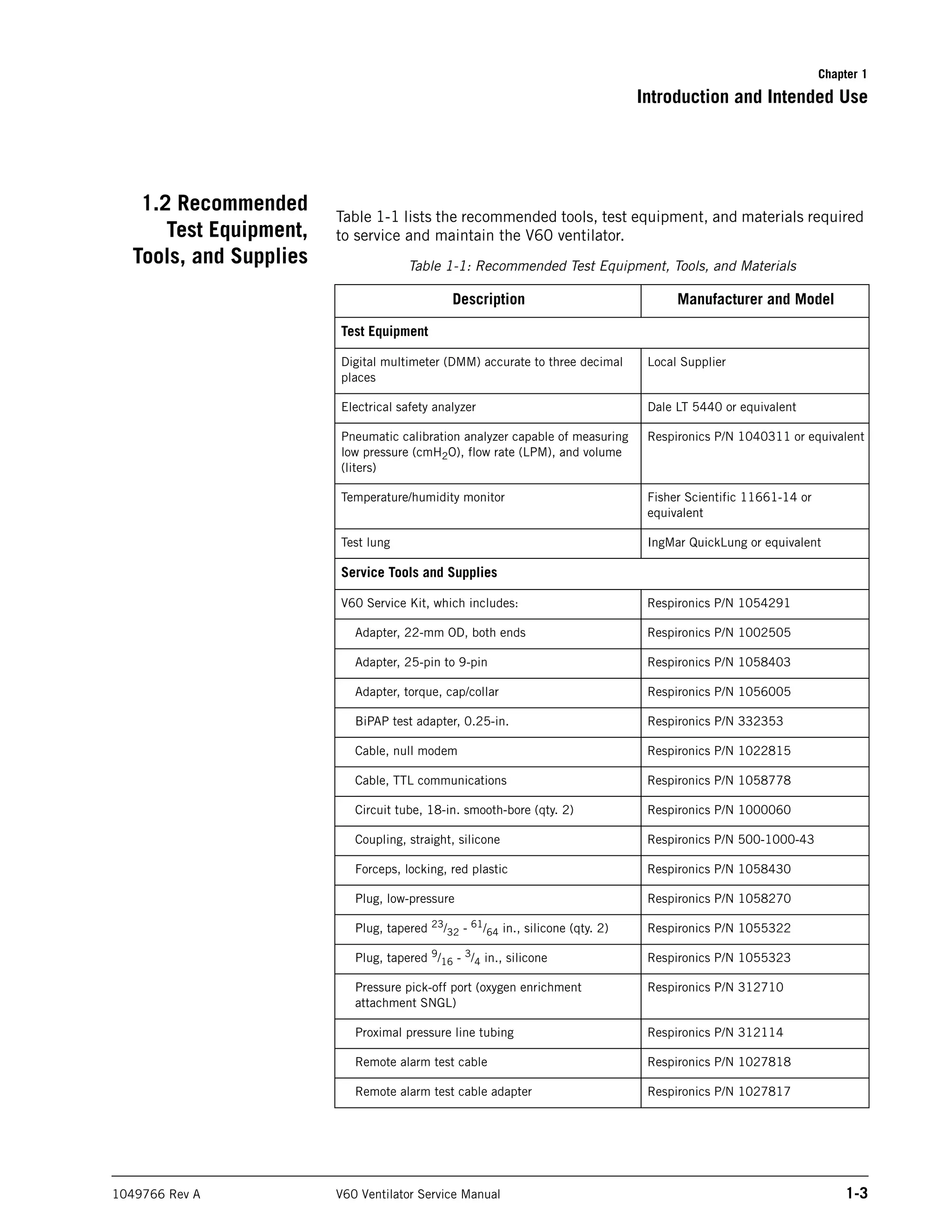
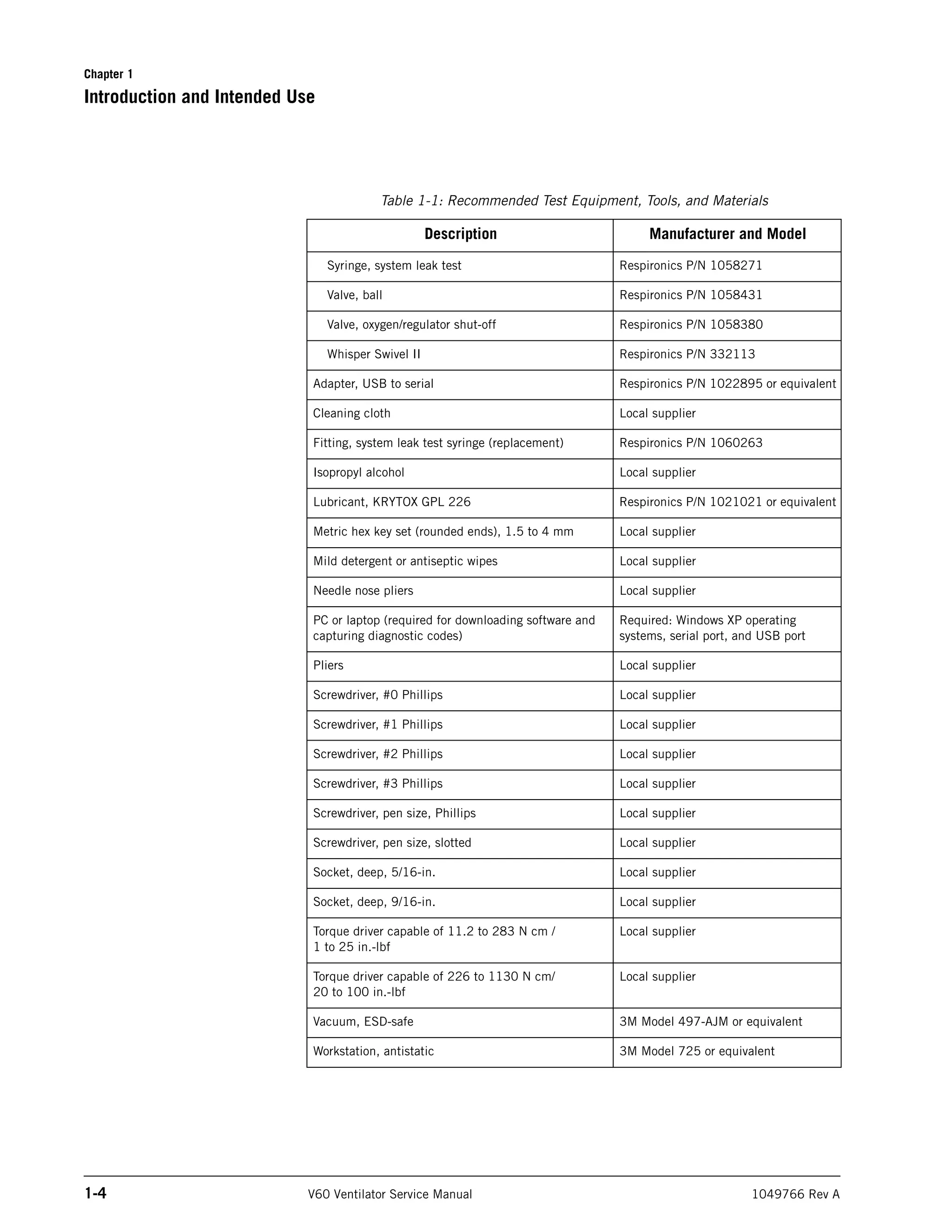
Table 1-1 lists the recommended tools, test equipment, and materials required
to service and maintain the V60 ventilator.
Table 1-1: Recommended Test Equipment, Tools, and Materials
Description Manufacturer and Model
Test Equipment
Digital multimeter (DMM) accurate to three decimal
places
Local Supplier
Electrical safety analyzer Dale LT 5440 or equivalent
Pneumatic calibration analyzer capable of measuring
low pressure (cmH2O), flow rate (LPM), and volume
(liters)
Respironics P/N 1040311 or equivalent
Temperature/humidity monitor Fisher Scientific 11661-14 or
equivalent
Test lung IngMar QuickLung or equivalent
Service Tools and Supplies
V60 Service Kit, which includes: Respironics P/N 1054291
Adapter, 22-mm OD, both ends Respironics P/N 1002505
Adapter, 25-pin to 9-pin Respironics P/N 1058403
Adapter, torque, cap/collar Respironics P/N 1056005
BiPAP test adapter, 0.25-in. Respironics P/N 332353
Cable, null modem Respironics P/N 1022815
Cable, TTL communications Respironics P/N 1058778
Circuit tube, 18-in. smooth-bore (qty. 2) Respironics P/N 1000060
Coupling, straight, silicone Respironics P/N 500-1000-43
Forceps, locking, red plastic Respironics P/N 1058430
Plug, low-pressure Respironics P/N 1058270
Plug, tapered 23
/32 - 61
/64 in., silicone (qty. 2) Respironics P/N 1055322
Plug, tapered 9
/16 - 3
/4 in., silicone Respironics P/N 1055323
Pressure pick-off port (oxygen enrichment
attachment SNGL)
Respironics P/N 312710
Proximal pressure line tubing Respironics P/N 312114
Remote alarm test cable Respironics P/N 1027818
Remote alarm test cable adapter Respironics P/N 1027817
Chapter 1
1-4 V60 Ventilator Service Manual 1049766 Rev A
Introduction and Intended Use
Syringe, system leak test Respironics P/N 1058271
Valve, ball Respironics P/N 1058431
Valve, oxygen/regulator shut-off Respironics P/N 1058380
Whisper Swivel II Respironics P/N 332113
Adapter, USB to serial Respironics P/N 1022895 or equivalent
Cleaning cloth Local supplier
Fitting, system leak test syringe (replacement) Respironics P/N 1060263
Isopropyl alcohol Local supplier
Lubricant, KRYTOX GPL 226 Respironics P/N 1021021 or equivalent
Metric hex key set (rounded ends), 1.5 to 4 mm Local supplier
Mild detergent or antiseptic wipes Local supplier
Needle nose pliers Local supplier
PC or laptop (required for downloading software and
capturing diagnostic codes)
Required: Windows XP operating
systems, serial port, and USB port
Pliers Local supplier
Screwdriver, #0 Phillips Local supplier
Screwdriver, #1 Phillips Local supplier
Screwdriver, #2 Phillips Local supplier
Screwdriver, #3 Phillips Local supplier
Screwdriver, pen size, Phillips Local supplier
Screwdriver, pen size, slotted Local supplier
Socket, deep, 5/16-in. Local supplier
Socket, deep, 9/16-in. Local supplier
Torque driver capable of 11.2 to 283 N cm /
1 to 25 in.-lbf
Local supplier
Torque driver capable of 226 to 1130 N cm/
20 to 100 in.-lbf
Local supplier
Vacuum, ESD-safe 3M Model 497-AJM or equivalent
Workstation, antistatic 3M Model 725 or equivalent
Table 1-1: Recommended Test Equipment, Tools, and Materials
Description Manufacturer and Model
Chapter 1
Introduction and Intended Use
1049766 Rev A V60 Ventilator Service Manual 1-5
1.3 Where to Go for
Help
For Technical Support and Customer Service, contact:
USA and Canada: 800-345-6443 or 724-387-4000
Respironics Europe, Africa, Middle East: +33-1-47-52-30-00
Respironics Asia Pacific: +852-3194-2280
Facsimile: +1-724-387-5012
Chapter 1
1-6 V60 Ventilator Service Manual 1049766 Rev A
Introduction and Intended Use
(This page is intentionally blank.)
1049766 Rev A V60 Ventilator Service Manual 2-1
Chapter 2. Warnings and Cautions
Before servicing the Respironics V60 ventilator, read and understand this
service manual, especially safety considerations. These safety considerations
are for reference only, and are not intended to supersede your institution’s
protocol for service or safe use of noninvasive ventilation.
The instructions in this manual are primarily reserved for use by a qualified
service technician.
2.1 General WARNING: An alternative means of ventilation shall be available whenever the ventilator
is in use. If a fault is detected in the ventilator, disconnect the patient from it
and immediately start ventilation with such a device. The ventilator must be
removed from clinical use and serviced by Respironics-authorized service
personnel.
WARNING: Use the Respironics V60 ventilator on spontaneously breathing patients only.
It is an assist ventilator and is intended to augment the ventilation of a
spontaneously breathing patient. It is not intended to provide the total
ventilatory requirements of the patient.
WARNING: We do not recommend you use the Respironics V60 ventilator on patients who
require ventilation at predetermined tidal volumes. The ventilator provides
continuous positive airway pressure (CPAP) and positive pressure ventilation
(S/T, PCV, and AVAPS) and is indicated for assisted ventilation only. These
modes do not provide ventilation with guaranteed tidal volume delivery.
WARNING: We do not recommend you use AVAPS on patients who require rapid and
frequent IPAP adjustments to maintain a consistent tidal volume. AVAPS, a
volume targeted mode, changes the IPAP setting in order to achieve the target
tidal volume. During AVAPS setup, there may be a period of time before the
target tidal volume is achieved. AVAPS is ideal for more stabilized patients.
WARNING: Alerts the user to the possibility of injury, death, or other serious adverse
reactions associated with the use or misuse of the device.
CAUTION: Alerts the user to the possibility of a problem with the device associated
with its use or misuse, such as device malfunction, device failure,
damage to the device, or damage to other property.
NOTE: Emphasizes information of particular importance.
Chapter 2
2-2 V60 Ventilator Service Manual 1049766 Rev A
Warnings and Cautions
WARNING: To reduce the risk of CO2 rebreathing, make sure EPAP pressures and
exhalation times are sufficient to clear all exhaled gas through the exhalation
port. In noninvasive ventilation continuous air flow through the port flushes
exhaled gases from the circuit. The ability to completely exhaust exhaled gas
from the circuit depends on the EPAP setting and I:E ratio. Higher tidal
volumes further increase the volume of CO2 rebreathed by the patient.
WARNING: To reduce the risk of CO2 rebreathing, monitor the patient for changes in
respiratory status at the start of ventilation and with each change in ventilator
settings, circuit configuration, or patient condition. Pay attention to ventilator
alarms that warn of increased CO2 rebreathing risk.
WARNING: Be aware of the possibility of contamination from patient exhalate being
exhausted into the room through the exhalation port.
WARNING: To ensure accuracy of oxygen administration and to monitor for the presence
of contamination (incorrect gas connected), use an external oxygen monitor
to verify the oxygen concentration in the delivered gas.
WARNING: To reduce the risk of fire, use the ventilator in well-ventilated areas away from
flammable anesthetics. Do not use in a hyperbaric chamber or other similarly
oxygen-enriched environments. Do not use near an open flame.
WARNING: To reduce the risk of electric shock from liquid entering the device, do not put
a container filled with a liquid on the ventilator.
WARNING: To reduce patient risk of hypoxemia, keep free-flowing oxygen away from air
inlet of ventilator.
WARNING: Connect to the ventilator only items that are specified as part of or compatible
with the ventilator system. Additional equipment connected to medical
electrical equipment must comply with the respective IEC or ISO standards.
Furthermore, all configurations shall comply with the requirements for
medical electrical systems (see IEC 60601-1-1 or clause 16 of edition 3 of
IEC 60601-1, respectively). Anybody connecting additional equipment to
medical electrical equipment configures a medical system and is therefore
responsible for ensuring that the system complies with the requirements for
medical electrical systems. Also be aware that local laws may take priority
over the above mentioned requirements. If in doubt, consult Respironics.
WARNING: To reduce the risk of fire, explosion, leakage, or other hazard, take these
precautions with respect to the battery:
• Do not attempt to disassemble, open, drop, crush, bend or deform, insert
foreign objects into, puncture, or shred the battery pack; modify or
remanufacture it; immerse or expose it to water or other liquids; expose
it to fire, excessive heat (including soldering irons); or put it in a
microwave oven.
• Replace the battery only with another battery specified by the
manufacturer.
• Follow all instructions for proper use of the battery.
• Do not short-circuit the battery or allow metallic or conductive objects to
contact the battery connector housing.
• Use the battery with the Respironics V60 ventilator only.
Chapter 2
Warnings and Cautions
1049766 Rev A V60 Ventilator Service Manual 2-3
WARNING: The nurse call/remote alarm should be considered a backup to the ventilator’s
primary alarm system.
WARNING: To ensure that the alarm will be heard, make sure the alarm loudness is
adequate and avoid blocking the alarm speakers beneath the ventilator.
CAUTION: Federal law (USA) restricts this device to sale by or on the order of a
physician.
CAUTION: The Respironics V60 ventilator is designed to operate in the temperature
range of 5 to 40 ºC (41 to 104 ºF). To minimize the risk of overheating the
device, do not operate adjacent to heaters or other heat sources.
NOTE: The displays shown in this manual may not exactly match what you see on
your own ventilator.
NOTE: Pressures are indicated on the ventilator in cmH2O. Millibars and
hectopascals (hPa) are used by some institutions instead. Since 1
millibar equals 1 hPa, which equals 1.016 cmH2O, the units may be
used interchangeably.
NOTE: The ventilator is not intended for use as an ambulance transport ventilator
or as an Automatic Transport Ventilator as described by the American
Hospital Association and referenced by the FDA. It is intended to allow
the patient to be transported within the hospital setting using a cart to
move the ventilator.
NOTE: When attachments or other components or subassemblies are added to
the ventilator breathing system, the pressure gradient across the
ventilator breathing system, measured with respect to the ventilator
outlet, may increase.
NOTE: The Respironics V60 ventilator parts that have patient contact are free of
latex.
NOTE: If an alarm persists for no apparent reason, discontinue ventilator use and
contact Respironics.
NOTE: If you detect any unexplained changes in the performance or visual
displays of the ventilator, discontinue ventilator use and contact
Respironics.
NOTE: The Respironics V60 ventilator does not support automatic record
keeping.
Chapter 2
2-4 V60 Ventilator Service Manual 1049766 Rev A
Warnings and Cautions
2.2 Preparing for
Ventilation
WARNING: To ensure the correct performance of the ventilator and the accuracy of
patient data, we recommend you use only Respironics-approved accessories
with the ventilator.
WARNING: To prevent possible asphyxia and to reduce the risk of CO2 rebreathing, take
these precautions with respect to mask and exhalation port use:
• Use only a mask with an exhalation port or a nasal mask for noninvasive
ventilation.
• Do not occlude the exhalation port.
• Turn on the ventilator and verify that the port is operational before
application. Pressurized gas from the ventilator should cause a
continuous flow of air to exhaust from the leak port, flushing exhaled gas
from the circuit.
WARNING: Never leave the mask on the patient while the ventilator is not operating.
When the ventilator is not operating, the exhalation port does not allow
sufficient exhaust to eliminate CO2 from the circuit. Substantial CO2
rebreathing may occur.
WARNING: To ensure normal air circulation and exchange, do not cover or block the
ports on the ventilator or ventilator circuit. Do not block the air inlet panel on
the right side of the ventilator.
WARNING: To prevent possible patient injury and possible water damage to the ventilator,
make sure the humidifier is set to appropriate temperature and humidification
settings.
WARNING: To prevent the possibility of inadequate humidification, pay close attention to
the humidifier’s functioning when operating the ventilator at an ambient
temperature > 30 ºC (86 ºF). The ventilator warms the air delivered to the
patient above ambient temperature, which may impair the humidifier’s
performance.
WARNING: To reduce the risk that the patient will aspirate condensed water from the
breathing circuit, position any humidifier lower than both the ventilator and
the patient.
WARNING: To prevent possible patient injury and equipment damage, do not turn the
humidifier on until the gas flow has started and is regulated. Starting the
heater or leaving it on without gas flow for prolonged periods may result in
heat build-up, causing a bolus of hot air to be delivered to the patient. Circuit
tubing may melt under these conditions. Turn the heater power switch off
before stopping gas flow.
WARNING: To reduce the risk of fire, use only patient circuits intended for use in oxygen-
enriched environments. Do not use antistatic or electrically conductive
tubing.
WARNING: To prevent patient or ventilator contamination, recommend you use a
Respironics-approved main flow bacteria filter on the patient gas outlet port.
Filters not approved by Respironics may degrade system performance.
Chapter 2
Warnings and Cautions
1049766 Rev A V60 Ventilator Service Manual 2-5
WARNING: To reduce the risk of bacterial contamination or damage, handle bacteria
filters with care.
WARNING: To reduce the risk of strangulation from patient tubing, use a tubing support
arm and secure the proximal pressure line with clips.
WARNING: To reduce the risk of electric shock, connect the ventilator to an AC supply
mains with protective earth only.
WARNING: Do not use extension cords, adapters, or power cords with the ventilator that
are not approved by Respironics.
WARNING: To prevent unintentional disconnection of the power cord, always use the
correct, Respironics-supplied power cord and lock it into place with the
power cord retainer before you switch the ventilator on. The retainer is
designed to hold the connector end of the Respironics-supplied cord securely
in place.
WARNING: To reduce the risk of electric shock, regularly inspect the AC power cord and
verify that it is not frayed or cracked.
WARNING: To reduce the risk of strangulation, route the power cord to avoid
entanglement.
WARNING: To reduce the risk of power failure, pay close attention to the battery’s charge
level. The battery’s operation time is approximate and is affected by ventilator
settings, discharge and recharge cycles, battery age, and ambient
temperature. Battery charge is reduced at low ambient temperatures or in
situations where the alarm is continuously sounding.
WARNING: To ensure the ventilator’s safe operation, always run the full preoperational
check described in the operator’s manual before using the ventilator on a
patient. If the ventilator fails any tests, remove it from clinical use
immediately. Do not use the ventilator until necessary repairs are completed
and all tests have passed.
WARNING: To prevent possible patient injury, disconnect the patient from the ventilator
before running the preoperational check. Make sure another source of
ventilatory support is available.
WARNING: To prevent possible patient injury due to nonannunciating alarms, verify the
operation of any remote alarm device before use.
CAUTION: To prevent possible damage to the ventilator, ensure that the connection
to the oxygen supply is clean and unlubricated, and that there is no water
in the oxygen supply gas.
CAUTION: For 120 V equipment, grounding reliability can only be achieved when it
is connected to an equivalent receptacle marked “hospital only” or
“hospital grade.”
Chapter 2
2-6 V60 Ventilator Service Manual 1049766 Rev A
Warnings and Cautions
2.3 Operation WARNING: To prevent possible patient injury, avoid setting alarm limits to extreme
values, which can render the alarm system useless.
2.4 Alarms and
Messages
WARNING: If AC power fails and the backup battery is not installed or is depleted, an
audible and visual alarm annunciates for at least 2 minutes. Immediately
discontinue ventilator use and secure an alternative means of ventilation. As
in most ventilators with passive exhalation ports, when power is lost,
sufficient air is not provided through the circuit and exhaled air may be
rebreathed.
2.5 Care and
Maintenance
WARNING: WARNING: To reduce the risk of electric shock, power down the ventilator and
disconnect it from AC power before cleaning or servicing it.
WARNING: WARNING: To prevent patient or ventilator contamination, inspect and replace
the main flow bacteria filter between patients and at regular intervals (or as
stated by the manufacturer).
WARNING: WARNING: To prevent possible patient injury, inspect and verify the proper
operation of the exhalation port regularly during use.
CAUTION: Do not attempt to sterilize or autoclave the ventilator.
CAUTION: To prevent possible damage to the ventilator, use only those cleaning
agents listed in this manual.
CAUTION: To prevent possible damage to the touchscreen, take care when cleaning
it. Do not drip water and/or soap solution. After cleaning and rinsing,
remove all moisture with a dry, soft cloth. Never clean the touchscreen
with an abrasive brush or device, since this will cause irreparable
damage.
CAUTION: To avoid introducing foreign matter into the ventilator and to ensure
proper system performance, change the air inlet filter at regular intervals
(or as stipulated by your institution).
CAUTION: To ensure proper system performance, use a Respironics-approved air
inlet filter.
CAUTION: Because some environments cause a quicker collection of lint and dust
than others, inspect the filters more often when needed. The air inlet
filter should be replaced; the cooling fan filter should be cleaned.
CAUTION: To prevent possible damage to the ventilator, always ship it with the
original packing material. If the original material is not available, contact
Respironics to order replacements.
Chapter 2
Warnings and Cautions
1049766 Rev A V60 Ventilator Service Manual 2-7
2.6 First-Time
Installation
WARNING: Never attempt to disconnect or reconnect the battery during operation.
CAUTION: To prevent possible damage to the ventilator, always secure it to its stand
or securely place it on a flat, stable surface that is free of dirt and debris.
Do not use the ventilator adjacent to, or stack it with, other equipment.
2.7 Communications
Interface
WARNING: Connect to the ventilator only items that are specified as part of or compatible
with the ventilator system. Additional equipment connected to medical
electrical equipment must comply with the respective IEC or ISO standards.
Furthermore, all configurations shall comply with the requirements for
medical electrical systems (see IEC 60601-1-1 or clause 16 of edition 3 of
IEC 60601-1, respectively). Anybody connecting additional equipment to
medical electrical equipment configures a medical system and is therefore
responsible for ensuring that the system complies with the requirements for
medical electrical systems. Also be aware that local laws may take priority
over the above mentioned requirements. If in doubt, consult Respironics.
WARNING: It is the responsibility of the end user to validate the compatibility and use of
information transmitted from the ventilator with the device to be connected to
the ventilator.
WARNING: The data provided through the communications interface is for reference only.
Decisions for patient care should be based on the clinician’s observations of
the patient.
WARNING: To prevent possible patient injury due to nonannunciating alarms, verify the
operation of any remote alarm device before use.
WARNING: To ensure the functionality of the remote alarm, connect only Respironics-
approved cables to the remote alarm port.
CAUTION: The remote alarm port is intended to connect only to an SELV (safety
extra-low voltage and ungrounded system with basic insulation to
ground), in accordance with IEC 60601-1. To prevent damage to the
remote alarm, make sure the signal input does not exceed the maximum
rating of 24 VAC or 36 VDC at 500 mA with a minimum current of
> 1 mA.
2.8 Diagnostic Mode WARNING: To prevent possible patient injury, do not enter the diagnostic mode while a
patient is connected to the ventilator. Verify that the patient is disconnected
before proceeding.
Chapter 2
2-8 V60 Ventilator Service Manual 1049766 Rev A
Warnings and Cautions
(This page is intentionally blank.)
1049766 Rev A V60 Ventilator Service Manual 3-1
Chapter 3. Theory of Operation
The V60 ventilator is a microprocessor-controlled gas flow control and
monitoring system that can deliver air and oxygen to augment or replace the
work normally performed by the patient’s respiratory system. The ventilator
uses electromechanical control circuits, flow and pressure monitors, and
software programs to deliver pressure controlled breaths.
The ventilator includes a user interface (UI), internal blower, and gas delivery
subsystem (GDS) that mixes air and oxygen. The ventilator can operate from a
40 to 87 psig (276 to 600 kPa) medical grade oxygen source for enriched
oxygen operation. The internal power supply that can operate from mains (100
to 240 V AC 50/60 Hz) or internal battery (14.4 V DC) power. The ventilator
also includes several communications interfaces.
Schematic diagrams of the V60 ventilator are available upon request.
3.1 Pneumatics The pneumatic subsystem delivers and monitors pressurized gas to the patient
in response to commands from the CPU subsystem. The pneumatic subsystem
includes the:
• Manifold
• Blower
• Oxygen solenoid valve
• Air and oxygen flow sensors
• Pressure transducers
• Solenoid valves
• Motor controller (MC) PCBA
• Data acquisition (DA) PCBA
The ventilator uses ambient air and high-pressure oxygen. Air enters through
an inlet filter. Oxygen enters though a high-pressure inlet, and a proportional
valve provides the operator-set concentration. The system mixes the air and
oxygen, pressurizes it in the blower, and then regulates it to the user-set
pressure. To do this, the ventilator compares the proximal (patient) pressure
measurement with the ventilator outlet (machine) pressure, and adjusts the
machine pressure to compensate for the pressure drop across the inspiratory
filter, patient circuit, and humidifier. This helps ensure accurate and
responsive pressure delivery and leak compensation.
The ventilator delivers gas to the patient through a main flow (inspiratory)
bacteria filter, a single-limb patient breathing circuit, a humidification device
(optional), and a patient interface such as a mask or ET tube. A pressure tap
3-2 V60 Ventilator Service Manual 1049766 Rev A
Chapter 3: Theory of Operation
proximal to the patient is used to monitor patient pressure. The internal
exhalation port continually clears gas from the ventilator airway to ensure
delivery of an accurate oxygen mixture.
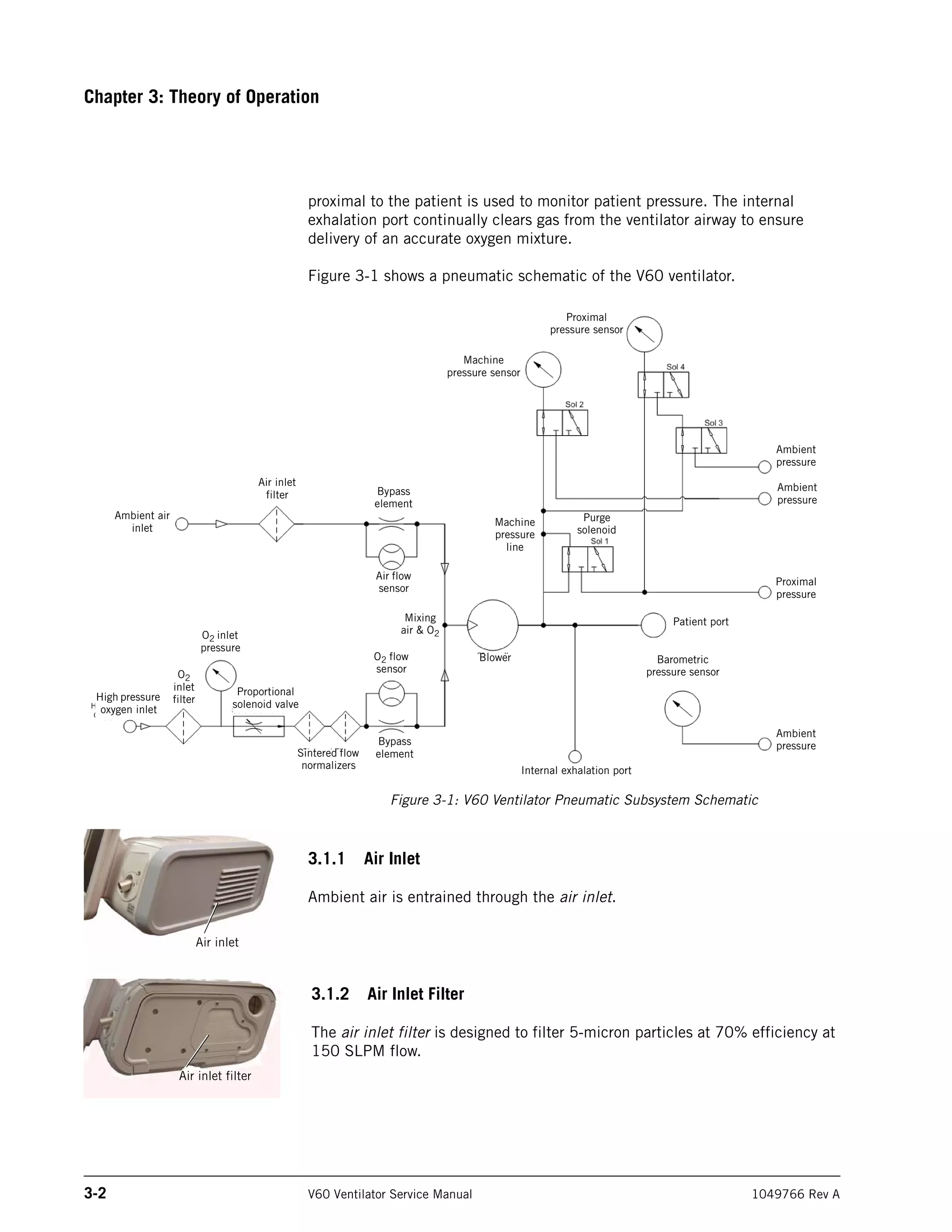
Figure 3-1 shows a pneumatic schematic of the V60 ventilator.
Figure 3-1: V60 Ventilator Pneumatic Subsystem Schematic
3.1.1 Air Inlet
Ambient air is entrained through the air inlet.
3.1.2 Air Inlet Filter
The air inlet filter is designed to filter 5-micron particles at 70% efficiency at
150 SLPM flow.
High pressure
oxygen inlet
O2
inlet
filter
O2 inlet
pressure
Proportional
solenoid valve
Sintered flow
normalizers
Bypass
element
O2 flow
sensor
Mixing
air & O2
Air flow
sensor
Bypass
element
Air inlet
filter
Ambient air
inlet
Blower
Internal exhalation port
Patient port
Barometric
pressure sensor
Machine
pressure sensor
Proximal
pressure sensor
Machine
pressure
line
Purge
solenoid
Ambient
pressure
Ambient
pressure
Ambient
pressure
Proximal
pressure
Air inlet
Air inlet filter
Chapter 3: Theory of Operation
1049766 Rev A V60 Ventilator Service Manual 3-3
3.1.3 Air Flow Sensor
The air flow sensor measures a subset (bypass flow) of total flow in the
pneumatic air path and interpolates the measurements according to constants
that are calculated during gas delivery subsystem (GDS) calibration. The air
flow sensor also helps provide closed-loop control of gas flow during oxygen
blending.
3.1.4 Machine and Proximal Pressure Transducers
The machine and proximal pressure transducers on the DA PCBA measure the
machine and proximal pressure over a range of -20 to +65 cmH2O.
3.1.5 Barometric Pressure Transducer
The barometric pressure transducer on the DA PCBA measures barometric
pressure over a range of 525 to 850 mmHg.
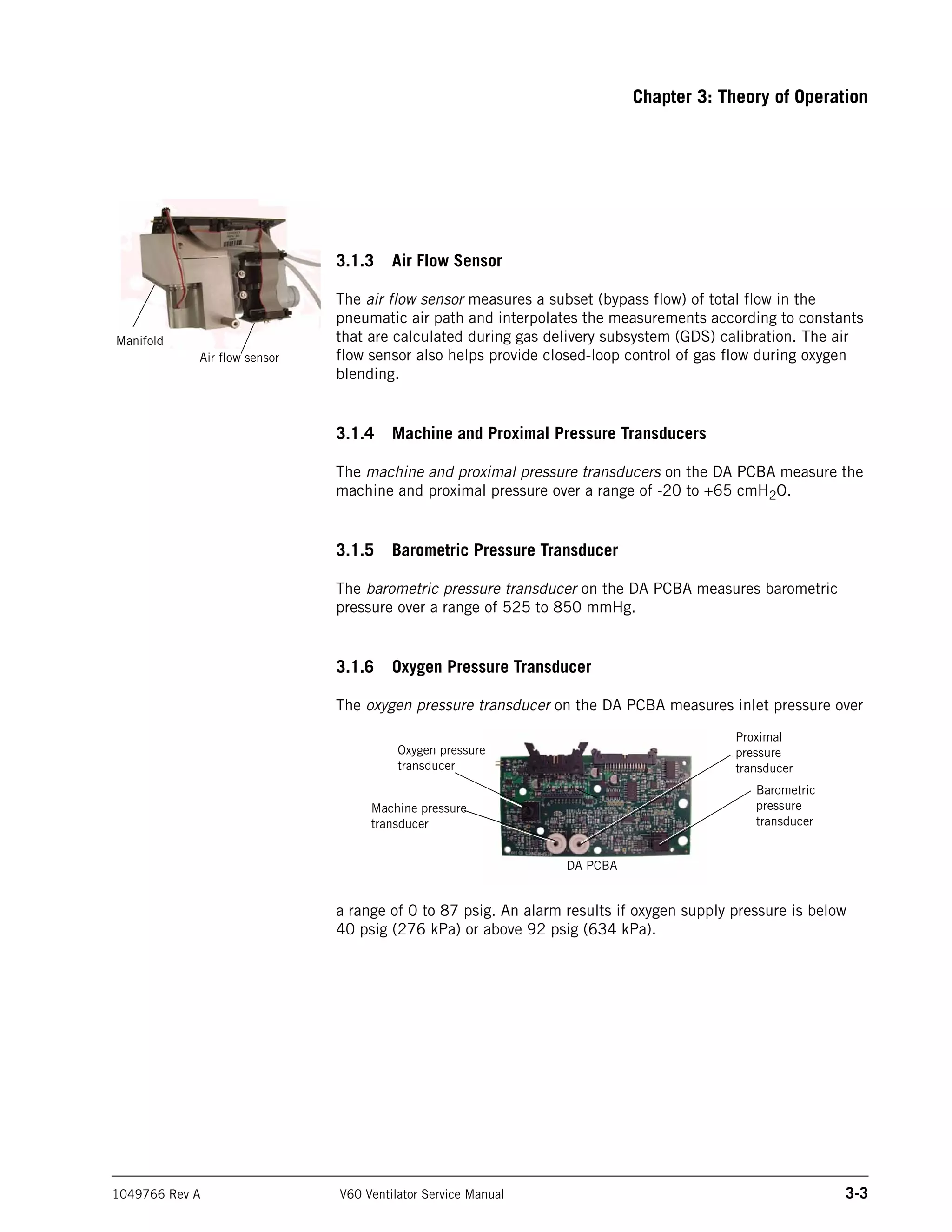
3.1.6 Oxygen Pressure Transducer
The oxygen pressure transducer on the DA PCBA measures inlet pressure over
a range of 0 to 87 psig. An alarm results if oxygen supply pressure is below
40 psig (276 kPa) or above 92 psig (634 kPa).
Air flow sensor
Manifold
Oxygen pressure
transducer
Machine pressure
transducer
Proximal
pressure
transducer
Barometric
pressure
transducer
DA PCBA
3-4 V60 Ventilator Service Manual 1049766 Rev A
Chapter 3: Theory of Operation
3.1.7 Manifold, Oxygen Inlet Filter, Filter Element
The manifold includes a connection for the oxygen inlet, allowing country-
specific oxygen connections to be attached to the manifold. The manifold
provides the pneumatic interfaces to the air inlet, oxygen inlet, blower inlet,
and proximal and machine pressure lines.
The oxygen inlet filter removes 5-micron particles from the oxygen gas supply.
A 40-micron sintered bronze filter element acts to reduce turbulence in the
oxygen flow. The 40-micron oxygen breather vent reduces noise in the oxygen
flow.
3.1.8 Oxygen Solenoid Valve
The oxygen solenoid valve and valve driver circuitry control the flow of oxygen
according to the set O2 and flow. The oxygen solenoid valve is closed when
there is a loss of power or system reset.
3.1.9 Oxygen Flow Sensor
The oxygen flow sensor measures a subset (bypass flow) of the total flow.
These measurements are interpolated according to constants that are
calculated during GDS calibration. Together, the oxygen solenoid valve and
flow sensor provide closed-loop control for delivered oxygen flow.
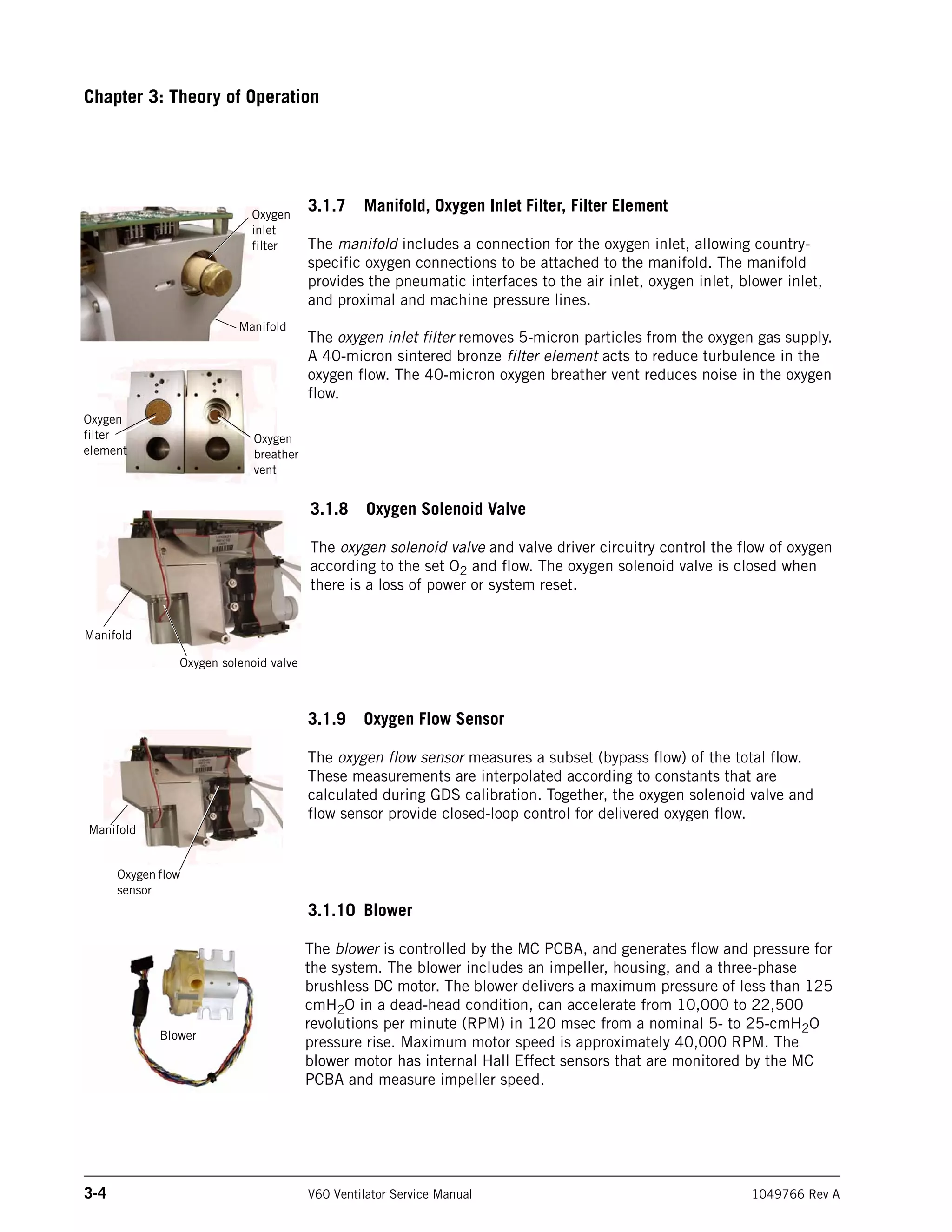
3.1.10 Blower
The blower is controlled by the MC PCBA, and generates flow and pressure for
the system. The blower includes an impeller, housing, and a three-phase
brushless DC motor. The blower delivers a maximum pressure of less than 125
cmH2O in a dead-head condition, can accelerate from 10,000 to 22,500
revolutions per minute (RPM) in 120 msec from a nominal 5- to 25-cmH2O
pressure rise. Maximum motor speed is approximately 40,000 RPM. The
blower motor has internal Hall Effect sensors that are monitored by the MC
PCBA and measure impeller speed.
Manifold
Oxygen solenoid valve
Manifold
Oxygen flow
sensor
Blower
Manifold
Oxygen
inlet
filter
Oxygen
filter
element
Oxygen
breather
vent
Chapter 3: Theory of Operation
1049766 Rev A V60 Ventilator Service Manual 3-5
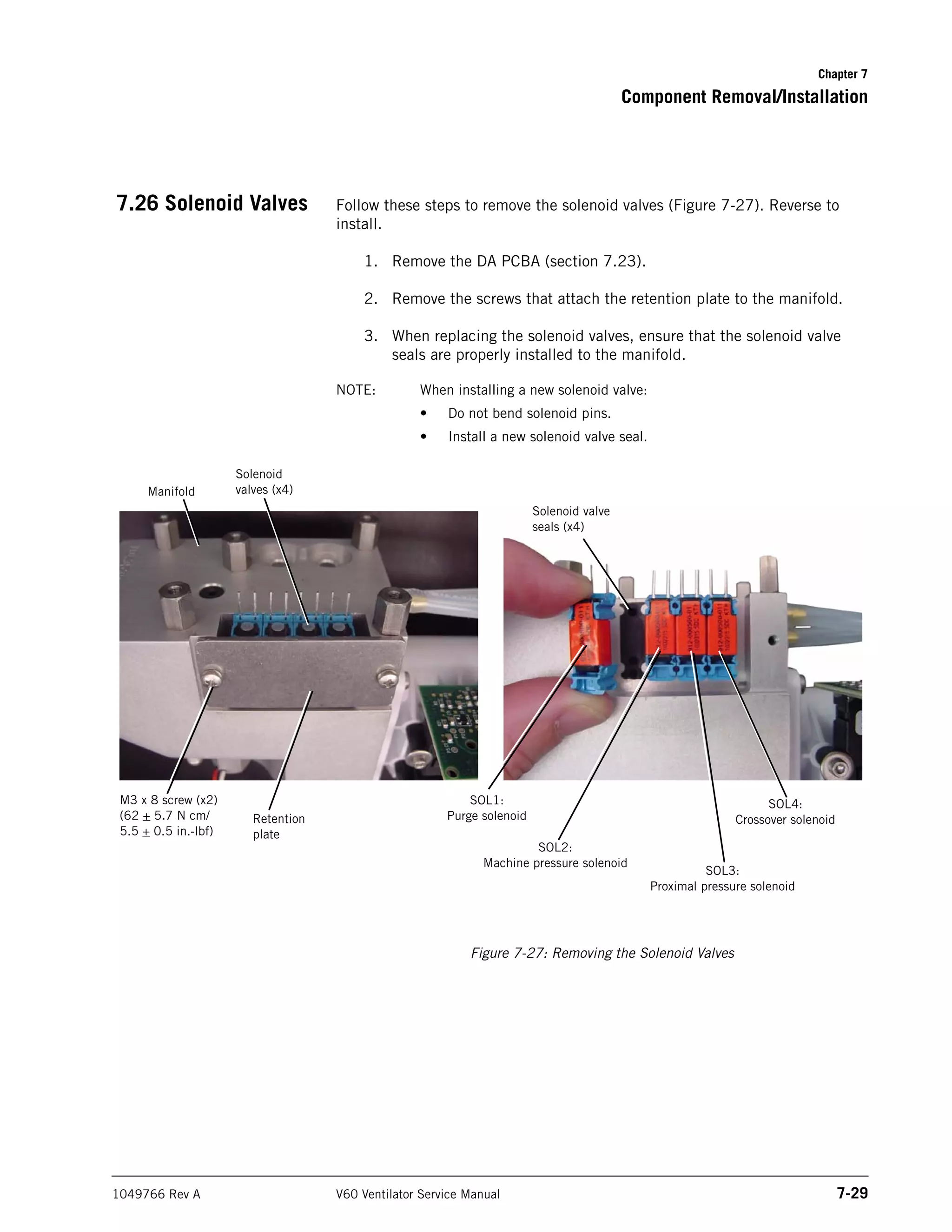
3.1.11 Solenoid Valves
Four solenoid valves are mounted on the manifold and controlled by the DA
PCBA. These three-way autozero solenoids include SOL1 (purge solenoid),
SOL2 and SOL4 (machine pressure autozero solenoids), and SOL3 and SOL4
(proximal pressure autozero solenoids).
Solenoid valves
SOL3, SOL4: Proximal pressure autozero solenoids. SOL4:
Also connects machine pressure to the proximal pressure
transducer during autozero.
SOL2, SOL4: Machine pressure autozero solenoids.
SOL1: Purge solenoid, uses the machine pressure
line to purge the proximal pressure line.
Manifold
Solenoid valves (x4)
3-6 V60 Ventilator Service Manual 1049766 Rev A
Chapter 3: Theory of Operation
3.2 Electronics The electronics system provides software-based control and monitoring, power
management, user input, display, subsystem I/O, external communication, and
alarms. The electronics system includes a Cirrus EP9307 microcontroller for
control and monitor processing.
Control tasks include breath delivery, patient data calculation, and alarm
detection/response. Monitoring tasks include controlling the LCD, front panel
keys and indicators, inputs, and primary alarm output. An independent
watchdog control provides safety monitoring.
The electronics system includes:
• Power management (PM) PCBA
• Power supply
• Internal battery
• CPU PCBA
• Motor controller (MC) PCBA
• Data acquisition (DA) PCBA
• Flow sensors
• User interface
• Liquid crystal display (LCD)
• Backlight inverter PCBA
• Touch screen assembly
• Nav-ring assembly
• Power switch overlay
• Switch PCB
• User interface (UI) PCBA
Chapter 3: Theory of Operation
1049766 Rev A V60 Ventilator Service Manual 3-7
3.2.1 Power management (PM) PCBA
• Battery charging and management circuitry
• Internal supply voltages (supply voltages: 3.3 V, 5 V, 12 V, 35 V).
• Fan power and tach monitoring.
• Backup alarm control circuitry, including power fail detection.
• Power switch control circuitry.
• System alarm and reset management.
• Electrical interfaces between the CPU PCBA, LCD, and the user
interface (UI) PCBA.
• Includes an EEPROM for calibration data, board identification
information, and PM PCBA power-on hours.
3.2.2 Power Supply
• Provides ventilator and battery recharging power from AC line voltage.
• Converts AC line voltage (100 to 240 VAC, 50 to 60 Hz) into 24 VDC
power.
• Includes input over-current, output over-voltage, and output current-
limiting protection.
3.2.3 Internal Battery
• 14.4-V, 11.5-Ah lithium-ion battery has a run-time of at least six
hours under normal conditions.
• Provides operating power when AC power is not available.
• Provides charge and temperature status to the PM PCBA.
• Internal circuitry monitors battery status, provides self-contained
fault control features, and communicates this information to the PM
PCBA.
PM PCBA
Power supply
Internal battery
3-8 V60 Ventilator Service Manual 1049766 Rev A
Chapter 3: Theory of Operation
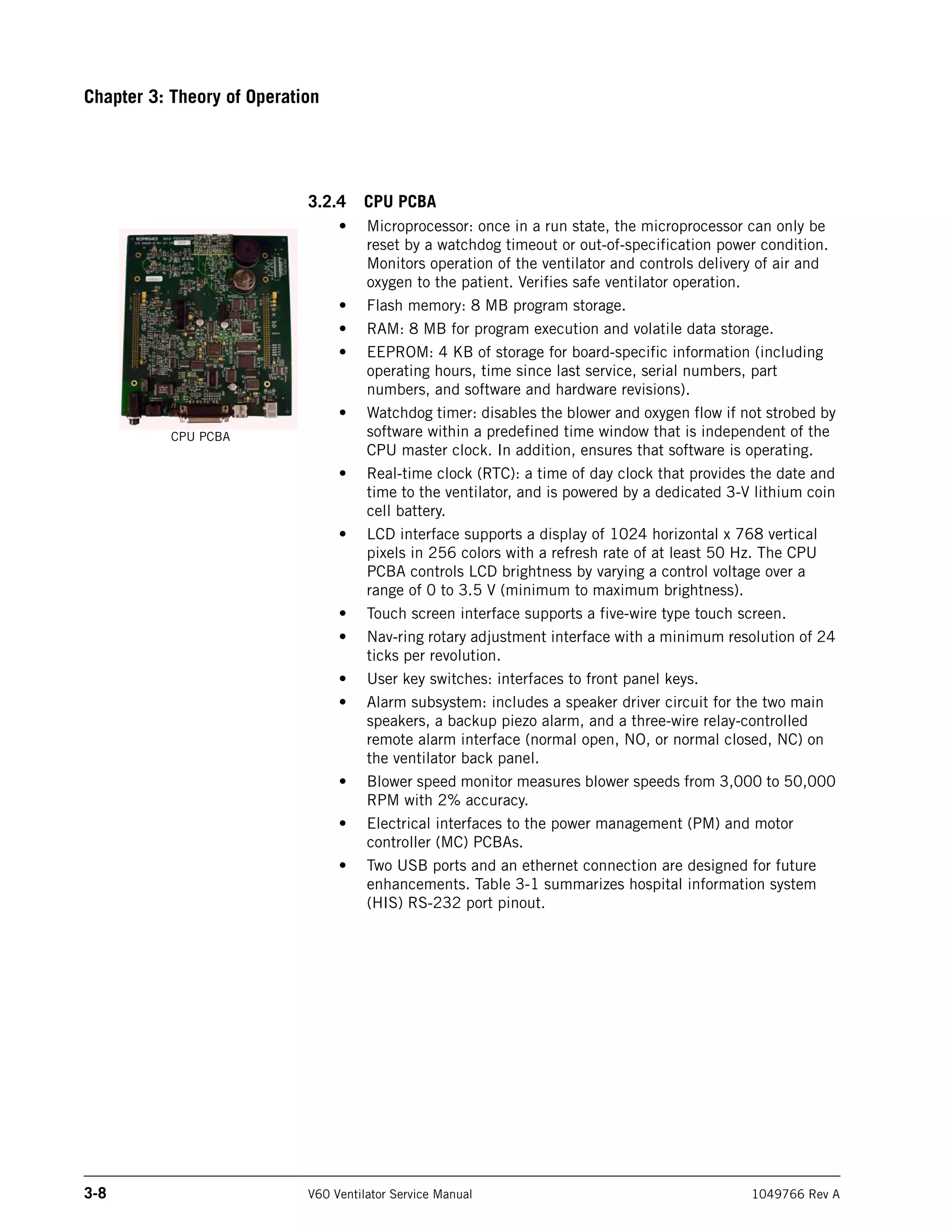
3.2.4 CPU PCBA
• Microprocessor: once in a run state, the microprocessor can only be
reset by a watchdog timeout or out-of-specification power condition.
Monitors operation of the ventilator and controls delivery of air and
oxygen to the patient. Verifies safe ventilator operation.
• Flash memory: 8 MB program storage.
• RAM: 8 MB for program execution and volatile data storage.
• EEPROM: 4 KB of storage for board-specific information (including
operating hours, time since last service, serial numbers, part
numbers, and software and hardware revisions).
• Watchdog timer: disables the blower and oxygen flow if not strobed by
software within a predefined time window that is independent of the
CPU master clock. In addition, ensures that software is operating.
• Real-time clock (RTC): a time of day clock that provides the date and
time to the ventilator, and is powered by a dedicated 3-V lithium coin
cell battery.
• LCD interface supports a display of 1024 horizontal x 768 vertical
pixels in 256 colors with a refresh rate of at least 50 Hz. The CPU
PCBA controls LCD brightness by varying a control voltage over a
range of 0 to 3.5 V (minimum to maximum brightness).
• Touch screen interface supports a five-wire type touch screen.
• Nav-ring rotary adjustment interface with a minimum resolution of 24
ticks per revolution.
• User key switches: interfaces to front panel keys.
• Alarm subsystem: includes a speaker driver circuit for the two main
speakers, a backup piezo alarm, and a three-wire relay-controlled
remote alarm interface (normal open, NO, or normal closed, NC) on
the ventilator back panel.
• Blower speed monitor measures blower speeds from 3,000 to 50,000
RPM with 2% accuracy.
• Electrical interfaces to the power management (PM) and motor
controller (MC) PCBAs.
• Two USB ports and an ethernet connection are designed for future
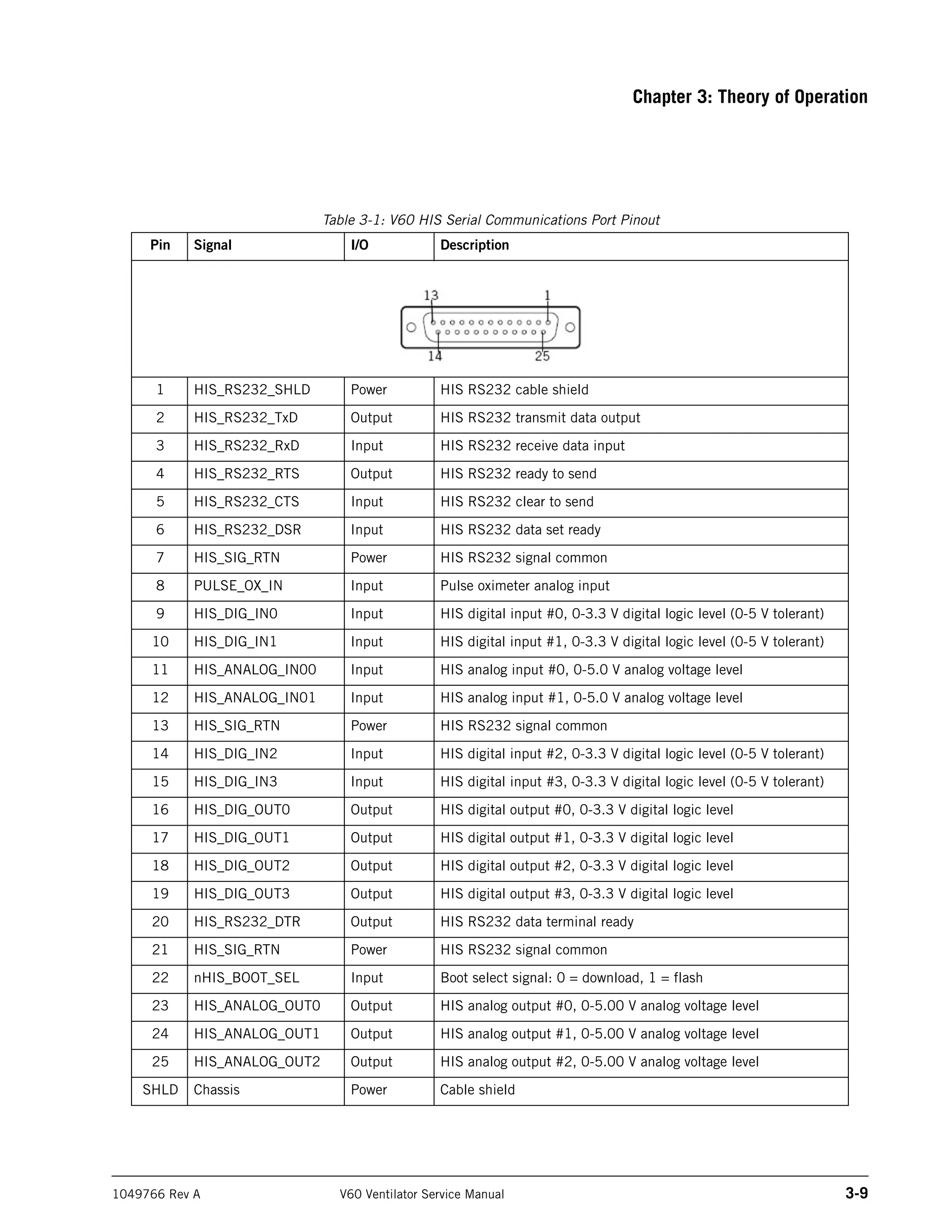
enhancements. Table 3-1 summarizes hospital information system
(HIS) RS-232 port pinout.
CPU PCBA
Chapter 3: Theory of Operation
1049766 Rev A V60 Ventilator Service Manual 3-9
Table 3-1: V60 HIS Serial Communications Port Pinout
Pin Signal I/O Description
1 HIS_RS232_SHLD Power HIS RS232 cable shield
2 HIS_RS232_TxD Output HIS RS232 transmit data output
3 HIS_RS232_RxD Input HIS RS232 receive data input
4 HIS_RS232_RTS Output HIS RS232 ready to send
5 HIS_RS232_CTS Input HIS RS232 clear to send
6 HIS_RS232_DSR Input HIS RS232 data set ready
7 HIS_SIG_RTN Power HIS RS232 signal common
8 PULSE_OX_IN Input Pulse oximeter analog input
9 HIS_DIG_IN0 Input HIS digital input #0, 0-3.3 V digital logic level (0-5 V tolerant)
10 HIS_DIG_IN1 Input HIS digital input #1, 0-3.3 V digital logic level (0-5 V tolerant)
11 HIS_ANALOG_IN00 Input HIS analog input #0, 0-5.0 V analog voltage level
12 HIS_ANALOG_IN01 Input HIS analog input #1, 0-5.0 V analog voltage level
13 HIS_SIG_RTN Power HIS RS232 signal common
14 HIS_DIG_IN2 Input HIS digital input #2, 0-3.3 V digital logic level (0-5 V tolerant)
15 HIS_DIG_IN3 Input HIS digital input #3, 0-3.3 V digital logic level (0-5 V tolerant)
16 HIS_DIG_OUT0 Output HIS digital output #0, 0-3.3 V digital logic level
17 HIS_DIG_OUT1 Output HIS digital output #1, 0-3.3 V digital logic level
18 HIS_DIG_OUT2 Output HIS digital output #2, 0-3.3 V digital logic level
19 HIS_DIG_OUT3 Output HIS digital output #3, 0-3.3 V digital logic level
20 HIS_RS232_DTR Output HIS RS232 data terminal ready
21 HIS_SIG_RTN Power HIS RS232 signal common
22 nHIS_BOOT_SEL Input Boot select signal: 0 = download, 1 = flash
23 HIS_ANALOG_OUT0 Output HIS analog output #0, 0-5.00 V analog voltage level
24 HIS_ANALOG_OUT1 Output HIS analog output #1, 0-5.00 V analog voltage level
25 HIS_ANALOG_OUT2 Output HIS analog output #2, 0-5.00 V analog voltage level
SHLD Chassis Power Cable shield
3-10 V60 Ventilator Service Manual 1049766 Rev A
Chapter 3: Theory of Operation
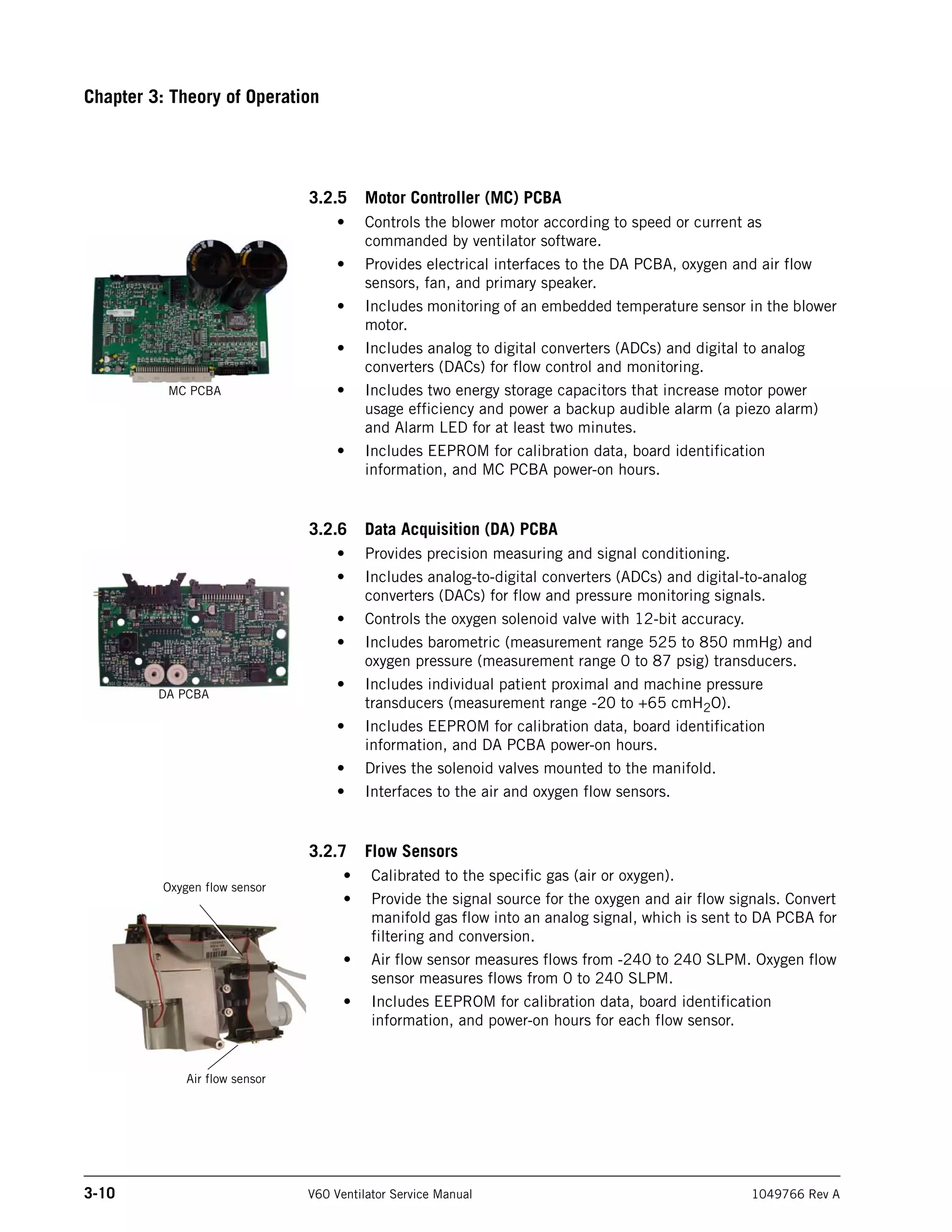
3.2.5 Motor Controller (MC) PCBA
• Controls the blower motor according to speed or current as
commanded by ventilator software.
• Provides electrical interfaces to the DA PCBA, oxygen and air flow
sensors, fan, and primary speaker.
• Includes monitoring of an embedded temperature sensor in the blower
motor.
• Includes analog to digital converters (ADCs) and digital to analog
converters (DACs) for flow control and monitoring.
• Includes two energy storage capacitors that increase motor power
usage efficiency and power a backup audible alarm (a piezo alarm)
and Alarm LED for at least two minutes.
• Includes EEPROM for calibration data, board identification
information, and MC PCBA power-on hours.
3.2.6 Data Acquisition (DA) PCBA
• Provides precision measuring and signal conditioning.
• Includes analog-to-digital converters (ADCs) and digital-to-analog
converters (DACs) for flow and pressure monitoring signals.
• Controls the oxygen solenoid valve with 12-bit accuracy.
• Includes barometric (measurement range 525 to 850 mmHg) and
oxygen pressure (measurement range 0 to 87 psig) transducers.
• Includes individual patient proximal and machine pressure
transducers (measurement range -20 to +65 cmH2O).
• Includes EEPROM for calibration data, board identification
information, and DA PCBA power-on hours.
• Drives the solenoid valves mounted to the manifold.
• Interfaces to the air and oxygen flow sensors.
3.2.7 Flow Sensors
• Calibrated to the specific gas (air or oxygen).
• Provide the signal source for the oxygen and air flow signals. Convert
manifold gas flow into an analog signal, which is sent to DA PCBA for
filtering and conversion.
• Air flow sensor measures flows from -240 to 240 SLPM. Oxygen flow
sensor measures flows from 0 to 240 SLPM.
• Includes EEPROM for calibration data, board identification
information, and power-on hours for each flow sensor.
MC PCBA
DA PCBA
Oxygen flow sensor
Air flow sensor
Chapter 3: Theory of Operation
1049766 Rev A V60 Ventilator Service Manual 3-11
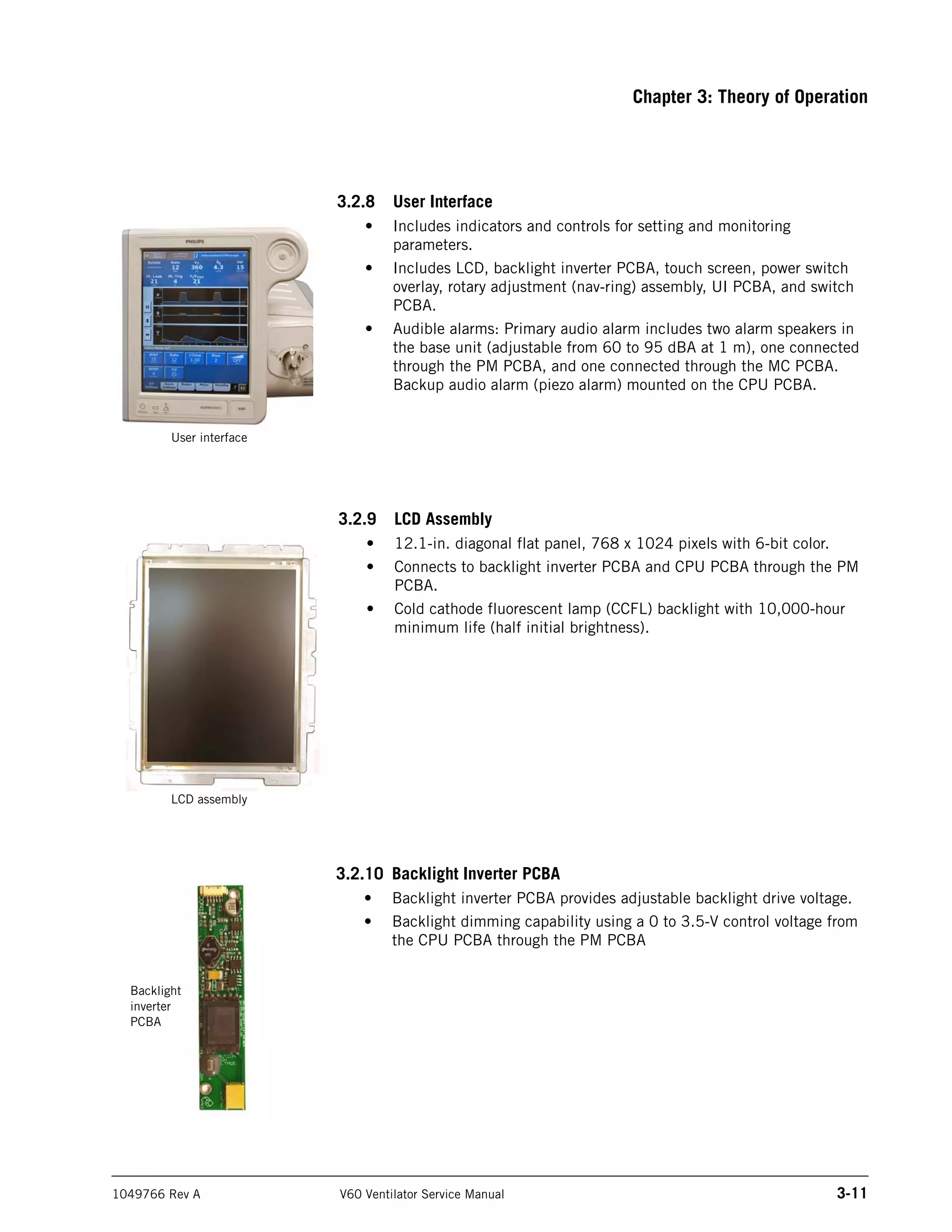
3.2.8 User Interface
• Includes indicators and controls for setting and monitoring
parameters.
• Includes LCD, backlight inverter PCBA, touch screen, power switch
overlay, rotary adjustment (nav-ring) assembly, UI PCBA, and switch
PCBA.
• Audible alarms: Primary audio alarm includes two alarm speakers in
the base unit (adjustable from 60 to 95 dBA at 1 m), one connected
through the PM PCBA, and one connected through the MC PCBA.
Backup audio alarm (piezo alarm) mounted on the CPU PCBA.
3.2.9 LCD Assembly
• 12.1-in. diagonal flat panel, 768 x 1024 pixels with 6-bit color.
• Connects to backlight inverter PCBA and CPU PCBA through the PM
PCBA.
• Cold cathode fluorescent lamp (CCFL) backlight with 10,000-hour
minimum life (half initial brightness).
3.2.10 Backlight Inverter PCBA
• Backlight inverter PCBA provides adjustable backlight drive voltage.
• Backlight dimming capability using a 0 to 3.5-V control voltage from
the CPU PCBA through the PM PCBA
Backlight
inverter
PCBA
LCD assembly
User interface
3-12 V60 Ventilator Service Manual 1049766 Rev A
Chapter 3: Theory of Operation
3.2.11 Touch Screen Assembly
• Uses a robust five-wire resistive panel.
• Resolves touches in a configuration 0.3 x 0.3-in. matrix.
3.2.12 Nav-Ring Assembly (Rotary Adjustment)
• Rotary adjustment used to change setting values.
• Center push-button (on switch PCBA) to accept a value of a selected
field.
3.2.13 Power Switch Overlay
• Includes power switch, and embedded indicators for power status,
battery charge status, and alarms.
3.2.14 Switch PCBA
• Interconnection between rotary adjustment and UI PCBA and CPU
PCBA.
• Provides a center push button and interface to nav-ring.
• Connects to UI PCBA.
Touch screen assembly
Nav-ring
assembly
Power switch overlay
Switch PCBA
Chapter 3: Theory of Operation
1049766 Rev A V60 Ventilator Service Manual 3-13
3.2.15 UI PCBA
• Provides a connection for backlight PCBA, touch panel, switches, and
switch PCBA to PM PCBA.
• Mounts behind LCD, provides connectors to backlight inverter PCBA,
power switch overlay, switch PCBA, and touch screen.
• Connects to PM PCBA.
UI PCBA
3-14 V60 Ventilator Service Manual 1049766 Rev A
Chapter 3: Theory of Operation
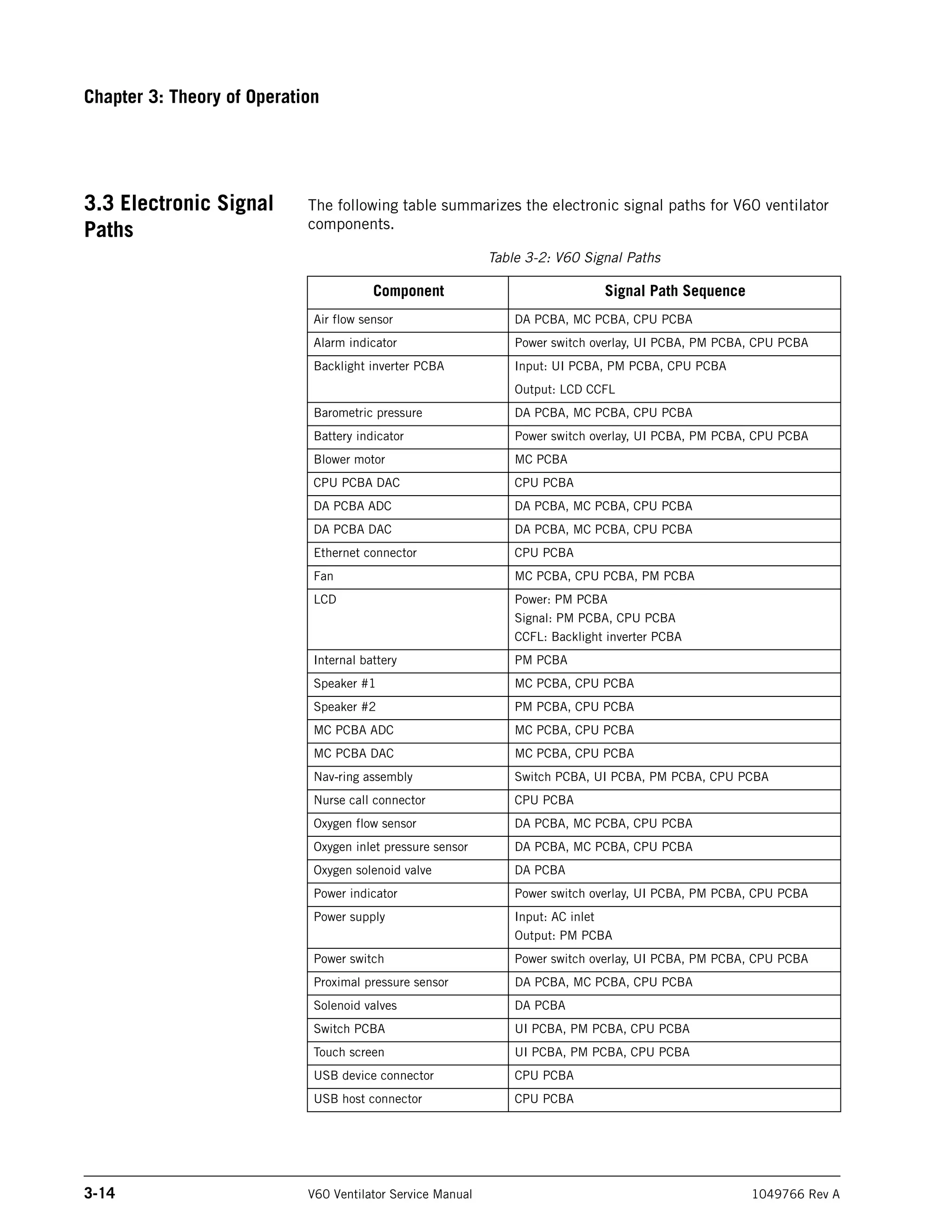
3.3 Electronic Signal
Paths
The following table summarizes the electronic signal paths for V60 ventilator
components.
Table 3-2: V60 Signal Paths
Component Signal Path Sequence
Air flow sensor DA PCBA, MC PCBA, CPU PCBA
Alarm indicator Power switch overlay, UI PCBA, PM PCBA, CPU PCBA
Backlight inverter PCBA Input: UI PCBA, PM PCBA, CPU PCBA
Output: LCD CCFL
Barometric pressure DA PCBA, MC PCBA, CPU PCBA
Battery indicator Power switch overlay, UI PCBA, PM PCBA, CPU PCBA
Blower motor MC PCBA
CPU PCBA DAC CPU PCBA
DA PCBA ADC DA PCBA, MC PCBA, CPU PCBA
DA PCBA DAC DA PCBA, MC PCBA, CPU PCBA
Ethernet connector CPU PCBA
Fan MC PCBA, CPU PCBA, PM PCBA
LCD Power: PM PCBA
Signal: PM PCBA, CPU PCBA
CCFL: Backlight inverter PCBA
Internal battery PM PCBA
Speaker #1 MC PCBA, CPU PCBA
Speaker #2 PM PCBA, CPU PCBA
MC PCBA ADC MC PCBA, CPU PCBA
MC PCBA DAC MC PCBA, CPU PCBA
Nav-ring assembly Switch PCBA, UI PCBA, PM PCBA, CPU PCBA
Nurse call connector CPU PCBA
Oxygen flow sensor DA PCBA, MC PCBA, CPU PCBA
Oxygen inlet pressure sensor DA PCBA, MC PCBA, CPU PCBA
Oxygen solenoid valve DA PCBA
Power indicator Power switch overlay, UI PCBA, PM PCBA, CPU PCBA
Power supply Input: AC inlet
Output: PM PCBA
Power switch Power switch overlay, UI PCBA, PM PCBA, CPU PCBA
Proximal pressure sensor DA PCBA, MC PCBA, CPU PCBA
Solenoid valves DA PCBA
Switch PCBA UI PCBA, PM PCBA, CPU PCBA
Touch screen UI PCBA, PM PCBA, CPU PCBA
USB device connector CPU PCBA
USB host connector CPU PCBA
Chapter 3
Theory of Operation
1049766 Rev A V60 Ventilator Service Manual 3-15
Figure 3-2 shows a wiring diagram for the main assembly.
Figure 3-2: V60 Main Assembly Wiring Diagram.
Chapter 3
3-16 V60 Ventilator Service Manual 1049766 Rev A
Theory of Operation
(This page is intentionally blank.)
Chapter 3
Theory of Operation
1049766 Rev A V60 Ventilator Service Manual 3-17
Figure 3-3 shows a wiring diagram for the UI subsystem.
Figure 3-3: V60 UI Assembly Wiring Diagram
Chapter 3
3-18 V60 Ventilator Service Manual 1049766 Rev A
Theory of Operation
(This page is intentionally blank.)
Chapter 3
Theory of Operation
1049766 Rev A V60 Ventilator Service Manual 3-19
Figure 3-4 shows a block diagram of the power supply.
Figure 3-4: Power Supply Block Diagram
Chapter 3
3-20 V60 Ventilator Service Manual 1049766 Rev A
Theory of Operation
(This page is intentionally blank.)
Chapter 3
Theory of Operation
1049766 Rev A V60 Ventilator Service Manual 3-21
Figure 3-5 shows a block diagram of the PM PCBA.
Figure 3-5: Power Management (PM) PCBA Block Diagram
Chapter 3
3-22 V60 Ventilator Service Manual 1049766 Rev A
Theory of Operation
(This page is intentionally blank.)
Chapter 3
Theory of Operation
1049766 Rev A V60 Ventilator Service Manual 3-23
Figure 3-6 shows a block diagram of the MC PCBA.
Figure 3-6: Motor Controller (MC) PCBA Block Diagram
Chapter 3
3-24 V60 Ventilator Service Manual 1049766 Rev A
Theory of Operation
(This page is intentionally blank.)
1049766 Rev A V60 Ventilator Service Manual 4-1
Chapter 4. Periodic Maintenance
Perform cleaning, sterilizing, and periodic maintenance procedures
(Table 4-1) to ensure consistent ventilator operation. Hospital personnel can
perform all maintenance tasks except the annual preventive maintenance
procedures (the preventive maintenance procedures must be performed by a
qualified service technician). The V60 Ventilator User Manual summarizes
periodic care and maintenance procedures.
Table 4-1: Periodic Maintenance Procedures
Frequency Component Maintenance
Daily Patient outlet bacteria filter • Check for occlusions, cracks, and
tears.
Monthly Cooling fan filter Inspect for occlusions, dust lint, etc. If
discolored or dirty, replace or remove and
wash or rinse thoroughly and let dry
completely before reinstalling.
250 hours Air inlet filter Inspect and replace as required
(environments with more lint and dust
may require more frequent replacement).
Annually Reusable bacteria filters Replace and destroy reusable filters.
• Air inlet filter
• Cooling fan filter
• Install annual preventive maintenance
kit (P/N 1054378). Kit contents are
subject to change.
• Clean ventilator interior and exterior.
• Inspect the oxygen inlet filter.
• Complete performance verification
procedure.
CAUTION: Only qualified service technicians are to install preventive maintenance kits or
perform service procedures.
Chapter 4
4-2 V60 Ventilator Service Manual 1049766 Rev A
Periodic Maintenance
4.1 Annual
Preventive
Maintenance
Instructions
Follow these steps to perform the annual preventive maintenance (PM)
procedure on the V60 ventilator.
NOTE: The annual PM procedure must be performed by a qualified service
technician in an appropriate setting, such as a biomedical repair facility.
Use a clean patient circuit and filters when performing any testing or
operational checkout.
1. Clean the exterior of the V60 ventilator using universal precautions
(including mask, gloves, eye protection).
2. Enter Diagnostic mode by pressing and holding the nav-ring Enter
button and turn on the ventilator by pressing the On/Shutdown button
on the user interface. Within 5 seconds, press the nav-ring Enter
button again to enter Diagnostic mode. The Diagnostics Menu appears
(Figure 4-1).
Figure 4-1: Diagnostics Menu
Chapter 4
Periodic Maintenance
1049766 Rev A V60 Ventilator Service Manual 4-3
3. Touch Service to display the V60 Ventilator Information screen (Figure
4-2).
Figure 4-2: Ventilator Information Screen
4. Record the following information on the Performance Verification Data
Form (Chapter 8):
• Software options
• Ventilator serial number
• Software version
• Total power-on hours
• Hours since last PM
• Battery lot number
• Battery manufacture date
5. Generate a diagnostic report (DRPTA) for the ventilator (Chapter 6).
6. Turn off the V60 by pressing the ON/Shutdown button.
7. Disconnect all power, remove the top cover, and remove the EMI
shroud from the power supply (section 7.16).
8. Use an electrostatic discharge (ESD) safe vacuum to remove any
accumulated dust and debris from the inside the ventilator enclosure.
9. Inspect all electrical and pneumatic connections.
Chapter 4
4-4 V60 Ventilator Service Manual 1049766 Rev A
Periodic Maintenance
10. Replace the air inlet filter (section 7.2).
11. Remove the oxygen filter cap from the GDS (section 7.20). Inspect the
oxygen inlet filter for contamination or debris and verify that it is
properly installed.
12. From outside the bottom enclosure, remove the filter retainer and
replace the cooling fan filter (Figure 4-3).
Figure 4-3: Cooling Fan Filter Retainer
13. Reassemble the V60 ventilator and complete the Performance
Verification (Chapter 8).
14. If the ventilator is not already in diagnostic mode, press and hold the
nav-ring Enter button and turn on the ventilator by pressing the On/
Shutdown button on the user interface. Within 5 seconds, release and
press the nav-ring Enter button again to enter Diagnostic mode.
15. Turn on the PC and connect a standard 9-pin male/female RS-232
null modem cable and a 9-pin to 25-pin female/male adapter between
the PC serial port and the V60 ventilator.
16. Click on the HyperTerminal or Tera Term icon to enable
communication with the V60 ventilator.
Filter retainer
Cooling fan
filter
Chapter 4
Periodic Maintenance
1049766 Rev A V60 Ventilator Service Manual 4-5
17. Type:
#RESETPM
(all caps) in the dialog box, and press Enter to reset hours since last
PM to zero (Figure 4-4).
Figure 4-4: Reset Hours since Last PM Command (HyperTerminal)
18. When the hours since last PM have been successfully reset, the dialog
box displays:
?RESETPMOK
Chapter 4
4-6 V60 Ventilator Service Manual 1049766 Rev A
Periodic Maintenance
19. Type
#CLRLOG
(all caps) in the dialog box, and press Enter to clear the diagnostic log
(Figure 4-5).
Figure 4-5: Clear Diagnostic Codes Command (HyperTerminal)
20. When the diagnostic log has been successfully cleared, the dialog box
displays:
?CLRLOGOK
21. Touch System Settings, and then touch Restore Default Settings.
22. Touch Date/Time and correct the date and time if necessary.
23. Turn the V60 ventilator off by pressing the ON/Shutdown button.
24. Upon successful completion of the performance verification, hours
reset, and restoring the default settings, enter the required
information on the PM and electrical safety labels.
Chapter 4
Periodic Maintenance
1049766 Rev A V60 Ventilator Service Manual 4-7
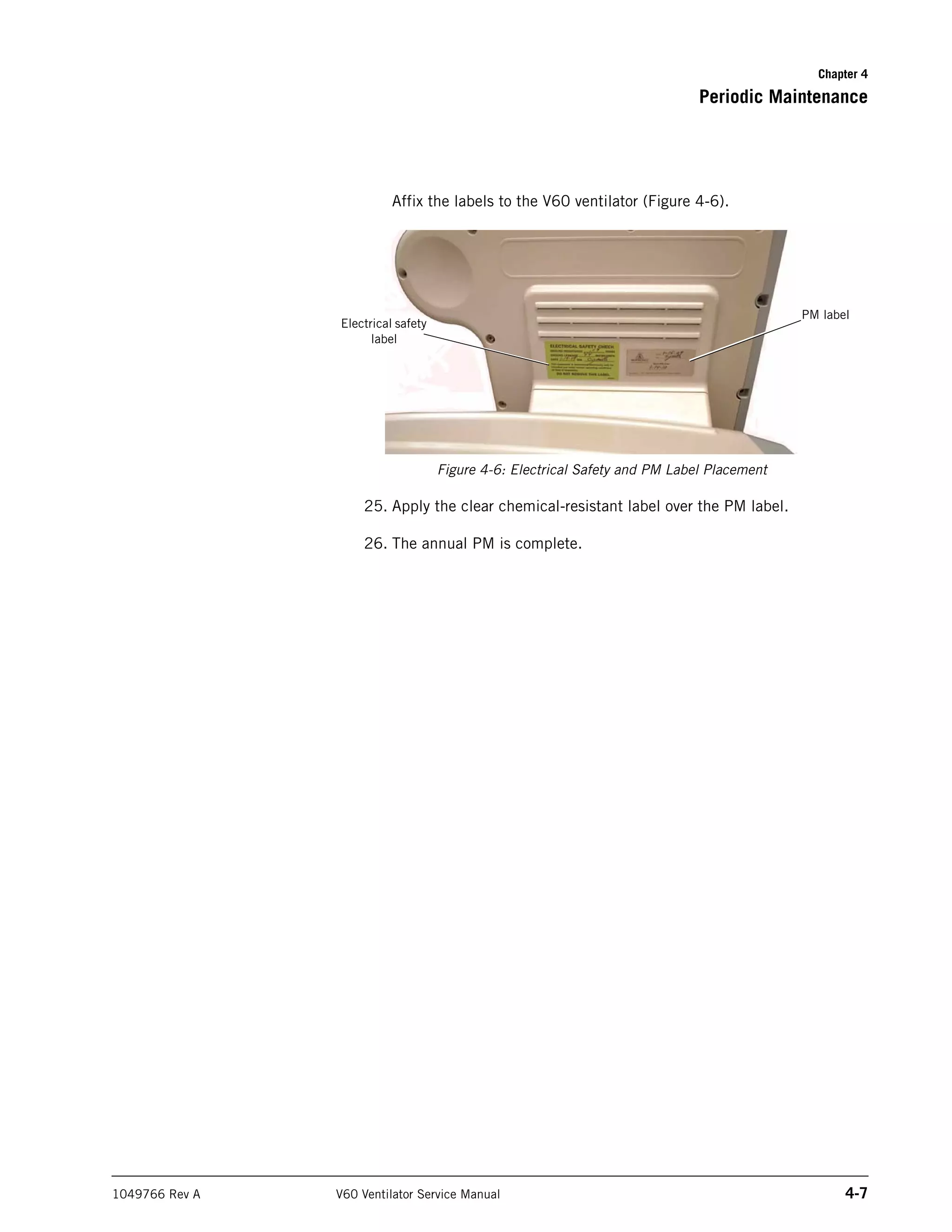
Affix the labels to the V60 ventilator (Figure 4-6).
Figure 4-6: Electrical Safety and PM Label Placement
25. Apply the clear chemical-resistant label over the PM label.
26. The annual PM is complete.
PM label
Electrical safety
label
Chapter 4
4-8 V60 Ventilator Service Manual 1049766 Rev A
Periodic Maintenance
(This page is intentionally blank.)
1049766 Rev A V60 Ventilator Service Manual 5-1
Chapter 5. Diagnostic Mode and
Troubleshooting
Use diagnostic mode to perform these functions:
• System settings: language, ventilator date and time, pressure units,
restore default settings, enable software options, and Baud rate.
• Service: ventilator information, pneumatics and outputs screens (for
troubleshooting), and miscellaneous features (viewing the significant
event log, downloading software, touch screen diagnostics, high
pressure leak test, and system leak test).
• Touch screen calibration.
This chapter also provides detailed information on diagnostic codes and
troubleshooting (section 5.4).
WARNING: Do not enter diagnostic mode while a patient is connected to the ventilator.
NOTE: This mode is primarily reserved for use by a qualified service technician.
To enter diagnostic mode:
1. Press and hold the nav-ring Enter button then press and release the
ventilator On/Shutdown button on the user interface.
2. Within five seconds, press the nav-ring Enter button again to enter the
Diagnostics Menu (Figure 5-1).
Figure 5-1: Diagnostics Menu
3. To exit diagnostic mode at any time, press the ON/Shutdown button.
Chapter 5
5-2 V60 Ventilator Service Manual 1049766 Rev A
Diagnostic Mode and Troubleshooting
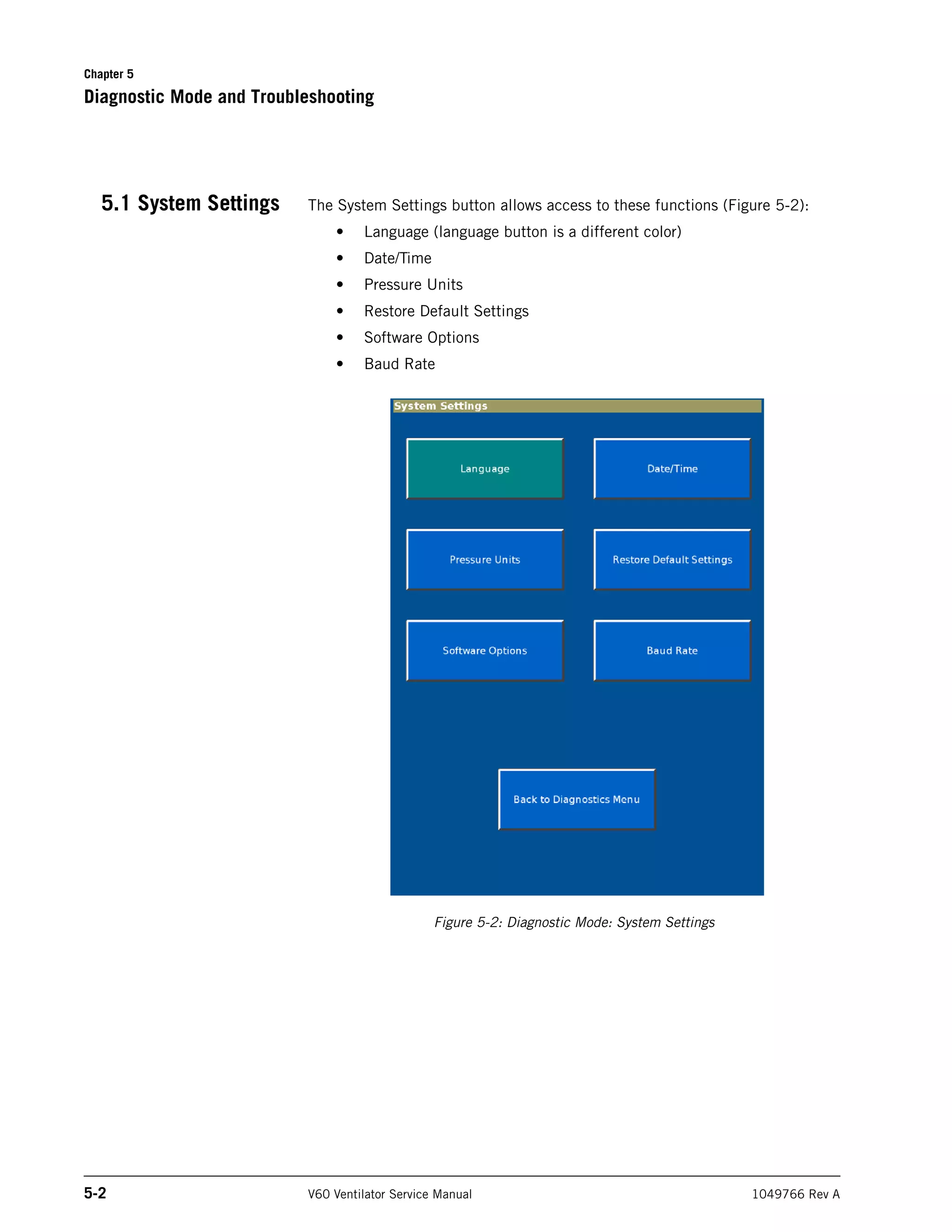
5.1 System Settings The System Settings button allows access to these functions (Figure 5-2):
• Language (language button is a different color)
• Date/Time
• Pressure Units
• Restore Default Settings
• Software Options
• Baud Rate
Figure 5-2: Diagnostic Mode: System Settings
Chapter 5
Diagnostic Mode and Troubleshooting
1049766 Rev A V60 Ventilator Service Manual 5-3
5.1.1 Selecting a Language
The Set Language screen allows you to select the language displayed during
ventilation mode.
NOTE: Screens displayed after touching the Service button from the Diagnostics
Menu appear in English, regardless of the selected language.
1. From the System Settings screen, touch Language.
2. Touch the language button on the Set Language screen (Figure 5-3).
Figure 5-3: Set Language Screen
3. The screen shows the selected language (Figure 5-4).
4. To apply the new language, touch Ventilator Shutdown.
To exit without changing the language, touch Cancel.
Chapter 5
5-4 V60 Ventilator Service Manual 1049766 Rev A
Diagnostic Mode and Troubleshooting
Figure 5-4: Set Language - Apply or Cancel
Chapter 5
Diagnostic Mode and Troubleshooting
1049766 Rev A V60 Ventilator Service Manual 5-5
5.1.2 Setting Date and Time
The Set Date and Time screen allows you to update the ventilator’s date and
time. The ventilator uses these settings for the significant event log, and does
not adjust settings for daylight savings.
1. From the System Settings screen, touch Date/Time.
2. Enter the date and time, then touch Accept (Figure 5-5).
To exit without changing the date and time, touch Cancel.
Figure 5-5: Set Date and Time Screen
Chapter 5
5-6 V60 Ventilator Service Manual 1049766 Rev A
Diagnostic Mode and Troubleshooting
5.1.3 Restoring Default Settings
The Restore Default Settings screen allows you to restore ventilation and alarm
settings to their default values. This function does not change other settings
such as brightness, loudness, language, Baud rate, or pressure units.
1. From the System Settings screen, touch Restore Default Settings.
2. Touch Restore Defaults on the Restore Default Settings screen (Figure
5-6).
To exit without restoring default settings, touch Cancel.
Figure 5-6: Restore Default Settings Screen
3. When all ventilator and alarm settings have been restored to factory
default values, the screen displays this message:
Ventilation and Alarm Settings have been restored to factory defaults.
Chapter 5
Diagnostic Mode and Troubleshooting
1049766 Rev A V60 Ventilator Service Manual 5-7
5.1.4 Selecting Pressure Units
The Set Pressure Units screen allows you to select what unit of pressure the
ventilator displays during ventilation and Diagnostic modes.
1. From the System Settings screen, touch Pressure Units.
2. Touch the selected pressure unit button on the Set Pressure Units
screen (Figure 5-7).
Figure 5-7: Set Pressure Units Screen
3. The screen displays the selected pressure unit and this message:
Pressure units will apply after a ventilator shutdown and restart.
4. To apply the new unit of pressure, touch Ventilator Shutdown.
To exit without changing the unit of pressure, touch Cancel.
Chapter 5
5-8 V60 Ventilator Service Manual 1049766 Rev A
Diagnostic Mode and Troubleshooting
5.1.5 Enabling Software Options
Every software option has a unique enable code for each ventilator. A unique
option code is required for each software option before it can be enabled.
NOTE: Do not install an option until you have verified that the ventilator serial
number on the enclosure matches the serial number shown on the
Ventilator Information screen (section 5.2.1). If a serial number must be
reprogrammed, do so before enabling an option.
1. From the System Settings screen, touch Software Options.
2. Use the onscreen keypad on the Enable Software Options screen
(Figure 5-8) to enter the option code, then touch Accept.
Figure 5-8: Enable Software Options Screen
3. If the option code is invalid, the screen prompts you to reenter.
4. When the software option has been successfully enabled, the screen
displays Enabled: followed by the option name.
5. Repeat as needed to enable additional options.
6. To exit the Enable Software Options screen at any time, touch Back to
System Settings.
Chapter 5
Diagnostic Mode and Troubleshooting
1049766 Rev A V60 Ventilator Service Manual 5-9
5.1.6 Baud Rate
The Set Baud Rate screen allows you to change the ventilator Baud rate for
serial communications during ventilation mode. Diagnostic mode always uses
19,200 Baud.
1. From the System Settings screen, touch Baud Rate.
2. Touch the button to select the Baud rate (Figure 5-9).
Figure 5-9: Set Baud Rate Screen
3. The screen then displays this message:
Baud rate is now set to:
followed by the selected Baud rate.
Chapter 5
5-10 V60 Ventilator Service Manual 1049766 Rev A
Diagnostic Mode and Troubleshooting
5.2 Service The Service button allows access to these functions:
• Ventilator information
• Pneumatic controls
• Output controls
• Miscellaneous (significant event log, download mode, and touch
screen diagnostics, high pressure leak test, and system leak test).
NOTE: Service button functions are intended for use by qualified service
technicians.
Chapter 5
Diagnostic Mode and Troubleshooting
1049766 Rev A V60 Ventilator Service Manual 5-11
5.2.1 Viewing Ventilator Information
Ventilator information is used for periodic maintenance and troubleshooting.
1. From the Service screen, touch the Vent Info tab.
2. The Ventilator Information screen displays software options, serial
numbers, software versions, power-on hours, hours since last PM, and
information on the internal battery and PCBAs (Figure 5-10).
Figure 5-10: Ventilator Information Screen
Chapter 5
5-12 V60 Ventilator Service Manual 1049766 Rev A
Diagnostic Mode and Troubleshooting
5.2.2 Pneumatic Controls
This Pneumatic Controls screen allows you to adjust flows, pressures, oxygen
concentrations, and the state of each solenoid.
1. From the Service screen, touch the Pneumatics tab.
2. The screen displays real-time diagnostic information and pneumatic
controls (Figure 5-11).
Figure 5-11: Pneumatic Controls Screen
Chapter 5
Diagnostic Mode and Troubleshooting
1049766 Rev A V60 Ventilator Service Manual 5-13
5.2.3 Output Controls
This Output Controls screen allows you to set and verify wrap, analog, and
digital outputs.
NOTE: When entering wrap counts, ensure that the displayed values are within
+ 23 counts of the set value.
1. From the Service screen, touch the Outputs tab.
2. The screen shows diagnostic information and output controls (Figure
5-12).
Figure 5-12: Output Controls Screen
Chapter 5
5-14 V60 Ventilator Service Manual 1049766 Rev A
Diagnostic Mode and Troubleshooting
5.2.4 Miscellaneous
The Miscellaneous screen allows you to access the significant event log, touch
screen diagnostics, download mode, high pressure leak test, and system leak
test.
1. From the Service screen, touch the Misc tab.
2. The screen includes the Significant Event Log, Download Mode, Touch
Screen Diagnostics, High Pressure Leak Test, and System Leak Test
buttons (Figure 5-13).
Figure 5-13: Miscellaneous Screen
3. To exit the Miscellaneous screen at any time, touch Back to
Diagnostics Menu.
Chapter 5
Diagnostic Mode and Troubleshooting
1049766 Rev A V60 Ventilator Service Manual 5-15
Significant Event Log
The significant even log allows you to view a log of setting changes, alarms,
and diagnostic codes.
1. From the Miscellaneous screen, touch Significant Event Log.
2. You can use the arrow buttons to page through the significant event
log (Figure 5-14) 25 entries at a time.
Figure 5-14: Significant Event Log
3. To display the beginning or end of the significant event log, touch the
To Newest or To Oldest button.
Refer to Chapter 6, Reports and Software Downloads for information on
interpreting the significant event log and saving it to a computer.
Chapter 5
5-16 V60 Ventilator Service Manual 1049766 Rev A
Diagnostic Mode and Troubleshooting
Download Mode
The Download Mode screen allows you to load operational software onto the
CPU PCBA.
1. From the Miscellaneous screen, touch Download Mode to prepare the
ventilator for a software download. Refer to Chapter 6, Reports and
Software Downloads for more information on downloading software.
2. When the software download is complete, the download complete
screen appears (Figure 5-15).
Figure 5-15: Download Complete Screen
Chapter 5
Diagnostic Mode and Troubleshooting
1049766 Rev A V60 Ventilator Service Manual 5-17
Touch Screen Diagnostics
The Touch Screen Diagnostics screen allows you to verify touch screen x and y
coordinates.
1. From the Miscellaneous screen, touch Touch Screen Diagnostics.
2. At the touch screen diagnostics screen (Figure 5-15), touch the screen
in multiple places to verify correct touch screen function.
Figure 5-16: Touch Screen Diagnostics Screen
Chapter 5
5-18 V60 Ventilator Service Manual 1049766 Rev A
Diagnostic Mode and Troubleshooting
5.3 Touch Screen
Calibration
The Touch Screen Calibration button allows you to calibrate the touch screen x
and y coordinates (Figure 5-17):
1. From the Diagnostics Menu, touch Touch Screen Calibration.
NOTE: If the Touch Screen Calibration button does not respond, press the nav-
ring Enter button to begin.
2. Follow the onscreen instructions to perform the calibration. Touch the
middle of each target with a blunt, narrow object.
Figure 5-17: Calibrate Touch Screen
Chapter 5
Diagnostic Mode and Troubleshooting
1049766 Rev A V60 Ventilator Service Manual 5-19
5.4 Diagnostic Codes,
Alarms, and
Troubleshooting
This section lists possible ventilator diagnostic codes (codes generated by the
ventilator when an event such as a setting change or fault condition is
detected, or when an alarm indicates patient or ventilator conditions), and the
recommended repair for each. Follow the repair procedures in order until the
problem is resolved.
NOTE: See Chapter 7 for information on removing and replacing ventilator
components. See Chapter 8 for performance verification procedures.
Table 5-1: Diagnostic Codes and Troubleshooting
Diagnostic
code Description Recommended repair
1000-10FF Vent Inop Diagnostic Codes
(High-priority error conditions that preclude continued safe operation of the ventilator. A Vent Inop alarm
displays on the screen, turns on remote alarm interfaces, and disables oxygen flow and blower operation.
Immediately place the patient on another means of ventilatory support.) CBIT = continuous built-in tests.
POST = power on self test.
1000
(CBIT)
3.3 V supply failed. 1.Replace PM PCBA.
1001
(CBIT)
12 V supply failed. 1.Replace PM PCBA.
1002
(CBIT)
Blower temperature too high. 1.Verify that cooling fan is
operational
2.Replace blower.
3.Replace MC PCBA.
1003
(CBIT)
Internal temperature high at CPU PCBA. 1.Replace CPU PCBA.
1004
(CBIT)
Internal temperature high at DA PCBA. 1.Verify that cooling fan is
operational.
2.Replace DA PCBA.
1005
(CBIT)
Internal temperature high at MC PCBA. 1.Verify that cooling fan is
operational.
2.Replace MC PCBA.
1006
(CBIT)
DA PCBA ADC failed. 1.Replace DA PCBA.
1007
(POST)
1008
(CBIT)
Machine and proximal pressure sensors failed. 1.Replace DA PCBA to MC PCBA
cable.
2.Replace DA PCBA.
Chapter 5
5-20 V60 Ventilator Service Manual 1049766 Rev A
Diagnostic Mode and Troubleshooting
1009 Pressure regulation high. 1.Verify pressures and flows.
2.Replace DA PCBA.
3.Replace MC PCBA.
100A
(CBIT)
DA PCBA ADC reference failed. 1.Verify 3.3V in diagnostics.
2.Verify 2.5V ref on DA PCBA.
3.Replace DA PCBA to MC PCBA
cable.
4.Replace DA PCBA.
5.Replace PM PCBA.
100B
(POST)
Watchdog test failed. Replace CPU.
1100-11FF Check Vent Diagnostic Codes
(High-priority error conditions that require immediate attention. Ventilator continues to operate with limited
performance. Do not use the ventilator until the problem is corrected.) CBIT = continuous built-in tests. POST
= power on self test.
1100
(CBIT)
Program CRC test failed. 1.Re-load software.
2.Replace CPU PCBA.
1101 Ventilator restarted. 1.Replace CPU PCBA.
1102
(POST)
Primary alarm failed. 1.Listen for audible sound from
speakers.
2.Verify speakers are connected.
3.Replace speaker #1 (MC PCBA).
4.Replace speaker #2 (PM PCBA).
5.Replace CPU PCBA.
1104
(POST)
Backup alarm failed. 1.Replace PM PCBA.
2.Replace CPU PCBA.
1105
(POST)
Alarm LED failed. 1.Replace power switch overlay.
2.Replace UI to PM PCBA cable.
3.Replace PM PCBA (PM PCBA
only if LED is functioning).
1106
(POST)
Machine pressure sensor calibration data error.
Proximal pressure is not measured. Pressure-related alarms
are compromised.
1.Replace DA PCBA.
Table 5-1: Diagnostic Codes and Troubleshooting
Diagnostic
code Description Recommended repair
Chapter 5
Diagnostic Mode and Troubleshooting
1049766 Rev A V60 Ventilator Service Manual 5-21
1107
(POST)
Proximal pressure sensor calibration data error.
Proximal pressure is not measured. Pressure-related alarms
are compromised.
1.Replace DA PCBA.
1108
(POST)
1109
(CBIT)
Machine pressure sensor auto-zero failed.
Proximal pressure is not measured. Pressure-related alarms
are compromised.
1.Verify pin alignment between
solenoids and DA PCBA.
2.Replace machine auto-zero
solenoid (SOL 2).
3.Replace DA PCBA.
110A
(POST)
110B
(CBIT)
Proximal pressure sensor auto-zero failed.
Proximal pressure is not measured. Pressure-related alarms
are compromised.
1.Verify pin alignment between
solenoids and DA PCBA.
2.Replace proximal auto-zero
solenoid (SOL 3).
3.Replace DA PCBA.
110C
(CBIT)
Machine pressure sensor range error.
Proximal pressure is not measured. Pressure-related alarms
are compromised.
1.Cycle ventilator power to reset
proximal pressure sensor.
2.Replace DA PCBA.
110D
(CBIT)
Proximal pressure sensor range error.
Proximal pressure is not measured. Pressure-related alarms
are compromised.
1.Cycle ventilator power to reset
proximal pressure sensor.
2.Replace DA PCBA.
110E
(POST)
Air flow sensor calibration data error.
Flow-related patient data is disabled. Oxygen concentration
switches to 21% (air only). Default volume used in AVAPS
mode. Standby disabled. Volume, leak, disconnect, and
occlusion alarms compromised.
1.Replace flow sensor cable.
2.Replace flow sensor assembly.
3.Replace DA PCBA.
110F
(POST)
Oxygen flow sensor calibration data error.
Ventilation continues with air only.
1.Replace flow sensor cable.
2.Replace flow sensor assembly.
3.Replace DA PCBA.
1110
(POST)
Oxygen pressure sensor calibration data error.
Ventilation continues with air only.
1.Replace DA PCBA.
Table 5-1: Diagnostic Codes and Troubleshooting
Diagnostic
code Description Recommended repair
Chapter 5
5-22 V60 Ventilator Service Manual 1049766 Rev A
Diagnostic Mode and Troubleshooting
1111
(CBIT)
Oxygen device failed.
Ventilation continues with air only.
1.Inspect the oxygen inlet filter for
contamination or debris.
2.Perform high pressure leak test
(Chapter 8).
3.Verify oxygen flows (Chapter 8).
4.Replace oxygen valve.
5.Replace DA PCBA.
1112
(CBIT)
Oxygen pressure sensor range error.
Ventilation continues with air only.
1.Verify correct oxygen pressure
sensor function.
2.Replace DA PCBA.
1113
(POST)
Barometer calibration data error.
Default barometric pressure of 686.0 mmHg
(approximately 900 m/2953 ft above sea level) used in
calculations.
1.Replace DA PCBA.
1114 Barometer sensor range error.
Default barometric pressure of 686.0 mmHg
(approximately 900 m/2953 ft above sea level) used in
calculations.
1.Verify correct barometric
pressure sensor function.
2.Replace DA PCBA.
1115 Auxiliary alarm supply failed.
Audible and visual alarm indicators activate and the
ventilator continues to ventilate with air only in a reduced
capacity.
1.Replace MC PCBA.
2.Replace PM PCBA.
1116
(CBIT)
1.8 V supply failed. 1.Replace CPU PCBA.
1117
(CBIT)
3.3 V supply failed. 1.Replace PM PCBA.
1118
(POST)
5 V supply failed. 2.Replace PM PCBA.
1119
(CBIT)
12 V supply failed. 1.Replace PM PCBA.
111A
(POST)
24 V supply failed. 1.Replace power supply.
111B
(POST)
35 V supply failed. 1.Replace PM PCBA.
2.Replace MC PCBA.
Table 5-1: Diagnostic Codes and Troubleshooting
Diagnostic
code Description Recommended repair
Chapter 5
Diagnostic Mode and Troubleshooting
1049766 Rev A V60 Ventilator Service Manual 5-23
111C
(CBIT)
DA PCBA ADC failed. 1.Replace DA PCBA.
111D
(CBIT)
MC PCBA ADC failed. 1.Replace MC PCBA.
111E
(CBIT)
CPU PCBA ADC failed. 1.Replace CPU PCBA.
111F
(CBIT)
Internal temperature high at CPU PCBA. 1.Replace CPU PCBA.
1120
(CBIT)
Internal temperature high at DA PCBA. 1.Verify that cooling fan is
operational.
2.Replace DA PCBA.
1121
(CBIT)
Internal temperature high at MC PCBA. 1.Verify that cooling fan is
operational.
2.Replace MC PCBA.
1122
(CBIT)
Blower temperature high. 1.Verify that cooling fan is
operational.
2.Replace blower.
3.Replace MC PCBA.
1123
(CBIT)
Battery temperature high. 1.Replace internal battery.
2.Replace PM PCBA.
1124
(CBIT)
Battery failed.
Audible and visual alarm indicators activate and the
ventilator continues to ventilate. Battery charger turns off.
1.Replace internal battery.
2.Replace PM PCBA.
1125
(CBIT)
Cooling fan speed error.
Ventilator overheating possible.
1.Verify that cooling fan RPM is
4000 + 1000 RPM.
2.Replace fan.
3.Replace PM PCBA.
1126 Flash file system error. 1.Repeat software download.
2.Replace CPU PCBA.
1127 OVP circuit failed. 1.Replace MC PCBA.
Table 5-1: Diagnostic Codes and Troubleshooting
Diagnostic
code Description Recommended repair
Chapter 5
5-24 V60 Ventilator Service Manual 1049766 Rev A
Diagnostic Mode and Troubleshooting
1200-120F Alarm Message Diagnostic Codes
(Alarm conditions that indicate a patient or ventilator condition that requires immediate attention.)
1200 Alarm message: Patient Disconnect
Patient is no longer connected to the ventilator, either
through circuit, mask, or ET tube; or the patient circuit is
disconnected from the ventilator and the patient is no
longer receiving ventilatory support. Ventilation continues.
Check patient. Confirm that
ventilator and alarm settings are
appropriate. If problem persists,
provide alternative ventilation.
Service ventilator.
1201 Alarm message: Patient Circuit Occluded
Patient circuit occluded.
Check patient. Check patient
circuit for bulk liquid, crimps, or
blocked filter. Confirm that
ventilator and alarm settings are
appropriate. If problem persists,
provide alternative ventilation.
Service ventilator.
1202 Alarm message: Proximal Pressure Line Disconnect
Proximal pressure line is disconnected. Air flow to patient
continues.
Check patient. Reconnect
proximal pressure line. Confirm
that ventilator and alarm settings
are appropriate. If problem
persists, provide alternative
ventilation. Service ventilator.
1203 Alarm message: Low Leak-CO2 Rebreathing Risk
Exhalation port may be occluded. Ventilation continues if
possible.
Check patient, as possibility of
CO2 rebreathing could pose a
potential problem. Check the port
for occlusions.
1204 Alarm message: Low Internal Battery
Battery can provide operating power for only an additional
15 minutes under nominal conditions. Autoresets when
ventilator is connected to AC power.
Connect the ventilator to AC
power. Provide alternate
ventilation.
1205 Alarm message: Pressure Regulation High
Pressures exceed ventilator-defined thresholds. Ventilation
continues. Autoresets when alarm condition removed.
Transitions to the ventilator inoperative state if pressure
continues to rise.
Check patient. Confirm that
ventilator and alarm settings are
appropriate. If problem persists,
provide alternative ventilation.
Service ventilator.
Table 5-1: Diagnostic Codes and Troubleshooting
Diagnostic
code Description Recommended repair
Chapter 5
Diagnostic Mode and Troubleshooting
1049766 Rev A V60 Ventilator Service Manual 5-25
1206 Alarm message: High Inspiratory Pressure
Measured inspiratory pressure is greater than the HIP
setting and the ventilator cycles into exhalation. Autoresets
after a complete inspiration without the alarm condition.
Check patient. Confirm that
ventilator and alarm settings are
appropriate. If problem persists,
provide alternative ventilation.
Service ventilator.
1207 Alarm message: Low Inspiratory Pressure
Measured inspiratory pressure is less than the LIP setting.
Check patient. Confirm that
ventilator and alarm settings are
appropriate. If problem persists,
provide alternative ventilation.
Service ventilator.
1208 Alarm message: Oxygen Not Available
Oxygen supply pressure out of range, oxygen device failed,
air flow sensor and/or oxygen flow sensor calibration failed,
or oxygen inlet pressure sensor calibration failed. The
ventilator discontinues oxygen support.
Check patient. Check if high/low
O2 source is the problem and
correct. If problem persists,
provide alternative ventilation.
Service ventilator.
1209 Alarm message: Low O2 Supply Pressure
Oxygen supply pressure is less than 40 psig and delivered
oxygen is at least 5% lower than O2 setting. The ventilator
continues to deliver as much oxygen as possible, but ends
oxygen support when oxygen inlet pressure drops to less
than 18 psig. Autoresets when oxygen supply pressure
exceeds 23 psig.
Check patient. Confirm that
ventilator and alarm settings are
appropriate. If problem persists,
provide alternative ventilation.
Service ventilator.
120A Alarm message: High O2 Supply Pressure
O2 inlet pressure is greater than 92 psig, O2 enrichment
ends. Autoresets when O2 supply pressure falls below 87
psig.
Check patient. If problem persists,
provide alternative ventilation.
Service ventilator.
120D Alarm message: Low Rate
A low-priority alarm if the measured respiratory rate is less
than the Lo Rate setting, escalating to a high-priority alarm
in 60 sec.
Begins as a high-priority alarm if:
• The Lo Rate setting is < 4 BPM and there are no breaths
for > 60/Lo Rate setting.
• The Lo Rate setting is > 4 BPM and there are no breaths
for > 15 sec.
Check patient. Confirm that
ventilator and alarm settings are
appropriate. If problem persists,
provide alternative ventilation.
Service ventilator.
Table 5-1: Diagnostic Codes and Troubleshooting
Diagnostic
code Description Recommended repair
Chapter 5
5-26 V60 Ventilator Service Manual 1049766 Rev A
Diagnostic Mode and Troubleshooting
120E Alarm message: Low Minute Ventilation
Estimated minute ventilation is less than the
Lo
.
VE setting. Escalates to a high-priority alarm if the alarm
condition persists for more than 60 sec.
Check patient. Confirm that
ventilator and alarm settings are
appropriate. If problem persists,
provide alternative ventilation.
Service ventilator.
120F Alarm message: Low Tidal Volume
Estimated tidal volume is less than the Lo VT setting.
Escalates to a high-priority alarm if the alarm condition
persists for more than 60 sec.
Check patient. Confirm that
ventilator and alarm settings are
appropriate. If problem persists,
provide alternative ventilation.
Service ventilator.
1210 Alarm message: High Tidal Volume
Measured estimated tidal volume is greater than the Hi VT
setting. Escalates to a high-priority alarm if the alarm
condition persists for more than 60 sec.
Check patient. Confirm that
ventilator and alarm settings are
appropriate. If problem persists,
provide alternative ventilation.
Service ventilator.
1211 Alarm message: High Rate
Measured respiratory rate is greater than the Hi Rate
setting. Escalates to a high-priority alarm if the alarm
condition persists for more than 60 sec.
Check patient. Confirm that
ventilator and alarm settings are
appropriate. If problem persists,
provide alternative ventilation.
Service ventilator.
1212 Alarm message: Running on Internal Battery
System is powered by internal battery. Autoresets when
ventilator is connected to AC power.
Connect ventilator to AC power.
1213 Alarm message: Using Default Settings
Displayed after power on if setting values are corrupted or
not set, or if default values were restored by the user.
Check patient. Check and adjust
settings as required.
1214 Alarm message: AVAPS: Target Vt Not Achieved.
Insufficient Max Pressure
AVAPS target pressure exceeds AVAPS Max P setting. The
ventilator limits applied pressure to Max P.
Check patient. Confirm that
pressure settings are compatible
with target. Evaluate pressure and
volume settings.
1215 Alarm message: AVAPS: Target Vt Exceeded. Min Pressure
Too High
AVAPS target pressure is less than Min P setting. The
ventilator limits applied pressure to Min P.
Check patient. Confirm that
pressure settings are compatible
with target. Evaluate pressure and
volume settings.
Table 5-1: Diagnostic Codes and Troubleshooting
Diagnostic
code Description Recommended repair
Chapter 5
Diagnostic Mode and Troubleshooting
1049766 Rev A V60 Ventilator Service Manual 5-27
1216 Alarm message: Mask:x, Exh Port:y
Use Menu to change
Displays when ventilator is turned on. Displays selected
mask type and exhalation port.
Select mask and port from Menu
tab. Message is removed when
user confirms selections, or after 5
minutes.
1217 Alarm message: Power Has Been Restored
Power is restored following loss of power. The ventilator
restarts and continues ventilation in the mode set before
power was lost.
Check patient. Confirm that
ventilator and alarm settings are
appropriate.
2000- 2003 Informational Diagnostic Codes (no user action required)
2000 System startup (diagnostic). Occurs when ventilator is power
ON in diagnostic mode: no action
required.
2001 System startup (ventilation). Occurs when ventilator is powered
ON in normal ventilation: no
action required.
2002 System shutdown. Occurs when ventilator is powered
OFF: no action required.
2003 Restored default settings Occurs when default settings are
restored: no action required.
5xxx: Leaks Tests Diagnostic Codes
5000 Passed high pressure leak test. No action required.
5001 Failed high pressure leak test.
Leak detected.
1.Verify that oxygen source is
adequate for this test.
2.Check for leaks at the oxygen
fitting, oxygen filter element
cap, oxygen solenoid valve, and
oxygen pressure transducer.
3.Check that the oxygen solenoid
valve is fully closed by verifying
that there is zero flow across the
oxygen flow sensor. If not,
replace the oxygen solenoid
valve.
4.Verify that the oxygen pressure
transducer is reading correctly.
If not, replace the DA PCBA.
Table 5-1: Diagnostic Codes and Troubleshooting
Diagnostic
code Description Recommended repair
Chapter 5
5-28 V60 Ventilator Service Manual 1049766 Rev A
Diagnostic Mode and Troubleshooting
5002 Failed high pressure leak test.
Start pressure too low.
1.Verify that oxygen source is
adequate for this test.
2.Check for leaks at the oxygen
fitting, oxygen filter element
cap, oxygen solenoid valve, and
oxygen pressure transducer.
3.Check that the oxygen solenoid
valve is fully closed by verifying
that there is zero flow across the
oxygen flow sensor. If not,
replace the oxygen solenoid
valve.
4.Verify that the oxygen pressure
transducer is reading correctly.
If not, replace the DA PCBA.
5003 Failed high pressure leak test.
Start pressure too high.
1.Verify that oxygen source is
adequate for this test.
2.Verify that the oxygen pressure
transducer is reading correctly.
If not, replace the DA PCBA.
5004 Failed high pressure leak test.
Pressure rise detected.
1.Verify shut off valve is closed on
the that oxygen source is
adequate for this test.
2.Check for leaks at the oxygen
fitting.
3.Check that the oxygen solenoid
valve is fully closed by verifying
that there is zero flow across the
oxygen flow sensor. If not,
replace the oxygen solenoid
valve.
4.Verify that the oxygen pressure
transducer is reading correctly.
If not, replace the DA PCBA.
5005 Passed system leak test. No action required.
Table 5-1: Diagnostic Codes and Troubleshooting
Diagnostic
code Description Recommended repair
Chapter 5
Diagnostic Mode and Troubleshooting
1049766 Rev A V60 Ventilator Service Manual 5-29
5006 Failed system leak test.
Leak detected.
1.Verify that the internal
exhalation port, air inlet port,
gas outlet port and proximal port
are plugged properly.
2.Verify that the system leak test
syringe tubing is properly
clamped.
3.Check for disconnected or cut
tubing from the GDS to the gas
outlet port, and from the gas
outlet port to the base assembly.
4.Check for misaligned or cut
rubber boots from the GDS to
the blower, and from the blower
to the gas outlet port.
5.Check for leaks at the flow
sensor assembly, solenoid
valves, and pressure
transducers.
6.Verify that the machine and
proximal pressure transducers
are reading correctly. If not,
replace the DA PCBA.
Table 5-1: Diagnostic Codes and Troubleshooting
Diagnostic
code Description Recommended repair
Chapter 5
5-30 V60 Ventilator Service Manual 1049766 Rev A
Diagnostic Mode and Troubleshooting
5007 Failed system leak test.
Start pressure too low.
1.Verify that the internal
exhalation port, air inlet port,
gas outlet port and proximal port
are plugged properly.
2.Verify that the system leak test
syringe tubing is properly
clamped.
3.Check for disconnected or cut
tubing from the GDS to the gas
outlet port, and from the gas
outlet port to the base assembly.
4.Check for misaligned or cut
rubber boots from the GDS to
the blower, and from the blower
to the gas outlet port.
5.Check for leaks at the flow
sensor assembly, solenoid
valves, and pressure
transducers.
6.Verify that the machine and
proximal pressure transducers
are reading correctly. If not,
replace the DA PCBA.
5008 Failed system leak test.
Start pressure too high.
1.Verify that the system leak test
syringe tubing is properly
clamped.
2.Verify that the machine and
proximal pressure transducers
are reading correctly. If not,
replace the DA PCBA.
5009 Failed system leak test.
Pressure rise detected.
1.Verify that the system leak test
syringe tubing is properly
clamped.
2.Verify that the machine and
proximal pressure transducers
are reading correctly. If not,
replace the DA PCBA.
Table 5-1: Diagnostic Codes and Troubleshooting
Diagnostic
code Description Recommended repair
Chapter 5
Diagnostic Mode and Troubleshooting
1049766 Rev A V60 Ventilator Service Manual 5-31
5.5 Miscellaneous
Troubleshooting Tips
Table 5-2 summarizes troubleshooting tips for the V60 ventilator. Follow the
repair procedures in order until the problem is resolved.
Table 5-2: Miscellaneous Troubleshooting Tips
Symptom Recommended repair
Cannot turn ventilator off because LCD is blank
or touch screen is unresponsive.
1.Press ON/Shutdown and then release and
press the nav-ring Enter button.
Unexpected touch screen response. 1.Calibrate the touch screen (section 5.3).
Low Leak-CO2 Rebreathing Risk alarm occurs
during performance verification oxygen
accuracy test.
1.Verify test setup and that Whisper Swivel is
correctly installed.
DAC ADC reference voltage failure. 1.Verify that the MC PCBA is fully seated onto
the CPU PCBA.
Cooling fan does not operate when the ventilator
is off and the internal battery is charging.
1.Replace fan.
2.Replace PM PCBA.
3.Replace power supply.
Chapter 5
5-32 V60 Ventilator Service Manual 1049766 Rev A
Diagnostic Mode and Troubleshooting
(This page is intentionally blank.)
1049766 Rev A V60 Ventilator Service Manual 6-1
Chapter 6. Reports and Software Downloads
This chapter describes how to set up and use a service PC to generate
diagnostic reports, download software to the ventilator, or program the
ventilator serial number.
• Section 6.1.1 describes how enable communication between a service
PC and a ventilator.
• Section 6.2 describes how to generate diagnostic reports.
• Section 6.4 describes how to downloading software to the ventilator.
• Section 6.5 describes how to programming the ventilator serial
number.
6.1 Setting Up the
Service PC
This section describes how to set up a service PC to communicate with the
ventilator. Once communication is enabled, you can generate diagnostic
reports, download software to the ventilator, or program the ventilator serial
number. Use either of these programs to enable PC-to-ventilator
communication:
• HyperTerminal (Section 6.1.1)
• Tera Term (Section 6.1.2)
Chapter 6
6-2 V60 Ventilator Service Manual 1049766 Rev A
Reports and Software Downloads
6.1.1 Setting Up the Serial Interface Using HyperTerminal
Follow these steps to set up the HyperTerminal program, which enables the
ventilator to communicate to a service PC.
1. Launch the HyperTerminal program on the PC by clicking Start > All
Programs > Accessories > Communications > HyperTerminal.
2. If the Default Telnet Program? screen appears, click No (Figure 6-1).
Figure 6-1: Default Telnet Program Screen
3. Enter V60 as the name, choose an icon, then click OK (Figure 6-2).
Figure 6-2: Selecting the Connection Description
Chapter 6
Reports and Software Downloads
1049766 Rev A V60 Ventilator Service Manual 6-3
4. Select the appropriate COM port, then click OK (Figure 6-3).
Figure 6-3: Selecting the COM Port
5. Select the COM port properties, then click OK (Figure 6-4).
Figure 6-4: Selecting the COM Port Properties
Chapter 6
6-4 V60 Ventilator Service Manual 1049766 Rev A
Reports and Software Downloads
6. At the HyperTerminal window, click File, then Properties (Figure 6-5).
Figure 6-5: Selecting HyperTerminal Properties
7. Select these HyperTerminal settings, then click ASCII Setup (Figure 6-
6).
Figure 6-6: Entering HyperTerminal Settings
Chapter 6
Reports and Software Downloads
1049766 Rev A V60 Ventilator Service Manual 6-5
8. Select these ASCII settings, then click OK (Figure 6-7).
Figure 6-7: Entering ASCII Settings
9. Select File, then Save As and save the V60 icon to the Windows
desktop (Figure 6-8).
Figure 6-8: Saving the V60 Icon to the Desktop
Chapter 6
6-6 V60 Ventilator Service Manual 1049766 Rev A
Reports and Software Downloads
6.1.2 Setting Up the Serial Interface Using Tera Term
Follow these steps to set up the Tera Terminal program, which enables the
ventilator to communicate to a service PC.
1. From your web browser go to: http://ttssh2.sourceforge.jp/, then click
the download page link.
2. Click on teraterm-x.xx.exe.
NOTE: If your PC does not allow the download, follow the instructions for “click
this link.”
3. Click Run on the File Download screen (Figure 6-9).
Figure 6-9: File Download Screen
4. A progress screen is displayed during the file download (Figure 6-10).
Figure 6-10: File Download
Chapter 6
Reports and Software Downloads
1049766 Rev A V60 Ventilator Service Manual 6-7
5. When the file download is complete, click Run (Figure 6-11).
Figure 6-11: File Download Complete
6. If the security warning screen appears, click Run (Figure 6-12).
Figure 6-12: Internet Explorer Security Warning
Chapter 6
6-8 V60 Ventilator Service Manual 1049766 Rev A
Reports and Software Downloads
7. When the Tera Term setup screen appears, click Next (Figure 6-13).
Figure 6-13: Tera Term Setup Screen
8. Click the I accept the agreement radio button, then click Next (Figure
6-14).
Figure 6-14: Tera Term License Agreement Screen
Chapter 6
Reports and Software Downloads
1049766 Rev A V60 Ventilator Service Manual 6-9
9. Select a destination, then click Next (Figure 6-15).
Figure 6-15: Destination Location Screen
10. Select Standard installation on the Select Components screen, then
click Next (Figure 6-16).
Figure 6-16: Select Components Screen
Chapter 6
6-10 V60 Ventilator Service Manual 1049766 Rev A
Reports and Software Downloads
11. Select a language, then click Next (Figure 6-17).
Figure 6-17: Select Language Screen
12. At the Select Start Menu screen, click Next (Figure 6-18).
Figure 6-18: Select Start Menu Screen
Chapter 6
Reports and Software Downloads
1049766 Rev A V60 Ventilator Service Manual 6-11
13. At the Select Additional Tasks screen select Create Tera Term shortcut
to Desktop, then click Next (Figure 6-19).
Figure 6-19: Select Additional Tasks Screen
14. At the Ready to Install screen, then click Install (Figure 6-20).
Figure 6-20: Ready to Install Screen
Chapter 6
6-12 V60 Ventilator Service Manual 1049766 Rev A
Reports and Software Downloads
15. Tera Term begins installing on your PC (Figure 6-21).
Figure 6-21: Tera Term Installing Screen
16. At the Completing the Tera Term Setup screen, click Launch Tera
Term, then click Finish (Figure 6-22).
Figure 6-22: Completing the Tera Term Setup Screen
Chapter 6
Reports and Software Downloads
1049766 Rev A V60 Ventilator Service Manual 6-13
17. Once the Tera Term Setup is installed, the New Connection screen
appears (Figure 6-23).
Figure 6-23: Tera Term New Connection Screen
18. Select the Serial radio button, then click OK (Figure 6-24).
Figure 6-24: Selecting a Serial Connection
Chapter 6
6-14 V60 Ventilator Service Manual 1049766 Rev A
Reports and Software Downloads
19. Select Setup, then click Serial port (Figure 6-25).
Figure 6-25: Selecting the Serial Port Setup
20. Select these serial port properties, then click OK (Figure 6-26).
Figure 6-26: Serial Port Setup Screen
Chapter 6
Reports and Software Downloads
1049766 Rev A V60 Ventilator Service Manual 6-15
21. Select Setup, then click Terminal (Figure 6-27).
Figure 6-27: Selecting the Terminal Setup
22. Select these terminal properties, then click OK (Figure 6-28).
Figure 6-28: Terminal Setup Screen
Chapter 6
6-16 V60 Ventilator Service Manual 1049766 Rev A
Reports and Software Downloads
23. Select Setup, then click Save setup (Figure 6-29).
Figure 6-29: Saving the Tera Term Setup
24. At the Save setup screen, click Save (Figure 6-30).
Figure 6-30: Tera Term Save Setup Screen
Chapter 6
Reports and Software Downloads
1049766 Rev A V60 Ventilator Service Manual 6-17
6.2 Generating a
Diagnostic Report
(DRPTA)
The DRPTA command allows you to save ventilator diagnostic codes to your
PC.
NOTE: Do not connect the null modem cable until instructed to do so.
1. Place the ventilator in diagnostic mode.
2. Connect the 25-pin to 9-pin adapter and a null modem cable between
the ventilator COM port and the service PC.
3. Click on the HyperTerminal or Tera Term icon to launch the program
that communicates with the V60 ventilator.
4. Type DRPTA (all caps) in the dialog box (Figure 6-31), and press
Enter.
Figure 6-31: Entering the DRPTA Command
HyperTerminal dialog box
Tera Term dialog box
Chapter 6
6-18 V60 Ventilator Service Manual 1049766 Rev A
Reports and Software Downloads
5. If the command is successful, a DRPTA appears (Figure 6-32).
Figure 6-32: Example Diagnostic Report (DRPTA)
HyperTerminal DRPTA
Tera Term DRPTA
Chapter 6
Reports and Software Downloads
1049766 Rev A V60 Ventilator Service Manual 6-19
6. Figure 6-33 shows example lines of a DRPTA report and how to
interpret them.
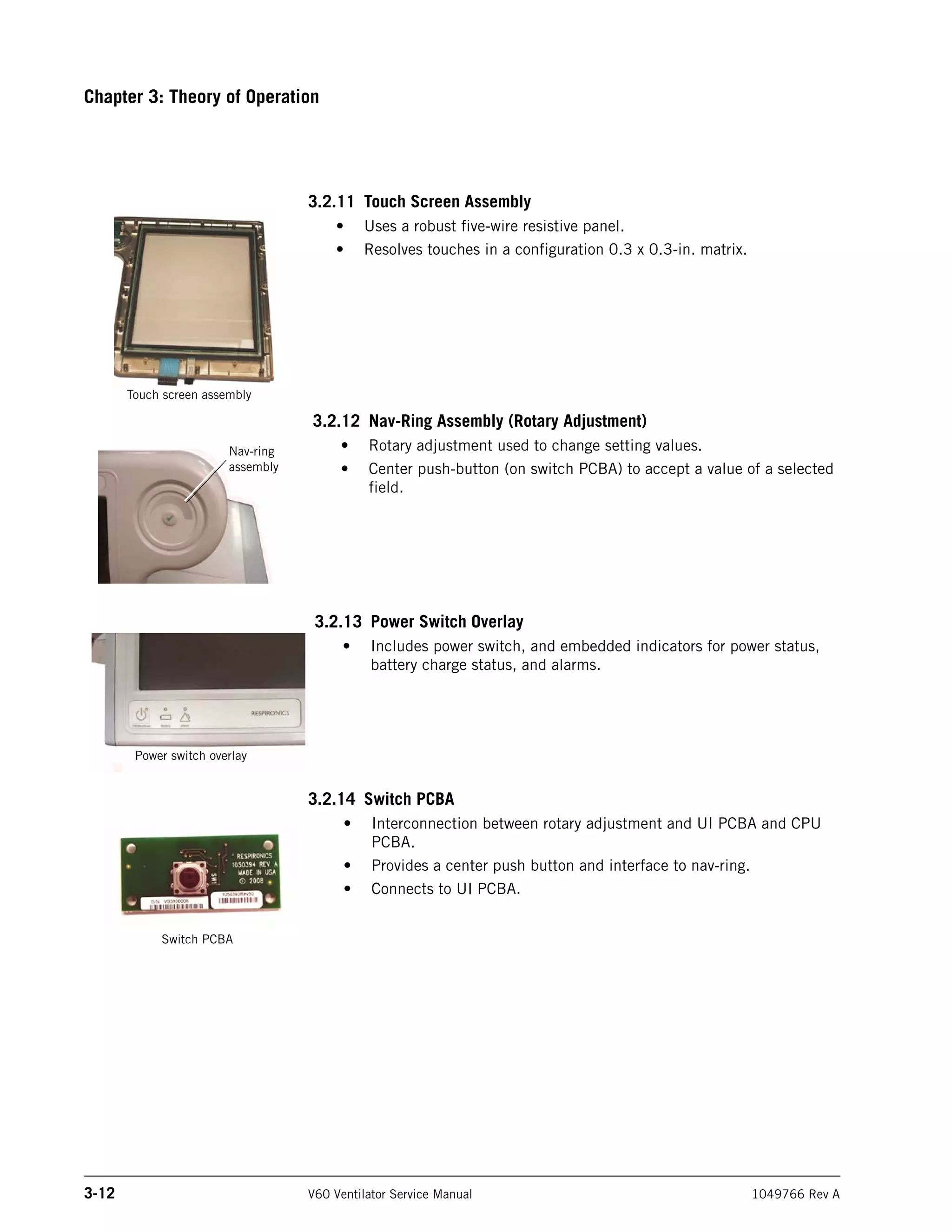
Figure 6-33: Interpreting the DRPTA Report
Diagnostic
code
Time of event Date of event Description
Setting description
Previous
(from) setting
New (to)
setting
Diagnostic
code
Time of event Date of event
Chapter 6
6-20 V60 Ventilator Service Manual 1049766 Rev A
Reports and Software Downloads
6.3 Clearing the
Significant Event Log
The #CLRLOG command allows you to use your PC to clear the significant
event log.
CAUTION: Only qualified service technicians are to clear the significant event log.
NOTE: Do not clear the significant log until you have used the DRPTA command
to save the information to your PC using HyperTerminal or Tera Term.
1. Enter Diagnostic mode by pressing and holding the nav-ring Enter
button and turn on the ventilator by pressing the On/Shutdown button.
Within 5 seconds, press the nav-ring Enter button again to enter
Diagnostic mode.
2. Connect the 25-pin to 9-pin adapter and null modem cable between
the ventilator COM port and the service PC.
3. Click on the HyperTerminal or Tera Term icon to launch the program
that communicates with the V60 ventilator.
4. Type: #CLRLOG (all caps) in the dialog box, and press Enter to clear
the diagnostic log (Figure 6-34).
Figure 6-34: Clear Diagnostic Codes Command
5. When the diagnostic log has been successfully cleared, the dialog box
displays this response:
?CLRLOGOK
6. Clearing the diagnostic log is complete.
Chapter 6
Reports and Software Downloads
1049766 Rev A V60 Ventilator Service Manual 6-21
6.4 Downloading
Ventilator Software
Use the Respi-Link Remote Diagnostic System to download V60 ventilator
software. If your institution is not Respi-Link capable, contact Respironics to
request Respi-Link information from your local Field Service Specialist or
Regional Service Provider.
If your institution is Respi-Link capable, contact Respironics to have a
software package deployed. See Appendix A for installation instructions using
Respi-Link.
NOTE: Note: If you have replaced the CPU PCBA, please contact Respironics to
have your local Field Service Specialist or Regional Service Provider
install the software for you.
For technical support and customer service, contact:
USA and Canada: 800-345-6443 or 724-387-4000
Respironics Europe, Africa, Middle East: +33-1-47-52-30-00
Respironics Asia Pacific: +852-3194-2280
6.5 Programming the
Ventilator Serial
Number and Power-
On Hours
The ventilator serial number and power-on hours must be re-programmed to
the CPU PCBA whenever you replace the CPU PCBA.
CAUTION: Only qualified service technicians are to program the ventilator serial
number and power-on hours.
NOTE: V60 ventilator software must be installed before programming the
ventilator serial number or power-on hours.
6.5.1 Programming the Ventilator Serial Number
NOTE: Do not connect the null modem cable until instructed to do so.
Follow these steps to re-program the ventilator serial number to a new CPU
PCBA:
1. Enter Diagnostic mode by pressing and holding the nav-ring Enter
button and turn on the ventilator by pressing On/Shutdown. Within 5
seconds, press the nav-ring Enter button again to enter Diagnostic
mode.
2. Turn on the PC and connect a standard 9-pin male/female RS 232
null modem cable and a 9-pin to 25-pin female/male adapter between
the PC serial port and the V60 ventilator.
3. Click on the HyperTerminal or Tera Term icon to launch the program
that enables communication with the V60 ventilator.
Chapter 6
6-22 V60 Ventilator Service Manual 1049766 Rev A
Reports and Software Downloads
4. Type:
#PCNFGxxxxxxxxx
(all caps) in the dialog box (xxxxxxxxx is the ventilator serial number),
and press Enter (Figure 6-35).
Figure 6-35: Ventilator Serial Number Programming Command
(HyperTerminal dialog box)
(Tera Terminal dialog box)
Chapter 6
Reports and Software Downloads
1049766 Rev A V60 Ventilator Service Manual 6-23
5. The V60 ventilator stores the serial number and the dialog box
displays this response: ?CFGOK
6. Touch Misc then Vent Info, and verify that the serial number displayed
on the Vent Info screen matches the ventilator serial number.
7. Programming the serial number is complete.
6.5.2 Programming Ventilator Power-On Hours
NOTE: Do not connect the null modem cable until instructed to do so.
Follow these steps to re-program the ventilator power-on hours to a new CPU
PCBA:
1. If the ventilator is not already in Diagnostic mode, press and hold the
nav-ring Enter button and turn on the ventilator by pressing the
On/Shutdown button. Within 5 seconds, release and press the nav-ring
Enter button again to enter Diagnostic mode.
2. Turn on the PC and then connect a standard 9-pin male-female
RS-232 null modem cable and 9-pin to 25-pin female-male adapter
between the PC serial port and the V60 ventilator.
3. Click on the HyperTerminal or Tera Term icon to enable
communication with the V60 ventilator.
4. Type:
#SETOPTIME
(all caps) with the additional information listed in the table below
separated by a comma (Table 6-1).
Table 6-1: Power-On Hours Command Format
Field Description
Operating time ID 0 = Total power-on hours
1 = CPU PCBA
2 = PM PCBA
3 = MC PCBA
4 = DA PCBA
5 = Oxygen flow sensor PCBA
6 = Air flow sensor PCBA
Hours Must be 6 digits, zero padded (for example:
001234), up to a maximum of 596523.
Chapter 6
6-24 V60 Ventilator Service Manual 1049766 Rev A
Reports and Software Downloads
5. For example, this command sets the total power-on hours to 1234
hours:
#SETOPTIME0,001234
Figure 6-36: Power-On Hours Command Format
6. Programming the power-on hours is complete.
#SETOPTIME0,001234
Set power-on hours command, total power-on hours
Total power-on hours = 1234 (6 digits, zero padded)
1049766 Rev A V60 Ventilator Service Manual 7-1
Chapter 7. Component Removal/Installation
This chapter describes how to remove and install the replaceable components
in the V60 ventilator.
WARNING: To avoid personal injury, disconnect all power from the ventilator before
servicing or cleaning.
CAUTION: Component removal and installation is to be performed only by a
qualified service technician.
CAUTION: To avoid equipment damage due to static electricity, perform all repairs
in an antistatic, electrostatic discharge (ESD)-protected environment.
CAUTION: Replacing the CPU PCBA deletes the serial number, significant event
log entries, and ventilator preferences. Review the significant event log
before removing the CPU PCBA.
CAUTION: The gas delivery subsystem (GDS) must be leak tested if you replace any
of these components:
• Data acquisition (DA) PCBA
• Oxygen inlet filter
• Oxygen solenoid valve
• Oxygen filter cap
Chapter 7
7-2 V60 Ventilator Service Manual 1049766 Rev A
Component Removal/Installation
7.1 Disconnecting
Power
Follow these steps to disconnect AC and battery power.
1. Shut down and then unplug the ventilator.
2. Disconnect the internal battery from the power harness connector
(Figure 7-1).
Figure 7-1: Disconnecting the Internal Battery
Power harness connector
Bracket
Internal battery
Chapter 7
Component Removal/Installation
1049766 Rev A V60 Ventilator Service Manual 7-3
7.2 Air Inlet Filter Follow these steps to remove the air inlet filter (Figure 7-2). Reverse to install.
1. Turn the unit OFF and disconnect the power cord from the outlet.
2. Twist the locking pin 1/4 turn with a slotted screwdriver or by hand,
and pull down on locking pin to remove right side panel (locking pin is
captive).
3. Remove air inlet filter.
Figure 7-2: Removing the Air Inlet Filter
7.3 Internal Battery Follow these steps to remove and install the internal battery (Figure 7-3).
1. Disconnect power (section 7.1).
2. Disconnect the internal battery from the power harness connector.
3. Remove the side panel by turning the captive Phillips head fastener a
1/4 turn and releasing.
4. Using a 3-mm hex wrench, remove the battery bracket by removing
two screws.
Right side
panel
Air inlet
filter
Chapter 7
7-4 V60 Ventilator Service Manual 1049766 Rev A
Component Removal/Installation
5. Holding the battery so that the vent hole faces up and the Philips logo
faces out, thread the battery cable through the battery bracket.
Position and place the battery inside the battery compartment.
Pinching the end of the battery connector, plug it in so that it locks in
place.
6. Reinstall the battery bracket by replacing the two screws. Reinstall the
side panel and secure the fastener with a 1/4 turn clockwise.
7. Make sure the battery is properly installed by plugging the ventilator
into an AC power receptacle and verifying that the yellow Battery
(charged) LED on the front panel flashes. The flashing LED indicates
the battery is being charged.
8. If necessary, attach the option label.
NOTE: When installing a new battery:
• The battery must be charged for at least 5 hours before being placed
into service.
• Dispose of the old battery according to your institution’s protocol.
Follow all local, state, and federal regulations with respect to
environmental protection.
Figure 7-3: Removing the Internal Battery
M4 x 8 screw (x2)
(113 + 11.3 N cm/
10 + 1 in.-lbf)
Left side wall
Battery bracket
Internal battery
Install battery with vent hole on
top and Philips logo facing out
Chapter 7
Component Removal/Installation
1049766 Rev A V60 Ventilator Service Manual 7-5
7.4 Top Cover Follow these steps to remove the top cover (Figure 7-4). Reverse to install.
1. Disconnect all power (section 7.1).
2. Turn and pull down on the locking pin to remove right side panel
(locking pin is captive).
3. Remove the screws that attach the top cover, the remove the top cover.
Figure 7-4: Removing the Top Cover
Top cover
M4 x 8 screw (x4)
(113 + 11.3 N cm
10 + 1 in.-lbf)
Chapter 7
7-6 V60 Ventilator Service Manual 1049766 Rev A
Component Removal/Installation
7.5 AC Inlet Follow these steps to remove the AC inlet (Figure 7-5). Reverse to install.
1. Remove top cover (section 7.4).
2. Remove EMI shroud from power supply (section 7.16).
3. Remove the screws that attach the power cord retainer, then remove
retainer and power cord.
4. Remove screws that attach the AC inlet to the back panel.
5. Disconnect AC inlet cables from power supply and ground terminal.
6. Feed cable through back panel cutout, and pull AC inlet from back
panel.
CAUTION: Install ground wires and nuts in this order to ensure proper grounding:
1. Kep nut
2. AC inlet wire
3. Kep nut
4. Power supply connector wire
5. GDS ground wire
6. Kep nut
NOTE: When reinstalling, orient the AC inlet with ground terminal as shown.
Figure 7-5: Removing AC Inlet
AC inlet
AC inlet wire to
ground terminal
M2.5 x 8 screw (x2)
(34 + 3.4 N cm/
3 + 0.3 in.-lbf)
Power cord
retainer
Power
cord
AC inlet wires to
power supply
Ground terminal
M4 x 8 screw (x2)
(113 + 11.3 N cm/
10 + 1 in.-lbf) M4 kep nut (x3)
(113 + 11.3 N cm/
10 + 1 in.-lbf)
Chapter 7
Component Removal/Installation
1049766 Rev A V60 Ventilator Service Manual 7-7
7.6 Fan Follow these steps to remove the fan (Figure 7-6). Reverse to install.
NOTE: See Chapter 4 for fan filter replacement instructions.
1. Remove top cover (section 7.4).
2. Remove fan mount push pins that attach the fan to the back panel
(pliers may be required).
3. Disconnect fan cable from the motor controller (MC) PCBA.
4. Remove the fan from inside the back panel.
5. Remove fan filter assembly (fan filter and housing) from outside the
back panel.
NOTE: When installing, orient the fan as shown (cable at the top inside of
the fan). Orient the fan filter and housing as shown.
Figure 7-6: Removing the Fan
Fan cable
(to MC PCBA)
Fan filter housing
Back panel
Fan isolation
mount (x4)
Fan filter
Fan
Install fan as shown:
^ AIR FLOW (into ventilator)
< ROTATION
Fan mount
push pin (x4)
Chapter 7
7-8 V60 Ventilator Service Manual 1049766 Rev A
Component Removal/Installation
7.7 Oxygen Inlet Follow these steps to remove the oxygen inlet (Figure 7-7). Reverse to install.
1. Disconnect all power (section 7.1).
2. Loosen the screws that attach the retaining bracket to the GDS, then
remove the bracket.
3. Pull to remove the oxygen inlet.
Figure 7-7: Removing the Oxygen Inlet
Oxygen
inlet
Retaining
bracket
M3 screw (x2)
(113 + 11.3 N cm/
10 + 1 in.-lbf)
Washer (x2)
Chapter 7
Component Removal/Installation
1049766 Rev A V60 Ventilator Service Manual 7-9
7.8 Motor Controller
(MC) PCBA
Follow these steps to remove the MC PCBA (Figure 7-8). Reverse to install.
1. Remove top cover (section 7.4).
2. Remove the screws and wing nuts that attach the MC PCBA to the
PCBA brackets.
3. Loosen the captive screws that attach the capacitor bracket to the
base.
4. Disconnect cables:
• Blower cable
• Fan cable
• DA-MC ribbon cable
5. Gently pull MC PCBA up from its connection on the CPU PCBA, then
disconnect speaker #1 cable.
6. Remove PCBA brackets.
NOTE: To avoid bending connector pins, reinstall the MC PCBA, and then the
PCBA brackets. Verify that the MC PCBA does not protrude above the
brackets.
Figure 7-8: Removing the MC PCBA
M3 x 12 screw (x2)
(62 + 5.7 N cm/
5.5 + 0.5 in.-lbf)
Wing nut (x2)
Capacitor
bracket
PCBA
bracket (x2)
MC PCBA
#6 washer (x2)
(under bracket,
not shown)
M4 x 8screw (x4)
(113 + 11.3 N cm/
10 + 1 in.-lbf)
Fan
cable
Blower cable
DA-MC
ribbon cable
Speaker #1
cable
Chapter 7
7-10 V60 Ventilator Service Manual 1049766 Rev A
Component Removal/Installation
7.9 Separating the UI
from the Base
Follow these steps to separate the UI from the base (Figure 7-9). Reverse to
install.
NOTE: When connecting the LCD cable to the PM PCBA, ensure that the
connector tab faces the front panel.
NOTE: After installing a new UI assembly, perform the touch screen calibration
(section 5.3).
1. Remove top cover (section 7.4).
2. Remove MC PCBA (section 7.8).
3. Disconnect cables:
• LCD cable from PM PCBA.
• LCD cable ground wires from the ground terminal.
• LCD tray ground wires from the ground terminal.
• UI cable (ribbon cable) from the PM PCBA.
4. Loosen the captive screw that attaches the UI retainer to the UI.
5. Slide retainer up, then remove UI from base.
Figure 7-9: Separating the UI from the Base
UI retainer
M4 x 8 screw (x1)
(113 + 11.3 N cm/
10 + 1 in.-lbf)
PM PCBA
Ground wires (from LCD
cable and LCD tray)
UI cable
LCD cable
Chapter 7
Component Removal/Installation
1049766 Rev A V60 Ventilator Service Manual 7-11
7.10 Front Panel Follow these steps to remove the front panel (Figure 7-10). Reverse to install.
1. Separate UI from base (section 7.9).
2. Remove hose clamp and boot that attach blower to the gas outlet.
3. Remove the tubing from the barbed fittings inside the front panel.
4. Disconnect gas outlet and proximal port ground wires from the base.
5. Remove the screws that attach the front panel to the base and side
walls.
NOTE: When reinstalling tubing, ensure that:
• Longer (9-in.) tube is connected between manifold barb “M” (machine)
to barbed gas outlet fitting.
• Shorter (8-in.) tube is connected between manifold barb “P” (proximal)
and barbed proximal pressure port.
Figure 7-10: Removing the Front Panel
M4 x 8 screw (x7)
(113 + 11.3 N cm/
10 + 1 in.-lbf)
Gas outlet
Boot (opposite end
connects to blower)
Hose clamp
(to gas outlet)
Proximal pressure port
(8-in. tube from manifold “P”)
Gas outlet ground wire
Machine pressure fitting
(9-in. tube from manifold “M”)
Internal exhalation port fitting
(7.5-in. tube from base)
Chapter 7
7-12 V60 Ventilator Service Manual 1049766 Rev A
Component Removal/Installation
7.11 Gas Outlet Port Follow these steps to remove the gas outlet port (Figure 7-11). Reverse to
install.
1. Remove front panel (section 7.10).
2. Remove screws that attach Gas outlet bracket to inside front panel.
Figure 7-11: Removing the Gas Outlet
Bracket
Gas outlet
Inside front
panel
M4 x 8 screw (x2)
(113 + 11.3 N cm/
10 + 1 in.-lbf)
Chapter 7
Component Removal/Installation
1049766 Rev A V60 Ventilator Service Manual 7-13
7.12 UI Retainer Follow these steps to remove the UI retainer (Figure 7-12). Reverse to install.
1. Remove front panel (section 7.10).
2. Remove screws and washers that attach UI retainer to inside front
panel.
Figure 7-12: Removing the UI Retainer
UI retainer
Inside
front
panel
M3 x 6 screw (x4)
(62 + 5.7 N cm/
5.5 + 0.5 in.-lbf)
Washer (x4)
Chapter 7
7-14 V60 Ventilator Service Manual 1049766 Rev A
Component Removal/Installation
7.13 Proximal
Pressure Port
Follow these steps to remove the proximal pressure port (Figure 7-13). Reverse
to install.
1. Remove front panel (section 7.10).
2. Remove the nut and lock washer that attach the proximal pressure
port to the inside of the front panel. (Proximal pressure port includes
the nut and lock washer.)
NOTE: When reinstalling the proximal pressure port, install the ground wire
first, then the lock washer and nut.
Figure 7-13: Removing the Proximal Pressure Port
Nut (x1)
(62 + 5.7 N cm/
5.5 + 0.5 in.-lbf)
Proximal
pressure port
(Inside front panel)
Ground wire
Lock washer (x1)
Chapter 7
Component Removal/Installation
1049766 Rev A V60 Ventilator Service Manual 7-15
7.14 Speakers Follow these steps to remove the alarm speakers (Figure 7-14). Reverse to
install.
1. Remove front panel (section 7.10).
2. Disconnect speaker #2 from the power management (PM) PCBA.
(Speaker #1 is disconnected when the MC PCBA is disconnected.)
3. Remove the screw and washer that attaches each speaker to the base.
Figure 7-14: Removing the Alarm Speakers
Speaker #2
(to PM PCBA)
Speaker #1
(to MC PCBA)
M3 x 6 screw (x2)
(62 + 5.7 N cm/
5.5 + 0.5 in.-lbf)
M3 washer (x2)
Chapter 7
7-16 V60 Ventilator Service Manual 1049766 Rev A
Component Removal/Installation
7.15 Power
Management (PM)
PCBA
Follow these steps to remove the PM PCBA (Figure 7-15). Reverse to install.
1. Remove top cover (section 7.4).
2. Disconnect cables:
• Speaker #2 cable
• Power harness assembly
• UI cable
• LCD cable
3. Remove the screws that attach the PM PCBA to the left side wall.
4. Gently pull PM PCBA up from its connection on the CPU PCBA.
Figure 7-15: Removing the PM PCBA
M3 x 6 screw (x2)
(62 + 5.7 N cm/
5.5 + 0.5 in.-lbf)
UI
cable Power harness
assembly
LCD
cable Left
side
wall
PM PCBA
Speaker
cable
Chapter 7
Component Removal/Installation
1049766 Rev A V60 Ventilator Service Manual 7-17
7.16 Power Supply Follow these steps to remove the power supply (Figure 7-16). Reverse to
install.
NOTE: Do not remove any connections from the power supply terminal strip.
1. Remove MC PCBA (section 7.8) and PM PCBA (section 7.15).
2. Remove EMI shroud from power supply by slightly lifting the shroud
away from the power supply with a small screwdriver.
3. Remove the screws that attach the mounting plate to the base. (Power
supply includes attached mounting plate.)
4. Disconnect AC inlet cable and power harness.
NOTE: Squeeze EMI shroud before reinstalling to ensure that it fits snugly over
the power supply.
Figure 7-16: Removing the Power Supply
Power supply
EMI shroud
Mounting plate
M3 x 6 screw (x4)
(62 + 5.7 N cm/
5.5 + 0.5 in.-lbf)
From under mounting plate (not shown):
M3 x 6 screw (x4)
(62 + 5.7 N cm/
5.5 + 0.5 in.-lbf)
Holes in EMI shroud fit over screw
heads on the side of the power supply
Chapter 7
7-18 V60 Ventilator Service Manual 1049766 Rev A
Component Removal/Installation
7.17 CPU PCBA Follow these steps to remove the CPU PCBA (Figure 7-17). Reverse to install.
NOTE: Replacing the CPU PCBA deletes the serial number, installed options,
significant event log entries, and ventilator preferences. Review the
significant event log before removing the CPU PCBA.
• To reinstall options on a newly-installed CPU PCBA, please contact
Customer Service at 800-345-6443 or 724-387-4000 for the
appropriate option codes.
• You must provide this information to customer service: the V60
ventilator serial number and the CPU PCBA serial number.
• Option-only (no labeling or literature) part numbers:
Ramp: P/N 1053080
AVAPS: P/N 1053085
C-FLEX: P/N 1053093
1. Remove MC PCBA (section 7.8) and PM PCBA (section 7.15).
2. Remove the screws that attach the CPU cover to the underside of the
base.
3. Remove the screws that attach the CPU PCBA to the CPU tray.
NOTE: After installing a new CPU PCBA, reprogram the ventilator serial number
and power-on hours as described in Chapter 6.
Figure 7-17: Removing the CPU PCBA
M3 x 6 screw (x12)
(62 + 5.7 N cm/
5.5 + 0.5 in.-lbf)
CPU cover CPU PCBA M3 x 6 screw (x6)
(62 + 5.7 N cm/
5.5 + 0.5 in.-lbf)
CPU bracket
CPU tray
M12 x 1 nut (x1)
(34 + 3.4 N cm/
3.0 + 0.3 in.-lbf)
Chapter 7
Component Removal/Installation
1049766 Rev A V60 Ventilator Service Manual 7-19
7.18 Real-Time Clock
Battery
Follow these steps to remove the real-time clock battery (Figure 7-18). Reverse
to install.
1. Disconnect all power (section 7.1).
2. Remove the screws that attach the CPU cover to the underside of the
base.
3. Remove the real-time clock battery from the CPU PCBA.
NOTE: When installing the real-time clock battery, ensure that the positive side
of the battery faces up.
Figure 7-18: Removing the Real-Time Clock Battery
M3 x 6 screw (x12)
(62 + 5.7 N cm/
5.5 + 0.5 in.-lbf)
CPU cover Real-time clock battery (install
with positive side facing up)
CPU
PCBA
Chapter 7
7-20 V60 Ventilator Service Manual 1049766 Rev A
Component Removal/Installation
7.19 Left Side Wall Follow these steps to remove the left side wall (Figure 7-19). Reverse to
install.
1. Remove front panel (section 7.10).
2. Remove the battery (section 7.3).
3. Remove the PM PCBA (section 7.15).
4. Detach power harness assembly connector from left side wall.
5. Remove screws that attach the left side wall to the base.
NOTE: At reinstallation, install the power harness connector with its red wires
toward the top of the side wall.
Figure 7-19: Removing the Left Side Wall
M4 x 8 screw (x4)
(113 + 11.3 N cm/
10 + 1 in.-lbf)
Power
harness
assembly
Left side wall
Chapter 7
Component Removal/Installation
1049766 Rev A V60 Ventilator Service Manual 7-21
7.20 Gas Delivery
Subsystem (GDS)
Follow these steps to remove the GDS (Figure 7-20, Figure 7-21). Reverse to
install.
NOTE: The oxygen filter cap and air inlet collar attach the GDS to the ventilator,
and when removed the GDS is not attached to the ventilator.
1. Remove top cover (section 7.4).
2. Remove the oxygen inlet (section 7.7).
3. Remove the screws that attach the filter retainer, then remove the
filter retainer and air inlet filter.
Figure 7-20: Removing the Air Inlet Filter and Retainer
4. Remove the screws that attach the filter frame, then remove filter
frame.
5. Remove the tubing from the barbed fittings inside the front panel.
6. Loosen the hose clamp that attaches the boot to the manifold cap.
NOTE: When reinstalling, verify that the boot is attached to the blower
before reinstalling the GDS.
Filter retainer
M3 x 6 screw (x4)
(62 + 5.7 N cm/
5.5 + 0.5 in.-lbf)
Filter frame
M4 x 8 screw (x6)
(113 + 11.3 N cm/
10 + 1 in.-lbf)
Right side wall
Oxygen filter cap
(62 0 + 57 N cm/
55 + 5 in.-lbf)
Air inlet collar
(620 + 57 N cm/
55 + 5 in.-lbf)
Chapter 7
7-22 V60 Ventilator Service Manual 1049766 Rev A
Component Removal/Installation
7. Remove screw that attaches the ground cable to the manifold.
8. Remove the oxygen filter cap and air inlet collar from the right side
wall.
NOTE: When reinstalling, apply a thin coat of Krytox to the inlet collar
flange on the side wall. Tighten the air inlet collar first, and then the
oxygen filter cap.
9. Disconnect the DA-MC cable from the DA PCBA.
10. Remove GDS from base.
NOTE: When reinstalling, connect tubing so that:
• Longer (9-in.) tube connects between manifold “M”
(machine) barb and barbed gas outlet fitting.
• Shorter (8-in.) tube connects between manifold “P”
(proximal) barb and barbed proximal pressure port.
Figure 7-21: Removing the GDS
DA PCBA: remove
DA-MC cable (not shown)
Manifold cap
GDS manifold:
remove ground
cable (not shown)
Chapter 7
Component Removal/Installation
1049766 Rev A V60 Ventilator Service Manual 7-23
7.21 Right Side Wall Follow these steps to remove the right side wall (Figure 7-22). Reverse to
install.
1. Remove the front panel (section 7.10).
2. Remove the GDS (section 7.20).
3. Remove screws that attach the right side wall to the base.
Figure 7-22: Removing the Right Side Wall
Right side wall
M4 x 8 screw (x4)
(113 + 11.3 N cm/
10 + 1 in.-lbf)
Chapter 7
7-24 V60 Ventilator Service Manual 1049766 Rev A
Component Removal/Installation
7.22 Oxygen Inlet
Filter
Follow these steps to remove the oxygen inlet filter (Figure 7-23). Reverse to
install.
NOTE: When installing the oxygen inlet filter, ensure that the smaller end of the
filter is opposite the threads in the GDS.
1. Remove GDS (section 7.20).
2. Use a wrench to loosen the oxygen inlet filter and remove from GDS.
Figure 7-23: Removing the Oxygen Inlet Filter
Gas delivery subsystem (GDS)
Oxygen inlet filter
(362 + 34 N cm/
32 + 3 in.-lbf)
Chapter 7
Component Removal/Installation
1049766 Rev A V60 Ventilator Service Manual 7-25
7.23 Data Acquisition
(DA) PCBA
Follow these steps to remove the DA PCBA (Figure 7-24). Reverse to install.
1. Remove GDS (section 7.20).
2. Remove the screws and washers that attach the DA PCBA to the
manifold.
3. Disconnect these cables from the DA PCBA:
• Oxygen solenoid cable
• Flow sensor ribbon cable assembly
4. Remove the DA PCBA.
CAUTION: To avoid damage to the DA PCBA or solenoid pins, use care to avoid
flexing the PCBA or bending the pins. When installing the DA PCBA,
ensure that transducer grommets and o-rings are installed to the manifold
as shown.
Chapter 7
7-26 V60 Ventilator Service Manual 1049766 Rev A
Component Removal/Installation
Figure 7-24: Removing the DA PCBA
M3 x 8 screw (x7)
(62 + 5.7 N cm/
5.5 + 0.5 in.-lbf)
M3 washer (x7)
DA PCBA installed on GDS
Oxygen solenoid
cable
DA to MC ribbon
cable connector
Underside of installed DA PCBA:
solenoid pins (do not bend)
Underside of DA PCBA: ensure that transducer grommets
and o-rings are installed at reassembly
O-ring (x2)
Flow sensor ribbon
cable assembly
Transducer grommet (x2)
This grommet is correctly
installed
This grommet is NOT
correctly installed
Chapter 7
Component Removal/Installation
1049766 Rev A V60 Ventilator Service Manual 7-27
7.24 Air and Oxygen
Flow Sensor
Assembly
Follow these steps to remove the air and oxygen flow sensor assembly
(Figure 7-25). Reverse to install.
1. Remove GDS (section 7.20).
2. Disconnect the flow sensor cable from the DA PCBA and flow sensor
assembly.
3. Remove the screws that attach the DA PCBA to the flow sensor
assembly.
4. Remove screws that attach the flow sensor assembly to the manifold
block.
NOTE: When installing a new flow sensor assembly, install the new o-rings.
Figure 7-25: Removing the Flow Sensor Assembly
Flow sensor
ribbon cable
DA PCBA
GDS
Flow sensor
assembly
M3 x 8 screw (x2)
(62 + 5.7 N cm/
5.5 + 0.5 in.-lbf)
M3 washer (x2)
DA to MC
ribbon
cable
connector
M3 x 14 screw (x4)
(62 + 5.7 N cm/
5.5 + 0.5 in.-lbf)
DA PCBA
Chapter 7
7-28 V60 Ventilator Service Manual 1049766 Rev A
Component Removal/Installation
7.25 Oxygen Solenoid
Valve
Follow these steps to remove the oxygen solenoid valve (Figure 7-26). Reverse
to install.
1. Remove the GDS (section 7.20).
2. Disconnect the oxygen solenoid cable from the DA PCBA.
3. Remove the screws that attach the solenoid orientation clip to the
solenoid mount.
NOTE: When installing the oxygen solenoid, apply a thin coat of Krytox on
the o-rings.
Figure 7-26: Removing the Oxygen Solenoid Valve
Oxygen
solenoid
valve
Oxygen solenoid cable
Oxygen solenoid valve
DA PCBA
Solenoid
orientation
clip
Solenoid
mount
M3 x 8 screw (x3)
(62 + 5.7 N cm/
5.5 + 0.5 in.-lbf)
M2.5 x 6 screw (x2)
(34 + 3.4 N cm/
3.0 + 0.3 in.-lbf)
O-rings
Chapter 7
Component Removal/Installation
1049766 Rev A V60 Ventilator Service Manual 7-29
7.26 Solenoid Valves Follow these steps to remove the solenoid valves (Figure 7-27). Reverse to
install.
1. Remove the DA PCBA (section 7.23).
2. Remove the screws that attach the retention plate to the manifold.
3. When replacing the solenoid valves, ensure that the solenoid valve
seals are properly installed to the manifold.
NOTE: When installing a new solenoid valve:
• Do not bend solenoid pins.
• Install a new solenoid valve seal.
Figure 7-27: Removing the Solenoid Valves
M3 x 8 screw (x2)
(62 + 5.7 N cm/
5.5 + 0.5 in.-lbf)
Solenoid
valves (x4)
Retention
plate
Solenoid valve
seals (x4)
Manifold
SOL1:
Purge solenoid
SOL2:
Machine pressure solenoid
SOL4:
Crossover solenoid
SOL3:
Proximal pressure solenoid
Chapter 7
7-30 V60 Ventilator Service Manual 1049766 Rev A
Component Removal/Installation
7.27 Blower Follow these steps to remove the blower (Figure 7-28). Reverse to install.
1. Remove the top cover (section 7.4).
2. Disconnect the blower cable from the MC PCBA.
3. Remove the boot and hose clamps that attach the blower to the gas
outlet.
4. Remove the shoulder screws that attach the blower to the base.
5. Loosen the clamps on the boot that attaches the blower to the GDS,
then remove the blower, boot, and clamps.
NOTE: When installing the blower:
• Ensure that the boot is fully and clamped to the blower before
installing the blower.
• Install new motor mount grommets when installing a new blower.
Figure 7-28: Removing the Blower
Hose clamps (x2)
Hose clamps
(x2)
Shoulder screw (x4)
(113 + 11.3 N cm/
10 + 1 in.-lbf)
Blower
Blower
Manifold to
blower boot
Manifold to
blower boot
Blower
cable to
MC PCBA
Gas outlet
To gas outlet
To GDS
Chapter 7
Component Removal/Installation
1049766 Rev A V60 Ventilator Service Manual 7-31
7.28 Opening the
User Interface (UI)/
Rear Bezel
Follow these steps to open the UI and remove the rear bezel (Figure 7-29).
Reverse to install.
1. Separate UI from base (section 7.9).
2. Remove the screws from the end cap and remove the end cap.
3. Remove the screws from the rear bezel.
4. Separate the front and rear bezel.
NOTE: When reinstalling rear bezel:
• Ensure that gasket is properly installed around the inside of the
bezel.
• Verify that all cables extend through the same slot as shown.
Figure 7-29: Opening the UI
End cap
Rear bezel
Ensure that bezel cord
gasket is properly installed
Rear bezel (interior)
M3 x 14 screw (x13)
((62 + 5.7 N cm/
5.5 + 0.5 in.-lbf) Rear bezel gasket
Bezel cord gasket
All cables extend
from same slot
Chapter 7
7-32 V60 Ventilator Service Manual 1049766 Rev A
Component Removal/Installation
7.29 Power Switch
Overlay
Follow these steps to remove the power switch overlay (Figure 7-30). Reverse
to install.
1. Open the UI (section 7.28).
2. From inside the front bezel, disconnect the power switch overlay cable
from the UI PCBA.
3. Carefully peel the power switch overlay from the front bezel.
4. Once the power switch overlay is removed, use isopropyl alcohol to
remove any remaining adhesive. Ensure that the bezel surface is clean
and dry.
CAUTION: Do not flex the overlay.
NOTE: When installing a new power switch overlay, peel the backing from the
overlay, feed the cable through the bezel cutout, align the overlay to the
front bezel, and press to adhere.
Figure 7-30: Removing the Power Switch Overlay
LCD tray
Power switch
overlay cable
Power switch overlay
position on front bezel
Chapter 7
Component Removal/Installation
1049766 Rev A V60 Ventilator Service Manual 7-33
7.30 Switch PCBA Follow these steps to remove the switch PCBA (Figure 7-31). Reverse to
install.
1. Open the UI (section 7.28).
2. Remove the screws that attach the switch PCBA to the inside of the
front bezel.
3. Disconnect the nav-ring and UI PCBA cables from the switch PCBA.
NOTE: During installation, verify that the nav-ring cable is fully seated into its
connector on the switch PCBA.
Figure 7-31: Removing the Switch PCBA
Switch PCBA
Front bezel
Switch PCBA to
UI PCBA cable
M3 x 6 screw (x4)
(62 + 5.7 N cm/
5.5 + 0.5 in.-lbf)
Nav-ring cable
Chapter 7
7-34 V60 Ventilator Service Manual 1049766 Rev A
Component Removal/Installation
7.31 Nav-Ring
Assembly
Follow these steps to remove the nav-ring assembly (Figure 7-32). Reverse to
install.
1. Remove the switch PCBA (section 7.30).
2. Remove the nav-ring button from the front of the bezel.
3. Carefully remove the nav-ring assembly from the front of the bezel.
Use isopropyl alcohol to remove any remaining adhesive. Ensure that
the surface is clean and dry.
NOTE: After installing the nav-ring assembly, install the button so that its
check mark is upright as shown.
Figure 7-32: Nav-Ring Assembly Button
Install switch button with
check mark in upright position
Chapter 7
Component Removal/Installation
1049766 Rev A V60 Ventilator Service Manual 7-35
7.32 Front Bezel,
Touch Screen
Follow these steps to remove the front bezel and touch screen (Figure 7-33).
Reverse to install.
NOTE: When installing a new touch screen, remove the protective film and avoid
touching the screen surface.
NOTE: After installing a new UI assembly, perform the touch screen calibration
(section 5.3).
1. Open the UI (section 7.28).
2. Disconnect these cables from the UI PCBA:
• Switch PCBA cable
• Nav-ring cable
• Power switch overlay cable
• Touch screen cable
3. Remove the switch PCBA.
4. Remove the screw that attaches the cable clamp to the LCD tray.
5. Remove the screws and washers that attach the LCD tray to the front
bezel, then remove the LCD tray.
6. Remove the touch screen from the front bezel.
Figure 7-33: Removing the Touch Screen
Cable clamp
M3 x 6 screw (x8)
(34 + 3.4 N cm/
3.0 + 0.3 in.-lbf)
M3 x 6 screw (x1)
(62 + 5.7 N cm/
5.5 + 0.5 in.-lbf)
LCD tray
Front bezel
Touch screen
Nav-ring cable
Switch PCBA to
UI PCBA cable
Power switch
overlay cable
Touch screen
cable
Chapter 7
7-36 V60 Ventilator Service Manual 1049766 Rev A
Component Removal/Installation
7.33 LCD Follow these steps to remove the LCD (Figure 7-34). Reverse to install.
NOTE: When installing a new LCD, remove the protective film before reinstalling
the LCD tray to the front bezel, and avoid touching the LCD screen.
1. Open and separate the UI bezel (section 7.28).
2. Remove the front bezel (section 7.32).
3. Remove the screws that attach the LCD to the LCD tray.
4. With the LCD face up, carefully lift the LCD slightly to disconnect the
backlight inverter and LCD cable.
5. Remove the LCD.
NOTE: When installing the LCD cable to the LCD, use a new piece of Kapton
tape.
Chapter 7
Component Removal/Installation
1049766 Rev A V60 Ventilator Service Manual 7-37
Figure 7-34: Removing the LCD
M1.6 x 4screw (x4)
(8.5 + 11.3 N cm/
0.75 + 1 in.-lbf)
LCD
LCD tray
LCD cable
Backlight inverter cable
Underside of LCD
Underside
of LCD
UI PCBA
Kapton tape
Chapter 7
7-38 V60 Ventilator Service Manual 1049766 Rev A
Component Removal/Installation
7.34 User Interface
(UI) PCBA
Follow these steps to remove the UI PCBA (Figure 7-35). Reverse to install.
1. Remove the LCD (section 7.33).
2. Remove the screws that attach the UI PCBA to the LCD tray.
3. Disconnect these cables from the UI PCBA:
• Backlight inverter cable
• UI ribbon cable
Figure 7-35: Removing the UI PCBA
UI PCBA
M3 x 6 screw (x5)
(62 + 5.7 N cm/
5.5 + 0.5 in.-lbf)
LCD tray
Chapter 7
Component Removal/Installation
1049766 Rev A V60 Ventilator Service Manual 7-39
7.35 Backlight
Inverter PCBA
Follow these steps to remove the backlight inverter PCBA (Figure 7-36).
Reverse to install.
1. Remove the LCD (section 7.33).
2. Remove the screws that attach the backlight inverter PCBA to the LCD
tray.
3. Disconnect the backlight inverter cable from the backlight inverter
PCBA.
Figure 7-36: Removing the Backlight Inverter PCBA
LCD tray
Backlight
inverter PCBA
M2.5 x 8 screw (x2)
(34 + 3.4 N cm/
3.0 + 0.3 in.-lbf)
Chapter 7
7-40 V60 Ventilator Service Manual 1049766 Rev A
Component Removal/Installation
7.36 LCD Tray Follow these steps to remove the LCD tray (Figure 7-37). Reverse to install.
1. Remove the UI PCBA (section 7.34).
2. Remove the backlight inverter PCBA (section 7.35).
Figure 7-37: Removing the LCD Tray
LCD tray
UI PCBA
Backlight
inverter
PCBA
Chapter 7
Component Removal/Installation
1049766 Rev A V60 Ventilator Service Manual 7-41
7.37 Bottom Feet Follow these steps to remove the bottom feet (section Figure 7-38:). Reverse
to install.
CAUTION: Follow these instructions to remove the right rear bottom foot: it is
attached with a hex nut inside the base assembly.
1. Remove the 3 screws that attach the front and left rear bottom feet to
the base assembly.
2. Disconnect all power (section 7.1).
3. Remove the GDS (section 7.20).
4. From inside the base assembly, remove the hex nut that attaches the
screw and bottom foot.
Figure 7-38: Removing the Bottom Feet
M4 hex kep nut (x1)
(113 + 11.3 N cm/
10 + 1 in.-lbf)
M4 x 14 screw (x4)
(113 + 11.3 N cm/
10 + 1 in.-lbf)
Chapter 7
7-42 V60 Ventilator Service Manual 1049766 Rev A
Component Removal/Installation
7.38 Labels Follow these steps to remove and replace labels (Figure 7-39, Figure 7-40.
Figure 7-41, Figure 7-42):
1. Use isopropyl alcohol to remove any remaining adhesive from the
original part. Ensure that surface is clean and dry.
2. Peel backing from new part and press to adhere.
Figure 7-39: Labels: Front of UI
Figure 7-40: Labels: Back of UI
Logo label
Auto-Trak
option label
Product label
PM label
Electrical
safety label
Option labels
Chapter 7
Component Removal/Installation
1049766 Rev A V60 Ventilator Service Manual 7-43
Figure 7-41: Labels: Back Panel of Base
Figure 7-42: Protective Earth Ground Label (inside base assembly)
Oxygen label
Patent label
Serial
number
label
CSA label
Rating label
Classification
label
Protective earth
ground label
Chapter 7
7-44 V60 Ventilator Service Manual 1049766 Rev A
Component Removal/Installation
(This page is intentionally blank.)
1049766 Rev A V60 Ventilator Service Manual 8-1
Chapter 8. Performance Verification
Performance verification verifies the integrity of the sensors and other critical
components in the ventilator using external measurement devices. The
performance verification consists of several tests (Table 8-1). The type of
service performed determines which tests are required (Table 8-2). Run all
tests in order.
CAUTION: Performance verification is to be performed only by a qualified service
technician.
Table 8-1: Performance Verification Tests
Test number Description
1 Electrical safety
2 Leak tests
3 Ventilator controls
4 Pressure accuracy
5 Air delivery/flow accuracy*
6 Oxygen flow accuracy*
7 Oxygen accuracy
8 S/T performance
9 Alarms
10 Power fail
11 Internal battery
* Flow testing above 1951 m (6400 ft.) cannot attain 130 SLPM.
Chapter 8
8-2 V60 Ventilator Service Manual 1049766 Rev A
Performance Verification
Table 8-2: Performance Verification Test Requirements
Service performed Required tests
Annual preventive maintenance All
AC inlet: removal/replacement Electrical safety
Air and oxygen flow sensor assembly: removal/
replacement
Electrical safety
High pressure leak test
System leak test
Pressure accuracy
Air delivery/flow accuracy
Oxygen flow accuracy
Oxygen accuracy
Breath rate
Backlight inverter cable: removal/replacement Electrical safety
Ventilator controls
Backlight inverter PCBA: removal/replacement Electrical safety
Ventilator controls
Blower: removal/replacement Electrical safety
System leak test
Pressure accuracy
Air delivery/flow accuracy
CPU PCBA: removal/replacement Electrical safety
Alarms
Data acquisition (DA) PCBA: removal/
replacement
Electrical safety
High pressure leak test
System leak test
Pressure accuracy
Air delivery/flow accuracy
Oxygen flow accuracy
Oxygen accuracy
Breath rate
Data acquisition (DA) PCBA to flow sensors
cable: removal/replacement
Electrical safety
Data acquisition (DA) PCBA to motor controller
(MC) PCBA cable: removal/replacement
Electrical safety
Fan: removal/replacement Electrical safety
Chapter 8
Performance Verification
1049766 Rev A V60 Ventilator Service Manual 8-3
Gas delivery subsystem (GDS): removal/
replacement
Electrical safety
High pressure leak test
System leak test
Pressure accuracy
Air delivery/flow accuracy
Oxygen flow accuracy
Oxygen accuracy
Breath rate
Gas outlet port: removal/replacement Electrical safety
System leak test
Pressure accuracy
Internal battery: removal/replacement Electrical safety
Internal battery
LCD: removal/replacement Electrical safety
Ventilator controls
LCD cable: removal/replacement Electrical safety
Ventilator controls
Motor controller (MC) PCBA: removal/
replacement
Electrical safety
Air delivery/flow accuracy
Internal battery
Power fail
Nav-ring: removal/replacement Electrical safety
Ventilator controls
Oxygen inlet filter: removal/replacement Electrical safety
High pressure leak test
System leak test
Pressure accuracy
Oxygen flow accuracy
Oxygen accuracy
Oxygen valve: removal/replacement Electrical safety
High pressure leak test
System leak test
Pressure accuracy
Oxygen flow accuracy
Oxygen accuracy
Breath rate
Power harness cable: removal/replacement Electrical safety
Internal battery
Power management (PM) PCBA: removal/
replacement
Electrical safety
Internal battery
Power supply: removal/replacement Electrical safety
Table 8-2: Performance Verification Test Requirements
Service performed Required tests
Chapter 8
8-4 V60 Ventilator Service Manual 1049766 Rev A
Performance Verification
Power switch overlay: removal/replacement Electrical safety
Rubber boots: removal/replacement/adjustment Electrical safety
System leak test
Pressure accuracy
Solenoid valve: removal/replacement Electrical safety
High pressure leak test
System leak test
Pressure accuracy
Air delivery/flow accuracy
Oxygen flow accuracy
Oxygen accuracy
Breath rate
Speaker: removal/replacement Electrical safety
Alarms
Switch PCBA: removal/replacement Electrical safety
Ventilator controls
Touch screen: removal/replacement Electrical safety
Touch screen calibration
Ventilator controls
User interface (UI) PCBA: removal/replacement Electrical safety
Ventilator controls
User interface: removal/replacement Electrical safety
Ventilator controls
UI PCBA to power management (PM) PCBA
cable: removal/replacement
Electrical safety
Ventilator controls
Table 8-2: Performance Verification Test Requirements
Service performed Required tests
Chapter 8
Performance Verification
1049766 Rev A V60 Ventilator Service Manual 8-5
8.1 Required Test
Equipment
Table 8-3 summarizes the test equipment required, and Table 8-4 summarizes
the service accessories required for performance verification. Check the
calibration status of all test equipment before use.
Table 8-3: Required Test Equipment for Performance Verification
Description Recommended Manufacturer/Model
Electrical safety analyzer Dale LT 5440 or equivalent
Pneumatic calibration analyzer(s)
capable of measuring low pressure
(cmH2O), flow rate (LPM), volume
(liters), and respiratory rate
TSI Certifier FA Plus (P/N 1040311),
or equivalent
Oxygen analyzer TSI Certifier FA Plus or equivalent
Pressure analyzer capable of
measuring high pressure (PSI)
TSI Certifier FA Plus or equivalent
Digital multimeter (DMM) and
frequency counter
Local supplier
Test lung IngMar QuickLung or equivalent
Temperature/humidity monitor Fisher Scientific 11-661-14 or
equivalent
NOTE: An oxygen source capable of delivering 140 LPM (40-87 PSI) is
required for oxygen system tests.
Chapter 8
8-6 V60 Ventilator Service Manual 1049766 Rev A
Performance Verification
Table 8-4: Required Service Accessories for Performance Verification
Description Part Number
V60 Service Kit, which includes: 1054291
Adapter, 22-mm OD, both ends 1002505
Adapter, 25-pin to 9-pin 1058403
Adapter, torque, cap/collar 1056005
BiPAP test adapter, 0.25-in. 332353
Cable, null modem 1022815
Cable, TTL communications 1058778
Circuit tube, 18-in. smooth-bore (qty. 2) 1000060
Coupling, straight, silicone 500-1000-43
Forceps, locking, red plastic 1058430
Plug, low-pressure 1058270
Plug, tapered 23
/32 - 61
/64 in., silicone (qty. 2) 1055322
Plug, tapered 9
/16 - 3
/4 in., silicone 1055323
Pressure pick-off port (oxygen enrichment
attachment SNGL)
312710
Proximal pressure line tubing 312114
Remote alarm test cable 1027818
Remote alarm test cable adapter 1027817
Syringe, system leak test 1058271
Valve, ball 1058431
Valve, oxygen/regulator shut-off 1058380
Whisper Swivel II 332113
Chapter 8
Performance Verification
1049766 Rev A V60 Ventilator Service Manual 8-7
8.2 Preliminary
Cleaning, Inspection
and Setup
WARNING: To prevent disease transmission, use protective equipment when handling
contaminated bacteria filters or other patient accessories.
Before servicing the ventilator, clean and inspect as follows:
• Clean the ventilator exterior as described in the User Manual.
• Remove the humidifier from the ventilator, if applicable.
• Visually inspect the exterior of the ventilator for damage. Replace
damaged parts as needed.
• Remove and inspect the cooling fan filter and air inlet filter. Clean or
replace filter as described in the User Manual.
Chapter 8
8-8 V60 Ventilator Service Manual 1049766 Rev A
Performance Verification
8.3 View and Record
Ventilator Information
1. If the ventilator is not already in diagnostic mode, press and hold the
nav-ring Enter button, and press the On/Shutdown button on the user
interface. Within 5 seconds of power up, release and press the nav-
ring Enter button again to enter the Diagnostics menu.
2. Touch Service to display the Ventilator Information screen (Figure 8-
1), and record the following information on the Electrical Safety
(section 8.8, Electrical Safety Data Form) or Performance Verification
Data Form (section 8.9, Performance Verification Data Form):
Figure 8-1: Ventilator Information Screen
3. Touch Pneumatics and record the displayed barometric pressure.
4. Measure and record the ambient temperature and relative humidity.
5. Complete a diagnostic report (DRPTA) download (Chapter 6).
6. Turn the ventilator OFF.
• Software options
• Ventilator serial number
• Software version
• Total power-on hours
• Hours since last PM
• Battery lot number
• Battery manufacture date
Chapter 8
Performance Verification
1049766 Rev A V60 Ventilator Service Manual 8-9
8.4 Pneumatic
Calibration Analyzer
Setup
Follow these steps to set up the Certifier FA Plus pneumatic calibration
analyzer, including:
• Measurement Selection Screen
• Averaging Setup Menu
• Trigger Options menu
• Configurations menu
NOTE: When using a pneumatic calibration analyzer, remember the analyzer
should be in STP when measuring flow.
8.4.1 Measurement Selection Screen
Use the Measurement Selection Screen to add or remove parameters from the
Certifier FA Plus screen.
1. Touch any parameter on the analyzer touch screen to display the
Measurement Selection Screen (Figure 8-2).
Figure 8-2: Measurement Selection Screen (Certifier FA Plus)
2. To add a parameter, touch the parameter name in the left window then
touch the right arrow.
To remove a parameter, touch the parameter name in the right window
then touch the left arrow.
Use the up and down arrows to determine the order of the selected
parameters.
Recommended parameters:
• High Pressure (psig)
Chapter 8
8-10 V60 Ventilator Service Manual 1049766 Rev A
Performance Verification
• Low Pressure (cmH2O)
• Absolute Pressure (mmHg)
• Flow Rate (SLPM)
• Oxygen Concentration (%)
• Peak Pressure (cmH2O)
• PEEP Pressure (cmH2O)
3. To select or change the measured gas, touch the gas dropdown list and
select the gas.
4. Touch OK when parameters selection and order is complete.
8.4.2 Averaging Setup Menu
Use the Averaging Setup Menu to select averages for breath parameters (how
many breaths are averaged) and real-time transducer values (the time interval
used for averaging).
1. Touch the Breath Average button to display the Averaging Setup Menu
(Figure 8-3).
Figure 8-3: Averaging Setup Menu (Certifier FA Plus)
Breath Average button
Second Average for
Real-Time Values = 2.0
Number of Breaths
Averaged = 5
Chapter 8
Performance Verification
1049766 Rev A V60 Ventilator Service Manual 8-11
2. Use the up and down arrows to set these values:
Number of Breaths Averaged: 5.
Second Average for Real-Time Values: 2.0.
3. Touch OK when complete.
8.4.3 Trigger Options
Use Trigger Options to define how the analyzer detects the start of the
inspiratory and expiratory breath cycles.
1. Touch the Trigger options button to display the Trigger Options menu
(Figure 8-4).
Figure 8-4: Trigger Options Menu (Certifier FA Plus)
2. Select TTL.
3. Use the arrow buttons to select Start Trigger.
4. Touch OK when complete.
Trigger options button
Chapter 8
8-12 V60 Ventilator Service Manual 1049766 Rev A
Performance Verification
8.4.4 Configurations Menu
Use the Configurations menu to save test configurations and switch between
saved configurations.
1. Touch the Configuration button to display the Configurations menu
(Figure 8-5).
Figure 8-5: Configurations Menu (Certifier FA Plus)
Configuration button
Chapter 8
Performance Verification
1049766 Rev A V60 Ventilator Service Manual 8-13
2. To create a Respironics folder, touch Save As, then touch New Folder
(Figure 8-6). If a Respironics folder already exists go to step 4.
Figure 8-6: Save As Configuration - New Folder Button (Certifier FA Plus)
3. Use the touch screen keyboard to enter RESPIRONICS, then touch OK
(Figure 8-7).
Figure 8-7: Entering a New Folder Name (Certifier FA Plus)
Chapter 8
8-14 V60 Ventilator Service Manual 1049766 Rev A
Performance Verification
4. Highlight RESPIRONICS and touch Save (Figure 8-8).
Figure 8-8: Saving a New Configuration to the RESPIRONICS Folder (Certifier FA Plus)
5. Use the touch screen keyboard to enter the new configuration name
(V60), then touch OK (Figure 8-9).
Figure 8-9: Entering a New Configuration Name (Certifier FA Plus)
Chapter 8
Performance Verification
1049766 Rev A V60 Ventilator Service Manual 8-15
8.5 Performance
Verification
Procedures
When running a complete performance verification, perform the tests in order
to ensure logical fault diagnosis. If the ventilator fails any performance
verification test, see section 8.7, Performance Verification Troubleshooting/
Repair for troubleshooting instructions. Fill in the applicable parts of the
Performance Verification Data Form as each test is completed.
8.5.1 Electrical Safety (Test 1)
The electrical safety test verifies that the ground resistance and forward and
reverse leakage current are within specified limits (Figure 8-10).
Required equipment:
• 0.25-in. test adapter
• Needle nose vise grips
• Electrical safety analyzer
1. Check that the ground resistance < 0.2 ohm (Ω) at these test points:
• Gas outlet port
• Proximal pressure port
• Oxygen fitting retention plate
2. Attach the 0.25-in. test adapter to the gas outlet port.
3. Turn the ventilator on and check that the cooling fan is operating
correctly.
4. Check that the forward and reverse leakage current is:
• < 300 microamperes (µA) for ventilators connected to
100-120 VAC/60 Hz.
• < 500 µA for ventilators connected to 220-240 VAC/50 Hz.
5. The electrical safety test is complete.
Chapter 8
8-16 V60 Ventilator Service Manual 1049766 Rev A
Performance Verification
Figure 8-10: Electrical Safety Testing
Proximal pressure port
Electrical safety analyzer set to
measure ground resistance
Gas outlet port
Oxygen fitting retention
plate screw
NOTE: Oxygen fitting is
not grounded
Electrical safety analyzer set to
measure ground resistance
Electrical safety analyzer set to
measure ground resistance
Electrical safety analyzer set to
measure leakage current
Oxygen fitting retention
plate screw
NOTE: Oxygen fitting is
not grounded
Chapter 8
Performance Verification
1049766 Rev A V60 Ventilator Service Manual 8-17
8.5.2 Leak Tests (Test 2)
Leak tests include:
• High pressure leak test: verifies that there are no leaks on the high-
pressure (oxygen) side of the GDS.
• System leak test: verifies that there are no leaks on the low pressure
side of the GDS, or connections between the rubber boots, blower
patient outlet, and internal tubing.
Figure 8-11 shows the test configuration for the leak tests.
.
Figure 8-11: Leak Tests Configuration
High pressure
leak test setup
System leak test setup
Chapter 8
8-18 V60 Ventilator Service Manual 1049766 Rev A
Performance Verification
High Pressure Leak Test
Required equipment:
• Certifier FA Plus analyzer
• Oxygen shut-off valve
1. If the ventilator is not already in Diagnostic mode, press and hold the
Enter button on the nav-ring and turn the ventilator on by pressing the
On/Shutdown button. Within 5 seconds release and press the nav-ring
Enter button again to enter the Diagnostics menu.
2. Connect the oxygen regulator/shut-off valve to the ventilator and to the
Certifier FA Plus, and connect oxygen. (Touch Service, then
Pneumatics, and verify that the O2 inlet display and the analyzer
display read 45 to 50 psig.)
3. Touch Misc, then touch High Pressure Leak Test and follow the
onscreen prompts (Figure 8-12).
4. Touch Close and then remove the oxygen regulator/shut-off valve.
5. The high pressure leak test is complete.
Figure 8-12: High Pressure Leak Test Screen
Chapter 8
Performance Verification
1049766 Rev A V60 Ventilator Service Manual 8-19
System Leak Test
Required equipment:
• 9
/16 - 3
/4 in. tapered plug (2)
• Clamp (hemostat)
• Pressure pick-off port
• System leak test syringe
1. Remove the right side cover, air inlet filter retainer, and air inlet
housing to access the GDS (section 7.20).
2. Plug the air inlet, gas outlet, and patient pressure ports. Verify that the
system leak test syringe is pulled back, then connect it to the internal
exhalation port.
3. If the ventilator is not already in Diagnostic mode, press and hold the
Enter button on the nav-ring and turn the ventilator on by pressing the
On/Shutdown button on the UI. Within 5 seconds release and press
the nav-ring Enter button again to enter the Diagnostics menu.
4. Touch Service, Misc, then touch System Leak Test and follow the
onscreen prompts (Figure 8-13).
5. Touch Close, then remove the plugs and system leak test syringe.
6. Reinstall the inlet filter housing, inlet filter retainer, and the right side
cover (Chapter 7).
7. The system leak test is complete.
Figure 8-13: System Leak Test Screen
Chapter 8
8-20 V60 Ventilator Service Manual 1049766 Rev A
Performance Verification
8.5.3 Controls (Test 3)
The controls test verifies that the touch screen, nav-ring, and nav-ring Enter
button work correctly.
Required equipment:
• 0.25-in. test adapter.
1. If the ventilator is not already in normal ventilation mode, cycle power
to the ventilator to enter normal ventilation, attach a 0.25-in. test
adapter, and verify that the AC power icon is displayed on the UI.
2. Verify that the ON/Shutdown LED is green.
3. Select these ventilator settings and alarm limits:
4. Touch IPAP to display the IPAP adjustment screen, then use the nav-
ring to change the value to 40.
5. Press the nav-ring Enter button to accept the new setting.
6. Touch IPAP to display the IPAP adjustment screen, then use the touch
screen arrows to return the IPAP setting to 20.
7. Touch Menu, then Brightness and verify that the display information is
visible when brightness is set to its minimum value.
8. Adjust brightness to 5, then touch Close.
9. Touch Screen Lock, then attempt to change a setting. Verify that the
user interface displays Screen Locked at the top of the screen.
10. Press the nav-ring Enter button to unlock the screen.
11. Press the On/Shutdown button, then touch Ventilator Shutdown.
12. Verify that the ON/Shutdown LED is amber.
13. The controls test is complete.
Ventilator settings Alarm limits
Mode: S/T High Rate: 30 BPM
IPAP: 20 cmH2O Low Rate: 4 BPM
EPAP: 4 cmH2O Hi Vt: 2500 mL
Rate: 12 BPM Lo Vt: OFF mL
I-Time: 1.00 sec HIP: 50 cmH2O
Rise: 1 LIP: OFF cmH2O
Ramp: OFF Low VE: OFF L/min
O2: 21% LIP T: 20 sec
Chapter 8
Performance Verification
1049766 Rev A V60 Ventilator Service Manual 8-21
8.5.4 Pressure Accuracy (Test 4)
The pressure accuracy test verifies the accuracy of the inhalation and
exhalation pressure transducers.
Required equipment:
• Low-pressure plug
• 9
/16 - 3
/4 in. tapered plug
• 22-mm connector
• Pressure pick-off port
• 18-in. smooth-bore tubing
• Proximal pressure line assembly
• Certifier FA Plus analyzer
1. If the ventilator is not already in diagnostic mode, press and hold the
nav-ring Enter button and turn the ventilator on by pressing the On/
Shutdown button on the user interface. Within 5 seconds release and
press the nav-ring Enter button again to enter the Diagnostics Menu.
2. Touch Service, then Pneumatics.
3. Plug the internal exhalation port orifice (Figure 8-14).
Figure 8-14: Plug Internal Exhalation Port Orifice
4. Verify that the barometric pressure reading displayed on the ventilator
is within + 3.5% of the analyzer reading.
Use low-pressure plug to
plug internal exhalation
port orifice (underside of
ventilator)
Chapter 8
8-22 V60 Ventilator Service Manual 1049766 Rev A
Performance Verification
5. Set the analyzer's pressure range to measure at least 60 cmH2O, and
connect the pneumatic calibration analyzer to the ventilator as shown
(Figure 8-15).
NOTE: Zero the analyzer transducers, if required.
Figure 8-15: Pressure Accuracy Test Configuration
6. Configure the diagnostic screen (Figure 8-16) as follows:
• Pressure: 0 cmH2O
• Flow: 0 SLPM
• O2: 21%
• Solenoid 1: None
• Solenoid 2: Machine Pressure Line
• Solenoid 3: Machine Pressure Line
• Solenoid 4: Prox Pressure
Chapter 8
Performance Verification
1049766 Rev A V60 Ventilator Service Manual 8-23
Figure 8-16: Diagnostics Menu - Pneumatics Tab Selected
7. Set ventilator pressure values and verify that they correspond to
pressure measurements:
NOTE: Add the machine pressure offset reading (pneumatics screen) at 0 to the
analyzer readings for 1, 35, and 60 cmH2O.
8. To reset the pressure setting to 0, touch Flow then Accept.
9. The pressure accuracy test is complete. Remove low-pressure plug if
additional testing is not required.
Set Pressure to: Verify that analyzer, average Machine, and
Proximal displays read:
0 cmH2O -1.5 to 1.5 cmH2O
1 cmH2O 0.5 to 1.5 cmH2O
35 cmH2O 32.5 to 38.5 cmH2O
60 cmH2O 54 to 66 cmH2O
Chapter 8
8-24 V60 Ventilator Service Manual 1049766 Rev A
Performance Verification
8.5.5 Air Delivery/Flow Accuracy (Test 5)
The air delivery flow accuracy test verifies the accuracy of the air flow sensor
and function of the blower.
Required equipment (air delivery):
• Coupling, straight, silicone
• Ball valve
• 22-mm connector
• Pressure pick-off port
• 18-in. smooth-bore tubing
• Proximal pressure line assembly
• Certifier FA Plus analyzer
1. If the ventilator is not already in diagnostic mode, press and hold the
nav-ring Enter button and turn the ventilator on by pressing the On/
Shutdown button on the user interface. Within 5 seconds release and
press the nav-ring Enter button again to enter the Diagnostics Menu.
2. Touch Service, then Pneumatics.
3. Disconnect the oxygen source to the ventilator.
4. Plug the internal exhalation port orifice (Figure 8-14).
5. Connect a ball valve and pneumatic calibration analyzer to the
ventilator, set analyzer gas source to Air and select STP mode (Figure
8-17).
Figure 8-17: Air Delivery Test Configuration
6. Set the analyzer's flow range to measure at least 100 cmH2O and
230 SLPM.
Chapter 8
Performance Verification
1049766 Rev A V60 Ventilator Service Manual 8-25
7. Configure the diagnostic screen as follows:
• Pressure: 0 cmH2O
• Flow: 0 SLPM
• O2: 21%
• Solenoid 1: None
• Solenoid 2: Machine Pressure Line
• Solenoid 3: Machine Pressure Line
• Solenoid 4: Prox Pressure
8. Ensure that the ball valve is fully open, then touch Flow and set to
200 SLPM.
9. Begin closing the ball valve until the low pressure display on the
analyzer is greater than 64.42 cmH2O. Verify that the flow displayed
on the analyzer is greater than 136.8 SLPM.
10. Touch Pressure, then Accept to zero the flow setting.
11. Disconnect and remove the ball valve and pressure pick-off port from
the ventilator.
Required equipment (flow accuracy):
• Low-pressure plug
• 22-mm connector
• Pressure pick-off port
• 18-in. smooth-bore tubing
• Proximal pressure line assembly
• Certifier FA Plus analyzer
12. If the ventilator is not already in diagnostic mode, press and hold the
nav-ring Enter button and turn the ventilator on by pressing the On/
Shutdown button on the user interface. Within 5 seconds release and
press the nav-ring Enter button again to enter the Diagnostics menu.
13. Connect the pneumatic calibration analyzer to the ventilator, set
analyzer gas source to Air, and select STP mode (Figure 8-18).
Figure 8-18: Air Flow Accuracy Test Configuration
Chapter 8
8-26 V60 Ventilator Service Manual 1049766 Rev A
Performance Verification
14. Verify that the set air flow values correspond to the flow
measurements:
NOTE: When using the Certifier FA Plus the air delivery/flow accuracy test
requires that the temperatures of the delivered gas and ambient air must
be within 10 o
C of each other, and that the relative humidity of the gas
must be less than 30% at 21.1 o
C.
Most air flow analyzer flow sensors are sensitive to relative humidity, and
typically indicate higher-than-actual air flow readings when the relative
humidity is above 10%. Consult the manufacturer’s instructions for
correcting any air flow inaccuracies due to high relative humidity.
15. Remove the low-pressure plug and verify that the flow reading on the
analyzer drops by more than 15 SLPM.
16. Touch Pressure then Accept to zero the flow setting.
17. The air delivery/flow accuracy test is complete.
Set Flow to:
Verify that analyzer and
average Air Flow displays read:
10 SLPM 9 to 11 SLPM
120 SLPM 108 to 132 SLPM
230 SLPM 207 to 253 SLPM (N/A if above 6400 feet)
Chapter 8
Performance Verification
1049766 Rev A V60 Ventilator Service Manual 8-27
8.5.6 Oxygen Flow Accuracy (Test 6)
The oxygen flow accuracy test verifies the accuracy of the oxygen flow sensor
and function of the oxygen valve.
Required equipment:
• Low-pressure plug
• 22-mm connector
• Pressure pick-off port
• 18-in. smooth-bore tubing
• Proximal pressure line assembly
• Certifier FA Plus analyzer
1. If the ventilator is not already in diagnostic mode, press and hold the
nav-ring Enter button and turn the ventilator on by pressing the On/
Shutdown button on the user interface. Within 5 seconds release and
press the nav-ring Enter button again to enter the Diagnostics menu.
2. Touch Service, then Pneumatics.
3. Connect the oxygen source to the ventilator.
4. Plug the internal exhalation port orifice (Figure 8-14).
5. Connect the pneumatic calibration analyzer to the ventilator, set
analyzer gas source to O2 and select STP mode (Figure 8-19).
Figure 8-19: Oxygen Flow Accuracy Test Configuration
6. Set the analyzer flow range to measure at least 130 LPM.
Chapter 8
8-28 V60 Ventilator Service Manual 1049766 Rev A
Performance Verification
7. Configure the diagnostic screen as follows:
• Pressure: 0 cmH2O
• Flow: 0 SLPM
• O2: 100%
• Solenoid 1: None
• Solenoid 2: Machine Pressure Line
• Solenoid 3: Machine Pressure Line
• Solenoid 4: Prox Pressure
8. Verify that the set oxygen flow values correspond to the flow
measurements:
9. Touch Pressure then Accept to zero the flow setting.
10. Touch O2 and set to 21%.
11. The oxygen flow accuracy test is complete. Remove low-pressure plug.
Set Flow to:
Verify that analyzer and
average O2 Flow displays read:
10 SLPM 9 to 11 SLPM
140 SLPM 126 to 154 SLPM
Chapter 8
Performance Verification
1049766 Rev A V60 Ventilator Service Manual 8-29
8.5.7 Oxygen Accuracy (Test 7)
The oxygen accuracy test verifies the accuracy of the oxygen percentage
delivered to the patient.
Required equipment:
• 22-mm connector
• Pressure pick-off port
• 18-in. smooth-bore tubing
• Proximal pressure line assembly
• Whisper Swivel
• Ingmar test lung
• Certifier FA Plus analyzer with oxygen sensor
1. Connect a patient circuit, including test lung, Whisper Swivel, and
analyzer to the ventilator (Figure 8-20).
• Set the analyzer to measure oxygen.
• Set up the test lung with an Rp20 and a compliance of 20.
Figure 8-20: Oxygen Accuracy Test Configuration
2. If the ventilator is not already in normal ventilation mode, cycle power
to the ventilator to enter normal ventilation mode.
Chapter 8
8-30 V60 Ventilator Service Manual 1049766 Rev A
Performance Verification
3. Select these ventilator settings and alarm limits:
4. With the oxygen source disconnected, touch O2 and set to 22%.
5. Verify that the ventilator alarms and displays Oxygen Not Available.
6. Touch O2 and set to 21%, reset alarms.
7. Connect an oxygen source to the ventilator.
NOTE: Calibrate the oxygen analyzers sensor prior to proceeding.
8. Verify that the set O2% values corresponds to the measured values:
9. Touch O2 and set to 21%.
10. The oxygen accuracy test is complete.
Ventilator settings Alarm limits
Mode: S/T High Rate: 30 BPM
IPAP: 20 cmH2O Low Rate: 4 BPM
EPAP: 4 cmH2O Hi Vt: 2500 mL
Rate: 12 BPM Lo Vt: OFF mL
I-Time: 1.00 sec HIP: 50 cmH2O
Rise: 1 LIP: OFF cmH2O
Ramp: OFF Low VE: OFF L/min
O2: 21% LIP T: 20 sec
Touch O2 and
set to: Verify that analyzer measures:
21% 18 to 24% (after 12 breaths)
30% 27 to 33% (after 12 breaths)
60% 57 to 63% (after 12 breaths)
100% 97 to 103% (after 12 breaths)
Chapter 8
Performance Verification
1049766 Rev A V60 Ventilator Service Manual 8-31
8.5.8 S/T Performance (Test 8)
The S/T performance test verifies the accuracy of the IPAP and EPAP settings.
Required equipment:
• 22-mm connector
• Pressure pick-off port
• 18-in. smooth-bore tubing
• Proximal pressure line assembly
• Whisper Swivel
• Ingmar test lung
• TTL communications cable
• Certifier FA Plus analyzer
1. Connect a patient circuit, including test lung, Whisper Swivel, TTL
cable, and analyzer to the ventilator (Figure 8-21).
Figure 8-21: S/T Performance Test Configuration
2. Set up the test lung with an Rp20 and a compliance of 20.
3. If the ventilator is not already in normal ventilation mode, cycle power
to the ventilator to enter normal ventilation mode.
4. Set the analyzer to display peak inspiratory pressure (PIP) and positive
end expiratory pressure (PEEP).
Chapter 8
8-32 V60 Ventilator Service Manual 1049766 Rev A
Performance Verification
5. Select these ventilator settings and alarm limits, and reset any alarms
if necessary:
6. Allow the ventilator to operate for at least one minute.
7. Watch the waveforms on the V60 display to verify that the unit cycles
between IPAP and EPAP.
8. Verify that the set IPAP and EPAP values correspond to these
measurements:
9. The S/T performance test is complete.
Ventilator settings Alarm limits
Mode: S/T High Rate: 30 BPM
IPAP: 15 cmH2O Low Rate: 4 BPM
EPAP: 4 cmH2O Hi Vt: 2500 mL
Rate: 12 BPM Lo Vt: OFF mL
I-Time: 1.00 sec HIP: 50 cmH2O
Rise: 2 LIP: OFF cmH2O
Ramp: OFF Low VE: OFF L/min
O2: 21% LIP T: 20 sec
Select this setting: Verify that analyzer measures:
IPAP = 40 cmH2O 36.4 to 43.6 cmH2O (PIP)
EPAP = 25 cmH2O 22 to 28 cmH2O (PEEP)
Chapter 8
Performance Verification
1049766 Rev A V60 Ventilator Service Manual 8-33
8.5.9 Alarms (Test 9)
This test verifies the performance of the alarm outputs.
Required equipment:
• 22-mm connector
• Pressure pick-off port
• 18-in. smooth-bore tubing
• Proximal pressure line assembly
• Whisper Swivel
• Ingmar test lung
• Certifier FA Plus analyzer
• DMM
• Remote alarm test cable
• Remote alarm test cable adapter
1. Connect a patient circuit, including test lung, Whisper Swivel, and
analyzer to the ventilator (Figure 8-22).
Figure 8-22: Alarms Test Configuration
2. Set up the test lung with an Rp20 and a compliance of 20.
3. If the ventilator is not already in normal ventilation mode, cycle power
to the ventilator to enter normal ventilation mode.
Chapter 8
8-34 V60 Ventilator Service Manual 1049766 Rev A
Performance Verification
4. Select these ventilator settings and alarm limits:
5. Connect the adapter's double banana plugs to the DMM with the GND
tab to the common jack and set the DMM to measure resistance.
6. Connect the grey RCA plug (labeled TIP) of the remote alarm test
cable to the adapter.
7. Plug the ¼ - in. phono connector into the remote alarm phono jack at
the back of the ventilator.
8. Reset any alarms if necessary and verify that the DMM reads infinite
resistance (open circuit).
9. Remove the grey RCA plug from the adapter and connect the orange
RCA plug (labeled RING) in its place.
10. Reset any alarms if necessary, and verify that the DMM reads 0.0 + 3
ohms.
11. Disconnect the proximal line from the ventilator to create a
Proximal Pressure Line Disconnect alarm.
12. Touch Menu, then Loudness, and verify that the audible alarm is still
audible when set to 1 and steadily becomes louder as the value
increases to 10.
13. Verify that the DMM reads infinite resistance (open circuit).
14. Remove the orange RCA plug from the adapter and connect the grey
RCA plug (labeled TIP) in its place.
15. Verify that the DMM reads 0.0 + 3 ohms.
16. Reconnect the proximal line to the ventilator and verify that the
audible alarm is automatically silenced.
17. Remove the adapter from the DMM and the remote alarm test cable
from the remote alarm phono jack.
18. The alarms test is complete.
Ventilator settings Alarm limits
Mode: S/T High Rate: 30 BPM
IPAP: 10 cmH2O Low Rate: 4 BPM
EPAP: 4 cmH2O Hi Vt: 2500 mL
Rate: 12 BPM Lo Vt: OFF mL
I-Time: 1.00 sec HIP: 50 cmH2O
Rise: 1 LIP: OFF cmH2O
Ramp: OFF Low VE: OFF L/min
O2: 21% LIP T: 20 sec
Chapter 8
Performance Verification
1049766 Rev A V60 Ventilator Service Manual 8-35
8.5.10 Power Fail (Test 10)
This test verifies the integrity of the power fail alarm.
Required equipment:
• 0.25-in. test adapter.
If the internal battery is installed:
1. Turn ventilator power off and disconnect power cord from AC outlet.
2. Disconnect the internal battery from the ventilator.
3. Reconnect the power cord to the AC outlet.
4. Connect a 0.25-in. test adapter to the gas outlet port.
5. Turn the ventilator on in normal ventilation mode.
6. With the ventilator operating on AC power, unplug the power cord from
the AC outlet.
7. Verify that the audible alarm sounds and start a stopwatch. After 2
minutes, verify that the audible alarm is still sounding.
8. Press and hold the On/Shutdown button for about 5 seconds to turn
ventilator power off, then verify that the audible alarm is silenced.
9. Reconnect the internal battery to the ventilator.
10. Plug the ventilator into an AC outlet and verify that the battery icon
changes to the AC icon.
11. The power fail alarm test is complete.
If the internal battery is not installed:
1. Connect a test adapter to the gas outlet port.
2. Turn the ventilator on in normal ventilation mode, then unplug the
power cord from the AC outlet.
3. Verify that the audible alarm sounds and start a stopwatch. After 2
minutes, verify that the audible alarm is still sounding.
4. Press and hold the On/Shutdown button for about 5 seconds to turn
ventilator power off, then verify that the audible alarm is silenced.
5. The power fail alarm test is complete.
Chapter 8
8-36 V60 Ventilator Service Manual 1049766 Rev A
Performance Verification
8.5.11 Internal Battery (Test 11)
This test verifies that the ventilator can transition to and from optional battery
power. Do not perform this test if the internal battery is not installed.
Required equipment:
• 0.25-in. test adapter.
NOTE: The internal battery (if installed) should be fully charged before
performing this test. If the internal battery is not fully charged, this test
may fail. Record the result of this test as Limited use on the Performance
Verification Data Form until the internal battery is charged and internal
battery test passes.
1. If the ventilator is not already in Diagnostic mode, press and hold the
nav-ring Enter button and turn on the ventilator by pressing the
On/Shutdown button on the user interface. Within 5 seconds, release
and press the nav-ring Enter button again to enter the Diagnostic
menu.
2. Connect a 0.25-in. test adapter to the gas outlet port.
3. Touch Service, Pneumatics, and then Pressure and set the pressure to
65 cmH2O.
4. Unplug the AC power cord and verify that ventilator operation
continues uninterrupted and that Battery % on the diagnostic screen
is above 70%.
5. Allow ventilator to a minimum of 20 minutes on battery power, then
verify that the Battery % displayed on the diagnostic screen is at least
70%.
6. With AC still disconnected, cycle power to the ventilator and allow it to
come up in normal ventilation.
7. Verify that the ventilator operates in normal ventilation, the message
Running on Internal Battery is displayed in the Alert window, the
Battery In Use icon is displayed, and the Battery Low alarm is off.
8. Reconnect the AC power cord. Verify that ventilator operation is
uninterrupted, the AC icon is displayed, and the Battery icon turns off.
9. Verify that the Battery Charging LED begins flashing within 30
seconds.
10. The internal battery test is complete.
Chapter 8
Performance Verification
1049766 Rev A V60 Ventilator Service Manual 8-37
8.6 Returning
Ventilator to
Operation
Follow these steps to return the ventilator to operation after a successful
performance verification:
1. Remove all test equipment, tools, and materials from ventilator.
2. Verify that the internal exhalation port orifice is not plugged.
3. If the ventilator is not already in diagnostic mode: power up the
ventilator: press and hold the nav-ring Enter button and the On/
Shutdown button on the user interface. Within 5 seconds of power up,
release and press the nav-ring Enter button to enter the Diagnostics
menu.
4. Touch System Settings, and then Restore Default Settings.
5. Touch Date/Time and verify that the date and time are correct.
6. Turn ventilator OFF.
8.7 Performance
Verification
Troubleshooting/
Repair
Use the following troubleshooting procedures if the ventilator fails a
performance verification test. Make sure that the external measurement
devices such as the pneumatic calibration analyzer are calibrated and
functioning properly.
Perform the repair procedures in the order listed until the problem is resolved.
(See Chapter 5 for diagnostic mode procedures, and Chapter 7 for component
replacement procedures.)
CAUTION: Troubleshooting and repair should be performed only by a qualified
service technician.
Chapter 8
8-38 V60 Ventilator Service Manual 1049766 Rev A
Performance Verification
8.7.1 Test 1: Electrical Safety
8.7.2 Test 2: Leak Tests
Symptom Recommended Repair
Ground resistance
out of range
1.Verify that the AC outlet is properly grounded. Try
another AC outlet.
2.Verify that the AC power cord is completely inserted
into the AC inlet.
3.Check for secure connections of AC mains ground
wires, power supply, gas outlet, proximal pressure
port, and GDS.
4.Check for visible damage to the power cord.
5.Replace power cord.
Cooling fan not
operating
1.Check that the fan wires are properly seated in the
connector on the MC PCBA.
2.Slave in a replacement fan and replace if it is
operational.
3.Replace the MC PCBA.
Forward/reverse
leakage current out
of range
1.Check for secure connections of ground wires from
the AC inlet, power supply, and GDS.
2.Replace power cord and rerun test.
3.Check for pinched cables and harnesses or damaged
wire insulation throughout the ventilator.
4.Replace power supply and rerun test.
Symptom Recommended Repair
Oxygen inlet
reading out of
range (45-50 psig)
1.Verify that oxygen source is adequate for this test.
2.Check for leaks at the oxygen fitting.
3.Check that the oxygen solenoid valve is fully closed
by verifying that there is zero flow across the oxygen
flow sensor. If not, replace the oxygen solenoid valve.
4.Verify that the oxygen pressure transducer is reading
correctly. If not, replace the DA PCBA.
Chapter 8
Performance Verification
1049766 Rev A V60 Ventilator Service Manual 8-39
8.7.3 Test 3: Controls
High pressure leak
test fails
1.Verify that oxygen source is adequate for this test.
2.Check for leaks at the oxygen fitting, oxygen filter
element cap, oxygen solenoid valve, and oxygen
pressure transducer.
3.Check that the oxygen solenoid valve is fully closed
by verifying that there is zero flow across the oxygen
flow sensor. If not, replace the oxygen solenoid valve.
4.Verify that the oxygen pressure transducer is reading
correctly. If not, replace the DA PCBA.
System pressure
leak test fails
1.Verify that the internal exhalation port, air inlet port,
gas outlet port, and proximal port are plugged
properly.
2.Verify that system leak test syringe tubing is properly
clamped.
3.Check for disconnected or cut tubing from the GDS
to the gas outlet port, and from the gas outlet port to
the base.
4.Check for misaligned or cut rubber boots from the
GDS to the blower, and from the blower to the gas
outlet port.
5.Check for leaks at the flow sensor assembly, solenoid
valves, and pressure transducers.
6.Verify that the machine and proximal pressure
transducers are reading correctly. If not, replace the
DA PCBA.
Symptom Recommended Repair
Touch screen not
responding
properly
1.Calibrate the touch screen.
2.Slave in a different user interface-to-PM PCBA cable,
and replace original cable if the problem is resolved.
3.Replace PM PCBA.
4.Replace the CPU PCBA.
Nav-ring not
responding
properly
1.Verify connections between the nav-ring and the
switch PCBA.
2.Slave in a different switch PCBA cable, and replace
the original cable if the problem is resolved.
3.Replace the nav-ring assembly.
On/Shutdown
switch not
responding
properly
1.Verify connections between power switch overlay and
UI PCBA.
2.Slave in a different power switch overlay and replace
original overlay if this resolves the problem.
Symptom Recommended Repair
Chapter 8
8-40 V60 Ventilator Service Manual 1049766 Rev A
Performance Verification
8.7.4 Test 4: Pressure Accuracy
8.7.5 Test 5: Air Delivery/Flow Accuracy
Symptom Recommended Repair
Average machine or
proximal pressure
readings out of
range
1.Verify that the internal exhalation port orifice is
plugged.
2.Check for leaks at circuit connections, calibration
analyzer, filters, etc.
3.Check for kinked or cut tubing from GDS to gas
outlet port, and from the gas outlet port to the base.
4.Check for kinked or cut rubber boots from the GDS to
the blower, and from the blower to the gas outlet
port.
5.Check for leaks at the solenoid valves and pressure
transducers.
6.Replace the DA PCBA.
Symptom Recommended Repair
Measured air flow
values out of range
1.Verify that the internal exhalation port orifice is
plugged.
2.Verify that the calibration analyzer is set to measure
air in STP mode.
3.Check that nothing is obstructing the ventilator gas
outlet port.
4.If air flow sensor reading is not within limits as
compared to the calibration analyzer, replace the
flow sensor assembly.
5.Slave in a different air flow sensor to data acquisition
cable.
6.Replace the DA PCBA.
Chapter 8
Performance Verification
1049766 Rev A V60 Ventilator Service Manual 8-41
8.7.6 Test 6: Oxygen Flow Accuracy
8.7.7 Test 7: Oxygen Accuracy
8.7.8 Test 8: S/T Performance
Symptom Recommended Repair
Measured oxygen
flow values out of
range
1.Verify that the internal exhalation port orifice is
plugged.
2.Verify that the calibration analyzer is set to measure
oxygen in STP mode.
3.Check that nothing is obstructing the ventilator gas
outlet port.
4.If oxygen flow sensor reading is not within limits as
compared to the calibration analyzer, replace the
flow sensor assembly.
5.Slave in a different oxygen flow sensor to DA PCBA
cable.
6.Replace the DA PCBA.
Symptom Recommended Repair
The measured
oxygen percentage
is out of range
1.Check that test oxygen monitor is calibrated.
2.Verify that the external oxygen sensor is oriented with
cable connector on top.
3.Replace the external oxygen sensor and retest.
4.Replace the oxygen solenoid valve.
Symptom Recommended Repair
IPAP and EPAP
outside acceptable
value
1.Verify correct test setup.
2.Check for leaks at circuit connections, test lung,
analyzer, etc.
3.Replace DA PCBA.
4.Replace MC PCBA.
5.Replace CPU PCBA.
Chapter 8
8-42 V60 Ventilator Service Manual 1049766 Rev A
Performance Verification
8.7.9 Test 9: Alarms
8.7.10 Test 10: Power Fail
Symptom Recommended Repair
Normally open or
normally closed
relay test failure
(continuity check)
1.Verify continuity of remote alarm test cable.
2.Replace CPU PCBA.
Primary alarm
volume not
adjustable
Slave in PCBAs in this order until the problem is
resolved: MC PCBA, PM PCBA, CPU PCBA.
Symptom Recommended Repair
Backup audible
alarm fails to
sound
1.Replace MC PCBA.
2.Replace PM PCBA.
Backup audible
alarm fails to
sound for at least
two minutes
1.Replace MC PCBA.
2.Replace CPU PCBA.
Power switch
turned off but
backup alarm
remains on
1.Replace power switch overlay.
2.Replace MC PCBA.
Chapter 8
Performance Verification
1049766 Rev A V60 Ventilator Service Manual 8-43
8.7.11 Test 11: Internal Battery
Symptom Recommended Repair
Ventilator cannot
transition from AC
to battery power
1.Verify that battery harness connections are secure.
2.Verify that Battery % is above 50.
3.Replace PM PCBA.
Internal battery
becomes depleted
prematurely
1.Verify that battery is fully charged before test.
2.Replace internal battery.
3.Replace PM PCBA.
4.Replace power supply.
Connecting AC
power resets
ventilator
Replace PM PCBA.
When AC power is
connected after 10
minutes of battery
operation, Battery
Charging indicator
does not light
Replace PM PCBA.
Following ventilator
power cycle,
diagnostic code or
continuous backup
alarm condition
occurs
1.Verify that battery is fully charged before test
(recharge for up to 8 to12 hours if fully depleted).
2.Replace an internal battery.
3.Replace PM PCBA.
Chapter 8
8-44 V60 Ventilator Service Manual 1049766 Rev A
Performance Verification
8.8 Electrical Safety
Data Form
Complete this form at every performance verification. Make copies of this form
for data collection.
Date: Notification number(s):
Customer Information
Name:
Address:
City/State:
Account no.:
Preliminary ventilator cleaning and inspection Circle one
Was the ventilator damaged? YES NO
If yes, provide a brief description of damage and repair:
Cleaned ventilator exterior? YES NO
Inspected cooling fan filter? YES NO
Inspected inlet filter? YES NO
Serial number: Software version:
Installed options
(circle all that apply):
PAV>>>>>>AVAPS>>>>>>C-Flex>>>>>>Ramp
Other: _______________________________________________
Total power-on hours: Hours since last PM:
Battery lot number: Battery manufacture
date:
Test 1: Electrical safety Circle one Passed
value
Failed
value
Value after
repair
Proper cooling fan operation? YES NO
Proximal pressure port GND resistance (<0.2 ohm) ohm ohm ohm
Gas outlet port GND resistance (<0.2 ohm) ohm ohm ohm
Oxygen fitting GND resistance (<0.2 ohm) ohm ohm ohm
Forward leakage current
100-120 VAC: <300 uA, 220-240 VAC: <500 uA
uA uA uA
Reverse leakage current
100-120 VAC: <300 uA, 220-240 VAC: <500 uA
uA uA
Technician’s signature Date
Chapter 8
Performance Verification
1049766 Rev A V60 Ventilator Service Manual 8-45
8.9 Performance
Verification Data
Form
Complete this form at every performance verification. Make copies of this form
for data collection.
Date: Notification number(s):
Customer Information
Name:
Address:
City/State:
Account no.:
Preliminary ventilator cleaning and inspection Circle one
Was the ventilator damaged? YES NO
If yes, provide a brief description of damage and repair:
Cleaned ventilator exterior? YES NO
Inspected cooling fan filter? YES NO
Inspected inlet filter? YES NO
Serial number: Software version:
Installed options
(circle all that apply):
PAV>>>>>>AVAPS>>>>>>C-Flex>>>>>>Ramp
Other: _______________________________________________
Total power-on hours: Hours since last PM:
Battery lot number: Battery manufacture
date:
Environmental
readings:
Barometric pressure:
mmHg
Relative humidity:
%
Temperature:
o
C
Test 1: Electrical Safety Circle one
Pass value Fail value
Value after
repair
Proper cooling fan operation? YES NO
Proximal pressure port GND resistance (<0.2 ohm) ohm ohm ohm
Gas outlet port GND resistance (<0.2 ohm) ohm ohm ohm
Oxygen fitting GND resistance (<0.2 ohm) ohm ohm ohm
Forward leakage current
100-120 VAC: <300 uA, 220-240 VAC: <500 uA
uA uA uA
Reverse leakage current
100-120 VAC: <300 uA, 220-240 VAC: <500 uA
uA uA
Chapter 8
8-46 V60 Ventilator Service Manual 1049766 Rev A
Performance Verification
Test 2: Leak Tests Pass value Fail value Value after repair
High pressure leak test, oxygen inlet pressure at 45-50 psig
Analyzer pressure display (45-50 psig) psig psig psig
Oxygen inlet pressure display (45-50 psig) psig psig psig
Threshold psig psig
Pressure drop psig psig psig
System leak test, machine pressure at 55-60 cmH2O
Threshold cmH2O
Pressure drop cmH2O cmH2O cmH2O
Test 3: Controls Circle one Circle one
AC power indicator PASS FAIL Touch screen PASS FAIL
ON/Shutdown LED green PASS FAIL Brightness control PASS FAIL
Nav-ring PASS FAIL Screen lock PASS FAIL
Enter button PASS FAIL ON/Shutdown LED amber PASS FAIL
Test 4: Pressure Accuracy Pass value Fail value
Value after
repair
Barometric Pressure
Analyzer barometric pressure display mmHg
Barometric pressure display mmHg mmHg mmHg
Pressure at 0 cmH2O
Analyzer pressure display (-1.5 to 1.5 cmH2O) cmH2O cmH2O cmH2O
Avg Machine display (-1.5 to 1.5 cmH2O) cmH2O cmH2O cmH2O
Avg Proximal display (-1.5 to 1.5 cmH2O) cmH2O cmH2O cmH2O
Pressure at 1 cmH2O
Analyzer pressure display (0.5 - 1.5 cmH2O) cmH2O cmH2O cmH2O
Avg Machine display (0.5 - 1.5 cmH2O) cmH2O cmH2O cmH2O
Avg Proximal display (0.5 - 1.5 cmH2O) cmH2O cmH2O cmH2O
Pressure at 35 cmH2O
Analyzer pressure display (32.5 - 38.5 cmH2O) cmH2O cmH2O cmH2O
Avg Machine display (32.5 - 38.5 cmH2O) cmH2O cmH2O cmH2O
Avg Proximal display (32.5 - 38.5 cmH2O) cmH2O cmH2O cmH2O
Chapter 8
Performance Verification
1049766 Rev A V60 Ventilator Service Manual 8-47
Pressure at 60 cmH2O
Analyzer pressure display (54 - 66 cmH2O) cmH2O cmH2O cmH2O
Avg Machine display (54 - 66 cmH2O) cmH2O cmH2O cmH2O
Avg Proximal display (54 - 66 cmH2O) cmH2O cmH2O cmH2O
Test 5: Air Delivery/Flow Accuracy Pass value Fail value
Value after
repair
Air Delivery
Analyzer pressure display (> 64.42 cmH2O) cmH2O cmH2O cmH2O
Analyzer flow display (> 136.8 SLPM) SLPM SLPM SLPM
Air flow at 10 SLPM
Analyzer flow display (9 - 11 SLPM) SLPM SLPM SLPM
Average Air display (9 - 11 SLPM) SLPM SLPM SLPM
Air flow at 120 SLPM
Analyzer flow display (108 - 132 SLPM) SLPM SLPM SLPM
Avg Air display (108 -132 SLPM) SLPM SLPM SLPM
Air flow at 230 SLPM (N/A if above 6400 feet)
Analyzer flow display (207 - 253 SLPM) SLPM SLPM SLPM
Avg Air display (207 - 253 SLPM) SLPM SLPM SLPM
Analyzer flow display drops more than 15 SLPM PASS FAIL
Test 6: Oxygen Flow Accuracy Pass value Fail value
Value after
repair
Oxygen flow at 10 SLPM
Analyzer flow display (9 - 11 SLPM) SLPM SLPM SLPM
Avg O2 display (9 - 11 SLPM) SLPM SLPM SLPM
Oxygen flow at 140 SLPM
Analyzer flow display (126 - 154 SLPM) SLPM SLPM SLPM
Avg O2 display (126 - 154 SLPM) SLPM SLPM SLPM
Test 4: Pressure Accuracy Pass value Fail value
Value after
repair
Chapter 8
8-48 V60 Ventilator Service Manual 1049766 Rev A
Performance Verification
Test 7: Oxygen Accuracy Pass value Fail value
Value after
repair
Oxygen setting: 22%, oxygen source disconnected:
Oxygen Not Available alarm occurs? (circle one)
PASS FAIL
Oxygen setting: 21% (after 12 breaths)
External oxygen monitor (18 - 24%)
% % %
Oxygen setting: 30% (after 12 breaths)
External oxygen monitor (27 - 33%)
% % %
Oxygen setting: 60% (after 12 breaths)
External oxygen monitor (57 - 63%)
% % %
Oxygen setting: 100% (after 12 breaths)
External oxygen monitor (97 - 103%)
% % %
Test 8: S/T Performance Pass value Fail value
Value after
repair
Waveform
Pressure cycles between IPAP and EPAP
pressure
PASS FAIL
IPAP at 40 cmH2O
Analyzer pressure reading = 36.4-43.6 cmH2O cmH2O cmH2O cmH2O
EPAP at 25 cmH2O
Analyzer pressure reading = 22-28 cmH2O cmH2O cmH2O cmH2O
Test 9: Alarms Circle one
DMM to remote alarm test cable reads infinite resistance with no alarm PASS FAIL
DMM reads 0.0 + 3 ohm with no alarm PASS FAIL
Alarm volume steadily increases PASS FAIL
DMM reads infinite resistance with alarm PASS FAIL
DMM to analog output port reads 0.0 + 3 ohm with alarm: PASS FAIL
Audio alarm is automatically silenced PASS FAIL
Test 10: Power Fail Circle one
Audible alarm sounds PASS FAIL
Audible alarm continues to sound after two minutes PASS FAIL
Audible alarm silenced PASS FAIL
Battery icon changes to AC icon PASS FAIL
Chapter 8
Performance Verification
1049766 Rev A V60 Ventilator Service Manual 8-49
Test 11: Internal Battery Circle one
Transition from AC to battery operation does not interrupt
ventilator operation and indicators operate correctly
PASS FAIL N/A
Ventilator powers up in normal ventilation and indicators
operate correctly
PASS FAIL N/A
Transition from battery to AC operation does not interrupt
ventilator operation and indicators operate correctly
PASS FAIL N/A
Battery indicator stops flashing PASS FAIL N/A
Internal battery fully charged PASS FAIL N/A
(Internal Battery is not fully charged if Battery Low message is displayed during normal
operation on AC power: performance verification result is LIMITED USE)
Did the performance verification pass? (circle one)
YES NO LIMITED USE*
* LIMITED USE indicates that the internal battery operational check failed: recommend that
the operator connect the ventilator to AC power for at least 5 hours, then verify battery
performance.
Technician’s signature Date
Chapter 8
8-50 V60 Ventilator Service Manual 1049766 Rev A
Performance Verification
(This page is intentionally blank.)
1049766 Rev A V60 Ventilator Service Manual 9-1
Chapter 9. Replacement Parts List
This section lists and illustrates components of the V60 ventilator.
NOTE: All repair kits include necessary hardware.
CAUTION: Use only Respironics V60 ventilator repair parts. Only Respironics parts
are designed for use in the V60 ventilator. Using non-Respironics parts
can alter ventilator reliability or result in damage, and affects the product
warranty. Contact Respironics Customer Service at 1-800-345-6443 or
1-724-387-4000.
9.1 Complete Parts
List
Table 9-1 lists V60 ventilator replacement parts.
Table 9-1: V60 Ventilator Replacement Parts (Sheet 1 of 6)
Description Part number
Base assembly, English 1053891
Base assembly, non-English 1053892
Battery, internal 1056921
Battery, lithium 1056169
Bezel, front, English 1053894
Bezel, front, non-English 1053895
Bezel, rear 1053896
Blower assembly 1055434
Boot kit, rubber (GDS-blower and blower-output port boots) 1054197
Box, battery return, V60 ventilator 1056430
Box, shipping, V60 ventilator 1056561
Bracket kit, MC PCBA 1054198
Bracket, battery (left side wall) 1054199
Bracket, capacitor (MC PCBA) 1054200
Bracket, CPU (attached to CPU PCBA, includes connectors) 1054201
Bracket, gas outlet 1054202
Button, nav-ring, package of 5 (front bezel) 1054204
Cable, backlight inverter PCBA 1054206
Cable, DA PCBA-flow sensors 1054218
Cable, DA PCBA-MC PCBA 1054217
Cable, gas outlet to ground 1054219
Cable, GDS GND 1054220
Chapter 9
9-2 V60 Ventilator Service Manual 1049766 Rev A
Replacement Parts List
Cable, LCD 1054222
Cable, power harness 1054221
Cable, proximal port to ground 1054106
Cable, switch PCBA 1054223
Cable, UI GND 1054224
Cable, UI-PM PCBA 1054225
Cap, oxygen filter element 1054226
Clamp kit, hose
(used to secure boots between GDS, blower, and outlet
port)
1054239
Clamp, cable, 3/16-in. dia. (LCD tray) 1054238
Clip, capacitor bracket, ferrite 1054240
Clip, oxygen solenoid valve retainer 1054241
Collar, air inlet 1054242
Cover, CPU 1054243
Cover, top 1054244
End cap, bezel (UI) 1054245
Fan guard, filter, and retainer 1054246
Fan, cooling 1054277
Filter, air inlet, package of 5 1054279
Filter, cooling fan, package of 5 1054280
Filter, oxygen inlet 1054278
Fitting kit, oxygen, CAN/CSA, Canada 1054284
Fitting kit, oxygen, DISS-CGA, USA 1054286
Fitting kit, oxygen, NIST A-8, United Kingdom and
Hong Kong
1054297
Fitting kit, oxygen, SIS-AS2896, Australia 1054298
Fitting, barbed, 10-32 to 1/8-in., brass, package of 3
(machine pressure port, patient pressure port)
1054283
Fitting, barbed, white nylon, package of 2 (gas outlet port) 1054282
Flow sensor assembly, air and oxygen 1058898
Foam kit, sound insulation (top cover, base) 1054305
Foot kit, bottom, package of 4 1054302
Front panel assembly (base) 1054306
Gas delivery subsystem (GDS) 1054307
Gasket kit, capacitor bracket kit 1054309
Gasket kit, cord, UI front bezel 1054310
Gasket kit, UI rear bezel 1054312
Table 9-1: V60 Ventilator Replacement Parts (Sheet 2 of 6)
Description Part number
Chapter 9
Replacement Parts List
1049766 Rev A V60 Ventilator Service Manual 9-3
Gasket, air inlet collar. package of 5 1054308
Gasket, housing, filter inlet (right side wall) 1054311
Gasket, left side panel 1054313
Gasket, right side panel 1054314
Grommet, blower mount, package of 4 1054315
Grommet, transducer, package of 2 (DA PCBA-GDS) 1054316
Housing, air inlet filter 1054317
Inlet, AC 1054318
Label kit, CSA/patent 1054929
Label kit, logo/product (front bezel) 1054321
Label kit, oxygen/class/rating, English 1054322
Label kit, oxygen/class/rating, non-English 1054323
Label, Auto-Trak (front panel) 1054320
Label, AVAPS option (UI) 1054324
Label, battery option (UI) 1054325
Label, C-Flex option (UI) 1054326
Label, patient interface (front panel) 1054352
Label, protective earth ground (base) 1054337
LCD assembly 1054338
Mount, isolation, fan, package of 4 1055324
Mount, oxygen solenoid valve 1054339
Nav-ring assembly (front bezel) 1054340
Nut, hex, kep, M4, package of 10 (base grounding lug) 1054341
Nut, hex, M12x1, stainless steel, package of 10
(nurse call jack)
1055321
Nut, wing, M3, package of 10 (MC PCBA to PCBA bracket) 1056418
O-ring, 2-023, Viton 70 DU, package of 5
(oxygen solenoid valve)
1054347
O-ring, 2-103, Viton 70 DU, package of 5
(DA PCBA-manifold)
1054348
O-ring, 2-121, Viton 50 DU, package of 5
(flow sensor assembly, oxygen filter)
1056662
O-ring, 2-121, Viton 70 DU, package of 5
(flow sensor assembly, oxygen filter)
1054342
Table 9-1: V60 Ventilator Replacement Parts (Sheet 3 of 6)
Description Part number
Chapter 9
9-4 V60 Ventilator Service Manual 1049766 Rev A
Replacement Parts List
O-ring, 2-123, Viton 70 DU, package of 5
(air inlet)
1054343
O-ring, 2-135, Viton 70 DU, package of 5
(flow sensor assembly)
1054344
Overlay, power switch, English (UI) 1054350
Overlay, power switch, non-English (UI) 1054351
Padding, left side wall, package of 2 (battery bracket) 1054353
PCBA, backlight inverter 1054354
PCBA, CPU 1054355
PCBA, data acquisition (DA) 1054356
PCBA, motor controller (MC) 1054357
PCBA, power management (PM) 1054358
PCBA, switch (UI) 1054360
PCBA, user interface (UI) 1054361
Pin, locking, left side panel 1054362
Pin, locking, right side panel 1054363
Pin, push, fan mount, package of 4 1054235
Plate, oxygen fitting retention 1054365
Plate, power supply mounting 1054364
Plate, solenoid retention (used to retain solenoid valves to
manifold)
1054366
Plug kit, front panel 1054377
PM kit, annual 1054378
Port, gas outlet (front panel) 1054104
Port, proximal, 1/8-in.
(front panel)
1054275
Power cord, Argentina 1049627
Power cord, Australia 1049653
Power cord, China 1049628
Power cord, continental Europe 1043253
Power cord, Denmark 1049018
Power cord, Israel 1050940
Power cord, Italy 1049017
Power cord, North America 1043249
Power cord, South Africa 1043289
Power cord, Switzerland 1049016
Power cord, United Kingdom 1043287
Power supply 1054359
Table 9-1: V60 Ventilator Replacement Parts (Sheet 4 of 6)
Description Part number
Chapter 9
Replacement Parts List
1049766 Rev A V60 Ventilator Service Manual 9-5
Retainer, air inlet filter 1054105
Retainer, power cord (base) 1054294
Retainer, UI (front panel) 1054208
Ring, dampening, vibration (blower to outlet port boot) 1056191
Screw, 2-32 x 3/8-in. L, self-tap, package of 10
(ferrite clip, capacitor bracket)
1054209
Screw, 6-32 x 1/4-in. L, pan head, package of 10
(power supply/EMI shroud)
1054210
Screw, M1.6 x 4, pan head, package of 10
(LCD to LCD tray)
1054212
Screw, M2.5 x 6, socket head, package of 10
(oxygen solenoid valve clip)
1054214
Screw, M2.5 x 8, pan head, package of 10
(backlight inverter PCBA, AC inlet)
1054215
Screw, M3 x 12, pan head, package of 10 (MC PCBA) 1054229
Screw, M3 x 14, pan head, package of 10
(rear to front bezel, bezel end cap, flow sensor assembly)
1054230
Screw, M3 x 4, pan head, package of 10 (gas outlet port
GND wire)
1054216
Screw, M3 x 6, pan head, package of 10
(CPU, CPU cover, speakers, base-CPU tray, power supply to
mounting plate and base, PM PCBA, GDS GND wire, UI
cable clamp, LCD tray GND wire, LCD-front bezel, switch
PCBA, UI PCBA, UI GND wire)
1054227
Screw, M3 x 8, pan head, package of 10
(solenoid valve retention plate, oxygen solenoid valve
mount, DA PCBA)
1054228
Screw, M4 x 14, socket head, package of 10 (bottom feet) 1054234
Screw, M4 x 5 dia. x 5 L, shoulder, package of 10 (blower
mount)
1054211
Screw, M4 x 8, socket head, package of 10 (power cord
retainer, capacitor bracket, battery bracket, top cover to
base, base to front panel, base to side walls, air inlet filter
frame, gas outlet bracket, UI retainer)
1054233
Screw, M4, captive, socket head, package of 10
(oxygen fitting retention plate)
1054232
Seal, solenoid valve, package of 4 (manifold) 1054236
Shielding clips, EMI shroud 1054247
Shroud, EMI (power supply) 1054248
Side panel, left 1054249
Side panel, right 1054250
Side wall, left (interior wall) 1054251
Side wall, right (interior wall) 1054252
Table 9-1: V60 Ventilator Replacement Parts (Sheet 5 of 6)
Description Part number
Chapter 9
9-6 V60 Ventilator Service Manual 1049766 Rev A
Replacement Parts List
Solenoid valve
(purge, autozero, crossover)
1054254
Solenoid valve, oxygen 1054253
Speaker assembly 1054255
Standoffs, M3 x 10, M-F, package of 5 (GDS manifold) 1054256
Standoffs, M3 x 30, M-F, package of 3 (flow sensor
assembly, manifold)
1054267
Tape, Kapton, 3/4-in. wide (LCD cable, LCD tray) 1061127
Touch screen (front bezel) 1054268
Tray, CPU 1054269
Tray, LCD 1054270
Tubing kit, GDS (manifold to gas outlet port) 1054271
UI assembly, English 1054272
UI assembly, non-English 1054273
Washer, 9/64 ID x 5/8 OD, package of 10
(UI retainer)
1054289
Washer, lock, internal tooth, 1/2-in., package of 10
(nurse call jack)
1054319
Washer, M3 ID x 7 mm OD, package of 10
(LCD tray)
1054274
Washer, M3 ID x 9 mm OD, package of 10
(DA PCBA, speakers)
1054276
Washer, retainer, #6, plastic, package of 10
(capacitor bracket, oxygen fitting retainer, UI retainer)
1054288
Table 9-1: V60 Ventilator Replacement Parts (Sheet 6 of 6)
Description Part number
Chapter 9
Replacement Parts List
1049766 Rev A V60 Ventilator Service Manual 9-7
9.2 Recommended
Inventory Parts List
Table 9-2 lists the recommended replacement parts inventory for authorized
Respironics V60 ventilator dealers and distributors.
Table 9-2: V60 Ventilator Recommended Inventory Parts (Sheet 1 of 3)
Description Part number
Battery, internal 1056921
Battery, lithium 1056169
Blower assembly 1055434
Boot kit, rubber (GDS-blower and blower-output port boots) 1054197
Cable, backlight inverter PCBA 1054206
Cable, DA PCBA-flow sensors 1054218
Cable, DA PCBA-MC PCBA 1054217
Cable, gas outlet to ground 1054219
Cable, GDS GND 1054220
Cable, LCD 1054222
Cable, power harness 1054221
Cable, proximal port to ground 1054106
Cable, switch PCBA 1054223
Cable, UI GND 1054224
Cable, UI-PM PCBA 1054225
Clamp kit, hose
(used to secure boots between GDS, blower, and outlet
port)
1054239
Fan guard, filter, and retainer 1054246
Fan, cooling 1054277
Foot kit, bottom, package of 4 1054302
Filter, air inlet, package of 5 1054279
Filter, cooling fan, package of 5 1054280
Flow sensor assembly, air and oxygen 1058898
Gas delivery subsystem (GDS) 1054307
Gasket, air inlet collar. package of 5 1054308
Inlet, AC 1054318
LCD assembly 1054338
Mount, isolation, fan, package of 4 1055324
Nav-ring assembly (front bezel) 1054340
Nut, hex, kep, M4, package of 10 (base grounding lug) 1054341
Nut, hex, M12x1, stainless steel, package of 10
(nurse call jack)
1055321
Nut, wing, M3, package of 10 (MC PCBA to PCBA bracket) 1056418
O-ring, 2-023, Viton 70 DU, package of 5
(oxygen solenoid valve)
1054347
Chapter 9
9-8 V60 Ventilator Service Manual 1049766 Rev A
Replacement Parts List
O-ring, 2-121, Viton 50 DU, package of 5
(flow sensor assembly, oxygen filter)
1056662
O-ring, 2-103, Viton 70 DU, package of 5
(DA PCBA-manifold)
1054348
O-ring, 2-121, Viton 70 DU, package of 5
(flow sensor assembly, oxygen filter)
1054342
O-ring, 2-123, Viton 70 DU, package of 5
(air inlet)
1054343
O-ring, 2-135, Viton 70 DU, package of 5
(flow sensor assembly)
1054344
Overlay, power switch, English (UI) 1054350
Overlay, power switch, non-English (UI) 1054351
PCBA, backlight inverter 1054354
PCBA, CPU 1054355
PCBA, data acquisition (DA) 1054356
PCBA, motor controller (MC) 1054357
PCBA, power management (PM) 1054358
PCBA, switch (UI) 1054360
PCBA, user interface (UI) 1054361
Pin, locking, left side panel 1054362
Pin, locking, right side panel 1054363
Pin, push, fan mount, package of 4 1054235
Power cord, Argentina 1049627
Power cord, Australia 1049653
Power cord, China 1049628
Power cord, continental Europe 1043253
Power cord, Denmark 1049018
Power cord, Israel 1050940
Power cord, Italy 1049017
Power cord, North America 1043249
Power cord, South Africa 1043289
Power cord, Switzerland 1049016
Power cord, United Kingdom 1043287
Power supply 1054359
Screw, 2-32 x 3/8-in. L, self-tap, package of 10
(ferrite clip, capacitor bracket)
1054209
Screw, 6-32 x 1/4-in. L, pan head, package of 10
(power supply/EMI shroud)
1054210
Screw, M1.6 x 4, pan head, package of 10
(LCD to LCD tray)
1054212
Table 9-2: V60 Ventilator Recommended Inventory Parts (Sheet 2 of 3)
Description Part number
Chapter 9
Replacement Parts List
1049766 Rev A V60 Ventilator Service Manual 9-9
Screw, M2.5 x 6, socket head, package of 10
(oxygen solenoid valve clip)
1054214
Screw, M2.5 x 8, pan head, package of 10
(backlight inverter PCBA, AC inlet)
1054215
Screw, M3 x 12, pan head, package of 10 (MC PCBA) 1054229
Screw, M3 x 14, pan head, package of 10
(rear to front bezel, bezel end cap, flow sensor assembly)
1054230
Screw, M3 x 4, pan head, package of 10 (gas outlet port
GND wire)
1054216
Screw, M3 x 6, pan head, package of 10
(CPU, CPU cover, speakers, base-CPU tray, power supply to
mounting plate and base, PM PCBA, GDS GND wire, UI
cable clamp, LCD tray GND wire, LCD-front bezel, switch
PCBA, UI PCBA, UI GND wire)
1054227
Screw, M3 x 8, pan head, package of 10
(solenoid valve retention plate, oxygen solenoid valve
mount, DA PCBA)
1054228
Screw, M4 x 14, socket head, package of 10 (bottom feet) 1054234
Screw, M4 x 5 dia. x 5 L, shoulder, package of 10 (blower
mount)
1054211
Screw, M4 x 8, socket head, package of 10 (power cord
retainer, capacitor bracket, battery bracket, top cover to
base, base to front panel, base to side walls, air inlet filter
frame, gas outlet bracket, UI retainer)
1054233
Solenoid valve
(purge, autozero, crossover)
1054254
Solenoid valve, oxygen 1054253
Speaker assembly 1054255
Touch screen (front bezel) 1054268
Tubing kit, GDS (manifold to gas outlet port) 1054271
Washer, 9/64 ID x 5/8 OD, package of 10
(UI retainer)
1054289
Washer, lock, internal tooth, 1/2-in., package of 10
(nurse call jack)
1054319
Washer, M3 ID x 7 mm OD, package of 10
(LCD tray)
1054274
Washer, M3 ID x 9 mm OD, package of 10
(DA PCBA, speakers)
1054276
Washer, retainer, #6, plastic, package of 10
(capacitor bracket, oxygen fitting retainer, UI retainer)
1054288
Table 9-2: V60 Ventilator Recommended Inventory Parts (Sheet 3 of 3)
Description Part number
Chapter 9
9-10 V60 Ventilator Service Manual 1049766 Rev A
Replacement Parts List
9.3 Ventilator
Chassis
Front bezel, English
P/N 1053892
Front panel assembly
P/N 1054306
Logo/product label kit
P/N 1054321
Power switch overlay, English
P/N 1054350
UI retainer
P/N 1054208
Rear bezel
P/N 1053896
Chapter 9
Replacement Parts List
1049766 Rev A V60 Ventilator Service Manual 9-11
Left side panel
P/N 1054249
Right side panel
P/N 1054250
Air inlet filter housing
P/N 1054317
Air inlet filter retainer
P/N 1054105
Chapter 9
9-12 V60 Ventilator Service Manual 1049766 Rev A
Replacement Parts List
9.4 Pneumatics
Blower assembly
P/N 1052847
Flow sensor assembly
P/N 1058898
Gas delivery subsystem (GDS)
P/N 1054307
Gas outlet port
P/N 1054104
Chapter 9
Replacement Parts List
1049766 Rev A V60 Ventilator Service Manual 9-13
9.5 Electronics
Data acquisition (DA) PCBA
P/N 1054356
CPU PCBA
P/N 1054355
Backlight inverter PCBA
P/N 1054354
CPU tray
P/N 1054269
Chapter 9
9-14 V60 Ventilator Service Manual 1049766 Rev A
Replacement Parts List
Motor controller (MC) PCBA
P/N 1054357
Power management (PM) PCBA
P/N 1054358
Switch PCBA
P/N 1054360
User interface (UI) PCBA
P/N 1054361
Chapter 9
Replacement Parts List
1049766 Rev A V60 Ventilator Service Manual 9-15
A
AC inlet
P/N 1054318
LCD tray
P/N 1054270
Speaker assembly
P/N 1054255
Power supply
P/N 1054359 EMI shroud
P/N 1054248
Chapter 9
9-16 V60 Ventilator Service Manual 1049766 Rev A
Replacement Parts List
(This page is intentionally blank.)
1049766 Rev A V60 Ventilator Service Manual 10-1
Chapter 10. Specifications
10.1 Control settings Table 10-1 lists ventilator control setting ranges, resolutions, and accuracies.
Table 10-2 lists the controls active in the different ventilation modes.
Table 10-1: Control setting ranges, resolutions, and accuracies
Parameter Range Resolution Accuracy Factory default
Mode settings
Modes CPAP, S/T, PCV,
AVAPS (optional)
N/A N/A S/T
Control settings
C-Flex OFF, 1 to 3 1 N/A 2
CPAP 4 to 25 cmH2O 1 cmH2O ± (2 cmH2O + 4% of
target)
4 cmH2O
EPAP 4 to 25 cmH2O 1 cmH2O ± (2 cmH2O + 4% of
target)
4 cmH2O
IPAP 4 to 40 cmH2O 1 cmH2O ± (2 cmH2O + 4% of
target)
12 cmH2O
I-Time (Inspiratory
Time)
0.30 to 3.00 sec 0.05 sec ± 0.03 sec 1.00 sec
Max P (AVAPS Maxi-
mum IPAP Pressure)
6 to 40 cmH2O 1 cmH2O ± (2 cmH2O + 4% of
target)
25 cmH2O
Min P (AVAPS Mini-
mum IPAP Pressure)
5 to 30 cmH2O 1 cmH2O ± (2 cmH2O + 4% of
target)
10 cmH2O
O2 (Oxygen) 21 to 100% 1% ± 5% 21%
Ramp Time OFF, 5 to 45 min 5 min ± 1 sec OFF
Rate (Respiratory Rate) 4 to 60 BPM 1 BPM ± 1 BPM 4 BPM
Rise (Rise Time) 1 to 5 1 N/A 3
VT (AVAPS Target Tidal
Volume)
200 to 2000 mL BTPS 5 mL ± 15% 500 mL
Chapter 10
10-2 V60 Ventilator Service Manual 1049766 Rev A
Specifications
Table 10-2: Controls active in Respironics V60 ventilation modes
CPAP S/T PCV AVAPS
Timing Rate
I-Time
Baseline pressure CPAP EPAP
Inspiratory pres-
sure
IPAP
MinP
MaxP
Rise Time Rise
O2 O2
Volume VT
Ramp feature Ramp Time
Mode-specific C-Flex
Chapter 10
Specifications
1049766 Rev A V60 Ventilator Service Manual 10-3
10.2 Patient data
Table 10-3: Patient data ranges, resolutions, and accuracies
Parameter Range Resolution Accuracy
Patient data window
Breath phase/trigger
indicator
Spont, Timed,
Exhale
Color-coded display: Spont - turquoise,
Timed - orange, Exhale - blue
N/A
PIP 0 to 50 cmH2O 1 cmH2O ± 2 cmH2O
Pt. Leak 0 to 200 L/min
BTPS
1 L/min N/A
Pt. Trig 0 to 100% 1% ± 10%
Rate 0 to 90 BPM 1 BPM ± 1 BPM
TI/TTOT 0% to 91% 1% ± 5%
Tot.Leak 0 to 200 L/min
BTPS
1 L/min N/A
VE
.
0 to 99.0 L/min
BTPS
0.1 L/min ± 15% or 0.3 L/min (whichever is great-
er)
VT 0 to 3000 mL
BTPS
5 mL ± 15% for volumes above 200 mL
Waveform window
P waveform 0 to 50 cmH2O Time axis: 1 second N/A
VE waveform
.
-240 to 240 L/
min BTPS
Time axis: 1 second N/A
V waveform 0 to 3000 mL
BTPS
Time axis: 1 second N/A
Chapter 10
10-4 V60 Ventilator Service Manual 1049766 Rev A
Specifications
10.3 Alarms Table 10-4 lists the adjustable alarm ranges and resolutions.
10.4 Menu window
settings
Table 10-4: Adjustable alarm ranges and resolutions
Parameter Range Resolution Factory default
Hi Rate (High Rate
Alarm)
5 to 90 BPM 1 BPM 30 BPM
Lo Rate (Low Rate
Alarm)
1 to 89 BPM 1 BPM 10 BPM
Hi VT (High Tidal Vol-
ume Alarm)
200 to 2500 mL
BTPS
5 mL 2500 mL
Lo VT (Low Tidal Vol-
ume Alarm)
OFF, 5 to 1500 mL
BTPS
5 mL OFF
HIP (High Inspiratory
Pressure Alarm)
5 to 50 cmH2O 1 cmH2O 50 cmH2O
LIP (Low Inspiratory
Pressure Alarm)
OFF, 1 to 40 cmH2O 1 cmH2O OFF
Lo VE
.
(Low Minute
Ventilation Alarm)
OFF, 1 to 99 L/min
BTPS
1 L/min OFF
LIP T (Low Inspiratory
Pressure Delay Time
Alarm)
5 to 60 sec 1 sec 20 sec
Table 10-5: Menu window settings and ranges
Parameter Range
Brightness 1 to 5
Loudness 1 to 10
Mask/ET Selection ET/Trach, 1, 2, 3, 4, Other
Exhalation Port Selection DEP (Respironics Disposable Exhalation Port), Whisper
Swivel (Respironics Whisper Swivel), PEV (Respironics
Plateau Exhalation Valve, Other (Other Exhalation Port),
None (No inline circuit exhalation port)
Screen Lock Off, On
Chapter 10
Specifications
1049766 Rev A V60 Ventilator Service Manual 10-5
10.5 Operator-
accessiblediagnostic
mode functions
10.6 Physical
characteristics
Table 10-6: Diagnostic mode functions
Function Range
Language English, Nederlands, Français, Deutsch, Ital-
iano, Português, Español
Date/Time --
Pressure Units cmH2O, hPa
Restore Default Settings --
Software Options --
Baud Rate 9,600, 19,200, 115,200
Significant Event Log --
Touch Screen Calibration --
Table 10-7: Physical characteristics
Parameter Specification
Weight 10.9 kg (24 lb) with optional battery
10 kg (22 lb) without battery
Dimensions
(39.4 cm)
15.5 in.
(42.9 cm)
16.5 in.
(33.7 cm)
13.3 in.
Chapter 10
10-6 V60 Ventilator Service Manual 1049766 Rev A
Specifications
10.7 Environmental
specifications
10.8 Pneumatic
specifications
Table 10-8: Environmental specifications
Parameter Specification
Temperature Operating: 5 to 40 o
C (41 to 104 o
F)
Storage: -20 to 50 o
C (-4 to 122 o
F)
Relative humidity Operating: 15 to 95% (noncondensing)
Storage: 10 to 95% (noncondensing)
Barometric pressure 600 to 765 mmHg (approximately -51 to 1951 m/
-200 to 6400 ft relative to sea level)
Table 10-9: Pneumatic specifications
Parameter Specification
High-pressure oxygen supply Pressure: 2.76 to 6.00 bar / 276 to 600 kPa / 40 to
87 psig
Flow: 175 SLPM
Connector: DISS male, DISS female, NIST, SIS
Air supply Integrated blower
Inspiratory outlet (To patient
port)
Connector: ISO 15 mm female/22 mm male conical
Chapter 10
Specifications
1049766 Rev A V60 Ventilator Service Manual 10-7
10.9 Electrical
specifications Table 10-10: Electrical specifications
Parameter Specification
AC voltage 100 to 240 VAC
AC frequency 50 to 60 Hz
AC power 300 VA
Battery
(optional)
14.4 V, 11.5 Ah
Maximum system current draw: 11 A
Charge voltage: +16.9 V maximum
Operating time: 360 minutes under normal conditions
Power source
indicators
Powered by AC with Battery Present icon:
Ventilator powered by AC power, internal battery is in-
stalled
Powered by AC without Battery icon:
Ventilator powered by AC power, internal battery is
not installed
Battery Capacity Indicator icon:
Ventilator powered by internal battery.
Chapter 10
10-8 V60 Ventilator Service Manual 1049766 Rev A
Specifications
10.10 Other
specifications
10.11 Contact
Information
For further information or technical assistance, contact Respironics Customer
Service:
• By email: service@respironics.com
• In the U.S.: 800-345-6443
• Outside the U.S.: 724-387-4000 (phone) or 724-387-5012 (fax)
Table 10-11: Other specifications
Parameter Specification
Flow delivery 150 L/min at 40 cmH2O at 1951 m (6400 ft) altitude
(10% degradation in flow at 2286 m/7500 ft)
Demand flow range -240 to 240 L/min BTPS
Pressure range 4 to 40 cmH2O
Dynamic pressure regulation ± (2 cmH2O + 4% of target)
NOTE: Negative (subatmospheric) pressure
settings are not available.
Start-up time Ready to ventilate 9 seconds after power on
Triggering, cycling, and leak tol-
erance
As per the Digital Auto-Trak Sensitivity algorithms (see
V60 Ventilator Operator’s Manual)
Inspiratory and expiratory pres-
sure drop: measured at patient
connection, when the recom-
mended breathing system is in
use and normal ventilation is
compromised by the total or par-
tial loss of power supply
< 40 cmH2O (at 60 LPM)
< 1.5 cmH2O (at 30 LPM)
Audio alarm loudness 60 to 95 dBA (primary alarm)
≥ 65 dBA (backup alarm)
Acoustic noise Less than 45 dB (A) at 1 m)
1049766 Rev A V60 Ventilator Service Manual A-1
Appendix A Respi-Link
This section describes the following Respi-Link functions:
• Downloading V60 ventilator software
• Installing a V60 ventilator option
• Remote troubleshooting
A.1 Downloading
Ventilator Software
Follow these steps to download V60 ventilator software using Respi-Link.
NOTE: Do not connect the null modem cable until instructed to do so.
1. Turn on the PC and verify that the Gateway interface is running by
double-clicking on Start Auto Respi-Link Gateway in the Respi-Link
folder on your desktop.
2. If the ventilator is not already in Diagnostic mode, press and hold the
nav-ring Enter button and turn on the ventilator by pressing the
On/Shutdown button on the user interface. Within 5 seconds, release
and press the nav-ring Enter button again to enter Diagnostic mode.
3. Connect a standard 9-pin male-female RS-232 null modem cable and
9-pin to 25-pin female-male adapter between the PC serial port and
the V60 ventilator.
4. Within 30 seconds, the GatewayInterface screen appears on the PC
monitor if a software package is pending (Figure A-1).
Appendix A
A-2 V60 Ventilator Service Manual 1049766 Rev A
Figure A-1: Software Package Screen
5. Verify that the serial number on the GatewayInterface screen matches
the serial number on the V60 ventilator.
6. Click Install to continue, Finish to discard the package or Exit to
install the package at a later date.
7. When the confirmation screen appears, click Yes to continue the
software installation or No to exit (Figure A-2).
Figure A-2: Confirmation Screen
8. When the V60 installation program screen appears, place the V60
ventilator in software download mode by touching Service, Misc, then
Download mode.
Appendix A
1049766 Rev A V60 Ventilator Service Manual A-3
9. When the V60 ventilator is in download mode, click Next to continue
or Cancel to exit (Figure A-3).
Figure A-3: V60 Installation Program
10. Select the serial port that the V60 is connected to (Figure A-4).
Figure A-4: Serial Port Connection
11. Click Next to start the download sequence or Cancel to exit.
Appendix A
A-4 V60 Ventilator Service Manual 1049766 Rev A
12. The updater image download starts and a progress bar is displayed
(Figure A-5).
Figure A-5: Updater Image Download
13. When the updater image download is complete the ventilator image
download starts automatically (Figure A-6).
Figure A-6: Ventilator Image Download
Appendix A
1049766 Rev A V60 Ventilator Service Manual A-5
14. When the download is complete, click Finish (Figure A-7).
Figure A-7: Download Completed
15. When the V60 installation program screen closes, click Finish on the
GatewayInterface screen to send confirmation to Respi-Link that the
software installation was successful (Figure A-8).
Figure A-8: Installation Confirmation Screen
Appendix A
A-6 V60 Ventilator Service Manual 1049766 Rev A
16. Remove the null modem cable and adapter from the V60 ventilator.
17. Turn the V60 ventilator off by pressing and holding the On/Shutdown
button on the user interface.
18. Enter Diagnostic mode by pressing and holding the nav-ring Enter
button and turn on the ventilator by pressing the On/Shutdown button
on the user interface. Within 5 seconds, press the nav-ring Enter
button again to enter Diagnostic mode.
19. Touch Service and verify that the Software Version is the same as the
version listed on the GatewayInterface screen (Figure A-8).
20. Click Exit on the GatewayInterface screen.
21. Turn the V60 ventilator off by pressing the On/Shutdown button, then
touch Ventilator Shutdown.
22. Software download is complete.
A.2 Installing
Ventilator Options
Follow these steps to install V60 ventilator options using Respi-Link.
NOTE: Do not connect the null modem cable until instructed to do so.
1. Turn on the PC and verify the Gateway Interface is running by double-
clicking on Start Auto Respi-Link Gateway in the Respi-Link folder on
your desktop.
2. If the ventilator is not already in Diagnostic mode, press and hold the
nav-ring Enter button and turn on the ventilator by pressing the
On/Shutdown button on the user interface. Within 5 seconds, release
and press the nav-ring Enter button again to enter Diagnostic mode.
3. Connect a standard 9-pin male-female RS-232 null modem cable and
9-pin to 25-pin female-male adapter between the PC serial port and
the V60 ventilator.
Appendix A
1049766 Rev A V60 Ventilator Service Manual A-7
4. Within 30 seconds, a GatewayInterface screen appears on the PC
monitor if an option package is pending (Figure A-9).
Figure A-9: Option Package Screen
5. Verify that the serial number on the GatewayInterface screen matches
the serial number on the V60 ventilator.
6. Click Install to continue, Finish to discard the package, or Exit to
install the package at a later date.
7. At the confirmation screen, click Yes to continue the option
installation or No to exit (Figure A-10).
Figure A-10: Confirmation Screen
8. Click Finish on the GatewayInterface screen to send confirmation to
Respi-Link that the option installation was successful.
Appendix A
A-8 V60 Ventilator Service Manual 1049766 Rev A
9. Touch Service and verify the Options on the V60 ventilator are the
same as the options listed on the GatewayInterface screen.
10. Click Exit on the GatewayInterface screen.
11. Turn the V60 ventilator off by pressing the On/Shutdown button.
12. Option installation is complete.
A.3 Reinitiate a
Software Package
Follow these steps to reinitiate a V60 ventilator software package using
Respi-Link.
NOTE: Do not connect the null modem cable until instructed to do so.
1. Turn on the PC and verify the Gateway Interface is running by double-
clicking on Start Auto Respi-Link Gateway in the Respi-Link folder on
your desktop.
2. If the ventilator is not already in Diagnostic mode, press and hold the
nav-ring Enter button and turn on the ventilator by pressing the On/
Shutdown button on the user interface. Within 5 seconds, release and
press the nav-ring Enter button again to enter Diagnostic mode.
3. Connect a standard 9-pin male-female RS-232 null modem cable and
9-pin to 25-pin female-male adapter between the PC serial port and
the V60 ventilator.
4. Double click on the GatewayInterface icon to re-launch the install
screen (Figure A-11).
Figure A-11: GatewayInterface icon
Appendix A
1049766 Rev A V60 Ventilator Service Manual A-9
5. A GatewayInterface screen appears on the PC monitor if a software
package was previously suspended (Figure A-12).
Figure A-12: Software Package Screen
6. Verify that the serial number on the GatewayInterface screen matches
the serial number on the V60 ventilator.
7. Click Install to continue, Finish to discard the package, or Exit to
install the package at a later date.
8. At the confirmation screen, click Yes to continue the software
installation or No to exit (Figure A-13).
Figure A-13: Confirmation Screen
9. When the V60 installation program screen appears place the V60
ventilator in software download mode by touching Service, Misc, then
Download mode.
Appendix A
A-10 V60 Ventilator Service Manual 1049766 Rev A
10. When the V60 ventilator is in download mode, click Next to continue
or Cancel to exit (Figure A-14).
Figure A-14: V60 Installation Program
11. Select the serial port that the V60 is connected to (Figure A-15).
Figure A-15: Serial Port Connection
12. Click Next to start the download sequence or Cancel to exit.
Appendix A
1049766 Rev A V60 Ventilator Service Manual A-11
13. The updater image download starts and a progress bar is displayed
(Figure A-16).
Figure A-16: Updater Image Download
14. When the updater image download is complete the ventilator image
download starts automatically (Figure A-17).
Figure A-17: Ventilator Image Download
Appendix A
A-12 V60 Ventilator Service Manual 1049766 Rev A
15. When download is complete, click Finish (Figure A-18).
Figure A-18: Download Completed
16. When the V60 installation program screen closes, click Finish on the
GatewayInterface screen to send confirmation to Respi-Link that the
software installation was successful (Figure A-19).
Figure A-19: Installation Confirmation Screen
Appendix A
1049766 Rev A V60 Ventilator Service Manual A-13
17. Remove the null modem cable and adapter from the V60 ventilator.
18. Turn the V60 ventilator off by pressing and holding the On/Shutdown
button on the user interface.
19. Enter Diagnostic mode by pressing and holding the nav-ring Enter
button and turn on the ventilator by pressing the On/Shutdown button
on the user interface. Within 5 seconds, release and press the nav-ring
Enter button again to enter Diagnostic mode.
20. Touch Service and verify the Options on the V60 ventilator are the
same as the options listed on the GatewayInterface screen.
21. Click Exit on the GatewayInterface screen.
22. Turn the V60 ventilator off by pressing the On/Shutdown button.
23. Software reinitiation is complete.
A.4 Remote
Troubleshooting
Follow these steps to connect the V60 ventilator to Respi-Link and prepare for
remote troubleshooting.
NOTE: Do not connect the null modem cable until instructed to do so.
1. Turn on the PC and verify the Gateway Interface is running by double-
clicking on Start Auto Respi-Link Gateway in the Respi-Link folder on
your desktop.
2. If the ventilator is not already in Diagnostic mode, press and hold the
nav-ring Enter button and turn on the ventilator by pressing the
On/Shutdown button on the user interface. Within 5 seconds, press
the nav-ring Enter button again to enter Diagnostic mode.
3. Touch Service, then Pneumatics.
4. Connect a standard 9-pin male-female RS-232 null modem cable and
9-pin to 25-pin female-male adapter between the PC serial port and
the V60 ventilator.
5. The V60 ventilator is now connected to Respi-Link and can be
monitored remotely by a Respironics representative.
6. Contact your local service representative or Product Support at 800-
345-6443 for further instructions.
Appendix A
A-14 V60 Ventilator Service Manual 1049766 Rev A
(This page is intentionally blank.)
1049766 Rev A V60 Ventilator Service Manual B-1
Appendix B Field Communications
Save field communications in this section.
Appendix B
B-2 V60 Ventilator Service Manual 1049766 Rev A
(This page is intentionally blank.)
1049766 Rev A V60 Ventilator Service Manual Index-1
A
AC inlet
part number 9-15
AC power
specifications 10-7
Accessories
Recommended for servicing 1-3
Acoustic noise specifications 10-8
Air flow accuracy
performance verification test 8-24
Alarm speakers
removal/installation 7-15
Alarms 10-4
adjustable, specifications 10-4
B
Baclight inverter PCBA
part number 9-13
Battery, backup
specifications 10-7
Blower assembly
part number 9-12
Brightness, display
specifications 10-4
C
Communication between service PC and ventilator 6-1
Control settings
ranges, resolutions, and accuracies 10-1
CPU PCBA
part number 9-13
CPU tray
part number 9-13
D
Data acquisition (DA) PCBA
part number 9-13
Delivered pressure specifications 10-8
Demand flow specifications 10-8
Diagnostic report (DRPTA), generating 6-17
Dimensions, ventilator 10-5
Downloading ventilator software 6-21
E
Electrical safety
test 8-15
troubleshooting 8-38
Electrical specifications 10-7
Electronics
Signal path sequence 3-14
EMI shroud
part number 9-15
Environmental specifications 10-6
F
Filter retainer, air inlet
part number 9-11
Flow sensor assembly
part number 9-12
Front bezel
part number 9-10
G
Gas delivery subsystem (GDS)
leak test requirements 7-1
part number 9-12
schematic 3-2
Gas outlet port
part number 9-12
H
Housing, air inlet filter
part number 9-11
L
Label kit, logo/product
part number 9-10
LCD tray
part number 9-15
Left side panel
part number 9-11
Left side wall
removal/installation 7-20
M
Mains power
specifications 10-7
Maintenance schedule 4-1
Monitored parameters
ranges, resolutions, and accuracies 10-3
Motor controller (MC) PCBA
part number 9-14
O
Oxygen flow accuracy
performance verification test 8-27
P
Parts list, complete 9-1
Parts list, recommended inventory parts 9-7
Patient data
ranges, resolutions, and accuracies 10-3
Pneumatic specifications 10-6
Power managment (PM) PCBA
part number 9-14
Power supply
part number 9-15
Index
Index-2 V60 Ventilator Service Manual 1049766 Rev A
Power switch overlay
part number 9-10
Power-on hours, reprogramming 6-21
Pressure accuracy
performance verification test 8-21
R
Rear bezel
part number 9-10
Recommended inventory parts list 9-7
Reports and software downloads, description 6-1
Returning ventilator to operation
See Ventilator operation
Right side panel
part number 9-11
Right side wall
removal/installation 7-23
S
Serial number, reprogramming 6-21
Side panels
part numbers 9-11
Signal paths
See Electronics
Significant event log, clearing 6-20
Speaker assembly
part number 9-15
Specifications 10-1
acoustic noise 10-8
alarm settings 10-4
control settings 10-1
delivered pressure 10-8
demand flow 10-8
dimensions 10-5
display brightness 10-4
electrical 10-7
environmental 10-6
monitored parameters 10-3
patient data 10-3
pneumatic 10-6
ventilator start-up time 10-8
weight 10-5
Start-up time specifications 10-8
Switch PCBA
part number 9-14
T
Test equipment
Recommended for servicing 1-3
Tools
Recommended for servicing 1-3
Top cover
removal/installation 7-5
U
UI retainer
part number 9-10
User interface (UI) PCBA
part number 9-14
V
Ventilator operation
returning to operation 8-37
Ventilator software, downloading 6-21
W
Warnings and Cautions 2-1
Weight, ventilator 10-5

Philips Respironics V60 - Service manual.pdf

  • 1.
  • 2.
    For Technical Supportand Customer Service, contact: USA and Canada: 1-800-345-6443 (toll free) or 724-387-4000 Respironics Europe, Africa, Middle East: +33-1-47-52-30-00 Respironics Asia Pacific: +852-3194-2280 Facsimile: 724-387-5012 United States of America Respironics California, Inc. 2271 Cosmos Court Carlsbad, CA 92011 USA Email and Web Addresses service@respironics.com clinical@respironics.com www.respironics.com Authorized European Representative Respironics Deutschland GmbH Gewerbestrasse 17 D-82211 Herrsching Germany +49-8-15-29-30-60 Copyright© 2009 Respironics California, Inc. and its affiliates. All rights reserved. This work is protected under Title 17 of the United States copyright code and is the sole property of Respironics California, Inc. No part of this document may be copied or otherwise reproduced, or stored in any electronic information retrieval system, except as specifically permitted under United States copyright law, without the prior written consent of Respironics California, Inc.
  • 3.
    1049766 Rev AV60 Ventilator Service Manual iii Table of Contents 1 Introduction and Intended Use . . . . . . . . . . . . . . . . . . . . . . . . . . . . . . . 1-1 1.1 Intended Use . . . . . . . . . . . . . . . . . . . . . . . . . . . . . . . . . . . . . . . . . . . . . . 1-2 1.2 Recommended Test Equipment, Tools, and Supplies . . . . . . . . . . . . . . . . . . 1-3 1.3 Where to Go for Help . . . . . . . . . . . . . . . . . . . . . . . . . . . . . . . . . . . . . . . . 1-5 2 Warnings and Cautions . . . . . . . . . . . . . . . . . . . . . . . . . . . . . . . . . . . . 2-1 2.1 General . . . . . . . . . . . . . . . . . . . . . . . . . . . . . . . . . . . . . . . . . . . . . . . . . . 2-1 2.2 Preparing for Ventilation . . . . . . . . . . . . . . . . . . . . . . . . . . . . . . . . . . . . . . 2-4 2.3 Operation. . . . . . . . . . . . . . . . . . . . . . . . . . . . . . . . . . . . . . . . . . . . . . . . . 2-6 2.4 Alarms and Messages . . . . . . . . . . . . . . . . . . . . . . . . . . . . . . . . . . . . . . . . 2-6 2.5 Care and Maintenance . . . . . . . . . . . . . . . . . . . . . . . . . . . . . . . . . . . . . . . 2-6 2.6 First-Time Installation. . . . . . . . . . . . . . . . . . . . . . . . . . . . . . . . . . . . . . . . 2-7 2.7 Communications Interface. . . . . . . . . . . . . . . . . . . . . . . . . . . . . . . . . . . . . 2-7 2.8 Diagnostic Mode. . . . . . . . . . . . . . . . . . . . . . . . . . . . . . . . . . . . . . . . . . . . 2-7 3 Theory of Operation . . . . . . . . . . . . . . . . . . . . . . . . . . . . . . . . . . . . . . . 3-1 3.1 Pneumatics . . . . . . . . . . . . . . . . . . . . . . . . . . . . . . . . . . . . . . . . . . . . . . . 3-1 3.1.1 Air Inlet. . . . . . . . . . . . . . . . . . . . . . . . . . . . . . . . . . . . . . . . . . . . . . . 3-2 3.1.2 Air Inlet Filter . . . . . . . . . . . . . . . . . . . . . . . . . . . . . . . . . . . . . . . . . . 3-2 3.1.3 Air Flow Sensor . . . . . . . . . . . . . . . . . . . . . . . . . . . . . . . . . . . . . . . . . 3-3 3.1.4 Machine and Proximal Pressure Transducers . . . . . . . . . . . . . . . . . . . . . 3-3 3.1.5 Barometric Pressure Transducer. . . . . . . . . . . . . . . . . . . . . . . . . . . . . . 3-3 3.1.6 Oxygen Pressure Transducer . . . . . . . . . . . . . . . . . . . . . . . . . . . . . . . . 3-3 3.1.7 Manifold, Oxygen Inlet Filter, Filter Element . . . . . . . . . . . . . . . . . . . . . 3-4 3.1.8 Oxygen Solenoid Valve . . . . . . . . . . . . . . . . . . . . . . . . . . . . . . . . . . . . 3-4 3.1.9 Oxygen Flow Sensor . . . . . . . . . . . . . . . . . . . . . . . . . . . . . . . . . . . . . . 3-4 3.1.10 Blower. . . . . . . . . . . . . . . . . . . . . . . . . . . . . . . . . . . . . . . . . . . . . . . 3-4 3.1.11 Solenoid Valves . . . . . . . . . . . . . . . . . . . . . . . . . . . . . . . . . . . . . . . . 3-5 3.2 Electronics. . . . . . . . . . . . . . . . . . . . . . . . . . . . . . . . . . . . . . . . . . . . . . . . 3-6 3.2.1 Power management (PM) PCBA . . . . . . . . . . . . . . . . . . . . . . . . . . . . . . 3-7 3.2.2 Power Supply . . . . . . . . . . . . . . . . . . . . . . . . . . . . . . . . . . . . . . . . . . . 3-7 3.2.3 Internal Battery . . . . . . . . . . . . . . . . . . . . . . . . . . . . . . . . . . . . . . . . . 3-7 3.2.4 CPU PCBA. . . . . . . . . . . . . . . . . . . . . . . . . . . . . . . . . . . . . . . . . . . . . 3-8 3.2.5 Motor Controller (MC) PCBA . . . . . . . . . . . . . . . . . . . . . . . . . . . . . . . 3-10 3.2.6 Data Acquisition (DA) PCBA . . . . . . . . . . . . . . . . . . . . . . . . . . . . . . . 3-10 3.2.7 Flow Sensors . . . . . . . . . . . . . . . . . . . . . . . . . . . . . . . . . . . . . . . . . . 3-10
  • 4.
    iv V60 VentilatorService Manual 1049766 Rev A Table of Contents 3.2.8 User Interface . . . . . . . . . . . . . . . . . . . . . . . . . . . . . . . . . . . . . . . . . 3-11 3.2.9 LCD Assembly . . . . . . . . . . . . . . . . . . . . . . . . . . . . . . . . . . . . . . . . . 3-11 3.2.10 Backlight Inverter PCBA . . . . . . . . . . . . . . . . . . . . . . . . . . . . . . . . . 3-11 3.2.11 Touch Screen Assembly . . . . . . . . . . . . . . . . . . . . . . . . . . . . . . . . . 3-12 3.2.12 Nav-Ring Assembly (Rotary Adjustment) . . . . . . . . . . . . . . . . . . . . . . 3-12 3.2.13 Power Switch Overlay . . . . . . . . . . . . . . . . . . . . . . . . . . . . . . . . . . . 3-12 3.2.14 Switch PCBA . . . . . . . . . . . . . . . . . . . . . . . . . . . . . . . . . . . . . . . . . 3-12 3.2.15 UI PCBA . . . . . . . . . . . . . . . . . . . . . . . . . . . . . . . . . . . . . . . . . . . . 3-13 3.3 Electronic Signal Paths . . . . . . . . . . . . . . . . . . . . . . . . . . . . . . . . . . . . . . 3-14 4 Periodic Maintenance . . . . . . . . . . . . . . . . . . . . . . . . . . . . . . . . . . . . . 4-1 4.1 Annual Preventive Maintenance Instructions . . . . . . . . . . . . . . . . . . . . . . . . 4-2 5 Diagnostic Mode and Troubleshooting . . . . . . . . . . . . . . . . . . . . . . . . . 5-1 5.1 System Settings . . . . . . . . . . . . . . . . . . . . . . . . . . . . . . . . . . . . . . . . . . . . 5-2 5.1.1 Selecting a Language . . . . . . . . . . . . . . . . . . . . . . . . . . . . . . . . . . . . . 5-3 5.1.2 Setting Date and Time . . . . . . . . . . . . . . . . . . . . . . . . . . . . . . . . . . . . 5-5 5.1.3 Restoring Default Settings. . . . . . . . . . . . . . . . . . . . . . . . . . . . . . . . . . 5-6 5.1.4 Selecting Pressure Units . . . . . . . . . . . . . . . . . . . . . . . . . . . . . . . . . . . 5-7 5.1.5 Enabling Software Options. . . . . . . . . . . . . . . . . . . . . . . . . . . . . . . . . . 5-8 5.1.6 Baud Rate . . . . . . . . . . . . . . . . . . . . . . . . . . . . . . . . . . . . . . . . . . . . . 5-9 5.2 Service . . . . . . . . . . . . . . . . . . . . . . . . . . . . . . . . . . . . . . . . . . . . . . . . . 5-10 5.2.1 Viewing Ventilator Information . . . . . . . . . . . . . . . . . . . . . . . . . . . . . . 5-11 5.2.2 Pneumatic Controls . . . . . . . . . . . . . . . . . . . . . . . . . . . . . . . . . . . . . 5-12 5.2.3 Output Controls . . . . . . . . . . . . . . . . . . . . . . . . . . . . . . . . . . . . . . . . 5-13 5.2.4 Miscellaneous . . . . . . . . . . . . . . . . . . . . . . . . . . . . . . . . . . . . . . . . . 5-14 5.3 Touch Screen Calibration . . . . . . . . . . . . . . . . . . . . . . . . . . . . . . . . . . . . 5-18 5.4 Diagnostic Codes, Alarms, and Troubleshooting. . . . . . . . . . . . . . . . . . . . . 5-19 5.5 Miscellaneous Troubleshooting Tips . . . . . . . . . . . . . . . . . . . . . . . . . . . . . 5-31 6 Reports and Software Downloads . . . . . . . . . . . . . . . . . . . . . . . . . . . . 6-1 6.1 Setting Up the Service PC . . . . . . . . . . . . . . . . . . . . . . . . . . . . . . . . . . . . . 6-1 6.1.1 Setting Up the Serial Interface Using HyperTerminal . . . . . . . . . . . . . . . 6-2 6.1.2 Setting Up the Serial Interface Using Tera Term . . . . . . . . . . . . . . . . . . 6-6 6.2 Generating a Diagnostic Report (DRPTA) . . . . . . . . . . . . . . . . . . . . . . . . . 6-17 6.3 Clearing the Significant Event Log . . . . . . . . . . . . . . . . . . . . . . . . . . . . . . 6-20 6.4 Downloading Ventilator Software . . . . . . . . . . . . . . . . . . . . . . . . . . . . . . . 6-21 6.5 Programming the Ventilator Serial Number and Power-On Hours . . . . . . . . . 6-21 6.5.1 Programming the Ventilator Serial Number . . . . . . . . . . . . . . . . . . . . . 6-21 6.5.2 Programming Ventilator Power-On Hours. . . . . . . . . . . . . . . . . . . . . . . 6-23
  • 5.
    Table of Contents 1049766Rev A V60 Ventilator Service Manual v 7 Component Removal/Installation. . . . . . . . . . . . . . . . . . . . . . . . . . . . . . 7-1 7.1 Disconnecting Power. . . . . . . . . . . . . . . . . . . . . . . . . . . . . . . . . . . . . . . . . 7-2 7.2 Air Inlet Filter . . . . . . . . . . . . . . . . . . . . . . . . . . . . . . . . . . . . . . . . . . . . . 7-3 7.3 Internal Battery . . . . . . . . . . . . . . . . . . . . . . . . . . . . . . . . . . . . . . . . . . . . 7-3 7.4 Top Cover . . . . . . . . . . . . . . . . . . . . . . . . . . . . . . . . . . . . . . . . . . . . . . . . 7-5 7.5 AC Inlet. . . . . . . . . . . . . . . . . . . . . . . . . . . . . . . . . . . . . . . . . . . . . . . . . . 7-6 7.6 Fan . . . . . . . . . . . . . . . . . . . . . . . . . . . . . . . . . . . . . . . . . . . . . . . . . . . . . 7-7 7.7 Oxygen Inlet. . . . . . . . . . . . . . . . . . . . . . . . . . . . . . . . . . . . . . . . . . . . . . . 7-8 7.8 Motor Controller (MC) PCBA . . . . . . . . . . . . . . . . . . . . . . . . . . . . . . . . . . . 7-9 7.9 Separating the UI from the Base . . . . . . . . . . . . . . . . . . . . . . . . . . . . . . . 7-10 7.10 Front Panel . . . . . . . . . . . . . . . . . . . . . . . . . . . . . . . . . . . . . . . . . . . . . 7-11 7.11 Gas Outlet Port. . . . . . . . . . . . . . . . . . . . . . . . . . . . . . . . . . . . . . . . . . . 7-12 7.12 UI Retainer . . . . . . . . . . . . . . . . . . . . . . . . . . . . . . . . . . . . . . . . . . . . . 7-13 7.13 Proximal Pressure Port . . . . . . . . . . . . . . . . . . . . . . . . . . . . . . . . . . . . . 7-14 7.14 Speakers . . . . . . . . . . . . . . . . . . . . . . . . . . . . . . . . . . . . . . . . . . . . . . . 7-15 7.15 Power Management (PM) PCBA . . . . . . . . . . . . . . . . . . . . . . . . . . . . . . . 7-16 7.16 Power Supply . . . . . . . . . . . . . . . . . . . . . . . . . . . . . . . . . . . . . . . . . . . . 7-17 7.17 CPU PCBA. . . . . . . . . . . . . . . . . . . . . . . . . . . . . . . . . . . . . . . . . . . . . . 7-18 7.18 Real-Time Clock Battery . . . . . . . . . . . . . . . . . . . . . . . . . . . . . . . . . . . . 7-19 7.19 Left Side Wall . . . . . . . . . . . . . . . . . . . . . . . . . . . . . . . . . . . . . . . . . . . 7-20 7.20 Gas Delivery Subsystem (GDS). . . . . . . . . . . . . . . . . . . . . . . . . . . . . . . . 7-21 7.21 Right Side Wall . . . . . . . . . . . . . . . . . . . . . . . . . . . . . . . . . . . . . . . . . . 7-23 7.22 Oxygen Inlet Filter . . . . . . . . . . . . . . . . . . . . . . . . . . . . . . . . . . . . . . . . 7-24 7.23 Data Acquisition (DA) PCBA . . . . . . . . . . . . . . . . . . . . . . . . . . . . . . . . . 7-25 7.24 Air and Oxygen Flow Sensor Assembly . . . . . . . . . . . . . . . . . . . . . . . . . . 7-27 7.25 Oxygen Solenoid Valve . . . . . . . . . . . . . . . . . . . . . . . . . . . . . . . . . . . . . 7-28 7.26 Solenoid Valves . . . . . . . . . . . . . . . . . . . . . . . . . . . . . . . . . . . . . . . . . . 7-29 7.27 Blower. . . . . . . . . . . . . . . . . . . . . . . . . . . . . . . . . . . . . . . . . . . . . . . . . 7-30 7.28 Opening the User Interface (UI)/ Rear Bezel . . . . . . . . . . . . . . . . . . . . . . 7-31 7.29 Power Switch Overlay . . . . . . . . . . . . . . . . . . . . . . . . . . . . . . . . . . . . . . 7-32 7.30 Switch PCBA . . . . . . . . . . . . . . . . . . . . . . . . . . . . . . . . . . . . . . . . . . . . 7-33 7.31 Nav-Ring Assembly. . . . . . . . . . . . . . . . . . . . . . . . . . . . . . . . . . . . . . . . 7-34 7.32 Front Bezel, Touch Screen. . . . . . . . . . . . . . . . . . . . . . . . . . . . . . . . . . . 7-35 7.33 LCD . . . . . . . . . . . . . . . . . . . . . . . . . . . . . . . . . . . . . . . . . . . . . . . . . . 7-36 7.34 User Interface (UI) PCBA . . . . . . . . . . . . . . . . . . . . . . . . . . . . . . . . . . . 7-38 7.35 Backlight Inverter PCBA . . . . . . . . . . . . . . . . . . . . . . . . . . . . . . . . . . . . 7-39 7.36 LCD Tray . . . . . . . . . . . . . . . . . . . . . . . . . . . . . . . . . . . . . . . . . . . . . . . 7-40 7.37 Bottom Feet. . . . . . . . . . . . . . . . . . . . . . . . . . . . . . . . . . . . . . . . . . . . . 7-41 7.38 Labels . . . . . . . . . . . . . . . . . . . . . . . . . . . . . . . . . . . . . . . . . . . . . . . . . 7-42
  • 6.
    vi V60 VentilatorService Manual 1049766 Rev A Table of Contents 8 Performance Verification. . . . . . . . . . . . . . . . . . . . . . . . . . . . . . . . . . . 8-1 8.1 Required Test Equipment . . . . . . . . . . . . . . . . . . . . . . . . . . . . . . . . . . . . . 8-5 8.2 Preliminary Cleaning, Inspection and Setup . . . . . . . . . . . . . . . . . . . . . . . . 8-7 8.3 View and Record Ventilator Information . . . . . . . . . . . . . . . . . . . . . . . . . . . 8-8 8.4 Pneumatic Calibration Analyzer Setup . . . . . . . . . . . . . . . . . . . . . . . . . . . . 8-9 8.4.1 Measurement Selection Screen . . . . . . . . . . . . . . . . . . . . . . . . . . . . . . 8-9 8.4.2 Averaging Setup Menu . . . . . . . . . . . . . . . . . . . . . . . . . . . . . . . . . . . 8-10 8.4.3 Trigger Options. . . . . . . . . . . . . . . . . . . . . . . . . . . . . . . . . . . . . . . . . 8-11 8.4.4 Configurations Menu. . . . . . . . . . . . . . . . . . . . . . . . . . . . . . . . . . . . . 8-12 8.5 Performance Verification Procedures . . . . . . . . . . . . . . . . . . . . . . . . . . . . 8-15 8.5.1 Electrical Safety (Test 1). . . . . . . . . . . . . . . . . . . . . . . . . . . . . . . . . . 8-15 8.5.2 Leak Tests (Test 2) . . . . . . . . . . . . . . . . . . . . . . . . . . . . . . . . . . . . . . 8-17 8.5.3 Controls (Test 3). . . . . . . . . . . . . . . . . . . . . . . . . . . . . . . . . . . . . . . . 8-20 8.5.4 Pressure Accuracy (Test 4) . . . . . . . . . . . . . . . . . . . . . . . . . . . . . . . . 8-21 8.5.5 Air Delivery/Flow Accuracy (Test 5) . . . . . . . . . . . . . . . . . . . . . . . . . . 8-24 8.5.6 Oxygen Flow Accuracy (Test 6). . . . . . . . . . . . . . . . . . . . . . . . . . . . . . 8-27 8.5.7 Oxygen Accuracy (Test 7) . . . . . . . . . . . . . . . . . . . . . . . . . . . . . . . . . 8-29 8.5.8 S/T Performance (Test 8) . . . . . . . . . . . . . . . . . . . . . . . . . . . . . . . . . 8-31 8.5.9 Alarms (Test 9) . . . . . . . . . . . . . . . . . . . . . . . . . . . . . . . . . . . . . . . . 8-33 8.5.10 Power Fail (Test 10) . . . . . . . . . . . . . . . . . . . . . . . . . . . . . . . . . . . . 8-35 8.5.11 Internal Battery (Test 11) . . . . . . . . . . . . . . . . . . . . . . . . . . . . . . . . 8-36 8.6 Returning Ventilator to Operation . . . . . . . . . . . . . . . . . . . . . . . . . . . . . . . 8-37 8.7 Performance Verification Troubleshooting/Repair . . . . . . . . . . . . . . . . . . . . 8-37 8.7.1 Test 1: Electrical Safety . . . . . . . . . . . . . . . . . . . . . . . . . . . . . . . . . . 8-38 8.7.2 Test 2: Leak Tests . . . . . . . . . . . . . . . . . . . . . . . . . . . . . . . . . . . . . . 8-38 8.7.3 Test 3: Controls . . . . . . . . . . . . . . . . . . . . . . . . . . . . . . . . . . . . . . . . 8-39 8.7.4 Test 4: Pressure Accuracy . . . . . . . . . . . . . . . . . . . . . . . . . . . . . . . . . 8-40 8.7.5 Test 5: Air Delivery/Flow Accuracy . . . . . . . . . . . . . . . . . . . . . . . . . . . 8-40 8.7.6 Test 6: Oxygen Flow Accuracy . . . . . . . . . . . . . . . . . . . . . . . . . . . . . . 8-41 8.7.7 Test 7: Oxygen Accuracy . . . . . . . . . . . . . . . . . . . . . . . . . . . . . . . . . . 8-41 8.7.8 Test 8: S/T Performance . . . . . . . . . . . . . . . . . . . . . . . . . . . . . . . . . . 8-41 8.7.9 Test 9: Alarms . . . . . . . . . . . . . . . . . . . . . . . . . . . . . . . . . . . . . . . . . 8-42 8.7.10 Test 10: Power Fail. . . . . . . . . . . . . . . . . . . . . . . . . . . . . . . . . . . . . 8-42 8.7.11 Test 11: Internal Battery . . . . . . . . . . . . . . . . . . . . . . . . . . . . . . . . . 8-43 8.8 Electrical Safety Data Form . . . . . . . . . . . . . . . . . . . . . . . . . . . . . . . . . . . 8-44 8.9 Performance Verification Data Form . . . . . . . . . . . . . . . . . . . . . . . . . . . . . 8-45
  • 7.
    Table of Contents 1049766Rev A V60 Ventilator Service Manual vii 9 Replacement Parts List. . . . . . . . . . . . . . . . . . . . . . . . . . . . . . . . . . . . . 9-1 9.1 Complete Parts List . . . . . . . . . . . . . . . . . . . . . . . . . . . . . . . . . . . . . . . . . 9-1 9.2 Recommended Inventory Parts List . . . . . . . . . . . . . . . . . . . . . . . . . . . . . . 9-7 9.3 Ventilator Chassis . . . . . . . . . . . . . . . . . . . . . . . . . . . . . . . . . . . . . . . . . . 9-10 9.4 Pneumatics . . . . . . . . . . . . . . . . . . . . . . . . . . . . . . . . . . . . . . . . . . . . . . 9-12 9.5 Electronics. . . . . . . . . . . . . . . . . . . . . . . . . . . . . . . . . . . . . . . . . . . . . . . 9-13 10 Specifications . . . . . . . . . . . . . . . . . . . . . . . . . . . . . . . . . . . . . . . . . . 10-1 10.1 Control settings . . . . . . . . . . . . . . . . . . . . . . . . . . . . . . . . . . . . . . . . . . 10-1 10.2 Patient data . . . . . . . . . . . . . . . . . . . . . . . . . . . . . . . . . . . . . . . . . . . . . 10-3 10.3 Alarms. . . . . . . . . . . . . . . . . . . . . . . . . . . . . . . . . . . . . . . . . . . . . . . . . 10-4 10.4 Menu window settings. . . . . . . . . . . . . . . . . . . . . . . . . . . . . . . . . . . . . . 10-4 10.5 Operator-accessible diagnostic mode functions . . . . . . . . . . . . . . . . . . . . 10-5 10.6 Physical characteristics. . . . . . . . . . . . . . . . . . . . . . . . . . . . . . . . . . . . . 10-5 10.7 Environmental specifications . . . . . . . . . . . . . . . . . . . . . . . . . . . . . . . . . 10-6 10.8 Pneumatic specifications . . . . . . . . . . . . . . . . . . . . . . . . . . . . . . . . . . . 10-6 10.9 Electrical specifications . . . . . . . . . . . . . . . . . . . . . . . . . . . . . . . . . . . . 10-7 10.10 Other specifications . . . . . . . . . . . . . . . . . . . . . . . . . . . . . . . . . . . . . . 10-8 10.11 Contact Information . . . . . . . . . . . . . . . . . . . . . . . . . . . . . . . . . . . . . . 10-8 Appendix A Respi-Link. . . . . . . . . . . . . . . . . . . . . . . . . . . . . . . . . . . . . . . . . . . . . . A-1 A.1 Downloading Ventilator Software . . . . . . . . . . . . . . . . . . . . . . . . . . . . . . . . . A-1 A.2 Installing Ventilator Options . . . . . . . . . . . . . . . . . . . . . . . . . . . . . . . . . . . . A-6 A.3 Reinitiate a Software Package. . . . . . . . . . . . . . . . . . . . . . . . . . . . . . . . . . . A-8 A.4 Remote Troubleshooting. . . . . . . . . . . . . . . . . . . . . . . . . . . . . . . . . . . . . . A-13 Appendix B Field Communications . . . . . . . . . . . . . . . . . . . . . . . . . . . . . . . . . . . . . B-1 Index. . . . . . . . . . . . . . . . . . . . . . . . . . . . . . . . . . . . . . . . . . . . . . . Index-1
  • 8.
    viii V60 VentilatorService Manual 1049766 Rev A Table of Contents (This page is intentionally blank.)
  • 9.
    1049766 Rev AV60 Ventilator Service Manual 1-1 Chapter 1. Introduction and Intended Use The V60 ventilator is a microprocessor-controlled, positive pressure ventilator assist system. The ventilator provides noninvasive and invasive ventilatory support for spontaneously breathing adult and pediatric patients. The ventilator has a variety of modes and monitoring capabilities to assist in assessing performance and patient-to-ventilator synchrony. The safety features include in-depth alarms and a variety of integrated safety and self-diagnostic features. Many system functions are automatically checked at startup and during operation. The ventilator includes a touch screen user interface (UI) and navigation ring (nav-ring) that allows the operator to select ventilator and alarm settings and displays of ventilator and patient data. The ventilator is designed to be upgradeable, and features communications capabilities and an internal battery backup option. Read this manual thoroughly before performing service or maintenance on the V60 ventilator. This manual includes advanced troubleshooting, calibration, and maintenance instructions for the ventilator. All maintenance and repair work should be performed by qualified biomedical technicians who have appropriate training and authorization to provide maintenance, repair, and service for the V60. Review the operating instructions for the V60 ventilator before running tests, checking operational readiness, or initiating patient use. These instructions include important information about ventilator safety and operation. For additional information about accessories or related equipment, such as humidifiers and remote alarm systems, refer to the appropriate instruction manual prior to operating the V60 ventilator. Review the applicable warnings and cautions in the V60 User Manual before operating the ventilator.
  • 10.
    Chapter 1 1-2 V60Ventilator Service Manual 1049766 Rev A Introduction and Intended Use 1.1 Intended Use The Respironics V60 ventilator is an assist ventilator that is intended to augment patient breathing. It is intended for spontaneously breathing individuals who require mechanical ventilation: patients with respiratory failure, chronic respiratory insufficiency, or obstructive sleep apnea in a hospital or other institutional settings under the direction of a physician. The ventilator is intended to support pediatric patients weighing 20 kg (44 lb.) or greater to adult patients. It is also intended for intubated patients meeting the same selection criteria as the noninvasive applications. The ventilator is intended to be used by qualified medical professionals such as physicians, nurses, and respiratory therapists. The ventilator is intended to be used only with various combinations of Respironics recommended patient circuits, interfaces (masks), humidifiers, and other accessories.
  • 11.
    Chapter 1 Introduction andIntended Use 1049766 Rev A V60 Ventilator Service Manual 1-3 1.2 Recommended Test Equipment, Tools, and Supplies Table 1-1 lists the recommended tools, test equipment, and materials required to service and maintain the V60 ventilator. Table 1-1: Recommended Test Equipment, Tools, and Materials Description Manufacturer and Model Test Equipment Digital multimeter (DMM) accurate to three decimal places Local Supplier Electrical safety analyzer Dale LT 5440 or equivalent Pneumatic calibration analyzer capable of measuring low pressure (cmH2O), flow rate (LPM), and volume (liters) Respironics P/N 1040311 or equivalent Temperature/humidity monitor Fisher Scientific 11661-14 or equivalent Test lung IngMar QuickLung or equivalent Service Tools and Supplies V60 Service Kit, which includes: Respironics P/N 1054291 Adapter, 22-mm OD, both ends Respironics P/N 1002505 Adapter, 25-pin to 9-pin Respironics P/N 1058403 Adapter, torque, cap/collar Respironics P/N 1056005 BiPAP test adapter, 0.25-in. Respironics P/N 332353 Cable, null modem Respironics P/N 1022815 Cable, TTL communications Respironics P/N 1058778 Circuit tube, 18-in. smooth-bore (qty. 2) Respironics P/N 1000060 Coupling, straight, silicone Respironics P/N 500-1000-43 Forceps, locking, red plastic Respironics P/N 1058430 Plug, low-pressure Respironics P/N 1058270 Plug, tapered 23 /32 - 61 /64 in., silicone (qty. 2) Respironics P/N 1055322 Plug, tapered 9 /16 - 3 /4 in., silicone Respironics P/N 1055323 Pressure pick-off port (oxygen enrichment attachment SNGL) Respironics P/N 312710 Proximal pressure line tubing Respironics P/N 312114 Remote alarm test cable Respironics P/N 1027818 Remote alarm test cable adapter Respironics P/N 1027817
  • 12.
    Chapter 1 1-4 V60Ventilator Service Manual 1049766 Rev A Introduction and Intended Use Syringe, system leak test Respironics P/N 1058271 Valve, ball Respironics P/N 1058431 Valve, oxygen/regulator shut-off Respironics P/N 1058380 Whisper Swivel II Respironics P/N 332113 Adapter, USB to serial Respironics P/N 1022895 or equivalent Cleaning cloth Local supplier Fitting, system leak test syringe (replacement) Respironics P/N 1060263 Isopropyl alcohol Local supplier Lubricant, KRYTOX GPL 226 Respironics P/N 1021021 or equivalent Metric hex key set (rounded ends), 1.5 to 4 mm Local supplier Mild detergent or antiseptic wipes Local supplier Needle nose pliers Local supplier PC or laptop (required for downloading software and capturing diagnostic codes) Required: Windows XP operating systems, serial port, and USB port Pliers Local supplier Screwdriver, #0 Phillips Local supplier Screwdriver, #1 Phillips Local supplier Screwdriver, #2 Phillips Local supplier Screwdriver, #3 Phillips Local supplier Screwdriver, pen size, Phillips Local supplier Screwdriver, pen size, slotted Local supplier Socket, deep, 5/16-in. Local supplier Socket, deep, 9/16-in. Local supplier Torque driver capable of 11.2 to 283 N cm / 1 to 25 in.-lbf Local supplier Torque driver capable of 226 to 1130 N cm/ 20 to 100 in.-lbf Local supplier Vacuum, ESD-safe 3M Model 497-AJM or equivalent Workstation, antistatic 3M Model 725 or equivalent Table 1-1: Recommended Test Equipment, Tools, and Materials Description Manufacturer and Model
  • 13.
    Chapter 1 Introduction andIntended Use 1049766 Rev A V60 Ventilator Service Manual 1-5 1.3 Where to Go for Help For Technical Support and Customer Service, contact: USA and Canada: 800-345-6443 or 724-387-4000 Respironics Europe, Africa, Middle East: +33-1-47-52-30-00 Respironics Asia Pacific: +852-3194-2280 Facsimile: +1-724-387-5012
  • 14.
    Chapter 1 1-6 V60Ventilator Service Manual 1049766 Rev A Introduction and Intended Use (This page is intentionally blank.)
  • 15.
    1049766 Rev AV60 Ventilator Service Manual 2-1 Chapter 2. Warnings and Cautions Before servicing the Respironics V60 ventilator, read and understand this service manual, especially safety considerations. These safety considerations are for reference only, and are not intended to supersede your institution’s protocol for service or safe use of noninvasive ventilation. The instructions in this manual are primarily reserved for use by a qualified service technician. 2.1 General WARNING: An alternative means of ventilation shall be available whenever the ventilator is in use. If a fault is detected in the ventilator, disconnect the patient from it and immediately start ventilation with such a device. The ventilator must be removed from clinical use and serviced by Respironics-authorized service personnel. WARNING: Use the Respironics V60 ventilator on spontaneously breathing patients only. It is an assist ventilator and is intended to augment the ventilation of a spontaneously breathing patient. It is not intended to provide the total ventilatory requirements of the patient. WARNING: We do not recommend you use the Respironics V60 ventilator on patients who require ventilation at predetermined tidal volumes. The ventilator provides continuous positive airway pressure (CPAP) and positive pressure ventilation (S/T, PCV, and AVAPS) and is indicated for assisted ventilation only. These modes do not provide ventilation with guaranteed tidal volume delivery. WARNING: We do not recommend you use AVAPS on patients who require rapid and frequent IPAP adjustments to maintain a consistent tidal volume. AVAPS, a volume targeted mode, changes the IPAP setting in order to achieve the target tidal volume. During AVAPS setup, there may be a period of time before the target tidal volume is achieved. AVAPS is ideal for more stabilized patients. WARNING: Alerts the user to the possibility of injury, death, or other serious adverse reactions associated with the use or misuse of the device. CAUTION: Alerts the user to the possibility of a problem with the device associated with its use or misuse, such as device malfunction, device failure, damage to the device, or damage to other property. NOTE: Emphasizes information of particular importance.
  • 16.
    Chapter 2 2-2 V60Ventilator Service Manual 1049766 Rev A Warnings and Cautions WARNING: To reduce the risk of CO2 rebreathing, make sure EPAP pressures and exhalation times are sufficient to clear all exhaled gas through the exhalation port. In noninvasive ventilation continuous air flow through the port flushes exhaled gases from the circuit. The ability to completely exhaust exhaled gas from the circuit depends on the EPAP setting and I:E ratio. Higher tidal volumes further increase the volume of CO2 rebreathed by the patient. WARNING: To reduce the risk of CO2 rebreathing, monitor the patient for changes in respiratory status at the start of ventilation and with each change in ventilator settings, circuit configuration, or patient condition. Pay attention to ventilator alarms that warn of increased CO2 rebreathing risk. WARNING: Be aware of the possibility of contamination from patient exhalate being exhausted into the room through the exhalation port. WARNING: To ensure accuracy of oxygen administration and to monitor for the presence of contamination (incorrect gas connected), use an external oxygen monitor to verify the oxygen concentration in the delivered gas. WARNING: To reduce the risk of fire, use the ventilator in well-ventilated areas away from flammable anesthetics. Do not use in a hyperbaric chamber or other similarly oxygen-enriched environments. Do not use near an open flame. WARNING: To reduce the risk of electric shock from liquid entering the device, do not put a container filled with a liquid on the ventilator. WARNING: To reduce patient risk of hypoxemia, keep free-flowing oxygen away from air inlet of ventilator. WARNING: Connect to the ventilator only items that are specified as part of or compatible with the ventilator system. Additional equipment connected to medical electrical equipment must comply with the respective IEC or ISO standards. Furthermore, all configurations shall comply with the requirements for medical electrical systems (see IEC 60601-1-1 or clause 16 of edition 3 of IEC 60601-1, respectively). Anybody connecting additional equipment to medical electrical equipment configures a medical system and is therefore responsible for ensuring that the system complies with the requirements for medical electrical systems. Also be aware that local laws may take priority over the above mentioned requirements. If in doubt, consult Respironics. WARNING: To reduce the risk of fire, explosion, leakage, or other hazard, take these precautions with respect to the battery: • Do not attempt to disassemble, open, drop, crush, bend or deform, insert foreign objects into, puncture, or shred the battery pack; modify or remanufacture it; immerse or expose it to water or other liquids; expose it to fire, excessive heat (including soldering irons); or put it in a microwave oven. • Replace the battery only with another battery specified by the manufacturer. • Follow all instructions for proper use of the battery. • Do not short-circuit the battery or allow metallic or conductive objects to contact the battery connector housing. • Use the battery with the Respironics V60 ventilator only.
  • 17.
    Chapter 2 Warnings andCautions 1049766 Rev A V60 Ventilator Service Manual 2-3 WARNING: The nurse call/remote alarm should be considered a backup to the ventilator’s primary alarm system. WARNING: To ensure that the alarm will be heard, make sure the alarm loudness is adequate and avoid blocking the alarm speakers beneath the ventilator. CAUTION: Federal law (USA) restricts this device to sale by or on the order of a physician. CAUTION: The Respironics V60 ventilator is designed to operate in the temperature range of 5 to 40 ºC (41 to 104 ºF). To minimize the risk of overheating the device, do not operate adjacent to heaters or other heat sources. NOTE: The displays shown in this manual may not exactly match what you see on your own ventilator. NOTE: Pressures are indicated on the ventilator in cmH2O. Millibars and hectopascals (hPa) are used by some institutions instead. Since 1 millibar equals 1 hPa, which equals 1.016 cmH2O, the units may be used interchangeably. NOTE: The ventilator is not intended for use as an ambulance transport ventilator or as an Automatic Transport Ventilator as described by the American Hospital Association and referenced by the FDA. It is intended to allow the patient to be transported within the hospital setting using a cart to move the ventilator. NOTE: When attachments or other components or subassemblies are added to the ventilator breathing system, the pressure gradient across the ventilator breathing system, measured with respect to the ventilator outlet, may increase. NOTE: The Respironics V60 ventilator parts that have patient contact are free of latex. NOTE: If an alarm persists for no apparent reason, discontinue ventilator use and contact Respironics. NOTE: If you detect any unexplained changes in the performance or visual displays of the ventilator, discontinue ventilator use and contact Respironics. NOTE: The Respironics V60 ventilator does not support automatic record keeping.
  • 18.
    Chapter 2 2-4 V60Ventilator Service Manual 1049766 Rev A Warnings and Cautions 2.2 Preparing for Ventilation WARNING: To ensure the correct performance of the ventilator and the accuracy of patient data, we recommend you use only Respironics-approved accessories with the ventilator. WARNING: To prevent possible asphyxia and to reduce the risk of CO2 rebreathing, take these precautions with respect to mask and exhalation port use: • Use only a mask with an exhalation port or a nasal mask for noninvasive ventilation. • Do not occlude the exhalation port. • Turn on the ventilator and verify that the port is operational before application. Pressurized gas from the ventilator should cause a continuous flow of air to exhaust from the leak port, flushing exhaled gas from the circuit. WARNING: Never leave the mask on the patient while the ventilator is not operating. When the ventilator is not operating, the exhalation port does not allow sufficient exhaust to eliminate CO2 from the circuit. Substantial CO2 rebreathing may occur. WARNING: To ensure normal air circulation and exchange, do not cover or block the ports on the ventilator or ventilator circuit. Do not block the air inlet panel on the right side of the ventilator. WARNING: To prevent possible patient injury and possible water damage to the ventilator, make sure the humidifier is set to appropriate temperature and humidification settings. WARNING: To prevent the possibility of inadequate humidification, pay close attention to the humidifier’s functioning when operating the ventilator at an ambient temperature > 30 ºC (86 ºF). The ventilator warms the air delivered to the patient above ambient temperature, which may impair the humidifier’s performance. WARNING: To reduce the risk that the patient will aspirate condensed water from the breathing circuit, position any humidifier lower than both the ventilator and the patient. WARNING: To prevent possible patient injury and equipment damage, do not turn the humidifier on until the gas flow has started and is regulated. Starting the heater or leaving it on without gas flow for prolonged periods may result in heat build-up, causing a bolus of hot air to be delivered to the patient. Circuit tubing may melt under these conditions. Turn the heater power switch off before stopping gas flow. WARNING: To reduce the risk of fire, use only patient circuits intended for use in oxygen- enriched environments. Do not use antistatic or electrically conductive tubing. WARNING: To prevent patient or ventilator contamination, recommend you use a Respironics-approved main flow bacteria filter on the patient gas outlet port. Filters not approved by Respironics may degrade system performance.
  • 19.
    Chapter 2 Warnings andCautions 1049766 Rev A V60 Ventilator Service Manual 2-5 WARNING: To reduce the risk of bacterial contamination or damage, handle bacteria filters with care. WARNING: To reduce the risk of strangulation from patient tubing, use a tubing support arm and secure the proximal pressure line with clips. WARNING: To reduce the risk of electric shock, connect the ventilator to an AC supply mains with protective earth only. WARNING: Do not use extension cords, adapters, or power cords with the ventilator that are not approved by Respironics. WARNING: To prevent unintentional disconnection of the power cord, always use the correct, Respironics-supplied power cord and lock it into place with the power cord retainer before you switch the ventilator on. The retainer is designed to hold the connector end of the Respironics-supplied cord securely in place. WARNING: To reduce the risk of electric shock, regularly inspect the AC power cord and verify that it is not frayed or cracked. WARNING: To reduce the risk of strangulation, route the power cord to avoid entanglement. WARNING: To reduce the risk of power failure, pay close attention to the battery’s charge level. The battery’s operation time is approximate and is affected by ventilator settings, discharge and recharge cycles, battery age, and ambient temperature. Battery charge is reduced at low ambient temperatures or in situations where the alarm is continuously sounding. WARNING: To ensure the ventilator’s safe operation, always run the full preoperational check described in the operator’s manual before using the ventilator on a patient. If the ventilator fails any tests, remove it from clinical use immediately. Do not use the ventilator until necessary repairs are completed and all tests have passed. WARNING: To prevent possible patient injury, disconnect the patient from the ventilator before running the preoperational check. Make sure another source of ventilatory support is available. WARNING: To prevent possible patient injury due to nonannunciating alarms, verify the operation of any remote alarm device before use. CAUTION: To prevent possible damage to the ventilator, ensure that the connection to the oxygen supply is clean and unlubricated, and that there is no water in the oxygen supply gas. CAUTION: For 120 V equipment, grounding reliability can only be achieved when it is connected to an equivalent receptacle marked “hospital only” or “hospital grade.”
  • 20.
    Chapter 2 2-6 V60Ventilator Service Manual 1049766 Rev A Warnings and Cautions 2.3 Operation WARNING: To prevent possible patient injury, avoid setting alarm limits to extreme values, which can render the alarm system useless. 2.4 Alarms and Messages WARNING: If AC power fails and the backup battery is not installed or is depleted, an audible and visual alarm annunciates for at least 2 minutes. Immediately discontinue ventilator use and secure an alternative means of ventilation. As in most ventilators with passive exhalation ports, when power is lost, sufficient air is not provided through the circuit and exhaled air may be rebreathed. 2.5 Care and Maintenance WARNING: WARNING: To reduce the risk of electric shock, power down the ventilator and disconnect it from AC power before cleaning or servicing it. WARNING: WARNING: To prevent patient or ventilator contamination, inspect and replace the main flow bacteria filter between patients and at regular intervals (or as stated by the manufacturer). WARNING: WARNING: To prevent possible patient injury, inspect and verify the proper operation of the exhalation port regularly during use. CAUTION: Do not attempt to sterilize or autoclave the ventilator. CAUTION: To prevent possible damage to the ventilator, use only those cleaning agents listed in this manual. CAUTION: To prevent possible damage to the touchscreen, take care when cleaning it. Do not drip water and/or soap solution. After cleaning and rinsing, remove all moisture with a dry, soft cloth. Never clean the touchscreen with an abrasive brush or device, since this will cause irreparable damage. CAUTION: To avoid introducing foreign matter into the ventilator and to ensure proper system performance, change the air inlet filter at regular intervals (or as stipulated by your institution). CAUTION: To ensure proper system performance, use a Respironics-approved air inlet filter. CAUTION: Because some environments cause a quicker collection of lint and dust than others, inspect the filters more often when needed. The air inlet filter should be replaced; the cooling fan filter should be cleaned. CAUTION: To prevent possible damage to the ventilator, always ship it with the original packing material. If the original material is not available, contact Respironics to order replacements.
  • 21.
    Chapter 2 Warnings andCautions 1049766 Rev A V60 Ventilator Service Manual 2-7 2.6 First-Time Installation WARNING: Never attempt to disconnect or reconnect the battery during operation. CAUTION: To prevent possible damage to the ventilator, always secure it to its stand or securely place it on a flat, stable surface that is free of dirt and debris. Do not use the ventilator adjacent to, or stack it with, other equipment. 2.7 Communications Interface WARNING: Connect to the ventilator only items that are specified as part of or compatible with the ventilator system. Additional equipment connected to medical electrical equipment must comply with the respective IEC or ISO standards. Furthermore, all configurations shall comply with the requirements for medical electrical systems (see IEC 60601-1-1 or clause 16 of edition 3 of IEC 60601-1, respectively). Anybody connecting additional equipment to medical electrical equipment configures a medical system and is therefore responsible for ensuring that the system complies with the requirements for medical electrical systems. Also be aware that local laws may take priority over the above mentioned requirements. If in doubt, consult Respironics. WARNING: It is the responsibility of the end user to validate the compatibility and use of information transmitted from the ventilator with the device to be connected to the ventilator. WARNING: The data provided through the communications interface is for reference only. Decisions for patient care should be based on the clinician’s observations of the patient. WARNING: To prevent possible patient injury due to nonannunciating alarms, verify the operation of any remote alarm device before use. WARNING: To ensure the functionality of the remote alarm, connect only Respironics- approved cables to the remote alarm port. CAUTION: The remote alarm port is intended to connect only to an SELV (safety extra-low voltage and ungrounded system with basic insulation to ground), in accordance with IEC 60601-1. To prevent damage to the remote alarm, make sure the signal input does not exceed the maximum rating of 24 VAC or 36 VDC at 500 mA with a minimum current of > 1 mA. 2.8 Diagnostic Mode WARNING: To prevent possible patient injury, do not enter the diagnostic mode while a patient is connected to the ventilator. Verify that the patient is disconnected before proceeding.
  • 22.
    Chapter 2 2-8 V60Ventilator Service Manual 1049766 Rev A Warnings and Cautions (This page is intentionally blank.)
  • 23.
    1049766 Rev AV60 Ventilator Service Manual 3-1 Chapter 3. Theory of Operation The V60 ventilator is a microprocessor-controlled gas flow control and monitoring system that can deliver air and oxygen to augment or replace the work normally performed by the patient’s respiratory system. The ventilator uses electromechanical control circuits, flow and pressure monitors, and software programs to deliver pressure controlled breaths. The ventilator includes a user interface (UI), internal blower, and gas delivery subsystem (GDS) that mixes air and oxygen. The ventilator can operate from a 40 to 87 psig (276 to 600 kPa) medical grade oxygen source for enriched oxygen operation. The internal power supply that can operate from mains (100 to 240 V AC 50/60 Hz) or internal battery (14.4 V DC) power. The ventilator also includes several communications interfaces. Schematic diagrams of the V60 ventilator are available upon request. 3.1 Pneumatics The pneumatic subsystem delivers and monitors pressurized gas to the patient in response to commands from the CPU subsystem. The pneumatic subsystem includes the: • Manifold • Blower • Oxygen solenoid valve • Air and oxygen flow sensors • Pressure transducers • Solenoid valves • Motor controller (MC) PCBA • Data acquisition (DA) PCBA The ventilator uses ambient air and high-pressure oxygen. Air enters through an inlet filter. Oxygen enters though a high-pressure inlet, and a proportional valve provides the operator-set concentration. The system mixes the air and oxygen, pressurizes it in the blower, and then regulates it to the user-set pressure. To do this, the ventilator compares the proximal (patient) pressure measurement with the ventilator outlet (machine) pressure, and adjusts the machine pressure to compensate for the pressure drop across the inspiratory filter, patient circuit, and humidifier. This helps ensure accurate and responsive pressure delivery and leak compensation. The ventilator delivers gas to the patient through a main flow (inspiratory) bacteria filter, a single-limb patient breathing circuit, a humidification device (optional), and a patient interface such as a mask or ET tube. A pressure tap
  • 24.
    3-2 V60 VentilatorService Manual 1049766 Rev A Chapter 3: Theory of Operation proximal to the patient is used to monitor patient pressure. The internal exhalation port continually clears gas from the ventilator airway to ensure delivery of an accurate oxygen mixture. Figure 3-1 shows a pneumatic schematic of the V60 ventilator. Figure 3-1: V60 Ventilator Pneumatic Subsystem Schematic 3.1.1 Air Inlet Ambient air is entrained through the air inlet. 3.1.2 Air Inlet Filter The air inlet filter is designed to filter 5-micron particles at 70% efficiency at 150 SLPM flow. High pressure oxygen inlet O2 inlet filter O2 inlet pressure Proportional solenoid valve Sintered flow normalizers Bypass element O2 flow sensor Mixing air & O2 Air flow sensor Bypass element Air inlet filter Ambient air inlet Blower Internal exhalation port Patient port Barometric pressure sensor Machine pressure sensor Proximal pressure sensor Machine pressure line Purge solenoid Ambient pressure Ambient pressure Ambient pressure Proximal pressure Air inlet Air inlet filter
  • 25.
    Chapter 3: Theoryof Operation 1049766 Rev A V60 Ventilator Service Manual 3-3 3.1.3 Air Flow Sensor The air flow sensor measures a subset (bypass flow) of total flow in the pneumatic air path and interpolates the measurements according to constants that are calculated during gas delivery subsystem (GDS) calibration. The air flow sensor also helps provide closed-loop control of gas flow during oxygen blending. 3.1.4 Machine and Proximal Pressure Transducers The machine and proximal pressure transducers on the DA PCBA measure the machine and proximal pressure over a range of -20 to +65 cmH2O. 3.1.5 Barometric Pressure Transducer The barometric pressure transducer on the DA PCBA measures barometric pressure over a range of 525 to 850 mmHg. 3.1.6 Oxygen Pressure Transducer The oxygen pressure transducer on the DA PCBA measures inlet pressure over a range of 0 to 87 psig. An alarm results if oxygen supply pressure is below 40 psig (276 kPa) or above 92 psig (634 kPa). Air flow sensor Manifold Oxygen pressure transducer Machine pressure transducer Proximal pressure transducer Barometric pressure transducer DA PCBA
  • 26.
    3-4 V60 VentilatorService Manual 1049766 Rev A Chapter 3: Theory of Operation 3.1.7 Manifold, Oxygen Inlet Filter, Filter Element The manifold includes a connection for the oxygen inlet, allowing country- specific oxygen connections to be attached to the manifold. The manifold provides the pneumatic interfaces to the air inlet, oxygen inlet, blower inlet, and proximal and machine pressure lines. The oxygen inlet filter removes 5-micron particles from the oxygen gas supply. A 40-micron sintered bronze filter element acts to reduce turbulence in the oxygen flow. The 40-micron oxygen breather vent reduces noise in the oxygen flow. 3.1.8 Oxygen Solenoid Valve The oxygen solenoid valve and valve driver circuitry control the flow of oxygen according to the set O2 and flow. The oxygen solenoid valve is closed when there is a loss of power or system reset. 3.1.9 Oxygen Flow Sensor The oxygen flow sensor measures a subset (bypass flow) of the total flow. These measurements are interpolated according to constants that are calculated during GDS calibration. Together, the oxygen solenoid valve and flow sensor provide closed-loop control for delivered oxygen flow. 3.1.10 Blower The blower is controlled by the MC PCBA, and generates flow and pressure for the system. The blower includes an impeller, housing, and a three-phase brushless DC motor. The blower delivers a maximum pressure of less than 125 cmH2O in a dead-head condition, can accelerate from 10,000 to 22,500 revolutions per minute (RPM) in 120 msec from a nominal 5- to 25-cmH2O pressure rise. Maximum motor speed is approximately 40,000 RPM. The blower motor has internal Hall Effect sensors that are monitored by the MC PCBA and measure impeller speed. Manifold Oxygen solenoid valve Manifold Oxygen flow sensor Blower Manifold Oxygen inlet filter Oxygen filter element Oxygen breather vent
  • 27.
    Chapter 3: Theoryof Operation 1049766 Rev A V60 Ventilator Service Manual 3-5 3.1.11 Solenoid Valves Four solenoid valves are mounted on the manifold and controlled by the DA PCBA. These three-way autozero solenoids include SOL1 (purge solenoid), SOL2 and SOL4 (machine pressure autozero solenoids), and SOL3 and SOL4 (proximal pressure autozero solenoids). Solenoid valves SOL3, SOL4: Proximal pressure autozero solenoids. SOL4: Also connects machine pressure to the proximal pressure transducer during autozero. SOL2, SOL4: Machine pressure autozero solenoids. SOL1: Purge solenoid, uses the machine pressure line to purge the proximal pressure line. Manifold Solenoid valves (x4)
  • 28.
    3-6 V60 VentilatorService Manual 1049766 Rev A Chapter 3: Theory of Operation 3.2 Electronics The electronics system provides software-based control and monitoring, power management, user input, display, subsystem I/O, external communication, and alarms. The electronics system includes a Cirrus EP9307 microcontroller for control and monitor processing. Control tasks include breath delivery, patient data calculation, and alarm detection/response. Monitoring tasks include controlling the LCD, front panel keys and indicators, inputs, and primary alarm output. An independent watchdog control provides safety monitoring. The electronics system includes: • Power management (PM) PCBA • Power supply • Internal battery • CPU PCBA • Motor controller (MC) PCBA • Data acquisition (DA) PCBA • Flow sensors • User interface • Liquid crystal display (LCD) • Backlight inverter PCBA • Touch screen assembly • Nav-ring assembly • Power switch overlay • Switch PCB • User interface (UI) PCBA
  • 29.
    Chapter 3: Theoryof Operation 1049766 Rev A V60 Ventilator Service Manual 3-7 3.2.1 Power management (PM) PCBA • Battery charging and management circuitry • Internal supply voltages (supply voltages: 3.3 V, 5 V, 12 V, 35 V). • Fan power and tach monitoring. • Backup alarm control circuitry, including power fail detection. • Power switch control circuitry. • System alarm and reset management. • Electrical interfaces between the CPU PCBA, LCD, and the user interface (UI) PCBA. • Includes an EEPROM for calibration data, board identification information, and PM PCBA power-on hours. 3.2.2 Power Supply • Provides ventilator and battery recharging power from AC line voltage. • Converts AC line voltage (100 to 240 VAC, 50 to 60 Hz) into 24 VDC power. • Includes input over-current, output over-voltage, and output current- limiting protection. 3.2.3 Internal Battery • 14.4-V, 11.5-Ah lithium-ion battery has a run-time of at least six hours under normal conditions. • Provides operating power when AC power is not available. • Provides charge and temperature status to the PM PCBA. • Internal circuitry monitors battery status, provides self-contained fault control features, and communicates this information to the PM PCBA. PM PCBA Power supply Internal battery
  • 30.
    3-8 V60 VentilatorService Manual 1049766 Rev A Chapter 3: Theory of Operation 3.2.4 CPU PCBA • Microprocessor: once in a run state, the microprocessor can only be reset by a watchdog timeout or out-of-specification power condition. Monitors operation of the ventilator and controls delivery of air and oxygen to the patient. Verifies safe ventilator operation. • Flash memory: 8 MB program storage. • RAM: 8 MB for program execution and volatile data storage. • EEPROM: 4 KB of storage for board-specific information (including operating hours, time since last service, serial numbers, part numbers, and software and hardware revisions). • Watchdog timer: disables the blower and oxygen flow if not strobed by software within a predefined time window that is independent of the CPU master clock. In addition, ensures that software is operating. • Real-time clock (RTC): a time of day clock that provides the date and time to the ventilator, and is powered by a dedicated 3-V lithium coin cell battery. • LCD interface supports a display of 1024 horizontal x 768 vertical pixels in 256 colors with a refresh rate of at least 50 Hz. The CPU PCBA controls LCD brightness by varying a control voltage over a range of 0 to 3.5 V (minimum to maximum brightness). • Touch screen interface supports a five-wire type touch screen. • Nav-ring rotary adjustment interface with a minimum resolution of 24 ticks per revolution. • User key switches: interfaces to front panel keys. • Alarm subsystem: includes a speaker driver circuit for the two main speakers, a backup piezo alarm, and a three-wire relay-controlled remote alarm interface (normal open, NO, or normal closed, NC) on the ventilator back panel. • Blower speed monitor measures blower speeds from 3,000 to 50,000 RPM with 2% accuracy. • Electrical interfaces to the power management (PM) and motor controller (MC) PCBAs. • Two USB ports and an ethernet connection are designed for future enhancements. Table 3-1 summarizes hospital information system (HIS) RS-232 port pinout. CPU PCBA
  • 31.
    Chapter 3: Theoryof Operation 1049766 Rev A V60 Ventilator Service Manual 3-9 Table 3-1: V60 HIS Serial Communications Port Pinout Pin Signal I/O Description 1 HIS_RS232_SHLD Power HIS RS232 cable shield 2 HIS_RS232_TxD Output HIS RS232 transmit data output 3 HIS_RS232_RxD Input HIS RS232 receive data input 4 HIS_RS232_RTS Output HIS RS232 ready to send 5 HIS_RS232_CTS Input HIS RS232 clear to send 6 HIS_RS232_DSR Input HIS RS232 data set ready 7 HIS_SIG_RTN Power HIS RS232 signal common 8 PULSE_OX_IN Input Pulse oximeter analog input 9 HIS_DIG_IN0 Input HIS digital input #0, 0-3.3 V digital logic level (0-5 V tolerant) 10 HIS_DIG_IN1 Input HIS digital input #1, 0-3.3 V digital logic level (0-5 V tolerant) 11 HIS_ANALOG_IN00 Input HIS analog input #0, 0-5.0 V analog voltage level 12 HIS_ANALOG_IN01 Input HIS analog input #1, 0-5.0 V analog voltage level 13 HIS_SIG_RTN Power HIS RS232 signal common 14 HIS_DIG_IN2 Input HIS digital input #2, 0-3.3 V digital logic level (0-5 V tolerant) 15 HIS_DIG_IN3 Input HIS digital input #3, 0-3.3 V digital logic level (0-5 V tolerant) 16 HIS_DIG_OUT0 Output HIS digital output #0, 0-3.3 V digital logic level 17 HIS_DIG_OUT1 Output HIS digital output #1, 0-3.3 V digital logic level 18 HIS_DIG_OUT2 Output HIS digital output #2, 0-3.3 V digital logic level 19 HIS_DIG_OUT3 Output HIS digital output #3, 0-3.3 V digital logic level 20 HIS_RS232_DTR Output HIS RS232 data terminal ready 21 HIS_SIG_RTN Power HIS RS232 signal common 22 nHIS_BOOT_SEL Input Boot select signal: 0 = download, 1 = flash 23 HIS_ANALOG_OUT0 Output HIS analog output #0, 0-5.00 V analog voltage level 24 HIS_ANALOG_OUT1 Output HIS analog output #1, 0-5.00 V analog voltage level 25 HIS_ANALOG_OUT2 Output HIS analog output #2, 0-5.00 V analog voltage level SHLD Chassis Power Cable shield
  • 32.
    3-10 V60 VentilatorService Manual 1049766 Rev A Chapter 3: Theory of Operation 3.2.5 Motor Controller (MC) PCBA • Controls the blower motor according to speed or current as commanded by ventilator software. • Provides electrical interfaces to the DA PCBA, oxygen and air flow sensors, fan, and primary speaker. • Includes monitoring of an embedded temperature sensor in the blower motor. • Includes analog to digital converters (ADCs) and digital to analog converters (DACs) for flow control and monitoring. • Includes two energy storage capacitors that increase motor power usage efficiency and power a backup audible alarm (a piezo alarm) and Alarm LED for at least two minutes. • Includes EEPROM for calibration data, board identification information, and MC PCBA power-on hours. 3.2.6 Data Acquisition (DA) PCBA • Provides precision measuring and signal conditioning. • Includes analog-to-digital converters (ADCs) and digital-to-analog converters (DACs) for flow and pressure monitoring signals. • Controls the oxygen solenoid valve with 12-bit accuracy. • Includes barometric (measurement range 525 to 850 mmHg) and oxygen pressure (measurement range 0 to 87 psig) transducers. • Includes individual patient proximal and machine pressure transducers (measurement range -20 to +65 cmH2O). • Includes EEPROM for calibration data, board identification information, and DA PCBA power-on hours. • Drives the solenoid valves mounted to the manifold. • Interfaces to the air and oxygen flow sensors. 3.2.7 Flow Sensors • Calibrated to the specific gas (air or oxygen). • Provide the signal source for the oxygen and air flow signals. Convert manifold gas flow into an analog signal, which is sent to DA PCBA for filtering and conversion. • Air flow sensor measures flows from -240 to 240 SLPM. Oxygen flow sensor measures flows from 0 to 240 SLPM. • Includes EEPROM for calibration data, board identification information, and power-on hours for each flow sensor. MC PCBA DA PCBA Oxygen flow sensor Air flow sensor
  • 33.
    Chapter 3: Theoryof Operation 1049766 Rev A V60 Ventilator Service Manual 3-11 3.2.8 User Interface • Includes indicators and controls for setting and monitoring parameters. • Includes LCD, backlight inverter PCBA, touch screen, power switch overlay, rotary adjustment (nav-ring) assembly, UI PCBA, and switch PCBA. • Audible alarms: Primary audio alarm includes two alarm speakers in the base unit (adjustable from 60 to 95 dBA at 1 m), one connected through the PM PCBA, and one connected through the MC PCBA. Backup audio alarm (piezo alarm) mounted on the CPU PCBA. 3.2.9 LCD Assembly • 12.1-in. diagonal flat panel, 768 x 1024 pixels with 6-bit color. • Connects to backlight inverter PCBA and CPU PCBA through the PM PCBA. • Cold cathode fluorescent lamp (CCFL) backlight with 10,000-hour minimum life (half initial brightness). 3.2.10 Backlight Inverter PCBA • Backlight inverter PCBA provides adjustable backlight drive voltage. • Backlight dimming capability using a 0 to 3.5-V control voltage from the CPU PCBA through the PM PCBA Backlight inverter PCBA LCD assembly User interface
  • 34.
    3-12 V60 VentilatorService Manual 1049766 Rev A Chapter 3: Theory of Operation 3.2.11 Touch Screen Assembly • Uses a robust five-wire resistive panel. • Resolves touches in a configuration 0.3 x 0.3-in. matrix. 3.2.12 Nav-Ring Assembly (Rotary Adjustment) • Rotary adjustment used to change setting values. • Center push-button (on switch PCBA) to accept a value of a selected field. 3.2.13 Power Switch Overlay • Includes power switch, and embedded indicators for power status, battery charge status, and alarms. 3.2.14 Switch PCBA • Interconnection between rotary adjustment and UI PCBA and CPU PCBA. • Provides a center push button and interface to nav-ring. • Connects to UI PCBA. Touch screen assembly Nav-ring assembly Power switch overlay Switch PCBA
  • 35.
    Chapter 3: Theoryof Operation 1049766 Rev A V60 Ventilator Service Manual 3-13 3.2.15 UI PCBA • Provides a connection for backlight PCBA, touch panel, switches, and switch PCBA to PM PCBA. • Mounts behind LCD, provides connectors to backlight inverter PCBA, power switch overlay, switch PCBA, and touch screen. • Connects to PM PCBA. UI PCBA
  • 36.
    3-14 V60 VentilatorService Manual 1049766 Rev A Chapter 3: Theory of Operation 3.3 Electronic Signal Paths The following table summarizes the electronic signal paths for V60 ventilator components. Table 3-2: V60 Signal Paths Component Signal Path Sequence Air flow sensor DA PCBA, MC PCBA, CPU PCBA Alarm indicator Power switch overlay, UI PCBA, PM PCBA, CPU PCBA Backlight inverter PCBA Input: UI PCBA, PM PCBA, CPU PCBA Output: LCD CCFL Barometric pressure DA PCBA, MC PCBA, CPU PCBA Battery indicator Power switch overlay, UI PCBA, PM PCBA, CPU PCBA Blower motor MC PCBA CPU PCBA DAC CPU PCBA DA PCBA ADC DA PCBA, MC PCBA, CPU PCBA DA PCBA DAC DA PCBA, MC PCBA, CPU PCBA Ethernet connector CPU PCBA Fan MC PCBA, CPU PCBA, PM PCBA LCD Power: PM PCBA Signal: PM PCBA, CPU PCBA CCFL: Backlight inverter PCBA Internal battery PM PCBA Speaker #1 MC PCBA, CPU PCBA Speaker #2 PM PCBA, CPU PCBA MC PCBA ADC MC PCBA, CPU PCBA MC PCBA DAC MC PCBA, CPU PCBA Nav-ring assembly Switch PCBA, UI PCBA, PM PCBA, CPU PCBA Nurse call connector CPU PCBA Oxygen flow sensor DA PCBA, MC PCBA, CPU PCBA Oxygen inlet pressure sensor DA PCBA, MC PCBA, CPU PCBA Oxygen solenoid valve DA PCBA Power indicator Power switch overlay, UI PCBA, PM PCBA, CPU PCBA Power supply Input: AC inlet Output: PM PCBA Power switch Power switch overlay, UI PCBA, PM PCBA, CPU PCBA Proximal pressure sensor DA PCBA, MC PCBA, CPU PCBA Solenoid valves DA PCBA Switch PCBA UI PCBA, PM PCBA, CPU PCBA Touch screen UI PCBA, PM PCBA, CPU PCBA USB device connector CPU PCBA USB host connector CPU PCBA
  • 37.
    Chapter 3 Theory ofOperation 1049766 Rev A V60 Ventilator Service Manual 3-15 Figure 3-2 shows a wiring diagram for the main assembly. Figure 3-2: V60 Main Assembly Wiring Diagram.
  • 38.
    Chapter 3 3-16 V60Ventilator Service Manual 1049766 Rev A Theory of Operation (This page is intentionally blank.)
  • 39.
    Chapter 3 Theory ofOperation 1049766 Rev A V60 Ventilator Service Manual 3-17 Figure 3-3 shows a wiring diagram for the UI subsystem. Figure 3-3: V60 UI Assembly Wiring Diagram
  • 40.
    Chapter 3 3-18 V60Ventilator Service Manual 1049766 Rev A Theory of Operation (This page is intentionally blank.)
  • 41.
    Chapter 3 Theory ofOperation 1049766 Rev A V60 Ventilator Service Manual 3-19 Figure 3-4 shows a block diagram of the power supply. Figure 3-4: Power Supply Block Diagram
  • 42.
    Chapter 3 3-20 V60Ventilator Service Manual 1049766 Rev A Theory of Operation (This page is intentionally blank.)
  • 43.
    Chapter 3 Theory ofOperation 1049766 Rev A V60 Ventilator Service Manual 3-21 Figure 3-5 shows a block diagram of the PM PCBA. Figure 3-5: Power Management (PM) PCBA Block Diagram
  • 44.
    Chapter 3 3-22 V60Ventilator Service Manual 1049766 Rev A Theory of Operation (This page is intentionally blank.)
  • 45.
    Chapter 3 Theory ofOperation 1049766 Rev A V60 Ventilator Service Manual 3-23 Figure 3-6 shows a block diagram of the MC PCBA. Figure 3-6: Motor Controller (MC) PCBA Block Diagram
  • 46.
    Chapter 3 3-24 V60Ventilator Service Manual 1049766 Rev A Theory of Operation (This page is intentionally blank.)
  • 47.
    1049766 Rev AV60 Ventilator Service Manual 4-1 Chapter 4. Periodic Maintenance Perform cleaning, sterilizing, and periodic maintenance procedures (Table 4-1) to ensure consistent ventilator operation. Hospital personnel can perform all maintenance tasks except the annual preventive maintenance procedures (the preventive maintenance procedures must be performed by a qualified service technician). The V60 Ventilator User Manual summarizes periodic care and maintenance procedures. Table 4-1: Periodic Maintenance Procedures Frequency Component Maintenance Daily Patient outlet bacteria filter • Check for occlusions, cracks, and tears. Monthly Cooling fan filter Inspect for occlusions, dust lint, etc. If discolored or dirty, replace or remove and wash or rinse thoroughly and let dry completely before reinstalling. 250 hours Air inlet filter Inspect and replace as required (environments with more lint and dust may require more frequent replacement). Annually Reusable bacteria filters Replace and destroy reusable filters. • Air inlet filter • Cooling fan filter • Install annual preventive maintenance kit (P/N 1054378). Kit contents are subject to change. • Clean ventilator interior and exterior. • Inspect the oxygen inlet filter. • Complete performance verification procedure. CAUTION: Only qualified service technicians are to install preventive maintenance kits or perform service procedures.
  • 48.
    Chapter 4 4-2 V60Ventilator Service Manual 1049766 Rev A Periodic Maintenance 4.1 Annual Preventive Maintenance Instructions Follow these steps to perform the annual preventive maintenance (PM) procedure on the V60 ventilator. NOTE: The annual PM procedure must be performed by a qualified service technician in an appropriate setting, such as a biomedical repair facility. Use a clean patient circuit and filters when performing any testing or operational checkout. 1. Clean the exterior of the V60 ventilator using universal precautions (including mask, gloves, eye protection). 2. Enter Diagnostic mode by pressing and holding the nav-ring Enter button and turn on the ventilator by pressing the On/Shutdown button on the user interface. Within 5 seconds, press the nav-ring Enter button again to enter Diagnostic mode. The Diagnostics Menu appears (Figure 4-1). Figure 4-1: Diagnostics Menu
  • 49.
    Chapter 4 Periodic Maintenance 1049766Rev A V60 Ventilator Service Manual 4-3 3. Touch Service to display the V60 Ventilator Information screen (Figure 4-2). Figure 4-2: Ventilator Information Screen 4. Record the following information on the Performance Verification Data Form (Chapter 8): • Software options • Ventilator serial number • Software version • Total power-on hours • Hours since last PM • Battery lot number • Battery manufacture date 5. Generate a diagnostic report (DRPTA) for the ventilator (Chapter 6). 6. Turn off the V60 by pressing the ON/Shutdown button. 7. Disconnect all power, remove the top cover, and remove the EMI shroud from the power supply (section 7.16). 8. Use an electrostatic discharge (ESD) safe vacuum to remove any accumulated dust and debris from the inside the ventilator enclosure. 9. Inspect all electrical and pneumatic connections.
  • 50.
    Chapter 4 4-4 V60Ventilator Service Manual 1049766 Rev A Periodic Maintenance 10. Replace the air inlet filter (section 7.2). 11. Remove the oxygen filter cap from the GDS (section 7.20). Inspect the oxygen inlet filter for contamination or debris and verify that it is properly installed. 12. From outside the bottom enclosure, remove the filter retainer and replace the cooling fan filter (Figure 4-3). Figure 4-3: Cooling Fan Filter Retainer 13. Reassemble the V60 ventilator and complete the Performance Verification (Chapter 8). 14. If the ventilator is not already in diagnostic mode, press and hold the nav-ring Enter button and turn on the ventilator by pressing the On/ Shutdown button on the user interface. Within 5 seconds, release and press the nav-ring Enter button again to enter Diagnostic mode. 15. Turn on the PC and connect a standard 9-pin male/female RS-232 null modem cable and a 9-pin to 25-pin female/male adapter between the PC serial port and the V60 ventilator. 16. Click on the HyperTerminal or Tera Term icon to enable communication with the V60 ventilator. Filter retainer Cooling fan filter
  • 51.
    Chapter 4 Periodic Maintenance 1049766Rev A V60 Ventilator Service Manual 4-5 17. Type: #RESETPM (all caps) in the dialog box, and press Enter to reset hours since last PM to zero (Figure 4-4). Figure 4-4: Reset Hours since Last PM Command (HyperTerminal) 18. When the hours since last PM have been successfully reset, the dialog box displays: ?RESETPMOK
  • 52.
    Chapter 4 4-6 V60Ventilator Service Manual 1049766 Rev A Periodic Maintenance 19. Type #CLRLOG (all caps) in the dialog box, and press Enter to clear the diagnostic log (Figure 4-5). Figure 4-5: Clear Diagnostic Codes Command (HyperTerminal) 20. When the diagnostic log has been successfully cleared, the dialog box displays: ?CLRLOGOK 21. Touch System Settings, and then touch Restore Default Settings. 22. Touch Date/Time and correct the date and time if necessary. 23. Turn the V60 ventilator off by pressing the ON/Shutdown button. 24. Upon successful completion of the performance verification, hours reset, and restoring the default settings, enter the required information on the PM and electrical safety labels.
  • 53.
    Chapter 4 Periodic Maintenance 1049766Rev A V60 Ventilator Service Manual 4-7 Affix the labels to the V60 ventilator (Figure 4-6). Figure 4-6: Electrical Safety and PM Label Placement 25. Apply the clear chemical-resistant label over the PM label. 26. The annual PM is complete. PM label Electrical safety label
  • 54.
    Chapter 4 4-8 V60Ventilator Service Manual 1049766 Rev A Periodic Maintenance (This page is intentionally blank.)
  • 55.
    1049766 Rev AV60 Ventilator Service Manual 5-1 Chapter 5. Diagnostic Mode and Troubleshooting Use diagnostic mode to perform these functions: • System settings: language, ventilator date and time, pressure units, restore default settings, enable software options, and Baud rate. • Service: ventilator information, pneumatics and outputs screens (for troubleshooting), and miscellaneous features (viewing the significant event log, downloading software, touch screen diagnostics, high pressure leak test, and system leak test). • Touch screen calibration. This chapter also provides detailed information on diagnostic codes and troubleshooting (section 5.4). WARNING: Do not enter diagnostic mode while a patient is connected to the ventilator. NOTE: This mode is primarily reserved for use by a qualified service technician. To enter diagnostic mode: 1. Press and hold the nav-ring Enter button then press and release the ventilator On/Shutdown button on the user interface. 2. Within five seconds, press the nav-ring Enter button again to enter the Diagnostics Menu (Figure 5-1). Figure 5-1: Diagnostics Menu 3. To exit diagnostic mode at any time, press the ON/Shutdown button.
  • 56.
    Chapter 5 5-2 V60Ventilator Service Manual 1049766 Rev A Diagnostic Mode and Troubleshooting 5.1 System Settings The System Settings button allows access to these functions (Figure 5-2): • Language (language button is a different color) • Date/Time • Pressure Units • Restore Default Settings • Software Options • Baud Rate Figure 5-2: Diagnostic Mode: System Settings
  • 57.
    Chapter 5 Diagnostic Modeand Troubleshooting 1049766 Rev A V60 Ventilator Service Manual 5-3 5.1.1 Selecting a Language The Set Language screen allows you to select the language displayed during ventilation mode. NOTE: Screens displayed after touching the Service button from the Diagnostics Menu appear in English, regardless of the selected language. 1. From the System Settings screen, touch Language. 2. Touch the language button on the Set Language screen (Figure 5-3). Figure 5-3: Set Language Screen 3. The screen shows the selected language (Figure 5-4). 4. To apply the new language, touch Ventilator Shutdown. To exit without changing the language, touch Cancel.
  • 58.
    Chapter 5 5-4 V60Ventilator Service Manual 1049766 Rev A Diagnostic Mode and Troubleshooting Figure 5-4: Set Language - Apply or Cancel
  • 59.
    Chapter 5 Diagnostic Modeand Troubleshooting 1049766 Rev A V60 Ventilator Service Manual 5-5 5.1.2 Setting Date and Time The Set Date and Time screen allows you to update the ventilator’s date and time. The ventilator uses these settings for the significant event log, and does not adjust settings for daylight savings. 1. From the System Settings screen, touch Date/Time. 2. Enter the date and time, then touch Accept (Figure 5-5). To exit without changing the date and time, touch Cancel. Figure 5-5: Set Date and Time Screen
  • 60.
    Chapter 5 5-6 V60Ventilator Service Manual 1049766 Rev A Diagnostic Mode and Troubleshooting 5.1.3 Restoring Default Settings The Restore Default Settings screen allows you to restore ventilation and alarm settings to their default values. This function does not change other settings such as brightness, loudness, language, Baud rate, or pressure units. 1. From the System Settings screen, touch Restore Default Settings. 2. Touch Restore Defaults on the Restore Default Settings screen (Figure 5-6). To exit without restoring default settings, touch Cancel. Figure 5-6: Restore Default Settings Screen 3. When all ventilator and alarm settings have been restored to factory default values, the screen displays this message: Ventilation and Alarm Settings have been restored to factory defaults.
  • 61.
    Chapter 5 Diagnostic Modeand Troubleshooting 1049766 Rev A V60 Ventilator Service Manual 5-7 5.1.4 Selecting Pressure Units The Set Pressure Units screen allows you to select what unit of pressure the ventilator displays during ventilation and Diagnostic modes. 1. From the System Settings screen, touch Pressure Units. 2. Touch the selected pressure unit button on the Set Pressure Units screen (Figure 5-7). Figure 5-7: Set Pressure Units Screen 3. The screen displays the selected pressure unit and this message: Pressure units will apply after a ventilator shutdown and restart. 4. To apply the new unit of pressure, touch Ventilator Shutdown. To exit without changing the unit of pressure, touch Cancel.
  • 62.
    Chapter 5 5-8 V60Ventilator Service Manual 1049766 Rev A Diagnostic Mode and Troubleshooting 5.1.5 Enabling Software Options Every software option has a unique enable code for each ventilator. A unique option code is required for each software option before it can be enabled. NOTE: Do not install an option until you have verified that the ventilator serial number on the enclosure matches the serial number shown on the Ventilator Information screen (section 5.2.1). If a serial number must be reprogrammed, do so before enabling an option. 1. From the System Settings screen, touch Software Options. 2. Use the onscreen keypad on the Enable Software Options screen (Figure 5-8) to enter the option code, then touch Accept. Figure 5-8: Enable Software Options Screen 3. If the option code is invalid, the screen prompts you to reenter. 4. When the software option has been successfully enabled, the screen displays Enabled: followed by the option name. 5. Repeat as needed to enable additional options. 6. To exit the Enable Software Options screen at any time, touch Back to System Settings.
  • 63.
    Chapter 5 Diagnostic Modeand Troubleshooting 1049766 Rev A V60 Ventilator Service Manual 5-9 5.1.6 Baud Rate The Set Baud Rate screen allows you to change the ventilator Baud rate for serial communications during ventilation mode. Diagnostic mode always uses 19,200 Baud. 1. From the System Settings screen, touch Baud Rate. 2. Touch the button to select the Baud rate (Figure 5-9). Figure 5-9: Set Baud Rate Screen 3. The screen then displays this message: Baud rate is now set to: followed by the selected Baud rate.
  • 64.
    Chapter 5 5-10 V60Ventilator Service Manual 1049766 Rev A Diagnostic Mode and Troubleshooting 5.2 Service The Service button allows access to these functions: • Ventilator information • Pneumatic controls • Output controls • Miscellaneous (significant event log, download mode, and touch screen diagnostics, high pressure leak test, and system leak test). NOTE: Service button functions are intended for use by qualified service technicians.
  • 65.
    Chapter 5 Diagnostic Modeand Troubleshooting 1049766 Rev A V60 Ventilator Service Manual 5-11 5.2.1 Viewing Ventilator Information Ventilator information is used for periodic maintenance and troubleshooting. 1. From the Service screen, touch the Vent Info tab. 2. The Ventilator Information screen displays software options, serial numbers, software versions, power-on hours, hours since last PM, and information on the internal battery and PCBAs (Figure 5-10). Figure 5-10: Ventilator Information Screen
  • 66.
    Chapter 5 5-12 V60Ventilator Service Manual 1049766 Rev A Diagnostic Mode and Troubleshooting 5.2.2 Pneumatic Controls This Pneumatic Controls screen allows you to adjust flows, pressures, oxygen concentrations, and the state of each solenoid. 1. From the Service screen, touch the Pneumatics tab. 2. The screen displays real-time diagnostic information and pneumatic controls (Figure 5-11). Figure 5-11: Pneumatic Controls Screen
  • 67.
    Chapter 5 Diagnostic Modeand Troubleshooting 1049766 Rev A V60 Ventilator Service Manual 5-13 5.2.3 Output Controls This Output Controls screen allows you to set and verify wrap, analog, and digital outputs. NOTE: When entering wrap counts, ensure that the displayed values are within + 23 counts of the set value. 1. From the Service screen, touch the Outputs tab. 2. The screen shows diagnostic information and output controls (Figure 5-12). Figure 5-12: Output Controls Screen
  • 68.
    Chapter 5 5-14 V60Ventilator Service Manual 1049766 Rev A Diagnostic Mode and Troubleshooting 5.2.4 Miscellaneous The Miscellaneous screen allows you to access the significant event log, touch screen diagnostics, download mode, high pressure leak test, and system leak test. 1. From the Service screen, touch the Misc tab. 2. The screen includes the Significant Event Log, Download Mode, Touch Screen Diagnostics, High Pressure Leak Test, and System Leak Test buttons (Figure 5-13). Figure 5-13: Miscellaneous Screen 3. To exit the Miscellaneous screen at any time, touch Back to Diagnostics Menu.
  • 69.
    Chapter 5 Diagnostic Modeand Troubleshooting 1049766 Rev A V60 Ventilator Service Manual 5-15 Significant Event Log The significant even log allows you to view a log of setting changes, alarms, and diagnostic codes. 1. From the Miscellaneous screen, touch Significant Event Log. 2. You can use the arrow buttons to page through the significant event log (Figure 5-14) 25 entries at a time. Figure 5-14: Significant Event Log 3. To display the beginning or end of the significant event log, touch the To Newest or To Oldest button. Refer to Chapter 6, Reports and Software Downloads for information on interpreting the significant event log and saving it to a computer.
  • 70.
    Chapter 5 5-16 V60Ventilator Service Manual 1049766 Rev A Diagnostic Mode and Troubleshooting Download Mode The Download Mode screen allows you to load operational software onto the CPU PCBA. 1. From the Miscellaneous screen, touch Download Mode to prepare the ventilator for a software download. Refer to Chapter 6, Reports and Software Downloads for more information on downloading software. 2. When the software download is complete, the download complete screen appears (Figure 5-15). Figure 5-15: Download Complete Screen
  • 71.
    Chapter 5 Diagnostic Modeand Troubleshooting 1049766 Rev A V60 Ventilator Service Manual 5-17 Touch Screen Diagnostics The Touch Screen Diagnostics screen allows you to verify touch screen x and y coordinates. 1. From the Miscellaneous screen, touch Touch Screen Diagnostics. 2. At the touch screen diagnostics screen (Figure 5-15), touch the screen in multiple places to verify correct touch screen function. Figure 5-16: Touch Screen Diagnostics Screen
  • 72.
    Chapter 5 5-18 V60Ventilator Service Manual 1049766 Rev A Diagnostic Mode and Troubleshooting 5.3 Touch Screen Calibration The Touch Screen Calibration button allows you to calibrate the touch screen x and y coordinates (Figure 5-17): 1. From the Diagnostics Menu, touch Touch Screen Calibration. NOTE: If the Touch Screen Calibration button does not respond, press the nav- ring Enter button to begin. 2. Follow the onscreen instructions to perform the calibration. Touch the middle of each target with a blunt, narrow object. Figure 5-17: Calibrate Touch Screen
  • 73.
    Chapter 5 Diagnostic Modeand Troubleshooting 1049766 Rev A V60 Ventilator Service Manual 5-19 5.4 Diagnostic Codes, Alarms, and Troubleshooting This section lists possible ventilator diagnostic codes (codes generated by the ventilator when an event such as a setting change or fault condition is detected, or when an alarm indicates patient or ventilator conditions), and the recommended repair for each. Follow the repair procedures in order until the problem is resolved. NOTE: See Chapter 7 for information on removing and replacing ventilator components. See Chapter 8 for performance verification procedures. Table 5-1: Diagnostic Codes and Troubleshooting Diagnostic code Description Recommended repair 1000-10FF Vent Inop Diagnostic Codes (High-priority error conditions that preclude continued safe operation of the ventilator. A Vent Inop alarm displays on the screen, turns on remote alarm interfaces, and disables oxygen flow and blower operation. Immediately place the patient on another means of ventilatory support.) CBIT = continuous built-in tests. POST = power on self test. 1000 (CBIT) 3.3 V supply failed. 1.Replace PM PCBA. 1001 (CBIT) 12 V supply failed. 1.Replace PM PCBA. 1002 (CBIT) Blower temperature too high. 1.Verify that cooling fan is operational 2.Replace blower. 3.Replace MC PCBA. 1003 (CBIT) Internal temperature high at CPU PCBA. 1.Replace CPU PCBA. 1004 (CBIT) Internal temperature high at DA PCBA. 1.Verify that cooling fan is operational. 2.Replace DA PCBA. 1005 (CBIT) Internal temperature high at MC PCBA. 1.Verify that cooling fan is operational. 2.Replace MC PCBA. 1006 (CBIT) DA PCBA ADC failed. 1.Replace DA PCBA. 1007 (POST) 1008 (CBIT) Machine and proximal pressure sensors failed. 1.Replace DA PCBA to MC PCBA cable. 2.Replace DA PCBA.
  • 74.
    Chapter 5 5-20 V60Ventilator Service Manual 1049766 Rev A Diagnostic Mode and Troubleshooting 1009 Pressure regulation high. 1.Verify pressures and flows. 2.Replace DA PCBA. 3.Replace MC PCBA. 100A (CBIT) DA PCBA ADC reference failed. 1.Verify 3.3V in diagnostics. 2.Verify 2.5V ref on DA PCBA. 3.Replace DA PCBA to MC PCBA cable. 4.Replace DA PCBA. 5.Replace PM PCBA. 100B (POST) Watchdog test failed. Replace CPU. 1100-11FF Check Vent Diagnostic Codes (High-priority error conditions that require immediate attention. Ventilator continues to operate with limited performance. Do not use the ventilator until the problem is corrected.) CBIT = continuous built-in tests. POST = power on self test. 1100 (CBIT) Program CRC test failed. 1.Re-load software. 2.Replace CPU PCBA. 1101 Ventilator restarted. 1.Replace CPU PCBA. 1102 (POST) Primary alarm failed. 1.Listen for audible sound from speakers. 2.Verify speakers are connected. 3.Replace speaker #1 (MC PCBA). 4.Replace speaker #2 (PM PCBA). 5.Replace CPU PCBA. 1104 (POST) Backup alarm failed. 1.Replace PM PCBA. 2.Replace CPU PCBA. 1105 (POST) Alarm LED failed. 1.Replace power switch overlay. 2.Replace UI to PM PCBA cable. 3.Replace PM PCBA (PM PCBA only if LED is functioning). 1106 (POST) Machine pressure sensor calibration data error. Proximal pressure is not measured. Pressure-related alarms are compromised. 1.Replace DA PCBA. Table 5-1: Diagnostic Codes and Troubleshooting Diagnostic code Description Recommended repair
  • 75.
    Chapter 5 Diagnostic Modeand Troubleshooting 1049766 Rev A V60 Ventilator Service Manual 5-21 1107 (POST) Proximal pressure sensor calibration data error. Proximal pressure is not measured. Pressure-related alarms are compromised. 1.Replace DA PCBA. 1108 (POST) 1109 (CBIT) Machine pressure sensor auto-zero failed. Proximal pressure is not measured. Pressure-related alarms are compromised. 1.Verify pin alignment between solenoids and DA PCBA. 2.Replace machine auto-zero solenoid (SOL 2). 3.Replace DA PCBA. 110A (POST) 110B (CBIT) Proximal pressure sensor auto-zero failed. Proximal pressure is not measured. Pressure-related alarms are compromised. 1.Verify pin alignment between solenoids and DA PCBA. 2.Replace proximal auto-zero solenoid (SOL 3). 3.Replace DA PCBA. 110C (CBIT) Machine pressure sensor range error. Proximal pressure is not measured. Pressure-related alarms are compromised. 1.Cycle ventilator power to reset proximal pressure sensor. 2.Replace DA PCBA. 110D (CBIT) Proximal pressure sensor range error. Proximal pressure is not measured. Pressure-related alarms are compromised. 1.Cycle ventilator power to reset proximal pressure sensor. 2.Replace DA PCBA. 110E (POST) Air flow sensor calibration data error. Flow-related patient data is disabled. Oxygen concentration switches to 21% (air only). Default volume used in AVAPS mode. Standby disabled. Volume, leak, disconnect, and occlusion alarms compromised. 1.Replace flow sensor cable. 2.Replace flow sensor assembly. 3.Replace DA PCBA. 110F (POST) Oxygen flow sensor calibration data error. Ventilation continues with air only. 1.Replace flow sensor cable. 2.Replace flow sensor assembly. 3.Replace DA PCBA. 1110 (POST) Oxygen pressure sensor calibration data error. Ventilation continues with air only. 1.Replace DA PCBA. Table 5-1: Diagnostic Codes and Troubleshooting Diagnostic code Description Recommended repair
  • 76.
    Chapter 5 5-22 V60Ventilator Service Manual 1049766 Rev A Diagnostic Mode and Troubleshooting 1111 (CBIT) Oxygen device failed. Ventilation continues with air only. 1.Inspect the oxygen inlet filter for contamination or debris. 2.Perform high pressure leak test (Chapter 8). 3.Verify oxygen flows (Chapter 8). 4.Replace oxygen valve. 5.Replace DA PCBA. 1112 (CBIT) Oxygen pressure sensor range error. Ventilation continues with air only. 1.Verify correct oxygen pressure sensor function. 2.Replace DA PCBA. 1113 (POST) Barometer calibration data error. Default barometric pressure of 686.0 mmHg (approximately 900 m/2953 ft above sea level) used in calculations. 1.Replace DA PCBA. 1114 Barometer sensor range error. Default barometric pressure of 686.0 mmHg (approximately 900 m/2953 ft above sea level) used in calculations. 1.Verify correct barometric pressure sensor function. 2.Replace DA PCBA. 1115 Auxiliary alarm supply failed. Audible and visual alarm indicators activate and the ventilator continues to ventilate with air only in a reduced capacity. 1.Replace MC PCBA. 2.Replace PM PCBA. 1116 (CBIT) 1.8 V supply failed. 1.Replace CPU PCBA. 1117 (CBIT) 3.3 V supply failed. 1.Replace PM PCBA. 1118 (POST) 5 V supply failed. 2.Replace PM PCBA. 1119 (CBIT) 12 V supply failed. 1.Replace PM PCBA. 111A (POST) 24 V supply failed. 1.Replace power supply. 111B (POST) 35 V supply failed. 1.Replace PM PCBA. 2.Replace MC PCBA. Table 5-1: Diagnostic Codes and Troubleshooting Diagnostic code Description Recommended repair
  • 77.
    Chapter 5 Diagnostic Modeand Troubleshooting 1049766 Rev A V60 Ventilator Service Manual 5-23 111C (CBIT) DA PCBA ADC failed. 1.Replace DA PCBA. 111D (CBIT) MC PCBA ADC failed. 1.Replace MC PCBA. 111E (CBIT) CPU PCBA ADC failed. 1.Replace CPU PCBA. 111F (CBIT) Internal temperature high at CPU PCBA. 1.Replace CPU PCBA. 1120 (CBIT) Internal temperature high at DA PCBA. 1.Verify that cooling fan is operational. 2.Replace DA PCBA. 1121 (CBIT) Internal temperature high at MC PCBA. 1.Verify that cooling fan is operational. 2.Replace MC PCBA. 1122 (CBIT) Blower temperature high. 1.Verify that cooling fan is operational. 2.Replace blower. 3.Replace MC PCBA. 1123 (CBIT) Battery temperature high. 1.Replace internal battery. 2.Replace PM PCBA. 1124 (CBIT) Battery failed. Audible and visual alarm indicators activate and the ventilator continues to ventilate. Battery charger turns off. 1.Replace internal battery. 2.Replace PM PCBA. 1125 (CBIT) Cooling fan speed error. Ventilator overheating possible. 1.Verify that cooling fan RPM is 4000 + 1000 RPM. 2.Replace fan. 3.Replace PM PCBA. 1126 Flash file system error. 1.Repeat software download. 2.Replace CPU PCBA. 1127 OVP circuit failed. 1.Replace MC PCBA. Table 5-1: Diagnostic Codes and Troubleshooting Diagnostic code Description Recommended repair
  • 78.
    Chapter 5 5-24 V60Ventilator Service Manual 1049766 Rev A Diagnostic Mode and Troubleshooting 1200-120F Alarm Message Diagnostic Codes (Alarm conditions that indicate a patient or ventilator condition that requires immediate attention.) 1200 Alarm message: Patient Disconnect Patient is no longer connected to the ventilator, either through circuit, mask, or ET tube; or the patient circuit is disconnected from the ventilator and the patient is no longer receiving ventilatory support. Ventilation continues. Check patient. Confirm that ventilator and alarm settings are appropriate. If problem persists, provide alternative ventilation. Service ventilator. 1201 Alarm message: Patient Circuit Occluded Patient circuit occluded. Check patient. Check patient circuit for bulk liquid, crimps, or blocked filter. Confirm that ventilator and alarm settings are appropriate. If problem persists, provide alternative ventilation. Service ventilator. 1202 Alarm message: Proximal Pressure Line Disconnect Proximal pressure line is disconnected. Air flow to patient continues. Check patient. Reconnect proximal pressure line. Confirm that ventilator and alarm settings are appropriate. If problem persists, provide alternative ventilation. Service ventilator. 1203 Alarm message: Low Leak-CO2 Rebreathing Risk Exhalation port may be occluded. Ventilation continues if possible. Check patient, as possibility of CO2 rebreathing could pose a potential problem. Check the port for occlusions. 1204 Alarm message: Low Internal Battery Battery can provide operating power for only an additional 15 minutes under nominal conditions. Autoresets when ventilator is connected to AC power. Connect the ventilator to AC power. Provide alternate ventilation. 1205 Alarm message: Pressure Regulation High Pressures exceed ventilator-defined thresholds. Ventilation continues. Autoresets when alarm condition removed. Transitions to the ventilator inoperative state if pressure continues to rise. Check patient. Confirm that ventilator and alarm settings are appropriate. If problem persists, provide alternative ventilation. Service ventilator. Table 5-1: Diagnostic Codes and Troubleshooting Diagnostic code Description Recommended repair
  • 79.
    Chapter 5 Diagnostic Modeand Troubleshooting 1049766 Rev A V60 Ventilator Service Manual 5-25 1206 Alarm message: High Inspiratory Pressure Measured inspiratory pressure is greater than the HIP setting and the ventilator cycles into exhalation. Autoresets after a complete inspiration without the alarm condition. Check patient. Confirm that ventilator and alarm settings are appropriate. If problem persists, provide alternative ventilation. Service ventilator. 1207 Alarm message: Low Inspiratory Pressure Measured inspiratory pressure is less than the LIP setting. Check patient. Confirm that ventilator and alarm settings are appropriate. If problem persists, provide alternative ventilation. Service ventilator. 1208 Alarm message: Oxygen Not Available Oxygen supply pressure out of range, oxygen device failed, air flow sensor and/or oxygen flow sensor calibration failed, or oxygen inlet pressure sensor calibration failed. The ventilator discontinues oxygen support. Check patient. Check if high/low O2 source is the problem and correct. If problem persists, provide alternative ventilation. Service ventilator. 1209 Alarm message: Low O2 Supply Pressure Oxygen supply pressure is less than 40 psig and delivered oxygen is at least 5% lower than O2 setting. The ventilator continues to deliver as much oxygen as possible, but ends oxygen support when oxygen inlet pressure drops to less than 18 psig. Autoresets when oxygen supply pressure exceeds 23 psig. Check patient. Confirm that ventilator and alarm settings are appropriate. If problem persists, provide alternative ventilation. Service ventilator. 120A Alarm message: High O2 Supply Pressure O2 inlet pressure is greater than 92 psig, O2 enrichment ends. Autoresets when O2 supply pressure falls below 87 psig. Check patient. If problem persists, provide alternative ventilation. Service ventilator. 120D Alarm message: Low Rate A low-priority alarm if the measured respiratory rate is less than the Lo Rate setting, escalating to a high-priority alarm in 60 sec. Begins as a high-priority alarm if: • The Lo Rate setting is < 4 BPM and there are no breaths for > 60/Lo Rate setting. • The Lo Rate setting is > 4 BPM and there are no breaths for > 15 sec. Check patient. Confirm that ventilator and alarm settings are appropriate. If problem persists, provide alternative ventilation. Service ventilator. Table 5-1: Diagnostic Codes and Troubleshooting Diagnostic code Description Recommended repair
  • 80.
    Chapter 5 5-26 V60Ventilator Service Manual 1049766 Rev A Diagnostic Mode and Troubleshooting 120E Alarm message: Low Minute Ventilation Estimated minute ventilation is less than the Lo . VE setting. Escalates to a high-priority alarm if the alarm condition persists for more than 60 sec. Check patient. Confirm that ventilator and alarm settings are appropriate. If problem persists, provide alternative ventilation. Service ventilator. 120F Alarm message: Low Tidal Volume Estimated tidal volume is less than the Lo VT setting. Escalates to a high-priority alarm if the alarm condition persists for more than 60 sec. Check patient. Confirm that ventilator and alarm settings are appropriate. If problem persists, provide alternative ventilation. Service ventilator. 1210 Alarm message: High Tidal Volume Measured estimated tidal volume is greater than the Hi VT setting. Escalates to a high-priority alarm if the alarm condition persists for more than 60 sec. Check patient. Confirm that ventilator and alarm settings are appropriate. If problem persists, provide alternative ventilation. Service ventilator. 1211 Alarm message: High Rate Measured respiratory rate is greater than the Hi Rate setting. Escalates to a high-priority alarm if the alarm condition persists for more than 60 sec. Check patient. Confirm that ventilator and alarm settings are appropriate. If problem persists, provide alternative ventilation. Service ventilator. 1212 Alarm message: Running on Internal Battery System is powered by internal battery. Autoresets when ventilator is connected to AC power. Connect ventilator to AC power. 1213 Alarm message: Using Default Settings Displayed after power on if setting values are corrupted or not set, or if default values were restored by the user. Check patient. Check and adjust settings as required. 1214 Alarm message: AVAPS: Target Vt Not Achieved. Insufficient Max Pressure AVAPS target pressure exceeds AVAPS Max P setting. The ventilator limits applied pressure to Max P. Check patient. Confirm that pressure settings are compatible with target. Evaluate pressure and volume settings. 1215 Alarm message: AVAPS: Target Vt Exceeded. Min Pressure Too High AVAPS target pressure is less than Min P setting. The ventilator limits applied pressure to Min P. Check patient. Confirm that pressure settings are compatible with target. Evaluate pressure and volume settings. Table 5-1: Diagnostic Codes and Troubleshooting Diagnostic code Description Recommended repair
  • 81.
    Chapter 5 Diagnostic Modeand Troubleshooting 1049766 Rev A V60 Ventilator Service Manual 5-27 1216 Alarm message: Mask:x, Exh Port:y Use Menu to change Displays when ventilator is turned on. Displays selected mask type and exhalation port. Select mask and port from Menu tab. Message is removed when user confirms selections, or after 5 minutes. 1217 Alarm message: Power Has Been Restored Power is restored following loss of power. The ventilator restarts and continues ventilation in the mode set before power was lost. Check patient. Confirm that ventilator and alarm settings are appropriate. 2000- 2003 Informational Diagnostic Codes (no user action required) 2000 System startup (diagnostic). Occurs when ventilator is power ON in diagnostic mode: no action required. 2001 System startup (ventilation). Occurs when ventilator is powered ON in normal ventilation: no action required. 2002 System shutdown. Occurs when ventilator is powered OFF: no action required. 2003 Restored default settings Occurs when default settings are restored: no action required. 5xxx: Leaks Tests Diagnostic Codes 5000 Passed high pressure leak test. No action required. 5001 Failed high pressure leak test. Leak detected. 1.Verify that oxygen source is adequate for this test. 2.Check for leaks at the oxygen fitting, oxygen filter element cap, oxygen solenoid valve, and oxygen pressure transducer. 3.Check that the oxygen solenoid valve is fully closed by verifying that there is zero flow across the oxygen flow sensor. If not, replace the oxygen solenoid valve. 4.Verify that the oxygen pressure transducer is reading correctly. If not, replace the DA PCBA. Table 5-1: Diagnostic Codes and Troubleshooting Diagnostic code Description Recommended repair
  • 82.
    Chapter 5 5-28 V60Ventilator Service Manual 1049766 Rev A Diagnostic Mode and Troubleshooting 5002 Failed high pressure leak test. Start pressure too low. 1.Verify that oxygen source is adequate for this test. 2.Check for leaks at the oxygen fitting, oxygen filter element cap, oxygen solenoid valve, and oxygen pressure transducer. 3.Check that the oxygen solenoid valve is fully closed by verifying that there is zero flow across the oxygen flow sensor. If not, replace the oxygen solenoid valve. 4.Verify that the oxygen pressure transducer is reading correctly. If not, replace the DA PCBA. 5003 Failed high pressure leak test. Start pressure too high. 1.Verify that oxygen source is adequate for this test. 2.Verify that the oxygen pressure transducer is reading correctly. If not, replace the DA PCBA. 5004 Failed high pressure leak test. Pressure rise detected. 1.Verify shut off valve is closed on the that oxygen source is adequate for this test. 2.Check for leaks at the oxygen fitting. 3.Check that the oxygen solenoid valve is fully closed by verifying that there is zero flow across the oxygen flow sensor. If not, replace the oxygen solenoid valve. 4.Verify that the oxygen pressure transducer is reading correctly. If not, replace the DA PCBA. 5005 Passed system leak test. No action required. Table 5-1: Diagnostic Codes and Troubleshooting Diagnostic code Description Recommended repair
  • 83.
    Chapter 5 Diagnostic Modeand Troubleshooting 1049766 Rev A V60 Ventilator Service Manual 5-29 5006 Failed system leak test. Leak detected. 1.Verify that the internal exhalation port, air inlet port, gas outlet port and proximal port are plugged properly. 2.Verify that the system leak test syringe tubing is properly clamped. 3.Check for disconnected or cut tubing from the GDS to the gas outlet port, and from the gas outlet port to the base assembly. 4.Check for misaligned or cut rubber boots from the GDS to the blower, and from the blower to the gas outlet port. 5.Check for leaks at the flow sensor assembly, solenoid valves, and pressure transducers. 6.Verify that the machine and proximal pressure transducers are reading correctly. If not, replace the DA PCBA. Table 5-1: Diagnostic Codes and Troubleshooting Diagnostic code Description Recommended repair
  • 84.
    Chapter 5 5-30 V60Ventilator Service Manual 1049766 Rev A Diagnostic Mode and Troubleshooting 5007 Failed system leak test. Start pressure too low. 1.Verify that the internal exhalation port, air inlet port, gas outlet port and proximal port are plugged properly. 2.Verify that the system leak test syringe tubing is properly clamped. 3.Check for disconnected or cut tubing from the GDS to the gas outlet port, and from the gas outlet port to the base assembly. 4.Check for misaligned or cut rubber boots from the GDS to the blower, and from the blower to the gas outlet port. 5.Check for leaks at the flow sensor assembly, solenoid valves, and pressure transducers. 6.Verify that the machine and proximal pressure transducers are reading correctly. If not, replace the DA PCBA. 5008 Failed system leak test. Start pressure too high. 1.Verify that the system leak test syringe tubing is properly clamped. 2.Verify that the machine and proximal pressure transducers are reading correctly. If not, replace the DA PCBA. 5009 Failed system leak test. Pressure rise detected. 1.Verify that the system leak test syringe tubing is properly clamped. 2.Verify that the machine and proximal pressure transducers are reading correctly. If not, replace the DA PCBA. Table 5-1: Diagnostic Codes and Troubleshooting Diagnostic code Description Recommended repair
  • 85.
    Chapter 5 Diagnostic Modeand Troubleshooting 1049766 Rev A V60 Ventilator Service Manual 5-31 5.5 Miscellaneous Troubleshooting Tips Table 5-2 summarizes troubleshooting tips for the V60 ventilator. Follow the repair procedures in order until the problem is resolved. Table 5-2: Miscellaneous Troubleshooting Tips Symptom Recommended repair Cannot turn ventilator off because LCD is blank or touch screen is unresponsive. 1.Press ON/Shutdown and then release and press the nav-ring Enter button. Unexpected touch screen response. 1.Calibrate the touch screen (section 5.3). Low Leak-CO2 Rebreathing Risk alarm occurs during performance verification oxygen accuracy test. 1.Verify test setup and that Whisper Swivel is correctly installed. DAC ADC reference voltage failure. 1.Verify that the MC PCBA is fully seated onto the CPU PCBA. Cooling fan does not operate when the ventilator is off and the internal battery is charging. 1.Replace fan. 2.Replace PM PCBA. 3.Replace power supply.
  • 86.
    Chapter 5 5-32 V60Ventilator Service Manual 1049766 Rev A Diagnostic Mode and Troubleshooting (This page is intentionally blank.)
  • 87.
    1049766 Rev AV60 Ventilator Service Manual 6-1 Chapter 6. Reports and Software Downloads This chapter describes how to set up and use a service PC to generate diagnostic reports, download software to the ventilator, or program the ventilator serial number. • Section 6.1.1 describes how enable communication between a service PC and a ventilator. • Section 6.2 describes how to generate diagnostic reports. • Section 6.4 describes how to downloading software to the ventilator. • Section 6.5 describes how to programming the ventilator serial number. 6.1 Setting Up the Service PC This section describes how to set up a service PC to communicate with the ventilator. Once communication is enabled, you can generate diagnostic reports, download software to the ventilator, or program the ventilator serial number. Use either of these programs to enable PC-to-ventilator communication: • HyperTerminal (Section 6.1.1) • Tera Term (Section 6.1.2)
  • 88.
    Chapter 6 6-2 V60Ventilator Service Manual 1049766 Rev A Reports and Software Downloads 6.1.1 Setting Up the Serial Interface Using HyperTerminal Follow these steps to set up the HyperTerminal program, which enables the ventilator to communicate to a service PC. 1. Launch the HyperTerminal program on the PC by clicking Start > All Programs > Accessories > Communications > HyperTerminal. 2. If the Default Telnet Program? screen appears, click No (Figure 6-1). Figure 6-1: Default Telnet Program Screen 3. Enter V60 as the name, choose an icon, then click OK (Figure 6-2). Figure 6-2: Selecting the Connection Description
  • 89.
    Chapter 6 Reports andSoftware Downloads 1049766 Rev A V60 Ventilator Service Manual 6-3 4. Select the appropriate COM port, then click OK (Figure 6-3). Figure 6-3: Selecting the COM Port 5. Select the COM port properties, then click OK (Figure 6-4). Figure 6-4: Selecting the COM Port Properties
  • 90.
    Chapter 6 6-4 V60Ventilator Service Manual 1049766 Rev A Reports and Software Downloads 6. At the HyperTerminal window, click File, then Properties (Figure 6-5). Figure 6-5: Selecting HyperTerminal Properties 7. Select these HyperTerminal settings, then click ASCII Setup (Figure 6- 6). Figure 6-6: Entering HyperTerminal Settings
  • 91.
    Chapter 6 Reports andSoftware Downloads 1049766 Rev A V60 Ventilator Service Manual 6-5 8. Select these ASCII settings, then click OK (Figure 6-7). Figure 6-7: Entering ASCII Settings 9. Select File, then Save As and save the V60 icon to the Windows desktop (Figure 6-8). Figure 6-8: Saving the V60 Icon to the Desktop
  • 92.
    Chapter 6 6-6 V60Ventilator Service Manual 1049766 Rev A Reports and Software Downloads 6.1.2 Setting Up the Serial Interface Using Tera Term Follow these steps to set up the Tera Terminal program, which enables the ventilator to communicate to a service PC. 1. From your web browser go to: http://ttssh2.sourceforge.jp/, then click the download page link. 2. Click on teraterm-x.xx.exe. NOTE: If your PC does not allow the download, follow the instructions for “click this link.” 3. Click Run on the File Download screen (Figure 6-9). Figure 6-9: File Download Screen 4. A progress screen is displayed during the file download (Figure 6-10). Figure 6-10: File Download
  • 93.
    Chapter 6 Reports andSoftware Downloads 1049766 Rev A V60 Ventilator Service Manual 6-7 5. When the file download is complete, click Run (Figure 6-11). Figure 6-11: File Download Complete 6. If the security warning screen appears, click Run (Figure 6-12). Figure 6-12: Internet Explorer Security Warning
  • 94.
    Chapter 6 6-8 V60Ventilator Service Manual 1049766 Rev A Reports and Software Downloads 7. When the Tera Term setup screen appears, click Next (Figure 6-13). Figure 6-13: Tera Term Setup Screen 8. Click the I accept the agreement radio button, then click Next (Figure 6-14). Figure 6-14: Tera Term License Agreement Screen
  • 95.
    Chapter 6 Reports andSoftware Downloads 1049766 Rev A V60 Ventilator Service Manual 6-9 9. Select a destination, then click Next (Figure 6-15). Figure 6-15: Destination Location Screen 10. Select Standard installation on the Select Components screen, then click Next (Figure 6-16). Figure 6-16: Select Components Screen
  • 96.
    Chapter 6 6-10 V60Ventilator Service Manual 1049766 Rev A Reports and Software Downloads 11. Select a language, then click Next (Figure 6-17). Figure 6-17: Select Language Screen 12. At the Select Start Menu screen, click Next (Figure 6-18). Figure 6-18: Select Start Menu Screen
  • 97.
    Chapter 6 Reports andSoftware Downloads 1049766 Rev A V60 Ventilator Service Manual 6-11 13. At the Select Additional Tasks screen select Create Tera Term shortcut to Desktop, then click Next (Figure 6-19). Figure 6-19: Select Additional Tasks Screen 14. At the Ready to Install screen, then click Install (Figure 6-20). Figure 6-20: Ready to Install Screen
  • 98.
    Chapter 6 6-12 V60Ventilator Service Manual 1049766 Rev A Reports and Software Downloads 15. Tera Term begins installing on your PC (Figure 6-21). Figure 6-21: Tera Term Installing Screen 16. At the Completing the Tera Term Setup screen, click Launch Tera Term, then click Finish (Figure 6-22). Figure 6-22: Completing the Tera Term Setup Screen
  • 99.
    Chapter 6 Reports andSoftware Downloads 1049766 Rev A V60 Ventilator Service Manual 6-13 17. Once the Tera Term Setup is installed, the New Connection screen appears (Figure 6-23). Figure 6-23: Tera Term New Connection Screen 18. Select the Serial radio button, then click OK (Figure 6-24). Figure 6-24: Selecting a Serial Connection
  • 100.
    Chapter 6 6-14 V60Ventilator Service Manual 1049766 Rev A Reports and Software Downloads 19. Select Setup, then click Serial port (Figure 6-25). Figure 6-25: Selecting the Serial Port Setup 20. Select these serial port properties, then click OK (Figure 6-26). Figure 6-26: Serial Port Setup Screen
  • 101.
    Chapter 6 Reports andSoftware Downloads 1049766 Rev A V60 Ventilator Service Manual 6-15 21. Select Setup, then click Terminal (Figure 6-27). Figure 6-27: Selecting the Terminal Setup 22. Select these terminal properties, then click OK (Figure 6-28). Figure 6-28: Terminal Setup Screen
  • 102.
    Chapter 6 6-16 V60Ventilator Service Manual 1049766 Rev A Reports and Software Downloads 23. Select Setup, then click Save setup (Figure 6-29). Figure 6-29: Saving the Tera Term Setup 24. At the Save setup screen, click Save (Figure 6-30). Figure 6-30: Tera Term Save Setup Screen
  • 103.
    Chapter 6 Reports andSoftware Downloads 1049766 Rev A V60 Ventilator Service Manual 6-17 6.2 Generating a Diagnostic Report (DRPTA) The DRPTA command allows you to save ventilator diagnostic codes to your PC. NOTE: Do not connect the null modem cable until instructed to do so. 1. Place the ventilator in diagnostic mode. 2. Connect the 25-pin to 9-pin adapter and a null modem cable between the ventilator COM port and the service PC. 3. Click on the HyperTerminal or Tera Term icon to launch the program that communicates with the V60 ventilator. 4. Type DRPTA (all caps) in the dialog box (Figure 6-31), and press Enter. Figure 6-31: Entering the DRPTA Command HyperTerminal dialog box Tera Term dialog box
  • 104.
    Chapter 6 6-18 V60Ventilator Service Manual 1049766 Rev A Reports and Software Downloads 5. If the command is successful, a DRPTA appears (Figure 6-32). Figure 6-32: Example Diagnostic Report (DRPTA) HyperTerminal DRPTA Tera Term DRPTA
  • 105.
    Chapter 6 Reports andSoftware Downloads 1049766 Rev A V60 Ventilator Service Manual 6-19 6. Figure 6-33 shows example lines of a DRPTA report and how to interpret them. Figure 6-33: Interpreting the DRPTA Report Diagnostic code Time of event Date of event Description Setting description Previous (from) setting New (to) setting Diagnostic code Time of event Date of event
  • 106.
    Chapter 6 6-20 V60Ventilator Service Manual 1049766 Rev A Reports and Software Downloads 6.3 Clearing the Significant Event Log The #CLRLOG command allows you to use your PC to clear the significant event log. CAUTION: Only qualified service technicians are to clear the significant event log. NOTE: Do not clear the significant log until you have used the DRPTA command to save the information to your PC using HyperTerminal or Tera Term. 1. Enter Diagnostic mode by pressing and holding the nav-ring Enter button and turn on the ventilator by pressing the On/Shutdown button. Within 5 seconds, press the nav-ring Enter button again to enter Diagnostic mode. 2. Connect the 25-pin to 9-pin adapter and null modem cable between the ventilator COM port and the service PC. 3. Click on the HyperTerminal or Tera Term icon to launch the program that communicates with the V60 ventilator. 4. Type: #CLRLOG (all caps) in the dialog box, and press Enter to clear the diagnostic log (Figure 6-34). Figure 6-34: Clear Diagnostic Codes Command 5. When the diagnostic log has been successfully cleared, the dialog box displays this response: ?CLRLOGOK 6. Clearing the diagnostic log is complete.
  • 107.
    Chapter 6 Reports andSoftware Downloads 1049766 Rev A V60 Ventilator Service Manual 6-21 6.4 Downloading Ventilator Software Use the Respi-Link Remote Diagnostic System to download V60 ventilator software. If your institution is not Respi-Link capable, contact Respironics to request Respi-Link information from your local Field Service Specialist or Regional Service Provider. If your institution is Respi-Link capable, contact Respironics to have a software package deployed. See Appendix A for installation instructions using Respi-Link. NOTE: Note: If you have replaced the CPU PCBA, please contact Respironics to have your local Field Service Specialist or Regional Service Provider install the software for you. For technical support and customer service, contact: USA and Canada: 800-345-6443 or 724-387-4000 Respironics Europe, Africa, Middle East: +33-1-47-52-30-00 Respironics Asia Pacific: +852-3194-2280 6.5 Programming the Ventilator Serial Number and Power- On Hours The ventilator serial number and power-on hours must be re-programmed to the CPU PCBA whenever you replace the CPU PCBA. CAUTION: Only qualified service technicians are to program the ventilator serial number and power-on hours. NOTE: V60 ventilator software must be installed before programming the ventilator serial number or power-on hours. 6.5.1 Programming the Ventilator Serial Number NOTE: Do not connect the null modem cable until instructed to do so. Follow these steps to re-program the ventilator serial number to a new CPU PCBA: 1. Enter Diagnostic mode by pressing and holding the nav-ring Enter button and turn on the ventilator by pressing On/Shutdown. Within 5 seconds, press the nav-ring Enter button again to enter Diagnostic mode. 2. Turn on the PC and connect a standard 9-pin male/female RS 232 null modem cable and a 9-pin to 25-pin female/male adapter between the PC serial port and the V60 ventilator. 3. Click on the HyperTerminal or Tera Term icon to launch the program that enables communication with the V60 ventilator.
  • 108.
    Chapter 6 6-22 V60Ventilator Service Manual 1049766 Rev A Reports and Software Downloads 4. Type: #PCNFGxxxxxxxxx (all caps) in the dialog box (xxxxxxxxx is the ventilator serial number), and press Enter (Figure 6-35). Figure 6-35: Ventilator Serial Number Programming Command (HyperTerminal dialog box) (Tera Terminal dialog box)
  • 109.
    Chapter 6 Reports andSoftware Downloads 1049766 Rev A V60 Ventilator Service Manual 6-23 5. The V60 ventilator stores the serial number and the dialog box displays this response: ?CFGOK 6. Touch Misc then Vent Info, and verify that the serial number displayed on the Vent Info screen matches the ventilator serial number. 7. Programming the serial number is complete. 6.5.2 Programming Ventilator Power-On Hours NOTE: Do not connect the null modem cable until instructed to do so. Follow these steps to re-program the ventilator power-on hours to a new CPU PCBA: 1. If the ventilator is not already in Diagnostic mode, press and hold the nav-ring Enter button and turn on the ventilator by pressing the On/Shutdown button. Within 5 seconds, release and press the nav-ring Enter button again to enter Diagnostic mode. 2. Turn on the PC and then connect a standard 9-pin male-female RS-232 null modem cable and 9-pin to 25-pin female-male adapter between the PC serial port and the V60 ventilator. 3. Click on the HyperTerminal or Tera Term icon to enable communication with the V60 ventilator. 4. Type: #SETOPTIME (all caps) with the additional information listed in the table below separated by a comma (Table 6-1). Table 6-1: Power-On Hours Command Format Field Description Operating time ID 0 = Total power-on hours 1 = CPU PCBA 2 = PM PCBA 3 = MC PCBA 4 = DA PCBA 5 = Oxygen flow sensor PCBA 6 = Air flow sensor PCBA Hours Must be 6 digits, zero padded (for example: 001234), up to a maximum of 596523.
  • 110.
    Chapter 6 6-24 V60Ventilator Service Manual 1049766 Rev A Reports and Software Downloads 5. For example, this command sets the total power-on hours to 1234 hours: #SETOPTIME0,001234 Figure 6-36: Power-On Hours Command Format 6. Programming the power-on hours is complete. #SETOPTIME0,001234 Set power-on hours command, total power-on hours Total power-on hours = 1234 (6 digits, zero padded)
  • 111.
    1049766 Rev AV60 Ventilator Service Manual 7-1 Chapter 7. Component Removal/Installation This chapter describes how to remove and install the replaceable components in the V60 ventilator. WARNING: To avoid personal injury, disconnect all power from the ventilator before servicing or cleaning. CAUTION: Component removal and installation is to be performed only by a qualified service technician. CAUTION: To avoid equipment damage due to static electricity, perform all repairs in an antistatic, electrostatic discharge (ESD)-protected environment. CAUTION: Replacing the CPU PCBA deletes the serial number, significant event log entries, and ventilator preferences. Review the significant event log before removing the CPU PCBA. CAUTION: The gas delivery subsystem (GDS) must be leak tested if you replace any of these components: • Data acquisition (DA) PCBA • Oxygen inlet filter • Oxygen solenoid valve • Oxygen filter cap
  • 112.
    Chapter 7 7-2 V60Ventilator Service Manual 1049766 Rev A Component Removal/Installation 7.1 Disconnecting Power Follow these steps to disconnect AC and battery power. 1. Shut down and then unplug the ventilator. 2. Disconnect the internal battery from the power harness connector (Figure 7-1). Figure 7-1: Disconnecting the Internal Battery Power harness connector Bracket Internal battery
  • 113.
    Chapter 7 Component Removal/Installation 1049766Rev A V60 Ventilator Service Manual 7-3 7.2 Air Inlet Filter Follow these steps to remove the air inlet filter (Figure 7-2). Reverse to install. 1. Turn the unit OFF and disconnect the power cord from the outlet. 2. Twist the locking pin 1/4 turn with a slotted screwdriver or by hand, and pull down on locking pin to remove right side panel (locking pin is captive). 3. Remove air inlet filter. Figure 7-2: Removing the Air Inlet Filter 7.3 Internal Battery Follow these steps to remove and install the internal battery (Figure 7-3). 1. Disconnect power (section 7.1). 2. Disconnect the internal battery from the power harness connector. 3. Remove the side panel by turning the captive Phillips head fastener a 1/4 turn and releasing. 4. Using a 3-mm hex wrench, remove the battery bracket by removing two screws. Right side panel Air inlet filter
  • 114.
    Chapter 7 7-4 V60Ventilator Service Manual 1049766 Rev A Component Removal/Installation 5. Holding the battery so that the vent hole faces up and the Philips logo faces out, thread the battery cable through the battery bracket. Position and place the battery inside the battery compartment. Pinching the end of the battery connector, plug it in so that it locks in place. 6. Reinstall the battery bracket by replacing the two screws. Reinstall the side panel and secure the fastener with a 1/4 turn clockwise. 7. Make sure the battery is properly installed by plugging the ventilator into an AC power receptacle and verifying that the yellow Battery (charged) LED on the front panel flashes. The flashing LED indicates the battery is being charged. 8. If necessary, attach the option label. NOTE: When installing a new battery: • The battery must be charged for at least 5 hours before being placed into service. • Dispose of the old battery according to your institution’s protocol. Follow all local, state, and federal regulations with respect to environmental protection. Figure 7-3: Removing the Internal Battery M4 x 8 screw (x2) (113 + 11.3 N cm/ 10 + 1 in.-lbf) Left side wall Battery bracket Internal battery Install battery with vent hole on top and Philips logo facing out
  • 115.
    Chapter 7 Component Removal/Installation 1049766Rev A V60 Ventilator Service Manual 7-5 7.4 Top Cover Follow these steps to remove the top cover (Figure 7-4). Reverse to install. 1. Disconnect all power (section 7.1). 2. Turn and pull down on the locking pin to remove right side panel (locking pin is captive). 3. Remove the screws that attach the top cover, the remove the top cover. Figure 7-4: Removing the Top Cover Top cover M4 x 8 screw (x4) (113 + 11.3 N cm 10 + 1 in.-lbf)
  • 116.
    Chapter 7 7-6 V60Ventilator Service Manual 1049766 Rev A Component Removal/Installation 7.5 AC Inlet Follow these steps to remove the AC inlet (Figure 7-5). Reverse to install. 1. Remove top cover (section 7.4). 2. Remove EMI shroud from power supply (section 7.16). 3. Remove the screws that attach the power cord retainer, then remove retainer and power cord. 4. Remove screws that attach the AC inlet to the back panel. 5. Disconnect AC inlet cables from power supply and ground terminal. 6. Feed cable through back panel cutout, and pull AC inlet from back panel. CAUTION: Install ground wires and nuts in this order to ensure proper grounding: 1. Kep nut 2. AC inlet wire 3. Kep nut 4. Power supply connector wire 5. GDS ground wire 6. Kep nut NOTE: When reinstalling, orient the AC inlet with ground terminal as shown. Figure 7-5: Removing AC Inlet AC inlet AC inlet wire to ground terminal M2.5 x 8 screw (x2) (34 + 3.4 N cm/ 3 + 0.3 in.-lbf) Power cord retainer Power cord AC inlet wires to power supply Ground terminal M4 x 8 screw (x2) (113 + 11.3 N cm/ 10 + 1 in.-lbf) M4 kep nut (x3) (113 + 11.3 N cm/ 10 + 1 in.-lbf)
  • 117.
    Chapter 7 Component Removal/Installation 1049766Rev A V60 Ventilator Service Manual 7-7 7.6 Fan Follow these steps to remove the fan (Figure 7-6). Reverse to install. NOTE: See Chapter 4 for fan filter replacement instructions. 1. Remove top cover (section 7.4). 2. Remove fan mount push pins that attach the fan to the back panel (pliers may be required). 3. Disconnect fan cable from the motor controller (MC) PCBA. 4. Remove the fan from inside the back panel. 5. Remove fan filter assembly (fan filter and housing) from outside the back panel. NOTE: When installing, orient the fan as shown (cable at the top inside of the fan). Orient the fan filter and housing as shown. Figure 7-6: Removing the Fan Fan cable (to MC PCBA) Fan filter housing Back panel Fan isolation mount (x4) Fan filter Fan Install fan as shown: ^ AIR FLOW (into ventilator) < ROTATION Fan mount push pin (x4)
  • 118.
    Chapter 7 7-8 V60Ventilator Service Manual 1049766 Rev A Component Removal/Installation 7.7 Oxygen Inlet Follow these steps to remove the oxygen inlet (Figure 7-7). Reverse to install. 1. Disconnect all power (section 7.1). 2. Loosen the screws that attach the retaining bracket to the GDS, then remove the bracket. 3. Pull to remove the oxygen inlet. Figure 7-7: Removing the Oxygen Inlet Oxygen inlet Retaining bracket M3 screw (x2) (113 + 11.3 N cm/ 10 + 1 in.-lbf) Washer (x2)
  • 119.
    Chapter 7 Component Removal/Installation 1049766Rev A V60 Ventilator Service Manual 7-9 7.8 Motor Controller (MC) PCBA Follow these steps to remove the MC PCBA (Figure 7-8). Reverse to install. 1. Remove top cover (section 7.4). 2. Remove the screws and wing nuts that attach the MC PCBA to the PCBA brackets. 3. Loosen the captive screws that attach the capacitor bracket to the base. 4. Disconnect cables: • Blower cable • Fan cable • DA-MC ribbon cable 5. Gently pull MC PCBA up from its connection on the CPU PCBA, then disconnect speaker #1 cable. 6. Remove PCBA brackets. NOTE: To avoid bending connector pins, reinstall the MC PCBA, and then the PCBA brackets. Verify that the MC PCBA does not protrude above the brackets. Figure 7-8: Removing the MC PCBA M3 x 12 screw (x2) (62 + 5.7 N cm/ 5.5 + 0.5 in.-lbf) Wing nut (x2) Capacitor bracket PCBA bracket (x2) MC PCBA #6 washer (x2) (under bracket, not shown) M4 x 8screw (x4) (113 + 11.3 N cm/ 10 + 1 in.-lbf) Fan cable Blower cable DA-MC ribbon cable Speaker #1 cable
  • 120.
    Chapter 7 7-10 V60Ventilator Service Manual 1049766 Rev A Component Removal/Installation 7.9 Separating the UI from the Base Follow these steps to separate the UI from the base (Figure 7-9). Reverse to install. NOTE: When connecting the LCD cable to the PM PCBA, ensure that the connector tab faces the front panel. NOTE: After installing a new UI assembly, perform the touch screen calibration (section 5.3). 1. Remove top cover (section 7.4). 2. Remove MC PCBA (section 7.8). 3. Disconnect cables: • LCD cable from PM PCBA. • LCD cable ground wires from the ground terminal. • LCD tray ground wires from the ground terminal. • UI cable (ribbon cable) from the PM PCBA. 4. Loosen the captive screw that attaches the UI retainer to the UI. 5. Slide retainer up, then remove UI from base. Figure 7-9: Separating the UI from the Base UI retainer M4 x 8 screw (x1) (113 + 11.3 N cm/ 10 + 1 in.-lbf) PM PCBA Ground wires (from LCD cable and LCD tray) UI cable LCD cable
  • 121.
    Chapter 7 Component Removal/Installation 1049766Rev A V60 Ventilator Service Manual 7-11 7.10 Front Panel Follow these steps to remove the front panel (Figure 7-10). Reverse to install. 1. Separate UI from base (section 7.9). 2. Remove hose clamp and boot that attach blower to the gas outlet. 3. Remove the tubing from the barbed fittings inside the front panel. 4. Disconnect gas outlet and proximal port ground wires from the base. 5. Remove the screws that attach the front panel to the base and side walls. NOTE: When reinstalling tubing, ensure that: • Longer (9-in.) tube is connected between manifold barb “M” (machine) to barbed gas outlet fitting. • Shorter (8-in.) tube is connected between manifold barb “P” (proximal) and barbed proximal pressure port. Figure 7-10: Removing the Front Panel M4 x 8 screw (x7) (113 + 11.3 N cm/ 10 + 1 in.-lbf) Gas outlet Boot (opposite end connects to blower) Hose clamp (to gas outlet) Proximal pressure port (8-in. tube from manifold “P”) Gas outlet ground wire Machine pressure fitting (9-in. tube from manifold “M”) Internal exhalation port fitting (7.5-in. tube from base)
  • 122.
    Chapter 7 7-12 V60Ventilator Service Manual 1049766 Rev A Component Removal/Installation 7.11 Gas Outlet Port Follow these steps to remove the gas outlet port (Figure 7-11). Reverse to install. 1. Remove front panel (section 7.10). 2. Remove screws that attach Gas outlet bracket to inside front panel. Figure 7-11: Removing the Gas Outlet Bracket Gas outlet Inside front panel M4 x 8 screw (x2) (113 + 11.3 N cm/ 10 + 1 in.-lbf)
  • 123.
    Chapter 7 Component Removal/Installation 1049766Rev A V60 Ventilator Service Manual 7-13 7.12 UI Retainer Follow these steps to remove the UI retainer (Figure 7-12). Reverse to install. 1. Remove front panel (section 7.10). 2. Remove screws and washers that attach UI retainer to inside front panel. Figure 7-12: Removing the UI Retainer UI retainer Inside front panel M3 x 6 screw (x4) (62 + 5.7 N cm/ 5.5 + 0.5 in.-lbf) Washer (x4)
  • 124.
    Chapter 7 7-14 V60Ventilator Service Manual 1049766 Rev A Component Removal/Installation 7.13 Proximal Pressure Port Follow these steps to remove the proximal pressure port (Figure 7-13). Reverse to install. 1. Remove front panel (section 7.10). 2. Remove the nut and lock washer that attach the proximal pressure port to the inside of the front panel. (Proximal pressure port includes the nut and lock washer.) NOTE: When reinstalling the proximal pressure port, install the ground wire first, then the lock washer and nut. Figure 7-13: Removing the Proximal Pressure Port Nut (x1) (62 + 5.7 N cm/ 5.5 + 0.5 in.-lbf) Proximal pressure port (Inside front panel) Ground wire Lock washer (x1)
  • 125.
    Chapter 7 Component Removal/Installation 1049766Rev A V60 Ventilator Service Manual 7-15 7.14 Speakers Follow these steps to remove the alarm speakers (Figure 7-14). Reverse to install. 1. Remove front panel (section 7.10). 2. Disconnect speaker #2 from the power management (PM) PCBA. (Speaker #1 is disconnected when the MC PCBA is disconnected.) 3. Remove the screw and washer that attaches each speaker to the base. Figure 7-14: Removing the Alarm Speakers Speaker #2 (to PM PCBA) Speaker #1 (to MC PCBA) M3 x 6 screw (x2) (62 + 5.7 N cm/ 5.5 + 0.5 in.-lbf) M3 washer (x2)
  • 126.
    Chapter 7 7-16 V60Ventilator Service Manual 1049766 Rev A Component Removal/Installation 7.15 Power Management (PM) PCBA Follow these steps to remove the PM PCBA (Figure 7-15). Reverse to install. 1. Remove top cover (section 7.4). 2. Disconnect cables: • Speaker #2 cable • Power harness assembly • UI cable • LCD cable 3. Remove the screws that attach the PM PCBA to the left side wall. 4. Gently pull PM PCBA up from its connection on the CPU PCBA. Figure 7-15: Removing the PM PCBA M3 x 6 screw (x2) (62 + 5.7 N cm/ 5.5 + 0.5 in.-lbf) UI cable Power harness assembly LCD cable Left side wall PM PCBA Speaker cable
  • 127.
    Chapter 7 Component Removal/Installation 1049766Rev A V60 Ventilator Service Manual 7-17 7.16 Power Supply Follow these steps to remove the power supply (Figure 7-16). Reverse to install. NOTE: Do not remove any connections from the power supply terminal strip. 1. Remove MC PCBA (section 7.8) and PM PCBA (section 7.15). 2. Remove EMI shroud from power supply by slightly lifting the shroud away from the power supply with a small screwdriver. 3. Remove the screws that attach the mounting plate to the base. (Power supply includes attached mounting plate.) 4. Disconnect AC inlet cable and power harness. NOTE: Squeeze EMI shroud before reinstalling to ensure that it fits snugly over the power supply. Figure 7-16: Removing the Power Supply Power supply EMI shroud Mounting plate M3 x 6 screw (x4) (62 + 5.7 N cm/ 5.5 + 0.5 in.-lbf) From under mounting plate (not shown): M3 x 6 screw (x4) (62 + 5.7 N cm/ 5.5 + 0.5 in.-lbf) Holes in EMI shroud fit over screw heads on the side of the power supply
  • 128.
    Chapter 7 7-18 V60Ventilator Service Manual 1049766 Rev A Component Removal/Installation 7.17 CPU PCBA Follow these steps to remove the CPU PCBA (Figure 7-17). Reverse to install. NOTE: Replacing the CPU PCBA deletes the serial number, installed options, significant event log entries, and ventilator preferences. Review the significant event log before removing the CPU PCBA. • To reinstall options on a newly-installed CPU PCBA, please contact Customer Service at 800-345-6443 or 724-387-4000 for the appropriate option codes. • You must provide this information to customer service: the V60 ventilator serial number and the CPU PCBA serial number. • Option-only (no labeling or literature) part numbers: Ramp: P/N 1053080 AVAPS: P/N 1053085 C-FLEX: P/N 1053093 1. Remove MC PCBA (section 7.8) and PM PCBA (section 7.15). 2. Remove the screws that attach the CPU cover to the underside of the base. 3. Remove the screws that attach the CPU PCBA to the CPU tray. NOTE: After installing a new CPU PCBA, reprogram the ventilator serial number and power-on hours as described in Chapter 6. Figure 7-17: Removing the CPU PCBA M3 x 6 screw (x12) (62 + 5.7 N cm/ 5.5 + 0.5 in.-lbf) CPU cover CPU PCBA M3 x 6 screw (x6) (62 + 5.7 N cm/ 5.5 + 0.5 in.-lbf) CPU bracket CPU tray M12 x 1 nut (x1) (34 + 3.4 N cm/ 3.0 + 0.3 in.-lbf)
  • 129.
    Chapter 7 Component Removal/Installation 1049766Rev A V60 Ventilator Service Manual 7-19 7.18 Real-Time Clock Battery Follow these steps to remove the real-time clock battery (Figure 7-18). Reverse to install. 1. Disconnect all power (section 7.1). 2. Remove the screws that attach the CPU cover to the underside of the base. 3. Remove the real-time clock battery from the CPU PCBA. NOTE: When installing the real-time clock battery, ensure that the positive side of the battery faces up. Figure 7-18: Removing the Real-Time Clock Battery M3 x 6 screw (x12) (62 + 5.7 N cm/ 5.5 + 0.5 in.-lbf) CPU cover Real-time clock battery (install with positive side facing up) CPU PCBA
  • 130.
    Chapter 7 7-20 V60Ventilator Service Manual 1049766 Rev A Component Removal/Installation 7.19 Left Side Wall Follow these steps to remove the left side wall (Figure 7-19). Reverse to install. 1. Remove front panel (section 7.10). 2. Remove the battery (section 7.3). 3. Remove the PM PCBA (section 7.15). 4. Detach power harness assembly connector from left side wall. 5. Remove screws that attach the left side wall to the base. NOTE: At reinstallation, install the power harness connector with its red wires toward the top of the side wall. Figure 7-19: Removing the Left Side Wall M4 x 8 screw (x4) (113 + 11.3 N cm/ 10 + 1 in.-lbf) Power harness assembly Left side wall
  • 131.
    Chapter 7 Component Removal/Installation 1049766Rev A V60 Ventilator Service Manual 7-21 7.20 Gas Delivery Subsystem (GDS) Follow these steps to remove the GDS (Figure 7-20, Figure 7-21). Reverse to install. NOTE: The oxygen filter cap and air inlet collar attach the GDS to the ventilator, and when removed the GDS is not attached to the ventilator. 1. Remove top cover (section 7.4). 2. Remove the oxygen inlet (section 7.7). 3. Remove the screws that attach the filter retainer, then remove the filter retainer and air inlet filter. Figure 7-20: Removing the Air Inlet Filter and Retainer 4. Remove the screws that attach the filter frame, then remove filter frame. 5. Remove the tubing from the barbed fittings inside the front panel. 6. Loosen the hose clamp that attaches the boot to the manifold cap. NOTE: When reinstalling, verify that the boot is attached to the blower before reinstalling the GDS. Filter retainer M3 x 6 screw (x4) (62 + 5.7 N cm/ 5.5 + 0.5 in.-lbf) Filter frame M4 x 8 screw (x6) (113 + 11.3 N cm/ 10 + 1 in.-lbf) Right side wall Oxygen filter cap (62 0 + 57 N cm/ 55 + 5 in.-lbf) Air inlet collar (620 + 57 N cm/ 55 + 5 in.-lbf)
  • 132.
    Chapter 7 7-22 V60Ventilator Service Manual 1049766 Rev A Component Removal/Installation 7. Remove screw that attaches the ground cable to the manifold. 8. Remove the oxygen filter cap and air inlet collar from the right side wall. NOTE: When reinstalling, apply a thin coat of Krytox to the inlet collar flange on the side wall. Tighten the air inlet collar first, and then the oxygen filter cap. 9. Disconnect the DA-MC cable from the DA PCBA. 10. Remove GDS from base. NOTE: When reinstalling, connect tubing so that: • Longer (9-in.) tube connects between manifold “M” (machine) barb and barbed gas outlet fitting. • Shorter (8-in.) tube connects between manifold “P” (proximal) barb and barbed proximal pressure port. Figure 7-21: Removing the GDS DA PCBA: remove DA-MC cable (not shown) Manifold cap GDS manifold: remove ground cable (not shown)
  • 133.
    Chapter 7 Component Removal/Installation 1049766Rev A V60 Ventilator Service Manual 7-23 7.21 Right Side Wall Follow these steps to remove the right side wall (Figure 7-22). Reverse to install. 1. Remove the front panel (section 7.10). 2. Remove the GDS (section 7.20). 3. Remove screws that attach the right side wall to the base. Figure 7-22: Removing the Right Side Wall Right side wall M4 x 8 screw (x4) (113 + 11.3 N cm/ 10 + 1 in.-lbf)
  • 134.
    Chapter 7 7-24 V60Ventilator Service Manual 1049766 Rev A Component Removal/Installation 7.22 Oxygen Inlet Filter Follow these steps to remove the oxygen inlet filter (Figure 7-23). Reverse to install. NOTE: When installing the oxygen inlet filter, ensure that the smaller end of the filter is opposite the threads in the GDS. 1. Remove GDS (section 7.20). 2. Use a wrench to loosen the oxygen inlet filter and remove from GDS. Figure 7-23: Removing the Oxygen Inlet Filter Gas delivery subsystem (GDS) Oxygen inlet filter (362 + 34 N cm/ 32 + 3 in.-lbf)
  • 135.
    Chapter 7 Component Removal/Installation 1049766Rev A V60 Ventilator Service Manual 7-25 7.23 Data Acquisition (DA) PCBA Follow these steps to remove the DA PCBA (Figure 7-24). Reverse to install. 1. Remove GDS (section 7.20). 2. Remove the screws and washers that attach the DA PCBA to the manifold. 3. Disconnect these cables from the DA PCBA: • Oxygen solenoid cable • Flow sensor ribbon cable assembly 4. Remove the DA PCBA. CAUTION: To avoid damage to the DA PCBA or solenoid pins, use care to avoid flexing the PCBA or bending the pins. When installing the DA PCBA, ensure that transducer grommets and o-rings are installed to the manifold as shown.
  • 136.
    Chapter 7 7-26 V60Ventilator Service Manual 1049766 Rev A Component Removal/Installation Figure 7-24: Removing the DA PCBA M3 x 8 screw (x7) (62 + 5.7 N cm/ 5.5 + 0.5 in.-lbf) M3 washer (x7) DA PCBA installed on GDS Oxygen solenoid cable DA to MC ribbon cable connector Underside of installed DA PCBA: solenoid pins (do not bend) Underside of DA PCBA: ensure that transducer grommets and o-rings are installed at reassembly O-ring (x2) Flow sensor ribbon cable assembly Transducer grommet (x2) This grommet is correctly installed This grommet is NOT correctly installed
  • 137.
    Chapter 7 Component Removal/Installation 1049766Rev A V60 Ventilator Service Manual 7-27 7.24 Air and Oxygen Flow Sensor Assembly Follow these steps to remove the air and oxygen flow sensor assembly (Figure 7-25). Reverse to install. 1. Remove GDS (section 7.20). 2. Disconnect the flow sensor cable from the DA PCBA and flow sensor assembly. 3. Remove the screws that attach the DA PCBA to the flow sensor assembly. 4. Remove screws that attach the flow sensor assembly to the manifold block. NOTE: When installing a new flow sensor assembly, install the new o-rings. Figure 7-25: Removing the Flow Sensor Assembly Flow sensor ribbon cable DA PCBA GDS Flow sensor assembly M3 x 8 screw (x2) (62 + 5.7 N cm/ 5.5 + 0.5 in.-lbf) M3 washer (x2) DA to MC ribbon cable connector M3 x 14 screw (x4) (62 + 5.7 N cm/ 5.5 + 0.5 in.-lbf) DA PCBA
  • 138.
    Chapter 7 7-28 V60Ventilator Service Manual 1049766 Rev A Component Removal/Installation 7.25 Oxygen Solenoid Valve Follow these steps to remove the oxygen solenoid valve (Figure 7-26). Reverse to install. 1. Remove the GDS (section 7.20). 2. Disconnect the oxygen solenoid cable from the DA PCBA. 3. Remove the screws that attach the solenoid orientation clip to the solenoid mount. NOTE: When installing the oxygen solenoid, apply a thin coat of Krytox on the o-rings. Figure 7-26: Removing the Oxygen Solenoid Valve Oxygen solenoid valve Oxygen solenoid cable Oxygen solenoid valve DA PCBA Solenoid orientation clip Solenoid mount M3 x 8 screw (x3) (62 + 5.7 N cm/ 5.5 + 0.5 in.-lbf) M2.5 x 6 screw (x2) (34 + 3.4 N cm/ 3.0 + 0.3 in.-lbf) O-rings
  • 139.
    Chapter 7 Component Removal/Installation 1049766Rev A V60 Ventilator Service Manual 7-29 7.26 Solenoid Valves Follow these steps to remove the solenoid valves (Figure 7-27). Reverse to install. 1. Remove the DA PCBA (section 7.23). 2. Remove the screws that attach the retention plate to the manifold. 3. When replacing the solenoid valves, ensure that the solenoid valve seals are properly installed to the manifold. NOTE: When installing a new solenoid valve: • Do not bend solenoid pins. • Install a new solenoid valve seal. Figure 7-27: Removing the Solenoid Valves M3 x 8 screw (x2) (62 + 5.7 N cm/ 5.5 + 0.5 in.-lbf) Solenoid valves (x4) Retention plate Solenoid valve seals (x4) Manifold SOL1: Purge solenoid SOL2: Machine pressure solenoid SOL4: Crossover solenoid SOL3: Proximal pressure solenoid
  • 140.
    Chapter 7 7-30 V60Ventilator Service Manual 1049766 Rev A Component Removal/Installation 7.27 Blower Follow these steps to remove the blower (Figure 7-28). Reverse to install. 1. Remove the top cover (section 7.4). 2. Disconnect the blower cable from the MC PCBA. 3. Remove the boot and hose clamps that attach the blower to the gas outlet. 4. Remove the shoulder screws that attach the blower to the base. 5. Loosen the clamps on the boot that attaches the blower to the GDS, then remove the blower, boot, and clamps. NOTE: When installing the blower: • Ensure that the boot is fully and clamped to the blower before installing the blower. • Install new motor mount grommets when installing a new blower. Figure 7-28: Removing the Blower Hose clamps (x2) Hose clamps (x2) Shoulder screw (x4) (113 + 11.3 N cm/ 10 + 1 in.-lbf) Blower Blower Manifold to blower boot Manifold to blower boot Blower cable to MC PCBA Gas outlet To gas outlet To GDS
  • 141.
    Chapter 7 Component Removal/Installation 1049766Rev A V60 Ventilator Service Manual 7-31 7.28 Opening the User Interface (UI)/ Rear Bezel Follow these steps to open the UI and remove the rear bezel (Figure 7-29). Reverse to install. 1. Separate UI from base (section 7.9). 2. Remove the screws from the end cap and remove the end cap. 3. Remove the screws from the rear bezel. 4. Separate the front and rear bezel. NOTE: When reinstalling rear bezel: • Ensure that gasket is properly installed around the inside of the bezel. • Verify that all cables extend through the same slot as shown. Figure 7-29: Opening the UI End cap Rear bezel Ensure that bezel cord gasket is properly installed Rear bezel (interior) M3 x 14 screw (x13) ((62 + 5.7 N cm/ 5.5 + 0.5 in.-lbf) Rear bezel gasket Bezel cord gasket All cables extend from same slot
  • 142.
    Chapter 7 7-32 V60Ventilator Service Manual 1049766 Rev A Component Removal/Installation 7.29 Power Switch Overlay Follow these steps to remove the power switch overlay (Figure 7-30). Reverse to install. 1. Open the UI (section 7.28). 2. From inside the front bezel, disconnect the power switch overlay cable from the UI PCBA. 3. Carefully peel the power switch overlay from the front bezel. 4. Once the power switch overlay is removed, use isopropyl alcohol to remove any remaining adhesive. Ensure that the bezel surface is clean and dry. CAUTION: Do not flex the overlay. NOTE: When installing a new power switch overlay, peel the backing from the overlay, feed the cable through the bezel cutout, align the overlay to the front bezel, and press to adhere. Figure 7-30: Removing the Power Switch Overlay LCD tray Power switch overlay cable Power switch overlay position on front bezel
  • 143.
    Chapter 7 Component Removal/Installation 1049766Rev A V60 Ventilator Service Manual 7-33 7.30 Switch PCBA Follow these steps to remove the switch PCBA (Figure 7-31). Reverse to install. 1. Open the UI (section 7.28). 2. Remove the screws that attach the switch PCBA to the inside of the front bezel. 3. Disconnect the nav-ring and UI PCBA cables from the switch PCBA. NOTE: During installation, verify that the nav-ring cable is fully seated into its connector on the switch PCBA. Figure 7-31: Removing the Switch PCBA Switch PCBA Front bezel Switch PCBA to UI PCBA cable M3 x 6 screw (x4) (62 + 5.7 N cm/ 5.5 + 0.5 in.-lbf) Nav-ring cable
  • 144.
    Chapter 7 7-34 V60Ventilator Service Manual 1049766 Rev A Component Removal/Installation 7.31 Nav-Ring Assembly Follow these steps to remove the nav-ring assembly (Figure 7-32). Reverse to install. 1. Remove the switch PCBA (section 7.30). 2. Remove the nav-ring button from the front of the bezel. 3. Carefully remove the nav-ring assembly from the front of the bezel. Use isopropyl alcohol to remove any remaining adhesive. Ensure that the surface is clean and dry. NOTE: After installing the nav-ring assembly, install the button so that its check mark is upright as shown. Figure 7-32: Nav-Ring Assembly Button Install switch button with check mark in upright position
  • 145.
    Chapter 7 Component Removal/Installation 1049766Rev A V60 Ventilator Service Manual 7-35 7.32 Front Bezel, Touch Screen Follow these steps to remove the front bezel and touch screen (Figure 7-33). Reverse to install. NOTE: When installing a new touch screen, remove the protective film and avoid touching the screen surface. NOTE: After installing a new UI assembly, perform the touch screen calibration (section 5.3). 1. Open the UI (section 7.28). 2. Disconnect these cables from the UI PCBA: • Switch PCBA cable • Nav-ring cable • Power switch overlay cable • Touch screen cable 3. Remove the switch PCBA. 4. Remove the screw that attaches the cable clamp to the LCD tray. 5. Remove the screws and washers that attach the LCD tray to the front bezel, then remove the LCD tray. 6. Remove the touch screen from the front bezel. Figure 7-33: Removing the Touch Screen Cable clamp M3 x 6 screw (x8) (34 + 3.4 N cm/ 3.0 + 0.3 in.-lbf) M3 x 6 screw (x1) (62 + 5.7 N cm/ 5.5 + 0.5 in.-lbf) LCD tray Front bezel Touch screen Nav-ring cable Switch PCBA to UI PCBA cable Power switch overlay cable Touch screen cable
  • 146.
    Chapter 7 7-36 V60Ventilator Service Manual 1049766 Rev A Component Removal/Installation 7.33 LCD Follow these steps to remove the LCD (Figure 7-34). Reverse to install. NOTE: When installing a new LCD, remove the protective film before reinstalling the LCD tray to the front bezel, and avoid touching the LCD screen. 1. Open and separate the UI bezel (section 7.28). 2. Remove the front bezel (section 7.32). 3. Remove the screws that attach the LCD to the LCD tray. 4. With the LCD face up, carefully lift the LCD slightly to disconnect the backlight inverter and LCD cable. 5. Remove the LCD. NOTE: When installing the LCD cable to the LCD, use a new piece of Kapton tape.
  • 147.
    Chapter 7 Component Removal/Installation 1049766Rev A V60 Ventilator Service Manual 7-37 Figure 7-34: Removing the LCD M1.6 x 4screw (x4) (8.5 + 11.3 N cm/ 0.75 + 1 in.-lbf) LCD LCD tray LCD cable Backlight inverter cable Underside of LCD Underside of LCD UI PCBA Kapton tape
  • 148.
    Chapter 7 7-38 V60Ventilator Service Manual 1049766 Rev A Component Removal/Installation 7.34 User Interface (UI) PCBA Follow these steps to remove the UI PCBA (Figure 7-35). Reverse to install. 1. Remove the LCD (section 7.33). 2. Remove the screws that attach the UI PCBA to the LCD tray. 3. Disconnect these cables from the UI PCBA: • Backlight inverter cable • UI ribbon cable Figure 7-35: Removing the UI PCBA UI PCBA M3 x 6 screw (x5) (62 + 5.7 N cm/ 5.5 + 0.5 in.-lbf) LCD tray
  • 149.
    Chapter 7 Component Removal/Installation 1049766Rev A V60 Ventilator Service Manual 7-39 7.35 Backlight Inverter PCBA Follow these steps to remove the backlight inverter PCBA (Figure 7-36). Reverse to install. 1. Remove the LCD (section 7.33). 2. Remove the screws that attach the backlight inverter PCBA to the LCD tray. 3. Disconnect the backlight inverter cable from the backlight inverter PCBA. Figure 7-36: Removing the Backlight Inverter PCBA LCD tray Backlight inverter PCBA M2.5 x 8 screw (x2) (34 + 3.4 N cm/ 3.0 + 0.3 in.-lbf)
  • 150.
    Chapter 7 7-40 V60Ventilator Service Manual 1049766 Rev A Component Removal/Installation 7.36 LCD Tray Follow these steps to remove the LCD tray (Figure 7-37). Reverse to install. 1. Remove the UI PCBA (section 7.34). 2. Remove the backlight inverter PCBA (section 7.35). Figure 7-37: Removing the LCD Tray LCD tray UI PCBA Backlight inverter PCBA
  • 151.
    Chapter 7 Component Removal/Installation 1049766Rev A V60 Ventilator Service Manual 7-41 7.37 Bottom Feet Follow these steps to remove the bottom feet (section Figure 7-38:). Reverse to install. CAUTION: Follow these instructions to remove the right rear bottom foot: it is attached with a hex nut inside the base assembly. 1. Remove the 3 screws that attach the front and left rear bottom feet to the base assembly. 2. Disconnect all power (section 7.1). 3. Remove the GDS (section 7.20). 4. From inside the base assembly, remove the hex nut that attaches the screw and bottom foot. Figure 7-38: Removing the Bottom Feet M4 hex kep nut (x1) (113 + 11.3 N cm/ 10 + 1 in.-lbf) M4 x 14 screw (x4) (113 + 11.3 N cm/ 10 + 1 in.-lbf)
  • 152.
    Chapter 7 7-42 V60Ventilator Service Manual 1049766 Rev A Component Removal/Installation 7.38 Labels Follow these steps to remove and replace labels (Figure 7-39, Figure 7-40. Figure 7-41, Figure 7-42): 1. Use isopropyl alcohol to remove any remaining adhesive from the original part. Ensure that surface is clean and dry. 2. Peel backing from new part and press to adhere. Figure 7-39: Labels: Front of UI Figure 7-40: Labels: Back of UI Logo label Auto-Trak option label Product label PM label Electrical safety label Option labels
  • 153.
    Chapter 7 Component Removal/Installation 1049766Rev A V60 Ventilator Service Manual 7-43 Figure 7-41: Labels: Back Panel of Base Figure 7-42: Protective Earth Ground Label (inside base assembly) Oxygen label Patent label Serial number label CSA label Rating label Classification label Protective earth ground label
  • 154.
    Chapter 7 7-44 V60Ventilator Service Manual 1049766 Rev A Component Removal/Installation (This page is intentionally blank.)
  • 155.
    1049766 Rev AV60 Ventilator Service Manual 8-1 Chapter 8. Performance Verification Performance verification verifies the integrity of the sensors and other critical components in the ventilator using external measurement devices. The performance verification consists of several tests (Table 8-1). The type of service performed determines which tests are required (Table 8-2). Run all tests in order. CAUTION: Performance verification is to be performed only by a qualified service technician. Table 8-1: Performance Verification Tests Test number Description 1 Electrical safety 2 Leak tests 3 Ventilator controls 4 Pressure accuracy 5 Air delivery/flow accuracy* 6 Oxygen flow accuracy* 7 Oxygen accuracy 8 S/T performance 9 Alarms 10 Power fail 11 Internal battery * Flow testing above 1951 m (6400 ft.) cannot attain 130 SLPM.
  • 156.
    Chapter 8 8-2 V60Ventilator Service Manual 1049766 Rev A Performance Verification Table 8-2: Performance Verification Test Requirements Service performed Required tests Annual preventive maintenance All AC inlet: removal/replacement Electrical safety Air and oxygen flow sensor assembly: removal/ replacement Electrical safety High pressure leak test System leak test Pressure accuracy Air delivery/flow accuracy Oxygen flow accuracy Oxygen accuracy Breath rate Backlight inverter cable: removal/replacement Electrical safety Ventilator controls Backlight inverter PCBA: removal/replacement Electrical safety Ventilator controls Blower: removal/replacement Electrical safety System leak test Pressure accuracy Air delivery/flow accuracy CPU PCBA: removal/replacement Electrical safety Alarms Data acquisition (DA) PCBA: removal/ replacement Electrical safety High pressure leak test System leak test Pressure accuracy Air delivery/flow accuracy Oxygen flow accuracy Oxygen accuracy Breath rate Data acquisition (DA) PCBA to flow sensors cable: removal/replacement Electrical safety Data acquisition (DA) PCBA to motor controller (MC) PCBA cable: removal/replacement Electrical safety Fan: removal/replacement Electrical safety
  • 157.
    Chapter 8 Performance Verification 1049766Rev A V60 Ventilator Service Manual 8-3 Gas delivery subsystem (GDS): removal/ replacement Electrical safety High pressure leak test System leak test Pressure accuracy Air delivery/flow accuracy Oxygen flow accuracy Oxygen accuracy Breath rate Gas outlet port: removal/replacement Electrical safety System leak test Pressure accuracy Internal battery: removal/replacement Electrical safety Internal battery LCD: removal/replacement Electrical safety Ventilator controls LCD cable: removal/replacement Electrical safety Ventilator controls Motor controller (MC) PCBA: removal/ replacement Electrical safety Air delivery/flow accuracy Internal battery Power fail Nav-ring: removal/replacement Electrical safety Ventilator controls Oxygen inlet filter: removal/replacement Electrical safety High pressure leak test System leak test Pressure accuracy Oxygen flow accuracy Oxygen accuracy Oxygen valve: removal/replacement Electrical safety High pressure leak test System leak test Pressure accuracy Oxygen flow accuracy Oxygen accuracy Breath rate Power harness cable: removal/replacement Electrical safety Internal battery Power management (PM) PCBA: removal/ replacement Electrical safety Internal battery Power supply: removal/replacement Electrical safety Table 8-2: Performance Verification Test Requirements Service performed Required tests
  • 158.
    Chapter 8 8-4 V60Ventilator Service Manual 1049766 Rev A Performance Verification Power switch overlay: removal/replacement Electrical safety Rubber boots: removal/replacement/adjustment Electrical safety System leak test Pressure accuracy Solenoid valve: removal/replacement Electrical safety High pressure leak test System leak test Pressure accuracy Air delivery/flow accuracy Oxygen flow accuracy Oxygen accuracy Breath rate Speaker: removal/replacement Electrical safety Alarms Switch PCBA: removal/replacement Electrical safety Ventilator controls Touch screen: removal/replacement Electrical safety Touch screen calibration Ventilator controls User interface (UI) PCBA: removal/replacement Electrical safety Ventilator controls User interface: removal/replacement Electrical safety Ventilator controls UI PCBA to power management (PM) PCBA cable: removal/replacement Electrical safety Ventilator controls Table 8-2: Performance Verification Test Requirements Service performed Required tests
  • 159.
    Chapter 8 Performance Verification 1049766Rev A V60 Ventilator Service Manual 8-5 8.1 Required Test Equipment Table 8-3 summarizes the test equipment required, and Table 8-4 summarizes the service accessories required for performance verification. Check the calibration status of all test equipment before use. Table 8-3: Required Test Equipment for Performance Verification Description Recommended Manufacturer/Model Electrical safety analyzer Dale LT 5440 or equivalent Pneumatic calibration analyzer(s) capable of measuring low pressure (cmH2O), flow rate (LPM), volume (liters), and respiratory rate TSI Certifier FA Plus (P/N 1040311), or equivalent Oxygen analyzer TSI Certifier FA Plus or equivalent Pressure analyzer capable of measuring high pressure (PSI) TSI Certifier FA Plus or equivalent Digital multimeter (DMM) and frequency counter Local supplier Test lung IngMar QuickLung or equivalent Temperature/humidity monitor Fisher Scientific 11-661-14 or equivalent NOTE: An oxygen source capable of delivering 140 LPM (40-87 PSI) is required for oxygen system tests.
  • 160.
    Chapter 8 8-6 V60Ventilator Service Manual 1049766 Rev A Performance Verification Table 8-4: Required Service Accessories for Performance Verification Description Part Number V60 Service Kit, which includes: 1054291 Adapter, 22-mm OD, both ends 1002505 Adapter, 25-pin to 9-pin 1058403 Adapter, torque, cap/collar 1056005 BiPAP test adapter, 0.25-in. 332353 Cable, null modem 1022815 Cable, TTL communications 1058778 Circuit tube, 18-in. smooth-bore (qty. 2) 1000060 Coupling, straight, silicone 500-1000-43 Forceps, locking, red plastic 1058430 Plug, low-pressure 1058270 Plug, tapered 23 /32 - 61 /64 in., silicone (qty. 2) 1055322 Plug, tapered 9 /16 - 3 /4 in., silicone 1055323 Pressure pick-off port (oxygen enrichment attachment SNGL) 312710 Proximal pressure line tubing 312114 Remote alarm test cable 1027818 Remote alarm test cable adapter 1027817 Syringe, system leak test 1058271 Valve, ball 1058431 Valve, oxygen/regulator shut-off 1058380 Whisper Swivel II 332113
  • 161.
    Chapter 8 Performance Verification 1049766Rev A V60 Ventilator Service Manual 8-7 8.2 Preliminary Cleaning, Inspection and Setup WARNING: To prevent disease transmission, use protective equipment when handling contaminated bacteria filters or other patient accessories. Before servicing the ventilator, clean and inspect as follows: • Clean the ventilator exterior as described in the User Manual. • Remove the humidifier from the ventilator, if applicable. • Visually inspect the exterior of the ventilator for damage. Replace damaged parts as needed. • Remove and inspect the cooling fan filter and air inlet filter. Clean or replace filter as described in the User Manual.
  • 162.
    Chapter 8 8-8 V60Ventilator Service Manual 1049766 Rev A Performance Verification 8.3 View and Record Ventilator Information 1. If the ventilator is not already in diagnostic mode, press and hold the nav-ring Enter button, and press the On/Shutdown button on the user interface. Within 5 seconds of power up, release and press the nav- ring Enter button again to enter the Diagnostics menu. 2. Touch Service to display the Ventilator Information screen (Figure 8- 1), and record the following information on the Electrical Safety (section 8.8, Electrical Safety Data Form) or Performance Verification Data Form (section 8.9, Performance Verification Data Form): Figure 8-1: Ventilator Information Screen 3. Touch Pneumatics and record the displayed barometric pressure. 4. Measure and record the ambient temperature and relative humidity. 5. Complete a diagnostic report (DRPTA) download (Chapter 6). 6. Turn the ventilator OFF. • Software options • Ventilator serial number • Software version • Total power-on hours • Hours since last PM • Battery lot number • Battery manufacture date
  • 163.
    Chapter 8 Performance Verification 1049766Rev A V60 Ventilator Service Manual 8-9 8.4 Pneumatic Calibration Analyzer Setup Follow these steps to set up the Certifier FA Plus pneumatic calibration analyzer, including: • Measurement Selection Screen • Averaging Setup Menu • Trigger Options menu • Configurations menu NOTE: When using a pneumatic calibration analyzer, remember the analyzer should be in STP when measuring flow. 8.4.1 Measurement Selection Screen Use the Measurement Selection Screen to add or remove parameters from the Certifier FA Plus screen. 1. Touch any parameter on the analyzer touch screen to display the Measurement Selection Screen (Figure 8-2). Figure 8-2: Measurement Selection Screen (Certifier FA Plus) 2. To add a parameter, touch the parameter name in the left window then touch the right arrow. To remove a parameter, touch the parameter name in the right window then touch the left arrow. Use the up and down arrows to determine the order of the selected parameters. Recommended parameters: • High Pressure (psig)
  • 164.
    Chapter 8 8-10 V60Ventilator Service Manual 1049766 Rev A Performance Verification • Low Pressure (cmH2O) • Absolute Pressure (mmHg) • Flow Rate (SLPM) • Oxygen Concentration (%) • Peak Pressure (cmH2O) • PEEP Pressure (cmH2O) 3. To select or change the measured gas, touch the gas dropdown list and select the gas. 4. Touch OK when parameters selection and order is complete. 8.4.2 Averaging Setup Menu Use the Averaging Setup Menu to select averages for breath parameters (how many breaths are averaged) and real-time transducer values (the time interval used for averaging). 1. Touch the Breath Average button to display the Averaging Setup Menu (Figure 8-3). Figure 8-3: Averaging Setup Menu (Certifier FA Plus) Breath Average button Second Average for Real-Time Values = 2.0 Number of Breaths Averaged = 5
  • 165.
    Chapter 8 Performance Verification 1049766Rev A V60 Ventilator Service Manual 8-11 2. Use the up and down arrows to set these values: Number of Breaths Averaged: 5. Second Average for Real-Time Values: 2.0. 3. Touch OK when complete. 8.4.3 Trigger Options Use Trigger Options to define how the analyzer detects the start of the inspiratory and expiratory breath cycles. 1. Touch the Trigger options button to display the Trigger Options menu (Figure 8-4). Figure 8-4: Trigger Options Menu (Certifier FA Plus) 2. Select TTL. 3. Use the arrow buttons to select Start Trigger. 4. Touch OK when complete. Trigger options button
  • 166.
    Chapter 8 8-12 V60Ventilator Service Manual 1049766 Rev A Performance Verification 8.4.4 Configurations Menu Use the Configurations menu to save test configurations and switch between saved configurations. 1. Touch the Configuration button to display the Configurations menu (Figure 8-5). Figure 8-5: Configurations Menu (Certifier FA Plus) Configuration button
  • 167.
    Chapter 8 Performance Verification 1049766Rev A V60 Ventilator Service Manual 8-13 2. To create a Respironics folder, touch Save As, then touch New Folder (Figure 8-6). If a Respironics folder already exists go to step 4. Figure 8-6: Save As Configuration - New Folder Button (Certifier FA Plus) 3. Use the touch screen keyboard to enter RESPIRONICS, then touch OK (Figure 8-7). Figure 8-7: Entering a New Folder Name (Certifier FA Plus)
  • 168.
    Chapter 8 8-14 V60Ventilator Service Manual 1049766 Rev A Performance Verification 4. Highlight RESPIRONICS and touch Save (Figure 8-8). Figure 8-8: Saving a New Configuration to the RESPIRONICS Folder (Certifier FA Plus) 5. Use the touch screen keyboard to enter the new configuration name (V60), then touch OK (Figure 8-9). Figure 8-9: Entering a New Configuration Name (Certifier FA Plus)
  • 169.
    Chapter 8 Performance Verification 1049766Rev A V60 Ventilator Service Manual 8-15 8.5 Performance Verification Procedures When running a complete performance verification, perform the tests in order to ensure logical fault diagnosis. If the ventilator fails any performance verification test, see section 8.7, Performance Verification Troubleshooting/ Repair for troubleshooting instructions. Fill in the applicable parts of the Performance Verification Data Form as each test is completed. 8.5.1 Electrical Safety (Test 1) The electrical safety test verifies that the ground resistance and forward and reverse leakage current are within specified limits (Figure 8-10). Required equipment: • 0.25-in. test adapter • Needle nose vise grips • Electrical safety analyzer 1. Check that the ground resistance < 0.2 ohm (Ω) at these test points: • Gas outlet port • Proximal pressure port • Oxygen fitting retention plate 2. Attach the 0.25-in. test adapter to the gas outlet port. 3. Turn the ventilator on and check that the cooling fan is operating correctly. 4. Check that the forward and reverse leakage current is: • < 300 microamperes (µA) for ventilators connected to 100-120 VAC/60 Hz. • < 500 µA for ventilators connected to 220-240 VAC/50 Hz. 5. The electrical safety test is complete.
  • 170.
    Chapter 8 8-16 V60Ventilator Service Manual 1049766 Rev A Performance Verification Figure 8-10: Electrical Safety Testing Proximal pressure port Electrical safety analyzer set to measure ground resistance Gas outlet port Oxygen fitting retention plate screw NOTE: Oxygen fitting is not grounded Electrical safety analyzer set to measure ground resistance Electrical safety analyzer set to measure ground resistance Electrical safety analyzer set to measure leakage current Oxygen fitting retention plate screw NOTE: Oxygen fitting is not grounded
  • 171.
    Chapter 8 Performance Verification 1049766Rev A V60 Ventilator Service Manual 8-17 8.5.2 Leak Tests (Test 2) Leak tests include: • High pressure leak test: verifies that there are no leaks on the high- pressure (oxygen) side of the GDS. • System leak test: verifies that there are no leaks on the low pressure side of the GDS, or connections between the rubber boots, blower patient outlet, and internal tubing. Figure 8-11 shows the test configuration for the leak tests. . Figure 8-11: Leak Tests Configuration High pressure leak test setup System leak test setup
  • 172.
    Chapter 8 8-18 V60Ventilator Service Manual 1049766 Rev A Performance Verification High Pressure Leak Test Required equipment: • Certifier FA Plus analyzer • Oxygen shut-off valve 1. If the ventilator is not already in Diagnostic mode, press and hold the Enter button on the nav-ring and turn the ventilator on by pressing the On/Shutdown button. Within 5 seconds release and press the nav-ring Enter button again to enter the Diagnostics menu. 2. Connect the oxygen regulator/shut-off valve to the ventilator and to the Certifier FA Plus, and connect oxygen. (Touch Service, then Pneumatics, and verify that the O2 inlet display and the analyzer display read 45 to 50 psig.) 3. Touch Misc, then touch High Pressure Leak Test and follow the onscreen prompts (Figure 8-12). 4. Touch Close and then remove the oxygen regulator/shut-off valve. 5. The high pressure leak test is complete. Figure 8-12: High Pressure Leak Test Screen
  • 173.
    Chapter 8 Performance Verification 1049766Rev A V60 Ventilator Service Manual 8-19 System Leak Test Required equipment: • 9 /16 - 3 /4 in. tapered plug (2) • Clamp (hemostat) • Pressure pick-off port • System leak test syringe 1. Remove the right side cover, air inlet filter retainer, and air inlet housing to access the GDS (section 7.20). 2. Plug the air inlet, gas outlet, and patient pressure ports. Verify that the system leak test syringe is pulled back, then connect it to the internal exhalation port. 3. If the ventilator is not already in Diagnostic mode, press and hold the Enter button on the nav-ring and turn the ventilator on by pressing the On/Shutdown button on the UI. Within 5 seconds release and press the nav-ring Enter button again to enter the Diagnostics menu. 4. Touch Service, Misc, then touch System Leak Test and follow the onscreen prompts (Figure 8-13). 5. Touch Close, then remove the plugs and system leak test syringe. 6. Reinstall the inlet filter housing, inlet filter retainer, and the right side cover (Chapter 7). 7. The system leak test is complete. Figure 8-13: System Leak Test Screen
  • 174.
    Chapter 8 8-20 V60Ventilator Service Manual 1049766 Rev A Performance Verification 8.5.3 Controls (Test 3) The controls test verifies that the touch screen, nav-ring, and nav-ring Enter button work correctly. Required equipment: • 0.25-in. test adapter. 1. If the ventilator is not already in normal ventilation mode, cycle power to the ventilator to enter normal ventilation, attach a 0.25-in. test adapter, and verify that the AC power icon is displayed on the UI. 2. Verify that the ON/Shutdown LED is green. 3. Select these ventilator settings and alarm limits: 4. Touch IPAP to display the IPAP adjustment screen, then use the nav- ring to change the value to 40. 5. Press the nav-ring Enter button to accept the new setting. 6. Touch IPAP to display the IPAP adjustment screen, then use the touch screen arrows to return the IPAP setting to 20. 7. Touch Menu, then Brightness and verify that the display information is visible when brightness is set to its minimum value. 8. Adjust brightness to 5, then touch Close. 9. Touch Screen Lock, then attempt to change a setting. Verify that the user interface displays Screen Locked at the top of the screen. 10. Press the nav-ring Enter button to unlock the screen. 11. Press the On/Shutdown button, then touch Ventilator Shutdown. 12. Verify that the ON/Shutdown LED is amber. 13. The controls test is complete. Ventilator settings Alarm limits Mode: S/T High Rate: 30 BPM IPAP: 20 cmH2O Low Rate: 4 BPM EPAP: 4 cmH2O Hi Vt: 2500 mL Rate: 12 BPM Lo Vt: OFF mL I-Time: 1.00 sec HIP: 50 cmH2O Rise: 1 LIP: OFF cmH2O Ramp: OFF Low VE: OFF L/min O2: 21% LIP T: 20 sec
  • 175.
    Chapter 8 Performance Verification 1049766Rev A V60 Ventilator Service Manual 8-21 8.5.4 Pressure Accuracy (Test 4) The pressure accuracy test verifies the accuracy of the inhalation and exhalation pressure transducers. Required equipment: • Low-pressure plug • 9 /16 - 3 /4 in. tapered plug • 22-mm connector • Pressure pick-off port • 18-in. smooth-bore tubing • Proximal pressure line assembly • Certifier FA Plus analyzer 1. If the ventilator is not already in diagnostic mode, press and hold the nav-ring Enter button and turn the ventilator on by pressing the On/ Shutdown button on the user interface. Within 5 seconds release and press the nav-ring Enter button again to enter the Diagnostics Menu. 2. Touch Service, then Pneumatics. 3. Plug the internal exhalation port orifice (Figure 8-14). Figure 8-14: Plug Internal Exhalation Port Orifice 4. Verify that the barometric pressure reading displayed on the ventilator is within + 3.5% of the analyzer reading. Use low-pressure plug to plug internal exhalation port orifice (underside of ventilator)
  • 176.
    Chapter 8 8-22 V60Ventilator Service Manual 1049766 Rev A Performance Verification 5. Set the analyzer's pressure range to measure at least 60 cmH2O, and connect the pneumatic calibration analyzer to the ventilator as shown (Figure 8-15). NOTE: Zero the analyzer transducers, if required. Figure 8-15: Pressure Accuracy Test Configuration 6. Configure the diagnostic screen (Figure 8-16) as follows: • Pressure: 0 cmH2O • Flow: 0 SLPM • O2: 21% • Solenoid 1: None • Solenoid 2: Machine Pressure Line • Solenoid 3: Machine Pressure Line • Solenoid 4: Prox Pressure
  • 177.
    Chapter 8 Performance Verification 1049766Rev A V60 Ventilator Service Manual 8-23 Figure 8-16: Diagnostics Menu - Pneumatics Tab Selected 7. Set ventilator pressure values and verify that they correspond to pressure measurements: NOTE: Add the machine pressure offset reading (pneumatics screen) at 0 to the analyzer readings for 1, 35, and 60 cmH2O. 8. To reset the pressure setting to 0, touch Flow then Accept. 9. The pressure accuracy test is complete. Remove low-pressure plug if additional testing is not required. Set Pressure to: Verify that analyzer, average Machine, and Proximal displays read: 0 cmH2O -1.5 to 1.5 cmH2O 1 cmH2O 0.5 to 1.5 cmH2O 35 cmH2O 32.5 to 38.5 cmH2O 60 cmH2O 54 to 66 cmH2O
  • 178.
    Chapter 8 8-24 V60Ventilator Service Manual 1049766 Rev A Performance Verification 8.5.5 Air Delivery/Flow Accuracy (Test 5) The air delivery flow accuracy test verifies the accuracy of the air flow sensor and function of the blower. Required equipment (air delivery): • Coupling, straight, silicone • Ball valve • 22-mm connector • Pressure pick-off port • 18-in. smooth-bore tubing • Proximal pressure line assembly • Certifier FA Plus analyzer 1. If the ventilator is not already in diagnostic mode, press and hold the nav-ring Enter button and turn the ventilator on by pressing the On/ Shutdown button on the user interface. Within 5 seconds release and press the nav-ring Enter button again to enter the Diagnostics Menu. 2. Touch Service, then Pneumatics. 3. Disconnect the oxygen source to the ventilator. 4. Plug the internal exhalation port orifice (Figure 8-14). 5. Connect a ball valve and pneumatic calibration analyzer to the ventilator, set analyzer gas source to Air and select STP mode (Figure 8-17). Figure 8-17: Air Delivery Test Configuration 6. Set the analyzer's flow range to measure at least 100 cmH2O and 230 SLPM.
  • 179.
    Chapter 8 Performance Verification 1049766Rev A V60 Ventilator Service Manual 8-25 7. Configure the diagnostic screen as follows: • Pressure: 0 cmH2O • Flow: 0 SLPM • O2: 21% • Solenoid 1: None • Solenoid 2: Machine Pressure Line • Solenoid 3: Machine Pressure Line • Solenoid 4: Prox Pressure 8. Ensure that the ball valve is fully open, then touch Flow and set to 200 SLPM. 9. Begin closing the ball valve until the low pressure display on the analyzer is greater than 64.42 cmH2O. Verify that the flow displayed on the analyzer is greater than 136.8 SLPM. 10. Touch Pressure, then Accept to zero the flow setting. 11. Disconnect and remove the ball valve and pressure pick-off port from the ventilator. Required equipment (flow accuracy): • Low-pressure plug • 22-mm connector • Pressure pick-off port • 18-in. smooth-bore tubing • Proximal pressure line assembly • Certifier FA Plus analyzer 12. If the ventilator is not already in diagnostic mode, press and hold the nav-ring Enter button and turn the ventilator on by pressing the On/ Shutdown button on the user interface. Within 5 seconds release and press the nav-ring Enter button again to enter the Diagnostics menu. 13. Connect the pneumatic calibration analyzer to the ventilator, set analyzer gas source to Air, and select STP mode (Figure 8-18). Figure 8-18: Air Flow Accuracy Test Configuration
  • 180.
    Chapter 8 8-26 V60Ventilator Service Manual 1049766 Rev A Performance Verification 14. Verify that the set air flow values correspond to the flow measurements: NOTE: When using the Certifier FA Plus the air delivery/flow accuracy test requires that the temperatures of the delivered gas and ambient air must be within 10 o C of each other, and that the relative humidity of the gas must be less than 30% at 21.1 o C. Most air flow analyzer flow sensors are sensitive to relative humidity, and typically indicate higher-than-actual air flow readings when the relative humidity is above 10%. Consult the manufacturer’s instructions for correcting any air flow inaccuracies due to high relative humidity. 15. Remove the low-pressure plug and verify that the flow reading on the analyzer drops by more than 15 SLPM. 16. Touch Pressure then Accept to zero the flow setting. 17. The air delivery/flow accuracy test is complete. Set Flow to: Verify that analyzer and average Air Flow displays read: 10 SLPM 9 to 11 SLPM 120 SLPM 108 to 132 SLPM 230 SLPM 207 to 253 SLPM (N/A if above 6400 feet)
  • 181.
    Chapter 8 Performance Verification 1049766Rev A V60 Ventilator Service Manual 8-27 8.5.6 Oxygen Flow Accuracy (Test 6) The oxygen flow accuracy test verifies the accuracy of the oxygen flow sensor and function of the oxygen valve. Required equipment: • Low-pressure plug • 22-mm connector • Pressure pick-off port • 18-in. smooth-bore tubing • Proximal pressure line assembly • Certifier FA Plus analyzer 1. If the ventilator is not already in diagnostic mode, press and hold the nav-ring Enter button and turn the ventilator on by pressing the On/ Shutdown button on the user interface. Within 5 seconds release and press the nav-ring Enter button again to enter the Diagnostics menu. 2. Touch Service, then Pneumatics. 3. Connect the oxygen source to the ventilator. 4. Plug the internal exhalation port orifice (Figure 8-14). 5. Connect the pneumatic calibration analyzer to the ventilator, set analyzer gas source to O2 and select STP mode (Figure 8-19). Figure 8-19: Oxygen Flow Accuracy Test Configuration 6. Set the analyzer flow range to measure at least 130 LPM.
  • 182.
    Chapter 8 8-28 V60Ventilator Service Manual 1049766 Rev A Performance Verification 7. Configure the diagnostic screen as follows: • Pressure: 0 cmH2O • Flow: 0 SLPM • O2: 100% • Solenoid 1: None • Solenoid 2: Machine Pressure Line • Solenoid 3: Machine Pressure Line • Solenoid 4: Prox Pressure 8. Verify that the set oxygen flow values correspond to the flow measurements: 9. Touch Pressure then Accept to zero the flow setting. 10. Touch O2 and set to 21%. 11. The oxygen flow accuracy test is complete. Remove low-pressure plug. Set Flow to: Verify that analyzer and average O2 Flow displays read: 10 SLPM 9 to 11 SLPM 140 SLPM 126 to 154 SLPM
  • 183.
    Chapter 8 Performance Verification 1049766Rev A V60 Ventilator Service Manual 8-29 8.5.7 Oxygen Accuracy (Test 7) The oxygen accuracy test verifies the accuracy of the oxygen percentage delivered to the patient. Required equipment: • 22-mm connector • Pressure pick-off port • 18-in. smooth-bore tubing • Proximal pressure line assembly • Whisper Swivel • Ingmar test lung • Certifier FA Plus analyzer with oxygen sensor 1. Connect a patient circuit, including test lung, Whisper Swivel, and analyzer to the ventilator (Figure 8-20). • Set the analyzer to measure oxygen. • Set up the test lung with an Rp20 and a compliance of 20. Figure 8-20: Oxygen Accuracy Test Configuration 2. If the ventilator is not already in normal ventilation mode, cycle power to the ventilator to enter normal ventilation mode.
  • 184.
    Chapter 8 8-30 V60Ventilator Service Manual 1049766 Rev A Performance Verification 3. Select these ventilator settings and alarm limits: 4. With the oxygen source disconnected, touch O2 and set to 22%. 5. Verify that the ventilator alarms and displays Oxygen Not Available. 6. Touch O2 and set to 21%, reset alarms. 7. Connect an oxygen source to the ventilator. NOTE: Calibrate the oxygen analyzers sensor prior to proceeding. 8. Verify that the set O2% values corresponds to the measured values: 9. Touch O2 and set to 21%. 10. The oxygen accuracy test is complete. Ventilator settings Alarm limits Mode: S/T High Rate: 30 BPM IPAP: 20 cmH2O Low Rate: 4 BPM EPAP: 4 cmH2O Hi Vt: 2500 mL Rate: 12 BPM Lo Vt: OFF mL I-Time: 1.00 sec HIP: 50 cmH2O Rise: 1 LIP: OFF cmH2O Ramp: OFF Low VE: OFF L/min O2: 21% LIP T: 20 sec Touch O2 and set to: Verify that analyzer measures: 21% 18 to 24% (after 12 breaths) 30% 27 to 33% (after 12 breaths) 60% 57 to 63% (after 12 breaths) 100% 97 to 103% (after 12 breaths)
  • 185.
    Chapter 8 Performance Verification 1049766Rev A V60 Ventilator Service Manual 8-31 8.5.8 S/T Performance (Test 8) The S/T performance test verifies the accuracy of the IPAP and EPAP settings. Required equipment: • 22-mm connector • Pressure pick-off port • 18-in. smooth-bore tubing • Proximal pressure line assembly • Whisper Swivel • Ingmar test lung • TTL communications cable • Certifier FA Plus analyzer 1. Connect a patient circuit, including test lung, Whisper Swivel, TTL cable, and analyzer to the ventilator (Figure 8-21). Figure 8-21: S/T Performance Test Configuration 2. Set up the test lung with an Rp20 and a compliance of 20. 3. If the ventilator is not already in normal ventilation mode, cycle power to the ventilator to enter normal ventilation mode. 4. Set the analyzer to display peak inspiratory pressure (PIP) and positive end expiratory pressure (PEEP).
  • 186.
    Chapter 8 8-32 V60Ventilator Service Manual 1049766 Rev A Performance Verification 5. Select these ventilator settings and alarm limits, and reset any alarms if necessary: 6. Allow the ventilator to operate for at least one minute. 7. Watch the waveforms on the V60 display to verify that the unit cycles between IPAP and EPAP. 8. Verify that the set IPAP and EPAP values correspond to these measurements: 9. The S/T performance test is complete. Ventilator settings Alarm limits Mode: S/T High Rate: 30 BPM IPAP: 15 cmH2O Low Rate: 4 BPM EPAP: 4 cmH2O Hi Vt: 2500 mL Rate: 12 BPM Lo Vt: OFF mL I-Time: 1.00 sec HIP: 50 cmH2O Rise: 2 LIP: OFF cmH2O Ramp: OFF Low VE: OFF L/min O2: 21% LIP T: 20 sec Select this setting: Verify that analyzer measures: IPAP = 40 cmH2O 36.4 to 43.6 cmH2O (PIP) EPAP = 25 cmH2O 22 to 28 cmH2O (PEEP)
  • 187.
    Chapter 8 Performance Verification 1049766Rev A V60 Ventilator Service Manual 8-33 8.5.9 Alarms (Test 9) This test verifies the performance of the alarm outputs. Required equipment: • 22-mm connector • Pressure pick-off port • 18-in. smooth-bore tubing • Proximal pressure line assembly • Whisper Swivel • Ingmar test lung • Certifier FA Plus analyzer • DMM • Remote alarm test cable • Remote alarm test cable adapter 1. Connect a patient circuit, including test lung, Whisper Swivel, and analyzer to the ventilator (Figure 8-22). Figure 8-22: Alarms Test Configuration 2. Set up the test lung with an Rp20 and a compliance of 20. 3. If the ventilator is not already in normal ventilation mode, cycle power to the ventilator to enter normal ventilation mode.
  • 188.
    Chapter 8 8-34 V60Ventilator Service Manual 1049766 Rev A Performance Verification 4. Select these ventilator settings and alarm limits: 5. Connect the adapter's double banana plugs to the DMM with the GND tab to the common jack and set the DMM to measure resistance. 6. Connect the grey RCA plug (labeled TIP) of the remote alarm test cable to the adapter. 7. Plug the ¼ - in. phono connector into the remote alarm phono jack at the back of the ventilator. 8. Reset any alarms if necessary and verify that the DMM reads infinite resistance (open circuit). 9. Remove the grey RCA plug from the adapter and connect the orange RCA plug (labeled RING) in its place. 10. Reset any alarms if necessary, and verify that the DMM reads 0.0 + 3 ohms. 11. Disconnect the proximal line from the ventilator to create a Proximal Pressure Line Disconnect alarm. 12. Touch Menu, then Loudness, and verify that the audible alarm is still audible when set to 1 and steadily becomes louder as the value increases to 10. 13. Verify that the DMM reads infinite resistance (open circuit). 14. Remove the orange RCA plug from the adapter and connect the grey RCA plug (labeled TIP) in its place. 15. Verify that the DMM reads 0.0 + 3 ohms. 16. Reconnect the proximal line to the ventilator and verify that the audible alarm is automatically silenced. 17. Remove the adapter from the DMM and the remote alarm test cable from the remote alarm phono jack. 18. The alarms test is complete. Ventilator settings Alarm limits Mode: S/T High Rate: 30 BPM IPAP: 10 cmH2O Low Rate: 4 BPM EPAP: 4 cmH2O Hi Vt: 2500 mL Rate: 12 BPM Lo Vt: OFF mL I-Time: 1.00 sec HIP: 50 cmH2O Rise: 1 LIP: OFF cmH2O Ramp: OFF Low VE: OFF L/min O2: 21% LIP T: 20 sec
  • 189.
    Chapter 8 Performance Verification 1049766Rev A V60 Ventilator Service Manual 8-35 8.5.10 Power Fail (Test 10) This test verifies the integrity of the power fail alarm. Required equipment: • 0.25-in. test adapter. If the internal battery is installed: 1. Turn ventilator power off and disconnect power cord from AC outlet. 2. Disconnect the internal battery from the ventilator. 3. Reconnect the power cord to the AC outlet. 4. Connect a 0.25-in. test adapter to the gas outlet port. 5. Turn the ventilator on in normal ventilation mode. 6. With the ventilator operating on AC power, unplug the power cord from the AC outlet. 7. Verify that the audible alarm sounds and start a stopwatch. After 2 minutes, verify that the audible alarm is still sounding. 8. Press and hold the On/Shutdown button for about 5 seconds to turn ventilator power off, then verify that the audible alarm is silenced. 9. Reconnect the internal battery to the ventilator. 10. Plug the ventilator into an AC outlet and verify that the battery icon changes to the AC icon. 11. The power fail alarm test is complete. If the internal battery is not installed: 1. Connect a test adapter to the gas outlet port. 2. Turn the ventilator on in normal ventilation mode, then unplug the power cord from the AC outlet. 3. Verify that the audible alarm sounds and start a stopwatch. After 2 minutes, verify that the audible alarm is still sounding. 4. Press and hold the On/Shutdown button for about 5 seconds to turn ventilator power off, then verify that the audible alarm is silenced. 5. The power fail alarm test is complete.
  • 190.
    Chapter 8 8-36 V60Ventilator Service Manual 1049766 Rev A Performance Verification 8.5.11 Internal Battery (Test 11) This test verifies that the ventilator can transition to and from optional battery power. Do not perform this test if the internal battery is not installed. Required equipment: • 0.25-in. test adapter. NOTE: The internal battery (if installed) should be fully charged before performing this test. If the internal battery is not fully charged, this test may fail. Record the result of this test as Limited use on the Performance Verification Data Form until the internal battery is charged and internal battery test passes. 1. If the ventilator is not already in Diagnostic mode, press and hold the nav-ring Enter button and turn on the ventilator by pressing the On/Shutdown button on the user interface. Within 5 seconds, release and press the nav-ring Enter button again to enter the Diagnostic menu. 2. Connect a 0.25-in. test adapter to the gas outlet port. 3. Touch Service, Pneumatics, and then Pressure and set the pressure to 65 cmH2O. 4. Unplug the AC power cord and verify that ventilator operation continues uninterrupted and that Battery % on the diagnostic screen is above 70%. 5. Allow ventilator to a minimum of 20 minutes on battery power, then verify that the Battery % displayed on the diagnostic screen is at least 70%. 6. With AC still disconnected, cycle power to the ventilator and allow it to come up in normal ventilation. 7. Verify that the ventilator operates in normal ventilation, the message Running on Internal Battery is displayed in the Alert window, the Battery In Use icon is displayed, and the Battery Low alarm is off. 8. Reconnect the AC power cord. Verify that ventilator operation is uninterrupted, the AC icon is displayed, and the Battery icon turns off. 9. Verify that the Battery Charging LED begins flashing within 30 seconds. 10. The internal battery test is complete.
  • 191.
    Chapter 8 Performance Verification 1049766Rev A V60 Ventilator Service Manual 8-37 8.6 Returning Ventilator to Operation Follow these steps to return the ventilator to operation after a successful performance verification: 1. Remove all test equipment, tools, and materials from ventilator. 2. Verify that the internal exhalation port orifice is not plugged. 3. If the ventilator is not already in diagnostic mode: power up the ventilator: press and hold the nav-ring Enter button and the On/ Shutdown button on the user interface. Within 5 seconds of power up, release and press the nav-ring Enter button to enter the Diagnostics menu. 4. Touch System Settings, and then Restore Default Settings. 5. Touch Date/Time and verify that the date and time are correct. 6. Turn ventilator OFF. 8.7 Performance Verification Troubleshooting/ Repair Use the following troubleshooting procedures if the ventilator fails a performance verification test. Make sure that the external measurement devices such as the pneumatic calibration analyzer are calibrated and functioning properly. Perform the repair procedures in the order listed until the problem is resolved. (See Chapter 5 for diagnostic mode procedures, and Chapter 7 for component replacement procedures.) CAUTION: Troubleshooting and repair should be performed only by a qualified service technician.
  • 192.
    Chapter 8 8-38 V60Ventilator Service Manual 1049766 Rev A Performance Verification 8.7.1 Test 1: Electrical Safety 8.7.2 Test 2: Leak Tests Symptom Recommended Repair Ground resistance out of range 1.Verify that the AC outlet is properly grounded. Try another AC outlet. 2.Verify that the AC power cord is completely inserted into the AC inlet. 3.Check for secure connections of AC mains ground wires, power supply, gas outlet, proximal pressure port, and GDS. 4.Check for visible damage to the power cord. 5.Replace power cord. Cooling fan not operating 1.Check that the fan wires are properly seated in the connector on the MC PCBA. 2.Slave in a replacement fan and replace if it is operational. 3.Replace the MC PCBA. Forward/reverse leakage current out of range 1.Check for secure connections of ground wires from the AC inlet, power supply, and GDS. 2.Replace power cord and rerun test. 3.Check for pinched cables and harnesses or damaged wire insulation throughout the ventilator. 4.Replace power supply and rerun test. Symptom Recommended Repair Oxygen inlet reading out of range (45-50 psig) 1.Verify that oxygen source is adequate for this test. 2.Check for leaks at the oxygen fitting. 3.Check that the oxygen solenoid valve is fully closed by verifying that there is zero flow across the oxygen flow sensor. If not, replace the oxygen solenoid valve. 4.Verify that the oxygen pressure transducer is reading correctly. If not, replace the DA PCBA.
  • 193.
    Chapter 8 Performance Verification 1049766Rev A V60 Ventilator Service Manual 8-39 8.7.3 Test 3: Controls High pressure leak test fails 1.Verify that oxygen source is adequate for this test. 2.Check for leaks at the oxygen fitting, oxygen filter element cap, oxygen solenoid valve, and oxygen pressure transducer. 3.Check that the oxygen solenoid valve is fully closed by verifying that there is zero flow across the oxygen flow sensor. If not, replace the oxygen solenoid valve. 4.Verify that the oxygen pressure transducer is reading correctly. If not, replace the DA PCBA. System pressure leak test fails 1.Verify that the internal exhalation port, air inlet port, gas outlet port, and proximal port are plugged properly. 2.Verify that system leak test syringe tubing is properly clamped. 3.Check for disconnected or cut tubing from the GDS to the gas outlet port, and from the gas outlet port to the base. 4.Check for misaligned or cut rubber boots from the GDS to the blower, and from the blower to the gas outlet port. 5.Check for leaks at the flow sensor assembly, solenoid valves, and pressure transducers. 6.Verify that the machine and proximal pressure transducers are reading correctly. If not, replace the DA PCBA. Symptom Recommended Repair Touch screen not responding properly 1.Calibrate the touch screen. 2.Slave in a different user interface-to-PM PCBA cable, and replace original cable if the problem is resolved. 3.Replace PM PCBA. 4.Replace the CPU PCBA. Nav-ring not responding properly 1.Verify connections between the nav-ring and the switch PCBA. 2.Slave in a different switch PCBA cable, and replace the original cable if the problem is resolved. 3.Replace the nav-ring assembly. On/Shutdown switch not responding properly 1.Verify connections between power switch overlay and UI PCBA. 2.Slave in a different power switch overlay and replace original overlay if this resolves the problem. Symptom Recommended Repair
  • 194.
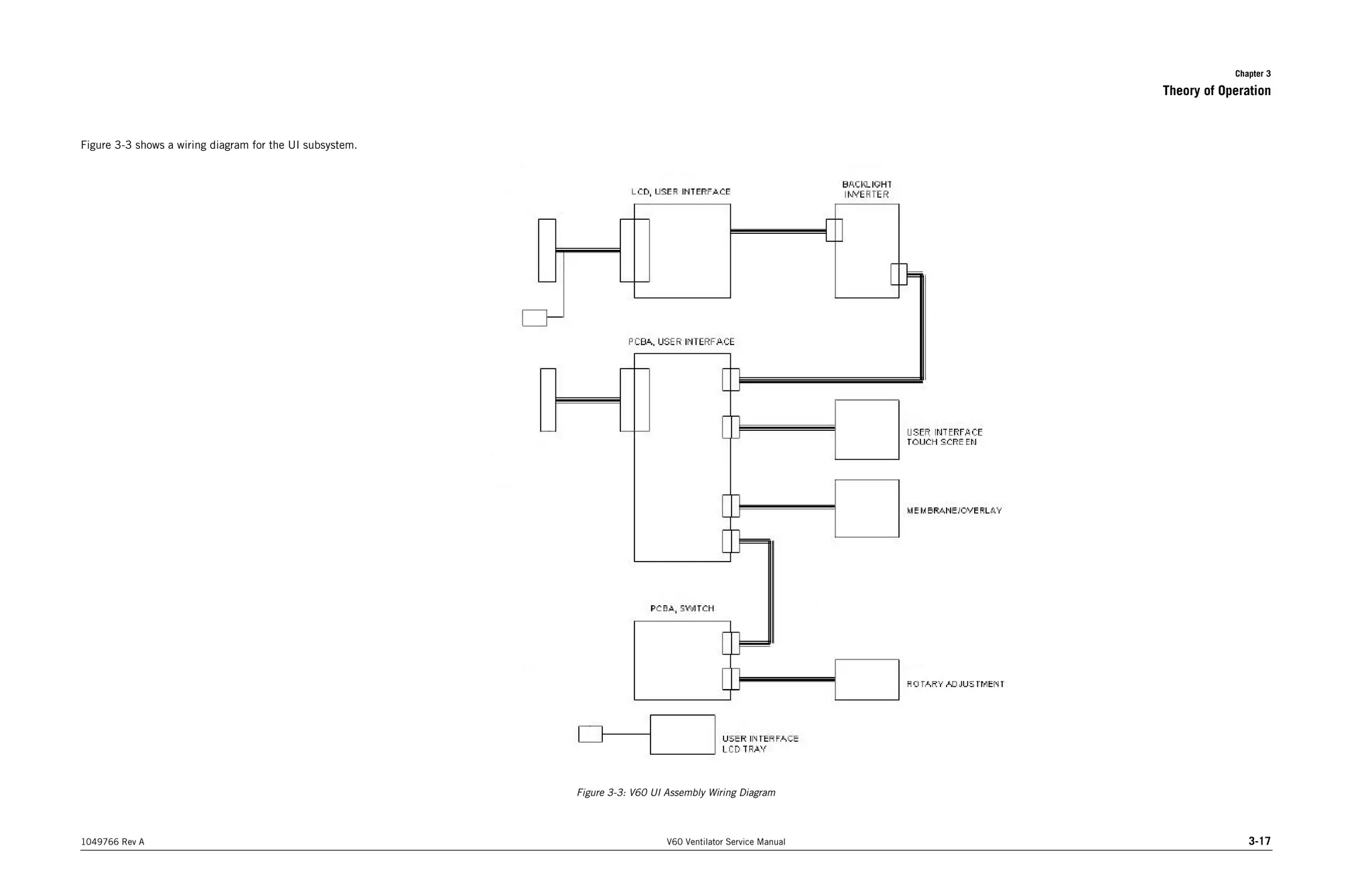
    Chapter 8 8-40 V60Ventilator Service Manual 1049766 Rev A Performance Verification 8.7.4 Test 4: Pressure Accuracy 8.7.5 Test 5: Air Delivery/Flow Accuracy Symptom Recommended Repair Average machine or proximal pressure readings out of range 1.Verify that the internal exhalation port orifice is plugged. 2.Check for leaks at circuit connections, calibration analyzer, filters, etc. 3.Check for kinked or cut tubing from GDS to gas outlet port, and from the gas outlet port to the base. 4.Check for kinked or cut rubber boots from the GDS to the blower, and from the blower to the gas outlet port. 5.Check for leaks at the solenoid valves and pressure transducers. 6.Replace the DA PCBA. Symptom Recommended Repair Measured air flow values out of range 1.Verify that the internal exhalation port orifice is plugged. 2.Verify that the calibration analyzer is set to measure air in STP mode. 3.Check that nothing is obstructing the ventilator gas outlet port. 4.If air flow sensor reading is not within limits as compared to the calibration analyzer, replace the flow sensor assembly. 5.Slave in a different air flow sensor to data acquisition cable. 6.Replace the DA PCBA.
  • 195.
    Chapter 8 Performance Verification 1049766Rev A V60 Ventilator Service Manual 8-41 8.7.6 Test 6: Oxygen Flow Accuracy 8.7.7 Test 7: Oxygen Accuracy 8.7.8 Test 8: S/T Performance Symptom Recommended Repair Measured oxygen flow values out of range 1.Verify that the internal exhalation port orifice is plugged. 2.Verify that the calibration analyzer is set to measure oxygen in STP mode. 3.Check that nothing is obstructing the ventilator gas outlet port. 4.If oxygen flow sensor reading is not within limits as compared to the calibration analyzer, replace the flow sensor assembly. 5.Slave in a different oxygen flow sensor to DA PCBA cable. 6.Replace the DA PCBA. Symptom Recommended Repair The measured oxygen percentage is out of range 1.Check that test oxygen monitor is calibrated. 2.Verify that the external oxygen sensor is oriented with cable connector on top. 3.Replace the external oxygen sensor and retest. 4.Replace the oxygen solenoid valve. Symptom Recommended Repair IPAP and EPAP outside acceptable value 1.Verify correct test setup. 2.Check for leaks at circuit connections, test lung, analyzer, etc. 3.Replace DA PCBA. 4.Replace MC PCBA. 5.Replace CPU PCBA.
  • 196.
    Chapter 8 8-42 V60Ventilator Service Manual 1049766 Rev A Performance Verification 8.7.9 Test 9: Alarms 8.7.10 Test 10: Power Fail Symptom Recommended Repair Normally open or normally closed relay test failure (continuity check) 1.Verify continuity of remote alarm test cable. 2.Replace CPU PCBA. Primary alarm volume not adjustable Slave in PCBAs in this order until the problem is resolved: MC PCBA, PM PCBA, CPU PCBA. Symptom Recommended Repair Backup audible alarm fails to sound 1.Replace MC PCBA. 2.Replace PM PCBA. Backup audible alarm fails to sound for at least two minutes 1.Replace MC PCBA. 2.Replace CPU PCBA. Power switch turned off but backup alarm remains on 1.Replace power switch overlay. 2.Replace MC PCBA.
  • 197.
    Chapter 8 Performance Verification 1049766Rev A V60 Ventilator Service Manual 8-43 8.7.11 Test 11: Internal Battery Symptom Recommended Repair Ventilator cannot transition from AC to battery power 1.Verify that battery harness connections are secure. 2.Verify that Battery % is above 50. 3.Replace PM PCBA. Internal battery becomes depleted prematurely 1.Verify that battery is fully charged before test. 2.Replace internal battery. 3.Replace PM PCBA. 4.Replace power supply. Connecting AC power resets ventilator Replace PM PCBA. When AC power is connected after 10 minutes of battery operation, Battery Charging indicator does not light Replace PM PCBA. Following ventilator power cycle, diagnostic code or continuous backup alarm condition occurs 1.Verify that battery is fully charged before test (recharge for up to 8 to12 hours if fully depleted). 2.Replace an internal battery. 3.Replace PM PCBA.
  • 198.
    Chapter 8 8-44 V60Ventilator Service Manual 1049766 Rev A Performance Verification 8.8 Electrical Safety Data Form Complete this form at every performance verification. Make copies of this form for data collection. Date: Notification number(s): Customer Information Name: Address: City/State: Account no.: Preliminary ventilator cleaning and inspection Circle one Was the ventilator damaged? YES NO If yes, provide a brief description of damage and repair: Cleaned ventilator exterior? YES NO Inspected cooling fan filter? YES NO Inspected inlet filter? YES NO Serial number: Software version: Installed options (circle all that apply): PAV>>>>>>AVAPS>>>>>>C-Flex>>>>>>Ramp Other: _______________________________________________ Total power-on hours: Hours since last PM: Battery lot number: Battery manufacture date: Test 1: Electrical safety Circle one Passed value Failed value Value after repair Proper cooling fan operation? YES NO Proximal pressure port GND resistance (<0.2 ohm) ohm ohm ohm Gas outlet port GND resistance (<0.2 ohm) ohm ohm ohm Oxygen fitting GND resistance (<0.2 ohm) ohm ohm ohm Forward leakage current 100-120 VAC: <300 uA, 220-240 VAC: <500 uA uA uA uA Reverse leakage current 100-120 VAC: <300 uA, 220-240 VAC: <500 uA uA uA Technician’s signature Date
  • 199.
    Chapter 8 Performance Verification 1049766Rev A V60 Ventilator Service Manual 8-45 8.9 Performance Verification Data Form Complete this form at every performance verification. Make copies of this form for data collection. Date: Notification number(s): Customer Information Name: Address: City/State: Account no.: Preliminary ventilator cleaning and inspection Circle one Was the ventilator damaged? YES NO If yes, provide a brief description of damage and repair: Cleaned ventilator exterior? YES NO Inspected cooling fan filter? YES NO Inspected inlet filter? YES NO Serial number: Software version: Installed options (circle all that apply): PAV>>>>>>AVAPS>>>>>>C-Flex>>>>>>Ramp Other: _______________________________________________ Total power-on hours: Hours since last PM: Battery lot number: Battery manufacture date: Environmental readings: Barometric pressure: mmHg Relative humidity: % Temperature: o C Test 1: Electrical Safety Circle one Pass value Fail value Value after repair Proper cooling fan operation? YES NO Proximal pressure port GND resistance (<0.2 ohm) ohm ohm ohm Gas outlet port GND resistance (<0.2 ohm) ohm ohm ohm Oxygen fitting GND resistance (<0.2 ohm) ohm ohm ohm Forward leakage current 100-120 VAC: <300 uA, 220-240 VAC: <500 uA uA uA uA Reverse leakage current 100-120 VAC: <300 uA, 220-240 VAC: <500 uA uA uA
  • 200.
    Chapter 8 8-46 V60Ventilator Service Manual 1049766 Rev A Performance Verification Test 2: Leak Tests Pass value Fail value Value after repair High pressure leak test, oxygen inlet pressure at 45-50 psig Analyzer pressure display (45-50 psig) psig psig psig Oxygen inlet pressure display (45-50 psig) psig psig psig Threshold psig psig Pressure drop psig psig psig System leak test, machine pressure at 55-60 cmH2O Threshold cmH2O Pressure drop cmH2O cmH2O cmH2O Test 3: Controls Circle one Circle one AC power indicator PASS FAIL Touch screen PASS FAIL ON/Shutdown LED green PASS FAIL Brightness control PASS FAIL Nav-ring PASS FAIL Screen lock PASS FAIL Enter button PASS FAIL ON/Shutdown LED amber PASS FAIL Test 4: Pressure Accuracy Pass value Fail value Value after repair Barometric Pressure Analyzer barometric pressure display mmHg Barometric pressure display mmHg mmHg mmHg Pressure at 0 cmH2O Analyzer pressure display (-1.5 to 1.5 cmH2O) cmH2O cmH2O cmH2O Avg Machine display (-1.5 to 1.5 cmH2O) cmH2O cmH2O cmH2O Avg Proximal display (-1.5 to 1.5 cmH2O) cmH2O cmH2O cmH2O Pressure at 1 cmH2O Analyzer pressure display (0.5 - 1.5 cmH2O) cmH2O cmH2O cmH2O Avg Machine display (0.5 - 1.5 cmH2O) cmH2O cmH2O cmH2O Avg Proximal display (0.5 - 1.5 cmH2O) cmH2O cmH2O cmH2O Pressure at 35 cmH2O Analyzer pressure display (32.5 - 38.5 cmH2O) cmH2O cmH2O cmH2O Avg Machine display (32.5 - 38.5 cmH2O) cmH2O cmH2O cmH2O Avg Proximal display (32.5 - 38.5 cmH2O) cmH2O cmH2O cmH2O
  • 201.
    Chapter 8 Performance Verification 1049766Rev A V60 Ventilator Service Manual 8-47 Pressure at 60 cmH2O Analyzer pressure display (54 - 66 cmH2O) cmH2O cmH2O cmH2O Avg Machine display (54 - 66 cmH2O) cmH2O cmH2O cmH2O Avg Proximal display (54 - 66 cmH2O) cmH2O cmH2O cmH2O Test 5: Air Delivery/Flow Accuracy Pass value Fail value Value after repair Air Delivery Analyzer pressure display (> 64.42 cmH2O) cmH2O cmH2O cmH2O Analyzer flow display (> 136.8 SLPM) SLPM SLPM SLPM Air flow at 10 SLPM Analyzer flow display (9 - 11 SLPM) SLPM SLPM SLPM Average Air display (9 - 11 SLPM) SLPM SLPM SLPM Air flow at 120 SLPM Analyzer flow display (108 - 132 SLPM) SLPM SLPM SLPM Avg Air display (108 -132 SLPM) SLPM SLPM SLPM Air flow at 230 SLPM (N/A if above 6400 feet) Analyzer flow display (207 - 253 SLPM) SLPM SLPM SLPM Avg Air display (207 - 253 SLPM) SLPM SLPM SLPM Analyzer flow display drops more than 15 SLPM PASS FAIL Test 6: Oxygen Flow Accuracy Pass value Fail value Value after repair Oxygen flow at 10 SLPM Analyzer flow display (9 - 11 SLPM) SLPM SLPM SLPM Avg O2 display (9 - 11 SLPM) SLPM SLPM SLPM Oxygen flow at 140 SLPM Analyzer flow display (126 - 154 SLPM) SLPM SLPM SLPM Avg O2 display (126 - 154 SLPM) SLPM SLPM SLPM Test 4: Pressure Accuracy Pass value Fail value Value after repair
  • 202.
    Chapter 8 8-48 V60Ventilator Service Manual 1049766 Rev A Performance Verification Test 7: Oxygen Accuracy Pass value Fail value Value after repair Oxygen setting: 22%, oxygen source disconnected: Oxygen Not Available alarm occurs? (circle one) PASS FAIL Oxygen setting: 21% (after 12 breaths) External oxygen monitor (18 - 24%) % % % Oxygen setting: 30% (after 12 breaths) External oxygen monitor (27 - 33%) % % % Oxygen setting: 60% (after 12 breaths) External oxygen monitor (57 - 63%) % % % Oxygen setting: 100% (after 12 breaths) External oxygen monitor (97 - 103%) % % % Test 8: S/T Performance Pass value Fail value Value after repair Waveform Pressure cycles between IPAP and EPAP pressure PASS FAIL IPAP at 40 cmH2O Analyzer pressure reading = 36.4-43.6 cmH2O cmH2O cmH2O cmH2O EPAP at 25 cmH2O Analyzer pressure reading = 22-28 cmH2O cmH2O cmH2O cmH2O Test 9: Alarms Circle one DMM to remote alarm test cable reads infinite resistance with no alarm PASS FAIL DMM reads 0.0 + 3 ohm with no alarm PASS FAIL Alarm volume steadily increases PASS FAIL DMM reads infinite resistance with alarm PASS FAIL DMM to analog output port reads 0.0 + 3 ohm with alarm: PASS FAIL Audio alarm is automatically silenced PASS FAIL Test 10: Power Fail Circle one Audible alarm sounds PASS FAIL Audible alarm continues to sound after two minutes PASS FAIL Audible alarm silenced PASS FAIL Battery icon changes to AC icon PASS FAIL
  • 203.
    Chapter 8 Performance Verification 1049766Rev A V60 Ventilator Service Manual 8-49 Test 11: Internal Battery Circle one Transition from AC to battery operation does not interrupt ventilator operation and indicators operate correctly PASS FAIL N/A Ventilator powers up in normal ventilation and indicators operate correctly PASS FAIL N/A Transition from battery to AC operation does not interrupt ventilator operation and indicators operate correctly PASS FAIL N/A Battery indicator stops flashing PASS FAIL N/A Internal battery fully charged PASS FAIL N/A (Internal Battery is not fully charged if Battery Low message is displayed during normal operation on AC power: performance verification result is LIMITED USE) Did the performance verification pass? (circle one) YES NO LIMITED USE* * LIMITED USE indicates that the internal battery operational check failed: recommend that the operator connect the ventilator to AC power for at least 5 hours, then verify battery performance. Technician’s signature Date
  • 204.
    Chapter 8 8-50 V60Ventilator Service Manual 1049766 Rev A Performance Verification (This page is intentionally blank.)
  • 205.
    1049766 Rev AV60 Ventilator Service Manual 9-1 Chapter 9. Replacement Parts List This section lists and illustrates components of the V60 ventilator. NOTE: All repair kits include necessary hardware. CAUTION: Use only Respironics V60 ventilator repair parts. Only Respironics parts are designed for use in the V60 ventilator. Using non-Respironics parts can alter ventilator reliability or result in damage, and affects the product warranty. Contact Respironics Customer Service at 1-800-345-6443 or 1-724-387-4000. 9.1 Complete Parts List Table 9-1 lists V60 ventilator replacement parts. Table 9-1: V60 Ventilator Replacement Parts (Sheet 1 of 6) Description Part number Base assembly, English 1053891 Base assembly, non-English 1053892 Battery, internal 1056921 Battery, lithium 1056169 Bezel, front, English 1053894 Bezel, front, non-English 1053895 Bezel, rear 1053896 Blower assembly 1055434 Boot kit, rubber (GDS-blower and blower-output port boots) 1054197 Box, battery return, V60 ventilator 1056430 Box, shipping, V60 ventilator 1056561 Bracket kit, MC PCBA 1054198 Bracket, battery (left side wall) 1054199 Bracket, capacitor (MC PCBA) 1054200 Bracket, CPU (attached to CPU PCBA, includes connectors) 1054201 Bracket, gas outlet 1054202 Button, nav-ring, package of 5 (front bezel) 1054204 Cable, backlight inverter PCBA 1054206 Cable, DA PCBA-flow sensors 1054218 Cable, DA PCBA-MC PCBA 1054217 Cable, gas outlet to ground 1054219 Cable, GDS GND 1054220
  • 206.
    Chapter 9 9-2 V60Ventilator Service Manual 1049766 Rev A Replacement Parts List Cable, LCD 1054222 Cable, power harness 1054221 Cable, proximal port to ground 1054106 Cable, switch PCBA 1054223 Cable, UI GND 1054224 Cable, UI-PM PCBA 1054225 Cap, oxygen filter element 1054226 Clamp kit, hose (used to secure boots between GDS, blower, and outlet port) 1054239 Clamp, cable, 3/16-in. dia. (LCD tray) 1054238 Clip, capacitor bracket, ferrite 1054240 Clip, oxygen solenoid valve retainer 1054241 Collar, air inlet 1054242 Cover, CPU 1054243 Cover, top 1054244 End cap, bezel (UI) 1054245 Fan guard, filter, and retainer 1054246 Fan, cooling 1054277 Filter, air inlet, package of 5 1054279 Filter, cooling fan, package of 5 1054280 Filter, oxygen inlet 1054278 Fitting kit, oxygen, CAN/CSA, Canada 1054284 Fitting kit, oxygen, DISS-CGA, USA 1054286 Fitting kit, oxygen, NIST A-8, United Kingdom and Hong Kong 1054297 Fitting kit, oxygen, SIS-AS2896, Australia 1054298 Fitting, barbed, 10-32 to 1/8-in., brass, package of 3 (machine pressure port, patient pressure port) 1054283 Fitting, barbed, white nylon, package of 2 (gas outlet port) 1054282 Flow sensor assembly, air and oxygen 1058898 Foam kit, sound insulation (top cover, base) 1054305 Foot kit, bottom, package of 4 1054302 Front panel assembly (base) 1054306 Gas delivery subsystem (GDS) 1054307 Gasket kit, capacitor bracket kit 1054309 Gasket kit, cord, UI front bezel 1054310 Gasket kit, UI rear bezel 1054312 Table 9-1: V60 Ventilator Replacement Parts (Sheet 2 of 6) Description Part number
  • 207.
    Chapter 9 Replacement PartsList 1049766 Rev A V60 Ventilator Service Manual 9-3 Gasket, air inlet collar. package of 5 1054308 Gasket, housing, filter inlet (right side wall) 1054311 Gasket, left side panel 1054313 Gasket, right side panel 1054314 Grommet, blower mount, package of 4 1054315 Grommet, transducer, package of 2 (DA PCBA-GDS) 1054316 Housing, air inlet filter 1054317 Inlet, AC 1054318 Label kit, CSA/patent 1054929 Label kit, logo/product (front bezel) 1054321 Label kit, oxygen/class/rating, English 1054322 Label kit, oxygen/class/rating, non-English 1054323 Label, Auto-Trak (front panel) 1054320 Label, AVAPS option (UI) 1054324 Label, battery option (UI) 1054325 Label, C-Flex option (UI) 1054326 Label, patient interface (front panel) 1054352 Label, protective earth ground (base) 1054337 LCD assembly 1054338 Mount, isolation, fan, package of 4 1055324 Mount, oxygen solenoid valve 1054339 Nav-ring assembly (front bezel) 1054340 Nut, hex, kep, M4, package of 10 (base grounding lug) 1054341 Nut, hex, M12x1, stainless steel, package of 10 (nurse call jack) 1055321 Nut, wing, M3, package of 10 (MC PCBA to PCBA bracket) 1056418 O-ring, 2-023, Viton 70 DU, package of 5 (oxygen solenoid valve) 1054347 O-ring, 2-103, Viton 70 DU, package of 5 (DA PCBA-manifold) 1054348 O-ring, 2-121, Viton 50 DU, package of 5 (flow sensor assembly, oxygen filter) 1056662 O-ring, 2-121, Viton 70 DU, package of 5 (flow sensor assembly, oxygen filter) 1054342 Table 9-1: V60 Ventilator Replacement Parts (Sheet 3 of 6) Description Part number
  • 208.
    Chapter 9 9-4 V60Ventilator Service Manual 1049766 Rev A Replacement Parts List O-ring, 2-123, Viton 70 DU, package of 5 (air inlet) 1054343 O-ring, 2-135, Viton 70 DU, package of 5 (flow sensor assembly) 1054344 Overlay, power switch, English (UI) 1054350 Overlay, power switch, non-English (UI) 1054351 Padding, left side wall, package of 2 (battery bracket) 1054353 PCBA, backlight inverter 1054354 PCBA, CPU 1054355 PCBA, data acquisition (DA) 1054356 PCBA, motor controller (MC) 1054357 PCBA, power management (PM) 1054358 PCBA, switch (UI) 1054360 PCBA, user interface (UI) 1054361 Pin, locking, left side panel 1054362 Pin, locking, right side panel 1054363 Pin, push, fan mount, package of 4 1054235 Plate, oxygen fitting retention 1054365 Plate, power supply mounting 1054364 Plate, solenoid retention (used to retain solenoid valves to manifold) 1054366 Plug kit, front panel 1054377 PM kit, annual 1054378 Port, gas outlet (front panel) 1054104 Port, proximal, 1/8-in. (front panel) 1054275 Power cord, Argentina 1049627 Power cord, Australia 1049653 Power cord, China 1049628 Power cord, continental Europe 1043253 Power cord, Denmark 1049018 Power cord, Israel 1050940 Power cord, Italy 1049017 Power cord, North America 1043249 Power cord, South Africa 1043289 Power cord, Switzerland 1049016 Power cord, United Kingdom 1043287 Power supply 1054359 Table 9-1: V60 Ventilator Replacement Parts (Sheet 4 of 6) Description Part number
  • 209.
    Chapter 9 Replacement PartsList 1049766 Rev A V60 Ventilator Service Manual 9-5 Retainer, air inlet filter 1054105 Retainer, power cord (base) 1054294 Retainer, UI (front panel) 1054208 Ring, dampening, vibration (blower to outlet port boot) 1056191 Screw, 2-32 x 3/8-in. L, self-tap, package of 10 (ferrite clip, capacitor bracket) 1054209 Screw, 6-32 x 1/4-in. L, pan head, package of 10 (power supply/EMI shroud) 1054210 Screw, M1.6 x 4, pan head, package of 10 (LCD to LCD tray) 1054212 Screw, M2.5 x 6, socket head, package of 10 (oxygen solenoid valve clip) 1054214 Screw, M2.5 x 8, pan head, package of 10 (backlight inverter PCBA, AC inlet) 1054215 Screw, M3 x 12, pan head, package of 10 (MC PCBA) 1054229 Screw, M3 x 14, pan head, package of 10 (rear to front bezel, bezel end cap, flow sensor assembly) 1054230 Screw, M3 x 4, pan head, package of 10 (gas outlet port GND wire) 1054216 Screw, M3 x 6, pan head, package of 10 (CPU, CPU cover, speakers, base-CPU tray, power supply to mounting plate and base, PM PCBA, GDS GND wire, UI cable clamp, LCD tray GND wire, LCD-front bezel, switch PCBA, UI PCBA, UI GND wire) 1054227 Screw, M3 x 8, pan head, package of 10 (solenoid valve retention plate, oxygen solenoid valve mount, DA PCBA) 1054228 Screw, M4 x 14, socket head, package of 10 (bottom feet) 1054234 Screw, M4 x 5 dia. x 5 L, shoulder, package of 10 (blower mount) 1054211 Screw, M4 x 8, socket head, package of 10 (power cord retainer, capacitor bracket, battery bracket, top cover to base, base to front panel, base to side walls, air inlet filter frame, gas outlet bracket, UI retainer) 1054233 Screw, M4, captive, socket head, package of 10 (oxygen fitting retention plate) 1054232 Seal, solenoid valve, package of 4 (manifold) 1054236 Shielding clips, EMI shroud 1054247 Shroud, EMI (power supply) 1054248 Side panel, left 1054249 Side panel, right 1054250 Side wall, left (interior wall) 1054251 Side wall, right (interior wall) 1054252 Table 9-1: V60 Ventilator Replacement Parts (Sheet 5 of 6) Description Part number
  • 210.
    Chapter 9 9-6 V60Ventilator Service Manual 1049766 Rev A Replacement Parts List Solenoid valve (purge, autozero, crossover) 1054254 Solenoid valve, oxygen 1054253 Speaker assembly 1054255 Standoffs, M3 x 10, M-F, package of 5 (GDS manifold) 1054256 Standoffs, M3 x 30, M-F, package of 3 (flow sensor assembly, manifold) 1054267 Tape, Kapton, 3/4-in. wide (LCD cable, LCD tray) 1061127 Touch screen (front bezel) 1054268 Tray, CPU 1054269 Tray, LCD 1054270 Tubing kit, GDS (manifold to gas outlet port) 1054271 UI assembly, English 1054272 UI assembly, non-English 1054273 Washer, 9/64 ID x 5/8 OD, package of 10 (UI retainer) 1054289 Washer, lock, internal tooth, 1/2-in., package of 10 (nurse call jack) 1054319 Washer, M3 ID x 7 mm OD, package of 10 (LCD tray) 1054274 Washer, M3 ID x 9 mm OD, package of 10 (DA PCBA, speakers) 1054276 Washer, retainer, #6, plastic, package of 10 (capacitor bracket, oxygen fitting retainer, UI retainer) 1054288 Table 9-1: V60 Ventilator Replacement Parts (Sheet 6 of 6) Description Part number
  • 211.
    Chapter 9 Replacement PartsList 1049766 Rev A V60 Ventilator Service Manual 9-7 9.2 Recommended Inventory Parts List Table 9-2 lists the recommended replacement parts inventory for authorized Respironics V60 ventilator dealers and distributors. Table 9-2: V60 Ventilator Recommended Inventory Parts (Sheet 1 of 3) Description Part number Battery, internal 1056921 Battery, lithium 1056169 Blower assembly 1055434 Boot kit, rubber (GDS-blower and blower-output port boots) 1054197 Cable, backlight inverter PCBA 1054206 Cable, DA PCBA-flow sensors 1054218 Cable, DA PCBA-MC PCBA 1054217 Cable, gas outlet to ground 1054219 Cable, GDS GND 1054220 Cable, LCD 1054222 Cable, power harness 1054221 Cable, proximal port to ground 1054106 Cable, switch PCBA 1054223 Cable, UI GND 1054224 Cable, UI-PM PCBA 1054225 Clamp kit, hose (used to secure boots between GDS, blower, and outlet port) 1054239 Fan guard, filter, and retainer 1054246 Fan, cooling 1054277 Foot kit, bottom, package of 4 1054302 Filter, air inlet, package of 5 1054279 Filter, cooling fan, package of 5 1054280 Flow sensor assembly, air and oxygen 1058898 Gas delivery subsystem (GDS) 1054307 Gasket, air inlet collar. package of 5 1054308 Inlet, AC 1054318 LCD assembly 1054338 Mount, isolation, fan, package of 4 1055324 Nav-ring assembly (front bezel) 1054340 Nut, hex, kep, M4, package of 10 (base grounding lug) 1054341 Nut, hex, M12x1, stainless steel, package of 10 (nurse call jack) 1055321 Nut, wing, M3, package of 10 (MC PCBA to PCBA bracket) 1056418 O-ring, 2-023, Viton 70 DU, package of 5 (oxygen solenoid valve) 1054347
  • 212.
    Chapter 9 9-8 V60Ventilator Service Manual 1049766 Rev A Replacement Parts List O-ring, 2-121, Viton 50 DU, package of 5 (flow sensor assembly, oxygen filter) 1056662 O-ring, 2-103, Viton 70 DU, package of 5 (DA PCBA-manifold) 1054348 O-ring, 2-121, Viton 70 DU, package of 5 (flow sensor assembly, oxygen filter) 1054342 O-ring, 2-123, Viton 70 DU, package of 5 (air inlet) 1054343 O-ring, 2-135, Viton 70 DU, package of 5 (flow sensor assembly) 1054344 Overlay, power switch, English (UI) 1054350 Overlay, power switch, non-English (UI) 1054351 PCBA, backlight inverter 1054354 PCBA, CPU 1054355 PCBA, data acquisition (DA) 1054356 PCBA, motor controller (MC) 1054357 PCBA, power management (PM) 1054358 PCBA, switch (UI) 1054360 PCBA, user interface (UI) 1054361 Pin, locking, left side panel 1054362 Pin, locking, right side panel 1054363 Pin, push, fan mount, package of 4 1054235 Power cord, Argentina 1049627 Power cord, Australia 1049653 Power cord, China 1049628 Power cord, continental Europe 1043253 Power cord, Denmark 1049018 Power cord, Israel 1050940 Power cord, Italy 1049017 Power cord, North America 1043249 Power cord, South Africa 1043289 Power cord, Switzerland 1049016 Power cord, United Kingdom 1043287 Power supply 1054359 Screw, 2-32 x 3/8-in. L, self-tap, package of 10 (ferrite clip, capacitor bracket) 1054209 Screw, 6-32 x 1/4-in. L, pan head, package of 10 (power supply/EMI shroud) 1054210 Screw, M1.6 x 4, pan head, package of 10 (LCD to LCD tray) 1054212 Table 9-2: V60 Ventilator Recommended Inventory Parts (Sheet 2 of 3) Description Part number
  • 213.
    Chapter 9 Replacement PartsList 1049766 Rev A V60 Ventilator Service Manual 9-9 Screw, M2.5 x 6, socket head, package of 10 (oxygen solenoid valve clip) 1054214 Screw, M2.5 x 8, pan head, package of 10 (backlight inverter PCBA, AC inlet) 1054215 Screw, M3 x 12, pan head, package of 10 (MC PCBA) 1054229 Screw, M3 x 14, pan head, package of 10 (rear to front bezel, bezel end cap, flow sensor assembly) 1054230 Screw, M3 x 4, pan head, package of 10 (gas outlet port GND wire) 1054216 Screw, M3 x 6, pan head, package of 10 (CPU, CPU cover, speakers, base-CPU tray, power supply to mounting plate and base, PM PCBA, GDS GND wire, UI cable clamp, LCD tray GND wire, LCD-front bezel, switch PCBA, UI PCBA, UI GND wire) 1054227 Screw, M3 x 8, pan head, package of 10 (solenoid valve retention plate, oxygen solenoid valve mount, DA PCBA) 1054228 Screw, M4 x 14, socket head, package of 10 (bottom feet) 1054234 Screw, M4 x 5 dia. x 5 L, shoulder, package of 10 (blower mount) 1054211 Screw, M4 x 8, socket head, package of 10 (power cord retainer, capacitor bracket, battery bracket, top cover to base, base to front panel, base to side walls, air inlet filter frame, gas outlet bracket, UI retainer) 1054233 Solenoid valve (purge, autozero, crossover) 1054254 Solenoid valve, oxygen 1054253 Speaker assembly 1054255 Touch screen (front bezel) 1054268 Tubing kit, GDS (manifold to gas outlet port) 1054271 Washer, 9/64 ID x 5/8 OD, package of 10 (UI retainer) 1054289 Washer, lock, internal tooth, 1/2-in., package of 10 (nurse call jack) 1054319 Washer, M3 ID x 7 mm OD, package of 10 (LCD tray) 1054274 Washer, M3 ID x 9 mm OD, package of 10 (DA PCBA, speakers) 1054276 Washer, retainer, #6, plastic, package of 10 (capacitor bracket, oxygen fitting retainer, UI retainer) 1054288 Table 9-2: V60 Ventilator Recommended Inventory Parts (Sheet 3 of 3) Description Part number
  • 214.
    Chapter 9 9-10 V60Ventilator Service Manual 1049766 Rev A Replacement Parts List 9.3 Ventilator Chassis Front bezel, English P/N 1053892 Front panel assembly P/N 1054306 Logo/product label kit P/N 1054321 Power switch overlay, English P/N 1054350 UI retainer P/N 1054208 Rear bezel P/N 1053896
  • 215.
    Chapter 9 Replacement PartsList 1049766 Rev A V60 Ventilator Service Manual 9-11 Left side panel P/N 1054249 Right side panel P/N 1054250 Air inlet filter housing P/N 1054317 Air inlet filter retainer P/N 1054105
  • 216.
    Chapter 9 9-12 V60Ventilator Service Manual 1049766 Rev A Replacement Parts List 9.4 Pneumatics Blower assembly P/N 1052847 Flow sensor assembly P/N 1058898 Gas delivery subsystem (GDS) P/N 1054307 Gas outlet port P/N 1054104
  • 217.
    Chapter 9 Replacement PartsList 1049766 Rev A V60 Ventilator Service Manual 9-13 9.5 Electronics Data acquisition (DA) PCBA P/N 1054356 CPU PCBA P/N 1054355 Backlight inverter PCBA P/N 1054354 CPU tray P/N 1054269
  • 218.
    Chapter 9 9-14 V60Ventilator Service Manual 1049766 Rev A Replacement Parts List Motor controller (MC) PCBA P/N 1054357 Power management (PM) PCBA P/N 1054358 Switch PCBA P/N 1054360 User interface (UI) PCBA P/N 1054361
  • 219.
    Chapter 9 Replacement PartsList 1049766 Rev A V60 Ventilator Service Manual 9-15 A AC inlet P/N 1054318 LCD tray P/N 1054270 Speaker assembly P/N 1054255 Power supply P/N 1054359 EMI shroud P/N 1054248
  • 220.
    Chapter 9 9-16 V60Ventilator Service Manual 1049766 Rev A Replacement Parts List (This page is intentionally blank.)
  • 221.
    1049766 Rev AV60 Ventilator Service Manual 10-1 Chapter 10. Specifications 10.1 Control settings Table 10-1 lists ventilator control setting ranges, resolutions, and accuracies. Table 10-2 lists the controls active in the different ventilation modes. Table 10-1: Control setting ranges, resolutions, and accuracies Parameter Range Resolution Accuracy Factory default Mode settings Modes CPAP, S/T, PCV, AVAPS (optional) N/A N/A S/T Control settings C-Flex OFF, 1 to 3 1 N/A 2 CPAP 4 to 25 cmH2O 1 cmH2O ± (2 cmH2O + 4% of target) 4 cmH2O EPAP 4 to 25 cmH2O 1 cmH2O ± (2 cmH2O + 4% of target) 4 cmH2O IPAP 4 to 40 cmH2O 1 cmH2O ± (2 cmH2O + 4% of target) 12 cmH2O I-Time (Inspiratory Time) 0.30 to 3.00 sec 0.05 sec ± 0.03 sec 1.00 sec Max P (AVAPS Maxi- mum IPAP Pressure) 6 to 40 cmH2O 1 cmH2O ± (2 cmH2O + 4% of target) 25 cmH2O Min P (AVAPS Mini- mum IPAP Pressure) 5 to 30 cmH2O 1 cmH2O ± (2 cmH2O + 4% of target) 10 cmH2O O2 (Oxygen) 21 to 100% 1% ± 5% 21% Ramp Time OFF, 5 to 45 min 5 min ± 1 sec OFF Rate (Respiratory Rate) 4 to 60 BPM 1 BPM ± 1 BPM 4 BPM Rise (Rise Time) 1 to 5 1 N/A 3 VT (AVAPS Target Tidal Volume) 200 to 2000 mL BTPS 5 mL ± 15% 500 mL
  • 222.
    Chapter 10 10-2 V60Ventilator Service Manual 1049766 Rev A Specifications Table 10-2: Controls active in Respironics V60 ventilation modes CPAP S/T PCV AVAPS Timing Rate I-Time Baseline pressure CPAP EPAP Inspiratory pres- sure IPAP MinP MaxP Rise Time Rise O2 O2 Volume VT Ramp feature Ramp Time Mode-specific C-Flex
  • 223.
    Chapter 10 Specifications 1049766 RevA V60 Ventilator Service Manual 10-3 10.2 Patient data Table 10-3: Patient data ranges, resolutions, and accuracies Parameter Range Resolution Accuracy Patient data window Breath phase/trigger indicator Spont, Timed, Exhale Color-coded display: Spont - turquoise, Timed - orange, Exhale - blue N/A PIP 0 to 50 cmH2O 1 cmH2O ± 2 cmH2O Pt. Leak 0 to 200 L/min BTPS 1 L/min N/A Pt. Trig 0 to 100% 1% ± 10% Rate 0 to 90 BPM 1 BPM ± 1 BPM TI/TTOT 0% to 91% 1% ± 5% Tot.Leak 0 to 200 L/min BTPS 1 L/min N/A VE . 0 to 99.0 L/min BTPS 0.1 L/min ± 15% or 0.3 L/min (whichever is great- er) VT 0 to 3000 mL BTPS 5 mL ± 15% for volumes above 200 mL Waveform window P waveform 0 to 50 cmH2O Time axis: 1 second N/A VE waveform . -240 to 240 L/ min BTPS Time axis: 1 second N/A V waveform 0 to 3000 mL BTPS Time axis: 1 second N/A
  • 224.
    Chapter 10 10-4 V60Ventilator Service Manual 1049766 Rev A Specifications 10.3 Alarms Table 10-4 lists the adjustable alarm ranges and resolutions. 10.4 Menu window settings Table 10-4: Adjustable alarm ranges and resolutions Parameter Range Resolution Factory default Hi Rate (High Rate Alarm) 5 to 90 BPM 1 BPM 30 BPM Lo Rate (Low Rate Alarm) 1 to 89 BPM 1 BPM 10 BPM Hi VT (High Tidal Vol- ume Alarm) 200 to 2500 mL BTPS 5 mL 2500 mL Lo VT (Low Tidal Vol- ume Alarm) OFF, 5 to 1500 mL BTPS 5 mL OFF HIP (High Inspiratory Pressure Alarm) 5 to 50 cmH2O 1 cmH2O 50 cmH2O LIP (Low Inspiratory Pressure Alarm) OFF, 1 to 40 cmH2O 1 cmH2O OFF Lo VE . (Low Minute Ventilation Alarm) OFF, 1 to 99 L/min BTPS 1 L/min OFF LIP T (Low Inspiratory Pressure Delay Time Alarm) 5 to 60 sec 1 sec 20 sec Table 10-5: Menu window settings and ranges Parameter Range Brightness 1 to 5 Loudness 1 to 10 Mask/ET Selection ET/Trach, 1, 2, 3, 4, Other Exhalation Port Selection DEP (Respironics Disposable Exhalation Port), Whisper Swivel (Respironics Whisper Swivel), PEV (Respironics Plateau Exhalation Valve, Other (Other Exhalation Port), None (No inline circuit exhalation port) Screen Lock Off, On
  • 225.
    Chapter 10 Specifications 1049766 RevA V60 Ventilator Service Manual 10-5 10.5 Operator- accessiblediagnostic mode functions 10.6 Physical characteristics Table 10-6: Diagnostic mode functions Function Range Language English, Nederlands, Français, Deutsch, Ital- iano, Português, Español Date/Time -- Pressure Units cmH2O, hPa Restore Default Settings -- Software Options -- Baud Rate 9,600, 19,200, 115,200 Significant Event Log -- Touch Screen Calibration -- Table 10-7: Physical characteristics Parameter Specification Weight 10.9 kg (24 lb) with optional battery 10 kg (22 lb) without battery Dimensions (39.4 cm) 15.5 in. (42.9 cm) 16.5 in. (33.7 cm) 13.3 in.
  • 226.
    Chapter 10 10-6 V60Ventilator Service Manual 1049766 Rev A Specifications 10.7 Environmental specifications 10.8 Pneumatic specifications Table 10-8: Environmental specifications Parameter Specification Temperature Operating: 5 to 40 o C (41 to 104 o F) Storage: -20 to 50 o C (-4 to 122 o F) Relative humidity Operating: 15 to 95% (noncondensing) Storage: 10 to 95% (noncondensing) Barometric pressure 600 to 765 mmHg (approximately -51 to 1951 m/ -200 to 6400 ft relative to sea level) Table 10-9: Pneumatic specifications Parameter Specification High-pressure oxygen supply Pressure: 2.76 to 6.00 bar / 276 to 600 kPa / 40 to 87 psig Flow: 175 SLPM Connector: DISS male, DISS female, NIST, SIS Air supply Integrated blower Inspiratory outlet (To patient port) Connector: ISO 15 mm female/22 mm male conical
  • 227.
    Chapter 10 Specifications 1049766 RevA V60 Ventilator Service Manual 10-7 10.9 Electrical specifications Table 10-10: Electrical specifications Parameter Specification AC voltage 100 to 240 VAC AC frequency 50 to 60 Hz AC power 300 VA Battery (optional) 14.4 V, 11.5 Ah Maximum system current draw: 11 A Charge voltage: +16.9 V maximum Operating time: 360 minutes under normal conditions Power source indicators Powered by AC with Battery Present icon: Ventilator powered by AC power, internal battery is in- stalled Powered by AC without Battery icon: Ventilator powered by AC power, internal battery is not installed Battery Capacity Indicator icon: Ventilator powered by internal battery.
  • 228.
    Chapter 10 10-8 V60Ventilator Service Manual 1049766 Rev A Specifications 10.10 Other specifications 10.11 Contact Information For further information or technical assistance, contact Respironics Customer Service: • By email: service@respironics.com • In the U.S.: 800-345-6443 • Outside the U.S.: 724-387-4000 (phone) or 724-387-5012 (fax) Table 10-11: Other specifications Parameter Specification Flow delivery 150 L/min at 40 cmH2O at 1951 m (6400 ft) altitude (10% degradation in flow at 2286 m/7500 ft) Demand flow range -240 to 240 L/min BTPS Pressure range 4 to 40 cmH2O Dynamic pressure regulation ± (2 cmH2O + 4% of target) NOTE: Negative (subatmospheric) pressure settings are not available. Start-up time Ready to ventilate 9 seconds after power on Triggering, cycling, and leak tol- erance As per the Digital Auto-Trak Sensitivity algorithms (see V60 Ventilator Operator’s Manual) Inspiratory and expiratory pres- sure drop: measured at patient connection, when the recom- mended breathing system is in use and normal ventilation is compromised by the total or par- tial loss of power supply < 40 cmH2O (at 60 LPM) < 1.5 cmH2O (at 30 LPM) Audio alarm loudness 60 to 95 dBA (primary alarm) ≥ 65 dBA (backup alarm) Acoustic noise Less than 45 dB (A) at 1 m)
  • 229.
    1049766 Rev AV60 Ventilator Service Manual A-1 Appendix A Respi-Link This section describes the following Respi-Link functions: • Downloading V60 ventilator software • Installing a V60 ventilator option • Remote troubleshooting A.1 Downloading Ventilator Software Follow these steps to download V60 ventilator software using Respi-Link. NOTE: Do not connect the null modem cable until instructed to do so. 1. Turn on the PC and verify that the Gateway interface is running by double-clicking on Start Auto Respi-Link Gateway in the Respi-Link folder on your desktop. 2. If the ventilator is not already in Diagnostic mode, press and hold the nav-ring Enter button and turn on the ventilator by pressing the On/Shutdown button on the user interface. Within 5 seconds, release and press the nav-ring Enter button again to enter Diagnostic mode. 3. Connect a standard 9-pin male-female RS-232 null modem cable and 9-pin to 25-pin female-male adapter between the PC serial port and the V60 ventilator. 4. Within 30 seconds, the GatewayInterface screen appears on the PC monitor if a software package is pending (Figure A-1).
  • 230.
    Appendix A A-2 V60Ventilator Service Manual 1049766 Rev A Figure A-1: Software Package Screen 5. Verify that the serial number on the GatewayInterface screen matches the serial number on the V60 ventilator. 6. Click Install to continue, Finish to discard the package or Exit to install the package at a later date. 7. When the confirmation screen appears, click Yes to continue the software installation or No to exit (Figure A-2). Figure A-2: Confirmation Screen 8. When the V60 installation program screen appears, place the V60 ventilator in software download mode by touching Service, Misc, then Download mode.
  • 231.
    Appendix A 1049766 RevA V60 Ventilator Service Manual A-3 9. When the V60 ventilator is in download mode, click Next to continue or Cancel to exit (Figure A-3). Figure A-3: V60 Installation Program 10. Select the serial port that the V60 is connected to (Figure A-4). Figure A-4: Serial Port Connection 11. Click Next to start the download sequence or Cancel to exit.
  • 232.
    Appendix A A-4 V60Ventilator Service Manual 1049766 Rev A 12. The updater image download starts and a progress bar is displayed (Figure A-5). Figure A-5: Updater Image Download 13. When the updater image download is complete the ventilator image download starts automatically (Figure A-6). Figure A-6: Ventilator Image Download
  • 233.
    Appendix A 1049766 RevA V60 Ventilator Service Manual A-5 14. When the download is complete, click Finish (Figure A-7). Figure A-7: Download Completed 15. When the V60 installation program screen closes, click Finish on the GatewayInterface screen to send confirmation to Respi-Link that the software installation was successful (Figure A-8). Figure A-8: Installation Confirmation Screen
  • 234.
    Appendix A A-6 V60Ventilator Service Manual 1049766 Rev A 16. Remove the null modem cable and adapter from the V60 ventilator. 17. Turn the V60 ventilator off by pressing and holding the On/Shutdown button on the user interface. 18. Enter Diagnostic mode by pressing and holding the nav-ring Enter button and turn on the ventilator by pressing the On/Shutdown button on the user interface. Within 5 seconds, press the nav-ring Enter button again to enter Diagnostic mode. 19. Touch Service and verify that the Software Version is the same as the version listed on the GatewayInterface screen (Figure A-8). 20. Click Exit on the GatewayInterface screen. 21. Turn the V60 ventilator off by pressing the On/Shutdown button, then touch Ventilator Shutdown. 22. Software download is complete. A.2 Installing Ventilator Options Follow these steps to install V60 ventilator options using Respi-Link. NOTE: Do not connect the null modem cable until instructed to do so. 1. Turn on the PC and verify the Gateway Interface is running by double- clicking on Start Auto Respi-Link Gateway in the Respi-Link folder on your desktop. 2. If the ventilator is not already in Diagnostic mode, press and hold the nav-ring Enter button and turn on the ventilator by pressing the On/Shutdown button on the user interface. Within 5 seconds, release and press the nav-ring Enter button again to enter Diagnostic mode. 3. Connect a standard 9-pin male-female RS-232 null modem cable and 9-pin to 25-pin female-male adapter between the PC serial port and the V60 ventilator.
  • 235.
    Appendix A 1049766 RevA V60 Ventilator Service Manual A-7 4. Within 30 seconds, a GatewayInterface screen appears on the PC monitor if an option package is pending (Figure A-9). Figure A-9: Option Package Screen 5. Verify that the serial number on the GatewayInterface screen matches the serial number on the V60 ventilator. 6. Click Install to continue, Finish to discard the package, or Exit to install the package at a later date. 7. At the confirmation screen, click Yes to continue the option installation or No to exit (Figure A-10). Figure A-10: Confirmation Screen 8. Click Finish on the GatewayInterface screen to send confirmation to Respi-Link that the option installation was successful.
  • 236.
    Appendix A A-8 V60Ventilator Service Manual 1049766 Rev A 9. Touch Service and verify the Options on the V60 ventilator are the same as the options listed on the GatewayInterface screen. 10. Click Exit on the GatewayInterface screen. 11. Turn the V60 ventilator off by pressing the On/Shutdown button. 12. Option installation is complete. A.3 Reinitiate a Software Package Follow these steps to reinitiate a V60 ventilator software package using Respi-Link. NOTE: Do not connect the null modem cable until instructed to do so. 1. Turn on the PC and verify the Gateway Interface is running by double- clicking on Start Auto Respi-Link Gateway in the Respi-Link folder on your desktop. 2. If the ventilator is not already in Diagnostic mode, press and hold the nav-ring Enter button and turn on the ventilator by pressing the On/ Shutdown button on the user interface. Within 5 seconds, release and press the nav-ring Enter button again to enter Diagnostic mode. 3. Connect a standard 9-pin male-female RS-232 null modem cable and 9-pin to 25-pin female-male adapter between the PC serial port and the V60 ventilator. 4. Double click on the GatewayInterface icon to re-launch the install screen (Figure A-11). Figure A-11: GatewayInterface icon
  • 237.
    Appendix A 1049766 RevA V60 Ventilator Service Manual A-9 5. A GatewayInterface screen appears on the PC monitor if a software package was previously suspended (Figure A-12). Figure A-12: Software Package Screen 6. Verify that the serial number on the GatewayInterface screen matches the serial number on the V60 ventilator. 7. Click Install to continue, Finish to discard the package, or Exit to install the package at a later date. 8. At the confirmation screen, click Yes to continue the software installation or No to exit (Figure A-13). Figure A-13: Confirmation Screen 9. When the V60 installation program screen appears place the V60 ventilator in software download mode by touching Service, Misc, then Download mode.
  • 238.
    Appendix A A-10 V60Ventilator Service Manual 1049766 Rev A 10. When the V60 ventilator is in download mode, click Next to continue or Cancel to exit (Figure A-14). Figure A-14: V60 Installation Program 11. Select the serial port that the V60 is connected to (Figure A-15). Figure A-15: Serial Port Connection 12. Click Next to start the download sequence or Cancel to exit.
  • 239.
    Appendix A 1049766 RevA V60 Ventilator Service Manual A-11 13. The updater image download starts and a progress bar is displayed (Figure A-16). Figure A-16: Updater Image Download 14. When the updater image download is complete the ventilator image download starts automatically (Figure A-17). Figure A-17: Ventilator Image Download
  • 240.
    Appendix A A-12 V60Ventilator Service Manual 1049766 Rev A 15. When download is complete, click Finish (Figure A-18). Figure A-18: Download Completed 16. When the V60 installation program screen closes, click Finish on the GatewayInterface screen to send confirmation to Respi-Link that the software installation was successful (Figure A-19). Figure A-19: Installation Confirmation Screen
  • 241.
    Appendix A 1049766 RevA V60 Ventilator Service Manual A-13 17. Remove the null modem cable and adapter from the V60 ventilator. 18. Turn the V60 ventilator off by pressing and holding the On/Shutdown button on the user interface. 19. Enter Diagnostic mode by pressing and holding the nav-ring Enter button and turn on the ventilator by pressing the On/Shutdown button on the user interface. Within 5 seconds, release and press the nav-ring Enter button again to enter Diagnostic mode. 20. Touch Service and verify the Options on the V60 ventilator are the same as the options listed on the GatewayInterface screen. 21. Click Exit on the GatewayInterface screen. 22. Turn the V60 ventilator off by pressing the On/Shutdown button. 23. Software reinitiation is complete. A.4 Remote Troubleshooting Follow these steps to connect the V60 ventilator to Respi-Link and prepare for remote troubleshooting. NOTE: Do not connect the null modem cable until instructed to do so. 1. Turn on the PC and verify the Gateway Interface is running by double- clicking on Start Auto Respi-Link Gateway in the Respi-Link folder on your desktop. 2. If the ventilator is not already in Diagnostic mode, press and hold the nav-ring Enter button and turn on the ventilator by pressing the On/Shutdown button on the user interface. Within 5 seconds, press the nav-ring Enter button again to enter Diagnostic mode. 3. Touch Service, then Pneumatics. 4. Connect a standard 9-pin male-female RS-232 null modem cable and 9-pin to 25-pin female-male adapter between the PC serial port and the V60 ventilator. 5. The V60 ventilator is now connected to Respi-Link and can be monitored remotely by a Respironics representative. 6. Contact your local service representative or Product Support at 800- 345-6443 for further instructions.
  • 242.
    Appendix A A-14 V60Ventilator Service Manual 1049766 Rev A (This page is intentionally blank.)
  • 243.
    1049766 Rev AV60 Ventilator Service Manual B-1 Appendix B Field Communications Save field communications in this section.
  • 244.
    Appendix B B-2 V60Ventilator Service Manual 1049766 Rev A (This page is intentionally blank.)
  • 245.
    1049766 Rev AV60 Ventilator Service Manual Index-1 A AC inlet part number 9-15 AC power specifications 10-7 Accessories Recommended for servicing 1-3 Acoustic noise specifications 10-8 Air flow accuracy performance verification test 8-24 Alarm speakers removal/installation 7-15 Alarms 10-4 adjustable, specifications 10-4 B Baclight inverter PCBA part number 9-13 Battery, backup specifications 10-7 Blower assembly part number 9-12 Brightness, display specifications 10-4 C Communication between service PC and ventilator 6-1 Control settings ranges, resolutions, and accuracies 10-1 CPU PCBA part number 9-13 CPU tray part number 9-13 D Data acquisition (DA) PCBA part number 9-13 Delivered pressure specifications 10-8 Demand flow specifications 10-8 Diagnostic report (DRPTA), generating 6-17 Dimensions, ventilator 10-5 Downloading ventilator software 6-21 E Electrical safety test 8-15 troubleshooting 8-38 Electrical specifications 10-7 Electronics Signal path sequence 3-14 EMI shroud part number 9-15 Environmental specifications 10-6 F Filter retainer, air inlet part number 9-11 Flow sensor assembly part number 9-12 Front bezel part number 9-10 G Gas delivery subsystem (GDS) leak test requirements 7-1 part number 9-12 schematic 3-2 Gas outlet port part number 9-12 H Housing, air inlet filter part number 9-11 L Label kit, logo/product part number 9-10 LCD tray part number 9-15 Left side panel part number 9-11 Left side wall removal/installation 7-20 M Mains power specifications 10-7 Maintenance schedule 4-1 Monitored parameters ranges, resolutions, and accuracies 10-3 Motor controller (MC) PCBA part number 9-14 O Oxygen flow accuracy performance verification test 8-27 P Parts list, complete 9-1 Parts list, recommended inventory parts 9-7 Patient data ranges, resolutions, and accuracies 10-3 Pneumatic specifications 10-6 Power managment (PM) PCBA part number 9-14 Power supply part number 9-15
  • 246.
    Index Index-2 V60 VentilatorService Manual 1049766 Rev A Power switch overlay part number 9-10 Power-on hours, reprogramming 6-21 Pressure accuracy performance verification test 8-21 R Rear bezel part number 9-10 Recommended inventory parts list 9-7 Reports and software downloads, description 6-1 Returning ventilator to operation See Ventilator operation Right side panel part number 9-11 Right side wall removal/installation 7-23 S Serial number, reprogramming 6-21 Side panels part numbers 9-11 Signal paths See Electronics Significant event log, clearing 6-20 Speaker assembly part number 9-15 Specifications 10-1 acoustic noise 10-8 alarm settings 10-4 control settings 10-1 delivered pressure 10-8 demand flow 10-8 dimensions 10-5 display brightness 10-4 electrical 10-7 environmental 10-6 monitored parameters 10-3 patient data 10-3 pneumatic 10-6 ventilator start-up time 10-8 weight 10-5 Start-up time specifications 10-8 Switch PCBA part number 9-14 T Test equipment Recommended for servicing 1-3 Tools Recommended for servicing 1-3 Top cover removal/installation 7-5 U UI retainer part number 9-10 User interface (UI) PCBA part number 9-14 V Ventilator operation returning to operation 8-37 Ventilator software, downloading 6-21 W Warnings and Cautions 2-1 Weight, ventilator 10-5