
info@gses.com
Control & HMI Emulation Project
2
Part 1
The Project
Rick Baker – Exelon - Quad Cities
3
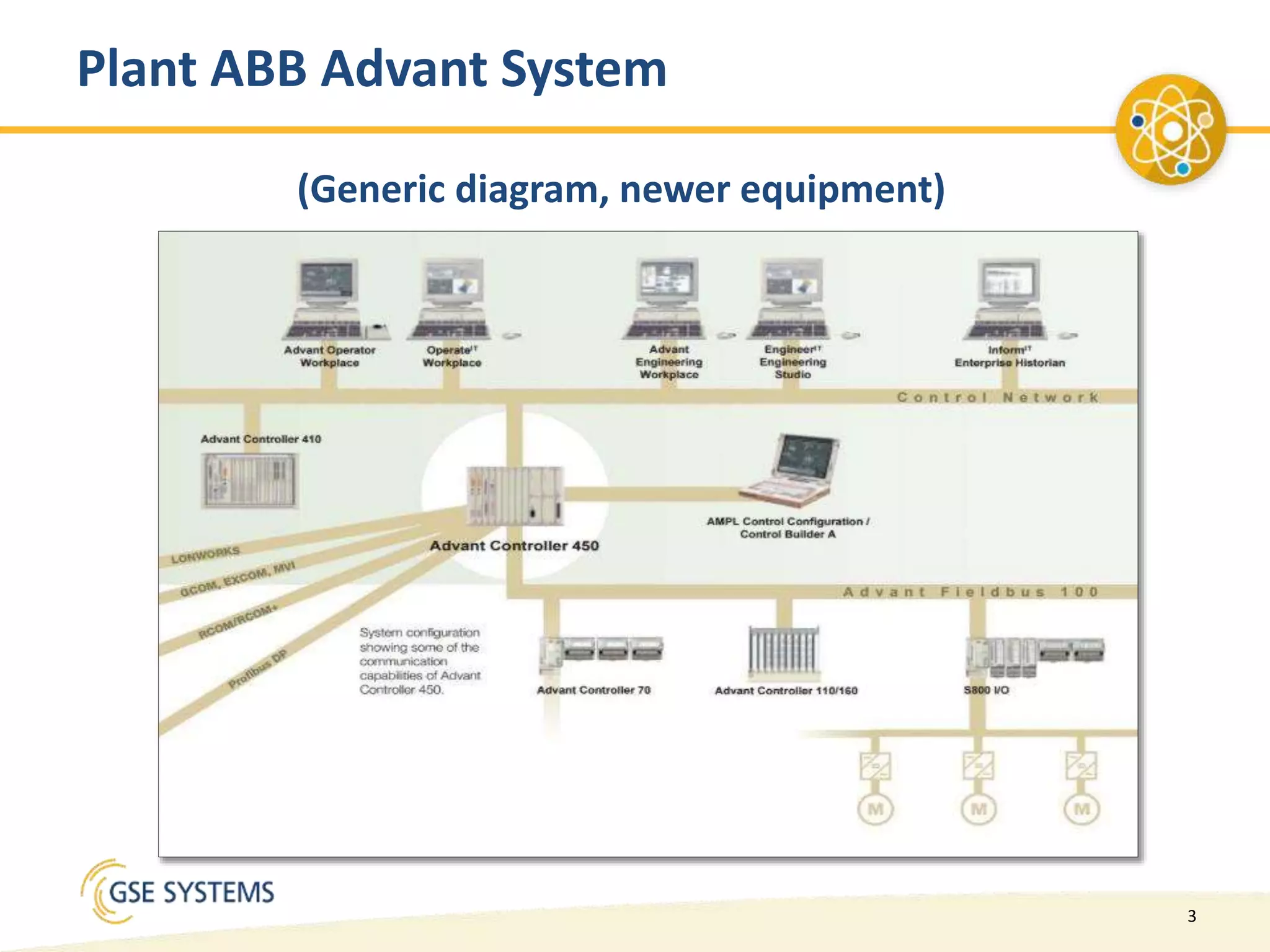
Plant ABB Advant System
(Generic diagram, newer equipment)
4
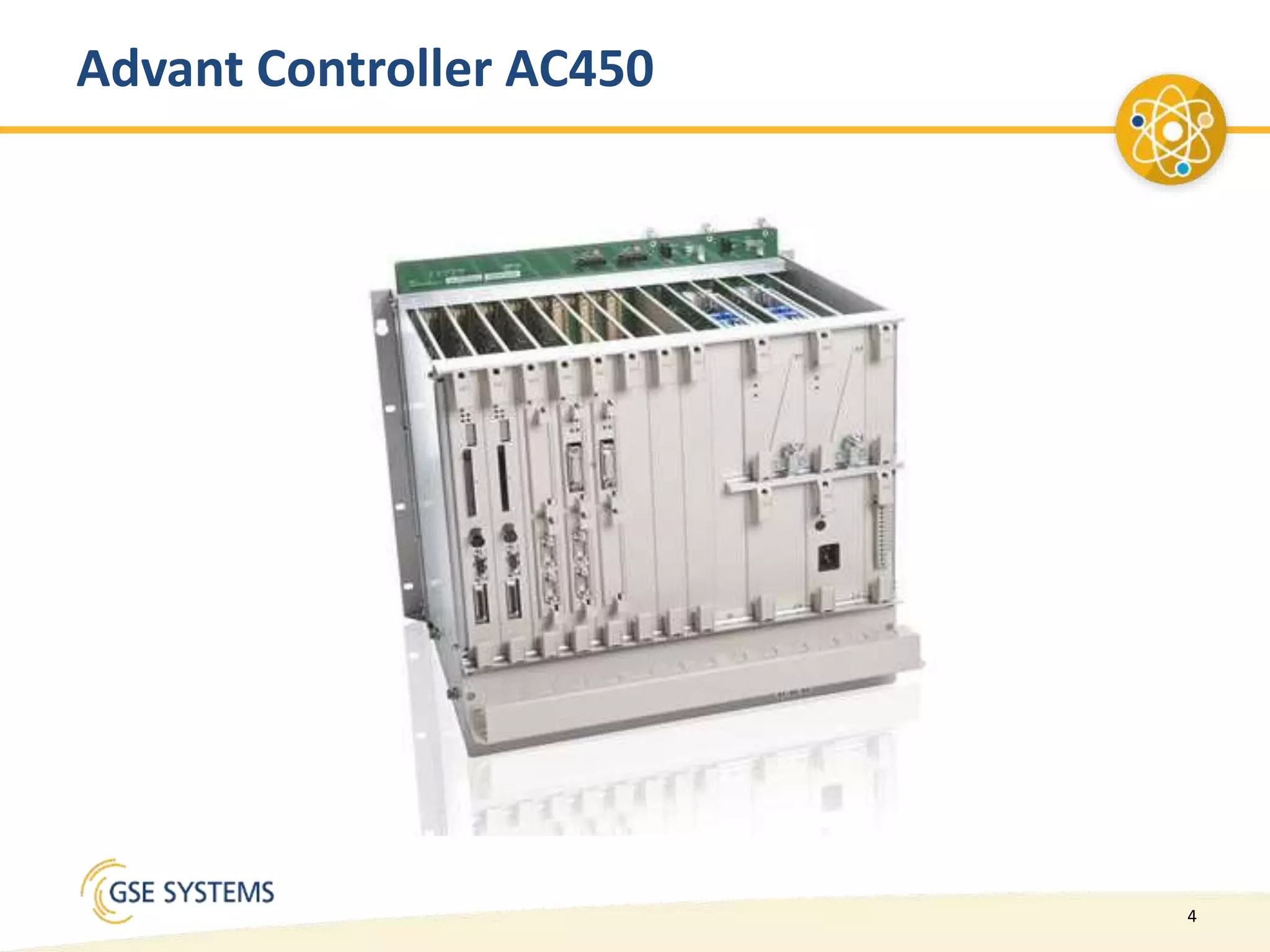
Advant Controller AC450
5
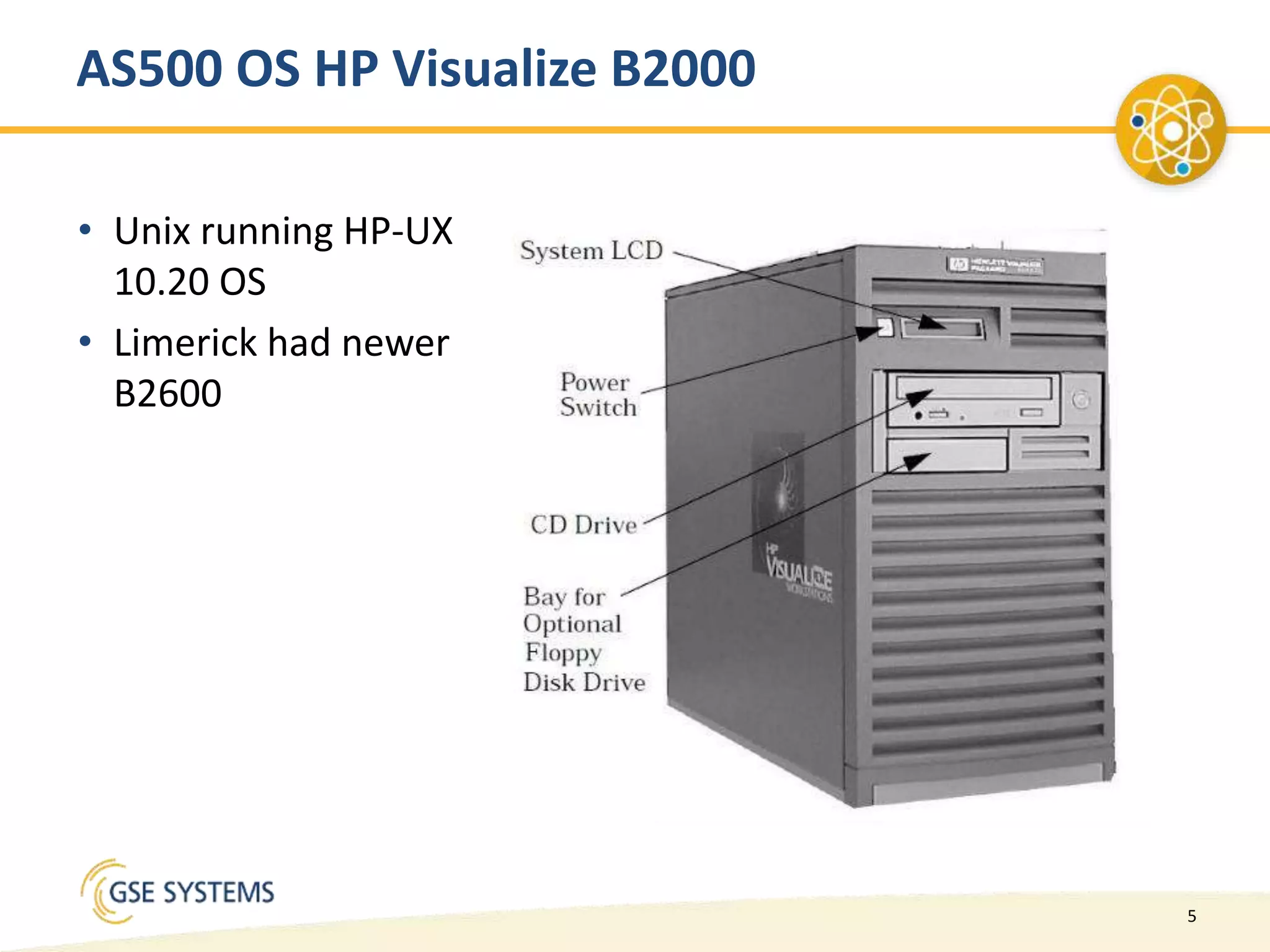
AS500 OS HP Visualize B2000
• Unix running HP-UX
10.20 OS
• Limerick had newer
B2600
6
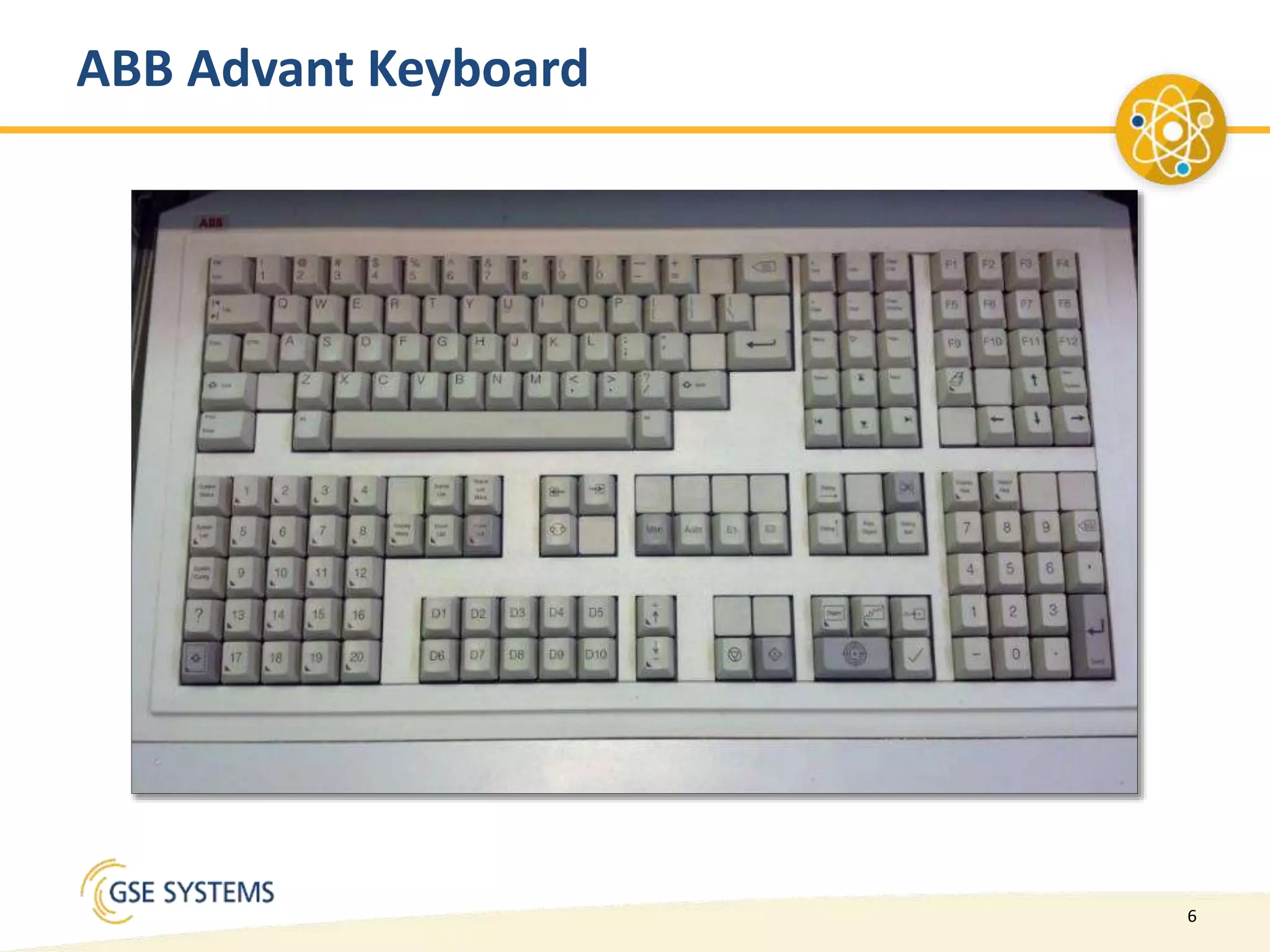
ABB Advant Keyboard
7
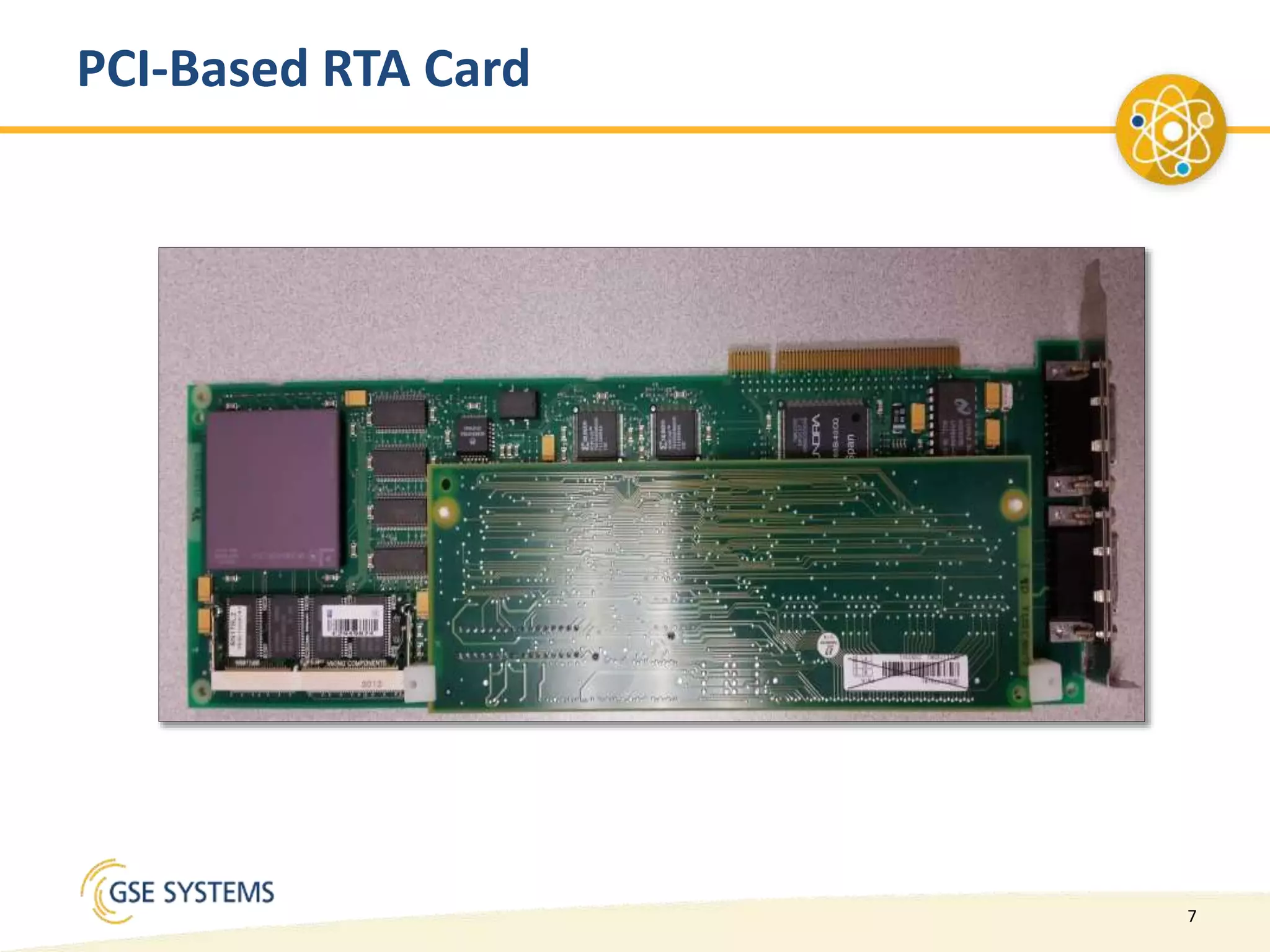
PCI-Based RTA Card
8
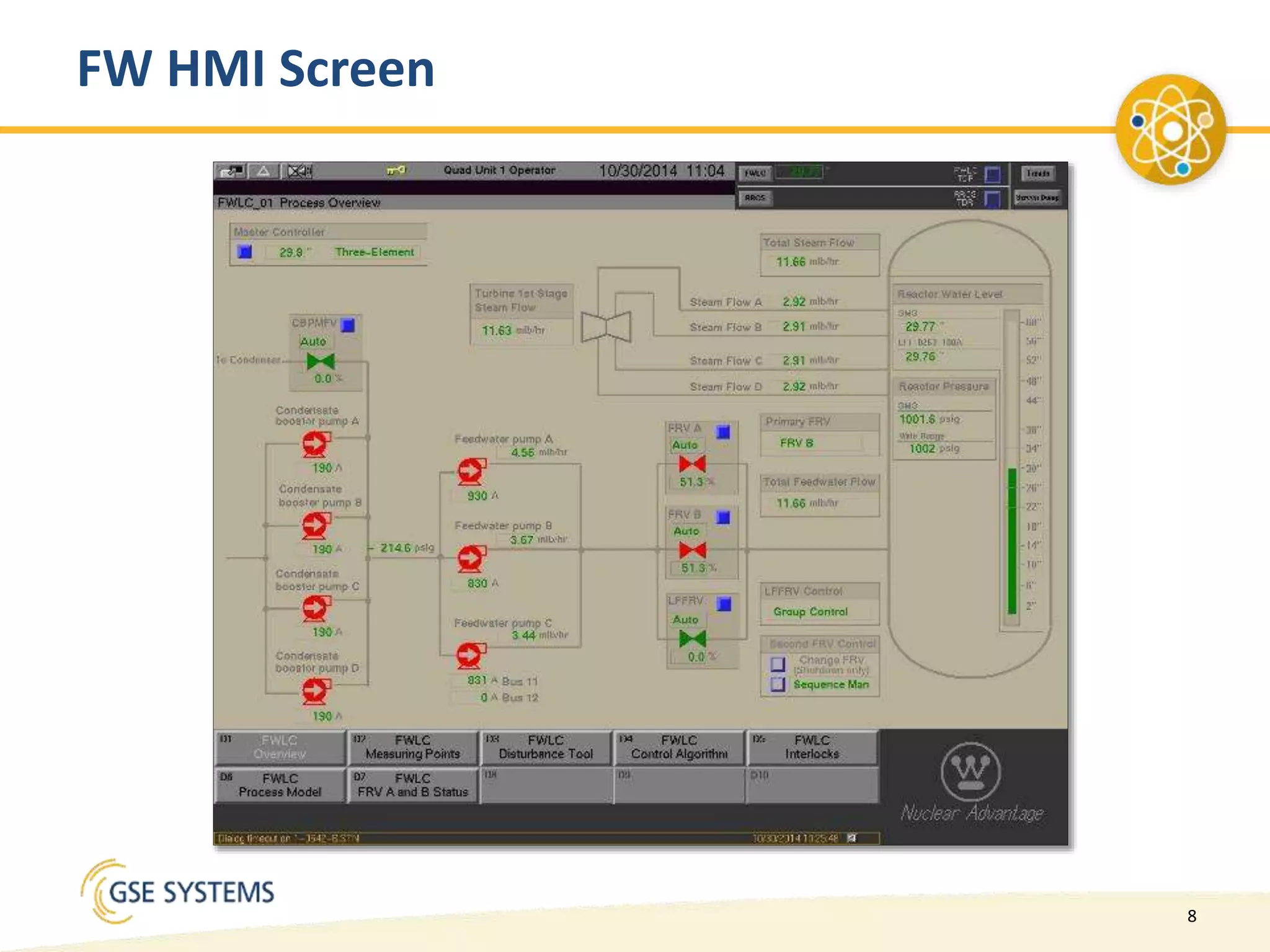
FW HMI Screen
9
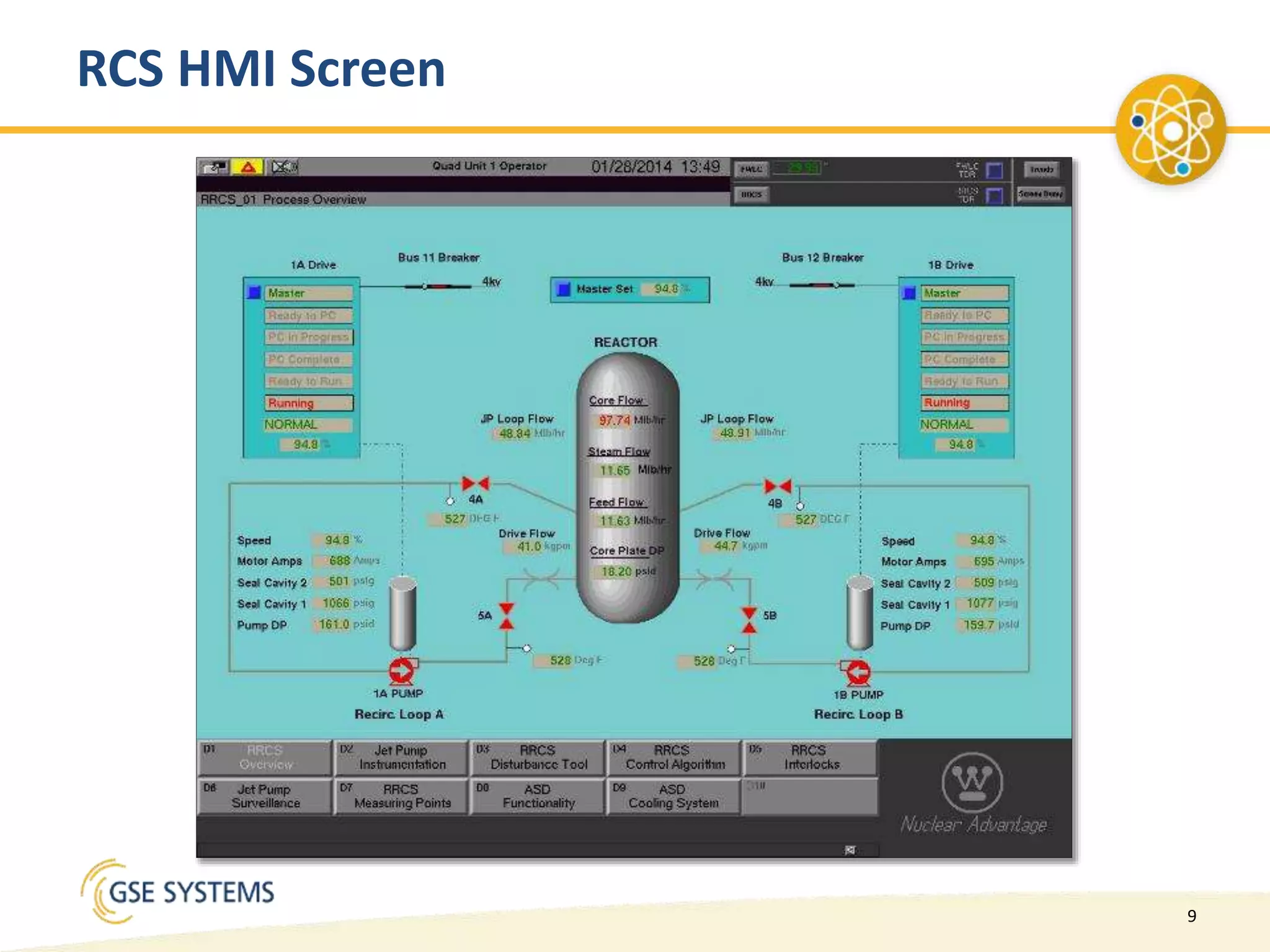
RCS HMI Screen
10
Simulator Needed to Emulate AC450 and
Stimulate AS500OS HMI
• Plant code and database received from plant
• Code and DB transformed into RTA card compatible version
• AS500OS HMI slightly modified for simulator use
–ATS link software installed
• Four main components installed on simulator model
computer(s)
–developed for WindowsNT
• PCI-based RTA card installed
• ATS Link setup to communicate with AS500OS HMI
11
Upgrade Requirements Last 15+ Years
• Simulator model PC refreshes
– required large PCI slot
• Microsoft OS upgrades to Windows 2000, Windows XP
– Windows XP version started to become unstable
– Needed to get to Windows 7
• RTA card driver not compatible with W7 or newer OS’s
• No practical solution from ABB/Westinghouse
– Rumors of a USB version
12
Additional Issues and Needs
• AS500OS HMI B2000 and B2600 are obsolete
• Repurposed HP C3600
– Acquired from retired plant system
• Preference was for non-hardware solution
– Allow for better use of glass simulators and V-panels
– Eliminate PC hardware platform requirements – PCI slot
• RTA Card replacement cost was very high
– Were able to acquire RTA cards from OEM vendor
– Future availability uncertain
13
Part 2
The Team
Scott Zepplin – GSE Systems, Inc.
14
Contract
• Overall Contract awarded to GSE
• Sub-contract awarded by GSE to nHance Technologies
15
Project Roles: GSE Systems, Inc.
• Overall project management
• Configuration Control
• Interfacing between nHance solution and Exelon loads
• Factory acceptance testing
• Site integration
16
Project Roles: Exelon
• Data collection
• Provide operational systems for nHance
• Site acceptance testing
• Configuration control
–Fleet-wide project management
–Fleet-wide design decisions
17
• Control System Translation
• HMI Emulation
• Configuration Control
• Alarm Manager Solution
• Keyboard Solution
• Site Integration
Project Roles: nHance Technologies
18
Fleet Solution Advantages
• Testing was done for each site individually
• Each site took a slightly different approach to the testing
• As issues were identified at each site, the resolution was
rolled out to all 3 sites
• Resulted in better overall product
19
Part 3
The Solution
Todd Sneed – nHance Technologies
20
nHance Technologies Solution Details
• Configuration Management
• DCS Emulation
• Control System Emulation
• DB Elements
• PC Elements
• HMI Emulation
• Custom Screens
• Standard Screens
• Keyboard Solution
21
Configuration Management
• Ensure model and HMI updates synchronized across 3+ locations
– nHance Office
– GSE St Marys and/or Sykesville Office
– Site
• Required Distributed Version Control System
– Does not restrict/preclude using server based VCS eg SVN
– Secure HTTPS / SSH Transmission protocol
• ‘git’ hosted on nHance private servers
– Required 2 repositories, one for Model, one for Program / project files
• Workflow
– nHance Review/Make Changes … Push up to nHance Cloud Server
– GSE Pull Down latest rev for testing pre-FAT
– Site Pull Down for install at site
22
Control System Overview
ABB Advant Control System Overview
– PC Program – Main Control Logic Program
• Complex Cycle Logic 3 “Interpreters”
• PC Elements – Individual Function Blocks (eg. AND/OR/PID, etc.)
• PC Elements can be Scheduled in any Interpreter / Rate group/ Order
within rate group
• Entire blocks of logic and be dynamically bypassed
– “Database” or DB Elements
• Typical “Tags”
• Interface between PC Program and external world
• Some “logic” eg. Block functionality/ Limit Checks
• I/O interface / Modbus / Profibus interface
23
Control System Emulation
Translation Approach
– C++ Program developed to read in DB and PC Element configuration files
– Automatically links function blocks and DB Element names
– Automatically creates Simulator database .ADD files
– Automatically creates Simulator I/O list
– Optionally match I/O tag names to Process model variable list (if
provided) to link I/O points to process model variables
– Generates Fortran Source code with comments
– Maintains left-over time to cycle control exact number of times required
(eg. 20ms rate group cycled correctly with 50ms time step size).
– Separate schedule for DB point processing and PC Cycle time execution
– Completely automatic, no human intervention required
24
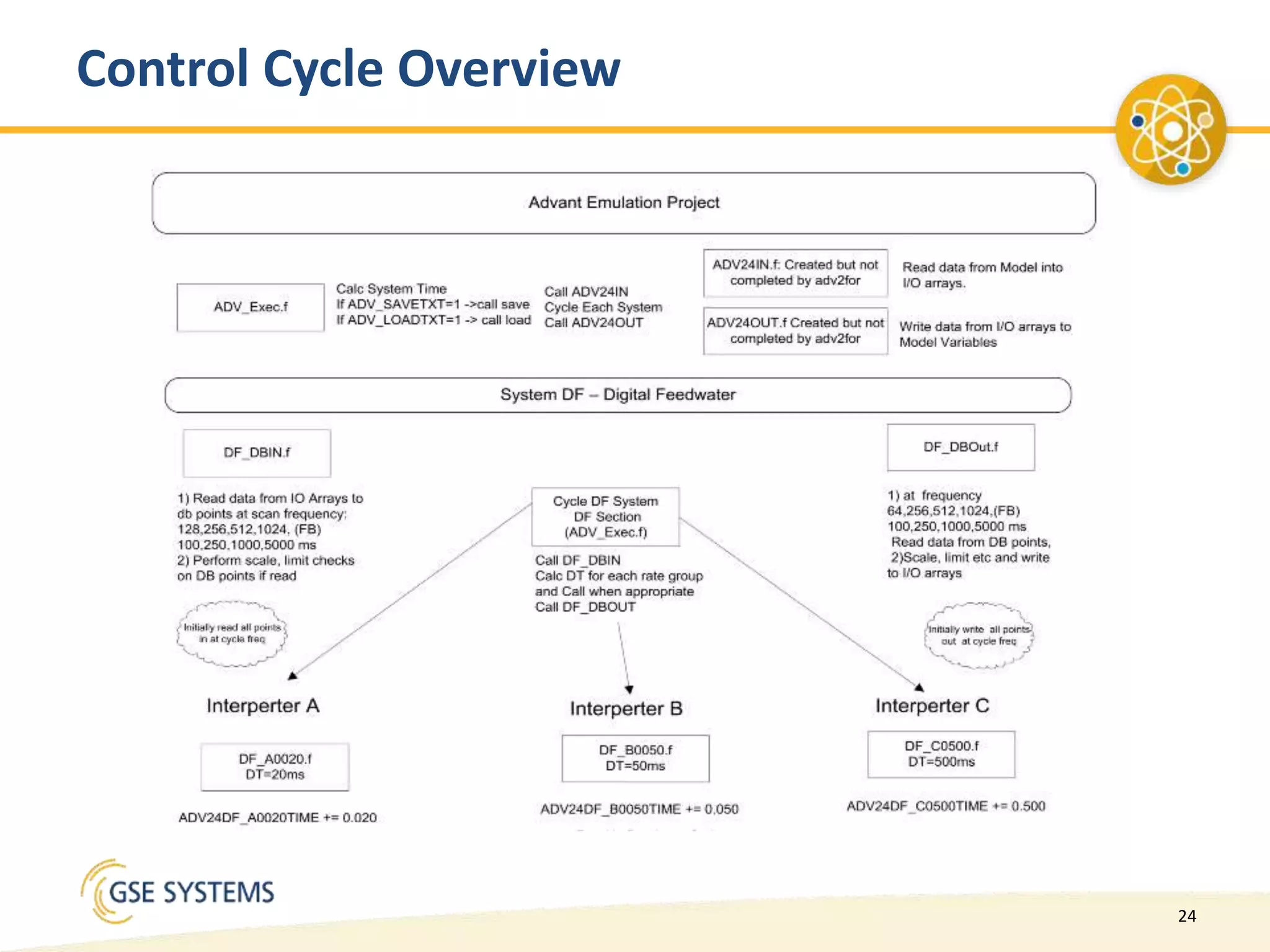
Control Cycle Overview
25
Control System Emulation – Alarm Manager
Alarm Manager
– Maintains list of points in alarm and alarm acknowledgement
state
– ABB Advant System Extremely flexible in alarms/events
– Alarm/event configuration files not available on simulator RTA
card workstations
– Point can be have an alarm and an event at same time
– All three sites used different approaches to alarms and events
26
HMI Emulation
Translator Approach
– Automatically read in HMI Configuration files and generate
visual basic source code to create HMI executable
– HMI Graphics files a derivation of Sherrill-Lubinski Graphical
Modeling System (SL-GMS) – static graphics only
• References system objects and custom objects with scripting
functionality
– Each HMI screen required both graphic files and scripting files
to tie point names/scripts to dynamic objects
– VB classes created by hand for system objects (eg. Dialogs)
27
• Alarm Screens
– Alarm List
– Event List
– Last unacknowledged Alarm in
Header
• Trend Screen
– Unique Trend Control scrolling
– Rich Feature Set (not all
supported)
• Dialog Boxes
– Navigation
– Unique per Point Type
• Display Menu
HMI Emulation Standard Screens
28
• ABB Advant Keyboard Overview
– Complex device with normal
keyboard + several custom keys
– External power supply
– Typical USB connection to HP unix
workstation
– Mouse attached to keyboard
• Sort of worked on PC
– Normal PC keys worked
– Custom keys mapped to existing PC
keys, some did nothing
– Mouse just worked
• USB Sniffing tools revealed
– Keyboard was USB hub + 3 HID
devices, 2 keyboards one mouse
• WireShark USB Pcap used to
inspect HID USB keys
– Keyboard hook used to “consume”
the key from that specific USB
device
– Device ID’s changed when
computer reboot
Keyboard Interface Solution
29
• Keyboard
– Solution not perfect, but
adequate
• Alarms/Events
– Point can be in Alarm and Event
at same time
– Several instances of same
Alarms on Alarm List
– Event Treatment pointers
configuration could not be
found
• Trend Control
– Unique trend scrolling and several
different features could be
supported
• SL-GMS
– Some commands not easily
handled in VB (eg. Gradients
fills)
– Transforms
Project Challenges
30
• Stimulated System was not “gospel”
– Plant Control logic manipulated before installed on RTA
– AI points converted to AIC
– ERR Flags for some AIC points were Set by ???
– Caused translator to set error flags for AIC points which proved incorrect
– Caused translator to set error flags for AI Points which proved incorrect
– Model AI Deadband Logic
– Removed as part of removing stimulated interface
– Contributed to differences and repeatability issues on RTA load
• Sometimes the “simple” blocks aren’t so simple
– MAJ-R Majority Selector
• All-In-One design of HMI
– Avoided need screen-to-screen communication
– Proved to be sluggish on loading screens especially on Windows 7
Solution Lessons Learned
31
Project Results - Lessons Learned
• Relieved hardware platform requirements
– PCI slot for RTA card
• HMI runs on standard Windows 7 PC
– Needs to be fast to prevent delays when Operator switches
displays
• Relieved OS requirements
• VB6 required for displays
– Newer version would have been preferable
32
Project Results - Lessons Learned (cont.)
• Relieved frequent issues where the RTA cards would not
function correctly
– (loss of comm., locked up, misc.)
• Original simulator version didn’t exactly match plant
implementation
– Discovered issue with analog inputs range treatment
– Error flags being set that would not in the plant
• causes a different response on some transients
Thank you.
For more information, go to:
www.GSES.com
info@gses.com
Or call 800-638-7912

Control & HMI Emulation Project

  • 1.
    info@gses.com Control & HMIEmulation Project
  • 2.
    2 Part 1 The Project RickBaker – Exelon - Quad Cities
  • 3.
    3 Plant ABB AdvantSystem (Generic diagram, newer equipment)
  • 4.
  • 5.
    5 AS500 OS HPVisualize B2000 • Unix running HP-UX 10.20 OS • Limerick had newer B2600
  • 6.
  • 7.
  • 8.
  • 9.
  • 10.
    10 Simulator Needed toEmulate AC450 and Stimulate AS500OS HMI • Plant code and database received from plant • Code and DB transformed into RTA card compatible version • AS500OS HMI slightly modified for simulator use –ATS link software installed • Four main components installed on simulator model computer(s) –developed for WindowsNT • PCI-based RTA card installed • ATS Link setup to communicate with AS500OS HMI
  • 11.
    11 Upgrade Requirements Last15+ Years • Simulator model PC refreshes – required large PCI slot • Microsoft OS upgrades to Windows 2000, Windows XP – Windows XP version started to become unstable – Needed to get to Windows 7 • RTA card driver not compatible with W7 or newer OS’s • No practical solution from ABB/Westinghouse – Rumors of a USB version
  • 12.
    12 Additional Issues andNeeds • AS500OS HMI B2000 and B2600 are obsolete • Repurposed HP C3600 – Acquired from retired plant system • Preference was for non-hardware solution – Allow for better use of glass simulators and V-panels – Eliminate PC hardware platform requirements – PCI slot • RTA Card replacement cost was very high – Were able to acquire RTA cards from OEM vendor – Future availability uncertain
  • 13.
    13 Part 2 The Team ScottZepplin – GSE Systems, Inc.
  • 14.
    14 Contract • Overall Contractawarded to GSE • Sub-contract awarded by GSE to nHance Technologies
  • 15.
    15 Project Roles: GSESystems, Inc. • Overall project management • Configuration Control • Interfacing between nHance solution and Exelon loads • Factory acceptance testing • Site integration
  • 16.
    16 Project Roles: Exelon •Data collection • Provide operational systems for nHance • Site acceptance testing • Configuration control –Fleet-wide project management –Fleet-wide design decisions
  • 17.
    17 • Control SystemTranslation • HMI Emulation • Configuration Control • Alarm Manager Solution • Keyboard Solution • Site Integration Project Roles: nHance Technologies
  • 18.
    18 Fleet Solution Advantages •Testing was done for each site individually • Each site took a slightly different approach to the testing • As issues were identified at each site, the resolution was rolled out to all 3 sites • Resulted in better overall product
  • 19.
    19 Part 3 The Solution ToddSneed – nHance Technologies
  • 20.
    20 nHance Technologies SolutionDetails • Configuration Management • DCS Emulation • Control System Emulation • DB Elements • PC Elements • HMI Emulation • Custom Screens • Standard Screens • Keyboard Solution
  • 21.
    21 Configuration Management • Ensuremodel and HMI updates synchronized across 3+ locations – nHance Office – GSE St Marys and/or Sykesville Office – Site • Required Distributed Version Control System – Does not restrict/preclude using server based VCS eg SVN – Secure HTTPS / SSH Transmission protocol • ‘git’ hosted on nHance private servers – Required 2 repositories, one for Model, one for Program / project files • Workflow – nHance Review/Make Changes … Push up to nHance Cloud Server – GSE Pull Down latest rev for testing pre-FAT – Site Pull Down for install at site
  • 22.
    22 Control System Overview ABBAdvant Control System Overview – PC Program – Main Control Logic Program • Complex Cycle Logic 3 “Interpreters” • PC Elements – Individual Function Blocks (eg. AND/OR/PID, etc.) • PC Elements can be Scheduled in any Interpreter / Rate group/ Order within rate group • Entire blocks of logic and be dynamically bypassed – “Database” or DB Elements • Typical “Tags” • Interface between PC Program and external world • Some “logic” eg. Block functionality/ Limit Checks • I/O interface / Modbus / Profibus interface
  • 23.
    23 Control System Emulation TranslationApproach – C++ Program developed to read in DB and PC Element configuration files – Automatically links function blocks and DB Element names – Automatically creates Simulator database .ADD files – Automatically creates Simulator I/O list – Optionally match I/O tag names to Process model variable list (if provided) to link I/O points to process model variables – Generates Fortran Source code with comments – Maintains left-over time to cycle control exact number of times required (eg. 20ms rate group cycled correctly with 50ms time step size). – Separate schedule for DB point processing and PC Cycle time execution – Completely automatic, no human intervention required
  • 24.
  • 25.
    25 Control System Emulation– Alarm Manager Alarm Manager – Maintains list of points in alarm and alarm acknowledgement state – ABB Advant System Extremely flexible in alarms/events – Alarm/event configuration files not available on simulator RTA card workstations – Point can be have an alarm and an event at same time – All three sites used different approaches to alarms and events
  • 26.
    26 HMI Emulation Translator Approach –Automatically read in HMI Configuration files and generate visual basic source code to create HMI executable – HMI Graphics files a derivation of Sherrill-Lubinski Graphical Modeling System (SL-GMS) – static graphics only • References system objects and custom objects with scripting functionality – Each HMI screen required both graphic files and scripting files to tie point names/scripts to dynamic objects – VB classes created by hand for system objects (eg. Dialogs)
  • 27.
    27 • Alarm Screens –Alarm List – Event List – Last unacknowledged Alarm in Header • Trend Screen – Unique Trend Control scrolling – Rich Feature Set (not all supported) • Dialog Boxes – Navigation – Unique per Point Type • Display Menu HMI Emulation Standard Screens
  • 28.
    28 • ABB AdvantKeyboard Overview – Complex device with normal keyboard + several custom keys – External power supply – Typical USB connection to HP unix workstation – Mouse attached to keyboard • Sort of worked on PC – Normal PC keys worked – Custom keys mapped to existing PC keys, some did nothing – Mouse just worked • USB Sniffing tools revealed – Keyboard was USB hub + 3 HID devices, 2 keyboards one mouse • WireShark USB Pcap used to inspect HID USB keys – Keyboard hook used to “consume” the key from that specific USB device – Device ID’s changed when computer reboot Keyboard Interface Solution
  • 29.
    29 • Keyboard – Solutionnot perfect, but adequate • Alarms/Events – Point can be in Alarm and Event at same time – Several instances of same Alarms on Alarm List – Event Treatment pointers configuration could not be found • Trend Control – Unique trend scrolling and several different features could be supported • SL-GMS – Some commands not easily handled in VB (eg. Gradients fills) – Transforms Project Challenges
  • 30.
    30 • Stimulated Systemwas not “gospel” – Plant Control logic manipulated before installed on RTA – AI points converted to AIC – ERR Flags for some AIC points were Set by ??? – Caused translator to set error flags for AIC points which proved incorrect – Caused translator to set error flags for AI Points which proved incorrect – Model AI Deadband Logic – Removed as part of removing stimulated interface – Contributed to differences and repeatability issues on RTA load • Sometimes the “simple” blocks aren’t so simple – MAJ-R Majority Selector • All-In-One design of HMI – Avoided need screen-to-screen communication – Proved to be sluggish on loading screens especially on Windows 7 Solution Lessons Learned
  • 31.
    31 Project Results -Lessons Learned • Relieved hardware platform requirements – PCI slot for RTA card • HMI runs on standard Windows 7 PC – Needs to be fast to prevent delays when Operator switches displays • Relieved OS requirements • VB6 required for displays – Newer version would have been preferable
  • 32.
    32 Project Results -Lessons Learned (cont.) • Relieved frequent issues where the RTA cards would not function correctly – (loss of comm., locked up, misc.) • Original simulator version didn’t exactly match plant implementation – Discovered issue with analog inputs range treatment – Error flags being set that would not in the plant • causes a different response on some transients
  • 33.
    Thank you. For moreinformation, go to: www.GSES.com info@gses.com Or call 800-638-7912