Copyrights © 2015. Aspire Software Solutions. All Rights Reserved. Aspire Confidential.http://www.aspiresoftware.in
Version controlling with GIT
Presented by : Dhaval Shah
Assisted by : Pratik Patel
WHAT IS VERSION CONTROL
Copyrights © 2015. Aspire Software Solutions. All Rights Reserved. Aspire Confidential.http://www.aspiresoftware.in 2
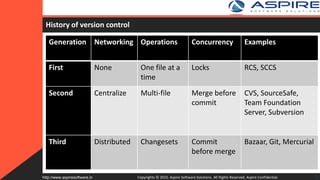
History of version control
Copyrights © 2015. Aspire Software Solutions. All Rights Reserved. Aspire Confidential.http://www.aspiresoftware.in 3
Generation Networking Operations Concurrency Examples
First None One file at a
time
Locks RCS, SCCS
Second Centralize Multi-file Merge before
commit
CVS, SourceSafe,
Team Foundation
Server, Subversion
Third Distributed Changesets Commit
before merge
Bazaar, Git, Mercurial
First Generation Version Control : Source Code Control System
Source Code Control System
The Source Code Control System (SCCS) allows you to control write access to
source files, and to monitor changes made to those files. SCCS allows only one
user at a time to update a file, and records all changes in a history file.
• The SCCS file is named s.filename, where filename is the file being tracked.
• Each set of changes depending on the previous revision
• Creating an SCCS File via admin
• Retrieving a File via get
• Recording Change via delta
Copyrights © 2015. Aspire Software Solutions. All Rights Reserved. Aspire Confidential.http://www.aspiresoftware.in 4
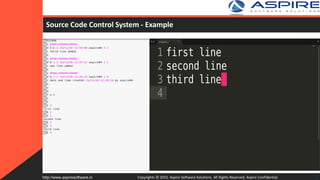
Source Code Control System - Example
Copyrights © 2015. Aspire Software Solutions. All Rights Reserved. Aspire Confidential.http://www.aspiresoftware.in 5
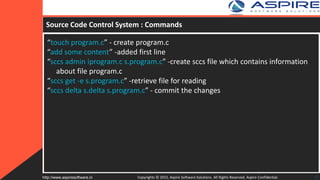
Source Code Control System : Commands
“touch program.c” - create program.c
“add some content” -added first line
“sccs admin iprogram.c s.program.c” -create sccs file which contains information
about file program.c
“sccs get -e s.program.c” -retrieve file for reading
“sccs delta s.delta s.program.c” - commit the changes
Copyrights © 2015. Aspire Software Solutions. All Rights Reserved. Aspire Confidential.http://www.aspiresoftware.in 6
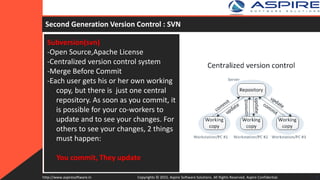
Subversion(svn)
-Open Source,Apache License
-Centralized version control system
-Merge Before Commit
-Each user gets his or her own working
copy, but there is just one central
repository. As soon as you commit, it
is possible for your co-workers to
update and to see your changes. For
others to see your changes, 2 things
must happen:
You commit, They update
Second Generation Version Control : SVN
Copyrights © 2015. Aspire Software Solutions. All Rights Reserved. Aspire Confidential.http://www.aspiresoftware.in 7
Subversion(svn) : Life Cycle
Create Repository - where users will commit changes
Checkout Repository - svn checkout (co) — Check out a working copy from a repository.
svn checkout URL[@REV]... [PATH]
Update Repository
svn update [PATH...]
svn update brings changes from the repository into your working copy. If no revision is given,
it brings your working copy up to date with the HEAD revision. Otherwise, it synchronizes the
working copy to the revision given by the --revision (-r) option.
Commit Repository
svn commit [PATH...]
Send changes from your working copy to the repository. If you do not supply a log message
with your commit by using either the --file (-F) or --message (-m) option, svn will launch your
editor for you to compose a commit message.
Copyrights © 2015. Aspire Software Solutions. All Rights Reserved. Aspire Confidential.http://www.aspiresoftware.in 8
Subversion(svn) – Advantages/Disadvantages
Advantages
• Atomic Commit
• fast and flexible update/commits
• ease of setup and administration
Disadvantages
• Centralised Copy : Need to connect to central copy if have to access
branches or commit changes
Copyrights © 2015. Aspire Software Solutions. All Rights Reserved. Aspire Confidential.http://www.aspiresoftware.in 9
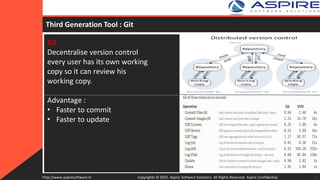
Git
Decentralise version control
every user has its own working
copy so it can review his
working copy.
Advantage :
• Faster to commit
• Faster to update
Third Generation Tool : Git
Copyrights © 2015. Aspire Software Solutions. All Rights Reserved. Aspire Confidential.http://www.aspiresoftware.in 10
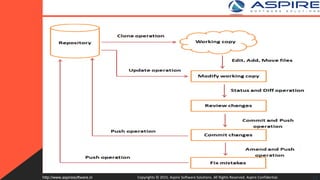
Copyrights © 2015. Aspire Software Solutions. All Rights Reserved. Aspire Confidential.http://www.aspiresoftware.in 11
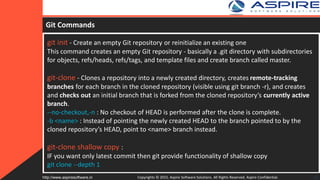
Git Commands
git init - Create an empty Git repository or reinitialize an existing one
This command creates an empty Git repository - basically a .git directory with subdirectories
for objects, refs/heads, refs/tags, and template files and create branch called master.
git-clone - Clones a repository into a newly created directory, creates remote-tracking
branches for each branch in the cloned repository (visible using git branch -r), and creates
and checks out an initial branch that is forked from the cloned repository’s currently active
branch.
--no-checkout,-n : No checkout of HEAD is performed after the clone is complete.
-b <name> : Instead of pointing the newly created HEAD to the branch pointed to by the
cloned repository’s HEAD, point to <name> branch instead.
git-clone shallow copy :
IF you want only latest commit then git provide functionality of shallow copy
git clone --depth 1
Copyrights © 2015. Aspire Software Solutions. All Rights Reserved. Aspire Confidential.http://www.aspiresoftware.in 12
Git Commands (Contd)
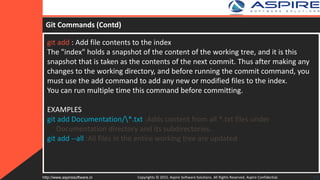
git add : Add file contents to the index
The "index" holds a snapshot of the content of the working tree, and it is this
snapshot that is taken as the contents of the next commit. Thus after making any
changes to the working directory, and before running the commit command, you
must use the add command to add any new or modified files to the index.
You can run multiple time this command before committing.
EXAMPLES
git add Documentation/*.txt :Adds content from all *.txt files under
Documentation directory and its subdirectories.
git add --all :All files in the entire working tree are updated
Copyrights © 2015. Aspire Software Solutions. All Rights Reserved. Aspire Confidential.http://www.aspiresoftware.in 13
Git Commands (Contd)
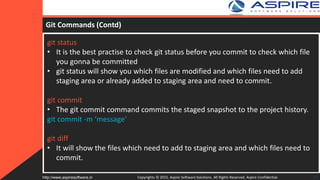
git status
• It is the best practise to check git status before you commit to check which file
you gonna be committed
• git status will show you which files are modified and which files need to add
staging area or already added to staging area and need to commit.
git commit
• The git commit command commits the staged snapshot to the project history.
git commit -m ‘message’
git diff
• It will show the files which need to add to staging area and which files need to
commit.
Copyrights © 2015. Aspire Software Solutions. All Rights Reserved. Aspire Confidential.http://www.aspiresoftware.in 14
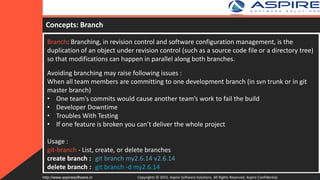
Concepts: Branch
Branch: Branching, in revision control and software configuration management, is the
duplication of an object under revision control (such as a source code file or a directory tree)
so that modifications can happen in parallel along both branches.
Avoiding branching may raise following issues :
When all team members are committing to one development branch (in svn trunk or in git
master branch)
• One team’s commits would cause another team’s work to fail the build
• Developer Downtime
• Troubles With Testing
• If one feature is broken you can’t deliver the whole project
Usage :
git-branch - List, create, or delete branches
create branch : git branch my2.6.14 v2.6.14
delete branch : git branch -d my2.6.14
Copyrights © 2015. Aspire Software Solutions. All Rights Reserved. Aspire Confidential.http://www.aspiresoftware.in 15
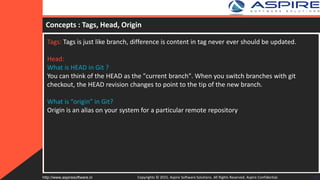
Concepts : Tags, Head, Origin
Tags: Tags is just like branch, difference is content in tag never ever should be updated.
Head:
What is HEAD in Git ?
You can think of the HEAD as the "current branch". When you switch branches with git
checkout, the HEAD revision changes to point to the tip of the new branch.
What is “origin” in Git?
Origin is an alias on your system for a particular remote repository
Copyrights © 2015. Aspire Software Solutions. All Rights Reserved. Aspire Confidential.http://www.aspiresoftware.in 16
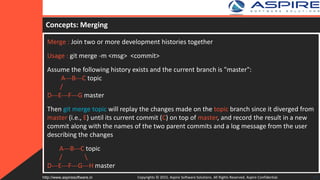
Concepts: Merging
Merge : Join two or more development histories together
Usage : git merge -m <msg> <commit>
Assume the following history exists and the current branch is "master":
A---B---C topic
/
D---E---F---G master
Then git merge topic will replay the changes made on the topic branch since it diverged from
master (i.e., E) until its current commit (C) on top of master, and record the result in a new
commit along with the names of the two parent commits and a log message from the user
describing the changes
A---B---C topic
/ 
D---E---F---G---H master
Copyrights © 2015. Aspire Software Solutions. All Rights Reserved. Aspire Confidential.http://www.aspiresoftware.in 17
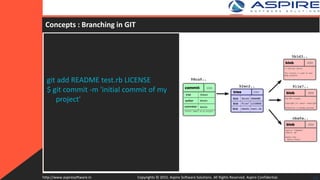
git add README test.rb LICENSE
$ git commit -m 'initial commit of my
project'
18Copyrights © 2015. Aspire Software Solutions. All Rights Reserved. Aspire Confidential.http://www.aspiresoftware.in
Concepts : Branching in GIT
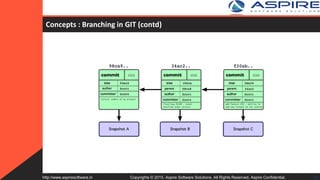
Concepts : Branching in GIT (contd)
19Copyrights © 2015. Aspire Software Solutions. All Rights Reserved. Aspire Confidential.http://www.aspiresoftware.in
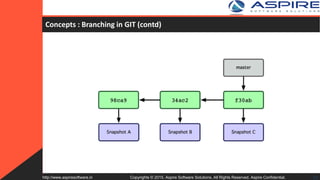
Concepts : Branching in GIT (contd)
20Copyrights © 2015. Aspire Software Solutions. All Rights Reserved. Aspire Confidential.http://www.aspiresoftware.in
Concepts : Branching in GIT (contd)
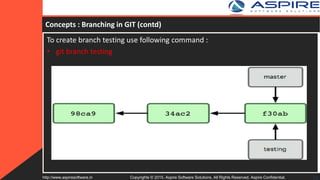
To create branch testing use following command :
• git branch testing
21Copyrights © 2015. Aspire Software Solutions. All Rights Reserved. Aspire Confidential.http://www.aspiresoftware.in
Concepts : Branching in GIT (contd)
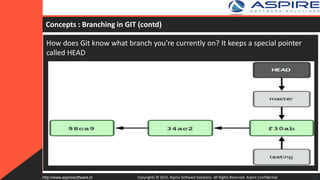
How does Git know what branch you’re currently on? It keeps a special pointer
called HEAD
Copyrights © 2015. Aspire Software Solutions. All Rights Reserved. Aspire Confidential.http://www.aspiresoftware.in 22
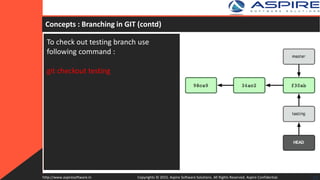
To check out testing branch use
following command :
git checkout testing
23Copyrights © 2015. Aspire Software Solutions. All Rights Reserved. Aspire Confidential.http://www.aspiresoftware.in
Concepts : Branching in GIT (contd)
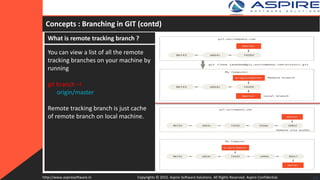
What is remote tracking branch ?
You can view a list of all the remote
tracking branches on your machine by
running
git branch –r
origin/master
Remote tracking branch is just cache
of remote branch on local machine.
24Copyrights © 2015. Aspire Software Solutions. All Rights Reserved. Aspire Confidential.http://www.aspiresoftware.in
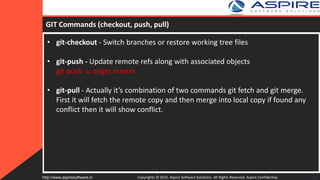
GIT Commands (checkout, push, pull)
• git-checkout - Switch branches or restore working tree files
• git-push - Update remote refs along with associated objects
git push -u origin master
• git-pull - Actually it’s combination of two commands git fetch and git merge.
First it will fetch the remote copy and then merge into local copy if found any
conflict then it will show conflict.
Copyrights © 2015. Aspire Software Solutions. All Rights Reserved. Aspire Confidential.http://www.aspiresoftware.in 25
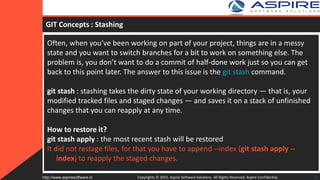
GIT Concepts : Stashing
Often, when you’ve been working on part of your project, things are in a messy
state and you want to switch branches for a bit to work on something else. The
problem is, you don’t want to do a commit of half-done work just so you can get
back to this point later. The answer to this issue is the git stash command.
git stash : stashing takes the dirty state of your working directory — that is, your
modified tracked files and staged changes — and saves it on a stack of unfinished
changes that you can reapply at any time.
How to restore it?
git stash apply : the most recent stash will be restored
It did not restage files, for that you have to append --index (git stash apply --
index) to reapply the staged changes.
Copyrights © 2015. Aspire Software Solutions. All Rights Reserved. Aspire Confidential.http://www.aspiresoftware.in 26
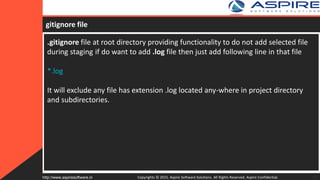
gitignore file
.gitignore file at root directory providing functionality to do not add selected file
during staging if do want to add .log file then just add following line in that file
*.log
It will exclude any file has extension .log located any-where in project directory
and subdirectories.
Copyrights © 2015. Aspire Software Solutions. All Rights Reserved. Aspire Confidential.http://www.aspiresoftware.in 27
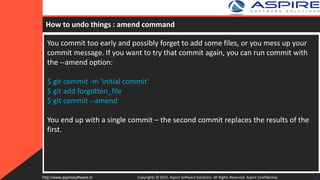
How to undo things : amend command
You commit too early and possibly forget to add some files, or you mess up your
commit message. If you want to try that commit again, you can run commit with
the --amend option:
$ git commit -m 'initial commit'
$ git add forgotten_file
$ git commit --amend
You end up with a single commit – the second commit replaces the results of the
first.
Copyrights © 2015. Aspire Software Solutions. All Rights Reserved. Aspire Confidential.http://www.aspiresoftware.in 28
How to get back deleted files ?
I want the deleted file that has been committed, and I don’t know on which
commit I have deleted that file.
1. find the last commit which touched that file
git rev-list -n 1 HEAD -- <file_path>
2. checkout that file using commit-id(deleting_commit) retrieved from previous
command,^ means first parent.
git checkout <deleting_commit>^ -- <file_path>
Copyrights © 2015. Aspire Software Solutions. All Rights Reserved. Aspire Confidential.http://www.aspiresoftware.in 29
How to undo commit ?
If I have accidently committed the wrong file or broken function code, how to
undo commit?
Using following command you can undo commit
$ git commit -m "Something terribly misguided"
$ git reset --soft HEAD~
$ git add ...
$ git commit -c ORIG_HEAD - reusing the old commit message. reset copied the
old head to .git/ORIG_HEAD
Copyrights © 2015. Aspire Software Solutions. All Rights Reserved. Aspire Confidential.http://www.aspiresoftware.in 30
How to undo git add ?
If you have accidently added wrong file then you can reset using git reset
command
git reset <file>
To undo git add . use git reset
Copyrights © 2015. Aspire Software Solutions. All Rights Reserved. Aspire Confidential.http://www.aspiresoftware.in 31
GIT Best Practises
1. Commit Related Changes
2. Commit Often
3. Don’t Commit Half-Done Work
4. Test Before You Commit
5. Write Good Commit Messages
6. Use Branches
Copyrights © 2015. Aspire Software Solutions. All Rights Reserved. Aspire Confidential.http://www.aspiresoftware.in 32
Questions
Copyrights © 2015. Aspire Software Solutions. All Rights Reserved. Aspire Confidential.http://www.aspiresoftware.in 33
Thank You
Copyrights © 2015. Aspire Software Solutions. All Rights Reserved. Aspire Confidential.http://www.aspiresoftware.in 34

Version control with git

  • 1.
    Copyrights © 2015.Aspire Software Solutions. All Rights Reserved. Aspire Confidential.http://www.aspiresoftware.in Version controlling with GIT Presented by : Dhaval Shah Assisted by : Pratik Patel
  • 2.
    WHAT IS VERSIONCONTROL Copyrights © 2015. Aspire Software Solutions. All Rights Reserved. Aspire Confidential.http://www.aspiresoftware.in 2
  • 3.
    History of versioncontrol Copyrights © 2015. Aspire Software Solutions. All Rights Reserved. Aspire Confidential.http://www.aspiresoftware.in 3 Generation Networking Operations Concurrency Examples First None One file at a time Locks RCS, SCCS Second Centralize Multi-file Merge before commit CVS, SourceSafe, Team Foundation Server, Subversion Third Distributed Changesets Commit before merge Bazaar, Git, Mercurial
  • 4.
    First Generation VersionControl : Source Code Control System Source Code Control System The Source Code Control System (SCCS) allows you to control write access to source files, and to monitor changes made to those files. SCCS allows only one user at a time to update a file, and records all changes in a history file. • The SCCS file is named s.filename, where filename is the file being tracked. • Each set of changes depending on the previous revision • Creating an SCCS File via admin • Retrieving a File via get • Recording Change via delta Copyrights © 2015. Aspire Software Solutions. All Rights Reserved. Aspire Confidential.http://www.aspiresoftware.in 4
  • 5.
    Source Code ControlSystem - Example Copyrights © 2015. Aspire Software Solutions. All Rights Reserved. Aspire Confidential.http://www.aspiresoftware.in 5
  • 6.
    Source Code ControlSystem : Commands “touch program.c” - create program.c “add some content” -added first line “sccs admin iprogram.c s.program.c” -create sccs file which contains information about file program.c “sccs get -e s.program.c” -retrieve file for reading “sccs delta s.delta s.program.c” - commit the changes Copyrights © 2015. Aspire Software Solutions. All Rights Reserved. Aspire Confidential.http://www.aspiresoftware.in 6
  • 7.
    Subversion(svn) -Open Source,Apache License -Centralizedversion control system -Merge Before Commit -Each user gets his or her own working copy, but there is just one central repository. As soon as you commit, it is possible for your co-workers to update and to see your changes. For others to see your changes, 2 things must happen: You commit, They update Second Generation Version Control : SVN Copyrights © 2015. Aspire Software Solutions. All Rights Reserved. Aspire Confidential.http://www.aspiresoftware.in 7
  • 8.
    Subversion(svn) : LifeCycle Create Repository - where users will commit changes Checkout Repository - svn checkout (co) — Check out a working copy from a repository. svn checkout URL[@REV]... [PATH] Update Repository svn update [PATH...] svn update brings changes from the repository into your working copy. If no revision is given, it brings your working copy up to date with the HEAD revision. Otherwise, it synchronizes the working copy to the revision given by the --revision (-r) option. Commit Repository svn commit [PATH...] Send changes from your working copy to the repository. If you do not supply a log message with your commit by using either the --file (-F) or --message (-m) option, svn will launch your editor for you to compose a commit message. Copyrights © 2015. Aspire Software Solutions. All Rights Reserved. Aspire Confidential.http://www.aspiresoftware.in 8
  • 9.
    Subversion(svn) – Advantages/Disadvantages Advantages •Atomic Commit • fast and flexible update/commits • ease of setup and administration Disadvantages • Centralised Copy : Need to connect to central copy if have to access branches or commit changes Copyrights © 2015. Aspire Software Solutions. All Rights Reserved. Aspire Confidential.http://www.aspiresoftware.in 9
  • 10.
    Git Decentralise version control everyuser has its own working copy so it can review his working copy. Advantage : • Faster to commit • Faster to update Third Generation Tool : Git Copyrights © 2015. Aspire Software Solutions. All Rights Reserved. Aspire Confidential.http://www.aspiresoftware.in 10
  • 11.
    Copyrights © 2015.Aspire Software Solutions. All Rights Reserved. Aspire Confidential.http://www.aspiresoftware.in 11
  • 12.
    Git Commands git init- Create an empty Git repository or reinitialize an existing one This command creates an empty Git repository - basically a .git directory with subdirectories for objects, refs/heads, refs/tags, and template files and create branch called master. git-clone - Clones a repository into a newly created directory, creates remote-tracking branches for each branch in the cloned repository (visible using git branch -r), and creates and checks out an initial branch that is forked from the cloned repository’s currently active branch. --no-checkout,-n : No checkout of HEAD is performed after the clone is complete. -b <name> : Instead of pointing the newly created HEAD to the branch pointed to by the cloned repository’s HEAD, point to <name> branch instead. git-clone shallow copy : IF you want only latest commit then git provide functionality of shallow copy git clone --depth 1 Copyrights © 2015. Aspire Software Solutions. All Rights Reserved. Aspire Confidential.http://www.aspiresoftware.in 12
  • 13.
    Git Commands (Contd) gitadd : Add file contents to the index The "index" holds a snapshot of the content of the working tree, and it is this snapshot that is taken as the contents of the next commit. Thus after making any changes to the working directory, and before running the commit command, you must use the add command to add any new or modified files to the index. You can run multiple time this command before committing. EXAMPLES git add Documentation/*.txt :Adds content from all *.txt files under Documentation directory and its subdirectories. git add --all :All files in the entire working tree are updated Copyrights © 2015. Aspire Software Solutions. All Rights Reserved. Aspire Confidential.http://www.aspiresoftware.in 13
  • 14.
    Git Commands (Contd) gitstatus • It is the best practise to check git status before you commit to check which file you gonna be committed • git status will show you which files are modified and which files need to add staging area or already added to staging area and need to commit. git commit • The git commit command commits the staged snapshot to the project history. git commit -m ‘message’ git diff • It will show the files which need to add to staging area and which files need to commit. Copyrights © 2015. Aspire Software Solutions. All Rights Reserved. Aspire Confidential.http://www.aspiresoftware.in 14
  • 15.
    Concepts: Branch Branch: Branching,in revision control and software configuration management, is the duplication of an object under revision control (such as a source code file or a directory tree) so that modifications can happen in parallel along both branches. Avoiding branching may raise following issues : When all team members are committing to one development branch (in svn trunk or in git master branch) • One team’s commits would cause another team’s work to fail the build • Developer Downtime • Troubles With Testing • If one feature is broken you can’t deliver the whole project Usage : git-branch - List, create, or delete branches create branch : git branch my2.6.14 v2.6.14 delete branch : git branch -d my2.6.14 Copyrights © 2015. Aspire Software Solutions. All Rights Reserved. Aspire Confidential.http://www.aspiresoftware.in 15
  • 16.
    Concepts : Tags,Head, Origin Tags: Tags is just like branch, difference is content in tag never ever should be updated. Head: What is HEAD in Git ? You can think of the HEAD as the "current branch". When you switch branches with git checkout, the HEAD revision changes to point to the tip of the new branch. What is “origin” in Git? Origin is an alias on your system for a particular remote repository Copyrights © 2015. Aspire Software Solutions. All Rights Reserved. Aspire Confidential.http://www.aspiresoftware.in 16
  • 17.
    Concepts: Merging Merge :Join two or more development histories together Usage : git merge -m <msg> <commit> Assume the following history exists and the current branch is "master": A---B---C topic / D---E---F---G master Then git merge topic will replay the changes made on the topic branch since it diverged from master (i.e., E) until its current commit (C) on top of master, and record the result in a new commit along with the names of the two parent commits and a log message from the user describing the changes A---B---C topic / D---E---F---G---H master Copyrights © 2015. Aspire Software Solutions. All Rights Reserved. Aspire Confidential.http://www.aspiresoftware.in 17
  • 18.
    git add READMEtest.rb LICENSE $ git commit -m 'initial commit of my project' 18Copyrights © 2015. Aspire Software Solutions. All Rights Reserved. Aspire Confidential.http://www.aspiresoftware.in Concepts : Branching in GIT
  • 19.
    Concepts : Branchingin GIT (contd) 19Copyrights © 2015. Aspire Software Solutions. All Rights Reserved. Aspire Confidential.http://www.aspiresoftware.in
  • 20.
    Concepts : Branchingin GIT (contd) 20Copyrights © 2015. Aspire Software Solutions. All Rights Reserved. Aspire Confidential.http://www.aspiresoftware.in
  • 21.
    Concepts : Branchingin GIT (contd) To create branch testing use following command : • git branch testing 21Copyrights © 2015. Aspire Software Solutions. All Rights Reserved. Aspire Confidential.http://www.aspiresoftware.in
  • 22.
    Concepts : Branchingin GIT (contd) How does Git know what branch you’re currently on? It keeps a special pointer called HEAD Copyrights © 2015. Aspire Software Solutions. All Rights Reserved. Aspire Confidential.http://www.aspiresoftware.in 22
  • 23.
    To check outtesting branch use following command : git checkout testing 23Copyrights © 2015. Aspire Software Solutions. All Rights Reserved. Aspire Confidential.http://www.aspiresoftware.in Concepts : Branching in GIT (contd)
  • 24.
    Concepts : Branchingin GIT (contd) What is remote tracking branch ? You can view a list of all the remote tracking branches on your machine by running git branch –r origin/master Remote tracking branch is just cache of remote branch on local machine. 24Copyrights © 2015. Aspire Software Solutions. All Rights Reserved. Aspire Confidential.http://www.aspiresoftware.in
  • 25.
    GIT Commands (checkout,push, pull) • git-checkout - Switch branches or restore working tree files • git-push - Update remote refs along with associated objects git push -u origin master • git-pull - Actually it’s combination of two commands git fetch and git merge. First it will fetch the remote copy and then merge into local copy if found any conflict then it will show conflict. Copyrights © 2015. Aspire Software Solutions. All Rights Reserved. Aspire Confidential.http://www.aspiresoftware.in 25
  • 26.
    GIT Concepts :Stashing Often, when you’ve been working on part of your project, things are in a messy state and you want to switch branches for a bit to work on something else. The problem is, you don’t want to do a commit of half-done work just so you can get back to this point later. The answer to this issue is the git stash command. git stash : stashing takes the dirty state of your working directory — that is, your modified tracked files and staged changes — and saves it on a stack of unfinished changes that you can reapply at any time. How to restore it? git stash apply : the most recent stash will be restored It did not restage files, for that you have to append --index (git stash apply -- index) to reapply the staged changes. Copyrights © 2015. Aspire Software Solutions. All Rights Reserved. Aspire Confidential.http://www.aspiresoftware.in 26
  • 27.
    gitignore file .gitignore fileat root directory providing functionality to do not add selected file during staging if do want to add .log file then just add following line in that file *.log It will exclude any file has extension .log located any-where in project directory and subdirectories. Copyrights © 2015. Aspire Software Solutions. All Rights Reserved. Aspire Confidential.http://www.aspiresoftware.in 27
  • 28.
    How to undothings : amend command You commit too early and possibly forget to add some files, or you mess up your commit message. If you want to try that commit again, you can run commit with the --amend option: $ git commit -m 'initial commit' $ git add forgotten_file $ git commit --amend You end up with a single commit – the second commit replaces the results of the first. Copyrights © 2015. Aspire Software Solutions. All Rights Reserved. Aspire Confidential.http://www.aspiresoftware.in 28
  • 29.
    How to getback deleted files ? I want the deleted file that has been committed, and I don’t know on which commit I have deleted that file. 1. find the last commit which touched that file git rev-list -n 1 HEAD -- <file_path> 2. checkout that file using commit-id(deleting_commit) retrieved from previous command,^ means first parent. git checkout <deleting_commit>^ -- <file_path> Copyrights © 2015. Aspire Software Solutions. All Rights Reserved. Aspire Confidential.http://www.aspiresoftware.in 29
  • 30.
    How to undocommit ? If I have accidently committed the wrong file or broken function code, how to undo commit? Using following command you can undo commit $ git commit -m "Something terribly misguided" $ git reset --soft HEAD~ $ git add ... $ git commit -c ORIG_HEAD - reusing the old commit message. reset copied the old head to .git/ORIG_HEAD Copyrights © 2015. Aspire Software Solutions. All Rights Reserved. Aspire Confidential.http://www.aspiresoftware.in 30
  • 31.
    How to undogit add ? If you have accidently added wrong file then you can reset using git reset command git reset <file> To undo git add . use git reset Copyrights © 2015. Aspire Software Solutions. All Rights Reserved. Aspire Confidential.http://www.aspiresoftware.in 31
  • 32.
    GIT Best Practises 1.Commit Related Changes 2. Commit Often 3. Don’t Commit Half-Done Work 4. Test Before You Commit 5. Write Good Commit Messages 6. Use Branches Copyrights © 2015. Aspire Software Solutions. All Rights Reserved. Aspire Confidential.http://www.aspiresoftware.in 32
  • 33.
    Questions Copyrights © 2015.Aspire Software Solutions. All Rights Reserved. Aspire Confidential.http://www.aspiresoftware.in 33
  • 34.
    Thank You Copyrights ©2015. Aspire Software Solutions. All Rights Reserved. Aspire Confidential.http://www.aspiresoftware.in 34