ARTISANS OF OPEN SOURCE


         Introduction to Portlets using Liferay Portal
                           (Part 1)

                           By: Aníbal Gómez-Estrada
                             http://rivetlogic.com/web/agomez


                                     August 23rd, 2011

Rivet Logic Corporation                                  Rivet Logic Costa Rica SRL
11410 Isaac Newton Square N.                             Costa Rica Developer's Forge
Suite 210                                                Edificio María Luisa, 3A office
Reston, VA 20190, USA                                    Paseo Colón, San José, Costa Rica
Ph: 703.955.3480 Fax: 703.234.7711                       Ph: (506) 2256-1024 Fax: (506) 2256-1024
Rivet Logic Overview                                             ARTISANS OF OPEN SOURCE


•  Award-winning consulting and systems integration firm
focused on enabling open source –based software solutions
for content management, collaboration and community:
     –  Innovator of the Year: JBoss (2008)
     –  Solution of the Year: Alfresco (2010)
     –  Platinum Partner: Liferay (2011)


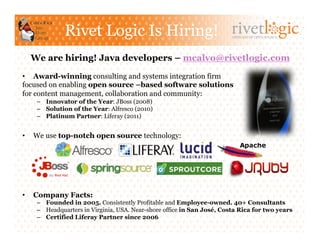
•    We use top-notch open source technology:


•    Company Facts:
     –  Founded in 2005. Consistently Profitable and Employee-owned. 40+ Consultants
     –  Headquarters in Virginia, USA. Near-shore office in San José, Costa Rica for two years
     –  Certified Liferay Partner since 2006:
          •  Conduct all public training on East Coast, USA
          •  Contributor (software, documentation, forums, training material)
          •  20+ Liferay projects underway or completed!
Agenda                             ARTISANS OF OPEN SOURCE


•  Introduction
   –  Portals and Portlets
   –  Liferay Portal 6.0, Liferay SDK and Liferay IDE

•  Portlet 1.0 (JSR 168)
   –    Contract and Lifecycle
   –    Packaging and Deployment
   –    JSP Support
   –    Portlet Modes and Window States
   –    Portlet Preferences

•  Conclusion
   –  Questions and Answers
   –  References

•  Announcements
   –  Introduction to Portlets using Liferay Portal (Part 2)
   –  Rivet Logic Is Hiring!
ARTISANS OF OPEN SOURCE


Introduction
Portals and Portlets                              ARTISANS OF OPEN SOURCE


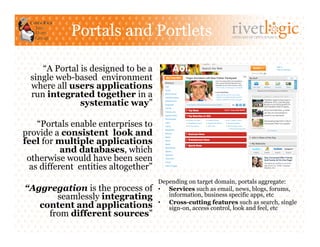
     “A Portal is designed to be a
  single web-based environment
  where all users applications
  run integrated together in a
               systematic way”

    “Portals enable enterprises to
provide a consistent look and
feel for multiple applications
           and databases, which
 otherwise would have been seen
  as different entities altogether”
                                      Depending on target domain, portals aggregate:
“Aggregation is the process of        •  Services such as email, news, blogs, forums,
       seamlessly integrating            information, business specific apps, etc
                                      •  Cross-cutting features such as search, single
   content and applications              sign-on, access control, look and feel, etc
     from different sources”
Portals and Portlets (2)                       ARTISANS OF OPEN SOURCE


 The web had grown up and instead
         of proprietary interfaces to
 everything, there is commitment
         to standardize on open
                         protocols

       Portlets emerged to allow the
        interoperability at level of
        portions of web pages across
different platforms and solutions
 that aggregate content and web
                      applications

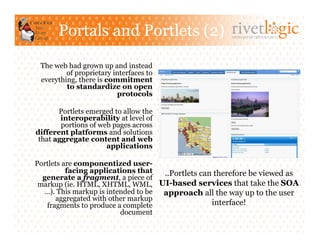
Portlets are componentized user-
          facing applications that  ..Portlets can therefore be viewed as
  generate a fragment, a piece of
 markup (ie. HTML, XHTML, WML, UI-based services that take the SOA
  …). This markup is intended to be approach all the way up to the user
      aggregated with other markup
   fragments to produce a complete                interface!
                         document
Portals and Portlets (3)                    ARTISANS OF OPEN SOURCE


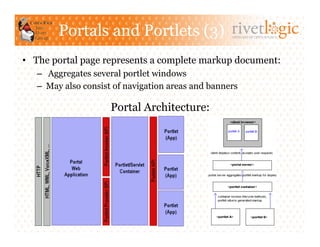
•  The portal page represents a complete markup document:
   –  Aggregates several portlet windows
   –  May also consist of navigation areas and banners

                     Portal Architecture:
Portals and Portlets (4)                          ARTISANS OF OPEN SOURCE


•  Portlets share many similarities with Servlets:
   –  Portlets and their lifecycle are managed by a specialized container
   –  Portlets interact with web client via a request/response paradigm


•  Some of the aspects Portlets differ from Servlets are:
   –  Portlets only generate markup fragments, not complete documents
   –  Portlets only invoked through URLs constructed via Portlet API
   –  Web clients usually interact with portlets through a portal system
   –  Portlets have more refined request handling, i.e. action requests,
      event request, render request and resource requests
   –  Portlets can exist many times in a portal page
   –  Portlets can store transient data in the portlet session in two different
      scopes: the application-wide scope and the portlet private scope
   –  Portlets can not set character set encoding of the render response
Portals and Portlets (5)                       ARTISANS OF OPEN SOURCE


•  Portlet Container implements the Java Portlet Specs:
    –  Usually on top of a servlet container (not stand-alone)
    –  Distinct but complementary to the Portal Server
      •  In some cases, bundled as part of same product though!


•  Some Portlet Container and Portal Server products:
    –  Apache Pluto / Apache Jetspeed (Reference Impl)
    –  OpenPortal Portlet Container (Sun Java Portal Server)
    –  WebSphere Portlet Container (IBM WebSphere Server)
    –  JBoss Portlet Container (JBoss Portal)
    –               (Liferay Portal)
Liferay Portal 6.0                               ARTISANS OF OPEN SOURCE


•  Liferay Portal is a Portlet Container and Portal Server:
    –  Platform and environment to run/administer web sites and integrate portlets
    –  A content management system with publishing, workflow, staging area and
       content-templating features
    –  A set of portlets provided OOTB (for collaboration, social media and more)

•  Liferay Portal is available as:
    –  Community Edition which uses LGPL open source license, so it can be
       “linked” to non open-source software
    –  Enterprise Edition which is the commercially available version with
       support and a hot-patching system for bug fixes and performance
       improvements
    For more info: http://www.liferay.com/downloads/liferay-portal/overview

•  Liferay Portal is provided as:
    –  A standard .war file which can be installed on any application server, or as,
    –  A “bundle” preinstalled in your open source application server of choice
    For more info: http://www.liferay.com/documentation/liferay-portal/6.0
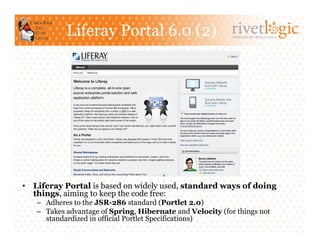
Liferay Portal 6.0 (2)                          ARTISANS OF OPEN SOURCE


•  Liferay Portal is based on widely used, standard ways of doing
   things, aiming to keep the code free:
   –  Adheres to the JSR-286 standard (Portlet 2.0)
   –  Takes advantage of Spring, Hibernate and Velocity (for things not
      standardized in official Portlet Specifications)
Liferay Portal 6.0 (3)                         ARTISANS OF OPEN SOURCE


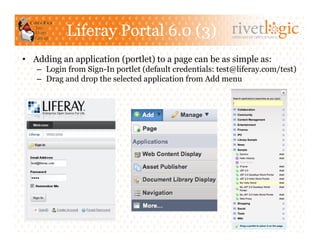
•  Adding an application (portlet) to a page can be as simple as:
   –  Login from Sign-In portlet (default credentials: test@liferay.com/test)
   –  Drag and drop the selected application from Add menu
Liferay Portal 6.0 (4)                                 ARTISANS OF OPEN SOURCE


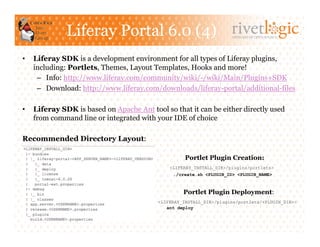
•    Liferay SDK is a development environment for all types of Liferay plugins,
     including: Portlets, Themes, Layout Templates, Hooks and more!
      –  Info: http://www.liferay.com/community/wiki/-/wiki/Main/Plugins+SDK
      –  Download: http://www.liferay.com/downloads/liferay-portal/additional-files

•    Liferay SDK is based on Apache Ant tool so that it can be either directly used
     from command line or integrated with your IDE of choice

Recommended Directory Layout:

                                                     Portlet Plugin Creation:
                                               <LIFERAY_INSTALL_DIR>/plugins/portlets>
                                                ./create.sh <PLUGIN_ID> <PLUGIN_NAME>


                                                    Portlet Plugin Deployment:
                                           <LIFERAY_INSTALL_DIR>/plugins/portlets/<PLUGIN_DIR>>
                                              ant deploy
Liferay Portal 6.0 (5)                           ARTISANS OF OPEN SOURCE


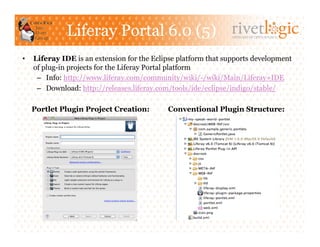
•    Liferay IDE is an extension for the Eclipse platform that supports development
     of plug-in projects for the Liferay Portal platform
      –  Info: http://www.liferay.com/community/wiki/-/wiki/Main/Liferay+IDE
      –  Download: http://releases.liferay.com/tools/ide/eclipse/indigo/stable/

     Portlet Plugin Project Creation:        Conventional Plugin Structure:
ARTISANS OF OPEN SOURCE


Portlet 1.0 (JSR 168)
Portlet 1.0 (JSR 168)                             ARTISANS OF OPEN SOURCE


•  JSR 168 standardizes how applications for portal servers are to
   be developed:
   –  Released in October, 2003
   –  Expert Group: IBM, ASF, Oracle, BEA, SAS, SAS, Citrix, among others

•  Defines a common Portlet API and infrastructure that provides
   facilities for personalization, presentation, and security
•  By adhering to the API and spec, Portlets can be product agnostic
   and deployed to compliant portal frameworks without extensive changes

•  JSR 168 mainly addresses following topics:
   –    Portlet Container contract and Portlet Lifecycle Management *
   –    Packaging and Deployment *
   –    Definition of Portlet Modes and Window States *
   –    Portlet Preferences Management *
   –    User Information and Security
   –    Localization and Caching
   –    JSP tags for Portlet Development *
Contract and Lifecycle                              ARTISANS OF OPEN SOURCE


•  Portlet Spec defines a contract for the portlet container to call
   methods during portlet’s lifecycle (similarly as Servlet API does)

•  Interface javax.portlet.Portlet defines a lifecycle consisting of:
   –  Initialization: init() is called when portlet is instantiated. Intended
      to contain logic that prepares it to serve requests

   –  Deinitialization: destroy() called when portlet is no longer needed
      or server shuts down. To contain logic that cleans it up

   –  Request Processing: in contrast to Servlet, divided in two types…
       •  Render requests: render() whenever the portlet needs to be redrawn by
          the desktop. Performs the render operation
       •  Action requests: processAction() is called after the user submits changes
          to a portlet. Processes input from a user action
Contract and Lifecycle (2)                                           ARTISANS OF OPEN SOURCE


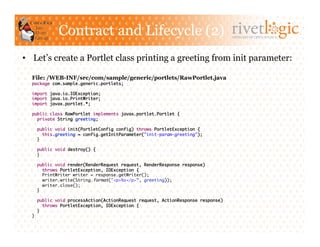
•  Let’s create a Portlet class printing a greeting from init parameter:

  File: /WEB-INF/src/com/sample/generic/portlets/RawPortlet.java
  package com.sample.generic.portlets;	

  import java.io.IOException;	
  import java.io.PrintWriter;	
  import javax.portlet.*;	

  public class RawPortlet implements javax.portlet.Portlet {	
    private String greeting;	

       public void init(PortletConfig config) throws PortletException {	
          this.greeting = config.getInitParameter("init-param-greeting");	
       }	

       public void destroy() {	
       }	

   public void render(RenderRequest request, RenderResponse response)	
      throws PortletException, IOException {	
      PrintWriter writer = response.getWriter();	
      writer.write(String.format("<p>%s</p>”, greeting));	
      writer.close();	
   }	

       public void processAction(ActionRequest request, ActionResponse response)	
          throws PortletException, IOException {	
       }	
  }
Packaging & Deployment                   ARTISANS OF OPEN SOURCE


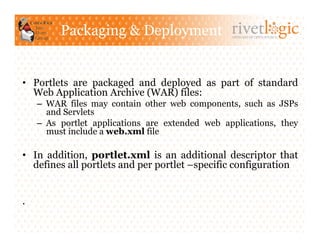
•  Portlets are packaged and deployed as part of standard
   Web Application Archive (WAR) files:
    –  WAR files may contain other web components, such as JSPs
       and Servlets
    –  As portlet applications are extended web applications, they
       must include a web.xml file

•  In addition, portlet.xml is an additional descriptor that
   defines all portlets and per portlet –specific configuration


.
Packaging & Deployment (2)                                         ARTISANS OF OPEN SOURCE


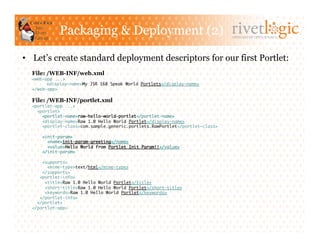
•  Let’s create standard deployment descriptors for our first Portlet:
  File: /WEB-INF/web.xml
  <web-app ...>	
       	<display-name>My JSR 168 Speak World Portlets</display-name>	
  </web-app>	

  File: /WEB-INF/portlet.xml
  <portlet-app ...>	
    <portlet>	
      <portlet-name>raw-hello-world-portlet</portlet-name>	
      <display-name>Raw 1.0 Hello World Portlet</display-name>	
      <portlet-class>com.sample.generic.portlets.RawPortlet</portlet-class>	

      <init-param>	
        <name>init-param-greeting</name>	
        <value>Hello World from Portlet Init Param!!</value>	
      </init-param>	

      <supports>	
        <mime-type>text/html</mime-type>	
      </supports>	
     <portlet-info>	
       <title>Raw 1.0 Hello World Portlet</title>	
       <short-title>Raw 1.0 Hello World Portlet</short-title>	
       <keywords>Raw 1.0 Hello World Portlet</keywords>	
     </portlet-info>	
    </portlet>	
  </portlet-app>
Packaging & Deployment (3)                                     ARTISANS OF OPEN SOURCE


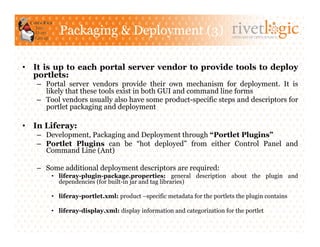
•  It is up to each portal server vendor to provide tools to deploy
   portlets:
   –  Portal server vendors provide their own mechanism for deployment. It is
      likely that these tools exist in both GUI and command line forms
   –  Tool vendors usually also have some product-specific steps and descriptors for
      portlet packaging and deployment

•  In Liferay:
   –  Development, Packaging and Deployment through “Portlet Plugins”
   –  Portlet Plugins can be “hot deployed” from either Control Panel and
      Command Line (Ant)

   –  Some additional deployment descriptors are required:
       •  liferay-plugin-package.properties: general description about the plugin and
          dependencies (for built-in jar and tag libraries)

       •  liferay-portlet.xml: product –specific metadata for the portlets the plugin contains

       •  liferay-display.xml: display information and categorization for the portlet
Packaging & Deployment (4)                        ARTISANS OF OPEN SOURCE


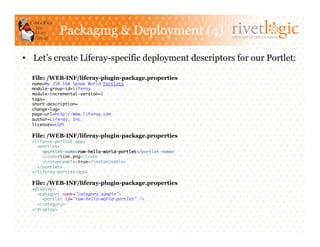
•  Let’s create Liferay-specific deployment descriptors for our Portlet:

  File: /WEB-INF/liferay-plugin-package.properties
  name=My JSR 168 Speak World Portlets	
  module-group-id=liferay	
  module-incremental-version=1	
  tags=	
  short-description=	
  change-log=	
  page-url=http://www.liferay.com	
  author=Liferay, Inc.	
  licenses=LGPL	

  File: /WEB-INF/liferay-plugin-package.properties
  <liferay-portlet-app>	
    <portlet>	
      <portlet-name>raw-hello-world-portlet</portlet-name>	
      <icon>/icon.png</icon>	
      <instanceable>true</instanceable>	
    </portlet>	
  </liferay-portlet-app>	

  File: /WEB-INF/liferay-plugin-package.properties
  <display>	
    <category name="category.sample">	
      <portlet id="raw-hello-world-portlet" />	
    </category>	
  </display>
Packaging & Deployment (5)                    ARTISANS OF OPEN SOURCE


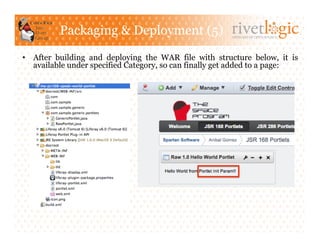
•  After building and deploying the WAR file with structure below, it is
   available under specified Category, so can finally get added to a page:
Contract and Lifecycle Revisited               ARTISANS OF OPEN SOURCE


•  Since it is up to the portal server how URL to a Portlet
   should be formed, the PortletURL interface represents a URL
   that reference the portlet itself:
   –  PortletURL is created through the RenderResponse. Parameters, a
      portlet mode, a window state and a security level can be added to it
   –  PortletURL must be converted to a String in order to be embeded
      into the markup generated by the portlet

•  Portlet API provide two types of URL (PortletURLs), one for each
   type of request enabled by a portlet’s lifecycle (render and action
   requests):
   –  Action            URLs            are  created    with
      RenderResponse.createActionURL() and trigger an action
      request followed by a render request.
   –  Render            URLs             are created    with
      RenderResponse.createRenderURL() and trigger a render
      request
Contract and Lifecycle Revisited (2)   ARTISANS OF OPEN SOURCE


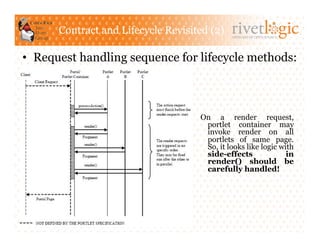
•  Request handling sequence for lifecycle methods:


                                    On a render request,
                                     portlet container may
                                     invoke render on all
                                     portlets of same page.
                                     So, it looks like logic with
                                     side-effects              in
                                     render() should be
                                     carefully handled!


.
Contract and Lifecycle Revisited (3)                                 ARTISANS OF OPEN SOURCE


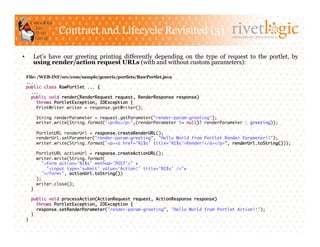
•         Let’s have our greeting printing differently depending on the type of request to the portlet, by
          using render/action request URLs (with and without custom parameters):

     File: /WEB-INF/src/com/sample/generic/portlets/RawPortlet.java
     ...	
     public class RawPortlet ... {	
        ...	
        public void render(RenderRequest request, RenderResponse response)	
          throws PortletException, IOException {	
          PrintWriter writer = response.getWriter();	

            String renderParameter = request.getParameter("render-param-greeting");	
            writer.write(String.format("<p>%s</p>",(renderParameter != null)? renderParameter : greeting));	

            PortletURL renderUrl = response.createRenderURL();	
            renderUrl.setParameter("render-param-greeting”, "Hello World from Portlet Render Parameter!!");	
            writer.write(String.format("<p><a href='%1$s' title='%1$s'>Render!</a></p>”, renderUrl.toString()));	

            PortletURL actionUrl = response.createActionURL();	
            writer.write(String.format(	
              "<form action='%1$s' method='POST'>" +	
                "<input type='submit' value='Action!' title='%1$s' />"+	
              "</form>", actionUrl.toString())	
            );	
            writer.close();	
       }	

          public void processAction(ActionRequest request, ActionResponse response)	
             throws PortletException, IOException {	
             response.setRenderParameter("render-param-greeting”, "Hello World from Portlet Action!!");	
          }	
     }
Contract and Lifecycle Revisited (4)   ARTISANS OF OPEN SOURCE


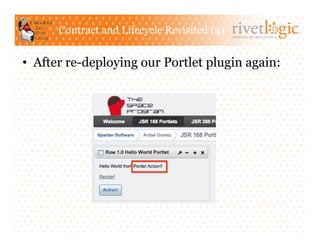
•  After re-deploying our Portlet plugin again:
Contract and Lifecycle Revisited (5)                   ARTISANS OF OPEN SOURCE


•  A PortletSession is created per user client per portlet. Portlets can bind
   object attributes in different scopes through method setAttribute():
    –  PortletSession.APPLICATION_SCOPE: enable Portlets within same
       portlet app to share data
    –  PortletSession.PORTLET_SCOPE: data to be private to portlet and its
       included resources

•  Lifecycle of PortletContext and PortletSession is tied to the lifecycle
   of ServletContext and ServletSession of the web application,
   respectively:
    –  Attributes in PortletContext/PortletSession mirrored in ServletContext/
       HttpSession
    –  Portlet request is independent of the Servlet request

•  PortalContext class that provides environment -specific info such as:
    –  The portal vendor, the portal version, and specific portal properties.
    –  The supported portlet modes and window states
•  The information allows the portlet to use vendor specific extensions when
   being called by a portal that supports these extensions
Let’s Take a Break!                               ARTISANS OF OPEN SOURCE


         Introduction to Portlets using Liferay Portal
                           (Part 1)

                           By: Aníbal Gómez-Estrada
                             http://rivetlogic.com/web/agomez


                                     August 23rd, 2011

Rivet Logic Corporation                                  Rivet Logic Costa Rica SRL
11410 Isaac Newton Square N.                             Costa Rica Developer's Forge
Suite 210                                                Edificio María Luisa, 3A office
Reston, VA 20190, USA                                    Paseo Colón, San José, Costa Rica
Ph: 703.955.3480 Fax: 703.234.7711                       Ph: (506) 2256-1024 Fax: (506) 2256-1024
JSP Support                           ARTISANS OF OPEN SOURCE


•  JSR 168 allows portlet pages to be rendered with JSP technology
   –  A MVC –like pattern for portlet development can be implemented
      when executing the render() method.
   –  A PortletRequestDispatcher object is available and may be used to
      include a JSP as part of the Portlet response

•  Additionally, defines a JSP tag library with some useful tags for
   common tasks:
   –  <portlet:defineObjects>: automatically declares the portlet
      request, response objects and config objects so they can be used within
      the JSP
   –  <portlet:renderURL> and <portlet:actionURL>: construct
      Render and Action URLs that refer back to the portlet

•  Let’s take a look how it works…
JSP Support (2)                                         ARTISANS OF OPEN SOURCE


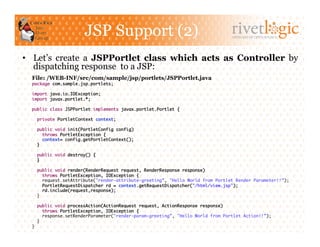
•  Let’s create a JSPPortlet class which acts as Controller by
   dispatching response to a JSP:
  File: /WEB-INF/src/com/sample/jsp/portlets/JSPPortlet.java
  package com.sample.jsp.portlets;	

  import java.io.IOException;	
  import javax.portlet.*;	

  public class JSPPortlet implements javax.portlet.Portlet {	

       private PortletContext context;	

    public void init(PortletConfig config)	
       throws PortletException {	
       context= config.getPortletContext();	
    }	

    public void destroy() {	
    }	

    public void render(RenderRequest request, RenderResponse response)	
       throws PortletException, IOException {	
       request.setAttribute("render-attribute-greeting”, "Hello World from Portlet Render Parameter!!”);	
       PortletRequestDispatcher rd = context.getRequestDispatcher("/html/view.jsp");	
       rd.include(request,response);	
    }	

    public void processAction(ActionRequest request, ActionResponse response)	
       throws PortletException, IOException {	
       response.setRenderParameter("render-param-greeting”, "Hello World from Portlet Action!!”);	
    }	
  }
JSP Support (3)                                           ARTISANS OF OPEN SOURCE


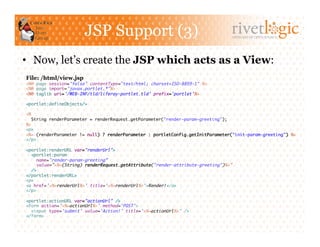
•  Now, let’s create the JSP which acts as a View:
File: /html/view.jsp
<%@ page session="false" contentType="text/html; charset=ISO-8859-1" %>	
<%@ page import="javax.portlet.*"%>	
<%@ taglib uri='/WEB-INF/tld/liferay-portlet.tld' prefix='portlet'%>	

<portlet:defineObjects/>	

<%	
  String renderParameter = renderRequest.getParameter("render-param-greeting");	
%>	
<p>	
<%= (renderParameter != null) ? renderParameter : portletConfig.getInitParameter("init-param-greeting") %>	
</p>	

<portlet:renderURL var="renderUrl">	
  <portlet:param	
     name="render-param-greeting”	
     value="<%=(String) renderRequest.getAttribute("render-attribute-greeting")%>”	
  />	
</portlet:renderURL>	
<p>	
<a href='<%=renderUrl%>' title='<%=renderUrl%>'>Render!</a>	
</p>	

<portlet:actionURL var="actionUrl" />	
<form action='<%=actionUrl%>' method='POST'>	
  <input type='submit' value='Action!' title='<%=actionUrl%>' />	
</form>
JSP Support (4)                                      ARTISANS OF OPEN SOURCE


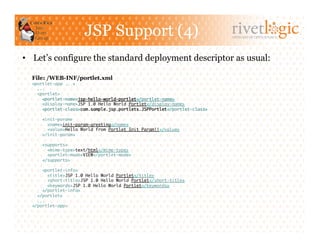
•  Let’s configure the standard deployment descriptor as usual:

  File: /WEB-INF/portlet.xml
  <portlet-app ...>	
    ...	
    <portlet>	
      <portlet-name>jsp-hello-world-portlet</portlet-name>	
      <display-name>JSP 1.0 Hello World Portlet</display-name>	
      <portlet-class>com.sample.jsp.portlets.JSPPortlet</portlet-class>	

      <init-param>	
        <name>init-param-greeting</name>	
        <value>Hello World from Portlet Init Param!!</value>	
      </init-param>	

      <supports>	
        <mime-type>text/html</mime-type>	
        <portlet-mode>VIEW</portlet-mode>	
      </supports>	

      <portlet-info>	
         <title>JSP 1.0 Hello World Portlet</title>	
         <short-title>JSP 1.0 Hello World Portlet</short-title>	
         <keywords>JSP 1.0 Hello World Portlet</keywords>	
      </portlet-info>	
    </portlet>	
    ...	
  </portlet-app>
JSP Support (5)                         ARTISANS OF OPEN SOURCE


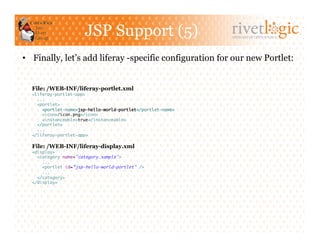
•  Finally, let’s add liferay -specific configuration for our new Portlet:


  File: /WEB-INF/liferay-portlet.xml
  <liferay-portlet-app>	
    ...	
    <portlet>	
      <portlet-name>jsp-hello-world-portlet</portlet-name>	
      <icon>/icon.png</icon>	
      <instanceable>true</instanceable>	
    </portlet>	
    ...	
  </liferay-portlet-app>	

  File: /WEB-INF/liferay-display.xml
  <display>	
    <category name="category.sample">	
      ...	
      <portlet id=”jsp-hello-world-portlet" />	
      ...	
    </category>	
  </display>
JSP Support (6)            ARTISANS OF OPEN SOURCE


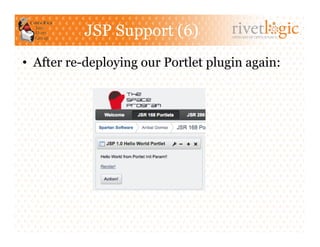
•  After re-deploying our Portlet plugin again:
Portlet Modes and Window States                               ARTISANS OF OPEN SOURCE


•    In constrast to Servlets, there are two main state items managed by the
     container for each portlet: Portlet Mode and Window State

•    Portlet Mode indicates the function the portlet is currently performing:
      –  The default modes defined in JSR 168 are VIEW, EDIT and HELP
      –  Custom portlet modes may be defined by instantiating PortletMode class

•    Window State indicates the amount of space portlets will be assigned on a page:
      –  The three states defined are NORMAL, MAXIMIZED and MINIMIZED
      –  Portlet can use this information to decide how much information to render

•    Custom portlet modes and window states are either mapped to vendor-
     specific portlet modes and window states supported by the container, or ignored.
      –  A portlet can use only portlet modes or window states supported by the container
      –  PortalContext's getSupportedPortletModes() and getSupportedWindowStates()
         methods used to retrieve the portlet modes and window states supported by the container
Portlet Modes and Window States (2)
                                                        ARTISANS OF OPEN SOURCE


•  Descriptor portlet.xml must specify which portlet modes and window
   states should be supported on a portlet.
•  Custom ones are additionally defined by using the <custom-portlet-
   mode> and <custom-window-state> elements

•  Both Portlet Mode and Window State can be programmatically:
   –  Queried anywhere by using PortletRequest’s methods to behave
      conditionally
   –  Changed when processing an action request using ActionResponse’s
      methods

•  Abstract class javax.portlet.GenericPortlet provides a default
   implementation (template -like) for the Portlet interface which
   transparently handle Portlet Modes and Window States. Subclasses
   should override at least one of the following methods:
   –  doView(), to handle render requests when in VIEW mode
   –  doEdit(), to handle render requests when in EDIT mode
   –  doHelp(), to handle render request when in HELP mode
Portlet Modes and Window States (3)
                                                                                   ARTISANS OF OPEN SOURCE


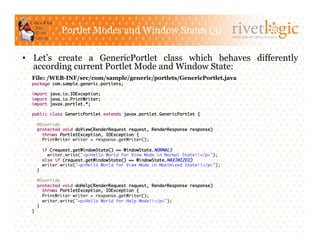
•  Let’s create a GenericPortlet class which behaves differently
   according current Portlet Mode and Window State:
  File: /WEB-INF/src/com/sample/generic/portlets/GenericPortlet.java
  package com.sample.generic.portlets;	

  import java.io.IOException;	
  import java.io.PrintWriter;	
  import javax.portlet.*;	

  public class GenericPortlet extends javax.portlet.GenericPortlet {	

    @Override	
    protected void doView(RenderRequest request, RenderResponse response)	
      throws PortletException, IOException {	
      PrintWriter writer = response.getWriter();	

         if (request.getWindowState() == WindowState.NORMAL)	
           writer.write("<p>Hello World for View Mode in Normal State!!</p>");	
         else if (request.getWindowState() == WindowState.MAXIMIZED)	
         writer.write("<p>Hello World for View Mode in Maximized State!!</p>");	
    }	

    @Override	
    protected void doHelp(RenderRequest request, RenderResponse response)	
       throws PortletException, IOException {	
       PrintWriter writer = response.getWriter();	
       writer.write("<p>Hello World for Help Mode!!</p>");	
    }	
  }
Portlet Modes and Window States (4)
                                                                                   ARTISANS OF OPEN SOURCE


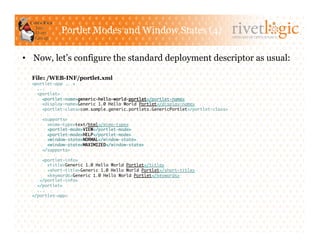
•  Now, let’s configure the standard deployment descriptor as usual:

  File: /WEB-INF/portlet.xml
  <portlet-app ...>	
    ...	
    <portlet>	
      <portlet-name>generic-hello-world-portlet</portlet-name>	
      <display-name>Generic 1.0 Hello World Portlet</display-name>	
      <portlet-class>com.sample.generic.portlets.GenericPortlet</portlet-class>	

      <supports>	
        <mime-type>text/html</mime-type>	
        <portlet-mode>VIEW</portlet-mode>	
        <portlet-mode>HELP</portlet-mode>	
        <window-state>NORMAL</window-state>	
        <window-state>MAXIMIZED</window-state>	
      </supports>	

      <portlet-info>	
         <title>Generic 1.0 Hello World Portlet</title>	
         <short-title>Generic 1.0 Hello World Portlet</short-title>	
         <keywords>Generic 1.0 Hello World Portlet</keywords>	
     </portlet-info>	
    </portlet>	
    ...	
  </portlet-app>
Portlet Modes and Window States (5)
                                                                  ARTISANS OF OPEN SOURCE


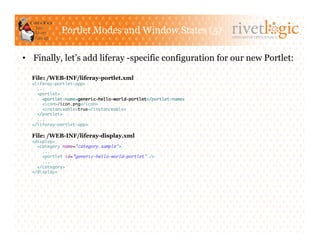
•  Finally, let’s add liferay -specific configuration for our new Portlet:

  File: /WEB-INF/liferay-portlet.xml
  <liferay-portlet-app>	
    ...	
    <portlet>	
      <portlet-name>generic-hello-world-portlet</portlet-name>	
      <icon>/icon.png</icon>	
      <instanceable>true</instanceable>	
    </portlet>	
    ...	
  </liferay-portlet-app>	

  File: /WEB-INF/liferay-display.xml
  <display>	
    <category name="category.sample">	
      ...	
      <portlet id=”generic-hello-world-portlet" />	
      ...	
    </category>	
  </display>
Portlet Modes and Window States (6)
                                                      ARTISANS OF OPEN SOURCE


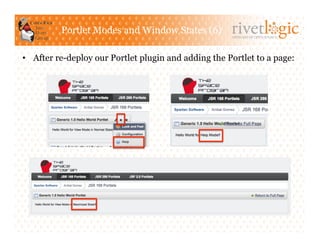
•  After re-deploy our Portlet plugin and adding the Portlet to a page:
Portlet Preferences                            ARTISANS OF OPEN SOURCE


•  Portlet Preferences are a set of persistent name/value pairs
   managed by the container for each portlet
    –  To be be used for configuration or provide a custom view or behavior for
       different users

•  Interface javax.portlet.PortletPreferences enables retrieval and
   storage through methods getValues() and setValues(), respectively:
    –  PortletPreferences object is always accessible when processing requests, but
       preference attributes can only be modified during processAction().
       The store() method must be invoked for changes to be permanent
    –  By implementing the interface javax.portlet.PreferencesValidator,
       method validate() is invoked during method store() and allows custom
       validation of preference values before the container writes changes
       to the data store
    –  By convention, Portlet Preferences are usually modified during EDIT
       Portlet Mode

•  Descriptor portlet.xml must define preferences that should be available
   on a portlet (name and default value). If used, PortletValidator class must
   also be specified in portlet.xml
Portlet Preferences (2)                                               ARTISANS OF OPEN SOURCE


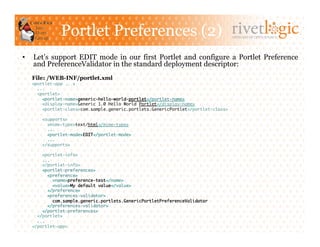
•    Let’s support EDIT mode in our first Portlet and configure a Portlet Preference
     and PreferenceValidator in the standard deployment descriptor:
     File: /WEB-INF/portlet.xml
     <portlet-app ...>	
       ...	
       <portlet>	
         <portlet-name>generic-hello-world-portlet</portlet-name>	
         <display-name>Generic 1.0 Hello World Portlet</display-name>	
         <portlet-class>com.sample.generic.portlets.GenericPortlet</portlet-class>	

         <supports>	
           <mime-type>text/html</mime-type>	
           ...	
           <portlet-mode>EDIT</portlet-mode>	
           ...	
         </supports>	

         <portlet-info>	
         ...	
         </portlet-info>	
         <portlet-preferences>	
            <preference>	
              <name>preference-test</name>	
              <value>My default value</value>	
            </preference>	
            <preferences-validator>	
              com.sample.generic.portlets.GenericPortletPreferenceValidator	
            </preferences-validator>	
         </portlet-preferences>	
       </portlet>	
       ...	
     </portlet-app>
Portlet Preferences (3)                                            ARTISANS OF OPEN SOURCE


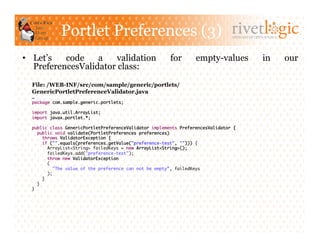
•  Let’s   code    a    validation                      for       empty-values                 in         our
   PreferencesValidator class:
  File: /WEB-INF/src/com/sample/generic/portlets/
  GenericPortletPreferenceValidator.java
  …	
  package com.sample.generic.portlets;	

  import java.util.ArrayList;	
  import javax.portlet.*;	

  public class GenericPortletPreferenceValidator implements PreferencesValidator {	
     public void validate(PortletPreferences preferences)	
        throws ValidatorException {	
        if ("".equals(preferences.getValue("preference-test", ""))) {	
           ArrayList<String> failedKeys = new ArrayList<String>();	
           failedKeys.add("preference-test");	
           throw new ValidatorException	
           (	
              "The value of the preference can not be empty”, failedKeys	
           );	
        }	
     }	
  }
Portlet Preferences (4)                                              ARTISANS OF OPEN SOURCE


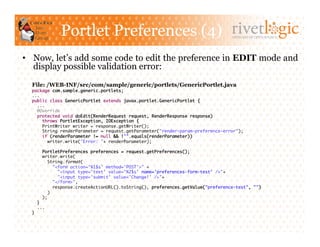
•  Now, let’s add some code to edit the preference in EDIT mode and
   display possible validation error:
  File: /WEB-INF/src/com/sample/generic/portlets/GenericPortlet.java
  package com.sample.generic.portlets;	
  ...	
  public class GenericPortlet extends javax.portlet.GenericPortlet {	
    ...	
    @Override	
    protected void doEdit(RenderRequest request, RenderResponse response)	
       throws PortletException, IOException {	
       PrintWriter writer = response.getWriter();	
       String renderParameter = request.getParameter("render-param-preference-error");	
       if (renderParameter != null && !"".equals(renderParameter))	
         writer.write("Error: "+ renderParameter);	

       PortletPreferences preferences = request.getPreferences();	
       writer.write(	
          String.format(	
             "<form action='%1$s' method='POST'>" +	
               "<input type='text' value='%2$s' name='preferences-form-test' />"+	
               "<input type='submit' value='Change!' />"+	
             "</form>",	
             response.createActionURL().toString(), preferences.getValue("preference-test", "")	
          )	
       );        	
    }	
    ...	
  }
Portlet Preferences (5)                                                ARTISANS OF OPEN SOURCE


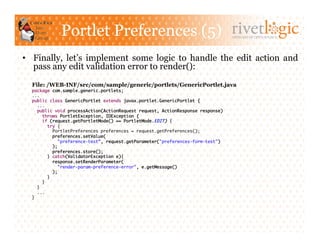
•  Finally, let’s implement some logic to handle the edit action and
   pass any edit validation error to render():
  File: /WEB-INF/src/com/sample/generic/portlets/GenericPortlet.java
  package com.sample.generic.portlets;	
  ...	
  public class GenericPortlet extends javax.portlet.GenericPortlet {	
     ...	
     public void processAction(ActionRequest request, ActionResponse response)	
        throws PortletException, IOException {	
        if (request.getPortletMode() == PortletMode.EDIT) {	
           try {	
              PortletPreferences preferences = request.getPreferences();	
              preferences.setValue(	
                "preference-test”, request.getParameter("preferences-form-test")	
              );	
              preferences.store();	
           } catch(ValidatorException e){	
              response.setRenderParameter(	
                "render-param-preference-error", e.getMessage()	
              );	
           }	
        }	
     }	
     ...	
  }
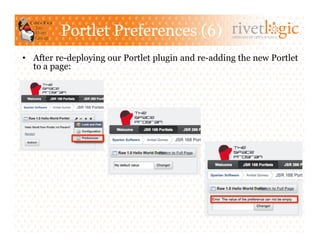
Portlet Preferences (6)                     ARTISANS OF OPEN SOURCE


•  After re-deploying our Portlet plugin and re-adding the new Portlet
   to a page:
ARTISANS OF OPEN SOURCE


Conclusion
Questions?                            ARTISANS OF OPEN SOURCE


         Introduction to Portlets using Liferay Portal
                           (Part 1)

                           By: Aníbal Gómez-Estrada
                             http://rivetlogic.com/web/agomez


                                     August 23rd, 2011

Rivet Logic Corporation                                  Rivet Logic Costa Rica SRL
11410 Isaac Newton Square N.                             Costa Rica Developer's Forge
Suite 210                                                Edificio María Luisa, 3A office
Reston, VA 20190, USA                                    Paseo Colón, San José, Costa Rica
Ph: 703.955.3480 Fax: 703.234.7711                       Ph: (506) 2256-1024 Fax: (506) 2256-1024
References                 ARTISANS OF OPEN SOURCE


                JSR 168: Portlet Specification
 http://www.jdocs.com/portlet/1.0/javax/portlet/package-
                        summary.html
http://www.javaworld.com/javaworld/jw-08-2003/jw-0801-
                     portlet.html?page=1
http://www.javaworld.com/javaworld/jw-09-2003/jw-0905-
                         portlet2.html
      http://www.developer.com/java/web/article.php/
      10935_3547186_1/Introduction-to-the-Java-Portlet-
                       Specification.htm
      http://www.developer.com/java/web/article.php/
       10935_3366111_1/Understanding-the-Java-Portlet-
                       Specification.htm
  http://docs.jboss.org/jbportal/v2.4/reference-guide/en/
                      html/tutorials.html
ARTISANS OF OPEN SOURCE


Announcements
Coming Soon!                      ARTISANS OF OPEN SOURCE


               Introduction to Portlets using Liferay Portal (Part 2)
                                  Coming Soon!
•    Liferay Portal Revisited
     –  Liferay SDK Plugin Types
     –  Liferay Portlets (Built-in)
     –  Service Builder

•    Portlets 2.0 (JSR 286)
     –    Inter-Portlet Communication
     –    Resource Serving
     –    Lifecycle Revisited
     –    Enhancements: Annotations and Tag Libraries

•    Tentative: JSF 2.0 Portlets
     –    Portlet Bridges (JSR-301/JSR-329)
     –    Setup and Hello World Portlet
     –    Actions and Navigation
     –    Portlet Preferences
     –    Inter-Portlet Communication
Rivet Logic Is Hiring!                                    ARTISANS OF OPEN SOURCE


     We are hiring! Java developers – mcalvo@rivetlogic.com

•  Award-winning consulting and systems integration firm
focused on enabling open source –based software solutions
for content management, collaboration and community:
      –  Innovator of the Year: JBoss (2008)
      –  Solution of the Year: Alfresco (2010)
      –  Platinum Partner: Liferay (2011)


•    We use top-notch open source technology:


•    Company Facts:
      –  Founded in 2005. Consistently Profitable and Employee-owned. 40+ Consultants
      –  Headquarters in Virginia, USA. Near-shore office in San José, Costa Rica for two years
      –  Certified Liferay Partner since 2006

Introduction to Portlets Using Liferay Portal

  • 1.
    ARTISANS OF OPENSOURCE Introduction to Portlets using Liferay Portal (Part 1) By: Aníbal Gómez-Estrada http://rivetlogic.com/web/agomez August 23rd, 2011 Rivet Logic Corporation Rivet Logic Costa Rica SRL 11410 Isaac Newton Square N. Costa Rica Developer's Forge Suite 210 Edificio María Luisa, 3A office Reston, VA 20190, USA Paseo Colón, San José, Costa Rica Ph: 703.955.3480 Fax: 703.234.7711 Ph: (506) 2256-1024 Fax: (506) 2256-1024
  • 2.
    Rivet Logic Overview ARTISANS OF OPEN SOURCE •  Award-winning consulting and systems integration firm focused on enabling open source –based software solutions for content management, collaboration and community: –  Innovator of the Year: JBoss (2008) –  Solution of the Year: Alfresco (2010) –  Platinum Partner: Liferay (2011) •  We use top-notch open source technology: •  Company Facts: –  Founded in 2005. Consistently Profitable and Employee-owned. 40+ Consultants –  Headquarters in Virginia, USA. Near-shore office in San José, Costa Rica for two years –  Certified Liferay Partner since 2006: •  Conduct all public training on East Coast, USA •  Contributor (software, documentation, forums, training material) •  20+ Liferay projects underway or completed!
  • 3.
    Agenda ARTISANS OF OPEN SOURCE •  Introduction –  Portals and Portlets –  Liferay Portal 6.0, Liferay SDK and Liferay IDE •  Portlet 1.0 (JSR 168) –  Contract and Lifecycle –  Packaging and Deployment –  JSP Support –  Portlet Modes and Window States –  Portlet Preferences •  Conclusion –  Questions and Answers –  References •  Announcements –  Introduction to Portlets using Liferay Portal (Part 2) –  Rivet Logic Is Hiring!
  • 4.
    ARTISANS OF OPENSOURCE Introduction
  • 5.
    Portals and Portlets ARTISANS OF OPEN SOURCE “A Portal is designed to be a single web-based environment where all users applications run integrated together in a systematic way” “Portals enable enterprises to provide a consistent look and feel for multiple applications and databases, which otherwise would have been seen as different entities altogether” Depending on target domain, portals aggregate: “Aggregation is the process of •  Services such as email, news, blogs, forums, seamlessly integrating information, business specific apps, etc •  Cross-cutting features such as search, single content and applications sign-on, access control, look and feel, etc from different sources”
  • 6.
    Portals and Portlets(2) ARTISANS OF OPEN SOURCE The web had grown up and instead of proprietary interfaces to everything, there is commitment to standardize on open protocols Portlets emerged to allow the interoperability at level of portions of web pages across different platforms and solutions that aggregate content and web applications Portlets are componentized user- facing applications that ..Portlets can therefore be viewed as generate a fragment, a piece of markup (ie. HTML, XHTML, WML, UI-based services that take the SOA …). This markup is intended to be approach all the way up to the user aggregated with other markup fragments to produce a complete interface! document
  • 7.
    Portals and Portlets(3) ARTISANS OF OPEN SOURCE •  The portal page represents a complete markup document: –  Aggregates several portlet windows –  May also consist of navigation areas and banners Portal Architecture:
  • 8.
    Portals and Portlets(4) ARTISANS OF OPEN SOURCE •  Portlets share many similarities with Servlets: –  Portlets and their lifecycle are managed by a specialized container –  Portlets interact with web client via a request/response paradigm •  Some of the aspects Portlets differ from Servlets are: –  Portlets only generate markup fragments, not complete documents –  Portlets only invoked through URLs constructed via Portlet API –  Web clients usually interact with portlets through a portal system –  Portlets have more refined request handling, i.e. action requests, event request, render request and resource requests –  Portlets can exist many times in a portal page –  Portlets can store transient data in the portlet session in two different scopes: the application-wide scope and the portlet private scope –  Portlets can not set character set encoding of the render response
  • 9.
    Portals and Portlets(5) ARTISANS OF OPEN SOURCE •  Portlet Container implements the Java Portlet Specs: –  Usually on top of a servlet container (not stand-alone) –  Distinct but complementary to the Portal Server •  In some cases, bundled as part of same product though! •  Some Portlet Container and Portal Server products: –  Apache Pluto / Apache Jetspeed (Reference Impl) –  OpenPortal Portlet Container (Sun Java Portal Server) –  WebSphere Portlet Container (IBM WebSphere Server) –  JBoss Portlet Container (JBoss Portal) –  (Liferay Portal)
  • 10.
    Liferay Portal 6.0 ARTISANS OF OPEN SOURCE •  Liferay Portal is a Portlet Container and Portal Server: –  Platform and environment to run/administer web sites and integrate portlets –  A content management system with publishing, workflow, staging area and content-templating features –  A set of portlets provided OOTB (for collaboration, social media and more) •  Liferay Portal is available as: –  Community Edition which uses LGPL open source license, so it can be “linked” to non open-source software –  Enterprise Edition which is the commercially available version with support and a hot-patching system for bug fixes and performance improvements For more info: http://www.liferay.com/downloads/liferay-portal/overview •  Liferay Portal is provided as: –  A standard .war file which can be installed on any application server, or as, –  A “bundle” preinstalled in your open source application server of choice For more info: http://www.liferay.com/documentation/liferay-portal/6.0
  • 11.
    Liferay Portal 6.0(2) ARTISANS OF OPEN SOURCE •  Liferay Portal is based on widely used, standard ways of doing things, aiming to keep the code free: –  Adheres to the JSR-286 standard (Portlet 2.0) –  Takes advantage of Spring, Hibernate and Velocity (for things not standardized in official Portlet Specifications)
  • 12.
    Liferay Portal 6.0(3) ARTISANS OF OPEN SOURCE •  Adding an application (portlet) to a page can be as simple as: –  Login from Sign-In portlet (default credentials: test@liferay.com/test) –  Drag and drop the selected application from Add menu
  • 13.
    Liferay Portal 6.0(4) ARTISANS OF OPEN SOURCE •  Liferay SDK is a development environment for all types of Liferay plugins, including: Portlets, Themes, Layout Templates, Hooks and more! –  Info: http://www.liferay.com/community/wiki/-/wiki/Main/Plugins+SDK –  Download: http://www.liferay.com/downloads/liferay-portal/additional-files •  Liferay SDK is based on Apache Ant tool so that it can be either directly used from command line or integrated with your IDE of choice Recommended Directory Layout: Portlet Plugin Creation: <LIFERAY_INSTALL_DIR>/plugins/portlets> ./create.sh <PLUGIN_ID> <PLUGIN_NAME> Portlet Plugin Deployment: <LIFERAY_INSTALL_DIR>/plugins/portlets/<PLUGIN_DIR>> ant deploy
  • 14.
    Liferay Portal 6.0(5) ARTISANS OF OPEN SOURCE •  Liferay IDE is an extension for the Eclipse platform that supports development of plug-in projects for the Liferay Portal platform –  Info: http://www.liferay.com/community/wiki/-/wiki/Main/Liferay+IDE –  Download: http://releases.liferay.com/tools/ide/eclipse/indigo/stable/ Portlet Plugin Project Creation: Conventional Plugin Structure:
  • 15.
    ARTISANS OF OPENSOURCE Portlet 1.0 (JSR 168)
  • 16.
    Portlet 1.0 (JSR168) ARTISANS OF OPEN SOURCE •  JSR 168 standardizes how applications for portal servers are to be developed: –  Released in October, 2003 –  Expert Group: IBM, ASF, Oracle, BEA, SAS, SAS, Citrix, among others •  Defines a common Portlet API and infrastructure that provides facilities for personalization, presentation, and security •  By adhering to the API and spec, Portlets can be product agnostic and deployed to compliant portal frameworks without extensive changes •  JSR 168 mainly addresses following topics: –  Portlet Container contract and Portlet Lifecycle Management * –  Packaging and Deployment * –  Definition of Portlet Modes and Window States * –  Portlet Preferences Management * –  User Information and Security –  Localization and Caching –  JSP tags for Portlet Development *
  • 17.
    Contract and Lifecycle ARTISANS OF OPEN SOURCE •  Portlet Spec defines a contract for the portlet container to call methods during portlet’s lifecycle (similarly as Servlet API does) •  Interface javax.portlet.Portlet defines a lifecycle consisting of: –  Initialization: init() is called when portlet is instantiated. Intended to contain logic that prepares it to serve requests –  Deinitialization: destroy() called when portlet is no longer needed or server shuts down. To contain logic that cleans it up –  Request Processing: in contrast to Servlet, divided in two types… •  Render requests: render() whenever the portlet needs to be redrawn by the desktop. Performs the render operation •  Action requests: processAction() is called after the user submits changes to a portlet. Processes input from a user action
  • 18.
    Contract and Lifecycle(2) ARTISANS OF OPEN SOURCE •  Let’s create a Portlet class printing a greeting from init parameter: File: /WEB-INF/src/com/sample/generic/portlets/RawPortlet.java package com.sample.generic.portlets; import java.io.IOException; import java.io.PrintWriter; import javax.portlet.*; public class RawPortlet implements javax.portlet.Portlet { private String greeting; public void init(PortletConfig config) throws PortletException { this.greeting = config.getInitParameter("init-param-greeting"); } public void destroy() { } public void render(RenderRequest request, RenderResponse response) throws PortletException, IOException { PrintWriter writer = response.getWriter(); writer.write(String.format("<p>%s</p>”, greeting)); writer.close(); } public void processAction(ActionRequest request, ActionResponse response) throws PortletException, IOException { } }
  • 19.
    Packaging & Deployment ARTISANS OF OPEN SOURCE •  Portlets are packaged and deployed as part of standard Web Application Archive (WAR) files: –  WAR files may contain other web components, such as JSPs and Servlets –  As portlet applications are extended web applications, they must include a web.xml file •  In addition, portlet.xml is an additional descriptor that defines all portlets and per portlet –specific configuration .
  • 20.
    Packaging & Deployment(2) ARTISANS OF OPEN SOURCE •  Let’s create standard deployment descriptors for our first Portlet: File: /WEB-INF/web.xml <web-app ...> <display-name>My JSR 168 Speak World Portlets</display-name> </web-app> File: /WEB-INF/portlet.xml <portlet-app ...> <portlet> <portlet-name>raw-hello-world-portlet</portlet-name> <display-name>Raw 1.0 Hello World Portlet</display-name> <portlet-class>com.sample.generic.portlets.RawPortlet</portlet-class> <init-param> <name>init-param-greeting</name> <value>Hello World from Portlet Init Param!!</value> </init-param> <supports> <mime-type>text/html</mime-type> </supports> <portlet-info> <title>Raw 1.0 Hello World Portlet</title> <short-title>Raw 1.0 Hello World Portlet</short-title> <keywords>Raw 1.0 Hello World Portlet</keywords> </portlet-info> </portlet> </portlet-app>
  • 21.
    Packaging & Deployment(3) ARTISANS OF OPEN SOURCE •  It is up to each portal server vendor to provide tools to deploy portlets: –  Portal server vendors provide their own mechanism for deployment. It is likely that these tools exist in both GUI and command line forms –  Tool vendors usually also have some product-specific steps and descriptors for portlet packaging and deployment •  In Liferay: –  Development, Packaging and Deployment through “Portlet Plugins” –  Portlet Plugins can be “hot deployed” from either Control Panel and Command Line (Ant) –  Some additional deployment descriptors are required: •  liferay-plugin-package.properties: general description about the plugin and dependencies (for built-in jar and tag libraries) •  liferay-portlet.xml: product –specific metadata for the portlets the plugin contains •  liferay-display.xml: display information and categorization for the portlet
  • 22.
    Packaging & Deployment(4) ARTISANS OF OPEN SOURCE •  Let’s create Liferay-specific deployment descriptors for our Portlet: File: /WEB-INF/liferay-plugin-package.properties name=My JSR 168 Speak World Portlets module-group-id=liferay module-incremental-version=1 tags= short-description= change-log= page-url=http://www.liferay.com author=Liferay, Inc. licenses=LGPL File: /WEB-INF/liferay-plugin-package.properties <liferay-portlet-app> <portlet> <portlet-name>raw-hello-world-portlet</portlet-name> <icon>/icon.png</icon> <instanceable>true</instanceable> </portlet> </liferay-portlet-app> File: /WEB-INF/liferay-plugin-package.properties <display> <category name="category.sample"> <portlet id="raw-hello-world-portlet" /> </category> </display>
  • 23.
    Packaging & Deployment(5) ARTISANS OF OPEN SOURCE •  After building and deploying the WAR file with structure below, it is available under specified Category, so can finally get added to a page:
  • 24.
    Contract and LifecycleRevisited ARTISANS OF OPEN SOURCE •  Since it is up to the portal server how URL to a Portlet should be formed, the PortletURL interface represents a URL that reference the portlet itself: –  PortletURL is created through the RenderResponse. Parameters, a portlet mode, a window state and a security level can be added to it –  PortletURL must be converted to a String in order to be embeded into the markup generated by the portlet •  Portlet API provide two types of URL (PortletURLs), one for each type of request enabled by a portlet’s lifecycle (render and action requests): –  Action URLs are created with RenderResponse.createActionURL() and trigger an action request followed by a render request. –  Render URLs are created with RenderResponse.createRenderURL() and trigger a render request
  • 25.
    Contract and LifecycleRevisited (2) ARTISANS OF OPEN SOURCE •  Request handling sequence for lifecycle methods: On a render request, portlet container may invoke render on all portlets of same page. So, it looks like logic with side-effects in render() should be carefully handled! .
  • 26.
    Contract and LifecycleRevisited (3) ARTISANS OF OPEN SOURCE •  Let’s have our greeting printing differently depending on the type of request to the portlet, by using render/action request URLs (with and without custom parameters): File: /WEB-INF/src/com/sample/generic/portlets/RawPortlet.java ... public class RawPortlet ... { ... public void render(RenderRequest request, RenderResponse response) throws PortletException, IOException { PrintWriter writer = response.getWriter(); String renderParameter = request.getParameter("render-param-greeting"); writer.write(String.format("<p>%s</p>",(renderParameter != null)? renderParameter : greeting)); PortletURL renderUrl = response.createRenderURL(); renderUrl.setParameter("render-param-greeting”, "Hello World from Portlet Render Parameter!!"); writer.write(String.format("<p><a href='%1$s' title='%1$s'>Render!</a></p>”, renderUrl.toString())); PortletURL actionUrl = response.createActionURL(); writer.write(String.format( "<form action='%1$s' method='POST'>" + "<input type='submit' value='Action!' title='%1$s' />"+ "</form>", actionUrl.toString()) ); writer.close(); } public void processAction(ActionRequest request, ActionResponse response) throws PortletException, IOException { response.setRenderParameter("render-param-greeting”, "Hello World from Portlet Action!!"); } }
  • 27.
    Contract and LifecycleRevisited (4) ARTISANS OF OPEN SOURCE •  After re-deploying our Portlet plugin again:
  • 28.
    Contract and LifecycleRevisited (5) ARTISANS OF OPEN SOURCE •  A PortletSession is created per user client per portlet. Portlets can bind object attributes in different scopes through method setAttribute(): –  PortletSession.APPLICATION_SCOPE: enable Portlets within same portlet app to share data –  PortletSession.PORTLET_SCOPE: data to be private to portlet and its included resources •  Lifecycle of PortletContext and PortletSession is tied to the lifecycle of ServletContext and ServletSession of the web application, respectively: –  Attributes in PortletContext/PortletSession mirrored in ServletContext/ HttpSession –  Portlet request is independent of the Servlet request •  PortalContext class that provides environment -specific info such as: –  The portal vendor, the portal version, and specific portal properties. –  The supported portlet modes and window states •  The information allows the portlet to use vendor specific extensions when being called by a portal that supports these extensions
  • 29.
    Let’s Take aBreak! ARTISANS OF OPEN SOURCE Introduction to Portlets using Liferay Portal (Part 1) By: Aníbal Gómez-Estrada http://rivetlogic.com/web/agomez August 23rd, 2011 Rivet Logic Corporation Rivet Logic Costa Rica SRL 11410 Isaac Newton Square N. Costa Rica Developer's Forge Suite 210 Edificio María Luisa, 3A office Reston, VA 20190, USA Paseo Colón, San José, Costa Rica Ph: 703.955.3480 Fax: 703.234.7711 Ph: (506) 2256-1024 Fax: (506) 2256-1024
  • 30.
    JSP Support ARTISANS OF OPEN SOURCE •  JSR 168 allows portlet pages to be rendered with JSP technology –  A MVC –like pattern for portlet development can be implemented when executing the render() method. –  A PortletRequestDispatcher object is available and may be used to include a JSP as part of the Portlet response •  Additionally, defines a JSP tag library with some useful tags for common tasks: –  <portlet:defineObjects>: automatically declares the portlet request, response objects and config objects so they can be used within the JSP –  <portlet:renderURL> and <portlet:actionURL>: construct Render and Action URLs that refer back to the portlet •  Let’s take a look how it works…
  • 31.
    JSP Support (2) ARTISANS OF OPEN SOURCE •  Let’s create a JSPPortlet class which acts as Controller by dispatching response to a JSP: File: /WEB-INF/src/com/sample/jsp/portlets/JSPPortlet.java package com.sample.jsp.portlets; import java.io.IOException; import javax.portlet.*; public class JSPPortlet implements javax.portlet.Portlet { private PortletContext context; public void init(PortletConfig config) throws PortletException { context= config.getPortletContext(); } public void destroy() { } public void render(RenderRequest request, RenderResponse response) throws PortletException, IOException { request.setAttribute("render-attribute-greeting”, "Hello World from Portlet Render Parameter!!”); PortletRequestDispatcher rd = context.getRequestDispatcher("/html/view.jsp"); rd.include(request,response); } public void processAction(ActionRequest request, ActionResponse response) throws PortletException, IOException { response.setRenderParameter("render-param-greeting”, "Hello World from Portlet Action!!”); } }
  • 32.
    JSP Support (3) ARTISANS OF OPEN SOURCE •  Now, let’s create the JSP which acts as a View: File: /html/view.jsp <%@ page session="false" contentType="text/html; charset=ISO-8859-1" %> <%@ page import="javax.portlet.*"%> <%@ taglib uri='/WEB-INF/tld/liferay-portlet.tld' prefix='portlet'%> <portlet:defineObjects/> <% String renderParameter = renderRequest.getParameter("render-param-greeting"); %> <p> <%= (renderParameter != null) ? renderParameter : portletConfig.getInitParameter("init-param-greeting") %> </p> <portlet:renderURL var="renderUrl"> <portlet:param name="render-param-greeting” value="<%=(String) renderRequest.getAttribute("render-attribute-greeting")%>” /> </portlet:renderURL> <p> <a href='<%=renderUrl%>' title='<%=renderUrl%>'>Render!</a> </p> <portlet:actionURL var="actionUrl" /> <form action='<%=actionUrl%>' method='POST'> <input type='submit' value='Action!' title='<%=actionUrl%>' /> </form>
  • 33.
    JSP Support (4) ARTISANS OF OPEN SOURCE •  Let’s configure the standard deployment descriptor as usual: File: /WEB-INF/portlet.xml <portlet-app ...> ... <portlet> <portlet-name>jsp-hello-world-portlet</portlet-name> <display-name>JSP 1.0 Hello World Portlet</display-name> <portlet-class>com.sample.jsp.portlets.JSPPortlet</portlet-class> <init-param> <name>init-param-greeting</name> <value>Hello World from Portlet Init Param!!</value> </init-param> <supports> <mime-type>text/html</mime-type> <portlet-mode>VIEW</portlet-mode> </supports> <portlet-info> <title>JSP 1.0 Hello World Portlet</title> <short-title>JSP 1.0 Hello World Portlet</short-title> <keywords>JSP 1.0 Hello World Portlet</keywords> </portlet-info> </portlet> ... </portlet-app>
  • 34.
    JSP Support (5) ARTISANS OF OPEN SOURCE •  Finally, let’s add liferay -specific configuration for our new Portlet: File: /WEB-INF/liferay-portlet.xml <liferay-portlet-app> ... <portlet> <portlet-name>jsp-hello-world-portlet</portlet-name> <icon>/icon.png</icon> <instanceable>true</instanceable> </portlet> ... </liferay-portlet-app> File: /WEB-INF/liferay-display.xml <display> <category name="category.sample"> ... <portlet id=”jsp-hello-world-portlet" /> ... </category> </display>
  • 35.
    JSP Support (6) ARTISANS OF OPEN SOURCE •  After re-deploying our Portlet plugin again:
  • 36.
    Portlet Modes andWindow States ARTISANS OF OPEN SOURCE •  In constrast to Servlets, there are two main state items managed by the container for each portlet: Portlet Mode and Window State •  Portlet Mode indicates the function the portlet is currently performing: –  The default modes defined in JSR 168 are VIEW, EDIT and HELP –  Custom portlet modes may be defined by instantiating PortletMode class •  Window State indicates the amount of space portlets will be assigned on a page: –  The three states defined are NORMAL, MAXIMIZED and MINIMIZED –  Portlet can use this information to decide how much information to render •  Custom portlet modes and window states are either mapped to vendor- specific portlet modes and window states supported by the container, or ignored. –  A portlet can use only portlet modes or window states supported by the container –  PortalContext's getSupportedPortletModes() and getSupportedWindowStates() methods used to retrieve the portlet modes and window states supported by the container
  • 37.
    Portlet Modes andWindow States (2) ARTISANS OF OPEN SOURCE •  Descriptor portlet.xml must specify which portlet modes and window states should be supported on a portlet. •  Custom ones are additionally defined by using the <custom-portlet- mode> and <custom-window-state> elements •  Both Portlet Mode and Window State can be programmatically: –  Queried anywhere by using PortletRequest’s methods to behave conditionally –  Changed when processing an action request using ActionResponse’s methods •  Abstract class javax.portlet.GenericPortlet provides a default implementation (template -like) for the Portlet interface which transparently handle Portlet Modes and Window States. Subclasses should override at least one of the following methods: –  doView(), to handle render requests when in VIEW mode –  doEdit(), to handle render requests when in EDIT mode –  doHelp(), to handle render request when in HELP mode
  • 38.
    Portlet Modes andWindow States (3) ARTISANS OF OPEN SOURCE •  Let’s create a GenericPortlet class which behaves differently according current Portlet Mode and Window State: File: /WEB-INF/src/com/sample/generic/portlets/GenericPortlet.java package com.sample.generic.portlets; import java.io.IOException; import java.io.PrintWriter; import javax.portlet.*; public class GenericPortlet extends javax.portlet.GenericPortlet { @Override protected void doView(RenderRequest request, RenderResponse response) throws PortletException, IOException { PrintWriter writer = response.getWriter(); if (request.getWindowState() == WindowState.NORMAL) writer.write("<p>Hello World for View Mode in Normal State!!</p>"); else if (request.getWindowState() == WindowState.MAXIMIZED) writer.write("<p>Hello World for View Mode in Maximized State!!</p>"); } @Override protected void doHelp(RenderRequest request, RenderResponse response) throws PortletException, IOException { PrintWriter writer = response.getWriter(); writer.write("<p>Hello World for Help Mode!!</p>"); } }
  • 39.
    Portlet Modes andWindow States (4) ARTISANS OF OPEN SOURCE •  Now, let’s configure the standard deployment descriptor as usual: File: /WEB-INF/portlet.xml <portlet-app ...> ... <portlet> <portlet-name>generic-hello-world-portlet</portlet-name> <display-name>Generic 1.0 Hello World Portlet</display-name> <portlet-class>com.sample.generic.portlets.GenericPortlet</portlet-class> <supports> <mime-type>text/html</mime-type> <portlet-mode>VIEW</portlet-mode> <portlet-mode>HELP</portlet-mode> <window-state>NORMAL</window-state> <window-state>MAXIMIZED</window-state> </supports> <portlet-info> <title>Generic 1.0 Hello World Portlet</title> <short-title>Generic 1.0 Hello World Portlet</short-title> <keywords>Generic 1.0 Hello World Portlet</keywords> </portlet-info> </portlet> ... </portlet-app>
  • 40.
    Portlet Modes andWindow States (5) ARTISANS OF OPEN SOURCE •  Finally, let’s add liferay -specific configuration for our new Portlet: File: /WEB-INF/liferay-portlet.xml <liferay-portlet-app> ... <portlet> <portlet-name>generic-hello-world-portlet</portlet-name> <icon>/icon.png</icon> <instanceable>true</instanceable> </portlet> ... </liferay-portlet-app> File: /WEB-INF/liferay-display.xml <display> <category name="category.sample"> ... <portlet id=”generic-hello-world-portlet" /> ... </category> </display>
  • 41.
    Portlet Modes andWindow States (6) ARTISANS OF OPEN SOURCE •  After re-deploy our Portlet plugin and adding the Portlet to a page:
  • 42.
    Portlet Preferences ARTISANS OF OPEN SOURCE •  Portlet Preferences are a set of persistent name/value pairs managed by the container for each portlet –  To be be used for configuration or provide a custom view or behavior for different users •  Interface javax.portlet.PortletPreferences enables retrieval and storage through methods getValues() and setValues(), respectively: –  PortletPreferences object is always accessible when processing requests, but preference attributes can only be modified during processAction(). The store() method must be invoked for changes to be permanent –  By implementing the interface javax.portlet.PreferencesValidator, method validate() is invoked during method store() and allows custom validation of preference values before the container writes changes to the data store –  By convention, Portlet Preferences are usually modified during EDIT Portlet Mode •  Descriptor portlet.xml must define preferences that should be available on a portlet (name and default value). If used, PortletValidator class must also be specified in portlet.xml
  • 43.
    Portlet Preferences (2) ARTISANS OF OPEN SOURCE •  Let’s support EDIT mode in our first Portlet and configure a Portlet Preference and PreferenceValidator in the standard deployment descriptor: File: /WEB-INF/portlet.xml <portlet-app ...> ... <portlet> <portlet-name>generic-hello-world-portlet</portlet-name> <display-name>Generic 1.0 Hello World Portlet</display-name> <portlet-class>com.sample.generic.portlets.GenericPortlet</portlet-class> <supports> <mime-type>text/html</mime-type> ... <portlet-mode>EDIT</portlet-mode> ... </supports> <portlet-info> ... </portlet-info> <portlet-preferences> <preference> <name>preference-test</name> <value>My default value</value> </preference> <preferences-validator> com.sample.generic.portlets.GenericPortletPreferenceValidator </preferences-validator> </portlet-preferences> </portlet> ... </portlet-app>
  • 44.
    Portlet Preferences (3) ARTISANS OF OPEN SOURCE •  Let’s code a validation for empty-values in our PreferencesValidator class: File: /WEB-INF/src/com/sample/generic/portlets/ GenericPortletPreferenceValidator.java … package com.sample.generic.portlets; import java.util.ArrayList; import javax.portlet.*; public class GenericPortletPreferenceValidator implements PreferencesValidator { public void validate(PortletPreferences preferences) throws ValidatorException { if ("".equals(preferences.getValue("preference-test", ""))) { ArrayList<String> failedKeys = new ArrayList<String>(); failedKeys.add("preference-test"); throw new ValidatorException ( "The value of the preference can not be empty”, failedKeys ); } } }
  • 45.
    Portlet Preferences (4) ARTISANS OF OPEN SOURCE •  Now, let’s add some code to edit the preference in EDIT mode and display possible validation error: File: /WEB-INF/src/com/sample/generic/portlets/GenericPortlet.java package com.sample.generic.portlets; ... public class GenericPortlet extends javax.portlet.GenericPortlet { ... @Override protected void doEdit(RenderRequest request, RenderResponse response) throws PortletException, IOException { PrintWriter writer = response.getWriter(); String renderParameter = request.getParameter("render-param-preference-error"); if (renderParameter != null && !"".equals(renderParameter)) writer.write("Error: "+ renderParameter); PortletPreferences preferences = request.getPreferences(); writer.write( String.format( "<form action='%1$s' method='POST'>" + "<input type='text' value='%2$s' name='preferences-form-test' />"+ "<input type='submit' value='Change!' />"+ "</form>", response.createActionURL().toString(), preferences.getValue("preference-test", "") ) ); } ... }
  • 46.
    Portlet Preferences (5) ARTISANS OF OPEN SOURCE •  Finally, let’s implement some logic to handle the edit action and pass any edit validation error to render(): File: /WEB-INF/src/com/sample/generic/portlets/GenericPortlet.java package com.sample.generic.portlets; ... public class GenericPortlet extends javax.portlet.GenericPortlet { ... public void processAction(ActionRequest request, ActionResponse response) throws PortletException, IOException { if (request.getPortletMode() == PortletMode.EDIT) { try { PortletPreferences preferences = request.getPreferences(); preferences.setValue( "preference-test”, request.getParameter("preferences-form-test") ); preferences.store(); } catch(ValidatorException e){ response.setRenderParameter( "render-param-preference-error", e.getMessage() ); } } } ... }
  • 47.
    Portlet Preferences (6) ARTISANS OF OPEN SOURCE •  After re-deploying our Portlet plugin and re-adding the new Portlet to a page:
  • 48.
    ARTISANS OF OPENSOURCE Conclusion
  • 49.
    Questions? ARTISANS OF OPEN SOURCE Introduction to Portlets using Liferay Portal (Part 1) By: Aníbal Gómez-Estrada http://rivetlogic.com/web/agomez August 23rd, 2011 Rivet Logic Corporation Rivet Logic Costa Rica SRL 11410 Isaac Newton Square N. Costa Rica Developer's Forge Suite 210 Edificio María Luisa, 3A office Reston, VA 20190, USA Paseo Colón, San José, Costa Rica Ph: 703.955.3480 Fax: 703.234.7711 Ph: (506) 2256-1024 Fax: (506) 2256-1024
  • 50.
    References ARTISANS OF OPEN SOURCE JSR 168: Portlet Specification http://www.jdocs.com/portlet/1.0/javax/portlet/package- summary.html http://www.javaworld.com/javaworld/jw-08-2003/jw-0801- portlet.html?page=1 http://www.javaworld.com/javaworld/jw-09-2003/jw-0905- portlet2.html http://www.developer.com/java/web/article.php/ 10935_3547186_1/Introduction-to-the-Java-Portlet- Specification.htm http://www.developer.com/java/web/article.php/ 10935_3366111_1/Understanding-the-Java-Portlet- Specification.htm http://docs.jboss.org/jbportal/v2.4/reference-guide/en/ html/tutorials.html
  • 51.
    ARTISANS OF OPENSOURCE Announcements
  • 52.
    Coming Soon! ARTISANS OF OPEN SOURCE Introduction to Portlets using Liferay Portal (Part 2) Coming Soon! •  Liferay Portal Revisited –  Liferay SDK Plugin Types –  Liferay Portlets (Built-in) –  Service Builder •  Portlets 2.0 (JSR 286) –  Inter-Portlet Communication –  Resource Serving –  Lifecycle Revisited –  Enhancements: Annotations and Tag Libraries •  Tentative: JSF 2.0 Portlets –  Portlet Bridges (JSR-301/JSR-329) –  Setup and Hello World Portlet –  Actions and Navigation –  Portlet Preferences –  Inter-Portlet Communication
  • 53.
    Rivet Logic IsHiring! ARTISANS OF OPEN SOURCE We are hiring! Java developers – mcalvo@rivetlogic.com •  Award-winning consulting and systems integration firm focused on enabling open source –based software solutions for content management, collaboration and community: –  Innovator of the Year: JBoss (2008) –  Solution of the Year: Alfresco (2010) –  Platinum Partner: Liferay (2011) •  We use top-notch open source technology: •  Company Facts: –  Founded in 2005. Consistently Profitable and Employee-owned. 40+ Consultants –  Headquarters in Virginia, USA. Near-shore office in San José, Costa Rica for two years –  Certified Liferay Partner since 2006