



Continuous
Integration 101
Maor Hayun
19/3/2014
Agenda
Continuous Integration1
2 Dealing with Dependencies
3 Package Managing – using Nuget
1 Continuous Integration
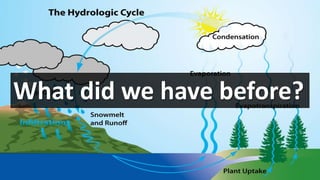
What did we have before?
Software development life cycle methodologies
• Long development iterations
• Integration as a phase
• Each developer worked on his own environment
• At most, Nightly build
• “Don’t Break the Build” Culture
What is Continuous Integration?
“Continuous integration (CI) is the practice,
in software engineering, of merging all
developer working copies with a
shared mainline several times a day”
Martin Fowler, May 2006
Main Goal
• Detect integration errors as quickly as possible
• Ability to deploy software to production at any time
Treat Integration as Non-Event
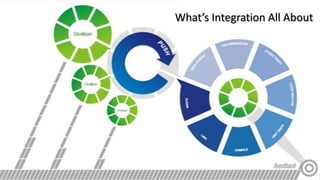
What’s Integration All About
How often is continuously?
As frequently as possible or… at least daily
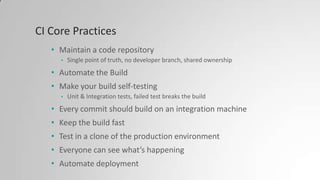
CI Core Practices
• Maintain a code repository
• Single point of truth, no developer branch, shared ownership
• Automate the Build
• Make your build self-testing
• Unit & Integration tests, failed test breaks the build
• Every commit should build on an integration machine
• Keep the build fast
• Test in a clone of the production environment
• Everyone can see what’s happening
• Automate deployment
Well…
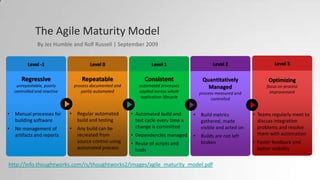
The Agile Maturity Model
Level -1
Regressive
unrepeatable, poorly
controlled and reactive
• Manual processes for
building software
• No management of
artifacts and reports
Level 0
Repeatable
process documented and
partly automated
• Regular automated
build and testing
• Any build can be
recreated from
source control using
automated process
Level 1
Consistent
automated processes
applied across whole
application lifecycle
• Automated build and
test cycle every time a
change is committed
• Dependencies managed
• Reuse of scripts and
tools
Level 2
Quantitatively
Managed
process measured and
controlled
• Build metrics
gathered, made
visible and acted on
• Builds are not left
broken
Level 3
Optimizing
focus on process
improvement
• Teams regularly meet to
discuss integration
problems and resolve
them with automation
• Faster feedback and
better visibility
By Jez Humble and Rolf Russell | September 2009
http://info.thoughtworks.com/rs/thoughtworks2/images/agile_maturity_model.pdf
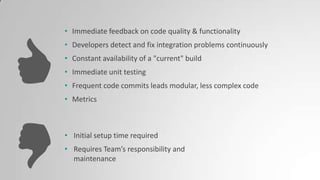
• Immediate feedback on code quality & functionality
• Developers detect and fix integration problems continuously
• Constant availability of a "current" build
• Immediate unit testing
• Frequent code commits leads modular, less complex code
• Metrics
• Initial setup time required
• Requires Team’s responsibility and
maintenance
CI Anti-Patterns
• Infrequent commits
• Broken builds
• Minimal feedback
• Spam feedback
• Slow Build Machine
• Relying on a bloated build
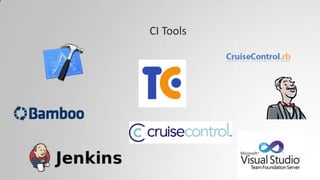
CI Tools
Demo – TeamCity
2 Dealing with Dependencies
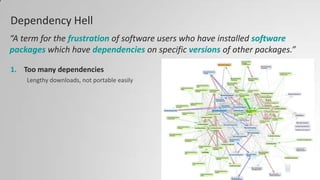
Dependency Hell
1. Too many dependencies
Lengthy downloads, not portable easily
“A term for the frustration of software users who have installed software
packages which have dependencies on specific versions of other packages.”
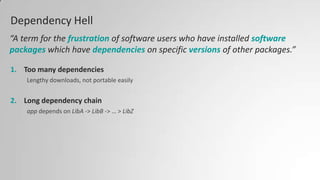
Dependency Hell
1. Too many dependencies
Lengthy downloads, not portable easily
2. Long dependency chain
app depends on LibA -> LibB -> … > LibZ
“A term for the frustration of software users who have installed software
packages which have dependencies on specific versions of other packages.”
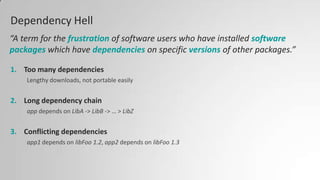
Dependency Hell
1. Too many dependencies
Lengthy downloads, not portable easily
2. Long dependency chain
app depends on LibA -> LibB -> … > LibZ
3. Conflicting dependencies
app1 depends on libFoo 1.2, app2 depends on libFoo 1.3
“A term for the frustration of software users who have installed software
packages which have dependencies on specific versions of other packages.”
Dependency Hell
1. Too many dependencies
Lengthy downloads, not portable easily
2. Long dependency chain
app depends on LibA -> LibB -> … > LibZ
3. Conflicting dependencies
app1 depends on libFoo 1.2, app2 depends on libFoo 1.3
4. Circular dependencies
“A term for the frustration of software users who have installed software
packages which have dependencies on specific versions of other packages.”
3 Package Management
USING NUGET
Nuget
• Package Manager for Microsoft ecosystem
• In Nuget Gallery: ~20600 unique packages, ~175K in total
• Provides a centeral location to store common knowledge
• code, assemblies, configuration and automation scripts
• Provides concrete solutions rather than guidance, samples or
abstract standarts
Nuget Package
Basically, just a simple zip file containg:
• content and source files – to be injected into target project
• PowerShell scripts and executables
• Configuration files and source code transformations
• Using David Ebbo’s WebActivator –
light-up-your-nupacks-with-startup-code-and-webactivator.aspx
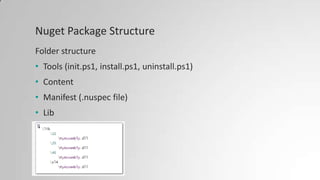
Nuget Package Structure
Folder structure
• Tools (init.ps1, install.ps1, uninstall.ps1)
• Content
• Manifest (.nuspec file)
• Lib
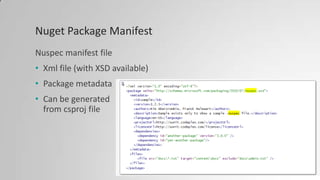
Nuget Package Manifest
Nuspec manifest file
• Xml file (with XSD available)
• Package metadata
• Can be generated
from csproj file
Demo - Nuget
Resources
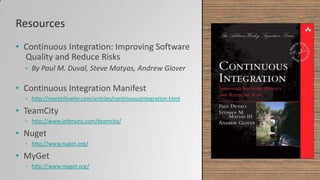
• Continuous Integration: Improving Software
Quality and Reduce Risks
• By Paul M. Duval, Steve Matyas, Andrew Glover
• Continuous Integration Manifest
• http://martinfowler.com/articles/continuousIntegration.html
• TeamCity
• http://www.jetbrains.com/teamcity/
• Nuget
• http://www.nuget.org/
• MyGet
• http://www.myget.org/
Continuous Integration & Package Management 101

Continuous Integration & Package Management 101

  • 1.
  • 2.
    Agenda Continuous Integration1 2 Dealingwith Dependencies 3 Package Managing – using Nuget
  • 3.
  • 4.
    What did wehave before?
  • 5.
    Software development lifecycle methodologies • Long development iterations • Integration as a phase • Each developer worked on his own environment • At most, Nightly build • “Don’t Break the Build” Culture
  • 6.
    What is ContinuousIntegration? “Continuous integration (CI) is the practice, in software engineering, of merging all developer working copies with a shared mainline several times a day” Martin Fowler, May 2006
  • 7.
    Main Goal • Detectintegration errors as quickly as possible • Ability to deploy software to production at any time Treat Integration as Non-Event
  • 8.
  • 9.
    How often iscontinuously? As frequently as possible or… at least daily
  • 11.
    CI Core Practices •Maintain a code repository • Single point of truth, no developer branch, shared ownership • Automate the Build • Make your build self-testing • Unit & Integration tests, failed test breaks the build • Every commit should build on an integration machine • Keep the build fast • Test in a clone of the production environment • Everyone can see what’s happening • Automate deployment
  • 12.
  • 14.
    The Agile MaturityModel Level -1 Regressive unrepeatable, poorly controlled and reactive • Manual processes for building software • No management of artifacts and reports Level 0 Repeatable process documented and partly automated • Regular automated build and testing • Any build can be recreated from source control using automated process Level 1 Consistent automated processes applied across whole application lifecycle • Automated build and test cycle every time a change is committed • Dependencies managed • Reuse of scripts and tools Level 2 Quantitatively Managed process measured and controlled • Build metrics gathered, made visible and acted on • Builds are not left broken Level 3 Optimizing focus on process improvement • Teams regularly meet to discuss integration problems and resolve them with automation • Faster feedback and better visibility By Jez Humble and Rolf Russell | September 2009 http://info.thoughtworks.com/rs/thoughtworks2/images/agile_maturity_model.pdf
  • 15.
    • Immediate feedbackon code quality & functionality • Developers detect and fix integration problems continuously • Constant availability of a "current" build • Immediate unit testing • Frequent code commits leads modular, less complex code • Metrics • Initial setup time required • Requires Team’s responsibility and maintenance
  • 16.
    CI Anti-Patterns • Infrequentcommits • Broken builds • Minimal feedback • Spam feedback • Slow Build Machine • Relying on a bloated build
  • 17.
  • 18.
  • 19.
    2 Dealing withDependencies
  • 20.
    Dependency Hell 1. Toomany dependencies Lengthy downloads, not portable easily “A term for the frustration of software users who have installed software packages which have dependencies on specific versions of other packages.”
  • 21.
    Dependency Hell 1. Toomany dependencies Lengthy downloads, not portable easily 2. Long dependency chain app depends on LibA -> LibB -> … > LibZ “A term for the frustration of software users who have installed software packages which have dependencies on specific versions of other packages.”
  • 22.
    Dependency Hell 1. Toomany dependencies Lengthy downloads, not portable easily 2. Long dependency chain app depends on LibA -> LibB -> … > LibZ 3. Conflicting dependencies app1 depends on libFoo 1.2, app2 depends on libFoo 1.3 “A term for the frustration of software users who have installed software packages which have dependencies on specific versions of other packages.”
  • 23.
    Dependency Hell 1. Toomany dependencies Lengthy downloads, not portable easily 2. Long dependency chain app depends on LibA -> LibB -> … > LibZ 3. Conflicting dependencies app1 depends on libFoo 1.2, app2 depends on libFoo 1.3 4. Circular dependencies “A term for the frustration of software users who have installed software packages which have dependencies on specific versions of other packages.”
  • 24.
  • 25.
    Nuget • Package Managerfor Microsoft ecosystem • In Nuget Gallery: ~20600 unique packages, ~175K in total • Provides a centeral location to store common knowledge • code, assemblies, configuration and automation scripts • Provides concrete solutions rather than guidance, samples or abstract standarts
  • 26.
    Nuget Package Basically, justa simple zip file containg: • content and source files – to be injected into target project • PowerShell scripts and executables • Configuration files and source code transformations • Using David Ebbo’s WebActivator – light-up-your-nupacks-with-startup-code-and-webactivator.aspx
  • 27.
    Nuget Package Structure Folderstructure • Tools (init.ps1, install.ps1, uninstall.ps1) • Content • Manifest (.nuspec file) • Lib
  • 28.
    Nuget Package Manifest Nuspecmanifest file • Xml file (with XSD available) • Package metadata • Can be generated from csproj file
  • 29.
  • 30.
    Resources • Continuous Integration:Improving Software Quality and Reduce Risks • By Paul M. Duval, Steve Matyas, Andrew Glover • Continuous Integration Manifest • http://martinfowler.com/articles/continuousIntegration.html • TeamCity • http://www.jetbrains.com/teamcity/ • Nuget • http://www.nuget.org/ • MyGet • http://www.myget.org/

Editor's Notes

  • #6 Waterfall, Spiral, Incremental, Prototype
  • #8 Paradigm change: integration as non event
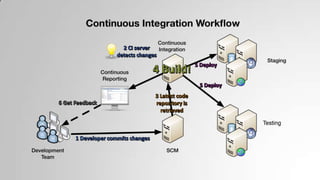
  • #9 Rebuild DatabaseBuild prod distributionPackage library and publish
  • #12 Maintain a code repositoryThis practice advocates the use of a revision control system for the project's source code. All artifacts required to build the project should be placed in the repository. In this practice and in the revision control community, the convention is that the system should be buildable from a fresh checkout and not require additional dependencies. Extreme Programming advocate Martin Fowler also mentions that where branching is supported by tools, its use should be minimized.[4] Instead, it is preferred for changes to be integrated rather than for multiple versions of the software to be maintained simultaneously. The mainline (or trunk) should be the place for the working version of the software.Automate the buildA single command should have the capability of building the system. Many build-tools, such as make, have existed for many years. Other more recent tools are frequently used in continuous integration environments. Automation of the build should include automating the integration, which often includes deployment into a production-like environment. In many cases, the build script not only compiles binaries, but also generates documentation, website pages, statistics and distribution media (such as Debian DEB, Red Hat RPM or Windows MSI files).Make the build self-testingOnce the code is built, all tests should run to confirm that it behaves as the developers expect it to behave.Everyone commits to the baseline every dayBy committing regularly, every committer can reduce the number of conflicting changes. Checking in a week's worth of work runs the risk of conflicting with other features and can be very difficult to resolve. Early, small conflicts in an area of the system cause team members to communicate about the change they are making. Committing all changes at least once a day (once per feature built) is generally considered part of the definition of Continuous Integration. In addition performing a nightly build is generally recommended. These are lower bounds, the typical frequency is expected to be much higher.Every commit (to baseline) should be builtThe system should build commits to the current working version in order to verify that they integrate correctly. A common practice is to use Automated Continuous Integration, although this may be done manually. For many[who?], continuous integration is synonymous with using Automated Continuous Integration where a continuous integration server or daemon monitors the revision control system for changes, then automatically runs the build process.Keep the build fastThe build needs to complete rapidly, so that if there is a problem with integration, it is quickly identified.Test in a clone of the production environmentHaving a test environment can lead to failures in tested systems when they deploy in the production environment, because the production environment may differ from the test environment in a significant way. However, building a replica of a production environment is cost prohibitive. Instead, the pre-production environment should be built to be a scalable version of the actual production environment to both alleviate costs while maintaining technology stack composition and nuances.Everyone can see the results of the latest buildIt should be easy to find out whether the build breaks and, if so, who made the relevant change.Automate deploymentMost CI systems allow the running of scripts after a build finishes. In most situations, it is possible to write a script to deploy the application to a live test server that everyone can look at. A further advance in this way of thinking is Continuous deployment, which calls for the software to be deployed directly into production, often with additional automation to prevent defects or regressions.
  • #17 Infrequent check-ins – leads to delayed integrationBroken builds – blocks teams from moving to other tasksMinimal feedback – prevents action from occurringSpam feedback – causes people to ignore messagesSlow Build Machine – creates build bottleneck and delays feedbackRelying on a bloated build - reduces rapid feedbackhttp://www.ibm.com/developerworks/library/j-ap11297/
  • #18 Bamboo – byAtlassian, integrates with JiraCruisecontrol – xml configuration based CruiseControl.rb - lightweight, Ruby-based continuous integration server that can build any codebaseHudson – Java based, formerly open-sourced until Sun made it commercial Jenkins – Fork of Hudson, Java based.TeamCity – commercial product by JetBrainsXcode 5 also contains a proprietary continuous integration system, works closely with OS X Server for OS X Mavericks