Continuous Integration
and Delivery
B R A N D O N C O R N E T T
Think about this…
2
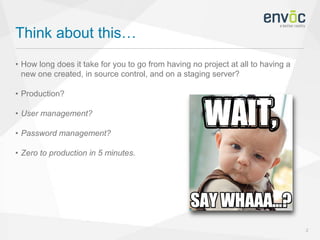
• How long does it take for you to go from having no project at all to having a
new one created, in source control, and on a staging server?
• Production?
• User management?
• Password management?
• Zero to production in 5 minutes.
Source Control… Just Do It
3
• Store everything that is needed to build the entire system, but nothing that
gets built
• If build products have to be committed, there’s a deeper problem
• "Anyone should be able to bring in a virgin machine, check the sources out of
the repository, issue a single command, and have a running system on their
machine."
- Martin Fowler
Problems to Solve
4
• “Integration Hell”
• Tracking down teammates to fix builds
• Build-breaking dependencies
• Developers work until the day of release, and commonly run in to integration
or deployment issues that day
• When defects are introduced, they can sometimes go unnoticed if unit tests
are not run by the developer before committing
The Solution - Continuous Integration
5
• “Continuous integration (CI) is the practice, in software engineering, of
merging all developer working copies with a shared mainline several times a
day.”
- Wikipedia
• Evolved idea from Extreme Programming, introduced in 1997
• Per-commit reporting
• Built every time in production-like environment
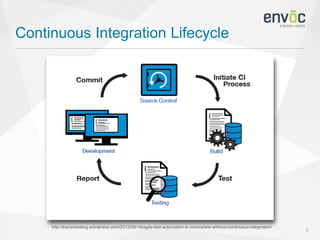
Continuous Integration Lifecycle
6
http://kaizentesting.wordpress.com/2012/08/19/agile-test-automation-is-incomplete-without-continuous-integration/
Benefits
7
• Increased visibility
• Immediate unit testing
• Significantly less back-tracking to find breaking changes
• Generated metrics
Best Practices
8
• Maintain a single source repository
• Automate the build
• Make your build self-testing
• Everyone commits to the mainline every day
• Every commit should build the mainline on an integration machine
• Keep the build fast
• Test in a clone of the production environment
• Everyone can see what's happening
Continuous Integration Systems
9
TeamCity Demo
The Next Step - Continuous
Delivery
11
• “Design practice used in software development to automate and improve the
process of software delivery”
- Wikipedia
• The practice of releasing every good build to users
• Goal is to increase quality, decrease cycle time
• Puts the release schedule in the hands of the business, not in the hands of IT
• Single-action deployments of any version to any environment on demand
• Extension of continuous integration
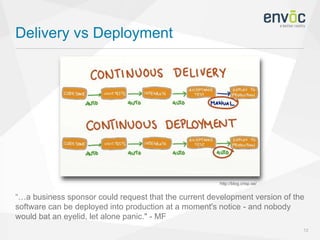
Delivery vs Deployment
12
“…a business sponsor could request that the current development version of the
software can be deployed into production at a moment's notice - and nobody
would bat an eyelid, let alone panic." - MF
http://blog.crisp.se/
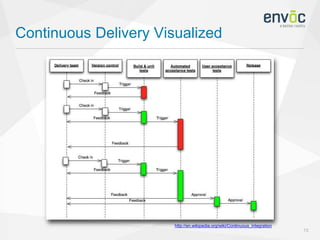
Continuous Delivery Visualized
13
http://en.wikipedia.org/wiki/Continuous_integration
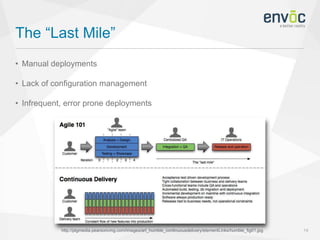
The “Last Mile”
14
• Manual deployments
• Lack of configuration management
• Infrequent, error prone deployments
http://ptgmedia.pearsoncmg.com/images/art_humble_continuousdelivery/elementLinks/humble_fig01.jpg
Benefits
15
• Feature-based releases
• Can measure performance directly
• Repeatable deployment process
• Constant availability
• State of development
Best Practices
16
• Release to pre-production staging servers for additional QA
• Rolling deployments help down-time
• Build binaries only once - not per environment
• Use precisely the same mechanism to deploy to every environment
• If anything fails, stop the build
• Integrate into HipChat, Slack, etc.
• Done means released
• Version everything
Continuous Delivery Systems
17
Octopus Deploy Demo
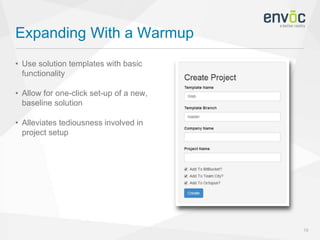
Expanding With a Warmup
19
• Use solution templates with basic
functionality
• Allow for one-click set-up of a new,
baseline solution
• Alleviates tediousness involved in
project setup
Zero to Prod in Five
Minutes
So… How Do I Convince My Boss?
21
envoc.io/ZeroToProdVideo
http://info.chromeriver.com/blog/bid/276672/5-Ways-to-Convince-Your-Boss-to-Automate-
Expenses
Impressive Stats
22
• GitHub had over 41,679 builds and
12,602 deployments from Jan-Aug
2012
• StackOverflow deploys 5 times per day
• IMVU - 6 deployments an hour, 15k test
cases, 9 mins to run over 40 machines
• Etsy deploys 50 times per day, 14k test
cases, 1.5 billion page views / month http://www.zap2it.com/
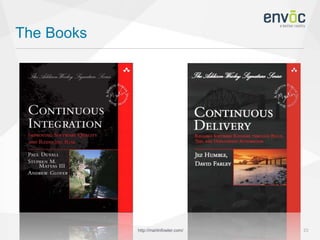
The Books
23http://martinfowler.com/
• Website: bcornett.com
• Email: brandon@bcornett.com
• Twitter: @brandonmc2005
• This presentation: envoc.io/CIandD
Questions?
References
25
• http://en.wikipedia.org/wiki/Continuous_integration
• http://en.wikipedia.org/wiki/Continuous_delivery
• http://martinfowler.com/delivery.html
• http://www.thoughtworks.com/continuous-integration
• http://www.extremeprogramming.org/rules/integrateoften.html

Continuous Integration and Delivery

  • 1.
    Continuous Integration and Delivery BR A N D O N C O R N E T T
  • 2.
    Think about this… 2 •How long does it take for you to go from having no project at all to having a new one created, in source control, and on a staging server? • Production? • User management? • Password management? • Zero to production in 5 minutes.
  • 3.
    Source Control… JustDo It 3 • Store everything that is needed to build the entire system, but nothing that gets built • If build products have to be committed, there’s a deeper problem • "Anyone should be able to bring in a virgin machine, check the sources out of the repository, issue a single command, and have a running system on their machine." - Martin Fowler
  • 4.
    Problems to Solve 4 •“Integration Hell” • Tracking down teammates to fix builds • Build-breaking dependencies • Developers work until the day of release, and commonly run in to integration or deployment issues that day • When defects are introduced, they can sometimes go unnoticed if unit tests are not run by the developer before committing
  • 5.
    The Solution -Continuous Integration 5 • “Continuous integration (CI) is the practice, in software engineering, of merging all developer working copies with a shared mainline several times a day.” - Wikipedia • Evolved idea from Extreme Programming, introduced in 1997 • Per-commit reporting • Built every time in production-like environment
  • 6.
  • 7.
    Benefits 7 • Increased visibility •Immediate unit testing • Significantly less back-tracking to find breaking changes • Generated metrics
  • 8.
    Best Practices 8 • Maintaina single source repository • Automate the build • Make your build self-testing • Everyone commits to the mainline every day • Every commit should build the mainline on an integration machine • Keep the build fast • Test in a clone of the production environment • Everyone can see what's happening
  • 9.
  • 10.
  • 11.
    The Next Step- Continuous Delivery 11 • “Design practice used in software development to automate and improve the process of software delivery” - Wikipedia • The practice of releasing every good build to users • Goal is to increase quality, decrease cycle time • Puts the release schedule in the hands of the business, not in the hands of IT • Single-action deployments of any version to any environment on demand • Extension of continuous integration
  • 12.
    Delivery vs Deployment 12 “…abusiness sponsor could request that the current development version of the software can be deployed into production at a moment's notice - and nobody would bat an eyelid, let alone panic." - MF http://blog.crisp.se/
  • 13.
  • 14.
    The “Last Mile” 14 •Manual deployments • Lack of configuration management • Infrequent, error prone deployments http://ptgmedia.pearsoncmg.com/images/art_humble_continuousdelivery/elementLinks/humble_fig01.jpg
  • 15.
    Benefits 15 • Feature-based releases •Can measure performance directly • Repeatable deployment process • Constant availability • State of development
  • 16.
    Best Practices 16 • Releaseto pre-production staging servers for additional QA • Rolling deployments help down-time • Build binaries only once - not per environment • Use precisely the same mechanism to deploy to every environment • If anything fails, stop the build • Integrate into HipChat, Slack, etc. • Done means released • Version everything
  • 17.
  • 18.
  • 19.
    Expanding With aWarmup 19 • Use solution templates with basic functionality • Allow for one-click set-up of a new, baseline solution • Alleviates tediousness involved in project setup
  • 20.
    Zero to Prodin Five Minutes
  • 21.
    So… How DoI Convince My Boss? 21 envoc.io/ZeroToProdVideo http://info.chromeriver.com/blog/bid/276672/5-Ways-to-Convince-Your-Boss-to-Automate- Expenses
  • 22.
    Impressive Stats 22 • GitHubhad over 41,679 builds and 12,602 deployments from Jan-Aug 2012 • StackOverflow deploys 5 times per day • IMVU - 6 deployments an hour, 15k test cases, 9 mins to run over 40 machines • Etsy deploys 50 times per day, 14k test cases, 1.5 billion page views / month http://www.zap2it.com/
  • 23.
  • 24.
    • Website: bcornett.com •Email: brandon@bcornett.com • Twitter: @brandonmc2005 • This presentation: envoc.io/CIandD Questions?
  • 25.
    References 25 • http://en.wikipedia.org/wiki/Continuous_integration • http://en.wikipedia.org/wiki/Continuous_delivery •http://martinfowler.com/delivery.html • http://www.thoughtworks.com/continuous-integration • http://www.extremeprogramming.org/rules/integrateoften.html

Editor's Notes

  • #2 Brandon Cornett Talking about … and Delivery But first… let me tell you SELU Graduate - Class of 2012 Envocean for 3 years At Envoc, I’m primarily Xamarin mobile app and ASP.NET developer Second SQL Saturday presentation
  • #3 1) Most people - hour or two Last) Using combo of CI, CD, and a custom solution, this is possible - Show you at end of presentation
  • #4 Prereq to all 1) Store needs for build, nothing product of build 1a) Fast transfers, builds 2) Commit products, have issues… bad 3) MF says Martin Fowler - author and design pattern guru
  • #5 1) Me and you both try to check in after a long time - last one in merging tons of files 2) Story - You commit week ago, forget files, Doesn’t build for me, track you down 3) Doesn’t build on anyone else’s machine 4) Happens to all of us 5) Testing important here, if not - found by QA weeks later, or worse clients - How know which commit broke it?
  • #6 1) one thing - solves “Integration Hell” - committing early and often, not taking forever 2) CI was used with just TDD, later introduced build server 3) Report results to developers - uncommitted files, dependencies missing or not working - See exactly which commit broke the build - [Story] Would have notified you of failed build, fix right away 4) Avoid last-minute deployment issues
  • #7 Before, daily was standard, now trigger every commit
  • #8 1) Which enables greater communication 2) Easy to determine if build is compromised - If it is - email / notify Slack or HipChat 3) so you can spend more time building features 4) code coverage, code complexity, etc
  • #9 1) So you don’t have triggers watching all over, trying to make systems communicate 2) Can do so using Nuget, make, etc. 3) Use unit tests - check before committing 4) Failing test should cause build to fail 5) Because there’s only hours between commits, no “Integration hell” 6) Always available - Reduces risk of dependency issues - Solves "Works on My Machine” 6) Cloning repo, building, testing should be fast 7) More risk if you don’t have a replica - Point is to test prod 8) Selling point is increased communication
  • #11 Notice build number
  • #12 1) Bring dev and IT teams together 2) All tests pass, should be ready for QA or production depending 3) By adopting both CI and CD, not only reduce risks, but move quickly to prod 4) For ex, when client asks, dev can be deployed to production at a moment's notice 5) Point is to minimize lead time 6) Systems work together
  • #13 • Delivery - isn’t deployed every time - but it can be • Deployment - Tests provide a guarantee of quality • Some customers like to test - consult / product • Single server - can’t take down prod in middle of day
  • #15 • Publish to prod env issues • Looks to solve this problem
  • #16 1) rather than a weekly “whatever happens to be ready” release 2) because releases are small, can tell which one did it. Monitor with Zabbix, NewRelic, etc. 3) and frees the IT team of busywork 4) Always have a current build for testing, demo, or release purposes 5) Anyone can see what the development progress is
  • #17 1) by clients, customers 2) Explain clustering 3) just apply web config transforms or the like 4) to ensure consistency 5) don’t push broken code 6) to keep devs in the loop on what’s going on 7) Don’t commit and think you’re done, it should make it all the way to prod through the build system 8) to keep track of everything - what features are in what environment
  • #20 - Use Entity Framework Code First 1) Pull latest from source control 2) Modify to be specific to client 3) Push to source control 4) Create continuous integration server project 5) Create continuous deployment server project 6) Trigger build and deploy to development environment *Give credit to chuck norris*