

Proprietary Material Provided for Training Purposes Only 
Š 2012 Excella Consulting, Inc.
Richard Cheng - @RichardKCheng 
◊ Agile trainer & coach 
◊ Member of PMI, Scrum Alliance, Agile 
Alliance, Agile Leadership Network 
◊ CST, PMP, CSM, CSPO, CSP, PMI-ACP 
◊ Founder & executive committee 
member of Agile Defense Adoption 
Proponents Team (ADAPT), the Agile 
DoD Task Force 
◊ Deep expertise in Federal and 
commercial Agile transformations 
◊ Richard.Cheng@Excella.com
Quality and the Business Analyst 
Validates work Validates correctness Validates usability
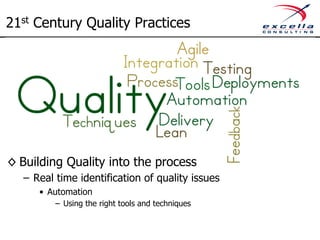
21st Century Quality Practices 
◊ Building Quality into the process 
– Real time identification of quality issues 
• Automation 
– Using the right tools and techniques
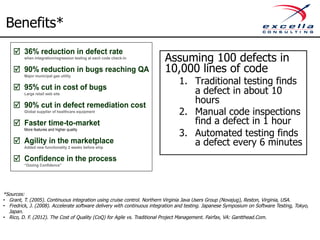
Benefits* 
Assuming 100 defects in 
10,000 lines of code 
1. Traditional testing finds 
a defect in about 10 
hours 
2. Manual code inspections 
find a defect in 1 hour 
3. Automated testing finds 
a defect every 6 minutes 
Þ 36% reduction in defect rate 
when integration/regression testing at each code check-in 
Þ 90% reduction in bugs reaching QA 
Major municipal gas utility 
Þ 
Þ 
Þ 
Þ 
Þ 
95% cut in cost of bugs 
Large retail web site 
90% cut in defect remediation cost 
Global supplier of healthcare equipment 
Faster time-to-market 
More features and higher quality 
Agility in the marketplace 
Added new functionality 2 weeks before ship 
Confidence in the process 
“Oozing Confidence” 
*Sources: 
• Grant, T. (2005). Continuous integration using cruise control. Northern Virginia Java Users Group (Novajug), Reston, Virginia, USA. 
• Fredrick, J. (2008). Accelerate software delivery with continuous integration and testing. Japanese Symposium on Software Testing, Tokyo, 
Japan. 
• Rico, D. F. (2012). The Cost of Quality (CoQ) for Agile vs. Traditional Project Management. Fairfax, VA: Gantthead.Com.
Technology Stacks 
◊ .Net 
◊ Java 
◊ Python 
◊ Ruby 
◊ JavaScript 
◊ Others….
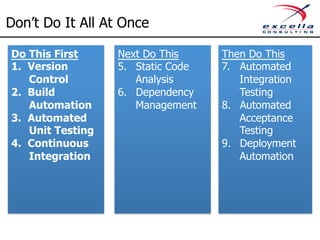
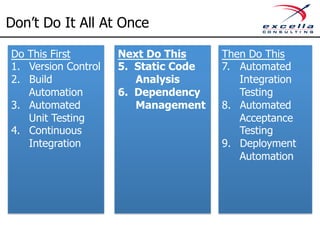
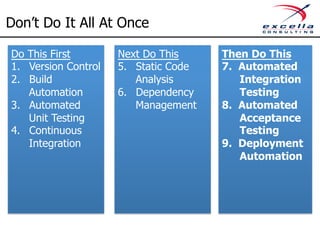
Don’t Do It All At Once 
Do This First 
1. Version 
Control 
2. Build 
Automation 
3. Automated 
Unit Testing 
4. Continuous 
Integration 
Next Do This 
5. Static Code 
Analysis 
6. Dependency 
Management 
Then Do This 
7. Automated 
Integration 
Testing 
8. Automated 
Acceptance 
Testing 
9. Deployment 
Automation
First Do This 
1. Version Control 
– What: Repository to persist and track version of code and 
artifacts 
– Effort: Low 
– Sample Tools: 
• Traditional – TFS (MS), Subversion 
• Distributed Version Control (branching and merging) - Git, 
Mercurial
First Do This 
2. Build Automation 
– What: One click or one command launch of build process 
– Effort: Low 
– Sample Tools: 
• Microsoft – MSBuild, Powershell 
• Java/Others – Ant, Gradle, Maven
First Do This 
3. Automated Unit Testing 
– What: An automated stand alone test that test a single 
unit of the code. 
– Effort: Medium 
– Sample Tools: 
• Unit test tools: JUnit (Java), NUnit (MS), MS Test (MS) 
• Advanced tools: Moq, Fluent Assertions
First Do This 
4. Continuous Integration 
– What: Provides frequent verification and notification of 
changes to the code and application 
– Effort: Medium 
– Sample Tools: Jenkins, Hudson, TFS (MS), TeamCity
Continuous Integration 
Build 
#1 
compile 
unit 
test 
integra0on 
test 
package 
deploy/run 
acceptance 
test 
analyze 
code 
Build 
Report 
Version 
Control 
change 
#1 
change 
#2 
Build 
Server 
Build 
#2 
compile 
unit 
test 
integra0on 
test 
package 
deploy/run 
acceptance 
test 
analyze 
code 
Build 
Email 
Report 
Failed 
Build
Continuous Integration 
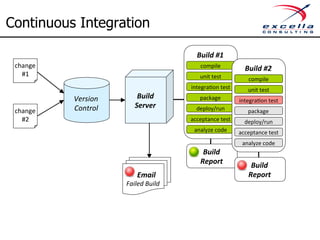
◊ CI involves: 
– Frequent code check-ins 
– Regularly scheduled, automated builds 
– Automated tests 
– Immediate feedback to developers detailing any build 
errors or failed tests 
◊ Benefit: 
– Developers know immediately upon check-in if their code 
works and if any other application features were broken as 
a result
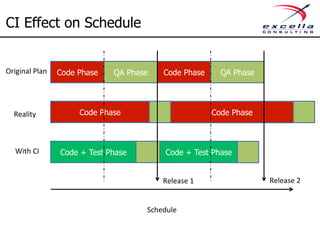
CI Effect on Schedule 
Code Phase QA Phase Code Phase QA Phase 
Code Phase Code Phase 
Code + Test Phase Code + Test Phase 
Release 
1 
Schedule 
Release 
2 
Original 
Plan 
Reality 
With 
CI
Benefits of Continuous Integration 
◊ Avoids last-minute chaos at release dates 
◊ Early warnings of broken code 
◊ Early warning of conflicting changes 
◊ Immediate testing of all changes 
◊ High availability of a "current" build for testing, 
demo, or release purposes
Don’t Do It All At Once 
Do This First 
1. Version Control 
2. Build 
Automation 
3. Automated 
Unit Testing 
4. Continuous 
Integration 
Next Do This 
5. Static Code 
Analysis 
6. Dependency 
Management 
Then Do This 
7. Automated 
Integration 
Testing 
8. Automated 
Acceptance 
Testing 
9. Deployment 
Automation
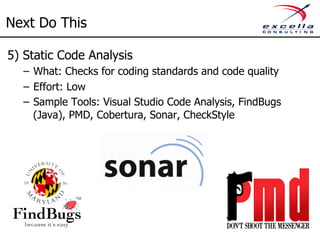
Next Do This 
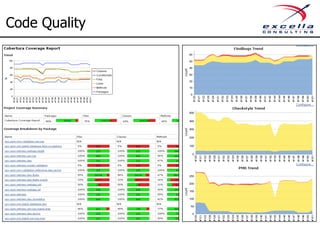
5) Static Code Analysis 
– What: Checks for coding standards and code quality 
– Effort: Low 
– Sample Tools: Visual Studio Code Analysis, FindBugs 
(Java), PMD, Cobertura, Sonar, CheckStyle
Code Quality
Next Do This 
6) Dependency Management 
– What: Manages 3rd party components and ensure we have 
the latest / correct version these components 
– Effort: Low 
– Sample Tools: Gradle, NuGet
Don’t Do It All At Once 
Do This First 
1. Version Control 
2. Build 
Automation 
3. Automated 
Unit Testing 
4. Continuous 
Integration 
Next Do This 
5. Static Code 
Analysis 
6. Dependency 
Management 
Then Do This 
7. Automated 
Integration 
Testing 
8. Automated 
Acceptance 
Testing 
9. Deployment 
Automation
Then Do This 
7. Automated Integration Testing 
– What: Testing interaction between multiple components to 
ensure our component dependencies don’t break 
– Effort: Medium to High 
– Sample Tools: DBUnit (Java), NDBUnit (MS)
Then Do This 
8. Automated Acceptance Testing 
– What: Automated testing to ensure the systems meets 
business needs 
– Effort: High 
– Sample Tools: SpecFlow, Cucumber, FitNess 
– For Browser Testing: Selenium, WatiN
Automated Tests 
◊ Automated tests involves: 
– Unit tests: Testing of smallest possible piece of code that can 
operate in isolation 
– Integration tests: Testing interaction between multiple 
components 
– Acceptance tests: Testing complete segments of a system to 
ensure it meets the business needs 
◊ Benefits 
– Enables rapid discovery of root cause 
– Reduces defect rate 
– Saves time in system test 
– Ensures testing starts early in cycle 
– Provides for a free regression testing suite
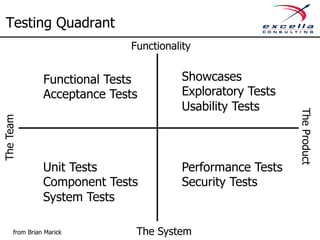
Testing Quadrant 
Functional Tests 
Acceptance Tests 
Unit Tests 
Component Tests 
System Tests 
Showcases 
Exploratory Tests 
Usability Tests 
Performance Tests 
Security Tests 
The Team 
The Product 
Functionality 
from Brian Marick The System
Then Do This 
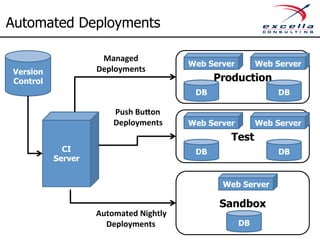
8. Automated Deployment 
– What: Push button deployment capabilities 
– Effort: High 
– Sample Tools: FluentMigrator, Puppet, Octopus
Automated Deployments 
Web Server Web Server 
Managed 
Deployments 
Production Version 
Control 
Web Server Web Server 
Web Server 
Sandbox 
CI 
Server 
DB 
DB 
Test 
DB 
DB 
DB 
Push 
Bu6on 
Deployments 
Automated 
Nightly 
Deployments
Benefits of Automated Deployments 
◊ Reduces complexity by using standardized script 
◊ Reduces risk by re-running same script 
◊ Reduces cost by speeding up deployment 
◊ Frees up resources to focus on new features
Team Member’s Bill of Rights 
1. Every {team member} shall have two monitors 
2. Every {team member} shall have a fast PC 
3. Every {team member} shall have their choice of 
mouse and keyboard 
4. Every {team member} shall have a comfortable chair 
5. Every {team member} shall have a fast internet 
connection 
6. Every {team member} shall have {effective} working 
conditions 
Modified from Jeff Atwood’s http://www.codinghorror.com/blog/2006/08/the-programmers- 
bill-of-rights.html
Useful References 
◊ Stephen Ritchie, Pro .NET Best Practices, Apress, 
2011. 
◊ Paul Duvall, Steve Matyas, and Andrew Glover, 
Continuous Integration: Improving Software Quality 
and Reducing Risk, Addison-Wesley, 2007. 
◊ Jez Humble, Continuous Delivery: Reliable Software 
Releases through Build, Test, and Deployment 
Automation, Addison-Wesley, 2010
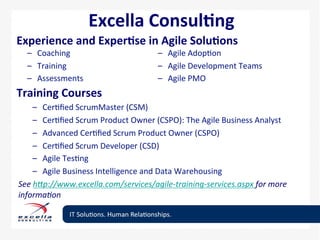
Excella 
Consul<ng 
Experience 
and 
Exper<se 
in 
Agile 
Solu<ons 
– Coaching 
– Training 
– Assessments 
– Agile 
Adop0on 
– Agile 
Development 
Teams 
– Agile 
PMO 
Training 
Courses 
– Cer0fied 
ScrumMaster 
(CSM) 
– Cer0fied 
Scrum 
Product 
Owner 
(CSPO): 
The 
Agile 
Business 
Analyst 
– Advanced 
Cer0fied 
Scrum 
Product 
Owner 
(CSPO) 
– Cer0fied 
Scrum 
Developer 
(CSD) 
– Agile 
Tes0ng 
– Agile 
Business 
Intelligence 
and 
Data 
Warehousing 
See 
h3p://www.excella.com/services/agile-­‐training-­‐services.aspx 
for 
more 
informa@on
Contact Information 
Richard K Cheng 
richard.cheng@excella.com 
703-967-8620 
http://www.excella.com 
Twitter: @RichardKCheng

Agile Engineering Best Practices by Richard Cheng

  • 1.
    Proprietary Material Providedfor Training Purposes Only Š 2012 Excella Consulting, Inc.
  • 2.
    Richard Cheng -@RichardKCheng ◊ Agile trainer & coach ◊ Member of PMI, Scrum Alliance, Agile Alliance, Agile Leadership Network ◊ CST, PMP, CSM, CSPO, CSP, PMI-ACP ◊ Founder & executive committee member of Agile Defense Adoption Proponents Team (ADAPT), the Agile DoD Task Force ◊ Deep expertise in Federal and commercial Agile transformations ◊ Richard.Cheng@Excella.com
  • 3.
    Quality and theBusiness Analyst Validates work Validates correctness Validates usability
  • 4.
    21st Century QualityPractices ◊ Building Quality into the process – Real time identification of quality issues • Automation – Using the right tools and techniques
  • 5.
    Benefits* Assuming 100defects in 10,000 lines of code 1. Traditional testing finds a defect in about 10 hours 2. Manual code inspections find a defect in 1 hour 3. Automated testing finds a defect every 6 minutes þ 36% reduction in defect rate when integration/regression testing at each code check-in þ 90% reduction in bugs reaching QA Major municipal gas utility þ þ þ þ þ 95% cut in cost of bugs Large retail web site 90% cut in defect remediation cost Global supplier of healthcare equipment Faster time-to-market More features and higher quality Agility in the marketplace Added new functionality 2 weeks before ship Confidence in the process “Oozing Confidence” *Sources: • Grant, T. (2005). Continuous integration using cruise control. Northern Virginia Java Users Group (Novajug), Reston, Virginia, USA. • Fredrick, J. (2008). Accelerate software delivery with continuous integration and testing. Japanese Symposium on Software Testing, Tokyo, Japan. • Rico, D. F. (2012). The Cost of Quality (CoQ) for Agile vs. Traditional Project Management. Fairfax, VA: Gantthead.Com.
  • 6.
    Technology Stacks ◊.Net ◊ Java ◊ Python ◊ Ruby ◊ JavaScript ◊ Others….
  • 7.
    Don’t Do ItAll At Once Do This First 1. Version Control 2. Build Automation 3. Automated Unit Testing 4. Continuous Integration Next Do This 5. Static Code Analysis 6. Dependency Management Then Do This 7. Automated Integration Testing 8. Automated Acceptance Testing 9. Deployment Automation
  • 8.
    First Do This 1. Version Control – What: Repository to persist and track version of code and artifacts – Effort: Low – Sample Tools: • Traditional – TFS (MS), Subversion • Distributed Version Control (branching and merging) - Git, Mercurial
  • 9.
    First Do This 2. Build Automation – What: One click or one command launch of build process – Effort: Low – Sample Tools: • Microsoft – MSBuild, Powershell • Java/Others – Ant, Gradle, Maven
  • 10.
    First Do This 3. Automated Unit Testing – What: An automated stand alone test that test a single unit of the code. – Effort: Medium – Sample Tools: • Unit test tools: JUnit (Java), NUnit (MS), MS Test (MS) • Advanced tools: Moq, Fluent Assertions
  • 11.
    First Do This 4. Continuous Integration – What: Provides frequent verification and notification of changes to the code and application – Effort: Medium – Sample Tools: Jenkins, Hudson, TFS (MS), TeamCity
  • 12.
    Continuous Integration Build #1 compile unit test integra0on test package deploy/run acceptance test analyze code Build Report Version Control change #1 change #2 Build Server Build #2 compile unit test integra0on test package deploy/run acceptance test analyze code Build Email Report Failed Build
  • 13.
    Continuous Integration ◊CI involves: – Frequent code check-ins – Regularly scheduled, automated builds – Automated tests – Immediate feedback to developers detailing any build errors or failed tests ◊ Benefit: – Developers know immediately upon check-in if their code works and if any other application features were broken as a result
  • 14.
    CI Effect onSchedule Code Phase QA Phase Code Phase QA Phase Code Phase Code Phase Code + Test Phase Code + Test Phase Release 1 Schedule Release 2 Original Plan Reality With CI
  • 15.
    Benefits of ContinuousIntegration ◊ Avoids last-minute chaos at release dates ◊ Early warnings of broken code ◊ Early warning of conflicting changes ◊ Immediate testing of all changes ◊ High availability of a "current" build for testing, demo, or release purposes
  • 16.
    Don’t Do ItAll At Once Do This First 1. Version Control 2. Build Automation 3. Automated Unit Testing 4. Continuous Integration Next Do This 5. Static Code Analysis 6. Dependency Management Then Do This 7. Automated Integration Testing 8. Automated Acceptance Testing 9. Deployment Automation
  • 17.
    Next Do This 5) Static Code Analysis – What: Checks for coding standards and code quality – Effort: Low – Sample Tools: Visual Studio Code Analysis, FindBugs (Java), PMD, Cobertura, Sonar, CheckStyle
  • 18.
  • 19.
    Next Do This 6) Dependency Management – What: Manages 3rd party components and ensure we have the latest / correct version these components – Effort: Low – Sample Tools: Gradle, NuGet
  • 20.
    Don’t Do ItAll At Once Do This First 1. Version Control 2. Build Automation 3. Automated Unit Testing 4. Continuous Integration Next Do This 5. Static Code Analysis 6. Dependency Management Then Do This 7. Automated Integration Testing 8. Automated Acceptance Testing 9. Deployment Automation
  • 21.
    Then Do This 7. Automated Integration Testing – What: Testing interaction between multiple components to ensure our component dependencies don’t break – Effort: Medium to High – Sample Tools: DBUnit (Java), NDBUnit (MS)
  • 22.
    Then Do This 8. Automated Acceptance Testing – What: Automated testing to ensure the systems meets business needs – Effort: High – Sample Tools: SpecFlow, Cucumber, FitNess – For Browser Testing: Selenium, WatiN
  • 23.
    Automated Tests ◊Automated tests involves: – Unit tests: Testing of smallest possible piece of code that can operate in isolation – Integration tests: Testing interaction between multiple components – Acceptance tests: Testing complete segments of a system to ensure it meets the business needs ◊ Benefits – Enables rapid discovery of root cause – Reduces defect rate – Saves time in system test – Ensures testing starts early in cycle – Provides for a free regression testing suite
  • 24.
    Testing Quadrant FunctionalTests Acceptance Tests Unit Tests Component Tests System Tests Showcases Exploratory Tests Usability Tests Performance Tests Security Tests The Team The Product Functionality from Brian Marick The System
  • 25.
    Then Do This 8. Automated Deployment – What: Push button deployment capabilities – Effort: High – Sample Tools: FluentMigrator, Puppet, Octopus
  • 26.
    Automated Deployments WebServer Web Server Managed Deployments Production Version Control Web Server Web Server Web Server Sandbox CI Server DB DB Test DB DB DB Push Bu6on Deployments Automated Nightly Deployments
  • 27.
    Benefits of AutomatedDeployments ◊ Reduces complexity by using standardized script ◊ Reduces risk by re-running same script ◊ Reduces cost by speeding up deployment ◊ Frees up resources to focus on new features
  • 28.
    Team Member’s Billof Rights 1. Every {team member} shall have two monitors 2. Every {team member} shall have a fast PC 3. Every {team member} shall have their choice of mouse and keyboard 4. Every {team member} shall have a comfortable chair 5. Every {team member} shall have a fast internet connection 6. Every {team member} shall have {effective} working conditions Modified from Jeff Atwood’s http://www.codinghorror.com/blog/2006/08/the-programmers- bill-of-rights.html
  • 29.
    Useful References ◊Stephen Ritchie, Pro .NET Best Practices, Apress, 2011. ◊ Paul Duvall, Steve Matyas, and Andrew Glover, Continuous Integration: Improving Software Quality and Reducing Risk, Addison-Wesley, 2007. ◊ Jez Humble, Continuous Delivery: Reliable Software Releases through Build, Test, and Deployment Automation, Addison-Wesley, 2010
  • 30.
    Excella Consul<ng Experience and Exper<se in Agile Solu<ons – Coaching – Training – Assessments – Agile Adop0on – Agile Development Teams – Agile PMO Training Courses – Cer0fied ScrumMaster (CSM) – Cer0fied Scrum Product Owner (CSPO): The Agile Business Analyst – Advanced Cer0fied Scrum Product Owner (CSPO) – Cer0fied Scrum Developer (CSD) – Agile Tes0ng – Agile Business Intelligence and Data Warehousing See h3p://www.excella.com/services/agile-­‐training-­‐services.aspx for more informa@on
  • 31.
    Contact Information RichardK Cheng richard.cheng@excella.com 703-967-8620 http://www.excella.com Twitter: @RichardKCheng