All Systems Go: Build, Measure and
Learn with Marketing Automation 101

Steve Susina
Director of Demand
Generation Services
Crain Communications /
Business Insurance
Magazine

@ssusina #ContentJam
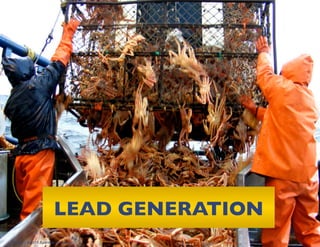
LEAD GENERATION	

Page 2 | © 2013 Business Insurance
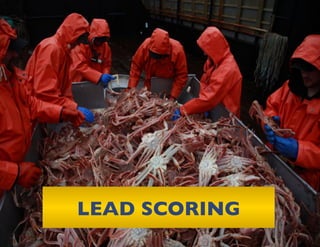
LEAD SCORING
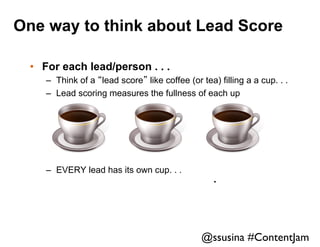
One way to think about Lead Score
•  For each lead/person . . .
–  Think of a “lead score” like coffee (or tea) filling a a cup. . .
–  Lead scoring measures the fullness of each up

–  EVERY lead has its own cup. . .

.	


@ssusina #ContentJam
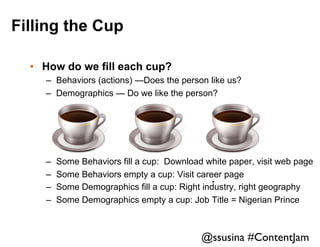
Filling the Cup
•  How do we fill each cup?
–  Behaviors (actions) —Does the person like us?
–  Demographics — Do we like the person?

– 
– 
– 
– 

Some Behaviors fill a cup: Download white paper, visit web page
Some Behaviors empty a cup: Visit career page
.	

Some Demographics fill a cup: Right industry, right geography
Some Demographics empty a cup: Job Title = Nigerian Prince

@ssusina #ContentJam
What we do with a score?
•  Underlying Assumption:
Bigger Score = Better Prospect
•  Score:
–  “I am comparing the cups of 100 people. . . “
–  Some are overflowing and need immediate attention
–  Some are partly full and should be watched
–  Some are empty and need no action.

•  Nurture
–  “Do not give a cup to sales that is not full.”
–  “Do something to fill the cup”
–  “When the cup is full, hand it over.”

@ssusina #ContentJam
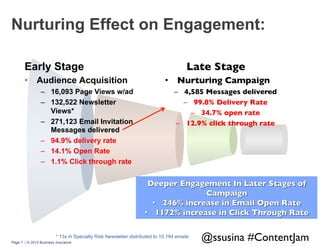
Nurturing Effect on Engagement:
Early Stage
•  Audience Acquisition
–  16,093 Page Views w/ad
–  132,522 Newsletter
Views*
–  271,123 Email Invitation
Messages delivered
–  94.9% delivery rate
–  14.1% Open Rate
–  1.1% Click through rate

Late Stage	

•  Nurturing Campaign
	

–  4,585 Messages delivered
	

–  99.8% Delivery Rate
	

–  34.7% open rate
	

–  12.9% click through rate


* 13x in Specialty Risk Newsletter distributed to 10,194 emails
Page 7 | © 2013 Business Insurance

@ssusina #ContentJam
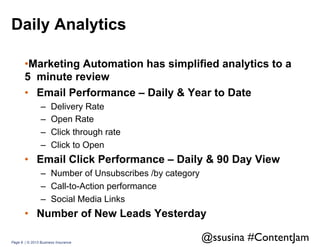
Daily Analytics
• Marketing Automation has simplified analytics to a
5 minute review
•  Email Performance – Daily & Year to Date
– 
– 
– 
– 

Delivery Rate
Open Rate
Click through rate
Click to Open

•  Email Click Performance – Daily & 90 Day View
–  Number of Unsubscribes /by category
–  Call-to-Action performance
–  Social Media Links

•  Number of New Leads Yesterday
Page 8 | © 2013 Business Insurance

@ssusina #ContentJam
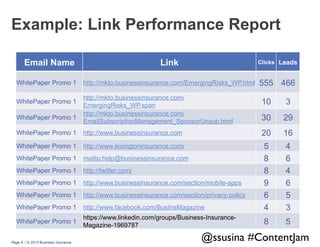
Example: Link Performance Report
Email Name
WhitePaper Promo 1

Link

Clicks Leads

http://mkto.businessinsurance.com/EmergingRisks_WP.html

555 466

http://mkto.businessinsurance.com/
EmergingRisks_WP.span
http://mkto.businessinsurance.com/
EmailSubscriptionManagement_SponsorUnsub.html

10

3

30

29

WhitePaper Promo 1

http://www.businessinsurance.com

20

16

WhitePaper Promo 1

http://www.lexingtoninsurance.com/

WhitePaper Promo 1

mailto:help@businessinsurance.com

WhitePaper Promo 1

http://twitter.com/

WhitePaper Promo 1

http://www.businessinsurance.com/section/mobile-apps

WhitePaper Promo 1

http://www.businessinsurance.com/section/privacy-policy

WhitePaper Promo 1

http://www.facebook.com/BusInsMagazine

5
8
8
9
6
4

4
6
4
6
5
3

WhitePaper Promo 1

https://www.linkedin.com/groups/Business-InsuranceMagazine-1969787

8

5

WhitePaper Promo 1
WhitePaper Promo 1

Page 9 | © 2013 Business Insurance

@ssusina #ContentJam
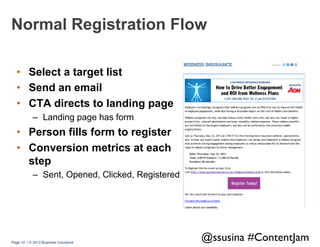
Normal Registration Flow
•  Select a target list
•  Send an email
•  CTA directs to landing page
–  Landing page has form

•  Person fills form to register
•  Conversion metrics at each
step
–  Sent, Opened, Clicked, Registered

Page 10 | © 2013 Business Insurance

@ssusina #ContentJam
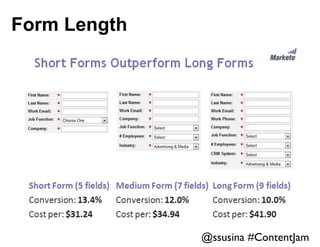
Form Length

@ssusina #ContentJam
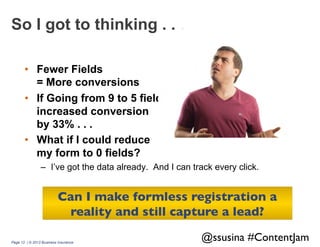
So I got to thinking . . .
•  Fewer Fields
= More conversions
•  If Going from 9 to 5 fields
increased conversion
by 33% . . .
•  What if I could reduce
my form to 0 fields?
–  I’ve got the data already. And I can track every click.

Can I make formless registration a
reality and still capture a lead?	

Page 12 | © 2013 Business Insurance

@ssusina #ContentJam
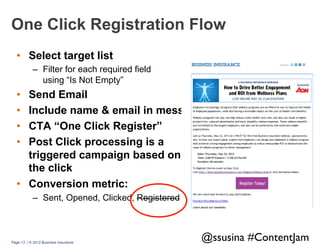
One Click Registration Flow
•  Select target list
–  Filter for each required field
using “Is Not Empty”

• 
• 
• 
• 

Send Email
Include name & email in message
CTA “One Click Register”
Post Click processing is a
triggered campaign based on
the click
•  Conversion metric:
–  Sent, Opened, Clicked, Registered

Page 13 | © 2013 Business Insurance

@ssusina #ContentJam
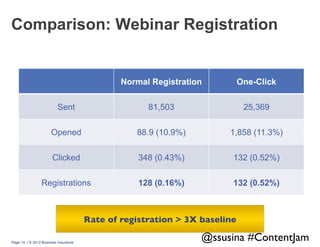
Comparison: Webinar Registration

Normal Registration

One-Click

Sent

81,503

25,369

Opened

88.9 (10.9%)

1,858 (11.3%)

Clicked

348 (0.43%)

132 (0.52%)

Registrations

128 (0.16%)

132 (0.52%)

Rate of registration > 3X baseline	

Page 14 | © 2013 Business Insurance

@ssusina #ContentJam
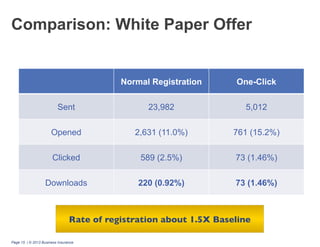
Comparison: White Paper Offer

Normal Registration

One-Click

Sent

23,982

5,012

Opened

2,631 (11.0%)

761 (15.2%)

Clicked

589 (2.5%)

73 (1.46%)

Downloads

220 (0.92%)

73 (1.46%)

Rate of registration about 1.5X Baseline	

Page 15 | © 2013 Business Insurance
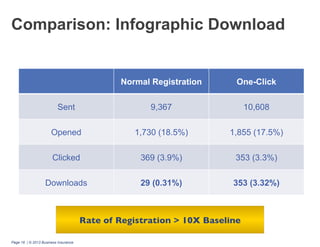
Comparison: Infographic Download

Normal Registration

One-Click

Sent

9,367

10,608

Opened

1,730 (18.5%)

1,855 (17.5%)

Clicked

369 (3.9%)

353 (3.3%)

Downloads

29 (0.31%)

353 (3.32%)

Rate of Registration > 10X Baseline	

Page 16 | © 2013 Business Insurance
Challenges
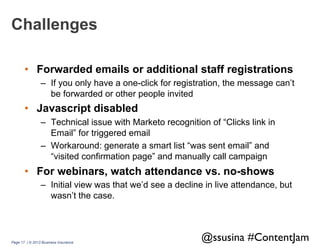
•  Forwarded emails or additional staff registrations
–  If you only have a one-click for registration, the message can’t
be forwarded or other people invited

•  Javascript disabled
–  Technical issue with Marketo recognition of “Clicks link in
Email” for triggered email
–  Workaround: generate a smart list “was sent email” and
“visited confirmation page” and manually call campaign

•  For webinars, watch attendance vs. no-shows
–  Initial view was that we’d see a decline in live attendance, but
wasn’t the case.

Page 17 | © 2013 Business Insurance

@ssusina #ContentJam
Lessons:
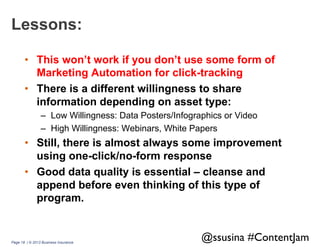
•  This won’t work if you don’t use some form of
Marketing Automation for click-tracking
•  There is a different willingness to share
information depending on asset type:
–  Low Willingness: Data Posters/Infographics or Video
–  High Willingness: Webinars, White Papers

•  Still, there is almost always some improvement
using one-click/no-form response
•  Good data quality is essential – cleanse and
append before even thinking of this type of
program.

Page 18 | © 2013 Business Insurance

@ssusina #ContentJam
A Few tips for those new to Marketing
Automation . ..
•  Learn the basics of CSS/HTML
•  Map out your entire campaign before starting to code –
know what you have to build, and any dependencies
•  Spend time with your provider online community.
–  Marketo Community or Eloqua Topliners

•  Map out your entire campaign before starting to code
–  Beginning with the end of the campaign in mind

•  Take on some stretch concepts
– For example: APIs
•  Invest time (and budget) for
data quality. each year
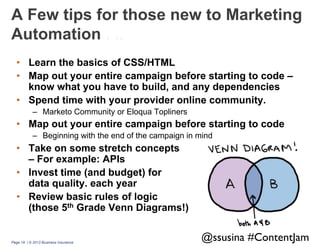
•  Review basic rules of logic
(those 5th Grade Venn Diagrams!)

Page 19 | © 2013 Business Insurance

@ssusina #ContentJam
Thank You!

Steve Susina
PH: 630.660.3595
E: steve@susina.com
TW: @ssusina

@ssusina #ContentJam

Content Jam 2013: All Systems Go: Build, Measure, Learn with Marketing Automation 101 by Steve Susina

  • 1.
    All Systems Go:Build, Measure and Learn with Marketing Automation 101 Steve Susina Director of Demand Generation Services Crain Communications / Business Insurance Magazine @ssusina #ContentJam
  • 2.
    LEAD GENERATION Page 2| © 2013 Business Insurance
  • 3.
  • 4.
    One way tothink about Lead Score •  For each lead/person . . . –  Think of a “lead score” like coffee (or tea) filling a a cup. . . –  Lead scoring measures the fullness of each up –  EVERY lead has its own cup. . . . @ssusina #ContentJam
  • 5.
    Filling the Cup • How do we fill each cup? –  Behaviors (actions) —Does the person like us? –  Demographics — Do we like the person? –  –  –  –  Some Behaviors fill a cup: Download white paper, visit web page Some Behaviors empty a cup: Visit career page . Some Demographics fill a cup: Right industry, right geography Some Demographics empty a cup: Job Title = Nigerian Prince @ssusina #ContentJam
  • 6.
    What we dowith a score? •  Underlying Assumption: Bigger Score = Better Prospect •  Score: –  “I am comparing the cups of 100 people. . . “ –  Some are overflowing and need immediate attention –  Some are partly full and should be watched –  Some are empty and need no action. •  Nurture –  “Do not give a cup to sales that is not full.” –  “Do something to fill the cup” –  “When the cup is full, hand it over.” @ssusina #ContentJam
  • 7.
    Nurturing Effect onEngagement: Early Stage •  Audience Acquisition –  16,093 Page Views w/ad –  132,522 Newsletter Views* –  271,123 Email Invitation Messages delivered –  94.9% delivery rate –  14.1% Open Rate –  1.1% Click through rate Late Stage •  Nurturing Campaign –  4,585 Messages delivered –  99.8% Delivery Rate –  34.7% open rate –  12.9% click through rate * 13x in Specialty Risk Newsletter distributed to 10,194 emails Page 7 | © 2013 Business Insurance @ssusina #ContentJam
  • 8.
    Daily Analytics • Marketing Automationhas simplified analytics to a 5 minute review •  Email Performance – Daily & Year to Date –  –  –  –  Delivery Rate Open Rate Click through rate Click to Open •  Email Click Performance – Daily & 90 Day View –  Number of Unsubscribes /by category –  Call-to-Action performance –  Social Media Links •  Number of New Leads Yesterday Page 8 | © 2013 Business Insurance @ssusina #ContentJam
  • 9.
    Example: Link PerformanceReport Email Name WhitePaper Promo 1 Link Clicks Leads http://mkto.businessinsurance.com/EmergingRisks_WP.html 555 466 http://mkto.businessinsurance.com/ EmergingRisks_WP.span http://mkto.businessinsurance.com/ EmailSubscriptionManagement_SponsorUnsub.html 10 3 30 29 WhitePaper Promo 1 http://www.businessinsurance.com 20 16 WhitePaper Promo 1 http://www.lexingtoninsurance.com/ WhitePaper Promo 1 mailto:help@businessinsurance.com WhitePaper Promo 1 http://twitter.com/ WhitePaper Promo 1 http://www.businessinsurance.com/section/mobile-apps WhitePaper Promo 1 http://www.businessinsurance.com/section/privacy-policy WhitePaper Promo 1 http://www.facebook.com/BusInsMagazine 5 8 8 9 6 4 4 6 4 6 5 3 WhitePaper Promo 1 https://www.linkedin.com/groups/Business-InsuranceMagazine-1969787 8 5 WhitePaper Promo 1 WhitePaper Promo 1 Page 9 | © 2013 Business Insurance @ssusina #ContentJam
  • 10.
    Normal Registration Flow • Select a target list •  Send an email •  CTA directs to landing page –  Landing page has form •  Person fills form to register •  Conversion metrics at each step –  Sent, Opened, Clicked, Registered Page 10 | © 2013 Business Insurance @ssusina #ContentJam
  • 11.
  • 12.
    So I gotto thinking . . . •  Fewer Fields = More conversions •  If Going from 9 to 5 fields increased conversion by 33% . . . •  What if I could reduce my form to 0 fields? –  I’ve got the data already. And I can track every click. Can I make formless registration a reality and still capture a lead? Page 12 | © 2013 Business Insurance @ssusina #ContentJam
  • 13.
    One Click RegistrationFlow •  Select target list –  Filter for each required field using “Is Not Empty” •  •  •  •  Send Email Include name & email in message CTA “One Click Register” Post Click processing is a triggered campaign based on the click •  Conversion metric: –  Sent, Opened, Clicked, Registered Page 13 | © 2013 Business Insurance @ssusina #ContentJam
  • 14.
    Comparison: Webinar Registration NormalRegistration One-Click Sent 81,503 25,369 Opened 88.9 (10.9%) 1,858 (11.3%) Clicked 348 (0.43%) 132 (0.52%) Registrations 128 (0.16%) 132 (0.52%) Rate of registration > 3X baseline Page 14 | © 2013 Business Insurance @ssusina #ContentJam
  • 15.
    Comparison: White PaperOffer Normal Registration One-Click Sent 23,982 5,012 Opened 2,631 (11.0%) 761 (15.2%) Clicked 589 (2.5%) 73 (1.46%) Downloads 220 (0.92%) 73 (1.46%) Rate of registration about 1.5X Baseline Page 15 | © 2013 Business Insurance
  • 16.
    Comparison: Infographic Download NormalRegistration One-Click Sent 9,367 10,608 Opened 1,730 (18.5%) 1,855 (17.5%) Clicked 369 (3.9%) 353 (3.3%) Downloads 29 (0.31%) 353 (3.32%) Rate of Registration > 10X Baseline Page 16 | © 2013 Business Insurance
  • 17.
    Challenges •  Forwarded emailsor additional staff registrations –  If you only have a one-click for registration, the message can’t be forwarded or other people invited •  Javascript disabled –  Technical issue with Marketo recognition of “Clicks link in Email” for triggered email –  Workaround: generate a smart list “was sent email” and “visited confirmation page” and manually call campaign •  For webinars, watch attendance vs. no-shows –  Initial view was that we’d see a decline in live attendance, but wasn’t the case. Page 17 | © 2013 Business Insurance @ssusina #ContentJam
  • 18.
    Lessons: •  This won’twork if you don’t use some form of Marketing Automation for click-tracking •  There is a different willingness to share information depending on asset type: –  Low Willingness: Data Posters/Infographics or Video –  High Willingness: Webinars, White Papers •  Still, there is almost always some improvement using one-click/no-form response •  Good data quality is essential – cleanse and append before even thinking of this type of program. Page 18 | © 2013 Business Insurance @ssusina #ContentJam
  • 19.
    A Few tipsfor those new to Marketing Automation . .. •  Learn the basics of CSS/HTML •  Map out your entire campaign before starting to code – know what you have to build, and any dependencies •  Spend time with your provider online community. –  Marketo Community or Eloqua Topliners •  Map out your entire campaign before starting to code –  Beginning with the end of the campaign in mind •  Take on some stretch concepts – For example: APIs •  Invest time (and budget) for data quality. each year •  Review basic rules of logic (those 5th Grade Venn Diagrams!) Page 19 | © 2013 Business Insurance @ssusina #ContentJam
  • 20.
    Thank You! Steve Susina PH:630.660.3595 E: steve@susina.com TW: @ssusina @ssusina #ContentJam