Containerizing
Hardware
Accelerated
Applications
Chelsea Mafrica
Data Center Systems Engineer
Intel Corporation
Motivation
Evaluate performance impact of
containers on a media stack that uses
hardware acceleration
Agenda
● Hardware accelerators, applications, and media
● Media stack
● When & how to use containers
● Experiment & results
● Portability
Hardware accelerators, applications, and
mediaA hardware accelerator is a processor or fixed function specialized to perform specific
tasks (excluding a general purpose CPU)
Examples: GPUs, FPGAs, ASICs
Applications that typically benefit from hardware acceleration are ones that can be
parallelized
Examples: AI, machine learning, HPC, media
Media refers to video processing
Examples: Video compression and decompression (encode and decode), filters
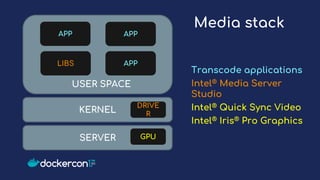
KERNEL
SERVER
DRIVE
R
GPU
LIBS
APP APP
APP
USER SPACE
Media stack
Transcode applications
Intel® Media Server
Studio
Intel® Quick Sync Video
Intel® Iris® Pro Graphics
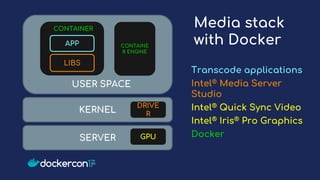
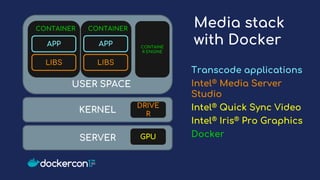
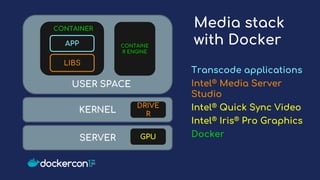
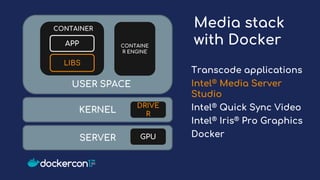
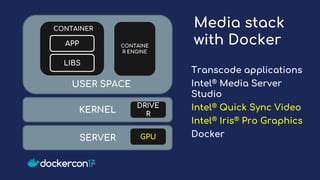
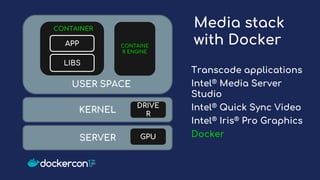
Media stack
with Docker
Transcode applications
Intel® Media Server
Studio
Intel® Quick Sync Video
Intel® Iris® Pro Graphics
Docker
KERNEL
SERVER
DRIVE
R
GPU
LIBS
APP
USER SPACE
CONTAINE
R ENGINE
CONTAINER
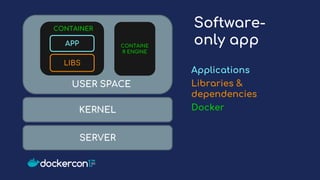
Software-
only app
Applications
Libraries &
dependencies
DockerKERNEL
SERVER
LIBS
APP
USER SPACE
CONTAINE
R ENGINE
CONTAINER
KERNEL
SERVER
DRIVE
R
GPU
USER SPACE
CONTAINE
R ENGINE
CONTAINER
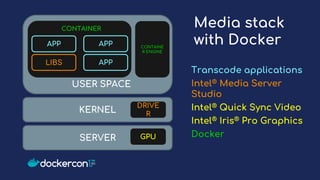
Media stack
with Docker
LIBS
APP APP
APP
Transcode applications
Intel® Media Server
Studio
Intel® Quick Sync Video
Intel® Iris® Pro Graphics
Docker
KERNEL
SERVER
DRIVE
R
GPU
USER SPACE
Media stack
with Docker
LIBS
APP
CONTAINER
APP
LIBS
CONTAINER
CONTAINE
R ENGINE
Transcode applications
Intel® Media Server
Studio
Intel® Quick Sync Video
Intel® Iris® Pro Graphics
Docker
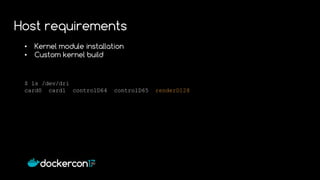
• Kernel module installation
• Custom kernel build
$ ls /dev/dri
card0 card1 controlD64 controlD65 renderD128
Host requirements
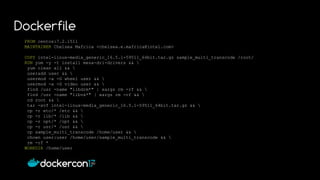
FROM centos:7.2.1511
MAINTAINER Chelsea Mafrica <chelsea.e.mafrica@intel.com>
COPY intel-linux-media_generic_16.5.1-59511_64bit.tar.gz sample_multi_transcode /root/
RUN yum -y -t install mesa-dri-drivers && 
yum clean all && 
useradd user && 
usermod -a -G wheel user && 
usermod -a -G video user && 
find /usr -name "libdrm*" | xargs rm -rf && 
find /usr -name "libva*" | xargs rm -rf && 
cd root && 
tar -xvf intel-linux-media_generic_16.5.1-59511_64bit.tar.gz && 
cp -r etc/* /etc && 
cp -r lib/* /lib && 
cp -r opt/* /opt && 
cp -r usr/* /usr && 
cp sample_multi_transcode /home/user && 
chown user:user /home/user/sample_multi_transcode && 
rm -rf *
WORKDIR /home/user
Dockerfile
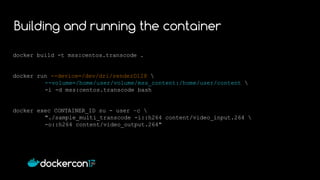
docker build -t mss:centos.transcode .
docker run --device=/dev/dri/renderD128 
--volume=/home/user/volume/mss_content:/home/user/content 
-i -d mss:centos.transcode bash
docker exec CONTAINER_ID su - user –c 
"./sample_multi_transcode -i::h264 content/video_input.264 
-o::h264 content/video_output.264"
Building and running the container
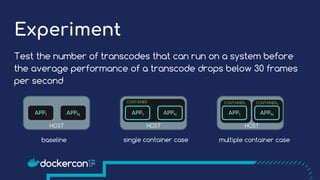
Experiment
Test the number of transcodes that can run on a system before
the average performance of a transcode drops below 30 frames
per second
APPNAPP1 APPNAPP1 APPNAPP1
CONTAINER
HOSTHOST HOST
CONTAINER1 CONTAINERN
baseline single container case multiple container case
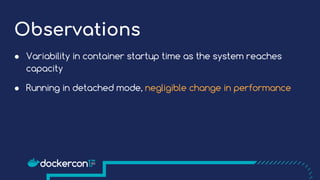
Observations
● Variability in container startup time as the system reaches
capacity
● Running in detached mode, negligible change in performance
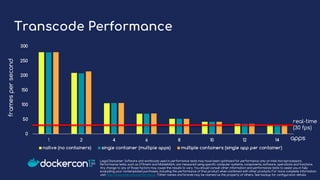
framespersecond
Legal Disclaimer: Software and workloads used in performance tests may have been optimized for performance only on Intel microprocessors.
Performance tests, such as SYSmark and MobileMark, are measured using specific computer systems, components, software, operations and functions.
Any change to any of those factors may cause the results to vary. You should consult other information and performance tests to assist you in fully
evaluating your contemplated purchases, including the performance of that product when combined with other products. For more complete information
visit http://www.intel.com/performance. *Other names and brands may be claimed as the property of others. See backup for configuration details.
Transcode Performance
apps
real-time
(30 fps)
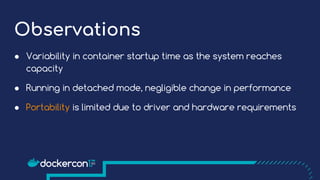
Observations
● Variability in container startup time as the system reaches
capacity
● Running in detached mode, negligible change in performance
● Portability is limited due to driver and hardware requirements
Media stack
with Docker
KERNEL
SERVER
DRIVE
R
GPU
LIBS
APP
USER SPACE
CONTAINE
R ENGINE
CONTAINER
Transcode applications
Intel® Media Server
Studio
Intel® Quick Sync Video
Intel® Iris® Pro Graphics
Docker
Media stack
with Docker
KERNEL
SERVER
DRIVE
R
GPU
LIBS
APP
USER SPACE
CONTAINE
R ENGINE
CONTAINER
Transcode applications
Intel® Media Server
Studio
Intel® Quick Sync Video
Intel® Iris® Pro Graphics
Docker
Media stack
with Docker
KERNEL
SERVER
DRIVE
R
GPU
LIBS
APP
USER SPACE
CONTAINE
R ENGINE
CONTAINER
Transcode applications
Intel® Media Server
Studio
Intel® Quick Sync Video
Intel® Iris® Pro Graphics
Docker
Media stack
with Docker
KERNEL
SERVER
DRIVE
R
GPU
LIBS
APP
USER SPACE
CONTAINE
R ENGINE
CONTAINER
Transcode applications
Intel® Media Server
Studio
Intel® Quick Sync Video
Intel® Iris® Pro Graphics
Docker
Summary
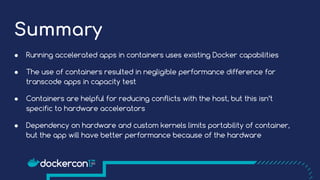
● Running accelerated apps in containers uses existing Docker capabilities
● The use of containers resulted in negligible performance difference for
transcode apps in capacity test
● Containers are helpful for reducing conflicts with the host, but this isn’t
specific to hardware accelerators
● Dependency on hardware and custom kernels limits portability of container,
but the app will have better performance because of the hardware
Links & current work
Intel® Media Server Studio: http://intel.ly/MediaServerStudio
Intel ® MediaSDK http://github.com/Intel-Media-SDK
Intel® OTC: http://github.com/vmmqa/dockerGpuStack
twitter: mafrica_
chelsea.e.mafrica at intel dot com
Legal Information
Testing by Chelsea Mafrica, January 2017 – June 2017
System Configuration:
BASELINE: Intel® Xeon® CPU E3-1585L v5, 3.5GHz, 4 cores, turbo and HT on, BIOS AMI 1.0, 32GB total
memory, 2 slots / 16GB / 2133MHz / DDR4 DIMM, 480GB total storage / 2 240GB SSDs (2.5”), Intel® I350
Gigabit Network Connection, CentOS Linux* 7.2.1511 kernel 3.10.0-327.13.1.x86_64, Media Server Studio
2017 R1
NEW: Baseline configuration, Docker* 1.12.3
Disclaimer
Software and workloads used in performance tests may have been optimized for
performance only on Intel microprocessors. Performance tests, such as SYSmark and
MobileMark, are measured using specific computer systems, components, software,
operations and functions. Any change to any of those factors may cause the results to vary.
You should consult other information and performance tests to assist you in fully evaluating
your contemplated purchases, including the performance of that product when combined
with other products. For more complete information visit http://www.intel.com/performance.
*Other names and brands may be claimed as the property of others

Containerizing Hardware Accelerated Applications

  • 1.
  • 2.
    Motivation Evaluate performance impactof containers on a media stack that uses hardware acceleration
  • 3.
    Agenda ● Hardware accelerators,applications, and media ● Media stack ● When & how to use containers ● Experiment & results ● Portability
  • 4.
    Hardware accelerators, applications,and mediaA hardware accelerator is a processor or fixed function specialized to perform specific tasks (excluding a general purpose CPU) Examples: GPUs, FPGAs, ASICs Applications that typically benefit from hardware acceleration are ones that can be parallelized Examples: AI, machine learning, HPC, media Media refers to video processing Examples: Video compression and decompression (encode and decode), filters
  • 5.
    KERNEL SERVER DRIVE R GPU LIBS APP APP APP USER SPACE Mediastack Transcode applications Intel® Media Server Studio Intel® Quick Sync Video Intel® Iris® Pro Graphics
  • 6.
    Media stack with Docker Transcodeapplications Intel® Media Server Studio Intel® Quick Sync Video Intel® Iris® Pro Graphics Docker KERNEL SERVER DRIVE R GPU LIBS APP USER SPACE CONTAINE R ENGINE CONTAINER
  • 7.
  • 8.
    KERNEL SERVER DRIVE R GPU USER SPACE CONTAINE R ENGINE CONTAINER Mediastack with Docker LIBS APP APP APP Transcode applications Intel® Media Server Studio Intel® Quick Sync Video Intel® Iris® Pro Graphics Docker
  • 9.
    KERNEL SERVER DRIVE R GPU USER SPACE Media stack withDocker LIBS APP CONTAINER APP LIBS CONTAINER CONTAINE R ENGINE Transcode applications Intel® Media Server Studio Intel® Quick Sync Video Intel® Iris® Pro Graphics Docker
  • 10.
    • Kernel moduleinstallation • Custom kernel build $ ls /dev/dri card0 card1 controlD64 controlD65 renderD128 Host requirements
  • 11.
    FROM centos:7.2.1511 MAINTAINER ChelseaMafrica <chelsea.e.mafrica@intel.com> COPY intel-linux-media_generic_16.5.1-59511_64bit.tar.gz sample_multi_transcode /root/ RUN yum -y -t install mesa-dri-drivers && yum clean all && useradd user && usermod -a -G wheel user && usermod -a -G video user && find /usr -name "libdrm*" | xargs rm -rf && find /usr -name "libva*" | xargs rm -rf && cd root && tar -xvf intel-linux-media_generic_16.5.1-59511_64bit.tar.gz && cp -r etc/* /etc && cp -r lib/* /lib && cp -r opt/* /opt && cp -r usr/* /usr && cp sample_multi_transcode /home/user && chown user:user /home/user/sample_multi_transcode && rm -rf * WORKDIR /home/user Dockerfile
  • 12.
    docker build -tmss:centos.transcode . docker run --device=/dev/dri/renderD128 --volume=/home/user/volume/mss_content:/home/user/content -i -d mss:centos.transcode bash docker exec CONTAINER_ID su - user –c "./sample_multi_transcode -i::h264 content/video_input.264 -o::h264 content/video_output.264" Building and running the container
  • 13.
    Experiment Test the numberof transcodes that can run on a system before the average performance of a transcode drops below 30 frames per second APPNAPP1 APPNAPP1 APPNAPP1 CONTAINER HOSTHOST HOST CONTAINER1 CONTAINERN baseline single container case multiple container case
  • 14.
    Observations ● Variability incontainer startup time as the system reaches capacity ● Running in detached mode, negligible change in performance
  • 15.
    framespersecond Legal Disclaimer: Softwareand workloads used in performance tests may have been optimized for performance only on Intel microprocessors. Performance tests, such as SYSmark and MobileMark, are measured using specific computer systems, components, software, operations and functions. Any change to any of those factors may cause the results to vary. You should consult other information and performance tests to assist you in fully evaluating your contemplated purchases, including the performance of that product when combined with other products. For more complete information visit http://www.intel.com/performance. *Other names and brands may be claimed as the property of others. See backup for configuration details. Transcode Performance apps real-time (30 fps)
  • 16.
    Observations ● Variability incontainer startup time as the system reaches capacity ● Running in detached mode, negligible change in performance ● Portability is limited due to driver and hardware requirements
  • 17.
    Media stack with Docker KERNEL SERVER DRIVE R GPU LIBS APP USERSPACE CONTAINE R ENGINE CONTAINER Transcode applications Intel® Media Server Studio Intel® Quick Sync Video Intel® Iris® Pro Graphics Docker
  • 18.
    Media stack with Docker KERNEL SERVER DRIVE R GPU LIBS APP USERSPACE CONTAINE R ENGINE CONTAINER Transcode applications Intel® Media Server Studio Intel® Quick Sync Video Intel® Iris® Pro Graphics Docker
  • 19.
    Media stack with Docker KERNEL SERVER DRIVE R GPU LIBS APP USERSPACE CONTAINE R ENGINE CONTAINER Transcode applications Intel® Media Server Studio Intel® Quick Sync Video Intel® Iris® Pro Graphics Docker
  • 20.
    Media stack with Docker KERNEL SERVER DRIVE R GPU LIBS APP USERSPACE CONTAINE R ENGINE CONTAINER Transcode applications Intel® Media Server Studio Intel® Quick Sync Video Intel® Iris® Pro Graphics Docker
  • 21.
    Summary ● Running acceleratedapps in containers uses existing Docker capabilities ● The use of containers resulted in negligible performance difference for transcode apps in capacity test ● Containers are helpful for reducing conflicts with the host, but this isn’t specific to hardware accelerators ● Dependency on hardware and custom kernels limits portability of container, but the app will have better performance because of the hardware
  • 22.
    Links & currentwork Intel® Media Server Studio: http://intel.ly/MediaServerStudio Intel ® MediaSDK http://github.com/Intel-Media-SDK Intel® OTC: http://github.com/vmmqa/dockerGpuStack twitter: mafrica_ chelsea.e.mafrica at intel dot com
  • 23.
    Legal Information Testing byChelsea Mafrica, January 2017 – June 2017 System Configuration: BASELINE: Intel® Xeon® CPU E3-1585L v5, 3.5GHz, 4 cores, turbo and HT on, BIOS AMI 1.0, 32GB total memory, 2 slots / 16GB / 2133MHz / DDR4 DIMM, 480GB total storage / 2 240GB SSDs (2.5”), Intel® I350 Gigabit Network Connection, CentOS Linux* 7.2.1511 kernel 3.10.0-327.13.1.x86_64, Media Server Studio 2017 R1 NEW: Baseline configuration, Docker* 1.12.3 Disclaimer Software and workloads used in performance tests may have been optimized for performance only on Intel microprocessors. Performance tests, such as SYSmark and MobileMark, are measured using specific computer systems, components, software, operations and functions. Any change to any of those factors may cause the results to vary. You should consult other information and performance tests to assist you in fully evaluating your contemplated purchases, including the performance of that product when combined with other products. For more complete information visit http://www.intel.com/performance. *Other names and brands may be claimed as the property of others